







The Dark Rock CPU Cooler Series sees its 2nd addition – we review Dark Rock Pro 2 and see how it fares with Intel’s Sandy Bridge-E.

Product on Review: Dark Rock Pro 2
Manufacturer and Sponsor: be quiet!
Street Price: Approx. £60 (at time of review)
be quiet! have been on the scene since 2006, having originally started out as a PSU supplier they have since moved into other areas of the market as many other brands have – in order to branch out as competition not only gets fierce but also difficult with the economic downturn.
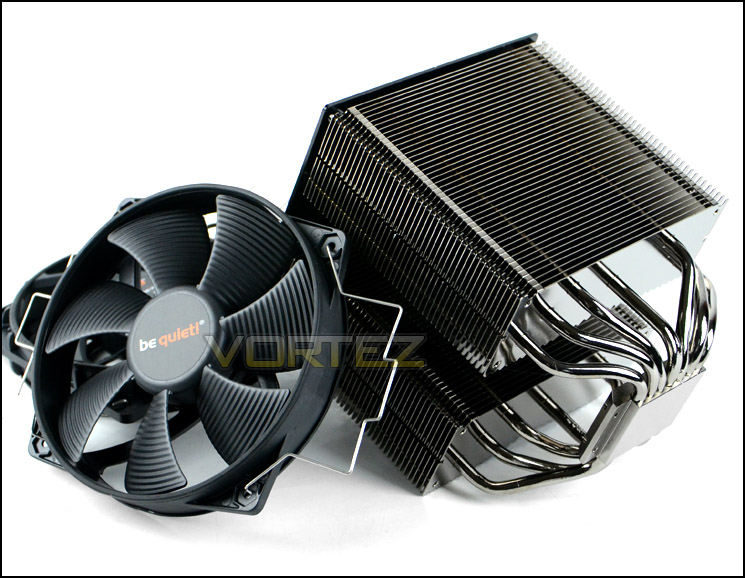
Today we will be taking a look at one of be quiet!’s premium CPU coolers named Dark Rock Pro 2. This is our first outing with be quiet! although we have had experience with the original Dark Rock Pro in the Scan 3XS FT03 ROG SLI system review earlier in the year. The Dark Rock Pro 2 is touted as the companies best offering to date, featuring – dual SilentWings cooling fans, seven copper heatpipes and a unique heatsink design which promises to offer great heat dissipation whilst delivering optimal airflow for fans.
be quiet! on Dark Rock Pro 2
The virtually silent Dark RockTM Pro 2 CPU Cooler puts our famous anti-noise technology where it counts: at the heart of your system. Its double tower, double fan design is perfect for overclocked systems and the most demanding multi-graphics platforms.
Twin quiet-optimized SilentWings® 2 fans with PWM function and seven ultra-high performance heatpipes generate massive 220W TDP cooling capacity and strikes the perfect balance between intense cooling and deep serenity. Special wave-contoured heatsink fins further minimize noise-inducing turbulence while maximizing heat transfer.
Dark Rock Pro 2: offering the greatest performance-to-noise ratio and highest reliability available.
Twin quiet-optimized SilentWings® 2 fans with PWM function and seven ultra-high performance heatpipes generate massive 220W TDP cooling capacity and strikes the perfect balance between intense cooling and deep serenity. Special wave-contoured heatsink fins further minimize noise-inducing turbulence while maximizing heat transfer.
Dark Rock Pro 2: offering the greatest performance-to-noise ratio and highest reliability available.
Technical Specifications
Overall Cooler Dimensions (L x W x H)
147 x 138 x 166 (mm)
Total weight
1.25 KG
TDP
Socket compatibility
Intel: LGA 775 / LGA 1155 / LGA 1156 / LGA 1366 / LGA 2011 AMD: FM1, AM2 (+) / AM3 (+) / 754/ 939 / 940
Cooling Fans
1 x SilentWings PWM 120mm, 1 x SilentWings PWM 135mm
Noise
900/1250/100% (RPM)
13.50 / 19.80 / 26.40
Heatsinkb Dimensions (L x W x D)
133 x 124 x 166 (mm)
Number of fins
44
Fin material
Aluminium
Base material
Copper
CPU contact surface
CNC machined
Heatpipe
7x 6mm
Surface treatment
Aluminium / Dark nickel-plated
Fan dimensions (mm)
135 x 135 x 25 / 120 x 120 x 25
Fan Speeds
Speed @ 100% PWM (RPM)
1500 / 1700
Air flow @ 12V (cfm, m3/h)
67.8 ; 113.8 / 57.2 ; 93.3
Air pressure @ 12V (mm H2O)
1.82 / 2.1
Bearing type
Fluid Dynamic Bearing
Rated voltage (V)
12
Input current (A)
0.25 / 0.20
Input power (W)
2.64 / 2.40
Connector
4-pin PWM
Cable length (mm)
250 + 150 / 200
Warranty (Years)
3
147 x 138 x 166 (mm)
Total weight
1.25 KG
TDP
Socket compatibility
Intel: LGA 775 / LGA 1155 / LGA 1156 / LGA 1366 / LGA 2011 AMD: FM1, AM2 (+) / AM3 (+) / 754/ 939 / 940
Cooling Fans
1 x SilentWings PWM 120mm, 1 x SilentWings PWM 135mm
Noise
900/1250/100% (RPM)
13.50 / 19.80 / 26.40
Heatsinkb Dimensions (L x W x D)
133 x 124 x 166 (mm)
Number of fins
44
Fin material
Aluminium
Base material
Copper
CPU contact surface
CNC machined
Heatpipe
7x 6mm
Surface treatment
Aluminium / Dark nickel-plated
Fan dimensions (mm)
135 x 135 x 25 / 120 x 120 x 25
Fan Speeds
Speed @ 100% PWM (RPM)
1500 / 1700
Air flow @ 12V (cfm, m3/h)
67.8 ; 113.8 / 57.2 ; 93.3
Air pressure @ 12V (mm H2O)
1.82 / 2.1
Bearing type
Fluid Dynamic Bearing
Rated voltage (V)
12
Input current (A)
0.25 / 0.20
Input power (W)
2.64 / 2.40
Connector
4-pin PWM
Cable length (mm)
250 + 150 / 200
Warranty (Years)
3
Packaging, Bundle & Fans
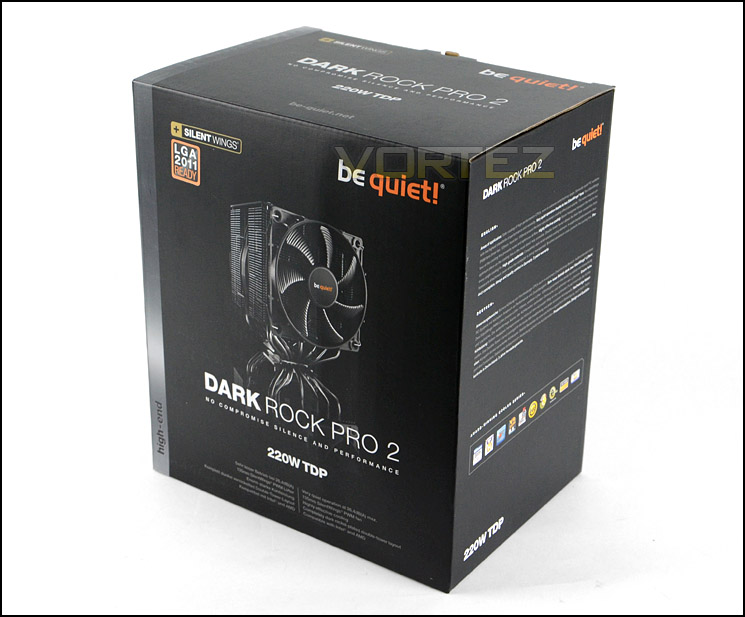
Dark Rock Pro 2 is presented in a very professional looking box. As is common with CPU coolers, the packaging features a listing of the technical specifications on the sides whilst the back shows the feature-set in more detail with illustration. Inside, the heatsink is well protected with Styrofoam padding – the fans already attached and the mounting kit within a cardboard box.
Packaging for Dark Rock Pro 2
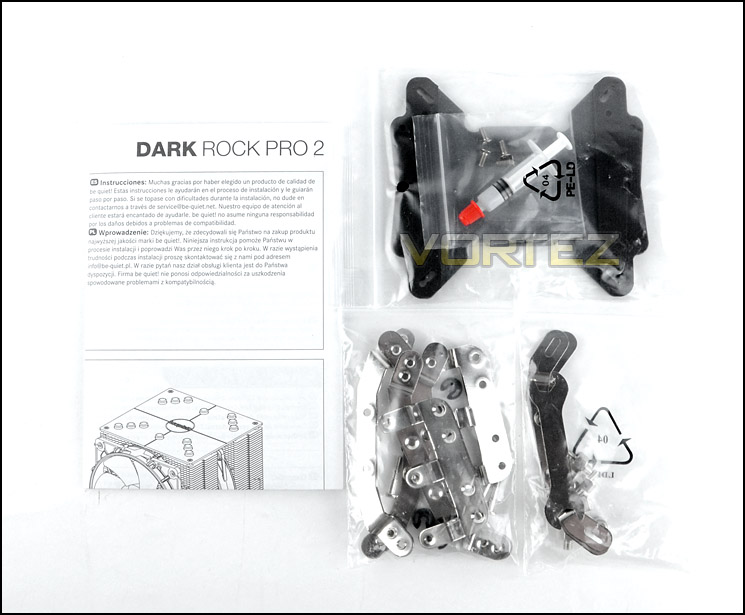
Bundled with the Dark Rock Pro 2 are various mounting kits to suit a variety of sockets which include: Intel: LGA 775 / LGA 1155 / LGA 1156 / LGA 1366 / LGA 2011 AMD: FM1, AM2 (+) / AM3 (+) / 754/ 939 / 940. Also included is the instructions leaflet for guidance when installing, a backplate and thermal paste. The guidance leaflet is quite brief but still useful when installing Dark Rock Pro 2.
Included kit within bundle
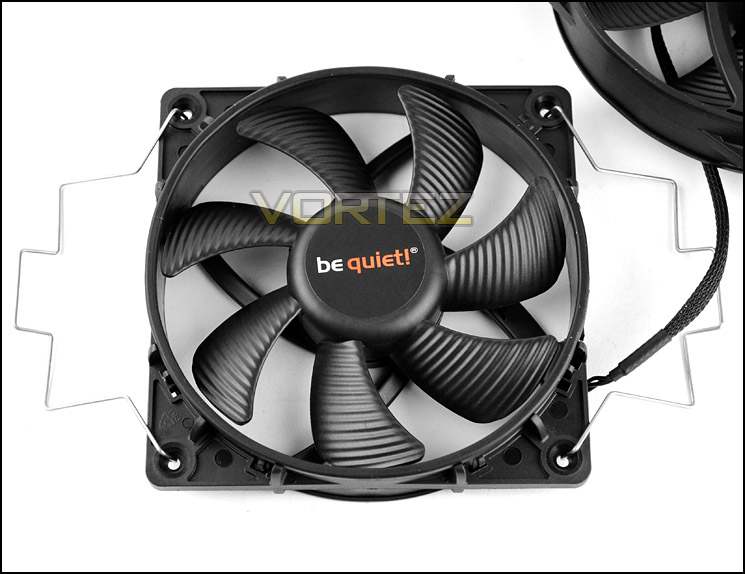
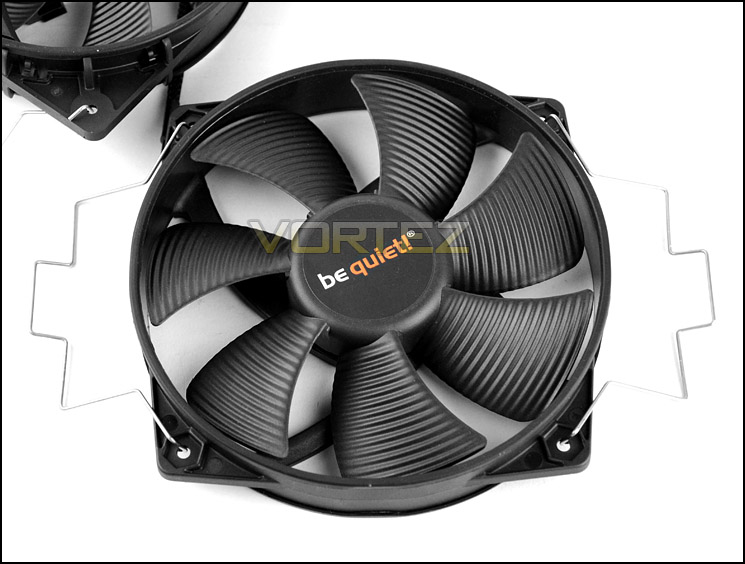
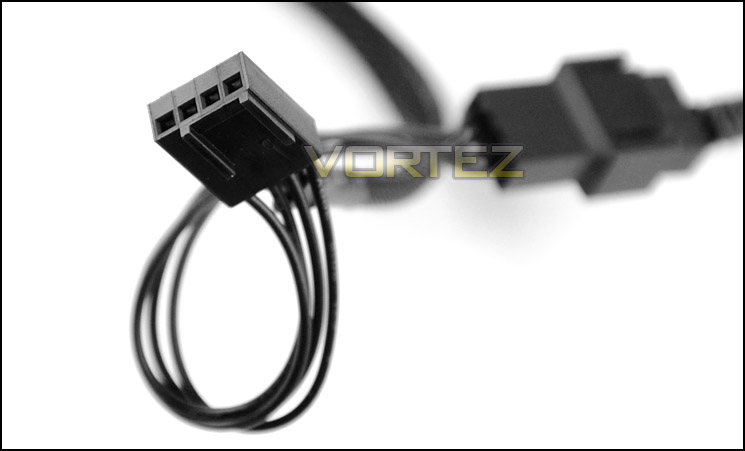
Also bundled with Dark Rock Pro 2 are two SilentWings cooling fans. These are 120mm and 135mm in dimension and come attached to the heatsink already – with fan clips applied. Both fans have seven blades with a ribbed design and use a Fluid Dynamic Bearing. Although both fans are PWM, they have a differing maximum speed. The 120mm is capable of up to 1700RPM whilst the 135mm up to 1500RPM. A Y-cable is provided so that both fans can run from just one fan header on the motherboard, both have 4-pin PWM connectors.
The 135mm cooling fan fits between the two radiators whilst the 120mm fits onto the outer radiator.
120mm PWM SilentWings up to 1700RPM
135mm PWM SilentWings up to 1500RPM
Both fans can use Y-Cable
Closer Look
The Dark Rock Pro 2 heatsink adopts a dual-radiator design with brushed aluminium plate on the topside.
In total there are 44 aluminium fins which have been coated in a dark shade of nickel, thus giving the name “Dark”. The fin design is a fairly condensed one, it features a series of jagged fins similar to those found on the Noctua NH-D14 but Dark Rock Pro 2 has a dipped contour, be quiet! believe this optimises airflow for the cooler.
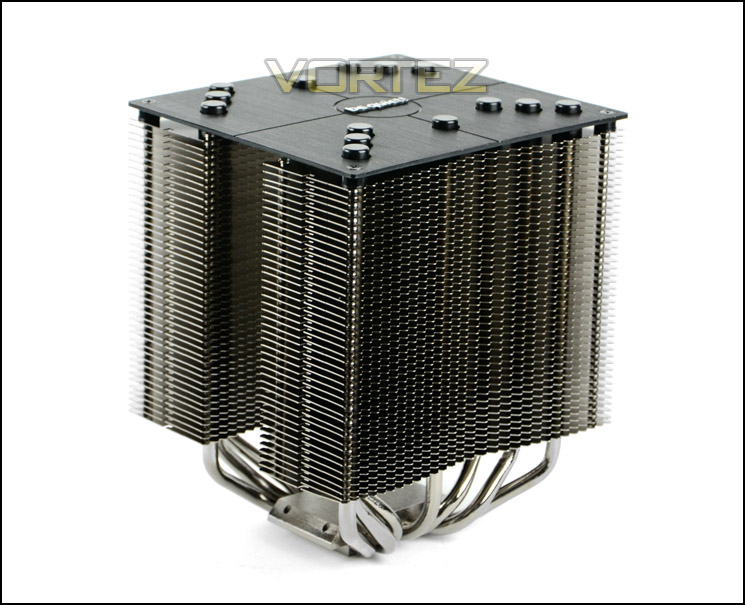
A dual-radiator design with brushed aluminium top plate
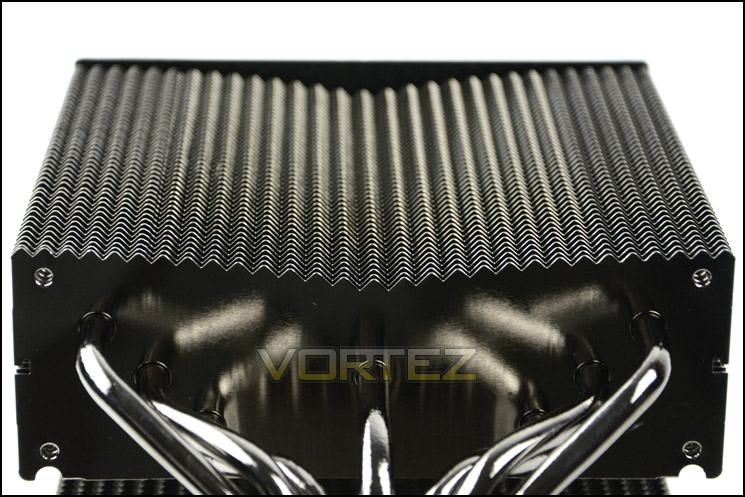
Jagged fins with dipped contour
At the top of Dark Rock Pro 2 is a brushed aluminium plate which has again been given a nice coating of black. This plate has plastic studs covering the top of the heatpipes. It’s uncertain why be quiet! have implemented such a feature as there is no explanation on their website but with it being aluminium this probably assists with heat dissipation.
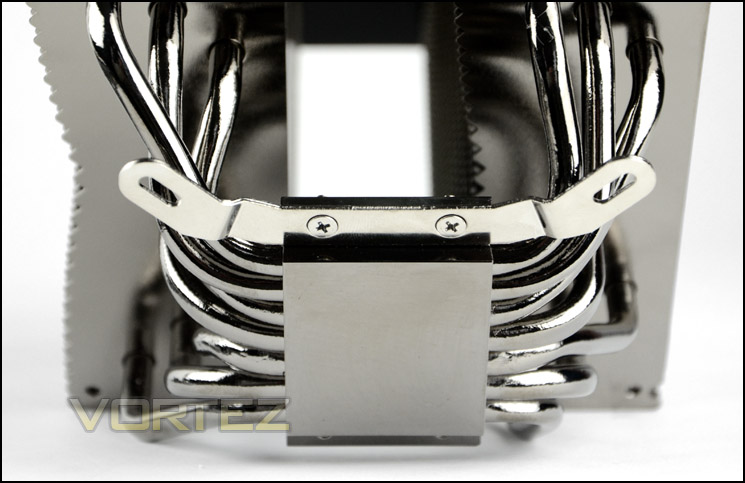
Dark Rock Pro 2 utilises seven copper heatpipes which pass through the base which is again is copper. The idea, as with all CPU coolers is for the heat to be taken off the CPU – through the pipes, then distributed over the fins and pushed away via the cooling fans. This baseplate is highly reflective, has a mirror finish and thus gives an impression of what is placed underneath it.
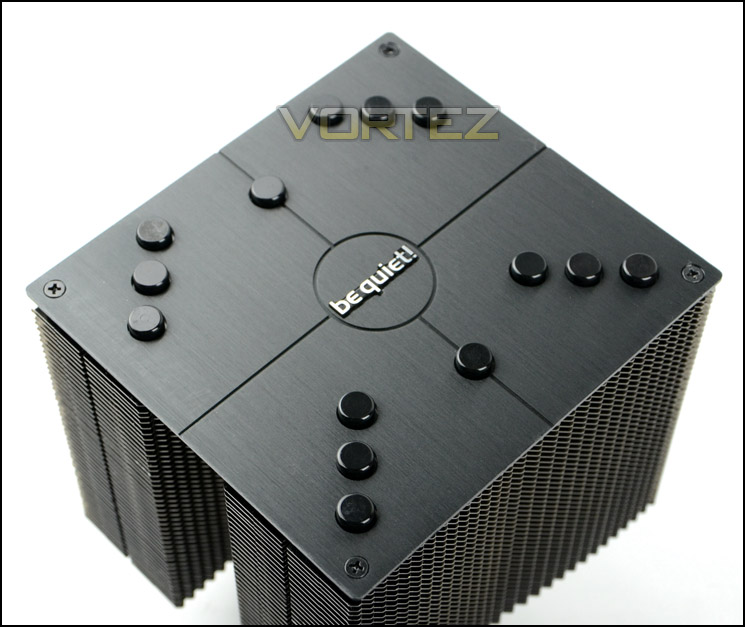
The top of Dark Rock Pro 2
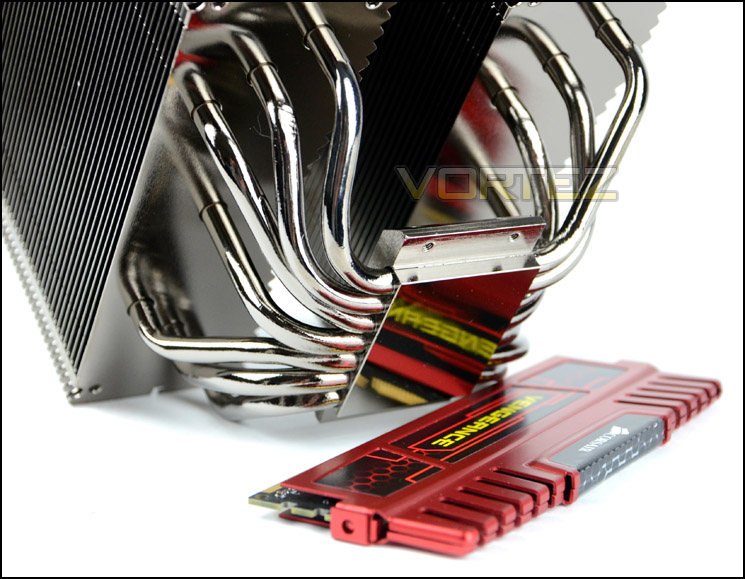
Seven copper heatpipes with reflective base
Dark Rock Pro 2’s cooling fans come with the fan clips already attached. These clips offer a very secure method to fasten the fans to the heatsink, so much so they can be quite tedious to remove due to tightness, but we can forgive be quiet! for this because the method is a very good one. We’ve seen other fan clips which are tedious to apply but do not offer a confident fitment and this is of course a totally different story.
The clips fit between the fin stack and then into a cavity between the tower.
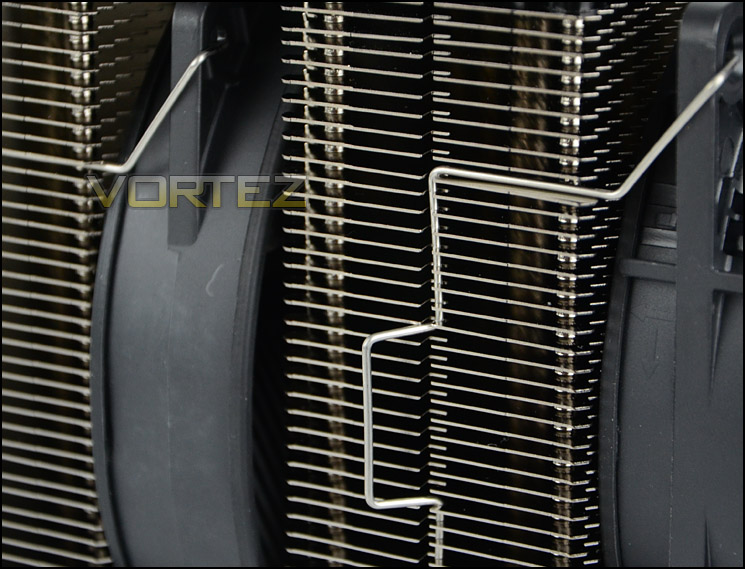
Fan clips offer a very reliable fitment
Installation Process
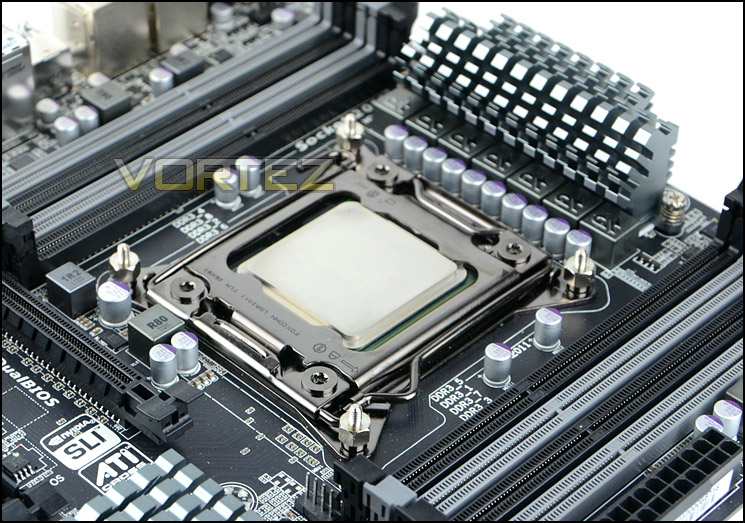
In order to demonstrate the installation process for Dark Rock Pro 2 we are installing the cooler on the Intel LGA2011 socket.
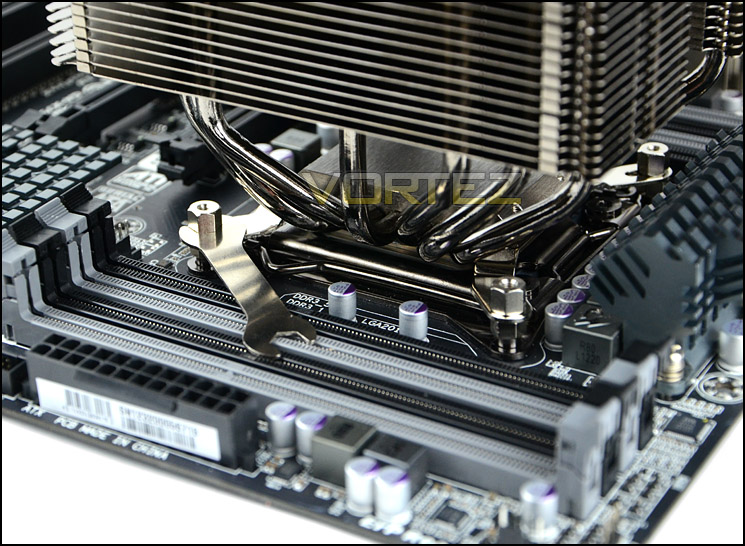
The first step for the installation on this socket (as we have found with many other coolers) is to apply four double sided screws to the mounting holes found on the outer edge of the socket. Once this has been done its then time to attach the mounting brackets to each side of the heatsink baseplate. This is accomplished by applying two screws on either side, the brackets must be placed in the orientation as per below picture. After the brackets are fixed onto the heatsink the final step is to apply thermal paste, place the heatsink over the CPU and tighten the four bolts with provided spanner.
Although this method requires more time to complete compared to other CPU cooler installations it is one that instills confidence and is reliable.
Installed – Memory Clearance
With Dark Rock Pro 2 now installed we have a good idea of how this CPU cooler looks on an ATX motherboard. Although its sheer size looks quite overwhelming there is a significant amount of clearance around its base. Not all CPU coolers have a pleasant physical appearance but Dark Rock Pro 2 has this as one of its strengths – it looks pleasing to the eye and co-ordinates well with other computer hardware.
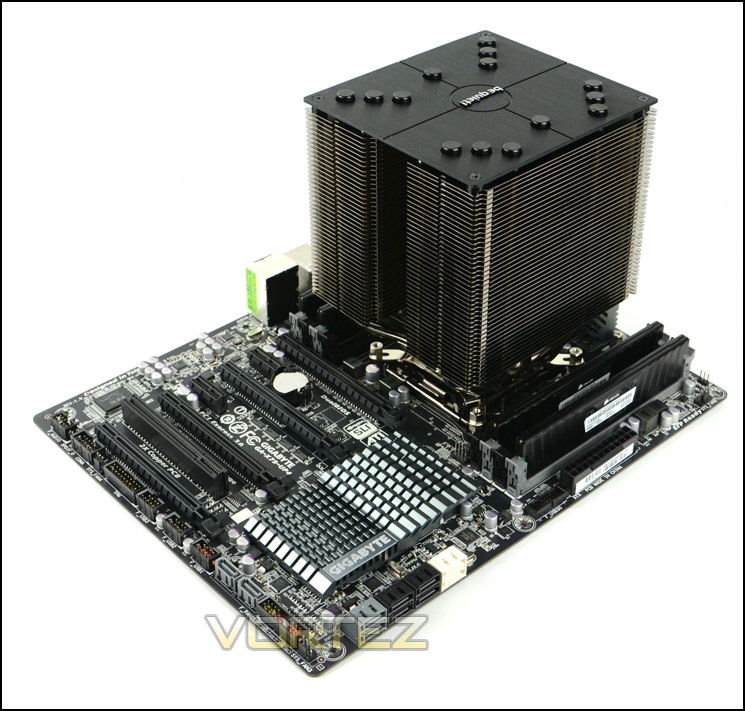
Dark Rock Pro 2 installed without cooling fans
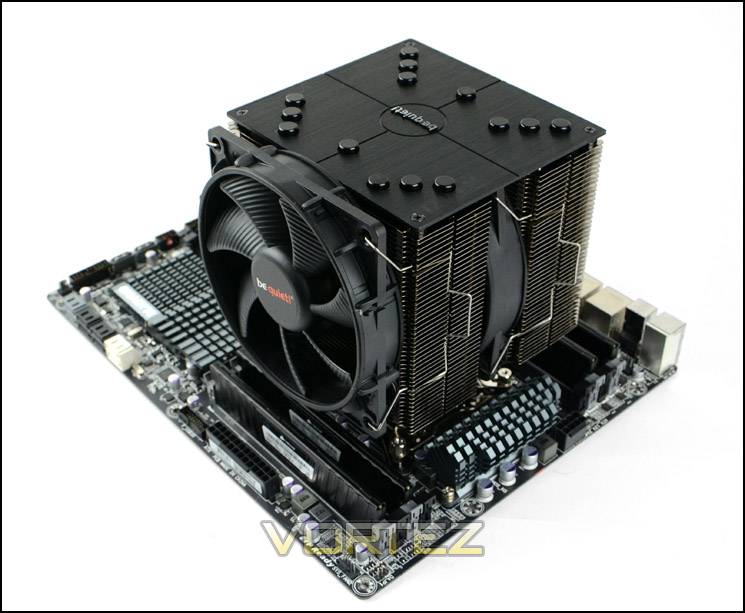
Dark Rock Pro 2 installed with SilentWings fans
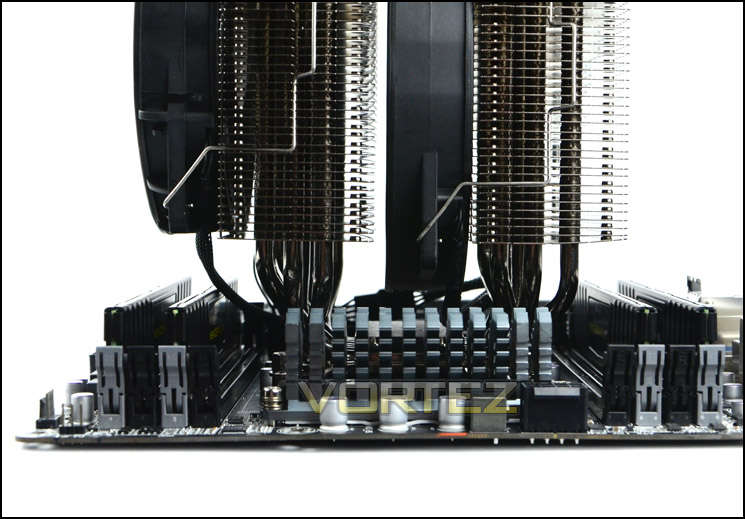
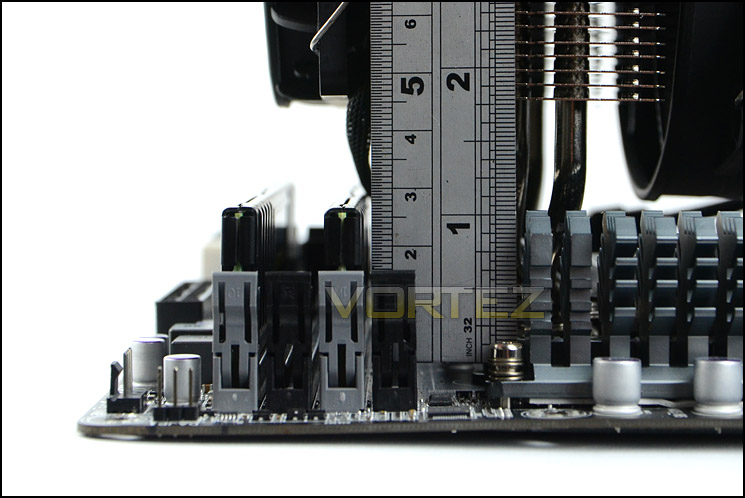
As previously mentioned the clearance around the base of the heatsink is quite generous which should present a variety of options when choosing memory.
The actual clearance for memory is approximately 4.5cm. One of the tallest kits – Corsair Vengeance is unfortunately 5cm so this kit will struggle to fit underneath.
Test Setup & Methodology
Test System
CPU – Intel Core i7-3930K (3.6GHz)
Motherboard – GIGABYTE X79-UP4
Memory – 8GB Corsair Vengeance LP 1600MHz CL9
Graphics – Sapphire Radeon HD 6850 1GB
PSU – NZXT Hale90 650W
Hard Drive – Kingston HyperX 240GB SATA III SSD
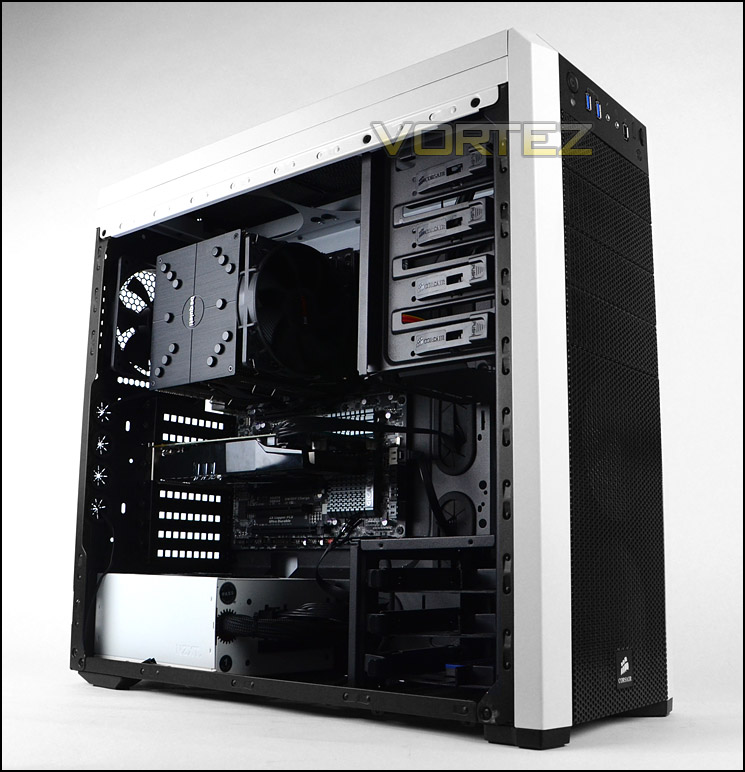
Case – Corsair Carbide 500R White
Motherboard – GIGABYTE X79-UP4
Memory – 8GB Corsair Vengeance LP 1600MHz CL9
Graphics – Sapphire Radeon HD 6850 1GB
PSU – NZXT Hale90 650W
Hard Drive – Kingston HyperX 240GB SATA III SSD
Case – Corsair Carbide 500R White
CPU Coolers
Alpenföhn Matterhorn Pure(120mm Wingboost: 300-1200RPM)
Alpenföhn K2 (120mm Wingboost: 500-1500RPM, 140mm Wingboost: 300-1100RPM)
Alpenföhn Gotthard (140mm Wingboost: 300-1100RPM)
Noctua NH-D14 (120mm NF-P12 PWM + 140mm NF-P14 PWM: up to 1200RPM)
Thermalright SilverArrow SB-E Extreme (Dual TY-143 fans – 600-2500RPM)
Corsair Hydro H100 (Dual 120mm fans – low: 1300RPM, mid: 2000RPM, high: 2600RPM)
SilverStone HE01 (140mm PWM fan – 500RPM-1200RPM – 500RPM-2000RPM)
be quiet! Dark Rock Pro 2 (135mm + 120mm PWM Fans – up to 1500RPM and 1700RPM)
Program Suite
Real Temp – Maximum temperature analysis
LinX 0.6.4 – Applies thorough stress test to CPU
CPU-Z – Confirmation of CPU frequency/voltage
AIDA64 Extreme Edition – Confirmation of temperatures/fan speeds
Testing methodology
Testing will be based on temperatures recorded by Real Temp after 20 passes of LinX stress test. The maximum absolute temperatures will be recorded after the test and averaged over the 6 cores. The delta is then calculated by subtracting the ambient temperature recorded near the intake fans from the average temperature calculated. Tests are conducted with the Intel i7 3930K at its default 3.6GHz stock speed and overclocked to 4.6GHz @ 1.42V. The tests are done inside the Corsair Carbide 500R chassis to simulate real world conditions. To keep the tests standardised we are using Noctua’s NT-H1 thermal paste on all coolers.
CPU coolers are reviewed as they come out of the box – with their factory cooling fans, as the manufacturer intended and as the consumer expects.
Additional tests include a passive test where the cooling fans are taken away from the heatsink and a comparison between the cooler used with stock thermal paste against our Noctua NT-H1 paste.
A kind thank you to Noctua for supplying us with NT-H1 thermal compound.
Results – Stock Performance
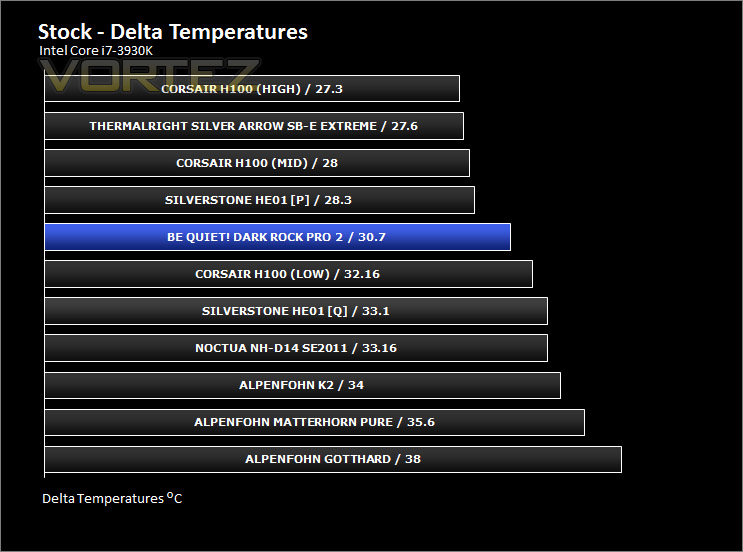
Stock performance is very impressive for Dark Rock Pro 2. Not only does it beat some of the firm favourites in the league but the PWM cooling fans remain around 935RPM which results in low-noise output. The results show clearly that this cooler should be a consideration for those wanting great out of the box performance.
Results – Overclocked Performance
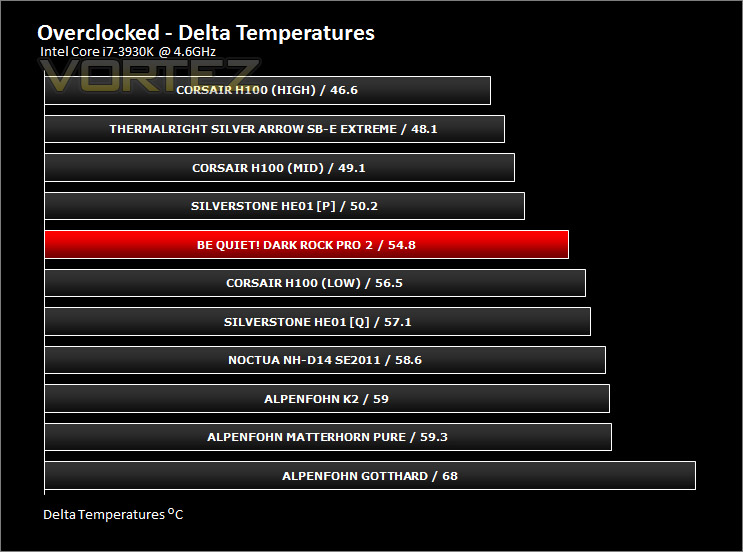
The gap between Dark Rock Pro 2 and the popular offerings increases, with our cooler delivering outstanding performance whilst the CPU is overclocked. PWM fan speeds increase quite significantly, moving up to 1480RPM. Whilst this is noticeable it isn’t as disruptive as other fans at such speeds.
Results – Passive Performance
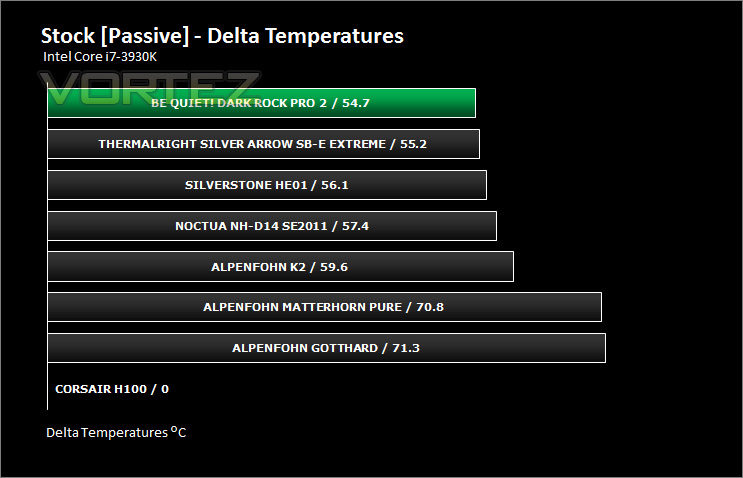
We’ve tested with the included PWM cooling fans to show the performance available out of the box but now it’s time to see how the heatsink design holds up to testing without the assistance of a cooling fan. This test relies purely on design and quality components. As you can see from the results, Dark Rock Pro 2 narrowly pushes past our current victor – Silver Arrow SB-E Extreme and confidently affirms itself as the best heatsink we have yet tested, proving that without the cooling fans the materials and design offer the best cooling efficiency.
Results – Thermal Paste Comparison
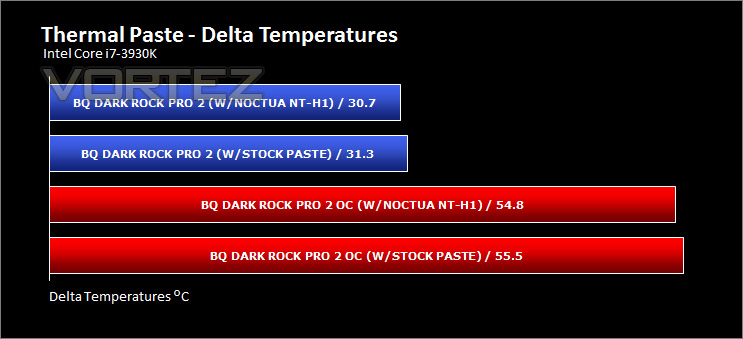
Most CPU coolers come accompanied with thermal paste provided by the manufacturer. For our CPU cooling tests we use Noctua’s NT-H1, so to offer up some interesting analysis we test the thermal paste given with the Dark Rock Pro 2 against NT-H1 to see which gives the best results during stock and overclocked performance.
The Noctua paste is a degree better than what be quiet! supply. The difference may not be significant but the Noctua paste is still slightly better.
Conclusion
With this being our first be quiet! product review our expectations remained a mystery but we have heard good things about the brand and their portfolio of products and so such a venture is an intriguing one for us.
From the packaging right through to the product itself we have been impressed. Dark Rock Pro 2 is presented in a very professional manner and has also been given a supreme level of engineering which makes the build quality very good indeed. Having the name “Dark” as part of its name, this cooler naturally coordinates well with other hardware – some enthusiasts like to build a system so that the colour-scheme and general layout is pleasing to the eye, with Dark Rock Pro 2 this can be achieved.
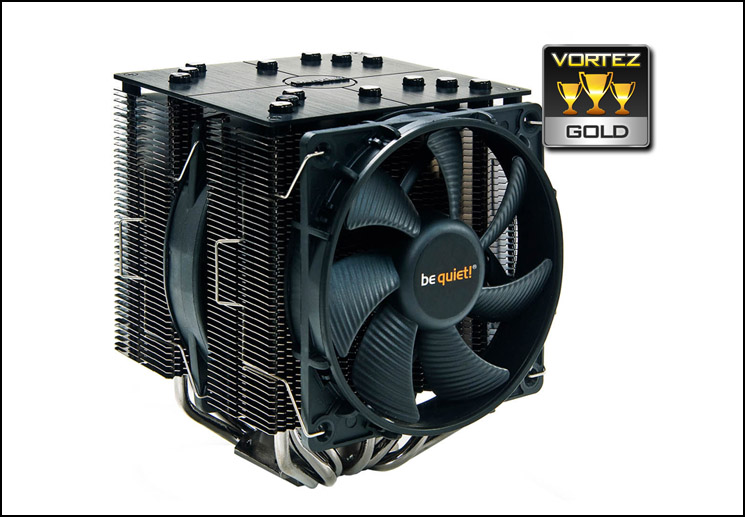
In our performance related tests the Dark Rock Pro 2 achieved admirable results showing its worth against a plethora of popular rivals. Our cooler even managed to top the passive cooling charts by beating all other candidates and demonstrating that its design and materials are the very best a CPU cooler can offer.
Available for £60, Dark Rock Pro 2 is competitively priced. Other coolers such as NH-D14 and Alpenfohn K2 are in a similar bracket but be quiet!’s offering delivers the best price: performance ratio.
Pros
+ Looks great, co-ordinates with other hardware
+ Good quality engineering
+ Excellent performance
+ Low noise
+ Best passive cooler we have tested
Cons
– Installation takes a little longer
+ Looks great, co-ordinates with other hardware
+ Good quality engineering
+ Excellent performance
+ Low noise
+ Best passive cooler we have tested
Cons
– Installation takes a little longer

Click here for an explanation of our awards at Vortez.net.


