







A burly prebuilt system by Scan 3XS featuring Intel Core i5 2500K, ASUS Maximus IV Gene-Z & NVIDIA GTX560Ti SLI and much more!

Manufacturer and Sponsor: Scan
Customised configuration Price: £1,499 inc. VAT
To many, building a computer can be a daunting task – perhaps not just the construction but selecting a list of compatible components. Whilst retailers have thousands of products to choose from for the confident system builders amongst us, most also host a selection of pre-built systems to counter this. It’s a great idea, consumers can simply order a system based on their budget and purpose of us – not having to worry about the selection of components or building the actual system.
Today we will be taking a look at a high-end gaming system designed and built by the notorious 3XS team over at Scan Computers. The 3XS FT03 ROG SLI edition features some of the best components currently on the market from brands like Intel, ASUS, Corsair, BeQuiet and many more. Our system under the spotlight today is based on Intel’s 2nd generation Core i5 processor – codenamed Sandy Bridge. Just a mere glance at the system specifications hints at an extremely powerful computer system so let’s waste no further time and begin our analysis of 3XS FT03 ROG SLI.
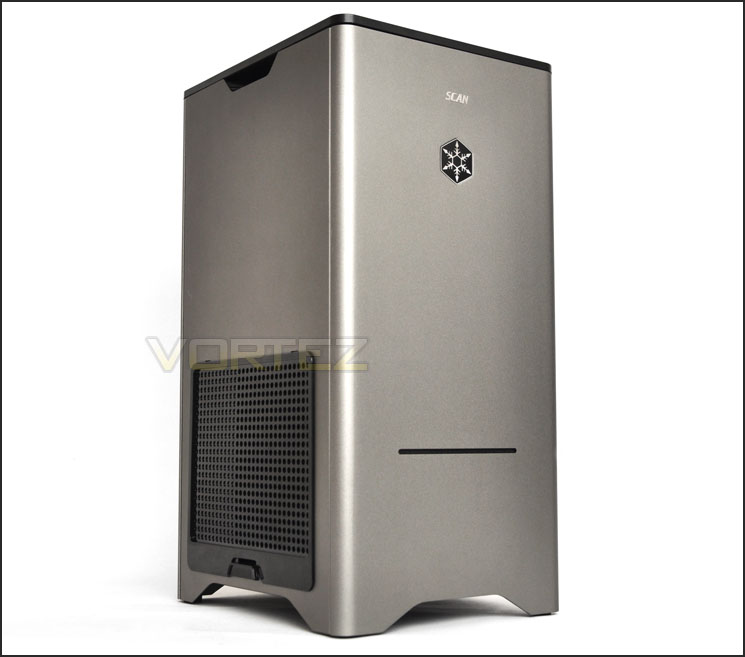
Scan’s take on 3XS FT03 ROG SLI
The FT03 ROG SLI features the all new Asus Maximus GENE-Z board with Intel’s Z68 Chipset, Intel’s i5 2500K CPU overclocked to a staggering 4.7Ghz, together with a pair of Asus GTX560 TOP graphics cards & 120Gb Corsair Force SSD. Offering mind blowing performance in a contemporary chassis. Not only is it suitable as a high performance gaming system it would equally look the part in your living room.
Technical Specifications
Case
Silverstone Fortress FT03B, Black, Micro-ATX Aluminum Mini Tower Case
Cables
Akasa SATA cable for slimline opticals
Warranty
Scan 3XS System – 2 Year Warranty – 1st Year Onsite, 2nd Year RTB (Mainland UK)
Motherboard
Asus Maximus IV Gene-Z, Gen3, Intel Z68 – Required for dual GPUs
CPU
Intel Core i5 2500K, 3.3GHz, QuadCore, 6Mb Cache (Overclocked by 3XS engineers to 4.7GHz)
CPU Cooler
Be Quiet! Dark Rock Advanced BK014 CPU Cooler
Memory
8Gb (2x4Gb) Corsair Vengeance LP, DDR3, 1600Mhz
Graphics
2x 1GB Asus GTX 560Ti (DirectCU II), 900MHz GPU, 384 Cores, 4200MHz GDDR5 + BF3!
PSU
850W Corsair HX Series V2
Storage
1x 120GB Corsair Force 3 SSD
1x 1TB Seagate Barracuda
Optical Drive
Samsung SN-T083C/BEBE SLOT Loader DVD Drive
Operating system
Microsoft Windows 7 Home Premium 64bit – OEM
DELIVERY (Scan’s own words)
The 3XS System Delivery & Setup are our own in house team. 3XS systems are all hand delivered. They do not go through a nationwide courier such as DPD. Our delivery team have a bunch of engineers throughout the country. We have a collection by the team a few times a week which are then distributed to teams based throughout the country. We decided to build this service to prevent and D.O.A. systems and to give the customer that “personal” touch. Once the system is QC’d the engineers get in touch with the customer to arrange a convenient time to deliver their system. This can also include out of office times.
Closer Look (External)
The 3XS FT03 ROG SLI takes its name from the very case Scan have chosen to build inside – Silverstone’s (Fortress) FT03. This is a popular chassis within the hardware market and is made up of aluminium and steel. Supporting the form factors Micro-ATX, mini-DTX and mini-ITX for a gaming rig the M-ATX form factor is an obvious top pick. The FT03 a very unique design, identifying it as a computer case may be difficult on first impressions because it is tall and thin unlike the typical ATX or even M-ATX computer cases available to the enthusiast.
The Scan insignia can be seen on the front, just above the SilverStone logo – the small horizontal slit that spans the width of the FT03 is in fact the optical drive.
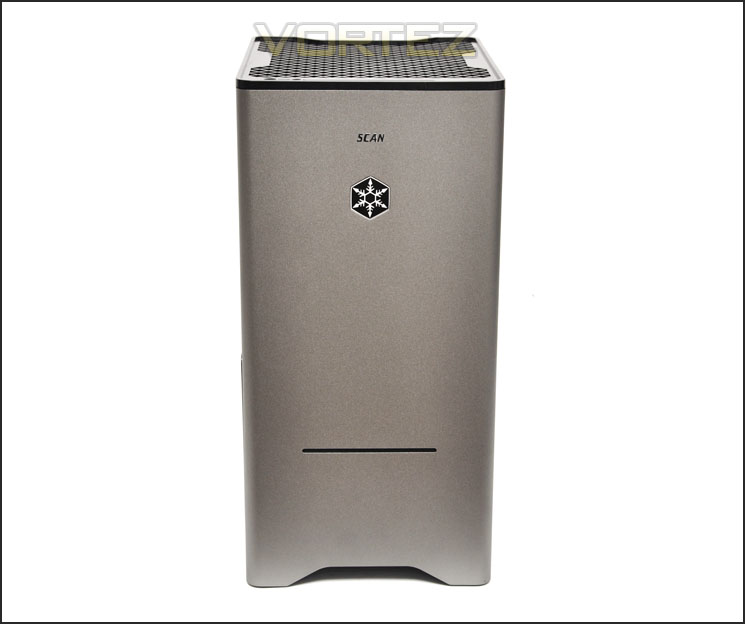
The front of Scan’s 3XS FT03 ROG SLI
Rotating the case around, there is a large plastic mesh cover. This is removable from the outside of the case and gives restricted access to the internal components inside such as the PSU on/off switch. The decision to go with the SilverStone FT03 is an interesting one. It can still accommodate high-end kit whilst giving a significant improvement to desk/room space compared to the typical computer case. Those who have a fondness for the sleek and minimalist approach will certainly be pleased with the FT03’s visual appearance.
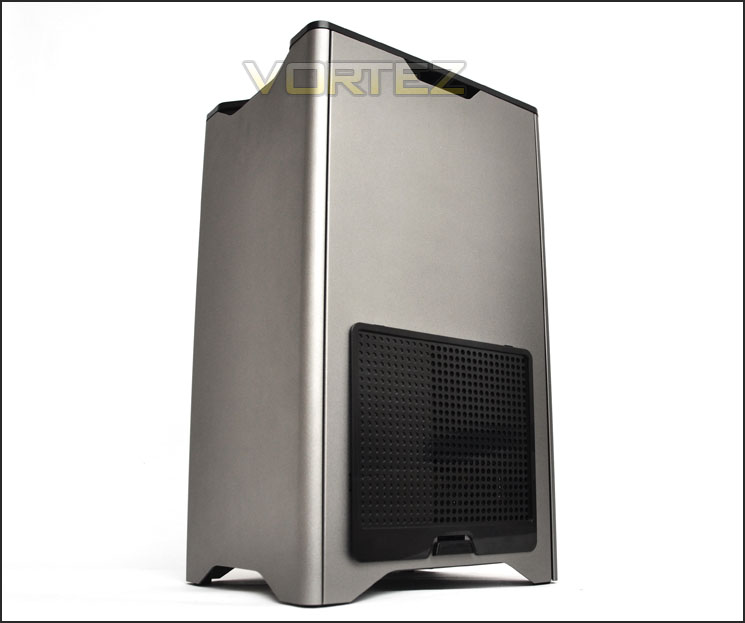
The side with plastic ventilation cover
At the very top of the FT03 is the front panel connectivity. Available here is the following:
• Power/reset buttons
• Activity LEDs
• 2x USB 3.0 ports
• Headphone/microphone jacks
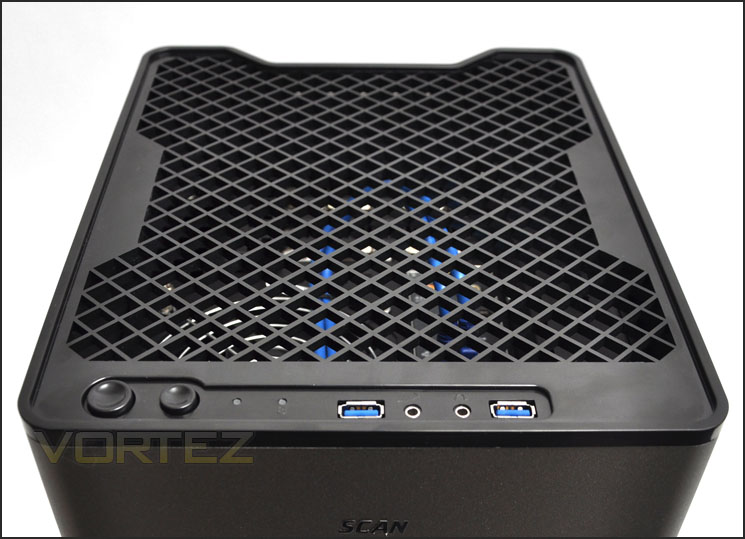
Front panel connectivity at the top – with USB 3.0 ports
These ports and buttons are surrounded by another removable mesh panel. Removing this reveals the I/O section of the motherboard. We will take a closer look at this and other internal elements over the page.
Closer Look (Internal)
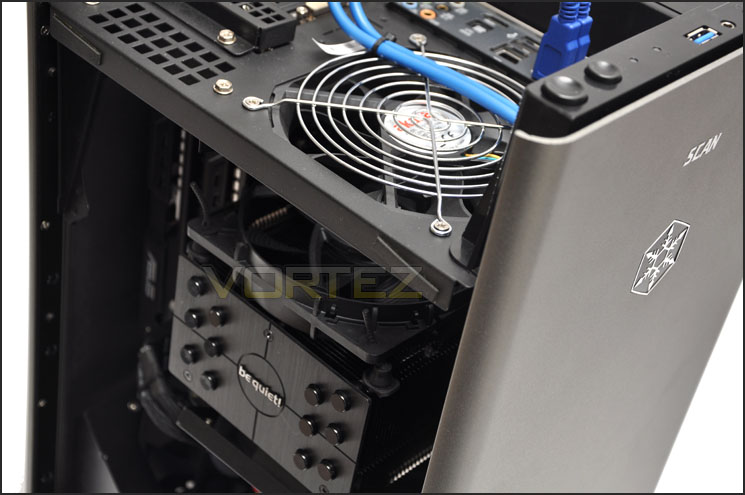
We’ll now take a look inside 3XS FT03 ROG SLI. To remove the side panels you just need to firmly slide each panel in an upwards motion. Upon removing the custom built system components can be seen. The most significant and immediate aspect to draw attention is the unique layout of all components within the FT03. Everything has been rotated 45 degrees meaning that any heat generated from major components will rise towards the top of the case and away from the system. There is just enough space for a dual graphics card configuration and as well as there being an Akasa Apache Silent 120mm fan on either side of the CPU cooler there is also an exhaust fan at the very top to create strong positive airflow. It will be interesting to see how effective the cooling is inside the FT03 a little later.Behind the motherboard tray is where the storage devices, used and redundant power cables are found. It’s quite a nice idea to have such devices stored behind the motherboard tray and out of sight though for heat/airflow there is no cooling.
Something worth mentioning is the attention to detail that 3XS engineers have taken to with the cable management and presentation. Everything is extremely tidy!
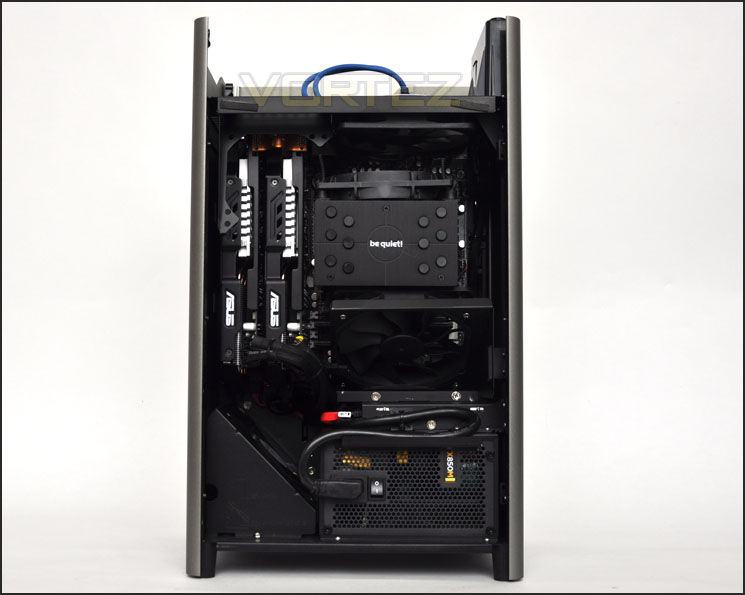
A different take on case design
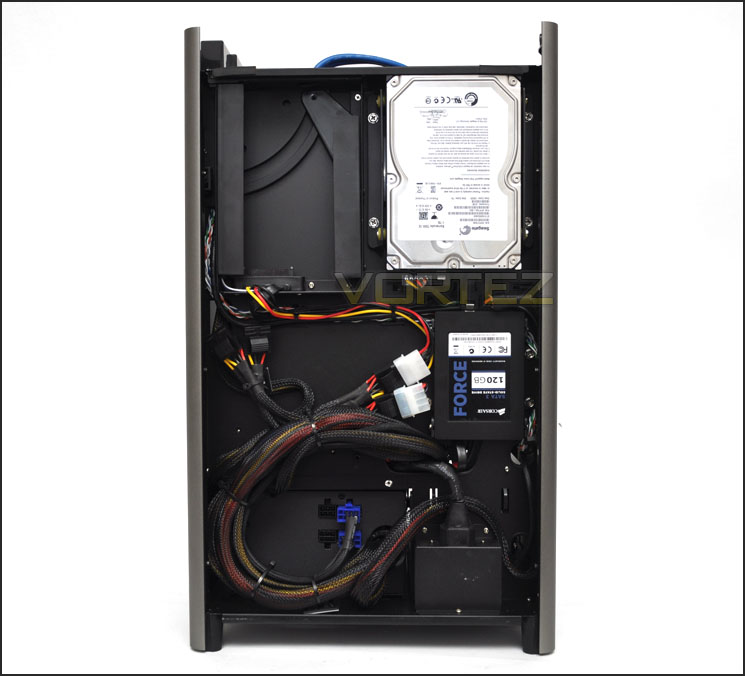
Behind the motherboard tray cables and storage devices
As mentioned on the previous page the top of the FT03 features the I/O panel – with the large mesh cover removed the ports and exhaust fan can be clearly seen. With such a layout the heat will comfortably dissipate out of the system (as we all know, heat rises). Plugging in a device like a USB memory stick is now a problem of the past with this helpful design.
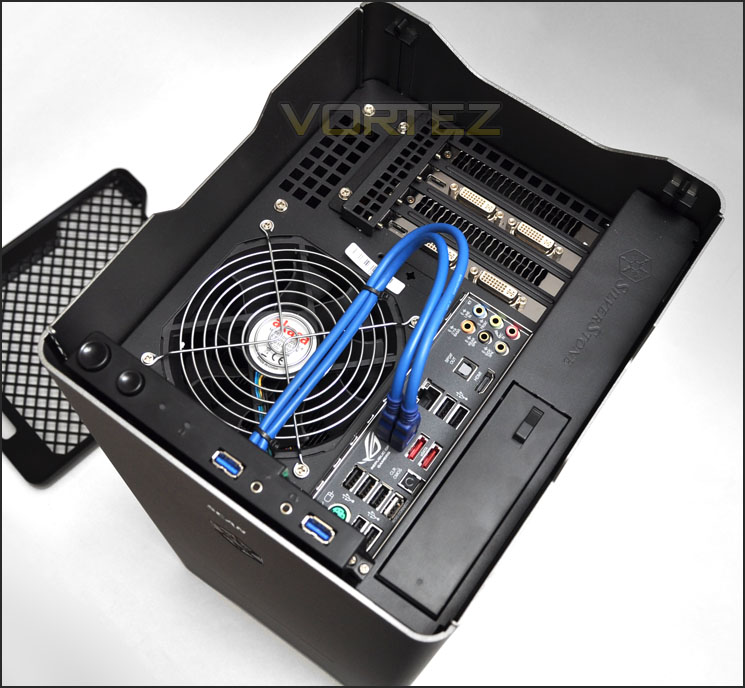
I/O ports are located at the top of the case – very handy
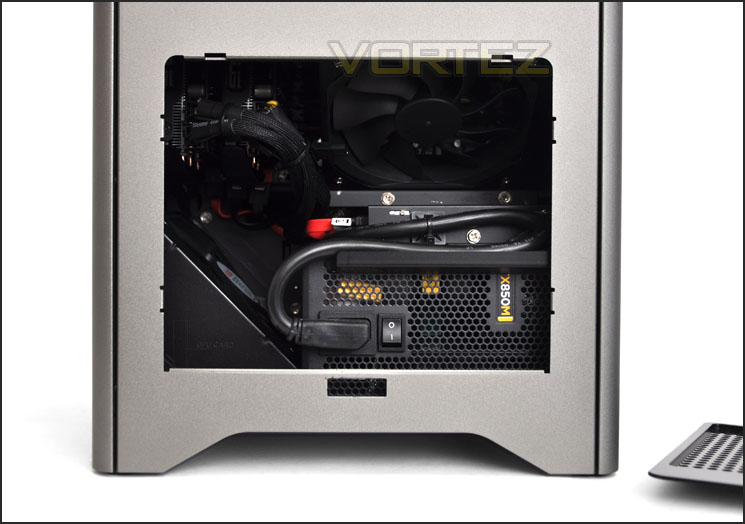
Side mesh cover removed – sneak preview inside
Though there are two areas taken for the storage devices there is another spot available for mounting another 3.5” drive should you desire. This particular spot has a levered cover and ports ready for plugging in the device.
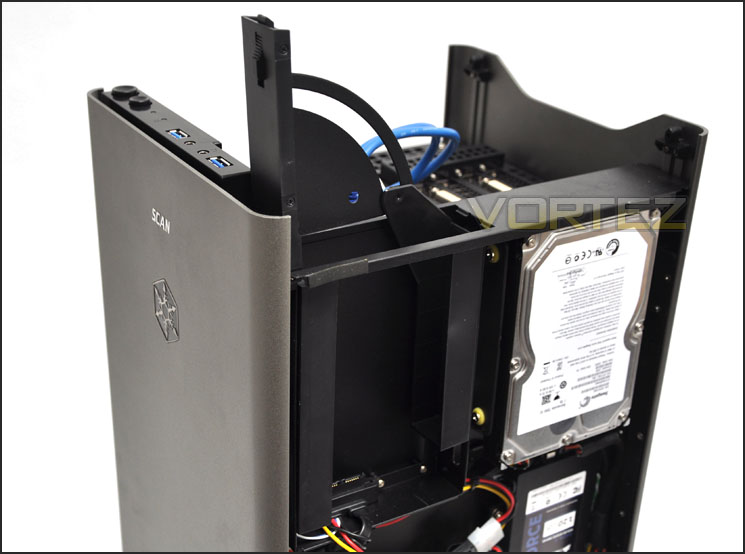
An additional spot for increasing storage capacity
With a brief inspection of the internal aspects complete let’s take a closer look at the significant, key components that make up the Scan 3XS FT03 ROG SLI over the page.
Closer Look (Components)
Though it’s very hard to make out what motherboard is being used in the FT03 ROG SLI (even with the side panels removed), underneath Scan have opted to go with the popular ASUS Maximus IV Gene-Z motherboard this is from the ASUS Republic of Gamer’s series and is classified as the cream of the crop in terms of how much punch a M-ATX motherboard can deliver. With the standard 3XS FT03 the consumer gets the option of this motherboard or GIGABYTE GA-Z68MX-UD2H-B3. Since this edition features SLI dual graphics card configuration the ASUS motherboard is a must. At the heart of our motherboard is the Intel Core i5 2500K – Intel’s fastest 2nd generation Core i5 processor. But Scan haven’t been idle, with having such a large after-market CPU cooler as the BeQuiet Dark Rock Advanced the engineers have overclocked the 3.3GHz 2500K up to 4.7GHz to allow the end user to take advantage of even more performance. Overclocking has been proven to deliver significant advantages in many areas of computing.
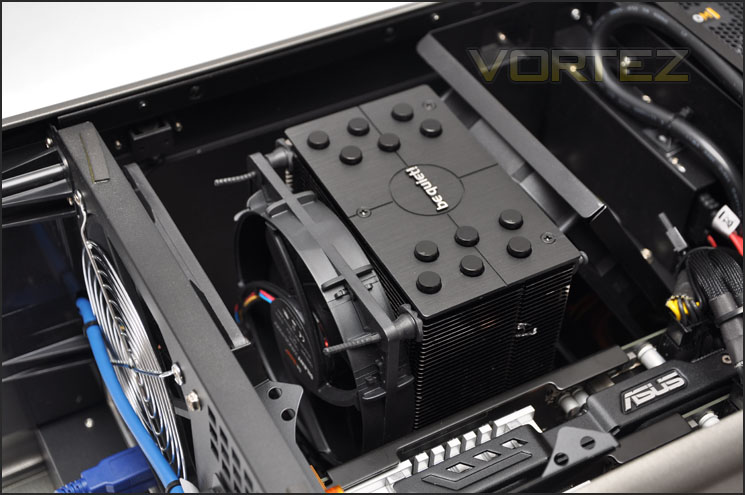
ASUS Maximus IV Gene-Z, 2500K @ 4.7GHz with Be Quiet Dark Rock Advanced
Hidden underneath the plethora of hardware are 2x 4GB of Corsair Vengeance LP 1600MHz CL9 (9-9-9-24). This kit is configured as XMP and have been on the test bench in quad channel – high profile version at Vortez before.
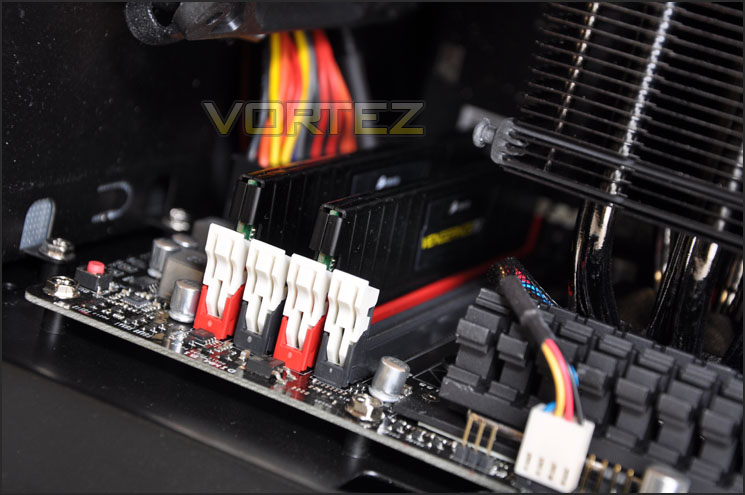
8GB Corsair Vengeance LP 1600MHz CL9
Turning our attention to the graphics cards we have some very powerful weapons at our disposal. Various editions of the FT03 give you different options but since this is SLI we will be going down the NVIDIA route. For this review we have chosen to go with 2x ASUS NVIDIA GTX560Ti which come with 2GB of RAM and the notorious DirectCU II cooler. Both have obviously been configured for SLI and should promise to deliver some raw grunt for the graphics delivery.
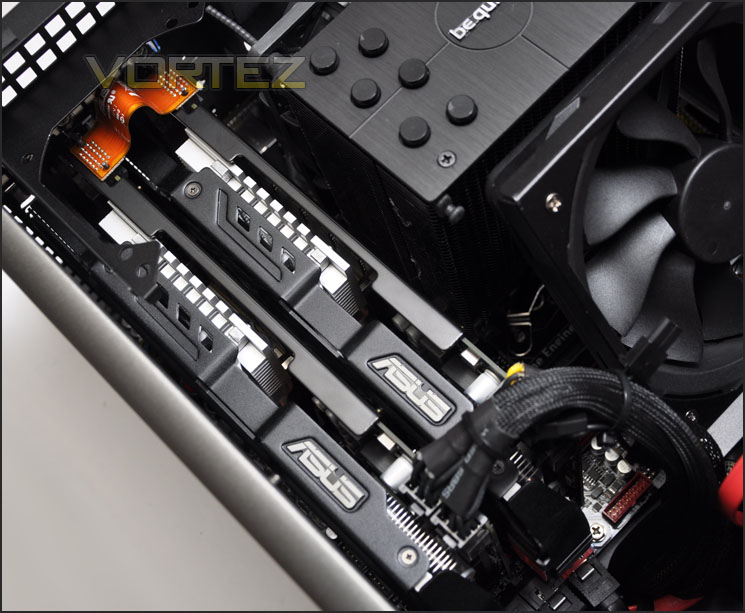
ASUS 560Ti DirectCU II in SLI
In terms of storage capabilities, our system takes advantage of a 120GB SATA 3 SSD – Corsair Force 3 for its boot drive giving fast bootup and application read/write times. An additional drive has been installed for further storage capacity. This is a 3.5” Seagate Barracuda 7200.12 – again SATA 3 (6GB/s) and has 1TB of capacity.
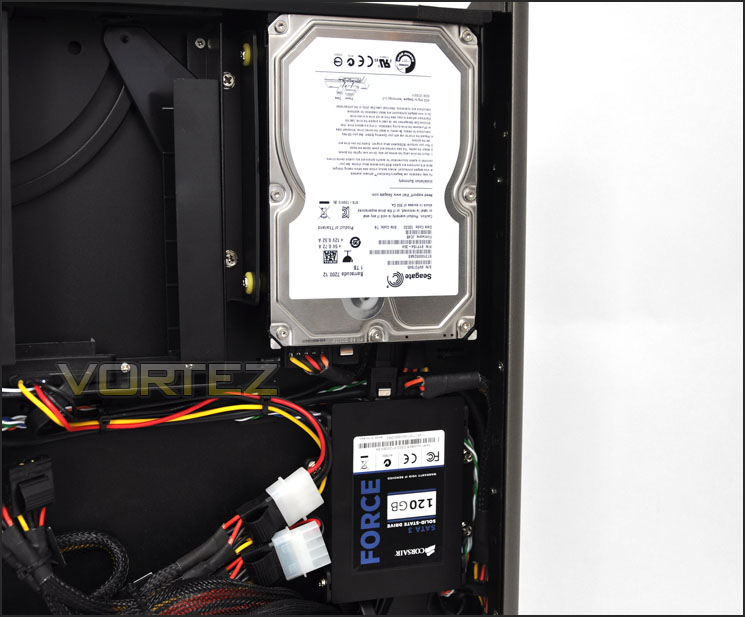
Storage drives via 120GB SATA 3 boot-drive and 1TB 6GB/s
Powering all of this lovely hardware is the Corsair TX850M V2. A smaller sized PSU is available when choosing the components but since our system has dual graphics cards we need the extra juice.
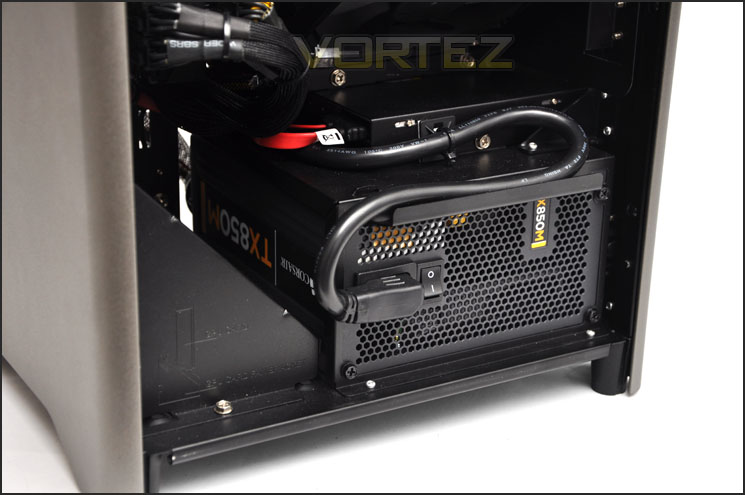
Corsair TX850M V2 powers the entire system
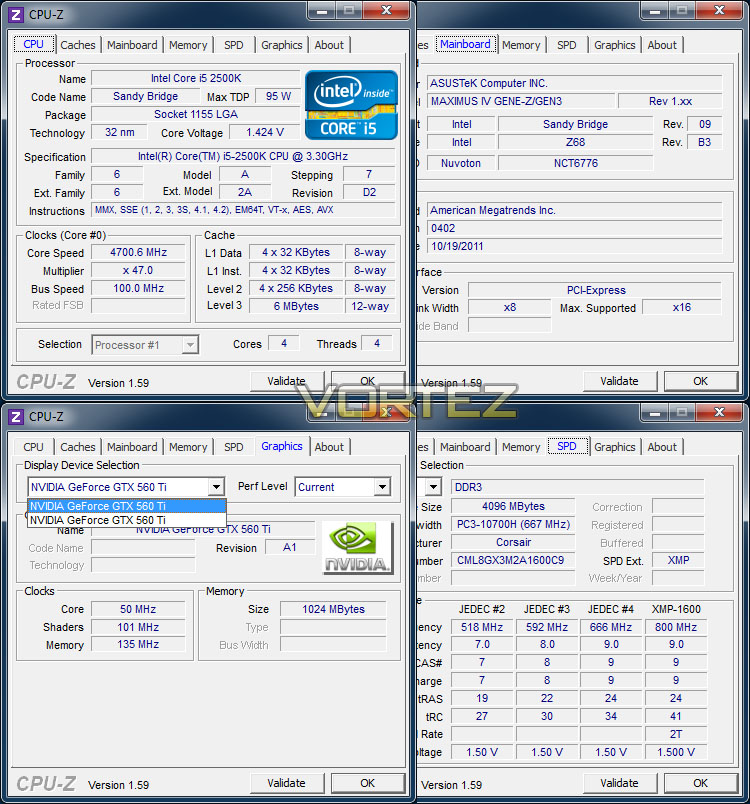
Testing Methodologies & CPU-Z
Scan 3XS FT03 ROG SLI
CPU Intel Core i5 2500K (Overclocked to 4.7GHz)
Memory 8GB Corsair Vengeance LP 1600MHz CL9 DDR3
Graphics 2x ASUS NVIDIA GTX560Ti DirectCU II 1GB
HDD 1x 120GB Corsair Force 3 SSD 1x Seagate Barracuda 7200.12 1TB
PSU Corsair TX850M V2
Custom PC – Intel Core i5 2500K, ASUS P8P67
CPU Intel Core i5 2500K (Quad-Core 3.3GHz)
Motherboards ASUS P8P67
Memory 4GB Kingston HyperX Genesis CL9 1600MHz
CPU Cooler Noctua NH-D14
Graphics ZOTAC GTX 460
HDD Samsung Spinpoint 500GB SATA 2
PSU OCZ Fatal1ty 750W
Benchmarks
Windows 7 Boot Time – Measuring with digital stopclock
x264 HD 4.0 – 1st and 2nd pass encoding
CrystalDiskMark 3 – Sequential Read/Write
Cinebench 11.5 – CPU Score
AIDA64 – Disk/Cache benchmarks
SiSoftware SANDRA 2011 – CPU benchmarks
3DMark 11 – Performance and Extreme preset
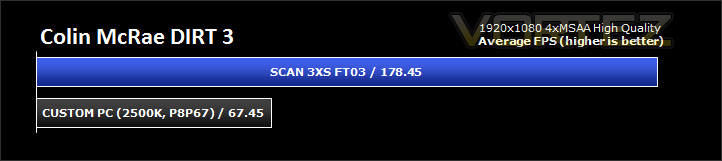
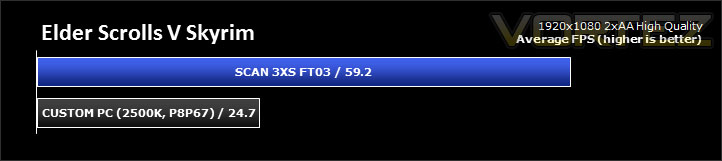
Gaming – DIRT 3 and Skyrim (Average FPS)
The above benchmarks will be run on both systems and compared. Our 3XS FT03 ROG SLI delivers mid-high end performance whilst the custom PC offers entry-mid range performance.
This system delivers mid-range power and whilst it may not offer like for like – ‘apples for apples’ testing it gives you an idea for how a typical up-to-date desktop system compares to an entry level/mid-range/high-end Notebook going forward in our reviews.
NOTE: Both systems use the same CPU – 2500K the 3XS being overclocked to 4.7GHz.
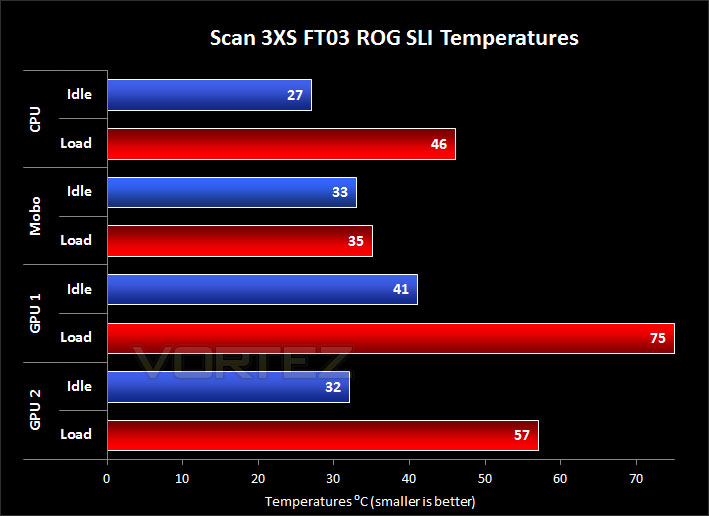
Temperatures
Temperatures are important for enthusiasts and gamers – keeping temperatures as low as possible prolongs component lifespan and also prevents the system from crashing. Thermal performance is measured using AIDA64 – system is fully loaded with 3D rendering application
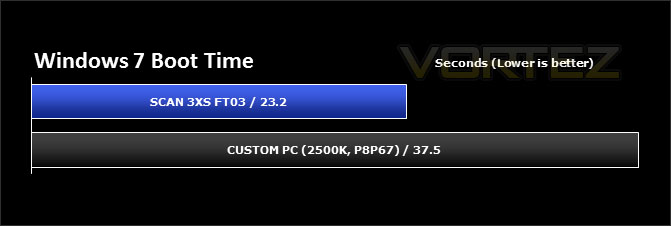
Real World Performance – Windows 7 Boot Time
Synthetic testing is valuable in the examination of systems, but some of the tests may not mean all that much to some readers so this real world test will show the Windows 7 boot time. A digital stopclock is used to record time duration.
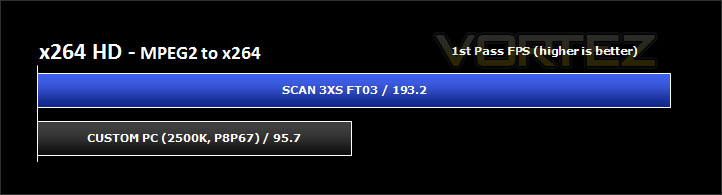
Real World Performance – x264 HD 4.0
Simply put, this test measures how fast your machine can encode a short, DVD quality MPEG-2 video clip into a high-quality x264 video clip. What’s x264, you ask? It’s more or less the next-generation Xvid/DivX codec. I think it’s ideal for a benchmark because the application (x264.exe) reports fairly accurate compression results (in frames per second) for each pass of the video encoding process, and it uses multi-core processors very efficiently.
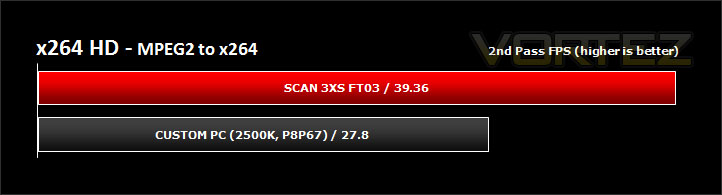
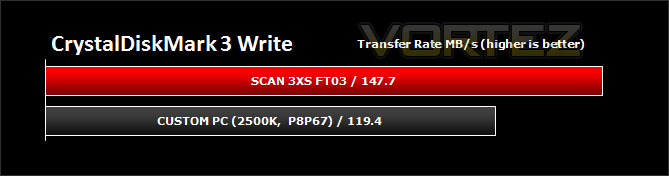
HDD Performance – CrystalDiskMark 3
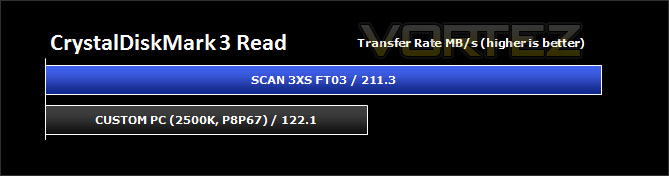
CrystalDiskMark is a disk benchmark software that analyses different types of hard drive. Giving sequential benchmark write and read statistics in MB/s. A simple program that is very useful. Sequential read/write performance is monitored.
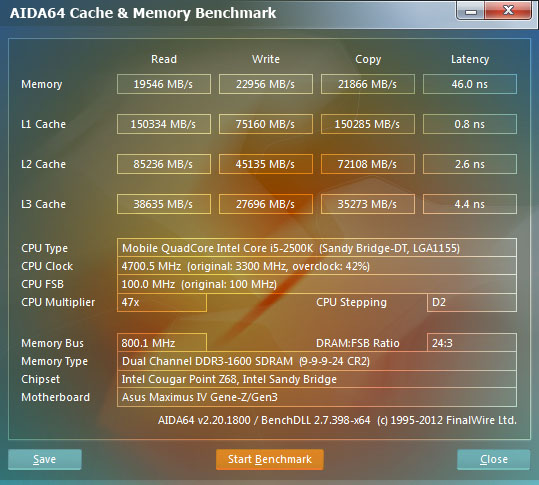
HDD Performance – AIDA64
Benchmark pages of AIDA64 Extreme Edition provide several methods to measure system performance. These benchmarks are synthetic, so their results show only the theoretical (maximum) performance of the system.
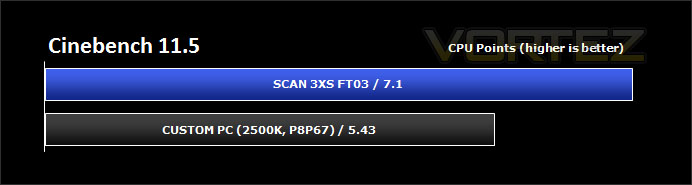
CPU Performance – Cinebench 11.5
CINEBENCH can measure systems with up to 64 processor threads. This test scene contains approximately 2,000 objects which in turn contain more than 300,000 polygons in total, and uses sharp and blurred reflections, area lights, shadows, procedural shaders, antialiasing, and much more. The result is displayed in points (pts). The higher the number, the faster your processor. CPU score is monitored.
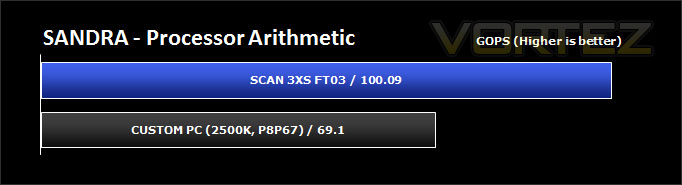
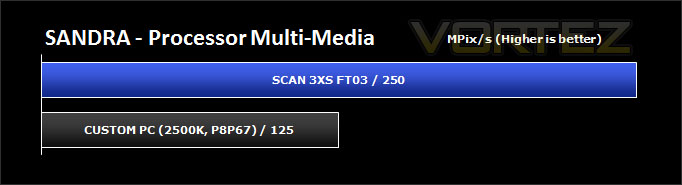
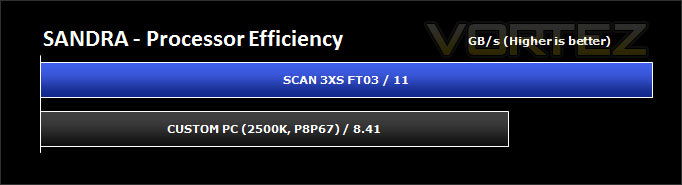
CPU Performance – SiSoftware SANDRA 2012
SiSoftware Sandra (the System ANalyser, Diagnostic and Reporting Assistant) is an information & diagnostic utility. It should provide most of the information (including undocumented) you need to know about your hardware, software and other devices whether hardware or software.
Sandra is a (girl) name of Greek origin that means “defender”, “helper of mankind”. We think that’s quite fitting.
It works along the lines of other Windows utilities, however it tries to go beyond them and show you more of what’s really going on. Giving the user the ability to draw comparisons at both a high and low-level. You can get information about the CPU, chipset, video adapter, ports, printers, sound card, memory, network, Windows internals, AGP, PCI, PCI-X, PCIe (PCI Express), database, USB, USB2, 1394/Firewire, etc.
Sandra is a (girl) name of Greek origin that means “defender”, “helper of mankind”. We think that’s quite fitting.
It works along the lines of other Windows utilities, however it tries to go beyond them and show you more of what’s really going on. Giving the user the ability to draw comparisons at both a high and low-level. You can get information about the CPU, chipset, video adapter, ports, printers, sound card, memory, network, Windows internals, AGP, PCI, PCI-X, PCIe (PCI Express), database, USB, USB2, 1394/Firewire, etc.
3D Performance – 3DMark 11
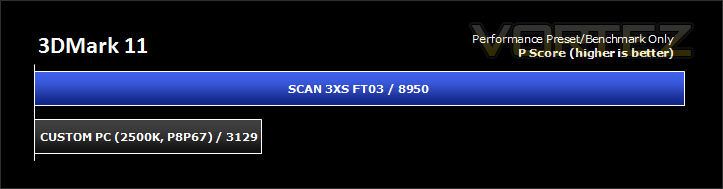
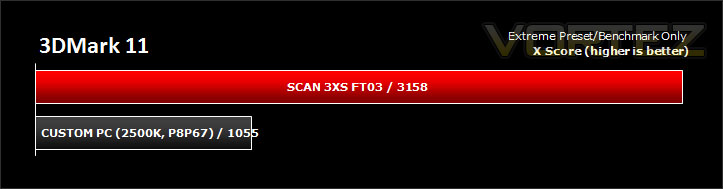
Designed to measure your PC’s gaming performance 3DMark 11 makes extensive use of all the new features in DirectX 11 including tessellation, compute shaders and multi-threading. Trusted by gamers worldwide to give accurate and unbiased results, 3DMark 11 is the best way to consistently and reliably test DirectX 11 under game-like loads.
3D Performance – DIRT 3 & Skyrim
It’s important for us to perform a number of game benchmarks as well as the synthetic tests because it allows us to test the 3D performance. So here we have some popular titles, critically acclaimed and action-packed. FRAPS and in-house benchmarking tools were used to capture average FPS.
Conclusion
Give any serious enthusiast £1500 to select a list of components and build a gaming system and the specifications will almost certainly match that of the 3XS FT03 ROG SLI. This system oozes quality and performance.
This is the first time we have experienced a system built by Scan’s 3XS team at Vortez and we weren’t disappointed. Not only were the components selected a great choice but care had been taken in ensuring cable management and layout appeared to be an important factor. The package was also delivered personally by Scan 3XS courier – meaning the parcel is handled with extreme care and the buyer can decide exactly when the parcel arrives.
As revealed during our benchmark tests the 3XS FT03 ROG SLI performs extremely well. A combination of high-end components and a significant overclock boost of 4.7GHz to the 2500K gives very pleasing results – the benefits are there to be had. Having a dual graphics card configuration almost means that 3D performance is very good too.
My only complaint about the system is the noise under full load. The two ASUS 560Ti graphics card’s fans were spinning at 3810 (63%) and 2580 (45%) RPM which as you may have guessed was the root cause of this noise. I would advise capping the fan speed to 30% with an application like MSI Afterburner to significantly drop noise levels being emitted from the 3XS FT03 ROG SLI.
Pros
+ Unique layout design
+ Excellent choice of components
+ Brilliant performance
+ Overclocked to 4.7GHz
+ Good cable management
+ Fast, convenient personal delivery
Cons
– Noisy under full load
+ Unique layout design
+ Excellent choice of components
+ Brilliant performance
+ Overclocked to 4.7GHz
+ Good cable management
+ Fast, convenient personal delivery
Cons
– Noisy under full load


Click here for an explanation of our awards at Vortez.net. Thanks to Scan Computers for providing today’s review sample.


