







With ClickBIOS II and PCI-E 3.0 we take a look at the new Z68A-GD65-G3 (Gen3) featuring high-quality Military Class II components at a price most can afford.
Product on Review: Z68A-GD65-G3

Manufacturer: MSI
Street Price: £145 inc. VAT
In our venture into the world of Sandy Bridge (LGA1155) and more specifically the Intel Z68 Chipset we have considered mainstream motherboards from a range of brands but never from MSI, until today. MSI have consistently impressed us with their graphics cards in the past and using the Intel P67 Chipset their Big Bang Marshal took our coveted gold award, but will today’s offering have the same amount of success?
Today we will be taking a look at one of MSI’s new motherboards under the Gen3 series using the Intel Z68 Chipset – the Z68A-GD65 G3. This motherboard sits in the mainstream segment and for the price packs in quite a punch. NVIDIA SLI and ATI CrossfireX is available, as is onboard power/reset buttons and a sleek looking exterior of black and blue. The Z68A-GD65 G3 comes with MSI’s 2nd generation ClickBIOS with improved navigation and a completely new look. As I pointed out in the Big Bang Marshal Review navigation was poor and the overall experience needed a facelift so it will be interesting to see what changes have been made and whether they can be attributed to success or failure.
So without further ado let’s begin our analysis of MSI’s Z68A-GD65 G3.
About MSI
Technical Specifications
CPU
• Supports Intel® Sandy Bridge processors in LGA1155 package.
Chipset
• Intel® Z68 (B3) Chipset
Main Memory
• Supports four unbuffered DIMM of 1.5 Volt DDR3 1066/1333/1600*/2133*(OC) DRAM, 32GB Max
– Supports 1GB/ 2GB/ 4GB/ 8GB DRAM size
– Supports Dual channel mode
Slots
• 2 PCI Express gen3 x16 slots
• 3 PCIE x1 slots
• 2 32-bit v2.3 master PCI bus slots.
– Support 3.3v/5v PCI bus interface.
On-Board SATA
• SATAII controller integrated in Intel® Z68 (B3) chipset
– Up to 3Gb/s transfer speed.
– Supports four SATAII ports (SATA3~6) by Z68 (B3) PCH
• SATAIII controller integrated in Intel® Z68 (B3) chipset
– Up to 6Gb/s transfer speed.
– Supports two SATAIII ports (SATA1~2) by Z68 (B3) PCH
– SATA1~6 ports support RAID 0/1/5/10 mode by Intel Z68 (B3) PCH
• SATAIII controller integrated in Marvell® 88SE9128 chipset
– Supports two SATA 6Gb/s ports
USB 3.0
• 1 USB 3.0 internal connector by NEC® D720200
• 2 USB 3.0 rear I/O ports by NEC® D720200
Audio
• Chipset integrated by Realtek® ALC892
– Flexible 8-channel audio with jack sensing
– Compliant with Azalia 1.0 Spec
– Meet Microsoft Vista Premium spec
LAN
• Supports one PCI Express LAN 10/100/1000 Fast Ethernet by Realtek 8111E.
Internal I/O Connectors
– ATX 24-Pin power connector
– 8-pin ATX 12V power connector
– CPU x 1 / System x 4 FAN connectors
– CD-in connector
– Front panel audio connector
– Front panel connector
– 1 x chasis intrusion connector
– 3 x USB 2.0 connectors
– 1 x USB 3.0 connectors
– 4 x Serial ATAII connectors
– 4 x Serial ATAIII connectors
– 1 x Clear CMOS jumper
– 1 x SPDIF-out connector
– 1 x TPM module connector
– 1 x DLED3 connector
– 1 x Voltage Check Point
– 1 x Power button
– 1 x Reset button
– 1 x OC Genie button
Back Panel I/O Ports
– 1 x PS/2 Mouse/Keyboard port
– 1 x Coaxial SPDIF port
– 1 x Optical SPDIF port
– 1 x Clear CMOS button
– 1 x RJ45 LAN Jack
– 4 x USB 2.0 ports
– 2 x USB 3.0 ports
– 1 x Graphics Card port
– 1 x DVI-D port
– 1 x HDMI port
– 1 x 6 in 1 audio jack
BIOS
• The mainboard BIOS provides “Plug & Play” BIOS which detects the peripheral devices and expansion cards of the board automatically.
• The mainboard provides a Desktop Management Interface(DMI) function which records your mainboard specifications.
Dimension
• 30.5cm(L) x 24.5cm(W) ATX Form Factor
Mounting
• 9 mounting holes.
Packaging & First Look
Carrying MSI’s latest core branding the GD65 G3 is presented in an attractive white box. Military Class II is a significant emphasis as is their 2nd generation Click BIOS II. If you want further features and details these can be found on the reverse of the box.
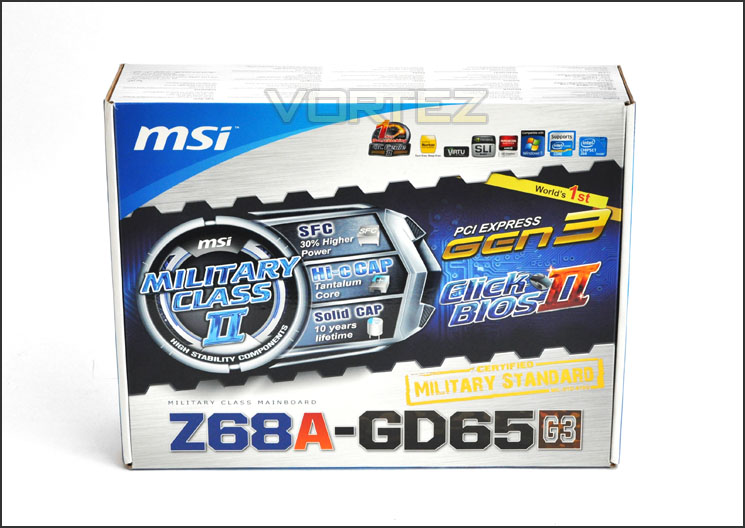
The MSI GD65 G3 packaging
Inside the packaging we have the bundle. This consists of a favourable amount of items that include:
• Documentation: User Guide, Software Guide, Quick Install Guide
• Driver/Software CD
• 4x SATA 3 (6Gbps) Cables
• Molex adapter
• Quick Connect Adapter Plugs
• SLI Bridge
• I/O Shield
• USB 3.0 Front Panel Fascia
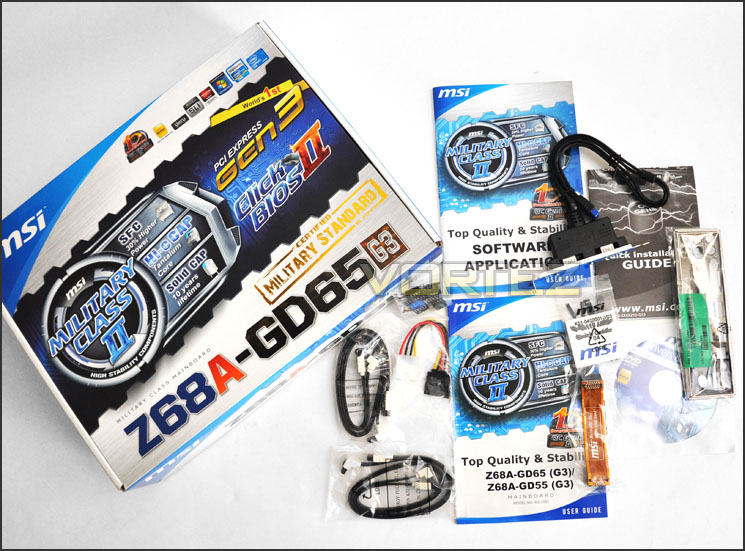
Plenty of items within the bundle
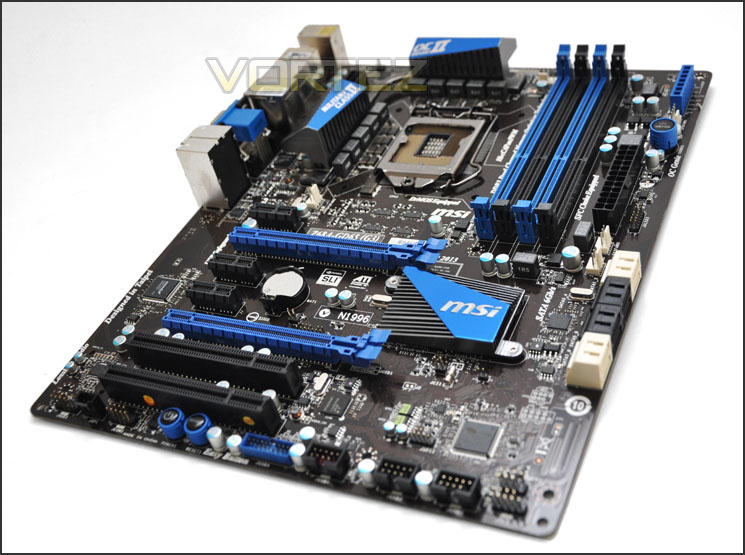
The motherboard is as would be expected – concealed within an anti-static bag to protect it during transit. Removing this we can get our first glimpse of the GD65 G3. As with the Intel P67 MSI motherboards, the Z68 G3’s also use a similar colour-scheme of black and blue for all major connectivity slots and heatsinks, this makes for an attractive looking motherboard and one that will favour highly with enthusiasts that prefer a blue configuration. The PCB although dark isn’t actually black, it has a two-tone brown appearance.
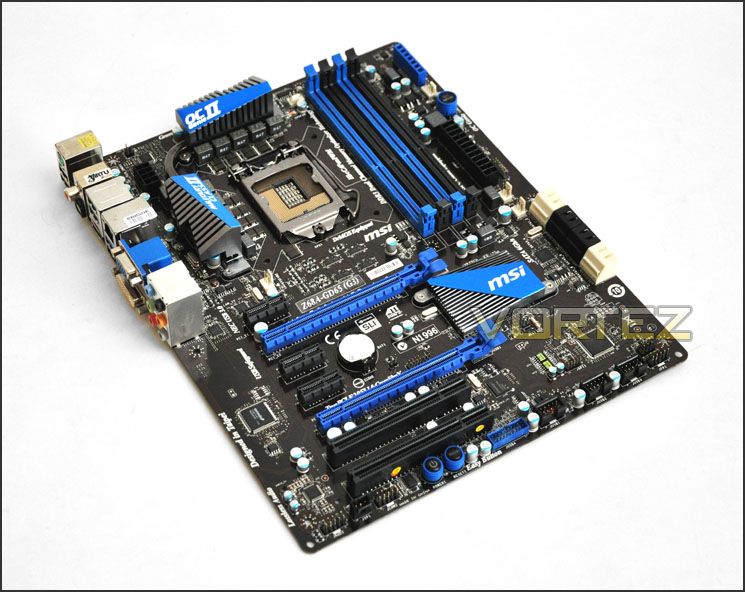
A good looking motherboard with clean layout
So for now the GD65 G3 has a good layout but let’s move in for a closer look over the page.
Closer Look
First of all let’s take a look at the region near the CPU socket. Here we have 8+2 DrMos Phase Power Design, being Military Class II the Phases are SFC (Super Ferrite Chokes) and instead of Solid CAPs we have Hi-c CAPs. These are essentially better made and more durable components but we will expand upon these components a little later on in the article. The heatsink design we have seen before, on the GD65 G3 has significantly smaller heatsinks compared to the higher end offerings and features a thick heatpipe. Behind the heatsink is the CPU power socket, this is 8-pin.
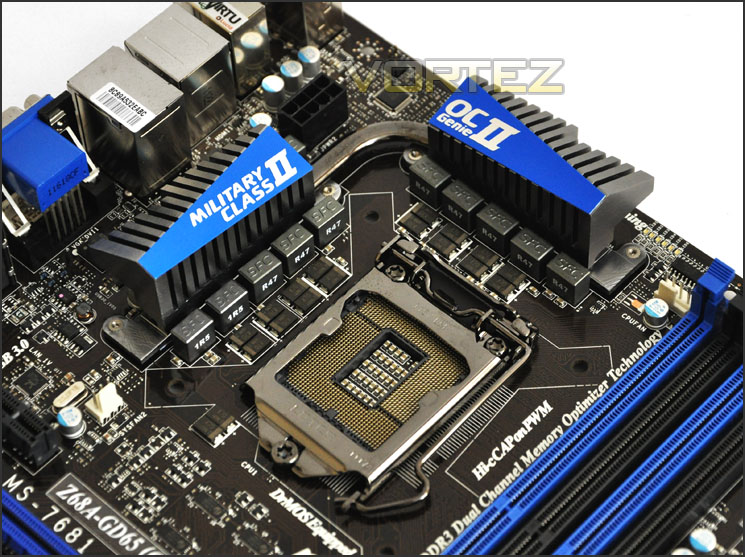
8+2 Phase Power Design with Military Class II components
Moving on to the memory slots, with LGA1155 we of course have Dual Channel DDR3 support. Additional to this the MSI GD65 G3 has Intel XMP support and you can fit kits with a frequency of 1066MHz to 2133MHz and a maximum capacity of 32GB.
Near this area there are more SFCs and a Voltage Checkpoint for the more technical enthusiasts out there. To use the Voltage check points a multimeter is used and various aspects of the motherboard can be verified such as the CPU voltage etc.
For those who want a quick and simple overclock – the MSI OC Genie button has been placed on the edge of the motherboard. Pressing this will boost performance in just a few seconds. MSI comment on the OC Genie II feature saying:
Just press the OC Genie button or enable OC Genie II function in BIOS menu, the CPU, memory, iGPU and HDD performance will be highly improved. Whether users want to watch a high bit-rate HD movie or go online gaming, both can be enjoyed with image performance that is smoother and lag-free![./quote]
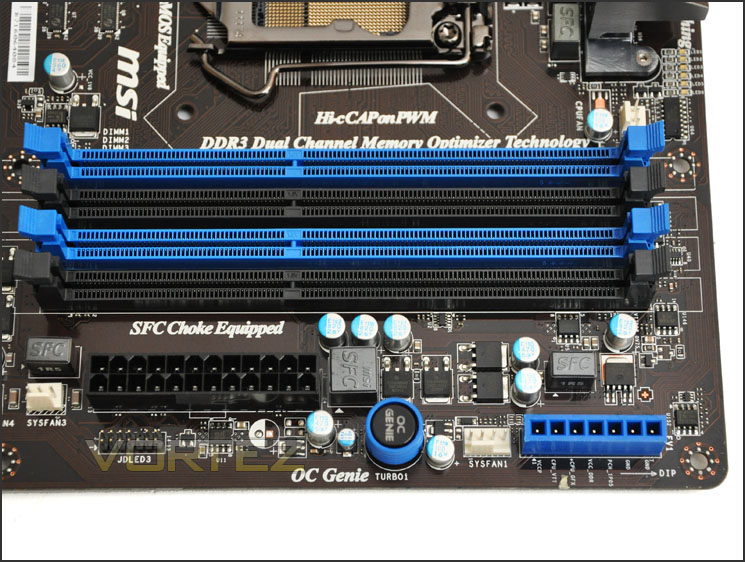
Memory slots and OC Genie II
Further along there are the SATA storage ports. MSI have separated the Intel Z68 SATA 3 (6Gbps) ports from the Marvell SATA 3 (6Gbps) ports in an effort to avoid confusion – usually these ports are side by side.
On the far left the 2x SATA ports (White) are SATA 3 (6Gbps) via Marvell 9128. The 4x SATA ports (Black) are SATA 2 (3Gbps) whilst the 2x SATA ports (White) on the far right are again SATA 3 (6Gbps) but via Intel Z68.
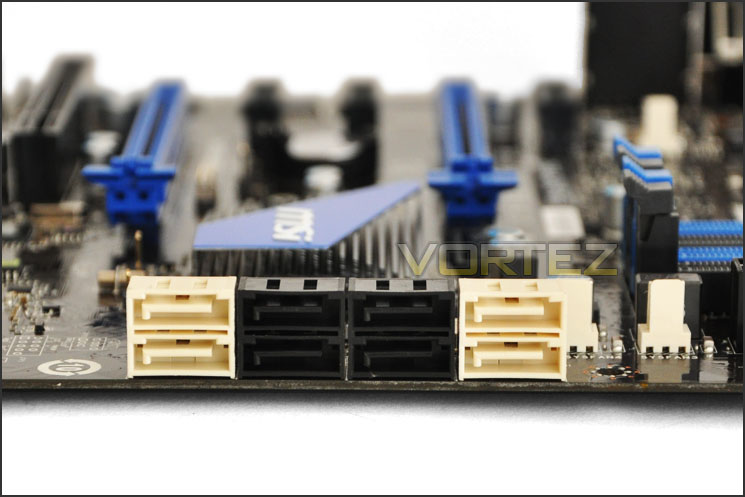
SATA 2/3 functionality
MSI’s GD65 G3 has support for NVIDIA SLI and ATI CrossfireX. Being a Gen3 motherboard MSI have verfieid that this motherboard is ready for PCI-E 3.0 too. Those with newer soundcards will be pleased to know that there are 3x PCI x1 slots and 2x PCI slots for older devices.
Beneath the PCI-E section are some onboard buttons – power and reset are always a handy accompaniment especially if this motherboard will be going onto a test bench, it saves the hassle of connecting up power/reset button cables. The USB 3.0 header is also found at the bottom of the motherboard, right next to these onboard buttons.
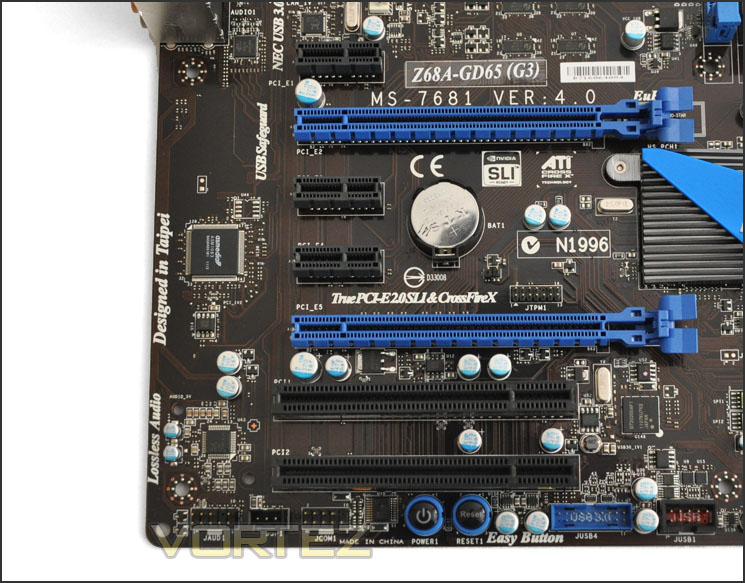
PCI-E with support for the new PCI-E 3.0
Lastly, taking a look at the I/O we have an assortment of functionality including the following ports:
• PS2 keyboard/mouse
• 2x USB 2.0 ports
• MEM OK!
• Optical/Analogue SPIDIF
• 2x USB 2.0 ports
• HDMI port
• Gigabit LAN (RJ45)
• 2x USB 3.0 ports
• VGA/DVI ports
• 6 Channel Audio
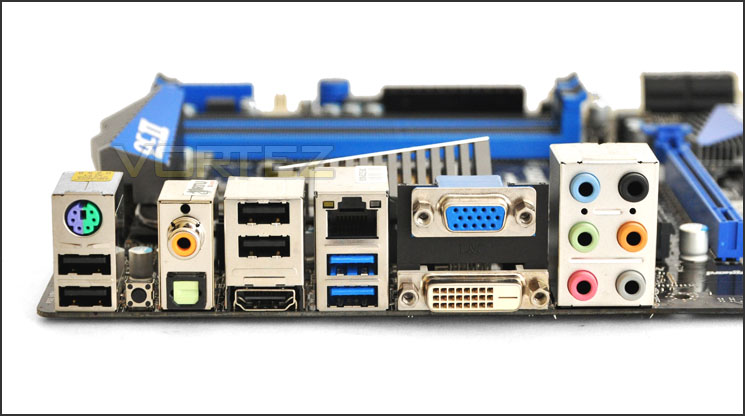
The I/O panel on the back of the motherboard
Military Class II
Well known and established as MSI’s biggest selling point is their Military Class II. The big push for MSI this year is Military Class II. Which if you haven’t heard of, is a brand exclusive. Many manufacturers classify their products as being military tested, military standard. The truth is that this only applies to certain components such as capacitors when we are talking motherboards. Only certain aspects are tested to military standards with other brands, but with MSI the entire board is military tested, not only the capacitors or specific components. All motherboards now feature the following 3 high quality components:
SFC – Super Ferrite Chokes
Hi-c CAP
Solid Capacitors
NOTE: Hi-c CAPs (Highly Conductive Polymerized Capacitor) are used by NASA on their spacestations. The polymer is a self-repairing substance – MSI actually spoke of a technician who thought he had damaged the board sent it back for RMA but by the time it arrived with RMA department it had healed itself.

Below is an excerpt from MSI about Military Class II.
Hi-c CAP
8X Lifespan than solid Capacitor!!
Insisting on the best stability, MSI utilizes Hi-c CAPs on Military Class series. Made of the rare element Tantalum, often used on space shuttles and satellites, which sustains very high temperatures and shows an amazingly high electrical conductivity.
SFC
SFC(Super Ferrite Choke).The super Ferrite Chokes use a Ferrite core that is Super-Permeable. Compare with traditional choke, the Super Ferrite Chokes run at a 35 degree Celsius lower temperature. The lower working temperature will enhance mainboard stability.
Solid CAP
10 years long lifespan
For providing the highest quality products, we built-in Solid CAP in the entire Military Class series. This not only makes bursting capacitors a non-issue but also ensures a dramatically extended lifetime and ultra-low ESR.
ClickBIOS II
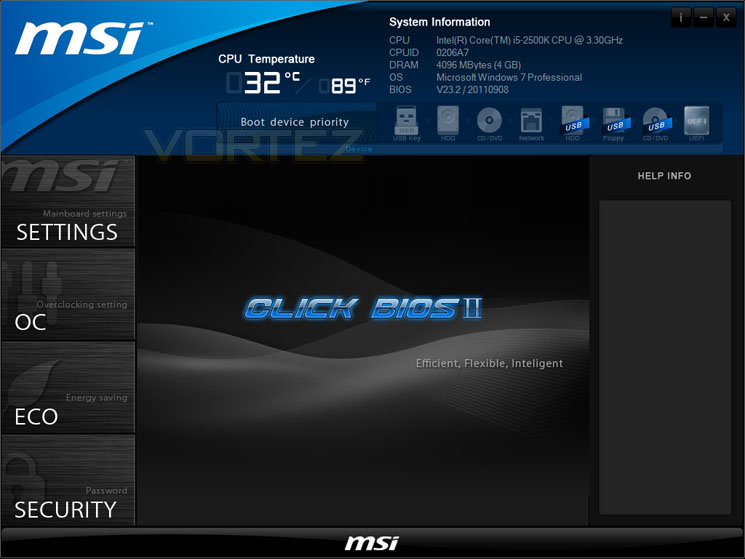
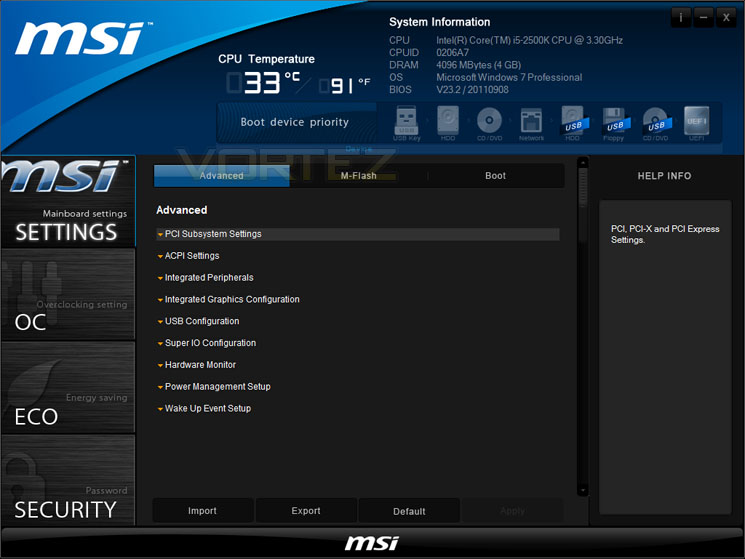
MSI are proud to announce that with all their Gen3 motherboards ClickBIOS II will be present. The 2nd generation of ClickBIOS, is a complete revamp of their previous UEFI BIOS. We also have the addition of the windows-based version too which I will cover in this section. This V2 is a vast improvement to their first attempt, even the windows-based application had its shortcomings – first seen on the Big Bang Marshal.
Getting into the BIOS can sometimes be a daunting task for some users, but with this windows-based application users can still access critical information and go one step further by tweaking some settings. For the advanced user it means that settings can be checked on-the-fly without having to restart the system. Here is what MSI have to say about their new ClickBIOS II.
Benefits:
– Graphical User Interface, with touchscreen support
– Simply click or touch and move to change settings
– Full system control, including overclocking, security and information
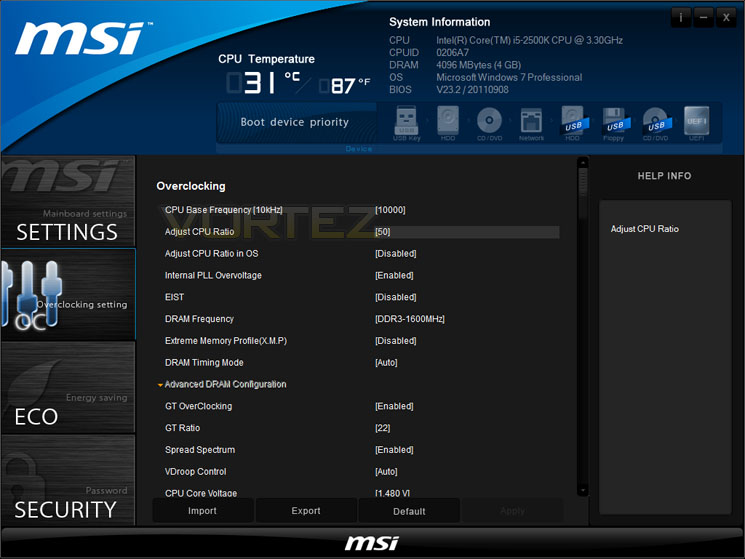
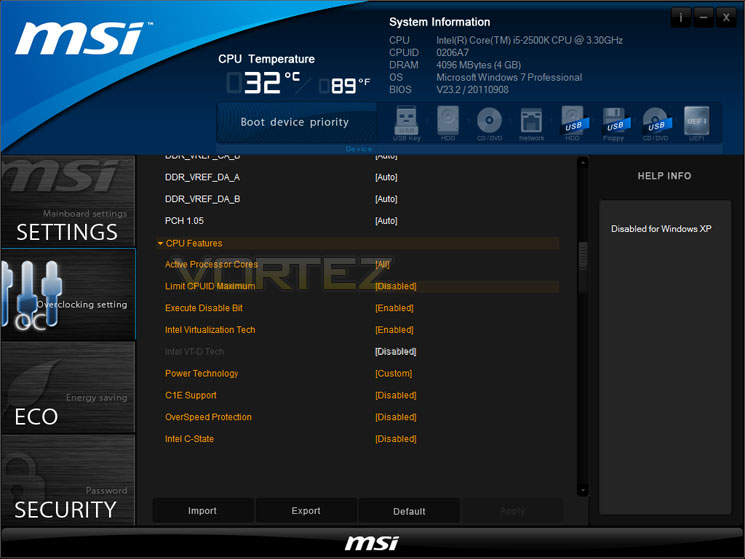
As you can see from the screenshots below – the interface looks very appealing. In the previous version of ClickBIOS not all options were available but now we have a wide range of settings to access including Boot Priorites, CPU features/overclocking and memory modifying plus much more.
I actually used the windows-based version of ClickBIOS II to achieve the 5GHz overclock in this review – see screenshots below and overclocking section
Lucid VIRTU
The GD-65 G3 takes advantage of Lucid’s VIRTU since it uses the Intel Z68 chipset. VIRTU is designed for the Sandy Bridge platform and assigns tasks to best available graphics resource based power, performance, and features.
As most would know, Intel Z68 takes advantage of a key feature that is found from the Intel H67 chipset – video outputs. Since the Intel 2nd Generation processors have an iGPU built-in some may want to use this as an option and also use a discrete graphics solution. What VIRTU does is – it allows the user to utilise both discrete GPU and Intel’s iGPU (built in graphics on the CPU) without the need to change hardware or switch the outputs.
VIRTU brings in many unique features, a great deal of them are associated with power management – relating to heat, fan speed, and other useful elements. There are two different modes to use when considering VIRTU:
i-Mode
This provides the user with Intel features and power saving options when not being used for 3D gaming. Display must be connected to video output on the motherboard to use this feature.
d-Mode
This mode allows gamers to enhance their 3D experience and performance – combining a discrete graphics solution and the iGPU. In this mode we can use VIRTU to assist with things like transcoding and media encoding in general. The overriding thought on this is that even entry level AMD and NVIDIA graphics cards have their own technologies for handling media encoding such as AMD Stream and NVIDIA CUDA – both of these technologies are deemed as being exceptional alternatives and don’t offer any real advantage over VIRTU using iGPU for these types of task.
Display drivers for discreet graphics card must be installed prior to VIRTU drivers.

For more information on VIRTU please go to: Lucidlogix Virtu
Test Setup & Overclocking
CPU Intel Core i5 2500K (3.3GHz)
Motherboards
– MSI Z68A-GD65 G3
– GIGABYTE Z68AP-D3
– ASRock Fatal1ty Z68 Professional Gen3
– GIGABYTE Z68XP-UD3P
– GIGABYTE G1 Sniper 2
– ASRock Extreme4 Gen3
– MSI Big Bang Marshal
– ASUS Maximus IV Extreme
– GIGABYTE Z68-UD4
– Foxconn Rattler P67
– ASUS Sabertooth P67
– ASUS P8P67 (LGA1155)
– Foxconn P67A-S
– ECS P67H2-A (Black Extreme)
Memory 4GB Kingston HyperX Genesis CL9 1600MHz
CPU Cooler Noctua NH-D14
Graphics ZOTAC GTX 460
PSU OCZ Fatal1ty 750W
All P67 Sandy Bridge motherboards will be benchmarked against each other using the Intel Core i5 2500K. The maximum overclock will also be included within the proceeding benchmark tests to identify performance gains as a result of tweaking CPU clock speed via the multiplier.
Overclocking
As previously mentioned in our Intel Core i5 Sandy Bridge Roundup – overclocking is achieved by altering the multiplier rather than the BCLK. So the BCLK stays at 100MHz and the multiplier is modified. So if we have 100MHz on the BCLK and 40 for the multiplier this will obviously output 4GHz. We chose to use the Intel Core i5 2500K across each of the motherboard tests and indeed for the overclocking due to its unlocked multiplier.
With overclocking simplified on Sandy Bridge, this means that achieving the best overclock couldn’t be easier. CPU voltage and multiplier just need to be modified accordingly. The ultimate milestone is 5GHz on air cooling for the Intel Core i5 2500K.
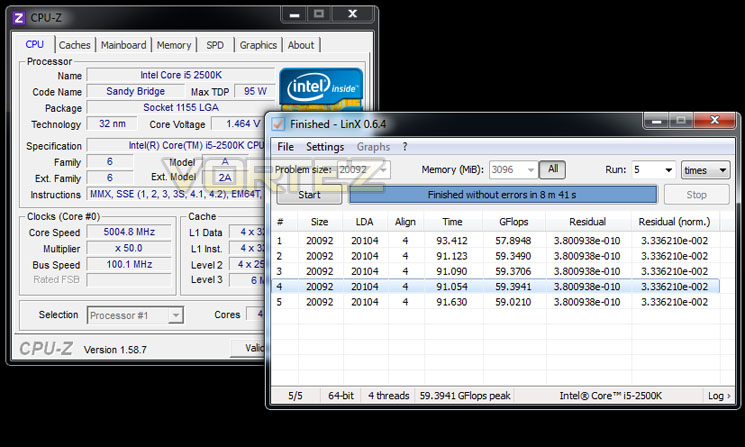
Rather than overclocking via the BIOS I thought I would give the windows-based version of ClickBIOS II a try and see how effective it was at enhancing the performance of the chip. Though you do need to restart after each modification, using this application is a much welcomed, new experience. All of the options needed to get overclocking are all there – including CPU features which will need to be disabled.
Achieving that 5GHz milestone with the MSI Z68A-GD65 G3 is very easy. I had no problems at all getting there with 1.45v and overvoltage enabled for PLL.
Power Consumption
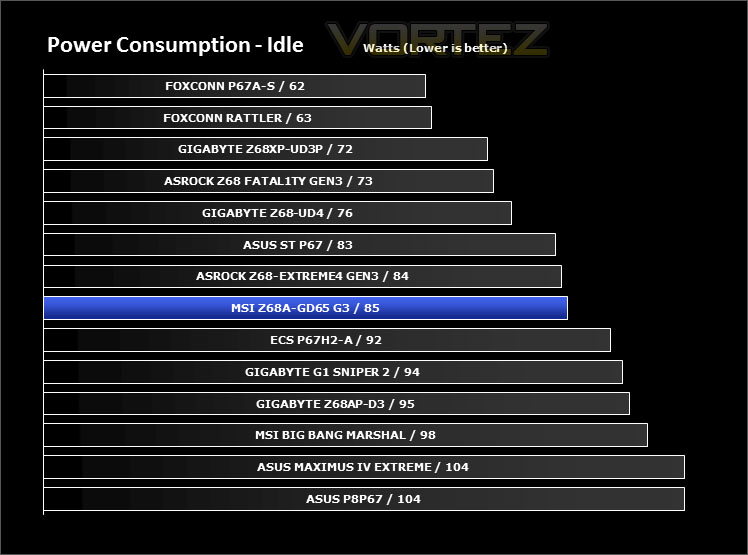
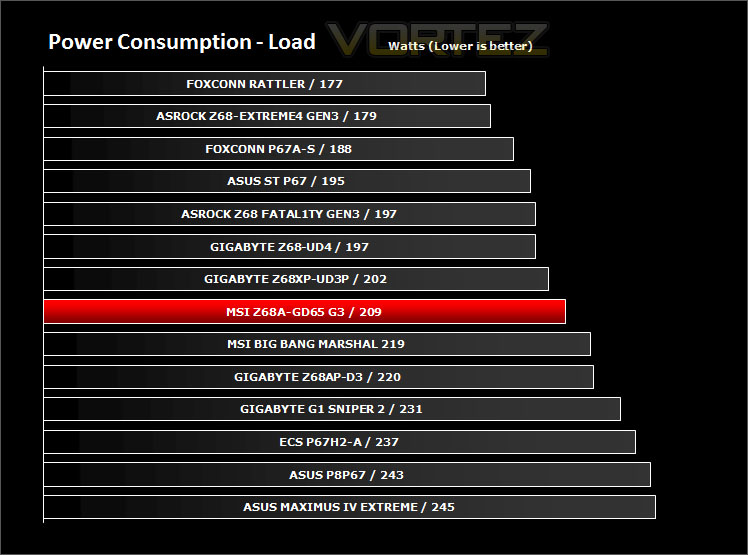
The GD65 G3’s energy efficiency leaves it right in the middle of our test subjects. Idle and load results are actually quite decent considering the specifications on this motherboard.
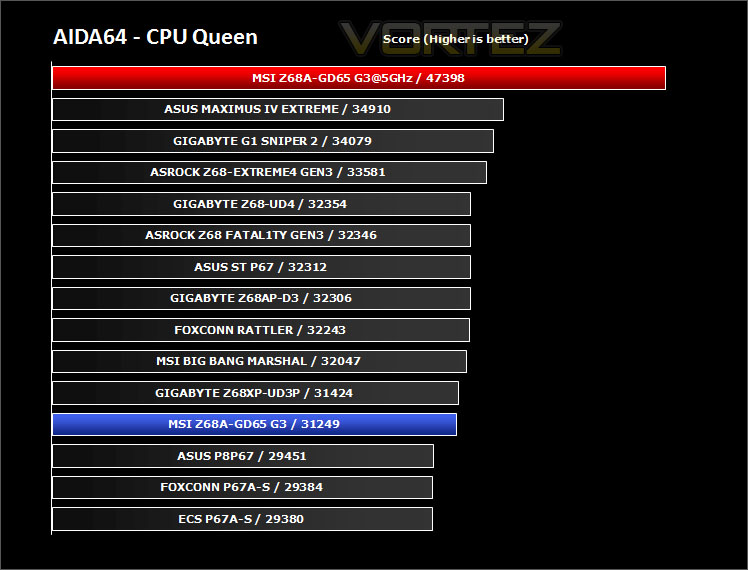
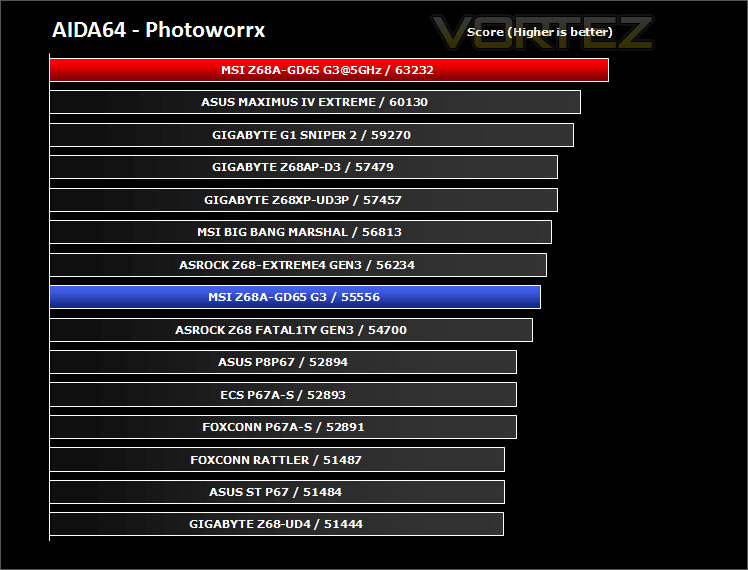
Synthetic Benchmarks: AIDA64
Get your copy of AIDA64 here!CPU Queen
CPU Photoworrx
Synthetic Benchmarks: x264 HD
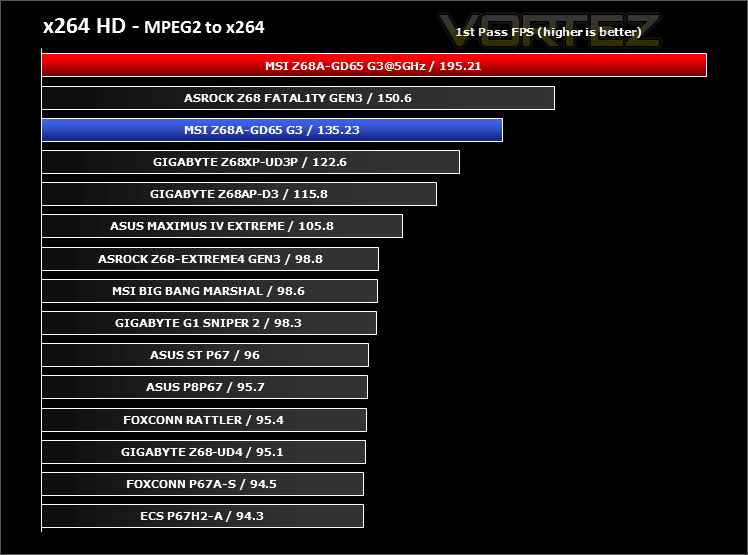
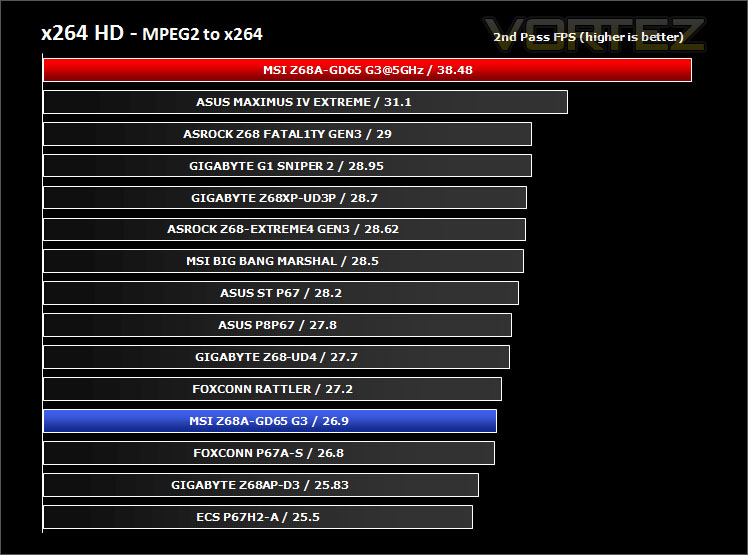
x264 HD gives results for 2 passes when compressing an MPEG-2 clip into x264. It presents 4 separate results for each pass giving a total of 8 – all results are given in FPS. For each pass I have averaged out the results.
As we have come to learn with most of the other candidates – the GD65 G3 does a great job in the 1st pass but lags behind a little throughout the 2nd pass. An overclocking lifts performance significantly in both encoding passes.
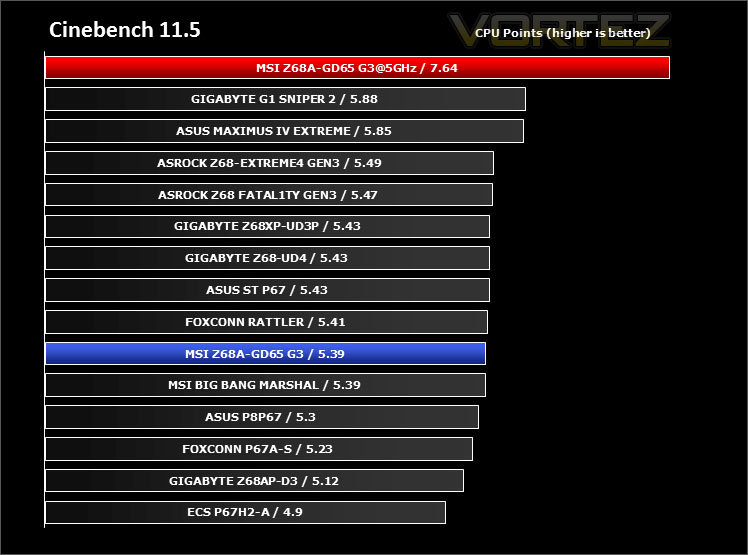
Synthetic Benchmarks: Cinebench
For the CPU score the GD65 G3 offers a similar points score to other rivals but a nudge in the CPU frequency lifts that score much higher than the other results.
Synthetic Benchmarks: SiSoftware SANDRA 2011
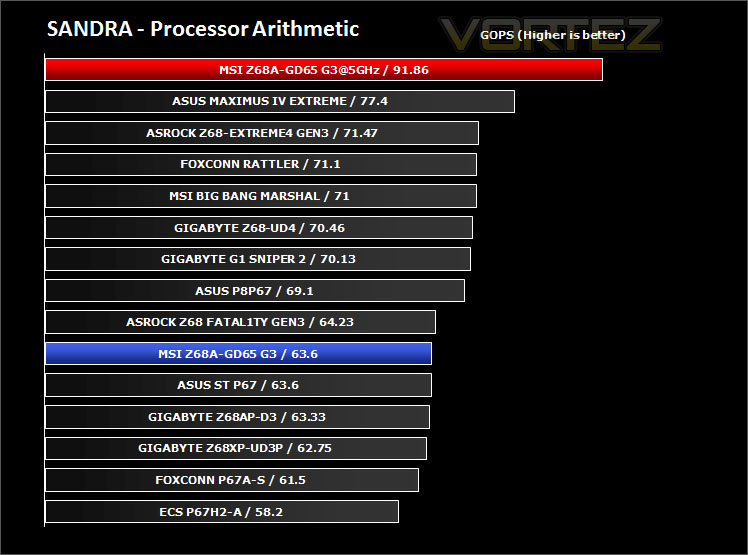
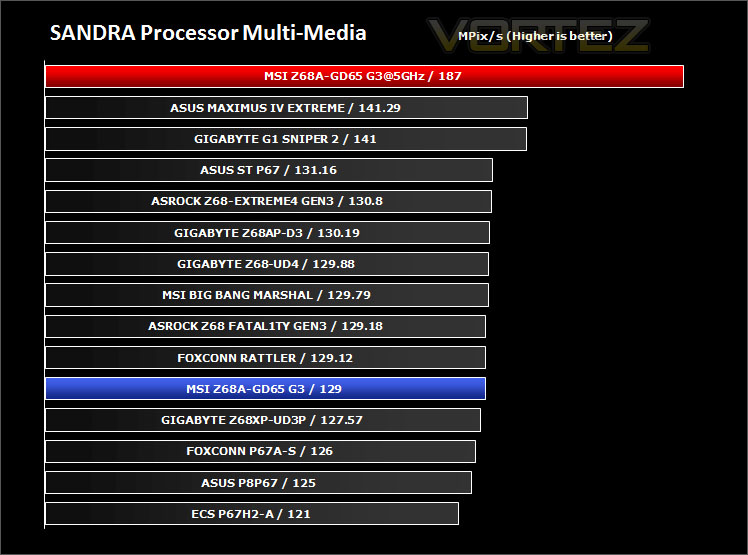
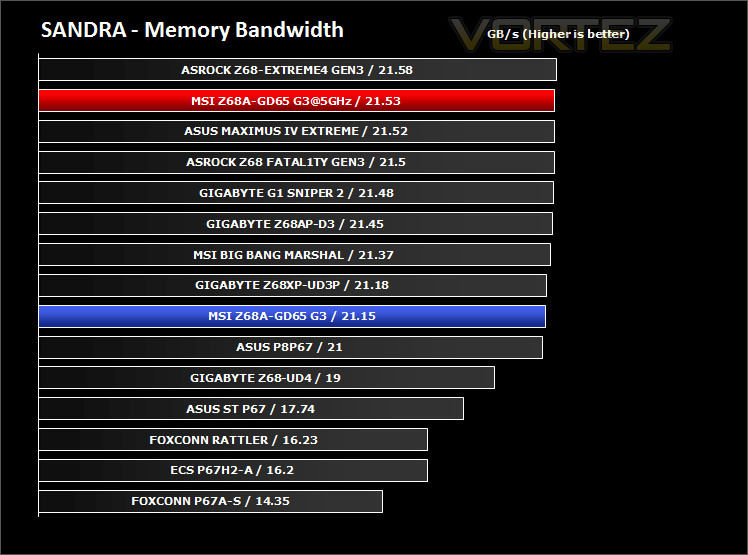
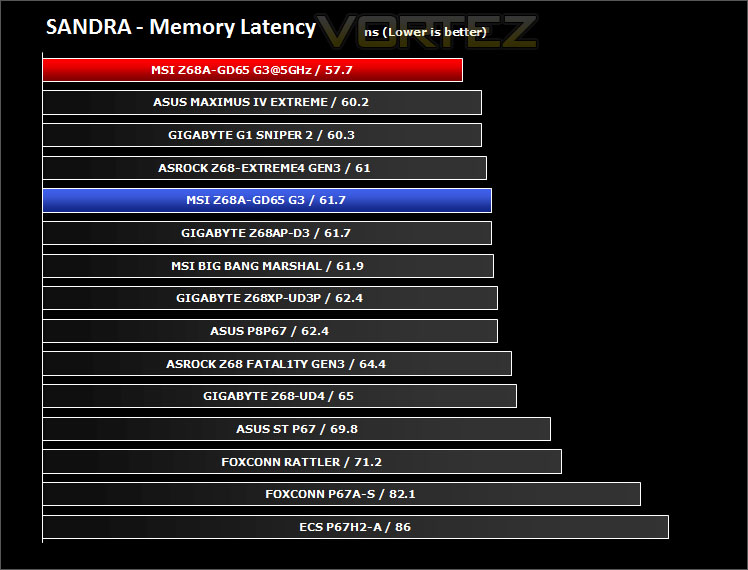
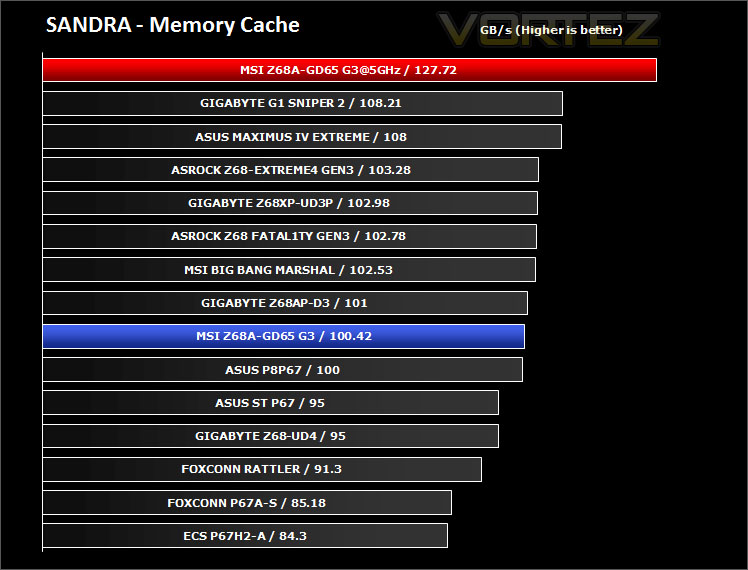
Processor tests – In these tests the GD65 G3 does an admirable job in offering consistently strong performance. As expected a nudge in the CPU frequency means the CPU tests will benefit from the added bandwidth.
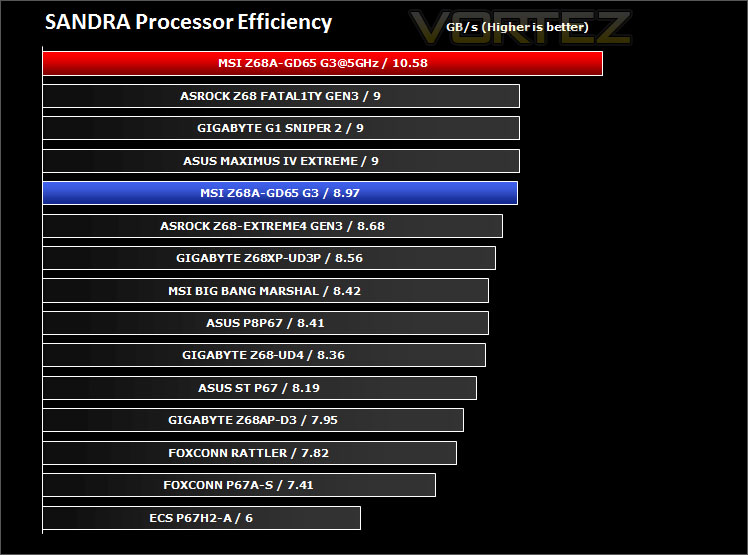
Memory tests– The GD65 G3 again does a good job. The results in these tests are marginal, the memory cache giving better results when overclocked.
Synthetic Benchmarks: 3DMark 11
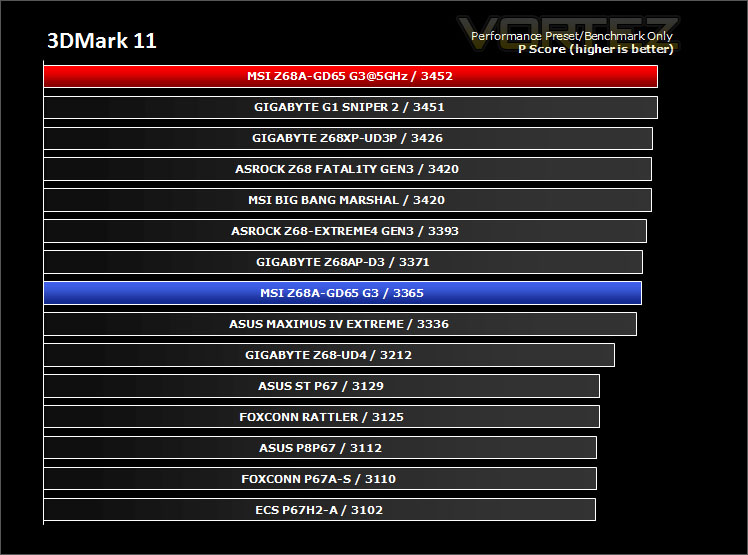
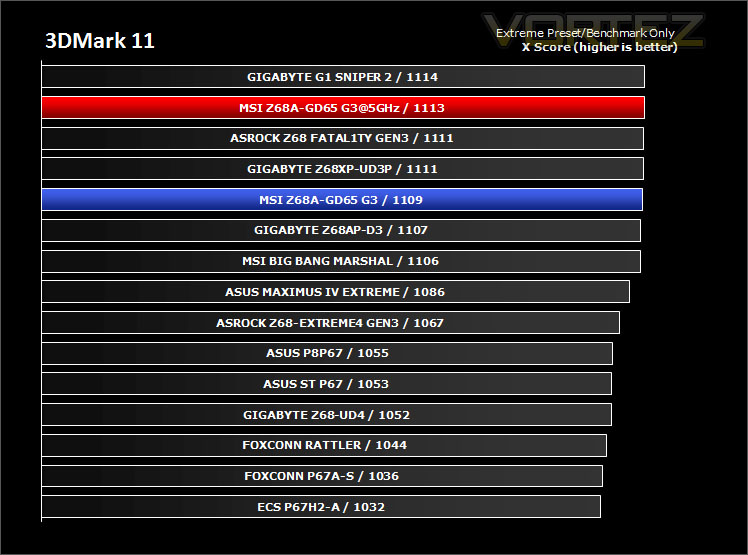
3DMark 11 was released at the end of last year and needs little introduction. For the test settings both Performance and Extreme presets are run with ‘benchmark only’ being selected. This provides good analysis. Many will only test the performance preset, using the extreme mode we can examine the board under much more severe stressing.
The GD65 G3 merges into the crowd and remains a good contender in both sets of tests. Between all of the candidates there isn’t a great deal to separate them.
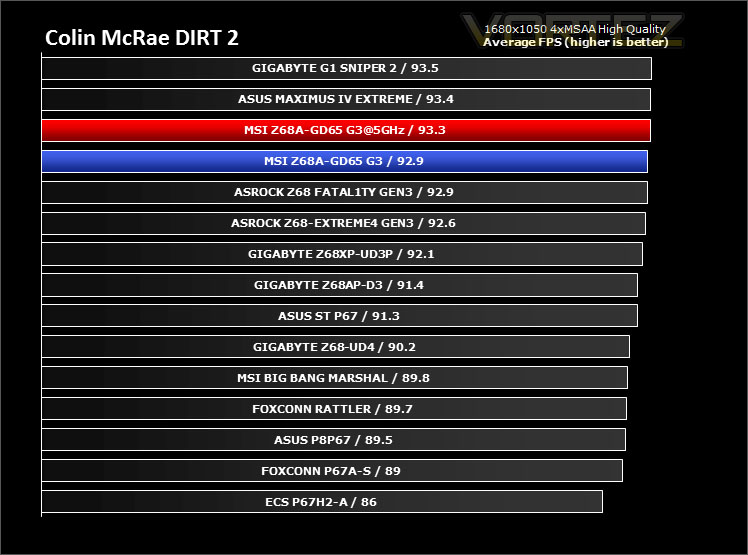
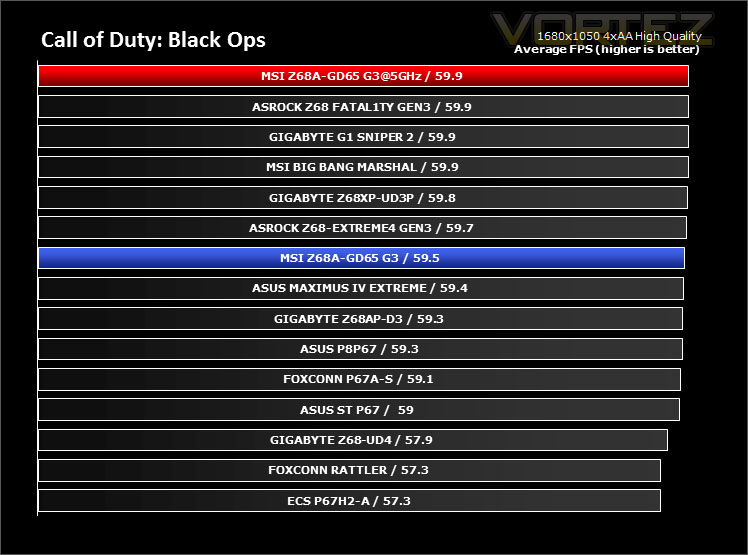
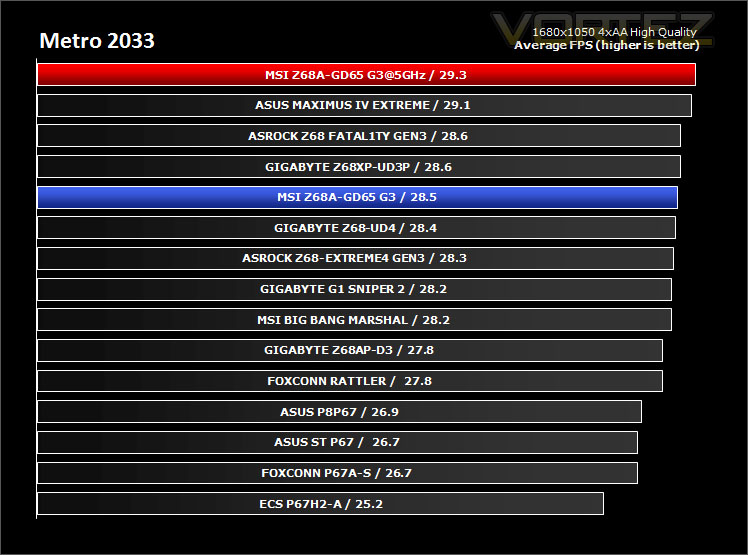
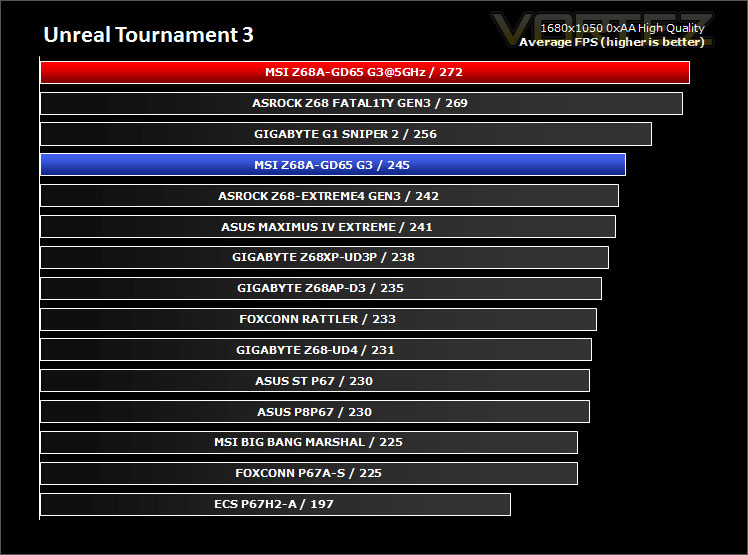
Game Benchmarks: DIRT 2, Black Ops, Metro 2033, UT3
Gaming performance across each of the motherboards is marginal; nevertheless this still indicates that our motherboard under review is a great performer.
Conclusion
We’ve experienced the delights of mainstream Z68 from other brands and now it’s the turn of MSI, but how does their offering compare against rivals?
If aesthetics are important to you then the GD65 G3 is going to be right up your street. Savage heatsinks and a two-tone black/blue colour-scheme sets this motherboard off very well indeed, overall layout and construction isn’t slap-dash – care has been taken to make this board look sharp.
In terms of performance the GD65 G3 delivered consistently good results overall and reached that 5GHz overclock milestone with ease. I decided to overclock with the new windows-based ClickBIOS II. Using this software was a fresh experience – it was easy to use and provided all the settings I needed in order to make the best alterations to the system. MSI have done a great job with the development of their new UEFI BIOS – ClickBIOS II. It just shows the true potential of what can be achieved with some careful layout choices and a keen eye for detail.
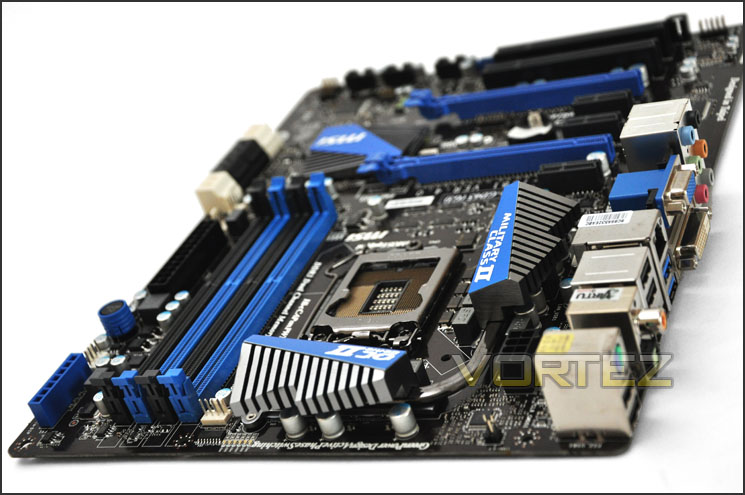
Other features include onboard power/reset buttons, OC Genie II for a fast solution overclock and dual card configuration options from NVIDIA and AMD. Based on the features and included items within the bundle the Z68A-GD65 G3 is one of my favourite mainstream offerings – it comes at the princely sum of £145.
The bottom line is The Z68A-GD65 G3 is a joy to work with thanks to a brilliantly designed UEFI BIOS/ClickBIOS II, a generous feature-set and stealthy looks to suit. If you are looking for a mainstream Z68 motherboard then add the Z68A-GD65 G3 to the shortlist, it’s definitely worth your consideration.
+ Delivers good overall performance
+ Overclocks to 5GHz
+ Affordable
+ Features new windows-based Click BIOS II
+ One of the best UEFI BIOS on the market
+ Extended 3 years warranty
Cons
– None


