The Q Series receives a full-sized ATX mid tower to its collection by way of the MasterBox Q500L. Should this affordable enclosure be on your shortlist?

Product on Review: MasterBox Q500L
Manufacturer & Sponsor: Cooler Master
Street Price: $59 USD / £50 GBP / $100 AUD
Cooler Master are one of the longest standing case manufacturers known to the industry – they’ve brought to market some stunning enclosures over the years and although the market is packed with competitors, they continue to differeniate themselves from rivals with inventive approaches such as the Q series that we’ll be checking out today.
After the successful introduction of MasterBox Q300L last year, Cooler Master are back again with the bigger brother to this alluring chassis, the Q500L.
In the Q500L we have support for an ATX configuration, which may come as a surprise to many given the tight dimensions. This computer case can house large CPU coolers, big graphics cards and has support for plenty of 2.5” and 3.5” storage too.
Are you on the hunt for an affordable case to house a new build? You might wanna check this out!
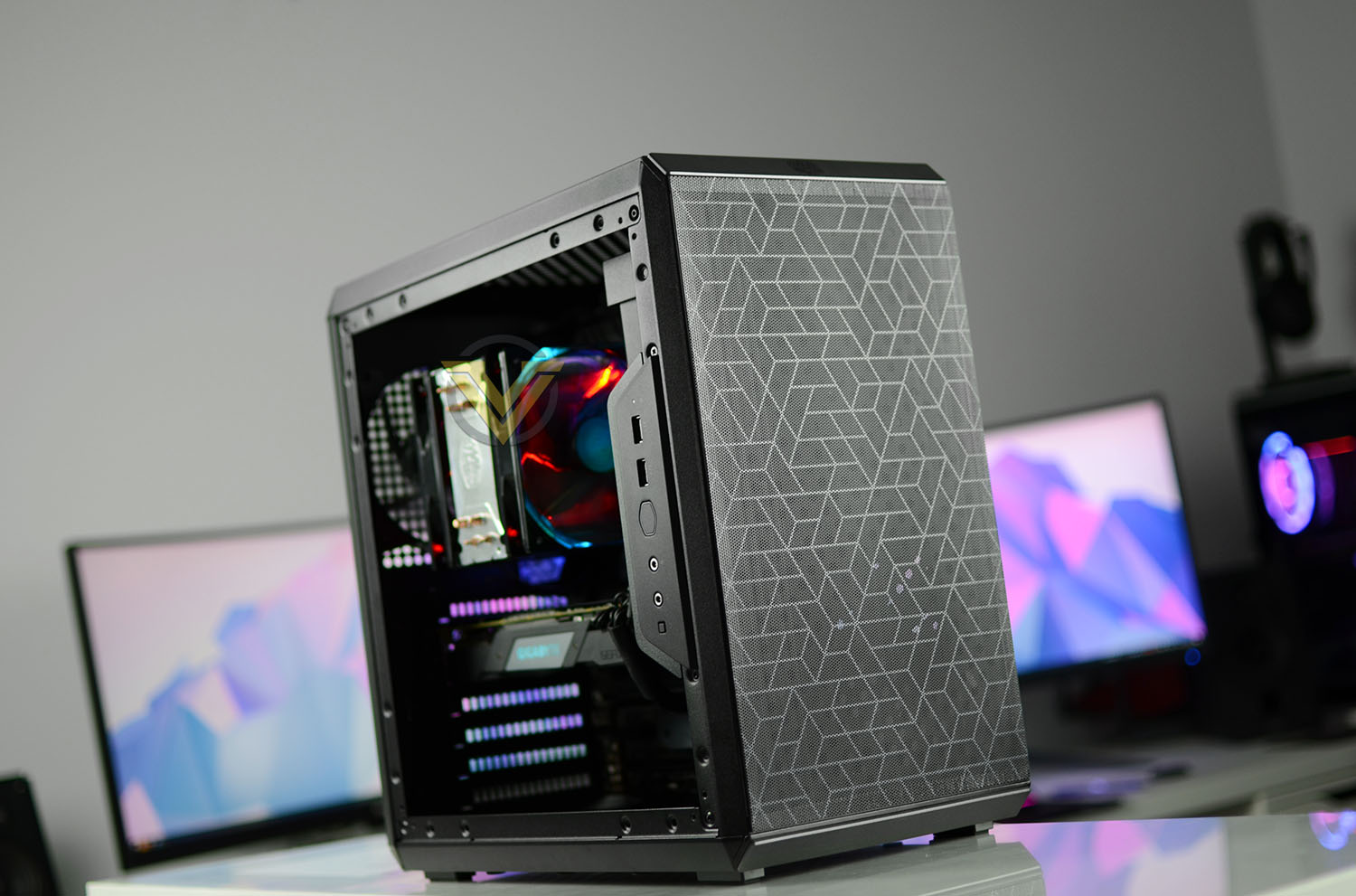
Cooler Master on their MasterBox Q500L
The modular MasterBox Q500L can orient vertically and horizontally with rubberized thumbscrews that also act as feet. Depending on hardware configuration, the movable I/O panel can be relocated to multiple positions to retain its accessibility.
Technical Specifications
Below are the technical specifications surrounding the MasterBox Q500L.
Closer Look Video
For this review we’ve also created a YouTube video which highlights all of the key features, shows a full system install and identifies the good/bad points regarding this computer case. Click the video below or go to the Cooler Master MasterBox Q500L Video.
Thermal Performance Testing
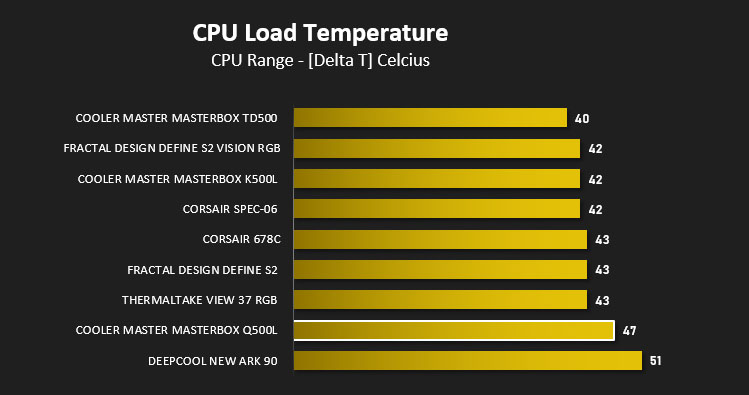
Inside our MasterBox Q500L we have just one 120mm cooling fan which is positioned as a rear exhaust. Without a push-pull configuration present we’re unlikely to achieve good results but let’s see how it shapes up below.
To discover the thermal performance of Q500L we will record idle temperatures after 20 minutes from a cold boot. We will then stress the system and temperatures will again be monitored after 30 minutes have elapsed.
For the purpose of accurate analysis, the idle and load temperatures for CPU will be recorded and the range between idle and load will be calculated to determine how efficient cooling is.
NOTE: Ambient temperature is 20C
System Components
CPU Intel Pentium K G3258 @ 4GHz
Motherboard GIGABYTE Z87X-D3H
CPU Cooler Cooler Master Hyper 212 LED Turbo
Graphics NVIDIA GTX 1080 Ti
Memory 4GB Kingston HyperX DDR3
HDD Samsung Spinpoint 500GB SATA-II
PSU Corsair RM850
Motherboard GIGABYTE Z87X-D3H
CPU Cooler Cooler Master Hyper 212 LED Turbo
Graphics NVIDIA GTX 1080 Ti
Memory 4GB Kingston HyperX DDR3
HDD Samsung Spinpoint 500GB SATA-II
PSU Corsair RM850
Noise
Q500L is quite an open case due to all of the perforations – it is possible to hear system noise but it isn’t regarded as disruptive due to there only being one cooling fan pre-installed.
Conclusion
Well, it was only a matter of time that we saw a larger version of the popular MasterBox Q300L and there actually isn’t a lot to separate this new Q500L from its smaller brother.
Casting an eye over this case and you’d probably expect it to house a Micro-ATX system due to its size. Cooler Master has done an excellent job in condensing the chassis to squeeze in the ATX form factor while also allowing support for high-performance kit like big CPU cooler and graphics cards.
There is however a trade-off, or more accurately, a number of them. Since we’re dealing with very tight dimensions the installation process can be finicky and extra time needs to be allocated for such a build. With components being so packed in, cooling is absolutely essential and unfortunately Q500L has some major drawbacks in this department. Cooler Master has fitted just one cooling fan within the chassis and furthermore it’s been configured as an exhaust. It’s understandable that having the PSU mounted at the front alters the ability to pre-install fans at the front but including a bottom-mounted intake would have been a better option – pair that with an exhaust at the top and we have a push-pull design which takes cool air across the system.
The design of Q500L does bring in some benefits though – if you’re wanting to keep things compact, then this case definitely ticks that box. It’s also lightweight too, coming in at just 5KG. If cable management is your forte, Q500L also does this very well by offering ample clearance behind the motherboard tray for organising cabling as well as hosting 2.5” and 3.5” drives.
Like the Q300L before it, the Q500L arrives with a very attractive price-tag – firmly placing it into the great value for money department. This case costs just £50 GBP – $59 USD and $100 AUD. It may not have an ideal cooling arrangement but this could easily be adjusted and improved.
The Q500L may have a few drawbacks but its low-price tag is hard to ignore. For an entry-level offering this case has a lot to offer!
Pros
+ Unique visual appearance
+ Compact design
+ Lightweight (Just 5KG)
+ No disposable PCI Express covers
+ Multiple storage options
+ Can house high-end kit
+ Great for cable management
+ Affordable
Cons
– Cooling is mediocre
– Limited water cooling support
– PSU noise can be heard from front of case
– Cost
+ Unique visual appearance
+ Compact design
+ Lightweight (Just 5KG)
+ No disposable PCI Express covers
+ Multiple storage options
+ Can house high-end kit
+ Great for cable management
+ Affordable
Cons
– Cooling is mediocre
– Limited water cooling support
– PSU noise can be heard from front of case
– Cost
Click here for an explanation of our awards at Vortez.net.
Stay connected with the Vortez Social Media pages:
Join in with the discussions on Discord