







Cooler Master’s V Series is back with the triple heatsink V8 GTS CPU Cooler. Can eight heatpipes and a vapor chamber deliver amazing performance?

Product on Review: V8 GTS CPU Cooler
Manufacturer and Sponsor: Cooler Master
Street Price: £79.99
Cooler Master have been at the forefront of the cooling market for over 20 years now and although they have branched off into other avenues, their pursuit for the cooling top spot is still a desired accolade. Our latest cooling review takes us to Cooler Master’s boldest move yet with an aggressive air cooler named V8 GTS.
V8 GTS is colossal CPU cooler which features a triple-heatsink design along with a mounting harness which have two 140mm cooling fans attached. Along with the triple-heatsinks, Cooler Master have engineered the base of V8 GTS to have a ‘vapor chamber’ – helping to eliminate hot spots on the CPU.
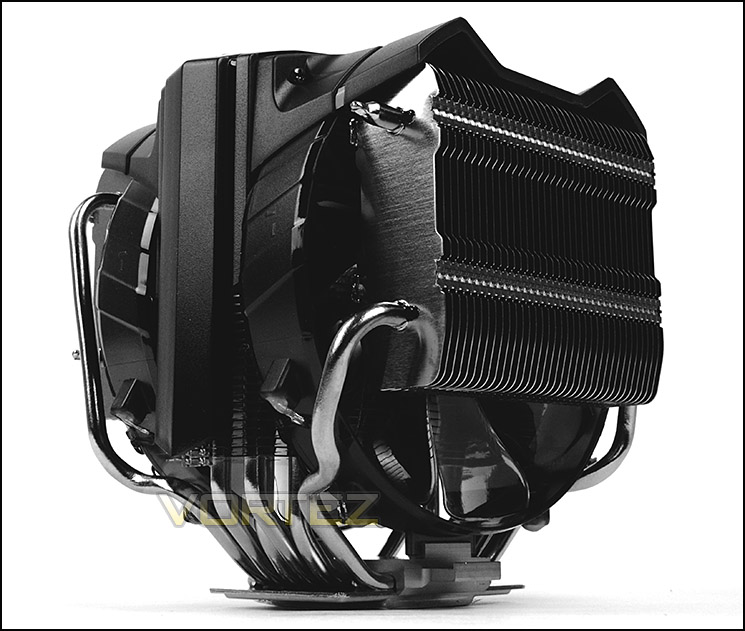
Cooler Master on their V8 GTS
The Cooler Master V8 GTS is the latest addition to Cooler Masters famous V-series of Performance Heatsink featuring a powerful car engine look. The V8 GTS features a high performance horizontal vapor chamber. It spreads heat up to 8x faster than Heatpipes which minimizes CPU hotspots and quickly balances the heat load between all heatpipes. As a result the V8 GTS features revolutionary high efficiency and cooling performance.
Technical Specifications
CPU Socket
Intel: LGA 2011/1366/1156/1155/1150/775
AMD: FM2/FM1/AM3+/AM3/AM2+/AM2
Dimension (W / H / D)
154 x 149.8 x 166.5mm (6.1 x 5.9 x 6.6 in)
Heat Sink Dimensions
154 x 140 x 153.5mm (6.1 x 5.5 x 6.0 in)
Heat Sink Material
Vapor Chamber / 8 Heat Pipes / Aluminum Fins
Heat Sink Weight
854g (1.9lb)
Heat Pipes Dimensions
6mm
Fan Dimension (W / H / D)
140 x 20 mm (5.5 x 0.8 inch)
Fan Speed
600 – 1,600 RPM (PWM) ? 10%
Fan Airflow
28 – 82 CFM ? 10%
Fan Air Pressure
0. 3 – 1.45 mmH2O ? 10%
Fan Life Expectancy
160,000 hrs
Bearing Type
POM bearing – CM 4th Gen. Bearing (*POM = Polyoxymethylene)
Connector
4-Pin
Fan Noise Level (dB-A)
16 ~36 dBA
Weight
1140g (2.5 lb)
Fan Weight
110g (0.24 lb) x 2
Intel: LGA 2011/1366/1156/1155/1150/775
AMD: FM2/FM1/AM3+/AM3/AM2+/AM2
Dimension (W / H / D)
154 x 149.8 x 166.5mm (6.1 x 5.9 x 6.6 in)
Heat Sink Dimensions
154 x 140 x 153.5mm (6.1 x 5.5 x 6.0 in)
Heat Sink Material
Vapor Chamber / 8 Heat Pipes / Aluminum Fins
Heat Sink Weight
854g (1.9lb)
Heat Pipes Dimensions
6mm
Fan Dimension (W / H / D)
140 x 20 mm (5.5 x 0.8 inch)
Fan Speed
600 – 1,600 RPM (PWM) ? 10%
Fan Airflow
28 – 82 CFM ? 10%
Fan Air Pressure
0. 3 – 1.45 mmH2O ? 10%
Fan Life Expectancy
160,000 hrs
Bearing Type
POM bearing – CM 4th Gen. Bearing (*POM = Polyoxymethylene)
Connector
4-Pin
Fan Noise Level (dB-A)
16 ~36 dBA
Weight
1140g (2.5 lb)
Fan Weight
110g (0.24 lb) x 2
Packaging & First Look
V8 GTS arrives in a small but attractive box. There is a depiction of the CPU cooler along with the fundamental features whilst the technical specifications can be found on the sides.
Inside, the CPU cooler is very well packaged with polystyrene to protect it during transit and a container for all of the included accessories.
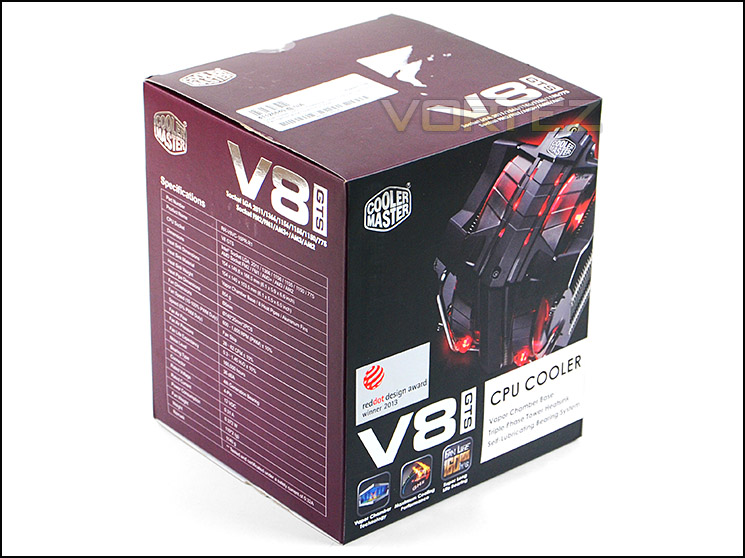
The packaging for V8 GTS
As with many other coolers which occupy the market at the moment, V8 GTS is a multi-socket CPU cooler and therefore comes with components for numerous socket types.
There is support for the following sockets:
• Intel: LGA 2011/1366/1156/1155/1150/775
• AMD: FM2/FM1/AM3+/AM3/AM2+/AM2
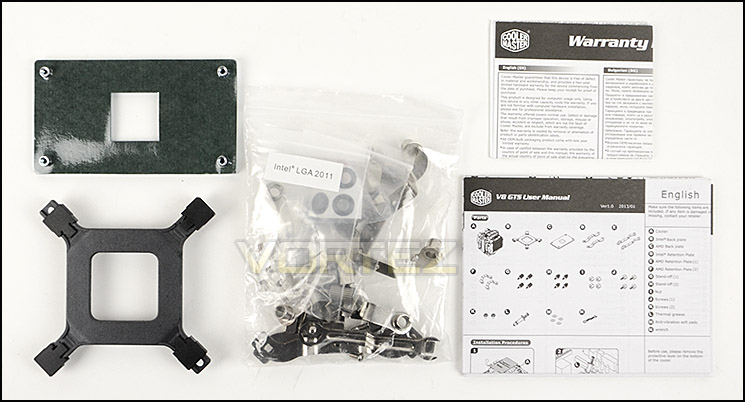
Compatibility for lots of socket types
V8 GTS comes accompanied with two 140mm cooling fans. These fans are already attached to the heatsink with a plastic mounting system as opposed to fan clips.
Both 140mm cooling fans are LED ready, emitting a warm red glow when powered up and feature a nine-blade design. Being PWM enabled, these fans operate between 600-1600RPM and come with a y-cable to allow both fans to plug into a single fan header on the motherboard.
NOTE: Both fans use Cooler Master’s 4th generation Polyoxymethylene bearing
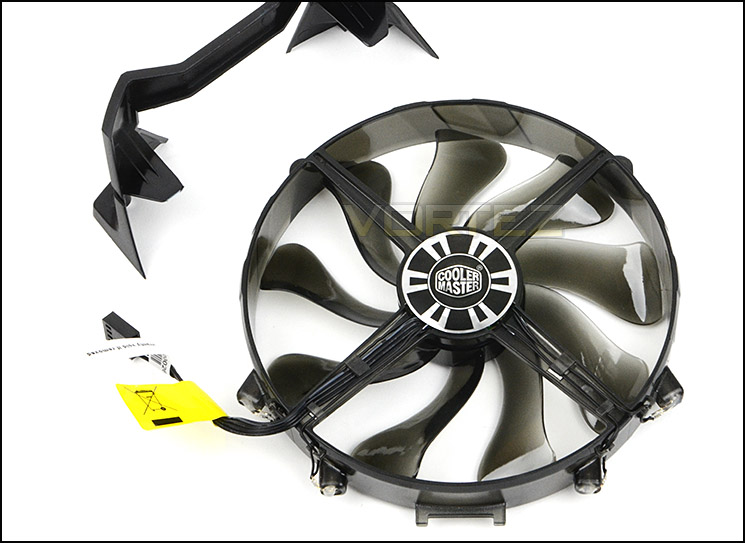
V8 GTS comes with two 140mm cooling fans
Closer Look
V8 GTS is unlike anything you will have seen before. Its shape and design are truly unique. Cooler Master engineered V8 GTS to have a triple heatsink arrangement and have given the central heatsink a mounting cover. This cover acts as a harness for the dual 140mm cooling fans.
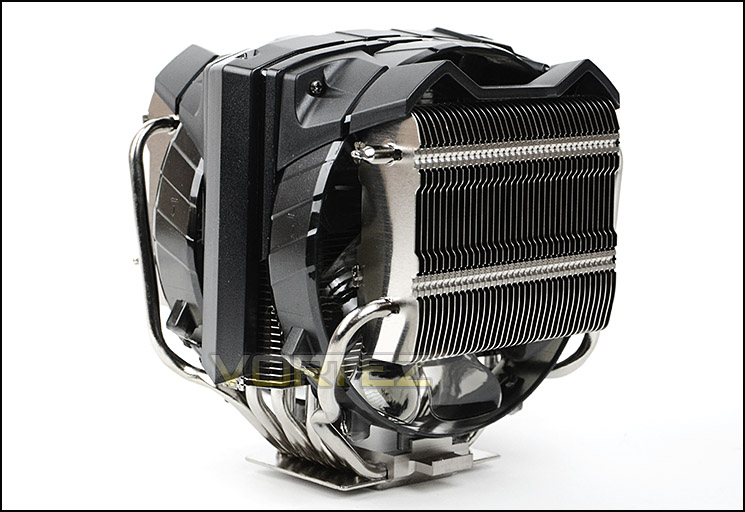
An aggressive looking CPU cooler
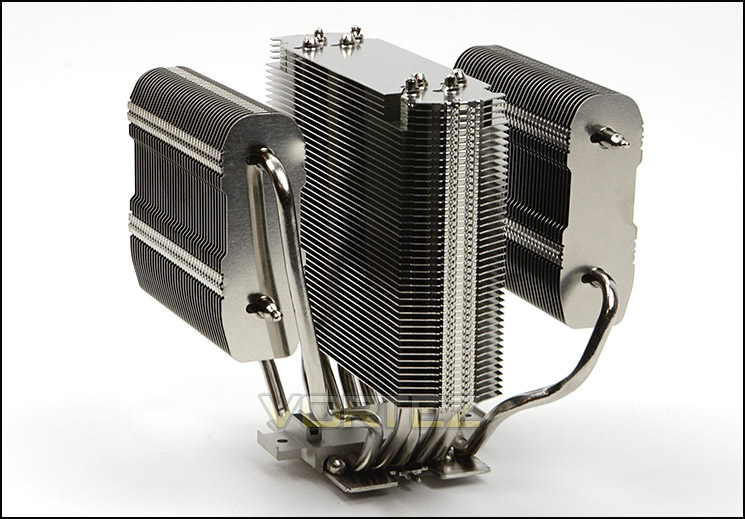
V8 GTS without mounting harness and fans
This unique triple heatsink CPU cooler makes use of a phenomenal eight heatpipe design – four allocated for the central heatsink, and another four through the additional heatsinks.
V8 GTS has an arrangement of aluminium fins which are stacked in a condensed fashion – the side heatsinks are horizontally orientated, contrasting to the central heatsink which is positioned just like a tower-style usually is, vertically.
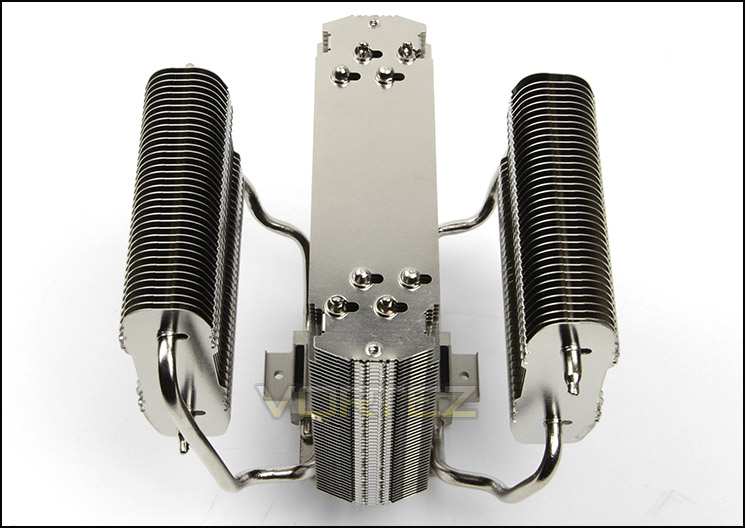
An aerial view of V8 GTS
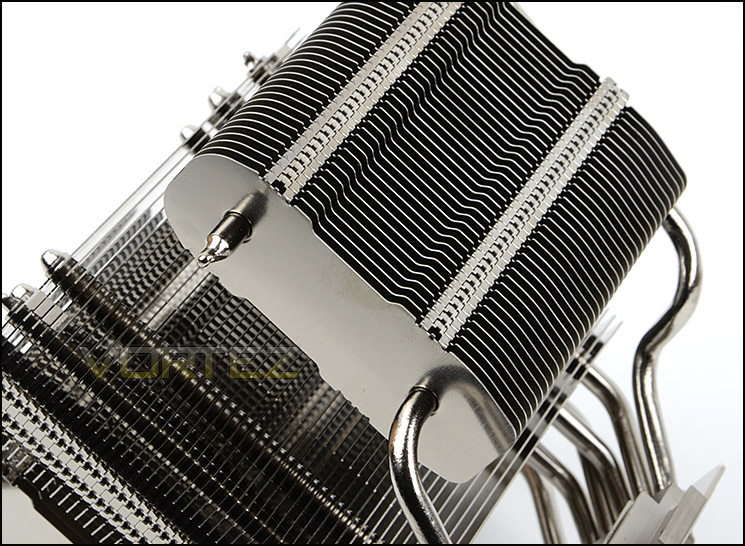
The profile of aluminium fins
The baseplate breaks away from the norm, usually CPU coolers simply have all copper heatpipes passing through them but V8 GTS uses a horizontal vapour chamber design instead. Cooler Master claim that having this base will eliminate CPU hot spots, thus spreading heat evenly. This base is semi-transparent, the surface is slightly uneven.
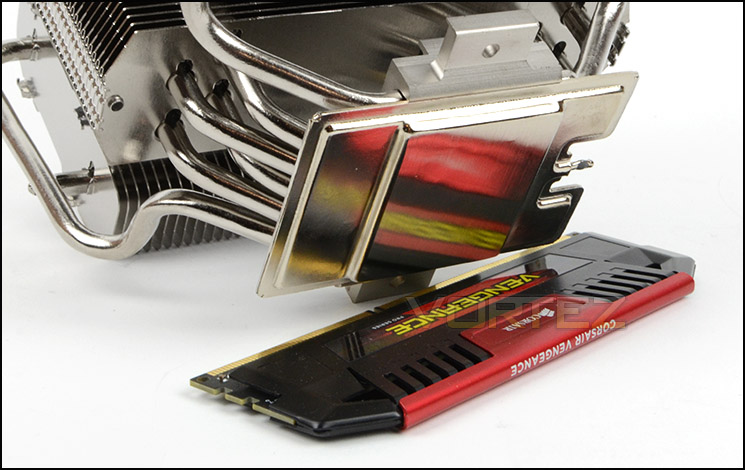
Vapor chamber design at the base
Installation Process
In order to demonstrate the installation process for Lucifer we are installing the cooler on the Intel LGA2011 socket.
The first step in the installation process is to apply four stand-off screws to the socket plate of our motherboard. Next, two mounting brackets need to be attached to the base of V8 GTS – two screws are simply tightened up to secure these brackets into place. The last step is to apply thermal paste to the CPU, position the cooler over the CPU and then attach four nuts to each corner, tightening with the provided spanner.
Although there are only a few steps in order to get up and running, care needs to be taken to ensure the stand-off screws are fastened tight enough that when the nuts are applied both components don’t turn. This can be tricky since you can only use your thumb to tighten. We would have liked to see better method of installation from Cooler Master.
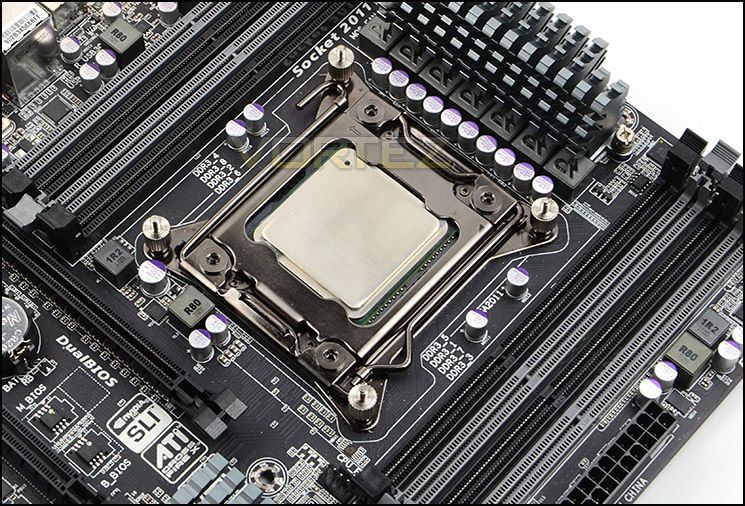
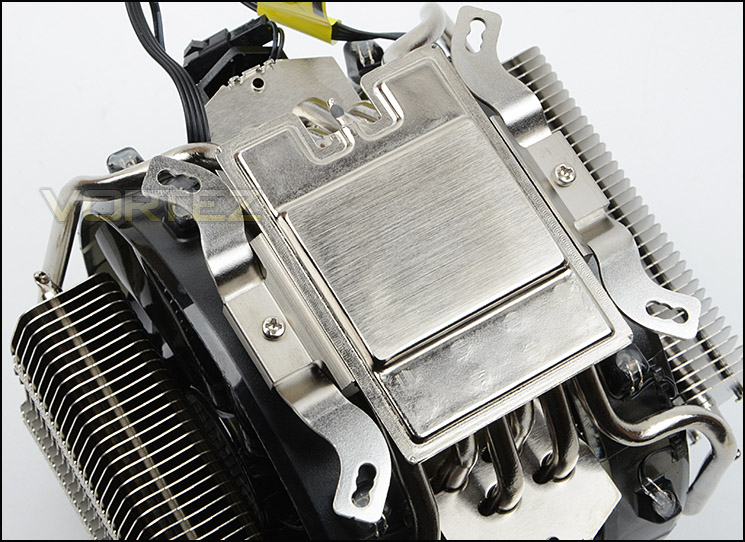
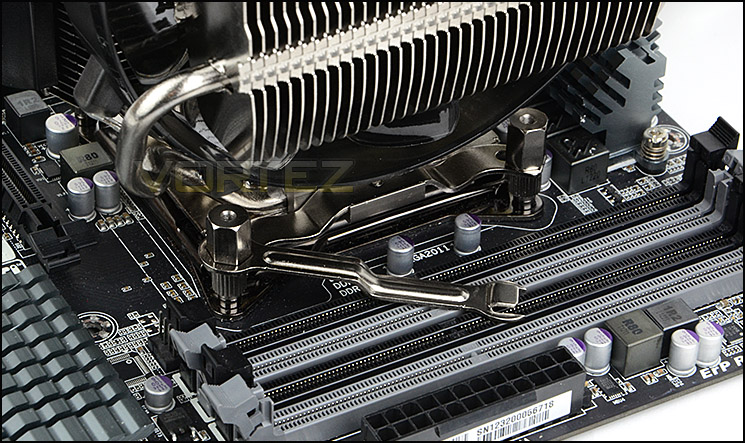
Installed – Memory Clearance
Memory clearance is something which many system builders and enthusiasts are eager to discover since this will ascertain whether a memory kit will be compatible with the CPU cooler or not. To demonstrate this, a low profile memory kit is used.
Overall Dimension
154 x 149.8 x 166.5mm
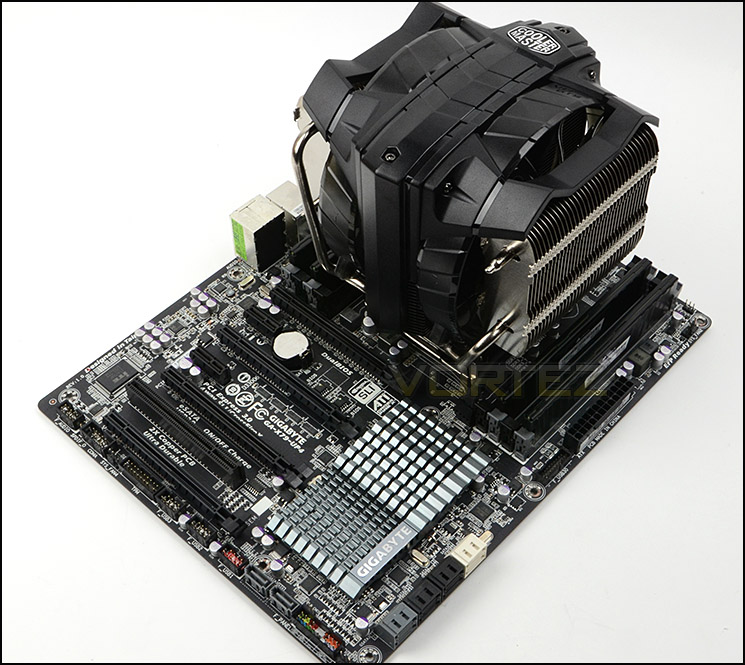
V8 GTS in all its glory
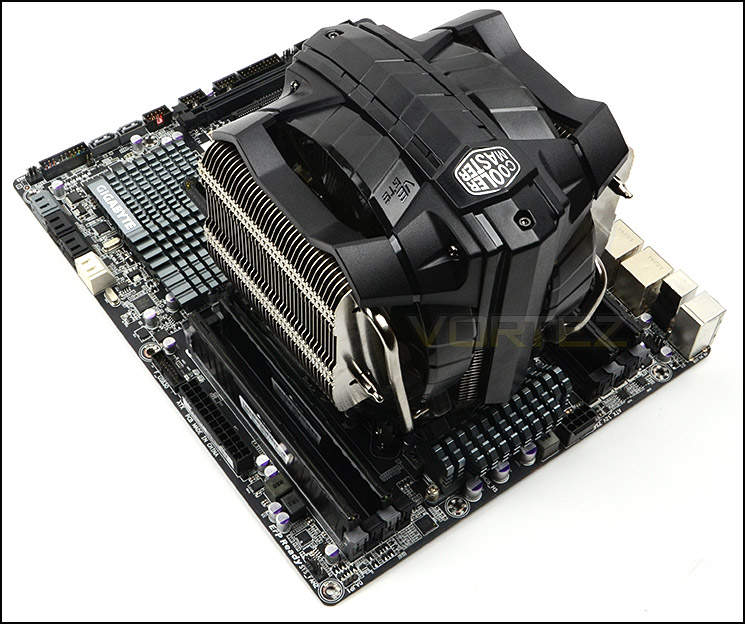
A monolith CPU cooler
V8 GTS is actually quite forgiving when we consider memory clearance which is quite surprising when you observe its dimensions and how it towers over the motherboard.
Due to the twin heatsinks at the sides being positioned higher up, memory clearance is very good. Both memory slots on either side have up to 5.5-6cm of space for taller memory kits.

Plenty of clearance on both sides for memory

Tall memory kits are compatible
Test Setup & Methodology
Test System
CPU – Intel Core i7-3930K (3.6GHz)
Motherboard – GIGABYTE X79-UP4
Memory – 8GB Corsair Vengeance LP 1600MHz CL9
Graphics – Sapphire Radeon HD 6850 1GB
PSU – NZXT Hale90 650W
Hard Drive – Kingston HyperX 240GB SATA III SSD
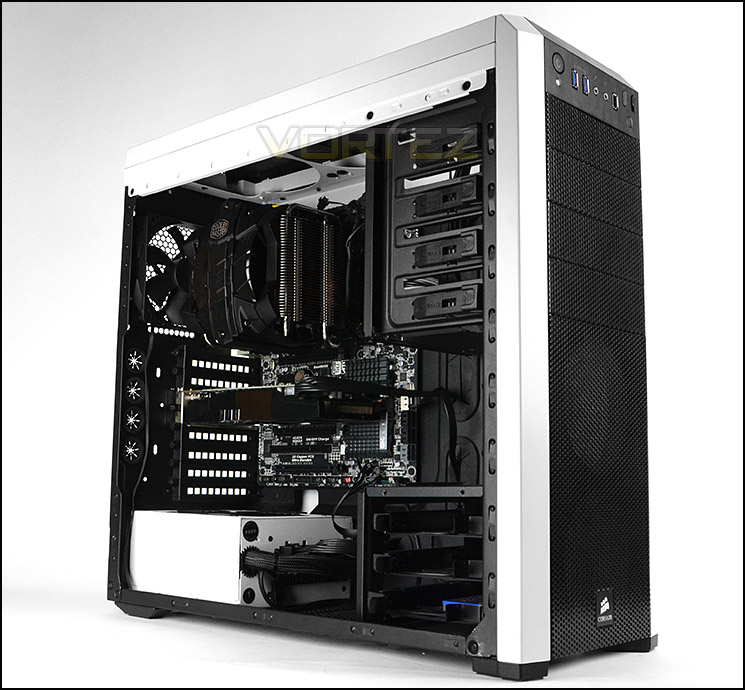
Case – Corsair Carbide 500R White
Motherboard – GIGABYTE X79-UP4
Memory – 8GB Corsair Vengeance LP 1600MHz CL9
Graphics – Sapphire Radeon HD 6850 1GB
PSU – NZXT Hale90 650W
Hard Drive – Kingston HyperX 240GB SATA III SSD
Case – Corsair Carbide 500R White
CPU Coolers
Alpenföhn Matterhorn Pure(120mm Wingboost: 300-1200RPM)
Alpenföhn K2 (120mm Wingboost: 500-1500RPM, 140mm Wingboost: 300-1100RPM)
Alpenföhn Gotthard (140mm Wingboost: 300-1100RPM)
Noctua NH-D14 (120mm NF-P12 PWM + 140mm NF-P14 PWM: up to 1200RPM)
Thermalright SilverArrow SB-E Extreme (Dual TY-143 fans – 600-2500RPM)
Corsair Hydro H100 (Dual 120mm fans – low: 1300RPM, mid: 2000RPM, high: 2600RPM Push Config)
SilverStone HE01 (140mm PWM fan – 500RPM-1200RPM – 500RPM-2000RPM)
be quiet! Dark Rock Pro 2 (135mm + 120mm PWM Fans – up to 1500RPM and 1700RPM)
Thermaltake Water 2.0 Pro (Dual 120mm PWM fans – up to 2000RPM)
Corsair Hydro Series H100i (Dual 120mm fans – up to 2700RPM Push Config)
Be Quiet! Shadow Rock TopFlow(1x 135mm PWM fan – up to 1500RPM)
SilverStone HE02 (Passive – optional fan used: Noctua NF-F12 120mm PWM)
Corsair H55 (Single 120mm fan – 1700RPM Exhaust Push)
Cooler Master Seidon 120M (Single 120mm fan – Up to 2500RPM Exhaust Push)
Zalman CNPS11X Extreme (Single 120mm fan – Up to 1950RPM)
Phanteks PH-TC12DX (Dual 120mm fans – 600-1800RPM)
Noctua NH-U14S (Single 140mm cooling fan – 300-1500RPM)
SilverStone TD03 (Dual 120mm fans – 1500-2500RPM)
Thermaltake]Thermaltake NiC C5 (Dual 120mm fans – 1000RPM – 2000RPM)
Raijintek EreBoss (Single 140mm fan – 1100RPM – 1600RPM)
GamerStorm Lucifer (Single 140mm fan – 800-1500RPM)
Cooler Master V8 GTS (Dual 140mm fans – 600-1600RPM)
Program Suite
Real Temp – Maximum temperature analysis
LinX 0.6.4 – Applies thorough stress test to CPU
CPU-Z – Confirmation of CPU frequency/voltage
AIDA64 Extreme Edition – Confirmation of temperatures/fan speeds
Testing methodology
Testing will be based on temperatures recorded by Real Temp after 20 passes of LinX stress test. The maximum absolute temperatures will be recorded after the test and averaged over the 6 cores. The delta is then calculated by subtracting the ambient temperature recorded near the intake fans from the average temperature calculated. Tests are conducted with the Intel i7 3930K at its default 3.6GHz stock speed and overclocked to 4.6GHz @ 1.42V. The tests are done inside the Corsair Carbide 500R chassis to simulate real world conditions. To keep the tests standardised we are using Noctua’s NT-H1 thermal paste on all coolers.
CPU coolers are reviewed as they come out of the box – with their factory cooling fans, as the manufacturer intended and as the consumer expects.
Additional tests include a passive test where the cooling fans are taken away from the heatsink and a comparison between the cooler used with stock thermal paste against our Noctua NT-H1 paste.
A kind thank you to Noctua for supplying us with NT-H1 thermal compound.
Results – Stock Performance
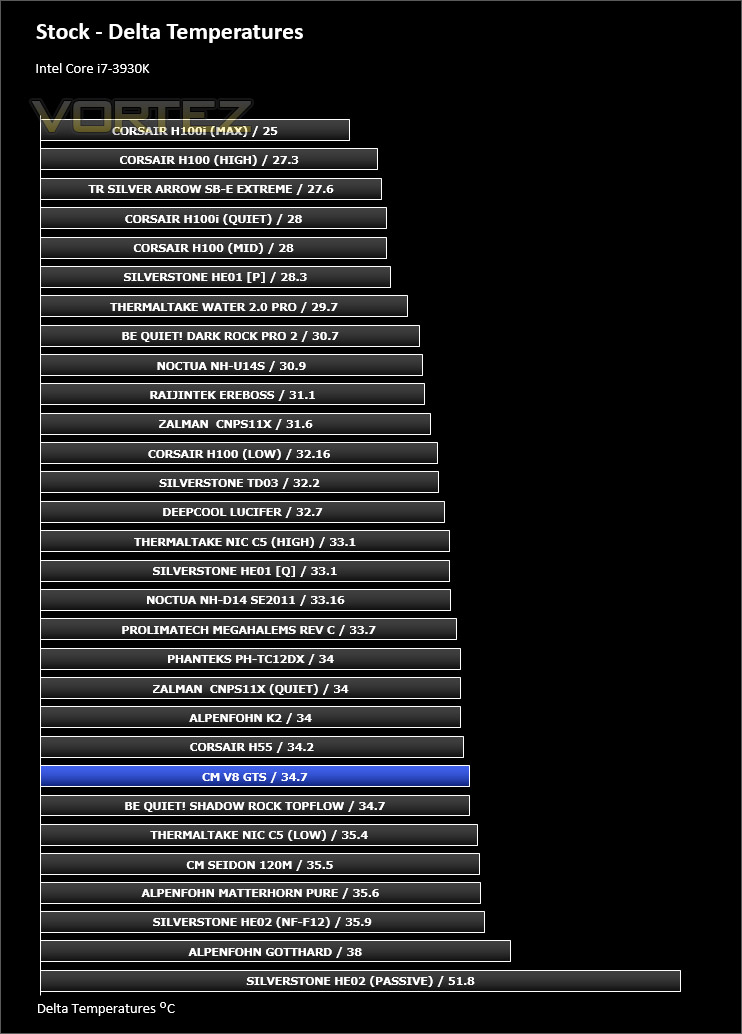
Having our Intel Sandy Bridge-E at stock settings, the V8 GTS does a reasonable job at keeping things cool but compared to the competition we expect better from Cooler Master’s offering. The noise levels from the cooling fans were quite noticeable whilst having the CPU at stock settings.
Fan speed – @1342RPM during load at stock settings.
Results – Overclocked Performance
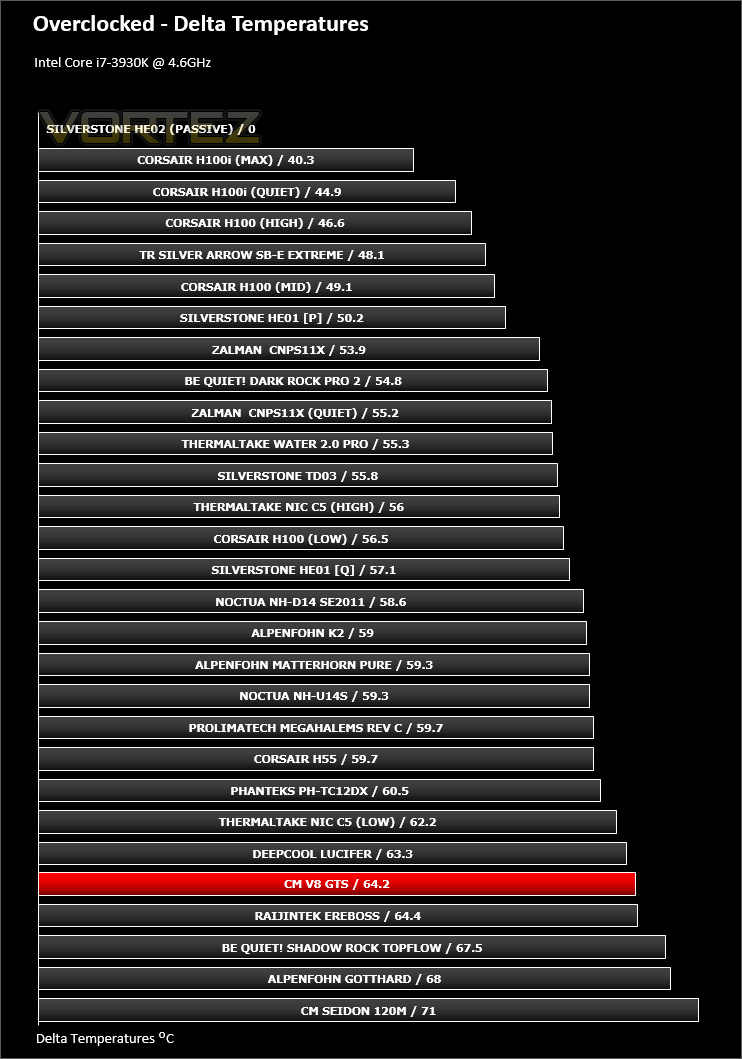
Applying a substantial overclock to the CPU pushes V8 GTS further down the chart and even with the fans spinning fast our cooler struggles to keep the CPU cool. The noise from the fans at 1500RPM+ is quite disruptive.
Fan speed – @1527RPM during load at overclocked settings.
Results – Passive Performance
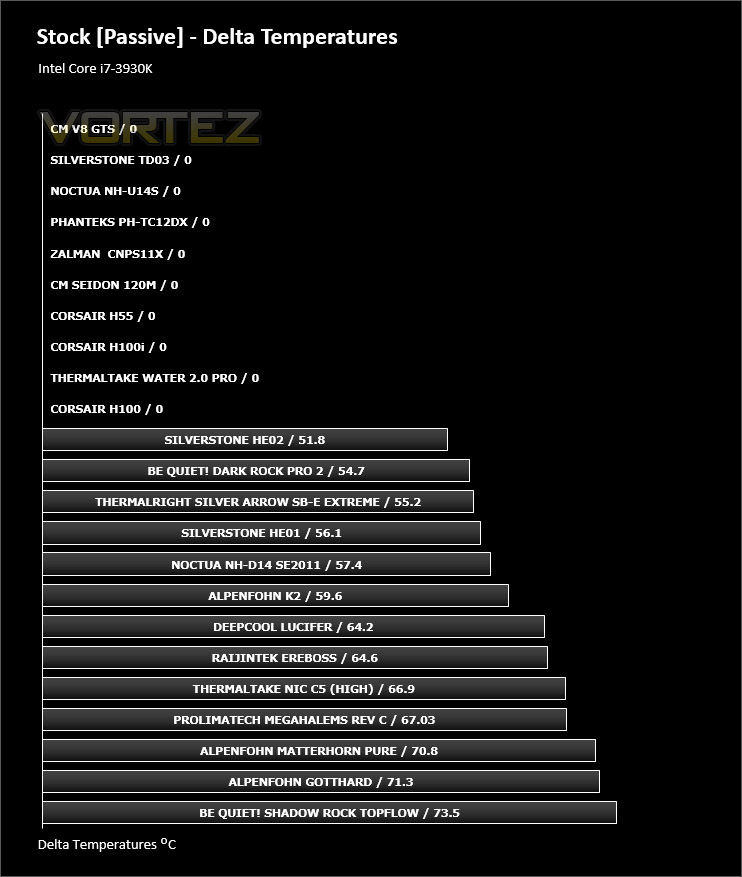
Removing those dual 140mm cooling fans and using the V8 GTS as a passive solution, our cooler fails to cool the CPU effectively. The temperatures rise to unreasonable levels (Beyond 90C).
Results – Thermal Paste Comparison
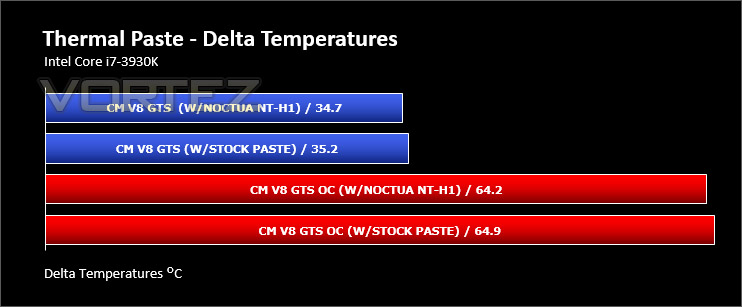
Most CPU coolers come accompanied with thermal paste provided by the manufacturer. For our CPU cooling tests we use Noctua’s NT-H1, so to offer up some interesting analysis we test the thermal paste given with V8 GTS against NT-H1 to see which gives the best results during stock and overclocked performance and the results really aren’t that much different, the Noctua is noticeably better.
Conclusion
Catching an initial glimpse of V8 GTS, it’s quite clear Cooler Master’s intention with this CPU cooler is on high-performance. Adopting a unique physical appearance, GTS is Cooler Master’s most resilient attempt at air cooling but has it been a triumph?
There is no denying that GTS is distinct in both its engineering and styling. Although the size of this cooler would lead you to believe there is poor compatibility for other components, having a triple heatsink configuration actually means there is good memory clearance if you have a tall memory kit. We also think the addition of LED lighting is a nice touch, although this could divide favour due to this type of feature being down to personal preference and since there is no on/off switch.

On the performance front, we found GTS to be a mixed bag. At both stock and overclocked settings our cooler gave our reasonable results but we have to say we expected more from a cooler of this calibre and cost. Having eight heatpipes and having such burly construction, you expect more – especially when competing products in our cooling charts are somewhat cheaper and offer the same, if not better performance.
Being priced at £79.99, GTS is one of the most expensive air CPU coolers currently on the market. Having such a big price attached to it, you really expect outstanding performance but sadly this isn’t the case at all
V8 GTS is an interesting CPU cooler. It has unique characteristics which lend itself to delivering good memory clearance and an attractive LED lighting system but unfortunately is let down by mediocre performance at both stock and overclocked settings and which also comes at a soaring price.
Pros
+ Distinct visual appearance
+ LED lighting
+ Compatible with numerous sockets
+ Good memory clearance for tall kits
Cons
– Loud fans
– Big and bulky
– Mediocre performance
– Expensive
+ Distinct visual appearance
+ LED lighting
+ Compatible with numerous sockets
+ Good memory clearance for tall kits
Cons
– Loud fans
– Big and bulky
– Mediocre performance
– Expensive

Click here for an explanation of our awards at Vortez.net.


