







Huge capacity and sleek aluminium exterior at a sub £100 price point, but can it buck the trend and offer the performance we expect from USB 3.0?

Product On Review: Flash Voyager GS 128GB
Manufacturer and Review Sponsor: Corsair
UK Street Price: £91.99 (inc. V.A.T.)
Corsair have built a sterling reputation for themselves over the years for excellent quality peripherals, cooling solutions and power supplies, but it all began for them with memory; RAM to be specific. We’re not quite back to the old days today as we’re talking non-volatile rather than volatile memory, but we are today’s review would have been classed as Corsair’s ‘core business’, before they diversified to their current extent.
Competition is hotting up in the USB 3.0 Flash Drive arena, with manufacturers moving away from re-housed USB 2.0 or low-speed controllers capable of less than 100MB/s read rates. Corsair are keen to differentiate their latest products from their rivals, and are releasing a number of USB thumb drives to satisfy a wide range of users.
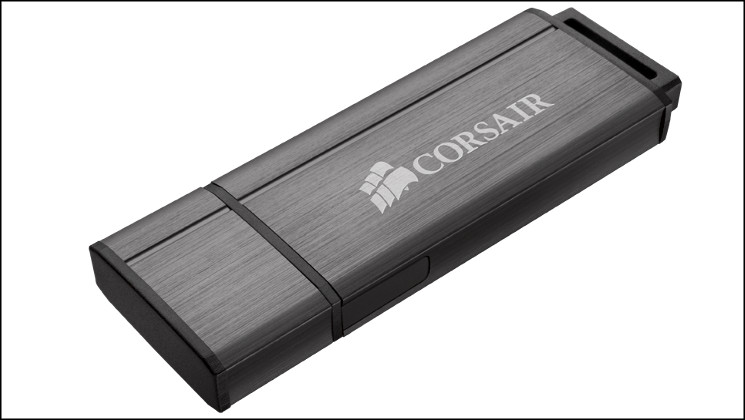
The Flash Voyager series is Corsair’s main line of flash thumb drives (often known as USB memory sticks), and there exists many subcategories with this line. The original Voyager designs were from the USB 2.0 era which have since been supplanted by USB 3.0 variants – the retracting-design Voyager LS and high performance Voyager GT. Now catering to high end users with a need for higher capacities and desire for something a little more stylish is the Flash Voyager GS.
High performance, high capacity, and high style
Flash Voyager GS is a large-capacity, high performance USB 3.0 flash drive in a sleek, scratch-resistant brushed metal enclosure.
Flash Voyager GS is a large-capacity, high performance USB 3.0 flash drive in a sleek, scratch-resistant brushed metal enclosure.
The Flash Voyager GS comes in 64GB, 128GB and 256GB flavours and is capable of file transfer rates well within the USB 3.0 envelope. In common with most USB 3.0 flash drives performance – especially write performance – is dependant on capacity; the larger the drive the higher the speed. Whichever capacity you choose however you should expect rates of around 200MB/s read and greater than 70MB/s write.
Construction is the other pillar of the Flash Voyager GS. Housed within a brushed aluminium chassis, the drive should prove to be durable for the shocks and bumps of modern life in addition to looking good and discrete if that’s important to you personally or professionally.
The 128GB variant we have today checks in at around £92 and is extremely aggressively priced when considering the market as a whole. From other vendors you can comfortably expect to shell out well over £100 for 128GB in the USB pen drive form factor (notably much more even than a SATAIII HDD), and even USB 2.0 speed drives of a similar size would exceed £55. If Corsair can live up to their performance claims the Voyager GS looks to be exceptionally keenly priced.
Features and Technical Specifications
Features
USB 3.0 speed and USB 2.0 compatibility
PCs and notebooks with USB 3.0 ports offer transfer speed that’s dramatically faster than USB 2.0, but not everybody’s there yet. Flash Voyager GS takes advantage of the faster USB 3.0 interface, while providing full USB 2.0 support.
Works with virtually any system
Flash Voyager GS is compatible with Microsoft Windows, Mac OS X and Linux. No drivers are necessary… just plug it in. In short, if your desktop or notebook has a USB 3.0 or 2.0 port, it’s compatible with the GS.
Key ring compatible
The loop at the end allows for attaching to most key rings.
PCs and notebooks with USB 3.0 ports offer transfer speed that’s dramatically faster than USB 2.0, but not everybody’s there yet. Flash Voyager GS takes advantage of the faster USB 3.0 interface, while providing full USB 2.0 support.
Works with virtually any system
Flash Voyager GS is compatible with Microsoft Windows, Mac OS X and Linux. No drivers are necessary… just plug it in. In short, if your desktop or notebook has a USB 3.0 or 2.0 port, it’s compatible with the GS.
Key ring compatible
The loop at the end allows for attaching to most key rings.
Technical Specifications
* High capacity 64GB / 128GB / 256GB
* High performance with USB 3.0 or USB 2.0
* Durable brushed aluminium housing
* Limited 5 year warranty
* Max Read: 260MB/s
* Max Write: 90MB/s
* Dimensions: 77mm x 28mm x 8mm (L x W x H)
* High performance with USB 3.0 or USB 2.0
* Durable brushed aluminium housing
* Limited 5 year warranty
* Max Read: 260MB/s
* Max Write: 90MB/s
* Dimensions: 77mm x 28mm x 8mm (L x W x H)
Packaging and Close Look
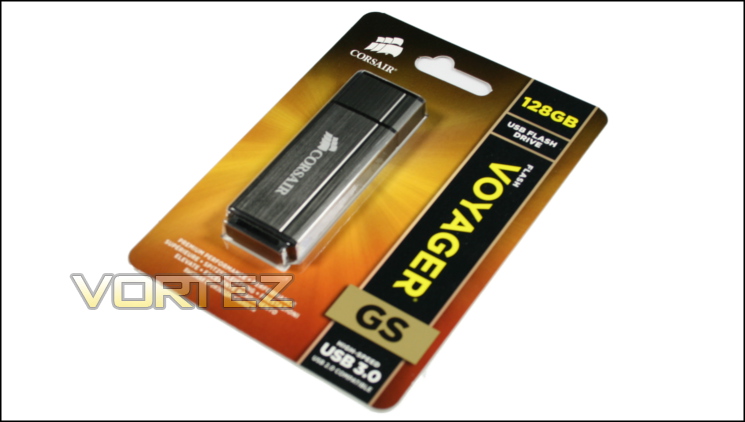
The gold and black packaging for the Flash Voyager GS series gives some indication of the premium nature of the drive inside, but colour-scheme aside Corsair are quite understated have chosen quite an understated design. The front is not plastered with performance numbers, certifications for exact technological features or other lurid claims; instead they present a more restrained layout in common with other products in the Corsair brand.
Were it not for the name of the SKU and golden colour-scheme you’d be justifiably be worried that it would get lost on the shelves against the often garish alternatives which may offer lesser speeds at the same price. Thankfully it encourages you to pick it up and take a look at the back, which is where Corsair hit you with the number-hammer.
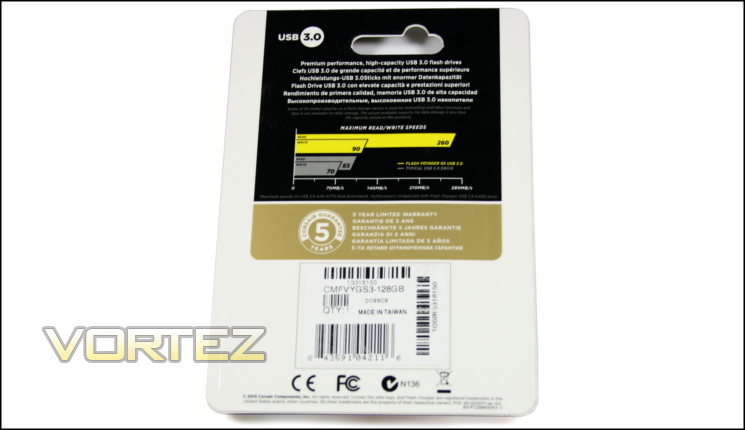
Dominating the rear are Corsair’s own performance values, and whilst impressive they’re less important than the chart itself. By including their performance claims in an easy to digest manner you begin to look more closely at the competition within arms reach (literally or figuratively) and comparing speeds rather than merely cost and capacity.
Also obviously important is the 5 year warranty, but it’s noteworthy that this is the norm for Corsair Flash Voyager pen drives. The drive still uses MLC NAND rather than the faster (and more expensive) SLC, so it’s a testament to Corsair’s own binning process and assembly standards that they should expect such a drive to last for so long.
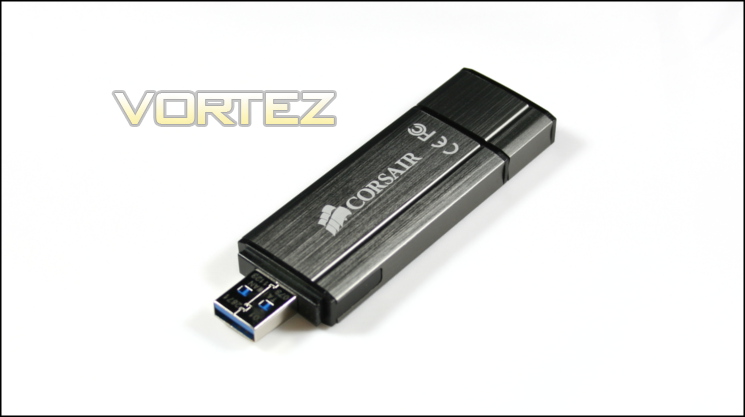
Removing the Voyager GS from its packaging we can immediately wallow in the exceptional brushed finish. The metal enclosure has added to the overall weight of the drive, making it noticeably heavier than other pen drives, although not to the extent that it becomes problematic.
In terms of size the Voyager GS is a little wider than many at 28mm, wide enough that the enclosure may start to interfere with adjacent USB slots and attached devices (depending on the layout of your backplate or front panel I/O). On the other hand if your USB slots are aligned vertically the 8mm thickness will pose no problems as that’s barely more than the overall footprint of a USB slot.
At the rear of the drive is a key-ring loop which doubles as an anchor point for the removable cap. The cap is tightly attached to the front and so should protect the sensitive USB plug quite well, but a relatively loose fit to the rear will mean that you won’t want to keep the cap there for extended periods for fear of it popping off and getting lost. Although the chassis doesn’t have a unibody design the key-ring loop appears to be well fixed to the drive.
A subtle blue LED on the rear of the drive indicates when it’s plugged in, flashing when the drive itself is being accessed. The LED is dimmer than some other competing solutions, and so shouldn’t distract the user when it’s in operation.
So, from a first impressions perspective Corsair hit it out of the park. The Flash Voyager looks the business, exudes quality and has a couple of key convenience features often overlooked. Performance is of course crucial, but there’s nothing wrong with enjoying great aesthetic design when it’s in evidence.
Testing Methodology
The following are the crucial system specs for this test.
CPU:- Intel i5-3570K @ Stock
RAM:- 8GB GEIL DDR3-1600
Motherboard:- MSI Big Bang Marshal (P67-B3) – NEC/Renasas USB 3.0 Controller
SSD:- Kingston SSDNow V+100 (230MB/s / 180MB/s Read/Write)
RAM:- 8GB GEIL DDR3-1600
Motherboard:- MSI Big Bang Marshal (P67-B3) – NEC/Renasas USB 3.0 Controller
SSD:- Kingston SSDNow V+100 (230MB/s / 180MB/s Read/Write)
Test Criteria
When testing the drive we wanted to evaluate the general speed of the drive under a couple of different conditions. As many users are still without USB 3, especially in a corporate environment, we also felt that testing the potential of the drive under USB 2.0 was important. Ideally a fast USB 3.0 drive should max out the available bandwidth of USB 2.0 – 480Mbps or 35MB/s theoretically – rather than only show an improvement under optimal conditions.
USB 3.0
The Maximum theoretical bandwidth of USB 3.0 is 5Gbps (625 MB/s); under the most common data encoding parameters this figure drops to ~400MB/s, still dwarfing the spec limits of the majority of USB 3.0 thumb drives. Though the absolute maximum data transfer rate for the drive under reasonable conditions is generally of primary importance, it’s also sensible to capture the performance with small file sizes and IOPS to allow a detailed comparison with other USB 3 drives and usage scenarios.
We’re able to test the drive against the high performance 64GB Kingston DataTraveler HyperX 3.0 and 32GB Mach Xtreme MX-ES previously reviewed. Note that unlike the MX-ES this drive doesn’t boast SLC NAND, and so has lower write rates.
USB 2.0
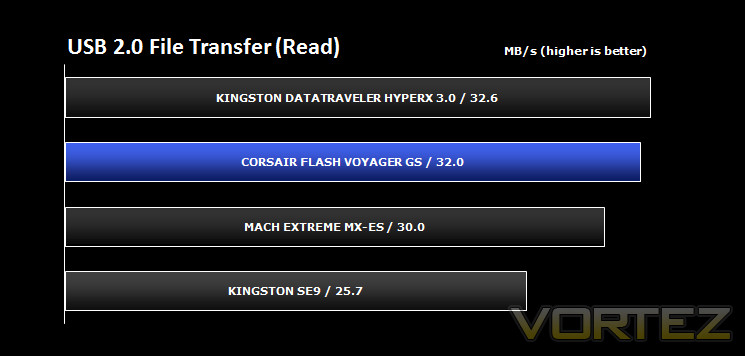
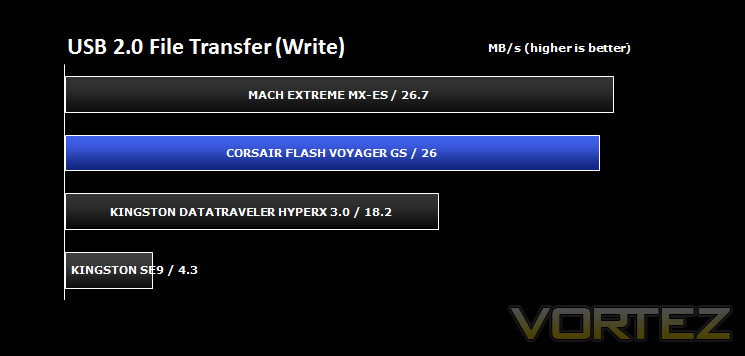
Here, all we wish to test is the speed of the drive in relation to more affordable USB 2.0 drives, and assess whether it can make the most of the 35MB/s available in this configuration. We will be comparing the Flash Voyager GS against the 32GB MX-ES, DataTraveler HyperX 3.0 and a Kingston 8GB DataTraveler SE9, which has fairly typical specs for USB 2.0 flash drives.
Testing Notes:-
1. Poorly configured or malfunctioning USB 3.0 ports may not recognise USB 3.0 devices, but still work in USB 2.0 mode for USB 2.0 devices. Do not assume that the drive is at fault if this occurs, especially if other USB 3.0 devices have yet to be tested.
2. For reasons unknown, some USB 3.0 ports may be limited to ~135MB/s read/write operation. Though not an issue for most drives, external USB 3.0 SSD enclosures and flash drives which are capable of greater speed will suffer.
Benchmarks: CrystalDiskMark 3.0
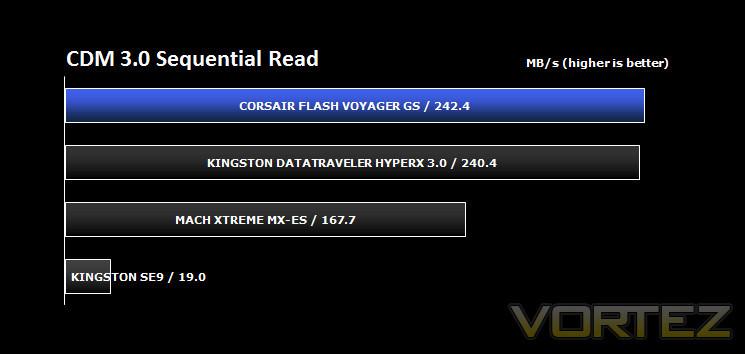
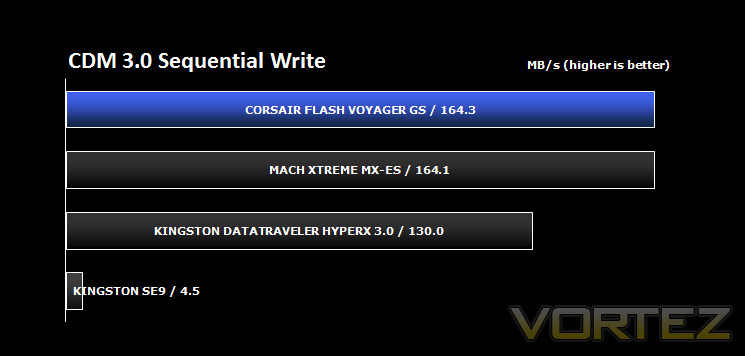
CrystalDiskMark is a disk benchmark software that analyses different types of hard drive. Giving sequential benchmark write and read statistics in MB/s. A simple program that is very useful.
CrystalDiskMark’s sequential read/write test provides generally good best case results for various storage media. The data is compressible, which is why Sandforce-based drives tend to perform well in this benchmark over suites with incompressible data; comparing these results with those for AS SSD should allow the assessment of whether drive write operations are benefiting from undocumented write compression.
Benchmarks: ATTO Disk Benchmark v2.46
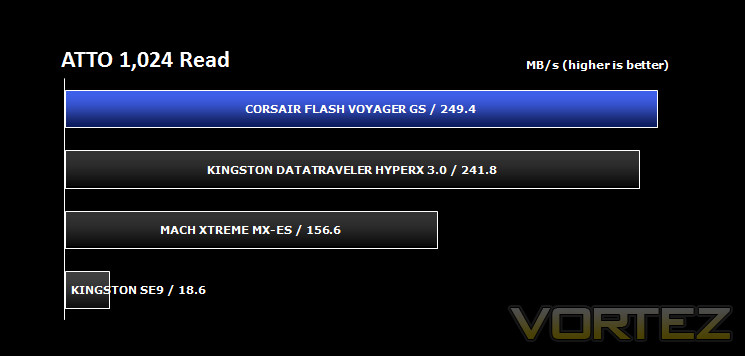
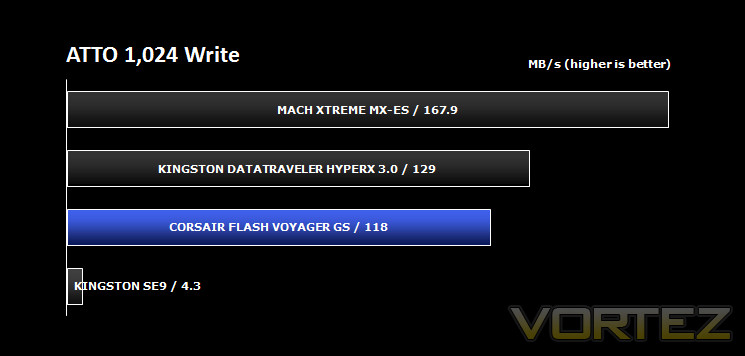
The ATTO Disk Benchmark performance measurement tool is compatible with Microsoft Windows. Measure your storage systems performance with various transfer sizes and test lengths for reads and writes. Several options are available to customize your performance measurement including queue depth, overlapped I/O and even a comparison mode with the option to run continuously. Use ATTO Disk Benchmark to test any manufacturers RAID controllers, storage controllers, host adapters, hard drives and SSD drives and notice that ATTO products will consistently provide the highest level of performance to your storage.
Benchmarks: AS SSD v1.6.4237
AS SSD Benchmark is a straightforward tool for measuring the speed of your SSD drive.
Simply launch the program, choose your drive, click Start, and it’ll test your SSD’s read and write speed in a variety of ways, delivering a score for each when it’s done. And if that’s not enough, there are also additional file copy and compression-related benchmarks available from the Tools menu. (The author’s support page is German only, but if you need further English explanations then there’s a thread on the program at the OCZ Technology forum.).
Simply launch the program, choose your drive, click Start, and it’ll test your SSD’s read and write speed in a variety of ways, delivering a score for each when it’s done. And if that’s not enough, there are also additional file copy and compression-related benchmarks available from the Tools menu. (The author’s support page is German only, but if you need further English explanations then there’s a thread on the program at the OCZ Technology forum.).
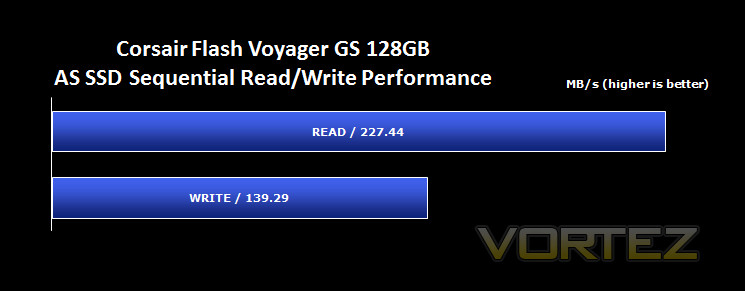
As previously noted, the AS SSD benchmark includes the facility to use incompressible data, representing data such as RAR files or encoded video which has already undergone compression. If the flash controller of the Flash Voyager GS utilised compression we would expect a heavy (40-50%) penalty to write rates vs the CrystalDiskMark and ATTO benchmarks.
Benchmarks: IOMeter
IOMeter is based on a client–server model, where one instance of the Iometer graphical user interface is managing multiple ‘workers’ (each one representing a separate Dynamo.exe process) which are doing the I/O. Iometer performs Asynchronous I/O – accessing files or block devices (later one allowing to bypass the file system buffers).
Iometer allows the configuration of disk parameters such as the ‘Maximum Disk Size’, ‘Starting Disk Sector’ and ‘# of Outstanding I/Os’. This allows a user to configure a test file upon which the ‘Access Specifications’ configure the I/O types to the file.
Iometer allows the configuration of disk parameters such as the ‘Maximum Disk Size’, ‘Starting Disk Sector’ and ‘# of Outstanding I/Os’. This allows a user to configure a test file upon which the ‘Access Specifications’ configure the I/O types to the file.
For USB Pen Drives, an IOPS test is pretty much the definition of ‘unfair’ as it simulates scenarios for which USB drives are not typically designed. Our test, which we put desktop storage through, uses IOMETER to perform 4K 50%/50% read/write cycles with 100% Random Distribution – reporting back on IOPS. This generally represents heavy database gruntwork, not something your average thumb drive should have to cope with.
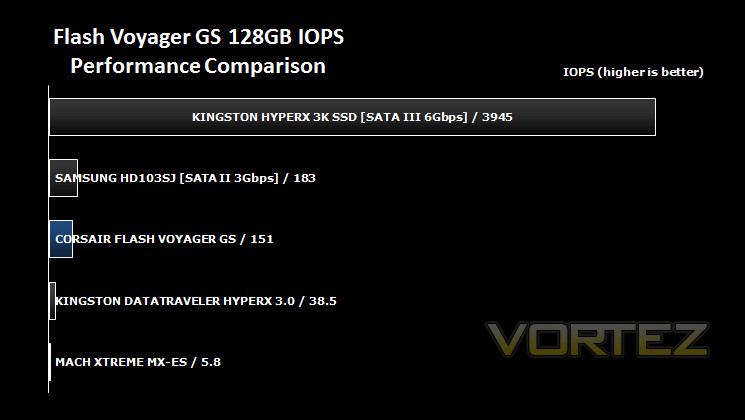
Interestingly the Corsair Flash Voyager GS is the first thumb drive we have tested which can reach the same ballpark as a baseline mechanical HDD. It’s not altogether clear why this is possible on this drive when others have struggled so mightily, but may be down to the capacity and number of IO channels in the controller for the drive. Either way, whilst it’s not quite enough to have us eager to use the Voyager GS as a secondary system storage drive, it does greatly improve the drives chops as high performance in a range of likely tasks.
Benchmarks: USB 2.0 File Transfer Speeds
Although USB 3.0 capability is becoming all the more ubiquitous within mainboard chipset definitions, USB 2.0 is still important for businesses and educational organisations with a longer hardware in-service times. USB 3.0’s backwards compatibility is especially useful, and improved controllers in modern drives may allow full use to be made of USB 2.0’s available bandwidth.
The test implemented is straightforward:- measure the time to transfer (and hence MB/s transfer speed) a sufficiently large file when using a USB 2.0 interface. In this case we have chosen a 1.546 GB MPEG4-encoded video file.
The test implemented is straightforward:- measure the time to transfer (and hence MB/s transfer speed) a sufficiently large file when using a USB 2.0 interface. In this case we have chosen a 1.546 GB MPEG4-encoded video file.
Conclusion
Navigating the minefield of the USB Flash Drive market can be problematic at times, and so we’re always pleased when a manufacturer simplifies the landscape and makes buying significantly more straightforward. Corsair have created a drive which is both high capacity and genuinely justifies its USB 3.0 connector, which isn’t quite as common as you might think.
Looking back through our benchmark results the 128GB Flash Voyager GS has excellent sequential read speeds and very good write rates, although they are sometimes surpassed by competing solutions that carry a price premium. However it’s noticeable that this varies on a benchmark-by-benchmark basis, displaying the 128GB Voyager GS’s ability to bring more data channels to bear by virtue of its greater capacity, whilst also acknowledging the strengths of the other smaller capacity drives. Interestingly the closest competitor on paper is Corsair’s own Voyager GT, which eschews >200MB/s read rates for higher write rates at the same price point. At no juncture however was the Voyager GS comprehensively bettered, especially when you consider the wide variance USB 3.0 testing tends to have.
We should also note that Corsair have significantly underplayed the speed of the drive. The 250MB/s Read and 90MB/s write rates were easily bettered, with 90MB/s especially undershooting our experience. Corsair don’t have a detailed breakdown of how these figures were generated but it’s clear to us that the drive is far more competitive than it may at first glance appear against drives with significantly higher specs.
One question we would ask however is if, once you start to need very high capacities such as this, you’d be better off moving to an external SSD solution. Thankfully the 128GB Voyager GS only comes in at approx. £92 and so comes comfortably under the cost of 120GB SSD and external caddy, making the equation much more comfortable for Corsair. However those engaging in workloads which take advantage of NCQ or benefit from good IOPS should look elsewhere due to the inherent limitations of the USB protocol.
For the majority of users, who are using their flash drive to shunt exceptionally large files between locations where doing it online would be inefficient, this thumb drive will more than meet their needs. We wouldn’t feel comfortable running our Steam Library from it for example, but moving large recorded fraps footage from a home gaming to editing PC would be an ideal use. Plus, there’s a reasonable amount of confidence in the durability of the drive keeping data safe – so long as it’s understood that such devices aren’t intended as backup storage media.
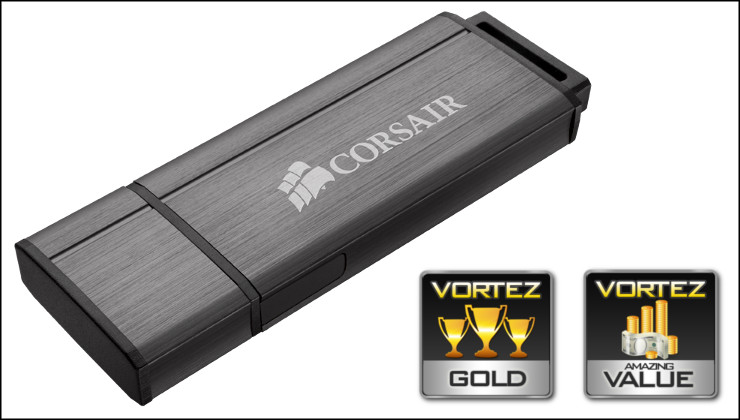
Corsair have produced yet another excellent high-performance device in the shape of the 128GB Flash Voyager GS. With read and write speeds to satisfy all but the most exacting of users, and excellent bang for your buck compared to the competition, this USB flash drive attains our Gold and Amazing Value awards.
Pros
+ Spacious 128GB capacity
+ Sleek brushed aluminium exterior
+ Durable metal chassis
+ Excellent GB per £ for a performance drive.
+ Write performance exceeded claims
Cons
– Width may obstruct adjacent USB ports depending on system configuration
– Not the fastest write speeds we’ve seen
Tips
= Carefully analyse your workload to assess whether an external ~120GB SSD would better suit your needs.
+ Spacious 128GB capacity
+ Sleek brushed aluminium exterior
+ Durable metal chassis
+ Excellent GB per £ for a performance drive.
+ Write performance exceeded claims
Cons
– Width may obstruct adjacent USB ports depending on system configuration
– Not the fastest write speeds we’ve seen
Tips
= Carefully analyse your workload to assess whether an external ~120GB SSD would better suit your needs.

Click here for an explanation of our awards at Vortez.net.


