Thinking about upgrading to SSD? We compare the newly launched F40 SSD from Corsair againt the traditional SATA-II drive.
Product on Review: Corsair Force SSD
Manufacturer and Sponsor: Corsair
Street Price: £98.69 (at time of review)

It wasn’t all that long ago when we saw IDE crushed by the influx of SATA-II and since Solid State Drives (SSDs) have arrived, a similar takeover is now underway with SSDs dropping in price and bigger capacities on the horizon. The SATA-II drive is beginning to look rather weak.
SSDs are smaller, more portable, dramatically faster, and have a significantly longer life-span. At the bottom end of the capacity range there are 40GB, 60GB and 80GB. These sized drives are dropping in price making them ideal bait for a bootable operating system drive.
Today is the first time we take a look at SSDs and so the journey begins. With having no previous drives tested it the SSD in question today will be compared to a standard SATA-II drive. This should make for an interesting article as we will see the real speed benefits of moving to SSD, showing just how much efficiency is to be had from the new successor.
Corsair have been at the very pinnacle of storage and memory based products since 1994. They have a multitude of SSDs currently available on the market and were amongst the first to launch this innovative product, today we will be taking a look the Force series and in particular the F40. The 40GB version. This is the smallest of all SSDs within the Force range, and is ideal for being used as a bootable OS drive.
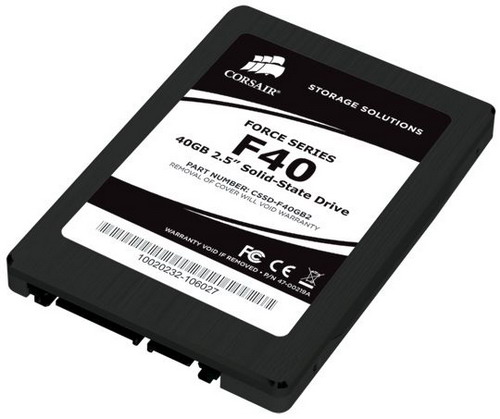
Corsair’s Taken on the F40
| For maximum performance for the ultimate system. The Corsair Force Series SSD product line offers the highest performance in Read/Write speeds of up to a maximum read speed of 285MB/s and write speed of 275MB/s. If speed is what you are looking for and what you expect from your performance or gaming system the Corsair Force Series SSD’s are the perfect choice. Based on the SandForce SF-1200 SSD Processor, the Corsair Force Series SSD’s are the ultimate performance drive. Choose from the F40, F60, F80, F120, F160 or F240 drive for the highest performance and density. Your system will start-up faster, applications and games will load quicker and you will see a huge improvement in overall system responsiveness. The Corsair Force Series SSD is the ultimate SSD for your demanding storage requirements. |
Specifications
– Capacity: 40GB
– Controller: SandForce SF-1200
– Maximum Read: 285MB/sec
– Maximum Write: 275MB/sec
– Sustained Write: 250MB/sec
– Max I/O Per Second (IOPS): 50000 IOPS (4KB File)
– NAND Flash: Latest generation Sandforce controller Multi-Level Cell (MLC)
– Interface: SATA-II
– TRIM Support (Requires Windows 7)
– Warranty: 2 Years
Corsair F40
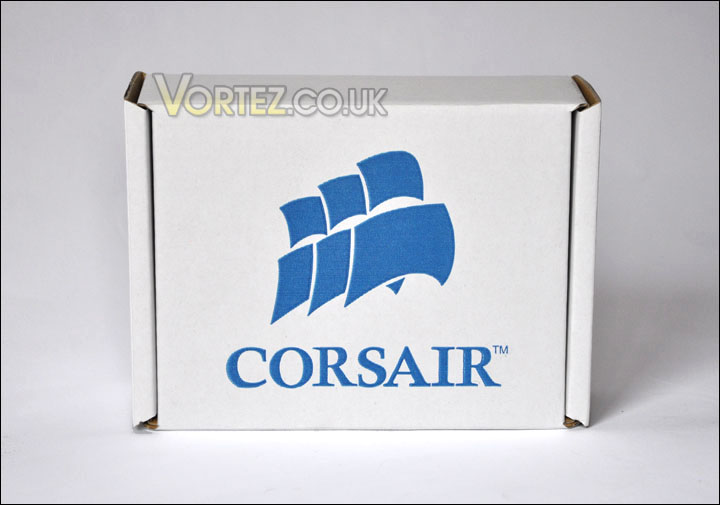
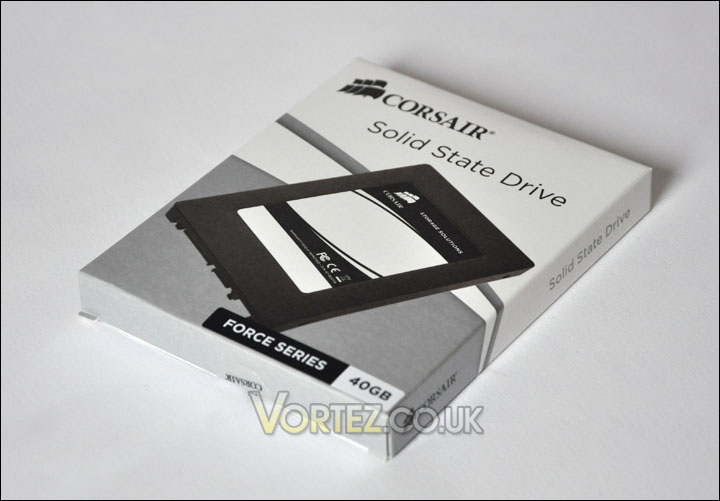
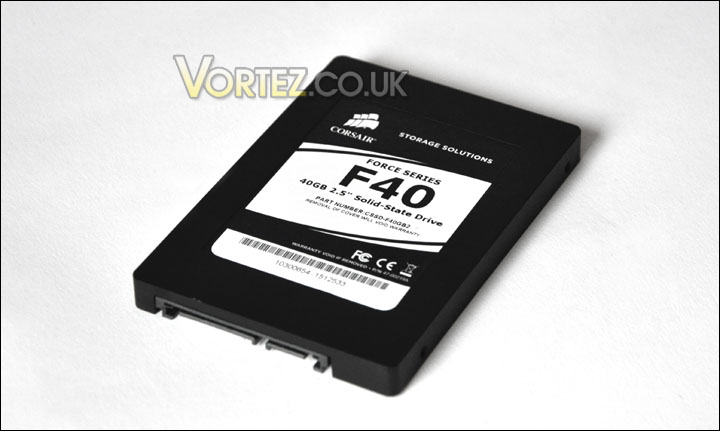
The F40 comes packaged in a Corsair cardboard box, and inside this box is a slim package containing the drive itself. Inside here, a further clear plastic shroud covers the F40. So plenty of protection for the drive, after all this is a sensitive device and it needs to be looked after whilst in transit.
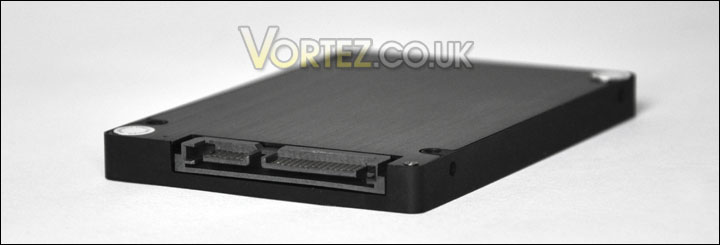
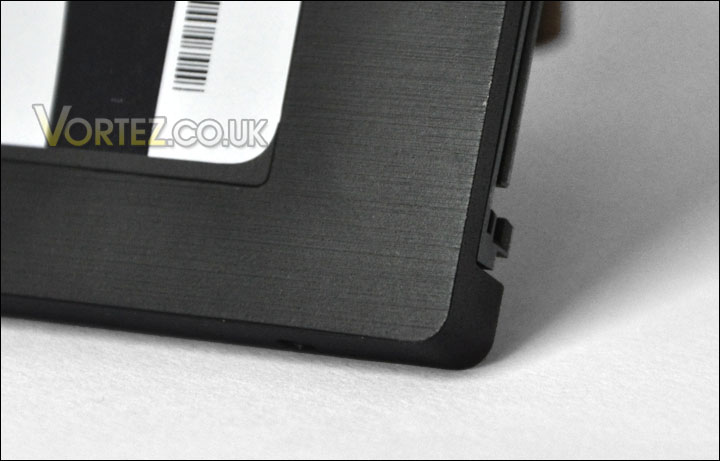
The F40 is fairly standard in SSD appearance. the drive is 2.5″ with a steel outer shell. In the centre lies a sticker with product number and brand/model name. Four screws hold the two steel panels together, on two of these screw heads are stickers warning you that removal of these stickers will void warranty. To the rear of the F40 are two connection ports, SATA power and SATA data port – besides this there isn’t anything else to comment on. The drive looks and feels good. In the next stage we will be commencing the test analysis.
Testing Methodologies
As previously mentioned this is the first of our SSD reviews so the comparison will be based on a standard SATA-II HDD. This will be an interesting analysis as it will determine how much difference there is between the media that most use (SATA-II) and the rising star that is SSD. As this is the first of SSD reviews, its important to conduct a comprehensive series of test benchmarks in order to cover a wide spectrum setting the standard for reviews to come.
Benchmarks to be considered are as follows:
ATTO Disk Benchmark v2.46
EVEREST Ultimate 5.50
CrystalDiskMark 3.0
Iometer
SiSoftware SANDRA
Test system
CPU AMD Phenom II X6 1055T 2.8GHz
Motherboard ASUS M4A89TD PRO (890FX)
Graphics MSI 8800GTX 798MB
Memory 4GB Mushkin EM3-10666 DDR3
HDD Samsung Spinpoint 250GB SATA-II
PSU Enermax Revolution85+
OS Microsoft Windows 7 Professional 64-Bit
F40 Firmware rev 1.1
Installation of the Corsair F40 is simple, or so you would think. Upon connecting the drive up Windows 7 Professional would not recognise the drive, even on different SATA ports. To have the drive appear within Windows I had to call up Disk Management (Start > Run > diskmgmt.msc) assigning the drive a letter, and formatting it before Windows would recognise the drive as part of the connected drives in My Computer.
The above tests will be conducted putting the Samsung Spinpoint 250GB SATA-II head to head with the Corsair F40. Read over the following pages to discover results in this interesting battle.
ATTO Disk Benchmark v2.46
“The ATTO Disk Benchmark performance measurement tool is compatible with Microsoft Windows. Measure your storage systems performance with various transfer sizes and test lengths for reads and writes. Several options are available to customize your performance measurement including queue depth, overlapped I/O and even a comparison mode with the option to run continuously. Use ATTO Disk Benchmark to test any manufacturers RAID controllers, storage controllers, host adapters, hard drives and SSD drives and notice that ATTO products will consistently provide the highest level of performance to your storage.”
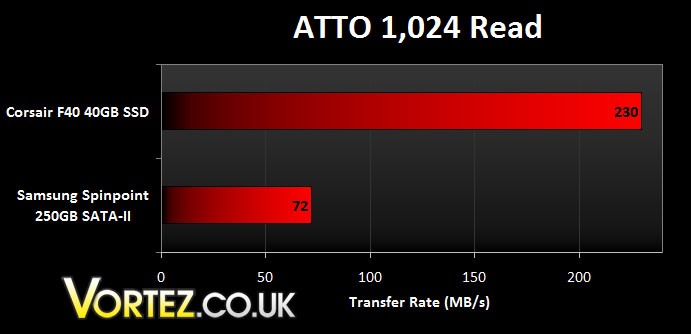
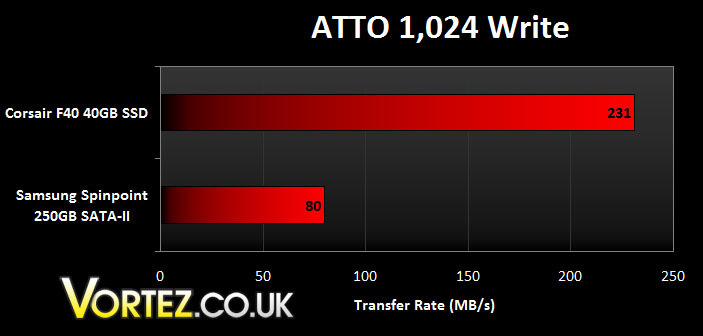
Although the read and write performance for the F40 is quite similar – the Corsair drive is almost 3 times as fast as the traditional SATA-II drive. This is very impressive.
EVEREST Ultimate 5.50
EVEREST Ultimate Edition is an industry leading system diagnostics and benchmarking solution for enthusiasts PC users, based on the award-winning EVEREST Technology. During system optimizations and tweaking it provides essential system and overclock information, advanced hardware monitoring and diagnostics capabilities to check the effects of the applied settings. CPU, FPU and memory benchmarks are available to measure the actual system performance and compare it to previous states or other systems.
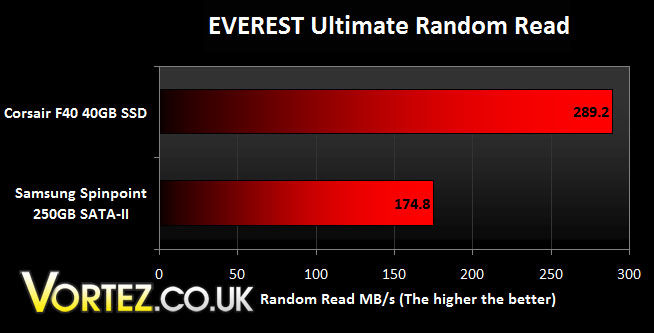
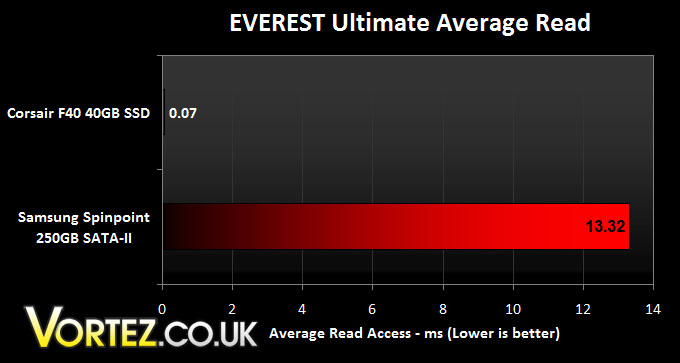
A millisecond is one thousandth of a second, so this won’t be perceivably to the human eye but there is a significant difference between the Corsair SSD and Samsung SATA-II drive in the average read test here. Again the random read performance is notably greater with the SSD drive – over 100MB/s to be had.
CrystalDiskMark 3.0
CrystalDiskMark is a disk benchmark software that analyses different types of hard drive. Giving sequential benchmark write and read statistics in MB/s. A simple program that is very useful.”
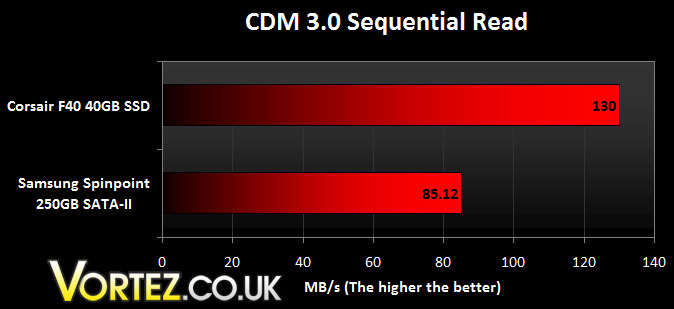
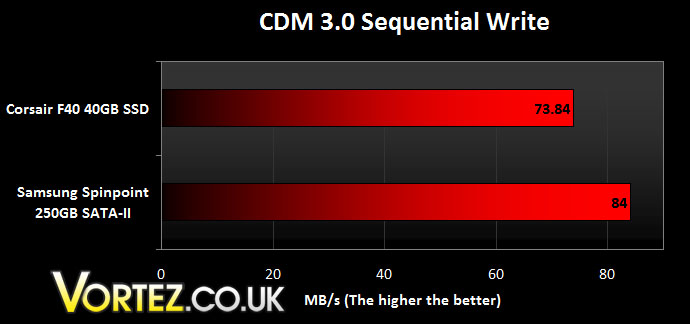
Whilst the read performance is good, surprisingly the sequential write performance is similar to that of the traditional HDD. Sequential performance is of course, slightly different to the other write benchmarks because it is uninterrupted for long periods of time.
Iometer
Iometer is based on a client–server model, where one instance of the Iometer graphical user interface is managing multiple ‘workers’ (each one representing a separate Dynamo.exe process) which are doing the I/O. Iometer performs Asynchronous I/O – accessing files or block devices (later one allowing to bypass the file system buffers).
Iometer allows the configuration of disk parameters such as the ‘Maximum Disk Size’, ‘Starting Disk Sector’ and ‘# of Outstanding I/Os’. This allows a user to configure a test file upon which the ‘Access Specifications’ configure the I/O types to the file.”
For the test specification the 4K 100% Sequential – 50% Read 50% Write test was run.
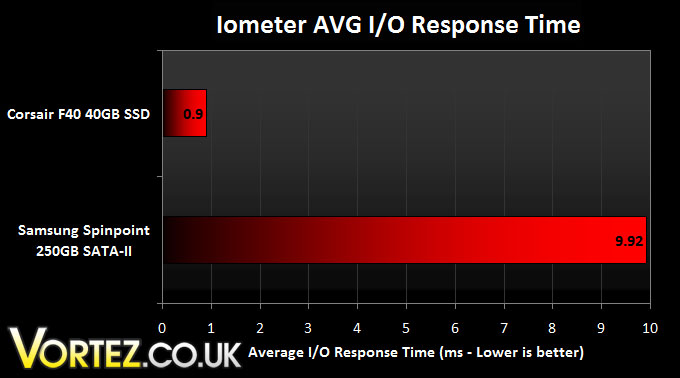
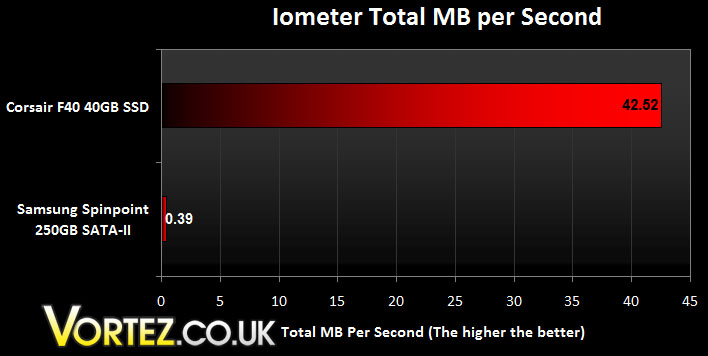
In similar fashion to the previous benchmark tests the Corsair drive responds well to this benchmark, giving some outstanding performance. There is no questioning it, this drive is very efficient.
SiSoftware SANDRA Professional
SiSoftware Sandra (the System ANalyser, Diagnostic and Reporting Assistant) is an information & diagnostic utility. It should provide most of the information (including undocumented) you need to know about your hardware, software and other devices whether hardware or software.
Sandra is a (girl) name of Greek origin that means “defender”, “helper of mankind”. We think that’s quite fitting.
It works along the lines of other Windows utilities, however it tries to go beyond them and show you more of what’s really going on. Giving the user the ability to draw comparisons at both a high and low-level. You can get information about the CPU, chipset, video adapter, ports, printers, sound card, memory, network, Windows internals, AGP, PCI, PCI-X, PCIe (PCI Express), database, USB, USB2, 1394/Firewire, etc.
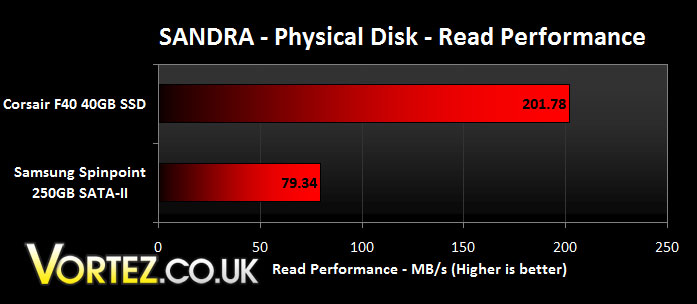
Unfortunately the write test was unavailable to this test because the Samsung drive was required to be formatted to perform the write test. Nevertheless the read test again supports all other benchmarks in that it shows that the Corsair drive is has the ability to read at over double the transfer rate of our traditional drive.
Conclusion
This review has revealed that without a doubt the SSD completely destroys the standard SATA-II HDD. The blistering performance to be had from an SSD is more than significant.
The Corsair Force series should convince you that moving to SSD can benefit you enormously. The SANDRA, ATTO and Iometer benchmarks in particular reveal some incredible read/write statistics. In many of the benchmarks the SSD performs at over double the transfer rate to that of the standard Samsung SATA-II HDD.
The F40 utilises the SandForce SF-1200 controller, this controller is revered by many within the industry because of its multi-faceted qualities.
Taken from sandforce.com
\”SSDs are capable of significantly outperforming traditional HDDs, but typical controllers haven’t delivered the compelling value necessary for mainstream adoption. SandForce DuraClass technology enables the SSD to maximize both the endurance and performance for the life of the drive fulfilling the promise of high speed Flash memory in client computing applications and improving system performance by up to 50% as measured by the SYSmark™ Benchmark.\”

So ultimately, with the F40 you are investing in a extremely fast and reliable drive. The F40 being 40GB comes in at a lower price than the larger capacity drives out there. So for around £100 you are able to have a blazingly fast OS drive that comes with a decent 2 years warranty.
+ Exceptional performance against traditional SATA-II HDD
+ Perfect size for an OS drive
+ Small, light, durable
Cons
– Newer technology costs a premium
With all aspects considered the F40 can settle for nothing less than excellent and therefore attains the Vortez Gold award.