







A full tower computer chassis, available in black, white or yellow and which comes with a plethora of features such as extensive water cooling support, fan controller and more!

Product On Review: Graphite 780T
Manufacturer & Sponsor: Corsair
Street Price: £145 GBP / $245 USD
As Corsair’s summer product release onslaught continues, the memory giant is going big by releasing a full tower-chassis under the Graphite Series. We were mightily impressed by the miniscule Graphite 380T last month but will the same be said of today’s release?
780T is a full-tower chassis which continues the favourable trait of detachable side panels by means of tool-free mechanism. Inside this burly case high-end components can easily be hosted due to the large expanse which paves the way for extensive water-cooling support, big CPU coolers and great cable management.
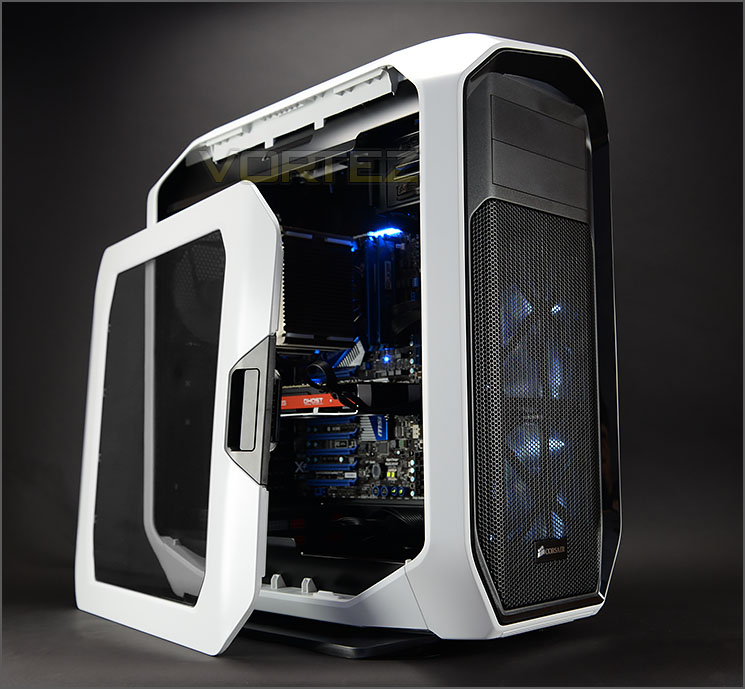
Corsair on their Graphite 780T
The stunning Graphite Series 780T Full-Tower PC case can satisfy the most hardcore computer gamer or overclocker with ample room for nine drives and nearly a dozen large cooling fans. Water-cooling enthusiasts will appreciate the generous space for dual 360mm radiators. The 780T offers easy maintenance shortcuts like tool-free removal of side panels, hard drives, and graphic cards. A three-speed fan control button and generous options for your array of peripherals make the front-panel a true time saver.
A nicely-built high performance PC can be a thing of beauty. This is truer than ever with the sleek, artfully crafted, and undeniably stunning Graphite Series 780T. The striking Graphite Series 780T full tower PC case is the perfect place for your high-end PC parts and delivers a knockout when it comes to performance capabilities and ease of maintenance.
A nicely-built high performance PC can be a thing of beauty. This is truer than ever with the sleek, artfully crafted, and undeniably stunning Graphite Series 780T. The striking Graphite Series 780T full tower PC case is the perfect place for your high-end PC parts and delivers a knockout when it comes to performance capabilities and ease of maintenance.
Technical Specifications
Features:
– Rounded corners and a sleek, cohesive design for great-looking systems
– Latched side panels for easy access
– Supports dual 360mm radiators for state-of-the-art cooling installations
– Front panel three-mode fan controller lets you tailor performance and fan noise
– Dual 140mm LED intake fans and a 140mm exhaust fan for ample airflow
– Six Modular hard drive cages and three space-saving side-mounted SSD bays for smart storage
– Maximum CPU Cooler Height – 200mm
– Maximum GPU Length – 355mm
– Maximum PSU Length – 260mm
Form Factor
E-ATX, XL-ATX, ATX, Micro-ATX, Mini-ITX
Dimensions (H x W x D)
602mm x 288mm x 637mm (23.7” x 11.3” x 25.1”)
Radiator Compatibility:
– Front – 360mm or 280mm
– Top – 360mm or 280mm
– Bottom – 240mm
– Rear – 140mm
Fans:
– Front fan mounts: 3 x 120, 2 x 140 mm
– Top fan mounts: 3 x 120, 2 x 140mm
– Bottom fan mounts (with HDD cage removed): 2 x 120mm
– Rear fan mounts: 1 x 140/120mm
– Rounded corners and a sleek, cohesive design for great-looking systems
– Latched side panels for easy access
– Supports dual 360mm radiators for state-of-the-art cooling installations
– Front panel three-mode fan controller lets you tailor performance and fan noise
– Dual 140mm LED intake fans and a 140mm exhaust fan for ample airflow
– Six Modular hard drive cages and three space-saving side-mounted SSD bays for smart storage
– Maximum CPU Cooler Height – 200mm
– Maximum GPU Length – 355mm
– Maximum PSU Length – 260mm
Form Factor
E-ATX, XL-ATX, ATX, Micro-ATX, Mini-ITX
Dimensions (H x W x D)
602mm x 288mm x 637mm (23.7” x 11.3” x 25.1”)
Radiator Compatibility:
– Front – 360mm or 280mm
– Top – 360mm or 280mm
– Bottom – 240mm
– Rear – 140mm
Fans:
– Front fan mounts: 3 x 120, 2 x 140 mm
– Top fan mounts: 3 x 120, 2 x 140mm
– Bottom fan mounts (with HDD cage removed): 2 x 120mm
– Rear fan mounts: 1 x 140/120mm
First Look
Graphite 780T arrives in a large eco-friendly box which we’re now very familiar with. The actual box is double-reinforced cardboard and details some of the integral features for 780T.
Inside, the case is covered in a fabric sheet and protected with dual polystyrene blocks to ensure a safe arrival.
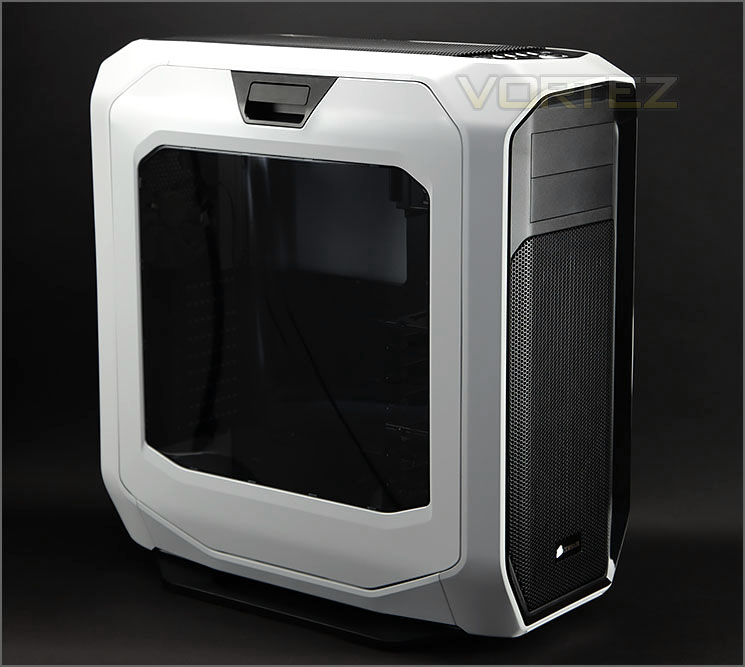
Large Perspex window and unique side panels
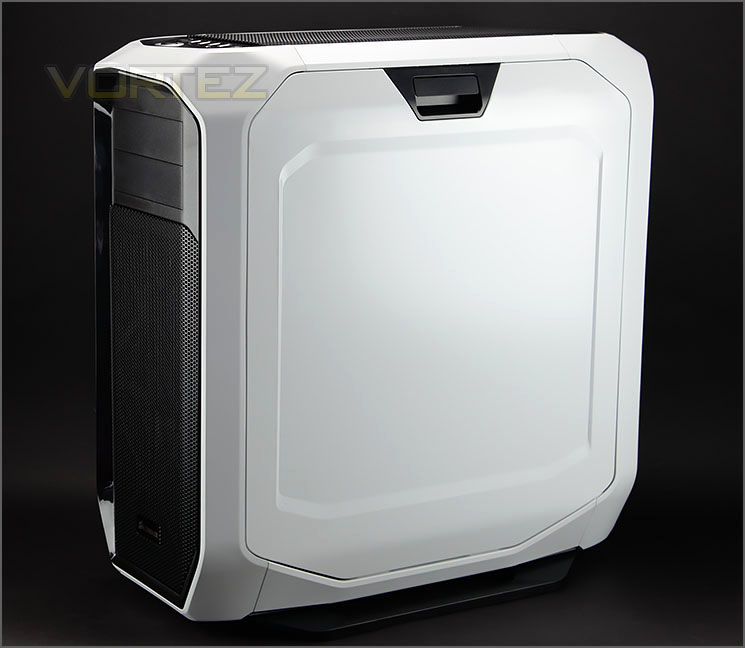
Super-clean aesthetics
780T is available in three colours; black, white or yellow – today we’re reviewing the white variant. It’s fairly obvious from the sheer size of 780T that this case is characterised as a full tower.
Both sides of 780T feature an easy to remove panel – a latch mechanism allows the panel fall away from the case. Having such a design means that it’s really easy to get in and out of the case.
The prominent side features a large Perspex window allowing a view of the internal components while the reverse side is pretty much plain. Both panels follow a convex contour, providing some additional space for hardware and cables.
On the next page we’ll take a good look at the external elements of 780T.
Exterior
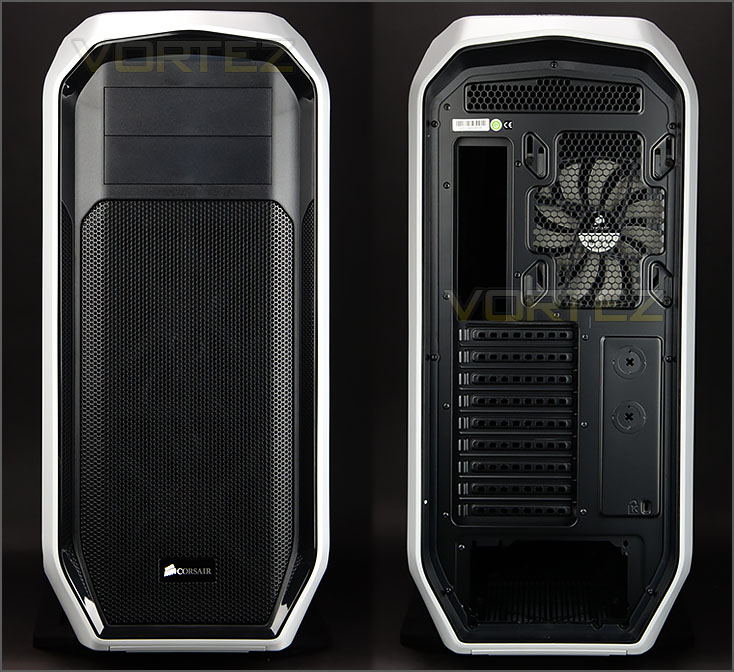
The front and back of 780T
At the front of 780T there is a large perforated mesh panel which can be detached. This panel provides ventilation for the dual 140mm cooling fans at the front. At the top there are two plastic 5.25” drive bay covers, these are both removable via access from inside the case.
Around the back of the case there is an opening at the bottom for mounting the PSU. Above this there are nine PCI expansion slot covers, each have ventilation holes. Beyond this there is a 140mm rear exhaust cooling fan (AF140L). This particular spot can also accommodate 120mm fans too. At the very top there is some honeycomb mesh for additional ventilation.

Dual AF140L LED fans at the front
With a soft press in each corner of the front panel we can gain access to the underside which contains two 140mm cooling fans (AF140L) – these fans are LED ready and emit a white glow when powered up. The front of 780T actually supports 3x 120mm or 2x 140mm fans and therefore paves the way for 240/280/360mm radiator support at the front; further in our review we’ll be looking at the clearance options for such components.
The detachable panel has a filter pre-attached.
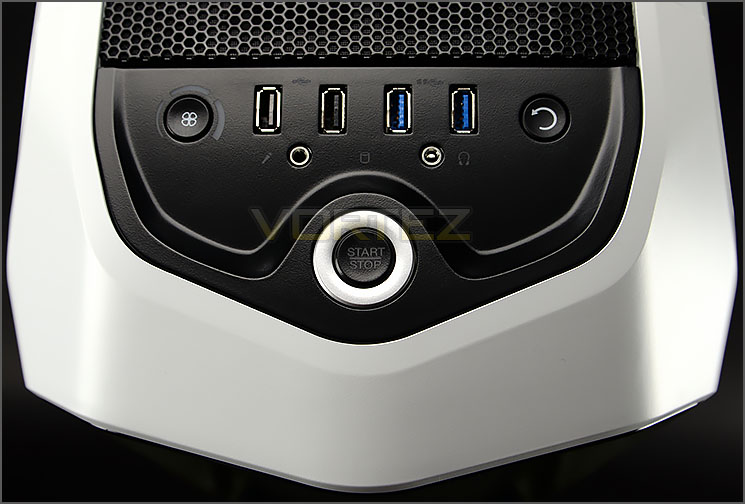
Three-speed fan controller
Up at the top of 780T there is a front panel connectivity console. This panel contains a number of useful ports and buttons which consist of the following:
• 2x USB 2.0 ports
• 2x USB 3.0 ports
• Power/Reset buttons
• Headphone/Microphone jacks
• Three-speed fan controller
Having the three-speed fan controller in this particular region is very handy. The button has a set of corresponding LEDs, signifying low, medium and high settings. The fan controller can support up to five cooling fans and is powered via SATA/Molex.
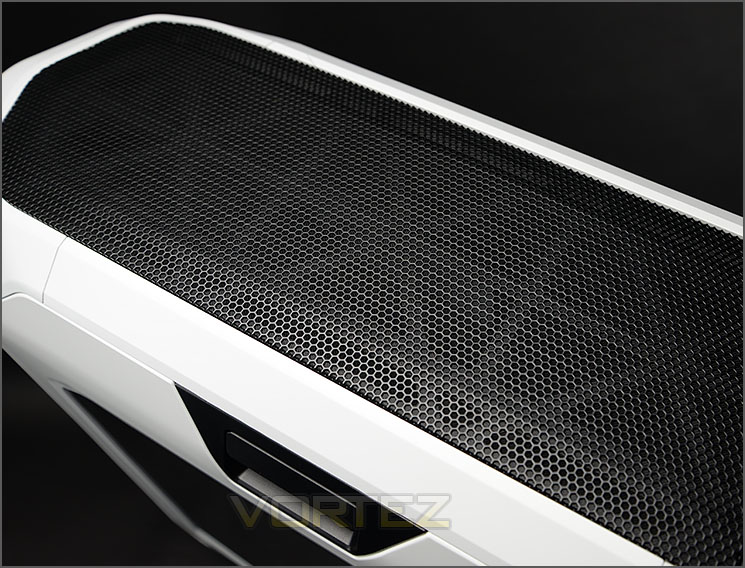
Detachable ventilated panel

Plethora of mounting options at the top
Just like the front panel, the top of 780T contains a detachable perforated mesh panel. This panel has a filter pre-attached and will therefore need to cleaned/washed as an entire unit.
After removing the ventilated panel we are greeted by a generous selection of different mounting options – 3x 120mm or 2x 140mm cooling fans can be installed or 240/280/360mm radiators – again we’ll be looking at the compatibility later in the review (clearance section).
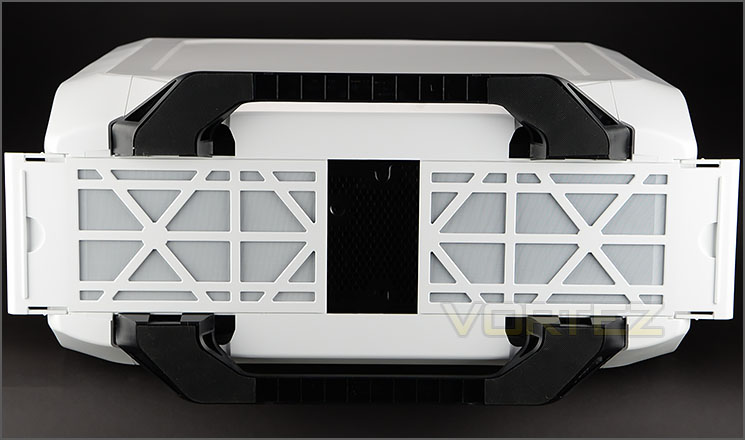
Two dust filters on the underneath
Turning the case over onto its side, there are two dust filters in the middle – these filters can be extracted from the case without having to flip the case over.
To form the feet on 780T, Corsair has used two large beams which offer a sturdy stance for this thick plastic has a thin layer of rubber to prevent the case from slipping on smooth surfaces.
Interior

E-ATX and XL-ATX support

Excellent cable routing options
After detaching the side panels from 780T (which we have to admit is extremely easy thanks to the latch mechanism design) we can cast an eye over the internal design. Corsair has powder coated all elements of the inside in black and the motherboard tray supports M-ATX, ATX, XL-ATX and E-ATX form factors.
Corsair have been keen to furnish the inside with tool-free options for installing kit and has also provided great allocation for cable management.
The reverse side has the added bonus of having three SSD sleds, providing a hassle-free method of attaching 2.5” drives.
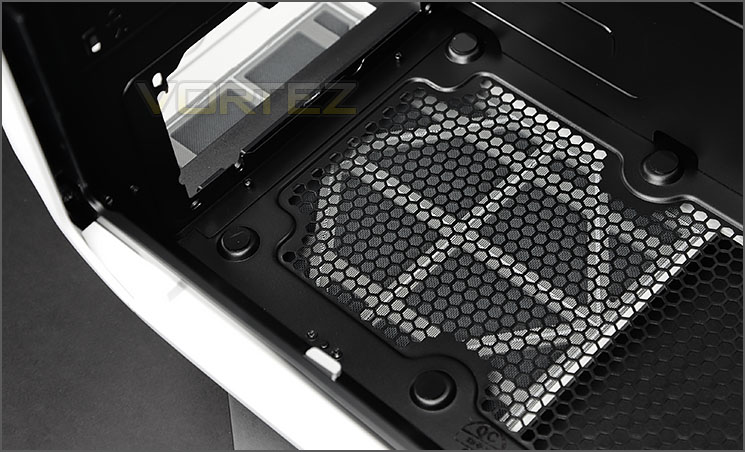
Area for mounting the PSU
At the bottom of 780T there is an area marked out for installing the PSU. This area not only has a detachable dust filter (as we have already seen), but there are rubber mounts for cushioning the unit once it’s inside the chassis.
There is support for units which are up to 260mm in size.
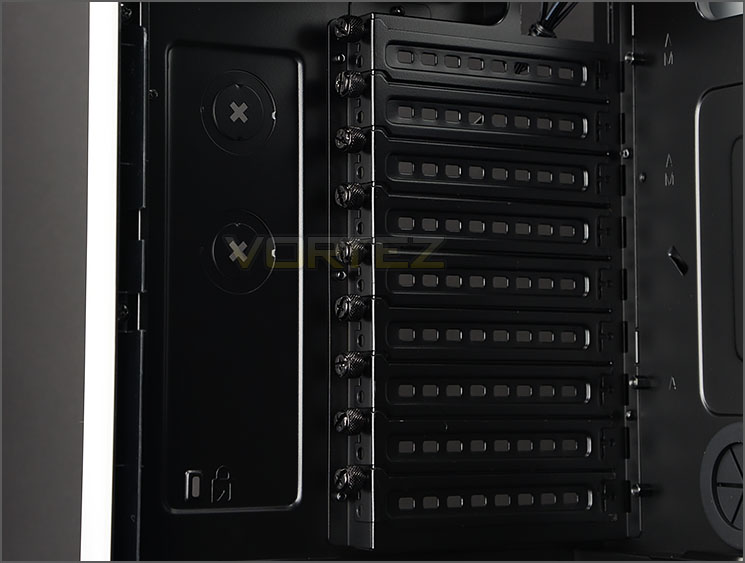
Up to nine PCI expansion slot covers
Being a full tower chassis, 780T has support for multi-GPU support – providing up to nine PCI expansion slots. The covers all have ventilation for better airflow inside the chassis and also have a thumbscrew to make the job of installing devices nice and easy.
On the next page we’ll continue our look at the inside of 780T
Interior (Continued)

AF140L sits as a rear exhaust fan
At the back of 780T there is a 140mm cooling fan (AF140L) and a large assortment of different mounting options at the top of the chassis – 3x 120mm or 2x140mm fans can be installed or a 240/280/360mm radiator.
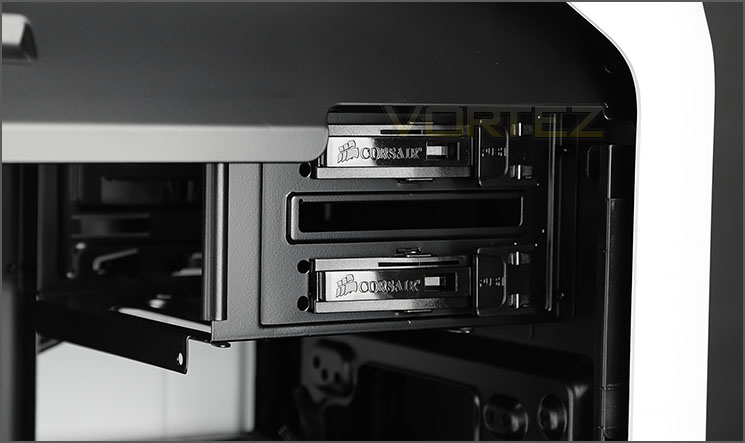
Two 5.25” drive bays
Over on the other side of the case there is allocation for two 5.25” drives. Each of the bays features a tool-free mechanism to install a device, this mechanism now makes a common appearance on most of Corsair cases.
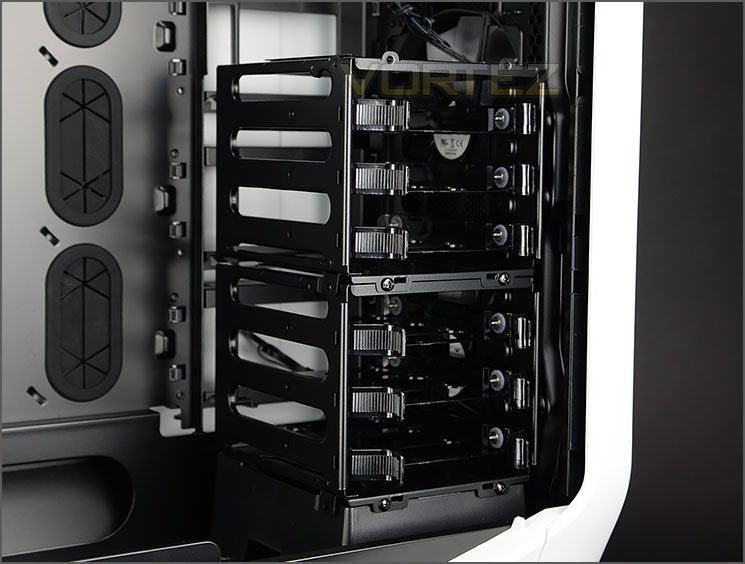
Two dedicated HDD cages
Positioned at the front of 780T there are two HDD cages which can be completely detached from the case after removing some screws and can accommodate up to six HDDs – both 2.5” and 3.5” drives are support and are installed within a HDD tray.
Behind the cages there are dual 140mm cooling fans (AF140L).
Installation

780T handles XL-ATX with no hitches
Since 780T can accommodate XL-ATX and E-ATX as the biggest form factors, we have chosen to install our XL-ATX test rig inside the case.
Having easy to remove side panels certainly ensures the job of installing kit is much more streamlined. Combine this with the spacious expanse inside and the entire process of installing kit is nice and easy.
We encountered no issues during the installation process and as you can see from the pictures, creating a clean and tidy configuration is very easy due to the clearance options available – in the next section of the review we’ll be identifying these allowances and limitations.

Super-clean, super-tidy
Clearance – CPU Cooler, Graphics Card, Cable Management
Essential to building PCs is the clearance limitations inside a case. Identifying these restrictions helps to acknowledge which hardware is compatible and which isn’t.
CPU Cooler
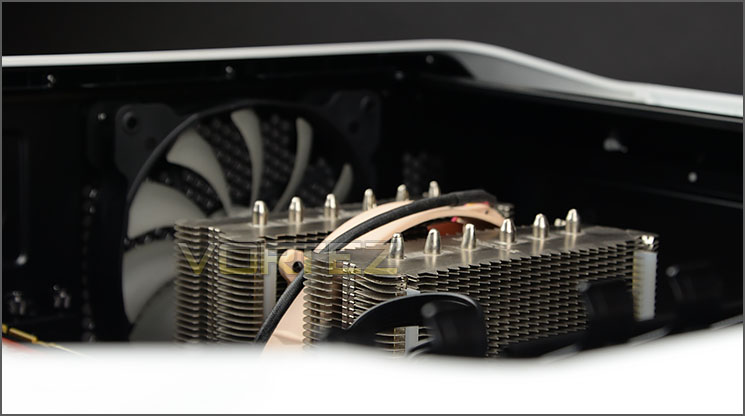
More than enough space for flagship CPU coolers
The width of 780T presents generous allocation for big CPU coolers. Flagship models tend to have a height of 160-170mm and for demonstration purposes our Noctua NH-D14 above easily fits inside the chassis. Corsair actually state there is up to 200mm of space here – so even the biggest of solutions will fit without any compatibility issues.
Graphics Cards
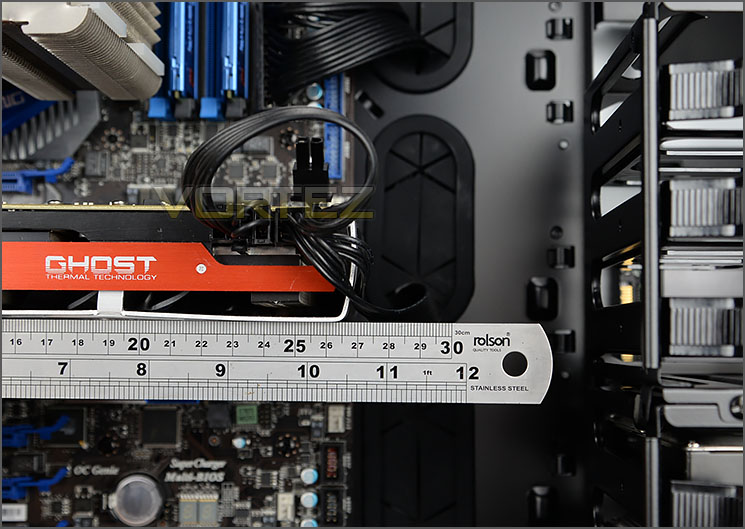
Long graphics cards are catered for
Turning our attention to the graphics card clearance there is once again, plenty of space. The HDD cages are the most immediate obstruction – with these cages removed we have unlimited space for any card currently on the market but with the cages installed there is approximately 355mm (>13”).
Since there are no other obstructions further down, adding in multiple graphics cards presents no issues in this regard either.
Cable Management
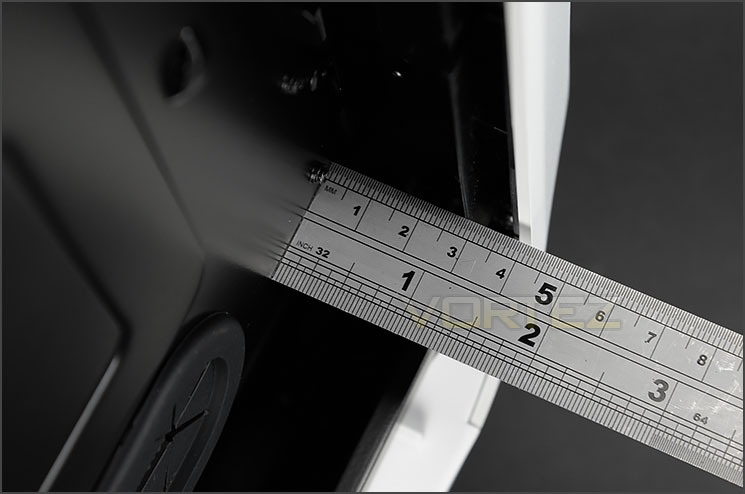
Huge clearance for cable management
The space behind the motherboard tray is essential for practising good cable management inside the chassis. We’re pleased to report there is approximately 3cm (1.25”) at the tightest point and not only this but there is an area in the lower section which supplies even more space and a large cavity to store all the cables out of sight.
We’ve reviewed hundreds of cases at Vortez and 780T certainly seems to be offer the most clearance behind the motherboard tray for arranging cables – a big thumbs up!
Over the page we’ll look at the radiator compatibility.
Clearance – Water Cooling Radiators
780T is built for water cooling, of that there is no doubt. Inside there are numerous locations for installing radiators of different sizes and in this section of the review we’ll be exploring the options available.
Radiator support at the top
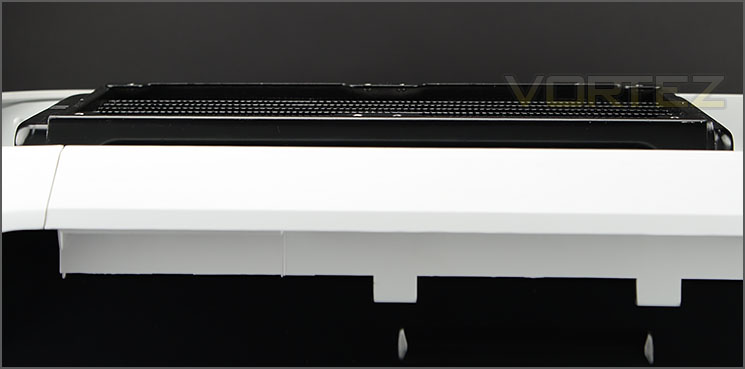
Only slim radiators will fit into the roof area
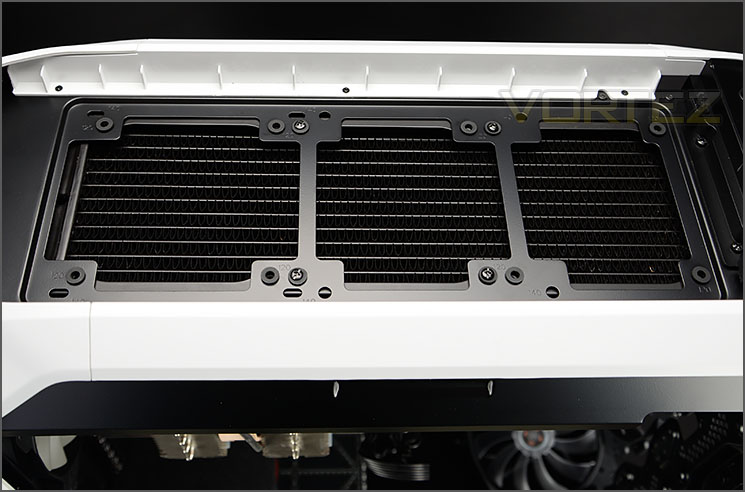
Up to 360mm radiator support at the top
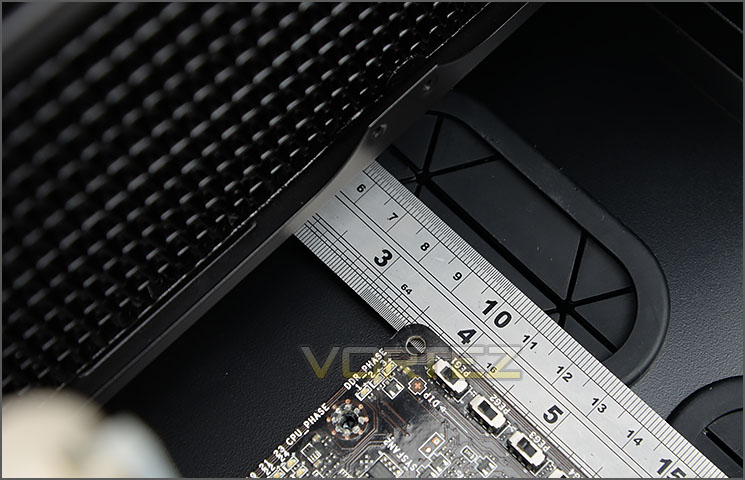
9cm / 3inches of space to the top of motherboard
At the top of 780T there is a large amount of space for different sized radiators. 240/280/360mm radiators can fit here but only the slimmer type (2.5cm) will fit inside the top roof section. As you can see above, the H105 radiator protrudes out of the chassis.
Our 360mm radiator fits at the top of 780T without any problems at all. There is actually 9cm (3 inches) of space from the top of the chassis to the top of the motherboard for radiator and fan combos.
Radiator support at the front
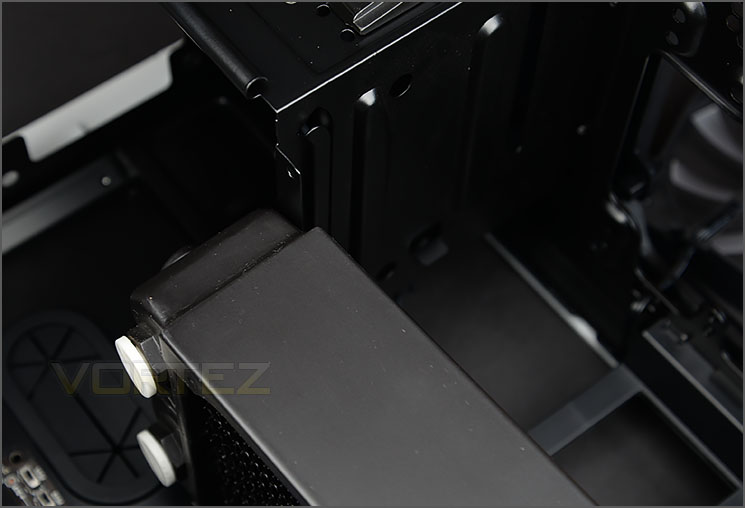
Oversized 360mm radiators struggles to fit
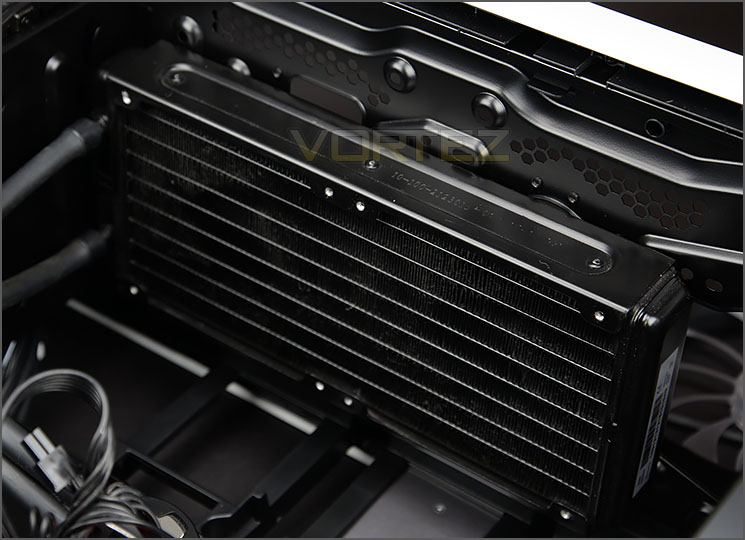
Hydro Series can be installed at front
Just like the top of 780T, the front lends itself to being able to cater for 240/280/360mm radiators. Unfortunately, our oversized Phobya G-Charger 360mm radiator wouldn’t squeeze in because the end sections were just too bulky but thinner radiators will fit without any compatibility issues.
For those wanting to install a Hydro Series cooler, the H105 fits at the front without any problems.
Radiator support at the bottom
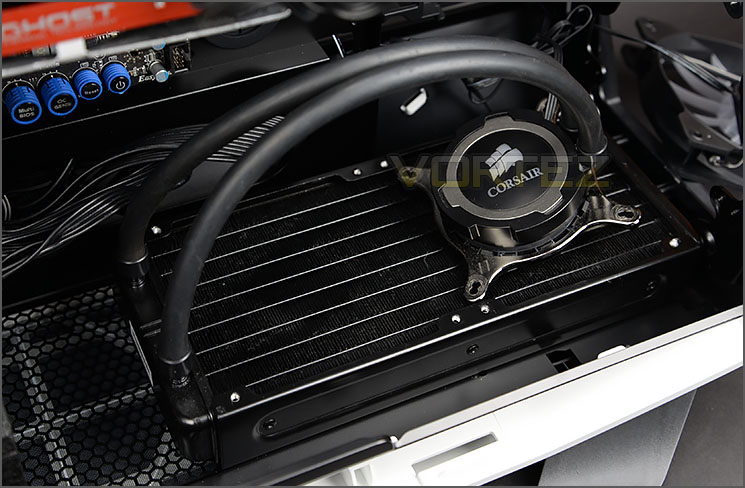
Allocation at the bottom for radiators too
By removing the HDD cages and the plastic mount at the bottom of 780T we can free up the chassis for installing even more radiators. At the bottom there is support for just a 240mm – which will be good news for enthusiasts wanting to install custom water cooling or even a Hydro Series – as we have in the picture above (H105).
Detaching the HDD cages may not be an issue for a selection of system builders, especially since there is 2.5” drive support on the reverse of the chassis.
Thermal Performance
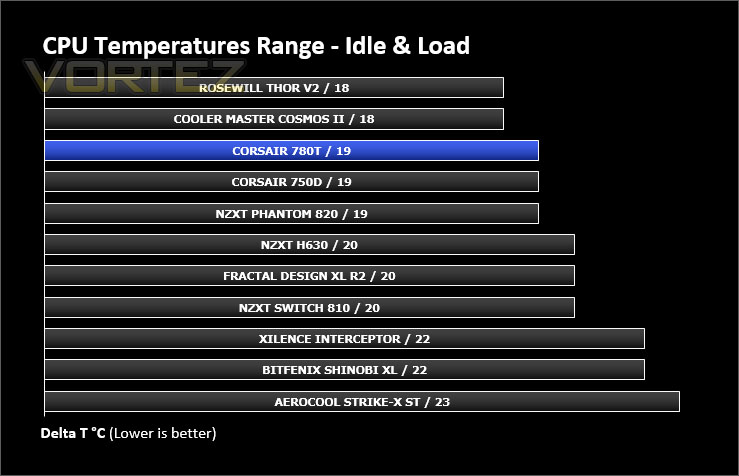
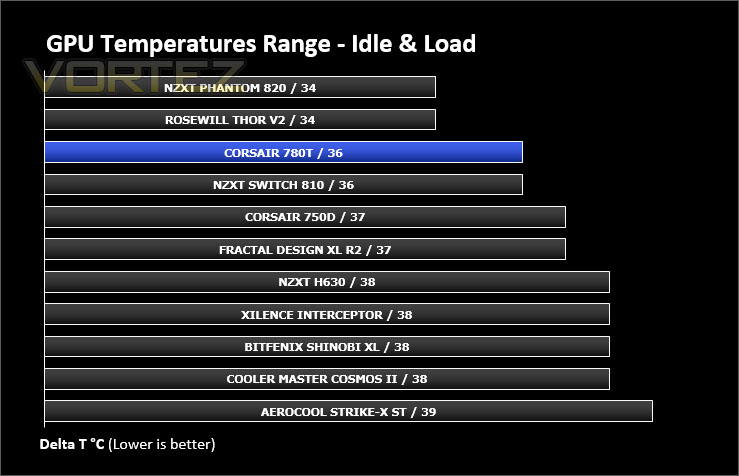
780T has a total of three 140mm cooling fans. These fans are positioned in key areas and configured in a push/pull configuration which usually yields good results. We also know the AF140L fans are extremely reliable a performance solution.
To discover the thermal performance of the 780T we will record idle temperatures after 20 minutes from a cold boot. We will then stress the system and temperatures will again be monitored after 30 minutes have elapsed.
For the purpose of accurate analysis the idle and load temperatures for CPU and GPU will be recorded and the range between idle and load will be calculated to determine how efficient cooling is.
Fan Controller will be set to high throughout testing.
NOTE: Ambient temperature is 20C
System Components
CPU Intel Core i5 2500K
Motherboard MSI Big Bang Marshal (P67)
Graphics ZOTAC NVIDIA GTX 480 AMP (Different to GPU used in pictures)
Memory 8GB Kingston HyperX Genesis 1600MHz CL9
HDD Samsung Spinpoint 500GB SATA-II
PSU DeepCool DQ750
Motherboard MSI Big Bang Marshal (P67)
Graphics ZOTAC NVIDIA GTX 480 AMP (Different to GPU used in pictures)
Memory 8GB Kingston HyperX Genesis 1600MHz CL9
HDD Samsung Spinpoint 500GB SATA-II
PSU DeepCool DQ750
Noise
The AF140L offer great noise/performance operation. With the fan controller set to low the noise levels are barely audible, at medium we begin to notice the whirring and then at high setting the cooling fans are noticeably nosier – but by no means is this disruptive.
Conclusion
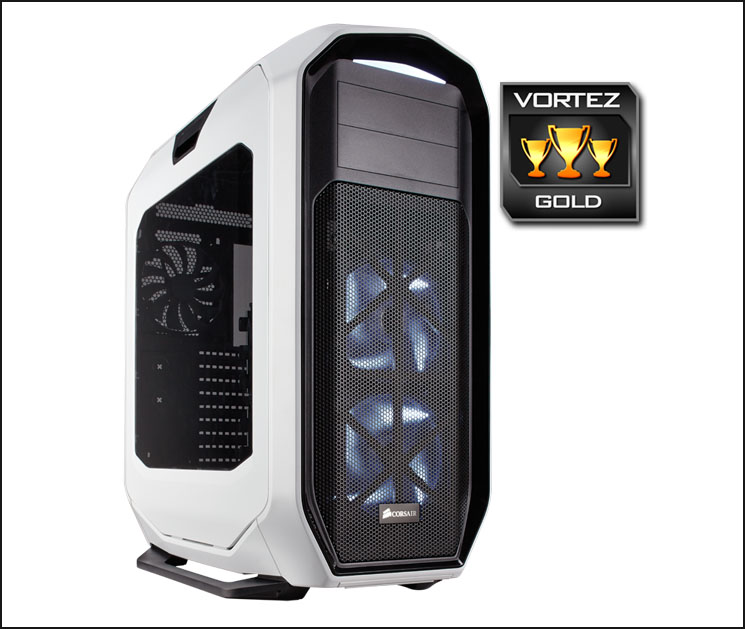
780T is Corsair’s second Graphite Series release this summer and in true Graphite fashion, this full tower chassis remains consistent with the rest of the portfolio.
One of the biggest attractions with the Graphite Series is the easy to remove side panels, 780T continues this key characteristic and not only are they innovative and quirky but they are extremely useful when performing the task of building a system. To enthusiasts, there is no disguising 780T’s beauty. Its form, shape and styling is top-class and we’d go as far as to say it is the pièce de résistance of full towers.
The integration of a three-speed fan controller is very useful, especially since it can supply up to five cooling fans. In its default configuration, 780T offers brilliant thermal performance which is testament to the trusty AF140 cooling fan which features three times within the chassis. Adding in more cooling fans isn’t an issue either because there are numerous locations at the top, front and bottom of 780T. Hosting different size fans also makes way for compatibility of a wide selection of different radiators for those wanting to go down the water cooling route – 240, 280 and 360mm radiators are supported throughout.
It’s abundantly clear that Corsair’s 780T is an enclosure with bags of space, just looking at the CPU cooler department highlights this very fact – there is up to 200mm of clearance for air coolers, something which is especially generous and will cater for a vast array of flagship cooling solutions from different brands. It doesn’t end there either, the cable management options are remarkable. Behind the motherboard tray there is ample room for storing redundant cables and Corsair has even engineered a deep cavity to allow you to really tuck away unwanted cables. Having this space, rubber grommets and hooks means that keeping the inside of the case neat and tidy is a doddle.
As of today 780T is priced at £145 GBP / $245 USD which is a hefty chunk of money for a full tower which comprises of a considerable amount of plastic. Although for a case of this calibre, consisting of all the features – we’re presented with a solid candidate in this arena, compared to other rivals.
The Graphite 780T is a spectacular full tower which not only offers brilliant air cooling performance but presents a substantial assortment of radiator compatibility throughout. This case has space and lots of it – those wanting to go super-size should look no further.
Pros
+ Impressive external design
+ Easy to remove side panels
+ Three-speed fan controller
+ Great thermal performance
+ Abundant fan/radiator support
+ Up to 200mm of clearance for CPU coolers
+ SSD allocation behind motherboard tray
+ Excellent cable management options
Cons
– Lots of plastic on exterior
+ Impressive external design
+ Easy to remove side panels
+ Three-speed fan controller
+ Great thermal performance
+ Abundant fan/radiator support
+ Up to 200mm of clearance for CPU coolers
+ SSD allocation behind motherboard tray
+ Excellent cable management options
Cons
– Lots of plastic on exterior

Click here for an explanation of our awards at Vortez.net.


