







We are back taking a look at the Hydro Series; this time the new lower-end liquid CPU cooler, H55. Will it impress or fall by the wayside?

Product on Review: Hydro H55
Manufacturer and Sponsor: Corsair
Street Price: £53 (At time of review)
ALCs (All-contained Liquid Coolers) are now regarded as a mainstay in the cooling market, bridging the gap between air cooling and custom water-cooling. Corsair have taken on this lucrative segment and confidently asserted themselves are a reliable source for countless enthusiasts.
The Hydro Series has been well received over the last few years. With numerous model names under their belt to cater for different audiences and budgets, enthusiasts and avid system builders have plenty of options. Today we will be taking a look at a new release for the Hydro Series which resides at the lower end of the market. The H55 is designed for budget-minded builders who require low-noise liquid cooling with no-nonsense installation. Can Corsair’s new H55 meet these demands?
Corsair on H55
Your PC will run cooler and quieter when you replace your CPU’s standard heatsink with a Hydro Series H55.
Installation is straightforward: if you can get to the back of your PC’s motherboard, you can install an H55. All you’ll need is a screwdriver.
Great for Smaller Cases
The compact components and flexible tubing make Hydro Series H55 easy to install even if you’re cramped for space. It allows you to improve your CPU’s cooling efficiency even in most compact cases — as long as your case has a 120mm fan mount near the CPU, H55 will probably fit.
Installation is straightforward: if you can get to the back of your PC’s motherboard, you can install an H55. All you’ll need is a screwdriver.
Great for Smaller Cases
The compact components and flexible tubing make Hydro Series H55 easy to install even if you’re cramped for space. It allows you to improve your CPU’s cooling efficiency even in most compact cases — as long as your case has a 120mm fan mount near the CPU, H55 will probably fit.
Technical Specifications
Warranty
Five years
Cold Plate Material
Copper Micro Fin
Fan Specification
120mm (x1)
Socket Support
AMD AM2, AMD AM3, AMD FM1
Intel LGA 1155, Intel LGA 1156, Intel LGA 1366, Intel LGA 2011
Radiator Material
Aluminium
Tubing
Low Evaporation Rubber
Radiator dimensions
120mm x 152mm x 27mm
Fan dimensions
120mm x 120mm x 25mm
Fan speed
1700RPM +/- 10%
Fan airflow
57 CFM
Fan dBA
30.32 dBA
Fan static pressure
1.9mm/H20
Five years
Cold Plate Material
Copper Micro Fin
Fan Specification
120mm (x1)
Socket Support
AMD AM2, AMD AM3, AMD FM1
Intel LGA 1155, Intel LGA 1156, Intel LGA 1366, Intel LGA 2011
Radiator Material
Aluminium
Tubing
Low Evaporation Rubber
Radiator dimensions
120mm x 152mm x 27mm
Fan dimensions
120mm x 120mm x 25mm
Fan speed
1700RPM +/- 10%
Fan airflow
57 CFM
Fan dBA
30.32 dBA
Fan static pressure
1.9mm/H20
Packaging, Bundle & Fan
H55 arrives in a large white box. Corsair have splashed green on the packaging to distinguish between the low and high-end of the Hydro Series. The H55 is of course at the lower-end. On the packaging there is a depiction of the cooler on the front and the fundamental features and technical details are printed on the sides for further reading.
Inside, the various parts and components are contained within a cardboard eggbox to ensure a safe arrival during transit.
The packaging for H55
Removing the contents of the bundle there are the following items:
• Mounting kit for Intel and AMD sockets
• Instructions manual, warranty leaflet
• Radiator, pump, 120mm cooling fan
The items included in the bundle
Included with H55 is a single seven-blade 1700 RPM cooling fan. This fan is 120mm and will attach to the radiator – allowing for installation to reside over where the rear exhaust fan in a computer chassis would typically be found. Our cooling fan uses a 3-pin connector which requires a fan header on the motherboard for functionality.
120mm cooling fan included
Closer Look
H55 is an all-in-one liquid cooler and has a radiator with the dimensions 120mm x 152mm x 27mm and is made entirely of aluminium. Being 120mm and only 27mm thick this radiator is ideal to mount in the area which usually occupies the rear exhaust fan in a computer chassis.
Tubing directly links the radiator to its pump and is made of rubber which is 10mm thick.
An overview of H55
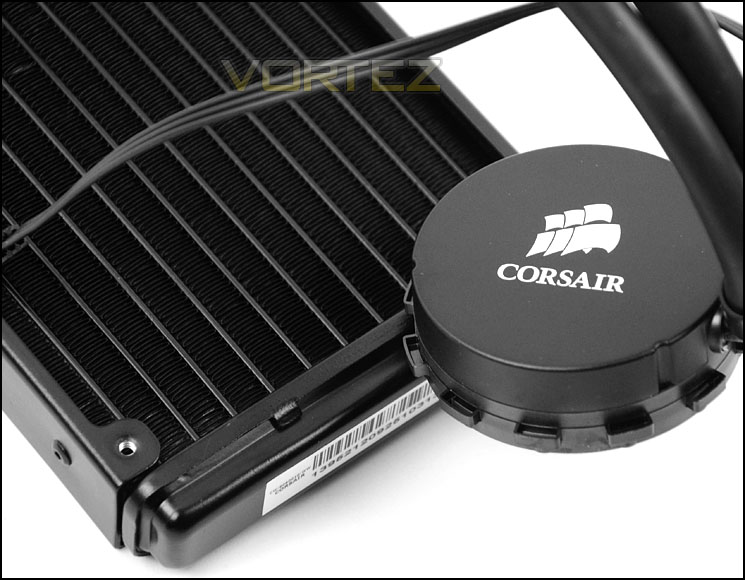
The pump is responsible for the transfer of liquid and is low-profile to encourage good compatibility for memory and other hardware. In order to get power/functionality to the pump a 3-pin connector is required to plug into a fan header on the motherboard.
The baseplate surface is of copper construction and has a thin layer of pre-applied thermal compound paste (Dow-corning) so that H55 is ready to install and go. The baseplate is large enough to entertain numerous socket sizes/types. The blocks which surround the edge of the pump allow the unit to securely fix to the installation retention ring. Those who aren’t aware, unlike the H60, H80i and H100i which is based around CoolIT the H55 is actually based on an Asetek platform.
Low-profile pump with adjustable tubing mounts
Copper baseplate with pre-applied thermal compound paste
Installation Process
In order to demonstrate the installation process for H55 we are installing the cooler on the Intel LGA2011 socket.
To start, rather than use stand-offs as most LGA 2011 coolers do, instead the retention ring, mounting clips and screws must be attached to the socket. Care must be taken not to fully tighten screws because the pump clips need to inside the retention ring.
The next step is to remove the rear exhaust fan from the chassis and replace it with the H55 radiator/pump. There are a variety of different orientations that can be used and it really depends on the airflow arrangement within that chassis as to which configuration the user goes with. For our review we have gone with a push-exhaust setup. After applying the long screws to the radiator/fan the pump can be fixed and retention ring screws tightened.
Usually we would show memory clearance in the next section of this CPU cooler review but since the H55 avoids this region completely there is no need to measure this.
Test Setup & Methodology
Test System
CPU – Intel Core i7-3930K (3.6GHz)
Motherboard – GIGABYTE X79-UP4
Memory – 8GB Corsair Vengeance LP 1600MHz CL9
Graphics – Sapphire Radeon HD 6850 1GB
PSU – NZXT Hale90 650W
Hard Drive – Kingston HyperX 240GB SATA III SSD
Case – Corsair Carbide 500R White
Motherboard – GIGABYTE X79-UP4
Memory – 8GB Corsair Vengeance LP 1600MHz CL9
Graphics – Sapphire Radeon HD 6850 1GB
PSU – NZXT Hale90 650W
Hard Drive – Kingston HyperX 240GB SATA III SSD
Case – Corsair Carbide 500R White
CPU Coolers
Alpenföhn Matterhorn Pure(120mm Wingboost: 300-1200RPM)
Alpenföhn K2 (120mm Wingboost: 500-1500RPM, 140mm Wingboost: 300-1100RPM)
Alpenföhn Gotthard (140mm Wingboost: 300-1100RPM)
Noctua NH-D14 (120mm NF-P12 PWM + 140mm NF-P14 PWM: up to 1200RPM)
Thermalright SilverArrow SB-E Extreme (Dual TY-143 fans – 600-2500RPM)
Corsair Hydro H100 (Dual 120mm fans – low: 1300RPM, mid: 2000RPM, high: 2600RPM Push Config)
SilverStone HE01 (140mm PWM fan – 500RPM-1200RPM – 500RPM-2000RPM)
be quiet! Dark Rock Pro 2 (135mm + 120mm PWM Fans – up to 1500RPM and 1700RPM)
Thermaltake Water 2.0 Pro (Dual 120mm PWM fans – up to 2000RPM)
Corsair Hydro Series H100i (Dual 120mm fans – up to 2700RPM Push Config)
Be Quiet! Shadow Rock TopFlow(1x 135mm PWM fan – up to 1500RPM)
SilverStone HE02 (Passive – optional fan used: Noctua NF-F12 120mm PWM)
Corsair H55 (Single 120mm fan – 1700RPM Exhaust Push)
Program Suite
Real Temp – Maximum temperature analysis
LinX 0.6.4 – Applies thorough stress test to CPU
CPU-Z – Confirmation of CPU frequency/voltage
AIDA64 Extreme Edition – Confirmation of temperatures/fan speeds
Testing methodology
Testing will be based on temperatures recorded by Real Temp after 20 passes of LinX stress test. The maximum absolute temperatures will be recorded after the test and averaged over the 6 cores. The delta is then calculated by subtracting the ambient temperature recorded near the intake fans from the average temperature calculated. Tests are conducted with the Intel i7 3930K at its default 3.6GHz stock speed and overclocked to 4.6GHz @ 1.42V. The tests are done inside the Corsair Carbide 500R chassis to simulate real world conditions. To keep the tests standardised we are using Noctua’s NT-H1 thermal paste on all coolers.
CPU coolers are reviewed as they come out of the box – with their factory cooling fans, as the manufacturer intended and as the consumer expects.
Additional tests include a passive test where the cooling fans are taken away from the heatsink and a comparison between the cooler used with stock thermal paste against our Noctua NT-H1 paste.
A kind thank you to Noctua for supplying us with NT-H1 thermal compound.
Results – Stock Performance
In our first test with the CPU at stock settings H55 provides similar performance to that of some of the premium high-end air coolers. Under stock settings the 3930K doesn’t cause the cooling fan to have to labour too much and therefore sound levels can be kept to a minimum.
Fan speed 1245RPM – Low noise and relatively unnoticeable.
Results – Overclocked Performance
Putting the CPU under a significant overclock results in a slightly bigger gap between the high-end air coolers and H55, temperatures were still favourable though. Noise levels with the 3930K under a significant overclock did obviously increase because the cooling fan is having to dissipate more heat. This is much more noticeable than under stock settings.
Fan speed 1458RPM – Noise levels noticeable.
Results – Passive Performance
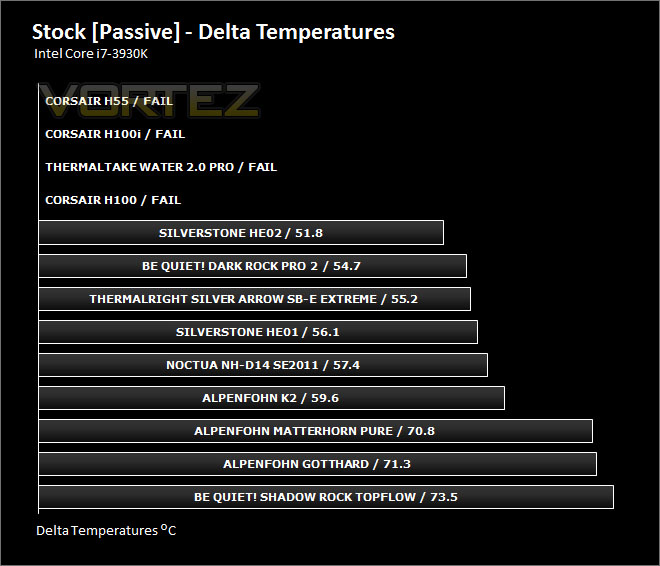
Sadly, H55 was not up to cooling the burly Sandy Bridge-E CPU. Without any active cooling fans the temperature rose to a dangerous level and so in this test it failed. This tells us that the provided cooling fan is essential.
Results – Thermal Paste Performance
Most CPU coolers come accompanied with thermal paste provided by the manufacturer. For our CPU cooling tests we use Noctua’s NT-H1, so to offer up some interesting analysis we test the thermal paste which is already applied to the water block (Dow-Corning) to see which gives the best results during stock and overclocked performance.
As you can see from the results, the quality of the paste which is pre-applied on H55 is very good. It almost matches that of the notorious Noctua NT-H1.
Conclusion
We’ve taken a look at high-end liquid coolers and today we have been taking a look at the lower-end. Having been impressed by the Hydro Series before are we in for more of the same?
H55 competes with rival air coolers which are deemed premium. With comparable results to that of Noctua NH-D14 and Alpenfohn K2, H55 offers a great alternative to air cooling. Due to the density and size of the radiator and specification of the cooling fan there are certain restraints when the CPU is overclocked but with things at stock, cooling performance is very good indeed.
The real bonus of having such a liquid cooler is the ease of installation. In just a few steps the product can be installed securely and with limited effort. Not only that but because the pump is low-profile there is great clearance for memory (For those with tall heatsinks this can often be a concern).
H55 is priced around £50, making it affordable to go down the ALC route without having to burn a hole in your pocket. At this price-point H55 offers a great alternative to air cooling.
Corsair continue to impress even at the lower-end within the Hydro Series. H55 is affordable, good quality and offers a convenient alternative to bulky air cooling.
Pros
+ Good performance
+ Easy to install
+ No memory clearance issues
+ 5 years warranty
Cons
– Can be noisy under overclocked conditions
+ Good performance
+ Easy to install
+ No memory clearance issues
+ 5 years warranty
Cons
– Can be noisy under overclocked conditions

Click here for an explanation of our awards at Vortez.net.


