The K70 mechanical keyboard – through it’s many incarnations over the years – have significant pedigree in the consumer space, but this is its debut in the Tenkeyless form factor. Boasting 8000Hz polling and an attractive aluminium unibody frame, can the K70 RGB TKL live up to its Champion Series billing?

Product On Review: K70 RGB TKL Mechanical Gaming Keyboard
Manufacturer: CORSAIR
MSRP (inc. V.A.T. where applicable): UK: £139.99 / EU: €149.99 / US: $139.99 / AUS: $219
Introduction
CORSAIR’s reinvigoration of their peripheral lineup ventures into unexplored territory this week as they release a brand new variant of the veteran K70 Mechanical Keyboard. Sitting within a compact tenkeyless footprint and boasting unique features for competitive gaming, the K70 RGB TKL mechanical gaming keyboard is a significant addition to their Champion Series for competitive gamers.
The Champion Series is a collection of products that CORSAIR are tweaking towards competitive esports gaming. Until now only two products officially fit the criteria – the MM250 and 350 mouse mats, so the K70 RGB TKL is something of a big deal when it comes to the Series’ future.
Despite the age of the model name this is the first tenkeyless K70 to make it to the market. It shares some of the looks and features of the K63 and K65, but premium features (including the familiar volume roller) push it towards that more premium SKU. If this is a streamlining of their range then it’s a welcome one; the number of keyboard SKUs CORSAIR offer can be bewildering at times.
Elements of both external and internal design updates have clearly been rolled forward from the K100 RGB, and none are more significant than the AXON processor engine. It pushes the USB polling rate well beyond 1000Hz, and controls lighting and key assignments for dozens of on-board profiles.
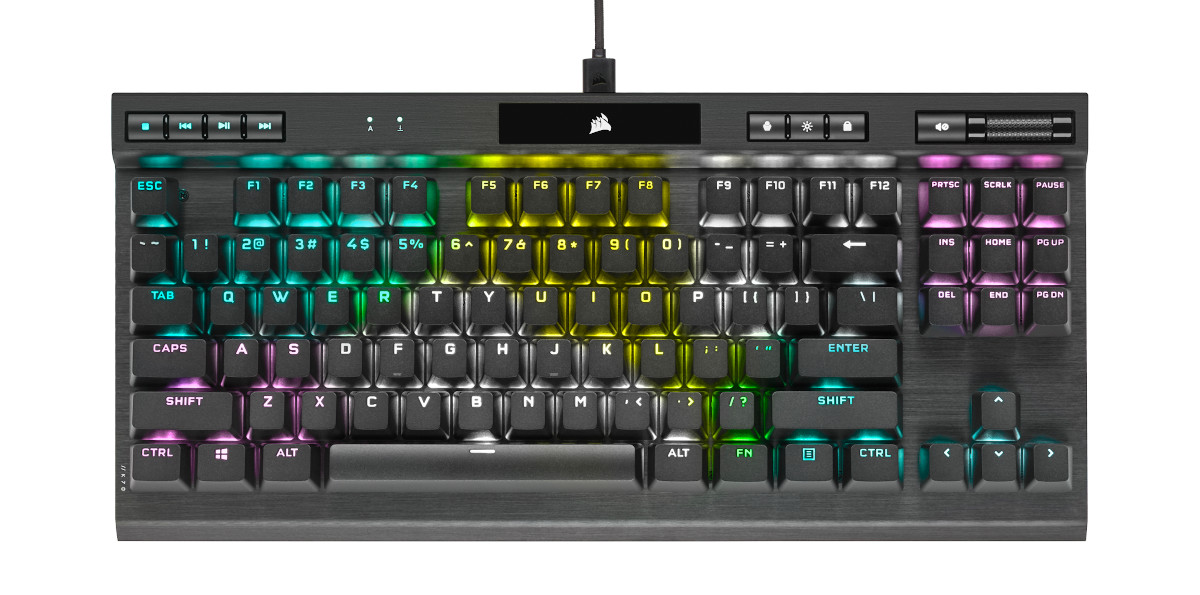
Nonetheless, it’s still unmistakably a CORSAIR keyboard. A brushed aluminium unibody frame is joined by the now familiar lip with auxiliary keys – in this instance media keys – give it sharp lines and a high-end appearance. But it’s not quite chock full of luxuries; there is no wrist rest in this model, unlike some other K70 variants over the years.
But as with the K100 RGB before it, premium features command a premium price even with the numberpad lopped off. An MSRP of £139.99 / US$139.99 / AUD $219 puts it on par with many full-sized mechanical gaming keyboards, but the keyboard actually comes in under some competitors such as the ASUS ROG Strix Scope TKL Deluxe we reviewed last year.
CORSAIR’s K70 RGB TKL in their own words
The CORSAIR K70 RGB TKL Mechanical Gaming Keyboards wil carry you to victory with a compact tenkeyless form factor, pro-l;evel performance powered by CORSAIR AXON hyper-processing technology, and world-renowned CHERRY MX keyswitches. Win in style with a durable aluminium frame and dynamic per-key RGB backlighting, and flip the tournament switch to instantly disable macros and swap to distraction-free lighting. PBT double-shot keycaps with 1.5mm thickness resist wear, fading and shine for years. Powerful iCUE software on PC and macOS enables custom macro programming and key remaps, while dedicated media keys and an aluminium volume roller offer convenient control over media. The K70 RGB TKL is a portable powerhouse thanks to a detachable USBType-C cable and 8MB of onboard storage for up to 50 profiles, so you can easily take pro performance to your next competition.
At an MSRP of $139.99, the K70 RGB TKL CHAMPION SERIES is ready to bring pro performance to your next competition.
At an MSRP of $139.99, the K70 RGB TKL CHAMPION SERIES is ready to bring pro performance to your next competition.
Technical Specifications
Chassis:- Aluminium, black anodized, brushed finish
Keyswitches:
– CHERRY MX RED,
– 45g actuation force,
– 2.0mm actuation distance
Backlight:- Individually lit and per-key programmable LED Color RGB, 16.8 million colors
Keycaps:
– Main Set: PBT double-shot keycap set, 1.5mm thick, backlight compatible
– Additional Keycaps: ABS PC FPS/MOBA Keys (textured and contoured)
Connectivity:- USB 3.0 Type-A to USB Type-C
USB Pass-through:- N/A
USB Report Rate:- Up to 8000Hz
Keyscan Rate:- Up to 4000Hz
Matrix:- Full key rollover (NKRO) with 100% anti-ghosting
On-Board Profiles:- Yes, up to 50 via 8MB of onboard memory
Media Keys:- Yes, five dedicated hotkeys (play/pause, stop, next track, last track, mute) and volume roller (volume up and down)
Brightness Key:- Yes
Windows Lock Key:- Yes
Adjustable Height:- Yes
iCUE (Software):- Supported in Windows 10 and macOS 10.15
Cable:- 1.82m / 6ft, braided fiber, USB 3.0 Type-A to Type-C, detachable
Dimensions:- 360(L) x 164(W) x 40(H) mm / 14.2(L) x 6.46(W) x 1.58(H) inches
Weight:- 0.93kg / 2.06lbs
Keyswitches:
– CHERRY MX RED,
– 45g actuation force,
– 2.0mm actuation distance
Backlight:- Individually lit and per-key programmable LED Color RGB, 16.8 million colors
Keycaps:
– Main Set: PBT double-shot keycap set, 1.5mm thick, backlight compatible
– Additional Keycaps: ABS PC FPS/MOBA Keys (textured and contoured)
Connectivity:- USB 3.0 Type-A to USB Type-C
USB Pass-through:- N/A
USB Report Rate:- Up to 8000Hz
Keyscan Rate:- Up to 4000Hz
Matrix:- Full key rollover (NKRO) with 100% anti-ghosting
On-Board Profiles:- Yes, up to 50 via 8MB of onboard memory
Media Keys:- Yes, five dedicated hotkeys (play/pause, stop, next track, last track, mute) and volume roller (volume up and down)
Brightness Key:- Yes
Windows Lock Key:- Yes
Adjustable Height:- Yes
iCUE (Software):- Supported in Windows 10 and macOS 10.15
Cable:- 1.82m / 6ft, braided fiber, USB 3.0 Type-A to Type-C, detachable
Dimensions:- 360(L) x 164(W) x 40(H) mm / 14.2(L) x 6.46(W) x 1.58(H) inches
Weight:- 0.93kg / 2.06lbs
Hardware Features
Cherry MX RGB Red Mechanical Switches
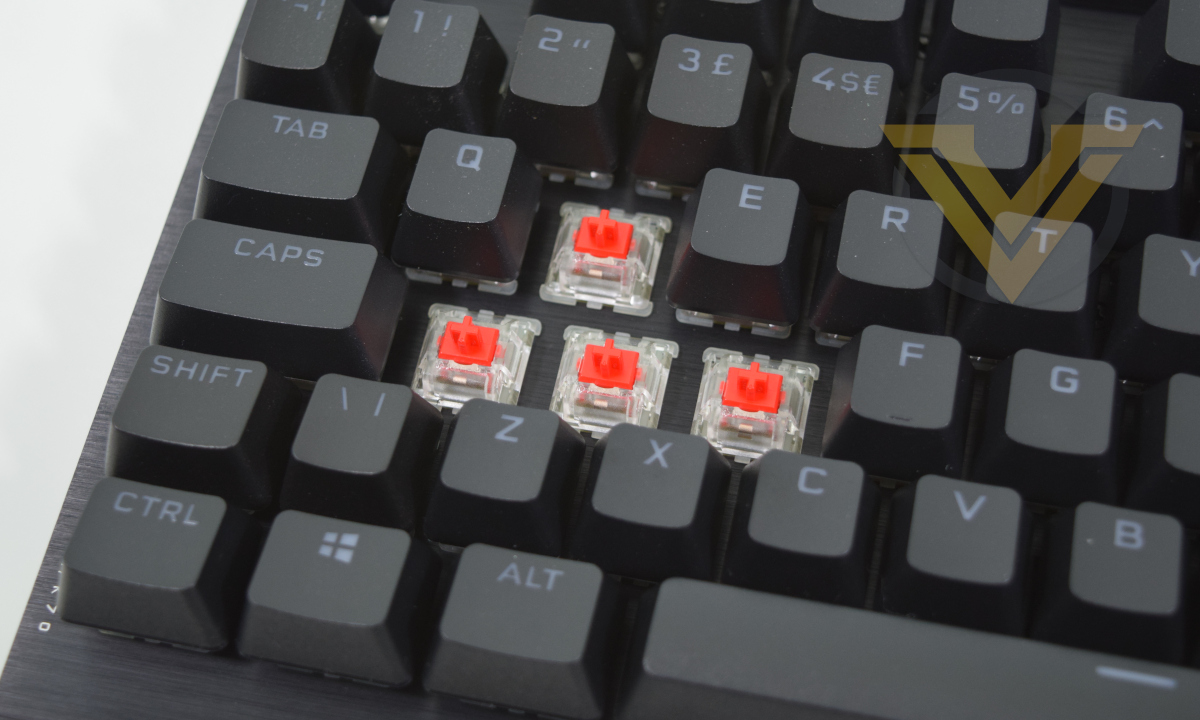
CHERRY MX switches are a tried and tested component of mainstream mechanical keyboards, and this particular model utilises the fast linear type with clear housing. Red-style switches have a 2mm actuation distance and low required actuation force, making a good gaming compromise and excellent style for those graduating from membrane switches.
The K70 RGB TKL can also be configured with either MX Speed or MX Silent switches. The former narrows each switch’s actuation distance to 1.2mm for yet-more responsiveness, while the latter cushions the keystroke within the switch housing to dampen the impact of a full stroke.
AXON Hyper-processing Technology
CORSAIR’s evocatively named ‘AXON Hyper-processing Technology’ refers to a new onboard controller that manages all aspects of the K70 RGB TLK’s operation, from reporting switch actuation to on-board lighting effects and more besides. It’s also part and parcel of another central plank to the new K70 variant’s design: 8000Hz USB and 4000Hz switch polling rates.
Peripherals have, for over a decade, been somewhat restricted by the limitations of the USB bus that maximizes polling rates to 1000Hz (i.e. 1 ms). That’s still exceptionally fast when the typical human reaction time to audio-visual stimuli is on the order of 170ms, but a renewed interest in minimising click-to-screen latency from game developers and GPU architects has put pressure back on peripheral manufacturers.
The K70 RGB TKL like the K100 before it transitions to a USB 2.0 datapath, unlocking up to 8000Hz polling on the USB bus. On the key switch side meanwhile, the AXON processor maintains a 4000Hz keyscan rate. A multi-threaded processor architecture allows the AXON to control all other aspects of the keyboard without impeding performance, pushing up the complexity of the underlying hardware and firmware.
And while they have their eyes fixed firmly on the future, they’re not forgetting legacy systems. A USB 1.1 datapath fallback mode for motherboards (and particularly older UEFI BIOS revisions) that aren’t equipped to handle this feature is available, but this mode will limit some other aspects of the keyboard’s functionality.
Hardware Tournament Mode Switch
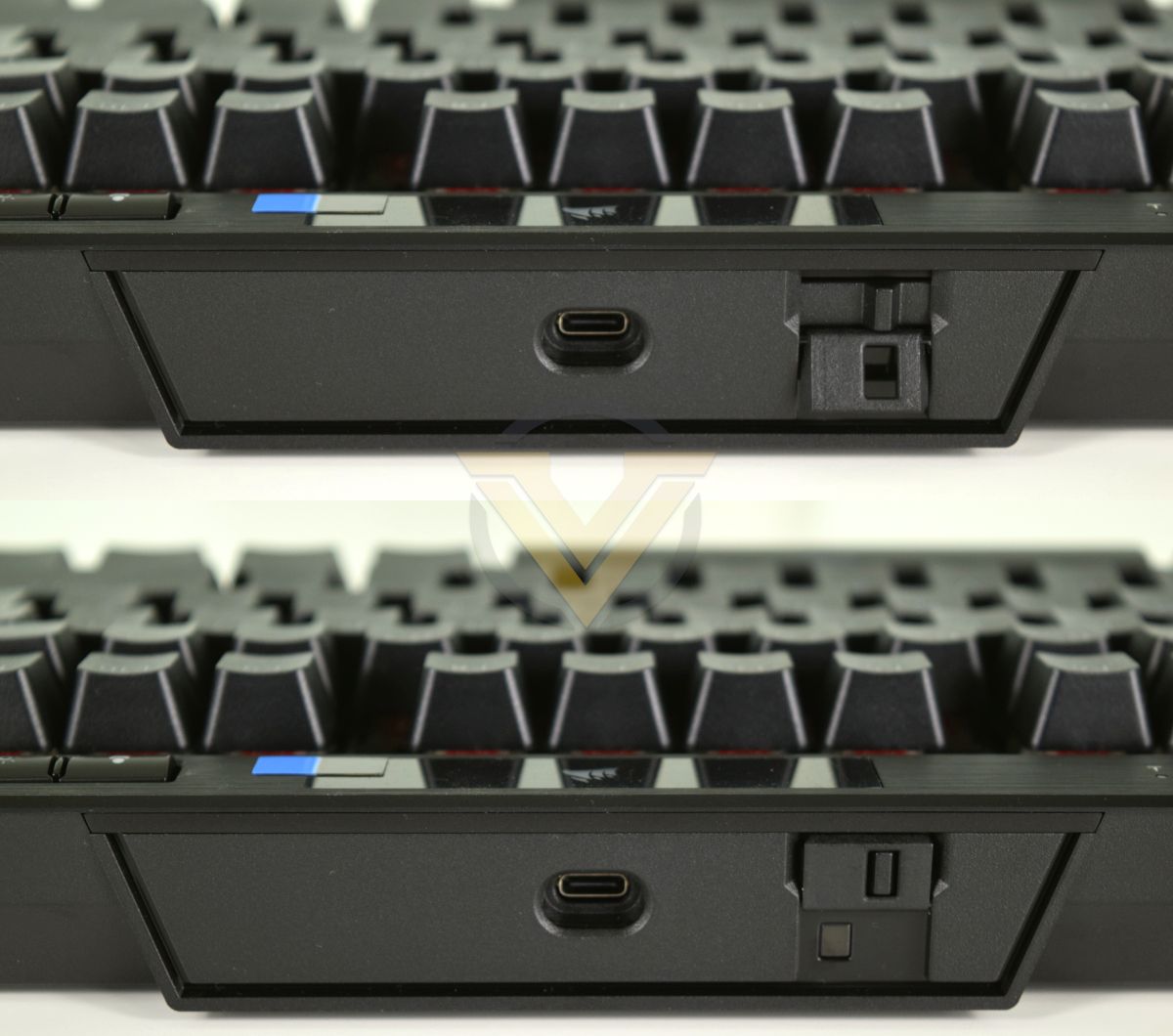
The K70 RGB TKL is part of CORSAIR’s Championship Series of peripherals, designed with competitive esports very much at the forefront. In respect to this the designers have created a sort of Tournament Mode that disables iCUE functionality – including dynamic lighting and on-board button assignments – to ‘ensure that macros and other customised features are not unintentionally triggered’. This also has the effect of creating a level playing field for esport tournament compliance, although that’s not explicitly stated.
This mode toggle is a simple switch at the back, while a plastic mask flips over to ensure it can’t be accidentally switched back. The keyboard will then revert static lighting across the whole keyboard (default red, but customisable) and a red indicator LED just below the switch would handily also let tournament officials know that the keyboard is in a basic ‘rules compliant’ mode.
Packaging, Bundle and First Look
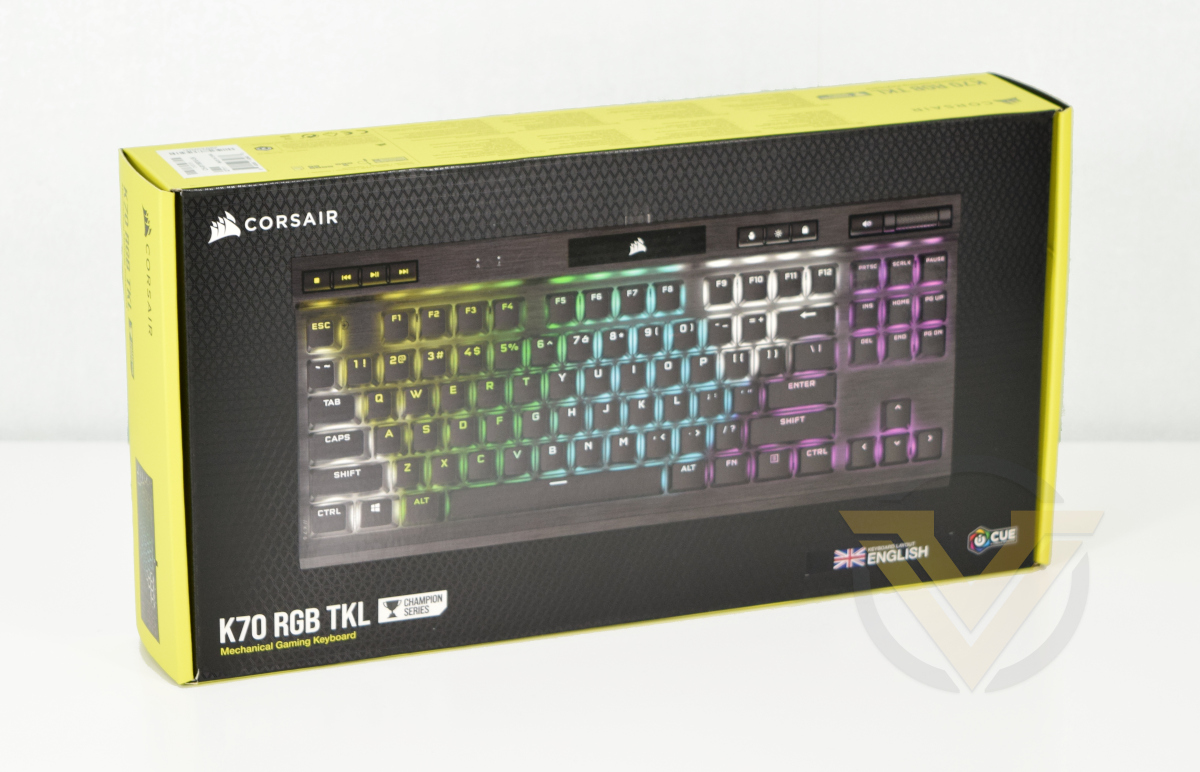
Once again CORSAIR’s black and yellow livery are boldly announce their presence. A full-length shot of the keyboard shows exactly what’s inside, and as usual it’s nice to see the regional layout indicated prominently on the front.
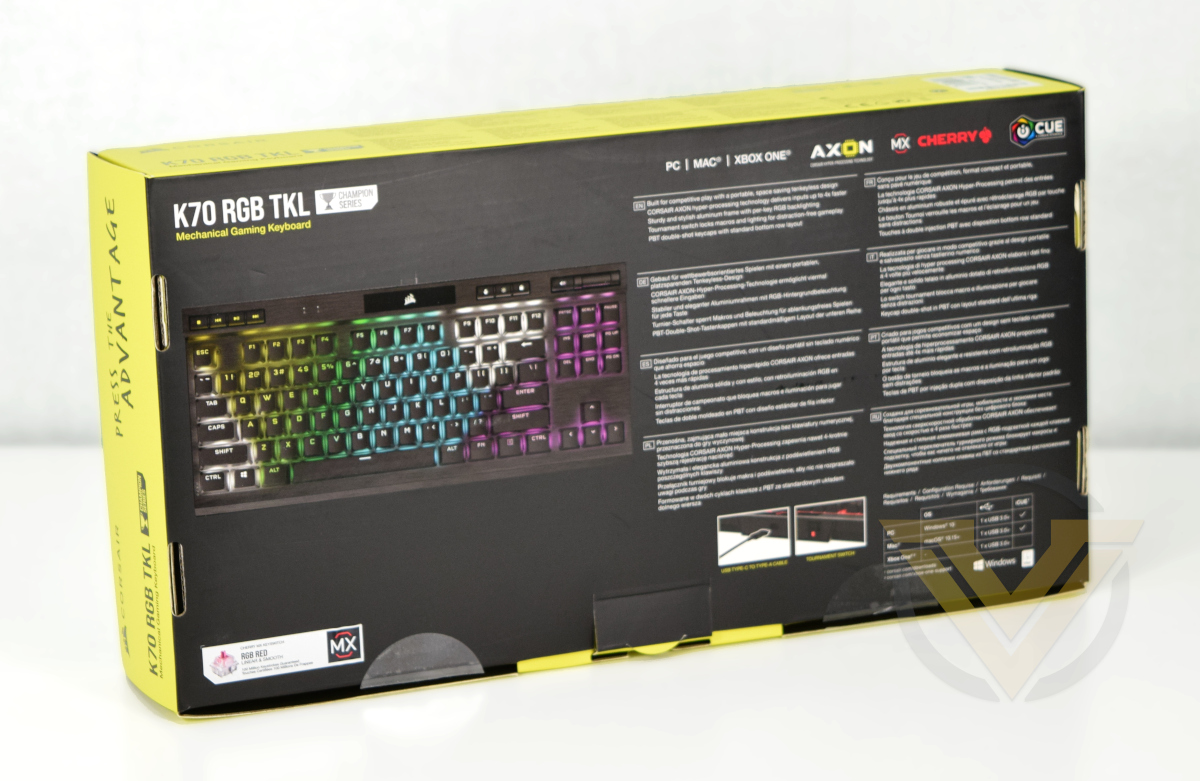
The rear has a 3qtr shot of the keyboard alongside important features, listed in major world languages. Image inserts show the detachable cable and tournament mode switch, the latter of which is a unique selling point.
Limited technical specifications and contents are detailed on the edge.
Included accessories
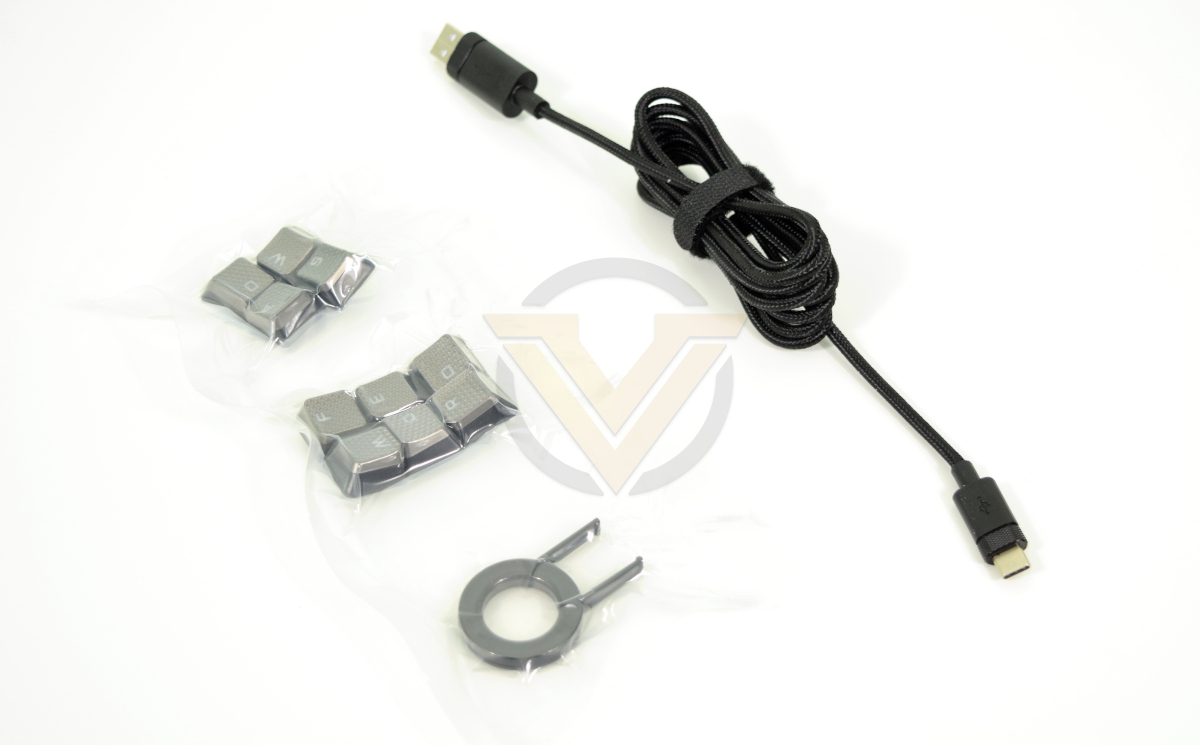
CORSAIR are keeping the bundle of included accessories down to a sensible minimum in this launch, but you do get a few luxuries befitting of a premium model. A 1.8m USB Type-A to USB-C cable is of course part of the package, but they also supply a keycap puller and set of 10 tactile keycaps for the set of WASD and QWERDF keys respectively.
Notably absent is a wrist-rest. A common feature of previous K70’s, a detachable rest shouldn’t be a dealbreaker for this keyboard’s intended market.
First Look
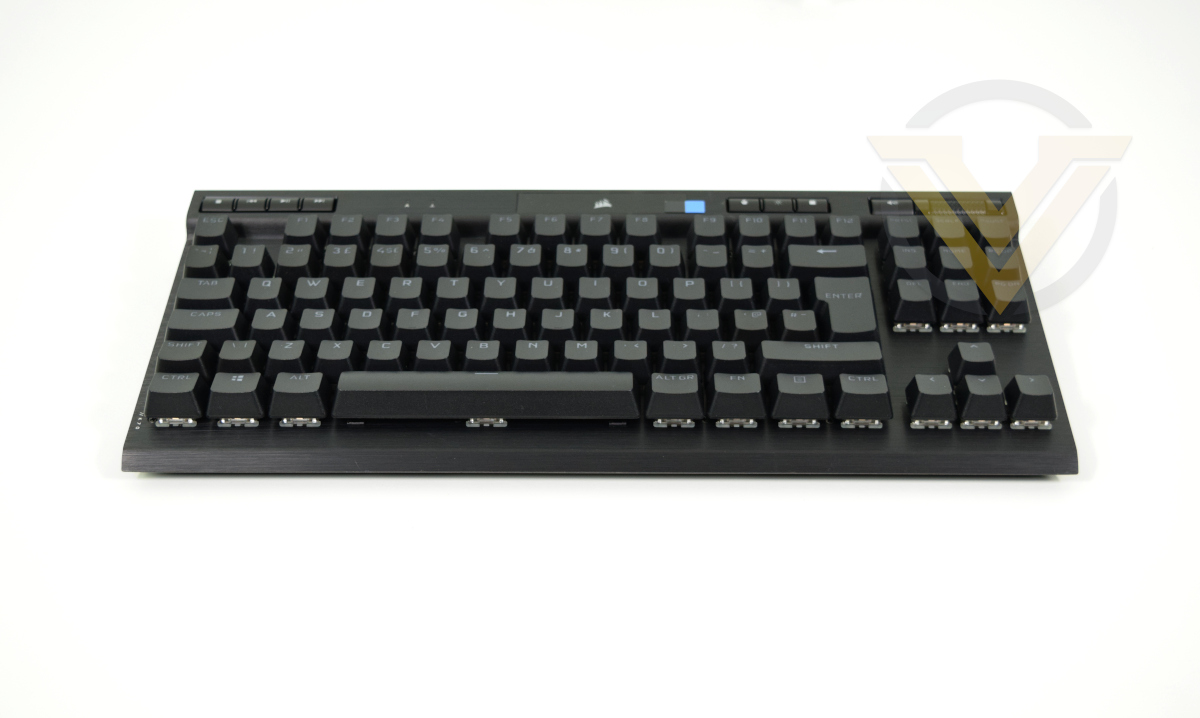
And this is our first peek at the K70 RGB TKL. It follows most of the hallmarks of CORSAIR’s premium keyboard lineup, particularly the aluminium frame with distinct lip at the back. It doesn’t waste space but nor does it appear particularly cluttered, likely due to ground-up design and development of the board rather than an adaptation of older frames.
Brushed aluminium is like catnip to reviewers of a certain age, and we’re absolutely not immune to its charms. If you’ve loved K-series keyboards over the years then this new model will not disappoint, even if it is something of a fingerprint magnet.
This K70 eschews macro keys and the dial of the K100 RGB, saving plenty of space on cramped desks while maintaining the necessary functionality of a thoroughbred gaming keyboard.
Closer Look
Compact dimensions are the key selling point for tenkeyless keyboards, particularly when they sit within premium price brackets. K70 RGB TKL shaves over 100mm of width from the K100 RGB, while also making it slightly shorter from front to back. It’s even more compact than the tenkeyless K63 when the latter has its wrist-rest removed, underscoring the clear design focus. Its footprint on a desk is thus much smaller, making it a good alternative for cramped gaming spaces that need room for a mouse to move but not going to the same lengths as the recently released K65 RGB Mini 65%.
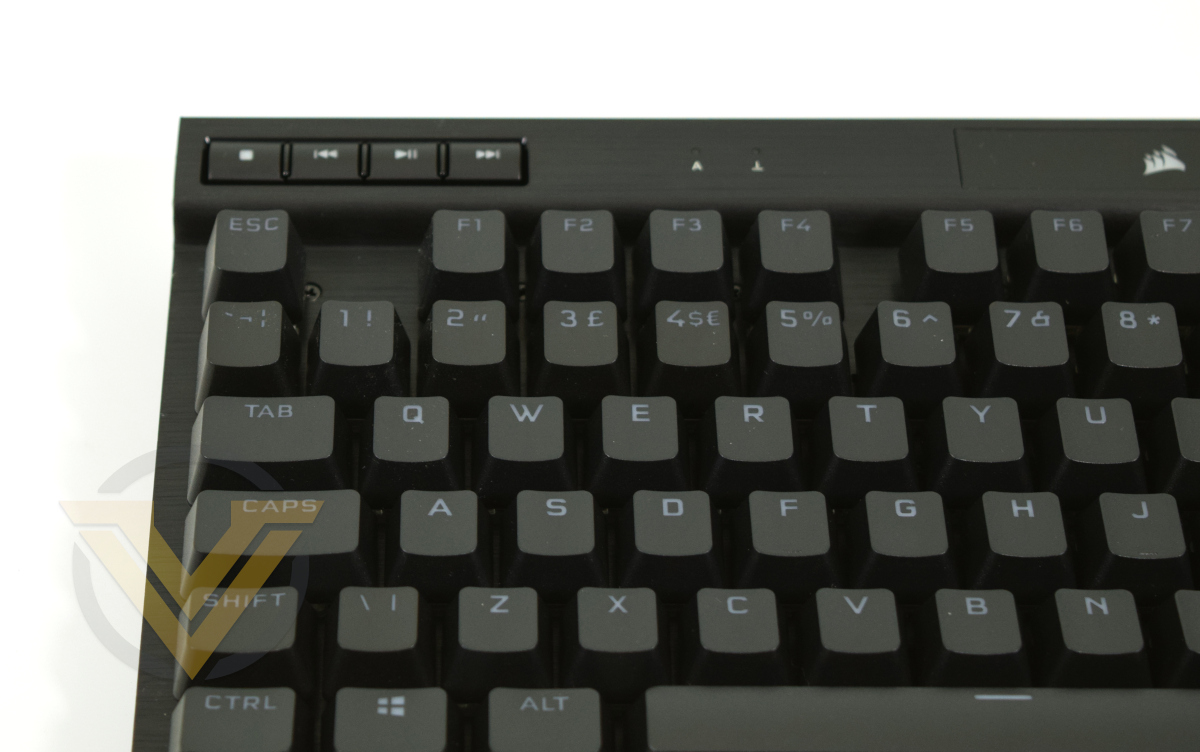
There’s a subtle departure from K65 and K63 TKL implementations as each media key is raised from the aluminium frame and separated by small raised buffers rather than appearing as discrete circular buttons. The position of these keys is reversed compared to the K100 (where they were located just above the number pad), having the secondary effect of making them usable as makeshift macro keys. Capslock and Scroll Lock indicator LEDs are recessed into the frame, but bright when illuminated.
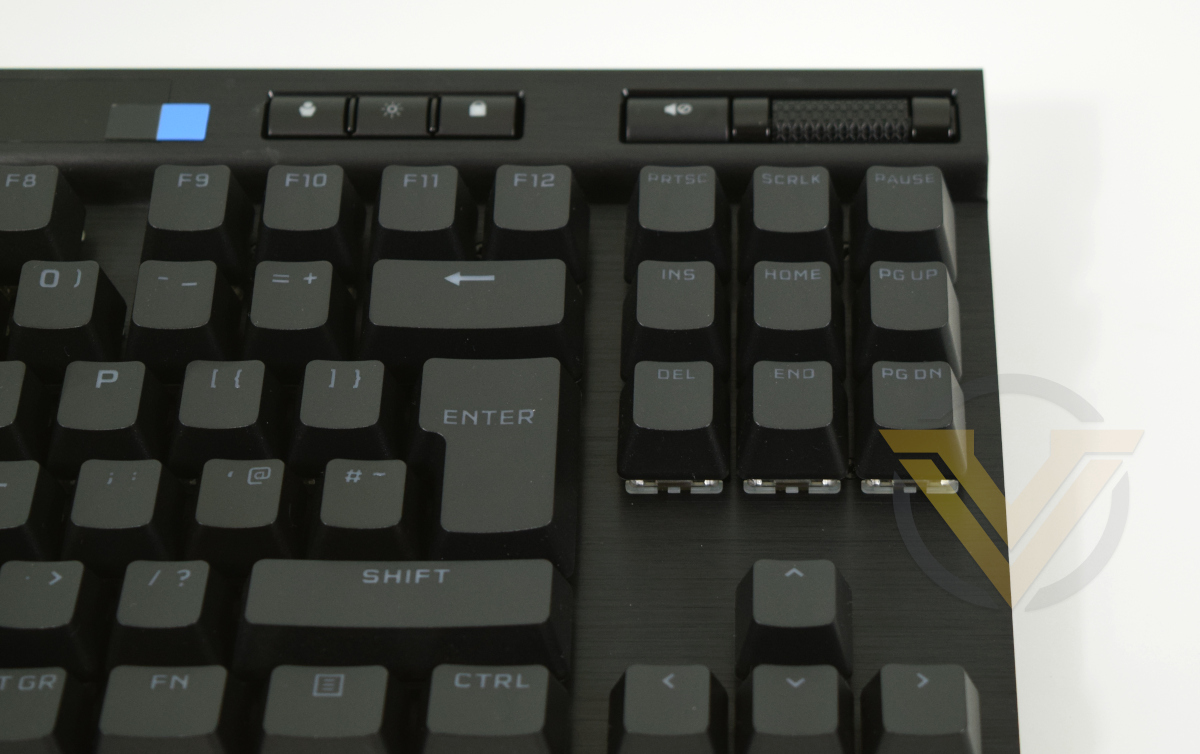
CORSAIR are continuing to use the revised keycap typeface introduced with the K100. It’s less stylised, far clearer and makes less use of abbreviations for functions like Home and Page Up compared to the K95 and previous generations.
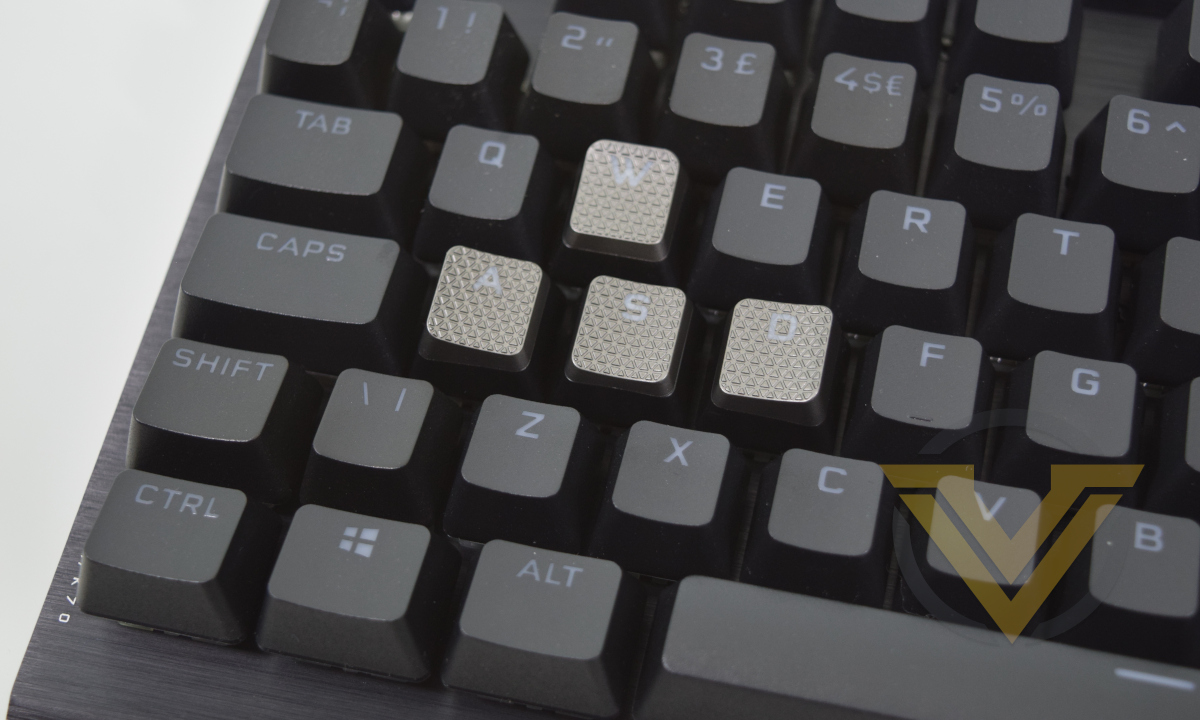
Textured alternative keycaps for ‘gaming zone’ keys – i.e. WASD and QWERDF – make a return too. Some of these keycaps are asymmetrically contoured with one edge noticeably higher than the others, cradling where you rest your fingers. Textured keycaps were absent from the K100 bundle but saw widespread use in prior generations.
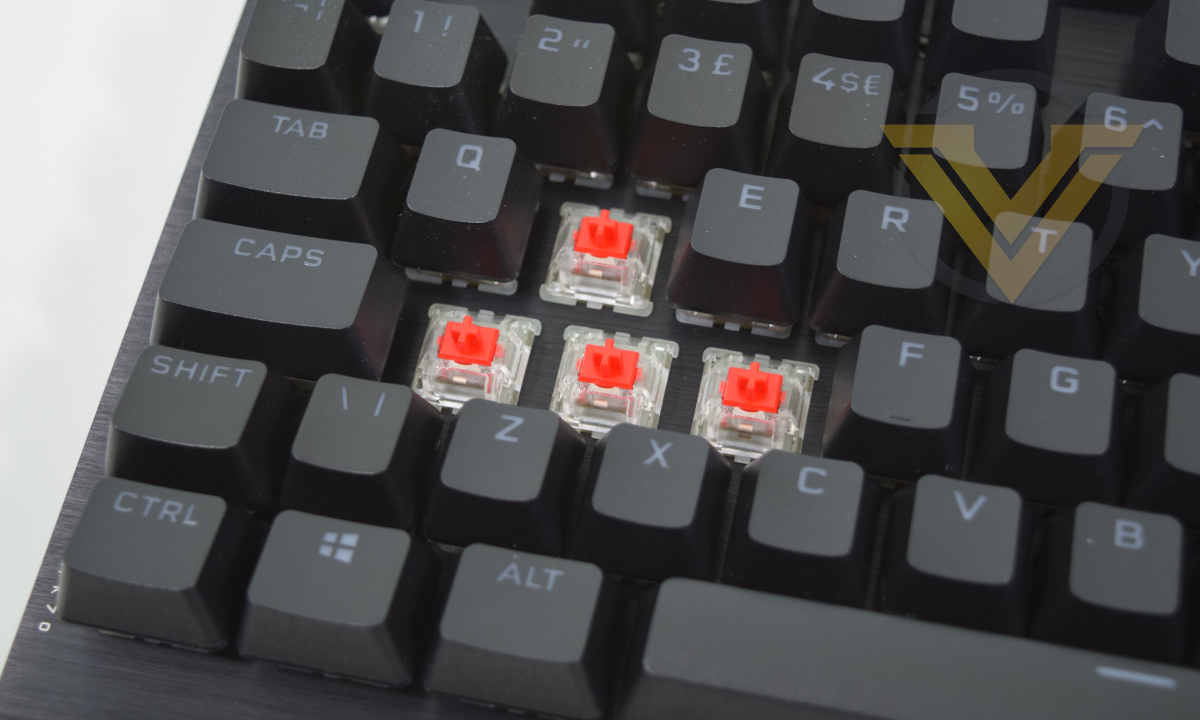
Removing the keycaps lays bare the CHERRY MX RGB switch. This ‘Red’ low force linear variant has a clear housing and red stem, making them clearly distinguishable from standard MX Reds. The K70 RGB TKL is also available with MX Speed and MX Silent switches, but not CORSAIR’s new OPX optical-mechanical switches.
One under-appreciated aspect of CORSAIR’s keyboard designs is how easy they are to clean. Removing each keycap is easy, and the unibody chassis dispenses with the usual nooks and crannies where crumbs, dust and hair can build up.
Closer Look (2)
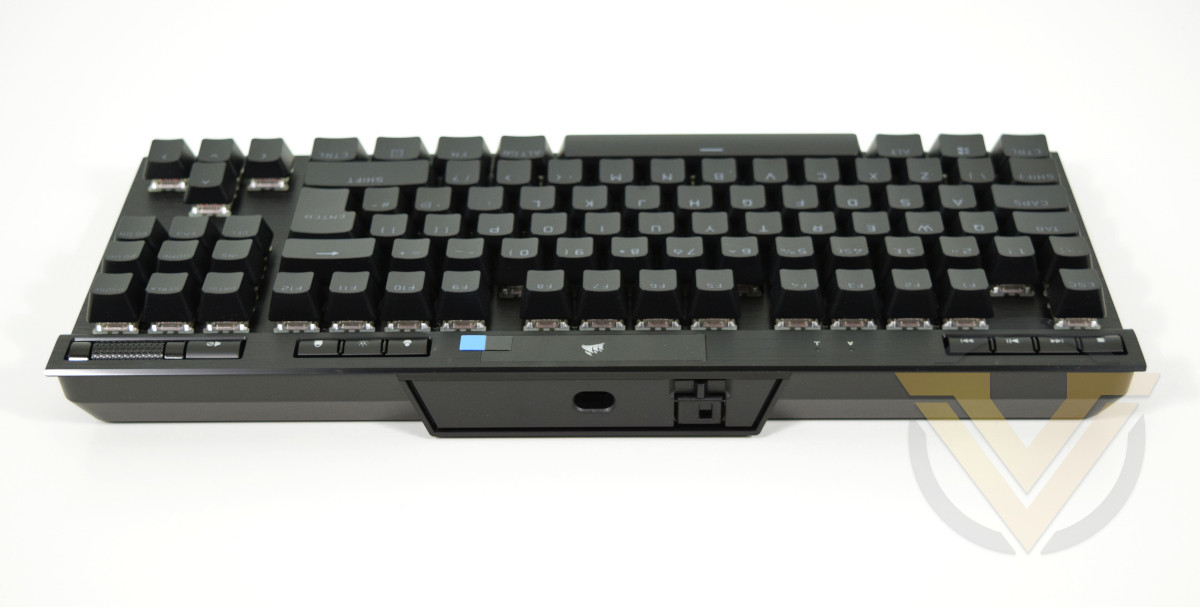
Moving to the rear exposes both the USB Type-C port and Tournament Mode switch.
The switch moves left to right, activating an LED just below it when in the on position. The flap can be raised to both show the LED status to others and lock the switch in place. When in that position it’s difficult to move the flap back down blind.
It should be mentioned that there is some play in the USB cable near the housing. When plugged it’s possible to wiggle the cable up and down a few millimetres, which could cause problems with the connector over time. Long-term durability therefore could be a concern depending on how the port is mounted within the keyboard itself.
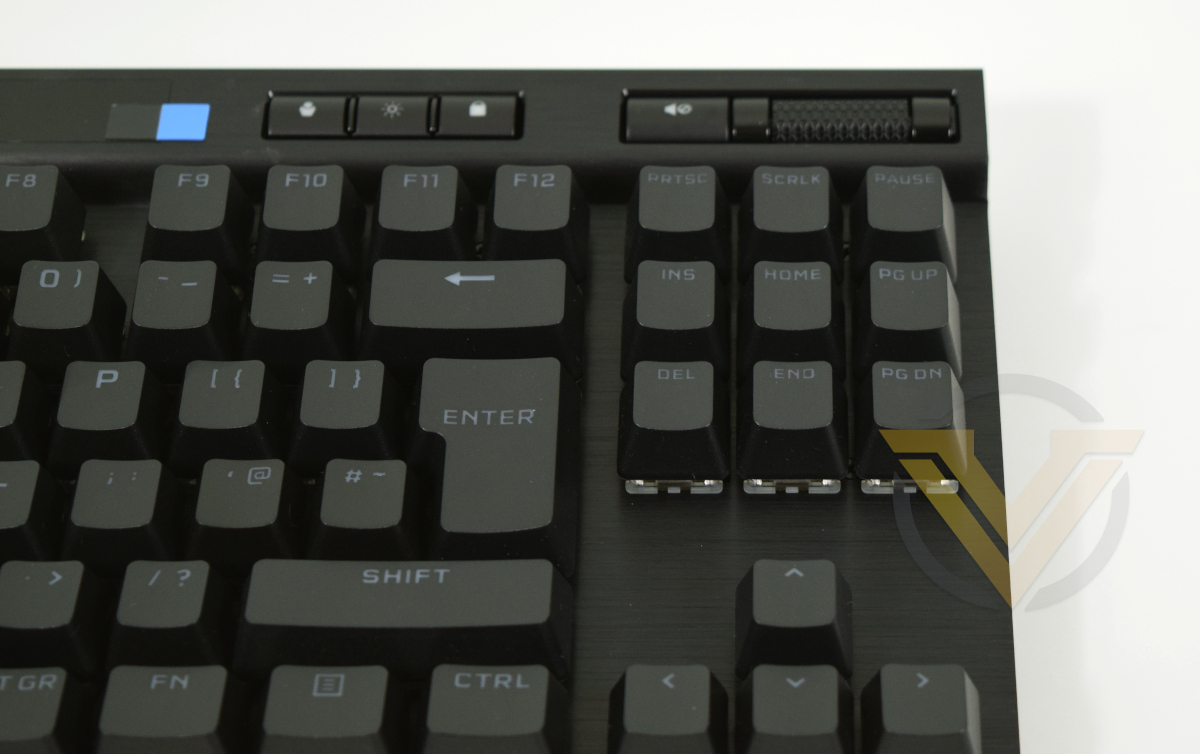
At the top-right we have, from left to right: profile switch, brightness adjust button, Windows Lock button, mute button and volume roller. Each of the buttons are illuminated with an RGB LED and can be configured in software. The roller is roughly textured making it easy to roll, and is quite resistive rather than spinning freely. It’s also remappable to other keys, macros and selected iCUE software functionality.
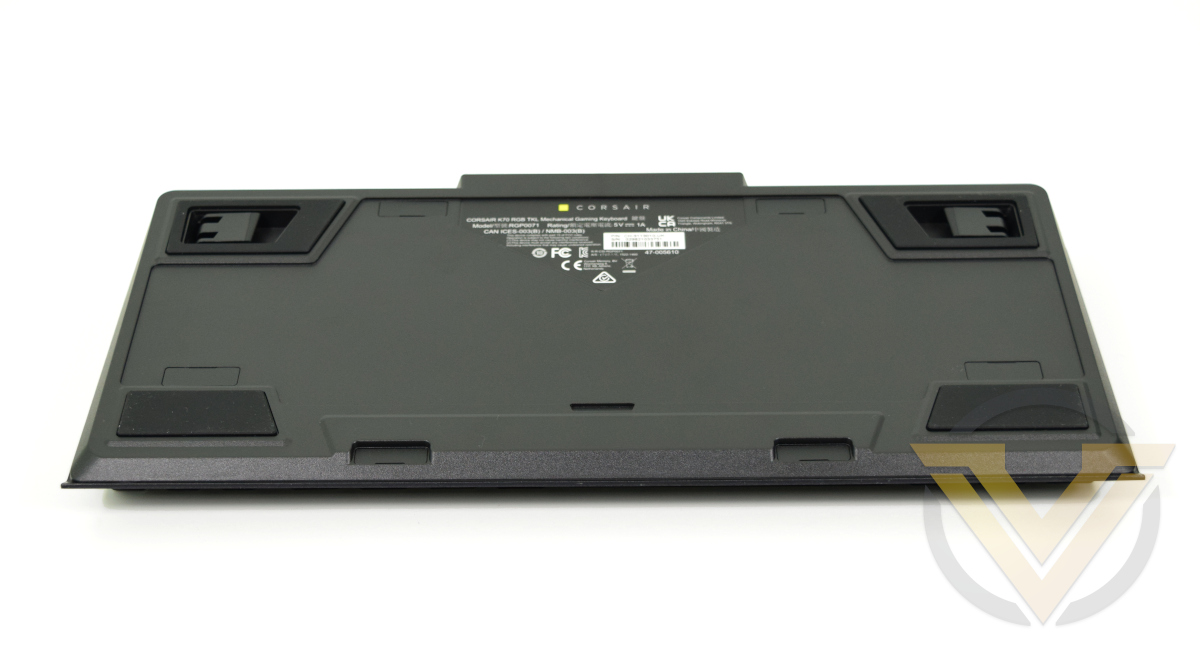
Switching to the underside, there are no cabling channels on the floor of the keyboard. It’s a feature that is increasingly common on larger keyboards, but the omission is excusable given both the lack of USB passthrough and its reduced footprint.
Four rubberised feet hold the keyboard in place, the rear two of which can be extended to offer a higher angle of attack.
Software & Lighting
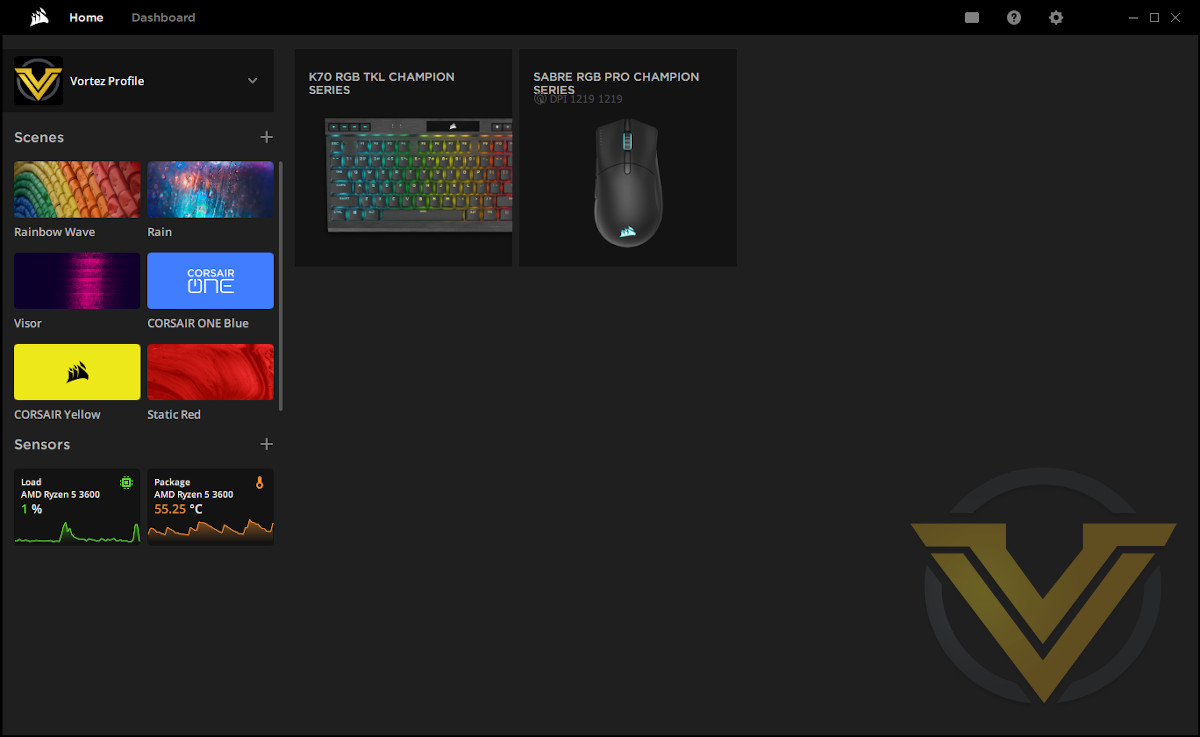
The Home screen for iCUE v4 release
CORSAIR’s iCUE software was updated in March 2021 to version 4, bringing significant changes to the UI motivated by making it more approachable and easier to manage multiple iCUE devices. The good news is that v3 profiles are compatible with v4; your meticulously created lighting effects and key assignments will not be lost in the update.
Despite the UI change, the underlying organisational approach remains the same:
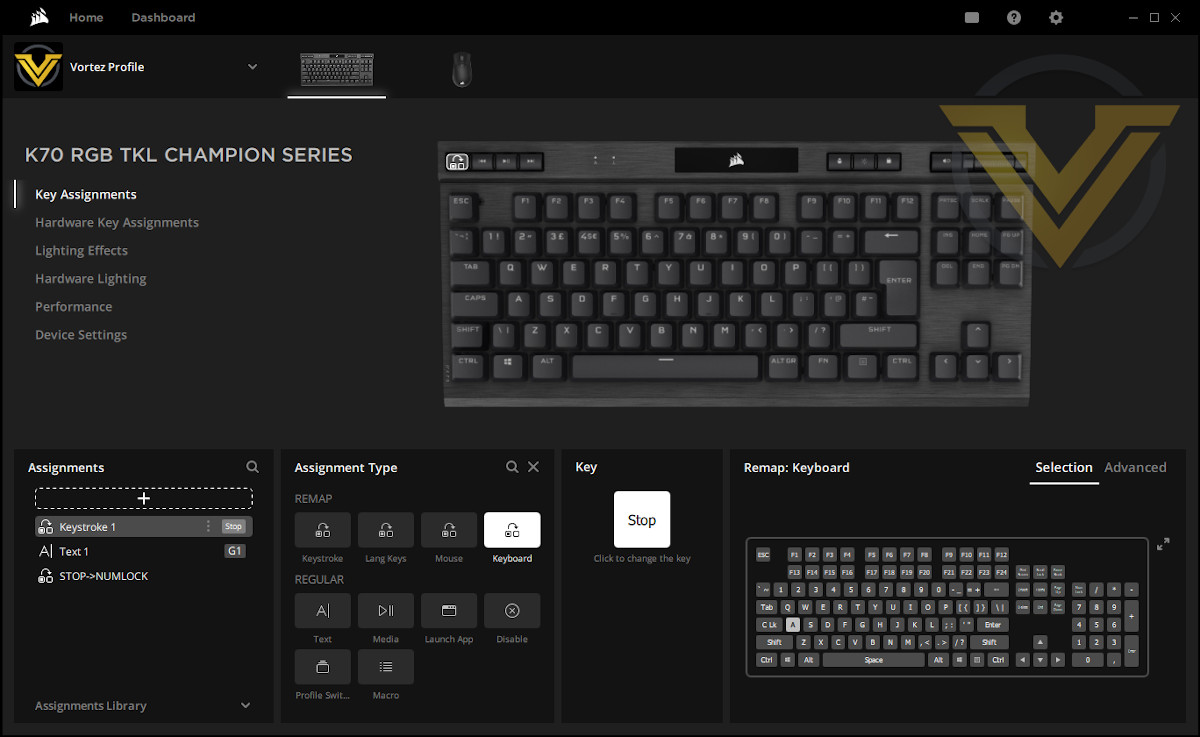
Key Assignments: Software-defined and controlled key assignments made on a per-key basis. Does not apply on other PCs, nor where iCUE isn’t running.
Every key (and the volume roller) on the K70 RGB TKL is able to be reassigned to a keystroke or macro through this functionality.
Hardware Key Assignments: Assignments stored in keyboard memory. This will become the default behaviour when connected to systems without iCUE software installed.
Lighting Effects: Software-defined and controlled lighting. Allows linked iCUE lighting across multiple devices. Effects are built up as layers (with defined per-key opacity) which the AXON processor or iCUE software manages to determine which should be shown.
Hardware Lighting Effects: Lighting effects stored on the keyboard. Will apply when connected to systems without iCUE installed.
Every key (and the volume roller) on the K70 RGB TKL is able to be reassigned to a keystroke or macro through this functionality.
Hardware Key Assignments: Assignments stored in keyboard memory. This will become the default behaviour when connected to systems without iCUE software installed.
Lighting Effects: Software-defined and controlled lighting. Allows linked iCUE lighting across multiple devices. Effects are built up as layers (with defined per-key opacity) which the AXON processor or iCUE software manages to determine which should be shown.
Hardware Lighting Effects: Lighting effects stored on the keyboard. Will apply when connected to systems without iCUE installed.
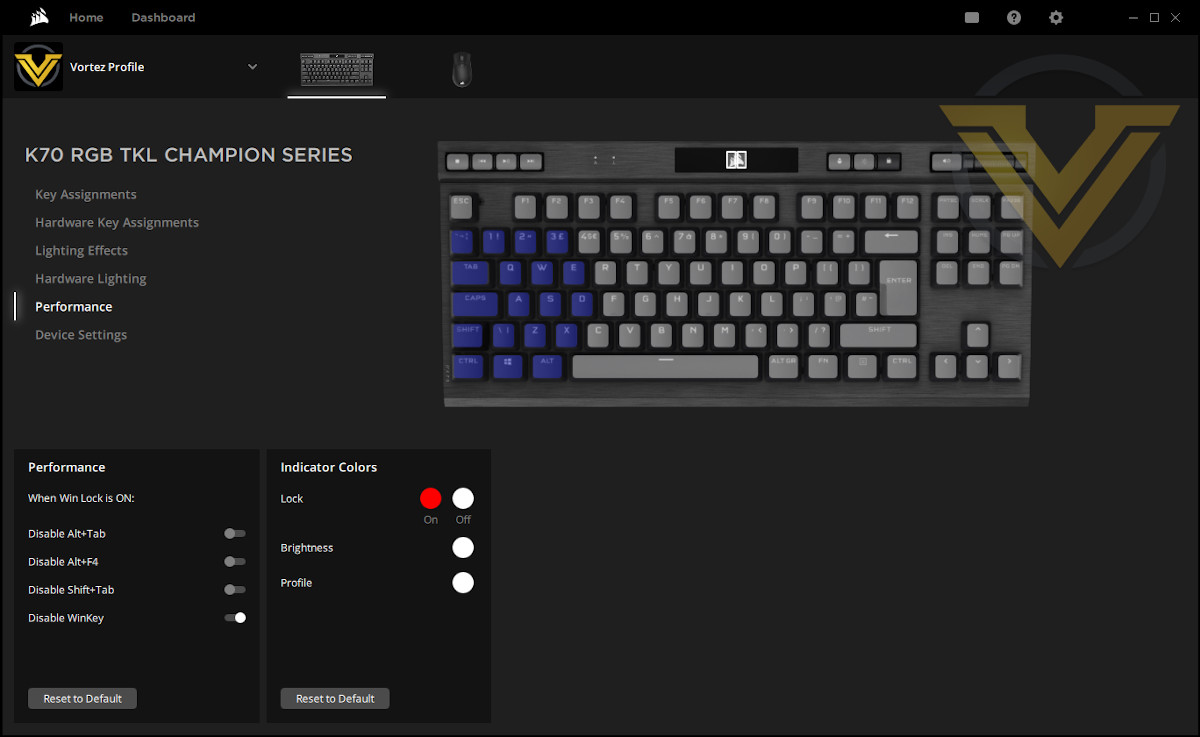
Each of these is stored on a per-profile basis, alongside device configuration information defined under the Performance and Device Configuration tabs. The number of software profiles available is effectively without limit, but the keyboard itself can store up to 50 depending on complexity.
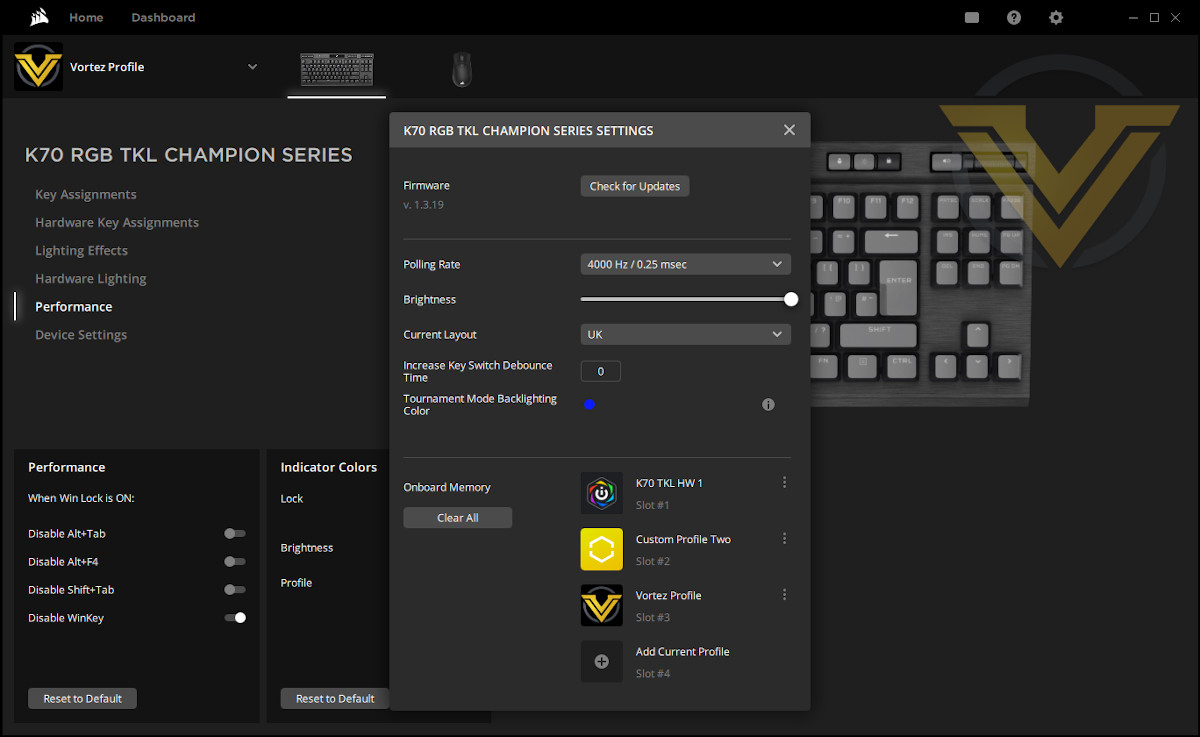
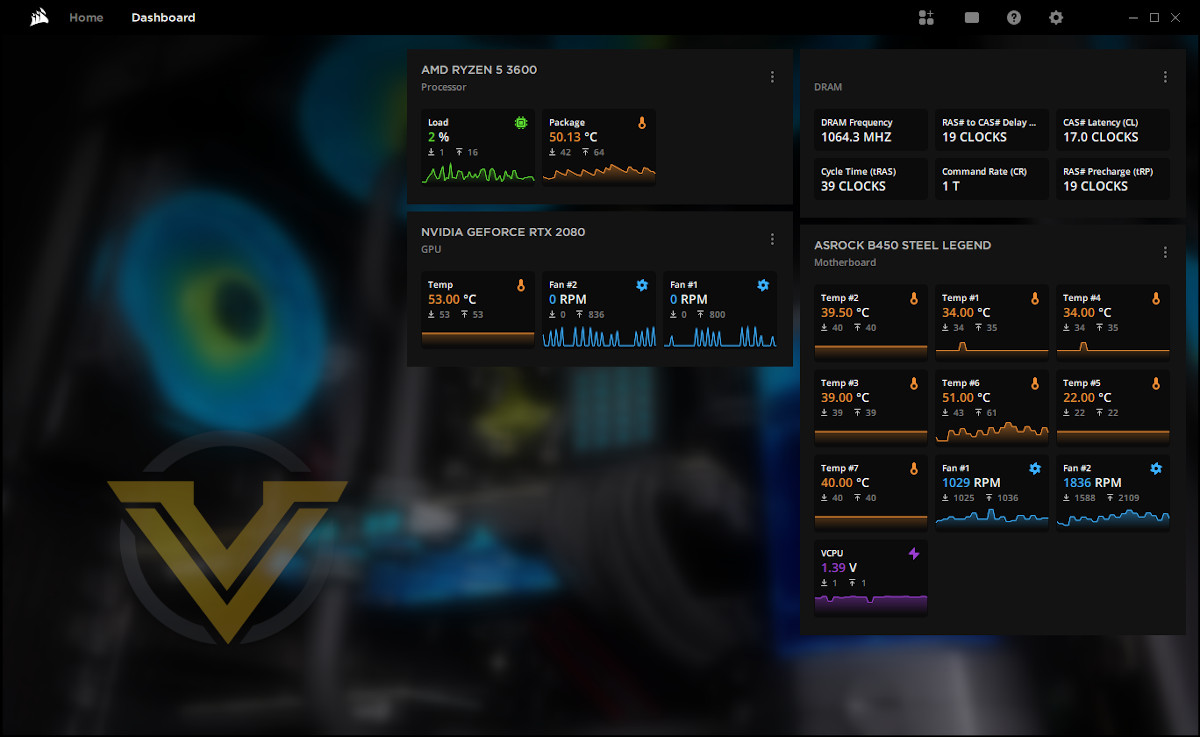
A more minor aspect of iCUE when it comes to peripheral control and configuration is the Dashboard panel. Here you can visualise all the system sensors – CPU Temp, GPU Fan RPM, Motherboard Sensors etc – in one convenient location. Optionally, you can also add a list of every active key assignment on attached peripherals (the K70 RGB TKL in this instance).
Lighting
CORSAIR’s iCUE software is a powerful tool for constructing complex dynamic per-key lighting through a layered system of simpler effects. Each layer defines the colour dynamics of any particular key over time, stacking together for the full visual show.
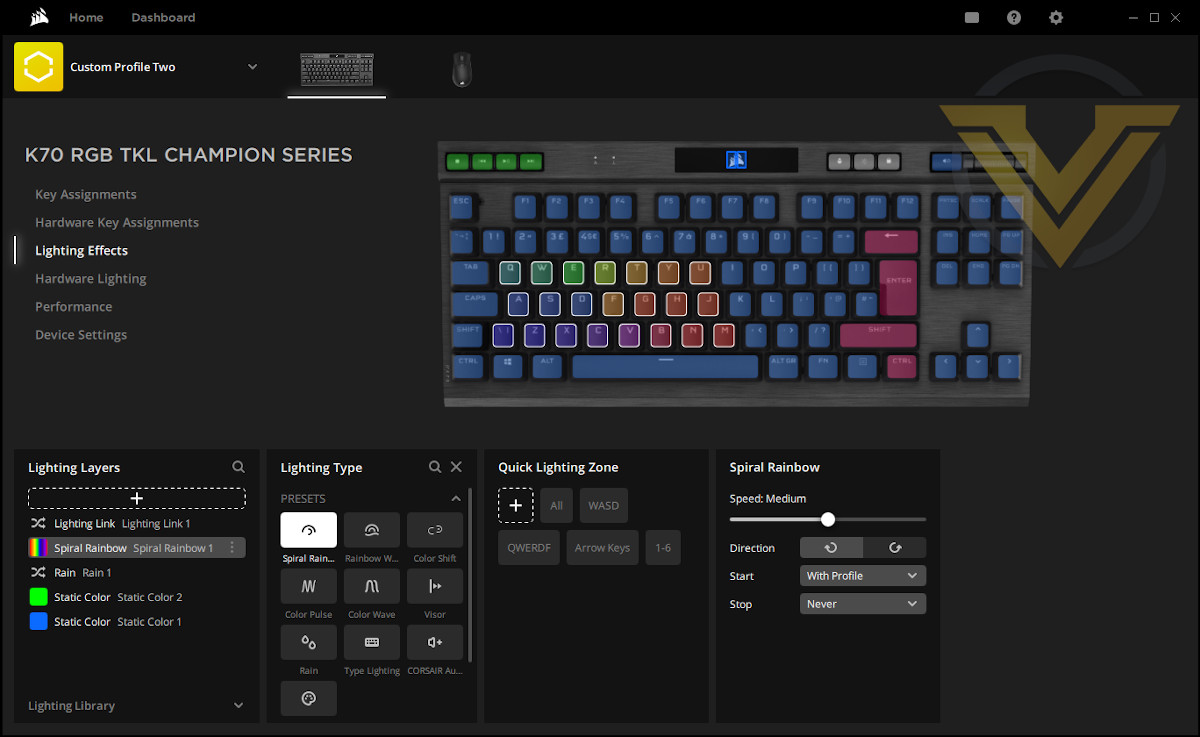
Any layer can have keys undefined, and per-key effects can have implicit transparencies for shorter periods. In those instances the layer underneath is checked for an underlying behaviour, repeated all the way down the stack where necessary. For example you can set up the visor effect on a layer to have a bar of light cross backwards and forwards over whole of the keyboard, and a layer underneath it defining a static background colour, all while having a static WASD key colour zone.
iCUE offers ten lighting type presets such as Spiral Rainbow, Visor, Color Pulse etc. Five Custom settings let you construct your own complex single-layer effect, or just generate static blocks of colour. Alternatively, Lighting Link treats each attached iCUE RGB lighting device as one, synchronising a lighting preset across them.
Community created lighting effects can also be imported as profiles into iCUE, to edit and use as you wish. You can also save a layer to the Lighting Library as an effect and import it into other iCUE profiles.
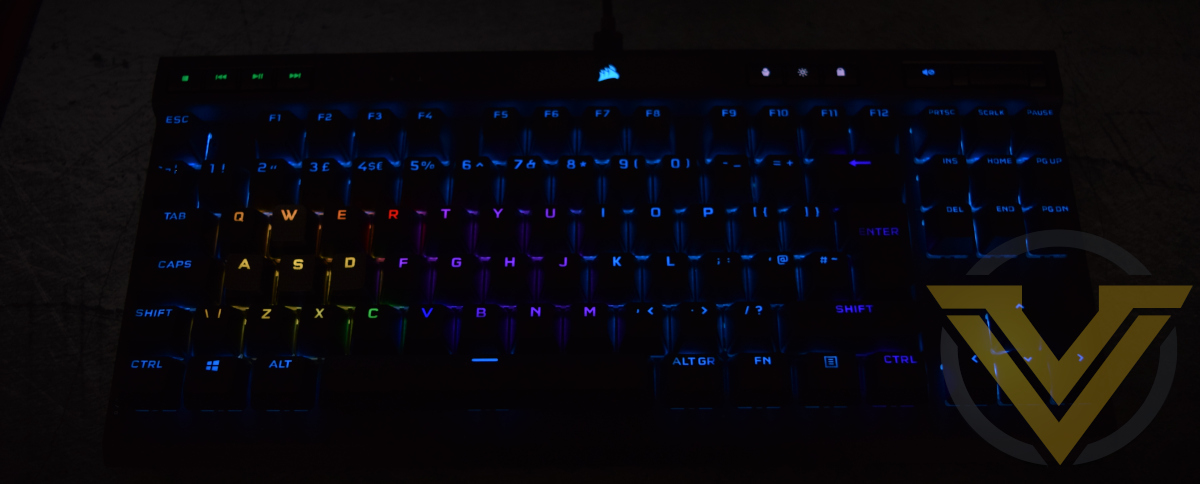
The configured lighting biases a little towards the blue end of the spectrum compared to what’s defined in the settings (lighting configured as white appears with a slight blue tint), although not quite so much as the K100 RGB. Happily, the keyboard lighting updates nearly instantaneously as you configure it, eliminating much of the potential for annoyance when exploring the functionality.
And the software certainly rewards exploration, unlocking potentially enormously complex effects with unique subtleties. The open nature of the iCUE SDK is also allowing the community to independently create new features such as custom game integration and linked dependencies with other lighting solutions.
That’s not to say that the software is perfect; small flaws are present when operating with the K70 RGB TKL. One example is the virtual position of the CORSAIR logo not quite lining up with the keys below it, making it offset to the left under some dynamic lighting effects. We’d also like to see some sort of configuration page that allows us to set out each peripheral in 2D space for dynamic effects. But these are minor quibbles.
Unlike many of their competitors, CORSAIR’s supporting software is a tremendous asset to their product range that can be bolstered further by an enthusiastic community should they continue to nurture it. The fact that the K70 RGB TKL can operate more than adequately without the software – and on games consoles – is another crucial advantage.
Performance
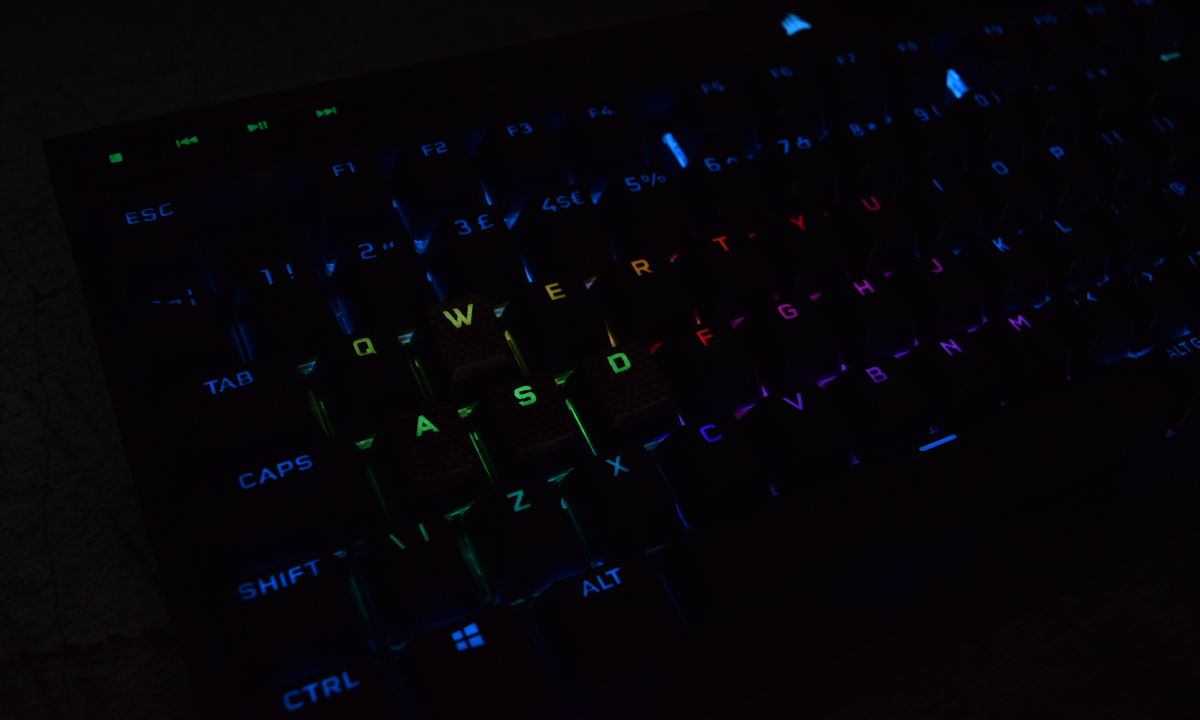
The K70 RGB TKL was ready to go straight out of the box in common with the wider selection of CORSAIR’s peripheral range. The lighting was active with the RGB ‘Rainbow’ wave preset, and configuration was unlocked once iCUE v4 was reinstalled (v3 did not support the keyboard).
One immediately notable fact was that the K70 immediately inherited left-over profile settings from the K100 RGB we reviewed previously. If you’re upgrading from an older CORSAIR keyboard you can take solace in knowing that old keybindings, and even partial lighting settings (without the NUMPAD region), will be inherited.
In contrast to the K100 RGB, the K70 TKL takes up less space than you might expect on the desk top, offering substantially more room to manoeuvre a mouse on compact desktop spaces. Nothing in terms of build quality appears to be lost in the transition either as there’s no hint of flex or misalignment when striking the keys; the K70 RGB TKL is very much living up to CORSAIR’s reputation for solidly built mechanical keyboards. The rubber feet are good, but the grip on the desk was slightly lighter on the right than the left.
The sample provided was equipped with CHERRY MX RGB RED switches. These switches aren’t the fastest available, and will have some amount of debounce response which may reduce the impact of the 4000Hz switch polling available through the K70’s AXON processor. At present CORSAIR have opted not to make their OPX optical-mechanical switches available to this model, a technology that remains exclusive to their flagship K100 RGB.
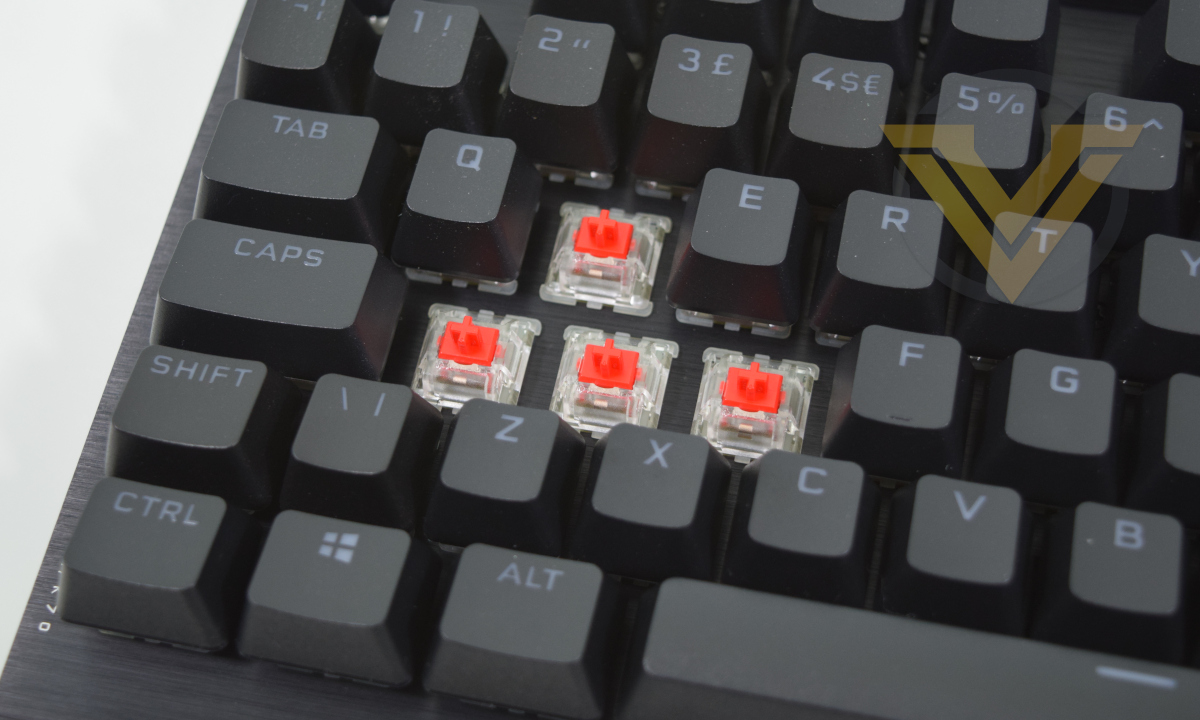
MX Red-style switches haven’t been our preferred switch type in the past due to the manner in which they tend to clatter against the base plate when bottoming out. We were surprised to notice that, although impacts could be heavy, they weren’t quite as jarring as other equivalent switches we’ve sampled. True gamers might prefer MX Speeds and those with acoustics to consider could take the MX Silent option, but we feel confident in saying that these might be a little easier to live with if mixing and matching gaming and work-related activities. As always when it comes to keyswitch designs, trying before you buy pays dividends.
The major question when it comes to general wordprocessing and office work is whether you can live without a numberpad, which for many people will be determined by whether or not they work from home. If a numberpad is effectively necessary (spreadsheets being what they are) then a full-sized keyboard may be more appropriate, but it should be noted that the detachable cable makes it trivial to just plug in as and when you want for a quick – or extended – gaming session.
To test out gaming we started by booting up World of Warcraft and importing keybinds and macros from the K100 RGB profile. More exotic configurations aren’t possible as the K70 lacks dedicated macro keys, but it is possible to leverage media or lesser-used keys for more useful functionality. In this respect the power of iCUE in combination with the fully-remappable CORSAIR key engine starts to show itself.
The MX Red style switches were fine for this application, despite a rather heavy-fingered and repetitive-striking play style. The longer actuation distance of MX Reds also means that you’re less likely to accidentally press a key despite resting your finger on top of it, which can be something of an issue with MX Speed/OPX models. Macro keys turn out to be useful, but not essential.
We found that the media keys were most suited for toggle on/off functionality, particularly microphone activation or lesser used abilities like hiding the HUD, rather than fast-response requirements. They’re just fractionally too spongy to be comfortable when used repetitively, but are reliable nonetheless.
We’d also like to mention one major improvement on this generation of keyboards: the stability of non-standard size keys. The Spacebar, Backspace and Enter keys all exhibit significantly less wobble and have a more even response across the key, particularly the space bar. This is a UK layout keyboard, but we hope that the same is true of the Left-Shift on US layout models.
Like the iCUE wheel on the K100 we’re a little unsure about additional uses for the volume wheel on the K70 RGB TKL. In WoW specifically we settled on camera zoom functionality, but there’s surely a killer app we’re missing to really use it to the fullest potential. Apart from volume control of course.
Bethesda’s DOOM (2016) switched things up and highlighted the value of that additional desk real-estate. With mouse sensitivity turned down it was far easier to make large movements for more accurate sniping without risk of clattering into the keyboard, and the keyboard itself was crisply responsive to inputs. The kepcaps are contoured such that fat-fingering adjacent keys wasn’t an issue here, nor with WoW.
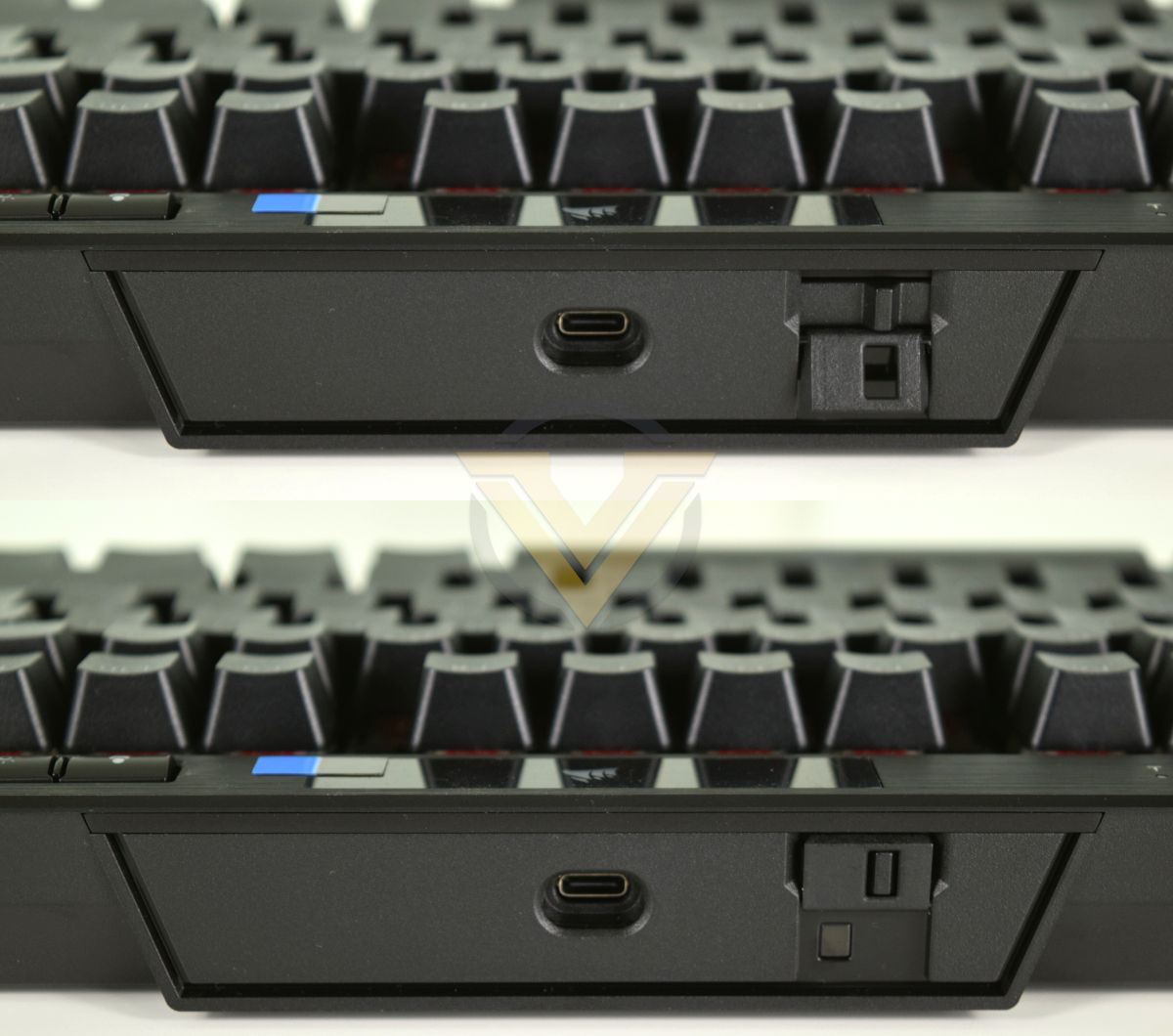
K70 RGB TKL Tournament Mode sliding switch. On above, locked On below.
Without LAN events in the near future the Tournament Mode feature can’t really get the work-out it deserves, but we found it trivial to activate and no problem to work with. When active the keyboard disappears entirely from iCUE, but basic functionality is retained including all media keys and the Windows Lock key. LEDs default to a static colour (customisable before hand) and profiles are explicitly disabled (even the profile switch button is disabled and not illuminated).
It’s a fascinating feature, but one that will only come into its own when LAN events, small and large, return in your home region.
One feature we’d love to see as part of the default iCUE suite is a Microphone Mute Action that can be bound to any key. We understand that this is something of a limitation with default Windows 10 behaviour, and that the Elgato software makes it possible with a custom plugin, but we feel that the popularity of streaming would make this feature all the more beneficial as part of the included software toolkit.
Conclusion
CORSAIR’s ongoing refresh of their product lineup, which has now encompassed peripherals, cooling and lighting solutions, is continuing to showcase solid designs that please the eye and delight the fingertips. The K70 RGB TKL may be the latest but it certainly won’t be the last.
The choice of bringing the compact TKL form factor to their premium K70 range must have merited plenty of assertive discussions behind the scenes, but from a pure product-oriented perspective it must be seen as a success. Surface-level feature additions may well be minor – the volume roller is the only one you’ll easily spot – but it gives the keyboard an overall expectation of quality which is more than lived up to. Aesthetics and overall robust construction get top marks.
Under the hood the AXON processing engine and 8000Hz polling may also turn out to be key differentiators for the K70 and higher, and for both high-end competitive and enthusiast gaming the ultra-fast response time and plethora of managed hardware profiles will be well received. More casual gamers may instead take advantage of the more complex lighting profiles it offers, particularly when travelling to other locations to play.
Small oversights present on prior K-series keyboards have also been notably improved. This model in particular, even more so than the K100, improves the quality of large key stabilisers for a much more consistent feel across the keycap. Remappable media keys can be differentiated by feel and are less likely to be ‘fat-fingered’, making them a little more viable as frequent-use keys in gaming and elsewhere.
If we were to nit-pick, a slightly more grippy front-left foot causing the keyboard to rotate very slightly anti-clockwise when typing is the only minor build niggle we uncovered. And it’s one that can easily be rectified through the use of a desk-pad and shouldn’t come up in gaming as typing force is focussed on the WASD zone.
The model reviewed was equipped with CHERRY MX RGB Red switches and the keyboard is available with either short-actuation MX Speed or dampened MX Silent types. Enthusiasts might have preferred at least one tactile option but that trio should satisfy the majority of needs.
The K70 RGB TKL’s ‘Tournament Mode’ switch is likely to confuse rather than intrigue potential owners, unless they fit into an extremely narrow competitive gaming demographic. It’s not a bad idea by any stretch, it just seems to be a lot of engineering work of a very niche application. Still, for those in real need of a default configuration mode with external indicator, the keyboard suddenly jumps to the head of a very thin herd with organised LAN locations in particular potentially sitting up to take notice.
Finally, we don’t think the claims of portability are overblown. It weighs less than a kilogram and the detachable cable makes it easy to tuck away in bags and holdalls. Just be careful not to scratch that aluminium, or get too many greasy fingerprints over it.
Perhaps our only (albeit muted) reservation therefore isn’t the keyboard itself, but rather the iCUE software. With the releases last month the software has transitioned to v4, and the UI change is a jarring one. Functionality doesn’t appear to have been reduced but those used to v3 may find a steep learning curve ahead of them. Thankfully older profiles are forwards compatible so you won’t lose any settings when you update.
Rounding off, we come to the price. It was mentioned at the start of the review that £139.99 was close to many of the competitors on the market and we conclude that it’s not out of its depth in that company. More affordable alternatives are available but you’d need to sacrifice features along the way, some of which are unique and highly desirable.
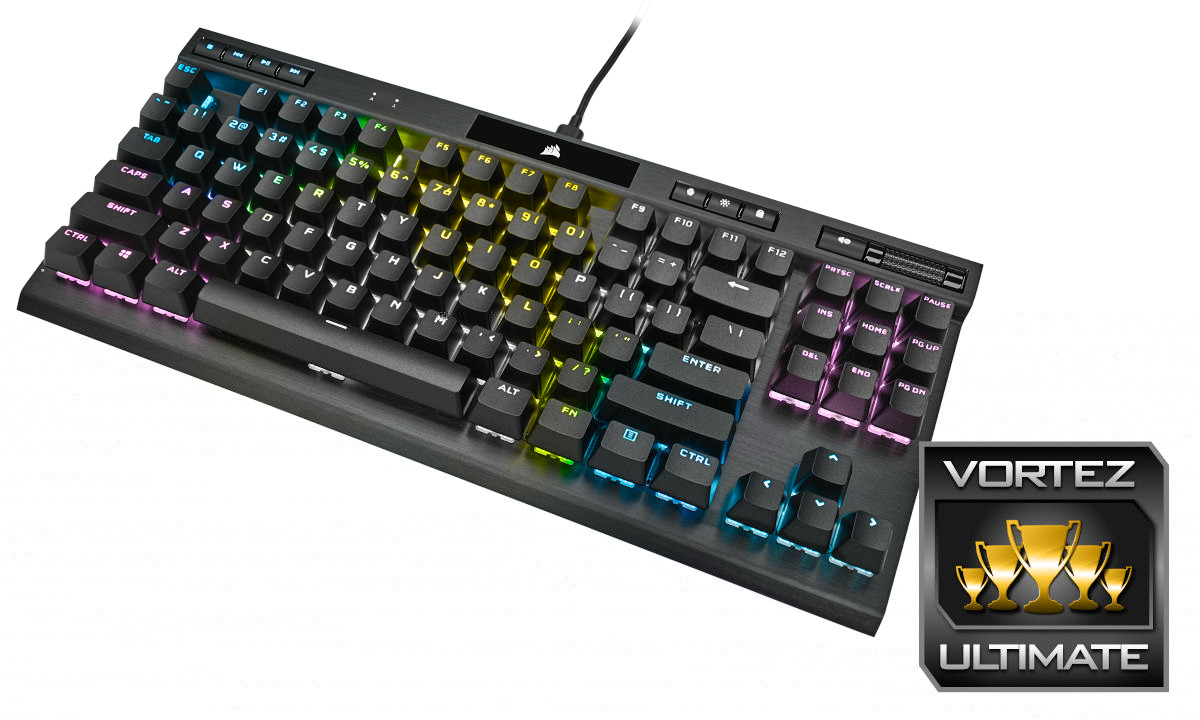
Living up to CORSAIR’s reputation for build quality and aesthetic excellence, the K70 RGB TKL is a compact mechanical keyboard ideal for gaming enthusiasts who appreciate more than the bare bones. Yet despite unique features tailored to competitive gaming, you don’t need to be the next Faker to appreciate what this has to offer. It deservedly earns our Ultimate award.
Pros
+ High build quality
+ Vibrant RGB illumination
+ Compact form factor
+ Optional tactile MOBA & FPS keycaps
+ Ever-solid CHERRY mechanical switches
+ Novel features
+ 8000Hz USB polling & 4000Hz keyscan support
+ Plenty of on-board profile space
+ Detachable USB cable
Cons
– No tactile switch option
Comment
= Latest iCUE software update takes some getting used to.
+ High build quality
+ Vibrant RGB illumination
+ Compact form factor
+ Optional tactile MOBA & FPS keycaps
+ Ever-solid CHERRY mechanical switches
+ Novel features
+ 8000Hz USB polling & 4000Hz keyscan support
+ Plenty of on-board profile space
+ Detachable USB cable
Cons
– No tactile switch option
Comment
= Latest iCUE software update takes some getting used to.
Click here for an explanation of our awards at Vortez.net.
Stay connected with Vortez social media pages: