The brand new gaming mouse from CORSAIR is the first to incorporate their AXON hyper-processor, unlocking 8000Hz USB polling. But in a highly competitive landscape can it show its class and pull ahead of the rest?

Product On Review: SABRE RGB PRO
Manufacturer: CORSAIR
MSRP: US$59.99; £49.99; €59.99; AUD89.99
We have a double-header of peripheral reviews today as both the CORSAIR K70 RGB TKL and SABRE RGB PRO are launching as part of the Champion Series of gaming peripherals. Click here for our coverage of the K70 RGB TKL.
Just like the KATAR before it, the CORSAIR SABRE family of mice is receiving a major revamp through a new PRO variant, updating all aspects of the design from sensor through to the chassis. In this instance the update slides it into a budding selection they’re calling the Champion Series, a lineup of peripherals which is developed with a distinct focus on competitive gaming and esports, while continuing to offer consumer-grade features and pricing.
After the KATAR PRO XT and PRO Wireless had somewhat mixed reception we were eager to give the SABRE RGB PRO a thorough going over. Like the KATAR PRO it boasts an ultra-lightweight mass (although definitions of ‘ultra-lightweight’ are an imprecise yardstick at best), but a more conventional size and shape will mark it out for mainstream audiences. Beyond that, it’s also their first mouse to incorporate the new AXON processor for up-to 8000Hz USB polling and maintains overall component quality thanks to OMRON switches and a semi-custom PixArt 3392 18,000 dpi optical sensor.
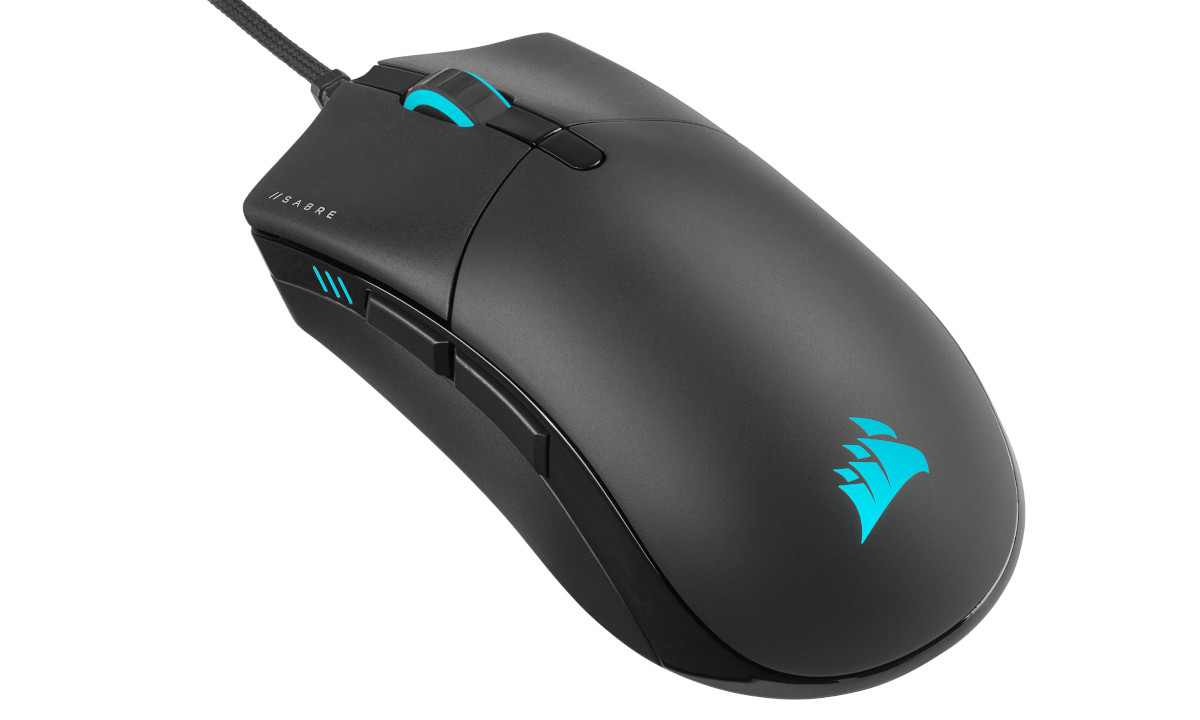
Augmenting the OMRON switches for a crisp action on the main buttons is QUICKSTRIKE, which zeros the gap between button and underlying switch for a fast and quick action. QUICKSTRIKE was an excellent feature on the KATAR PRO XT and an aspect we expect to complement the SABRE PRO series well.
CORSAIR iCUE support continues to be a significant feature pillar for the SABRE RGB PRO, controlling both lighting and major device settings in one unified software package for their whole peripheral range. The mouse incorporates two custom RGB zones and a further RGB DPI indicator, pushing it beyond the mere afterthought treatment received on other gaming mice.
The SABRE PRO and SABRE RGB PRO will be entering an extremely competitive gaming mouse market at a <$50 MSRP. They’re cheaper than the Razer Deathadder, and competitive with the Logitech G 305, Xtrfy M4, Steelseries 310 Optical and Glorious Model D. They’ll have their work cut out taking the fight to established names and the recent wave of Ultralight rodents that can slide in at under 70g.
About The SABRE RGB PRO
The CORSAIR SABRE RGB PRO CHAMPION SERIES Gaming Mouse is designed for and tested by esports pros, weighing an ultra-light 74g and equipped with a drag-reducing flexible paracord cable for responsive, unhindered movements. CORSAIR QUICKSTRIKE Buttons ensure every click is immediate and responsive, while CORSAIR AXON hyper-processing technology delivers inputs to your PC up to 8x faster with 8,000Hz hyper-polling. The SABRE RGB PRO is equipped with an 18,000 DPI optical sensor customisable in single-DPI steps, with a DPI button to cycle though five presets on-the-fly. Finished with high-quality materials such as 50 million click-rated OMRON switches and 100% PTFE glide pads, the SABRE RGB PRO cuts through the competition,
The SABRE RGB PRO is the first mouse to launch with the next generation of iCUE software featuring a brand-new UI that makes it easier than ever to take advantage of the software’s powerful features to program your mouse and synchronise your setup’s RGB lighting effects.
At an MSRP of $59.99 (£49.99 inc. V.A.T.), the SABRE RGB PRO CHAMPION SERIES is tournament primed and ready.
The SABRE RGB PRO is the first mouse to launch with the next generation of iCUE software featuring a brand-new UI that makes it easier than ever to take advantage of the software’s powerful features to program your mouse and synchronise your setup’s RGB lighting effects.
At an MSRP of $59.99 (£49.99 inc. V.A.T.), the SABRE RGB PRO CHAMPION SERIES is tournament primed and ready.
Technical Specifications
Chassis:- Solid construction plastic, black, matte and gloss finish
Colour:- Black
Handedness:- Right-handed
Sensor:- PixArt PMW3392
Sensor Type:- Optical
Resolution:- 100-18000 DPS, 1 DPI increments
Buttons:- Six (inc. DPS switch)
Click Buttons:- QUICKSTRIKE buttons (zero gap)
USB Report Rate:- up to 8000Hz Hyper-Polling
Onboard Memory:- Yes
Backlight:- 2-zone RGB (wheel + CORSAIR logo)
DPI Indicator:- Yes, three RGB LEDs (linked)
Mouse Feet:- 100% PTFE
iCUE Software:- Supported in Windows 10 and macOS 10.15
Cable:- 2.1m / 7ft, USB Type-A, black, braided fiber
Dimensions:- 129mm x 70mm x 43mm
Weight:- 0.74g
Colour:- Black
Handedness:- Right-handed
Sensor:- PixArt PMW3392
Sensor Type:- Optical
Resolution:- 100-18000 DPS, 1 DPI increments
Buttons:- Six (inc. DPS switch)
Click Buttons:- QUICKSTRIKE buttons (zero gap)
USB Report Rate:- up to 8000Hz Hyper-Polling
Onboard Memory:- Yes
Backlight:- 2-zone RGB (wheel + CORSAIR logo)
DPI Indicator:- Yes, three RGB LEDs (linked)
Mouse Feet:- 100% PTFE
iCUE Software:- Supported in Windows 10 and macOS 10.15
Cable:- 2.1m / 7ft, USB Type-A, black, braided fiber
Dimensions:- 129mm x 70mm x 43mm
Weight:- 0.74g
AXON Hyper-processor
The most remarked-upon aspect of CORSAIR’s recent peripheral update wave has been the AXON Hyper-processor. All modern gaming mice have an on-board processor to manage button responses, assignments, complex lighting effects and sensor output; AXON turns it up a notch. Taking centre stage in the K100 RGB last year, this multi-threaded chip and underlying engineering have unlocked higher USB polling rates and greater levels of on-board lighting and key assignment profile customisation.
Its inclusion on the SABRE PRO is significant. Both NVIDIA and AMD have made reducing latency between mouse click and on-screen action a major tenant of new technologies going forward – particularly NVIDIA Reflex – and each gaming mouse manufacturer is now under a magnifying glass to get their own latency house in order. Pushing 8000Hz USB polling, similarly fast internal component polling and input prioritisation will all help to keep delays to near zero.
Nonetheless, 8000Hz USB polling isn’t free. Upping the polling rate will place a commensurate tax on your CPU due to the data load, potentially reducing frame rates in certain titles. CORSAIR recommend a minimum of Ryzen 7 (2nd Gen) or Intel i7 (9th Gen) CPU for 8000Hz USB polling, and Ryzen 5 or Intel i5 for 4000Hz polling.
QUICKSTRIKE Buttons
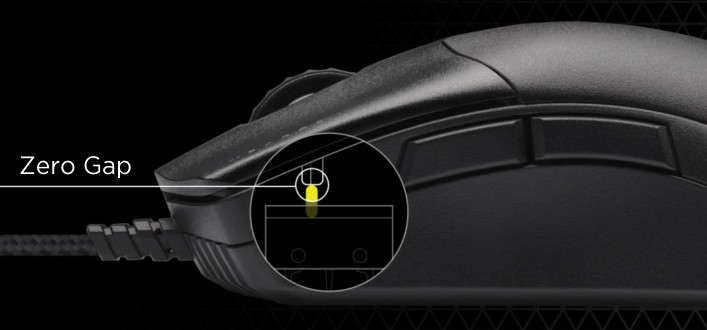
First seen on the KATAR PRO XT, QUICKSTRIKE buttons add tension to the main two buttons so that they rest firmly and securely on top of their respective switches. This should help the mouse maintain the consistent fast response that’s essential for competitive gaming.
PixArt PMW3392 Sensor
The sensor utilised by the SABRE PRO is a variant of PixArt’s optical offerings which have been customised to CORSAIR’s specifications. The exact model was previously used on the Dark Core RGB PRO mouse, and is capable of up to 18000 dpi and configurable in 1 dpi increments.
The combination of sensor and on-board processor also allows for calibration to the user’s mousing surface, as well as selective enabling of angle snapping and acceleration if ultimately desired.
Lightweight brained cable
A USB cable is rarely worthy of note, but that’s not the case here. The SABRE PRO is equipped with the same soft-braid cable as the KATAR PRO XT, reducing the tension and drag compared to stronger plastic weaves. It was a great inclusion there and, given the SABRE PRO’s ultra-light pretensions, this loose-looking paracord is set to be a well-judged inclusion.
On-the-fly On-Board DPI adjustment
For years gaming mice have featured on-board DPI level presets that can be cycled through at the press of a button. These preset levels are often customisable in software. But it’s a rarity to be able to modify the DPI presets using the mouse hardware alone, with no software holding your hand in the middle.
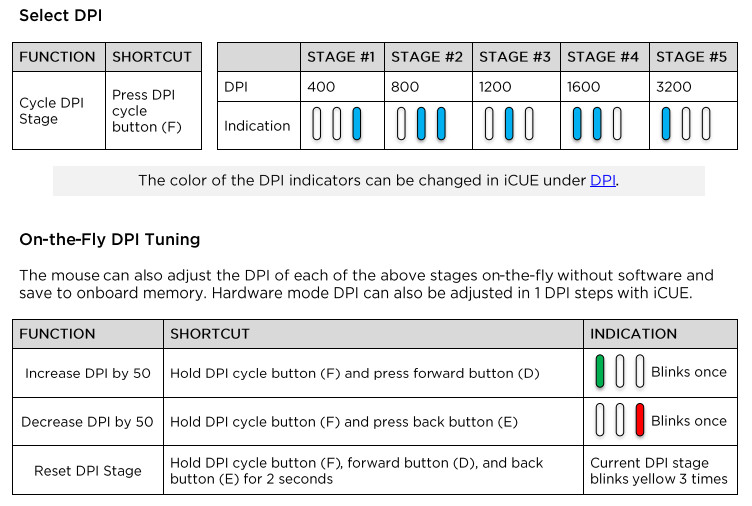
When the mouse is in Hardware Mode (i.e it’s not connected to a PC with iCUE installed) it’s possible to adjust each of the five DPI Stages independently in 50dpi increments. The process, which is laid out in the Quick Start guide, is a quick and easy means for console gamers in particular to modify their mouse preferences on-the-fly and without a PC acting as an intermediary.
Taking the software route will unlock additional options, including the ability to selectively disable stages and utilise single dpi increments. You may also change the colour of the DPI indicator LEDs which by default are red but are fully RGB (if not independent).
NVIDIA Reflex Support
NVIDIA Reflex was announced last year and hardware latency analysis tools were part of its suite of technologies. They interface with a new breed of 360Hz G-SYNC panels to uncover key game engine and frame rendering analytics with the focussed aim of reducing click-to-frame latency. Only a select few mice are natively compatible with this hardware, and yesterday NVIDIA announced that the SABRE PRO CHAMPION SERIES and SABRE RGB PRO CHAMPION SERIES have both been added to the official support list. Read more about that announcement and the underlying technology here.
NVIDIA’s internal testing reports, published on github, register the SABRE PRO as the mouse family with the lowest inherent average latency of those tested (up to 609 microseconds), beating out competitors such as the ASUS ROG Chakram Core (616 microseconds), Razer Deathadder V2 (1309 microseconds) and Logitech G502 (2497 microseconds).
Reflex testing and analysis is currently limited to the SABRE PRO’s 1000Hz USB polling mode.
Packaging and First Look
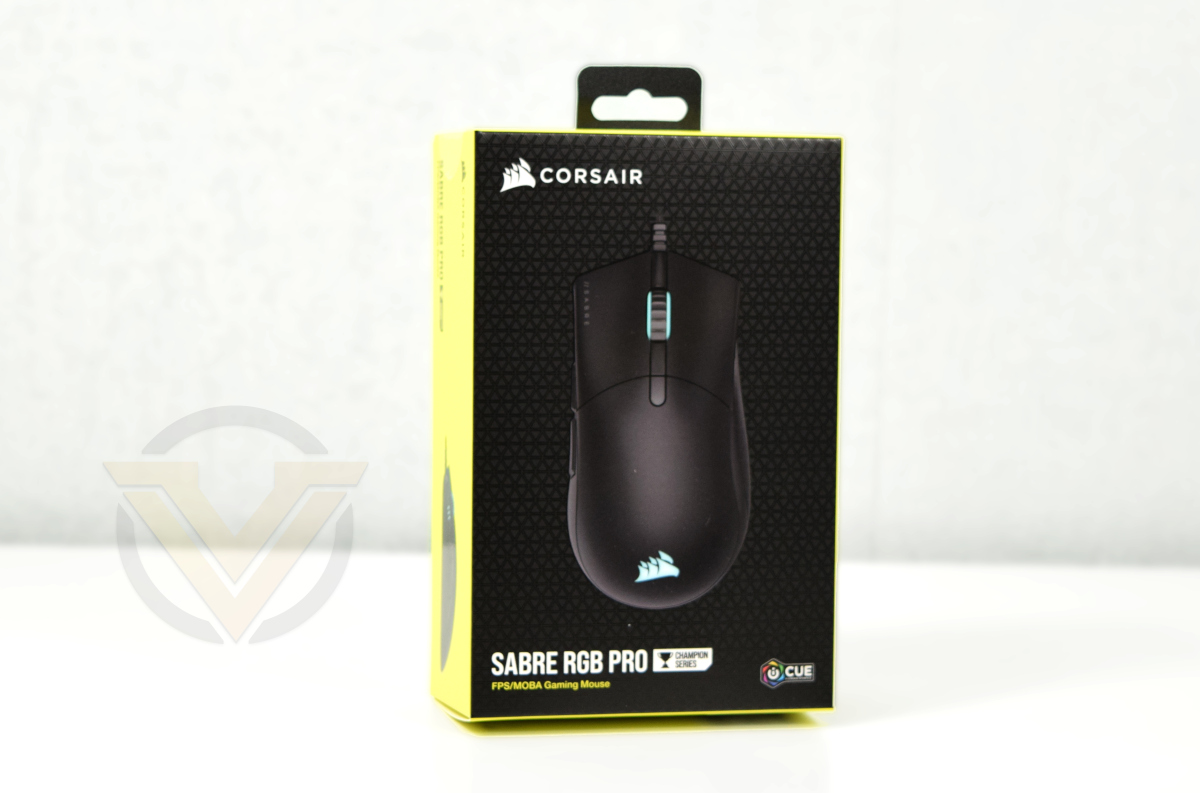
The familiar CORSAIR Black/Yellow packaging returns, this time with a top-down shot of the mouse that indicates handedness and an idealised gaming mechanic focus on FPS and MOBA titles. This top-down shot is slightly smaller than the SABRE PRO’s actual footprint.
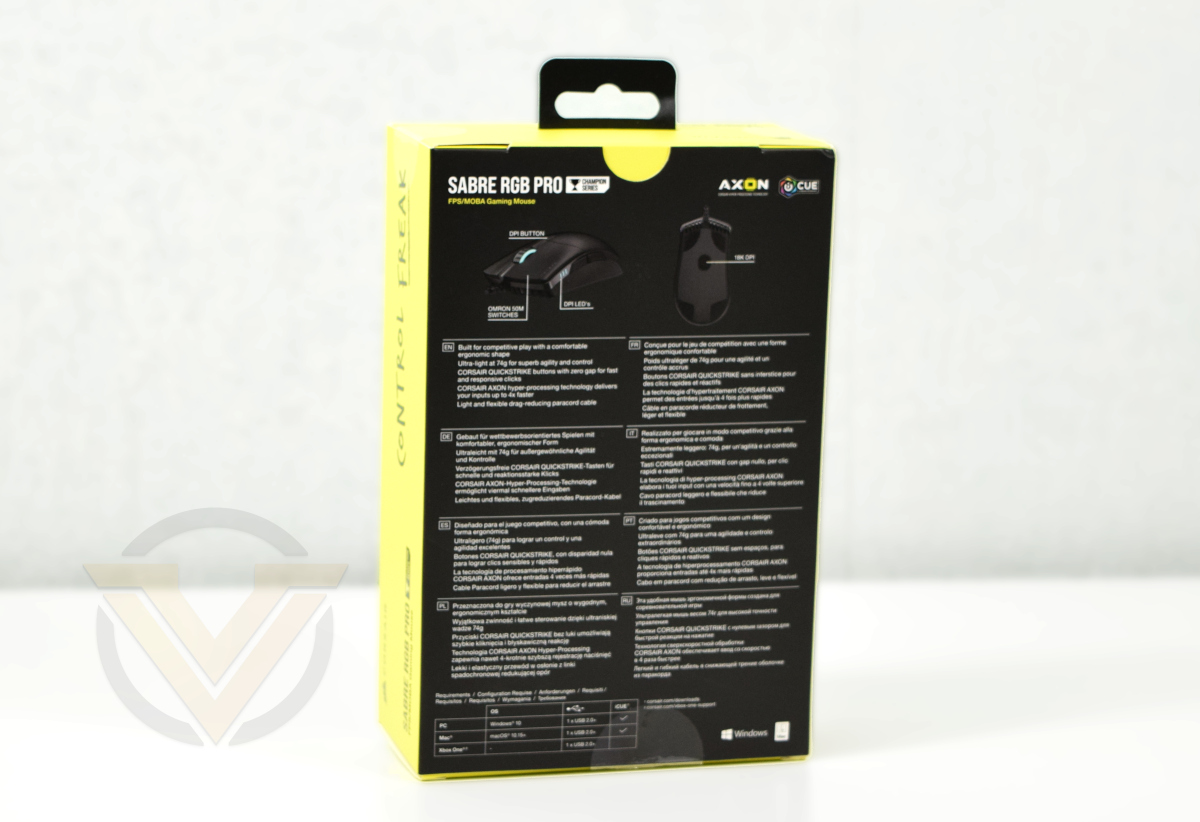
Additional angles of the mouse are represented on the rear relating to important functionality present. In this instance both the DPI indicator LEDs and sensor location are shown.
Only major features are discussed on the rear rather than all technical specifications, and in fact there are no indications of dimensions anywhere on the packaging for instance.
The bundle is sparse, but that’s not unexpected: just the mouse, warranty, safety information and quick-start guide are necessary. The mouse will auto-detect in Windows, and software can be downloaded from Corsair.com/icue.
Some of the mouse features are accessible without resorting to the iCUE software, and the quick-start guide helpfully details their use.
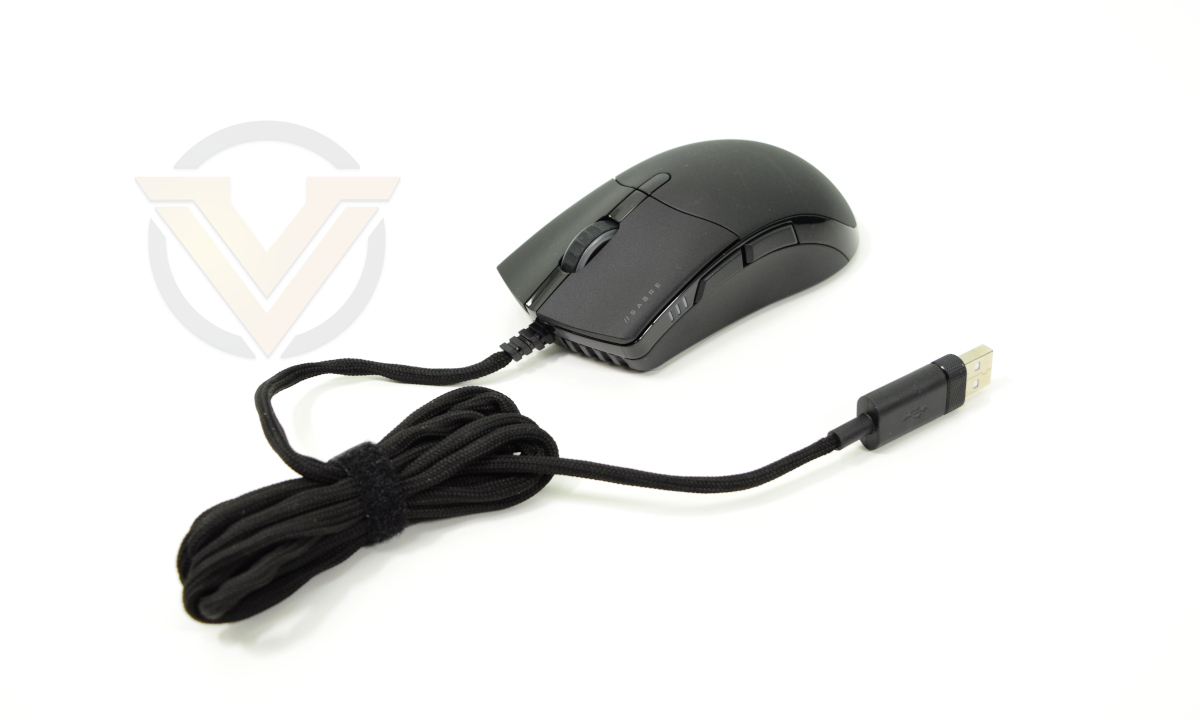
The SABRE RGB PRO itself is a typical shape gently oriented to fitting in the right hand but with less pronounced asymmetry than some. The cord, covered in a soft braid, leaves the chassis centrally rather than under the right mouse button (as was the case with the previous SABRE RGB).
Closer Look
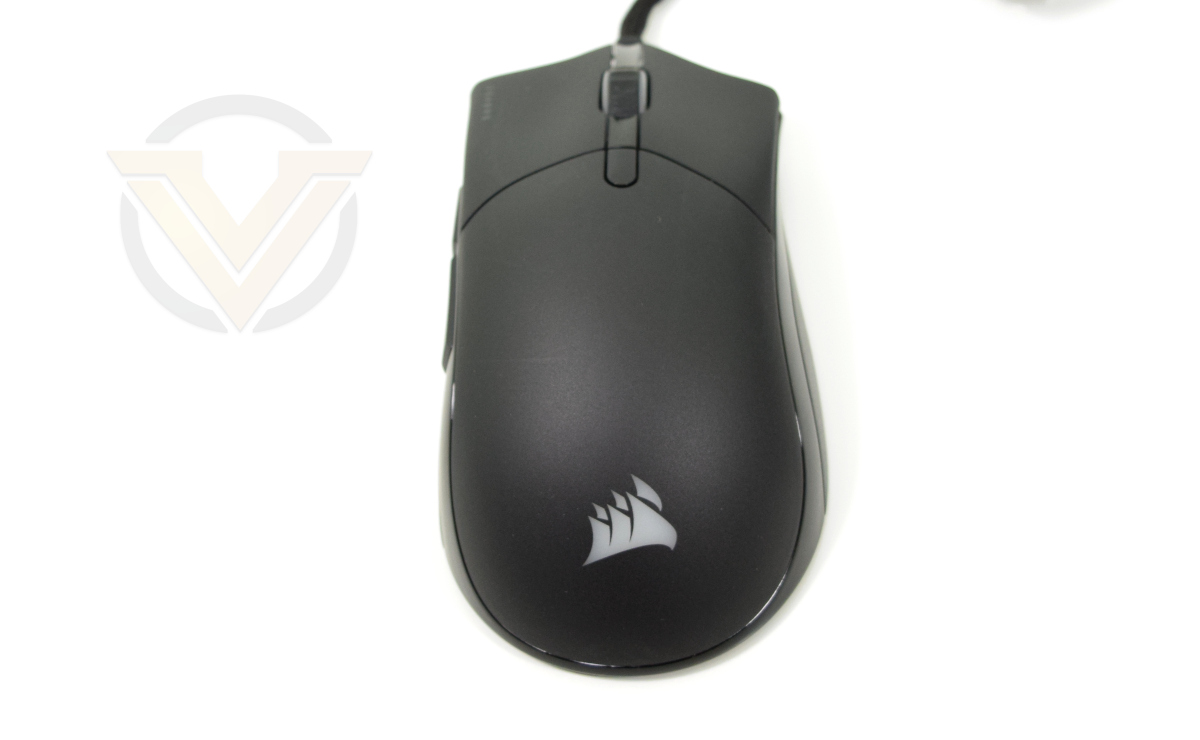
CORSAIR have opted for a relatively large design for the SABRE PRO series rather than the compact dimensions of the KATAR PRO XT and many mice competing in the lightweight space.
So it’s a surprise when you lift it for the first time. The MX518 is over 100g, the Deathadder v2 sits at around 83g, so the SABRE RGB PRO’s 74g is light as a feather by comparison. We wouldn’t put it in the ultra-lightweight category – mice probably need to be under 65g to really qualify – but it’s almost certainly one of the least dense mice we’ve had our hands on.
Left and right mouse buttons are slightly concave (saddle-shaped), and contoured to your fingertips. The centrally located wheel is illuminated, and a button below it (the lower of the two rectangular shapes) acts as the DPI selector. CORSAIR’s logo is also illuminated in full RGB.
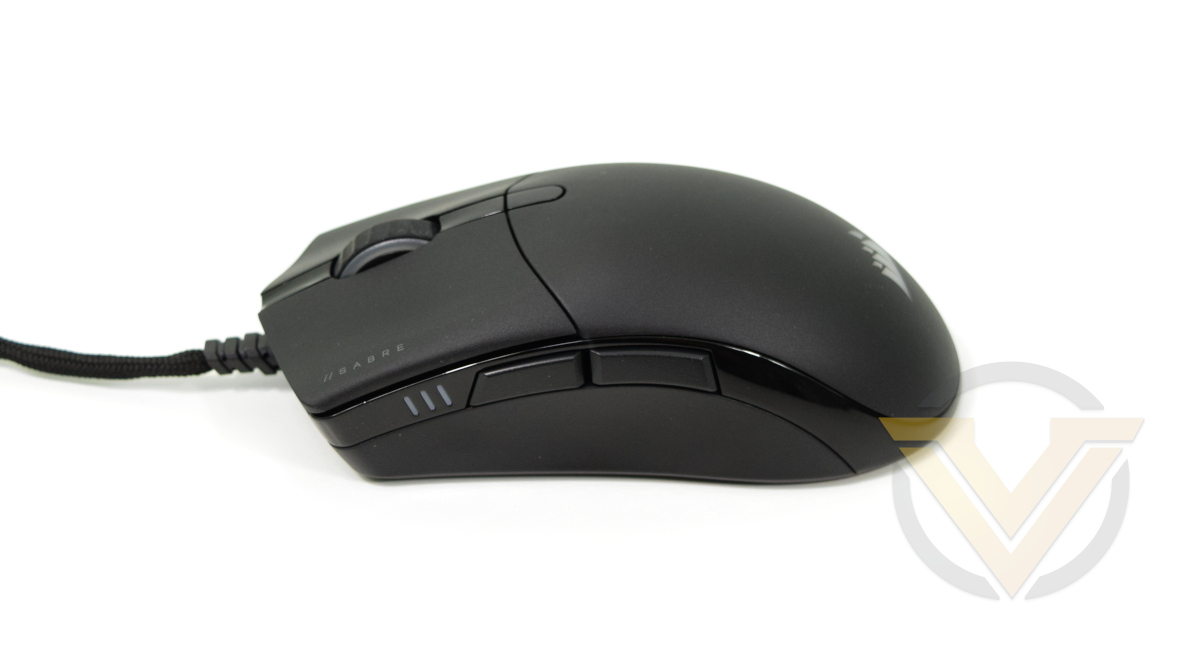
Suitably located thumb buttons are slightly larger than expected with a pronounced separation. A DPI indicator (3 recessed bars which can be illuminated to indicate one of 5 different DPI stages) is just forward of that point. The thumb rest location just below the side buttons is gently contoured inwards.
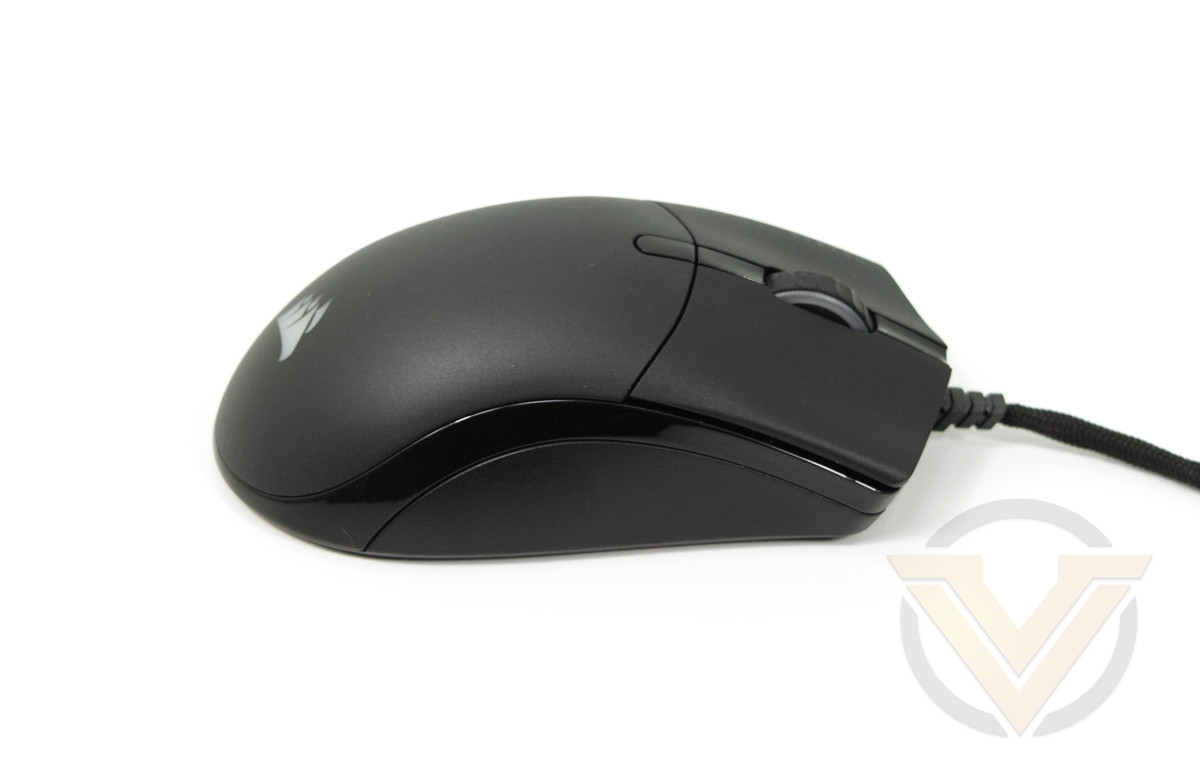
The right of the mouse is plain apart from glossy trim that mirrors the left. Its little finger rest area is angled out rather than in, making the mouse slightly less easy to lift than the KATAR PRO.
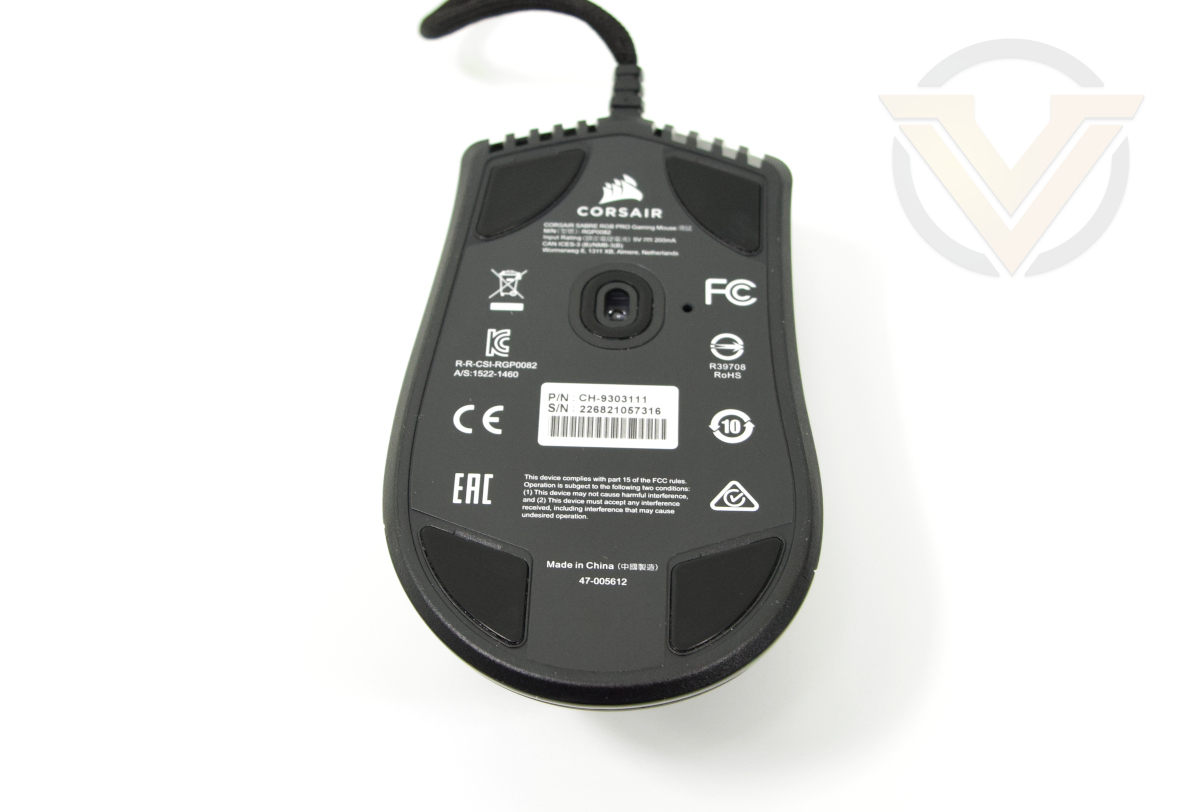
The floor of the mouse serves as one large label of product information (including PN and SN) while the sensor is located almost exactly under the DPI button (slightly forward of centre). Four PTFE triangular glide pads provide a low-friction glide surface. A further oval pad around the sensor helps to prevent the alcove edges from catching on fabric mousing surfaces.
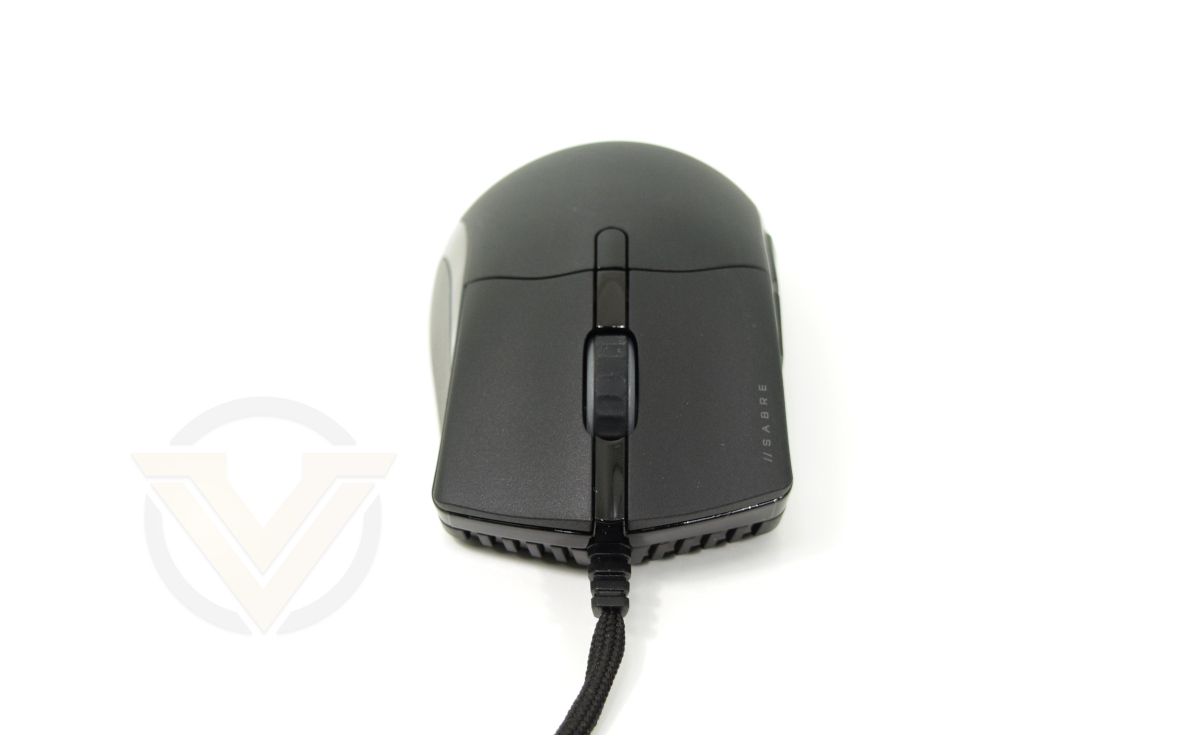
And finally, the front is aggressive with an almost radiator grill effect at the base. Its cable entry point into the chassis has been reinforced for long-term durability, and the soft braided cable should prevent drag or lateral force caused by inherent rigidity.
Overall the mouse’s size belies its light weight. A matte plastic exterior should be plenty durable enough for regular day-to-day use over years. First impressions are definitely positive.
Software and Lighting
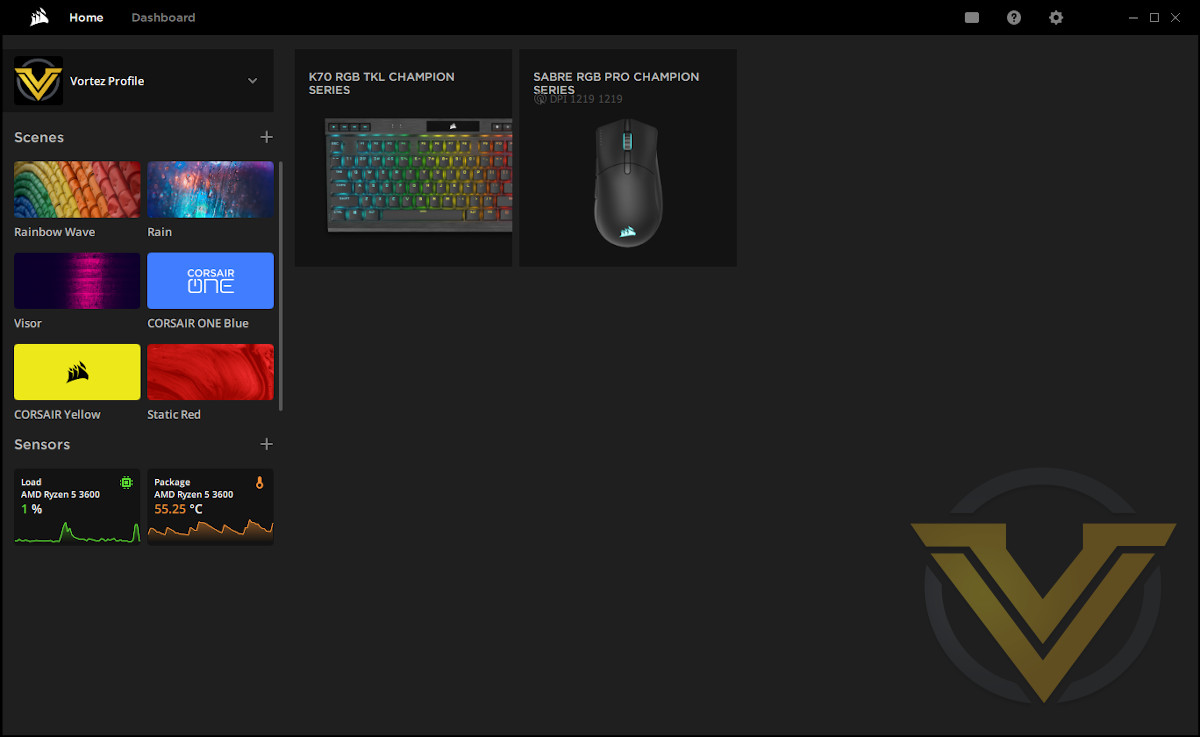
As part of their 2021 peripheral refresh CORSAIR have also taken a fresh look at the iCUE desktop application, with a view to making it more approachable and accessible. The underlying functionality remains the same; however the UI layout is bolder and clearer. There’s also greater prominence given to the home screen, with quick links to your iCUE peripherals and linked lighting options (and scope for more in future builds) as well as dedicated space for system sensor read-outs.
The new iCUE version is necessary for each CORSAIR peripheral launched since March 2021, with the SABRE PRO being the first mouse for which it is necessary. However your previous iCUE settings will be imported wholesale to the new version without fuss.
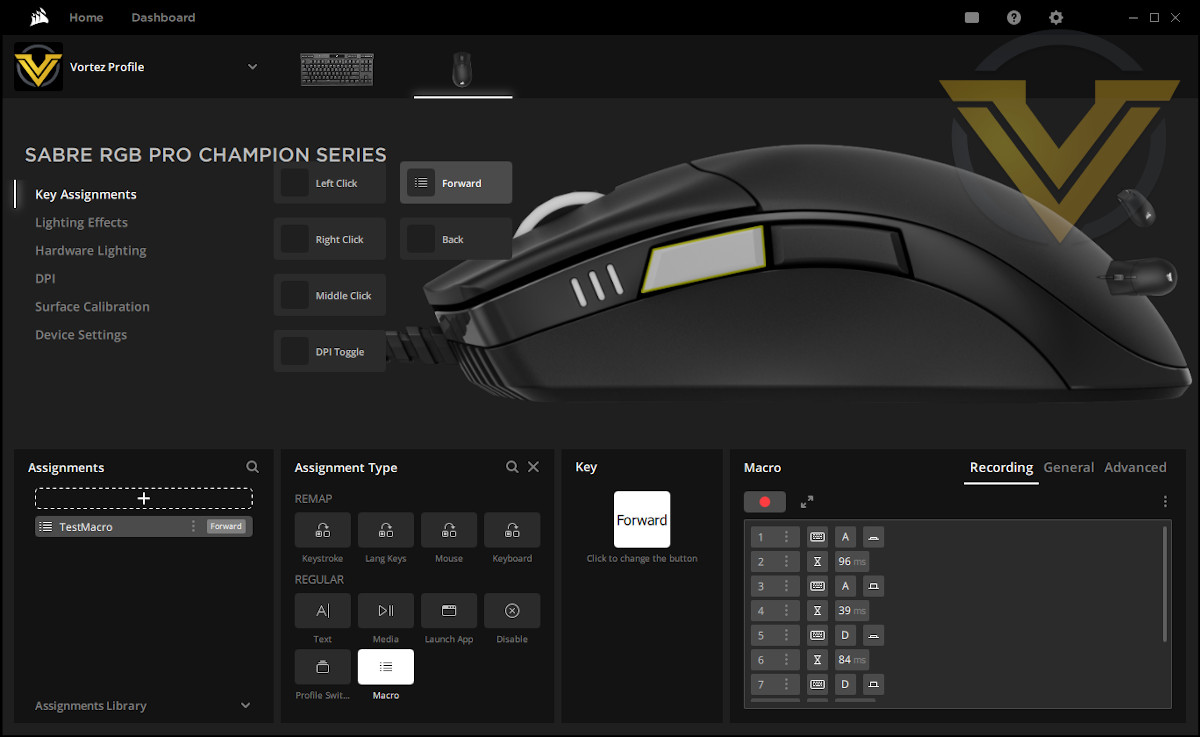
As far as mice go, iCUE incorporates control elements for both software-controlled and on-board hardware lighting and button assignments. Any software assignments are on a per-profile basis (with profiles extending across all attached CORSAIR peripherals), while hardware assignments are singular to the mouse.
Breaking down the tabs:
Key Assignments: Binds a particular keystroke, function, macro or string of text to a button for the active profile. Configuration is very similar to keyboard, and also allows you to simultaneously retain the underlying button press if required.
Lighting Effects: Construction and editing of software lighting effects for the active profile. The SABRE RGB PRO has two lighting zones – the mouse wheel and Corsair logo – which can be independently customised. A selection of preset effects, some of which can be customised, are available or it can be set to a solid colour.
Synchronised lighting via linked lighting layers is also possible. Doing so inserts a lighting effect as a layer to all attached iCUE peripherals in the active profile, with timings matched on each. These effects include synchronised colour-shifting ‘rainbow’ lighting, a ‘Visor’ bar that oscillates across the keyboard to the mouse and back again, and a few more.
Such effects can improve in-game immersion or create a single unified aesthetic for your system as a whole.
Hardware Lighting: A simplified selection of lighting effects to be stored on-board the mouse. This is active only when the mouse is not connected to a PC with running iCUE software.
DPI: This section is for configuring the 5 DPI Stages, while also setting the colour for the DPI indicator LED zone. Default is the behaviour when operating with iCUE running, the Hardware DPI Mode is switched to when the mouse doesn’t detect iCUE running. Also allows configuration of a Sniper DPI mode, which can then be bound to a mouse button.
Surface Calibration: Allow the sensor to scan your mousing surface, helping it build up a profile of tolerances and best suited settings to ensure that it doesn’t skip a beat. Process is simple, but a sensible one to utilise if you’re having difficulty with accurate tracking across your mousing surface.
Device Settings: Set polling rate, hardware acceleration and other features. Also where you check for Firmware updates.
Lighting Effects: Construction and editing of software lighting effects for the active profile. The SABRE RGB PRO has two lighting zones – the mouse wheel and Corsair logo – which can be independently customised. A selection of preset effects, some of which can be customised, are available or it can be set to a solid colour.
Synchronised lighting via linked lighting layers is also possible. Doing so inserts a lighting effect as a layer to all attached iCUE peripherals in the active profile, with timings matched on each. These effects include synchronised colour-shifting ‘rainbow’ lighting, a ‘Visor’ bar that oscillates across the keyboard to the mouse and back again, and a few more.
Such effects can improve in-game immersion or create a single unified aesthetic for your system as a whole.
Hardware Lighting: A simplified selection of lighting effects to be stored on-board the mouse. This is active only when the mouse is not connected to a PC with running iCUE software.
DPI: This section is for configuring the 5 DPI Stages, while also setting the colour for the DPI indicator LED zone. Default is the behaviour when operating with iCUE running, the Hardware DPI Mode is switched to when the mouse doesn’t detect iCUE running. Also allows configuration of a Sniper DPI mode, which can then be bound to a mouse button.
Surface Calibration: Allow the sensor to scan your mousing surface, helping it build up a profile of tolerances and best suited settings to ensure that it doesn’t skip a beat. Process is simple, but a sensible one to utilise if you’re having difficulty with accurate tracking across your mousing surface.
Device Settings: Set polling rate, hardware acceleration and other features. Also where you check for Firmware updates.
CORSAIR iCUE adds a good amount of value to the overall SABRE PRO package, and is where you can start to leverage its class-leading features including advanced polling rate and linked lighting. It’s the nature of the beast that tends to bring more to the table for keyboards than other peripherals but the mouse isn’t being shortchanged here.
Lighting
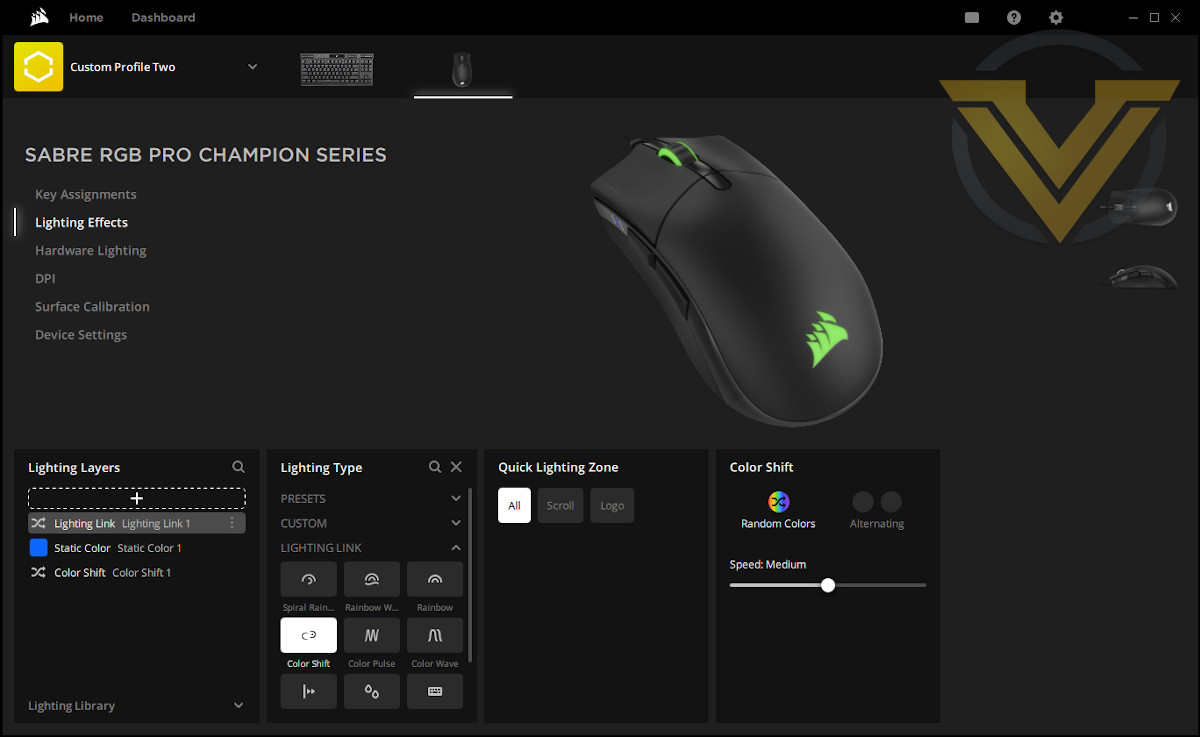
The SABRE RGB PRO incorporates two lighting zones – the mouse wheel and logo – which doesn’t really lend itself to the creation of complex lighting schemes from just the one device. What it can do however is support a wider lighting scheme across more peripherals or your entire desktop, or be used as subtle indicator lighting to denote profile switching or other discreet notification you want to convey (CPU temp for instance).
Hardware lighting options are restricted to a greater degree and iCUE software is not available to manage linked lighting schemes and synchronised timings. Standard presets remain available however, adding some nice vibrant illumination to the mix as a high-quality baseline feature. Unlike some keyboards however there’s no way to cycle through these available effects on the mouse itself.
Importing lighting profiles from the iCUE community adds a further dimension and potentially far more complexity than the default effects iCUE provides.
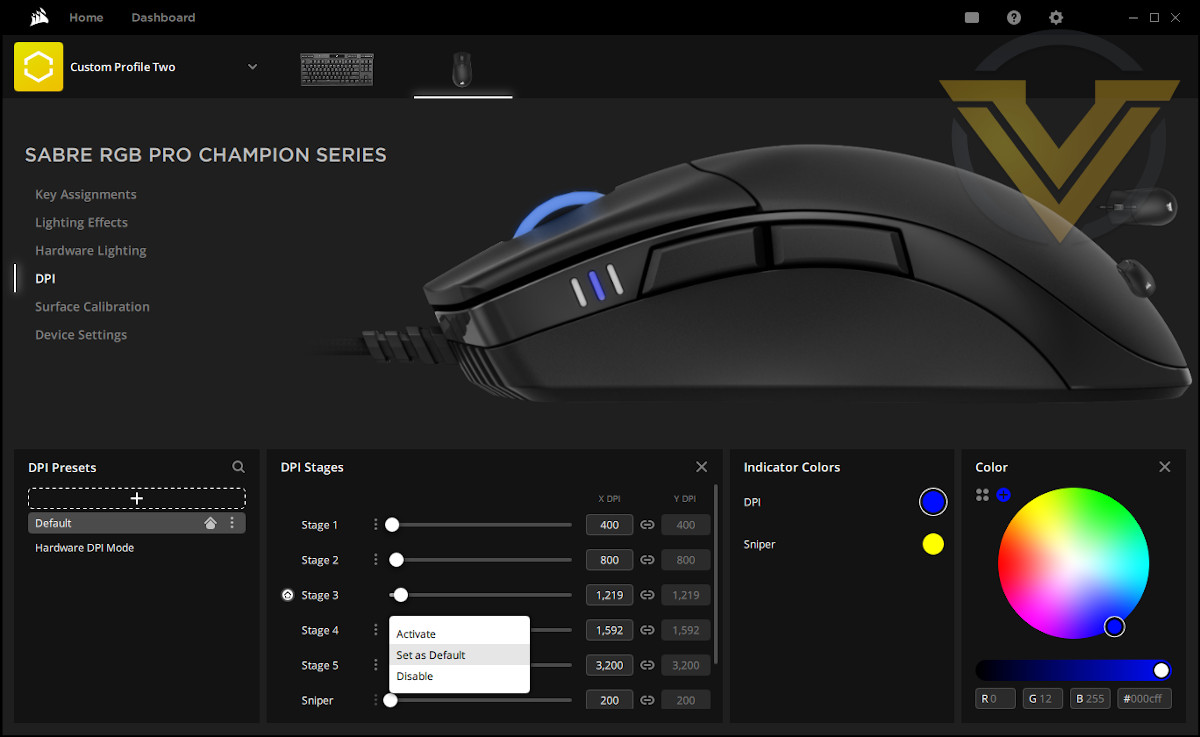
With such a huge emphasis on customisation therefore it’s a little disappointing that the DPI Stage section customisation is so restrictive.
Our first surprise was that the five DPI Stages are not stored on a per-profile basis, but rather as a single set of stages for the whole mouse. It would be understandable were that the case for the values solely stored in hardware, but not extending per-profile configuration to this feature seems like a missed opportunity.
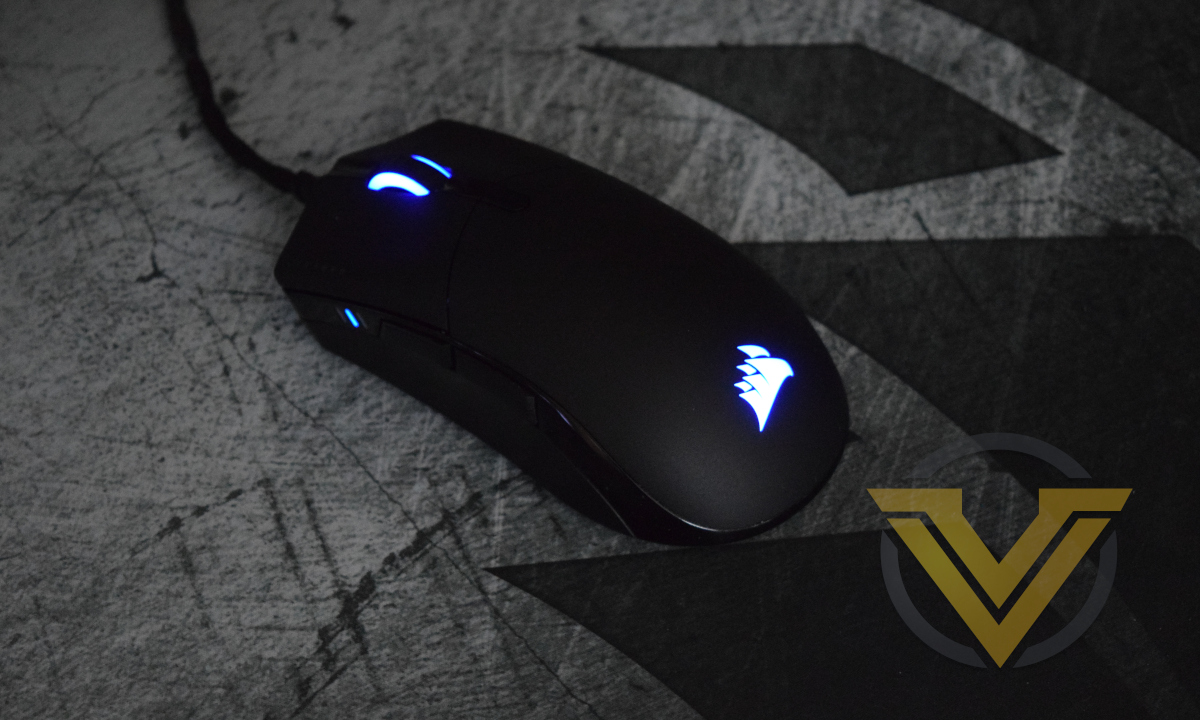
Similarly, for some reason the DPI zone lighting is static rather than individually set for each of the DPI Stages, which can make visually telling the difference between each stage difficult with a quick glance in low-light conditions. Similarly, it’s not possible to at least use the colour of the DPI Stage indicator LEDs as a simple profile indicator by linking its colour to profile.
The dpi section aside however, CORSAIR’s SABRE RGB PRO has plenty to recommend it if creating an immersive iCUE-powered lighting environment is a feature you value. The non-RGB variant of the SABRE PRO is available to those who don’t value the lighting quite so highly.
Performance
We spent two weeks with the SABRE RGB PRO, giving us a good opportunity to work through its idiosyncrasies and get used to its combination of size and shape.Size and weight are indeed the first aspects to be remarked upon. The SABRE RGB PRO is large, far larger than the KATAR models and larger even than the Razer Deathadder v2. The dimensions put it more on a par with the old Microsoft Intellimouse, Logitech MX513 and its recent update. These add up to a mouse design that’s best suited to larger hands, particular if using claw-style grips.
The weight however is shockingly light, almost giving the impression of a chassis that’s hollow. We wouldn’t quite refer to it as ultra-light in feel but there’s certainly a remarkable dissonance between its volume and weight. If you got a prize for the least-dense mouse the SABRE PRO range would probably have it nailed on.
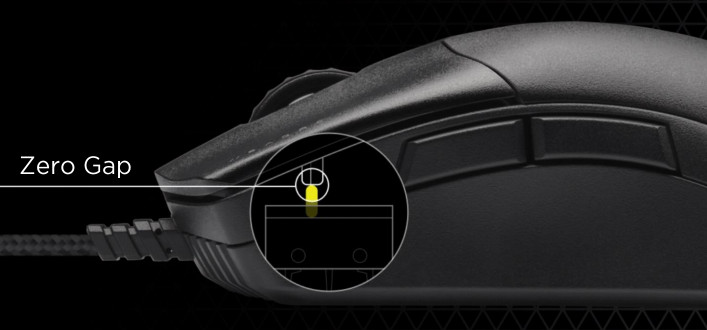
Our time with the SABRE RGB PRO started pretty well. We were immediately struck by how responsive the QUICKSTRIKE buttons were, with effectively zero actuation distance and little space before bottoming out. Over time however we did notice that both the two main buttons, but particularly the left mouse button, developed a very small but noticeable wobble in its resting position. This might be due to the upper portion of the mouse shell not being a single shaped piece, allowing the button to fractionally slide from side to side.
By the same token, the side buttons were far better than the KATAR PRO and PRO XT. Both are significantly more responsive and less spongy, with button actuation beginning almost immediately. Their large size makes them suitable for many different grip types, while a significant separation between the two makes differentiating each easier. After two weeks the buttons weren’t quite as crisp as day one, but still satisfying to use.
The construction of the mouse wheel is solid but unexceptional. Although not stiff, there’s also not quite a regular rotation to the wheel; some notches around the wheel feel notably different to others, almost like it’s slipping into place. Its middle click however is crisp and the wheel itself offers enough stability to add the middle button into regular use.
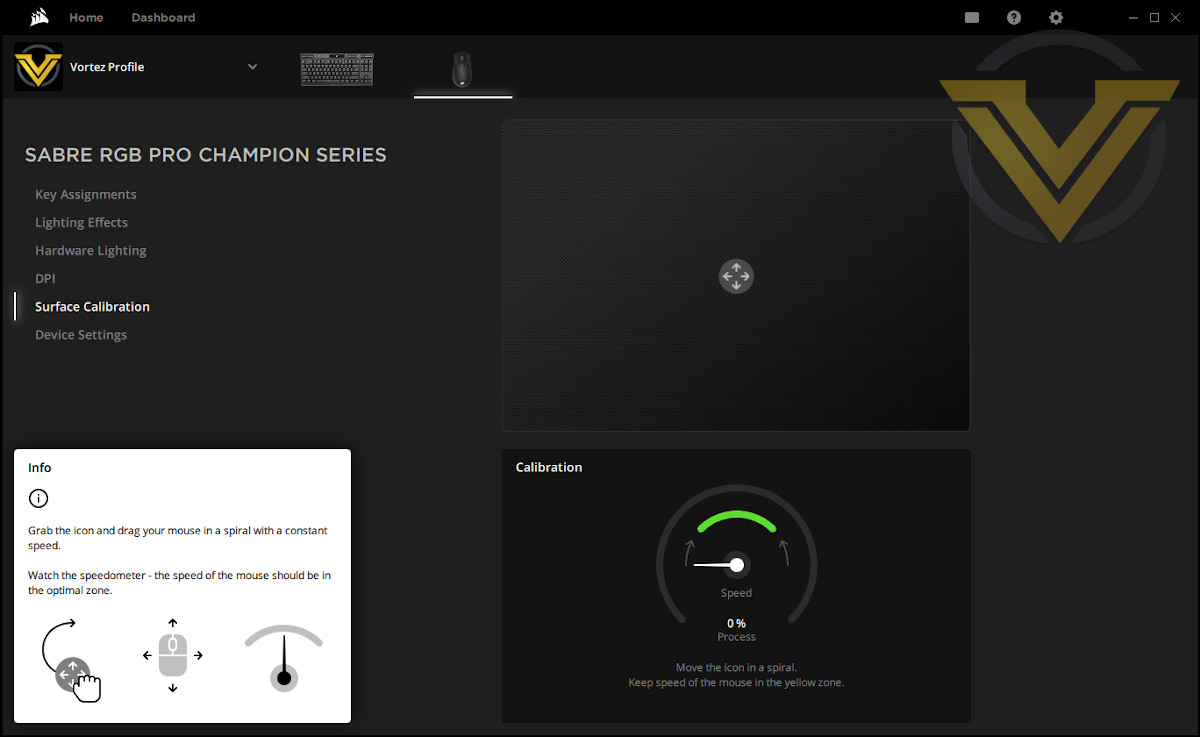
We should also state that there were some initial teething issues with the sensor. We were using it in combination with CORSAIR’s MM350 mouse mat, which has a stylised CORSAIR logo over a large part of the right hand side. When transitioning from the logo to the lighter areas surrounding it the mouse tracked irregularly; not jumping, rather just slowing down like it was snapping to an imaginary UI element.
Running a Sensor Calibration scan over the problem area appeared to solve the issue, but the initial problems did make us hyper-aware of any mousing irregularities. It also underscored the value of software sensor calibration tools. And for the record, we didn’t notice similar issues when paired with a mouse mat with uniform surface or a plain painted wooden desk.
As a final general usage statement, we should mention the skates. While well suited to most mousing surfaces, particularly hard ones, the sheer surface area of the SABRE PRO’s base does introduce some drag that even the slipperiest feet wouldn’t be able to overcome.
Gaming:
During the testing period we spent some time in both DOOM and World of Warcraft: Shadowlands, putting it through its paces in both low-sensitivity FPS gaming and keybind-heavy MMO gaming. We also added Diablo 3, taking advantage of a new Season for some very ‘clicky’ ARPG gameplay.
Holding to recommendations, we turned up polling to 4000Hz on our Ryzen 5-equipped system. Average frame rates in DOOM remained within margins of error and anecdotally we didn’t notice any slowdowns during intense gameplay sessions, but we very much take CORSAIR performance advisory when operating at polling rates over 1000Hz to heart.
Diablo 3 and DOOM gameplay tested the quality and response of the main mouse buttons in particular, and we were pleased to note that despite the wobble, the response was reasonably uniform and fast in the moment. A strong push-back makes it hard to accidentally actuate when resting your finger on one or the other main buttons, which is a definite plus given how tight to the switch each are held. Repeated quick clicks are registered effectively, while held pushes don’t rock or slide off the switch to prematurely disengage.
The DPI Stage switching button is very difficult to use rapidly in a regular palm grip as you’re reaching too far back, but is slightly easier in a claw grip. We also found it a little difficult to judge the DPI Stage from the indicator LEDs; it’s not easy to tell at a glance whether the illuminated LED is in position 1, 2 or 3, particularly if the area around it isn’t well illuminated.
Lifting the mouse when necessary was a little more laborious than we would like. We needed to grip it harder than the low weight would suggest due to a right side that angles away rather than inward. The glossy band running under the buttons and around the back of the mouse helps somewhat, but not in a way that we were comfortable relying on.
A few long sessions with WoW meanwhile helps us to test the effectiveness of each of the buttons used in regular intervals, particularly the side and middle buttons. In this instance they were very good, exactly as responsive as necessary with a strong return force. Forward felt slightly different from backward, and it’s just about possible to roll the back button a little so the travel distance feels longer too. But overall we have no complaints, and it’s a big step up from the KATAR PRO XT.
The middle button also offers a stable, crisp click during gameplay, but the wheel isn’t quite as satisfying. An irregular feel to one or two notches across the wheel when spinning quickly makes you just a bit apprehensive about a timely response.
Once the tracking issues on the MM350 were resolved we found the sensor to be broadly good at speed. There was no perceptible angle snapping at default settings, nor obvious acceleration occurring. This allowed us to be precise in all three games at vastly different DPI settings, quickly forgetting about the sheer size of the mouse in hand.
Conclusion
The SABRE RGB PRO is the second CORSAIR mouse we’ve reviewed in recent months, and in our estimation is by far the better of the two even accounting for their clear design differences. That’s not to say it’s perfect, but as a daily mouse to use in an office environment and then shift things up with fast-paced gaming it fits the bill in most major aspects.As good as it is however, it’s likely that the SABRE PRO will take some getting used to. The size to weight ratio really throws you off at first, particularly if you’re using a solid mousing surface rather than a traditional mat. Once adapted however it’s extremely easy to use, and won’t inflict quite the same level of fatigue in long gaming sessions that is often the case with heftier mice of similar size.
And for that reason it’s fair to say that the SABRE PRO will be too large for some hands. That’s not necessarily to the mouse’s detriment, but a slight trim here or there might have made it a little more universal. By the same token gamers with larger hands will welcome its chonky dimensions that don’t lapse into parody.
We found two causes for concern in the long run. By far the most important was the mouse button wobble on the main two buttons, a problem we’ve not experienced for some time. They didn’t affect responsiveness but planted that seed of doubt, and could be a major issue if it starts to degrade long-term. Given the emphasis CORSAIR place on QUICKSTRIKE this did come as a surprise.
The second concern was to an extent swiftly dispelled as sensor calibration showed its value by resolving a tracking issue. We previously thought consumer calibration was a rather minor feature, but in this instance it more than proved its worth. That being said, we still don’t know the underlying cause of the errors.
Speaking of welcome minor features, the low resistance cord made a return from the KATAR PRO XT. It might not look as attractive as a tight mesh braid, but is perfectly suited to lightweight mice and doesn’t catch on fabric surfaces as some heavyweight braids have in the past.
There’s also a missed opportunity in a particular feature: the DPI indicator and Stage setting process. From a practicality standpoint it leaves a lot to be desired, and its flexibility in both customisation and configuration aren’t up to iCUE’s usual standards. Simple things like not being able to set stages and lighting by profile, or even assign each stage an individual colour, were strange omissions.
Nonetheless, the hardware DPI Stage setting is a good addition for console gaming. Changing DPI levels on the fly without software is novel, but welcome for pure console gamers who don’t necessarily have a PC to act as a convenient intermediary.
And of course CORSAIR’s lighting continues to be vibrant and consistent across devices, even if the two lighting zones don’t quite give it an opportunity to show its power.
In general therefore the SABRE PRO doesn’t really have any particular ‘wow’ factor for the majority of gamers. Each aspect is good, even great at times, but nothing quite puts it ahead of the curve as a class leader either individually or in totality. For competitive gamers the AXON-enabled ‘up to’ 8000Hz hyper-polling should be it, with a great effect here than the keyboards in which the feature is present.
NVIDIA’s internal tests for Reflex, measuring average left mousebutton latency, currently places the SABRE PRO mouse family at the head of the pack, easily out-performing the Deathadder V2 and Logitech G502. A more complete picture of the competitive landscape is swiftly being built-up as more mice are tested and added to the results, but for now CORSAIR’s SABRE PRO & SABRE RGB PRO are the class of the field.
CORSAIR’s SABRE RGB PRO enters a market where you can already get plenty of bang for your buck. It offers plenty of the former for not a lot of the latter, but doesn’t quite distinguish itself in any one aspect and falls short once or twice. The chunky size in particular marks it out as one for fans of older designs rather than compact modern rodents, but its lightweight 74g mass isn’t out of place amongst the elite below £45.
Pros
+ Light weight
+ Vibrant iCUE-powered lighting
+ Up-to 8000Hz USB Polling via AXON processor
+ Responsive buttons
+ Improved side buttons
+ DPI Indicator
+ On-board DPI level configuration for console gamers.
Cons
– Developed a wobble wobble in the main buttons
– Some default sensor issues rectified by calibration
– Scope for more functionality from the DPI indicator
Of Note
= For best results use with CORSAIR iCUE software
+ Light weight
+ Vibrant iCUE-powered lighting
+ Up-to 8000Hz USB Polling via AXON processor
+ Responsive buttons
+ Improved side buttons
+ DPI Indicator
+ On-board DPI level configuration for console gamers.
Cons
– Developed a wobble wobble in the main buttons
– Some default sensor issues rectified by calibration
– Scope for more functionality from the DPI indicator
Of Note
= For best results use with CORSAIR iCUE software
Click here for an explanation of our awards at Vortez.net.
Stay connected with Vortez social media pages: