







Sporting a gorgeous brushed aluminium chassis, Cherry MX Red switches and key-by-key customisable lighting, is the K70 a game changer?

Product On Review: Corsair K70 Mechanical Keyboard
Manufacturer and Sponsor: Corsair
Street Price: ~£119.99 (inc. V.A.T.)
Corsair are swiftly becoming a veteran manufacturer for gaming peripherals. Long gone are the days of focussing on performance RAM; with their recently updated Vengeance peripheral range they now cater for audio and input needs with a definitive line-up of keyboards, mice and headsets. Thanks to the new Raptor range also presenting more affordable options, Corsair have a wide variety of products for gamers with both constrained and liberated budgets.
This week we’re looking at the Vengeance K70 Mechanical Gaming Keyboard, which is a substancial evolution of the Vengeance K60 Richard reviewed early last year. The K70 comes a little over eighteen months after the K60 and K90, the first mechanical keyboards Corsair released, but by virtue of the price point doesn’t quite replace either directly. It’s also a part of a refresh which includes the Vengeance K65 and K95, keyboards that occupy lower and higher price points respectively whilst retaining the mechanical switch feature.
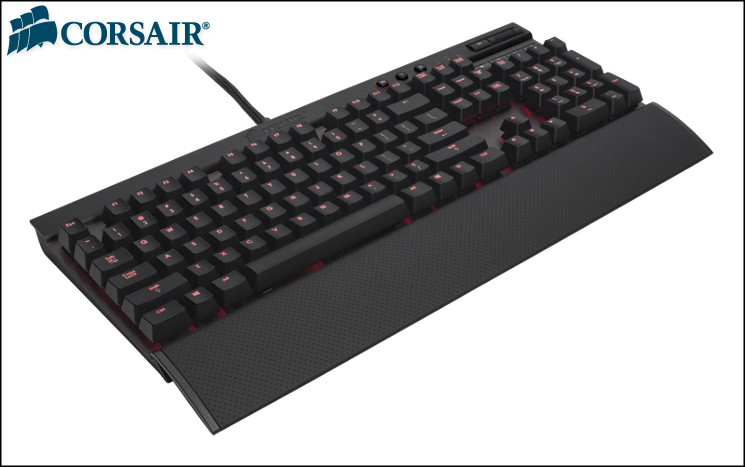
The first release designs for the K70 incorporated the switch type which is fast becoming the standard for mechanical gaming keyboards: Cherry MX Reds. During Computex 2013 Corsair also announced Cherry MX Blue and Brown switch variants which offer tactile feedback rather than the smoothly linear actuation of Reds. The Vengeance K70 is therefore shaping up to offer choices for even more discerning users of mechanical gaming keyboards, but that is not an end to the options.
Our review sample has a black anodised aluminium frame, but those who prefer a lighter look can opt for a silver colour scheme. The variation is purely aesthetic – whilst the black version includes red per-switch LEDs, the silver option swaps these out for a blue LED. With these exceptions there are no differences between the two keyboard’s feature-sets or RRP; you’re not losing out by choosing one over the other.
About the Vengeance K70
The new Vengeance K70 gaming keyboard is built on a rugged, brushed, aluminum chassis and features highly responsive Cherry MX Red mechanical switches under every key. The high performance switches combined with the keyboard’s 100% anti-ghosted matrix, 20-key rollover and 1000Hz reporting rate provide fast, accurate input for gaming.
The Vengeance K70 gaming keyboards are available in two color schemes: silver aluminum with blue backlighting, and anodized black with deep red backlighting. Overall backlighting can be adjusted to four levels of intensity and each key is individually backlit, enabling the lighting for each key to be independently enabled or disabled. The key-by-key lighting customization allows users to highlight just the keys they need to emphasize and then save the setting directly to the K70’s onboard memory. In addition, the Vengeance K70 comes with alternate colored, contoured keycaps for the WASD and 1-6 keycaps to allow additional customization.
The Vengeance K70 gaming keyboards are available in two color schemes: silver aluminum with blue backlighting, and anodized black with deep red backlighting. Overall backlighting can be adjusted to four levels of intensity and each key is individually backlit, enabling the lighting for each key to be independently enabled or disabled. The key-by-key lighting customization allows users to highlight just the keys they need to emphasize and then save the setting directly to the K70’s onboard memory. In addition, the Vengeance K70 comes with alternate colored, contoured keycaps for the WASD and 1-6 keycaps to allow additional customization.
The Vengeance K70 addresses many of the weaknesses we identified in the K60, including a full-length wrist-rest and replacing the previously rubber-domed Function and Command key switches with mechanical ones. Although these updates have come at not inconsiderable cost, they should result in a far more well-rounded experience overall. Apart from those obvious plus points we’re very interested to see both how well key-by-key highlighting works in practice and if there are any advantages to the contoured keycaps.
Features and Technical Specifications
Features
Designed for performance gaming.
Cherry MX Red mechanical key switches provide fast, linear response and low-noise operation. Since the K70 is fully mechanical, you’ll get that response with any key you press. There’s a full key matrix anti-ghosting mechanism for perfect signal quality, and the 20-key rollover ensures accuracy no matter how fast you play. The aluminum frame is lightweight and durable for hours and hours of intense play.
Customizable to your style of play.
The all-important WASD and 1-6 keys are contoured and textured, so you can find them fast, and enjoy fast gaming action with less chance of your fingers missing their mark. You can use the software to program backlighting for each key independently, so you can set up custom-lit key bindings for each game you play. And, once you’ve tweaked it to your tastes, the onboard memory lets you take your settings with you.
Looks great on your desktop.
Not only is the K70 a remarkable gaming keyboard – it looks amazing, too. The brushed aluminum frame is black anodized for an impressive look, and the brilliant red backlighting gives it the unmistakable look of serious gaming machinery.
100% Cherry MX Red Mechanical Key Switches
You get smooth, linear key response for ultra fast double and triple taps without the audible click.
Key-by-Key Customizable Backlighting
Deep red LEDs with adjustable brightness and key-by-key programmability to light up just the keys you need. It’s great for illuminating your key bindings for each game, and you can store multiple presets. They’re saved directly to the K70 onboard memory, so you can take your light maps with you.
Brushed Aluminum Chassis
The K70 frame has a professional-grade look and feel, plus the rugged durability you need for hours of gaming.
Full key Matrix Anti-Ghosting with 20-Key Rollover
Very keystroke translates into accurate gameplay—even when multiple keys are pressed. There’s no signal degradation, and it keeps up with you, no matter how fast you play.
Contoured, Textured WASD and 1-6 Keycaps
Keep your eyes on the action with easy to locate FPS keys. An extra set of standard typing keycaps and a keycap replacement tool are provided for general typing.
Easy-Access Multimedia Controls
You don’t just play games – you play music and video, too. Play, stop, pause, skip tracks and adjust volume directly from the K70.
USB Pass-Through
An extra USB connector is provided. It’s great for attaching a Vengeance gaming mouse or headset.
Soft-Touch Wrist Rest
Give your wrists a break, or take it off if it gets in the way.
Cherry MX Red mechanical key switches provide fast, linear response and low-noise operation. Since the K70 is fully mechanical, you’ll get that response with any key you press. There’s a full key matrix anti-ghosting mechanism for perfect signal quality, and the 20-key rollover ensures accuracy no matter how fast you play. The aluminum frame is lightweight and durable for hours and hours of intense play.
Customizable to your style of play.
The all-important WASD and 1-6 keys are contoured and textured, so you can find them fast, and enjoy fast gaming action with less chance of your fingers missing their mark. You can use the software to program backlighting for each key independently, so you can set up custom-lit key bindings for each game you play. And, once you’ve tweaked it to your tastes, the onboard memory lets you take your settings with you.
Looks great on your desktop.
Not only is the K70 a remarkable gaming keyboard – it looks amazing, too. The brushed aluminum frame is black anodized for an impressive look, and the brilliant red backlighting gives it the unmistakable look of serious gaming machinery.
100% Cherry MX Red Mechanical Key Switches
You get smooth, linear key response for ultra fast double and triple taps without the audible click.
Key-by-Key Customizable Backlighting
Deep red LEDs with adjustable brightness and key-by-key programmability to light up just the keys you need. It’s great for illuminating your key bindings for each game, and you can store multiple presets. They’re saved directly to the K70 onboard memory, so you can take your light maps with you.
Brushed Aluminum Chassis
The K70 frame has a professional-grade look and feel, plus the rugged durability you need for hours of gaming.
Full key Matrix Anti-Ghosting with 20-Key Rollover
Very keystroke translates into accurate gameplay—even when multiple keys are pressed. There’s no signal degradation, and it keeps up with you, no matter how fast you play.
Contoured, Textured WASD and 1-6 Keycaps
Keep your eyes on the action with easy to locate FPS keys. An extra set of standard typing keycaps and a keycap replacement tool are provided for general typing.
Easy-Access Multimedia Controls
You don’t just play games – you play music and video, too. Play, stop, pause, skip tracks and adjust volume directly from the K70.
USB Pass-Through
An extra USB connector is provided. It’s great for attaching a Vengeance gaming mouse or headset.
Soft-Touch Wrist Rest
Give your wrists a break, or take it off if it gets in the way.
Techanical Specifications:
Vengeance K70 Mechanical Gaming Keyboard
Materials: Aluminium, Plastic
Chassis Colours:- Silver, Black
Mechanical Switch Options:- Cherry MX Red, Cherry MX Blue*, Cherry MX Brown*
– Red: 2mm actuation, 4mm to bottom, 45g actuation force, gold contacts
Backlight:
– Red LED (Black Option)
– Blue LED (Silver Option)
– Three brightness levels
Connector Type:- High Power USB 2.0 (+500 mA). Additional USB 2.0 for passthrough
Polling Rate:- 1000-125MHz
Media Keys:- Yes
Windows Key Lock: Yes
Dimensions:
– Inc Wrist Rest: 437mm x 210mm.
– Ex. Wrist Rest: 437mm x 165mm.
Weight:- 1250g (excl. wrist-rest)
Materials: Aluminium, Plastic
Chassis Colours:- Silver, Black
Mechanical Switch Options:- Cherry MX Red, Cherry MX Blue*, Cherry MX Brown*
– Red: 2mm actuation, 4mm to bottom, 45g actuation force, gold contacts
Backlight:
– Red LED (Black Option)
– Blue LED (Silver Option)
– Three brightness levels
Connector Type:- High Power USB 2.0 (+500 mA). Additional USB 2.0 for passthrough
Polling Rate:- 1000-125MHz
Media Keys:- Yes
Windows Key Lock: Yes
Dimensions:
– Inc Wrist Rest: 437mm x 210mm.
– Ex. Wrist Rest: 437mm x 165mm.
Weight:- 1250g (excl. wrist-rest)
* Cherry MX Blue and Brown variants coming at a later date.
Packaging and First Look
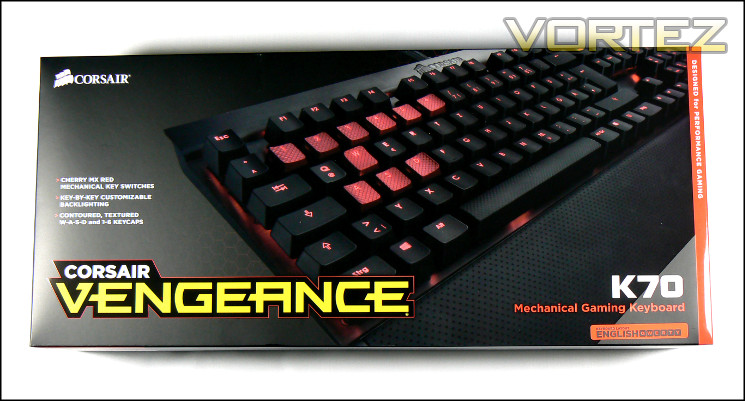
Corsair’s Vengeance K70 inherits the packaging style of the rest of the Vengeance range, although perhaps with slightly fewer garish colours in this case. For a keyboard box it’s thick and pretty compact, speaking to the quantity and quality of components within. It’s certainly one likely to be seen on the shelf, although will appear to be a little understated compared to its chief marketplace competitors.
Up front the box proudly displays a vanity shot of the keyboard with optional contoured keycaps, highlighting the option which might otherwise be lost in the feature list. Speaking of, the feature list includes Cherry MX Red mechanical switches and key-by-key lighting. The first of these is important to gamers, whilst the second will be intriguing to those who have desired a more customisable experience in their lighting but left wanting by the current marketplace offerings. There’s slightly more of an explanation of this feature on the rear, but in the main we’re left wondering just what it entails.
Also prominent on the front is the keyboard layout, which we always like to see on such products just in case errant SKUs make it into the wrong market. As you can see, we’re using the English QWERTY layout; one imagines that they’re not preparing a Dvorak variant, just being thorough.
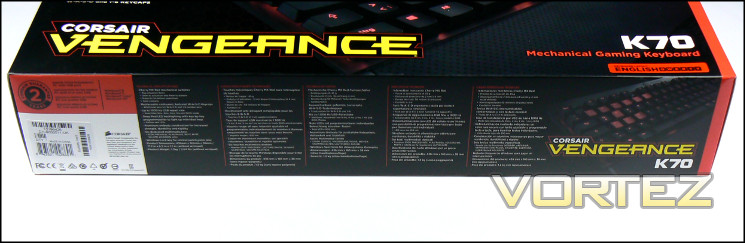
One side panel is dedicated to the keyboard’s tech. specs, helpfully listed in five different languages. Here you will see some information which isn’t actually repeated elsewhere such as the gold switch contacts, dimension information and the like. Compatibility requirements and the 2yr guarantee are also part of the info dump, as well as the specific SKU.
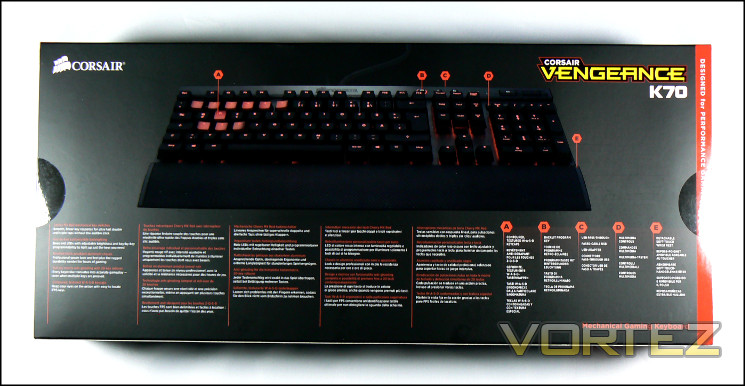
Moving to the rear we’re quite gratified to see a full-length shot of the keyboard, once again including the contoured keycaps. Corsair also helpfully label important areas of the keyboard, linking them to features such as USB pass-through and multimedia controls. To the left is a list of five features, three of which explain in a little more detail those from the front. In addition to these three a brushed anodised aluminium chassis and 20-key rollover for the entire keyboard are also identified and would be important to professionals and gamers respectively.
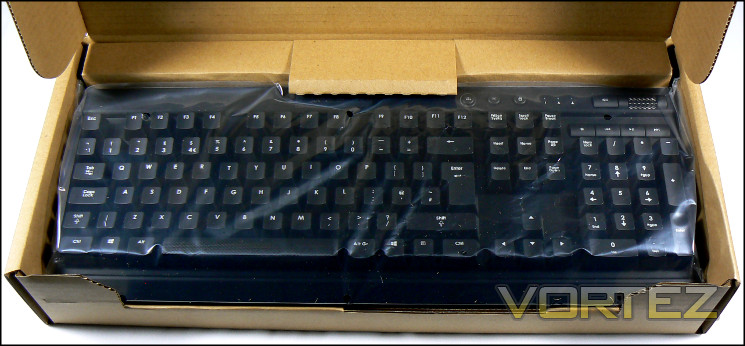
Those keen to make any purchase as environmentally ethical as possible will be pleased to note that the majority of the packaging is easy to recycle cardboard. For some time now Corsair products have tended to be packaged in such an environmentally sensitive, and although it may not be appreciated by everyone it’s still a welcome touch. The trade-off is two-fold: the packaging designers need to ensure that the product cannot shift at all during shipping as there’s very little cushioning; and the unboxing experience isn’t quite as satisfying as, for instance, a premium Apple product.
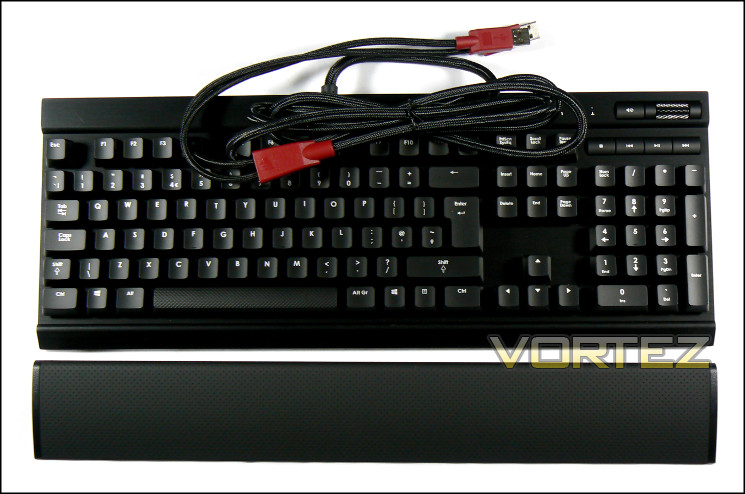
The keyboard and wrist-rest are packed in two separate bags, which accounts for why the box is a little taller and narrower than you’d expect at first. In the case of the K70 the braided USB cable is always attached; other Vengeance keyboards have had detachable USB cables for travelling to and from LANs.
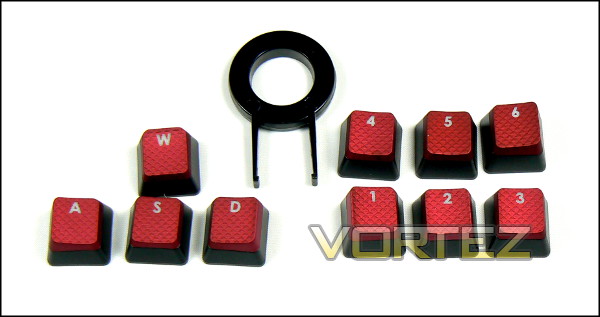
The contents of the package are fairly comprehensive. Ten contoured red keycaps and a keycap puller are present and accounted for, allowing you to use some or all of them as you prefer. Vengeance K70 keyboards don’t require any software or specialised drivers to operate, so a driver CD can be dispensed with right off the bat. A small user guide is included, and you’ll want to keep hold of it if for no other reason than to learn how the key-by-key lighting customisation and USB polling rate selector works. Finally, you’re also provided a warranty guide.
First impressions are pretty good. Let’s take a closer look.
A Closer Look
Corsair have constructed the Vengeance K70 from a plastic base and aluminium mid-plate, the latter of which is formed from a single piece of aluminium. It’s therefore unsurprising that it has a solid heft, weighing in at 1.25kg with the potential for more when you include the wrist-rest. Speaking of, the rest hooks onto the lower lip, extending down a little further. The aluminium has a fashionable black anodised brushed finish which should go with many a PC set-up. At the top-centre of the frame near the entry-point of the USB cable is a Corsair logo, cut and polished into the top.
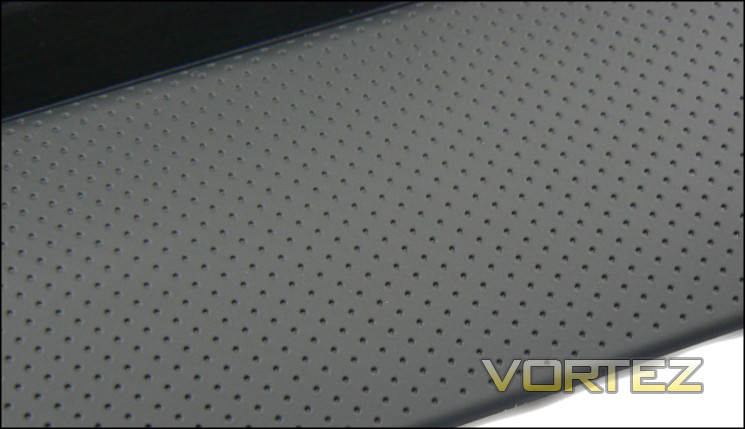
The wrist-rest itself is composed of a plastic frame and thin dimpled rubber top surface, catching sweat and the gradual grime which will naturally build up over time. When clipped in place it articulates around the lip such that if you extend the keyboards feet it will still rest properly in place. A novel solution to one of the nagging issues with keyboard wrist-rests, even if it the overall rest could be a little wider to provide more hand support.

Lift off any keycap and you will find a Cherry MX Red switch with distinctive red ‘+’; unlike the Vengeance K60, Corsair have gone for a fully-mechanical approach this time by also integrating mechanical switches in the function and command keys. It’s great news for those who use the keys a lot, whilst if nothing else adding to the overall quality of the keyboard. Atop each switch is an LED – red in this case, whilst the Silver variant of the K70 will have blue LEDs – which will shine through the keycap when lit.
Generally the pre-installed keycaps are smooth with a laser-etched character on the top allowing light to pass through from below. The sole exception is the spacebar, which is noticeably textured to match that of the replacement keycaps. It’s an interesting variation which will be a matter of taste for most users.
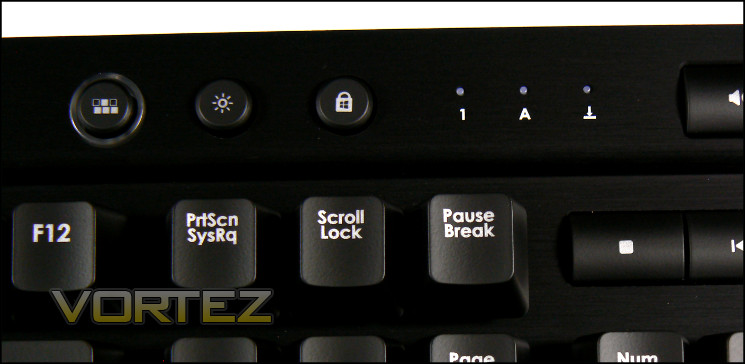
Most of the interesting variation of the keyboard from a standard mechanical type appears at the top-right of the frame, where three additional buttons have been added. These buttons – described from left to right as the ‘Backlight Program Key’, ‘Backlight Brightness Key’ and ‘Windows Key Disable’ button – are additional customisation features for the keyboard (detailed next page). To the right of these are three indicator LEDs: your standard Caps, Numlock and Scroll-lock.
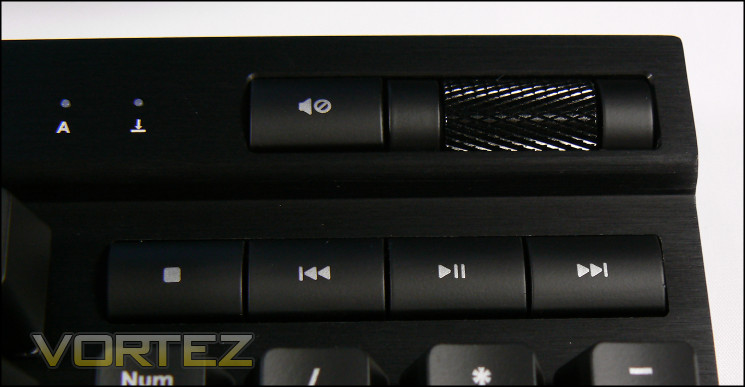
Slightly further to the right is an array of media keys for controlling audio and video playback on your PC. Each of these keys have standard Windows functions which cannot be rebound, but despite this they’re remain a useful addition. Here Corsair have retained the style from the K60 which is in keeping with the anodised aluminium frame, and the buttons are very firm and well located in their respective sockets. The scroll wheel as you would expect is a simple volume control, but the textured finish and smooth action screams quality. It’s great that Corsair have this sort of attention to detail for what is such an ancillary mechanism to the majority of users.
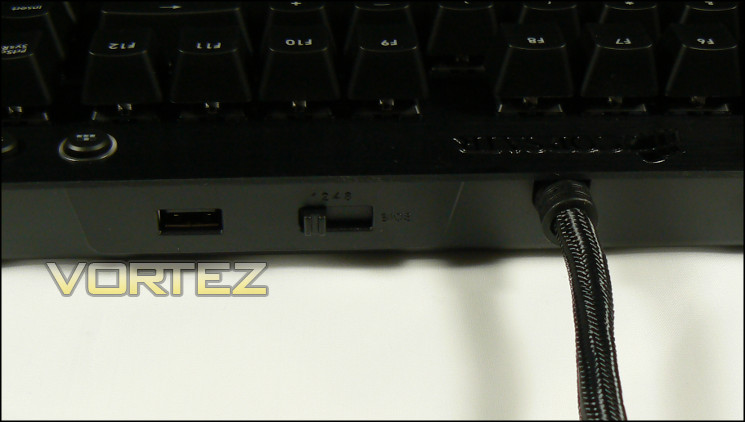
The keyboards rear is unadorned in the main, with the exception of a simple five-position switch and USB socket. The latter is essentially a USB 2.0 passthrough from the second plug, whilst the switch determines the USB polling rate, which we will discuss a little more later.
Moving to the floor of the keyboard we find four small rubber pad and four retractable plastic feet. Although the pads alone should be more than enough to hold it to the straight and narrow when in the lowered position, we’re a little worried about whether plastic feet along will be enough to stop the keyboard from slipping on the desk given the typical force used when striking a mechanical keyboard.
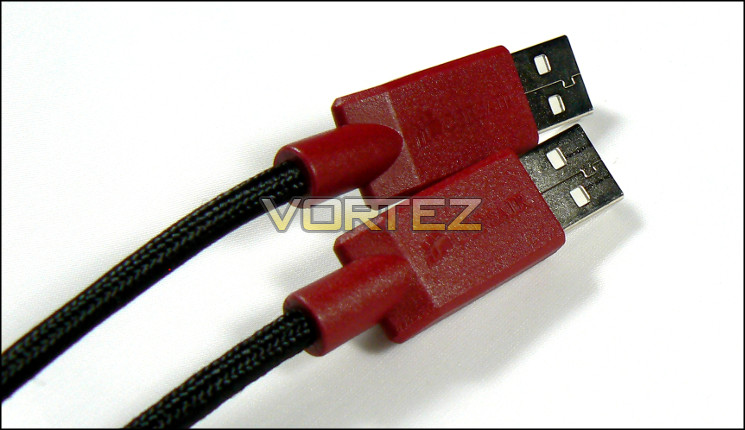
Finally we come to the USB cable, which thankfully is braided for additional durability. The K70 provides one USB passthrough rather than attempting to piggy-back off the keyboard’s, likely down to the power requirements of the keyboard if nothings else, which is ideal for removable storage. Interestingly the cable isn’t quite as stiff and heavy-weight as some we’ve seen, and has plenty of length to hook into the back of your PC.
So with a more detailed look at the K70 things are looking impressive so far. The finish on the aluminium is superb, whilst the layout and hints at features draw you in quite well. A few surprises nonetheless cropped up, such as USB2 rather than USB3 and relatively low-friction feet, but we shall have to see how that shakes out in testing.
Configuration And Customisation
Keyboards without any software suite are often pretty customisation-free, but happily that’s not the case for the Vengeance K70. Some customisations are naturally devolve from the keyboard’s construction, such as removable keycaps and the like, but in this case features have been built into the keyboard itself which would normally be delegated to software.
Keycaps

Corsair provide a selection of alternative keycaps which are shaped such that a slight depression is simulated in the WASD region common for gaming control. These keycaps are textured in a manner not dissimilar to the space bar, and one imagines are intended to provide additional purchase during gaming. We didn’t find them particularly necessary, but they neatly flag up the fact that many mechanical keyboards have a layout and keycap style which can be replaced with bespoke and off-the-shelf variants.
Lighting
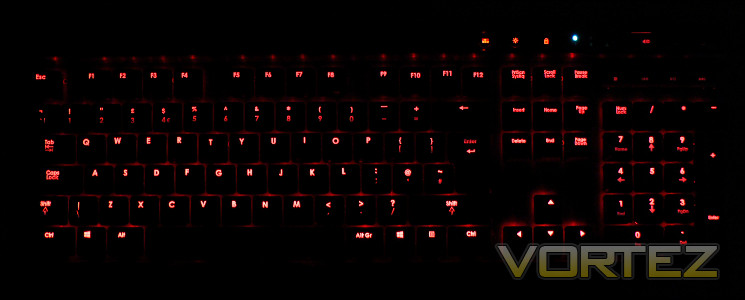
If you don’t delve into the user guide you might assume that the lighting options for the K70 aren’t much more than the basic, but in fact it’s quite complex. There are a series of modes, each of which determines how the lighting behaves.
Pressing the Backlight Control Key cycles through two modes: full illumination or a specific pattern. Full illumination is self-explanatory, whereas the specific pattern illuminates only certain keys, with 1-6, WASD & Arrow Keys being the default.
Holding the Backlight Control Key for five seconds causes the key to flash, during which time pressing any key toggles whether it should be on or off in the backlight pattern. This pattern is stored in keyboard memory, can can be extremely handy for highlighting specific keys during gaming where perhaps WASD isn’t the default control method.
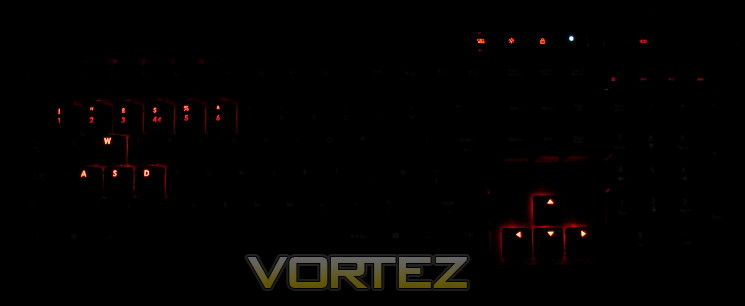
Finally, by pressing CTRL & the Backlight Control you’ll enter a further mode, which could perhaps be described as a secondary mode. From that point on, any keys you strike will briefly flash before going out automatically, although any pattern you have selected will always remain illuminated. We’re not entirely sure why Corsair have opted to include it because it’s so niche, but that said it’s a cool effect which may have a few applications in demonstrations under low-light conditions.
All keyboard modes are subject to the three brightness levels selected by the brightness key.
Polling Rate
USB polling rate – the rate at which the system polls for input from the USB bus – can be altered through the switch on the rear of the keyboard. This switch has five modes: {1,2,4,8} and BIOS; 1-8 determine the response time in milliseconds between updates (polling rate is 1000 divided by this number, measured in Hertz), whilst BIOS sets the keyboard to a compatibility mode to reduce conflicts with motherboard BIOS’s.
High level professional gamers will tend to have the figure dialled right down to 1ms for optimum performance, whilst us mere mortals will generally feel out a preference over time. A BIOS compatibility mode is an excellent addition to any gaming keyboard, and should reduce the chance of any issues with legacy or early revision motherboard BIOS’s.
Windows Lock Key
Often present in software and far more rare on the keyboard itself is a Windows lock key. When pressed it lights up and locks out the Windows key, ensuring that a miss-click doesn’t drop you out of your game (or worse yet, crash it). Note that like the LED Backlight Program Key, when locked it will remain illuminated even if the backlight brightness is set to off.
For a keyboard without software the Vengeance K70’s customisation options are quite comprehensive. We particularly appreciate the potential of the per-key lighting options, both for practical demonstrations and key highlighting in MMO gaming. With those features outlined it’s time to take a look at how it performs.
Performance
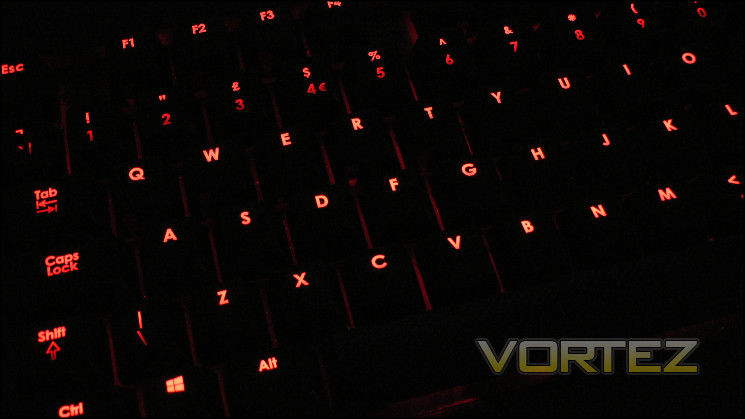
Corsair’s Vengeance K70 comes to us equipped with a Cherry MX Red switches. As we’ve mentioned before, this type is a happy medium when moving from membrane keyboards for two reasons: they’re lighter than MX Blacks, and their response is closer to a membrane type than a tactile MX Brown or Blue. If possible, it’s best to try a large sample of mechanical switch types to determine your personal preference; in general however the Reds are a great place to start. Although they’re typically more expensive than membrane keyboards, the longevity of around 50 million keystrokes is vastly better and so if taken care of will last for years.
The K70’s matte keycap finish works well as a non-slip finish, but as is the case with many paints used it could be a slight irritant to some owners due to the ‘blackboard’ feel; we should stress however that we found them fine. The laser etching on the keycaps is excellent, leaving very clear print and allowing the LED lighting to shine through.
Although the keyboard is full-size, Corsair have taken a few non-critical liberties in their layout mirroring the very similar chassis on the rest of the Vengeance keyboard line, namely moving indicator LEDs to the keyboard’s top ridge and using the area above the Numberpad for media keys. It speaks to the high-end nature of the keyboard that they’ve not simply sought to re-purpose the Function keys for media functionality, and given that they’re illuminated should prove to be useful for the minority of people who can take full advantage. The volume control in particular is very nice indeed, and the ability to rebind it to another function would have been a great addition.
Key action on the K70 is as good as you would expect. The aluminium backplate is extremely solid with no flex, ensuring that the action is as consistent as possible across the keyboard, although there is a perceptible difference between the feel of the normal keycaps and the Enter and backspace keys. The reason for this is fairly obvious, as all the longer keys are double-supported by an additional weak spring that slightly cushions them rather than striking an unyielding surface when depressed. We should note that this isn’t the first time we’ve found these keys to feel a little different to the main set, even on mechanical keyboards. Keystrokes are responsive, with the point of actuation remaining the standard for Cherry MS Reds – half way down.
You will note that the Vengeance K70 has no macro keys. Of critical importance in gaming, they’re increasingly used in the workplace for data input or scenarios where multiple processes of keystrokes are repeated which can’t be captured in a single OS clipboard. Those who require this sort of functionality from their keyboard will have to look elsewhere, up-to and including the K90/K95. Otherwise in the office, many users may find the K70 a little loud depending on the striking force, which could may it a little less suitable for a shared space than a membrane equivalent. If this does become an issue however a simple per-key mod with an o-ring to cushion the key slightly will easily and inexpensively muffle the sound. It’s worth noting that compared to the louder tactile-type keyboards it’s less likely to cause an intractable problem.
Anti-Ghosting/NKRO
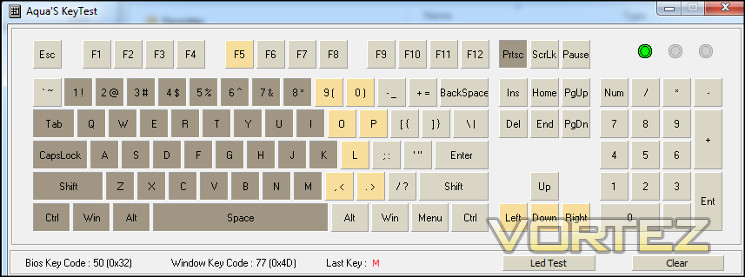
The Vengeance K70’s claims up to 20-key roll over across the whole keyset, which is quite an impressive claim for a USB keyboard (although thankfully increasingly common). We continue to use Aquakey as a quick-test for NKRO, focussing on the core gaming section around the WASD keys. The main aim is to ensure that all keys can be pressed simultaneously such that every input in a fast-paced gaming session is recorded accurately.
Here the Vengeance K70 performed exceptionally, with no issues reported around the crucial WASD keys and NKRO extending further into the centre of the keyboard too. USB keyboards are becoming increasingly robust in the field of NKRO, and we welcome Corsair’s efforts in this arena.
Gaming Performance
Corsair’s Vengeance range are designed to be gaming peripherals, and in this role the K70 is easily up to par. They’ve chosen Cherry MX Red switches which as we’ve mentioned before are gaming all-rounders, although veteran gamers may prefer MX Blacks in particular due to their higher resistance. Low-light conditions are easily illuminated thanks to the per-key backlighting, and the key-by-key highlighting system is a novel solution for MMOs. When looking at the specifics of performance we took a look at a trio of gaming titles, investing in quite a few hours over the two week testing window.
Team Fortress 2
TF2 is still the one true free to play FPS which tests response time and special features at minimal cost, and never really caused much of an issue with the K70. Keys remained responsive throughout, with enough play for quick repeated taps where appropriate. The relatively short actuation length aided in keeping reaction times low, and the linear style shaves off just a little bit from response times. A standard layout meant that no key was an unexpected stretch, whilst those who have a portfolio of keybinds from years of gaming shouldn’t need to adjust them for spacing. Those who have used tactile mechanical keyboards in the past will find it more difficult to ‘ride’ the actuation point of any individual key however, and may prefer to wait on tactile options.
Starcraft 2 & World of Warcraft
Starcraft in particular benefits from fast successive key presses, for which mechanical keyboards are usually well suited. The K70 won’t have quite the potential of an otherwise identical keyboard with a higher resistance Cherry MX Black mechanical switch, but the linear response adds the sort of predictability you need.
We’ve experienced in the past the value which a regular key response brings to gaming, and the K70 is no different in this regard. Although membrane keyboards can provide a somewhat fluid response, and certainly one with less impact on the fingers than a mechanical keyboard, the uneven response across some keys can be detrimental to the overall experience. In reviews spacebars have been particular offenders, which is obviously fairly crucial in may default set-ups as a ‘jump’ key.
Macro keys are something that the K70 unfortunately does not provide, which impacts its potential greatly for World of Warcraft and other hotkey MMOs. Although they’re not essential, macro keys unlock the potential of many titles which feature character classes with extensive toolboxes. Combined with multiple profiles, they make transitioning between one title and another a pain-free process.
Many RPG titles, particularly action-RPG titles such as Torchlight 2 and Diablo 3, also suffer from this lack of macro functionality on the keyboard, greatly increasing set-up time and reducing player capabilities in many respects. Players of games such as League Of Legends may also be disadvantaged, depending on where they bias their macros.
Thankfully, that is chiefly where our the K70’s flaws ended. Anti-ghosting capabilities of the K70 turned out to be more than adequate, neatly sidestepping the need for additional mouse macros we have sometimes utilised to compensate for poor ghosting on other keyboards. Sometimes the headline figure can be misleading but in the case of the K70 all the most important keys around WASD were unaffected by ghosting.
We must give a final thought to one of maintenance. The K70 has an open frame design with very few nooks and crannies for dust and debris to build. As a result, cleaning the keyboard is straightforward so long as you are willing to take the time to extract every other row of keys, although you will want to ensure that you take good care not to scratch the paint on the keycaps. One word of caution however – brushed aluminium surfaces, even when anodised, pick up fingerprints very easily. If you want to keep the keyboard pristine you’ll need to be quite careful when handling the frame and media keys.
Conclusion
Over time we have come to expect great things from Corsair’s product teams, whether it be their previous core memory business or the relatively new peripheral line. The strength of the brand breeds users who are both content with the products they have bought and eager to see the next big thing. It’s through that lens we are sometimes forced to look, for good or ill.
From a look and feel perspective everyone would be forced to concede that the Vengeance K70 is excellent. The demand for brushed aluminium aesthetics has not diminished since we first started to see them on PC chassis all those years ago, and bringing them to the relatively bland peripheral arena is a decision that both gamers and those with a more refined pallet will appreciate. Red LEDs will tend to be rather ‘love it or hate it’, but you can certainly build your PC around that colour-scheme if its your thing. Even the wrist-rest – and the engineering that fixes into place – isn’t out of place; it’s a keyboard that no-one would be embarrassed to have on show anywhere.
Our opinions on the K70 from a pure functionality point of view are slightly more mixed. On one hand we’ll never begrudge the inclusion of mechanical keys, especially when supported by a chassis which has absolutely zero give in it. As a typing and gameplay interface platform it’s durable, reliable and solid, the only weakness being plainly finished plastic feet which can allow the keyboard to slide when elevated. On the other, it doesn’t feature macro keys – a mainstay of most gaming keyboards at the present time – nor the associated multiple profile feature. These features are reserved for the high-end K90 and K95 models, the latter of which mimics the aesthetics of the K70.
That’s not to say that other innovations aren’t of great value. The contoured keycaps were intriguing, even if at times it was difficult to warm to them thanks to our mixed workload, and the new lighting features are particularly promising for many different gamers. In particular, hotkey MMO gamers will appreciate the ability to selectively highlight keys bound to particular in-game macros if they play in low-light conditions, plus streamers might be interested in the ‘light on strike’ feature if they want to show off their APM or other keyboard control skills. We’d love to see more manufacturers integrate these sorts of customisation options on boards which are not astronomical in pricing, and if Corsair need to be the first to do so then so be it.
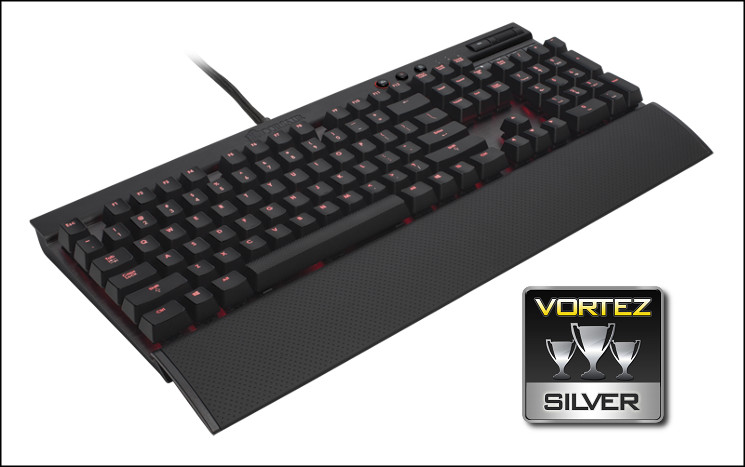
For all that said, if this keyboard were twenty pounds or so cheaper our conclusion would be different. The K70 is without doubt a big improvement over the K60, but one wonders if for a £30 RRP increase it goes far enough. At £119.95 it lacks two core gameplay features which arrive pretty much as standard throughout the competition line-up, even those which use mechanical keys and are in some cases substantially less costly. Worse yet the Vengeance K95, a keyboard with near identical aesthetics and features but also including macros and profiles, is available for only £10 more than the typical UK RRP of the K70.
Taken in isolation, the Corsair Vengeance K70 is well engineered keyboard with innovative features and tempting brushed-aluminium finish. As you would expect from Corsair the build quality is excellent, which coupled with the Cherry MX Red switches should allow it to see out a prolonged lifespan, no matter your workload. Where the K70 falls is in the lack of macro keys and complementary profiles, which restricts gaming functionality compared to less expensive mechanical competitors. Despite this we can’t help but award it a strong Silver and suggest that earnest gamers tempted to a K70 also take a long hard look at the Vengeance K95.
Pros
+ Excellent build quality
+ Cherry MX Red switches
+ Red LED backlighting
+ Easily detachable wrist-rest runs the length of the keyboard
+ Media keys and volume wheel
+ Windows lock key through hardware
+ Polling rate selection as part of hardware.
Cons
– No macro keys
– No custom profiles
– Only USB 2.0 passthrough
– Price runs in the face of strong competition
– K95 more feature-packed for only £10 more.
+ Excellent build quality
+ Cherry MX Red switches
+ Red LED backlighting
+ Easily detachable wrist-rest runs the length of the keyboard
+ Media keys and volume wheel
+ Windows lock key through hardware
+ Polling rate selection as part of hardware.
Cons
– No macro keys
– No custom profiles
– Only USB 2.0 passthrough
– Price runs in the face of strong competition
– K95 more feature-packed for only £10 more.

Click here for an explanation of our awards at Vortez.net.


