







An update to the well regarded M60 sees a new 8200DPI sensor and new colour options, but has it kept its core performance characteristics?

Product On Review: Vengeance M65 Gaming Mouse
Manufacturer & Sponsor: Corsair
Street Price: £49.99 inc. V.A.T.
The peripheral market is currently festooned with competitive mice from a wide range of manufacturers, and since Corsair diversified from the core business of memory, PSUs and cases they have been a strong presence never to be underestimated. Early last year we had the pleasure of reviewing the Vengeance M60, a heavily styled gaming mouse with striking looks and performance to match, which deservedly earned our Gold Award; one year on, the Vengeance M65 is an incremental evolution of that mouse.
The M65 joins the Vengeance M95 and K95 as a part of a refresh of their peripheral line-up for 2013, in most cases concentrating on making small changes for a more well-rounded whole. The headline change made in the design of the M65 is the inclusion of the 8200DPI Avago ADNS-9800 LaserStream Gaming Sensor, substantially upgrading from the previous 5200DPI sensor, although the promotional material also boasts access to the second generation Vengeance Configuration software utility. Remaining at centre stage are the stylish exposed aluminium-chassis design, sniper button and configurable weight system seen on the M60.
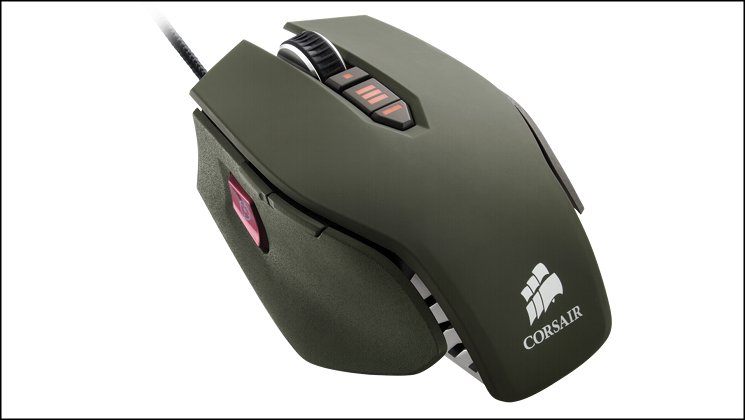
The Vengeance M65 is designed for FPS enthusiasts. It features an innovative Sniper button, allowing an instant toggle from fast movement, high DPI-resolution mode down to a high-precision mode for more accurate aiming. Its aluminum body has an adjustable center of gravity to allow gamers to balance the mouse to their preference. The Vengeance M65 is available in three colors— Military Green, Arctic White and Gunmetal Black.
Even though the Vengeance M65 is tailored to FPS gaming, we shall also be putting it through its paces in Action-RPG and RTS gaming to assess its practicality as a peripheral for a modern gamer with a range of gaming tastes. Given that Rich outlined the software as a weakness of the M60 in his review last year, we’ll also be paying particular attention to the M65’s release software suite and assess how marked any improvements have been.
Features And Specifications
Features
Quickly switch sensor resolution when you need extreme accuracy in FPS games. It’s not just for when you’ve selected a long-range weapon – it’s an indispensable feature any time you need to quickly switch to ultra-precise control.
Second-Generation Control Panel
The control panel software (available as a free download) makes setup and customization easier than ever.
Corsair Vengeance: Designed for performance gaming
Onboard Profile Storage
Once you’ve set up your button configuration and other parameters for each of your favorite games, you can quickly toggle between profiles directly from the M65. Since they’re stored onboard, you can take your profiles with you.
Aluminum Unibody Design
The aluminum frame combines high rigidity with low weight, and provides optimal mass distribution.
Adjustable Weight System
Three adjustable tuning zones allow you to customize the weight of your M65 to give it just the exact feel you want.
Selectable Response Time
Tune the performance for your desktop surface by choosing between 1000Hz, 500Hz, 250Hz, or 125Hz (1ms, 2ms, 4ms or 8ms).
High-Mass Scroll Wheel
The solid metal, rubberized scroll wheel doesn’t just feel great — it gives you the precision you need when selecting weapons. Precise tactile feedback and accuracy help make sure that you select the right weapon every time.
Switches Rated for 20 Million Clicks
The durable you need for years of high-performance gaming.
Soft-Touch Materials
Surfaces are textured and have just the right amount of give for outstanding comfort.
PTFE Glide Pads
M65 is designed with low-friction contact points for swift, precise movement with minimal effort.
Specifications
Sensor Type:- 8200DPI Avago ADNS-9800 LaserStream Gaming Sensor
Number of buttons:- 8, independently assignable
Sniper Button:- Yes (over-sized)
Dimensions:- 118(L) x 77(W) x 39(H) mm
Weight:- 135g (max)
Weight Options:- 3 x 5g
Colour Options:- Black, White, Green
Interface Type:- USB
Requirements:
– PC /w USB port
– Windows 8, 7, Vista or XP
– Internet Connection (software driver installation)
– 35MB HDD space
Packaging and First Look
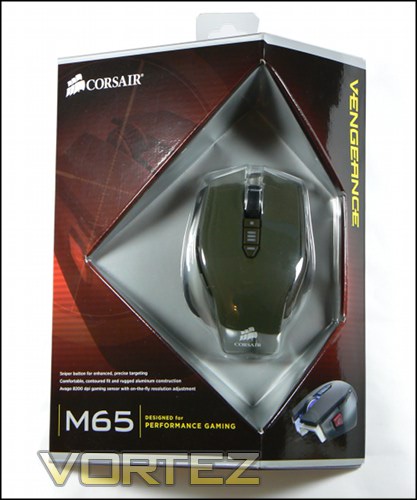
Corsair are certainly ones to be different, and they have succeeded in the shape of the Vengeance M65’s packaging. The off-centre triangular base will make shelf layout designers scratch their head, but will serve to keep shipping costs down thanks to their low overall package volume. The mouse is displayed front and centre thanks to a cut-away and the the cardboard shroud, though we should note that it can be difficult to tell the difference between the Gunmetal Black and Military Green at first glance. If in doubt, check the base where the full SKU is listed.
The packaging front lists all three major core features: the Sniper button, contoured shape, aluminium construction and 8200DPI sensor. For most, these will be the key selling points, and thankfully this time around the features don’t need much explaining. The package shape alone should cause plenty of interest in the M65 as it sits on the shelf, but it will pay to look on.
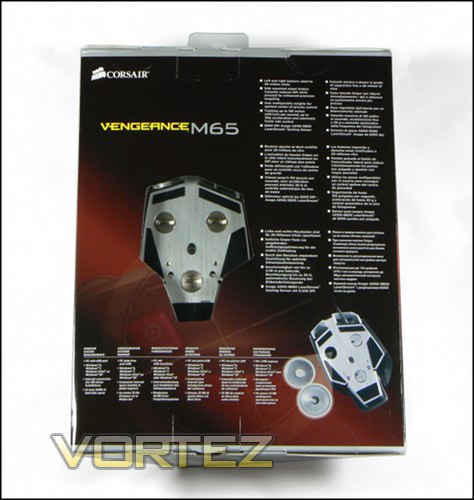
As with the front, the rear also has a small windows cut in the cardboard through which the mouse if visible. In this case it’s the aluminium base which can be seen, preying on the allure of brushed aluminium to all tech. enthusiasts. A little more feature information is divulged, but much less than you would see on even a poorly-appointed e-tailer page, indicating that perhaps Corsair expect you to have done your homework.
Additional features mentioned are the high-durability switches (rated for 20-million clicks), customisable weight system and sensor tracking metrics. In particular the weights adjustment should be noted as they are a feature which has been atypically undersold on the M65. Compatibility information is also provided, of which special mention should be made of the internet connection requirement.
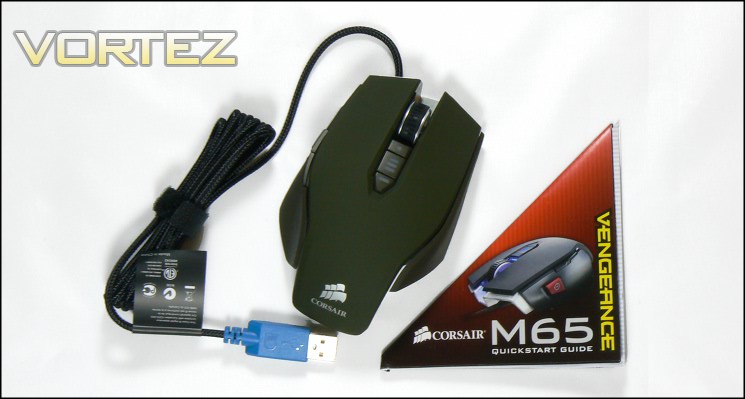
And here is out first look at the M65 in the flesh, though a small quick-start guide and warranty information card is also included in the bundle. As indicated by the rear of the packaging no software is included, mandating that it be downloaded from the official website.
From this angle mere hints of the cut-away design are visible, and despite a few flourishes such as the aluminium peaking from front there’s little to suggest that there’s anything unique about the M65. The Military Green colour matches the colouring of the Mil. Green Vengeance C70 gaming chassis and similar computing components currently on the market, which should allow you to build up a theme with that colour if desired.
First impressions are good, although there is little to suggest luxury here and none of the bundled extras we have seen from more high-end mice. We shall see what the M65 can bring to the table soon.
A Closer Look
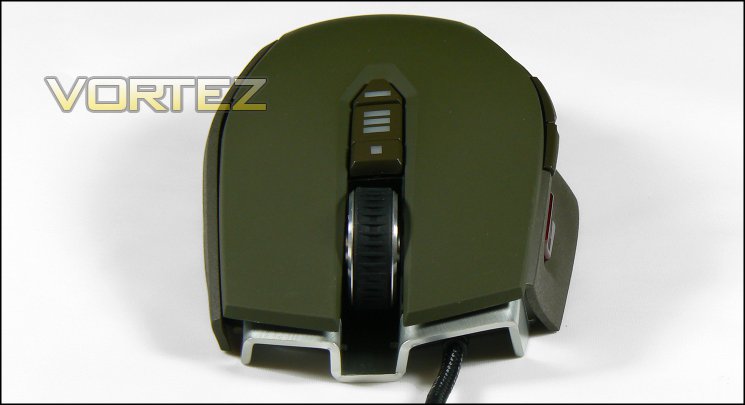
From the front you can see a glimpse of the Vengeance M65’s aluminium unibody frame, rearing up from the base like two radiator ducts. Sat on the frame is the topmost of the three plastic shell pieces, which has a smooth, soft and very slightly rubberised finish chiefly for comfort. Between the two major left/right buttons is a mousewheel with open-arch design, evoking something of the open-wheel race car thanks to its gripping rubber rim. The wheel itself is styled to be metallic, matching the brushed aluminium features, and is relatively low resistance even as it exhibits clear notches as it rotates. Either side of the mouse wheel is an LED lightbar, providing accent lighting in low-light conditions.
A small console behind the wheel appears to house three buttons, but in fact only the two extremes are buttons with the central panel instead acting as a panel for DPI indicator LEDs. The two buttons are also topped by LED lighting which, like the wheel accent lighting, is static in nature. The buttons are by default bound to DPI Up/Down, but this can be changed in the Vengeance suite.
Although from the top the M65 appears have an ambidextrous shape, the mouse slopes down from left to right. Combined with the majority of additional functionality being limited to the left hand side panel, the mouse isn’t suitable for a left handed grip.
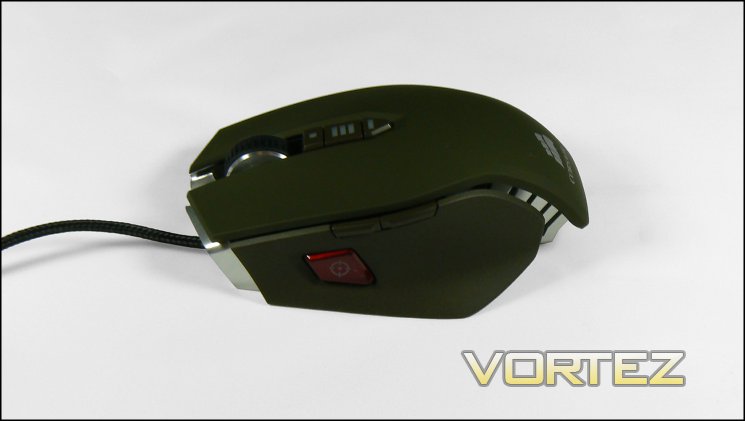
The left and right side panels of the M65 have a rougher, more textured finish to the plastic to generate more grip on those areas likely to see more force. The left hand panel includes two shoulder buttons, both of which have a high quality feel and solid back-stop which in the main prevents too much pressure from causing misclicks.
Below these is the ‘Sniper’ button, a large red switch with stylised crosshair. The location should see it as accessible to claw grips quite easily, whilst those with palm grips would probably need to stretch a little if their hands are small. Fingertip grips would be unable to use the Sniper button unless the user had pretty huge hands.
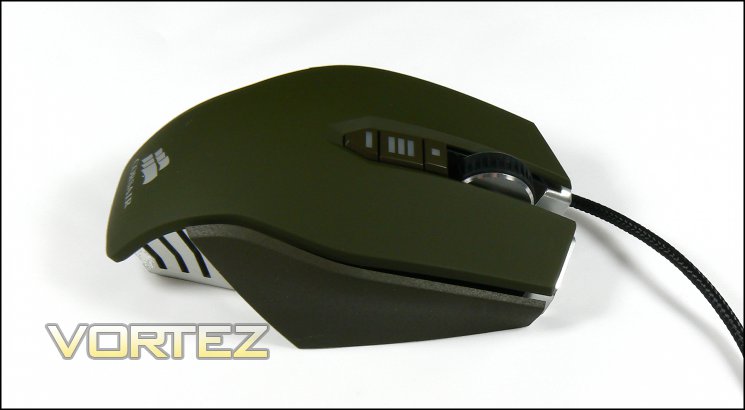
The panelled style of the M65 makes the mouse far easier to clean than most in its class, with less opportunity for grime to build up in various nooks. Whilst beyond the scope of this review it would be interesting to see what modders could do with this slightly more modular than normal design.
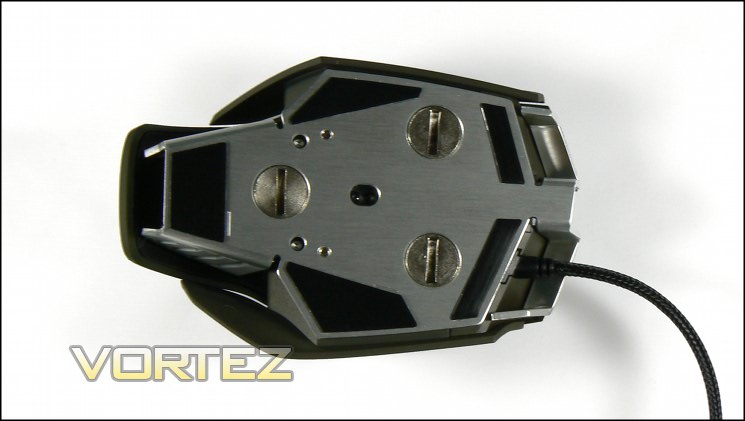
The floor of the M65 exposes the aluminium unibody in all its brushed glory, though five Teflon pads preserve its modesty somewhat. A strange feature at first glance will be the three circles, but a quick perusal of the M65 packaging reveals these to be plugged recesses for weights. The laser sensor is centrally located, and with the exception of the pads there is little to mar this quality look; it’s a shame you won’t see it very often really.
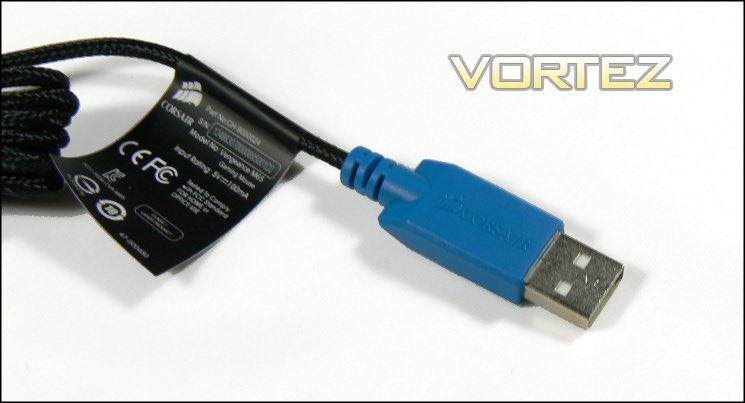
Detailed product information including serial number, product number and safe disposal information is usually found on the base of the mouse. However in order to save space it is instead included on a label fastened to the braided USB cable. This can be removed if desired, just be sure to keep it in a safe place.
The USB plug is gold plated, and allied to the soft weave of the braid should ensure few snags and excellent long-term durability. One potential pitfall will be the off-centre location for the cables entrance into the mouse chassis; lighter weight mice would suffer from uneven weight distribution but the heavyweight M65 should be a little less prone.
In all, the M65 does not appear to be the most option-rich mouse, but is fine at this price-point. Inclusion of a large sniper button rather than the much smaller designs we have seen is excellent as it improves compatibility for the widest range of grip styles.
Customisation Options
Corsair’s Vengeance M65 features two major areas which the user can customise to their particular tastes: lighting and weight distribution. In this regard it can be considered to be fairly middling in what it offers for its price bracket, with few offering any sort of weight adjustment.
Lighting
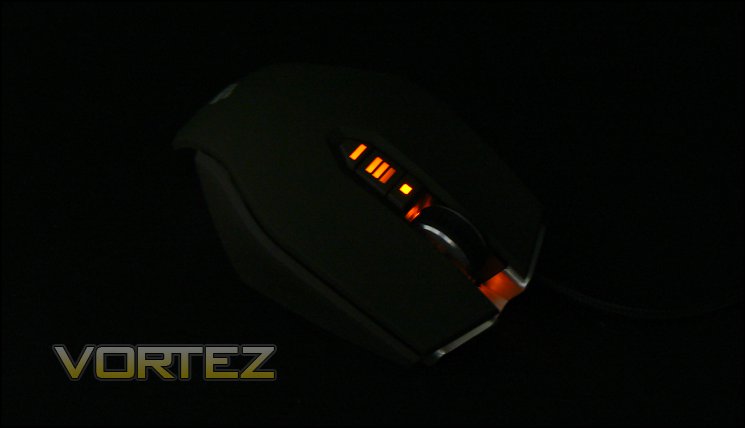
The lighting colours for the M65 will depend on the particular version you purchase, but the lighting zones will be the same whichever the option. Both Gunmetal Black and Arctic White offer blue LEDs, whilst the Military Green option we’re reviewing utilises an orange/red LED which complements the overall colour-scheme. The lighting is enabled or disabled via the Corsair Vengeance software suite, typically on a per-profile basis.
Many mice emphasise a wide range of colour options, even on accent lighting; the M65’s lighting is subtle, fairly constant and has little functional value. It also doesn’t have sufficient variation to allow profile differentiation, but the light bars below the mouse wheel do vary to indicate DPI level. Fundamentally, most of the lighting is for aesthetic purposes.
Weights
As with the M60 before it, the M65 includes three removable weight packages on the underside of the chassis; each weight package is 5g and removed by unscrewing the associated plug with a coin or similar device. The weight system allows alteration of the centre of gravity, and given the relatively high overall weight of 135g, being able to shave off the little can aid in overall movement.
Be advised, Corsair don’t supply a carry-case for their weights.
Software
Corsair don’t bundle a software CD with the Vengeance M65, keeping down costs and ensuring that newcomers to the device will be using the very latest revision of the software. You will need to download the latest software from the official Corsair website, although as you would expect the mouse will operate with basic functionality without software installed. Corsair also list a user guide for the software catered to the more complex Vengeance M90 MMO gaming mouse, but the same principles apply. The guide can be found here in PDF form.
In testing we made use of software version 1.00.00.04, the most up to date at the time.
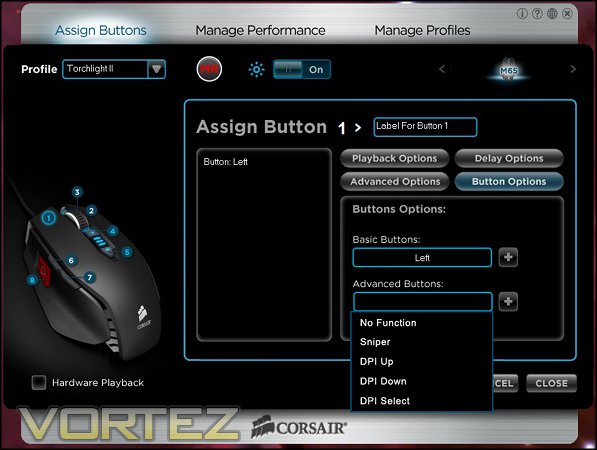
Upon launching the configuration software you’re thrown straight into the Assignment pane, but before we get into that lets discuss the window. The look is obviously designed to mimic the brushed aluminium and matte black finish of the Vengeance M65 Black and similar Corsair products, a nice touch when you’re thinking about brand identity. Four icons at the top-right on the silver portion allow you to identify the software version, launch the Corsair troubleshooting web page, launch the main Corsair website or close the suite.
Top-level navigation is as simple as it can get, divided as it is between three major options: Assign Buttons; Manage Performance; and Manage Profiles. Assign Buttons is the place to be to record macros, manage illumination and – as the name suggests – assign particular keystrokes to buttons. Manage Performance allows you to change the core sensor characteristics of DPI and lift-off height. Finally Manage Profiles does exactly what it says on the tin – manage your profiles. You’ll also note that the software can be used for a range of attached Corsair peripherals simply by cycling the icons at the top-right of the main pane.
Button Assignment is on a per-profile basis, with selection determined by the drop-down box on the top-left. Before new profiles become available they need to be created in the Manage Profile tap, although the M65 Default profile is available from the get-go.
On the left of the main configuration zone is an image of the M65 with buttons labelled 1~8. Assignment begins by selecting one of these buttons, which will then update the config. zone to its settings. These settings are split between four sections:
Delay Options:- Defines the delay between keystrokes, both as part of Playback Options and strokes in a macro.
– Can ignore delays, set to a fixed value or random value up to a limit.
Advanced Options:- Presents a way of binding a button press to a Windows Command.
– Includes common commands such as Copy, Paste, Find etc,
– Advanced options include the launching of specific application, closing a window etc.
Button Options:- Allows binding common mouse functions to a button
– Basic functions include Left, Right, Middle etc. clicks
– Advanced Functionality includes Sniper mode and DPI cycling.
N.B.:
* Profile cycling is not available as a assignment option or keystroke shortcut.
* Mouse Wheel Up/Down activities cannot be reassigned to different functionality.
* Text following “ASSIGN BUTTON X>” is included as a means of labelling functionality and is reflected in the Profile Preview [see: Manage Profiles].
In our view this order is somewhat counter-intuitive, and would be more logical if reversed.
Creating a macro of keystrokes follows yet another process; in this case you are required to press the (MR) button at the top of the window, followed by one of the eight button labels on the image of the M65. MR will begin flashing, and any character input will be logged in the main input section, overwriting the current keybind; this process will cease when MR is pushed for the second time. Currently there is no mechanism to back up macros once they have been created, only whole profiles.
UPDATE:
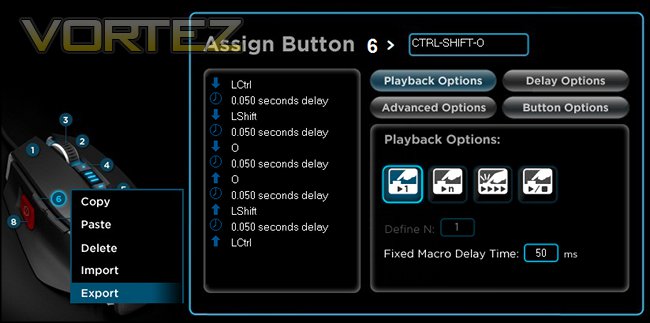
Following publication of the review Corsair let us know that a macro can be Exported by right-clicking on button to which the macro is bound. The macro is saved as a .xml file, and can be Imported (and bound to any particular button) using the same procedure. Any label you assigned (for example, to describe the function of the macro) is also preserved. Although pretty unintuitive, we’re glad to see that it does exist as a feature.
Rounding out a rather packed and window, lighting can be enabled or disabled through the button at the top row.
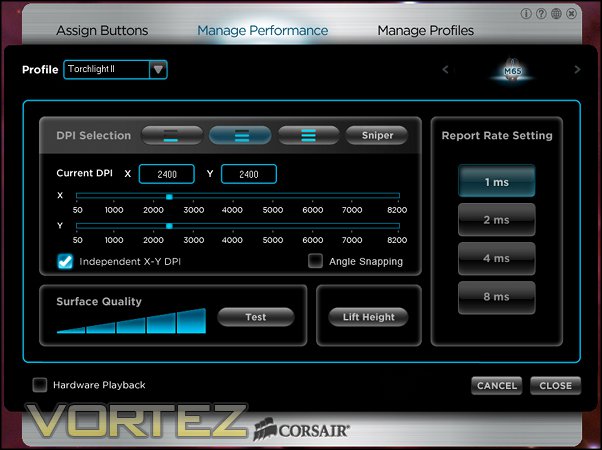
The Manage Performance window contains the configuration tools required to adjust sensor dynamics to your preferences. Three DPI levels can be set using this tool to be cycled through with mouse controls. Levels can vary between 50 and 8200 DPI in increments of 50, and each DPI level is independent, with separate sensitivities able to be set in the x- and y-axes.
In addition to the three overall DPI levels M65 configuration software also includes a fourth ‘Sniper’ mode. This functionality is a DPI override – a setting only active once a button assigned to the Sniper mouse command is pushed. This is generally intended to be bound to the red Sniper button, but can be bound to any button.
Angle snapping, a means by which the sensor will seek to approximate a straight line if the user input appears to be such, can also be toggled on here. Most gamers will want to keep it off by default, but other users may appreciate the option.
Lift Height and Report Rate round out the different configuration options available on this page, which respectively define the height about the mousing surface the sensor is disabled and the average response time of the mouse to input. Both will be of key interest to gamers – report rate in particular will want to be as low as possible, although the benefit you see will mostly depends on the polling rate of your motherboard USB ports. Appropriate Lift Height will be related to the quality of the mousing surface, but generally you will want to place it to be as low possible without causing jerky cursor movement through poor sensor information.
The final tool on the performance management window is a surface quality analyser. When assessing performance we discovered that the sensor provided a better response with polished wood surfaces over fabric mats, but your mileage will vary.
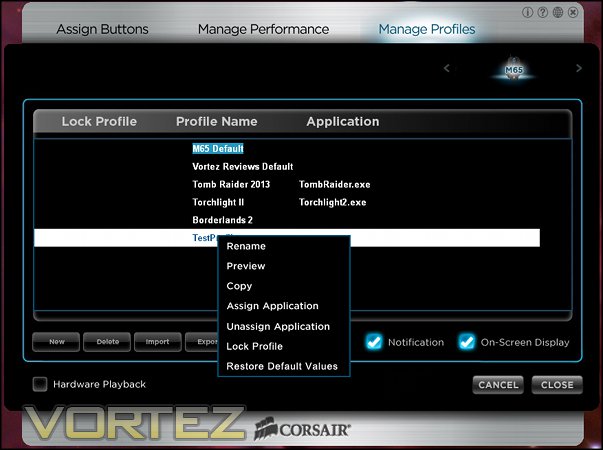
The final configuration windows is that for profile management, and even though profiles are less of a factor on the Vengeance M65 than other mice it’s notable that some considerable effort has been placed in this feature. On this window profiles can be created or deleted and is the most reliable way to activate profiles given the lack of profile cycling in the mouse command list.
Once created the profiles can be exported to .xml file, and can be re-imported at a later date. They can also be uploaded directly to the M65, although the configuration utility indicates that only one profile at a time can be stored on-board. Finally, enabling Notification means that the configuration utility minimises to the system tray rather than being shut down entirely when closed, whilst On-Screen-Display presents selection of the profile and DPI as an on-screen notification of the profile name or DPI value.
In summation therefore this software version bears a startling resemblance to the software for the M60, and may be due for an upgrade before too long. Profile handling is poor in comparison to competitors, and the button assignment UI isn’t as logical as it should be which leads to a high learning curve. Macro creation is powerful, but backup functionality of long sets of complex keystrokes to mirror to a different profile is opaque – a newcomer to the software missing it is all too likely.
With this proviso, the Vengeance M65 software is tailored to FPS gamers whilst needing some work for MMO/MOBA enthusiasts seeking to squeak more functionality out of their device. Every button being bindable to a keystroke is excellent, but lack of profile cycling will hold it back in the minds of many. This is all the more galling given that the M90 profile handling is much more robust.
Performance
In performance testing we initially paired the Vengeance M65 with a rubber-back fabric mousemat designed by another gaming peripheral manufacturer, but swiftly swapped it out for a different option following a medium (2/4) surface quality test in the Vengeance Configuration utility. Although we didn’t notice any difference in sensor or skate dynamics we felt it was sensible to follow the advice the mouse gave for its ideal surface. The mousemat we utilised provided a 3 out of 4 result for surface quality, which we felt was adequate without moving to a hard polished surface.
General Performance
Minimising friction with the mousing surface is all important in gaming and the M65’s five Teflon feet are startlingly good in their role, allowing this heavyweight mouse to slide with ease over fabric mousing surfaces. After two weeks quite intensive use they lost none of their viability so short-term durability is proven; if they can last into the years of projected use expensive peripherals should be subject to they will prove to be an excellent solution. Corsair however do not include replacement feet should any wear out, so keep that in mind before you use a sandpaper mat for you next LAN tournament.
As discussed the M65 is quite heavy at 135g in maximum, although a more svelte 120g configuration is possible. What makes the mouse a rare breed however is that this weight is packed into a compact shape rather than the elaborate designs of other mice seeking to be a jack-of-all-trades. In theory this lean design makes it more suitable for a range of grip types, whilst in practice personal preference will continue to reign; we find however that larger than usual hands shouldn’t find this mouse difficult to use, whilst those on the smaller side may struggle with the ‘Sniper’ button if using a palm or other less conventional grip.
The major buttons are very sensitive in comparison to competing solutions, but remain very responsive. Individuals with less control over their fingers may prefer a mouse which offers up more resistance, but for most the M65 will offer a pleasing experience. They’re also quite quiet, making the mouse excellent for an office or game streaming environment.
Thanks to the assignable Sniper button and reasonably robust macro system the M65 offers an interesting compromise for those seeking a mouse suitable for both IT dogsbody work such as spreadsheet handling or wordprocessing and FPS gaming, although the impression the mouse will give is of a thoroughbred gaming peripheral. The mouse wheel is excellent for frequent usage thanks to precise movement and zero axle wobble, although the middle button does offer up a lot of resistance to being pressed.
Gaming Performance
Like its predecessor, the M65 makes most sense as an out and out FPS peripheral. Thanks to the Teflon feet it zips across the desk, allowing for precise aiming between broad movements. All buttons are clearly differentiated – which is more important and less common than you might think – leading to very little input confusion and a short learning curve overall.
If Corsair had persisted with a smooth finish throughout the M65 it may have been a different story. The textured sides add significantly more grip than you expect, which is necessary thanks to the way the left side tapers away from the thumb towards the rear rather than cupping it in place. The level of control this affords is very good, although for the first few days will make it seem quite odd if you’re used to a more conventional shape. Those moving from ambidextrous mice shouldn’t feel discomforted.
In the past we have criticised some ‘Sniper’-esq buttons; in many cases they have been a little too small to be appropriate for the grip the rest of the mouse is tailored to, or have far too spongy a response. We’re pleased to report that the M65’s is very good, especially in size where it will be easily accessible. Once again the learning curve will be a little steep, especially in compensating for the additional lateral force needed to press this button, but if you absolutely have to have this functionality we’d struggle to see how it could be done better.
Although a clear visual indicator of DPI is included, the M65 does not have any perceptible indicator of active profile. This jives with the software configuration utility. which allows only one profile to be uploaded to the mouse at a time. Profiles stored in software but not uploaded to the M65 can be parsed properly if selected in software, but this feels like an incomplete solution only slightly mitigated by being able to activate a profile upon application launch.
Within Team Fortress II headshots started coming thick and fast, a surprising achievement given the tester’s skill level, and we attribute this to the sniper button and very precise sensor which didn’t misfire over the course of testing. The M65 was also the mouse we used in our first play through of Tomb Raider (2013), and rather than (as you might expect) fight with the device when new to it and learning the idiosyncrasies of the new game, transition felt seemless. Not as if we had been using it all along, but certainly forgetting it was brand new.
In Torchlight II and Starcraft testing gameplay was fine, the profile issues notwithstanding. We found the sniper button less beneficial as a tool in constant use, but it remained an addition with considerable value. Once again tracking presented no problem, even at the higher DPI levels which tend to be used in RPG and RTS gameplay.
FPS gamers may be happy with one profile, but those with more varied gaming tastes often take advantage of multiple genres each of which have different requirements. Whilst the M65 is obviously specialised for FPS, lack of a more robust profile system* makes it less suitable for RPG/MOBA gaming such as Diablo III or League of Legends. Given the increasing popularity of these titles this seems like a significant oversight which could at least in part be rectified with improved software.
*Ed. note: changed to reflect macro import/export clarification from Corsair.
Conclusion
It’s been over a year since we reviewed the M60, and in the intervening period a significant number of high quality mice have passed through our hands to be tested. Does this new update, the Vengeance M65, keep up with the renewed competition? The answer is more complex than we first thought.
Without doubt, the hardware is still of an excellent standard. The aluminium chassis and plastic shell have the heft of a mouse you think will last for years rather than the more fragile impression you may get from other entirely plastic chassis. Yet again the choice of high quality switching components show their value with a sensitive response on the main buttons and consistent play on the side buttons. Of course, there is a trade-off: the M65 is pretty heavy, but the five Teflon skates do an excellent job of keeping friction low and making the mouse feel far lighter than it is.
FPS gamers will find the addition of a sniper buttons welcome, whilst MMO gamers will appreciate an additional button to bind to a macro. Three DPI settings up to 8200DPI is the gravy on top of the package.
No, it’s not the hardware where the M65 feels lacking, but rather the software. It hasn’t changed a great deal since the M60 was reviewed last year, and proves itself to be less intuitive and flexible than many suites developed by competitors in the past year. With a few exceptions this merely leads to a steeper learning curve, but the inability to cycle profiles outside of software UI or store more than one onboard is a let-down and distinct weakness.
Even so, if you’re comparing it to some of the high-end solutions we’ve reviewed recently, Corsair have got the price right. At less than £50, not only are all three colour variants of the Vengeance M65 less costly than many of the competitors, they’re also priced lower than the model it’s replacing. Couple that with the generally very good RMA process Corsair boasts and it’s a proposition that should be tempting to those wanting to spend a little more than usual on a new peripheral without breaking the bank.
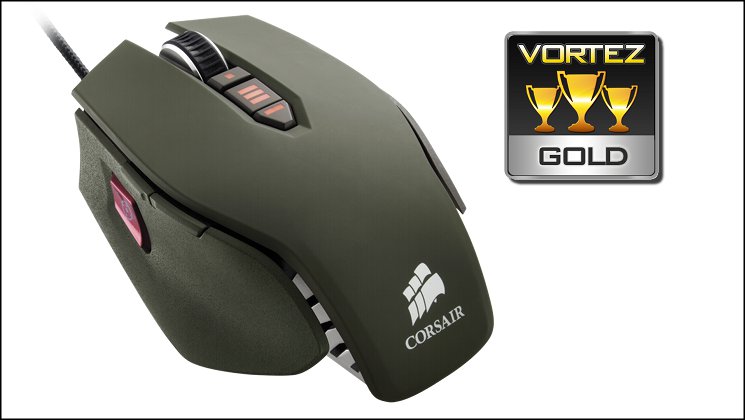
In the Vengeance M65 Corsair have produced a mouse which is a strong successor to the M60. Those who have already invested in an M60 won’t seem much of a benefit in the M65 – although there is some – but those who previously dabbled in the low-to-mid range should find the M65 a worthy purchase. Corsair should however spend more time on the software, where they are beginning to be surpassed by more comprehensive competitor solutions. Thanks to the excellent build quality, aesthetics and value it earns a Gold Award, with a strong emphasis on suitability for FPS gaming.
+ Durable construction
+ Finish which is grippy where necessary, smooth where appropriate
+ Large, easy to access Sniper Button on thumb.
+ Three independent DPI levels & Sniper DPI level
+ Responsive button switches
+ Aesthetic appeal which sets it apart at the price point
Cons
– Steep software learning curve
– Few onboard profiles
– Heavy


