With Dynamic Write Acceleration technology, the new MX200 promises to be an improvement over the already impressive MX100. See how it holds up against other popular drives on the market in our latest review…

Product on Review Crucial MX200
Manufacturer & Sponsor: Crucial
Street Price: £330.70 / $459.99
The MX100 impressed us with its great value but write speeds could have been better when compared to the competition. Crucial have recently unleashed the new and improved MX200 complete with Dynamic Write Acceleration technology on its smaller drives. Why only the smaller drives you ask? Well, it simply is not required on the larger capacity drives. 500GB and above SSDs do not tend to suffer with write speeds as much as smaller drives so it is certainly a welcome addition for those who are looking for a small boot drive. We have the 1TB version for review today which does not require Dynamic Write Acceleration technology but as with all of our SSDs on test we will look closely at write speeds because read speeds appear to have reached a performance threshold with most SSDs hitting the fabled 550MB/s speed. Write speed is where solid state drives can be distinguished from one another.
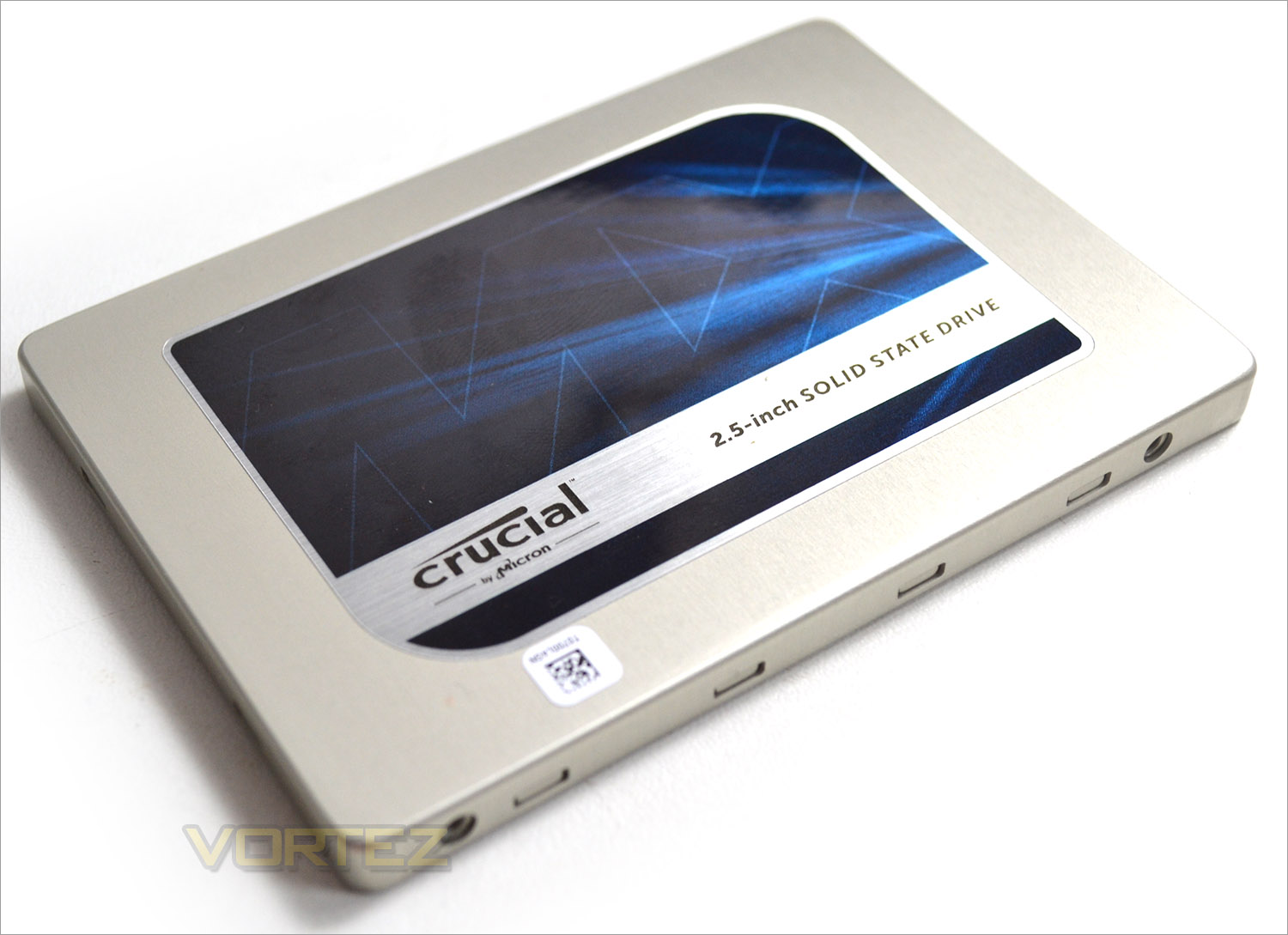
The MX200 comes in a variety of storage sizes along with 3 form factors (2.5″, mSATA and M.2) but only the standard 2.5″ variant is currently available with the full 1TB of storage space. All of the drives come with Extreme Energy Efficiency technology, Adaptive Thermal Protection and Exclusive Data Defence along with a useful 3 year warranty. The MX200 also appears to offer good value for money with the range topping 1TB drive being one of the cheapest available. The BX100 is a little cheaper but this is considered Crucial’s ‘budget’ conscious drive whereas the MX200 strikes a balance between cost and performance. If you don’t need masses of storage space then the MX200 can be had for under £100 at around the £85 mark for the 256GB size and £160 for the 500GB. We would have liked to have seen a smaller 128GB drive in the line-up as many still prefer mechanical drives for data with a small SSD for a boot drive but the drop in SSD prices has meant that larger capacity drives have become more affordable and thus larger sizes are now more popular. Still, we think there is room for a small boot drive in Crucial’s armoury.
About the MX200
When the Crucial® MX100 was released, it set a new standard for SSDs that the Crucial MX200 pushes even further. Leveraging leading specs on all fronts, along with new Dynamic Write Acceleration technology, the Crucial MX200 is loaded with innovative features and immediately increases your system’s performance.
Specification
Manufacturer: Crucial
Capacity: 1TB
Edition: MX200
Part Number: CT1000MX200SSD1
Form Factor: 2.5″
Height: 7 mm
Max. Read: 555 MB/s
Max. Write: 500 MB/s
Max. Random Read 4K: 100k IOPS
Max. Random Write 4K: 87k IOPS
Box Contents: 2.5″ (7mm) SSD, 7mm to 9.5mm spacer, Acronis® True Image™ HD certificate
Capacity: 1TB
Edition: MX200
Part Number: CT1000MX200SSD1
Form Factor: 2.5″
Height: 7 mm
Max. Read: 555 MB/s
Max. Write: 500 MB/s
Max. Random Read 4K: 100k IOPS
Max. Random Write 4K: 87k IOPS
Box Contents: 2.5″ (7mm) SSD, 7mm to 9.5mm spacer, Acronis® True Image™ HD certificate
Packaging & First Look
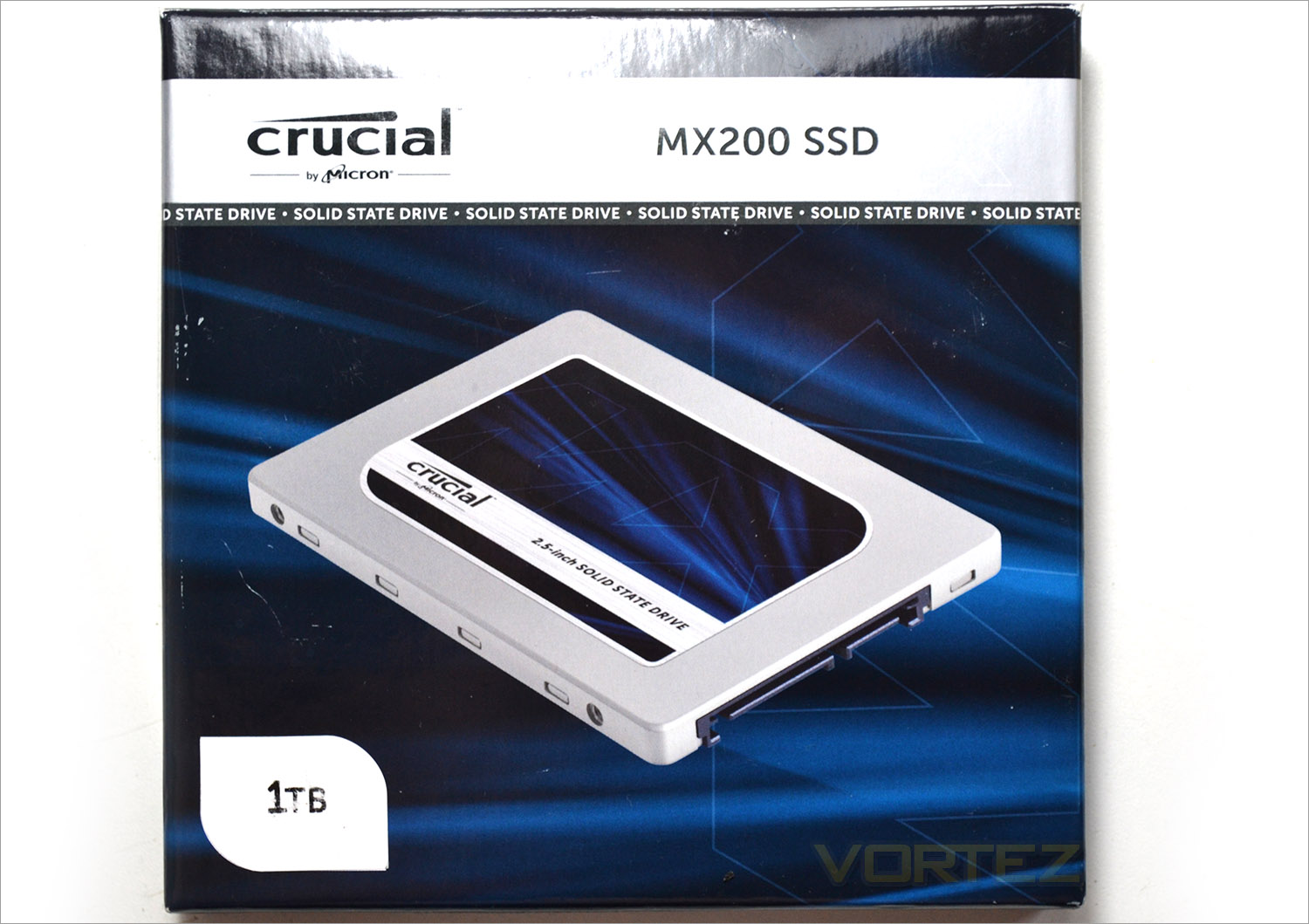
The drive comes packaged in a rigid cardboard box with glossy print. On the front of the package you will see a product image along with a sticker to the bottom left signifying the storage capacity of the drive in question.
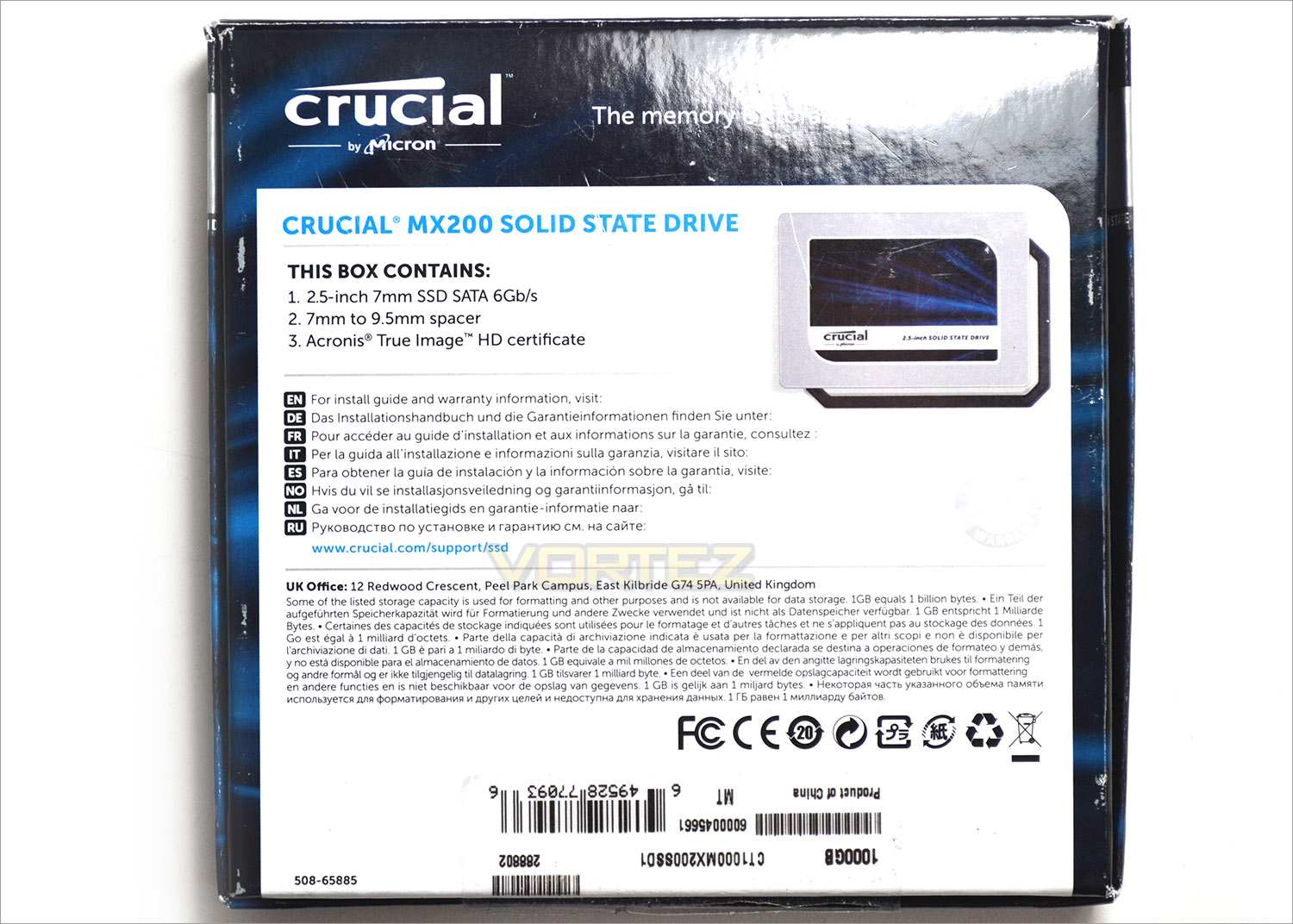
The rear of the box will dictate what the product contents are, in this case a 2.5″-3.5″ adaptor, Acronis True Image product key and the SSD itself.
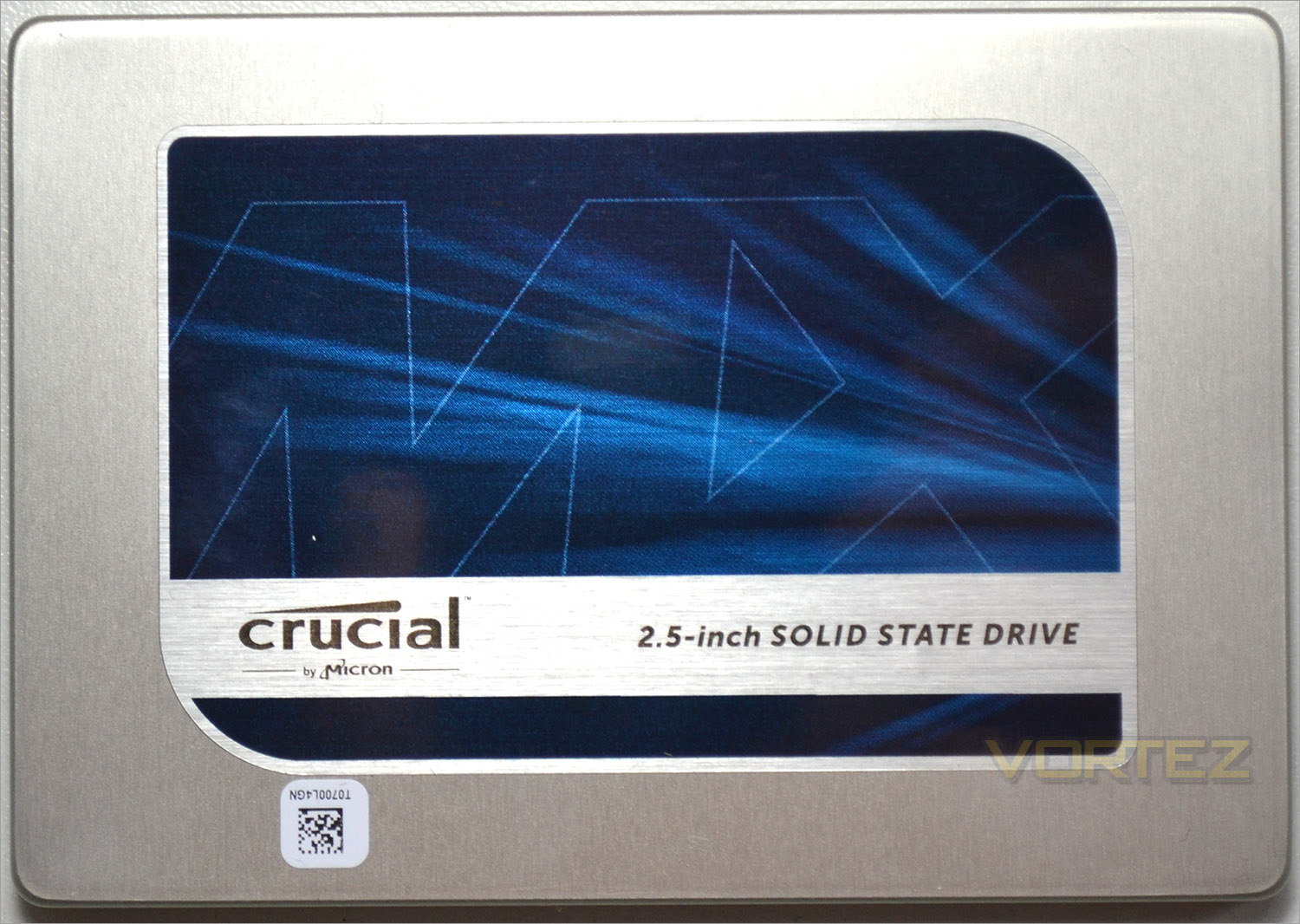
The SSD has a low profile (7mm) so can be installed in thin ultra book style notebooks. It weighs next to nothing thanks to the full aluminium casing and thus is ideally suited to both desktop and laptop devices.
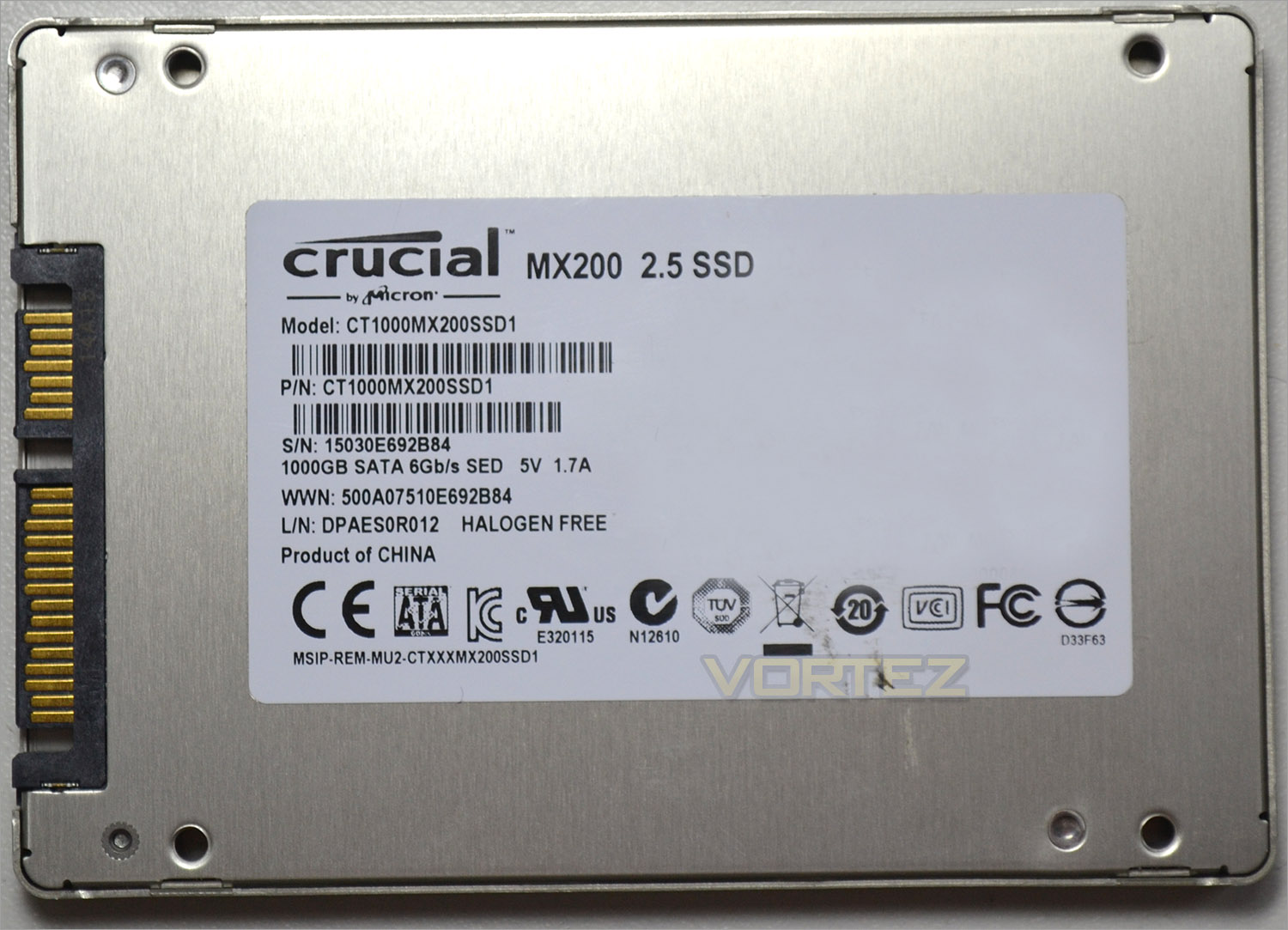
The rear of the drive has a variety serial numbers and product codes. We do however find that thankfully the storage capacity is identified. We also see that the drive is a product of China.
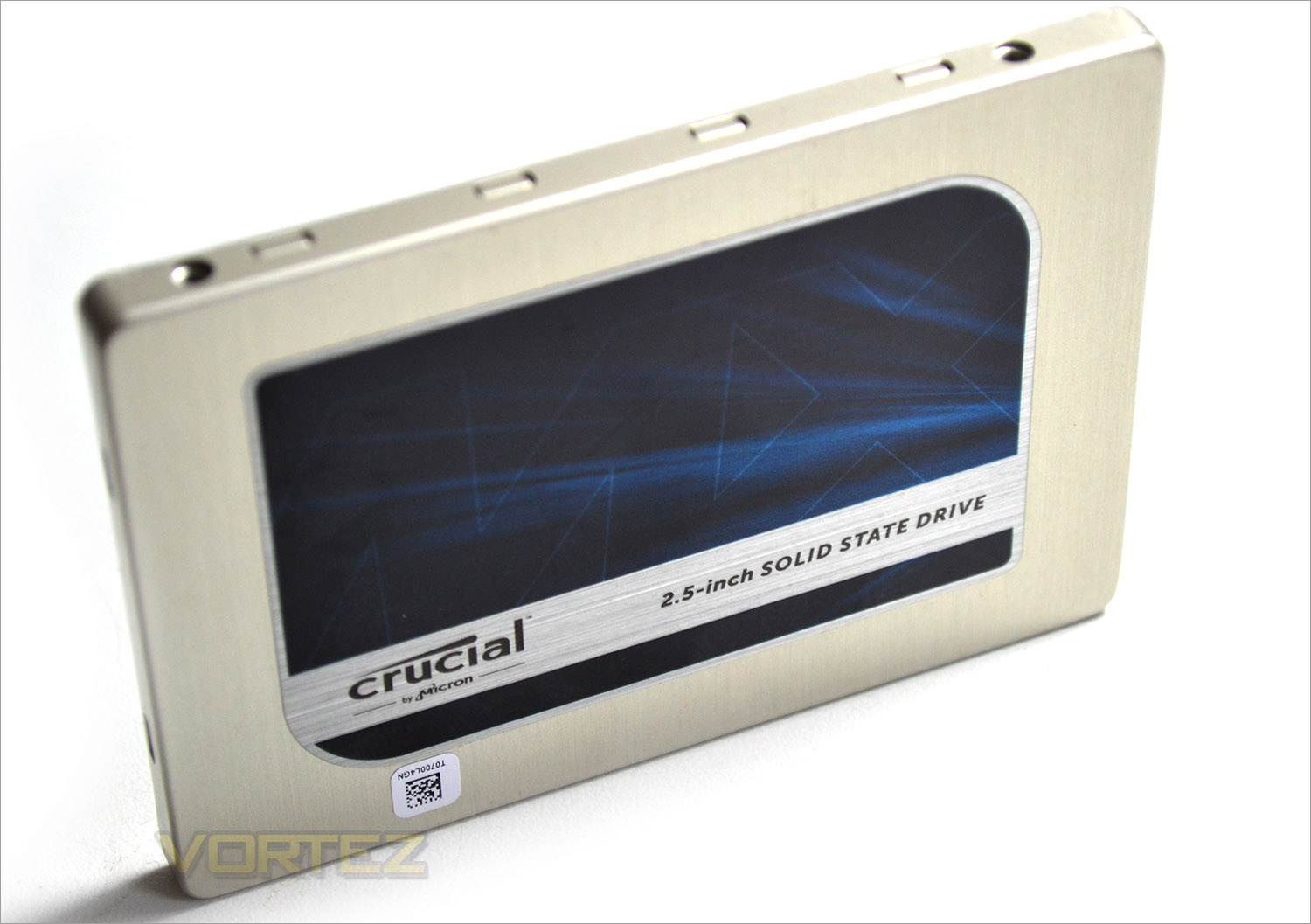
Overall, the MX200 doesn’t look too dissimilar to the many other crucial MX drives on the market today with the same blue/silver colour scheme. It is fair to say they are pretty much identical with only the very basic info on the rear sticker showing any difference. Not that we are complaining you understand as we like that Crucial have stuck to an attractive branding style rather than changing for changes sake.
Test Setup & Methodology
Our test system is formatted and a fresh version of Windows is installed with just drives in place – no additional applications. Windows is then updated to the latest release and the drivers are installed. Included in the list of benchmarks are the following applications:Benchmarks
Anvil Pro
AS SSD
ATTO Disk Benchmark v2.46
Iometer
Futuremark PCMark 8
AS SSD
ATTO Disk Benchmark v2.46
Iometer
Futuremark PCMark 8
Test system
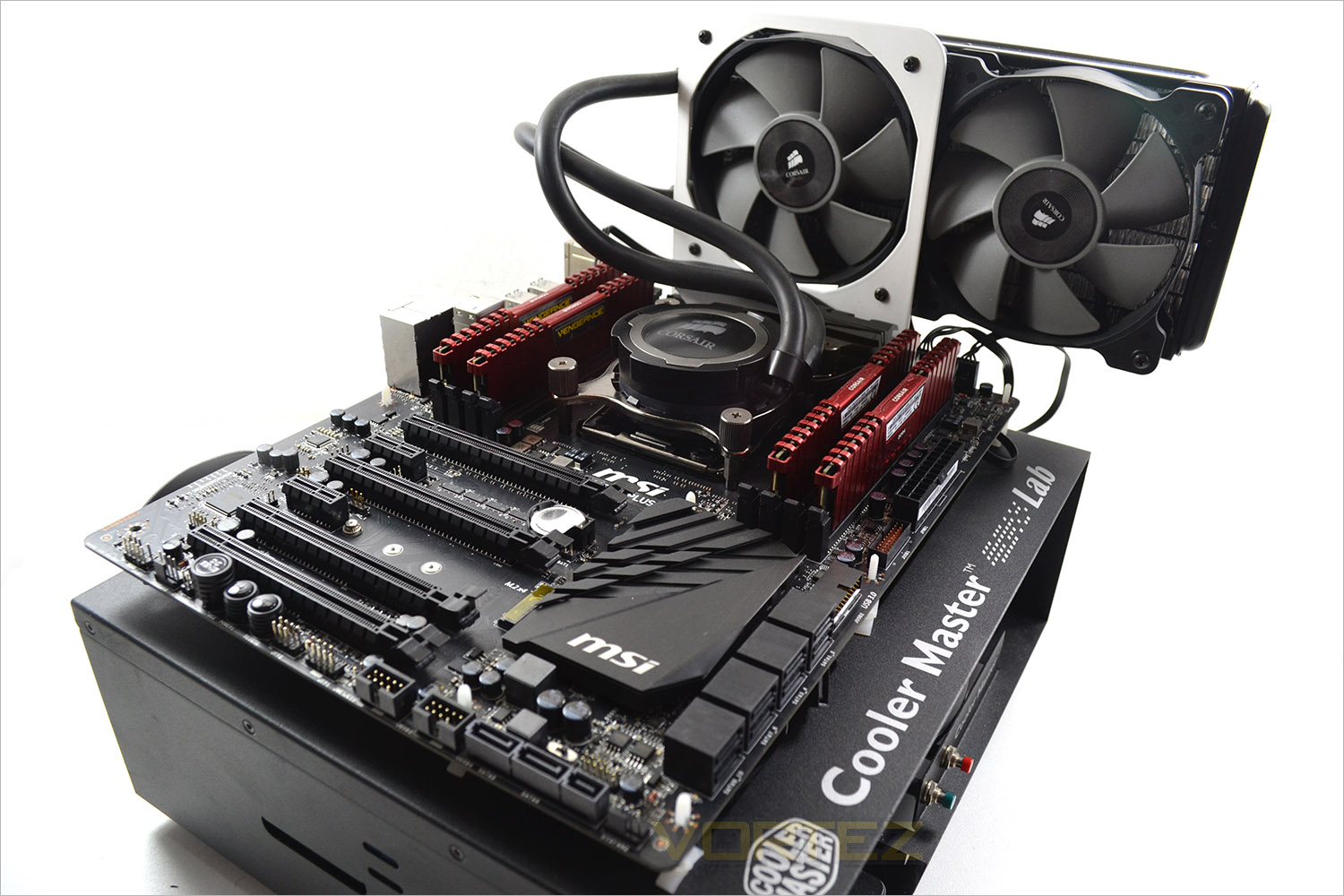
CPU Intel Core-i7 5960X
Motherboard MSI X99S – SLI
Graphics PALIT NVIDIA GTX 760
Memory 16GB Corsair Vengeance Pro (2666MHz) CL15
HDD
–
– Kingston HyperX Savage 256GB (Sata 6Gbps)
– Corsair Force LX 256GB (Sata 6Gbps)
– Plextor M6e 256GB(PCIe)
PSU Corsair HX1050 Gold
OS Microsoft Windows 7 Professional 64-Bit
Motherboard MSI X99S – SLI
Graphics PALIT NVIDIA GTX 760
Memory 16GB Corsair Vengeance Pro (2666MHz) CL15
HDD
–
Crucial MX200 1TB (Sata 6Gbps)
– Kingston HyperX Savage 256GB (Sata 6Gbps)
– Corsair Force LX 256GB (Sata 6Gbps)
– Plextor M6e 256GB(PCIe)
PSU Corsair HX1050 Gold
OS Microsoft Windows 7 Professional 64-Bit
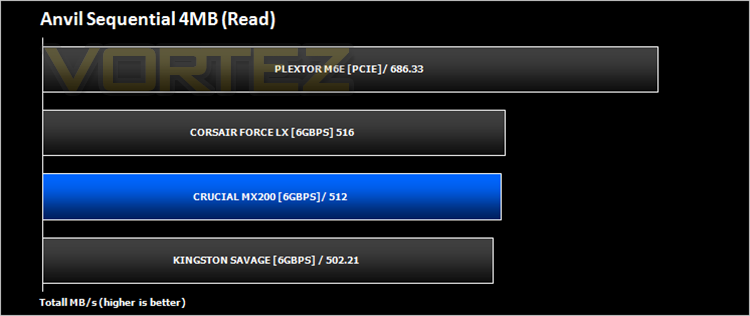
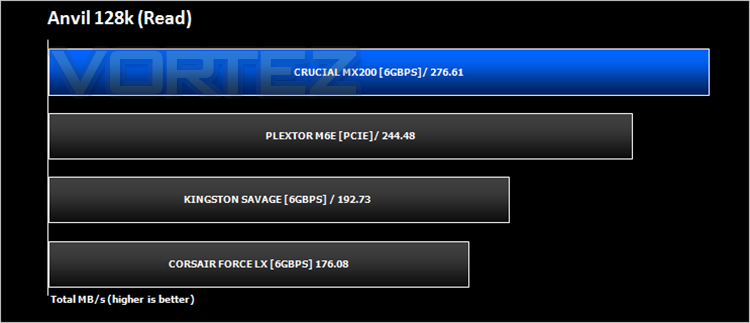
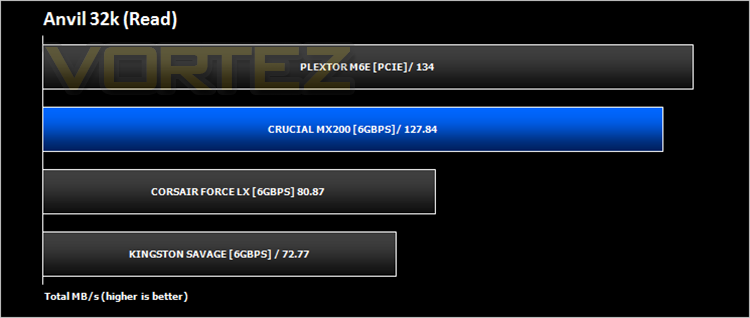
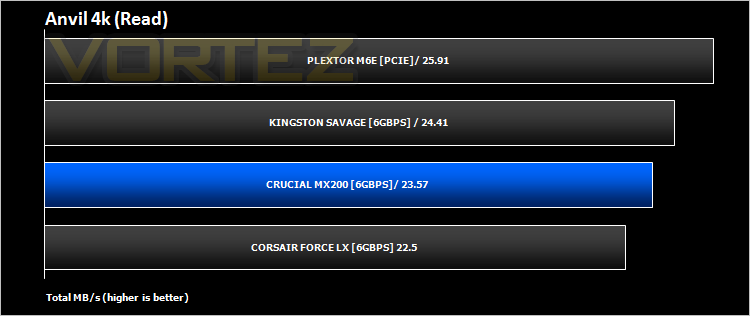
Anvil Pro
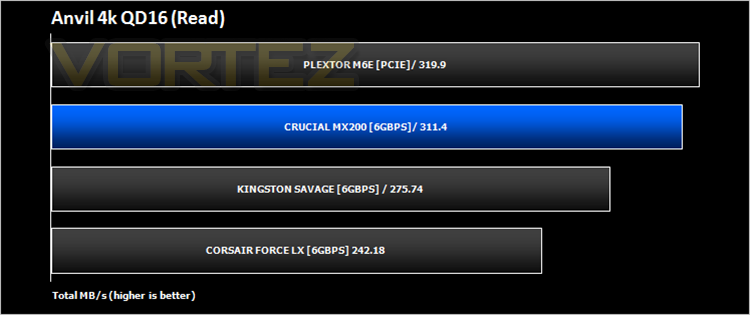
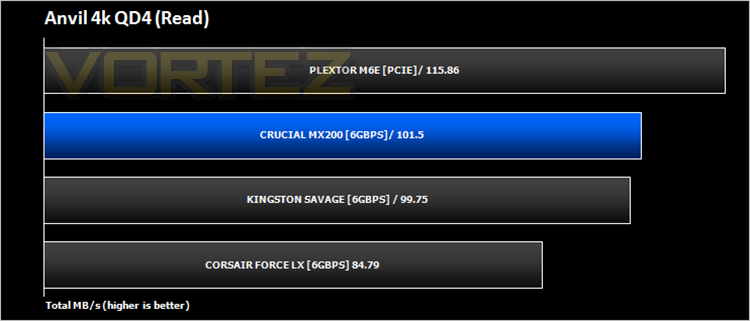
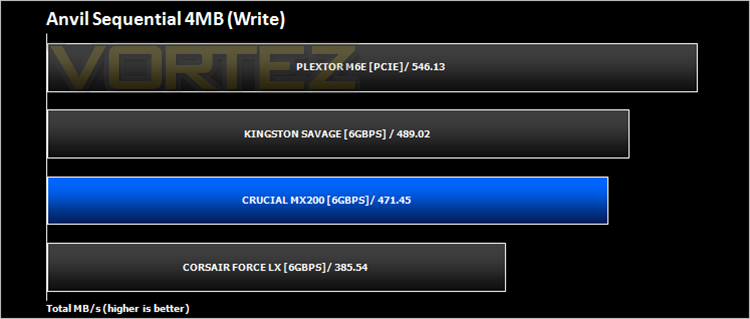
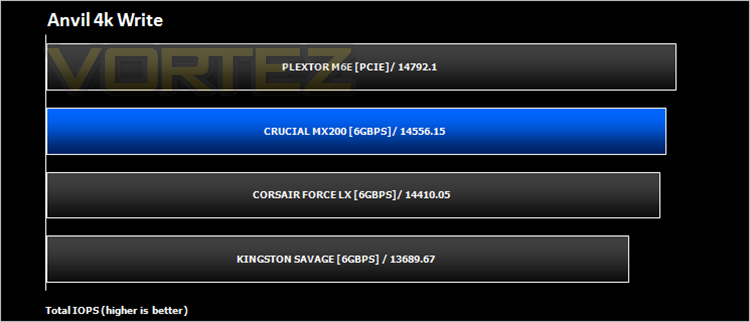
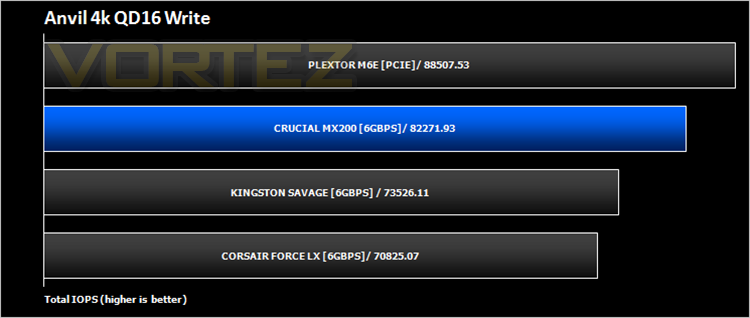
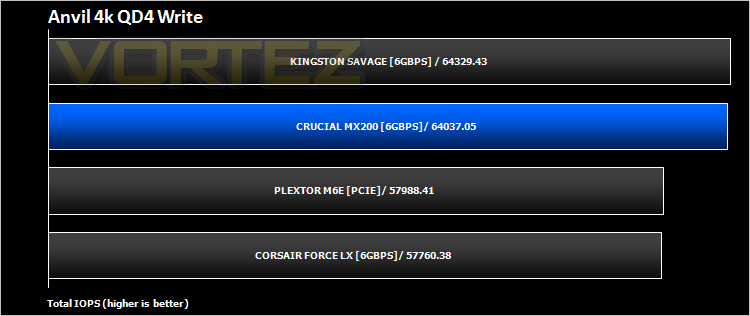
Anvil Pro from Anvil Storage utilities is one of the most popular storage benchmarking utilities today thanks to the large suit of tests available. You can test pretty much anything from Read/write Speed to IOPs with many variables to tweak allowing you to get either a single or host of results to compare with other like minded enthusiasts. In our test we ran the standard suite 5 times, subtracting both the highest and lowest scores and determined the final result from the average of the remaining three results.
AS SSD
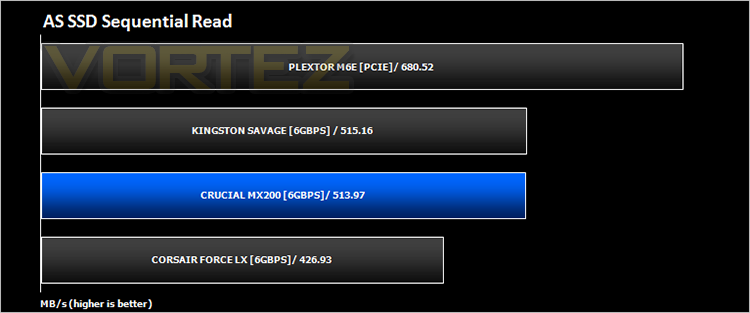
AS SSD Benchmark is a straightforward tool for measuring the speed of your SSD drive.
Simply launch the program, choose your drive, click Start, and it’ll test your SSD’s read and write speed in a variety of ways, delivering a score for each when it’s done. And if that’s not enough, there are also additional file copy and compression-related benchmarks available from the Tools menu. (The author’s support page is German only, but if you need further English explanations then there’s a thread on the program at the OCZ Technology forum.).
Simply launch the program, choose your drive, click Start, and it’ll test your SSD’s read and write speed in a variety of ways, delivering a score for each when it’s done. And if that’s not enough, there are also additional file copy and compression-related benchmarks available from the Tools menu. (The author’s support page is German only, but if you need further English explanations then there’s a thread on the program at the OCZ Technology forum.).
ATTO
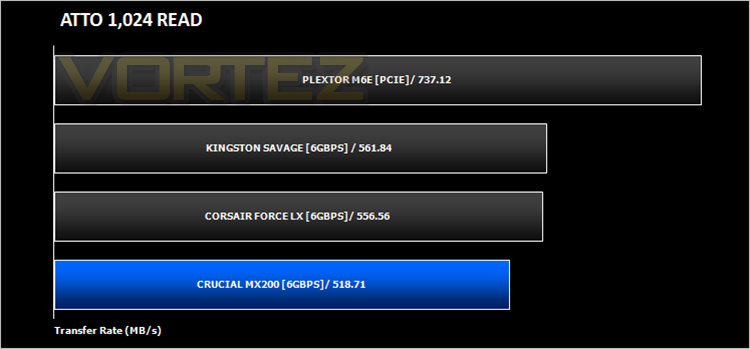
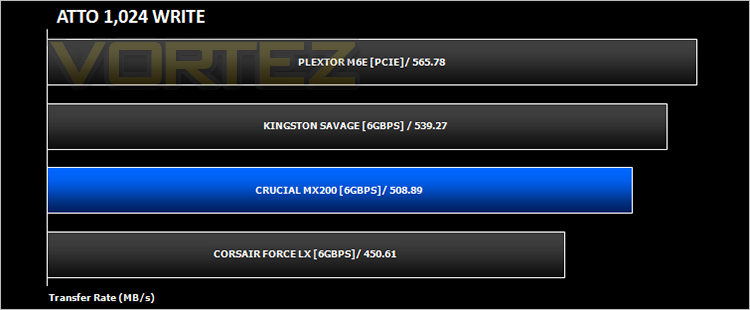
The ATTO Disk Benchmark performance measurement tool is compatible with Microsoft Windows. Measure your storage systems performance with various transfer sizes and test lengths for reads and writes. Several options are available to customize your performance measurement including queue depth, overlapped I/O and even a comparison mode with the option to run continuously. Use ATTO Disk Benchmark to test any manufacturers RAID controllers, storage controllers, host adapters, hard drives and SSD drives and notice that ATTO products will consistently provide the highest level of performance to your storage.
IOMETER
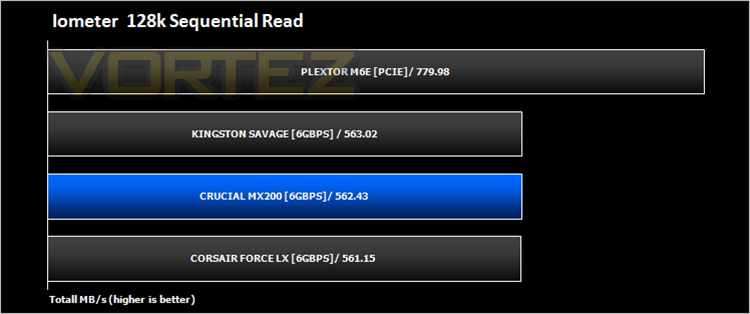
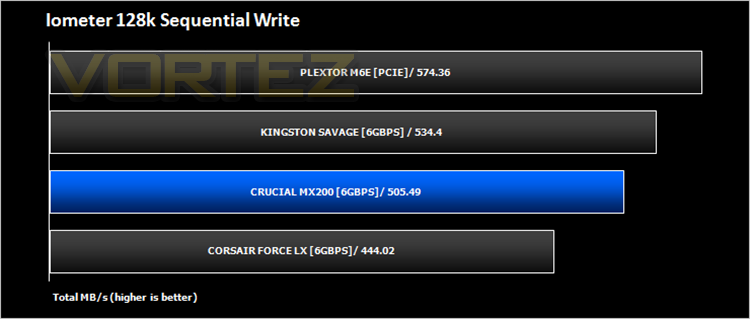
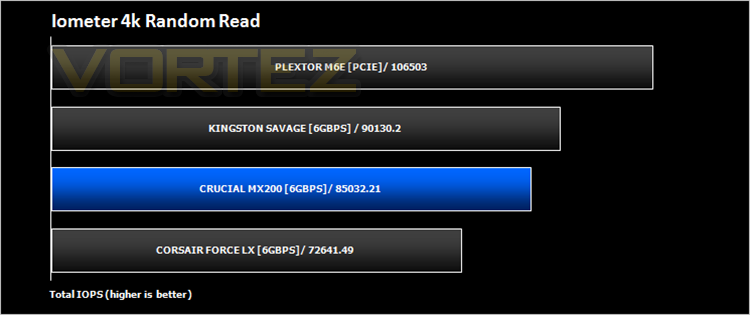
Iometer is based on a client–server model, where one instance of the Iometer graphical user interface is managing multiple ‘workers’ (each one representing a separate Dynamo.exe process) which are doing the I/O. Iometer performs Asynchronous I/O – accessing files or block devices (later one allowing to bypass the file system buffers).
Iometer allows the configuration of disk parameters such as the ‘Maximum Disk Size’, ‘Starting Disk Sector’ and ‘# of Outstanding I/Os’. This allows a user to configure a test file upon which the ‘Access Specifications’ configure the I/O types to the file.
Iometer allows the configuration of disk parameters such as the ‘Maximum Disk Size’, ‘Starting Disk Sector’ and ‘# of Outstanding I/Os’. This allows a user to configure a test file upon which the ‘Access Specifications’ configure the I/O types to the file.
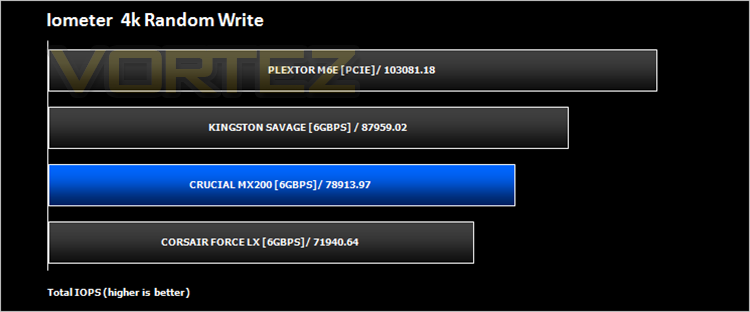
For the purpose of this test, we prepared the drive for 20 minutes using sequential writes. We then ran 128kb sequential read and 128kb sequential write speeds for 20 minutes measuring MB/s and then 4kb random read/writes to 4 workers in order to measure IOPs.
PCMark 8
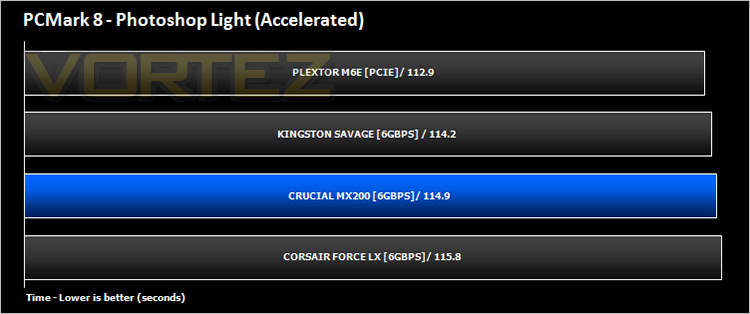
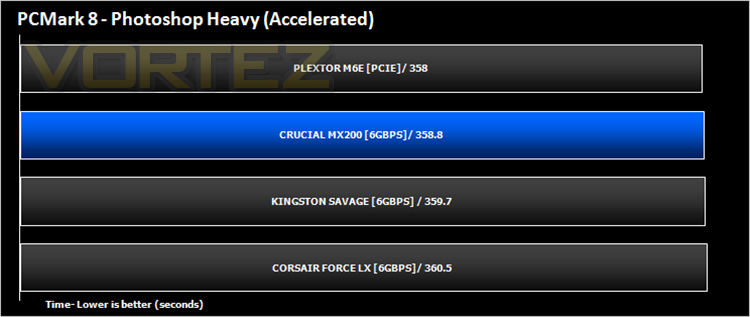
We used the Futuremark PCMark 8 utility to measure storage via Photoshop performance under both light and heavy loading conditions. Accelerated (open CL) was used to perform this test. The test is measured in seconds to complete.
Conclusion
SSDs have reached a performance threshold which none based on the SATA interface appears capable to cross. This is of course not a fault of Crucial as they are simply doing the best they possibly can with the protocols they have to work with but with PCIe technology and especially NVMe now becoming much more common place we can’t help feeling that SATA based technology is becoming obsolete – at least in terms of ultimate performance. It wasn’t so long ago that having an SSD was a luxury. Then an SSD became labelled as the single best upgrade you could make to a PC. Now they are commonplace and to this end the companies who produce them have invested millions to the point the market is now saturated with it being increasingly difficult to differentiate one drive from another, at least in terms of performance. Most manufacturers are instead concentrating their efforts on adding features which are welcome additions but are much of a muchness when each has their own feature set that mirrors another but named differently. Crucial have the advantage of using their own MICRON NAND, which allows them to produce dedicated firmware to best utilise this NAND.Running an SSD, in this case our 1TB version is much more power efficient than for example, running an equivalent mechanical hard drive and Crucial also claim (although we couldn’t verify) that the MX200 has higher endurance by up to 5 times than 3 other popular drives in the market from Samsung, Corsair and Intel. Crucial’s Redundant Array of Independent NAND (RAIN) technology is also utilised in this product and the MX200 also puts our mind at ease by giving us four layers of data protection against file corruption. The drive also encompasses AES 256-bit encryption and meets all industry encryption standards, including Microsoft® eDrive, IEEE-1667, and TCG Opal 2.0. So what’s not to like?
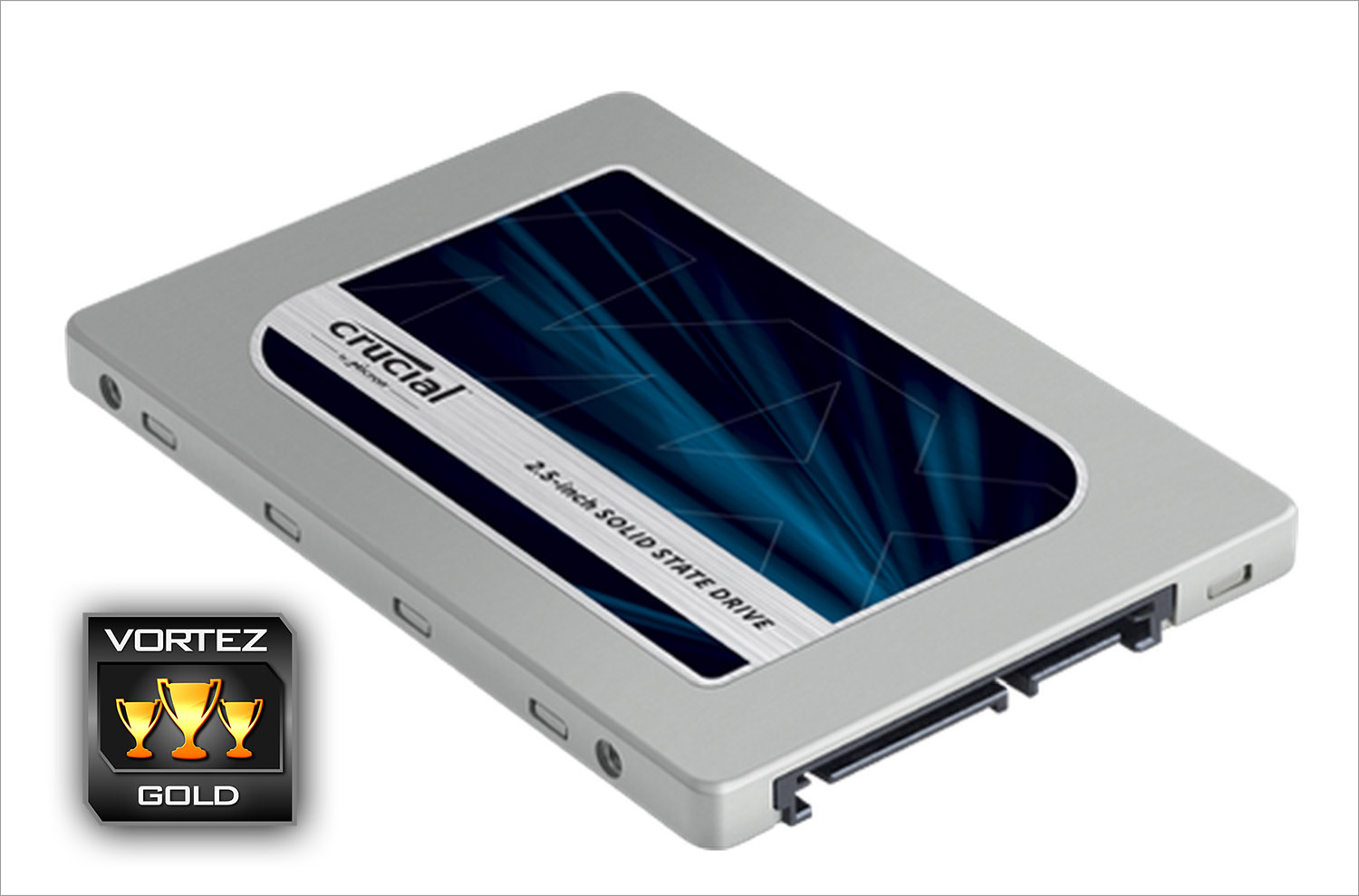
Crucial have made every effort to make their latest MX200 drive as attractive to the public as possible. It looks great, priced fairly and performs very well so there is little to criticise for what is in effect a very good SSD. Crucial would be the first to admit that they have concentrated more on features rather than outright performance with this drive so the average performance (albeit still very fast) can be forgiven. If we had one area we would like to see improved is the warranty. While 3 years is the industry standard these days we are seeing some drives that come with a 5 year warranty. That said, it is only a minor observation which is outweighed by the other features the MX200 offers. With this in mind we have no issues in recommending the MX200. It doesn’t score our highest accolade with us because it doesn’t do quite enough to differentiate itself from other drives on the market in terms of raw performance but it does get our Gold award because when all aspects are considered this is a very impressive SSD and one which we would happily use in our own system.
In summary:
With a splendid array of features, the MX200 offers much more than just raw performance.
Pros
+ Reliability Features
+ Power efficient
+ Solid IOPs performance
Cons
– Average sequential read/write performance
+ Reliability Features
+ Power efficient
+ Solid IOPs performance
Cons
– Average sequential read/write performance

Thanks to EBUYER for providing today’s sample.
Click here for an explanation of our awards at Vortez.net.