







This new mechanical keyboard from relative newcomers GAMDIAS includes a patented switch dampening technology intended for faster, quieter operation.

Product On Review: Hermes Ultimate Black
Manufacturer: GAMDIAS
Street Price: £114.18
We’ve taken a look at some of the biggest peripheral brands recently, but it’s always good to take a step back and check out some of the less well known in the chance of discovering a hidden gem or bargain. Is Taiwan-based GAMDIAS one of these? We’re here to find out.
Although relatively new to the market having been established only in 2012, lesser known brand GAMDIAS already boast a wide selection of unique peripheral designs in the keyboard, mouse and headset arenas. What they lack in depth within a range they make up for with an often quirky aesthetic and an innovative take on solving specific problems in established designs. The Hermes Ultimate is typical of this approach.
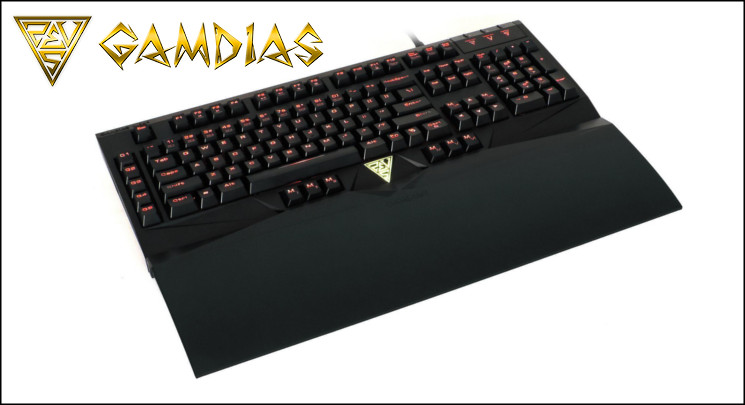
About GAMDIAS
GAMDIAS emphasizes the fundamentals, complemented with creativity and service.
GAMDIAS Technology was founded 2012,with team of over 100 led by RK HAN. Successfully creating the gaming brand known as GAMDIAS. Our team emphasizes the fundamental need of gamers, integrated with creativity and artistic beauty. Not only do we aim to set the bar for quality and practically, but also to go above and beyond in our designs. Further supplementing our motto: Gaming Art in Motion, we will continue to invest heavily on designs, transcending GAMDIAS products to an artistic pantheon.
Our design team
We are a group of passionate gamers with limitless creative ideas, and it is our mission to illuminate the specialties of each product, just like the distinctive characteristic of the gods in the Greek Mythologies, each of our products are design with an patented special feature. We never cease to break the limitations of traditional thinking, and revolutionize the gaming industry, GAMDIAS aspires to offer users gaming experiences like none that precedes.
Conceptualized in 2013
GAMDIAS will redefine the Electronic Sports (eSports) landscape for gamers worldwide. Backed by international award winning designers (Red Dot), innovative think tanks, and inspirational brand leaders, GAMDIAS will be the next generation of Gaming Gear.
GAMDIAS emphasizes the fundamentals, complemented with creativity and service.
GAMDIAS Technology was founded 2012,with team of over 100 led by RK HAN. Successfully creating the gaming brand known as GAMDIAS. Our team emphasizes the fundamental need of gamers, integrated with creativity and artistic beauty. Not only do we aim to set the bar for quality and practically, but also to go above and beyond in our designs. Further supplementing our motto: Gaming Art in Motion, we will continue to invest heavily on designs, transcending GAMDIAS products to an artistic pantheon.
Our design team
We are a group of passionate gamers with limitless creative ideas, and it is our mission to illuminate the specialties of each product, just like the distinctive characteristic of the gods in the Greek Mythologies, each of our products are design with an patented special feature. We never cease to break the limitations of traditional thinking, and revolutionize the gaming industry, GAMDIAS aspires to offer users gaming experiences like none that precedes.
Conceptualized in 2013
GAMDIAS will redefine the Electronic Sports (eSports) landscape for gamers worldwide. Backed by international award winning designers (Red Dot), innovative think tanks, and inspirational brand leaders, GAMDIAS will be the next generation of Gaming Gear.
Designed for use with the ever-popular Cherry MX mechanical switches, the Hermes takes its name from the fleetfooted Greek messenger god known for his speed and cunning. Attempting to live up to its namesake, the keyboard includes a GAMDIAS patented design they called ‘Element’, which is intended to increase typing speed and reduce the noise associated mechanical keys.
Other component choices made by the manufacturer include a 32-bit ARM Cortex processor and 512kb of on-board memory, intending to form the backbone of a powerful macro engine. A macro engine is nothing without macro keys however, and the Hermes has thirteen which are dedicated to the job. An LED backlight, 1000Hz polling and n-key rollover round off the features any gamer would be proud to have under their fingertips, which GAMDIAS are banking on turning as many heads of possible.
Despite its functionality and unique features for a retail design, the Hermes enters a market which has never been more competitive. The number of high-quality keyboards with variable feature sets available from between £110 and £120 mean that it will have its work cut out securing a position amongst the pantheon of greats.
Features and Technical Specifications
Features
GAMDIAS Element increases clicking speed by 20% and reduces keyboard clanking noise
Fully mechanical keyboard with Cherry MX switch with 50 million click life cycle
32-bits ARM Cortex premium micro-processor offers superior computing performance
512KB onboard memory for key and profile assignments
13 additional macro keys
Anti-ghosting with full N-key roll over
On-the-fly macro recording
Ergonomically designed wrist rest magnetically attaches with keyboard for gaming comfort
Wrist rest doubles as a protective cover when keyboard is not in use
Windows key lock during Gaming mode
Built-in USB port pass through earphone and microphone jacks for quick peripheral access
Military grade braided cable with Gold-plated USB connector
Fitted for right and left handed gamers.
Fully mechanical keyboard with Cherry MX switch with 50 million click life cycle
32-bits ARM Cortex premium micro-processor offers superior computing performance
512KB onboard memory for key and profile assignments
13 additional macro keys
Anti-ghosting with full N-key roll over
On-the-fly macro recording
Ergonomically designed wrist rest magnetically attaches with keyboard for gaming comfort
Wrist rest doubles as a protective cover when keyboard is not in use
Windows key lock during Gaming mode
Built-in USB port pass through earphone and microphone jacks for quick peripheral access
Military grade braided cable with Gold-plated USB connector
Fitted for right and left handed gamers.
Technical Specifications
Cable Length:- 2.2M
Dimension (LxWxH):- 474.85 x 176.74 x 39 mm
Key Switch:- Cherry MX mechanical switches
Switch Lifecycle:- 50 Million
Polling Rate:- 1000 Hz
Onboard Memory:- 512KB
Additional Macro Keys:- 13
Multimedia Keys:- 6
Backlit:- All Keys with 6 Levels of Brightness
N-Key Rollover:- Yes, N-Key / 6-Key Option
OTF Macro Record:- Yes (with HERA)
Windows Key Disable:- Yes (Game Mode)
All-Keys:- Lock Yes
Onboard Audio Jacks:- Audio-Out / Mic-In Jacks
Onboard USB Port:- One USB Pass-through Port
Interface:- USB
Graphical UI:- Yes (GAMDIAS HERA)
Dimension (LxWxH):- 474.85 x 176.74 x 39 mm
Key Switch:- Cherry MX mechanical switches
Switch Lifecycle:- 50 Million
Polling Rate:- 1000 Hz
Onboard Memory:- 512KB
Additional Macro Keys:- 13
Multimedia Keys:- 6
Backlit:- All Keys with 6 Levels of Brightness
N-Key Rollover:- Yes, N-Key / 6-Key Option
OTF Macro Record:- Yes (with HERA)
Windows Key Disable:- Yes (Game Mode)
All-Keys:- Lock Yes
Onboard Audio Jacks:- Audio-Out / Mic-In Jacks
Onboard USB Port:- One USB Pass-through Port
Interface:- USB
Graphical UI:- Yes (GAMDIAS HERA)
Packaging and First Look
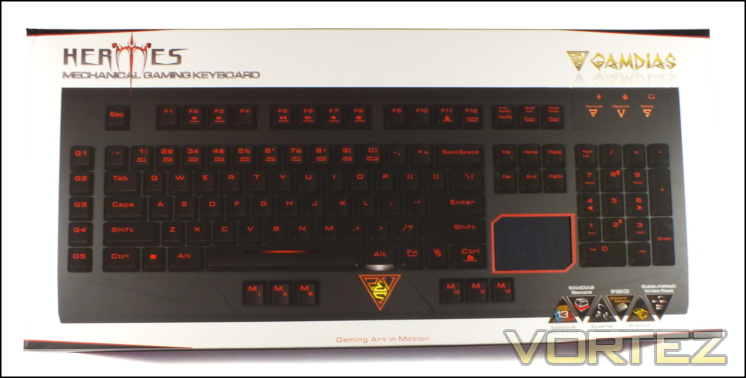
Well, the Hermes packaging is certainly substantial, double the thickness of some keyboard packs we’ve seen. We’ll discover in later reviews that the white and black packaging is something of a unifying theme for GAMDIAS’ peripherals, but for now we’ll just mention that it provides adequate contrast between the image of the keyboard on the front and the exterior as a whole, allowing you to clearly discern its shape.
The keyboard boldly placed front and centre is the US layout, and one slight niggle is that you have to look on the rear to learn both the regional keyboard layout and switch type used. Thankfully the Hermes does use Cherry MX Blues, a more than reputable manufacturer, but one should always be careful to have the fullest picture possible. A small window on the front where you would expect the arrow keys instead simply shows a panel of black cardboard where it should really be displaying the six keys in that location, differing from the usual four. These are a part of what GAMDIAS are calling ‘Ambidextrous Design’, allowing more optimal use the keyboard whether you’re left or right handed.
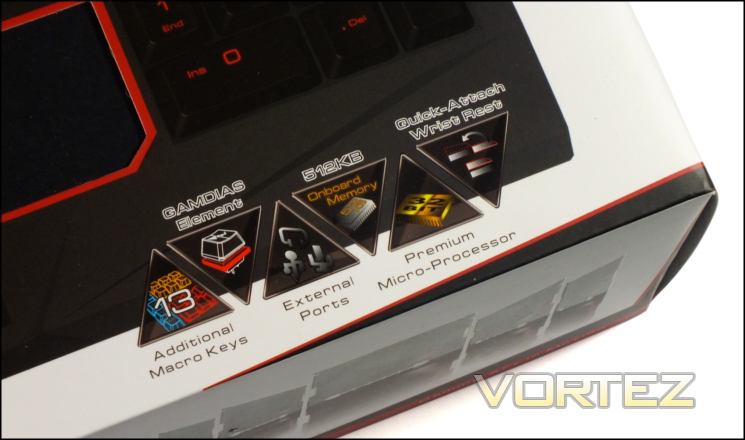
Six additional features are also highlighted: the thirteen macro keys, external ports, on-board memory and processor, wrist-reset and GAMDIAS Element switch modification. How important these features are will depend on your gaming preferences.
There is one final sticking point worthy of note – there is no mention on this packaging that it is the Hermes Ultimate variant, although the rear does mention that its model number is KB2010. The difference between this and the ‘Essential’ KB2000 version is that the KB2010 also includes a wrist-rest. When you buy your keyboard take careful note of the model number being advertised; thankfully UK e-tailers appear to be ahead of the curve in this regard but it’s best to be sure nonetheless.
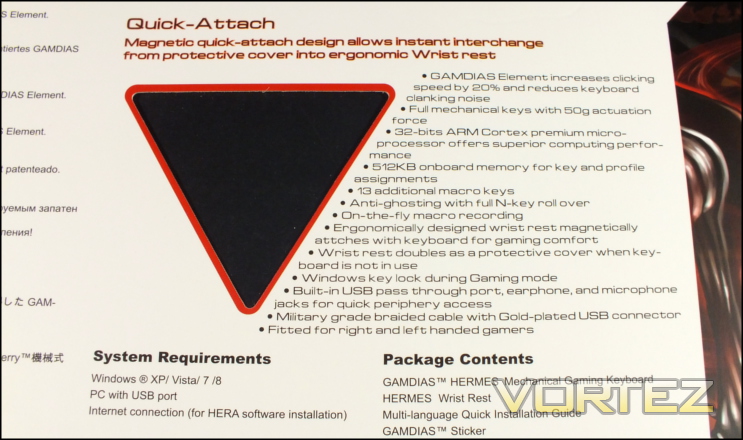
The rear once again lists the keyboard features and a few specific system requirements. Serial number, model number and layout information are also detailed at the bottom for final clarification on the exact type inside. A second window into the product shows a small portion of the wrist-rest, although it’s not altogether clear that’s what you’re seeing until you open the pack.
GAMDIAS make the best use of space on the sides to go into more detail of the features and also includes the specific technical specs and system requirements. This includes a panel dedicate to the capabilities of the Hera control software, although that perhaps isn’t spelled out explicitly. Overall they can’t really be faulted for the information they have included and space they have set aside for it. Whilst perhaps not fantastic for marketing, as a potential end-user having all this information is really important.

Included with the Hermes Ultra keyboard is the wrist-rest/keyboard dust protector, two GAMDIAS stickers and a quick installation guide. That’s pretty much par for the course these days, but the inclusion of the quick install guide with instructions for on-board functionality is always nice given that in products past that’s not always clear. No Key-cap remover is something of a let-down, but no great problem in most situations.
A Closer Look
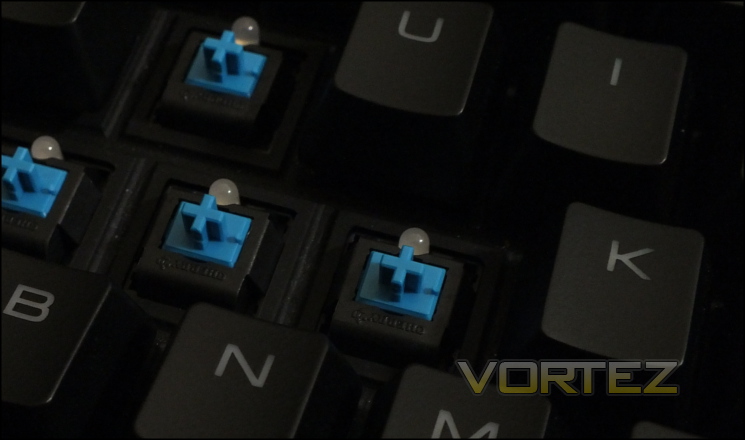
The first feature we should take a look at are the switches, so we can attempt to discern how GAMDIAS’ Element design works. From the looks of things it’s relatively simple – a square channel around the switch is filled with a rubber-like substance (an elastomer) which will cushion the keycap when the key is fully depressed. It will retain the uniform switch dynamics up to the point that you would normally hit the backplate, at which point you will push into the elastomer rather than a hard steel or plastic. The overall effect should be to dampen the noise of typing whilst not affecting the clicky response of the Cherry MX Blues.
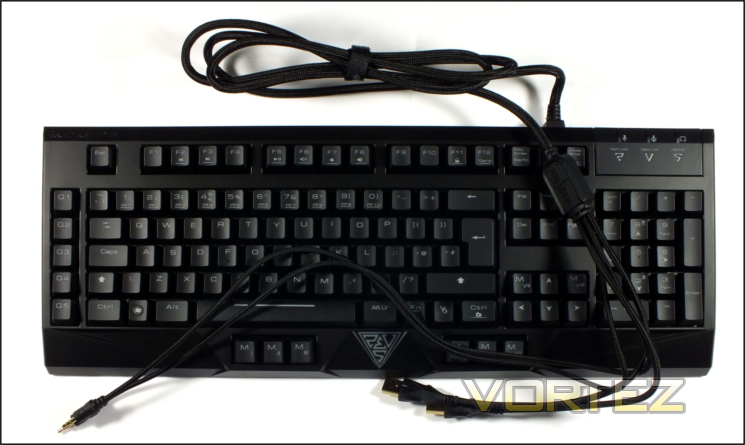
As far as the layout goes, it’s broadly derived from the standard UK whilst also incorporating macro keys. G1-G5 are macro keys on the left side of the keyboard, which tends to be the most suitable place for additional keys intended to be used in gaming. There’s a slight gap between the two, but not enough to be too much of a stretch from WASD.
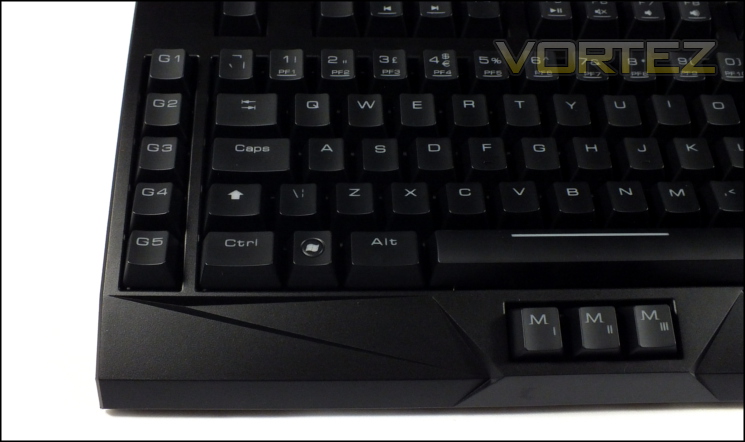
MI-MVI are macro keys positioned in two sets of three – one set below the spacebar and another below the right control. In common with the rest of the keyboard these keys are also mechanical and have received the Element treatment. Although they’re relatively low compared to the rest of the keyset they remain quite proud from the keyboard chassis, and may interfere a little with hand movement in this area.
Along the top row are the F-keys, which double as Media Keys through the used of the Function modifier (Fn-key). A lack of dedicate media keys isn’t uncommon amongst mechanical keyboards, especially as a means of saving space and thus overall footprint. A little less common is that 1-0 also have sub-type modified by the function key – PF1-PF10. These are profile selectors and yes, there are ten.
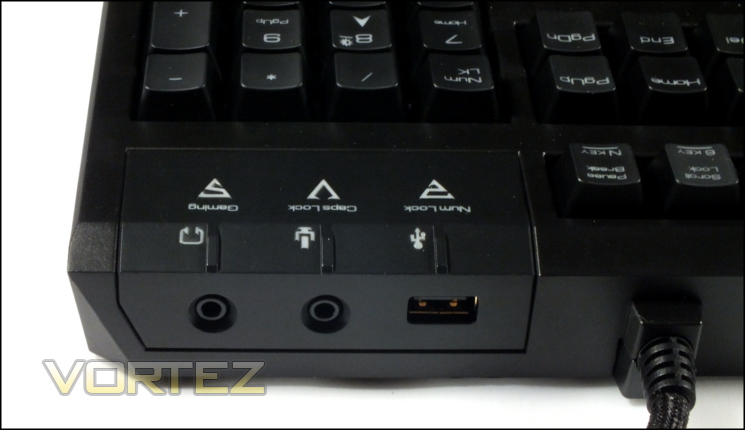
On rear there are three ports: USB, mic-out and headphone out. These are strictly passthrough, the keyboard isn’t independantly powered and nor does it have a built-in soundcard. The main passthrough cable bundle is braided and secured to the rear firmly with plenty of support – no risk of failure through wear here.
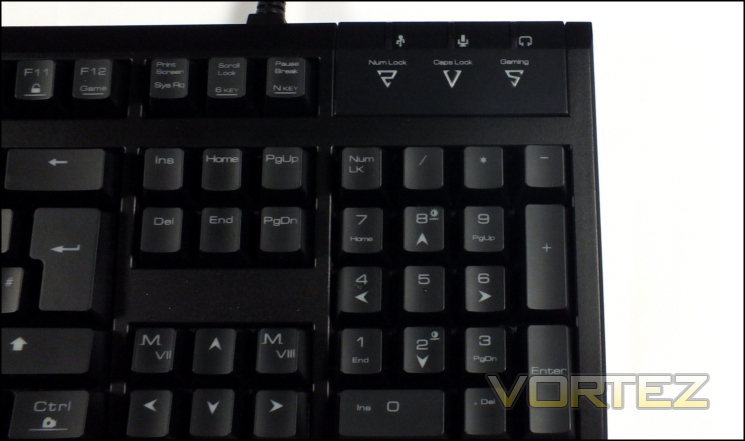
A final feature on the main keyboard is arrow key block, which also includes two additional macro keys labelled MVI and MVII. This block as a whole are part of what GAMDIAS calls their ambidexterious deign which allows left-handed users to operate WASD-like input with their right hand whilst using the mouse in their left. This is augmented by the macro keys below the right control and within easy reach of the thumb. It’s not exactly cleay why it wouldn’t just be more sensible to used the number-pad, but the option is there if required. It’s also a pretty cool option for games which have local (on same PC) co-op.
The wrist-rest is attached to the front of the keyboard chassis with two powerful magnets rather than an elaborate mechanical locking mechanism. It’s a pretty substantial piece of plastic however, and so will extend to footprint of the keyboard considerably. When not in use it can slide over the keys as a dust protector
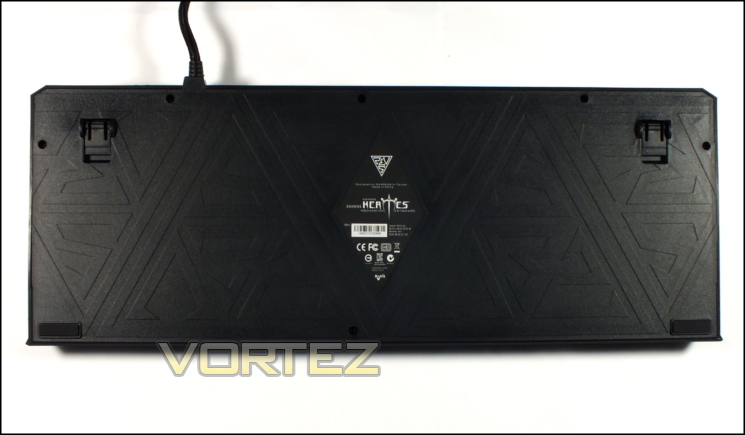
In contrast to the top, the base of the keyboard is unadorned. Two small rubber pads are present towards the front whilst plastic supports near the extendable feet are located at the rear. Unfortunately the base is slightly uneven resulting in only one pad being in contact with desk at a time, and causing the keyboard to slide around far too easily. When the feet are extended it’s held in place very well as the feet themselves are rubberised. This is a poor show for those who prefer their keyboard to have as low an angle of attack as possible, and isn’t helped enough by the three rubber feet on the front of the optional wrist-rest.
Finally we come to the braided cable. Four inputs – two USB, a microphone-out and headphone-out – are all individually braided at the ends and unified in a single cable around 20cms up.
There’s not a huge amount more to say about the Hermes’ exterior features, and they seem to be quite adequate in the main. The aesthetics won’t set the world on fire, and in fairness the wrist-rest locking mechanism will never feel the most secure, but there’s little here apart from how well the keyboard holds itself in place to be disappointed about.
Lighting and Customisation
Lighting and customisation options are increasingly becoming key differentiators between products in the peripheral market, and so those at all ends of the spectrum need to stand out from the crowd. In many respects the Hermes tries valiantly but just falls short, although this is in common with the vast majority of mechanical keyboards currently on the market.
All the customisation options are well detailed in the Quick Installation Guide, so if you ever get stuck it will be a good resource to get back on track. That GAMDIAS can fit all the on-board functionality on one side of A5 paper speaks to how simple it is, rather than a significant lack which would mark it down.
Lighting
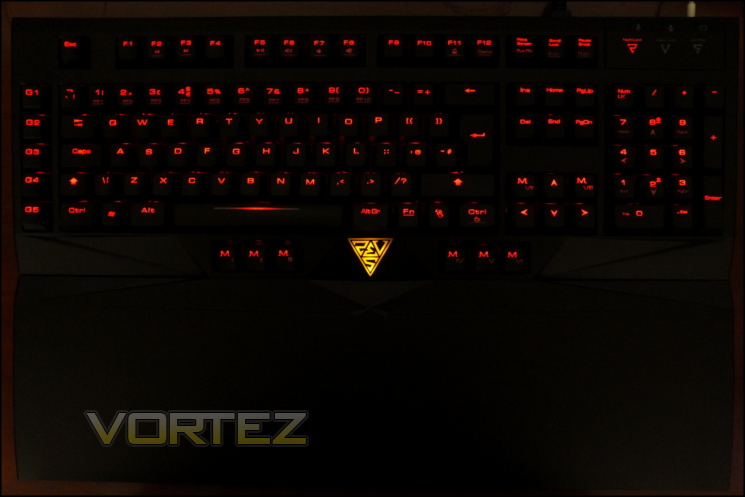
In terms of lighting the Hermes utilises the standard of one LED per key with linked control. This is true across the whole of the keyset with none omitted. Red LEDs have been chosen for this keyboard, and we don’t believe that there are any specific variations with other colours available at this time.
Red LEDs are an interesting choice, and may go further than mere aesthetics. Blues and whites are the popular alternatives, but users with glasses have log has difficulty with these LEDs diffracting in peripheral vision. Red LEDs don’t exhibit this effect to nearly the same extent, and so are a safe and good looking option.
Hermes lighting has five brightness levels – 0%/25%/50%/75%/100% – and a further lighting mode which gradually pulses the lighting from off to fully on and back. All lighting is on a per-profile basis, and can be adjusted without access to the keyboard software through the Fn+8 and FN+2 commands. These options are replicated in the Keyboard Luminescence pane of the Hera configuration tool.
Other On-Board Settings
For gamers few features are as important as N-key rollover and the Hermes delivers by offering the option of both 6-key and full N-key support. Activating either type is as simple as pressing Fn+ScrollLock (for 6-key) or Fn+Pause/Break (for N-key). 6-key rollover is offered as a simple legacy mode for some BIOS’s and OS types, otherwise we imagine that N-Key would be the norm.
In addition, the Hermes incorporates an optional gaming mode which disables the Windows key by simply pressing Fn+F12. When active the Gaming LED on the right next to the Caps Lock indicator LED will light up. If instead you with to disable the entire keyset you can lock input by holding Fn+F11. There’s no indicator that the keyboard is locked when this occurs though, so be mindful to keep track of when you turn it on.
Live Macro Record
Although the Hermes of course comes with software, the power of the ARM Cortex processor allows them to add the ability to create macros on the fly rather than going through the software UI. Through a few simple keystroke combinations you can record an ‘as you type it’ timed macro and assign it to any key you wish. The process is very simple:
Press FN+Right-CTRL. Three LEDs at the top-right begin flashing yellow
Enter the sequence of keys to a maximum of 21.
Press FN+Right-CTRL again. Lights stop blinking
Press the macro key you wish to bind it to, or repeat FN+Right-CTRL to cancel recording.
Enter the sequence of keys to a maximum of 21.
Press FN+Right-CTRL again. Lights stop blinking
Press the macro key you wish to bind it to, or repeat FN+Right-CTRL to cancel recording.
Customisation options for the Hermes are very good though not quite as comprehensive as some we have seen. Being able to record macros without the use of software is useful in all sorts of situations, and a limit of 21 keystrokes per macro is not a significant constraint. We’re always appreciative of manufacturers who have gone to the trouble of including Windows Key disabling functionality as a hardware feature, and GAMDIAS have gone the extra step of allowing the disabling of all keys – to us this sounds like a very useful function for a public LAN.
Of course, more functionality is unlocked through the use of the software, which we must move on to.
Software
GAMDIAS have created a single configuration utility to operate with each peripheral in their range. This utility – which they call Hera – handles key/button assignment, macro creation, profiles and a few other unorthodox features to boot. The current iteration is 0.8.0, reflecting the fact that it’s not quite finished yet, but we found it to be easily in a polished enough state to made good use of it.
Hera is currently a stand-alone utility that doesn’t have a typical installer and isn’t generally launched on start-up. In order to make full use of the functionality you will need to extract the files from the zip archive and run the executable, whilst ancillary functionality such as keystroke tracking will not be logged unless the program is running. Hera will also check for updates to both software and product firmware, although it will not download and install them automatically.
When first run the application will take around a minute to download all the settings from the keyboard and around 10 seconds every time thereafter. That’s certainly no hardship, but is something you will need to keep in mind if in a hurry.
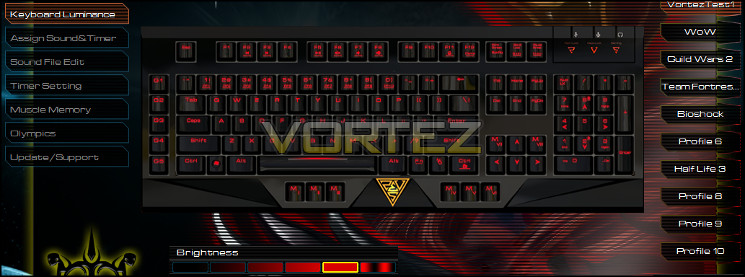
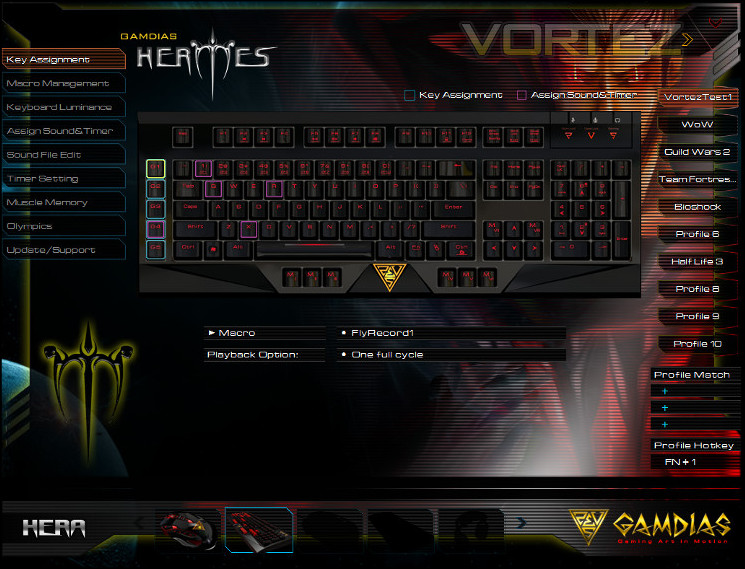
The main Hera window is a translucent white that appears to still have a few rendering issues on light backgrounds. It does however look quite sharp and certainly legible on black backgrounds, as shown here.
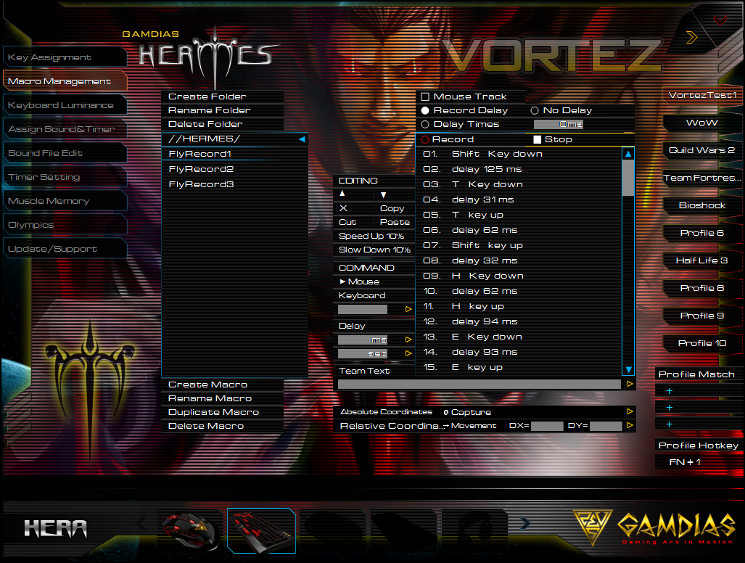
Menu items are listed on the left whereas profiles are typically listed on the right. The majority of keyboard settings are stored on a per-profile basis, with ten profiles to choose from. Each profile can be selected manually (through the UI or keyboard shortcut), or launched in tandem with the launch of a specific user-selectable application. At present there appears to be no way to back up a profile without delving into the file structure of the application, but if you choose to do so it’s a pretty trivial process. At present the default file extension for Hermes profiles is .kh0.
Hera does an excellent job of displaying the key assignments – i.e. what’s at default, what is bound to a macro and what is bound to a timer or sound effect. Any key bound to a macro will be outlined in light blue, whereas keys bound to timers or sounds will have a pink outline. At a glance you can therefore grasp where something may be incorrect and can be changed.
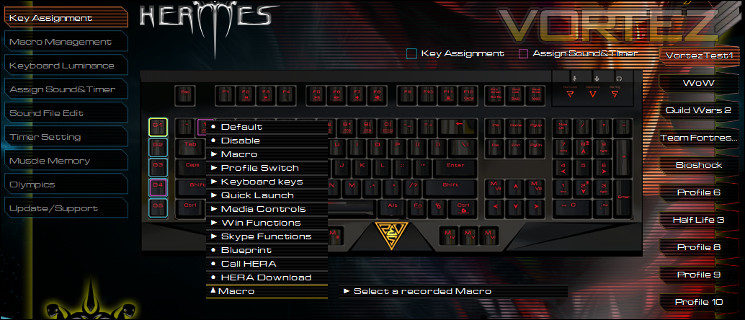
As well as displaying all key assignments, the actual assignments themselves are also made here. Each key, including the main keyset, can be bound to a wide array of default functions, Windows shortcuts or macros, allowing for some pretty comprehensive customisations. Macros need to be pre-created in order to be selected, and as you would expect all assignments are on a per-profile basis.
The ‘Assign Sounds and Timer’ section is pretty useful in its own right. The window allows you to, independent of macros etc., create an on-screen timer following specific keystrokes. As some added gravy you can even set up a sound to play after the timer has expired, or simply when the key is pressed at all. Each of these could be immensely useful during MMO gameplay to track skill cooldowns or encounter abilities independent of the game engine itself, and GAMDIAS have even added the facility to change where on the screen the timer is located. Custom sounds aren’t quite ready, but are a planned feature for the future.
Before assigning a timer to a key you will need to create it in the Timer Setting window. Creating and setting the timer up is straightforward, and selecting a suitable sound file (or none at all) a trivial matter. At present all timers count down rather than count up, but that’s the most logical use for it anyway.
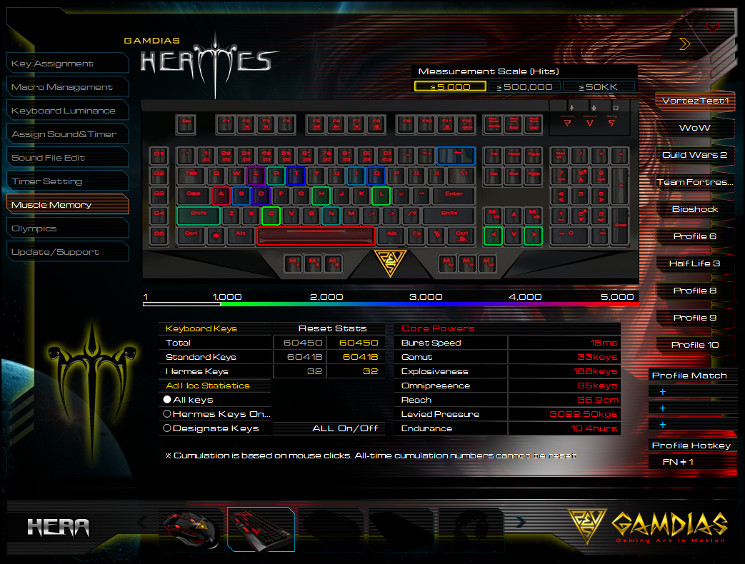
Muscle Memory is the final non-support section of the Hera software for the Hermes, and it tracks a wide range of keystroke statistics. Eventually these stats could be shared with the wider gaming public – GAMDIAS are touting an as yet unfinished feature called ‘Olympics’ which may pitch you against other Hermes users in a series of key metrics – but for now they show you most commonly used keys and what they call ‘core powers’. Apart from just being of academic interest this tab also may allow you to analyse and more efficiently distribute keystroke commands in the games you play, especially if enabled on a per-encounter basis. Specific shortcuts to enable/disable the stat tracking would therefore be quite handy.
At the bottom of the window you are able to select each of the GAMDIAS products you’re using and the Hera utility will reconfigure its layout accordingly. Any attached GAMDIAS products are shown as full images, whilst silhouettes represent products not yet associated with the PC.
For software only in release 0.8.0 Hera is pretty accomplished. Yes there are a few niggles and some incomplete features, but what’s present works well and doesn’t detract from the overall strength of the product. Right now it’s better than average, and shows a lot of promise if the developers can keep up the pace of updates.
Performance
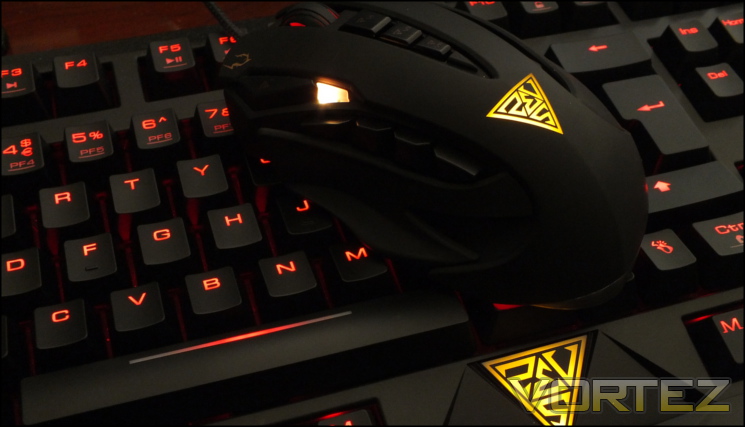
During testing we paired the Hermes with the GAMDIAS Zeus (a review of which is coming shortly), but disabled the latter’s extra functionality so that it largely behaved as a generic 5-button mouse. This methodology allowed us to assess the stand-alone capabilities of the Hermes without muddying the water with a mouse which could do much of the legwork we wanted to rely on the keyboard for.
Immediately upon use of the Hermes the impact of the GAMDIAS Element switch dampening was apparent. Other Cherry MX Blue switches have tended to be crisp when bottoming out on a keystroke, whereas with the Element elastomer cushioning the impact it was much softer and quieter. The amount of travel through this layer is very small, perhaps a millimetre or so, and so the changes to travel distance and force used is minimal. The impact force however does feel different and much less harsh, which we could definitely see as useful for those who worry about striking the keyboard backplate heavily when typing.
The overall effect is very much like using a small rubber o-ring to dampen the keystroke, but installed by the factory and perfectly uniform across the major portions of the keys. All the macro keys are included in this treatment, with only the Return key seemingly going without.
Independent of GAMDIAS Element the Cherry MX Blue switches are still the same clicky type we encountered on the CM Storm MECH, a design which is relatively loud but provides both audible and tactile feedback to the user. Preference will vary from person to person, but those moving from membrane keyboards or MX Red designs should have very little difficulty in adapting to them.
The lighting on the keyboard is very good, aided by the very crisp print on the keys. The slight dimming towards the bottom of each keycap isn’t problematic as this print is typically of a secondary or tertiary character/function.
Moving to the keyboard-specific adaptations, they’re generally well thought out. The G-keys especially are ideally located for use when hovering about the WASD portion of the keyboard, whilst the M-keys below the spacebar are relatively easy to hit with either thumb. That said, for many they will in fact be too easy to push accidentally and could break typing rythmn. Similarly the M-keys below the right Control sit under the typists palm for much of the time, which is quite distracting during long sessions. We can certainly see the value of them for left-handed gamers, but in all other situations where a hand is not hovering over the mouse they get in the way somewhat. Of all the macro keys, these are perhaps the most surplus to requirements.
A lack of dedicated media keys should be noted, as some continue to use them. The F-keys act as stand-ins, but are obviously less convenient.
NKRO/Anti-Ghosting
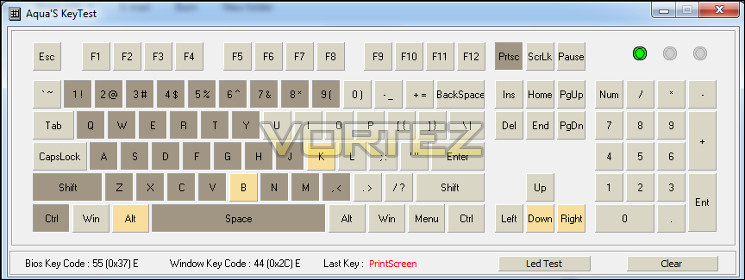
The Hermes claims full N-Key rollover and also offers a legacy 6-key mode. During testing both modes appeared to perform without fault across the main keyset and especially with regards to the key WASD-zone, a crucial factor for gaming without hardware error. Anti-ghosting is much harder to assess, but at no point did the keyboard appear to register keystrokes which were not intended.
When extending our test to the macro keys our conclusions are a little more complex. We found the G-keys on the left of the keyboard to be very good indeed – no keypress was interrupted unless the macro itself contained a key which was already being pressed. This was both for single key assignments and macros containing longer strings, something which more illustrious competition was unable to deliver.
The MI-MVIII NKRO support was a little more spotty, with MI especially causing the keys around the WASD zone to stop registering if multiples were being pushed. However these keys immediately began to register once the M-key was released, once again a feature not present in many competitors.
Tailoring your macros to the situations in which they’re likely to be used, and selecting the right macro keys for them, will be essential. Games which favour a press-and-hold style of keystroke will suffer a little, whilst rapid consequetive presses will be far less impacted. Purely in terms of flexibility and utility in this area the Hermes is a long way ahead of the curve compared to even most premium mechanical keyboards.
—
During extended gaming sessions the Hermes performed admirably thanks to the MX Blue switches and stable design. MMO gaming in World of Warcraft and Guild Wars 2 presented few difficulties thanks to a very robust macro and NKRO system. A little more visual feedback on the active profile whilst in operation would have been useful, but isn’t essential.
When moving the keyboard to a local LAN event the on-board memory proved to be well warranted – Counter Strike: Source bindings were ready to go, as were the DOTA2 macros which were necessary to create on-the-fly. These sorts of titles and also including RTS titles, where a rapid succession of keypresses are necessary rather than continual pressing of one key whilst also needing an active macro, were those in which the Hermes could really show its class.
We also wouldn’t discount the clicky nature of the Cherry MX Blues. They won’t be for everyone, but they shouldn’t be overlooked by those who would find tactile feedback reassuring. If you have exceptional manual dexterity it’s even possible to ‘ride’ the tactile bump, greatly decreasing reaction times.
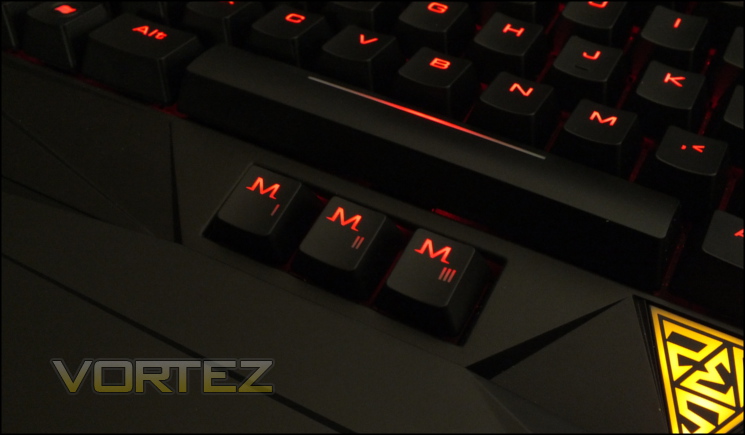
For non-gaming workloads the Hermes will prove to be a good, if not exceptional choice. The macro system is easily flexible enough for use in applications where repeated text input or commands are common, but the M-keys will tend to be more of a hindrance than a help. The very large wrist-rest also almost doubles the keyboard footprint, taking up valuable desk space. Using the wrist-rest makes the M-keys a little less prone to unintended strikes, but in many respects they seem superfluous.
When it comes to upkeep, the lack of a key-cap remover and recessed design will make cleaning the keyboard quite difficult and time-consuming compared to some of the designs we’ve reviewed recently. That said, it will still be easier than a typical membrane-style keyboard.
Conclusion
We really weren’t sure what to expect from the Hermes, GAMDIAS being a new company to us and all. Within a short period of time we were reassured by the competent component choices and headline feature set, and settled into using a keyboard which was in its own way quite unique for a factory-spec mechanical unit. Unsurprisingly there was a lot to like in the Hermes, but then we would hope that this would be true of any keyboard being sold above the £100 mark. Most importantly it is solid and has a lingering air of durability despite the rather inexpensive ABS plastic used in its frame.
The key differentiating factor for the Hermes is the GAMDIAS Element switch dampening technique. We’ve mentioned in previous reviews that normally loud mechanical switches can be made more quiet with the use of o-rings, and GAMDIAS has implemented something similar with the Hermes, only with a much higher level of quality control and uniformity. As effective as it is in its stated role, Element is very much a love it or hate it proposition – it certainly deadens the noise generated by typing, but the feel of the keys changes dramatically.
In most other respects we were quite impressed with the Hermes. N-Key rollover performance was extremely good, and we were very pleased to note that this extended to the G-keys in a manner which is much more comprehensive than most other keyboards at the same price point. The MI-MVI keys by contrast seemed to be more of an extravagance and unnecessary except in very niche circumstances; your own milage may vary on this score however. If nothing else they do make excellent secondary media keys if you find that a dedicated set is important.
There were still one or two niggles such as the introduction of electrical noise to passthrough audio and the slightly uneven base causing the keyboard to slide about when the feet are not extended. That said, other keyboards with a far more illustrious pedigree have fallen foul of similar quality oversights.
Of course it’s in gaming, especially LAN gaming where access to your own software isn’t guaranteed, that the Hermes will shine. The copious amounts of on-board memory and excellent ARM Cortex processor keep response times down to effectively lag-free levels and sidestep that potentially problematic software layer. At a time when so many companies are eschewing these onboard features in favour of ever more elaborate configuration utilities and software parsing, it’s nice to see that GAMDIAS are keeping it simple.
But not too simple. Ten profiles is, after all, perhaps a little extravagant.
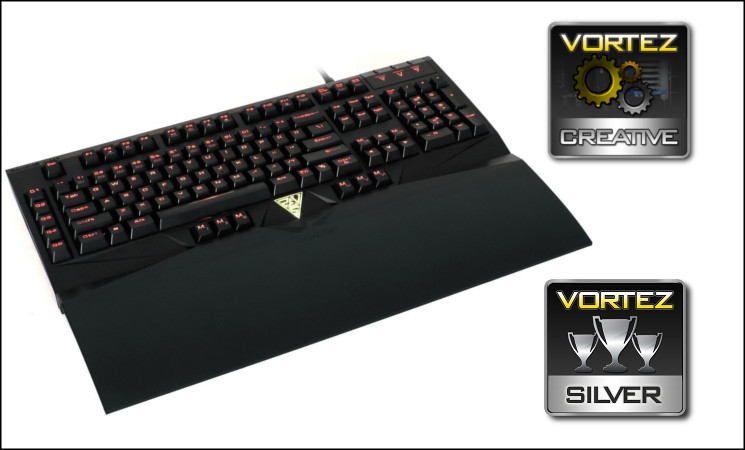
The Hermes is our brush with the GAMDIAS peripheral range and it’s an extremely creditable device. Featuring Cherry MX Blue switches with a patented Element dampening system, it feels drastically different from a typical mechanical keyboard whilst retaining the uniform keystroke dynamic. Also including all mod cons such as thirteen dedicated macro keys, excellent N-key rollover and an on-board macro engine, the Hermes is sure to satisfy many a hardcore gamer. Despite a couple of oversights it gets our Silver Award and a well deserved Creative Award.
Pros
+ Cherry MX Switches
+ LED Backlight
+ 512kb on-board memory
+ 32bit ARM Cortex processor
+ 10 Profiles
+ Live Macro Recording
+ 13 Macro Keys inc. 5 ideally located
+ N-Key Rollover on main keyset, partially extended to the macro keys.
Cons
– Promising, but currently incomplete Hera software (at time of writing)
– Backlight introduces noise to audio passthrough
– Thumb button locations can obstruct easy movement around the spacebar
– Uneven base (feet retracted)
– Uninspired aesthetics
Tips
= The GAMDIAS Element design may be just the ticket if you need a quieter mechanical design or worry about the impact force when striking a key.
+ Cherry MX Switches
+ LED Backlight
+ 512kb on-board memory
+ 32bit ARM Cortex processor
+ 10 Profiles
+ Live Macro Recording
+ 13 Macro Keys inc. 5 ideally located
+ N-Key Rollover on main keyset, partially extended to the macro keys.
Cons
– Promising, but currently incomplete Hera software (at time of writing)
– Backlight introduces noise to audio passthrough
– Thumb button locations can obstruct easy movement around the spacebar
– Uneven base (feet retracted)
– Uninspired aesthetics
Tips
= The GAMDIAS Element design may be just the ticket if you need a quieter mechanical design or worry about the impact force when striking a key.

Click here for an explanation of our awards at Vortez.net. Our thanks go to GAMDIAS for this review sample.


