







Will GIGABYTE’s latest highly customisable gaming mouse and dual-sided mousemat live up to their noble namesake. Aivia Krypton is in the spotlight.

Products On Review: Krypton & Dual-sided Mousemat
Manufacturer and Sponsor: GIGABYTE
Street Price: £59.99 & £22.99 (inc. VAT)
Hot on the heels of our review of the new Osmium mechanical keyboard we present to you the GIGABYTE Aivia Krypton Gaming Mouse and Krypton Dual-sided Mousemat. Designed very much for gamers, and utilising the same GHOST macro software as the Osmium mechanical keyboard, the Krypton changes up surfaces to extend choice for gamers compared to their previous market offerings.
The budget to mid-range sections of the market have up till now been amply served by the FORCE range of mice, most recently encompassing the FORCE M7 Thor, and until now the Aivia range has has been this sort of design, only more so. The Aivia Krypton is the latest of these gaming mice with few compromises from GIGABYTE, and is placed at a higher price point than their other wired options. Gaming profiles and user-adjustable DPI settings are something of the norm amongst mice in this price bracket, but in an exceptionally rare twist the ability to swap the mouse casters for a different speed of movement has been added. Combined with 8200DPI sensor and customisable weight package, the Krypton should be a formidable gamer peripheral.
About the Aivia Krypton
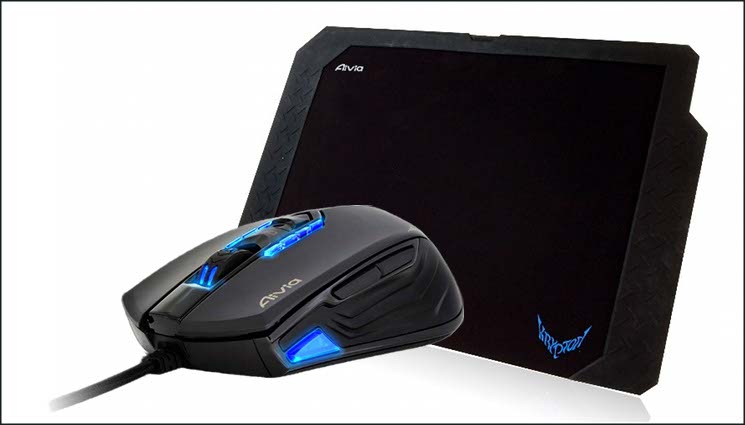
The Aivia Krypton gaming mouse features a revolutionary new dual mouse chassis design which allows for a hot-swappable mouse chassis giving the user unparalleled freedom by changing fundamental mouse movement and dynamics to best fit the application at hand. Aivia Krypton further enables maximum control and flexibility by giving users the option to customize the center of gravity and weight of the mouse. GHOST Macro engine with built-in 32KB memory for onboard Macro memorization and gaming on the go.
To complement the evocatively named ‘dual-chassis’ feature, GIGABYTE are also offering the Krypton dual-sided mousemat. This gaming mousing surface is composed of a low friction hard PVC side – ideal for ceramic casters – and precise fabric side – more appropriate for common teflon casters – held in a rubber frame. Users can then choose their favourite combination, whilst still gaining value if they change their mouse at a later date.
Although not quite occupying quite the premium label of the Osmium in terms of pricing, marketing to date certainly indicates that GIGABYTE are targeting discerning gamers with these two products. It must be said however, this is a very tough market.
Features and Technical Specifications
Aivia Krypton Mouse
Features
MAJOR PRODUCT FEATURES
Dual mouse chassis design which allows for a hot-swappable mouse chassis gives the user unparalleled freedom by changing fundamental mouse movement and dynamics to best fit the application at hand
Speed Chassis
The Speed Chassis features an abrasion-free ceramic foundation focused on quick movements, immediate reaction, and extraordinary speed.
Control Chassis
The Control Chassis utilizes an ultra smooth Teflon foundation which ensures precision movements for maximum control.
Exclusive Weight Tuning System
Revolutionary weight distribution system allows user to adjust the center of gravity for maximum control and flexibility.
Weight Adjustment Case
1.8g/5.3g weights allows you to adjust to the optimal weigh and balance
– Weigh increase 1.8g ~ 39g
– 35 weight adjustable combination
Tailor weight distribution to user hand dominance and grip style
– Right Hand -oriented
– Left Hand -oriented
– Palm Hold-oriented
– Claw Grip -oriented
Built-in GHOST™ Macro Engine
GHOST™ macro engine which features intuitive interface allows you to pre-define and switch between keys or buttons easily for latest PC gaming titles.
5 gaming profiles on the go
Profile switch at your fingertips enables you to switch between 5 different gaming profiles. Up to 70 macros memorization for the gamer on the go.
Top of the line laser sensor
Advanced laser sensor supports up to 8200dpi resolution and 150ips tracking speed.
Quick switch between right-hand and left-hand mode
Press and hold both profile switch buttons for 3 seconds, the mouse will be switched between Left-Hand and Right-Hand operation modes.
Dual mouse chassis design which allows for a hot-swappable mouse chassis gives the user unparalleled freedom by changing fundamental mouse movement and dynamics to best fit the application at hand
Speed Chassis
The Speed Chassis features an abrasion-free ceramic foundation focused on quick movements, immediate reaction, and extraordinary speed.
Control Chassis
The Control Chassis utilizes an ultra smooth Teflon foundation which ensures precision movements for maximum control.
Exclusive Weight Tuning System
Revolutionary weight distribution system allows user to adjust the center of gravity for maximum control and flexibility.
Weight Adjustment Case
1.8g/5.3g weights allows you to adjust to the optimal weigh and balance
– Weigh increase 1.8g ~ 39g
– 35 weight adjustable combination
Tailor weight distribution to user hand dominance and grip style
– Right Hand -oriented
– Left Hand -oriented
– Palm Hold-oriented
– Claw Grip -oriented
Built-in GHOST™ Macro Engine
GHOST™ macro engine which features intuitive interface allows you to pre-define and switch between keys or buttons easily for latest PC gaming titles.
5 gaming profiles on the go
Profile switch at your fingertips enables you to switch between 5 different gaming profiles. Up to 70 macros memorization for the gamer on the go.
Top of the line laser sensor
Advanced laser sensor supports up to 8200dpi resolution and 150ips tracking speed.
Quick switch between right-hand and left-hand mode
Press and hold both profile switch buttons for 3 seconds, the mouse will be switched between Left-Hand and Right-Hand operation modes.
Tech. Specs
Interface:- USB
Tracking System:- Advanced Gaming Laser Sensor
Resolution:- Real 8200dpi
Frame Rate:- 12000 frames/second
Maximum Acceleration:- 30g
Maximum Tracking Speed:- 150 inches/ second
Switch Life (L/R click):- 10 million times
Color:- Black
Cable Length:- 1.8m nylon braided / Gold-plated USB connector
Dimension:- (L)128.0*(W)67.0*(H)41.5 mm
Weight:- 110g ~149g adjustable
Support OS:- Windows XP/ Vista/ Windows 7
Tracking System:- Advanced Gaming Laser Sensor
Resolution:- Real 8200dpi
Frame Rate:- 12000 frames/second
Maximum Acceleration:- 30g
Maximum Tracking Speed:- 150 inches/ second
Switch Life (L/R click):- 10 million times
Color:- Black
Cable Length:- 1.8m nylon braided / Gold-plated USB connector
Dimension:- (L)128.0*(W)67.0*(H)41.5 mm
Weight:- 110g ~149g adjustable
Support OS:- Windows XP/ Vista/ Windows 7
Aivia Krypton Dual-Sided Mousemat
Features
Speed Side
Abrasion-resistant hard coat to boost gliding speed, highly recommended to work with Krypton speed chassis mouse feet
Precision Side
Special pattern of fabric surface to achieve ultra precision, highly recommend to work with Krypton control chassis mouse feet
Cross-section
1. Fabric surface
2. Soft rubber layer
3. Hard PVC coat
Anti-slick Rubber Frame
Non-slip rubber frame provide a strong foundation resistant to unwanted movement during gaming sessions
Abrasion-resistant hard coat to boost gliding speed, highly recommended to work with Krypton speed chassis mouse feet
Precision Side
Special pattern of fabric surface to achieve ultra precision, highly recommend to work with Krypton control chassis mouse feet
Cross-section
1. Fabric surface
2. Soft rubber layer
3. Hard PVC coat
Anti-slick Rubber Frame
Non-slip rubber frame provide a strong foundation resistant to unwanted movement during gaming sessions
Packaging And First Look
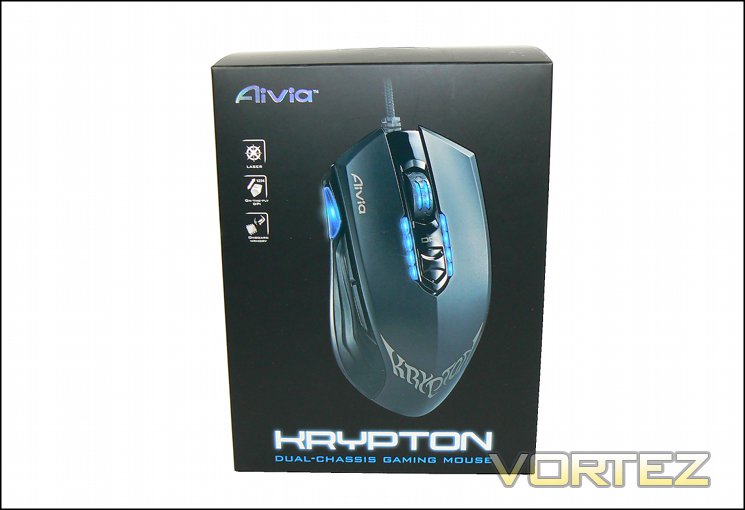
It’s not nearly the monster that was the Osmium packaging within its delux packaging, yet the Aivia Krypton follows through with the same dark grey box with embossed product picture on the front; if GIGABYTE continue with this packaging in future models they should be well differentiated from the competition. The mouse is given pride of place, viewed at a slight angle in a way that belies an ambidextrous design. Lighting positions are clear, which is always nice to see, but surprisingly little space is devoted to the mouse feature set – only the laser sensor, on-the-fly DPI changing and onboard memory are listed, and subtly at that.
As well reproduced as the mouse is, eyes are inevitable drawn to the product subtitle: “dual-chassis gaming mouse”. What could it mean? You’ll have to check other sides to find out.
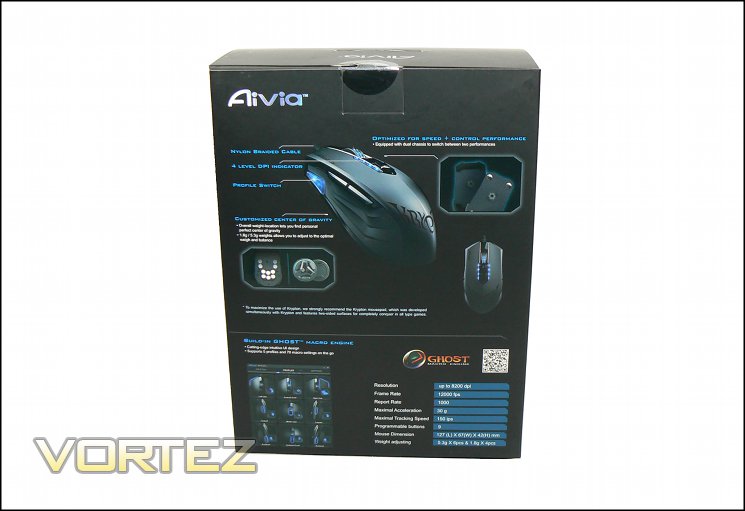
The rear further outlines the Krypton’s capabilities, including information on less orthodox features. The nylon-braided cable, profile switch and 4-level DPI indicator are all identified, as is the advanced weight system and what they call ‘dual-chassis’ feature of different mouse floors with ceramic or Teflon casters/feet.
The package rear is also the first indication that the Krypton is a ambidextrous mouse, but that’s not too clear at first glance. Technical information such as sensor specifications and dimensions are also provided, as well as the note that it makes use of GIGABYTE’s GHOST Macro Engine software suite.
The left side is dedicated to a multilingual feature listing without and additional information, whilst the Right describes the dual-chassis system in a little more detail. We would like to have seen the fully ambidextrous nature of the Krypton spelled out a little more explicitly, but it does a pretty good just of encouraging you to pick it up off a shelf and give it more than a cursory glance.
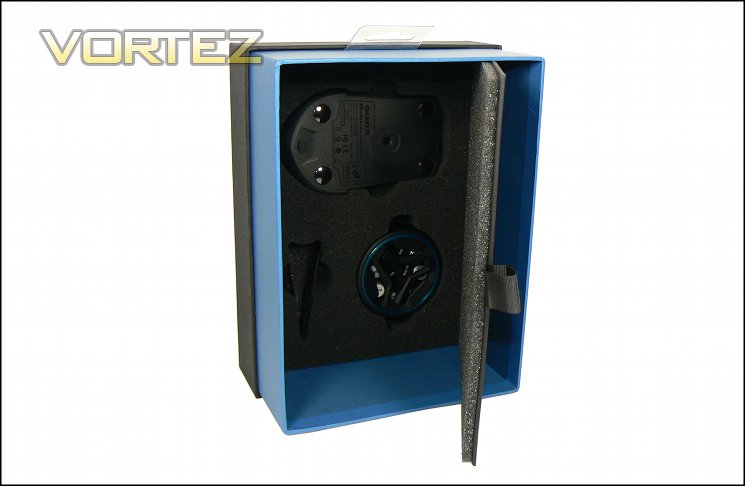
Sliding the sleeving off, the internal packaging is flavoured in a similar manner to that of the Osmium – well padded and high-end. The mouse is securely packed inside and protected by foam to save it from the bumps of pan-continental transit. Accessories are also stored in packed foam, behind a door underneath the mouse tray. GIGABYTE are obviously seeking to make as strong a first impression as possible, and succeeding.
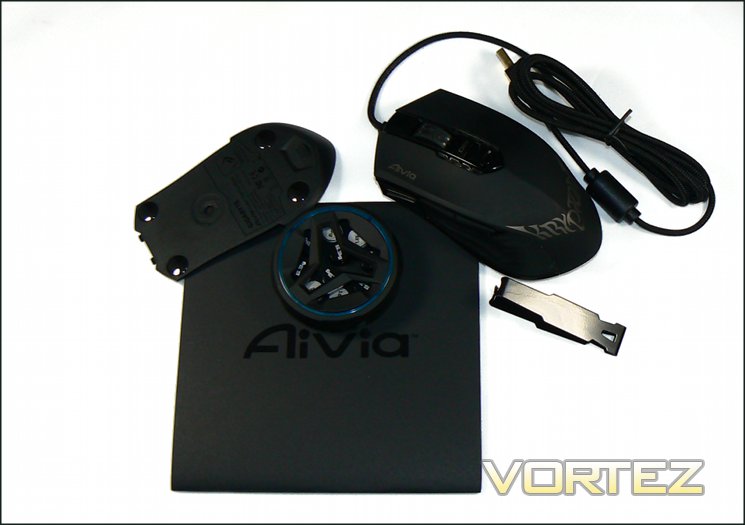
The Krypton is bundled with ten weights in a small storage box, tweezers and additional ‘chassis’. As is swiftly becoming the norm no drivers are bundled with the mouse, though a quick-start pamphlet guides you through the setup process.
A Closer Look
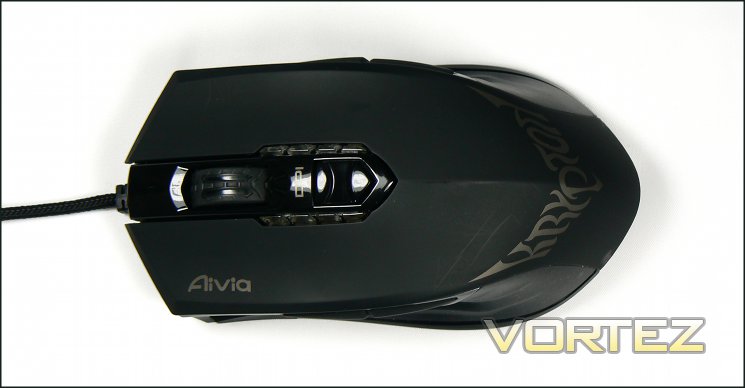
Above is our first top-down look at the Krypton. In construction it is perfectly symmetrical along a vertical axis, enabling an ambidextrous layout suited to both left and right-handed gamers. The main shell is a very dark grey plastic, finished in such a way as to no accumulate sweat. Centrally located is the mouse wheel, which seems to be flatter and slightly larger than is the norm and is therefore more usable as a middle-mouse button.
DPI is adjusted by pulling back or pushing forward the central switch, with LED indicators on either side indicating the current DPI level. DPI level presets are adjusted in the GHOST software suite, utilising discrete values for horizontal and vertical sensitivity. GIGABYTE have eschewed the more common rocker-switch design in favour of a slider that will move with very little force, at the expense of some solidity.
Mouse contours and shape encourages a claw rather than palm grip, but adapting either to the Krypton shouldn’t be too much of an issue.
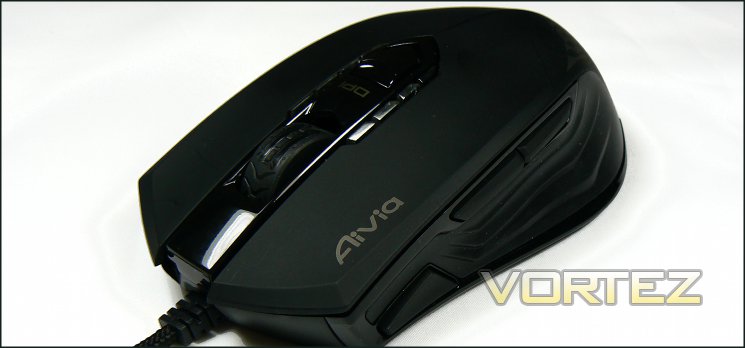
Both left and right sides of the mouse mirror each other exactly in all button placements; thankfully GIGABYTE aren’t claiming ambidexterity without also backing it up by treating both sides equally. Located on the shoulders of the mouse are thumb buttons, both of which are large and clearly distinct from one another by feel. Both buttons are springy, with some distance between point of rest and point of resistance where button actuation begins. Below this position is a textured rubber thumb grip, lending aggressive styling and better control over mouse movement.
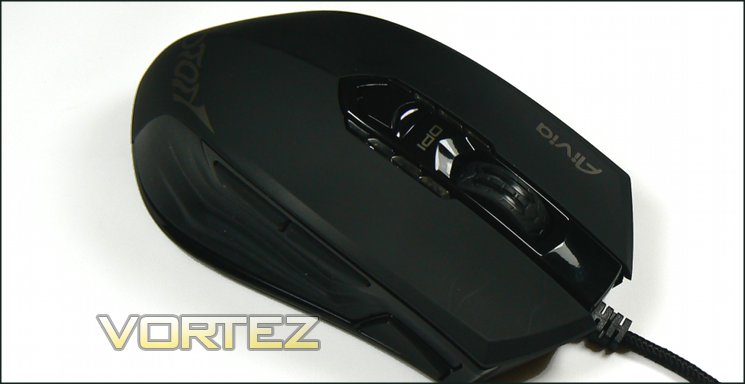
Forward and towards the bottom of the mouse is an illuminated profile selector switch – pressing once will activate the next available profile. If the profile switch on the left and right side are held together for 3 seconds the mouse will switch from left to right-hand assignment orientations (or visa-versa), otherwise only one profile switch is active at any one time.
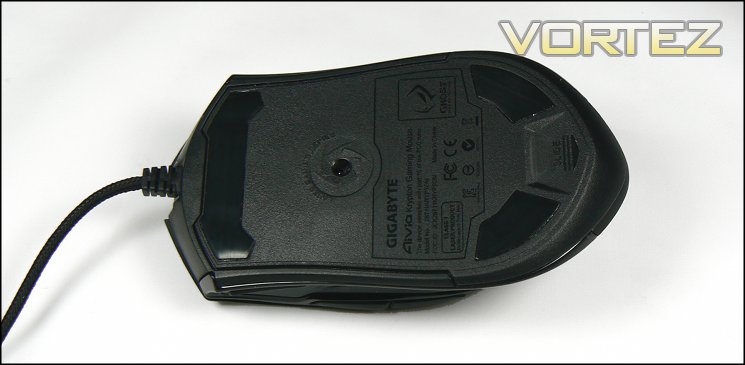
The floor of the Krypton is one of its chief innovations: it’s entirely removable and can be fitted out to use four ceramic casters rather than the usual low-friction Teflon variety. Under this base is a compartment for weights, and as you would expect the 8200DPI laser sensor is centrally located.
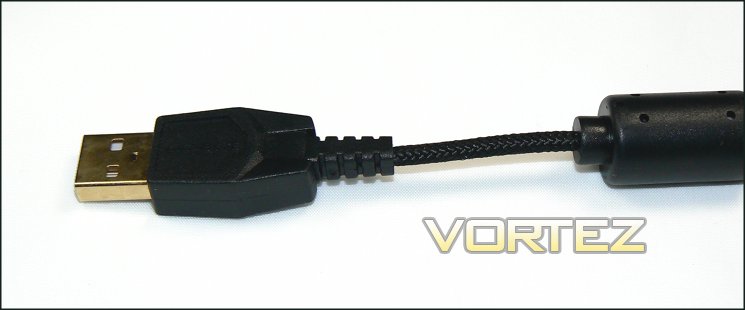
The Krypton utilises a compact USB connector and braided cable, both of which are of good quality. The connector housing is not particularly large, and should not obstruct neighbouring USB ports.
Overall, the mouse looks pretty good. The chassis and shell are of solid construction and there’s no feeling of looseness or rattling which may have been a concern given the number of replaceable components. Initial reservations centre around the thumb buttons and DPI selector switch, but they may be fine in operation. We should also note that the construction of the outer layer from a number of surfaces inevitably leads to nooks and crannies, resulting in the accumulation of dirt and some cleaning difficulty without the liberal use of a small brush.
The Krypton Dual-sided Mousemat Detailed
Packaging
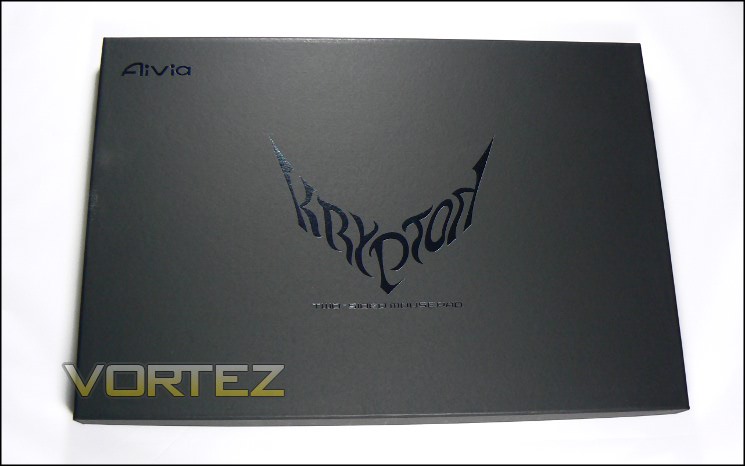
In common with the other members of the updated Aivia peripheral range, the packaging for the Krypton Dual-sided Mousemat is more towards the high-end of the market. This does unfortunately mean that you won’t be able to touch the mousing surfaces without cracking the packaging open, but certain sacrifices must be made for the greater good. As you might have gathered, this mousemat is of rigid design rather than intended to be folded up in storage.
The mousemat is packed surrounded by 5mm thick foam. That’s slight overkill for an ostensibly non-fragile product, but it should mean that there’s no risk of the rubber frame popping off the mat in transit.
Closer Look
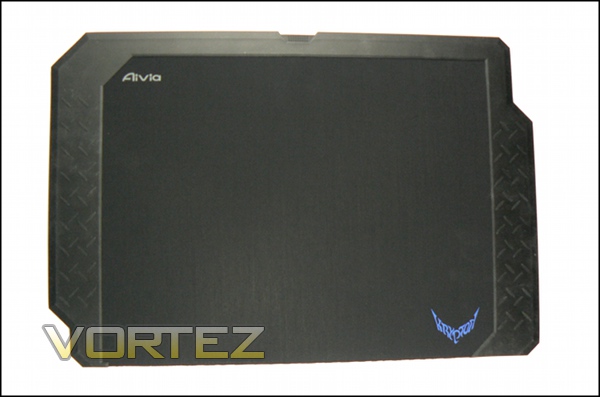
This is our first look at the fabric side of the mousemat. The dimensions are fairly wide for a desk-bound mat at 425mm across the widest extent, whilst the height is more modest at only 285m. A rubber layer backs the fabric section, cushioning your hand and the mouse when resting on it. The rubber frame is a not insignificant proportion of the mat, the design of which allows a dual-sided surface with grippy section fixing the mat more firmly in place than otherwise would be the case. Other solutions we have seen include a frame and reversible insert arrangement, maximising the mousing area but with the potential of having an insert which slides in the frame.
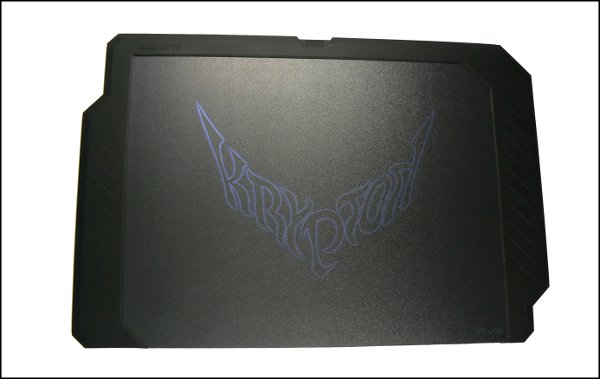
The reverse side of the mousemat is a hard textured PVC surface, once again surrounded by a rubber frame. Unlike the more common fabric, this finish is designed for mouse feet which minimise the surface area in contact with the mat. Due to the additional pressure at the point of contact both feet and mousing surface need to be significantly more durable to withstand abrasion, hence the ceramic material used on the alternate Krypton mouse base. The lower resistance to movement experienced by the mouse lends itself to faster movement and hence response times, making it ideal for FPS at a low mouse sensitivity (in-game or otherwise).
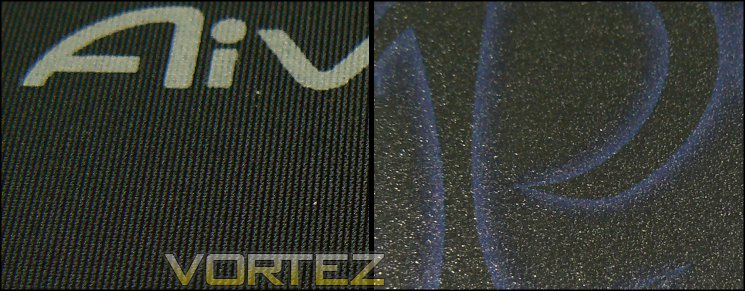
Left: Fabric / Right: PVC
The extent of the mousing area is 265mm x 335mm, fairly typical for mid to large size mats released by a large number of peripheral manufacturers. LAN atendees will need to make allowances for the size and inflexibility, but it’s roughly the right size to fit in large courier and laptop bags. Only cleaning the rubber frame should present much of an issue in the long run as it will tend to attract dust and grime as a normal part of day-to-day use.
Customisation Options
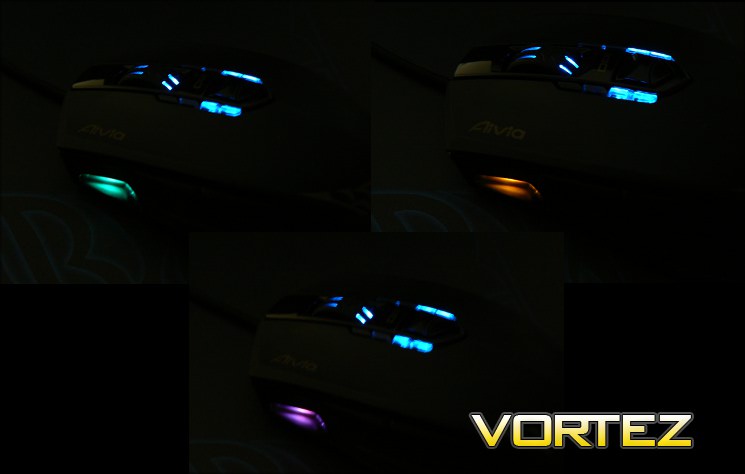
Three of nine profile button lighting options. May also be disabled.
Most premium gaming mice feature some level of customisation, and the GIGABYTE Krypton doesn’t buck the trend. Unlike some however it doesn’t concentrate on lighting; only the profile lighting and mouse wheel brightness are adjustable, which generally amounts to an accent rather than full-blown aesthetic feature.
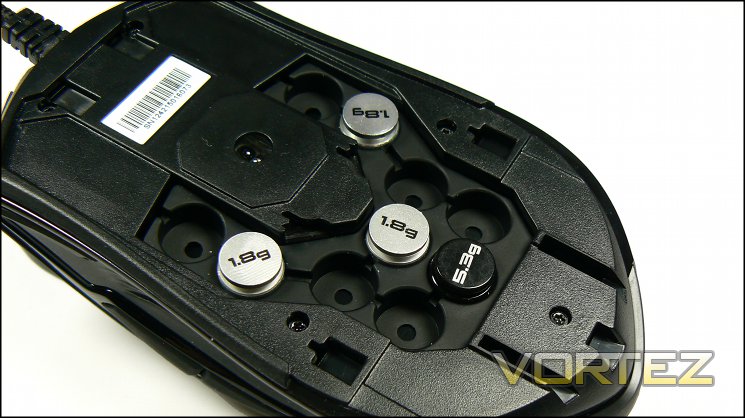
Quite literally core to the Krypton customisation are the removable weights, designed to be distributed around the base of the mouse in order to alter its centre of gravity. Both 1.8g (silver) and 5.3g are included with the Krypton, for a maximum weight increase of 39g from the base 110g. As with the overall design theme, the mass distribution points are in a symmetrical pattern, resulting in neither left nor right hand bias.
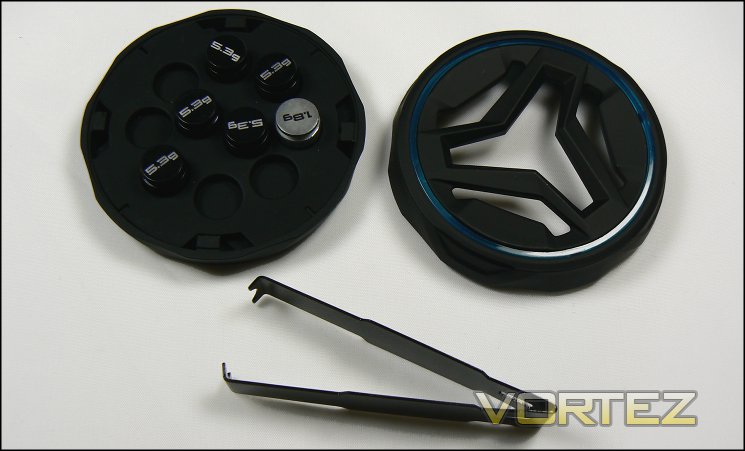
When not in use the weights can be stored in the included case for safekeeping. The included tweezers are an interesting addition, especially for those without strong nails to lever out the weights, but for most users will be surplus to requirements.
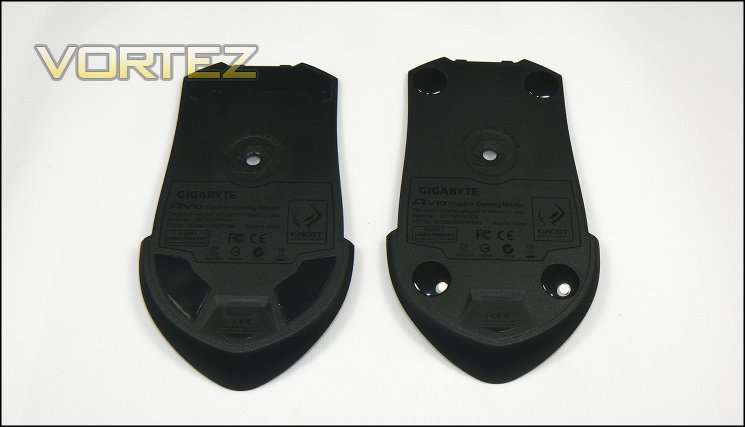
The Krypton’s party-trick is without doubt the changeable base. The mouse comes with two bases, fitted with either Teflon or ceramic casters for markedly different skating dynamics. Teflon casters, most suited to fabric topped mousemats, tend to have a relatively high friction movement over the mat surface. By contrast ceramic casters are hard and slightly curved, ensuring that the surface area in contact with the mat – and hence friction – is minimal. Combine with a hard surface, low wear mat and the mouse will zip across for optimum performance in gaming were response times are critical.
So pretty strong customisation leaning more towards the practical than aesthetic end of the spectrum. Lets see how complementary the software turns out to be.
Software
Krypton makes use of GIGABYTE’s unified GHOST Macro Engine software package, which includes both driver and UI support for button assignments, macros and profile management. Only one download and update process for all compatible GIGABYTE peripheral hardware is required thanks to the unified nature of the package, cutting down the hassle of an update process but also increasing QA requirements on GIGABYTE’s end.
In testing we utilised version 1.4 of the package, found here.
The Krypton’s retail package does not include driver disk, but ready access to the internet enjoyed by most gamers rarely make this an issue. The install process is as simple matter of downloading the software directly from the official website and installing it to a suitable location; installation executables are standalone – unlike recent ‘innovations’ by other peripheral manufacturers an internet connection is not required thereafter.
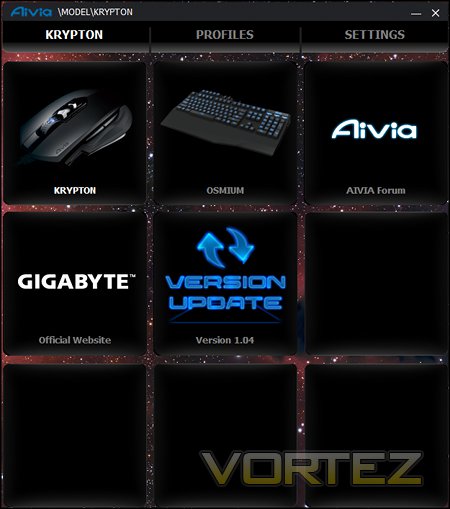
A tiled template is a theme throughout the GHOST Macro Engine application UI, likely speaking to a modular design which could be built on with later releases. The main screen displays all compatible peripherals currently connected to the system (in this case the Osmium and Krypton), quick-links to official GIGABYTE websites, and a one-button check for software updates. Altering peripheral configuration options begins by simply selecting the relevant peripheral and then clicking either Profiles or Settings in the top bar.
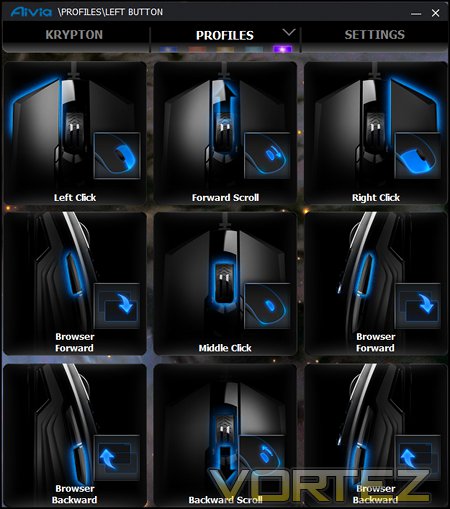
The Profiles screen is where you configure button assignments on a per profile basis. Profiles 1-5 are selected by clicking one of five colours at the top or pressing the profile button on mouse, following which the button assignments will be shown for that profile. Click on each assignment to set to one of many pre-selected or user-defined macros.
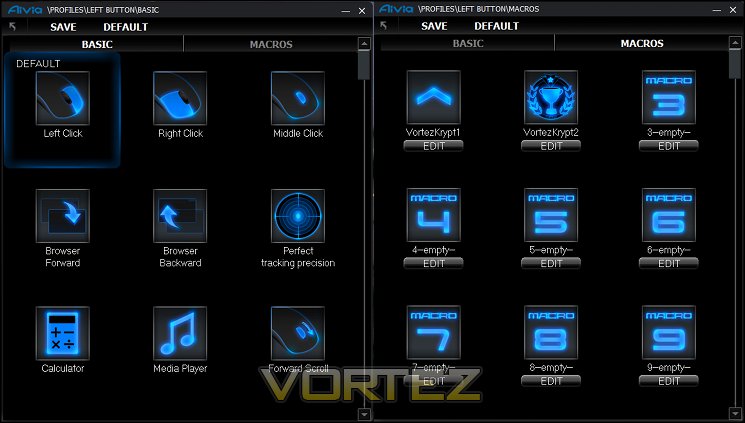
GIGABYTE allow two different types of macros to be utilised: well known pre-configured Windows macros – under the ‘BASIC’ tab – or user created ones – under ‘MACROS’ (see above). Basic macros are mainly limited to typical Windows shortcuts such as default web browser or ALT+Windows key combinations, although the Krypton specifically has pre-defined macros for restricting movement along a particular axis and a function labelled ‘Perfect tracking precision’. Advanced macros are generated only by keyboard or mouse keystrokes, with delay information also optionally stored.
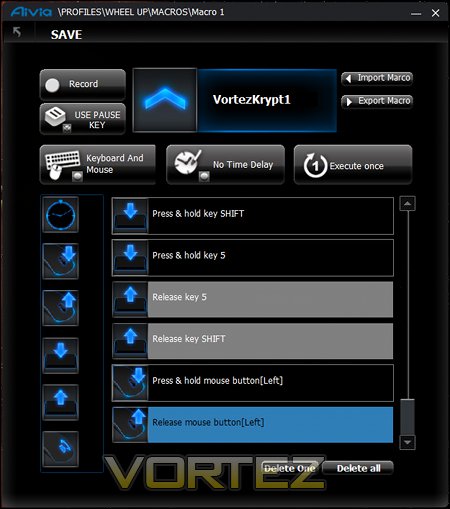
The macro creation screen takes some getting used to, but with experience can be quite powerful. When macro recording begins keyboard keystrokes and/or mouse clicks are logged, as well as time delay between operations if specified. Additional specific entries in a macro sequence can also be added from the list to the left sequences which are more difficult to record thanks to OS limitations.
Macros can be exported or imported to/from a .ini file on a per macro basis. Note that these files are specific to the device, Krypton macros will not work with the Osmium keyboard and visa versa. Unlike some manufacturers, GIGABYTE offer no back catalogue of macros tailored to specific games – you’ll need to configure and import/export them yourself until the Aivia community beings to make user-created macro’s available.
[fullimage=19966]
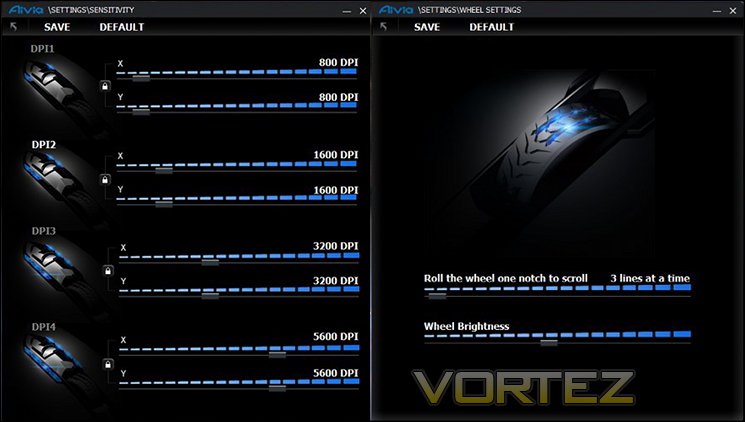
Finally, in the Settings tab GIGABYTE make available access to advanced mouse features. Here you can change the DPI presets for each of the four levels, wheel scrolling behaviour and USB polling rates (up to 1000Hz/1ms), all expected functionality on today’s gaming mice. There is no shortcut for additional features such as double-click speed, sensitivity tweaking and lift-off distance – each of which have been options in competing solutions – but given the design there is scope for including them at a later date.
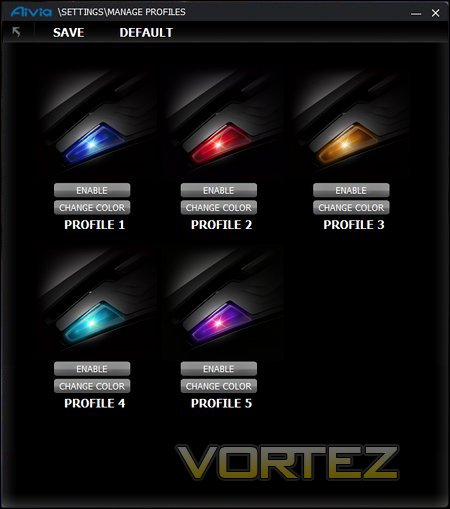
Also on the Settings tab is the Profile Manager, where the selective disabling of Profiles and LED colour selection may be performed. Up to nine different colours are available, as per user preferences, and selective disabling of profiles is useful if only a few are being used and cycling between them is a common occurrence (esp. in-game). The only point to note is that ENABLE means ‘This profile is enabled’ rather than ‘Click to enable’; the same holds true for DISABLE.
A more significant issue can be that of customisable icons. This is a great feature which doesn’t appear to have been tested to its fullest extent, inevitably leading to an improper choice of icon which will cause “Invalid Imagelist” error messages on load and prevent further use of this feature. Worse still, there doesn’t appear to be any way to clear the list of icons should this error occur.
In summation, the GHOST software is much more suited to the Krypton mouse than the Osmium keyboard, though extremely high level users will be rather put out by a relatively low number of advanced mouse tweaking options. It would also be advantageous to add additional synergy to the Aivia gaming package by allowing keyboard modifiers (SHIFT, ALT etc.) to act as modifiers to mouse button presses, greatly increasing the number of available button assignments. Linking profile switching, so that Keyboard and Mouse profiles are switched simultaneously, could also improve usability for use with a wide array of multiple software titles.
Performance
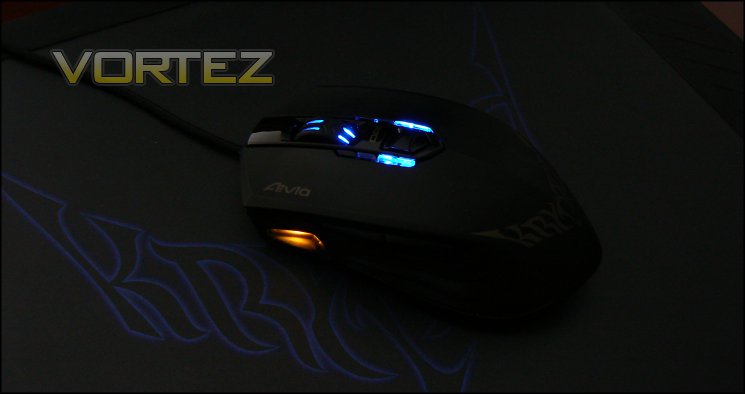
We paired the Krypton with it’s the Krypton dual-sided mousemat counterpart to assess its performance characteristics, but it’s worth noting thatother dual-sided mats are available. This type of mat allows us to compare caster dynamics and sensor tracking with both Teflon and ceramic casters, as well as fabric and PVC surfaces.
General Performance
Three Teflon feet on the default setup of the Krypton lead to a very smooth movement over the fabric mousemat, though the level of wear you’ll see if you use the hard textured side will be too much to bear in the long run. In conjunction with the slightly elevated mat (thanks to the thick rubber framt), the intermediate rubber layer serves to cushion your hand more than you might expect. The precision in manufacture means that there is no rocking motion typically caused by mismatched feet, though this will vary from batch-to-batch.
At 110g without additional weights the Krypton is something of a middleweight, thanks at least in part to the additional structural support needed to affix the base plates securely. 149g, the top end of the weight band for the Krypton, is on the heavy side; well engineered Teflon skates make it feel lighter howver. Even at the low end of the range the USB cable isn’t quite rigid enough to move the mouse far whilst you’re hands-off.
We should note that the reinforcing plastic where the braided cable enters the mouse is angled slightly downwards and protrudes almost 1cm. After a few weeks of use this began to point downwards and rub into the mousing surface, adding drag and wear to the mat itself.
The Krypton is deceptively short – an illusion of length is generated by the high arch apex towards the rear of the mouse. Height then quickly falls off with the shell also tapering towards the rear, a design which will tend to provide less palm support than some. This may cause discomfort in long sessions depending on the size of your hand and type of grip used.
The two major mouse buttons are excellent in terms of actuation and responsiveness: there’s no dead zone between rest point and the point where resistance begins, and the overall distance travelled from rest to fully depressed is very small. For both gaming and productivity this is absolutely ideal. The mouse wheel is similarly well appointed, and is actually functional as a third button. In contrast, thumb buttons on both sides have a springy action and a switch which is surprisingly loud; certainly less than ideal for an office environment on both counts.
Gaming Performance
Impressions of the Krypton certainly pick up in gaming, where the thick of action clouds should accentuate the positives and mask minor drawbacks. As an ambidextrous mouse it’s not quite as ergonomically suited to the hand as some gaming mice will be, but you’re not left confused by a button position or the overall layout. The shoulder buttons are raised relative to the mouse contours, making them easy to differentiate between by touch. The profile switch is a little bit of a stretch when using a thumb in a claw grip and even more so with palm grips; it’s not the most easy to utilise without significantly adjusting your hold on the mouse. Ironically, it’s usually easier to press the button on the opposite side with your index finger.
We’re pleased to note the clear DPI indicators just below the wheel, something we felt was a little lacking on other mice we have tested. Being able to assess DPI and active profile at a glance is more useful than you might imagine, and we can rarely see a reason not to include it apart from cost. The DPI switch isn’t fantastic; without a ‘sniper’ button we would like to have made level selection register when the switch was pushed rather than when it was released.
FPS Gaming – Team Fortress 2
FPS gamers will be enthused by the ceramic feet when coupled with a hard mousemat surface. Movement over a pad is extremely swift and accurate, and when coupled with low DPI settings can improve accuracy. They take a little getting used to – friction dynamics are quite different to that of fabric mats + Teflon – but it’s an addition that enriches gaming rather than dissociates from it. Whichever mat type used, tracking is smooth with no perceptible angle snapping.
Weapon switching is performed without difficulty when performed with the mouse-wheel if that’s your thing, and the wheel button can be used as an additional alt-fire switch more easily than other mice. The GHOST software’s macro engine is good in this regard as this button, or those on the generally surplus side, can be bound as game function shortcuts which often require more keyboard keystrokes.
The GHOST software also features a ‘Precise Tracking’ mode keybind, but we were unable to discern if it made a different to the sensor performance.
RTS/RTS Gaming – Torchlight 2 & Starcraft
Disquiet over the performance of the thumb buttons extends to RPG gaming, due mainly to the slow nature of their response. MMORPG/MOBA’s are reliant on leveraging additional buttons to gain access to huge number of additional skills – requiring an exceptionally fast response time – which the Krypton wasn’t able to provide. Whilst like most gaming mice the Krypton is not tailored to MMORPG’s specifically thanks to a relatively limited number of easily accessible buttons, the design of these make it less ideal than many other conventional gaming mice.
By contrast, the GHOST Macro engine was able to prove its worth. Seventy different macros can be created and swiftly available through the software, each of which could be a complex combination of keystrokes augmented by recorded or user-specified delays. Cancelling a macro is performed simply by activating it again, and whilst the macro is in operation both keyboard and mouse presses are possible. Appropriate improvements would be the ability to link profiles to the launch of specific software titles and being able to back-up a profile wholesale, but even as it stands it’s more powerful than is provided by some gaming mouse packages*.
When paired with the Krypton mouse mat we certainly preferred the fabric side and Teflon casters for these sorts of titles, which are vastly more suited to subtle movements at a higher DPI than the alternative. Even at these higher DPI settings tracking from the sensor was very good, though we would like to have seen an double-click timing adjuster built into the GHOST suite.
All-in-all, the Krypton is a study in contrasts. Customisation options which should provide value to all users are undermined by an elementary design flaw which detracts substantially from the overall package.
* Be careful not to use too much automation in your macros. Some gaming titles scan for regular and repeated events and interpret it as botting or cheating.
Conclusion
After the high water mark that was the Osmium mechanical keyboard, Krypton mouse had a lot to live up to. Whilst having plenty of excellent ideas, it unfortunately came up a little short to that benchmark.
We can certainly praise the mouse for its ambidextrous design. Too often gaming mice are either subtly or heavily biased towards right-handedness, leaving left-handed gamers out in the cold. Even going to the extent of mirroring the profile switching buttons is great, and allowing quick-switching between left and right hand layouts is an intriguing addition in gaming households where a mouse is shared.
Perhaps it is in attempting to be the best of both worlds that the side buttons were overlooked. Although fully functional, the mechanical operation of the buttons is poor due to a long travel distance before actuation and springy rather than solid feel. In this, we also worry about long-term reliability, though poor experiences in this regard with this button style have been restricted to other manufacturers.
In a similar vein, the DPI switch at the crest of the mouse doesn’t quite feel as sturdy as it might: forward and back movement is fine, but the impression that you can press the switch down doesn’t always make you confident in switching. It would also be slightly more responsive if DPI changed upon actuation rather than release; a very minor concern to most by important to some high-end gaming where response time is crucial.
With that out the way, lets talk about the positives. Visual indicators of profile and DPI level for the Krypton are excellent, better than many other mice we’ve tested. The mouse wheel is also very good, both in a very good scrolling movement and just enough resistance and size to make using it as a button viable. It doesn’t have tilt functionality, but in most non-MMO cases the functionality is overblown.
Weight customisation is also some of the most comprehensive we have seen, especially with regards to adjusting centre of gravity to suit left or right-handed preferences. Equally, allowing the choice between Teflon or ceramic casters is extremely rare, and will be a pretty large boon to those who flit between game genres.
We have fewer reservations about the GHOST software for the Krypton than the Osmium. It’s serviceable if not quite top tier, and does suit the Krypton slightly more than its keyboard cousin. The macro engine itself is powerful, as is the ability to bind all four shoulder buttons and mouse wheel actions independantly, but it doesn’t feature all the tweaking options we have seen on other driver suites.
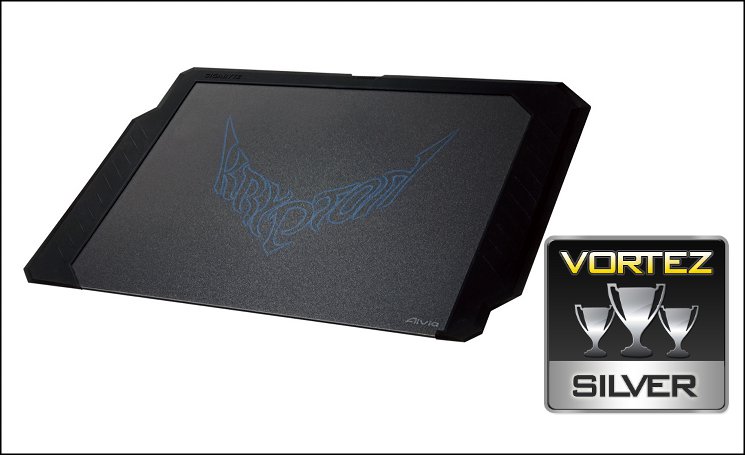
Finally, we come to the Krypton Mousemat. Having approached it with a level of trepidation, we must say that we were pleasantly surprised by this dual-sided effort. It’s ideally suited to pairing it with the Krypton mouse, and the speed which you can zip around the mat when combined with ceramic casters is exceptional; we can see the benefit many will find in twitch gaming. Those seeking a pristinely clean work area may be a little frustrated by how easily it picks up dust and grime, and how difficult cleaning the rubber turns out to be.
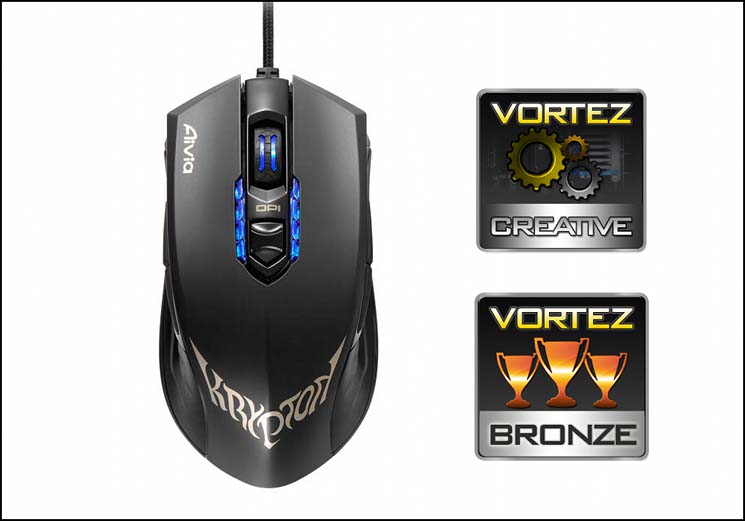
The GIGABYTE Krypton Gaming Mouse is a key innovating product for gaming, featuring a choice of casters to suit different gaming styles. Augmented by an ambidextrous design and weight customisation, it’s a powerful tool for both left and right-handed gamers. Detracting points are the thumb buttons, which are too springy for optimum precision and response time, and slightly less powerful software suite compared to competitors. Some great ideas make it worthy of the Vortez Creative Award and a creditable Bronze Award.
Pros
+ Ambidextrous
+ Ceramic or Teflon casters
+ 5 Gaming Profiles
+ Clear at-a-glance profile and DPI indicators
+ Weight Customisation
+ One-touch left/right hand button remapping
Cons
– Weak shoulder buttons
– Price
– Software improvements needed to bring it to top tier
Tips
= Pair with a Krypton Mousemat or other dual-sided mousing surface to make the most of mouse features
+ Ambidextrous
+ Ceramic or Teflon casters
+ 5 Gaming Profiles
+ Clear at-a-glance profile and DPI indicators
+ Weight Customisation
+ One-touch left/right hand button remapping
Cons
– Weak shoulder buttons
– Price
– Software improvements needed to bring it to top tier
Tips
= Pair with a Krypton Mousemat or other dual-sided mousing surface to make the most of mouse features

Click here for an explanation of our awards at Vortez.net.


