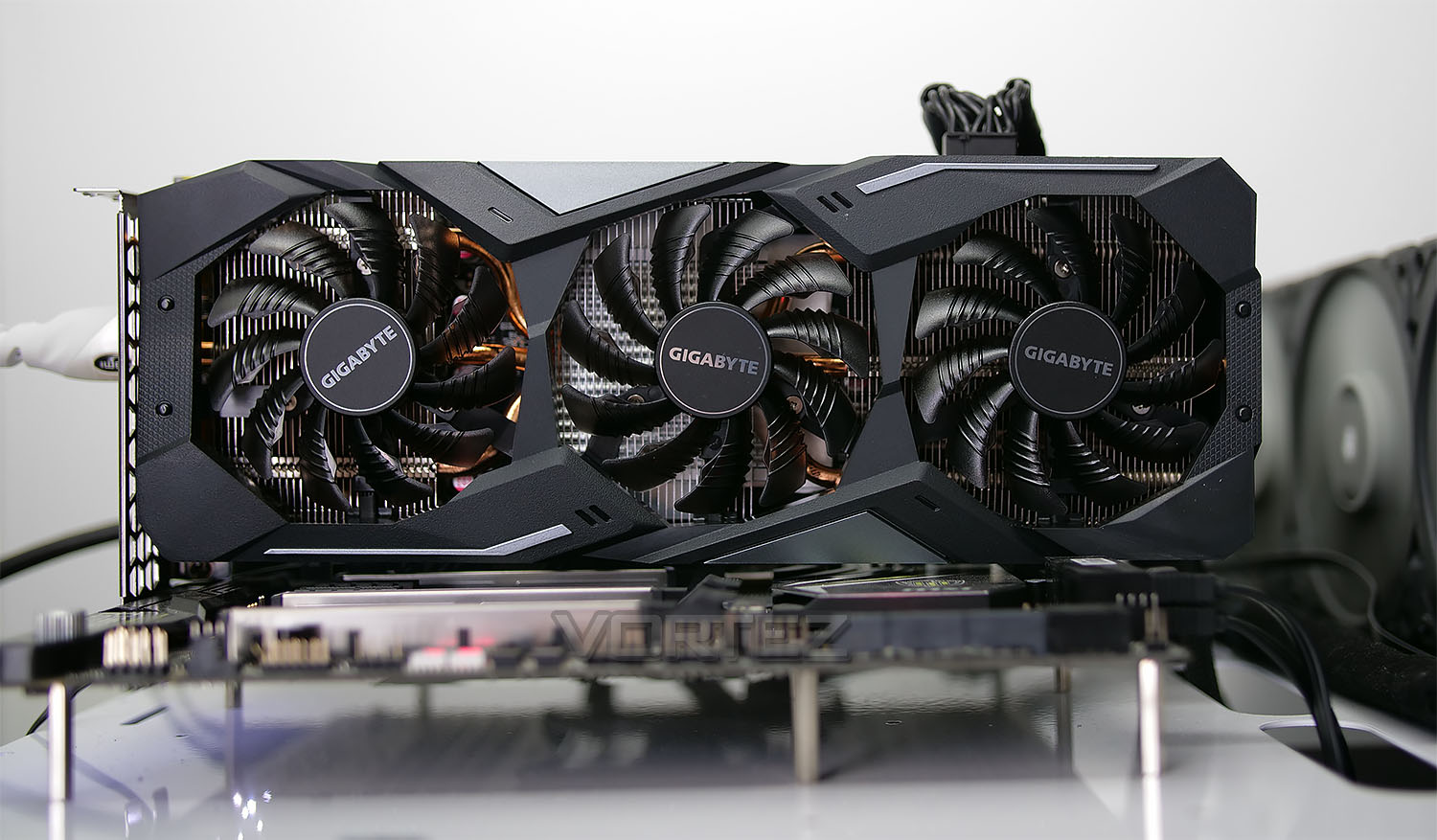
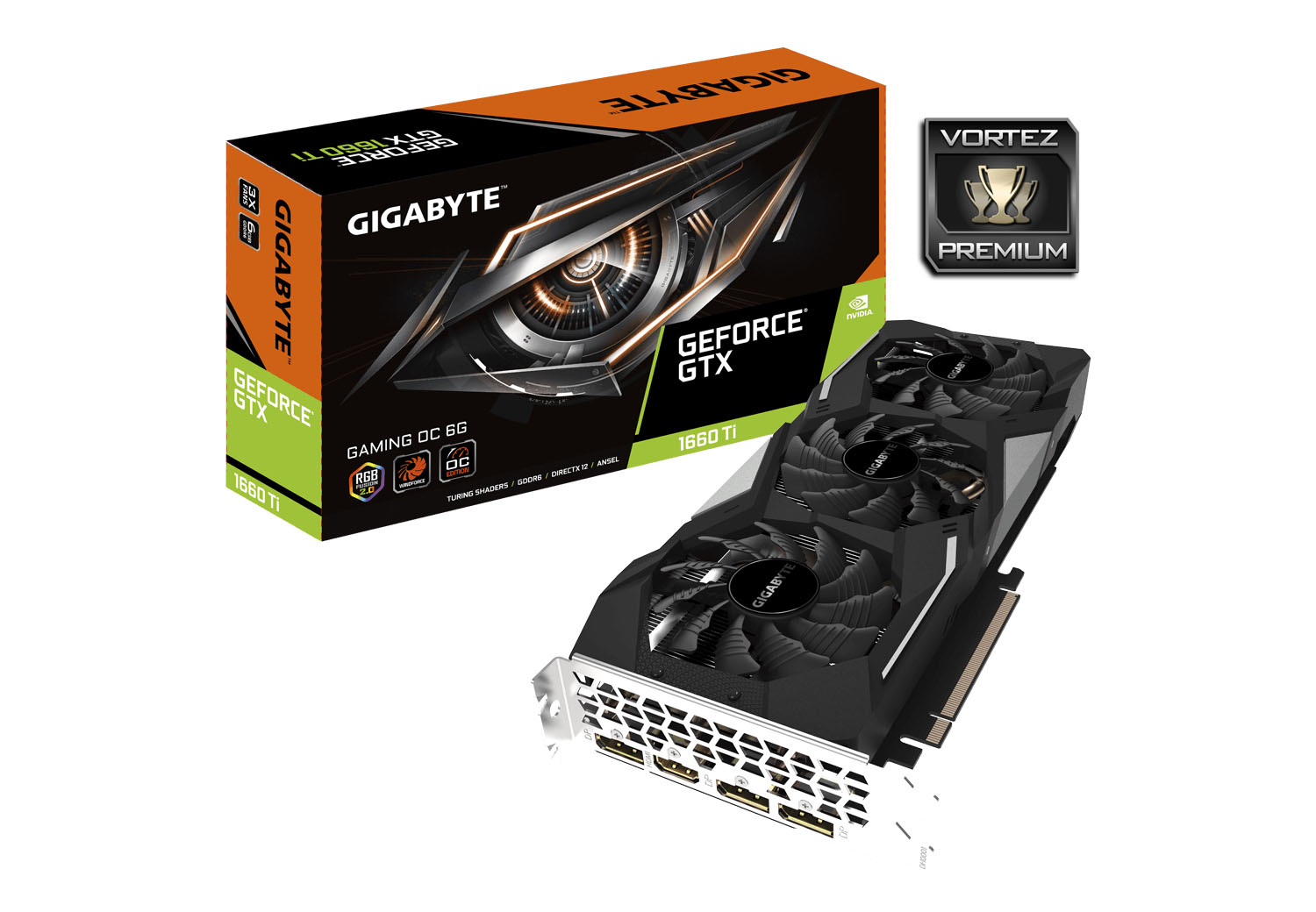
It’s GIGABYTE’S turn to showcase their efforts with the NVIDIA GTX 1660 Ti, by way of the GAMING OC (GV-N166TGAMING-OC-6GD) – featuring the WindForce 3x cooler and a factory overclock.

Product on Review: GV-N166TGAMING-OC-6GD
Manufacturer & Sponsor: GIGABYTE
Street Price: £289 GBP – $289 USD – $529 AUD
Some days ago NVIDIA lifted the lid on their new GTX 16 series of graphics cards, a move which will see the decommission of the retiring GTX 10 series. Although the performance from the new GTX 1660 Ti positions it as an inferior unit compared to the RTX 2060, the MSRP sits dangerously close. In some instances this makes the GTX part a tough one to recommend if the price floats beyond the £300/$300/$560 mark, however today we’ll be investigating one such graphics card which in the safe zone.
Enter the GIGABYTE GTX 1660 Ti GAMING OC – bearing the renowned Windforce 3x cooling system, a factory overclock and some subtle RGB lighting via RGB Fusion 2.0.
About GIGABYTE
A global leader in the PC industry, GIGABYTE offers a comprehensive product lineup that aims to “Upgrade Your Life.” With expertise encompassing consumer, business, gaming, and cloud systems, GIGABYTE uses research and innovation to consistently meet user needs. GIGABYTE is renowned for award-winning products including motherboards, graphics cards, laptops, mini PCs, and other PC components and accessories, and has revolutionized the PC industry with patented DualBIOS™ and Ultra Durable™ technologies. As an expert in PC technology, GIGABYTE is poised to extend our scope in business servers and cloud systems with hardware and software solutions that integrate AI and AloT applications to develop the ideal infrastructure for future prospects in 5G.
Technical Specifications
Below are the technical specifications surrounding GTX 1660 Ti supplied directly by GIGABYTE
GPU
GTX 1660 Ti (TU116)
Stream Processor
1536
Video Memory
6GB GDDR6
Memory Bus
192-bit
Engine Clock
1500MHz
Engine Clock Boost
1860MHz
Memory Clock
1500MHz – 12000MHz Effective
PCI Express
3.0
Display Outputs
3x DisplayPort 1.4
1x HDMI 2.0b
Recommended Power Supply
450W
DirectX
12 API feature level 12_1
OpenGL
4.5
Cooling
Triple-fan solution
Slot Size
2
Supported OS
Windows 10
Card Length
280 x 116 x 40 mm
GTX 1660 Ti (TU116)
Stream Processor
1536
Video Memory
6GB GDDR6
Memory Bus
192-bit
Engine Clock
1500MHz
Engine Clock Boost
1860MHz
Memory Clock
1500MHz – 12000MHz Effective
PCI Express
3.0
Display Outputs
3x DisplayPort 1.4
1x HDMI 2.0b
Recommended Power Supply
450W
DirectX
12 API feature level 12_1
OpenGL
4.5
Cooling
Triple-fan solution
Slot Size
2
Supported OS
Windows 10
Card Length
280 x 116 x 40 mm
Features
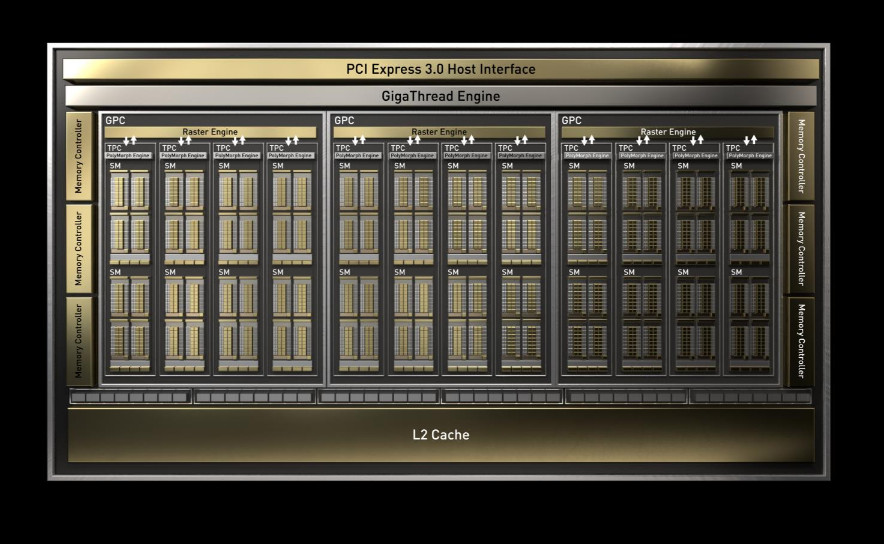
NVIDIA’s GeForce GTX 1660 Ti’s new TU116 GPU is a brand new design specifically for the mainstream gaming market. Manufactured using TSMC’s 12nm FinFET technology, it incorporates 1560 ‘Turing’ CUDA Cores arraigned in a Shader Module that differs considerably from that of the RTX 2060. Without both Tensor and RT Cores it lacks hardware support for NVIDIA RTX Hybrid/Real-Time Raytracing and AI features such as DLSS, but does roll in other improvements specific to the Turing architecture.
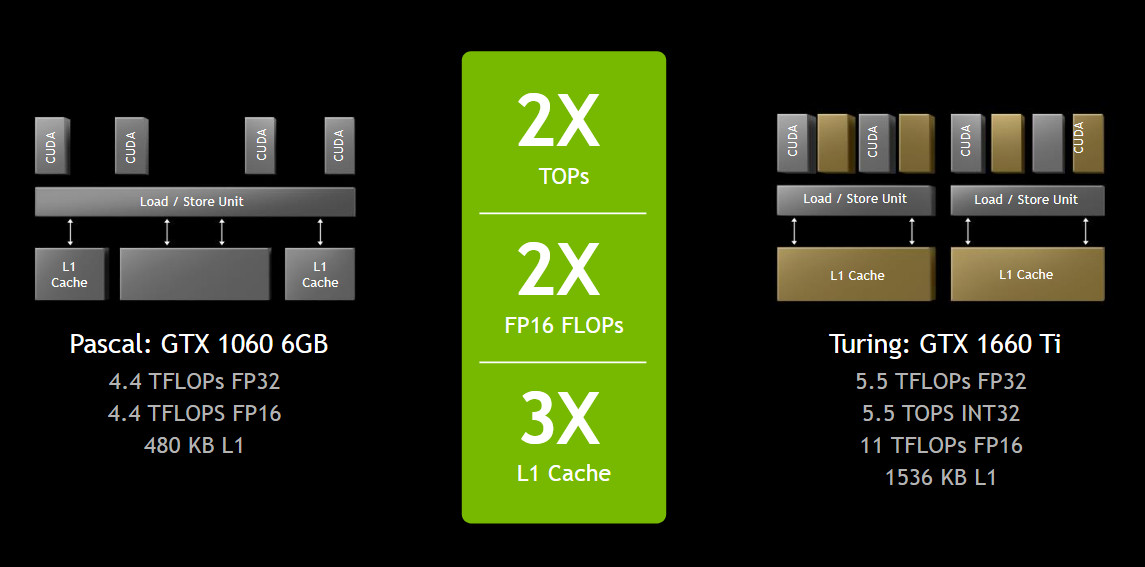
UPDATED CACHE MODEL
Turing moves to a Unified L1 Cache, a schema which offers lower latency, higher bandwidth, and higher capacity compared to Pascal and earlier architectures. NVIDIA describe the design as featuring a more ‘heavyweight’ shader thanks to a 3x increase in L1 Cache Size (from 48 to 128 KB) and 4x increase to L1 Cache Bandwidth.These changes are likely to have a high impact on effective shader Instructions Per Clock, even without accounting for game engine optimisations that take advantage of new dynamic cache allocation features and support for larger data structures. Simply increasing the cache size will increase the chances for a cache ‘hit’, reducing how often slower cache and memory needs to be accessed.
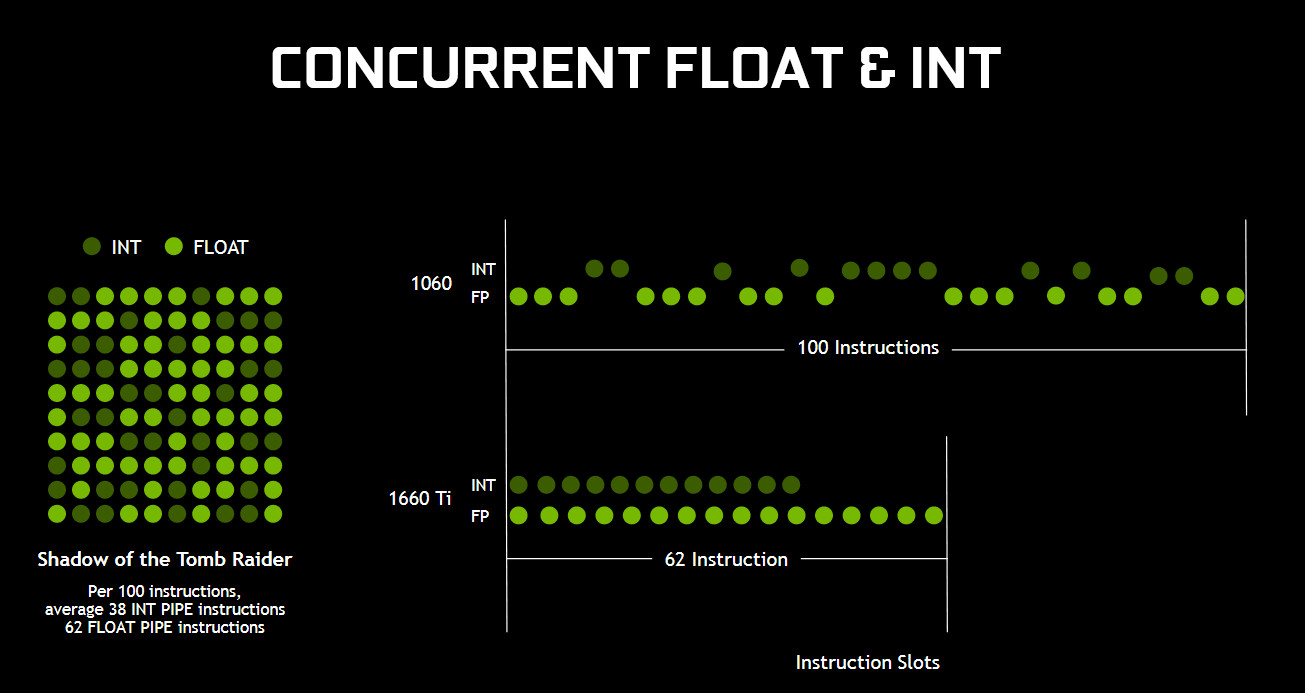
COHERENT FLOATING POINT AND INTEGER OPERATIONS
NVIDIA’s Pascal architecture is capable of executing both Floating and Integer operations, but only sequentially across the shader module by switching between the two modes. Turing shader processors by contrast can execute batches of mixed operations in parallel, greatly increasing total operations per second in mixed workloads.While floating point operations have tended to dominate game engine workloads, modern titles are beginning to roll in integer operations where it’s deemed appropriate as GPU hardware broadens its mixed workload capabilities. As a result the GTX 1660 Ti has a certain amount of future-proofing when compared to a GPU from an older generation with similar performance characteristics.
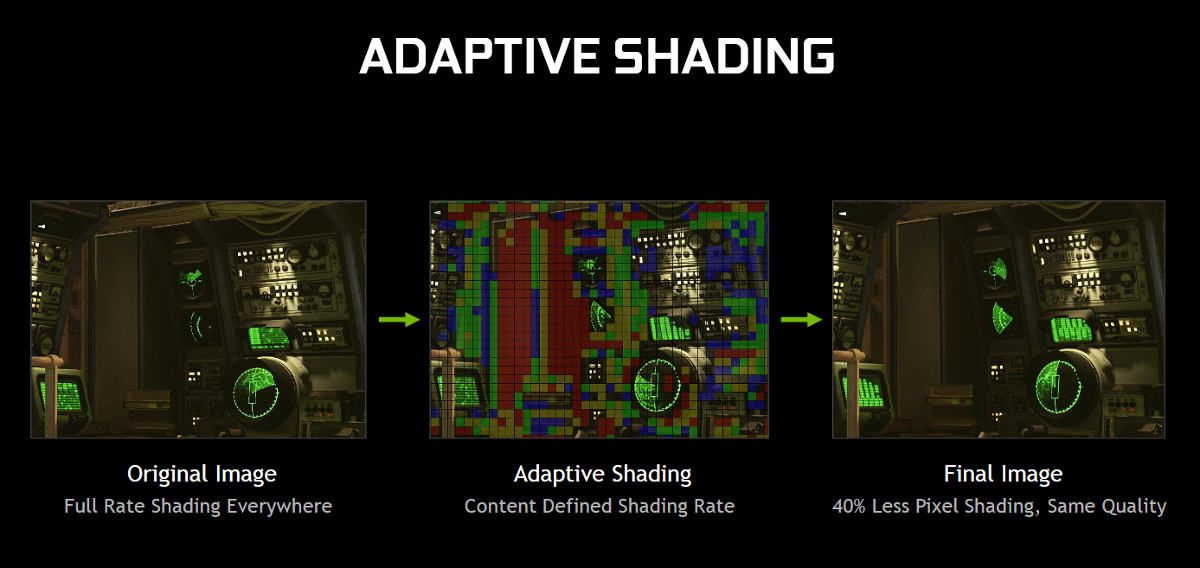
ADAPTIVE SHADING
Sections of any rendered scene will differ in complexity, from heavily textured objects and surfaces to more plain walls with less detail. From frame to frame large areas with less detail may change very little over time. Adaptive Shading techniques are aware of that contextual difference, and can allocate fewer shading resources to these zones dynamically.Adaptive Shading is one aspect of Variable Rate Shading possible under the RTX technologies umbrella. It’s not clear which aspects won’t be possible with the GTX 16-series, but that will no-doubt become clear as it is used in more games. For now, Adapative Shading is present in Wolfenstein: The New Colossus, and is a factor in the NVIDIA’s projection of a 1.4x performance advantage vs the 1060 6GB.
VIRTUALLINK
The new VirtualLink VR connector standard is a optionally available on the GTX 1660 Ti. We already know of a number of partner cards which will not be incorporating the I/O connector, so approach each on a case-by-case basis if it is important to you. From a pure performance perspective the GTX 1660 Ti should be more than capable of current Premium VR rendering support as its anticipated performance exceeds that of the already-validated GTX 1060 6GB.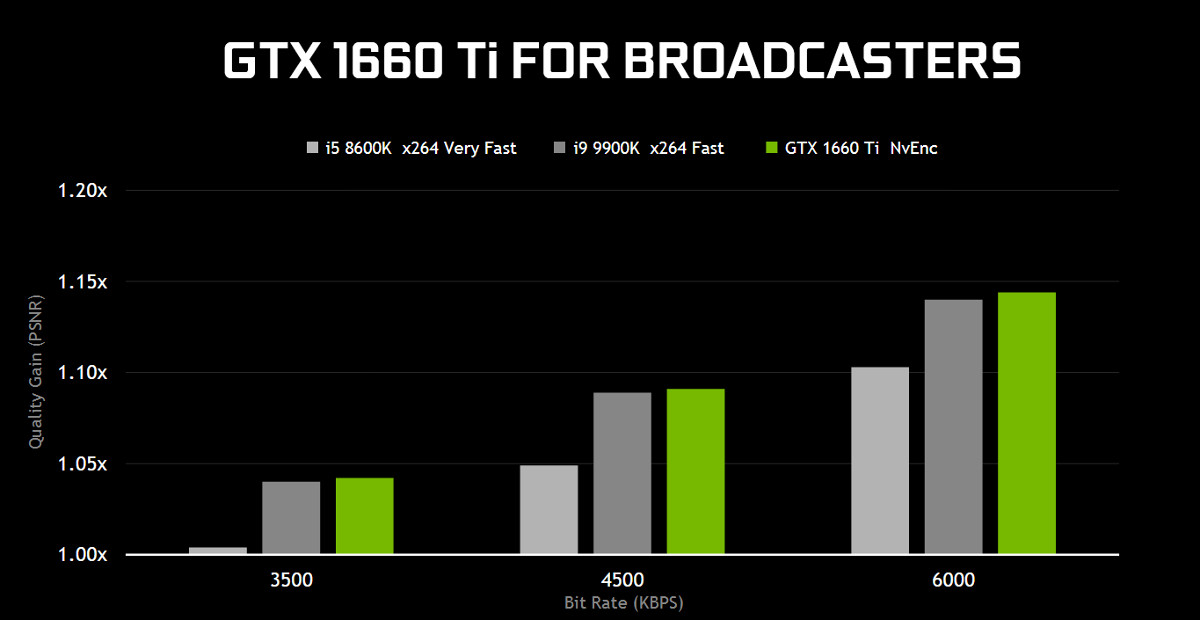
NEW NVENC ENCODING ENGINE
The GXT 1660Ti supports NVIDIA’s latest NvEnc hardware video encoder. Designed specifically for game broadcasting via Twitch and other streaming platforms, it improves the video stream (x264 fast) encoding bit rates to up to 6000KB/s. Video quality is also improved, now exceeding that of an Intel Core i9-9900K using the same encoding while also offloading processing from the CPU.OC SCANNER
OC Scanner was introduced alongside the RTX 20-series cards as a means of offering automated (one-click) overclocking for a ‘free’ performance boost, and has since been extended to older NVIDIA GPU architectures. It works by scanning for artefacts and other inconsistencies as operating frequencies increase, easing off when detected and failing safely rather than causing hard lockups. OC Scanner is now incorporated into the major aftermarket overclocking tools from EVGA, MSI and ASUS.POWER EFFICIENCY
Currently Turing GPUs are manufactured using TSMC’s 12nm lithography, which has many similarities the GTX 1060 6GB’s 16nm manufacturing process. Power efficiency improvements will tend to be down to architectural changes rather than the manufacturing process, but higher frequencies on similar voltages aren’t out of the question.NVIDIA boast of a 1.4x perf/watt improvement in optimal workloads over the GTX 1060 6GB, which is more than just a little significant. The GTX 1660 Ti has a reference TDP of 120W, the same as the GTX 1060 6GB, which speaks to the expected performance improvement you might see when comparing with the previous generation.
Most GTX 1660 Ti’s will ship with a single 6-Pin PCIe connector, but some (such as the ROG STRIX GTX 1660 Ti) are equipped with an 8-pin connector for a little more overhead.
MEMORY SUBSYSTEM
The GTX 1660 Ti is the first mainstream GPU to be configured with GDDR6 memory, a standard that until now has been exclusive to performance class RTX 20-series GPUs. An effective memory speed of 12000Gbps compares very favourably with the GTX 1060 6GB’s 8000Gbps, increasing the available memory bandwidth by 50% to 288 GB/sec.Closer Look
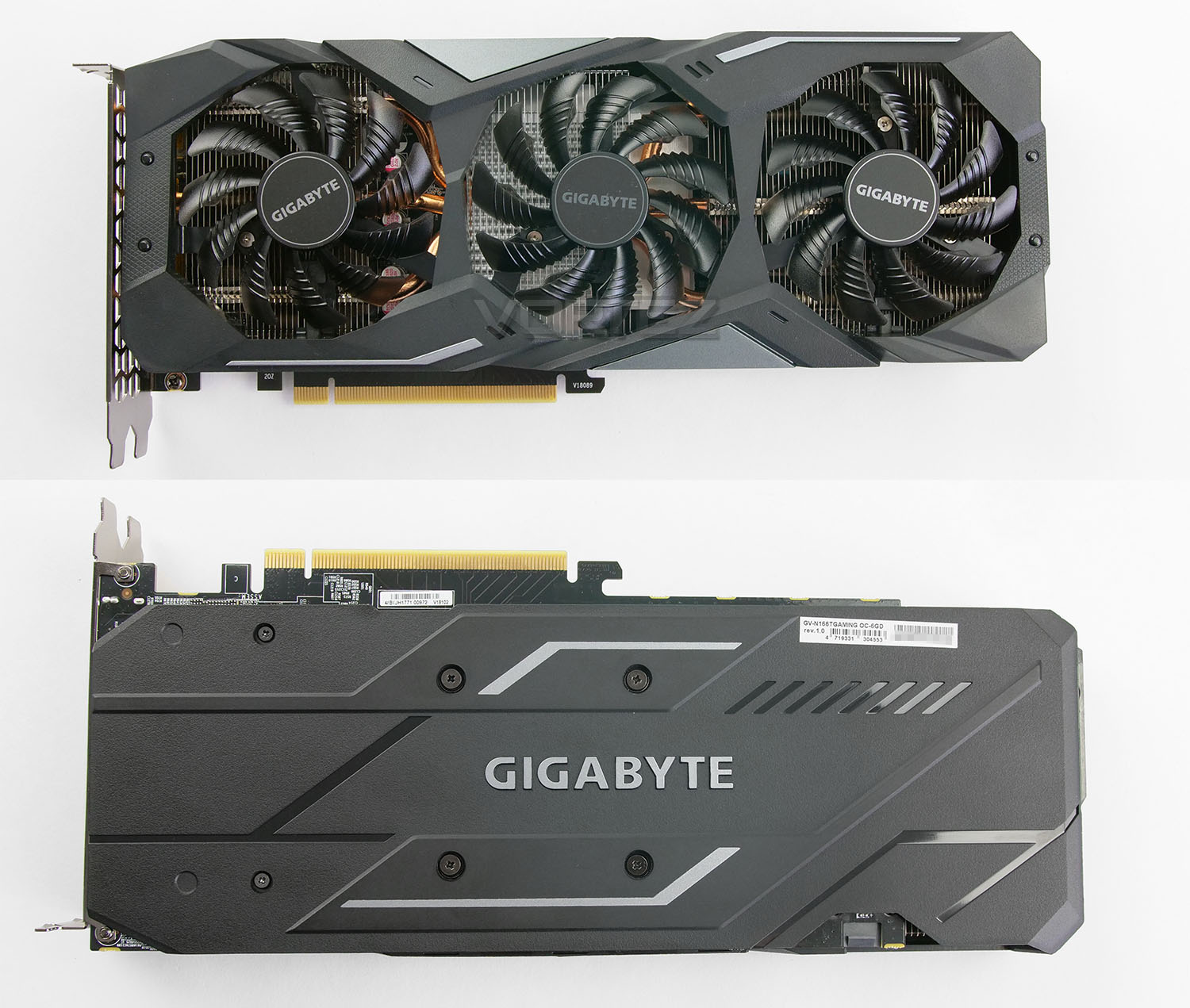
The design which GAMING OC adopts is one which should be familiar. There have been some subtle changes but the theme employed is very similar to what we saw under the GTX 10 series from GIGABYTE. A triple fan configuration takes centre stage which is named WINDFORCE 3X. This consists of GIGABYTE’s renowned WINDFORCE cooler which utilises 3D active fans. The middle fan spins in a different direction to the others (counter clock-wise) in a bid to enhance airflow. Underneath we have a triple heatsink design to match.
Since the colour scheme used uses neutral colours, this graphics card will pair up with other hardware in the computer case very well.
Over the back-side of the card there is backplate which marries up to the front shroud – while this does feel cheap and flimsy compared to metal backplate, it does reduce the overall weight significantly.
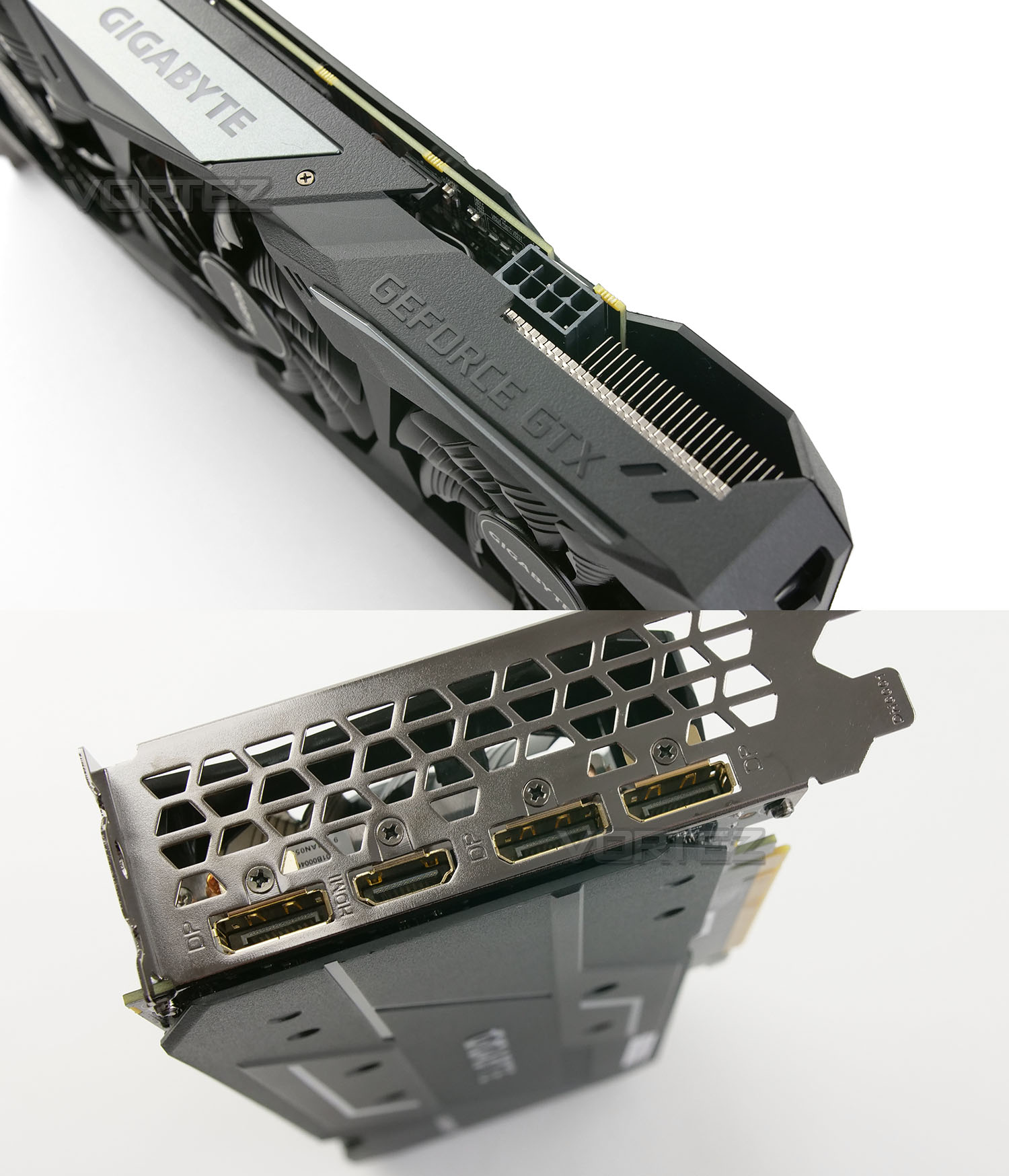
Along the outside edge of GAMING OC we have the GIGABYTE emblem which also acts as an LED – the lighting on this module can be tweaked using the RGB Fusion software. Just like other GTX 1660 Ti cards, the GAMING OC requires a 450W PSU and an 8-pin connection.
On the rear IO panel there are four ports – three DisplayPort 1.4 and one HDMI 2.0b – making it easy to expand to multiple monitors and/or a VR headset.
Test Setup & Methodology
HOW WE TEST GRAPHICS CARDS
Testing a graphics card is an extremely lengthy process. We sometimes see reviews where a graphics card has been tested using out of date equipment, out of date games and even out of date drivers. While the latter can be excused due to the sheer amount of driver updates making a thorough review impossible we will however notify the reader when we have used a different driver to the normal for example a pre-release driver. For the most part however we will always use the same hardware and latest drivers so this does certainly need to be taken into consideration when viewing our testing results. Each game and benchmark is tested times with the lowest and highest scores omitted out of the 5 results and the average then taken from the three remaining to give us our final result for each resolution and setting used.HARDWARE
Taking Intel’s High-End Desktop platform, our hardware utilises the Intel X99 chipset. Combined with this we use the Intel Core i7-5960X Extreme Edition processor clocked to a realistic and achievable 4GHz to ensure we have no CPU bottlenecks. With 16GB (4x4GB) of DDR4 at 2666MHz and a 750GB SSD there should be minimal paging so the benchmarks we run today will hopefully give a true reflection of the graphics card’s performance.Graphics Cards on test:
GIGABYTE GTX 1660 Ti GAMING OC
ZOTAC GTX 1660 Ti
ASUS STRIX GTX 1660 Ti
NVIDIA GTX 1070
NVIDIA GTX 1060
NVIDIA GTX 1050 Ti
NVIDIA GTX 1050
AMD RX 590
AMD RX 580
AMD RX 570
Special thanks go to Avermedia, Intel, Corsair, MSI and AOC for providing the extreme spec components used for our test bench:
Motherboard: MSI X99A Workstation
CPU: Intel Core i7-5960X Extreme Edition @ 4GHz
RAM – 16GB (4x4GB) Corsair LPX Vengeance (Red) DDR3 @ 2666MHz 16-17-17-35 C1
Power Supply – CORSAIR HX1050
Hard Drive – Samsung 840 EVO 750GB
Cooler – CORSAIR Hydro Series™ H150i Pro 360mm Extreme Performance Liquid CPU Cooler
Monitor – AOC 28″ 4K U2879VF
Capture Card – Avermedia Live Gamer Extreme 2
CPU: Intel Core i7-5960X Extreme Edition @ 4GHz
RAM – 16GB (4x4GB) Corsair LPX Vengeance (Red) DDR3 @ 2666MHz 16-17-17-35 C1
Power Supply – CORSAIR HX1050
Hard Drive – Samsung 840 EVO 750GB
Cooler – CORSAIR Hydro Series™ H150i Pro 360mm Extreme Performance Liquid CPU Cooler
Monitor – AOC 28″ 4K U2879VF
Capture Card – Avermedia Live Gamer Extreme 2
BENCHMARKS
If you are a regular reader of our reviews you will know we like to test the latest hardware with the latest games and benchmarks on the market. Here are the games we’ve chosen:Fortnite
Middle Earth: Shadow of War
Apex Legends
Shadow of the Tomb Raider
F1 2018
Battlefield V
Middle Earth: Shadow of War
Apex Legends
Shadow of the Tomb Raider
F1 2018
Battlefield V
To capture framerates we use a combination of in-game benchmark tools and FRAPS.
We also take into consideration the benchmarkers out there so have included three of the more popular synthetic benchmarks available:
Let’s see how today’s graphics card performed…
Power, Temperatures, Acoustics
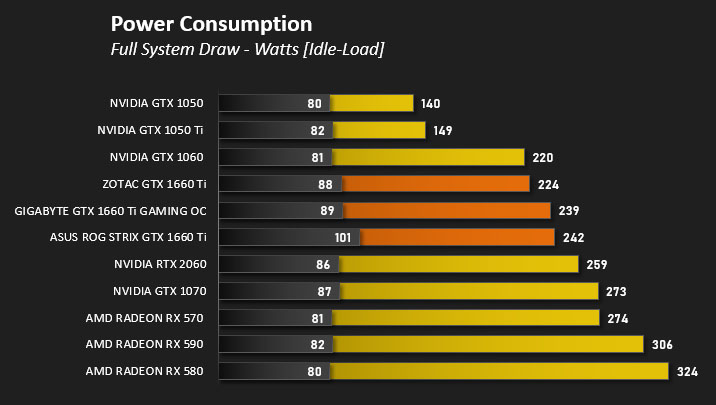
To test for power consumption, we take a measurement from the plug socket. It is important to note that the figures below represent total system power use and not just the GPU. The CPU was always in a fixed state (4GHz overclock) so did not affect the additional power load when the GPU was placed under 100% load using Heaven 4.0 which was ran for 20 minutes at which point a load reading was taken. Idle readings were taken 5 minutes after system boot to ensure any background services and applications had loaded.
TEMPERATURE
To test temperatures we measured idle temperatures after booting windows, letting all applications finish loading and ran a few benchmarks. Once the benchmarks were complete we left the card to reach a cooling plateau where we then took the idle temperatures. For the load tests we set Heaven 4.0 running continuously for ~30 minutes recorded the peak/maximum GPU temperature.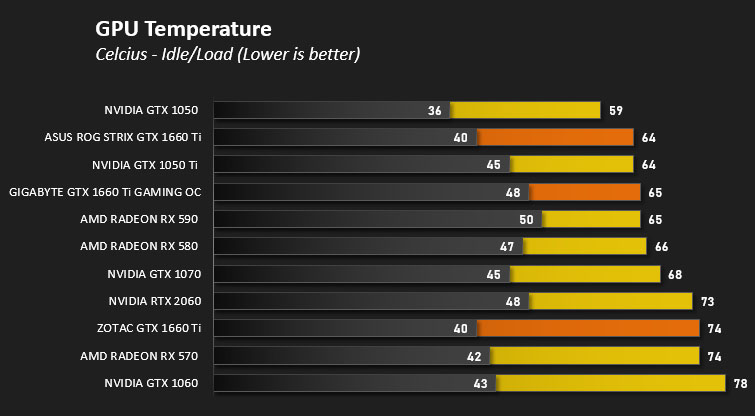
ACOUSTICS
We’ve had no complaints about the Windforce cooler in the past and the same experience can be reported with the solution found on the GTX 1660 Ti. The cooler is quiet under load and has the ‘semi-passive’ mode, meaning the fans stop spinning under a specific load.Overclocking
To overclock the GTX 1660 Ti we used GIGABYTE’s very own AORUS Engine software.
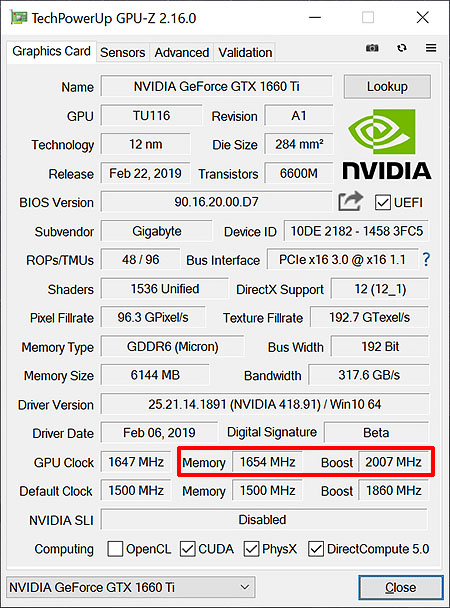
The GPU already has a factory overclocked applied which sees the GPU boost move up from the reference settings of 1770MHz to 1860MHz. However, we plan to surpass this.
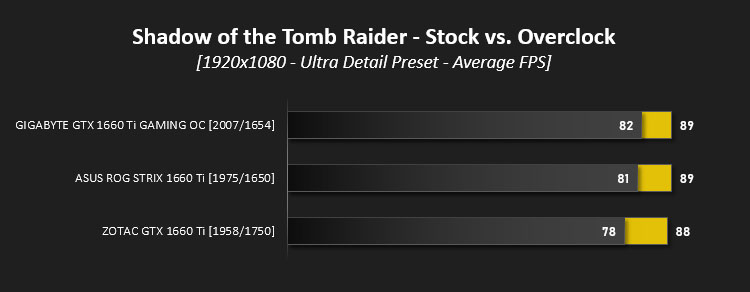
We were able to achieve an outstanding result with the GAMING OC which realised a GPU boost clock of 2007MHz and a modification to the memory clock of 1654MHz (up from 1500MHz). This is impressive and the best result we’ve had so far. Below are the results and a performance demo:
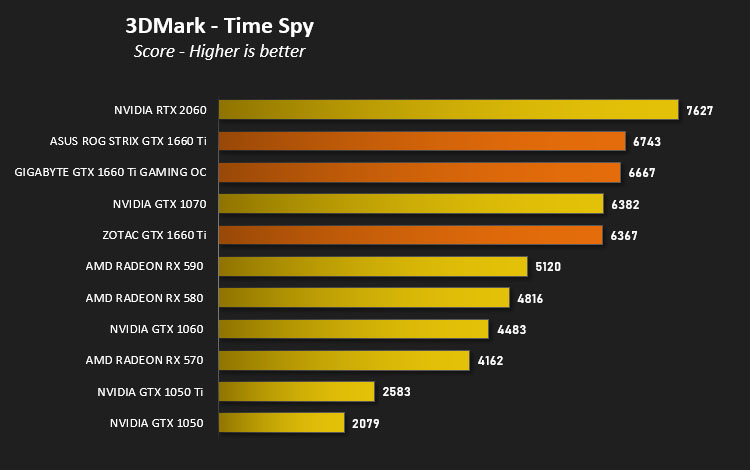
DX12: 3DMark Time Spy
Download your copy nowWith its pure DirectX 12 engine, which supports new API features like asynchronous compute, explicit multi-adapter, and multi-threading, 3DMark Time Spy is the ideal benchmark for testing the DirectX 12 performance of the latest graphics cards.
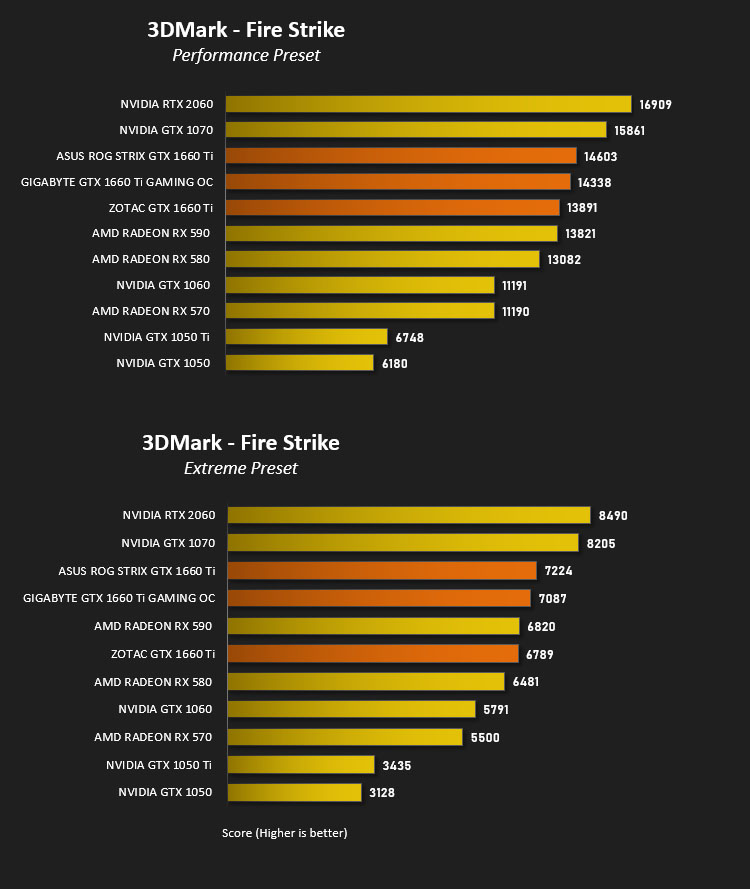
DX11: 3DMark FireStrike
Download your copy nowFire Strike is the new showcase DirectX 11 benchmark designed for high-performance gaming PCs. It is UL’s most ambitious and technical benchmark ever, featuring real-time graphics rendered with detail and complexity far beyond what is found in other benchmarks and games today.
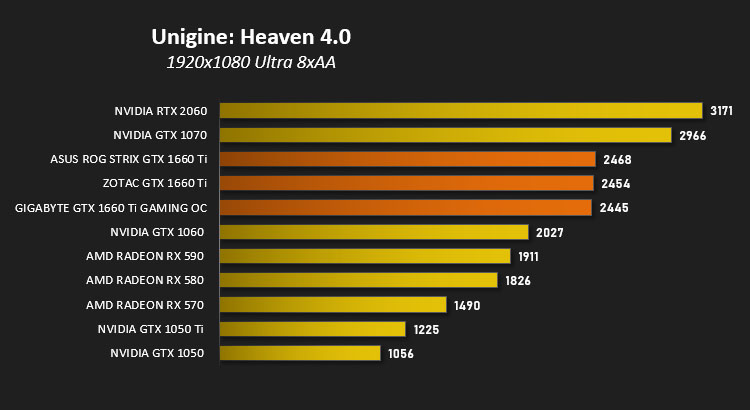
DX11: Unigine Heaven 4.0
Heaven Benchmark with its current version 4.0 is a GPU-intensive benchmark that hammers graphics cards to the limits. This powerful tool can be effectively used to determine the stability of a GPU under extremely stressful conditions, as well as check the cooling system’s potential under maximum heat output. It provides completely unbiased results and generates true in-game rendering workloads across all platforms.
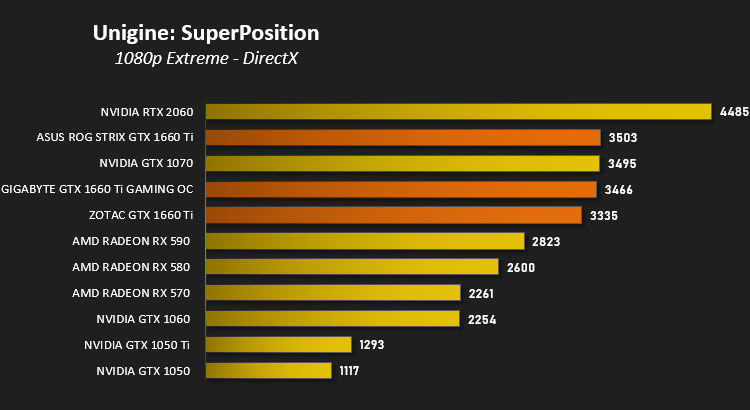
DX11: Unigine SuperPosition
Superposition is a new-generation benchmark tailored for testing reliability and performance of the latest GPUs. Top-notch visuals, support for VR-devices and an interactive mode with mini-games — the list of features built into Superposition could go on and on.
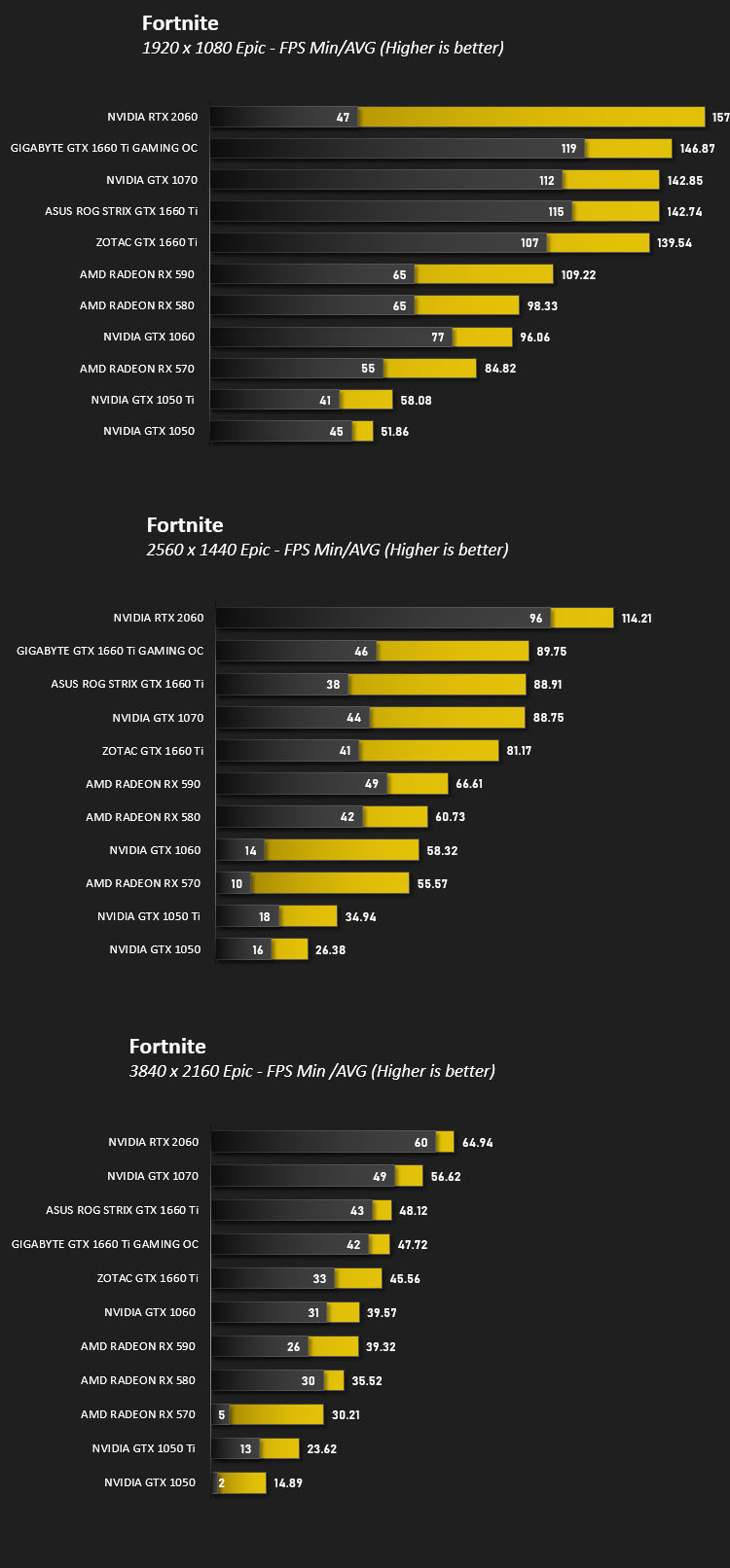
DX11: Fortnite
Fortnite Battle Royale is the FREE 100-player PvP mode in Fortnite. One giant map. A battle bus. Fortnite building skills and destructible environments combined with intense PvP combat. The last one standing wins.

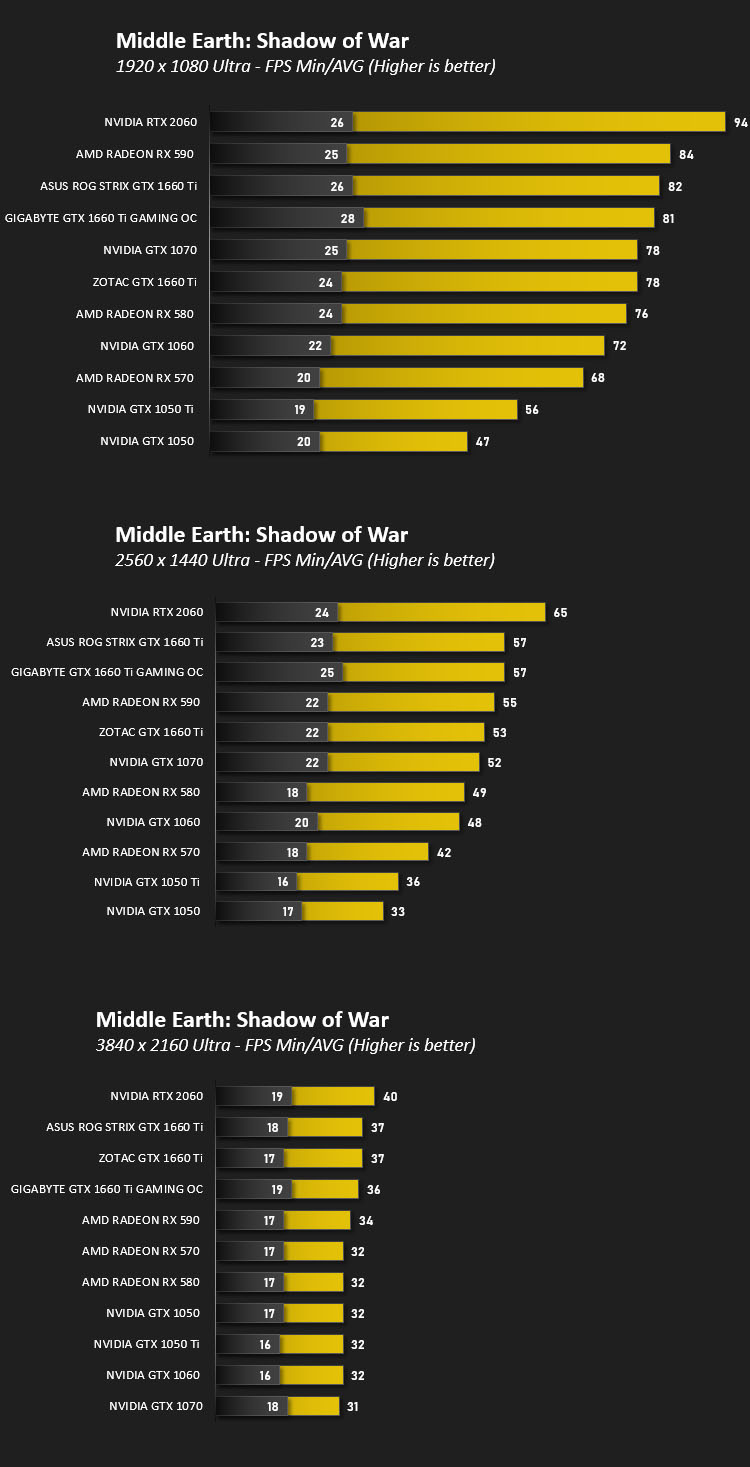
DX11: Middle Earth: Shadow of War
Middle-earth: Shadow of War is an action role-playing video game developed by Monolith Productions and published by Warner Bros. Interactive Entertainment. It is the sequel to 2014’s Middle-earth: Shadow of Mordor.

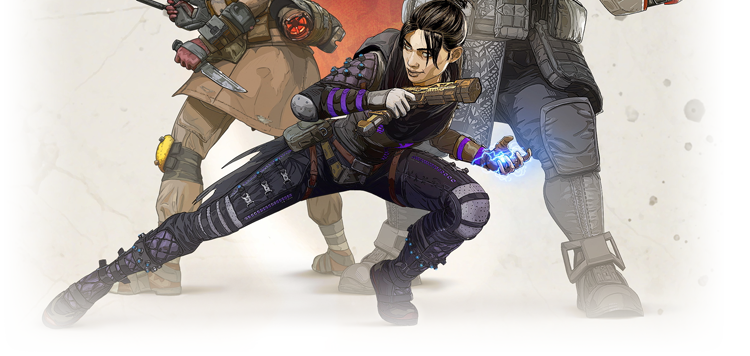
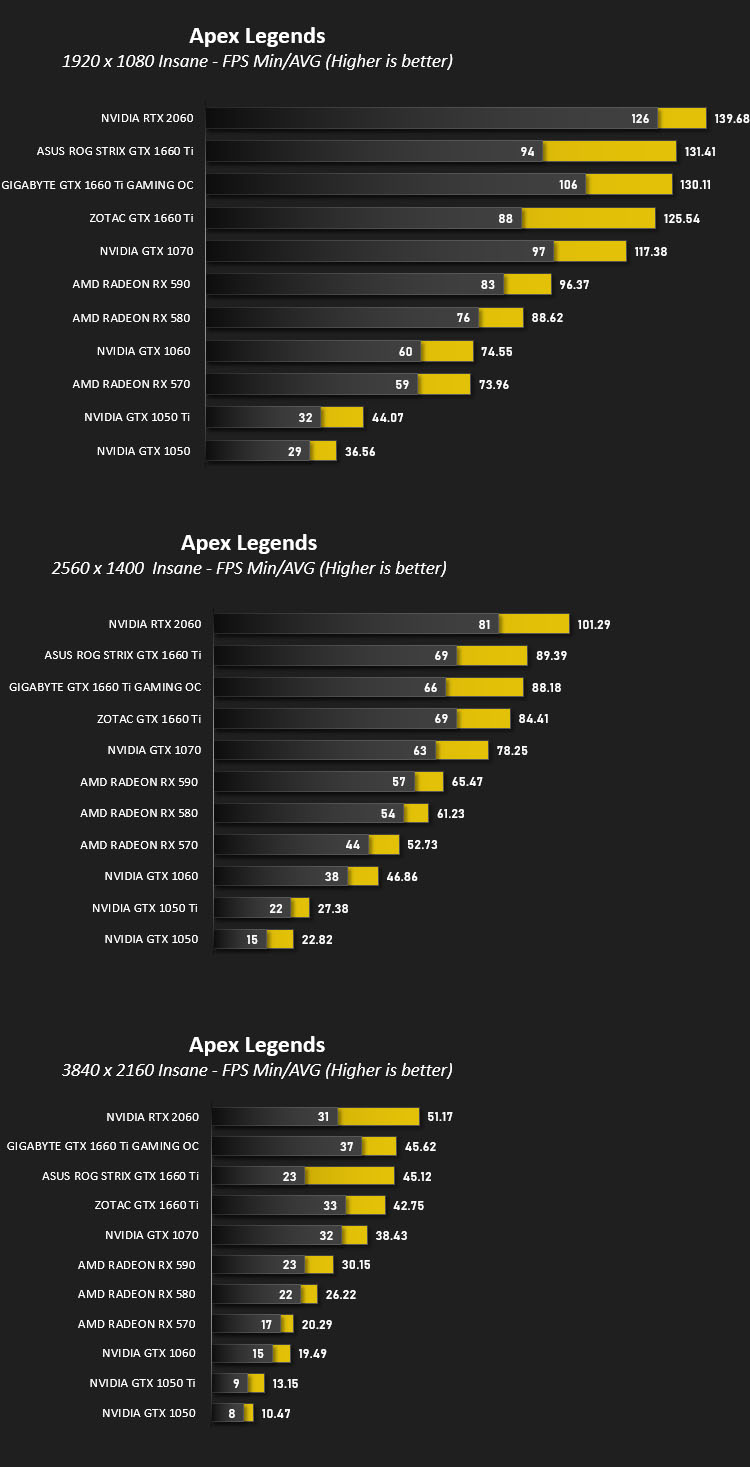
DX11: Apex Legends
Apex Legends is a free-to-play battle royale game developed by Respawn Entertainment and published by Electronic Arts. Set in the same universe as Titanfall, the game was released for Microsoft Windows, PlayStation 4, and Xbox One on February 4, 2019.
DX12: Shadow of the Tomb Raider
Shadow of the Tomb Raider is an action-adventure video game developed by Eidos Montréal in conjunction with Crystal Dynamics and published by Square Enix. It continues the narrative from the 2013 game Tomb Raider and its sequel Rise of the Tomb Raider, and is the twelfth mainline entry in the Tomb Raider series.


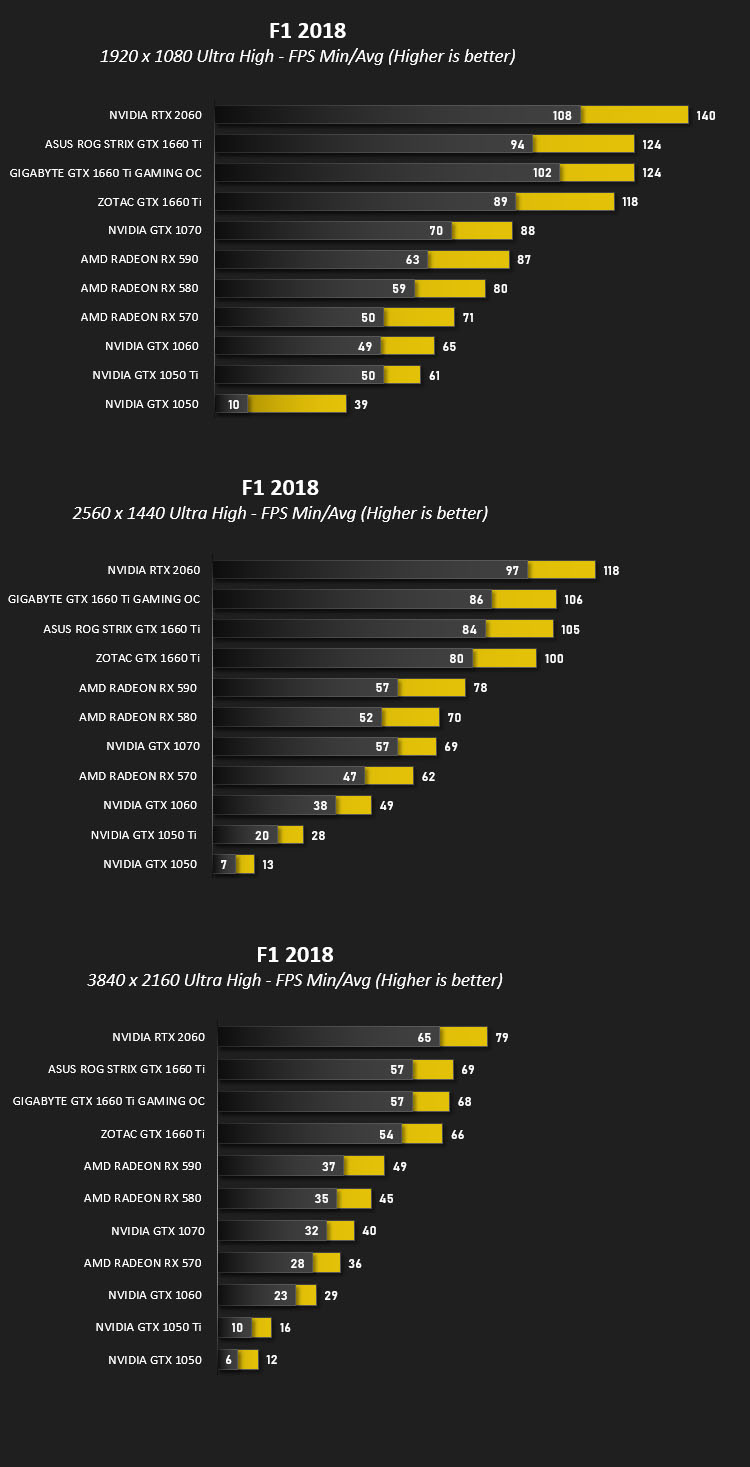
DX11: F1 2018
F1 2018 is a racing video game and the tenth instalment in the Formula One video game franchise developed and published by Codemasters. The game is based on the 2018 Formula One World Championship and includes all twenty-one circuits from the calendar and all twenty drivers and ten teams competing in the season.
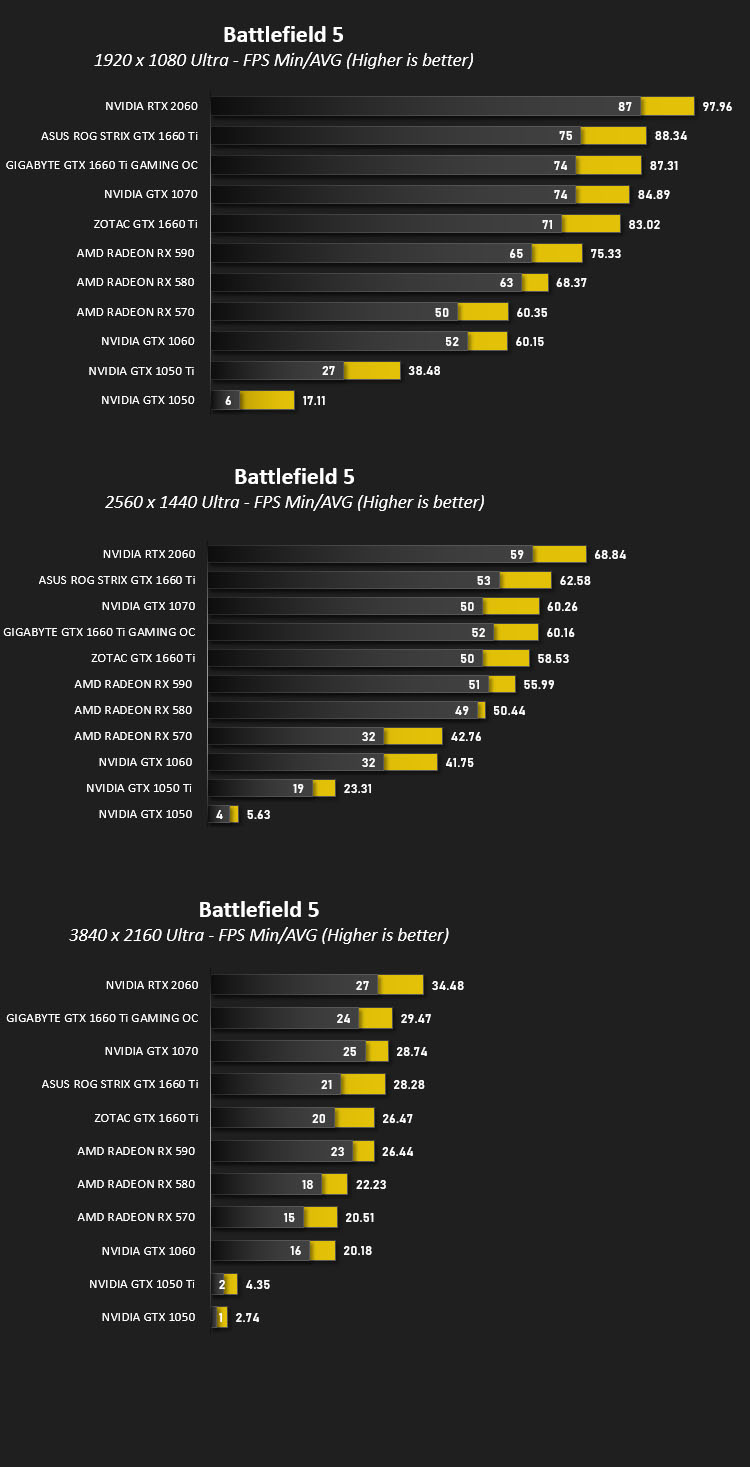
DX11: Battlefield V
Battlefield V is a first-person shooter video game developed by EA DICE and published by Electronic Arts. Battlefield V is the sixteenth installment in the Battlefield series.

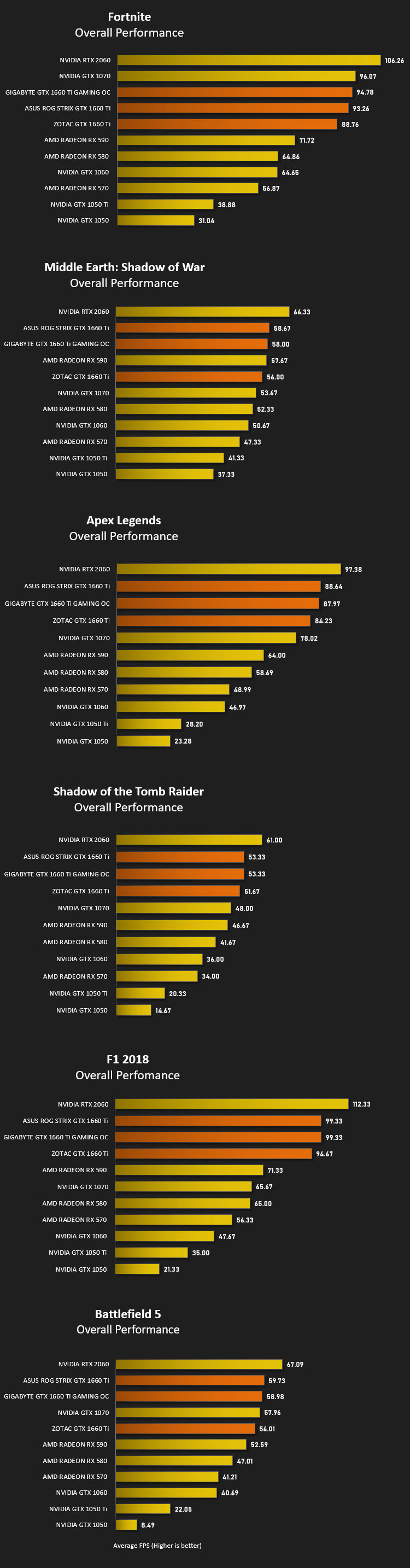
Overall Performance
Here we take a look at the overall performance of the graphics card. This figure is determined by finding the average FPS across all of the settings used in a particular benchmark(game) to give us an overall value.
Value For Money
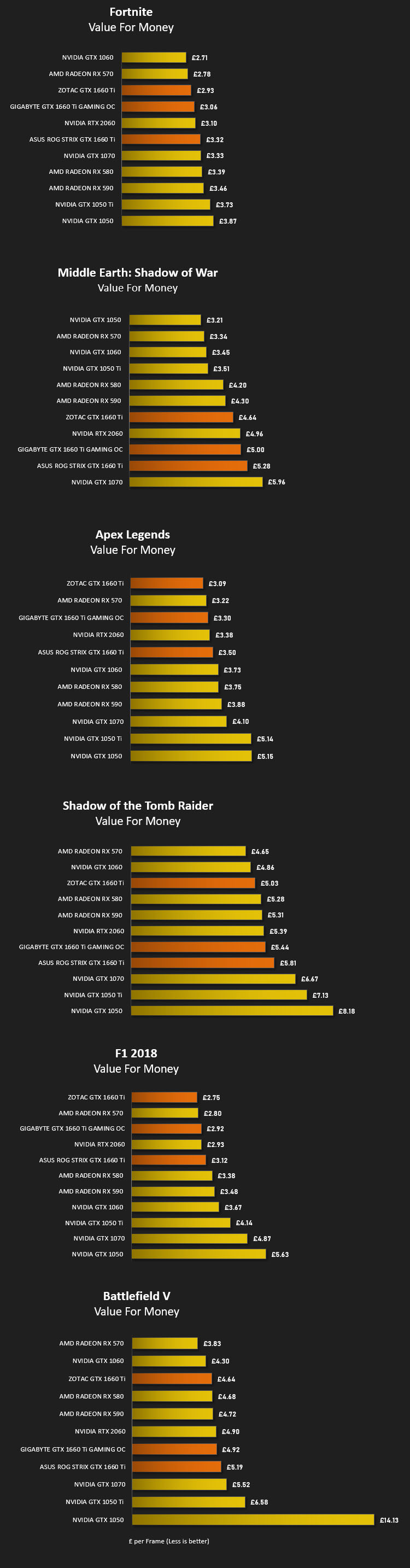
We make a simple calculation for this set of results. For each game we add all of the resulting FPS totals together and then divide by the four sets to give us an overall performance figure. While the figures alone do not give you an accurate picture of how the card will perform in any given scenario, they do tell you, when averaged, which GPU is the more capable across all of the benchmarks and settings tested.
Please note: we’ve used GBP for currency but since this is relative – regardless of which currency you use, this will give you a good indication of value for money.
Conclusion
The dust hasn’t quite settled from the GTX 1660 Ti launch at the end of last week as we’re still exploring more models such as the distinguished GIGABYTE’s GTX 1660 Ti GAMING OC, and we have to confess, we’ve been mightily impressed by what’s on offer.
GIGABYTE’s Windforce cooler needs no introduction as it’s been a notable fixture on their graphics cards for many years – the latest edition (Windforce 3X) delivers on what it sets out to – low noise and low temperatures. The cooler on a graphics card forms the physical appearance, and while the shroud may be entirely plastic it still looks sleek and will merge into any configuration very well. It’s the first time we’ve seen GIGABYTE include a plastic backplate and although we’d prefer metal, it still offers protection and reduces overall weight anyway.
Pitting the GAMING OC against other GTX 1660 Ti graphics cards highlights how resilient GIGABYTE’s offering is. It managed to go head to head with the ASUS STRIX GTX 1660 Ti which is considerably more expensive. Not only was the GIGABYTE model able to deliver similar cooling performance too, but this card is the best overclocker we’ve found thus far. We managed to push the GPU boost up to 2007MHz from 1860MHz, allowing us to tap into an extra 10 fps in-game.
Pricing is always a contributing factor when purchasing any new kit but the margins with GTX 1660 Ti couldn’t be any more critical, since this graphics card can in some cases, enter the same territory as the RTX 2060 which boasts superior performance and adds in RTX technologies which the GTX 1660 Ti lacks. However, GIGABYTE has sensibly slotted the GAMING OC around the MSRP even though it has a high-end thermal design and factory overclock. This GPU can be purchased for £289 GBP – $289 USD – $529 AUD which we think is good value for money!
The GTX 1660 Ti GAMING OC ticks all the boxes and still hovers around the MSRP. If you’re in the market for such a GPU then we can highly recommend this model.
Pros
+ Neutral aesthetics work well
+ Decent cooler – low-noise/low-temp
+ Excellent 1080p performance
+ Comes with factory overclock
+ Subtle RGB lighting
+ Overclocks very well
Mediocre
+- Plastic backplate
Cons
– Very long
+ Neutral aesthetics work well
+ Decent cooler – low-noise/low-temp
+ Excellent 1080p performance
+ Comes with factory overclock
+ Subtle RGB lighting
+ Overclocks very well
Mediocre
+- Plastic backplate
Cons
– Very long
Click here for an explanation of our awards at Vortez.net.
Stay connected with the Vortez Social Media pages:
Join in with the discussions on Discord