In our first Intel X299 motherboard review we take a look at what GIGABYTE has to offer in the X299 AORUS-Gaming 3 – which offers Skylake-X and Kaby Lake-X processors a catalogue of enthusiast-grade features.

Product on Review: AORUS X299-Gaming 3 Motherboard
Manufacturer & Sponsor: GIGABYTE
Street Price: £259 GBP / $279 USD
To say the CPU and motherboard markets are alive would be a clear understatement. Since Spring of this year we’ve seen the re-emergence of AMD as they shifted the tide with their long-awaited Zen architecture. Unlike previous generations, AMD Ryzen has offered a realistic threat to Intel’s reign and the shockwaves are still being felt – today marks the release of Intel’s Basin Falls platform aka LGA2066/X299, something many were expecting towards the end of the year; many assume that AMD’s Threadripper has caused Intel to fast-track this new platform and we can only assume that to be the case.
So today we’ll be exploring a new Intel X299 motherboard in the form of the GIGABYTE X299 AORUS-Gaming 3. In GIGABYTE’s AORUS lineup the Gaming 3 sits at the bottom of the stack – behind the Gaming 7 and Gaming 9, both of these boards will offer greater features and a bigger price-tag.
The Gaming 3 is therefore a mid-high end motherboard in the X299 range and carries with it numerous features – some of which include; dual M.2 slots, 3-way graphics card support, and server-class durability. On paper the Gaming 3 appears to have all the boxes ticked for performance, audio, connectivity and longevity – so let’s find out if this holds true!
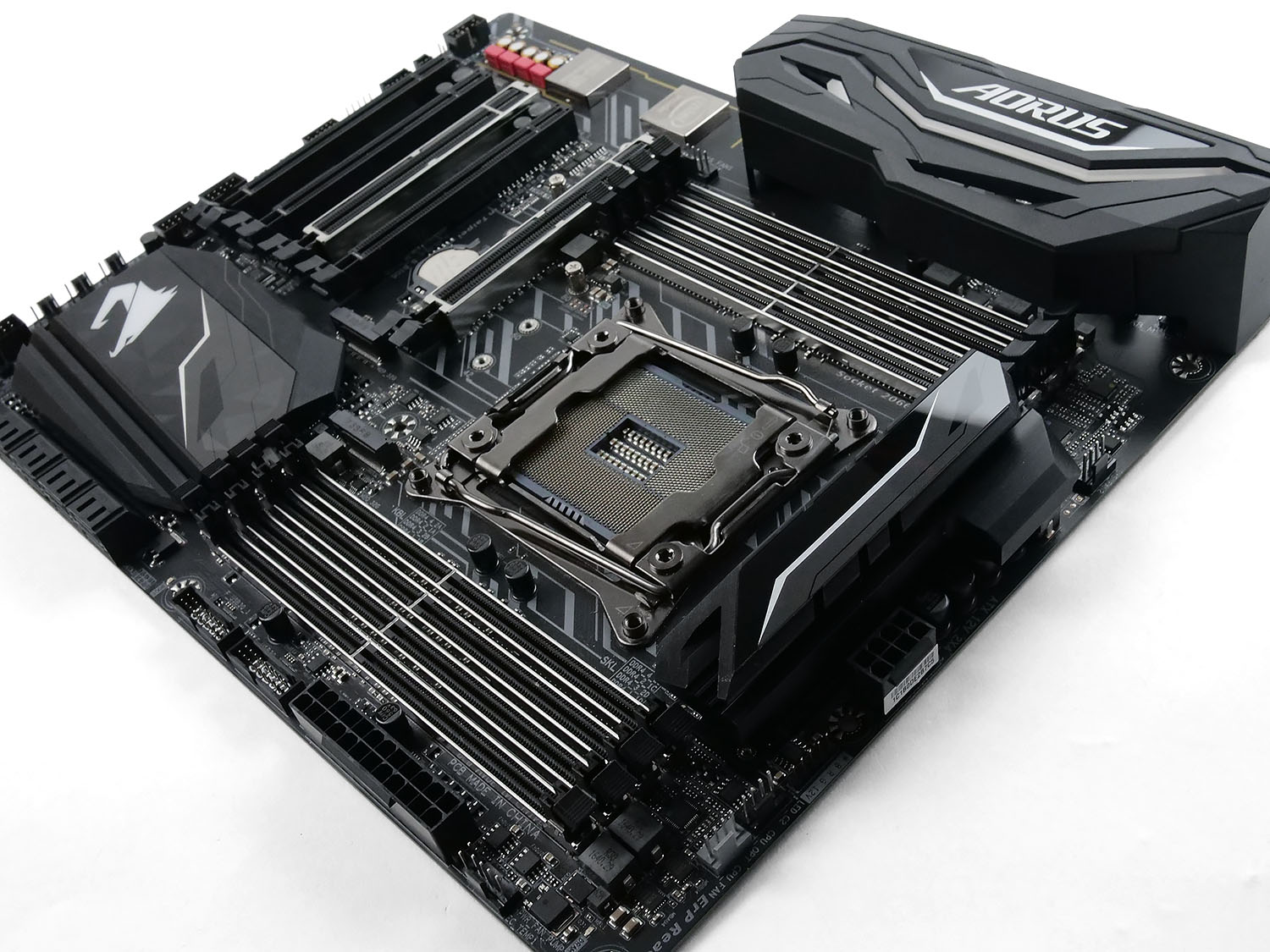
AORUS on their X299 motherboards
The AORUS X299 enthusiast motherboards are faster and more powerful than any motherboard the world has ever seen. With an aggressively redesigned armor and thermal heatsinks its sure to turn heads and catch eyes. Performance is no stranger to AORUS, with exotic cooling and an ability to be tuned to peak performance AORUS motherboards will exceed expectations.
Technical Specifications
Below are the technical specifications concerning the X299-GAMING 3:
CPU
Support for Intel® Core™ X series processors in the LGA2066 package
L3 cache varies with CPU
Intel® X299 Express Chipset
MEMORY
8 x DDR4 DIMM sockets supporting up to 128 GB of system memory.
* Support for up to 512 GB of system memory when using Registered DIMMs.
* Supported when using a 44-lane or 28-lane CPU.
4 x DDR4 DIMM sockets supporting up to 64 GB of system memory.
* Supported when using a 16-lane CPU.
4 channel memory architecture.
* Supported when using a 44-lane or 28-lane CPU.
Dual channel memory architecture.
Supported when using a 16-lane CPU.
Support for DDR4 4333(O.C.) / 4266(O.C.) / 4133(O.C.) / 4000(O.C.) / 3866(O.C.) / 3800(O.C.) / 3733(O.C.) / 3666(O.C.) / 3600(O.C.) / 3466(O.C.) / 3400(O.C.) / 3333(O.C.) / 3300(O.C.) / 3200(O.C.) / 3000(O.C.) / 2800(O.C.) / 2666(O.C.) / 2400 / 2133 MHz memory modules
Support for non-ECC Un-buffered DIMM memory modules
Support for Registered DIMM 1Rx8/2Rx8/1Rx4/2Rx4 memory modules (operate in non-ECC mode)
Support for Extreme Memory Profile (XMP) memory modules
AUDIO
Realtek® ALC1220 codec
High Definition Audio
2/4/5.1/7.1-channel
Support for S/PDIF Out
LAN
Intel® GbE LAN chip (10/100/1000 Mbit)
EXPANSION SLOTS
2 x PCI Express x16 slots, running at x16 (PCIEX16_1, PCIEX16_2)
1 x PCI Express x16 slot, running at x8 (PCIEX8)
2 x PCI Express x16 slots, running at x4 (PCIEX4_1, PCIEX4_2)
(All of the PCI Express slots conform to PCI Express 3.0 standard.)
STORAGE INTERFACE
Chipset:
1 x M.2 connector (Socket 3, M key, type 2242/2260/2280 SATA and PCIe x4/x2 SSD support) (M2Q_32G)
1 x M.2 connector (Socket 3, M key, type 2260/2280/22110 SATA and PCIe x4/x2 SSD support) (M2P_32G)
8 x SATA 6Gb/s connectors
Support for RAID 0, RAID 1, RAID 5, and RAID 10
MULTI-GRAPHICS TECHNOLOGY
Support for NVIDIA® Quad-GPU SLI™ and 3-Way* /2-Way* NVIDIA® SLI™ technologies
* Supported when using a 44-lane.
Support for AMD Quad-GPU CrossFire™ and 3-Way* /2-Way AMD CrossFire™ technologies
* Supported when using a 44-lane.
h2]USB
Chipset+ASMedia® USB 3.1 Gen 2 Controller:
1 x USB Type-C™ port on the back panel, with USB 3.1 Gen 2 support
1 x USB 3.1 Gen 2 Type-A port (red) on the back panel
Chipset:
10 x USB 3.1 Gen 1 ports (6 ports on the back panel, 4 ports available through the internal USB headers)
4 x USB 2.0/1.1 ports available through the internal USB headers
INTERNAL I/O CONNECTORS
1 x 24-pin ATX main power connector
1 x 8-pin ATX 12V power connector
1 x CPU fan header
1 x water cooling CPU fan header
4 x system fan headers
1 x system fan/water cooling pump header
1 x 3 Amp fan/water cooling pump header
1 x digital LED strip extension cable header
2 x RGB (RGBW) LED strip extension cable headers
2 x M.2 Socket 3 connectors
8 x SATA 6Gb/s connectors
1 x Intel® VROC Upgrade Key header
1 x front panel header
1 x front panel audio header
1 x S/PDIF Out header
2 x USB 3.1 Gen 1 headers
2 x USB 2.0/1.1 headers
1 x Thunderbolt™ add-in card connector
1 x Trusted Platform Module (TPM) header
1 x power button
1 x OC button
2 x temperature sensor headers
1 x Clear CMOS jumper
BACK PANEL CONNECTORS
1 x PS/2 keyboard/mouse port
1 x USB Type-C™ port, with USB 3.1 Gen 2 support
1 x USB 3.1 Gen 2 Type-A port (red)
6 x USB 3.1 Gen 1 ports
1 x RJ-45 port
6 x audio jacks (Center/Subwoofer Speaker Out, Rear Speaker Out, Side Speaker Out, Line In, Line Out, Mic In)
I/O CONTROLLER
iTE® I/O Controller Chip
H/W MONITORING
Voltage detection
Temperature detection
Fan speed detection
Water cooling flow rate detection
Overheating warning
Fan fail warning
Fan speed control
* Whether the fan (pump) speed control function is supported will depend on the fan (pump) you install
h2]BIOS
2 x 128 Mbit flash
Use of licensed AMI UEFI BIOS
Support for DualBIOS™
PnP 1.0a, DMI 2.7, WfM 2.0, SM BIOS 2.7, ACPI 5.0
UNIQUE FEATURES
Support for APP Center
* Available applications in APP Center may vary by motherboard model. Supported functions of each application may also vary depending on motherboard specifications.
3D OSD
@BIOS
AutoGreen
BIOS Setup
Color Temperature
Cloud Station
EasyTune
Easy RAID
Fast Boot
Game Boost
ON/OFF Charge
Platform Power Management
RGB Fusion
Smart Backup
Smart Keyboard
Smart TimeLock
Smart HUD
System Information Viewer
USB Blocker
V-Tuner
Support for Q-Flash
Support for Xpress Install
BUNDLE SOFTWARE
Norton® Internet Security (OEM version)
Intel® Optane™ Memory Ready
cFosSpeed
OPERATING SYSTEM
Support for Windows 10 64-bit
FORM FACTOR
ATX Form Factor; 30.5cm x 24.4cm
Unboxing & Closer Look Video
For this review we’ve produced a video showcasing the items included in the box and a detailed rundown of the included features on this motherboard. Please click on this link or watch the video below:Test Setup, Methodology & Overclocking
TEST SETUP
Cooling NZXT Kraken X62
Motherboard AORUS X299-GAMING 3
Memory 32GB Corsair Vengeance LPX 3000MHz
Graphics Radeon RX 480 8GB
Storage Kingston HyperX 240GB
PSU Corsair RM 1000 80 Plus Gold Certified PSU
Monitor AOC U2879VF
Capture Device Epiphan AV.iO 4K
BENCHMARKS
Cinebench R15 – CPU/OpenGL Score
x264 HD 4.0 – 1st and 2nd pass encoding
SiSoftware SANDRA – CPU & Memory benchmarks
POV-RAY – CPU benchmarks
TrueCrypt – CPU benchmarks
AIDA64 – CPU benchmarks & Memory
PCMark 8 – Home Suite & Photoshop
3DMark FireStrike – 3D Benchmark
Games – Rise of the Tomb Raider & Total War: WARHAMMER
OTHER SOFTWARE
Temperature Analysis: RealTemp
Stress Testing Software: AIDA64 Stability Test
CPU Specification Monitoring: CPU-Z
Performance Monitoring: MSI Afterburner
OVERCLOCKING
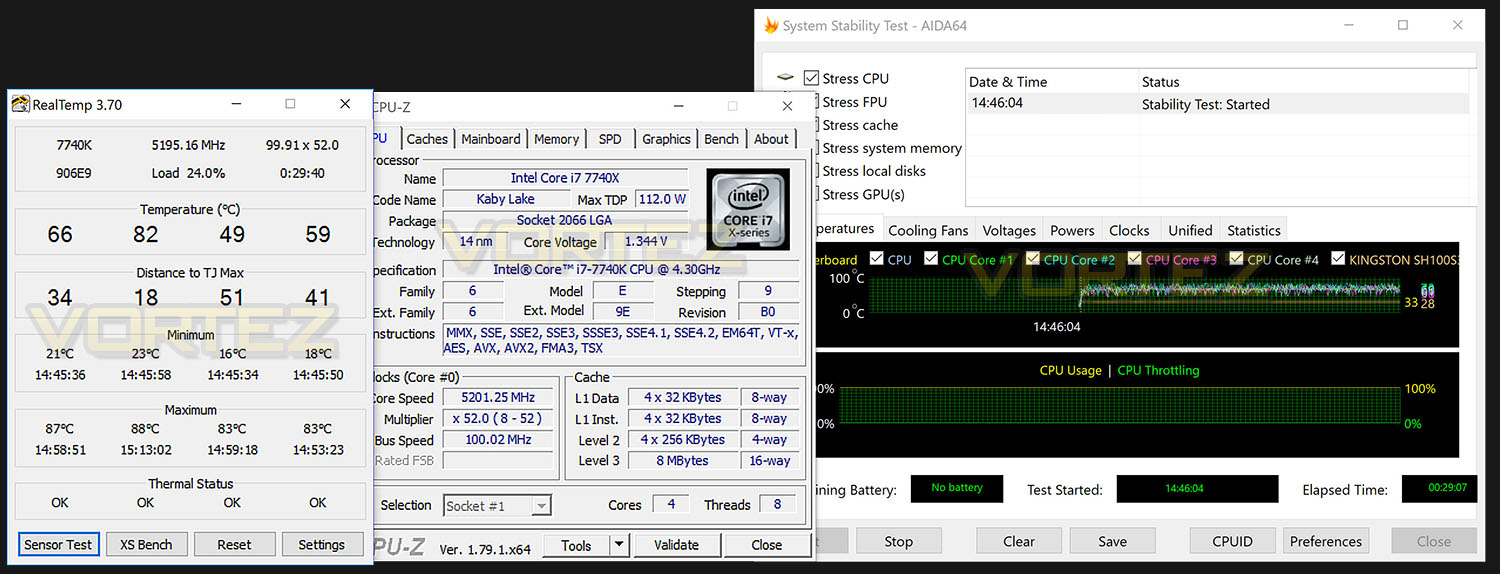
Much like previous generations of Intel platforms, the X299/LGA2066 allows us to apply overclocks to unlocked processors easily. Many variables can be adjusted including BCLK and ratios.
As we covered in our review of the Intel Core i7-7740X, the AORUS X299-GAMING 3 managed to achieve the best overclock out of the bunch of X299 motherboards we tested at launch. We were able to modify the clock speed to 5.2GHz with just 1.33v applied to the CPU core voltage which is an outstanding achievement.
Some of the other motherboards we tested weren’t able to climb beyond 5GHz – proving how capable AORUS’ digital power delivery system is over the competition. Going beyond 5.2GHz was possible but temperatures rose past the 90C mark which we regard as “too high”.
For a look at the AORUS BIOS, please check out the next page for a video tour of the interface.
Video Tour: BIOS
To demonstrate the options and navigation across the AORUS BIOS, we’ve captured usage with the Epiphan AV.iO 4K. To view the video simply click on this link or click on the video below:
Benchmarks: Power Consumption
It’s interesting to note the power consumption across all motherboards. Although they are using the X299 chipset, energy results can fluctuate between manufacturers due to the features and specifications that are integrated. First of all, for the idle tests the system is cold booted into Windows and no additional applications are executed – the watts are noted on the external energy monitor we use and then the system is loaded with 3DMark FireStrike – watts are again monitored for the duration of the test and the highest rated wattage result is then noted down. Below are the results of this energy test.
Benchmarks: Cinebench R15
CINEBENCH is a real-world cross platform test suite that evaluates your computer’s performance capabilities. CINEBENCH is based on MAXON’s award-winning animation software CINEMA 4D, which is used extensively by studios and production houses worldwide for 3D content creation. MAXON software has been used in blockbuster movies such as Iron Man 3, Oblivion, Life of Pi or Prometheus and many more.
Benchmarks: X264 HD
Simply put, this test measures how fast your machine can encode a short, DVD quality MPEG-2 video clip into a high-quality x264 video clip. What’s x264, you ask? It’s more or less the next-generation Xvid/DivX codec. I think it’s ideal for a benchmark because the application (x264.exe) reports fairly accurate compression results (in frames per second) for each pass of the video encoding process, and it uses multi-core processors very efficiently.
Benchmarks: SiSoftware SANDRA
SANDRA isn’t always a benchmark that is included in hardware reviews but we believe it shouldn’t be ignored. SANDRA provides a vigorous package that tests your system in a rather large array of benchmarks. There are many aspects of benchmark that can be executed. We will be considering – CPU and memory tests.
Benchmarks: POV-RAY
Persistence of Vision Raytracer’s PovRay is a free and open source 3D animator application with versions for computers with different operating systems.
This product allows users to build their custom 3D worlds with excellent quality despite their computer’s hardware. It has adjustable options for levels of radiance, refraction, and reflection. Calculation time may vary depending on the computer model, but PovRay can adapt to many computer builds, and is supported by the open source community.
This product allows users to build their custom 3D worlds with excellent quality despite their computer’s hardware. It has adjustable options for levels of radiance, refraction, and reflection. Calculation time may vary depending on the computer model, but PovRay can adapt to many computer builds, and is supported by the open source community.
Benchmarks: TrueCrypt
TrueCrypt is a discontinued source-available freeware utility used for on-the-fly encryption (OTFE). It can create a virtual encrypted disk within a file or encrypt a partition or (under Microsoft Windows except Windows 8 with GPT) the entire storage device (pre-boot authentication).
Benchmarks: AIDA64
AIDA64 Product PageThis simple integer benchmark focuses on the branch prediction capabilities and the misprediction penalties of the CPU. It finds the solutions for the classic “Queens problem” on a 10 by 10 sized chessboard. At the same clock speed theoretically the processor with the shorter pipeline and smaller misprediction penalties will attain higher benchmark scores. For example — with HyperThreading disabled — the Intel Northwood core processors get higher scores than the Intel Prescott core based ones due to the 20-step vs 31-step long pipeline. CPU Queen test uses integer MMX, SSE2 and SSSE3 optimizations.
Benchmarks: PCMark 8
PCMark 8 combines performance benchmarking with battery life measurement and includes tests based on popular Adobe and Microsoft applications. Whether you are looking for long battery life, or maximum power, PCMark 8 will help you find the devices that offer the perfect combination of efficiency and performance for your needs. It’s the complete PC performance benchmark for home and business.
Benchmarks: PCMark 8 Photoshop
The PCMark 8 Applications benchmark measures system performance using popular applications from the Adobe Creative Suite and Microsoft Office. You can choose which tests to run based on the applications installed on your system. Each test automatically steps through a series of actions such as opening, editing and saving a file. The results are used to calculate the PCMark 8 Applications scores for the system.
Benchmarks: 3DMark FireStrike
3DMark FireStrike Product PageFire Strike is our new showcase DirectX 11 benchmark designed for high-performance gaming PCs. It is our most ambitious and technical benchmark ever, featuring real-time graphics rendered with detail and complexity far beyond what is found in other benchmarks and games today. Fire Strike will only be available in the Windows editions of 3DMark initially.
Benchmarks: Tomb Raider & Total War: WARHAMMER
It’s important for us to perform a number of game benchmarks as well as the synthetic tests because gamers will want to know if there are any significant benefits. So here we have two recent gaming titles benchmarked with a Radeon RX 480 installed.
Conclusion
For those wanting a taste of the new Intel X299 chipset, you can’t go far wrong with what GIGABYTE has presented in the X299 AORUS-Gaming 3.
While this motherboard plays it safe with the overall aesthetics, having a neutral backdrop means the rest of your hardware will pair up very well indeed and the pre-installed RGB lighting and headers mean you can choose to add in the colour yourself – choosing a colour/theme of preference. So the styling is sleek and the overall layout of Gaming 3 arrives with the only complaint being that one of the M.2 drives will sit underneath the graphics card in the primary X16 PCI Express slot (and lack airflow) – however that’s only likely to be an issue should both M.2s be in use.
Speaking of storage, the Gaming 3 has eight SATA 3 6GB/s ports and also carries those two PCI-Express x4 Gen3 M.2 slots, so there is no shortage of available options for different storage standards. We also get up to eight fan headers which are positioned in key locations – twin CPU headers and a dedicated pump header are all found in close proximity to the CPU socket.
One particular area we are very pleased to see is the complete overhaul of USB 2.0 and even USB 3.0. On the back panel GIGABYTE has equipped this board to only have USB 3.1 – something we regard as a move in the right direction. A similar thing could be said for the wired gigabit LAN connection too – in the past GIGABYTE has opted for Killer LAN but instead they’re now embracing the benefits of an Intel-based controller, again, a wise decision.
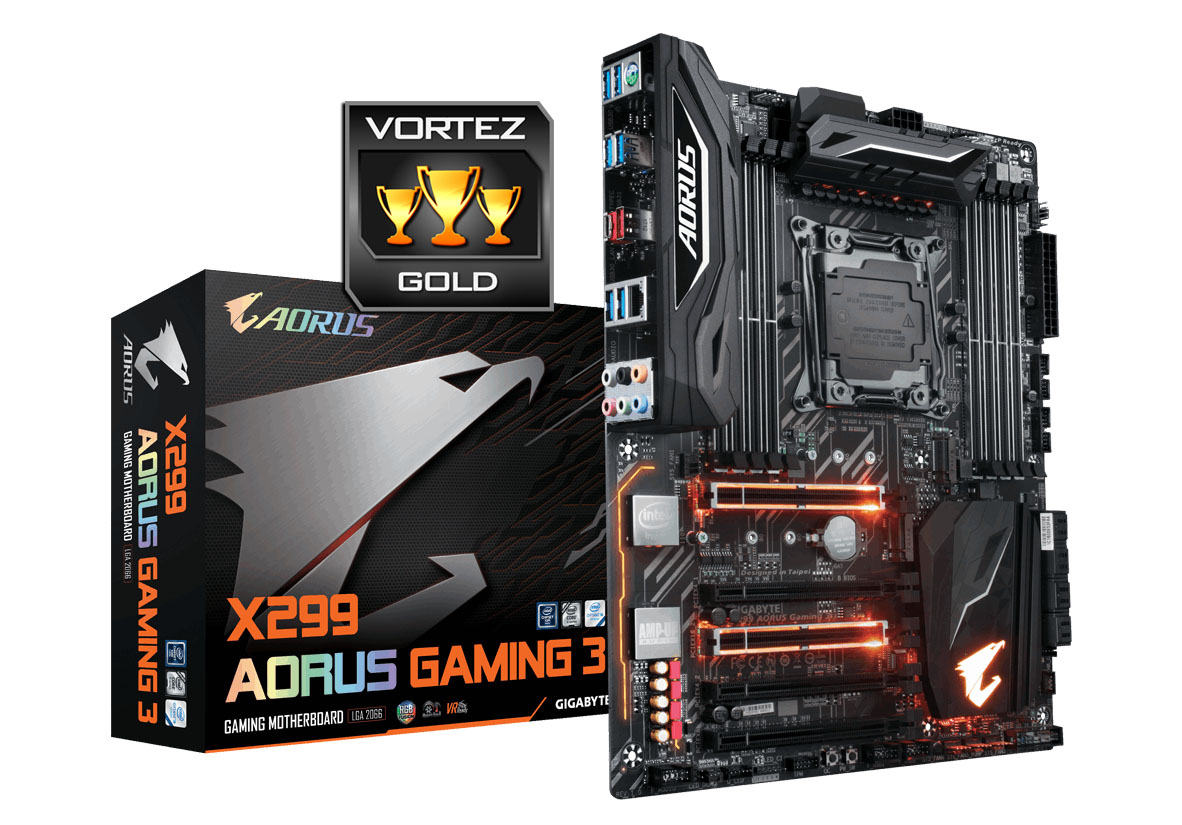
Moving on to performance the Gaming 3 maintains good overall results throughout the range of tests we ran, offering up consistent figures no matter the scenario. However, where this motherboard shines is when we step into the overclocking department. Among the Intel X299 motherboards we’ve tested for this platform launch, the Gaming 3 was the only board able to sustain a 5.2GHz with the Core i7-7740X. Due to the fact that Gaming 3 was able to offer the best overclock with this chip we decided to use it to review the quad-core Kabylake-X offering and what’s more is that of the bunch we tested, the AORUS comes in at the lowest price too!
Current pricing indicates that our Gaming 3 will arrive with a UK price of £259 GBP and $279 USD. Against the competition we have an extremely capable motherboard which is packed with features and which offers sever-level construction while delivering rock-solid overclocking prowess.
The X299-AORUS Gaming 3 is a stunning motherboard which does not shy away from serving up a whole host of exciting features. This might be the lowest model in the AORUS lineup but it carries server-level components and can push your CPU beyond the competition.
Pros
+ Desirable neutral theme
+ Excellent performance
+ Exceptional for overclocking
+ Arrives kitted out with all-USB 3.1 ports
+ Uses strengthened PCI Express/memory slots
+ Uses server-level construction/components
+ Up to eight fan headers
+ Additional onboard buttons
+ Lots of storage including dual M.2
+ Strong audio solution
Cons
– Lacks U.2
+ Desirable neutral theme
+ Excellent performance
+ Exceptional for overclocking
+ Arrives kitted out with all-USB 3.1 ports
+ Uses strengthened PCI Express/memory slots
+ Uses server-level construction/components
+ Up to eight fan headers
+ Additional onboard buttons
+ Lots of storage including dual M.2
+ Strong audio solution
Cons
– Lacks U.2
Click here for an explanation of our awards at Vortez.net.