Featuring an extensive VRM power phase, a stylish appearance and impressive onboard audio, the X570 AORUS PRO offers an impressive Ryzen 3rd Gen. platform. Read on for more.

Product on Review: GIGABYTE X570 AORUS PRO
Manufacturer: GIGABYTE
Street Price: GBP £254.98 / USD $269.99 / AUS $359.99
Back in 2017 when AMD first announced the AM4 platform and accompanying Ryzen processors, manufacturers were understandably reluctant to invest heavily into the X370 platform, releasing a few boards but not going all out like most typically will with Intel. The 2nd Gen. Ryzens were a small improvement where we saw some high-end options but when comparing to what has emerged on the X570 platform, it all pales in comparison. We’re seeing multiple different models to round out every possible budget, with GIGABYTE releasing a total of 10 motherboards so far.
Priced at £255 in the UK, $270 in the US and $360 in Aus, the motherboard isn’t quite as feature-rich as the higher tier AORUS solutions, some of which top out above £700, but don’t focus on that just yet because the X570 AORUS PRO still offers plenty for the enthusiast wanting to make the most of the AMD Ryzen 3000-series processor while also keeping their wallet happy.
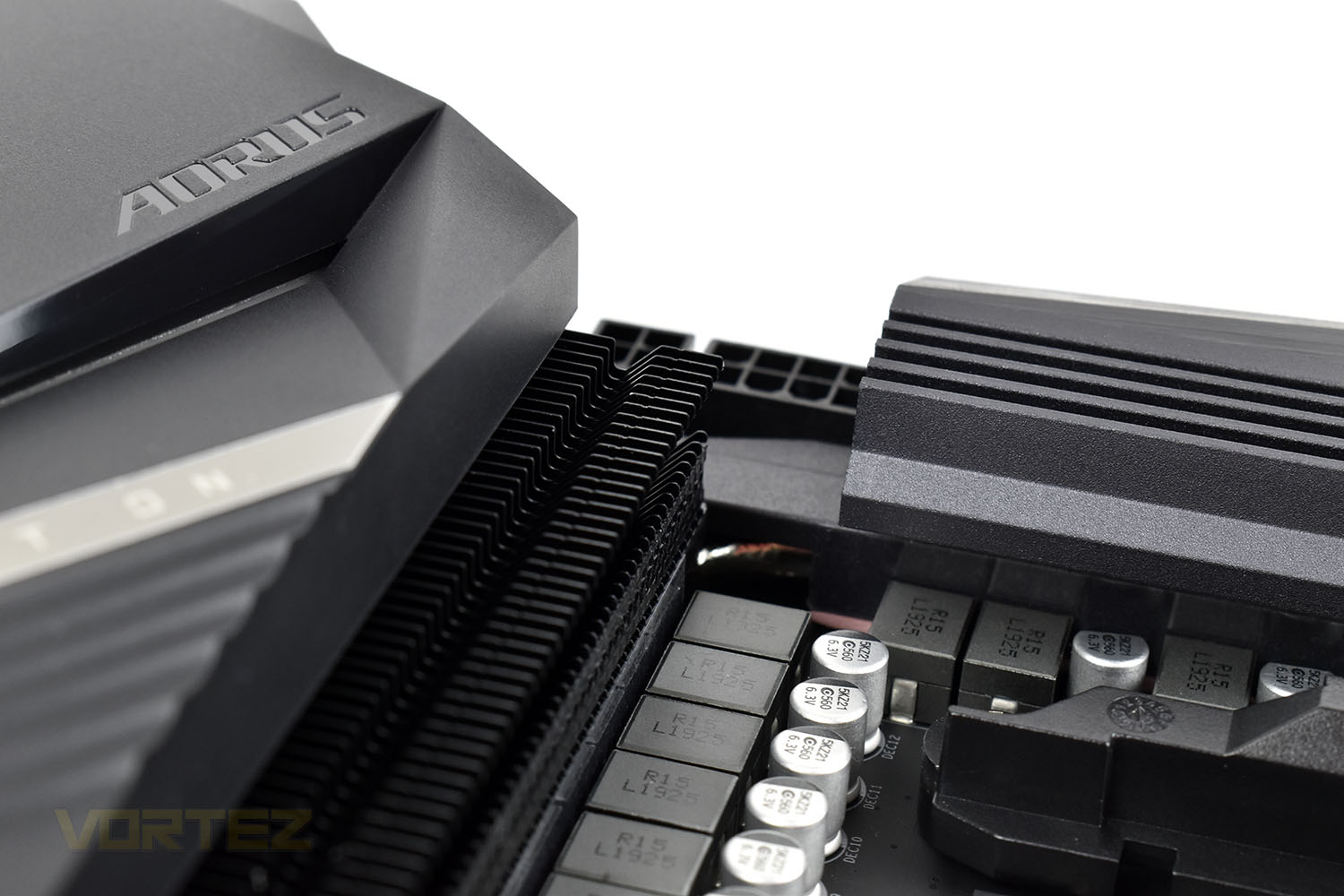
A robust 12+2 phase power supply, with stylish-yet-functional heatsinks are employed, multi-zone RGB lighting adorned across the rear IO heatsink and alongside the PCI-E adaptors. A pair of PCI-E 4.0 NVMe slots with Thermal-Guard heatsinks give access to rapid storage and ALC1220-VB onboard audio with WIMA Audio Capacitors guarantees excellent quality music and gameplay. Intel Gigabit LAN, PCI-E and Memory Armour, solid pin power connectors and much more round out the umpteen offerings.
We’ve already taken a look at the GIGABYTE X570 AORUS MASTER and now the X570 AORUS PRO which is two steps down in the pricing structure. The MASTER was an excellent offering with very few negatives, so the PRO will hopefully follow suit.
GIGABYTE on the X570 AORUS PRO
X570 AORUS PRO reaches a perfect balance between style and performance by combining the media acclaimed Fins-Array heatsink and Direct Touch heatpipe to provide 30% lower MOSFET temperatures for enthusiasts, overclockers and professional gamers
Technical Specifications
CPU
AMD Socket AM4, support for: 3rd Generation AMD Ryzen™ processors/ 2nd Generation AMD Ryzen™ processors/ 2nd Generation AMD Ryzen™ with Radeon™ Vega Graphics processors/ AMD Ryzen™ with Radeon™ Vega Graphics processors
(Please refer “CPU Support List” for more information.)
Chipset
AMD X570
Memory
3rd Generation AMD Ryzen™ processors:
Support for DDR4 4400(O.C.) / 4300(O.C.) / 4266(O.C.) / 4133(O.C.) / 4000(O.C.) / 3866(O.C.) / 3800(O.C.) / 3733(O.C.) / 3600(O.C.) / 3466(O.C.) / 3400(O.C.) / 3333(O.C.) / 3300(O.C.) / 3200 / 2933 / 2667 / 2400 / 2133 MHz memory modules
2nd Generation AMD Ryzen™ processors/AMD Ryzen™ with Radeon™ Vega Graphics processors:
Support for DDR4 3600(O.C.) / 3400(O.C.) / 3333(O.C.) / 3200(O.C.) / 2933 / 2667 / 2400 / 2133 MHz memory modules
4 x DDR4 DIMM sockets supporting up to 128 GB (32 GB single DIMM capacity) of system memory
Dual channel memory architecture
Support for ECC Un-buffered DIMM 1Rx8/2Rx8 memory modules*
* ECC mode supported by 3rd Gen AMD Ryzen™/ 2nd Gen AMD Ryzen™ and only PRO sku of 2nd Gen AMD Ryzen™ with Radeon™ Vega Graphics processors/ AMD Ryzen™ with Radeon™ Vega Graphics processors.
Support for non-ECC Un-buffered DIMM 1Rx8/2Rx8/1Rx16 memory modules
Support for Extreme Memory Profile (XMP) memory modules
(Please refer “Memory Support List” for more information.)
Onboard Graphics
Integrated Graphics Processor:
1 x HDMI port, supporting a maximum resolution of 4096×2160@60 Hz
* Support for HDMI 2.0 version, HDCP 2.2, and HDR.
Maximum shared memory of 16 GB
Note: For 2nd Generation AMD Ryzen™ with Radeon™ Vega Graphics processors/AMD Ryzen™ with Radeon™ Vega Graphics processors only.
Audio
Realtek® ALC1220-VB codec
* The back panel line out jack supports DSD audio.
High Definition Audio
2/4/5.1/7.1-channel
Support for S/PDIF Out
LAN
Intel® GbE LAN chip (10/100/1000 Mbit)
Expansion Slots
Integrated in the CPU (PCIEX16/PCIEX8):
· 3rd Generation AMD Ryzen™ processors:
1 x PCI Express x16 slot, supporting PCIe 4.0 and running at x16 (PCIEX16)
1 x PCI Express x16 slot, supporting PCIe 4.0 and running at x8 (PCIEX8)
· 2nd Generation AMD Ryzen™ processors:
1 x PCI Express x16 slot, supporting PCIe 3.0 and running at x16 (PCIEX16)
1 x PCI Express x16 slot, supporting PCIe 3.0 and running at x8 (PCIEX8)
* For optimum performance, if only one PCI Express graphics card is to be installed, be sure to install it in the PCIEX16 slot.
* The PCIEX8 slot shares bandwidth with the PCIEX16 slot. When using the 3rd Generation AMD Ryzen™ processors/2nd Generation AMD Ryzen™ processors, the PCIEX16 slot operates at up to x8 mode.
· 2nd Generation AMD Ryzen™ with Radeon™ Vega Graphics processors/AMD Ryzen™ with Radeon™ Vega Graphics processors:
1 x PCI Express x16 slot, supporting PCIe 3.0 and running at x8 (PCIEX16)
Integrated in the Chipset (PCIEX4/PCIEX1):
1 x PCI Express x16 slot, supporting PCIe 4.0*/3.0 and running at x4 (PCIEX4)
* For 3rd Generation AMD Ryzen™ processors only.
2 x PCI Express x1 slots, supporting PCIe 4.0*/3.0
* For 3rd Generation AMD Ryzen™ processors only.
Multi-Graphics Technology
Support for NVIDIA® Quad-GPU SLI™ and 2-Way NVIDIA® SLI™ technologies
Support for AMD Quad-GPU CrossFire™ and 2-Way AMD CrossFire™ technologies
Note: For 3rd Generation AMD Ryzen™ processors/2nd Generation AMD Ryzen™ processors only.
Storage Interface
Integrated in the CPU (M2A_SOCKET):
· 3rd Generation AMD Ryzen™ processors:
1 x M.2 connector (Socket 3, M key, type 2242/2260/2280/22110 SATA and PCIe 4.0 x4/x2 SSD support)
· 2nd Generation AMD Ryzen™ processors/2nd Generation AMD Ryzen™ with Radeon™ Vega Graphics processors/AMD Ryzen™ with Radeon™ Vega Graphics processors:
1 x M.2 connector (Socket 3, M key, type 2242/2260/2280/22110 SATA and PCIe 3.0 x4/x2 SSD support)
Integrated in the Chipset (M2B_SOCKET):
1 x M.2 connector (Socket 3, M key, type 2242/2260/2280/22110 SATA and PCIe 4.0*/3.0 x4/x2 SSD support)
* For 3rd Generation AMD Ryzen™ processors only.
6 x SATA 6Gb/s connectors
Support for RAID 0, RAID 1, and RAID 10
USB
Integrated in the CPU:
3 x USB 3.2 Gen 1 ports on the back panel
1 x USB 3.2 Gen 2*/Gen 1 Type-A port (red) on the back panel
* For 3rd Generation AMD Ryzen™ processors only.
Chipset:
1 x USB Type-C™ port with USB 3.2 Gen 2 support, available through the internal USB header
1 x USB Type-C™ port on the back panel, with USB 3.2 Gen 2 support
1 x USB 3.2 Gen 2 Type-A port (red) on the back panel
4 x USB 3.2 Gen 1 ports available through the internal USB headers
Chipset+USB 2.0 Hubs:
8 x USB 2.0/1.1 ports (4 ports on the back panel, 4 ports available through the internal USB headers)
Internal I/O Connectors
1 x 24-pin ATX main power connector
1 x 8-pin ATX 12V power connector
1 x 4-pin ATX 12V power connector
1 x CPU fan header
1 x water cooling CPU fan header
3 x system fan headers
2 x system fan/water cooling pump headers
2 x addressable LED strip headers
2 x RGB LED strip headers
1 x CPU cooler LED strip/RGB LED strip header
2 x M.2 Socket 3 connectors
6 x SATA 6Gb/s connectors
1 x front panel header
1 x front panel audio header
1 x USB Type-C™ port, with USB 3.2 Gen 2 support
2 x USB 3.2 Gen 1 headers
2 x USB 2.0/1.1 headers
1 x Trusted Platform Module (TPM) header (2×6 pin, for the GC-TPM2.0_S module only)
1 x Clear CMOS jumper
2 x temperature sensor headers
1 x Q-Flash Plus button
Back Panel Connectors
1 x HDMI port
1 x USB Type-C™ port, with USB 3.2 Gen 2 support
1 x USB 3.2 Gen 2*/Gen 1 Type-A port (red)
* For 3rd Generation AMD Ryzen™ processors only.
1 x USB 3.2 Gen 2 Type-A port (red)
3 x USB 3.2 Gen 1 ports
4 x USB 2.0/1.1 ports
1 x RJ-45 port
1 x optical S/PDIF Out connector
5 x audio jacks
I/O Controller
iTE® I/O Controller Chip
H/W Monitoring
Voltage detection
Temperature detection
Fan speed detection
Water cooling flow rate detection
Overheating warning
Fan fail warning
Fan speed control
* Whether the fan (pump) speed control function is supported will depend on the fan (pump) you install.
BIOS
2 x 128 Mbit flash
Use of licensed AMI UEFI BIOS
Support for DualBIOS™
PnP 1.0a, DMI 2.7, WfM 2.0, SM BIOS 2.7, ACPI 5.0
Unique Features
Support for APP Center
* Available applications in APP Center may vary by motherboard model. Supported functions of each application may also vary depending on motherboard specifications.
@BIOS
AutoGreen
Cloud Station
EasyTune
Fast Boot
Game Boost
ON/OFF Charge
RGB Fusion
Smart Backup
Smart Keyboard
Smart Survey
System Information Viewer
USB Blocker
Support for Q-Flash Plus
Support for Q-Flash
Support for Xpress Install
Bundled Software
Norton® Internet Security (OEM version)
cFosSpeed
XSplit Gamecaster + Broadcaster (12 months license)
Operating System
Support for Windows 10 64-bit
Form Factor
ATX Form Factor; 30.5cm x 24.4cm
Remark
Due to different Linux support condition provided by chipset vendors, please download Linux driver from chipset vendors’ website or 3rd party website.
Most hardware/software vendors may no longer offer drivers to support Win9X/ME/2000/XP. If drivers are available from the vendors, we will update them on the GIGABYTE website.
AMD Socket AM4, support for: 3rd Generation AMD Ryzen™ processors/ 2nd Generation AMD Ryzen™ processors/ 2nd Generation AMD Ryzen™ with Radeon™ Vega Graphics processors/ AMD Ryzen™ with Radeon™ Vega Graphics processors
(Please refer “CPU Support List” for more information.)
Chipset
AMD X570
Memory
3rd Generation AMD Ryzen™ processors:
Support for DDR4 4400(O.C.) / 4300(O.C.) / 4266(O.C.) / 4133(O.C.) / 4000(O.C.) / 3866(O.C.) / 3800(O.C.) / 3733(O.C.) / 3600(O.C.) / 3466(O.C.) / 3400(O.C.) / 3333(O.C.) / 3300(O.C.) / 3200 / 2933 / 2667 / 2400 / 2133 MHz memory modules
2nd Generation AMD Ryzen™ processors/AMD Ryzen™ with Radeon™ Vega Graphics processors:
Support for DDR4 3600(O.C.) / 3400(O.C.) / 3333(O.C.) / 3200(O.C.) / 2933 / 2667 / 2400 / 2133 MHz memory modules
4 x DDR4 DIMM sockets supporting up to 128 GB (32 GB single DIMM capacity) of system memory
Dual channel memory architecture
Support for ECC Un-buffered DIMM 1Rx8/2Rx8 memory modules*
* ECC mode supported by 3rd Gen AMD Ryzen™/ 2nd Gen AMD Ryzen™ and only PRO sku of 2nd Gen AMD Ryzen™ with Radeon™ Vega Graphics processors/ AMD Ryzen™ with Radeon™ Vega Graphics processors.
Support for non-ECC Un-buffered DIMM 1Rx8/2Rx8/1Rx16 memory modules
Support for Extreme Memory Profile (XMP) memory modules
(Please refer “Memory Support List” for more information.)
Onboard Graphics
Integrated Graphics Processor:
1 x HDMI port, supporting a maximum resolution of 4096×2160@60 Hz
* Support for HDMI 2.0 version, HDCP 2.2, and HDR.
Maximum shared memory of 16 GB
Note: For 2nd Generation AMD Ryzen™ with Radeon™ Vega Graphics processors/AMD Ryzen™ with Radeon™ Vega Graphics processors only.
Audio
Realtek® ALC1220-VB codec
* The back panel line out jack supports DSD audio.
High Definition Audio
2/4/5.1/7.1-channel
Support for S/PDIF Out
LAN
Intel® GbE LAN chip (10/100/1000 Mbit)
Expansion Slots
Integrated in the CPU (PCIEX16/PCIEX8):
· 3rd Generation AMD Ryzen™ processors:
1 x PCI Express x16 slot, supporting PCIe 4.0 and running at x16 (PCIEX16)
1 x PCI Express x16 slot, supporting PCIe 4.0 and running at x8 (PCIEX8)
· 2nd Generation AMD Ryzen™ processors:
1 x PCI Express x16 slot, supporting PCIe 3.0 and running at x16 (PCIEX16)
1 x PCI Express x16 slot, supporting PCIe 3.0 and running at x8 (PCIEX8)
* For optimum performance, if only one PCI Express graphics card is to be installed, be sure to install it in the PCIEX16 slot.
* The PCIEX8 slot shares bandwidth with the PCIEX16 slot. When using the 3rd Generation AMD Ryzen™ processors/2nd Generation AMD Ryzen™ processors, the PCIEX16 slot operates at up to x8 mode.
· 2nd Generation AMD Ryzen™ with Radeon™ Vega Graphics processors/AMD Ryzen™ with Radeon™ Vega Graphics processors:
1 x PCI Express x16 slot, supporting PCIe 3.0 and running at x8 (PCIEX16)
Integrated in the Chipset (PCIEX4/PCIEX1):
1 x PCI Express x16 slot, supporting PCIe 4.0*/3.0 and running at x4 (PCIEX4)
* For 3rd Generation AMD Ryzen™ processors only.
2 x PCI Express x1 slots, supporting PCIe 4.0*/3.0
* For 3rd Generation AMD Ryzen™ processors only.
Multi-Graphics Technology
Support for NVIDIA® Quad-GPU SLI™ and 2-Way NVIDIA® SLI™ technologies
Support for AMD Quad-GPU CrossFire™ and 2-Way AMD CrossFire™ technologies
Note: For 3rd Generation AMD Ryzen™ processors/2nd Generation AMD Ryzen™ processors only.
Storage Interface
Integrated in the CPU (M2A_SOCKET):
· 3rd Generation AMD Ryzen™ processors:
1 x M.2 connector (Socket 3, M key, type 2242/2260/2280/22110 SATA and PCIe 4.0 x4/x2 SSD support)
· 2nd Generation AMD Ryzen™ processors/2nd Generation AMD Ryzen™ with Radeon™ Vega Graphics processors/AMD Ryzen™ with Radeon™ Vega Graphics processors:
1 x M.2 connector (Socket 3, M key, type 2242/2260/2280/22110 SATA and PCIe 3.0 x4/x2 SSD support)
Integrated in the Chipset (M2B_SOCKET):
1 x M.2 connector (Socket 3, M key, type 2242/2260/2280/22110 SATA and PCIe 4.0*/3.0 x4/x2 SSD support)
* For 3rd Generation AMD Ryzen™ processors only.
6 x SATA 6Gb/s connectors
Support for RAID 0, RAID 1, and RAID 10
USB
Integrated in the CPU:
3 x USB 3.2 Gen 1 ports on the back panel
1 x USB 3.2 Gen 2*/Gen 1 Type-A port (red) on the back panel
* For 3rd Generation AMD Ryzen™ processors only.
Chipset:
1 x USB Type-C™ port with USB 3.2 Gen 2 support, available through the internal USB header
1 x USB Type-C™ port on the back panel, with USB 3.2 Gen 2 support
1 x USB 3.2 Gen 2 Type-A port (red) on the back panel
4 x USB 3.2 Gen 1 ports available through the internal USB headers
Chipset+USB 2.0 Hubs:
8 x USB 2.0/1.1 ports (4 ports on the back panel, 4 ports available through the internal USB headers)
Internal I/O Connectors
1 x 24-pin ATX main power connector
1 x 8-pin ATX 12V power connector
1 x 4-pin ATX 12V power connector
1 x CPU fan header
1 x water cooling CPU fan header
3 x system fan headers
2 x system fan/water cooling pump headers
2 x addressable LED strip headers
2 x RGB LED strip headers
1 x CPU cooler LED strip/RGB LED strip header
2 x M.2 Socket 3 connectors
6 x SATA 6Gb/s connectors
1 x front panel header
1 x front panel audio header
1 x USB Type-C™ port, with USB 3.2 Gen 2 support
2 x USB 3.2 Gen 1 headers
2 x USB 2.0/1.1 headers
1 x Trusted Platform Module (TPM) header (2×6 pin, for the GC-TPM2.0_S module only)
1 x Clear CMOS jumper
2 x temperature sensor headers
1 x Q-Flash Plus button
Back Panel Connectors
1 x HDMI port
1 x USB Type-C™ port, with USB 3.2 Gen 2 support
1 x USB 3.2 Gen 2*/Gen 1 Type-A port (red)
* For 3rd Generation AMD Ryzen™ processors only.
1 x USB 3.2 Gen 2 Type-A port (red)
3 x USB 3.2 Gen 1 ports
4 x USB 2.0/1.1 ports
1 x RJ-45 port
1 x optical S/PDIF Out connector
5 x audio jacks
I/O Controller
iTE® I/O Controller Chip
H/W Monitoring
Voltage detection
Temperature detection
Fan speed detection
Water cooling flow rate detection
Overheating warning
Fan fail warning
Fan speed control
* Whether the fan (pump) speed control function is supported will depend on the fan (pump) you install.
BIOS
2 x 128 Mbit flash
Use of licensed AMI UEFI BIOS
Support for DualBIOS™
PnP 1.0a, DMI 2.7, WfM 2.0, SM BIOS 2.7, ACPI 5.0
Unique Features
Support for APP Center
* Available applications in APP Center may vary by motherboard model. Supported functions of each application may also vary depending on motherboard specifications.
@BIOS
AutoGreen
Cloud Station
EasyTune
Fast Boot
Game Boost
ON/OFF Charge
RGB Fusion
Smart Backup
Smart Keyboard
Smart Survey
System Information Viewer
USB Blocker
Support for Q-Flash Plus
Support for Q-Flash
Support for Xpress Install
Bundled Software
Norton® Internet Security (OEM version)
cFosSpeed
XSplit Gamecaster + Broadcaster (12 months license)
Operating System
Support for Windows 10 64-bit
Form Factor
ATX Form Factor; 30.5cm x 24.4cm
Remark
Due to different Linux support condition provided by chipset vendors, please download Linux driver from chipset vendors’ website or 3rd party website.
Most hardware/software vendors may no longer offer drivers to support Win9X/ME/2000/XP. If drivers are available from the vendors, we will update them on the GIGABYTE website.
Packaging & Bundle
The AORUS Falcon has become quite synonymous with high end components since GIGABYTE introduced the brand a few years back. It adorns the front of their motherboards with the accompanying orange and black theme. The front of the box tells you plenty about what you can expect from the motherboard inside.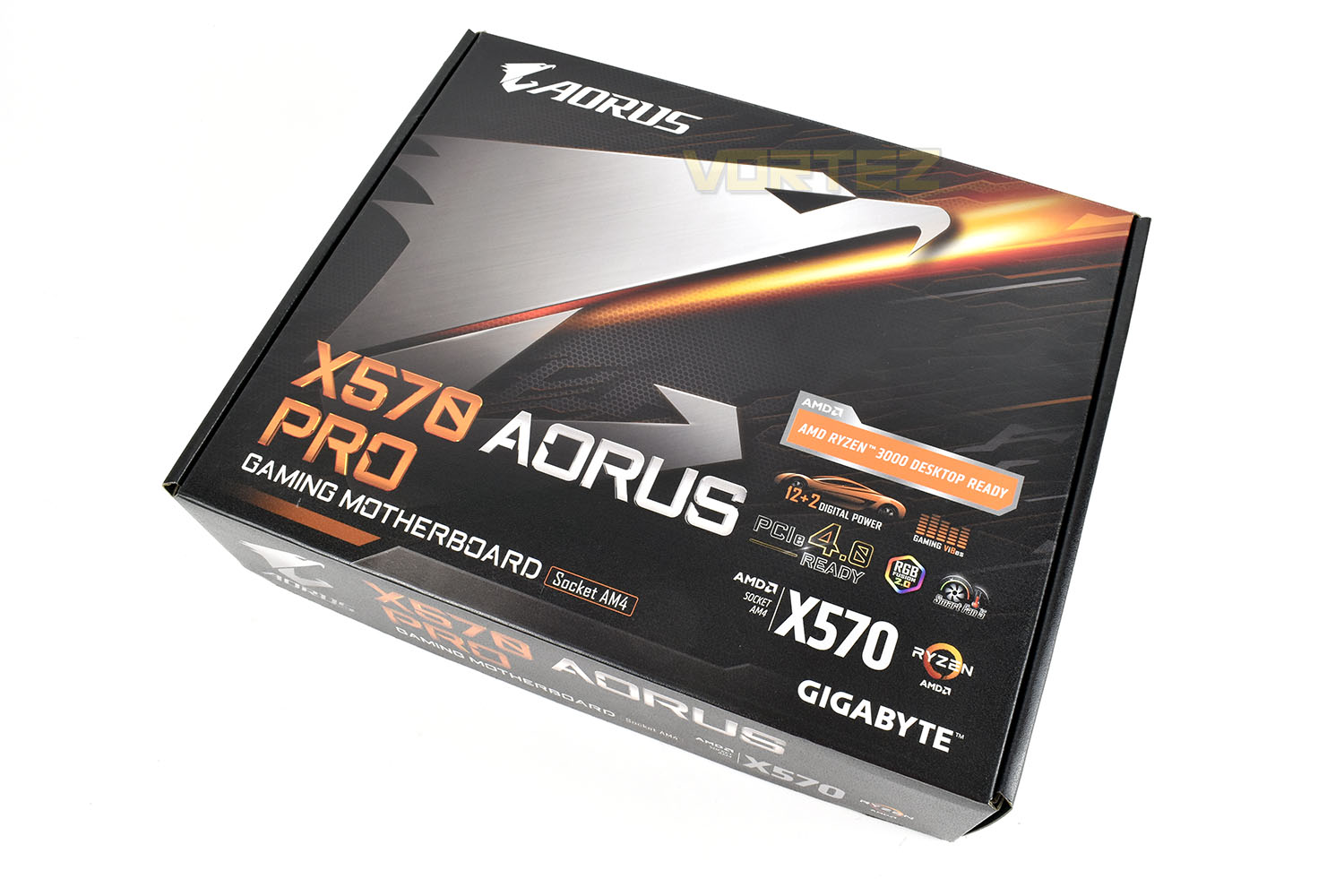
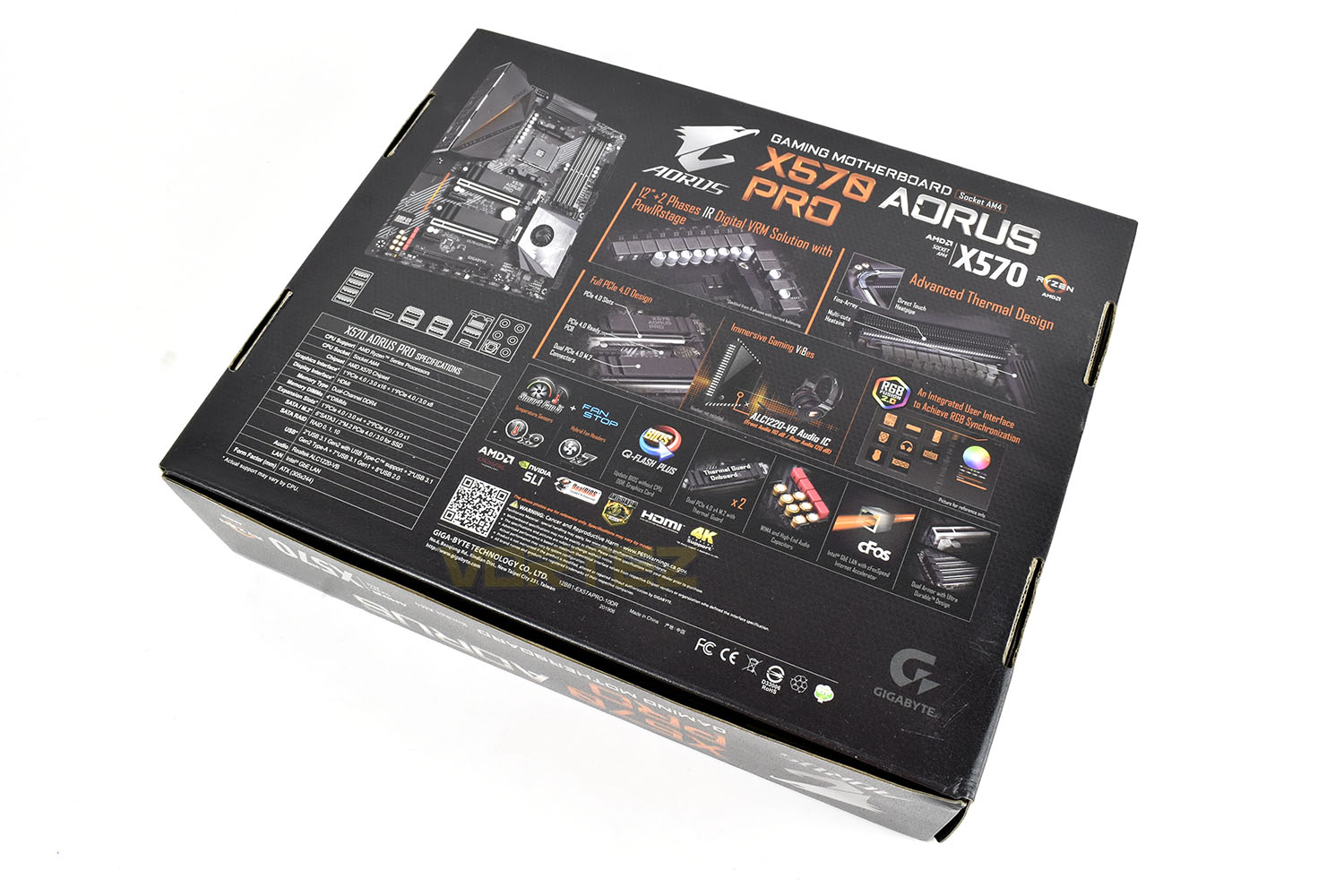
The back side is a bit overwhelming but the specifications table in the bottom-left is a great summary of the motherboard with ample illustrated images to explain what is what.
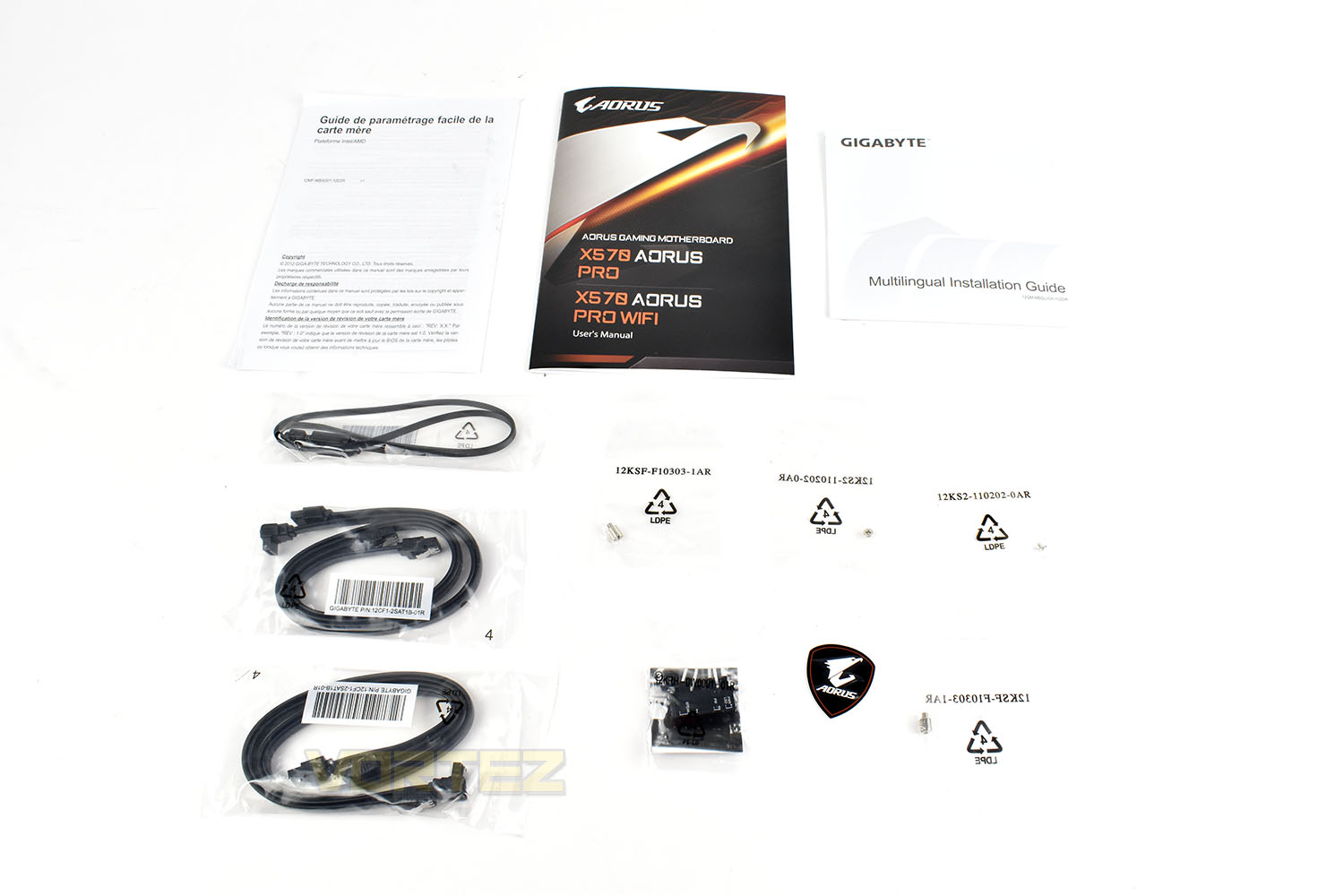
Included alongside your brand new AORUS PRO motherboard is a quartet of SATA 3 cables, an RGB extension, a couple of NVMe standoffs and screws, GIGABYTE’s G-Connector which helps with the fiddly case connections, an AORUS case sticker and, of course, the user manual.
Closer Look
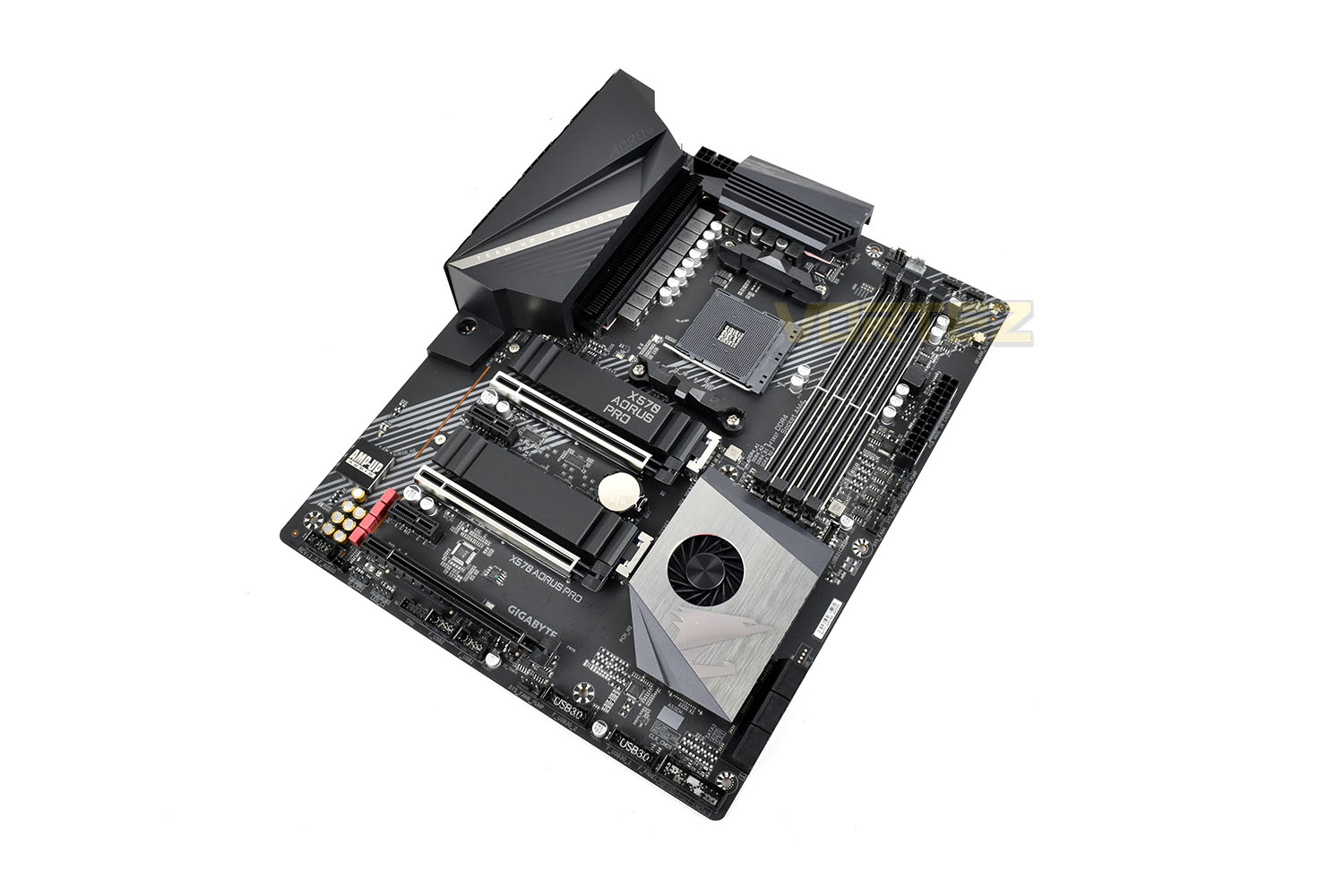
If you’ve seen any GIGABYTE AORUS motherboard from the past 18 months or so, the styling will be familiar. The black and silver theme looks great, if you ask us, lending itself well to the addition of RGB components which is all the rage right now. The AORUS PRO houses a couple of small RGB strips, one within the large block covering the rear IO and another behind the bottom-left section of the motherboard where the integrated soundcard resides.The board conforms to the usual ATX standard, 305mm x 244mm so will fit into most cases.
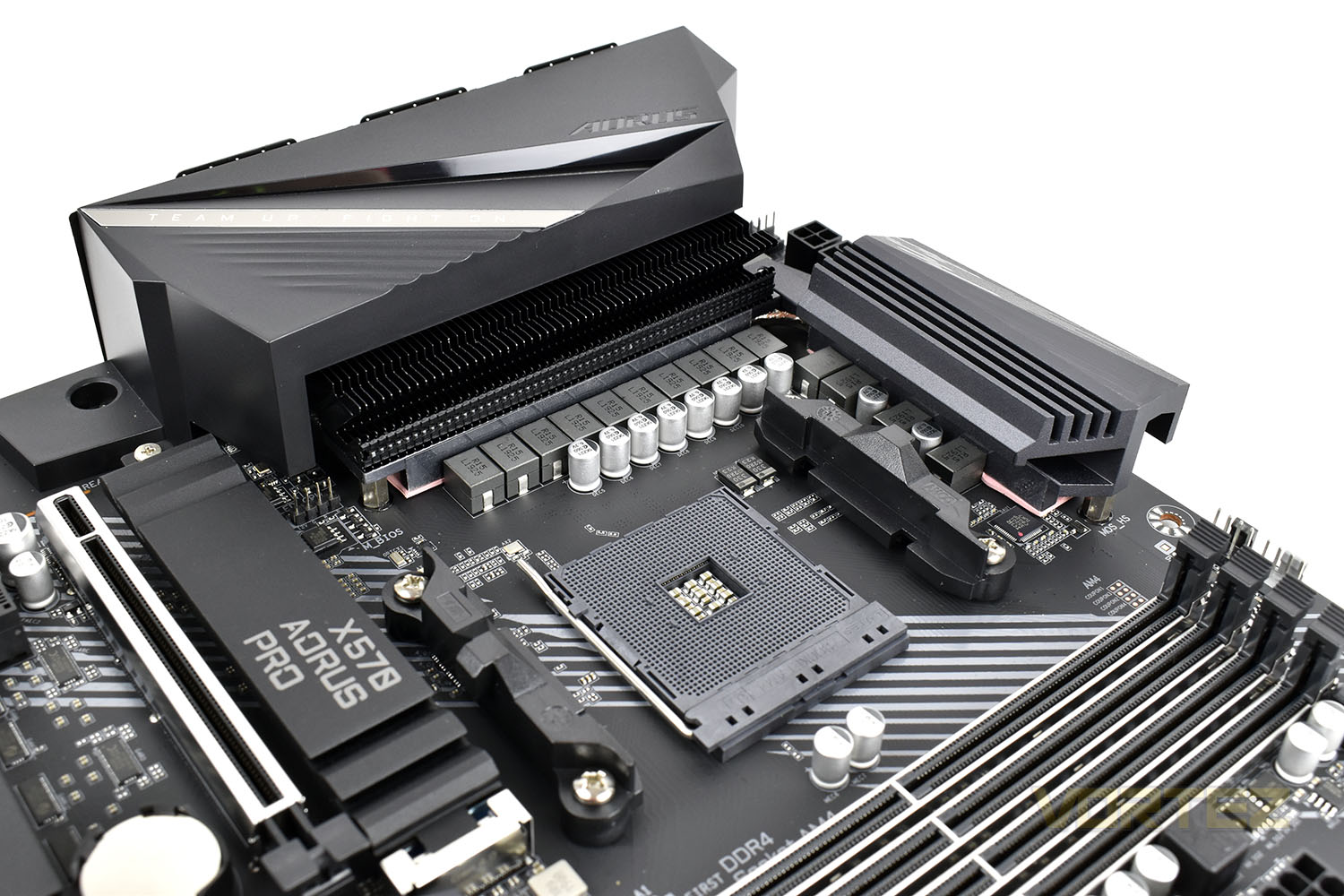
Lined up around the AM4 CPU socket is a 12+2 phase IR digital power design supplied by an 8+4 power connection in the top-left. Keeping the VRMs cool is a two-part heatsink, with an extensive fin array for massively increased surface area (around 300% more than a typical heatsink of equal size), joined up by a direct-touch heatpipe for optimal thermal transfer.
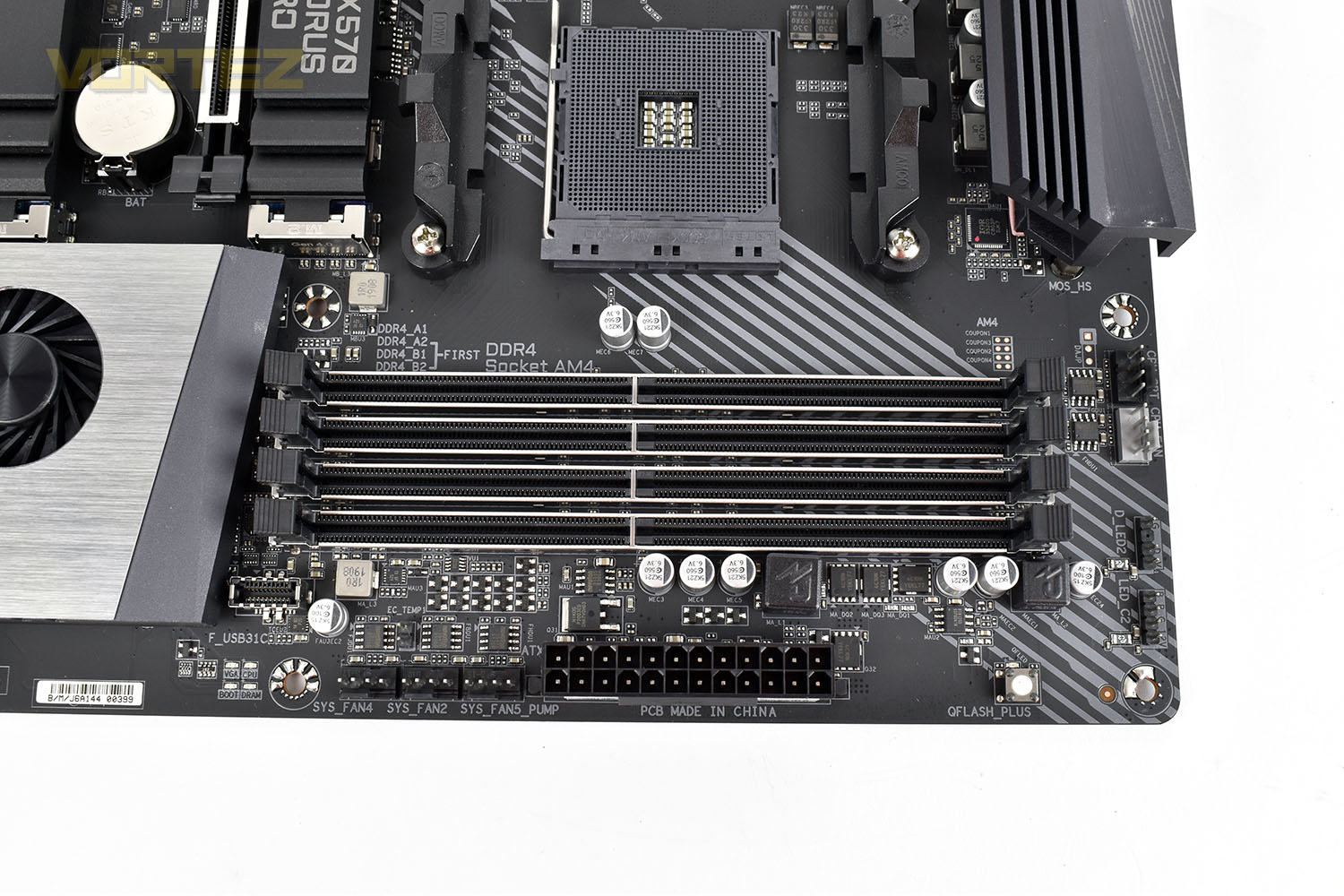
The four DRAM slots feature GIGABYTE’s Ultra Durable Memory Armour that prevents against PCB distortion, twisting or bending and reduces the chance of any possibly ESD interference for better memory stability.
DDR4 memory support extends all the way up to 4400MHz via XMP profiles. GIGABYTE work closely with memory vendors and go through rigorous testing procedures to ensure their motherboards with over 1000 different memory kits for the best possible compatibility.
Also located in this region are a pair of CPU 4-pin PWM fan connections and a pair of RGB headers. The small white button is GIGABYTE’s Q Flash Plus, allowing you to upgrade the BIOS on the motherboard without a CPU, GPU or RAM installed, handy for a variety of reasons. Finally, there’s the 24-pin motherboard power connection, a trio of PWM 4-pin fan headers and a USB 3.2 Gen 1 front header.
The bottom half of the X570 AORUS PRO is kitted out with several PCI-E devices, all operating on the new 4.0 specification brought about by AMD’s 3000-series processors.
There’s a couple of NVMe slots, both of which are adorned with Thermal Guard heatsinks which, in theory, help to reduce the temperature of power-hungry NVMe drives to preserve peak performance for longer. These may be particularly useful for the current crop of PCI-E 4.0 NVMe drives with a considerable increase in bandwidth over their 3.0 counterparts.
Alongside the M.2 ports are three PCI-E x16 slots, two of which feature GIGABYTE’s Ultra Dural PCI-E Armour for a much stronger port. This is arguably much more important than the armour wrapped around the DRAM slots with the weight of some GPUs and their triple slot coolers posing a real threat to some weaker all-plastic slot designs. Finally there’s a couple of PCI-E x1 ports for smaller add-in cards.
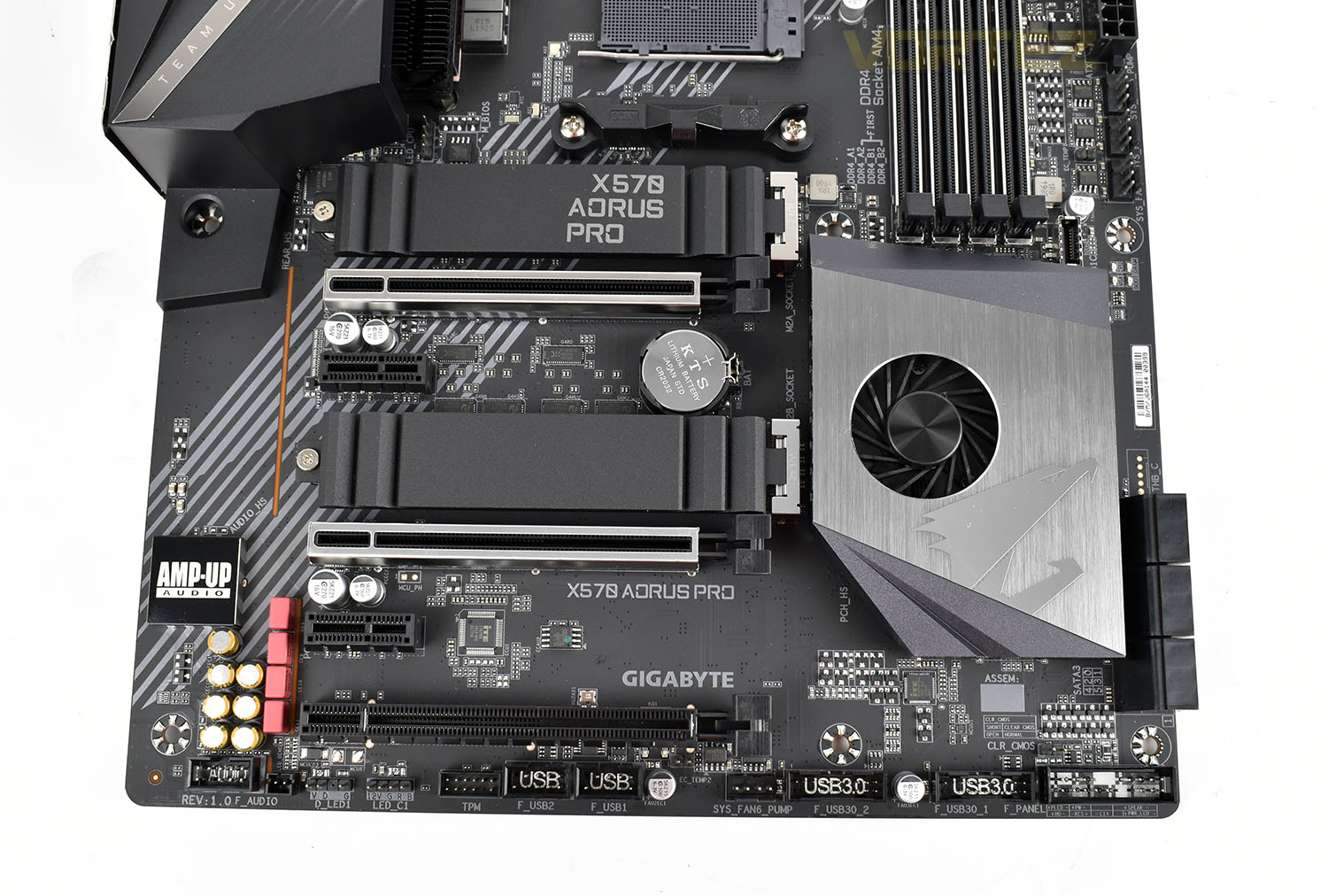
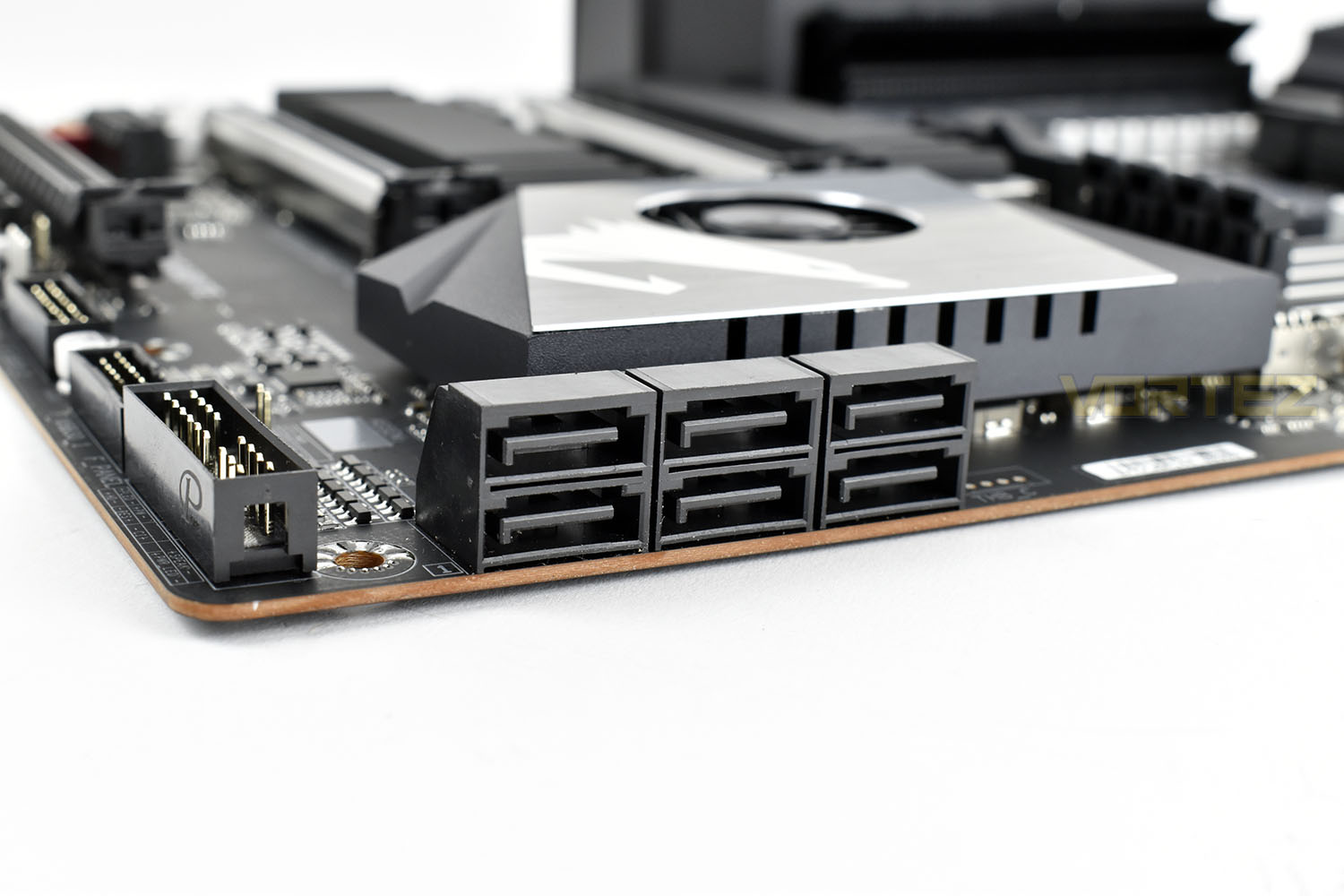
Rounding out the AORUS PRO’s storage options, in the bottom-right of the board are six 90° SATA 3.0 headers.
Closer Look (Continued)
Removing the thick metal M.2 heatsinks, each of the two slots is capable of accepting the 2242, 2260, 2280 or 22110 M.2 form factors. The provided standoffs and screws in the motherboard’s bundle mean that these heatsinks can be removed and stored in the box if your NVMe SSD arrives with its own heatsink or if you’d just prefer not to use GIGABYTE’s solution.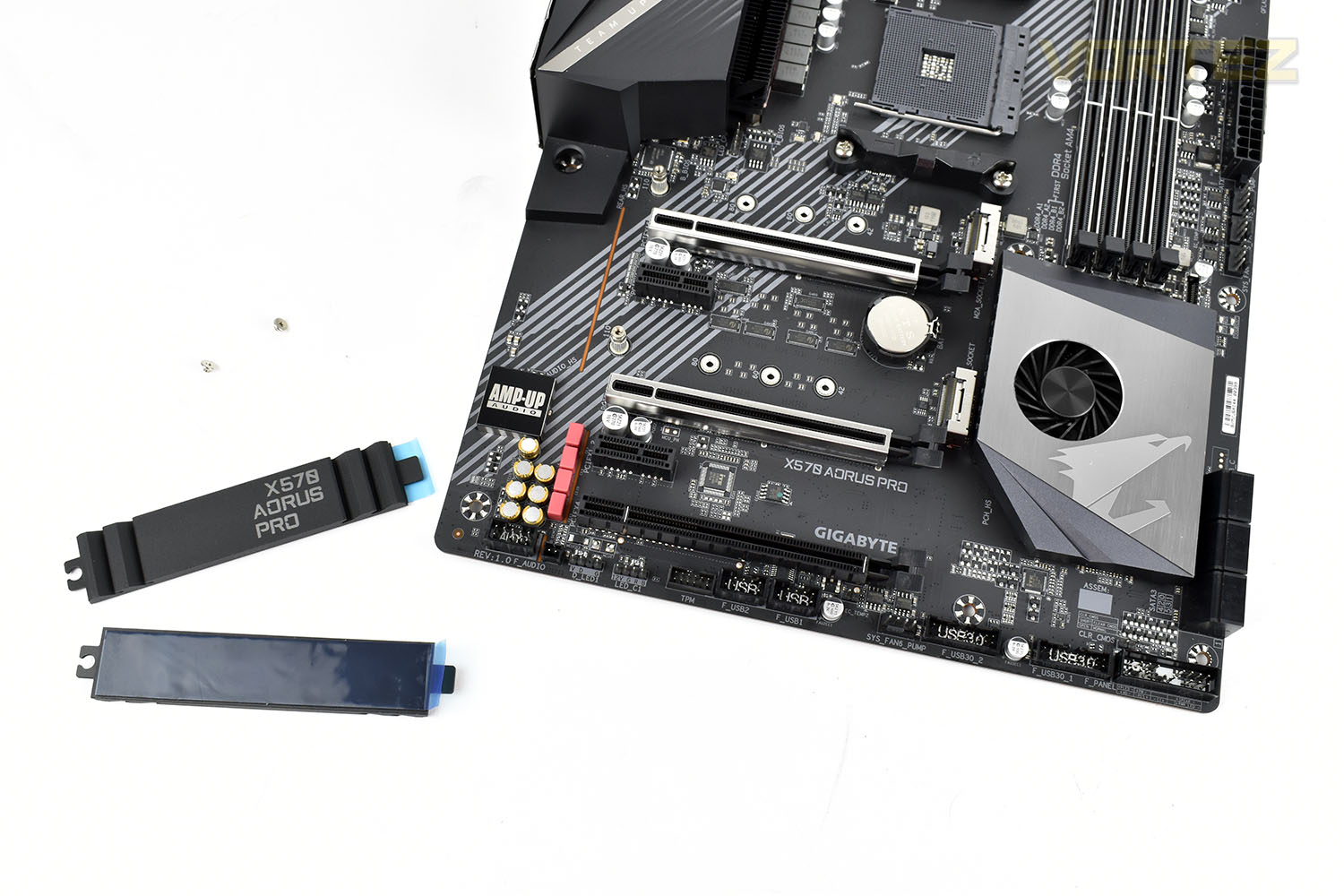
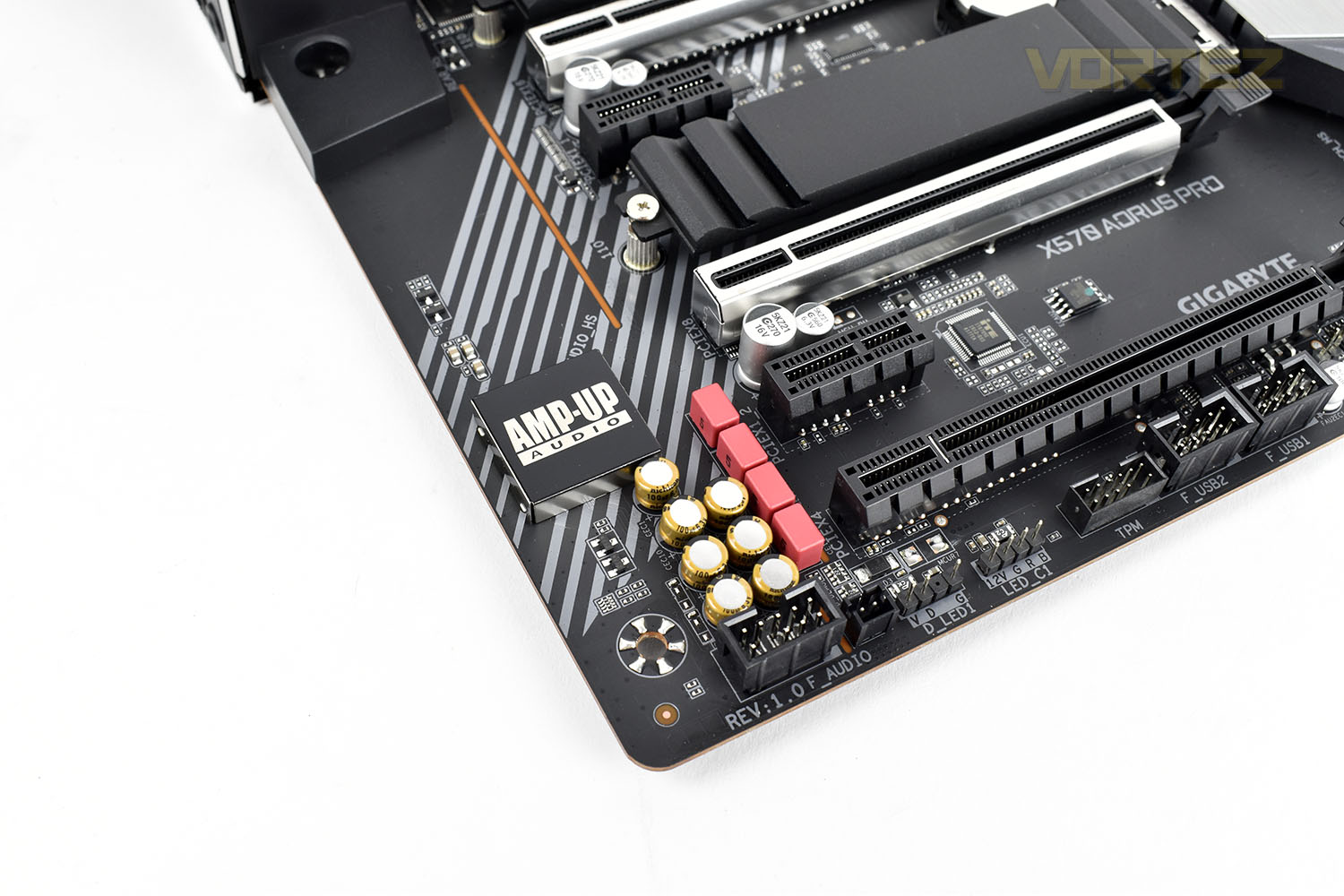
The Realtek ALC1220-VB audio chip has been equipped with a Smart Headphone Amp that automatically detects the impedance of a connected headset and makes the according changes to ensure that audio is crystal clear and problems such as low volume or distortion are prevented.
GIGABYTE use a combination of WIMA FKP2 capacitors and high-end Chemicon audio capacitors for rich sound, clear high frequencies and heavy bass.
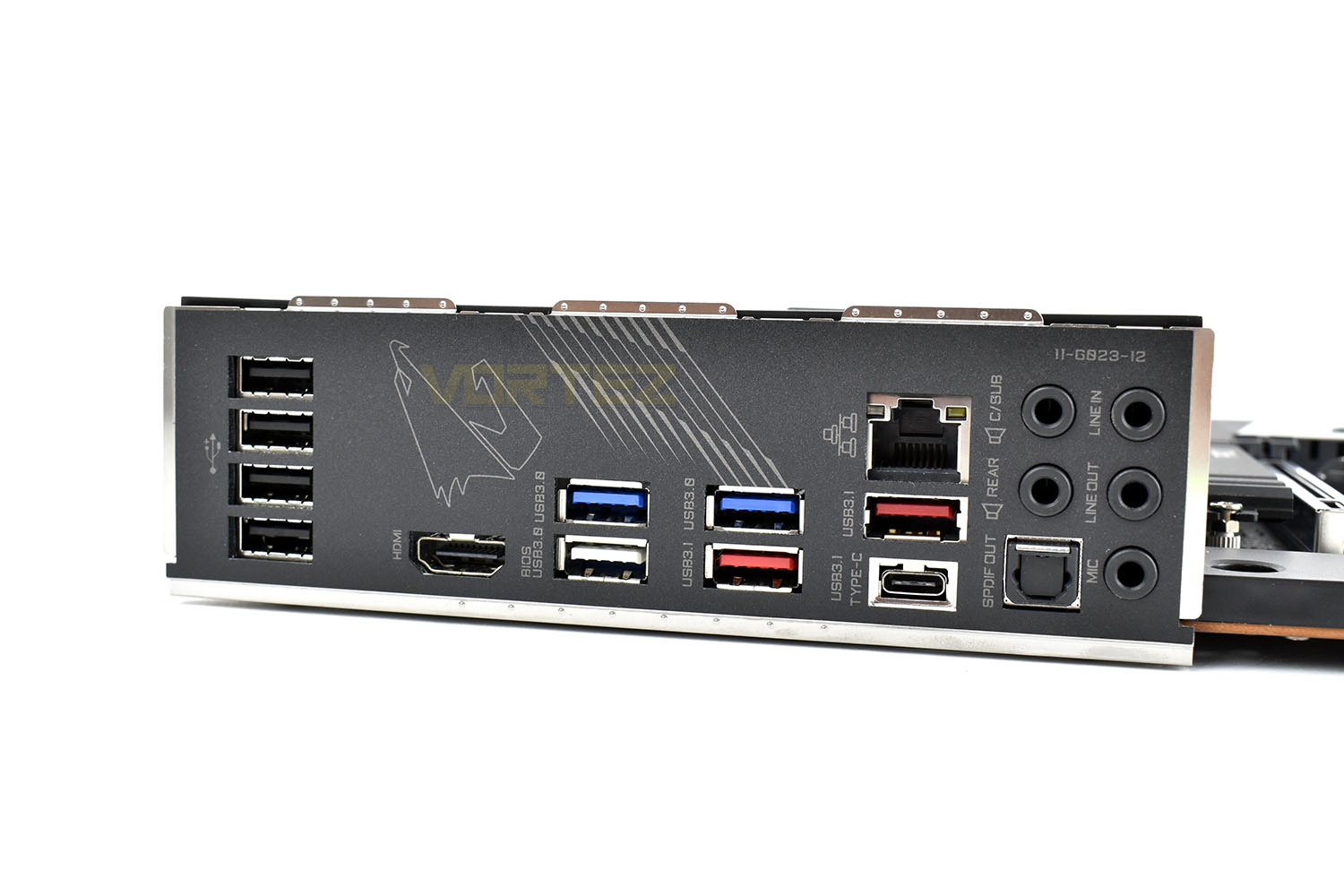
Looking around to the rear I/O, here we get the following, from left to right:
4x USB 2.0 ports
1x HDMI
3x USB 3.0
2x USB 3.1 Type-A
1x USB 3.1 Type-C
1x Intel Gigabit LAN
5x 3.5mm Audio jacks
1x SPDIF optical out
BIOS
GIGABYTE’s UEFI BIOS features both an Easy Mode and an Advanced Mode. The Easy Mode gives you plenty of information at a glance, as well as allowing you to toggle on your DRAM’s XMP profile for optimal performance. Typically people will only ever visit their BIOS to enable XMP anyway so having that option available immediately is good.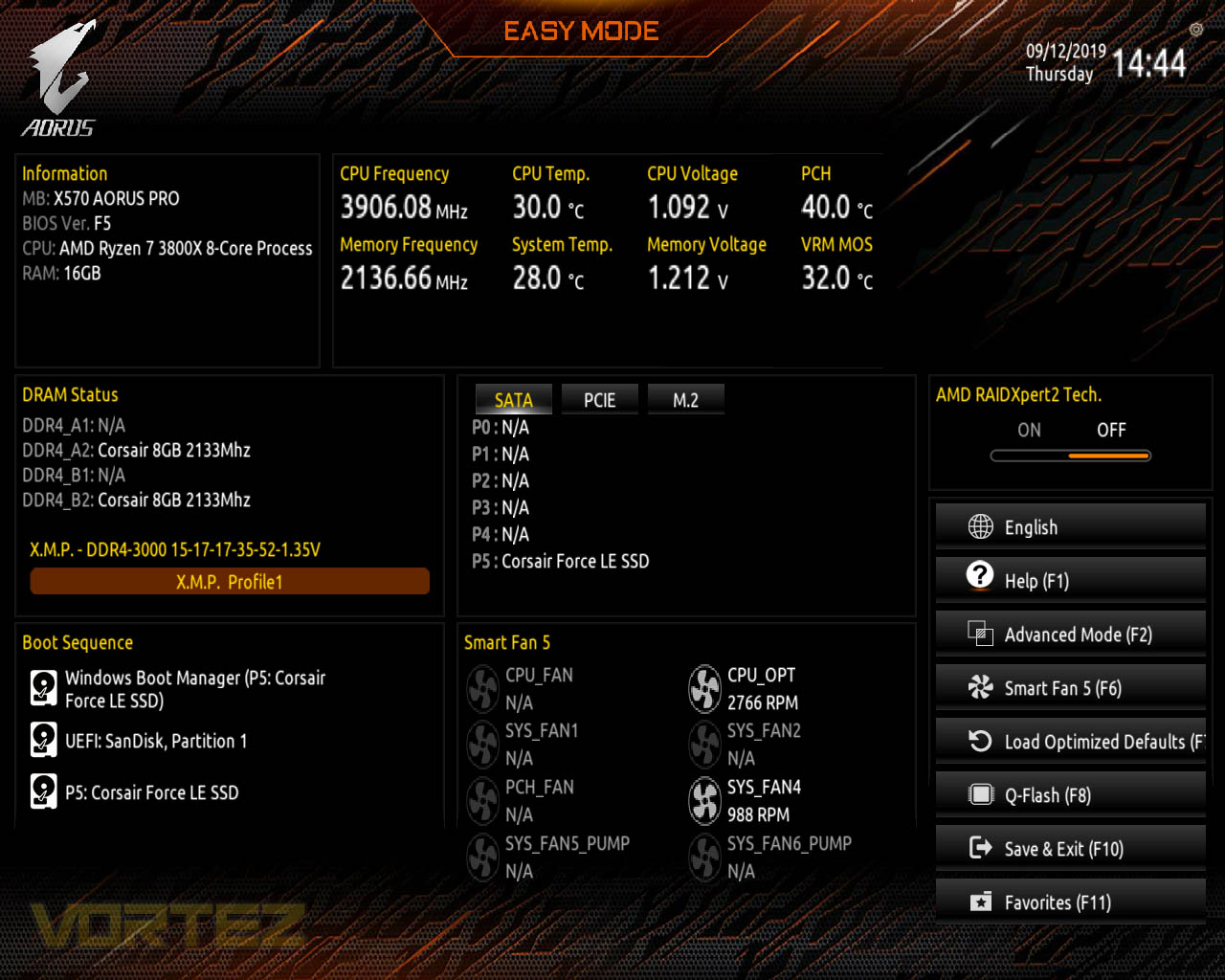
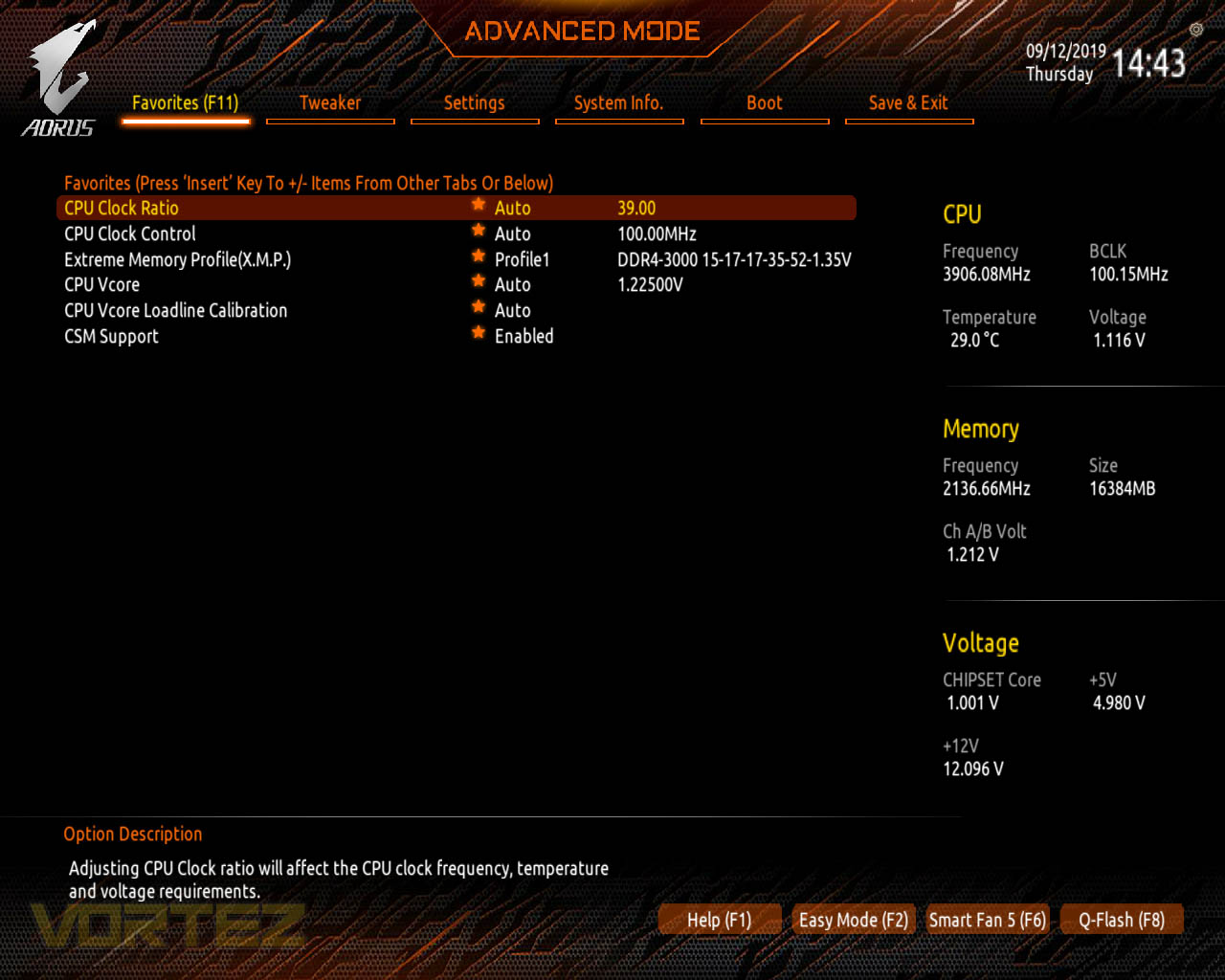
Something that’s handy within the GIGABYTE BIOS is the favourites page. Obviously, this is only going to be any use to someone who visits this often, particularly those who like to tweak settings and overclock their system, so perhaps it won’t be useful to everyone but it’s decently equipped as standard, with the following being present.
Within the Tweaker tab, this is where the CPU, DRAM and other system components can be.. tweaked. Not much more needs to be said other than that, really.
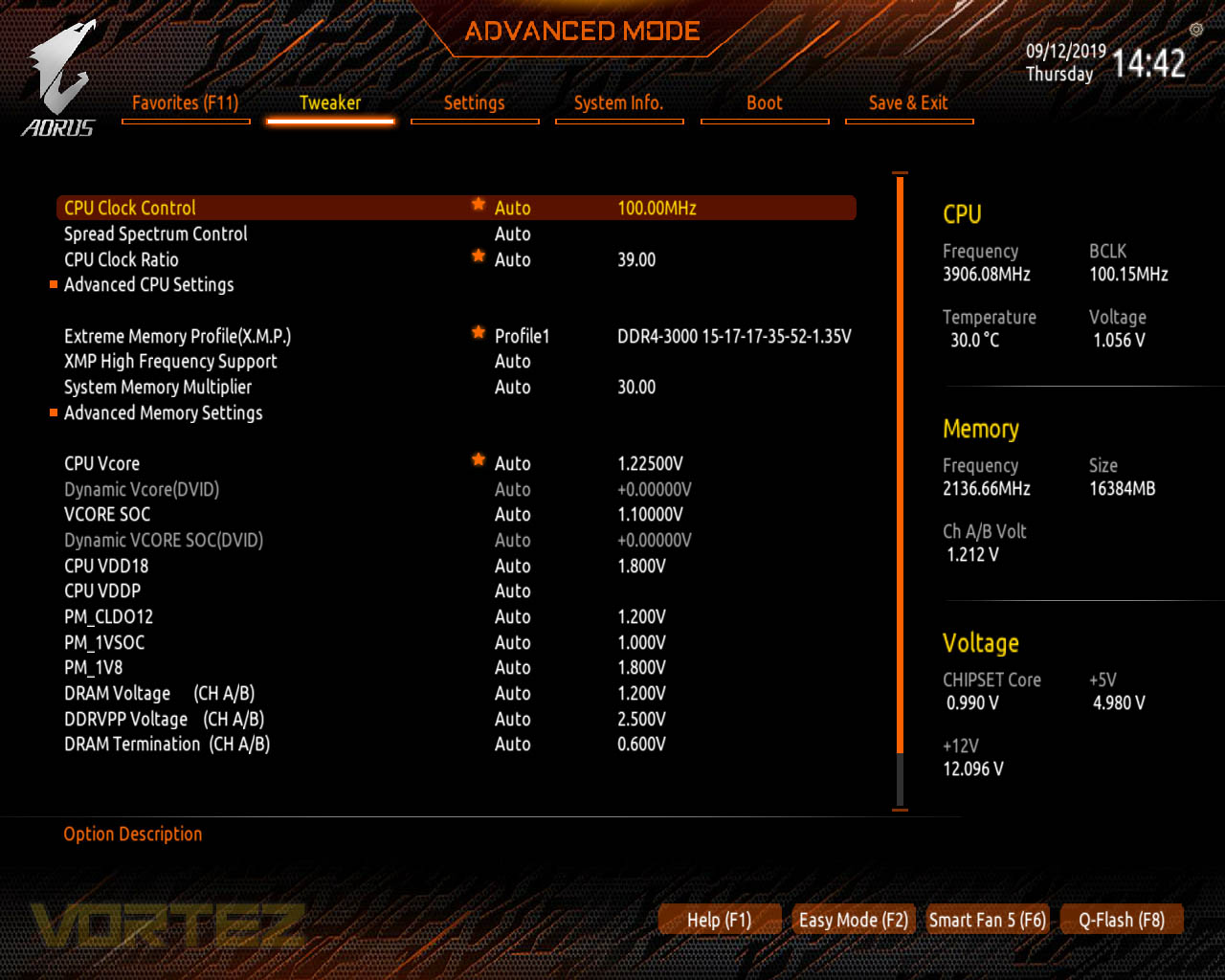
As for a BIOS suite, it’s easy to use and looks good with the orange and black colour scheme, updates are easy to apply and system health is always visible on the right-hand side.
Test Setup & Software
BIOS Version Tested: F5 – 04/09/2019Test Setup
CPU AMD Ryzen 7 2700X
Cooling Corsair” onclick=”window.open(this.href);return false;”>https://vortez.ivtest.isolly.com/corsair_h150i_pro_rgb_review/]Corsair H150i Pro RGB – Balanced Profile
Motherboard
Memory 16GB Corsair Vengeance LPX 3200MHz @ 3000MHz @ 15-17-17-38-58
Graphics AMD Radeon RX 480 8GB
Storage Corsair Force LE 480GB
PSU Corsair RM750X 80 Plus Gold Certified PSU
Cooling Corsair” onclick=”window.open(this.href);return false;”>https://vortez.ivtest.isolly.com/corsair_h150i_pro_rgb_review/]Corsair H150i Pro RGB – Balanced Profile
Motherboard
Memory 16GB Corsair Vengeance LPX 3200MHz @ 3000MHz @ 15-17-17-38-58
Graphics AMD Radeon RX 480 8GB
Storage Corsair Force LE 480GB
PSU Corsair RM750X 80 Plus Gold Certified PSU
Benchmarks
Cinebench R20 – CPU Score
SiSoftware SANDRA – CPU & Memory benchmarks
POV-RAY – CPU benchmarks
TrueCrypt – CPU benchmarks
AIDA64 – CPU benchmarks & Memory
PCMark 8 Photoshop
PC” onclick=”window.open(this.href);return false;”>https://benchmarks.ul.com/pcmark10]PC Mark 10 Extended Test
3DMark – FireStrike Extreme & TimeSpy
Games – Rise of the Tomb Raider & Total War: WARHAMMER
SiSoftware SANDRA – CPU & Memory benchmarks
POV-RAY – CPU benchmarks
TrueCrypt – CPU benchmarks
AIDA64 – CPU benchmarks & Memory
PCMark 8 Photoshop
PC” onclick=”window.open(this.href);return false;”>https://benchmarks.ul.com/pcmark10]PC Mark 10 Extended Test
3DMark – FireStrike Extreme & TimeSpy
Games – Rise of the Tomb Raider & Total War: WARHAMMER
Other Software
Temperature Analysis: Aida64 & Ryzen Master
Stress Testing Software: AIDA64 Stability Test
CPU Specification Monitoring: CPU-Z
Performance Monitoring: MSI Afterburner
Stress Testing Software: AIDA64 Stability Test
CPU Specification Monitoring: CPU-Z
Performance Monitoring: MSI Afterburner
Benchmarks: Power Consumption
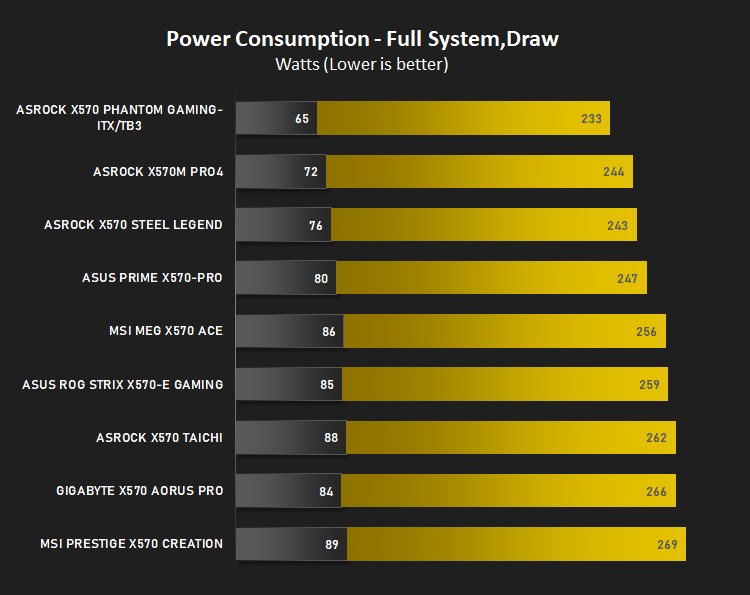
It’s interesting to note the power consumption across all motherboards. Although they are using the X570 chipset, energy results can fluctuate between manufacturers due to the features and specifications that are integrated. First of all, for the idle tests the system is cold booted into Windows and no additional applications are executed – the watts are noted on the external energy monitor we use and then the system is loaded with 3DMark FireStrike – watts are again monitored for the duration of the test and the highest rated wattage result is then noted down. Below are the results of this energy test.
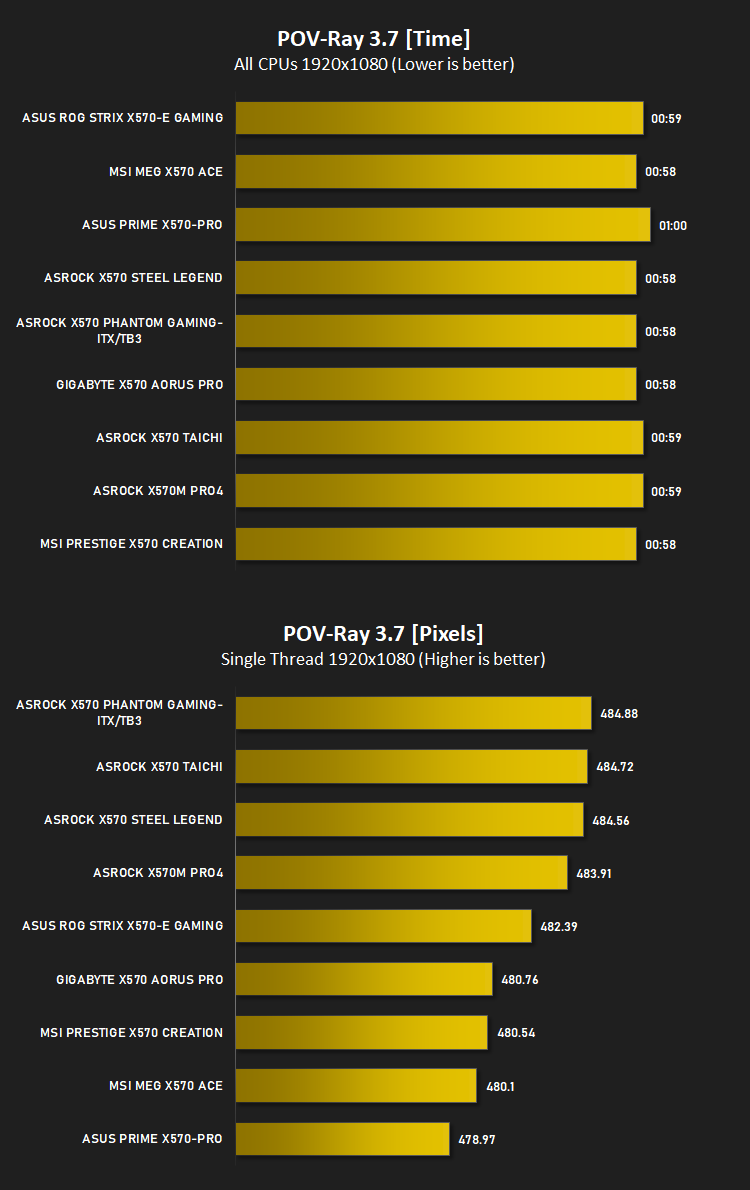
Ray Tracing Performance – POV-Ray 3.7
Persistence of Vision Raytracer’s PovRay is a free and open source 3D animator application with versions for computers with different operating systems.
This product allows users to build their custom 3D worlds with excellent quality despite their computer’s hardware. It has adjustable options for levels of radiance, refraction, and reflection. Calculation time may vary depending on the computer model, but PovRay can adapt to many computer builds, and is supported by the open source community.
This product allows users to build their custom 3D worlds with excellent quality despite their computer’s hardware. It has adjustable options for levels of radiance, refraction, and reflection. Calculation time may vary depending on the computer model, but PovRay can adapt to many computer builds, and is supported by the open source community.
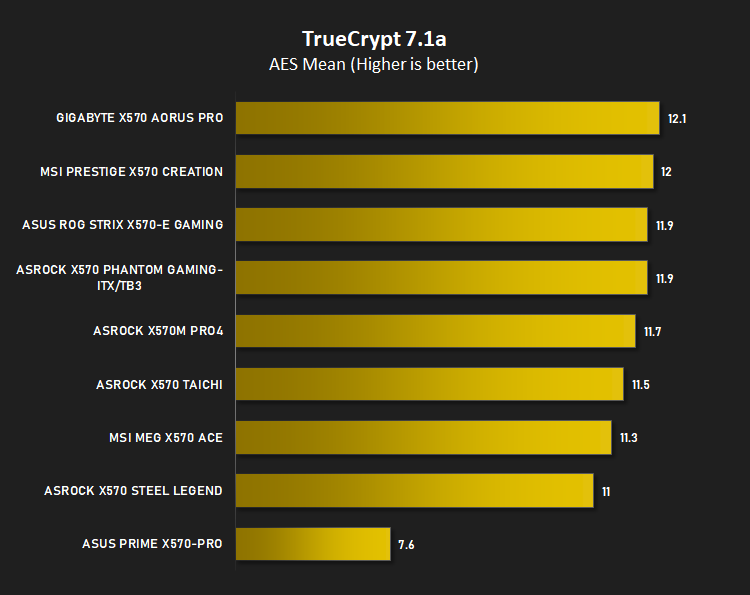
AES Encryption Performance – TrueCrypt 7.1a
TrueCrypt is a discontinued source-available freeware utility used for on-the-fly encryption (OTFE). It can create a virtual encrypted disk within a file or encrypt a partition or (under Microsoft Windows except Windows 8 with GPT) the entire storage device (pre-boot authentication).
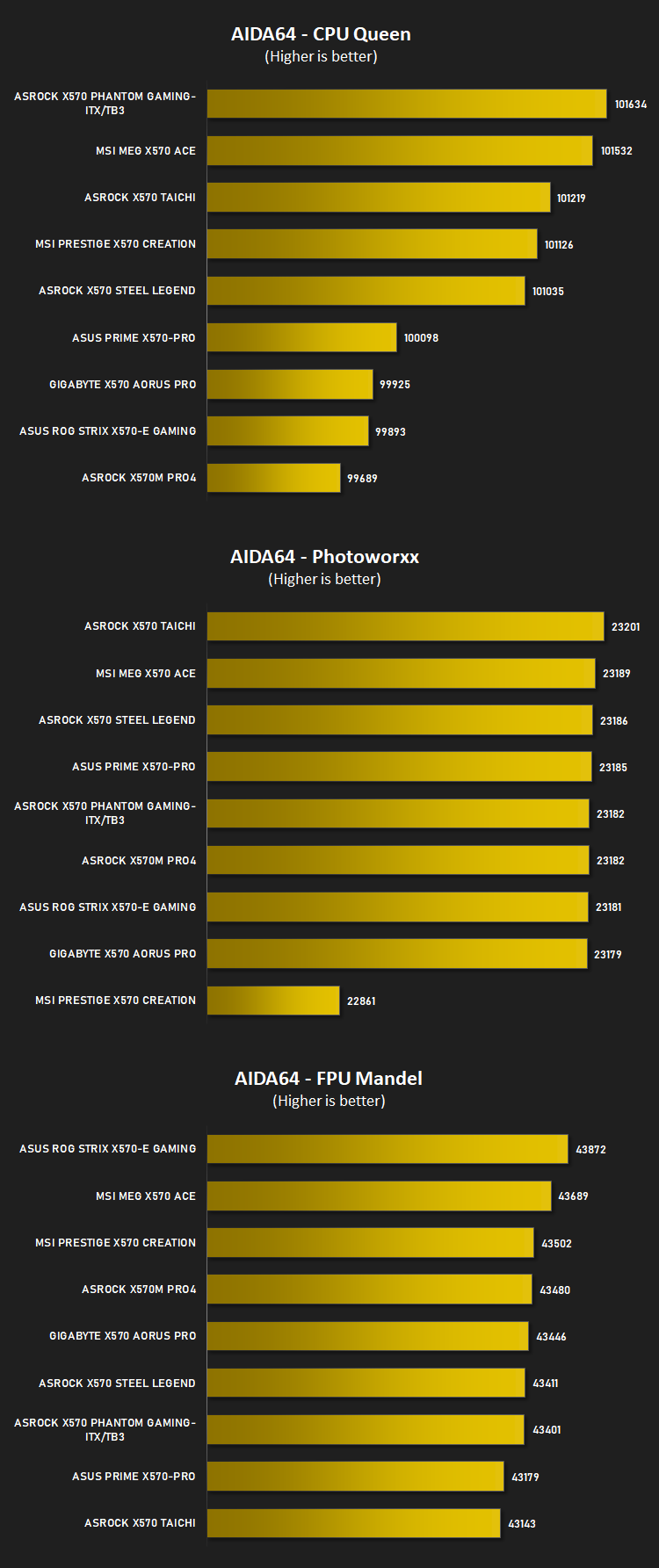
Processing Features Performance – AIDA64
AIDA64 Product PageThis simple integer benchmark focuses on the branch prediction capabilities and the misprediction penalties of the CPU. It finds the solutions for the classic “Queens problem” on a 10 by 10 sized chessboard. At the same clock speed theoretically the processor with the shorter pipeline and smaller misprediction penalties will attain higher benchmark scores. For example — with HyperThreading disabled — the Intel Northwood core processors get higher scores than the Intel Prescott core based ones due to the 20-step vs 31-step long pipeline. CPU Queen test uses integer MMX, SSE2 and SSSE3 optimizations.
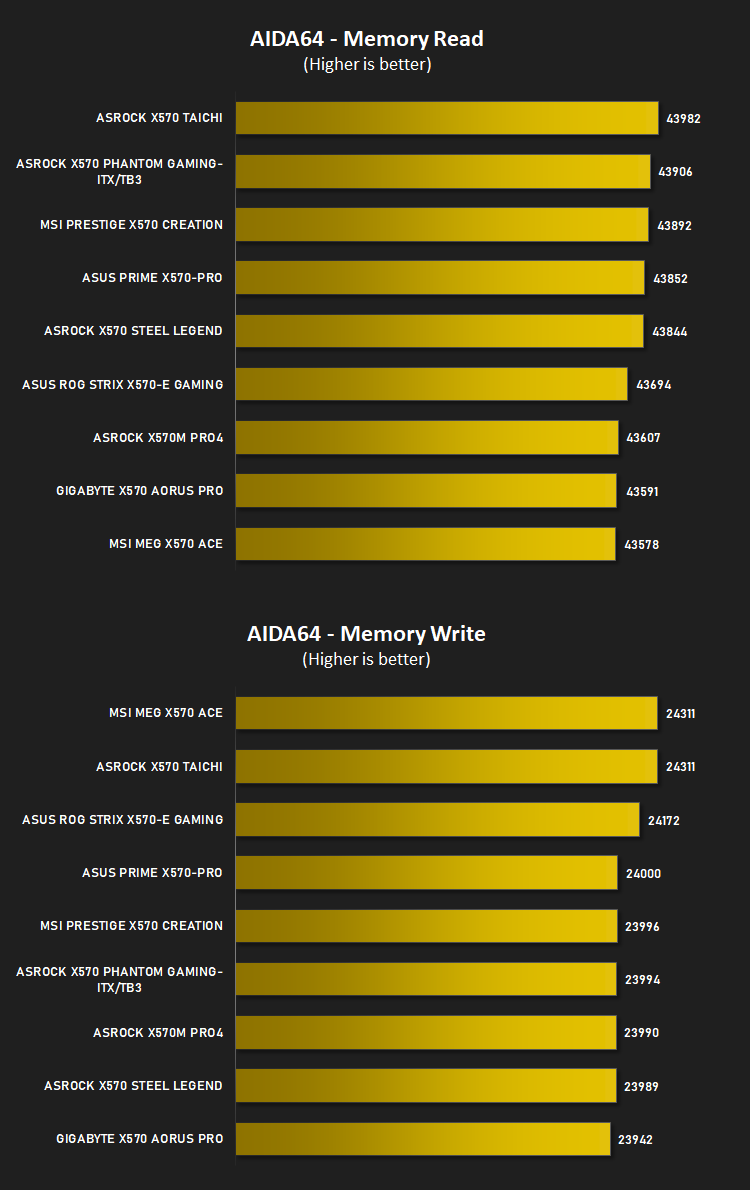
Memory Transfer Performance – AIDA64
AIDA64 Product PageMemory bandwidth benchmarks (Memory Read, Memory Write, Memory Copy) measure the maximum achiveable memory data transfer bandwidth. The code behind these benchmark methods are written in Assembly and they are extremely optimized for every popular AMD, Intel and VIA processor core variants by utilizing the appropriate x86/x64, x87, MMX, MMX+, 3DNow!, SSE, SSE2, SSE4.1, AVX, and AVX2 instruction set extension.
The Memory Latency benchmark measures the typical delay when the CPU reads data from system memory. Memory latency time means the penalty measured from the issuing of the read command until the data arrives to the integer registers of the CPU.
The Memory Latency benchmark measures the typical delay when the CPU reads data from system memory. Memory latency time means the penalty measured from the issuing of the read command until the data arrives to the integer registers of the CPU.
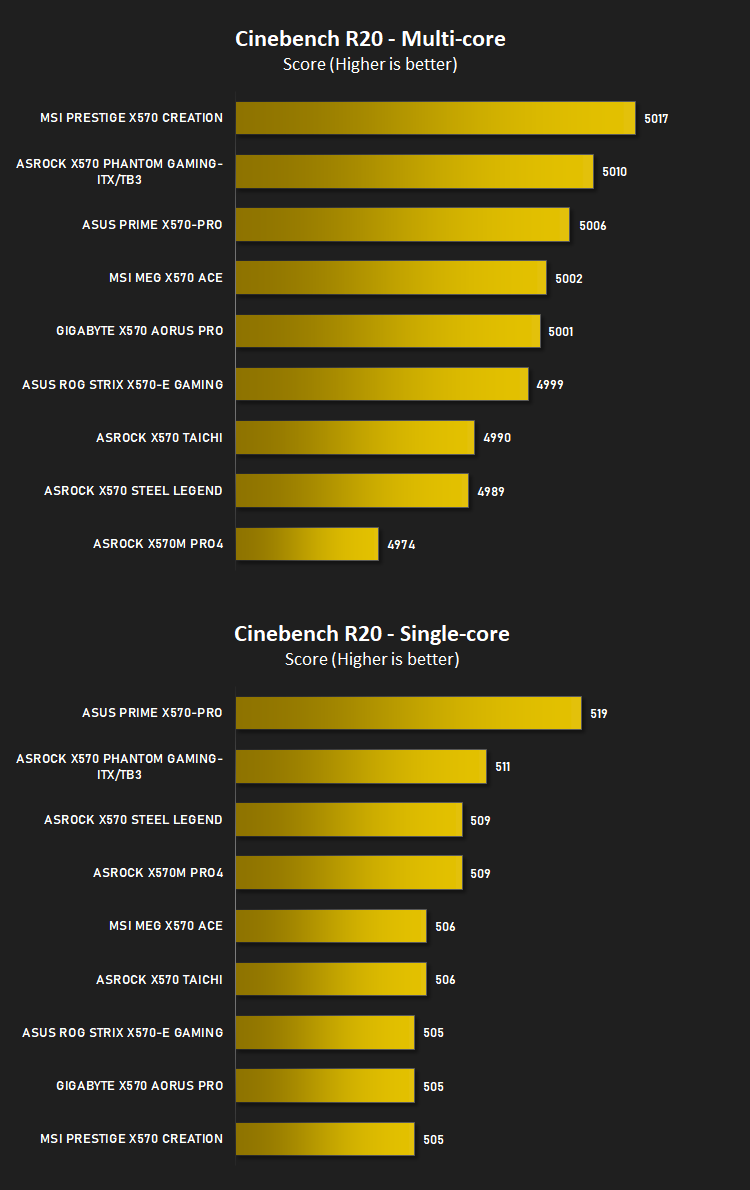
Processing Power Performance – Cinebench R20
Cinebench is a real-world cross-platform test suite that evaluates your computer’s hardware capabilities. Improvements to Cinebench Release 20 reflect the overall advancements to CPU and rendering technology in recent years, providing a more accurate measurement of Cinema 4D’s ability to take advantage of multiple CPU cores and modern processor features available to the average user.
Bandwidth Performance – SiSoftware SANDRA
SANDRA isn’t always a benchmark that is included in hardware reviews but I believe it shouldn’t be ignored. SANDRA provides a vigorous package that tests your system in a rather large array of benchmarks. There are many aspects of benchmark that can be executed. We will be considering – CPU and memory tests.
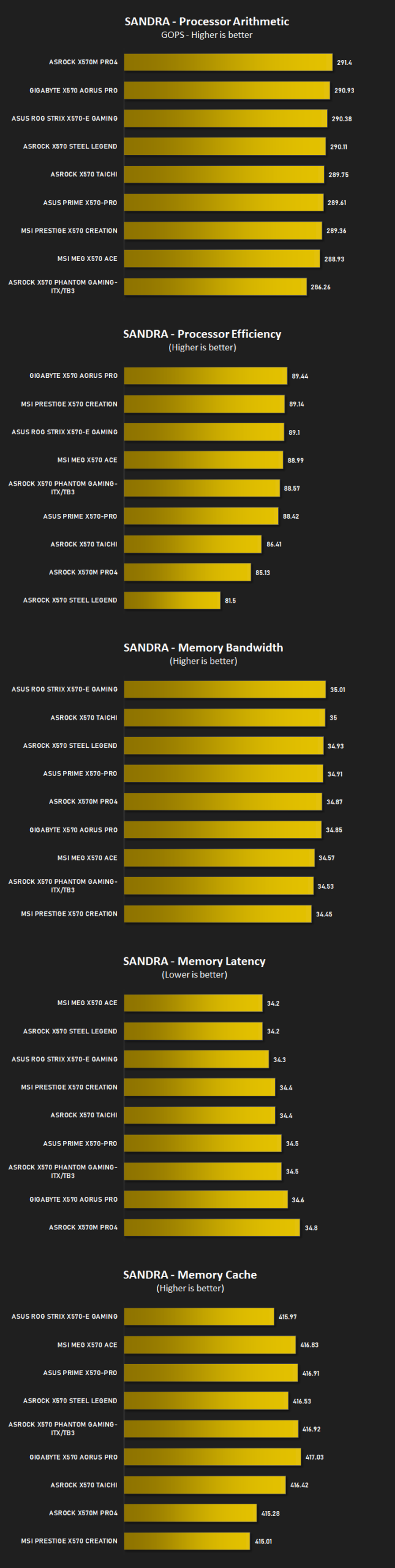
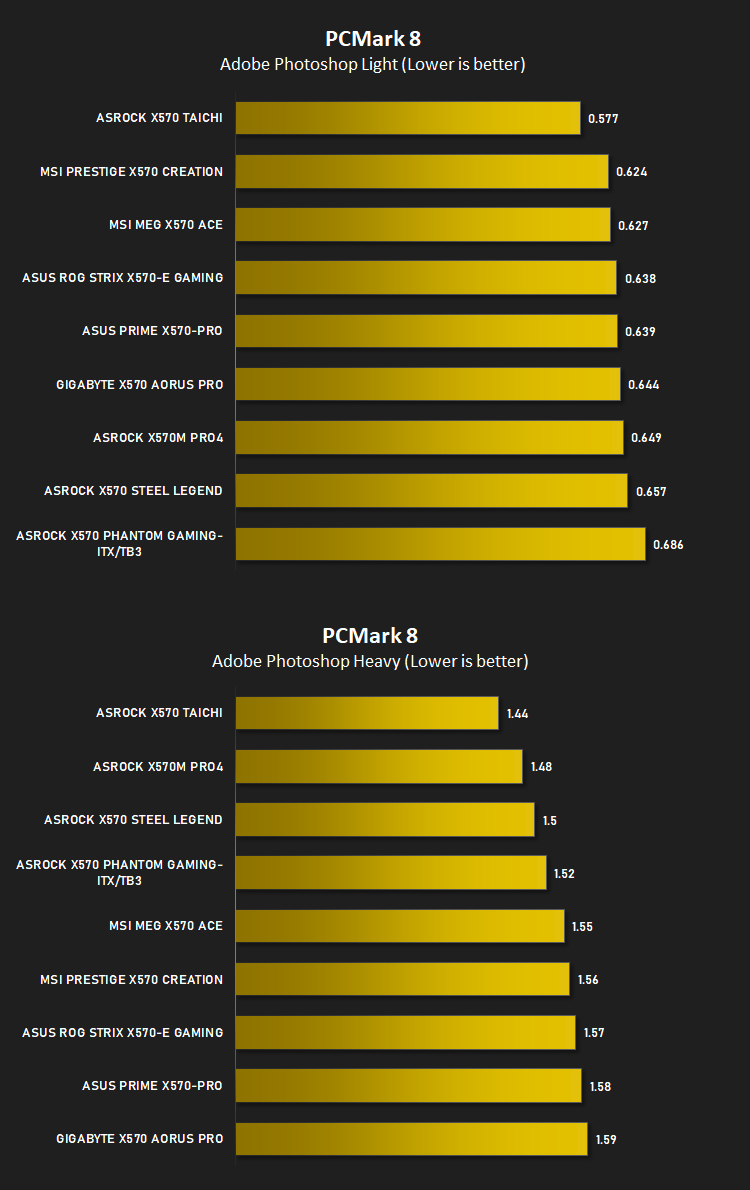
Image Editing Performance – PCMark 8 Photoshop
PCMark 8 Product Page Developed in partnership with Benchmark Development Program members Acer, AMD, Condusiv Technologies, Dell, HGST, HP, Intel, Microsoft, NVIDIA, Samsung, SanDisk, Seagate and Western Digital, PCMark 8 is the latest version in FutureMark’s popular series of PC benchmarking tools. Improving on previous releases, PCMark 8 includes new tests using popular applications from Adobe and Microsoft.
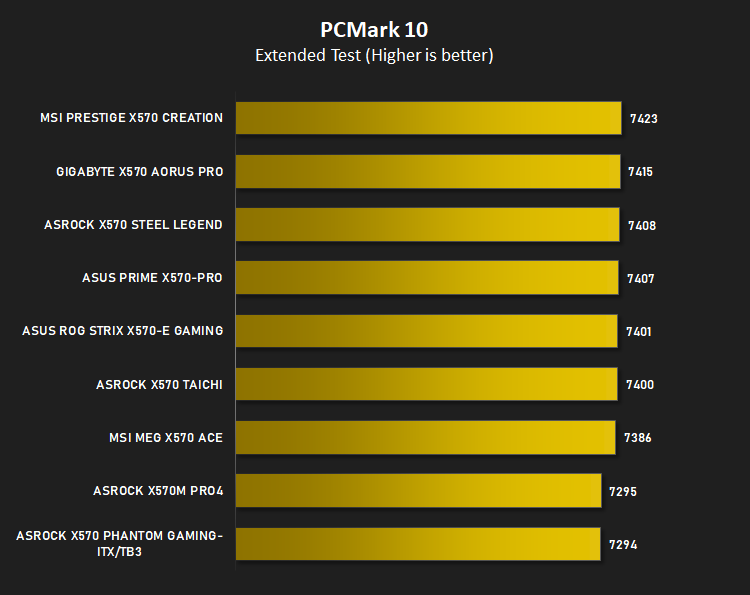
Overall System Performance – PCMark 10
PCMark 10 is the latest version in our series of industry standard PC benchmarks. Updated for Windows 10 with new and improved workloads, PCMark 10 is also faster and easier to use.
PCMark 10 features a comprehensive set of tests that cover the wide variety of tasks performed in the modern workplace. With a range of performance tests, custom run options, and the new Battery Life Profile, PCMark 10 is the complete PC benchmark for the modern office.
PCMark 10 features a comprehensive set of tests that cover the wide variety of tasks performed in the modern workplace. With a range of performance tests, custom run options, and the new Battery Life Profile, PCMark 10 is the complete PC benchmark for the modern office.
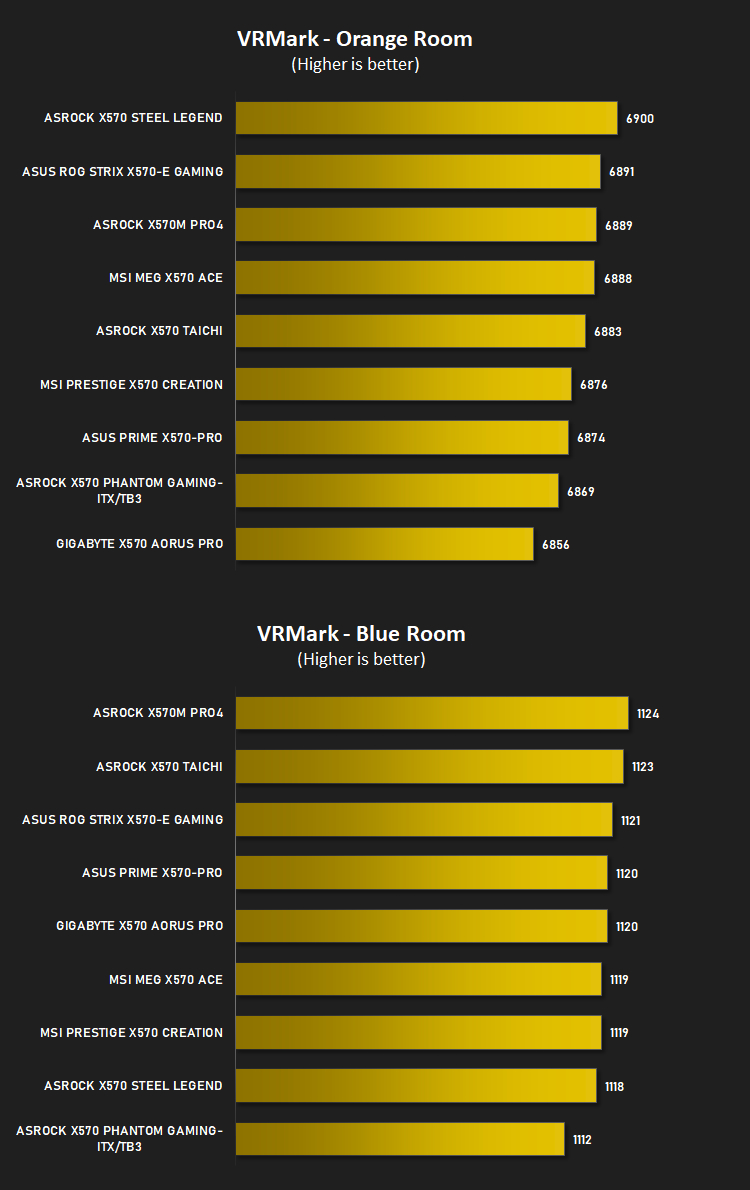
VR Performance – VRMark
VRMark Product PageVRMark includes two VR benchmark tests that run on your monitor, no headset required, or on a connected HMD. At the end of each test, you’ll see whether your PC is VR ready, and if not, how far it falls short.
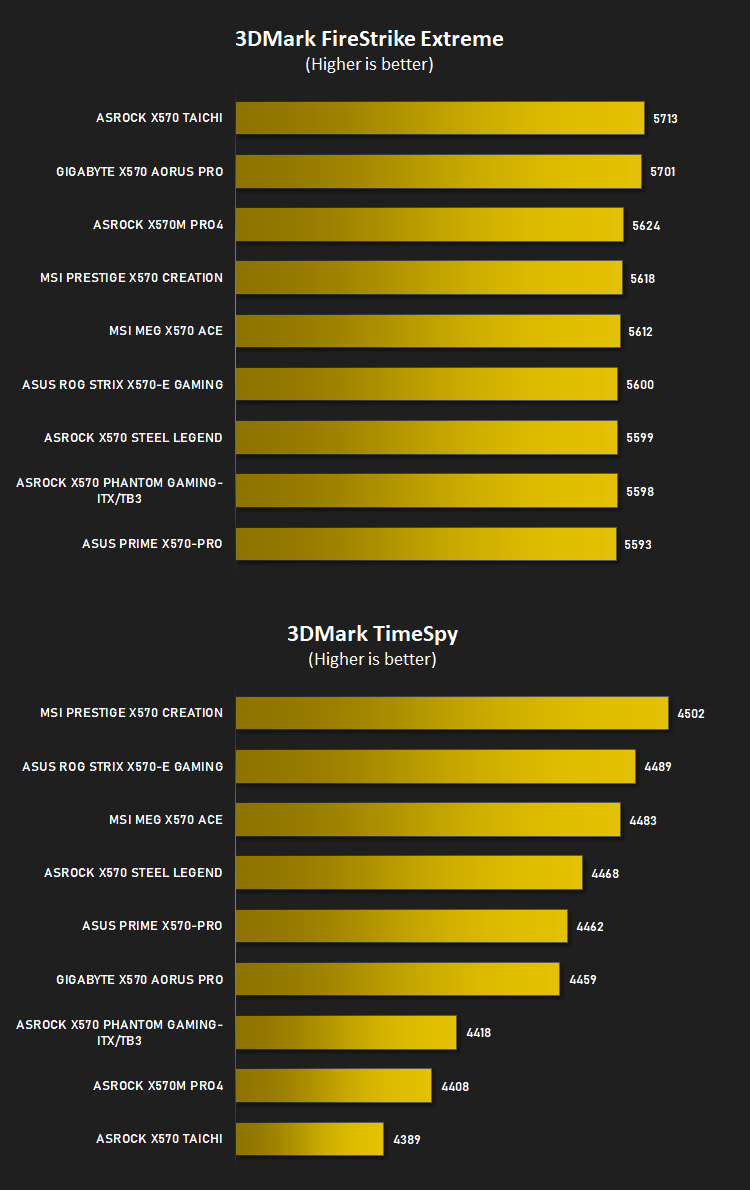
3D Performance – 3DMark
3DMark FireStrike Product PageFire Strike is our new showcase DirectX 11 benchmark designed for high-performance gaming PCs. It is our most ambitious and technical benchmark ever, featuring real-time graphics rendered with detail and complexity far beyond what is found in other benchmarks and games today. Fire Strike will only be available in the Windows editions of 3DMark initially.
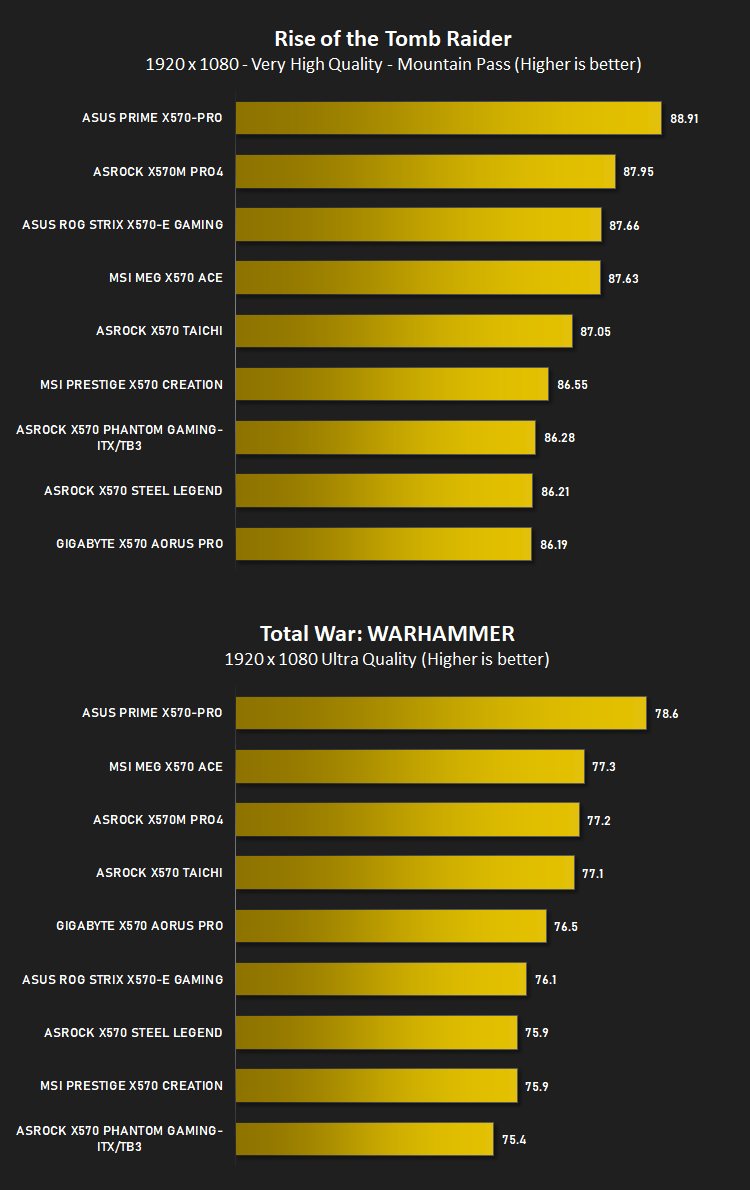
Gaming Performance – Rise of the Tomb Raider & Total War: WARHAMMER
It’s important for us to perform a number of game benchmarks as well as the synthetic tests because gamers will want to know if there are any significant benefits. So here we have two recent gaming titles.
Conclusion
The GIGABYTE X570 AORUS PRO has proven itself to be perfectly capable of handling our AMD Ryzen 7 3800X, though all of the tested X570 boards have shown very similar results which is perhaps testament to AMDs engineering on designing an excellent chipset that’s easy to implement. Regardless, there’s zero complaints or concerns regarding the AORUS PRO’s performance credentials.Focussing briefly on the aesthetics of the AORUS PRO, we love the styling that GIGABYTE are employing at the moment; the dark motherboard and heatsinks contrasting against the polished steel armour around the DRAM and PCI-E slots look fantastic. Obviously, the appearance is entirely subjective and your own tastes may differ but we feel it lends itself perfectly to both a “standard” build with a set of black DRAM modules and a dark GPU, or conversely, a full array of RGB-equipped components.
A duo of M.2 NVMe slots, three PCI-E x16 and a pair of x1 slots round out the onboard connectivity nicely for a board in this price range, allowing you a good balanced choice on which add-in cards you can use and where you can place them for optimal airflow to things like graphics cards or high-performance network cards.
GIGABYTE also offer this board, for around £15/$15/$25 more with built in WiFi 6. For the little bit extra, we reckon it’d be well worth investing for the option of having WiFi, even if just as a method of sharing your phone’s Personal Hotspot function in the event your internet breaks down or if you move the system and can’t wire it in straight away. The rest of the motherboard remains identical.
Swinging round to the rear IO, finding 10 USB ports is very much welcomed, with more and more devices asking for a connection to your PC these days. However, the inclusion of USB 1.1/2.0 ports is beyond the pale for a £260 motherboard in 2019; USB 2.0 is almost 20 years old now. We also saw this on the AORUS MASTER, an even-more-spendy option.
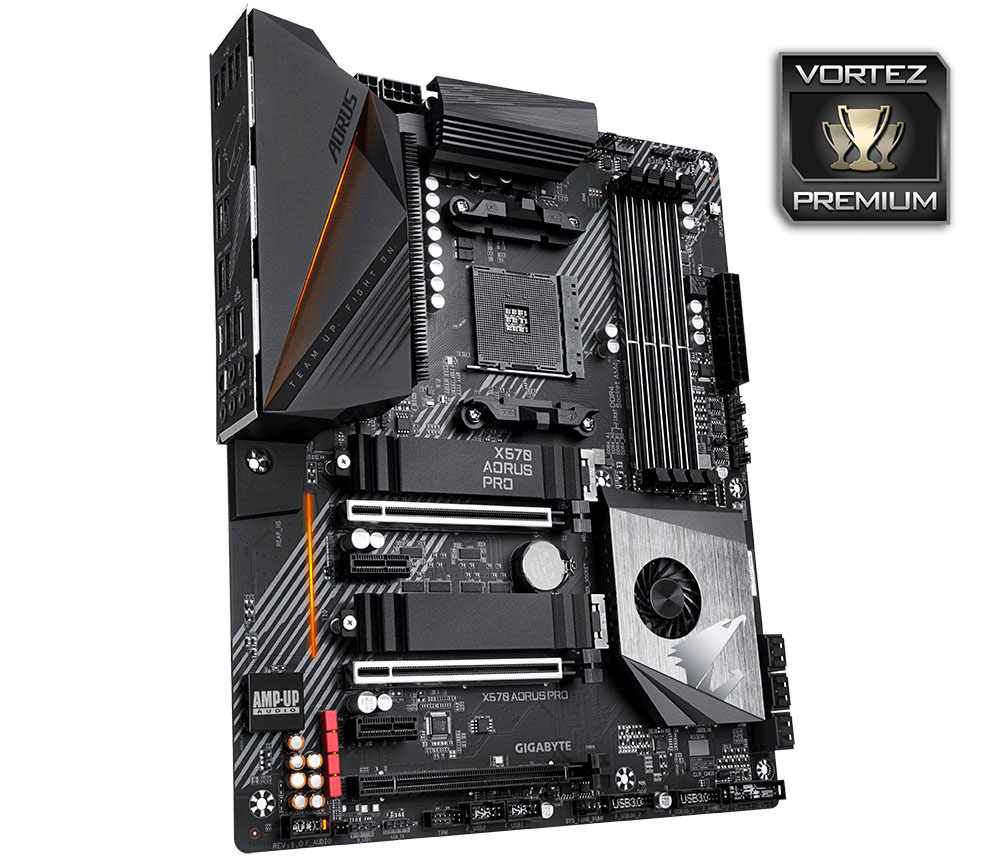
The GIGAYBTE X570 AORUS PRO sits at a very busy price point at this moment in time, with all of the major manufacturers presenting something, but the AORUS does just enough to stand out from the crowd.
pros
+ Great aesthetics
+ Good number of USB ports
+ Extensive VRM cooling around the CPU
+ Removeable M.2 heatsinks
Cons
– Still using USB 2.0 on the rear IO
– FCH fan never stops spinning
+ Great aesthetics
+ Good number of USB ports
+ Extensive VRM cooling around the CPU
+ Removeable M.2 heatsinks
Cons
– Still using USB 2.0 on the rear IO
– FCH fan never stops spinning
Click here for an explanation of our awards at Vortez.net.
Stay connected with the Vortez Social Media pages:
Join in with the discussions on Discord