







In our first of many LGA1150 Intel Z87 motherboard reviews we take a look at GIGABYTE’s premium overclocking solution with Intel Core i7-4770K – Haswell.

Product on Review: Z87X-OC
Manufacturer: GIGABYTE
Street Price: £180
GIGABYTE are well-known for their passion in the hardcore overclocking department, they have a track-record for achieving some of the best results on Intel’s platforms. Just recently G.SKILL announced their intentions at Computex 2013 to break world records, along with GIGABYTE overclocking ambassadors HiCookie and Dinos22. Whether they achieve such victories remains unknown but today we will be looking at something which we are quite certain both our overclocking advocates will be utilising.
GIGABYTE’s OC motherboards have remained a premium selection for advanced users. Richard reviewed the X58A-OC some time ago now and absolutely loved it. As we outlined in that review, that particular model arrived late in the day – X58 was soon to be superseded. GIGABYTE have decided to start the Intel Z87 onslaught with a release of their much coveted OC motherboard and we are pleased to begin our venture into the world of Haswell with this very board today. Enter the Z87X-OC.
Z87X-OC has been intentionally designed for avid Overclockers. Its feature-set lends itself to bringing every conceivable feature right to the finger-tips of these hardcore tweakers. This motherboard is no ‘walk in the park’ it tackles each arena by diving straight into the deep end and brings with it Ultra Durable 5 Plus components which work hand-in-hand with extreme conditions such as overclocking.
About GIGABYTE
GIGABYTE was founded in 1986, establishing our uncontested position in continuous technological innovation. By focusing on key technologies and achieving strict quality standards, GIGABYTE has been regarded as an innovative and trusted motherboard leader in the globe. To keep pace in a rapidly changing world, we have offered a comprehensive product line covering Motherboards, Graphics Cards, PC Components, PC Peripherals, Laptops, Slate Devices, Desktop PCs, Network Communications, Servers and Mobile Phones. We are dedicated to building up a full-range digital
Technical Specifications
Processor Support
4th Generation Intel® Core processors
Chipset
Intel Z87 Chipset
2 Renesas USB 3.0 Hub
Intel GbE LAN chip
8 Channel ALC892 Audio controller
Memory
Supports 2 Channel DDR3 with 4 DIMM slots
(Supporting up to 32GB of system memory)
Expansion Slots
1 x PCI Express 3.0 x16 slots (Running @x16)
1 x PCI Express 3.0 x16 slots (Running @x8)
2 x PCI Express 3.0 x16 slots (Running @x4)
1 x PCI Express 2.0 x1 slot
2 x PCI slots
Internal I/O Connectors
6 x Serial ATA 6Gb/s connectors
2 x USB 3.0/2.0 headers (supports 4 ports)
2 x USB 2.0/1.1 headers (supports 4 ports)
2 x USB 2.0/1.1 ports
1 x CMOS,1 x Restart, 1 x Power switch
1 x Serial port header
1 x Gear button,, 1 x BCLK UP, 1 x BCLK DOWN
1 x CPU Ratio UP, 1 x CPU Ratio DOWN
1 x onboard voltage measurement module
2 BIOS switch, 1 Direct to BIOS button,
1 OC Trigger switch, 1 OC PCIE switch,
1 Clear Battery button
1 CPU fan, 1 OPT fan, 6 system fan connectors
Rear I/O Connectors
6 x USB 3.0/2.0 ports , 2 x USB 2.0/1.1 ports
1 OC Ignition button
1 x coaxial S/PDIF Out connector
2 x HDMI connector
1 x Display ports
1 x LAN ports
6 x audio jacks, 1 x PS/2 Keyboard/Mouse port
4th Generation Intel® Core processors
Chipset
Intel Z87 Chipset
2 Renesas USB 3.0 Hub
Intel GbE LAN chip
8 Channel ALC892 Audio controller
Memory
Supports 2 Channel DDR3 with 4 DIMM slots
(Supporting up to 32GB of system memory)
Expansion Slots
1 x PCI Express 3.0 x16 slots (Running @x16)
1 x PCI Express 3.0 x16 slots (Running @x8)
2 x PCI Express 3.0 x16 slots (Running @x4)
1 x PCI Express 2.0 x1 slot
2 x PCI slots
Internal I/O Connectors
6 x Serial ATA 6Gb/s connectors
2 x USB 3.0/2.0 headers (supports 4 ports)
2 x USB 2.0/1.1 headers (supports 4 ports)
2 x USB 2.0/1.1 ports
1 x CMOS,1 x Restart, 1 x Power switch
1 x Serial port header
1 x Gear button,, 1 x BCLK UP, 1 x BCLK DOWN
1 x CPU Ratio UP, 1 x CPU Ratio DOWN
1 x onboard voltage measurement module
2 BIOS switch, 1 Direct to BIOS button,
1 OC Trigger switch, 1 OC PCIE switch,
1 Clear Battery button
1 CPU fan, 1 OPT fan, 6 system fan connectors
Rear I/O Connectors
6 x USB 3.0/2.0 ports , 2 x USB 2.0/1.1 ports
1 OC Ignition button
1 x coaxial S/PDIF Out connector
2 x HDMI connector
1 x Display ports
1 x LAN ports
6 x audio jacks, 1 x PS/2 Keyboard/Mouse port
Packaging, Bundle & First Look
Z87X-OC arrives in a large, attractive motherboard box which has been designed to catch the eye. With the model name signifying this board as being GIGABYTE’s OC specific model, they are keen to impress throughout the packaging that this is the case. Around the back, there are a number of features listed and an explanation of what to expect.
Inside, all of the items are well packaged and the motherboard itself is protected inside an anti-static bag.
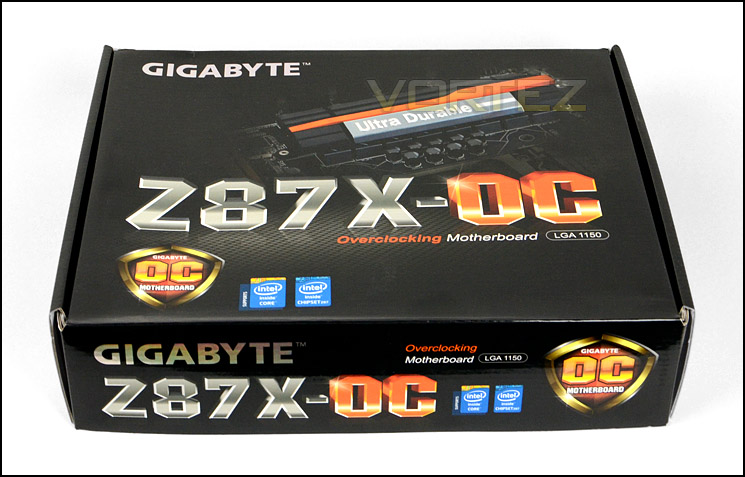
The packaging for Z87X-OC
Along with the motherboard, there are a plethora of items included within the bundle. GIGABYTE cover every possible scenario. Included are:
• 4x SATA3 6GB/s Cables
• Rear IO shield
• NVIDIA SLI Bridge (Flexible)
• AMD CrossfireX Bridge (Flexible)
• Voltage Check Cables
• Case Badge
• OC Brace
• Documentation: user manual, quick installation guide
• Driver CD/Utilities
The OC brace is an interesting item. With this OC board being designed for use on the test bench, GIGABYTE have included this brace to work in conjunction with a test bench – it allows multiple-GPUs to be installed and provides support for them whilst they are free standing and not assisted by a computer chassis etc.
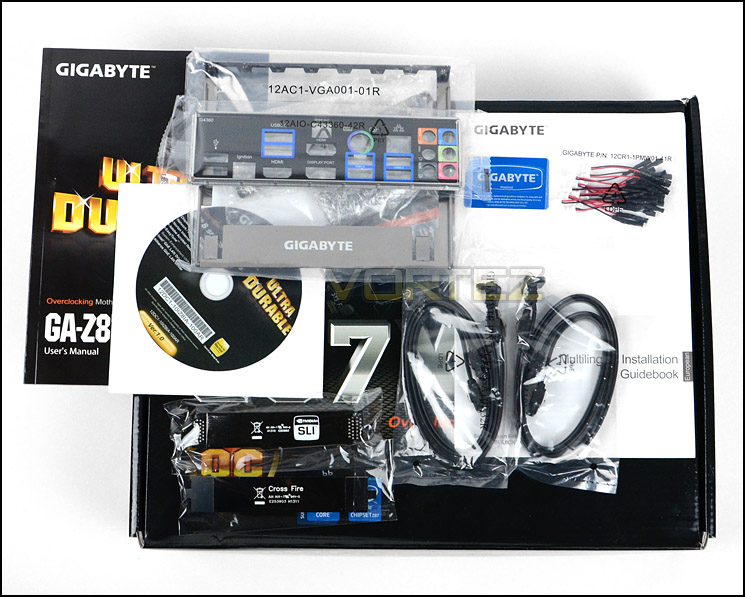
The accessories bundle includes many items
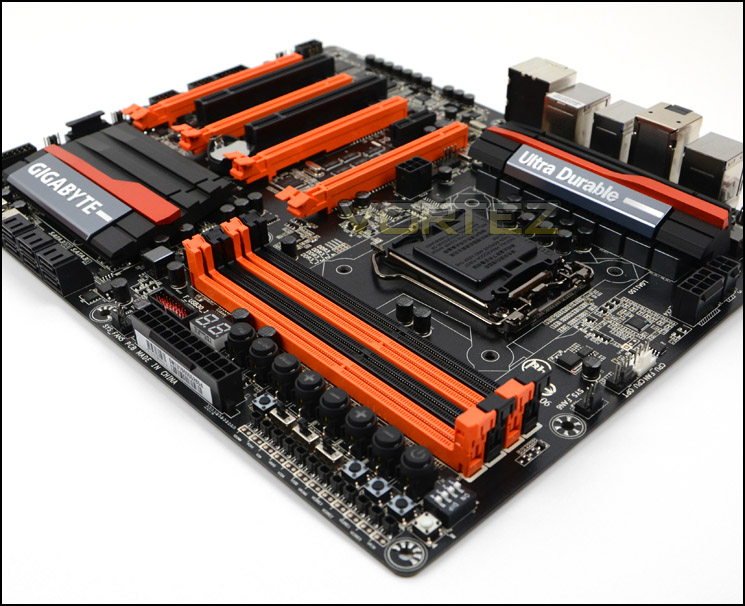
Z87X-OC continues GIGABYTE’s notorious black and orange colour-scheme found on previous generations of OC motherboards. You will struggle to find this configuration anywhere else and regardless of whether you like it or not, its synonymous to GIGABYTE’s premium overclocking solution and instantly recognisable.
We’ve developed quite a soft spot for GIGABYTE’s colour scheme on this motherboard and we really like what they have done on this new model for Z87. The board oozes quality and there are countless features which high-end users will been itching to get their hands on.
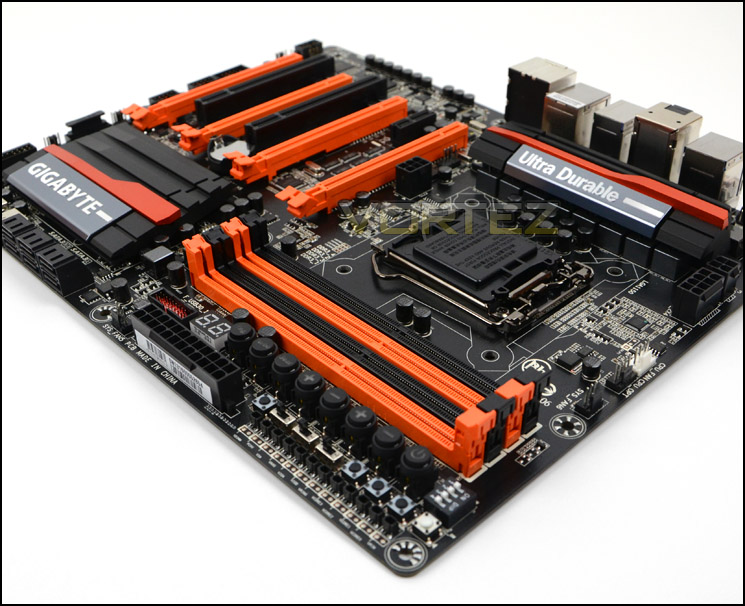
An overview of Z87X-OC – catching the eye with striking aesthetics
On the next page we will take a closer look at the various aspects of this board.
Closer Look
We’ll now move in for a closer look at the different features found on Z87X-OC, starting with the socket area. This motherboard is of course designed to work with Intel’s 4th Generation of processors – Haswell. The socket is LGA1150 but has the mounting holes for LGA115X so if you have a cooler that has been used on another socket such as LGA1155 then it will work fine here too.
Z87X-OC uses an 8-digital phase power design which takes advantage of a whopping 12-pin CPU EPS power allocation. As you can well imagine, this motherboard means business, it has the means to harness plenty of power. GIGABYTE have furnished this motherboard with Ultra Durable 5+ components – black solid CAPs are featured throughout and the board itself has a 2x copper PCB. A substantial single-heatsink covers the MOSFETs, resulting in plenty of space at the upper end of the motherboard where GIGABYTE have placed dual CPU cooler fan headers which we are very pleased to see, since most high-end air coolers (and ALCs) require dual fan power.
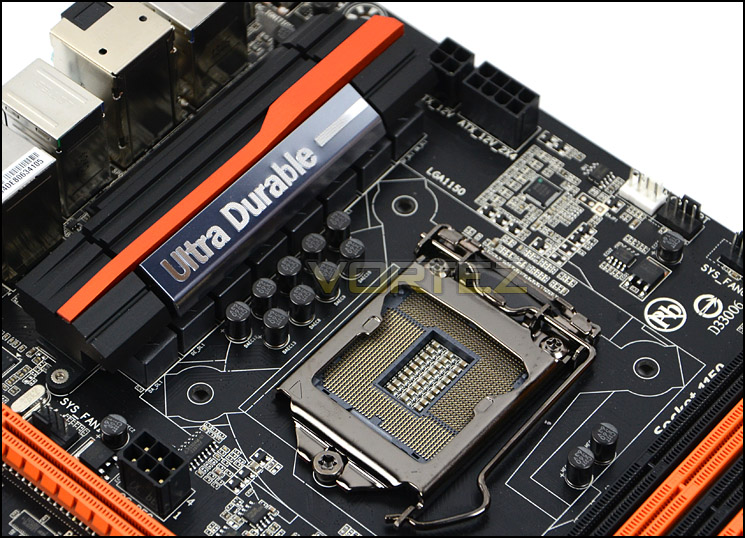
LGA1150 socket with 8+4 (12pin) EPS Power
Moving over to the memory slot region there are an abundance of high-end features that have been strategically placed. The memory slots are dual channel DDR3 compliant and can accommodate up to 32GB capacity and DDR-2400.
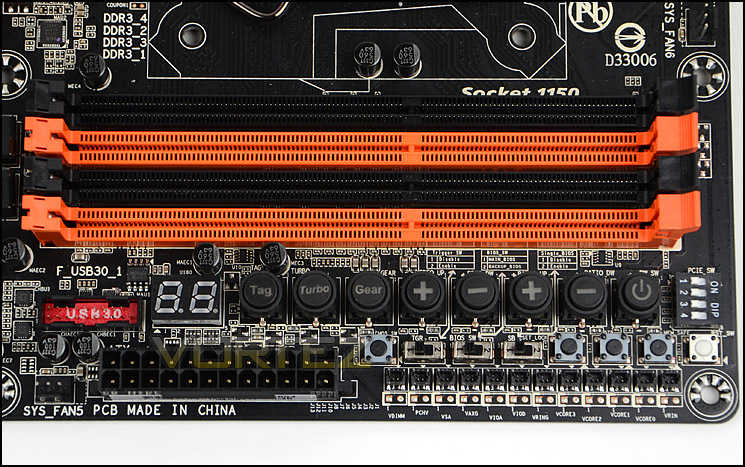
Lots of overclocking features integrated near memory slots
Beneath this there are a variety of controls to take advantage of which are perhaps deemed as being designed for high-end users. Rather than go through each specific control, below is a diagram showing you exactly what these options are.
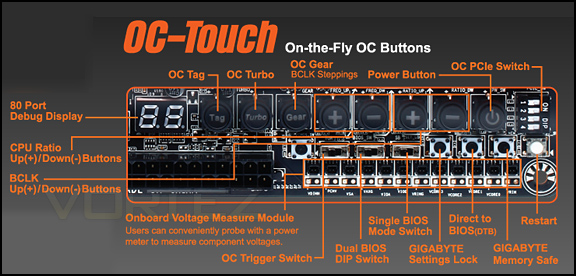
With this unique panel of controls, overclock features can be modified on-the-fly. Settings can be cleverly locked, memory timings can be lowered to avoid problems and on next bootup you can have the BIOS load up straight away.
We like that GIGABYTE have also integrated the PCI-E switch so that specific slots can be disabled for multi-GPU configurations so that you do not need to physically remove the card. This is ideal for those looking to perform advanced cooling analysis.
Further along the motherboard are six SATA 3 (6GB/s) ports. No longer do we have SATA 2, and since SATA 3 is backwards compatible older SATA 2 devices will work fine anyway, their speed will just be capped. All of these ports are controlled via Intel Z87.
Also next to the HDD storage ports are dual USB 2.0 ports which are handy for those using the system on a test bench, a clear battery switch is also present right beside the USB ports.
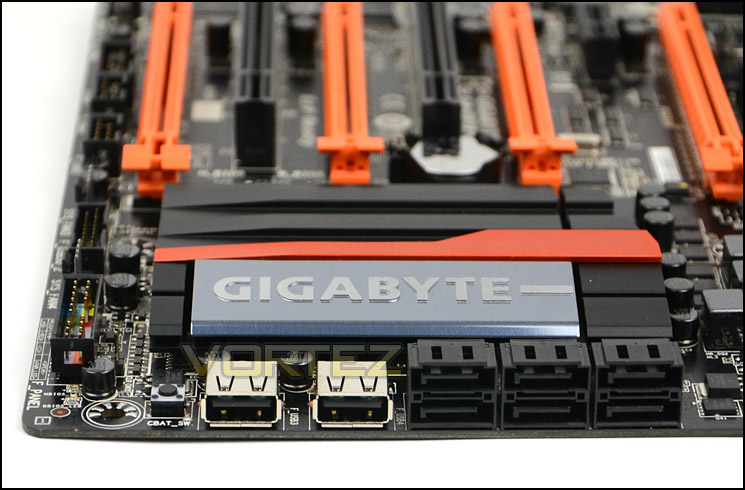
SATA 3 (6GB/s) ports – no SATA 2 present
GIGABYTE have opted for a large but uniquely styled heatsink for the Intel Z87 chip which is situated just behind the SATA ports. This heatsink is substantial and more than sufficient in dissipating unnecessary heat.
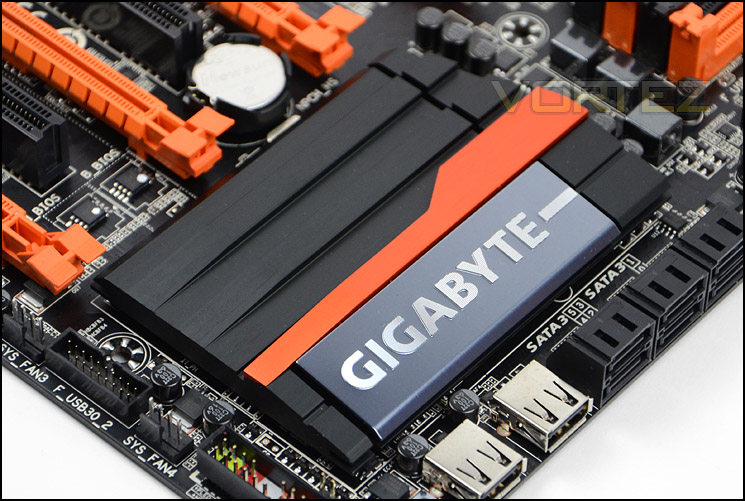
A large heatsink cover Intel Z87 chip
Z87X-OC is designed for multi-GPU configurations and has support for NVIDIA SLI (2-way) and AMD CrossfireX (4-way). This region is packed with functionality and has the following slots:
1 x PCI Express 3.0 x16 slots (Running @x16)
1 x PCI Express 3.0 x16 slots (Running @x8)
2 x PCI Express 3.0 x16 slots (Running @x4)
1 x PCI Express 2.0 x1 slot
2 x PCI slots
There is an additional power PEG slot at the top for the PCI-E slots should those using more than one card require it.
Next to the lower PCI slot are the dual UEFI bios chips. These also have LEDs to signify which one is currently being used – dual BIOS is obviously essential for Overclockers since you can often come unstuck and need to have a backup.
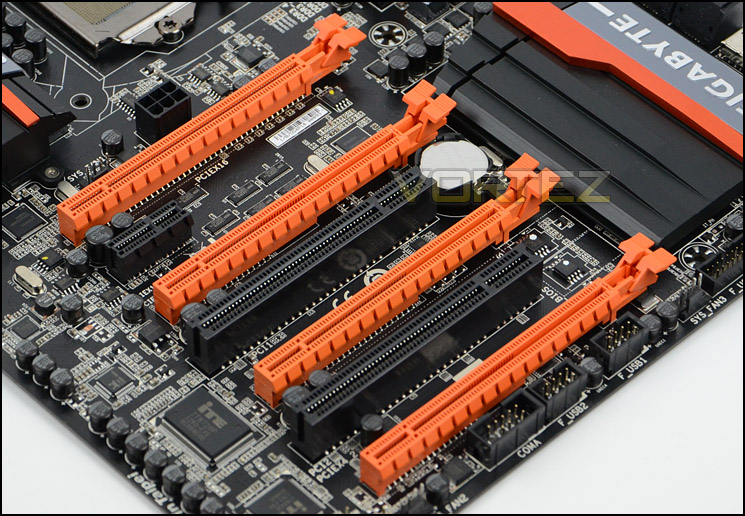
Numerous options for PCI-Express – NVIDIA SLI and AMD CrossfireX support
Lastly we come to the rear IO section and again this is jam-packed with features and plenty of USB 3.0 ports too. Included on this panel are the following:
6 x USB 3.0/2.0 ports , 2 x USB 2.0/1.1 ports
1 OC Ignition button
1 x Coaxial S/PDIF Out connector
2 x HDMI connector
1 x Display ports
1 x LAN ports
6 x audio jacks, 1 x PS/2 Keyboard/Mouse port
The OC ignition button is exclusive to GIGABYTE’s motherboards; this is what GIGABYTE have to say about this particular feature:
The OC Ignition feature maintains power to your motherboard and connected components while the system is shut down. This means that system fans will continue to provide airflow in cold bug situations, while i-ram drive users will not lose installed data. Ignition also allows users to pre-test water cooling setups, and allows case mod demonstrations without having to turn on the PC.
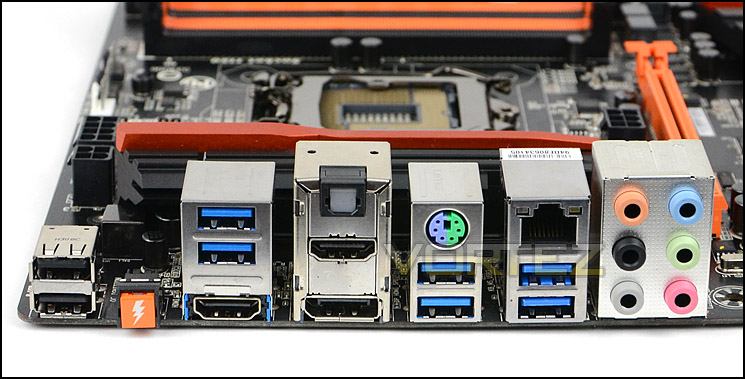
Rear IO functionality on Z87X-OC
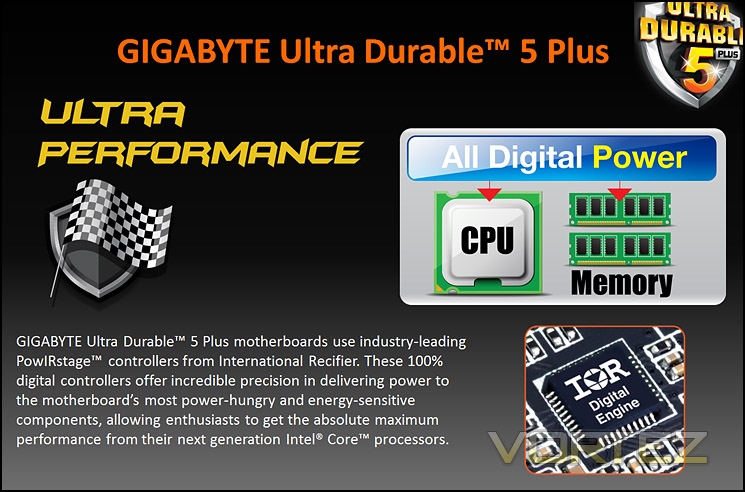
Ultra Durable 5 Plus Features
GIGABYTE have extended their notorious Ultra Durable feature-set to 5 Plus to extend the lifespan of the motherboard and also deliver stability in extreme conditions. Below are a series of slides which demonstrate some of the features Ultra Durable 5 Plus brings.

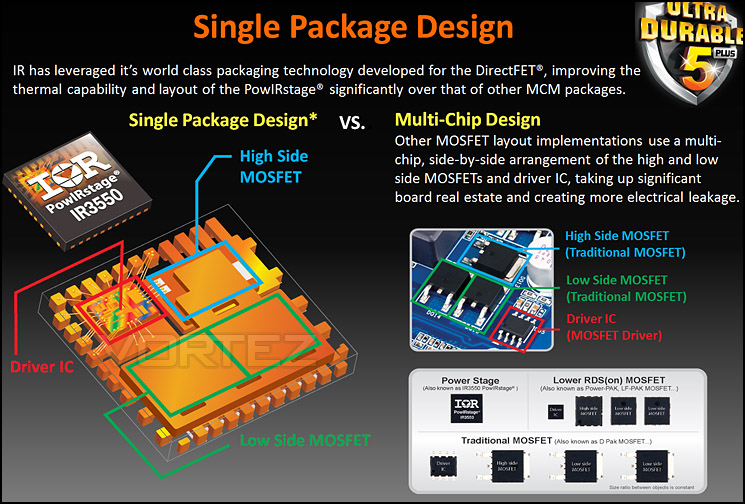

GIGABYTE BIOS
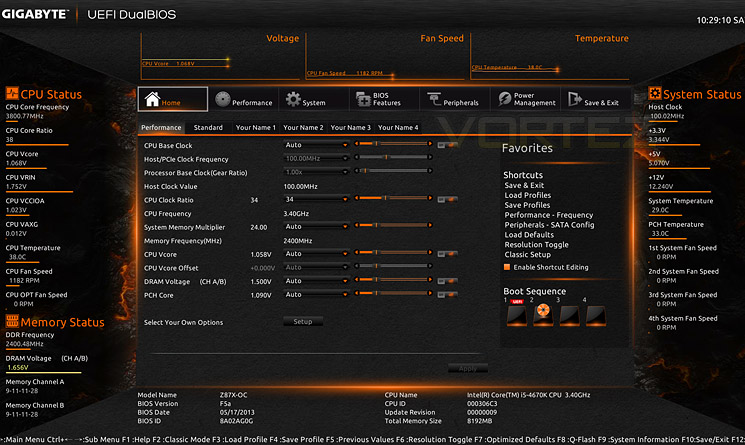
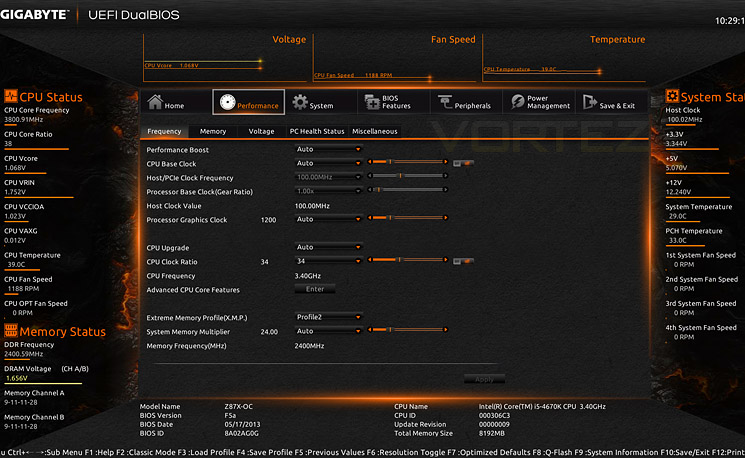
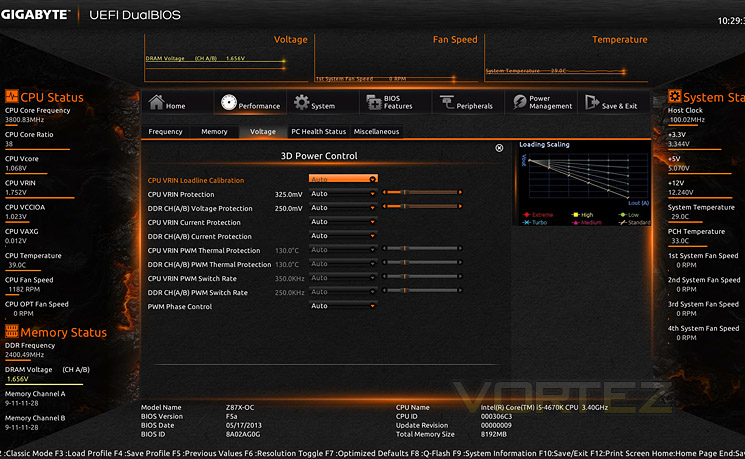
GIGABYTE’s BIOS for Z87 and more specifically, Z87X-OC has been given a much improved facelift. Compared to Z77, it is much more accessible and fluid which we are pleased to see. With this motherboard being tailored towards overclocking enthusiasts the interface within this UEFI BIOS is rather extensive and quite overwhelming at first. GIGABYTE have left no stone unturned, within each section there are options to tweak Haswell to your hearts content. Performance and voltage sections are a particular interest for overclockers and we have shown this below.
Test Setup & Overclocking
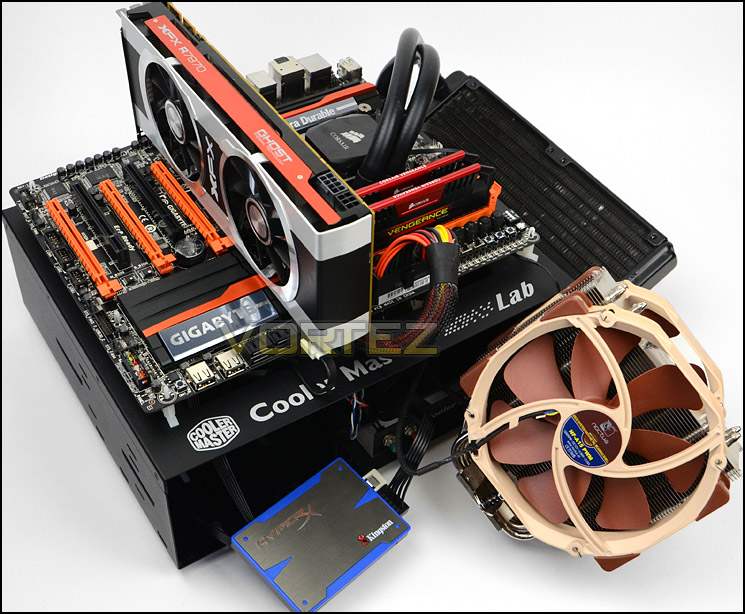
Test Setup
CPU Intel Core i7 4770K (Haswell) 3.50GHz
Cooling Noctua NH-U14
Motherboard GIGABYTE Z87X-OC
Memory 16GB Corsair Vengeance Pro 2400MHz CL10 DDR3
Graphics XFX R7970 Black Edition
Storage Kingston HyperX 240GB SSD
PSU Corsair HX1050 80 Plus Gold Certified PSU
Cooling Noctua NH-U14
Motherboard GIGABYTE Z87X-OC
Memory 16GB Corsair Vengeance Pro 2400MHz CL10 DDR3
Graphics XFX R7970 Black Edition
Storage Kingston HyperX 240GB SSD
PSU Corsair HX1050 80 Plus Gold Certified PSU
Benchmarks
Cinebench 11.5 – CPU Score
x264 HD 4.0 – 1st and 2nd pass encoding
SiSoftware SANDRA 2013 – CPU & Memory benchmarks
AIDA64 – CPU benchmarks
3DMark FireStrike – DX11 3D Benchmark
3DMark 11 – DX11 3D Performance and Extreme preset
Games – Tomb Raider, Crysis 3, Metro Last Light
x264 HD 4.0 – 1st and 2nd pass encoding
SiSoftware SANDRA 2013 – CPU & Memory benchmarks
AIDA64 – CPU benchmarks
3DMark FireStrike – DX11 3D Benchmark
3DMark 11 – DX11 3D Performance and Extreme preset
Games – Tomb Raider, Crysis 3, Metro Last Light
Other Software
Temperature Analysis: Core Temp
Stress Testing Software: LinX
CPU Specification Monitoring: CPU-Z
Stress Testing Software: LinX
CPU Specification Monitoring: CPU-Z
Overclocking
The introduction of Z87 brings a return to BCLK overclocking. This will in turn deliver more flexibility for Overclockers compared to previous generations where the BCLK was locked to 100MHz and only the ratio could be adjusted.
For our overclocking tests we indulge in both practises – leaving BLCK on auto (100MHz) and only adjusting the ratio and adjusting the BCLK to establish how much flexibility there is.
We managed to squeeze 4.7GHz out of the 4770K with Z87X-OC and then 4.6GHz via BCLK tuning. Both results are very good and this appears to be the limitation of the chip we currently have. Even after increasing the voltage up to 1.5v the frequency would not exceed this milestone, so we then lowered the voltage to the minimum it would operate at and work without stability issues – 1.34v.
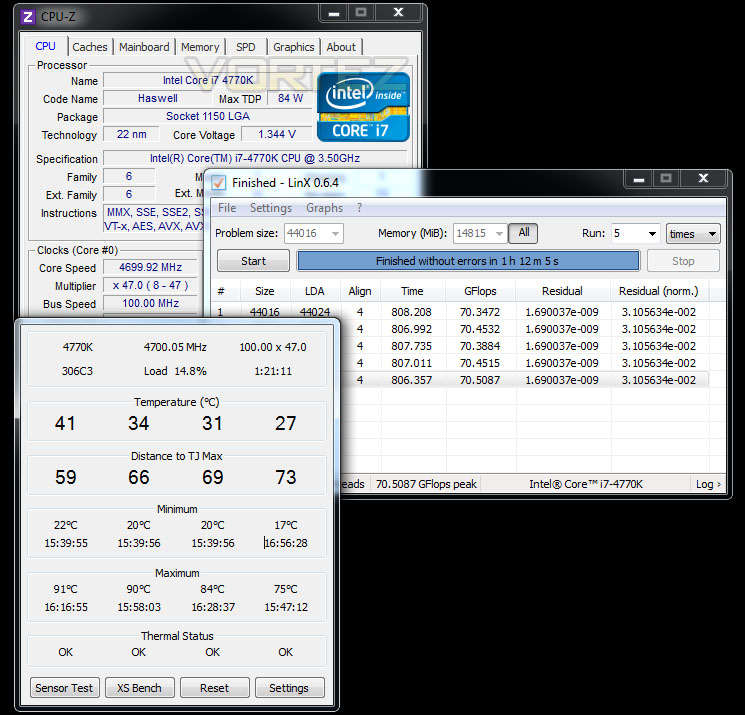
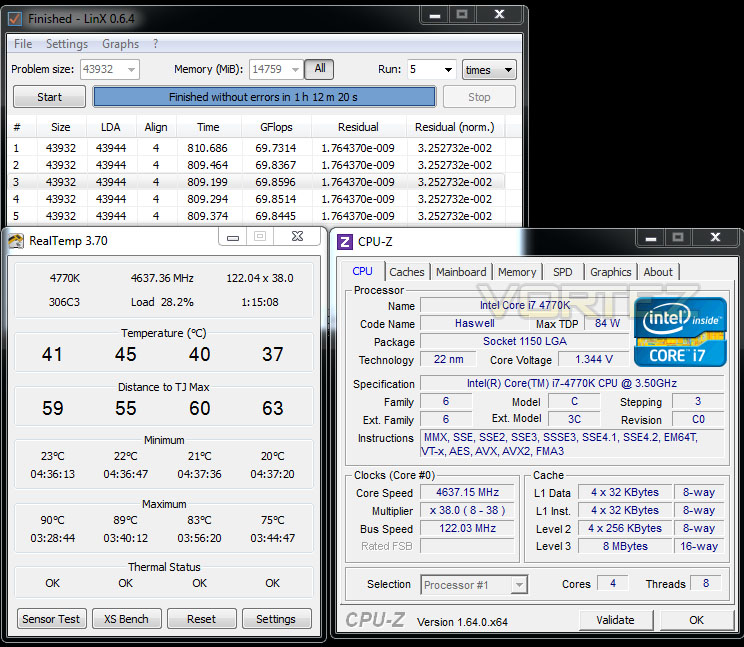
With the 4.7GHz overclock being our best, we will take this into our benchmark suite and test both stock and overclocked results on the subsequent pages. Our comparison results will obviously grow in the forthcoming weeks as we review more and more Z87 motherboards.
Power Consumption
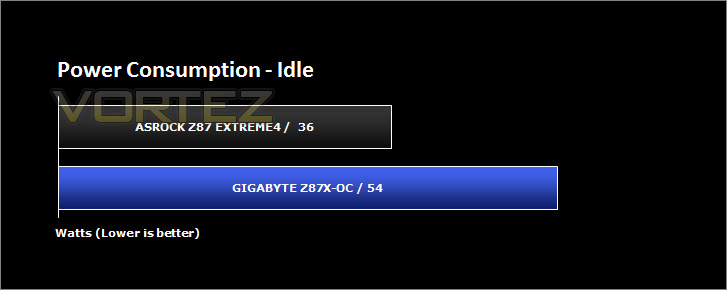
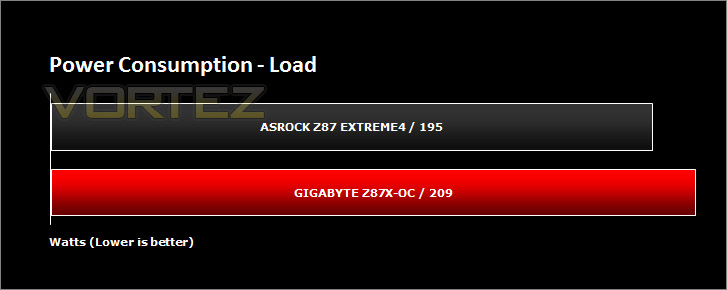
It’s interesting to note the power consumption across all motherboards. Although they are using Z87 chipset, energy results can fluctuate between manufacturers due to the features and specifications that are integrated. First of all, for the idle tests the system is cold booted into Windows and no additional applications are executed – the watts are noted on the external energy monitor we use and then the system is loaded with 3DMark FireStrike – watts are again monitored for the duration of the test and the highest rated wattage result is then noted down. Below are the results of this energy test.
Benchmarks: X264 HD
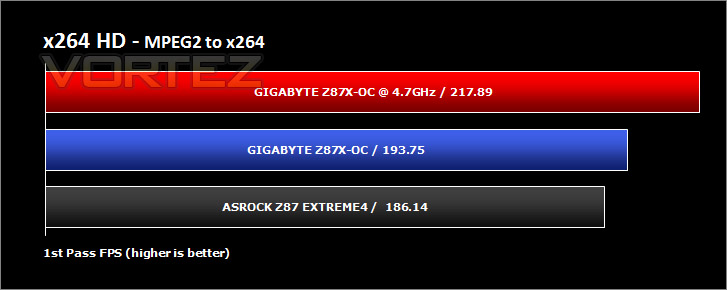
Simply put, this test measures how fast your machine can encode a short, DVD quality MPEG-2 video clip into a high-quality x264 video clip. What’s x264, you ask? It’s more or less the next-generation Xvid/DivX codec. I think it’s ideal for a benchmark because the application (x264.exe) reports fairly accurate compression results (in frames per second) for each pass of the video encoding process, and it uses multi-core processors very efficiently.
Benchmarks: AIDA64
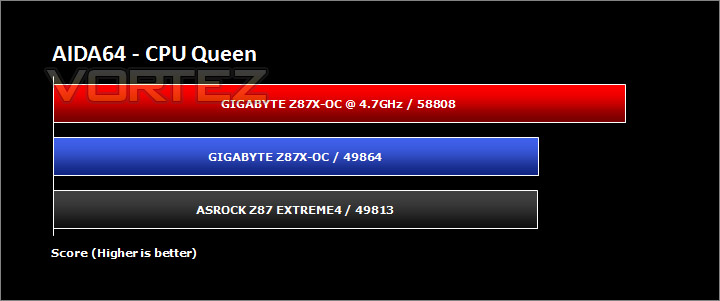
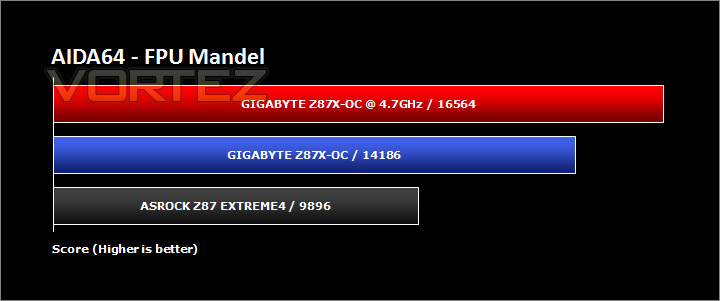
AIDA64 Product PageThis simple integer benchmark focuses on the branch prediction capabilities and the misprediction penalties of the CPU. It finds the solutions for the classic “Queens problem” on a 10 by 10 sized chessboard. At the same clock speed theoretically the processor with the shorter pipeline and smaller misprediction penalties will attain higher benchmark scores. For example — with HyperThreading disabled — the Intel Northwood core processors get higher scores than the Intel Prescott core based ones due to the 20-step vs 31-step long pipeline. CPU Queen test uses integer MMX, SSE2 and SSSE3 optimizations.
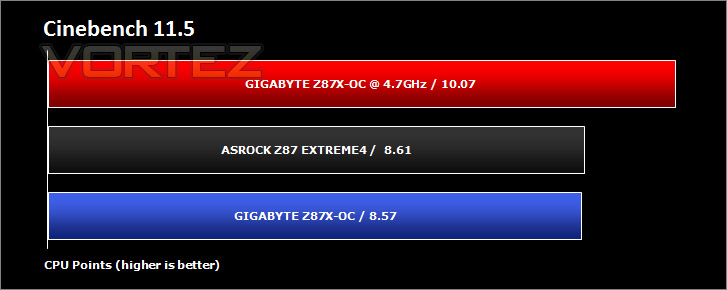
Benchmarks: Cinebench
CINEBENCH can measure systems with up to 64 processor threads. This test scene contains approximately 2,000 objects which in turn contain more than 300,000 polygons in total, and uses sharp and blurred reflections, area lights, shadows, procedural shaders, antialiasing, and much more. The result is displayed in points (pts). The higher the number, the faster your processor.
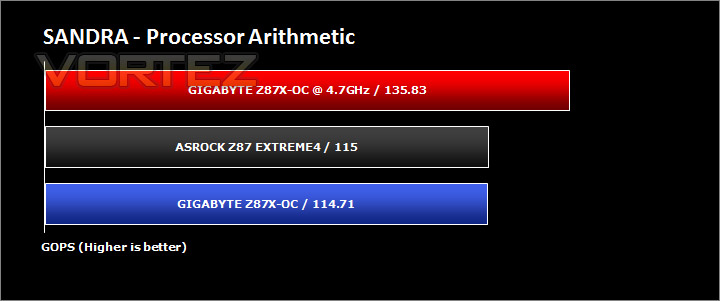
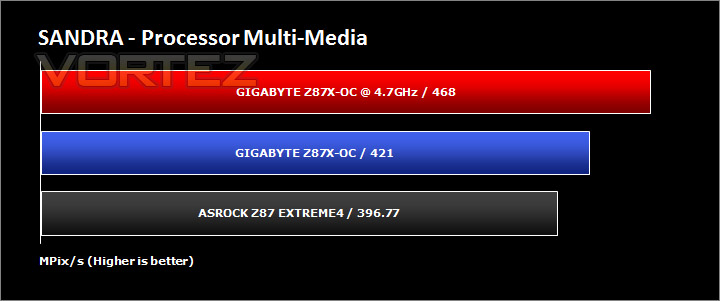
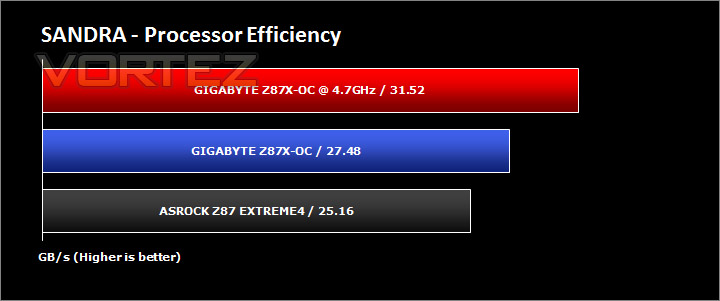
Benchmarks: SiSoftware SANDRA
3DMark 11 Product PageSANDRA isn’t always a benchmark that is included in hardware reviews but I believe it shouldn’t be ignored. SANDRA provides a vigorous package that tests your system in a rather large array of benchmarks. There are many aspects of benchmark that can be executed. We will be considering – CPU and memory tests.
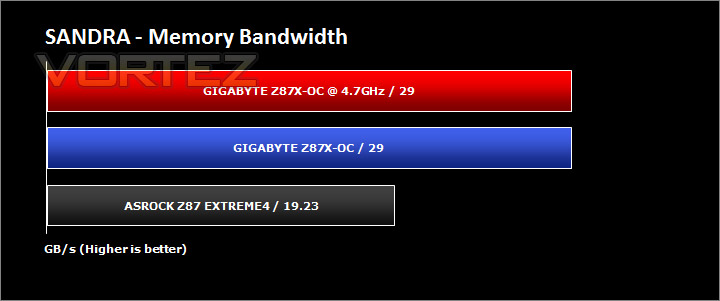
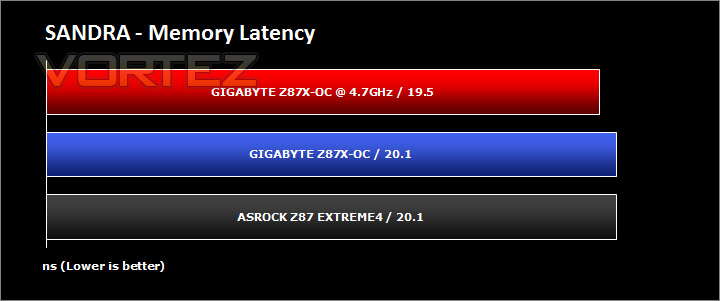
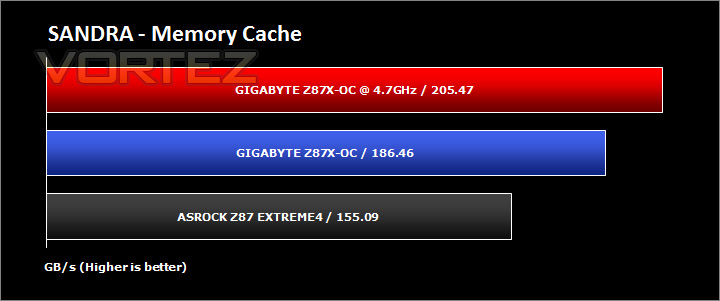
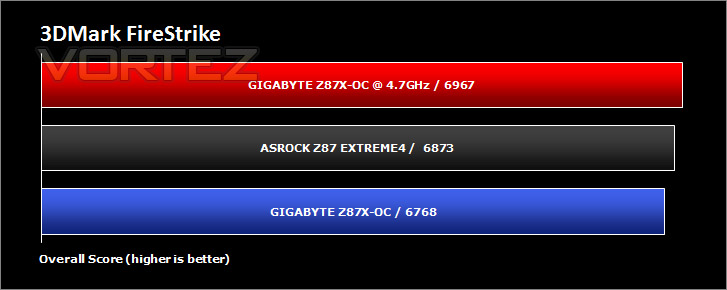
Benchmarks: 3DMARK FireStrike
3DMark FireStrike Product PageFire Strike is our new showcase DirectX 11 benchmark designed for high-performance gaming PCs. It is our most ambitious and technical benchmark ever, featuring real-time graphics rendered with detail and complexity far beyond what is found in other benchmarks and games today. Fire Strike will only be available in the Windows editions of 3DMark initially.
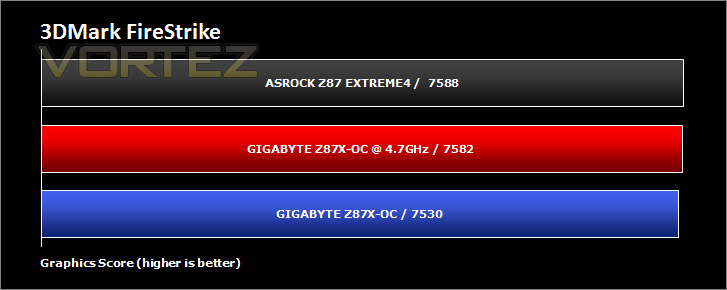
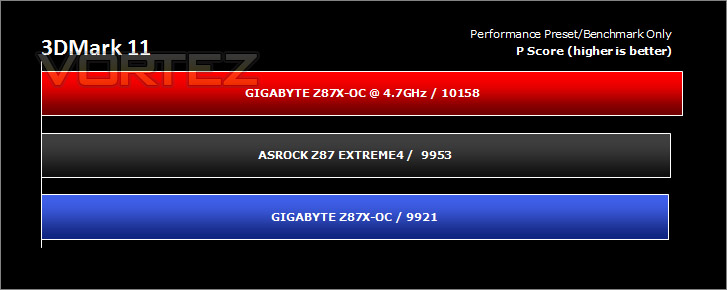
Benchmarks: 3DMARK 11
[quote]Designed to measure your PC’s gaming performance 3DMark 11 makes extensive use of all the new features in DirectX 11 including tessellation, compute shaders and multi-threading. Trusted by gamers worldwide to give accurate and unbiased results, 3DMark 11 is the best way to consistently and reliably test DirectX 11 under game-like loads.3DMark 11 is a very popular 3D performance benchmark suite and needs little introduction. For the test settings both Performance and Extreme presets are run with ‘benchmark only’ being selected. This provides good analysis. Many will only test the performance preset, using the extreme mode we can examine the board under much more severe stressing – at 720p and 1080p.
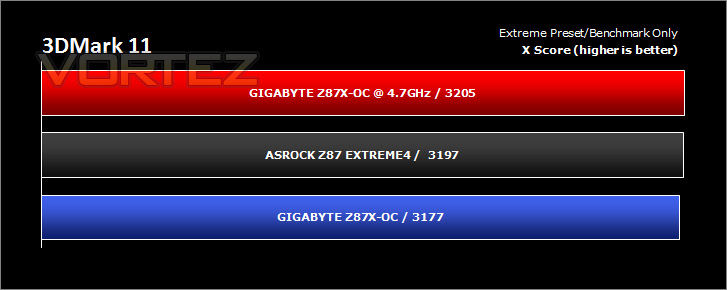
Benchmarks: Tomb Raider, Crysis 3, Metro Last Light
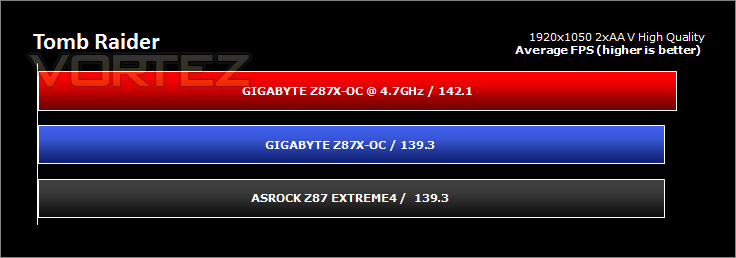
It’s important for us to perform a number of game benchmarks as well as the synthetic tests because gamers will want to know if there are any significant benefits. So here we have a selection of popular gaming titles, critically acclaimed and action-packed.
Settings
Tomb Raider
– 1920×1050 2xAA – Very High Quality *Benchmark tool*
Crysis 3
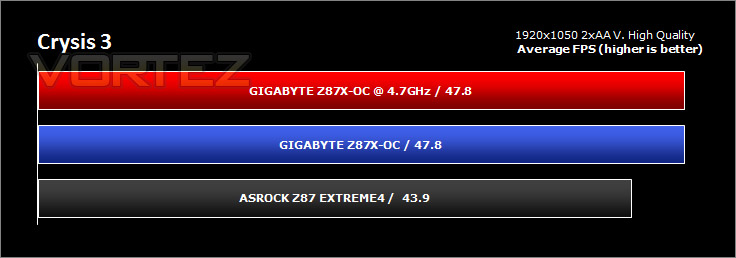
– 1920×1050 2xAA – Very High Quality *FRAPS – 1st scene/gameplay*
Metro Last Light
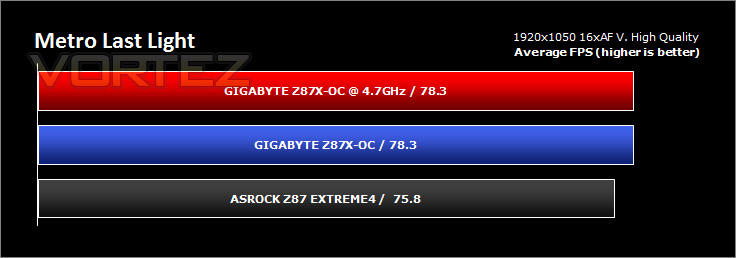
– 1920×1050 16xAF – Very High Quality *FRAPS – 1st scene/gameplay*
The gaming titles selected demand GPU power over CPU power – in each test the difference is rather marginal. VSync is disabled in all titles.
Conclusion
Right from the get-go we were impressed by GIGABYTE’s efforts with the Z87X-OC. It may be designed for the advanced user but even so, it’s even a great starting point for anyone seeking to learn more about overclocking. Z87X-OC has every conceivable tool for overclocking and leaves no stone unturned as it were, those enthusiasts who have their sights set on squeezing the most out of Haswell should look no further.
GIGABYTE have now fine-tuned the aesthetics in this, their latest creation for the prolific overclocking segment. Over the years the styling has altered ever so slightly but we can confidently say that this time round they have really nailed the visual appearance with Z87X-OC. Its design is unique and oozes finesse.
In our performance benchmarks this motherboard gave us the results we hoped for, we even chose this motherboard for reviewing [url=Intel’s Core i5 4670K and Core i7 4770K[/url] since we were certain this particular offering could give us the best results and squeeze the best results and overclock from Intel’s new 4th generation. We obviously couldn’t leave it the average board to demonstrate the absolute limits on this platform; Z87X-OC is about as high-end as you can get for LGA1150. We may not be avid overclockers and may not have the best Haswell chips (in overclockability) but we still felt confident that the 4770K we had was pushed to its limits, we managed a 4.7GHz overclock by using the basic and some advanced options. This is an admirable result, and we are certain records will be broken in the near future with such an offering.
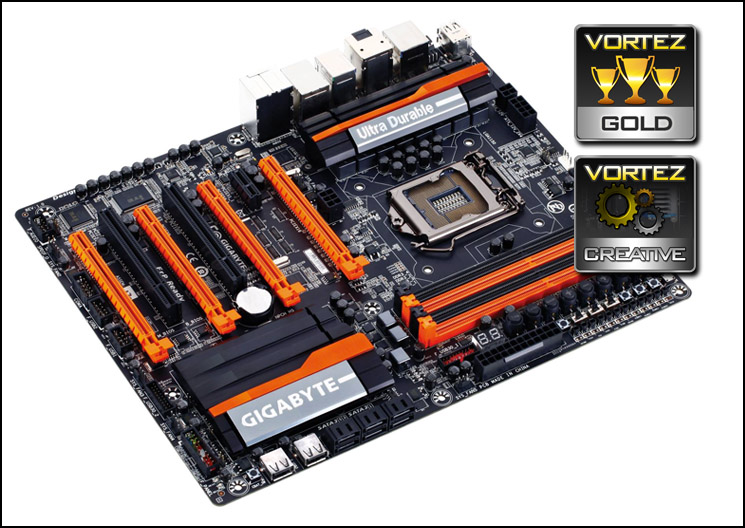
Z87X-OC brings with it Ultra Durable 5 Plus – GIGABYTE’s next instalment in their Ultra Durable series. What this translates to for the end user is – higher quality components and better stability for extreme conditions. Not only have GIGABYTE furnished this motherboard with premium components but the layout is also very good, those using a test bench will be pleased with the layout of features. The last thing you want when trying to push the boundaries is to struggle due to poor layout.
Priced at approximately £180 the Z87X-OC is a little more expensive than entry and mid-level LGA1150 motherboards but this is understandably so. This motherboard is designed for the high-end; it is a premium solution and has significantly more features compared to other solutions. This motherboard is actually quite good value for money considering all you get.
The Z87X-OC is poised and ready to take on anything thrown at it. If you are seeking a premium Z87 motherboard, want to push the limitations of your processor then this offering is a top-pick. We are pleased to hand GIGABYTE our Gold and Creative awards.
Pros
+ Features every conceivable tool for overclocking
+ Unique and striking aesthetics
+ Pushes the boundaries for overclocking
+ Great layout with numerous fan headers
+ Ultra Durable 5 Plus components/features
Cons
– Colour-scheme garish
+ Features every conceivable tool for overclocking
+ Unique and striking aesthetics
+ Pushes the boundaries for overclocking
+ Great layout with numerous fan headers
+ Ultra Durable 5 Plus components/features
Cons
– Colour-scheme garish

Click here for an explanation of our awards at Vortez.net.


