







Touted as GIGABYTE’s premium G1 gaming motherboard, the Z97X-Gaming G1-WIFI-BK attains the Black Edition status and promises to be a thrilling Intel Z97 offering.

Product on Review: Z97X-Gaming G1-WIFI-BK
Manufacturer and Sponsor: GIGABYTE
Street Price: £250 GBP / $379 USD
The G1 Series has been GIGABYTE’s gaming line for numerous generations but has been accustomed to the loud and exuberant luminous green but things are about to change with the new Intel 9 Series motherboards. Just like many of the other Intel partners, GIGABYTE are using the Z97 inauguration to freshen up the product line. But GIGABYTE hasn’t just changed the theme of their gaming motherboards, they have also been insistent on including a number of noteworthy features.
The Z97X-Gaming G1-WIFI-BK Black Edition is a premium motherboard designed primarily for gamers. One such feature which diversifies this offering is the integration of the PLX 8747 chip which paves the way for greater bandwidth over the four PCI express slots which accommodate 4-way SLI/CrossfireX. Being a “Black Edition” motherboard, also means higher grade components throughout and so this new Z97 motherboard is packed with innovation, creativity and performance – are you excited? Cause we sure are!
GIGABYTE on their Z97 G1 motherboards
GIGABYTE 9 series G1 gaming motherboards were designed to deliver top-notch features that matter most to gamers. From incorporating industry-leading GIGABYTE AMP-UP Audio technologies that allow gamers and audiophiles to experience crisp, ultra sound effects while gaming and the richest possible sound experience while listening to their favorite music and movies, to ultra-fast onboard Gigabit LAN solutions from Killer and Intel, GIGABYTE G1 motherboards were designed for gamers that aren’t satisfied with second best.
With a full range of top-to-bottom G1 gaming motherboards including the compact, yet powerful Z97N-Gaming 5 Mini-ITX motherboard, GIGABYTE has a gaming motherboard suited for any type of gamer, no matter what type of game they play. Featuring the distinctive G1 detailing and sexy new red and black styling, GIGABYTE G1 motherboards are sure to make gamers stand out from the horde.
With a full range of top-to-bottom G1 gaming motherboards including the compact, yet powerful Z97N-Gaming 5 Mini-ITX motherboard, GIGABYTE has a gaming motherboard suited for any type of gamer, no matter what type of game they play. Featuring the distinctive G1 detailing and sexy new red and black styling, GIGABYTE G1 motherboards are sure to make gamers stand out from the horde.
Packaging & First Look
Packaging for Z97X-Gaming G1-WIFI-BK
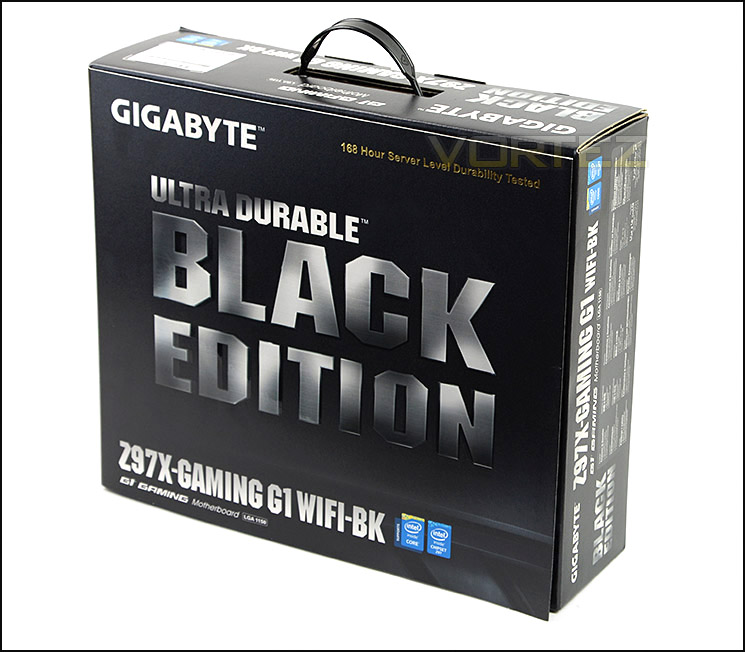
Z97X-GAMING G1-WIFI-BK is presented in a professional and eye-catching box. On the front, “Black Edition” is rather hard to miss and GIGABYTE are keen to emphasise this highlight, as well as the “168 Hour Server Level Durability Tested” which is printed in the upper edge.
Around the sides and back there are details concerning the features and specifications.
A glimpse of the motherboard
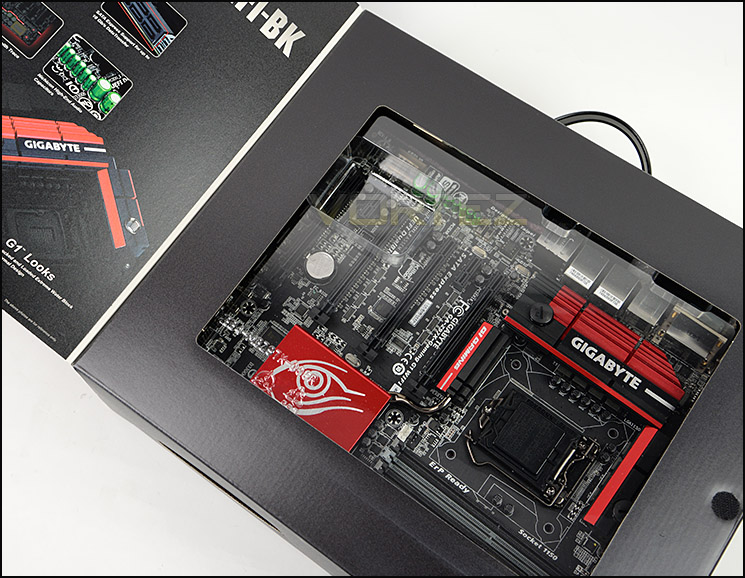
Being a premium motherboard, Z97X-GAMING G1-WIFI-BK has been given special treatment which extends even to the packaging. The box features a lid which, when uncovered reveals further insight into the features and a sneak preview of the actual board itself through a transparent window.
Inside, the motherboard and accessories are placed within two trays.
The included items within the bundle
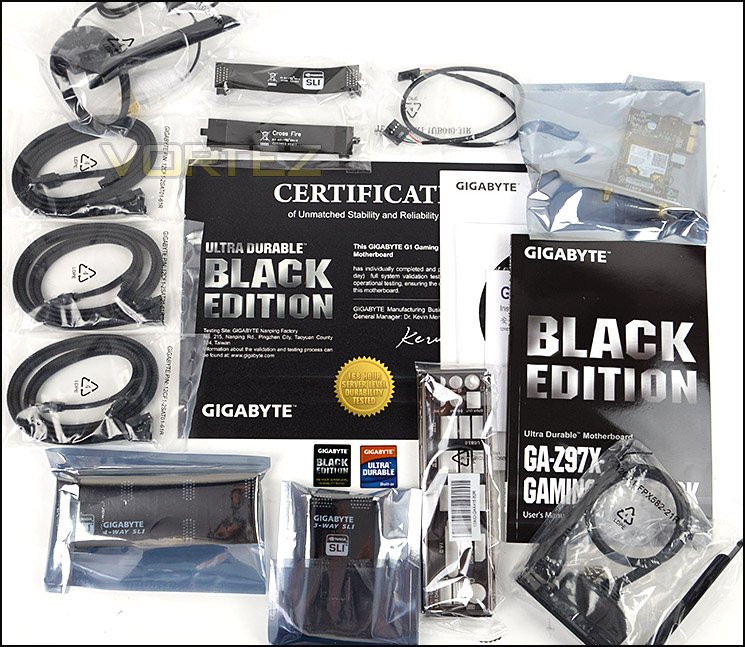
Inside the box, there are a plethora of accessories included with Z97X-GAMING G1-WIFI-BK. These items included are as follows:
• Documentation – User Guide, Warranty and certificate of stability
• Six braided SATA cables
• Rear IO Shield
• Flexible SLI Bridge
• Flexible CrossfireX Bridge
• Solid 3-Way SLI Bridge
• Solid 4-Way SLI Bridge
• WiFi Card / Antennas
• USB 3.0 Front Panel Adapter
• Case Stickers
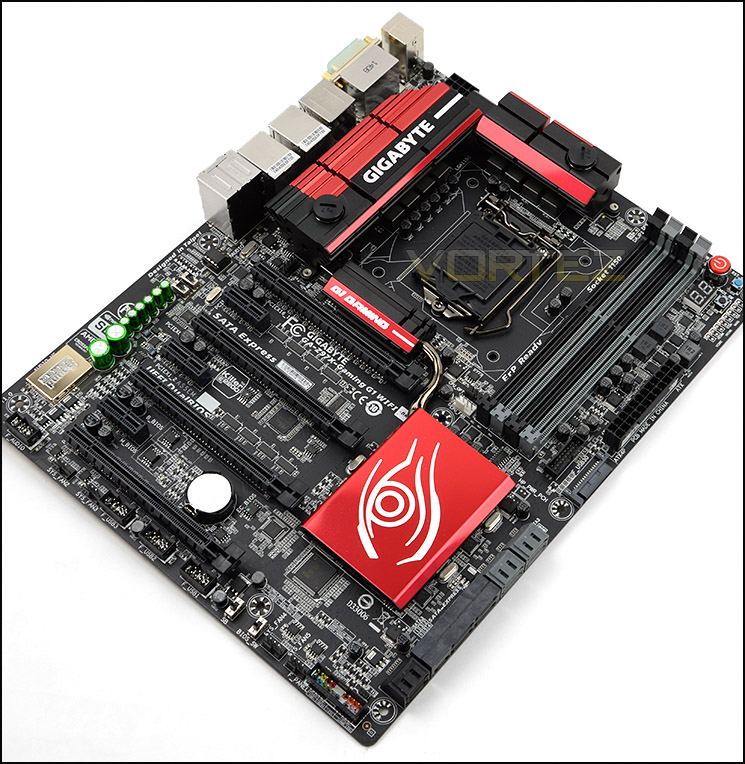
An overview of Z97X-GAMING G1-WIFI-BK
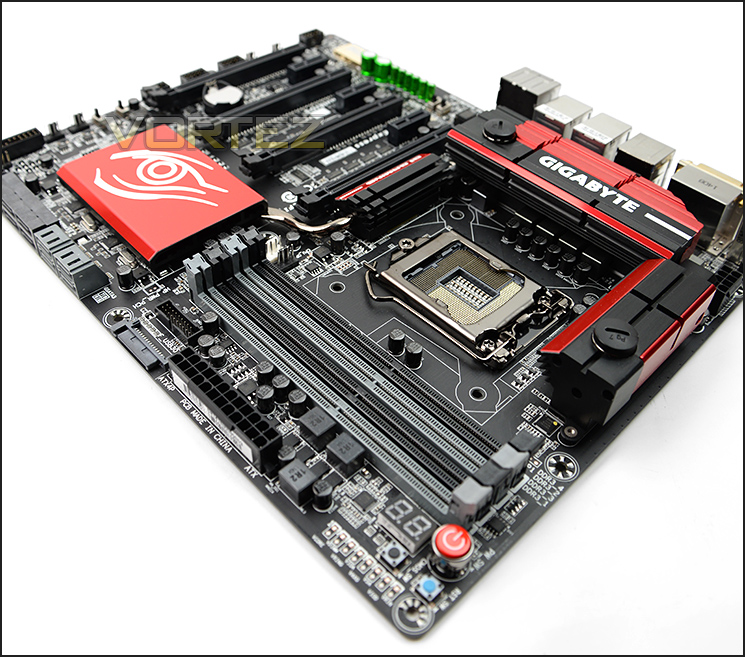
Z97X-GAMING G1-WIFI-BK is regarded as one of GIGABYTE’s prolific Z97 offering, jam-packed with high-end features. Touted as the “Black Edition” this motherboard uses a matt black PCB which avid system builders really favour nowadays. Although Z97X-GAMING G1-WIFI-BK has the “Black” moniker it does have a lick of colour on the heatsinks. Overall, this motherboard looks fantastic and it pairs up very well with other hardware.
There are a total of 7 fan headers on Z97X-GAMING G1-WIFI-BK, giving lots of flexibility for cooling capabilities.
As a bonus, GIGABYTE stress test all Black Edition products by putting them through an arduous, 7 day test to ensure utmost stability. Below are the details surrounding this test from GIGABYTE themselves:
GIGABYTE Black Edition motherboards undergo an extra 168 hours (7 days) of stress testing before shipment to ensure premium quality for our customers.
During the 168 hour test, each motherboard needs to pass rigorous full system validation testing including Litecoin mining for 1 full week. GIGABYTE has built a custom testing facility at out Taiwan (Nanping) factory, capable of testing up to 3,000 motherboards at a time.
Black Edition owners will receive an up to 5 year warranty when they register on the GIGIABYTE website (warranty period may vary by region).
A Certificate of Validation is included with every board, issued by the GIGABYTE factory and signed by the manufacturing VP & GM to indicate this board has passed our highest test standards.
Photos will be taken at regular time intervals during the 168 hours test, and users can view them from the GIGABYTE website to see how their board is holding up under testing.
During the 168 hour test, each motherboard needs to pass rigorous full system validation testing including Litecoin mining for 1 full week. GIGABYTE has built a custom testing facility at out Taiwan (Nanping) factory, capable of testing up to 3,000 motherboards at a time.
Black Edition owners will receive an up to 5 year warranty when they register on the GIGIABYTE website (warranty period may vary by region).
A Certificate of Validation is included with every board, issued by the GIGABYTE factory and signed by the manufacturing VP & GM to indicate this board has passed our highest test standards.
Photos will be taken at regular time intervals during the 168 hours test, and users can view them from the GIGABYTE website to see how their board is holding up under testing.
Closer Look
Digi+ 8-Phase VRM design
GIGABYTE have given Z97X-GAMING G1-WIFI-BK an interconnecting heatsink design which is quite bulky in its dimensions but certainly catches the eye. Z97X-GAMING G1-WIFI-BK has been given an 8-Phase VRM design and there is an 8-pin CPU power socket just behind the MOSFET heatsinks.
Dotted around the motherboard and indeed the VRM area are 10K-Solid CAPs. These capacitors promise to deliver at least 10K hours of usage, offering ultra-low ESR even under severe CPU load. These black CAPs are also exclusively designed by Nippon Chemi-Con for GIGABYTE motherboards – complimenting the overall look and aesthetics.
The actual socket on our Z97X-GAMING G1-WIFI-BK motherboard is LGA 1150 and has compatibility for 4th / 5th Generation of Core i5/i7 Processors. Power delivery on this board is completely digital for CPU and memory via IR Digital Engine.
Ready for water cooling
At each end of the heatsink there are tube connectors for use with water cooling kit. This means that custom configurations can be used to effectively cool the VRM area for those wanting to really push the limits of the system.
The caps which cover the mounting holes are plastic and simply unscrew from the heatsink. Various sized barb fittings are supported including: 1/2”, 3/8” and 1/4″.
This adds a completely different dimension to the motherboard compares to rivals and means the end user can choose to passively cool the VRMs or go down the water cooling route.
DDR3 memory support and overclocking features
Z97X-GAMING G1-WIFI-BK has 4x DIMM slots which support dual-channel DDR3. These slots can accommodate 32GB of capacity and up to 3200 (OC).
This particular region lends itself to having a number of useful features. In the very corner there are a variety of onboard buttons including: power, reset and clear CMOS. Having these buttons in such a place makes it much easier to access when needed. LED Debug also sits immediately next to the power button, giving LED codes throughout the POST process and helps to ascertain any issues with booting (codes can be verified by looking at the manual). On the outer edge, GIGABYTE has placed voltage measurement points for advanced users to read voltages from DRAM, CPU and other such areas.
Over on the left-side there is an OC-PEG connector which provides onboard SATA power connectors additional stability for PCI-E power when multiple graphics configurations are in use and there is a USB 3.0 header for gaining front panel connectivity.
SATA and SATA Express functionality
Moving along we come to the SATA storage which combines SATA III (6Gb/s) and SATA Express (10Gb/s). SATA Express is an integral feature with Z97 and combines the benefits of PCI-Express and SATA.
Closer Look (Continued)
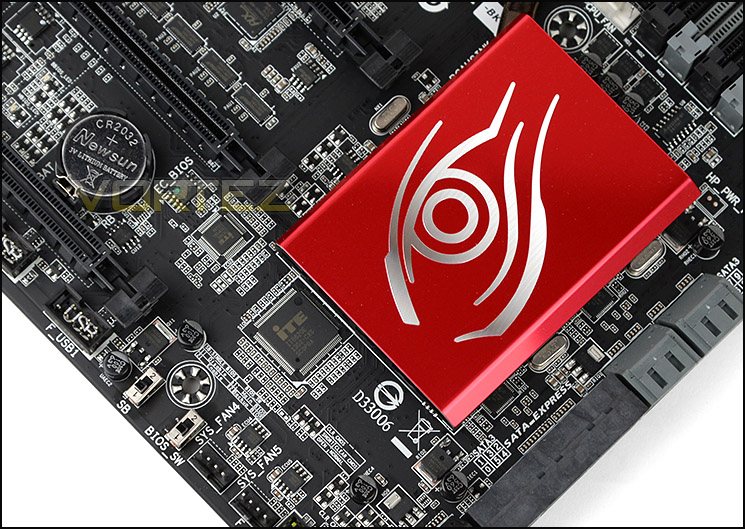
Large heatsink covering Z97
Covering the Z97 chip is a large heatsink which has been coated red and given the GIGABYTE gaming eye motif. This heatsink is substantial in size and is passive. A copper heatpipe connects this heatsink to the PLX heatsink above the PCI Express slots.
Running along the bottom edge of the motherboard are two switches – single BIOS mode switch and dual BIOS mode switch. Having a secondary BIOS is something many system builders and avid performance enthusiasts will appreciate because it means there is always a backup should the system become unstable and malfunction.
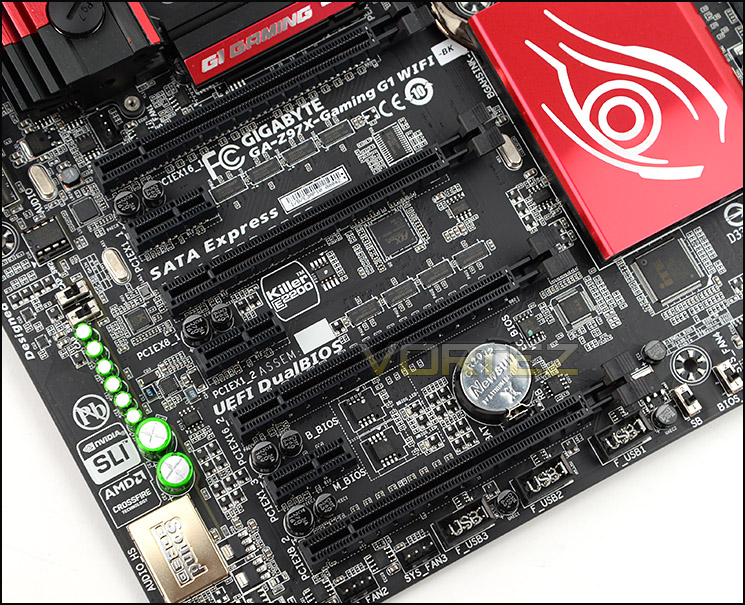
Wide selection of PCI Express options
Arriving at the expansion slot area, we are met by a plethora of options. This is certainly an area which GIGABYTE have channelled most of their efforts and since this motherboard is touted as a gaming product then it’s only right that we have so many routes to take.
Available in this region are the following:
2 x PCI Express 3.0 x16 slots (Running @x16)
2 x PCI Express 3.0 x16 slots (Running @x8)
3 x PCI Express 2.0 x1 slots
The uppermost PCI Express 3.0 x16 slots operate at x16 and the bandwidth does not drop down because GIGABYTE have integrated a PLX 8747 chip. Having a total of Four x16 PCI Express slots obviously means we have the ability to pair up four graphics cards for 4-Way SLI/CrossfireX.
The eagle eyed amongst you will notice GIGABYTE haven’t included an M.2 port on this motherboard for the simple reason that focus has been dedicated to PLX (chip sits underneath horiztonal heatsink with G1 Gaming written on it) and PCI Express support. This is an interesting decision and it’s easy to understand why GIGABYTE have chosen to opt for stronger provision for the graphics card over storage since this motherboard is directed at gamers.
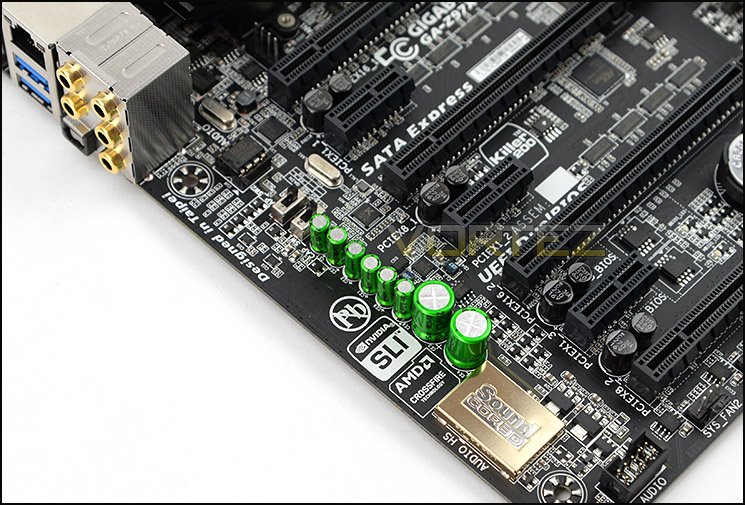
A strong lineup of audio components
Audio is just as important as video support and thus, we have a strong lineup of audio components situated on Z97X-GAMING G1-WIFI-BK. The gold chip which sits near the corner is Creative Sound Core 3D and is gold plated for shielding. The chip underneath is a quad-core audio processor and fully supports Sound Blaster SBX Pro Studio. The plethora of green capacitors are Bi-Polarized audio CAPs (MUSE ES Acoustic) which promise to deliver precise audio for high-end audiophiles and then finally we have two switches for OP-AMP gain boost – in essence this allows the user to use standard audio levels, 2.5x or 6x amplification for high impedance audio devices. GIGABYTE has also integrated an audio noise guard to protect audio components and separate analogue and digital to protect against EMI. When Z97X-GAMING G1-WIFI-BK is powered up a red LED trace path illuminates to show the separation of audio components to the rest of the motherboard.
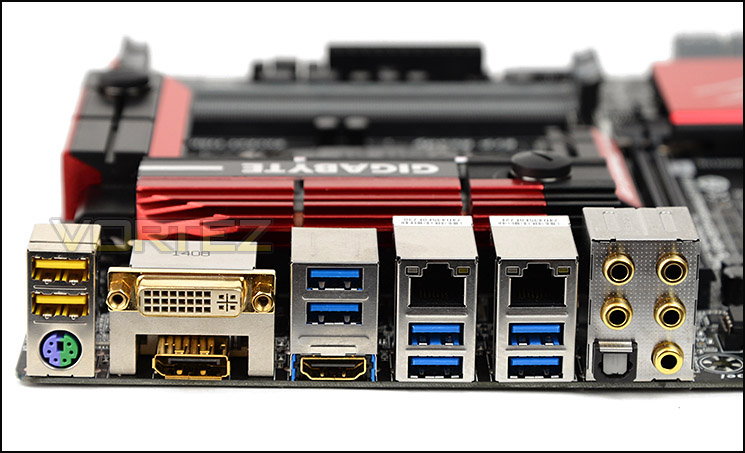
Lots of functionality on the Rear IO panel
Lastly, we come to the Rear IO panel which has a plethora of ports to take advantage of. The list of options available are as follows:
1 x PS/2 keyboard/mouse port
1 x DVI-I Connector
1 x HDMI port
1 x DisplayPort
1 x Optical S/PDIF Out connector
6 x USB 3.0/2.0 ports /2 x USB 2.0/1.1 ports
2 x RJ-45 ports /5 x audio jacks
You’ll also notice that some of the connectors are gold plated. GIGABYTE has chosen to incorporate this to improve signal conductivity – thus helping to alleviate electrostatic interference.
The LAN connectivity is via Killer E2200 and offers gigabit transfer rates from two RJ45 ports which both work in conjunction with Killer LAN software. Whilst we have wired solutions, GIGABYTE also bundle the Bluetooth 4.0 and 867 11AC Dual Band WiFi card with antenna so that wireless connectivity can be achieved too.
GIGABYTE 9 Series Features
DuraBlack – 10K Black Solid CAPs
GIGABYTE continue their Ultra Durable theme by teaming up with Nippon Chemi-Con who have developed a range of solid capacitors exclusively for the brand. These durable black solid CAPs (DuraBlack) offer a minimum of 10K hours of intense operation at temperatures up to 105C. Regardless of how much load is applied to the CPU, ultra-low ESR is achieved.
Audio inc. Creative Sound Core3D
GIGABYTE bundle a series of high-grade audio components with the 9 Series motherboards including a quad-core audio processor from Creative – Sound Core3D. This processor works in conjunction with Bi-Polarized Audio Capacitors which are audio-class MUSE ES acoustic CAPS – these components promise to deliver the highest quality sound resolution to ensure great audio both in games and when watching movies or listening to music.
Furthermore, GIGABYTE motherboards feature upgradable OP-AMP (World’s 1st Upgradable) were user can choose the audio quality based on their own taste. OP-AMPs can be obtained and installed onto the motherboard, providing an alternative route to enhancing the audio preference on the motherboard.
An EMI noise guard sections off all audio components from the rest of the motherboard to reinforce quality and ensure no noise interference takes place. An LED trace line glows when the system is powered.
Killer E2200
A reoccurring feature is integrated with GIGABYTE’s motherboards – Killer E2200. An adaptive gigabit controller is present and combining this with the full Killer software suite, users can enhance their network performance by taking advantage of improved performance over standard LAN connectivity.
DualBIOS
Having two BIOS on a motherboard is an extremely useful feature to have, especially for those who modify settings and are seeking to push the system to the limits. DualBIOS offers a backup scenario so that users can switch between BIOS should one become unstable and fail. So, even if the BIOS is infected with a virus or malfunctions the secondary option is completely independent and can be used without having to send the motherboard back – thus preventing inconvenient downtime.
App Center
GIGABYTE Intel 9 series MB features the latest ‘App Center’ utility, integrating all of GIGABYTE’s unique software applications into one convenient location. Live Updates ensure you are always using the latest software version.
GIGABYTE UEFI Video Tour
Below is a video tour showing the interface of GIGABYTE’s UEFI BIOS and the options which are available. As you can see, GIGABYTE haven’t really altered the BIOS experience except for the welcome screen. The Advanced Mode area remains the same and doesn’t feel as smooth or professional as rival UEFI BIOS’.
Test Setup, Methodology & Overclocking
Test Setup
CPU Intel Core i7 4770K (Haswell) 3.50GHz
Cooling Corsair Hydro Series H105
Motherboard Z97X-Gaming G1-WIFI-BK
Memory 16GB Corsair Vengeance Pro 2800MHz CL12 DDR3
Graphics XFX R7970 Black Edition
Storage Corsair Neutron GTX 480GB
PSU Corsair HX1050 80 Plus Gold Certified PSU
Cooling Corsair Hydro Series H105
Motherboard Z97X-Gaming G1-WIFI-BK
Memory 16GB Corsair Vengeance Pro 2800MHz CL12 DDR3
Graphics XFX R7970 Black Edition
Storage Corsair Neutron GTX 480GB
PSU Corsair HX1050 80 Plus Gold Certified PSU
Benchmarks
Cinebench R15 – CPU/OpenGL Score
x264 HD 4.0 – 1st and 2nd pass encoding
SiSoftware SANDRA 2014 – CPU & Memory benchmarks
AIDA64 – CPU benchmarks
PCMark 8 – Home Suite
3DMark FireStrike – DX11 3D Benchmark
Games – Tomb Raider, THIEF
x264 HD 4.0 – 1st and 2nd pass encoding
SiSoftware SANDRA 2014 – CPU & Memory benchmarks
AIDA64 – CPU benchmarks
PCMark 8 – Home Suite
3DMark FireStrike – DX11 3D Benchmark
Games – Tomb Raider, THIEF
Other Software
Temperature Analysis: Core Temp
Stress Testing Software: LinX
CPU Specification Monitoring: CPU-Z
Stress Testing Software: LinX
CPU Specification Monitoring: CPU-Z
Overclocking
Since the introduction of Z87 back in 2013, there has been a return to BCLK overclocking. This type of functionality ensures flexibility for Overclockers compared to previous generations were the BCLK was locked to 100MHz and only the ratio could be adjusted. As many of you will know, Haswell CPUs get very hot with little voltage increase therefore the flexibility and headroom for overclocking can be limited. For the Z97 launch, we are testing with the Intel Core i7-4770K which from previous, extensive testing, has a maximum overclock of 4.6GHz.
Z97X-GAMING G1-WIFI-BK managed to achieve that milestone of 4.6GHz with the Core Voltage as low as 1.270v – most motherboards we have tested require 1.29v to be configured so this is an impressive achievement and helps keep those temperatures down and ensure longevity of the chip.
Benchmarks: Power Consumption
It’s interesting to note the power consumption across all motherboards. Although they are using Z97 chipsets, energy results can fluctuate between manufacturers due to the features and specifications that are integrated. First of all, for the idle tests the system is cold booted into Windows and no additional applications are executed – the watts are noted on the external energy monitor we use and then the system is loaded with 3DMark FireStrike – watts are again monitored for the duration of the test and the highest rated wattage result is then noted down. Below are the results of this energy test.
Benchmarks: X264 HD
Simply put, this test measures how fast your machine can encode a short, DVD quality MPEG-2 video clip into a high-quality x264 video clip. What’s x264, you ask? It’s more or less the next-generation Xvid/DivX codec. I think it’s ideal for a benchmark because the application (x264.exe) reports fairly accurate compression results (in frames per second) for each pass of the video encoding process, and it uses multi-core processors very efficiently.
Benchmarks: AIDA64
AIDA64 Product PageThis simple integer benchmark focuses on the branch prediction capabilities and the misprediction penalties of the CPU. It finds the solutions for the classic “Queens problem” on a 10 by 10 sized chessboard. At the same clock speed theoretically the processor with the shorter pipeline and smaller misprediction penalties will attain higher benchmark scores. For example — with HyperThreading disabled — the Intel Northwood core processors get higher scores than the Intel Prescott core based ones due to the 20-step vs 31-step long pipeline. CPU Queen test uses integer MMX, SSE2 and SSSE3 optimizations.
Benchmarks: Cinebench
CINEBENCH is a real-world cross platform test suite that evaluates your computer’s performance capabilities. CINEBENCH is based on MAXON’s animation software CINEMA 4D 3D content creation.
Benchmarks: SiSoftware SANDRA
SANDRA isn’t always a benchmark that is included in hardware reviews but I believe it shouldn’t be ignored. SANDRA provides a vigorous package that tests your system in a rather large array of benchmarks. There are many aspects of benchmark that can be executed. We will be considering – CPU and memory tests.
Benchmarks: 3DMark
3DMark FireStrike Product PageFire Strike is our new showcase DirectX 11 benchmark designed for high-performance gaming PCs. It is our most ambitious and technical benchmark ever, featuring real-time graphics rendered with detail and complexity far beyond what is found in other benchmarks and games today. Fire Strike will only be available in the Windows editions of 3DMark initially.
Benchmarks: PCMark 8
PCMark 8 combines performance benchmarking with battery life measurement and includes tests based on popular Adobe and Microsoft applications. Whether you are looking for long battery life, or maximum power, PCMark 8 will help you find the devices that offer the perfect combination of efficiency and performance for your needs. It’s the complete PC performance benchmark for home and business.
Benchmarks: Tomb Raider & THIEF
It’s important for us to perform a number of game benchmarks as well as the synthetic tests because gamers will want to know if there are any significant benefits. So here we have two popular and recent gaming titles which feature a dedicated benchmark tool within them to display results.
Conclusion
There is no doubting Z97X-Gaming G1 WiFi-BK’s ability to impress. GIGABYTE has packed this motherboard with so many useful features which both the primary audience – the gamer, and the typical enthusiast will find very useful.
Adjusting the theme of a long-standing product can have unpredictable results but we think GIGABYTE has pulled it off. Aesthetically, Z97X-Gaming G1 WiFi-BK is appealing to the eye and will pair up very well with other hardware.
Having the option to water cool the VRMs is a handy integration because having a hybrid cooling solution opens the door to enthusiasts who want to push the limits of the system. Accompanying this are other overclocking features such as onboard buttons, LED debug, OC-PEG and DualBIOS.
Upon our initial look at Z97X-Gaming G1 WiFi-BK, we were surprised to see no M.2 socket but then we realised that the PLX chip and 4-Way graphics card support is something which gamers favour over optional storage. Irrespective of this, there is still SATA Express to future proof this offering.
Audio is another area which has been given special treatment. There are various components situated on the motherboard which will transform the audio experience for gamers and audiophiles. Creative Core3D is fundamental in delivering high-quality sound and we really like the inclusion of the gain switches on the motherboard to amplify audio for high-impedance products. All of this is backed by studio-class CAPs and an interchangeable OP-AMP so that the user can adjust things to their own particular taste or preference.
Priced at £250 GBP / $379 USD, Z97X-Gaming G1 WiFi-BK is certainly in the upper price-bracket for Z97 motherboards but then it does stand out from the crowd – not simply for the visual appearance but in regards to the feature-set. Having advanced overclocking tools, a PLX chip and improved audio components pushes the price up but if these are the features you need then Z97X-Gaming G1 WiFi-BK is a brilliant choice.
Z97X-Gaming G1 WiFi-BK is the ideal Z97 motherboard for gamers and enthusiasts who demand the most from their system. Graphics, audio and performance are a particular highlight and we have no qualms in giving this motherboard our stamp of approval.
Pros
+ Superb aesthetics
+ Premium components
+ Packed with numerous included items
+ Option to water cool VRMs
+ Numerous overclocking features
+ Great overclocker
+ PLX 8747 chip
+ Upgradable OP-AMP
+ Advanced audio features
+ 4-Way SLI/CrossfireX
Cons
– No M.2 socket
+ Superb aesthetics
+ Premium components
+ Packed with numerous included items
+ Option to water cool VRMs
+ Numerous overclocking features
+ Great overclocker
+ PLX 8747 chip
+ Upgradable OP-AMP
+ Advanced audio features
+ 4-Way SLI/CrossfireX
Cons
– No M.2 socket

Click here for an explanation of our awards at Vortez.net.


