







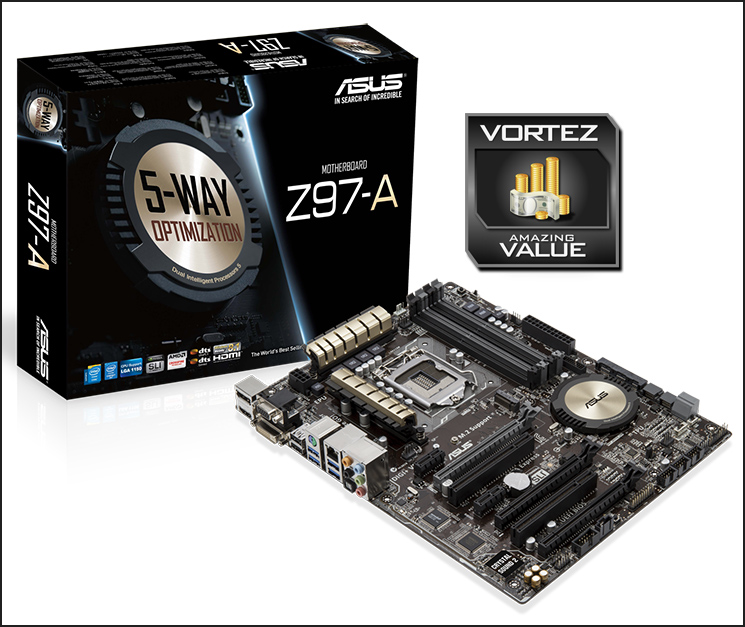
Taken from ASUS’ mainstream product line, we put the new Z97-A which features the Intel Z97 chipset and is one of the most affordable motherboards on the market.

Product on Review Z97-A Motherboard
Manufacturer & Sponsor: ASUS
Street Price: £119 GBP / $149 USD
In the first of our ASUS Z97 motherboard reviews for the Intel 9 Series launch we focus our attention on the mainstream segment. For us, it’s essential to look at this category because computer hardware affordability is key for a huge number of interested parties and many system builders simply desire to step-up to this new line in a bid to gain compatibility for forthcoming Intel 5th Generation Processors.
The Z97-A may be an entry-level Z97 motherboard but it is by no means boring. Styled with ASUS’ new black/gold theme, this new motherboard has been furnished with a variety of high-end features including Crystal Audio 2, SATA Express and M.2 to name just a few. Additionally one of the major attractions with Z97-A is the price, but will a lower price-tag mean a sacrifice in performance?
About ASUS
ASUS takes its name from Pegasus, the winged horse in Greek mythology that symbolises wisdom and knowledge. ASUS embodies the strength, purity, and adventurous spirit of this fantastic creature, and soars to new heights with each new product it creates.
This visionary approach is the reason ASUS is able to bring high-quality innovation and design to all, and the reason for its widespread acclaim. ASUS products won 4,168 international awards and accolades in 2012 – that’s over 11 a day, every day. ASUS has consistently achieved significant year-on-year growth in terms of consumer notebook units shipped too, and closed 2011 on a high with revenues hitting US$11.9 billion.
This visionary approach is the reason ASUS is able to bring high-quality innovation and design to all, and the reason for its widespread acclaim. ASUS products won 4,168 international awards and accolades in 2012 – that’s over 11 a day, every day. ASUS has consistently achieved significant year-on-year growth in terms of consumer notebook units shipped too, and closed 2011 on a high with revenues hitting US$11.9 billion.
Packaging & First Look
Packaging for Z97-A
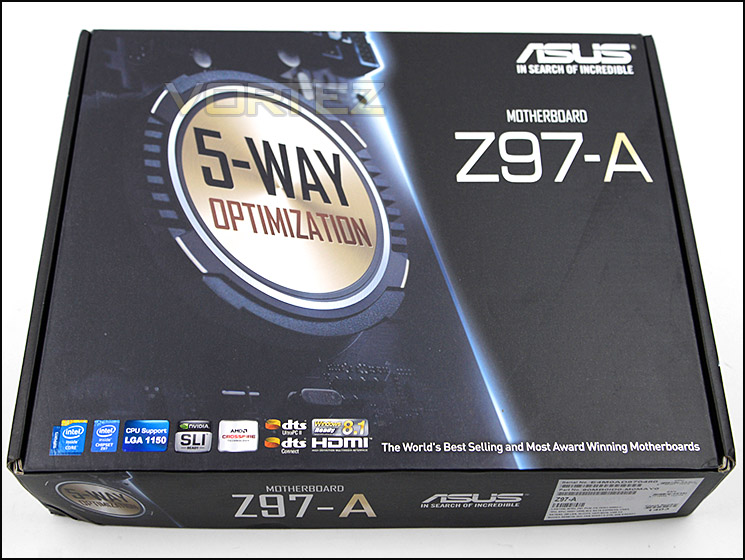
The ASUS Z97-A is presented in a professional looking box, and ASUS appear keen to us it to promote their new ‘5-Way Optimization’ methodology. An extensive breakdown of included features is present throughout in addition to package contents information, but as is most often the case you’ll need to visit the official site to uncover the entirety of the motherboards capabilities.
The included items within the bundle
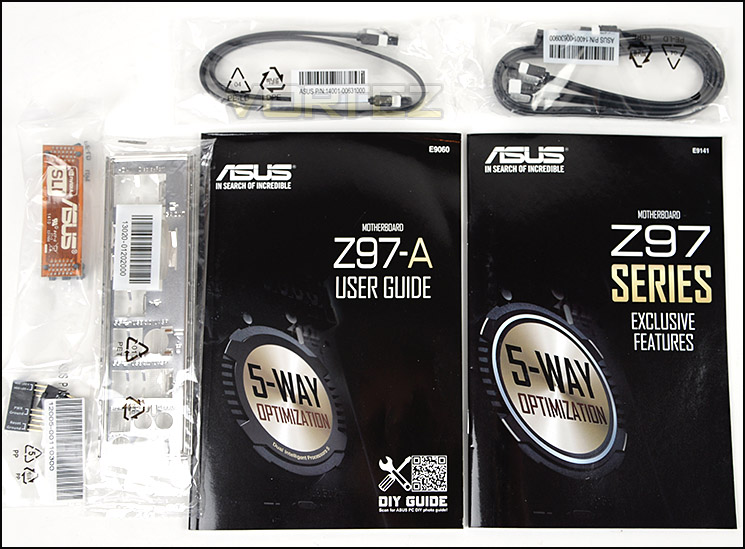
Inside the box ASUS include a handful of accessories which, whilst not the most comprehensive due to its budget nature, are more than adequate for most users:
• Documentation – User Guide and Exclusive Features
• Three SATA Cables
• Rear IO Shield
• Flexible SLI Bridge
• Q-Connect Adapter
• Three SATA Cables
• Rear IO Shield
• Flexible SLI Bridge
• Q-Connect Adapter
An overview of Z97-A
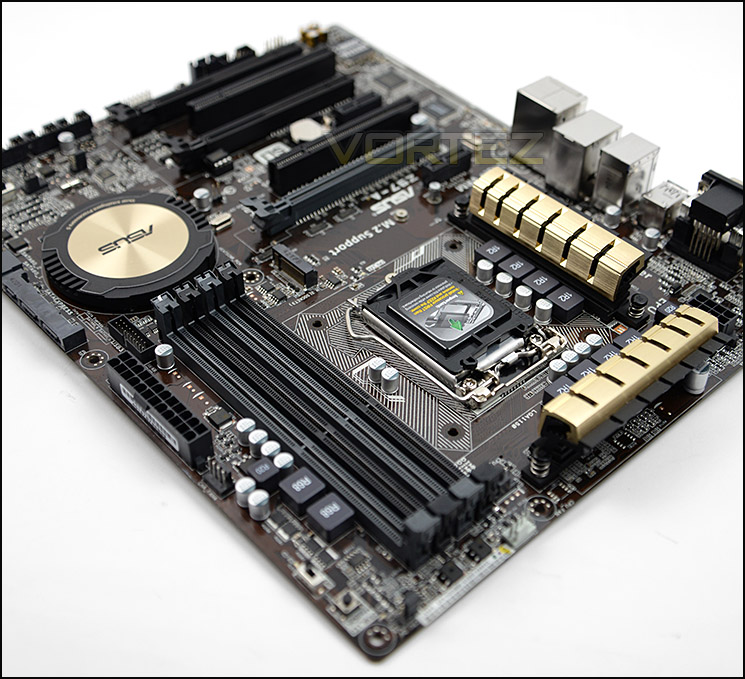
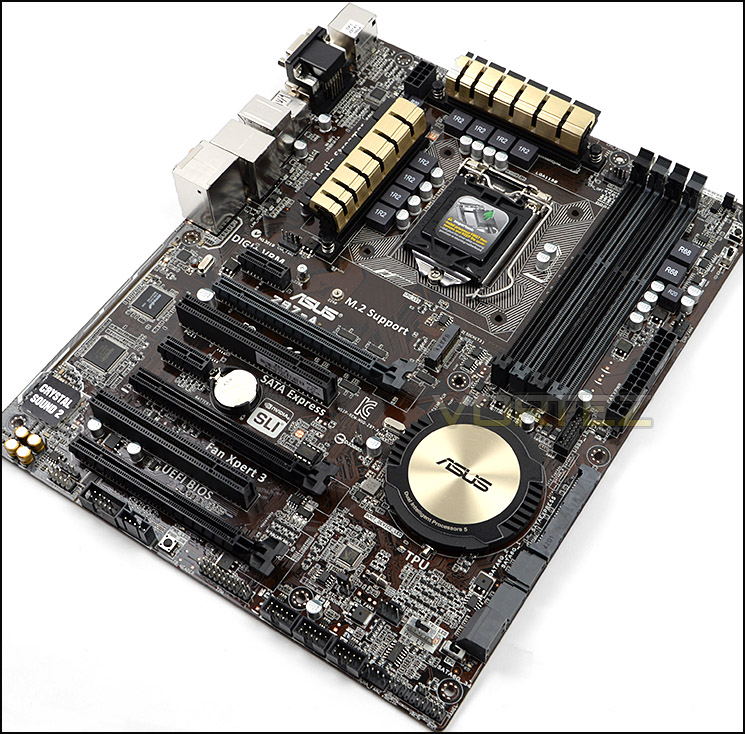
A relatively thin pain finish gives the PCB of the Z97-A a brown tinge, something which is has in common with other boards in the ASUS mainstream segment, and like its Z87 counterpart retains an ATX form factor. Overall we’re pleased with how this motherboard looks when installed within a chassis, mainly thanks to the gold theme which we first saw appear with the 8-Series range.
From an initial look, Z97-A is packed with features for the price.
Closer Look
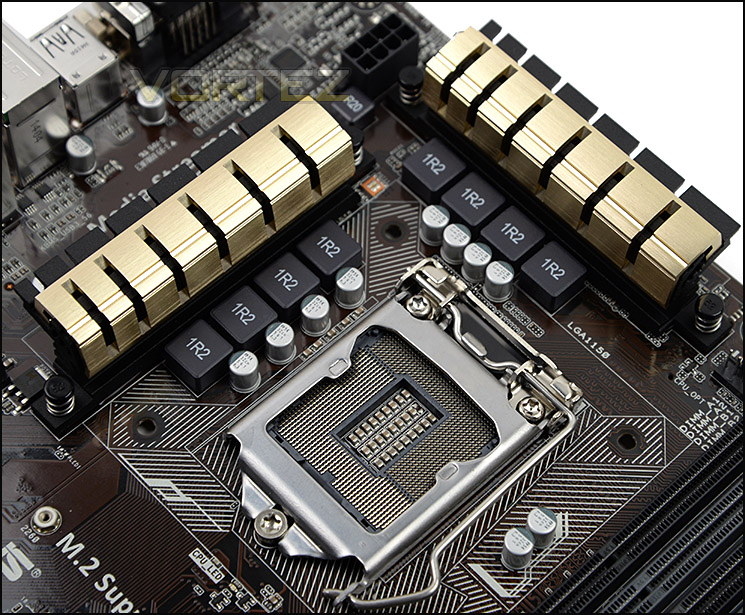
Digi+ 8-Phase VRM design
As we move in for a closer look at Z97-A, we note there is an 8+2 Digital Phase power design, which is generally sufficient not only for all LGA1150 CPUs in the range but also modest overclock of even Core i7 models. ASUS have given this motherboard Digi+ CPU, VRM and DRAM from which the CPU and other components draw digitally regulated power.
Over the MOSFETs sit two black/gold heatsink which are not interconnected via heatpipe; keeping these components cool under extremely heavy load could therefore be a potential issue in maxed out systems. Behind the heatsinks is an ideally located 8-pin CPU power socket. There are two 4-pin PWM fan headers are adjacent to the CPU socket, allowing independent control of fans for dual-fan CPU coolers or supporting system fans where necessary.
And once more to be clear, the Z97-A uses Socket 1150 and supports Intel’s 4th (Haswell, Haswell Refresh) and 5th (Broadwell) Generation Processors.
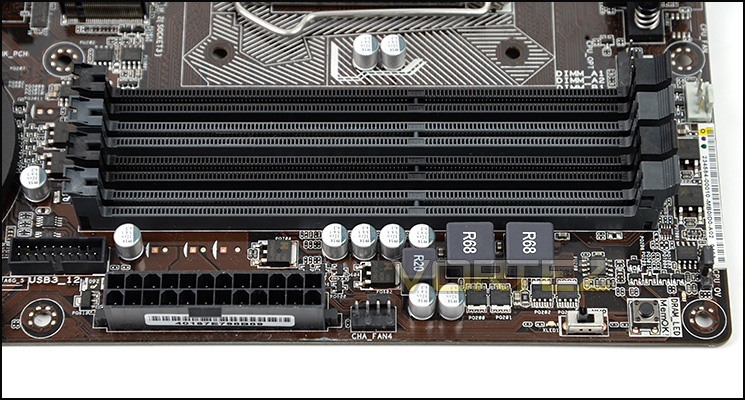
Dual-Channel DDR3 slots
Moving on there are 4x DDR3 DIMM slots which can accommodate up to 32GB of memory and 3200 (OC). As with all Z97 boards it supports dual-channel operation with one or two DIMMS per channel; follow the recommended installation instructions to maximise your memory bandwidth.
Also in the memory region are a number of buttons and features. MemOK! makes an appearance and is now regarded as an integral ASUS feature ensuring memory compatibility and a successful boot up. Next door is the EZ XMP switch, configuring memory as per the XMP profile automatically and without having to go into the BIOS.
ASUS have placed a USB 3.0 header near to the memory slots and 24-pin ATX socket, supplying USB 3.0 functionality for the front panel. Unfortunately it’s not edge-mounted so isn’t perfectly situated from a cable management perspective.
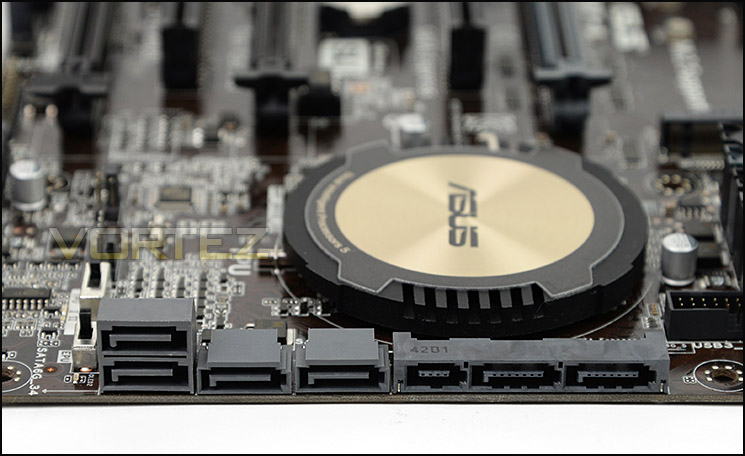
SATA and SATA Express ports
For storage, Z97-A has a combination of SATA 6Gbps ports (four ports on left) and the newly introduced SATA Express, the latter of which brings in 10Gbps+ transfer rates when connected to appropriate SATA Express drives. This new connector type is also backwards compatible with SATA III 6Gbps, adding two potential ports to the Z97-A’s arsenal.
ASUS are one of few brands to include both M.2 and SATA Express functionality on their mainstream Z97 motherboards, and they have felt confident doing this due to being extensively involved with the validation process for SATA Express. In the not to distant future ASUS will also be one of the first to launch retail SATA Express storage devices, and as such they have a vested interest in ensuring that there is a potential market from the get-go.
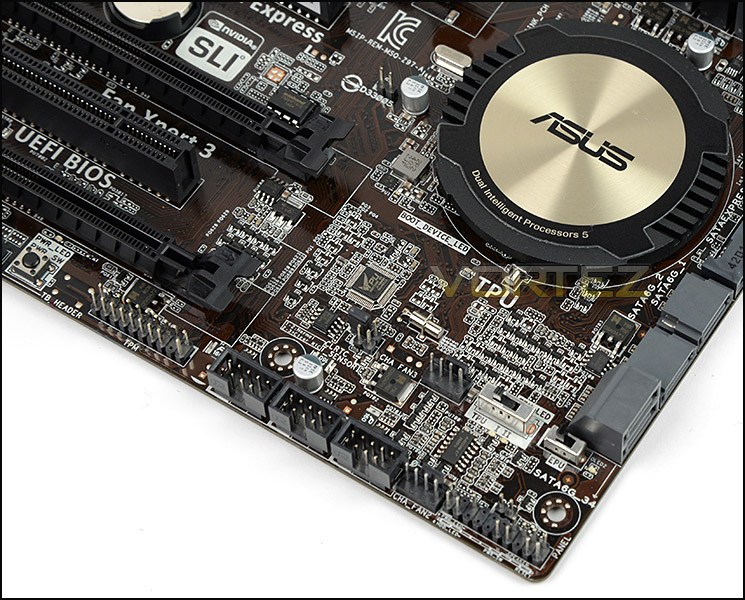
Large Intel PCH heatsink and additional switches
Swapping things up for the Intel 9 Series, ASUS continue the black/gold theme and give the Intel Z97 chip a large circular heatsink. Also in this area a the TPU switch that allows for an automatic adjustment to the CPU ratio and BCLK frequency when in the appropriate mode; adjustment to the latter is only sensible due to a built-in disable mode. The complementary EPU switch can moderate the board power consumption thanks to economy modes which reduce current draw. Naturally it’s important to only adjust this switch when the system is powered down.
Closer Look (Continued)
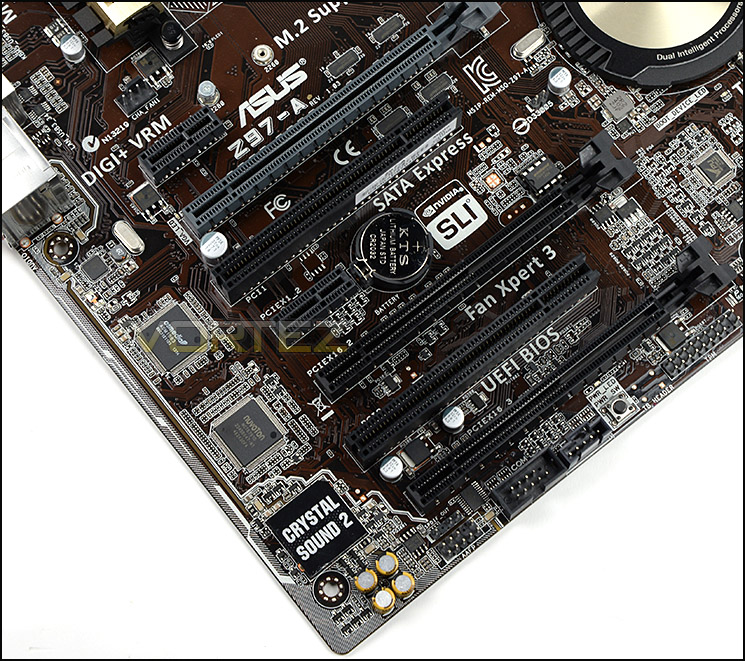
A plethora of options for expansion slots
Turning our attention to the expansion slot area a number of options immediately become apparent through a sensible and logical layout:
• 2x PCI-E 2.0 x1 slots
• 2x PCI-E 3.0/2.0 x16 slots (Running @ x16 / x8)
• 1x PCI-E 2.0 x16 slot (Running @ x4)
• 2x PCI legacy slots
• 2x PCI-E 3.0/2.0 x16 slots (Running @ x16 / x8)
• 1x PCI-E 2.0 x16 slot (Running @ x4)
• 2x PCI legacy slots
Acknowledging that the Z97-A is at the entry-level end of the market ASUS have nonetheless equipped it with support for up to two discrete GPUs, separated sufficiently for air flow to be minimally restricted. Furthermore since the top-most slot is only x1 (and hence unlikely to be populated with full-length expansion cards) very large CPU coolers are compatible and don’t foul on the main GPU.
In the lower region of the board resides the audio components. Z97-A uses Crystal Sound 2, a new iteration on ASUS’s proprietary feature which more effectively isolates left and right audio channels through dedicated PCB layers, shielding, and an EMI cover. The premium component selection – including Japanese Capacitors dotted throughout – also promises to improve sound quality by reducing electrical noise.
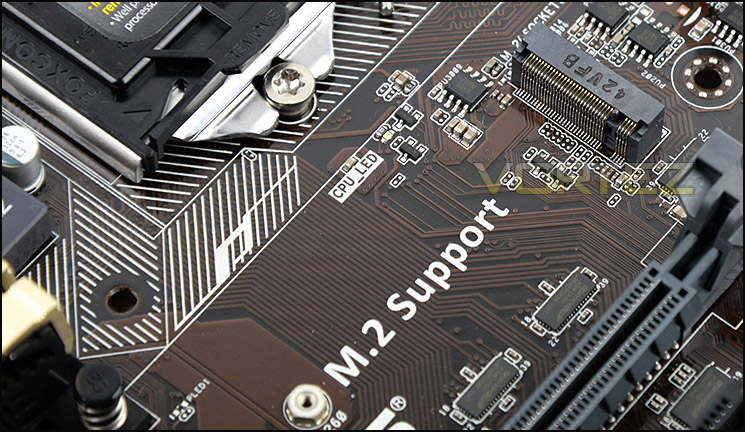
An M.2 slot for even more storage choice
Above the top PCI-E slot ASUS have included an M.2 slot, suitable for SSD storage devices which are type 2260/2280 (i.e. 6cm or 8cm length PCB). Again, not all manufacturers have chosen to include such functionality on the motherboard but it’s great to see it making an appearance as the interface is already being picked up by SSD manufacturers, although few are as yet exploiting its full potential. The M.2 slot also supports Intel’s Rapid Storage Technology, allowing it to operate as a cache for slower mechanical drives in a manner which is invisible to the OS.
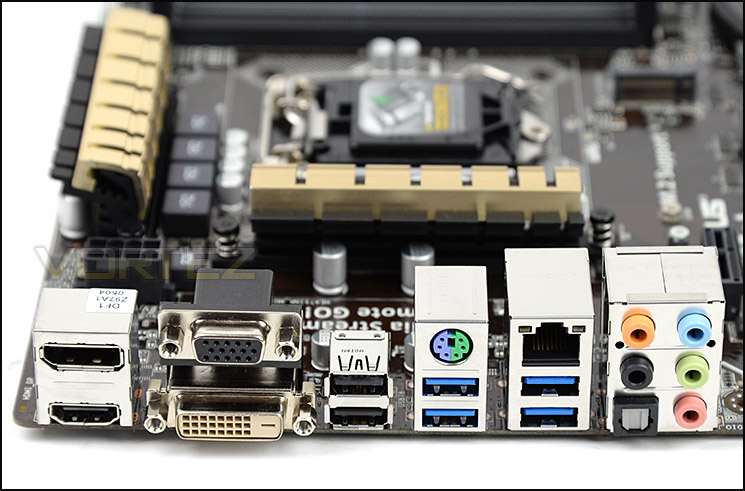
Rear IO has plenty of functionality
Lastly we come to the Rear IO panel, replete with a generous selection of ports to take advantage of. The arrangement is relative unorthodox, and as you can see dispenses with the traditional ‘peripheral I/O at the top’ layout we are used to seeing. From the left to right we have the following:
• HDMI port
• Display port
• D-Sub port
• DVI port
• 2x USB 2.0 ports
• PS2 Keyboard/Mouse
• 2x USB 3.0 ports
• Gigabit LAN port
• 2x USB 3.0 ports
• Audio jacks with optical S/PDIF
ASUS have stuck to the Intel NIC rather than utilising more exotic designs, believing that Intel’s implementation is not only more cost-effective but also superior to other solutions. Naturally they’ve augmented it with software such that functionality rivals that their competitors, but don’t relegate it to an enthusiast line. Reflecting its affordable nature, the Z97-A still features a legacy D-Sub port.
ASUS 9 Series Features

ASUS continue the next generation of Intel motherboards where they left off with Z87, bring a series of proprietary solutions to diverse requirements such as overclocking, fan control and on-board audio. The main thrust is through what they call ‘5-Way Optimisation’, which is all about providing tools to consumers with different expertise such that they can exploit the motherboard with a minimal learning curve.
5-Way Optimisation
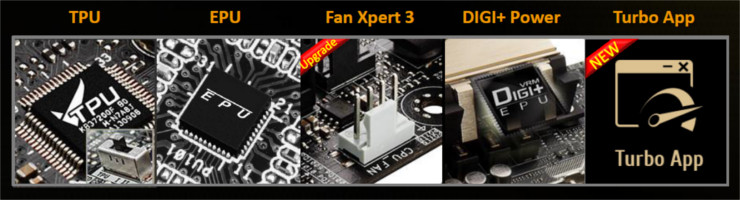
This feature in the latest generation of boards builds on the previous designs which integrated TPU, EPU and DIGI+ Power. Under the new umbrella feature ASUS also bring Fan Expert 3 – the successor to Fan Expert 2 – and the brand new Turbo App, both for intermediate to advanced users.
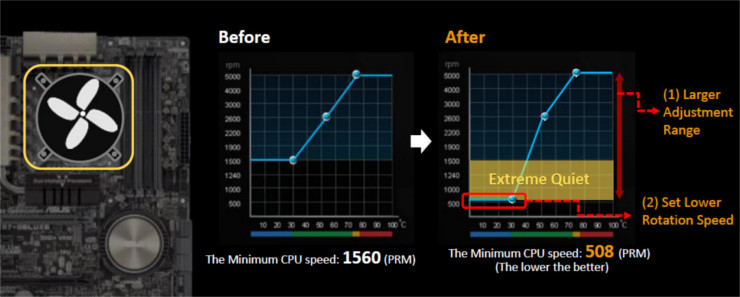
Fan Expert 3 allows the creation of individual fan profiles for any and every system fan, be they DC or PWM, utilising data from multiple onboard thermal sensors – VRM, CPU, PCH and Motherboard (as well as an external header on some models). ASUS has also discovered a means of increasing the RPM range of most PWM fans specifically at the lower end, allowing very low-noise operation without the risk of stalling.
Rounding out the optimisations is the new Turbo App, a software suite primarily intended for gamers. Through the App you can allocate system resources to specific applications, prioritising for instance a game whilst throttling other background processes. The Turbo App also includes the sofware overclocking tools which can be tailored to specific processes, accessing a little more oomph on demand.
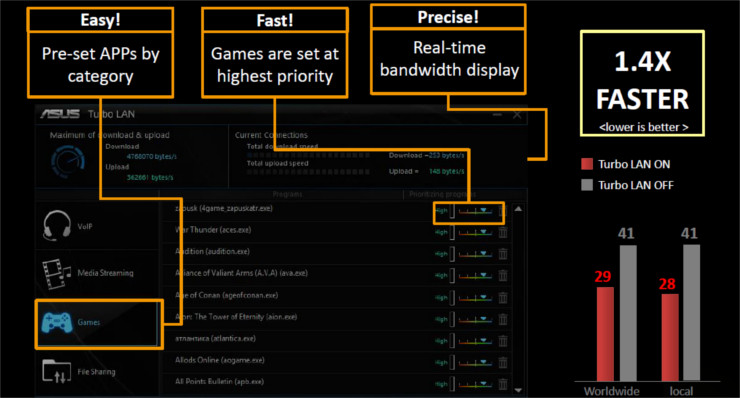
Complementing the Turbo App is Turbo LAN, and additional utility through which you can reduce network latency by setting priorities for applications. The effect should be most pronounced when downloading heavily in combination with playing an online title, although as always this will depend on network conditions. If you’re on a capped internet tariff the built-in bandwidth meter will be a boon too.
It should be noted that any Turbo App dynamic overclocking settings will override Intel’s Turbo Boost, and isn’t yet able to dynamically down-clock the CPU or DRAM when the system isn’t being stressed. That feature may be implemented in due course, but for now ASUS have prioritised energy saving through the EPU and chipset features.
All of the five key optimisation tools mentioned above can be accessed with just one click in software, making the process as straightforward as you could want, but nonetheless unlocks additional tools for those who can get to grips with everything the board is capable of.
Crystal Sound 2
Iterating on the original Crystal Sound, the new revision more effectively isolates left and right audio channels through dedicated PCB layers, shielding, and an EMI cover. Premium component selection will also improve sound quality, not least through the use of Japanese Capacitors and a de-pop circuit unique to ASUS boards.
On the software side ASUS are also improving the UI and including dts Connect and dts UltraPC II, which is intended to tailor the output audio to the speaker type utilised. In essence, although ASUS utilises a relatively standard Realtek CODEC, they’re engineering the board to produce the very best sound such chips are capable of.
Updated UEFI Bios Improvements
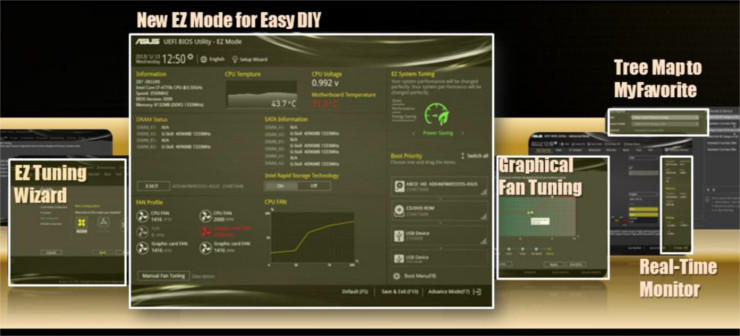
Rounding out the hardware-specific improvements are some subtle changes to the UEFI BIOS. ASUS’s implementation now includes both an EZ MODE for easy DIY system setup and an EZ Tuning Wizard to guide inexperienced users through the process of tweaking UEFI BIOS settings. Fan control also gets a refreshed graphical UI, now integrating system fan control into the BIOS and also allowing the creation of fan profiles for ASUS GPUs.
Additional Features
As with Z87 ASUS are stating that Thunderbolt 2 PCIe adaptor cards will be compatible with the next generation of boards including the one shown. A true niche interface, it’s still of great value to those who make use of extremely fast external storage or other external devices which will tax the 20GB/s interface.
ASUS Homecloud is an application which allows you to utilise your system as a personal cloud server, making available audio and video for streaming and file access. It also allows some remote system control from mobile devices, although naturally there will be some limitations on the level of access these devices will have.
ASUS Z97-A BIOS Tour
Below is a video tour showing the interface of ASUS Z97-A UEFI BIOS and the options which are available. As you can see, movement is very smooth and the overall look is very professional.
Test Setup, Methodology & Overclocking
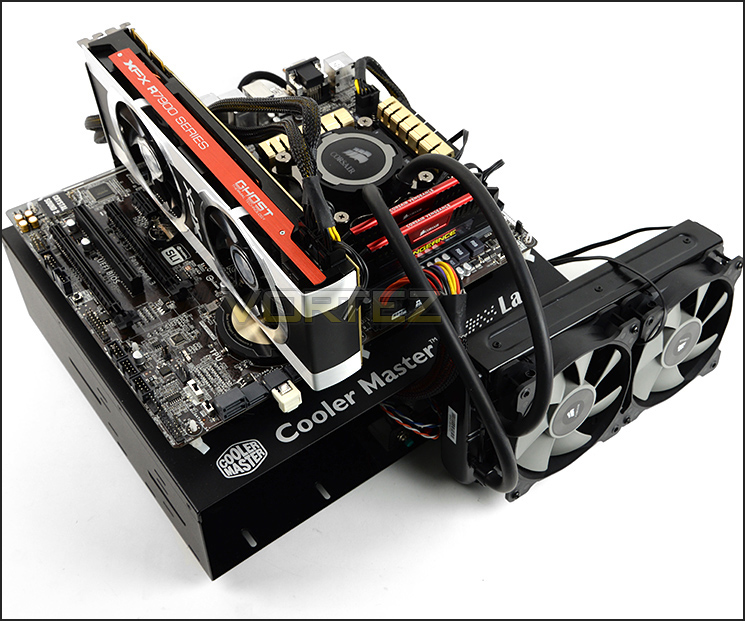
Test Setup
CPU Intel Core i7 4770K (Haswell) 3.50GHz
Cooling Corsair Hydro Series H105
Motherboard ASUS Z97-A
Memory 16GB Corsair Vengeance Pro 2800MHz CL12 DDR3
Graphics XFX R7970 Black Edition
Storage Corsair Neutron GTX 480GB
PSU Corsair HX1050 80 Plus Gold Certified PSU
Cooling Corsair Hydro Series H105
Motherboard ASUS Z97-A
Memory 16GB Corsair Vengeance Pro 2800MHz CL12 DDR3
Graphics XFX R7970 Black Edition
Storage Corsair Neutron GTX 480GB
PSU Corsair HX1050 80 Plus Gold Certified PSU
Benchmarks
Cinebench R15 – CPU/OpenGL Score
x264 HD 4.0 – 1st and 2nd pass encoding
SiSoftware SANDRA 2014 – CPU & Memory benchmarks
AIDA64 – CPU benchmarks
PCMark 8 – Home Suite
3DMark FireStrike – DX11 3D Benchmark
Games – Tomb Raider, THIEF
x264 HD 4.0 – 1st and 2nd pass encoding
SiSoftware SANDRA 2014 – CPU & Memory benchmarks
AIDA64 – CPU benchmarks
PCMark 8 – Home Suite
3DMark FireStrike – DX11 3D Benchmark
Games – Tomb Raider, THIEF
Other Software
Temperature Analysis: Core Temp
Stress Testing Software: LinX
CPU Specification Monitoring: CPU-Z
Stress Testing Software: LinX
CPU Specification Monitoring: CPU-Z
Overclocking
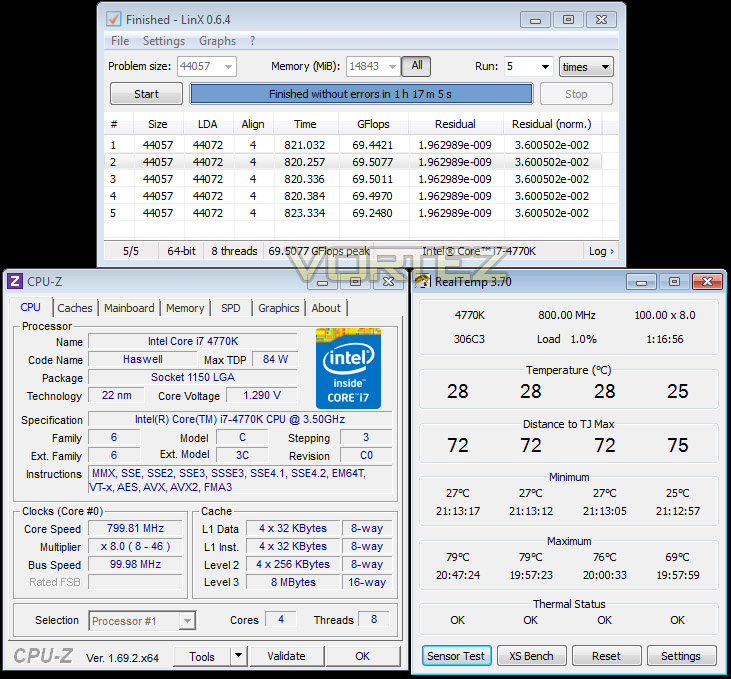
The introduction of Z87 back in 2013 heralded a return to BCLK overclocking, ill-advised during the Sandybridge and Ivybridge era. This type of functionality ensures flexibility for overclockers compared to previous generations were the BCLK was locked to 100MHz and only the ratio could be adjusted. As many of you will know, Haswell CPUs get very hot with little voltage increase therefore the flexibility and headroom for overclocking can be limited. For the Z97 launch we are testing with the Intel Core i7-4770K which from previous, extensive testing has a maximum overclock of 4.6GHz without the use of exotic cooling solutions.
Z97-A managed to achieve that milestone of 4.6GHz and 1.29v was the minimum Core Voltage to accomplish this. For a mainstream motherboard this is a commendable achievement.
Benchmarks: Power Consumption
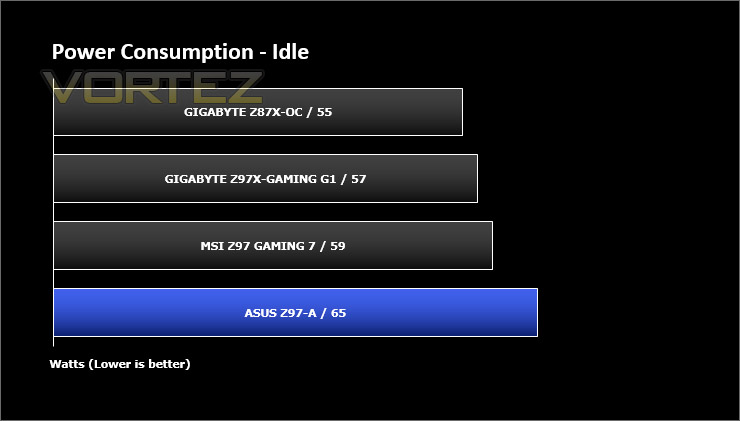
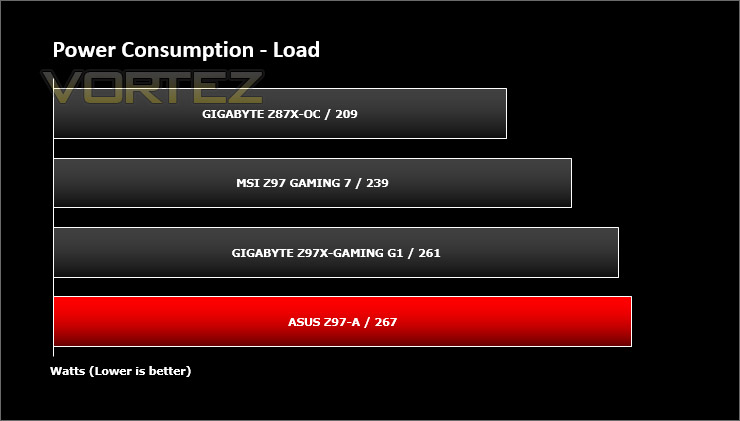
It’s interesting to note the power consumption across all motherboards. Although they are using Z97 chipsets, energy results can fluctuate between manufacturers due to the features and specifications that are integrated. First of all, for the idle tests the system is cold booted into Windows and no additional applications are executed – the watts are noted on the external energy monitor we use and then the system is loaded with 3DMark FireStrike – watts are again monitored for the duration of the test and the highest rated wattage result is then noted down. Below are the results of this energy test.
Benchmarks: X264 HD
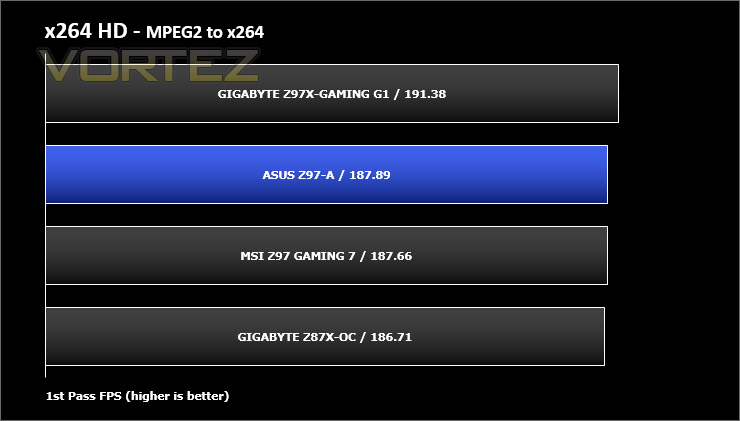
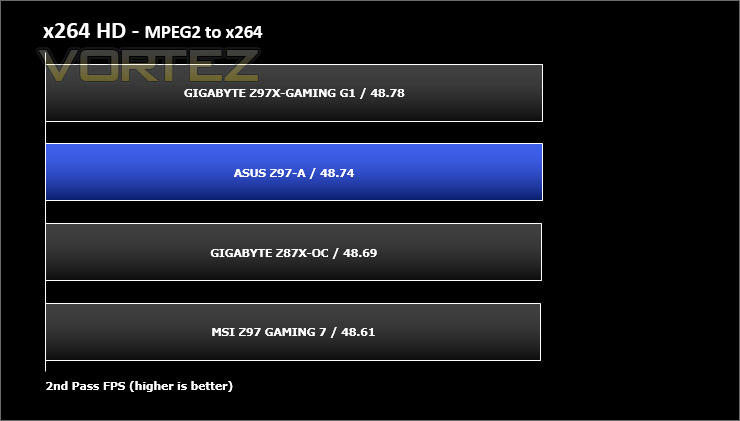
Simply put, this test measures how fast your machine can encode a short, DVD quality MPEG-2 video clip into a high-quality x264 video clip. What’s x264, you ask? It’s more or less the next-generation Xvid/DivX codec. I think it’s ideal for a benchmark because the application (x264.exe) reports fairly accurate compression results (in frames per second) for each pass of the video encoding process, and it uses multi-core processors very efficiently.
Benchmarks: AIDA64
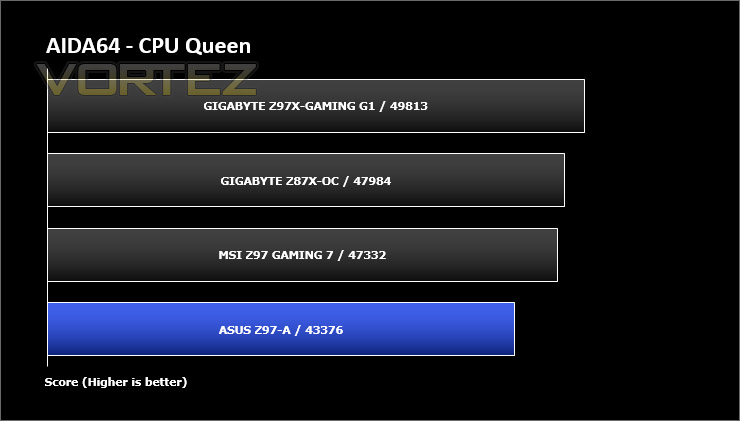
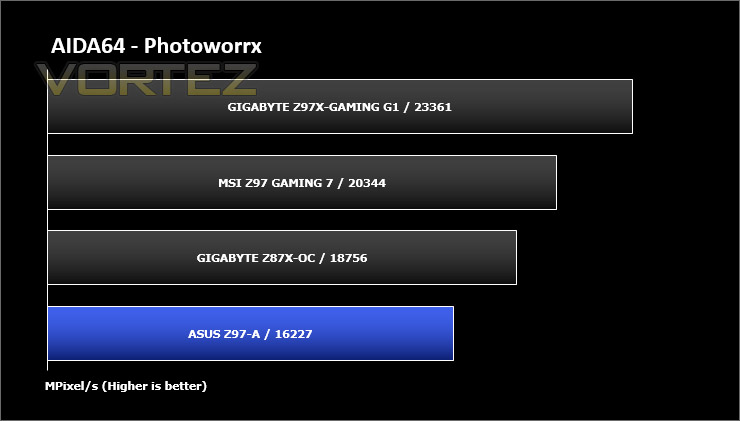
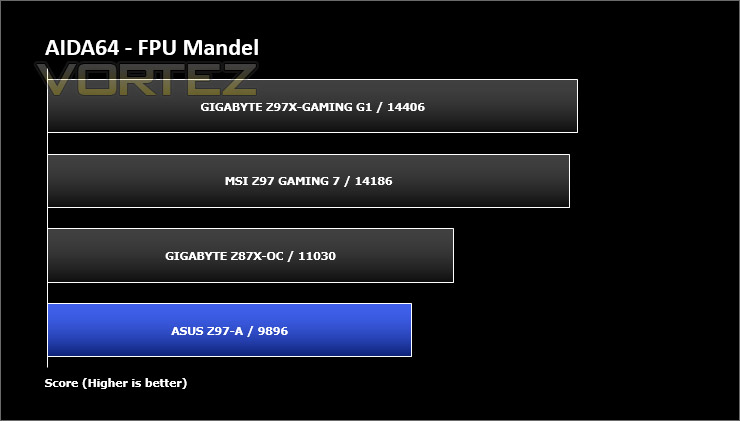
AIDA64 Product PageThis simple integer benchmark focuses on the branch prediction capabilities and the misprediction penalties of the CPU. It finds the solutions for the classic “Queens problem” on a 10 by 10 sized chessboard. At the same clock speed theoretically the processor with the shorter pipeline and smaller misprediction penalties will attain higher benchmark scores. For example — with HyperThreading disabled — the Intel Northwood core processors get higher scores than the Intel Prescott core based ones due to the 20-step vs 31-step long pipeline. CPU Queen test uses integer MMX, SSE2 and SSSE3 optimizations.
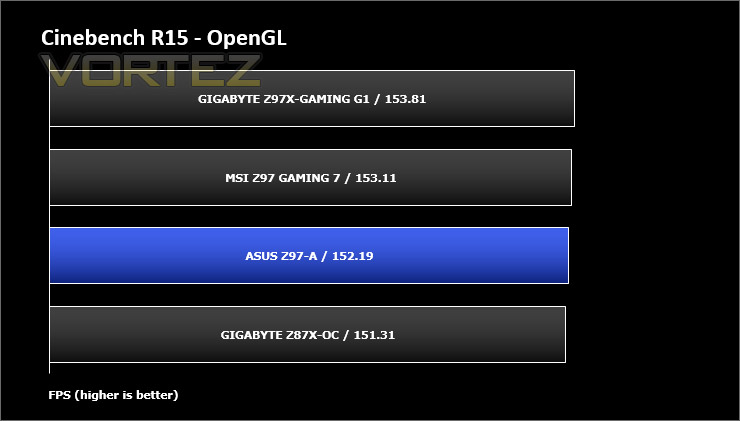
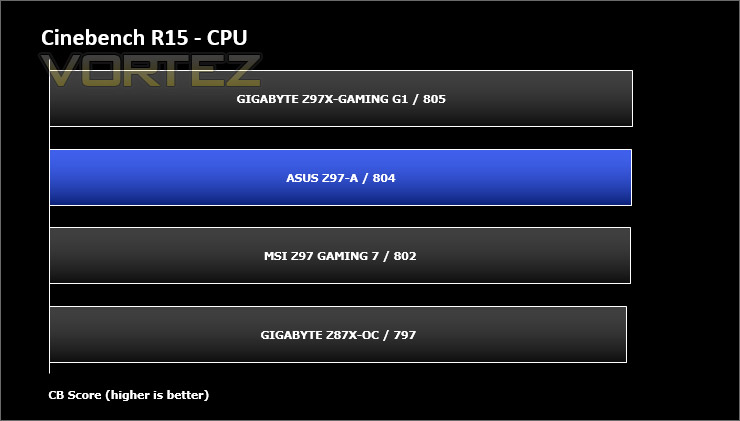
Benchmarks: Cinebench
CINEBENCH is a real-world cross platform test suite that evaluates your computer’s performance capabilities. CINEBENCH is based on MAXON’s animation software CINEMA 4D 3D content creation.
Benchmarks: SiSoftware SANDRA
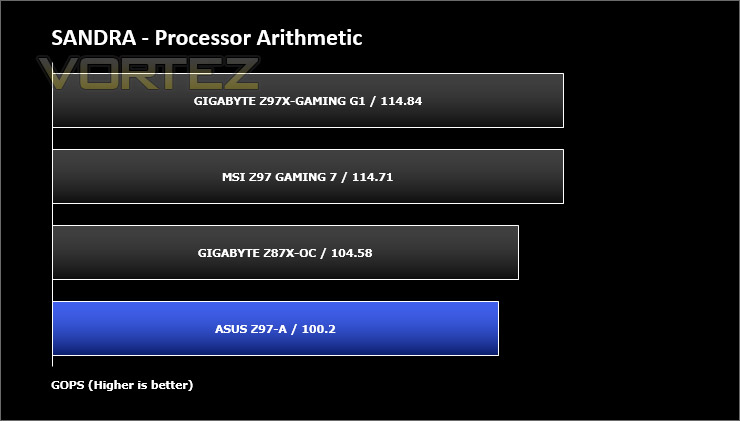
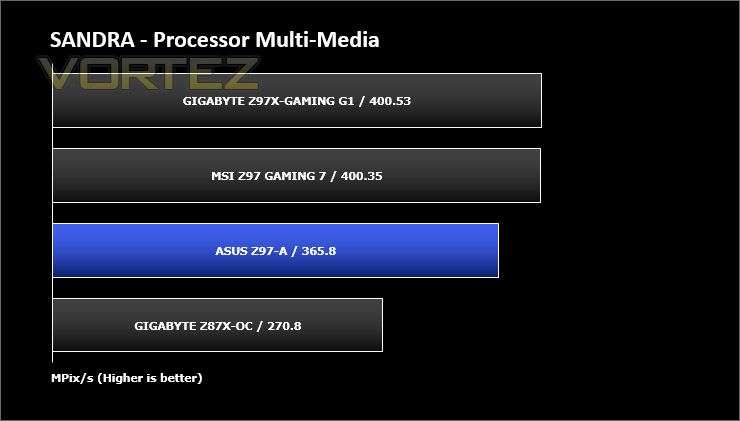
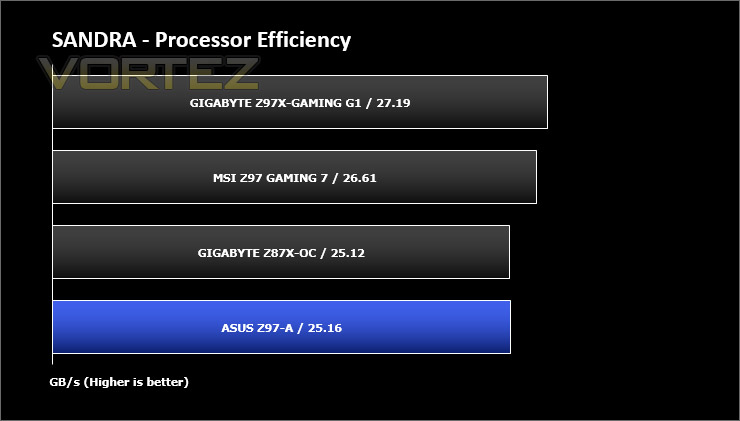
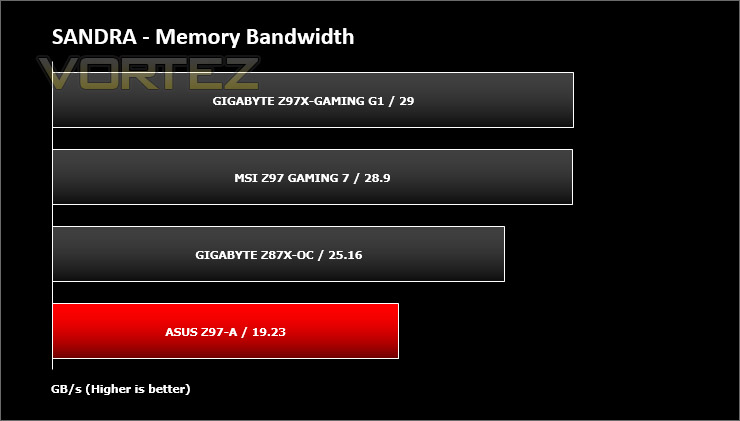
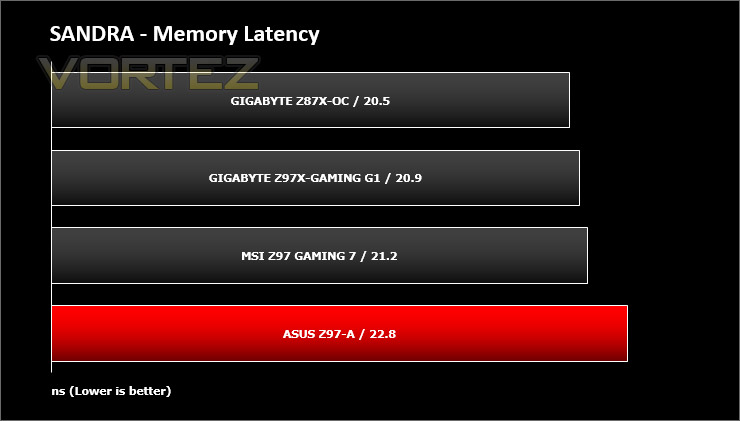
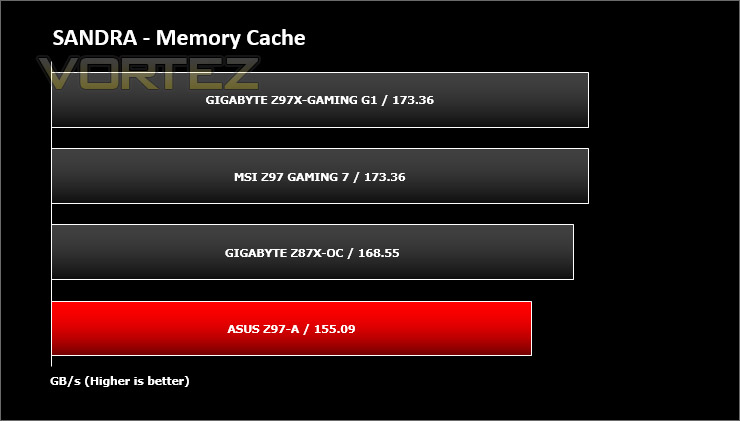
SANDRA isn’t always a benchmark that is included in hardware reviews but I believe it shouldn’t be ignored. SANDRA provides a vigorous package that tests your system in a rather large array of benchmarks. There are many aspects of benchmark that can be executed. We will be considering – CPU and memory tests.
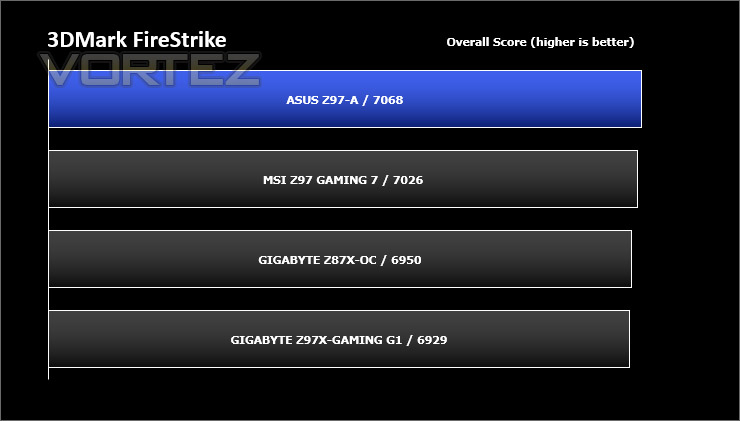
Benchmarks: 3DMark
3DMark FireStrike Product PageFire Strike is our new showcase DirectX 11 benchmark designed for high-performance gaming PCs. It is our most ambitious and technical benchmark ever, featuring real-time graphics rendered with detail and complexity far beyond what is found in other benchmarks and games today. Fire Strike will only be available in the Windows editions of 3DMark initially.
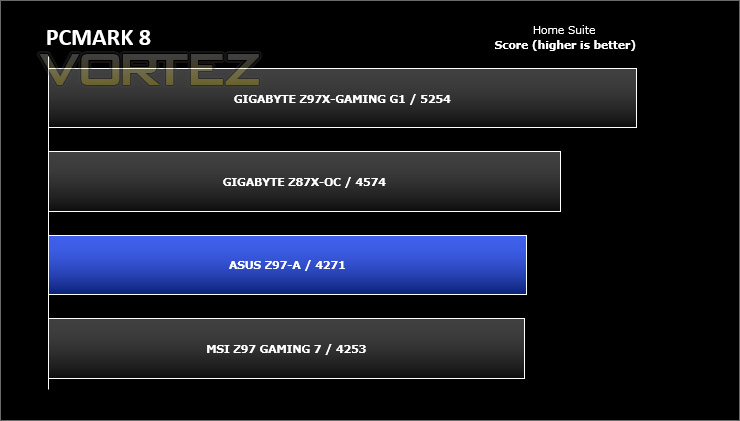
Benchmarks: PCMark 8
PCMark 8 combines performance benchmarking with battery life measurement and includes tests based on popular Adobe and Microsoft applications. Whether you are looking for long battery life, or maximum power, PCMark 8 will help you find the devices that offer the perfect combination of efficiency and performance for your needs. It’s the complete PC performance benchmark for home and business.
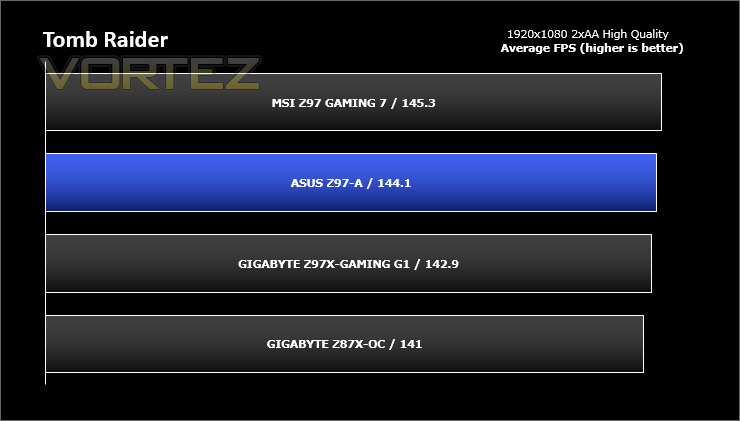
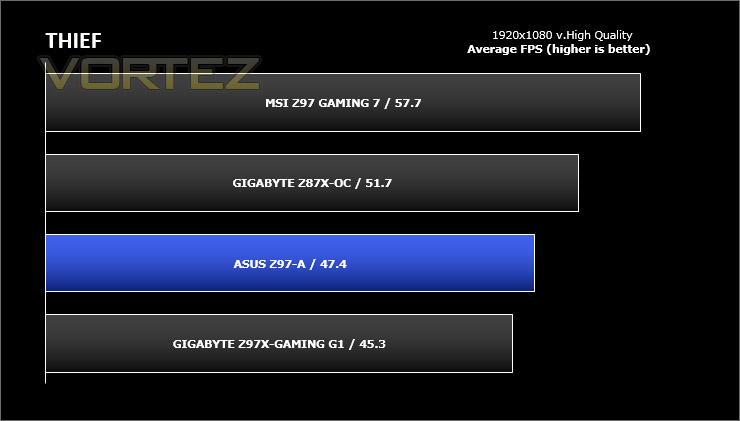
Benchmarks: Tomb Raider & THIEF
It’s important for us to perform a number of game benchmarks as well as the synthetic tests because gamers will want to know if there are any significant benefits. So here we have two popular and recent gaming titles which feature a dedicated benchmark tool within them to display results.
Conclusion
Last year we reviewed the corresponding ASUS mainstream model in the Intel 8 Series and, whilst impressive from a feature/performance standpoint, we were less than enthused by the styling of the Z87-A. We’re really pleased to note however that this new mainstream Z97-A has had a significant facelift, with styling and aesthetics that are much more consistent and appealing to the eye, gaining our approval in the process.
Throughout the testing we found the Z97-A to be a solid performer regardless of the environment and we were surprised to see this motherboard handle our best overclock milestone with ease. This just goes to show, sometimes you don’t have to spend all the money in the world to achieve great results.
Z97-A is versatile in its feature-set and even has multiple storage options from SATA, SATA Express and M.2. Having connectivity for these upcoming solutions ‘future proofs’ the motherboard and we’re glad that ASUS decided to integrate the two latter options.
ASUS has revised the BIOS experience for the new Intel 9 Series and thanks to their efforts we’re presented with a much more streamlined interface. Our video tour of the BIOS demonstrates just how fluid this experience is and we actually regard this UEFI version as one of the best out of the various Intel partners.
Priced at £112 / $149 the Z97-A represents solid value for money in what is sure to be a very crowded mainstream Z97 motherboard market, and will unlock a cost effective route to LGA 1150 and compatibility with Intel’s upcoming 5th Generation Processors.
With its clean and professional styling, Z97-A is a mainstream motherboard which offers excellent price/performance ratio. Combining various features and connectivity you will be hard pushed to find an offering for this price, of this calibre.
Pros
+ Subtle & professional aesthetics
+ Great value
+ Solid performer
+ Plenty of storage options including M.2 & SATA Express support
+ Great performance
+ Clean & easy to use BIOS
Cons
– Brown PCB
+ Subtle & professional aesthetics
+ Great value
+ Solid performer
+ Plenty of storage options including M.2 & SATA Express support
+ Great performance
+ Clean & easy to use BIOS
Cons
– Brown PCB

Click here for an explanation of our awards at Vortez.net.


