







In the first phase of our Intel Z97 coverage we take a look at MSI’s GAMING 7 motherboard and see how it handles Intel Core i7 4770K (Haswell).

Product on Review Z97 GAMING 7
Manufacturer & Sponsor: MSI
Street Price: £139.99 GBP / $189 USD
In recent years MSI have dedicated time and resources to the GAMING line, which encompasses a wide range of PC components designed and optimised specifically for gamers. GAMING components complement each other aesthetically and feature-wise, and are often built to the same high quality and performance requirements; a system decked out in MSI GAMING hardware will be easy on the eye and offer killer frame-rates.
The Z97 GAMING 7 sits in the mid-upper tier for the range, surpassed only by the Z97 GAMING 9 before MSI transitions to their premium OC range. Despite this it is priced below £140 whilst still being chock full of propriety features in addition to those present as standard on Intel’s Z97 chipset. Featuring high speed M.2 storage support, Killer NIC and propriety AudioBoost 2 technology, it is unsurprisingly expected to be a worthy débutante in the Z97 launch.
About MSI
Micro-Star International Co., Ltd (MSI) was established in August 1986 by 5 founders, one of the world’s largest information technology manufacturers.
MSI started from the motherboard and graphics card industries and extended into consumer and commercial electronics including notebooks, All-in-One PCs, servers, workstations, industrial PCs, household appliances, car infotainment products, barebone systems, multimedia, communication devices, and others.
MSI holds itself responsible not only to its clients, employees and stockholders, but also to the society and environment as a whole to consistently fulfill its corporate commitment.
With innovation and style as its core value, customer satisfaction and premium service as its goal, MSI will definitely be the most brilliant star in the global brands!
MSI started from the motherboard and graphics card industries and extended into consumer and commercial electronics including notebooks, All-in-One PCs, servers, workstations, industrial PCs, household appliances, car infotainment products, barebone systems, multimedia, communication devices, and others.
MSI holds itself responsible not only to its clients, employees and stockholders, but also to the society and environment as a whole to consistently fulfill its corporate commitment.
With innovation and style as its core value, customer satisfaction and premium service as its goal, MSI will definitely be the most brilliant star in the global brands!
Packaging & First Look
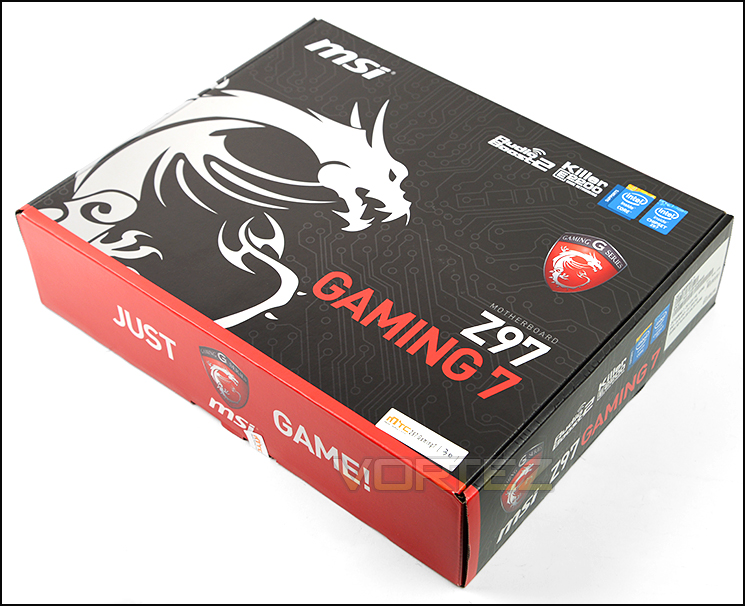
Packaging for GAMING 7
MSI’s Z97 GAMING 7 is presented with some pretty good looking exterior packaging, keen to promote the motherboard’s gaming credentials and the ‘Dragon’ logo. ‘It bears the legend ‘Just Game’, but also features prominently the AudioBoost 2 and Killer E2200 NIC technology. At the rear is an extensive breakdown of the included features.
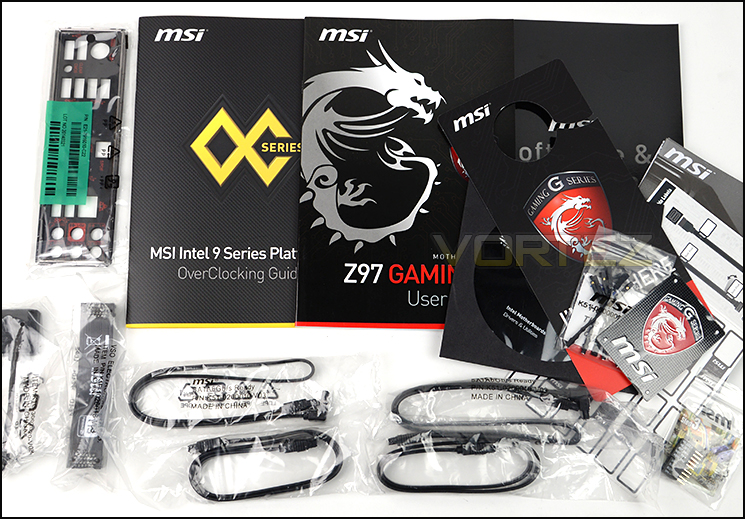
The included items within the bundle
Bundled with the GAMING 7 are a handful of useful accessories
• Documentation – General User and Overclocking Guides
• Four SATA Cables
• Rear IO Shield
• Flexible SLI Bridge
• Voltage Probes
• Gaming Series Case Badge
• mConnector Adapter
• Cable label set
• DND Door Hanger
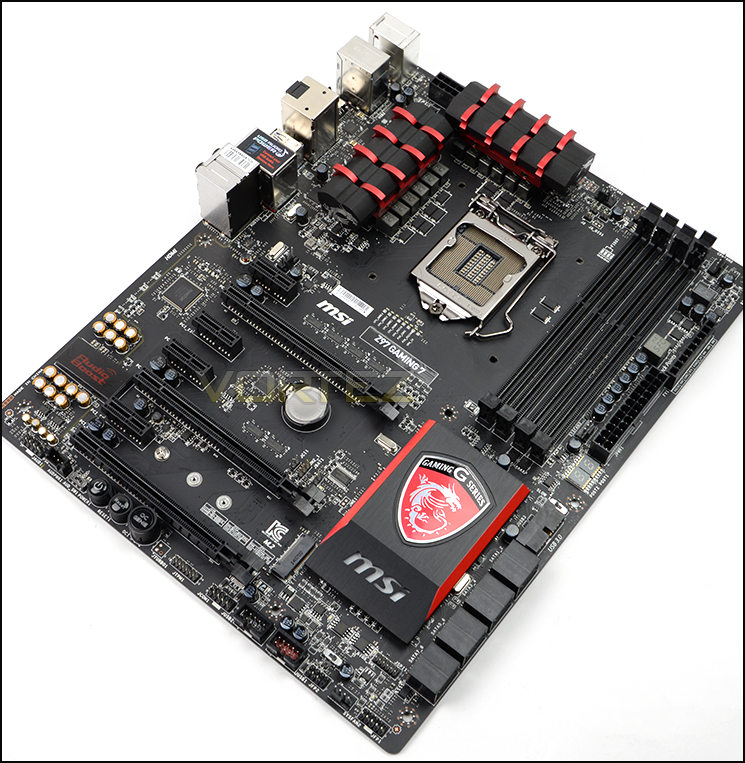
An overview of the Z97 GAMING 7
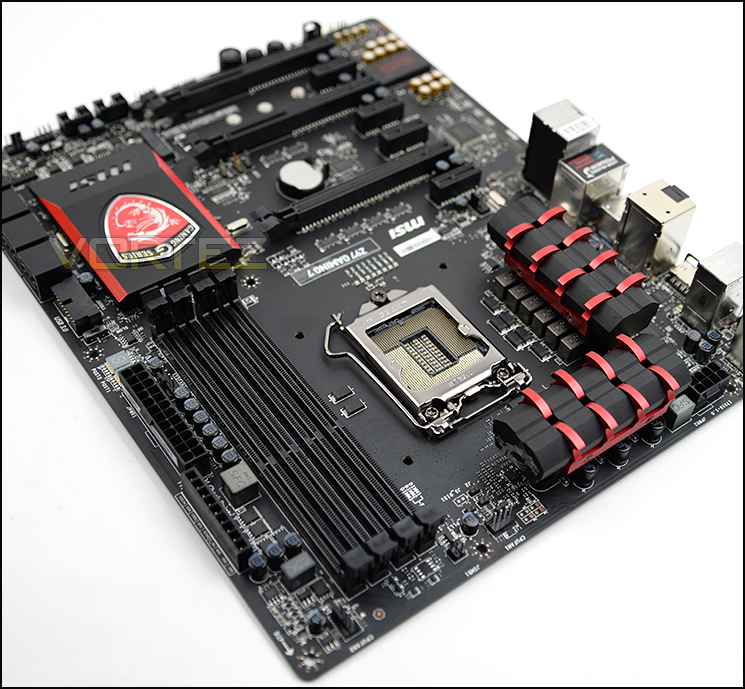
As a part of the MSI GAMING range the Z97 GAMING 7 is decked out in the now familiar black and red colour-scheme. In the past we have criticised manufacturers on the quality of the matte black paint job, but it’s certainly not the case here as MSI have done excellent work in creating an even finish which also hides most of the tracing. Due to this is feels much less busy than similar boards, and should give the enterprising system builder ample opportunity a blank canvas upon which they can put their own stamp.
Size-wise MSI have chosen the ubiquitous ATX form factor rather than the larger EATX, so there should be few compatibility issues with most ATX chassis. At first glance the GAMING 7 is certainly packed with appealing features for the price.
Closer Look
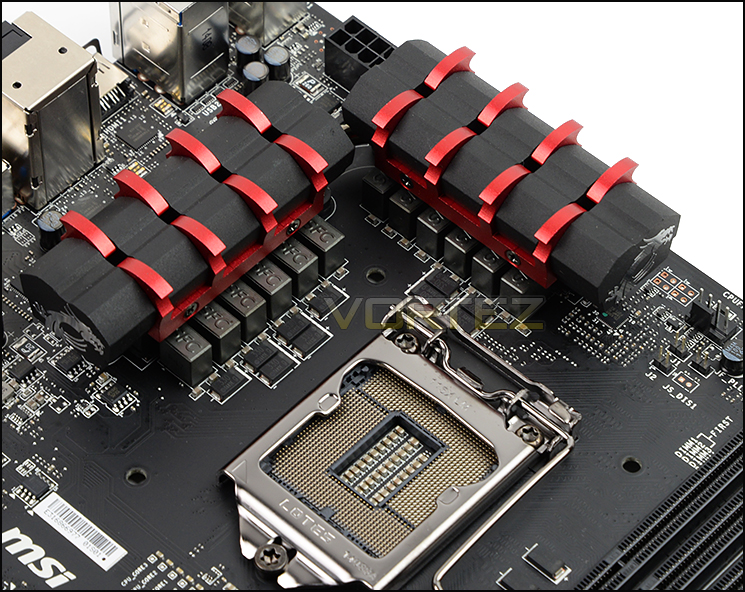
Intel’s LGA1150 socket and surrounding components
As we move in for a closer look at MSI’s GAMING 7 we note there is an 12-phase VRM power design, whilst two moderately-sized black and red heatsinks cool the power delivery system. A heatpipe connects the two heatsinks, aiding in overall dissipation and in so doing helping to ensure that overclocks remain stable.
The 8-pin EPS12V (CPU) power connector is in its ideal location as regards to cable management, and should pose no problems for your PSU beyond a simple extension cable. The closest fan connectors (both of which support 4-pin PWM operation) are top-right and bottom left of the CPU socket, the latter of which might be a little close to the top-most 1x PCIe slot for comfort.
Unsurprisingly if you’ve got this far the GAMING 7 supports LGA1150 4th Generation and 5th Generation CPUs including the current ‘Haswell Refresh’ SKUs.
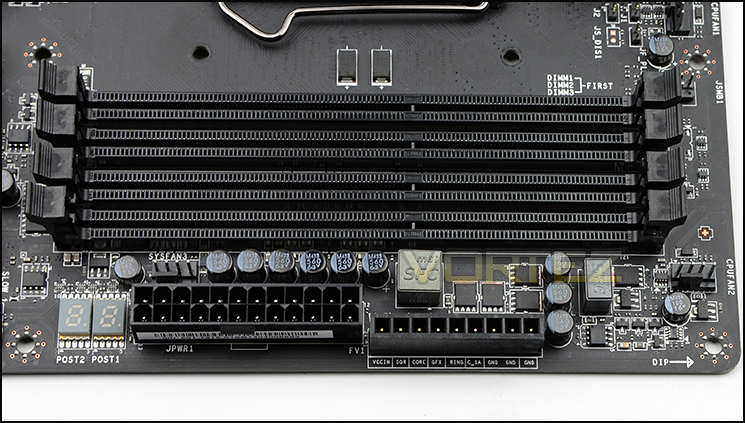
Dual-Channel DDR3 slots
Four DDR3 DIMM slots support up to 32GB RAM in a 4x8GB configuration, although typical operation will be a two-DIMM, dual-channel configuration. Unlike other brands MSI are avoiding a blanket statement of memory support on the board itself, but list the design as being capable of up to DDR3-3200MHz; in other words well in excess of stock RAM speeds.
Next to the DIMM slots are the debug LEDs, 24-pin ATX Power connector, voltage check-points and a further 4-pin system fan header. The voltage check-points are mainly a feature for high-end overclockers or advanced system diagnostics but are a welcome addition.
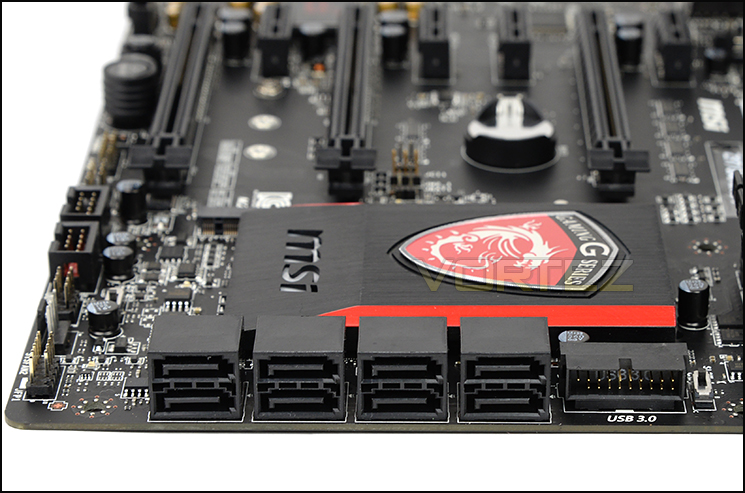
SATA III and USB 3.0 Header
Further down the board edge are the eight SATA III 6Gbps connectors and the ‘boards solitary USB 3.0 header next to the oversized PCH heatsink. We also note the lack of SATA Express connectors – Intel are integrating high-speed storage into Z97 for the first time and most manufacturers have been given the option of an M.2 or SATA Express slot (or in rare instance both). MSI have chosen to the M.2 solution, but also optionally bundle an M.2 to SATA Express adapter for the widest compatibility possible; this isn’t ideal in terms of cable management, but is acceptable given the current lack of SATA Express devices in the marketplace.
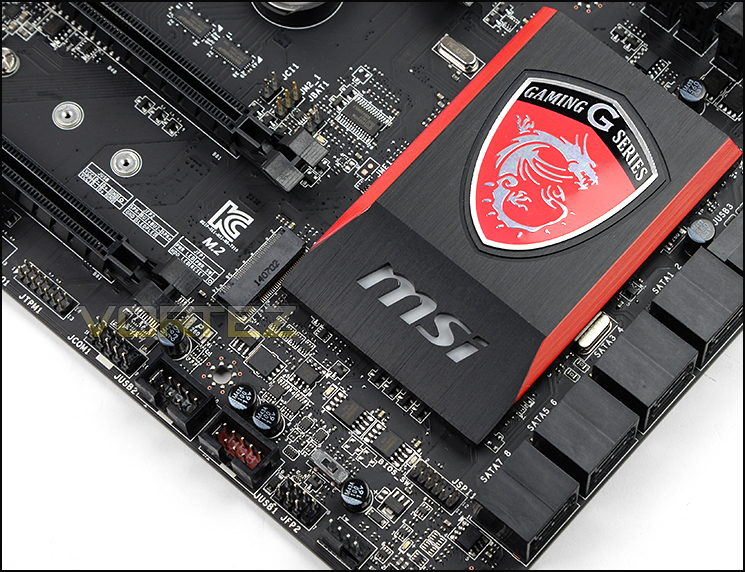
Intel Z97 heatsink
Closer Look (Continued)
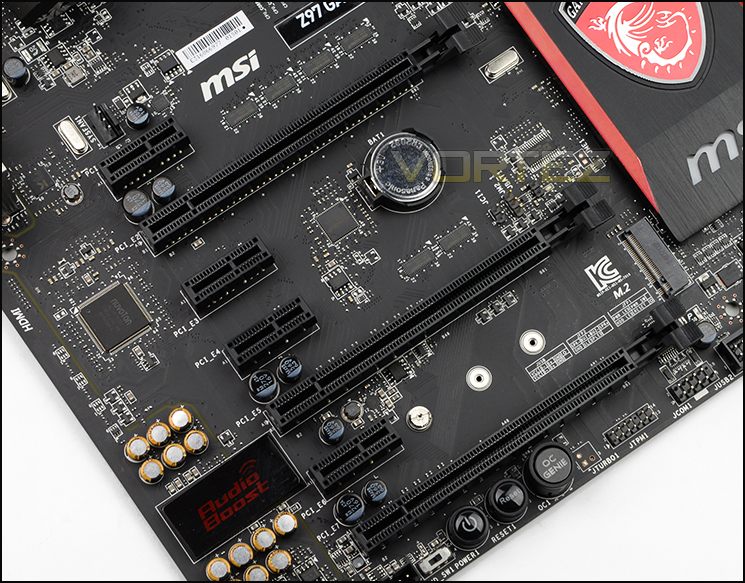
Many PCI Express Options
A central tenant of any good gaming motherboard is the PCI Express options and layout. MSI have taken the wise step of delegating the top-most slot to an x1 lane to allow space for extra-large CPU coolers such as the Noctua NH-D15. One slot down is the main PCIe 3.0 slot, electrically wired for x16 operation with further x16 slots positioned further down. The total ports available are:
4x PCI-E 2.0 x1 slots
3x PCI-E 3.0/2.0 x16 slots (Running @ x16/NC/NC, x8/x8/NC, x8/x4/x4)
The positioning is ideal for 2-way SLI as it leaves a gap of two slots between first and second x16 slot. Note also the lack of legacy PCI; this will become something of a running theme as Z97 designs mature.
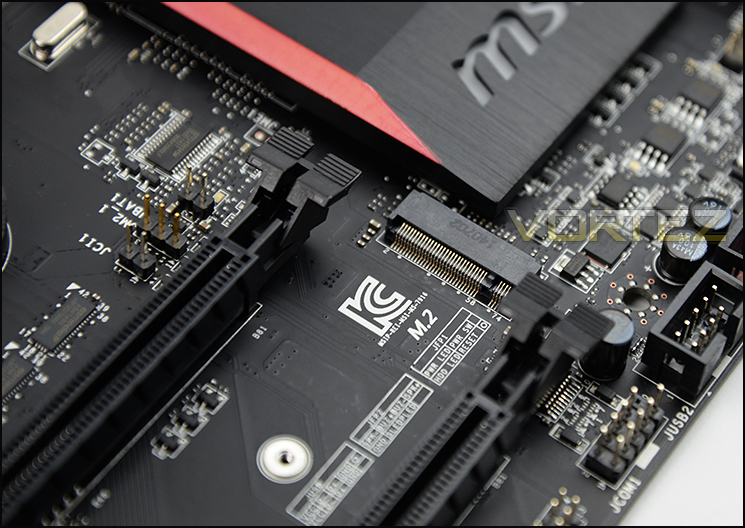
M.2 port for additional storage of up to 10GB/s
As you can see, MSI have positioned their M.2 interface between the second and third full-length PCIe slots. Other motherboards tend to have them closer to the CPU socket, but here it runs no risk of being obscured by large CPU coolers, as well as being closer to the ‘cabling ideal’ if you’re using it as a SATA Express adaptor. This particular M.2 interface supports M.2 SATA 6Gbps, M.2 PCIe 10GB/s and module lengths from 4.2 – 8cm.
Three switches – labelled Power, Reset and OC Genie – punctuate the end of the motherboard, and will be of immense use to anyone using it on a test bench.
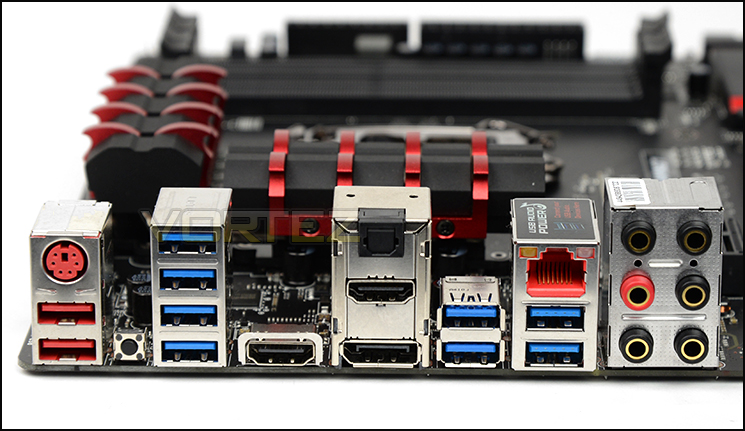
Rear I/O connectivity
Once more, the Z97 GAMING 7 shows a comprehensive feature-set, this with peripheral and auxiliary connectivity. From top to bottom they are:
PS/2 & 2 x USB 2.0 Gaming ports,
Clear CMOS Button
4 x USB 3.0
HDMI
S/PDIF, HDMI & DisplayPort
2 x USB 3.0
Gbit LAN & 2 x USB 3.0
7.1 Channel Analogue Audio
Clear CMOS Button
4 x USB 3.0
HDMI
S/PDIF, HDMI & DisplayPort
2 x USB 3.0
Gbit LAN & 2 x USB 3.0
7.1 Channel Analogue Audio
Gbit LAN is supported by the Broadcom Killer E2200 NIC and a Realtek ALC1150 Codec is the backbone of the audio system. Back-panel video-out is purely for the CPU on-board graphics, and doesn’t support Thunderbolt or dual-link DVI.
MSI 9-Series GAMING Features
A locked down Intel chipset demands that manufacturers differentiate their products by means of value and an augmenting set of branded features. MSI are no different in this regard as mainstream, GAMING and OC-series Z97 all include unique and diverse elements which set them apart.
Unsurprisingly the 9-series GAMING motherboards are all built to MSI’s exacting Military Class 4 standards which include efficient Hi-c Capacitors, Super Ferrite Chokes and aluminium-core Dark Caps. The combination should aid in long-term power stability and motherboard durability compared to standard designs.
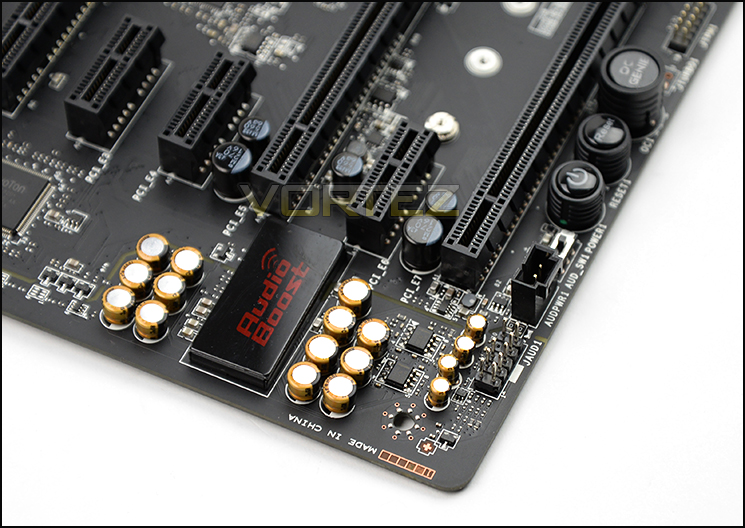
AudioBoost 2 and on-board switches
Motherboard audio has advanced leaps and bounds since the early days of integrated sound chips, and Audio Boost 2 should provide some of the cleanest and highest quality of any Z97 ‘board. Positioning is key and MSI have located their Realtek audio chip at the bottom-right and underneath an illuminated EM shield, thereby reducing electrical interference as much as possible without the use of a riser card. But that’s not the end of their audio optimisations.
Audio Boost 2 physically isolates the audio PCB for lower interference and makes use of a dedicated power interface to ensure that it’s both more powerful and stable. In addition to the standard 7.1 analogue output GAMING-series motherboards are bundled with Creative Sound Blaster Cinema 2 software, boosting simulated surround-sound to headphones and headsets for more immersive gameplay.
USB Audio Power ensures a consistent 5V supply to the rear USB ports, even under the heavy draw a device such as a USB DAC would cause. A significant long-term weakness for USB, is great to see MSI and others address the quality of power being delivered to external peripherals.
Dual built-in amplifiers improve audio clarity to headphones of up to 600-ohm impedance, headphones which can be hooked up to either the back panel or chassis audio ports. High quality Nichicon Japanese Capacitors are specially designed for audio and enable the best possible filtering for high-end acoustics. Finally, golden audio connectors should increase long-term durability and signal quality.
Networking
Drawing something of a contrast with one of their competitors MSI have opted to use the Broadcom Killer E2200 NIC rather than Intel’s already well respected solution. Benchmarking and assessing the differences between these solutions is notoriously difficult, but Killer note that they include Advanced Steam Detect algorithms to differentiate and accelerate game traffic over other network traffic.
This traffic prioritisation scheme should in theory help immensely when streaming online game footage, essentially ensuring that video data doesn’t saturate your network connection and cause your ping rate to rocket. Its value is very much use-case dependant.
Overclocking
OC Genie’s fourth generation automates CPU overclocking without needing to delve into the BIOS or OS, and depending on CPU model could improve performance by up to 20% with one button push. This functionality is expanded on with the MSI GAMING APP, desktop software which allows you to set a system mode and tailor your general overclock level on-the-go. Choose between OC-mode for highest performance, Gaming Mode for balanced settings and a Silent Mode to minimise the active cooling required by your CPU.
More advanced overclocking features can be found within the new Click BIOS 4 – now with a more intuitive UI, better mouse support, and further boot-time optimisations specifically for Windows 8. Enthusiasts will appreciate the check-points for direct voltage observations in particular, whilst everyone can relish the peace of mind the redundancy MultiBIOS II brings to the table.
Software
MSI’s complementary software has also had some work done under the hood and a fresh lick of paint. LiveUpdate 6 keeps all your MSI applications and drivers current although there are plenty of options to selectively disable updates if required. Command Centre is a system control tool from which stability settings and fan profiles can be tweaked to better serve user requirements. And if that weren’t enough MSI also bundles an unlimited RAMDisk, unlocking system memory to be used as a blisteringly fast HDD data cache up to 20x faster than current SSDs.
Each GAMING motherboard also comes with a 6-month XSplit Gamecaster software license. Ever wanted to stream your own gameplay, cast multiplayer matches or even create your on webshow? Well XSplit Gamecaster is designed to allow you to do just that through an intuitive UI which goes beyond your average streaming software.
Last but not least, MSI state that they are committed to SteamOS support out of the box. We’re not quite sure of the extent to which this support will run – full SteamOS/Linux driver and software suits or merely bundling Intel chipset drivers for Linux, but more will be known when Steam Boxes appear on the market in force later this year.
Additional Proprietary Features
The above isn’t the entirety of features MSI are bringing to bear. Below is a brief summary of what comes with the Z97 GAMING 7:
Guard Pro
– Circuit Protection
– ECO Power
– Humidity Protection
– High Temperature Protection
– ESD Protection
– EMI Protection
Super Charger USB power tailored to charging USB devices through rear and front-panel connectors.
USB Redrivers improves signal integrity to front-panel USB, allowing the use of longer cables with larger chassis.
Total Fan Control for all headers in the form of profiles as well as RPM/Temp/Voltage datalogging tools.
Oversized Dragon Heatsink to ensure that the PCH remains as cool as possible even during extended periods of heavy use.
– Circuit Protection
– ECO Power
– Humidity Protection
– High Temperature Protection
– ESD Protection
– EMI Protection
Super Charger USB power tailored to charging USB devices through rear and front-panel connectors.
USB Redrivers improves signal integrity to front-panel USB, allowing the use of longer cables with larger chassis.
Total Fan Control for all headers in the form of profiles as well as RPM/Temp/Voltage datalogging tools.
Oversized Dragon Heatsink to ensure that the PCH remains as cool as possible even during extended periods of heavy use.
Last but certainly not least GAMING-series motherboards also include a cushioned rear-I/O shield which is almost entirely black. In addition to the better electrical isolation the shield makes it slightly easier to fit your motherboard in place compared to the winged metal punch-out variety, and is far better for showing off at your local LAN event.
MSI Z97 GAMING 7 BIOS
Below is a video tour showing the interface of GAMING 7 UEFI BIOS and the options which are available. As you can see, movement is very smooth and features are easy to access.
Test Setup, Methodology & Overclocking
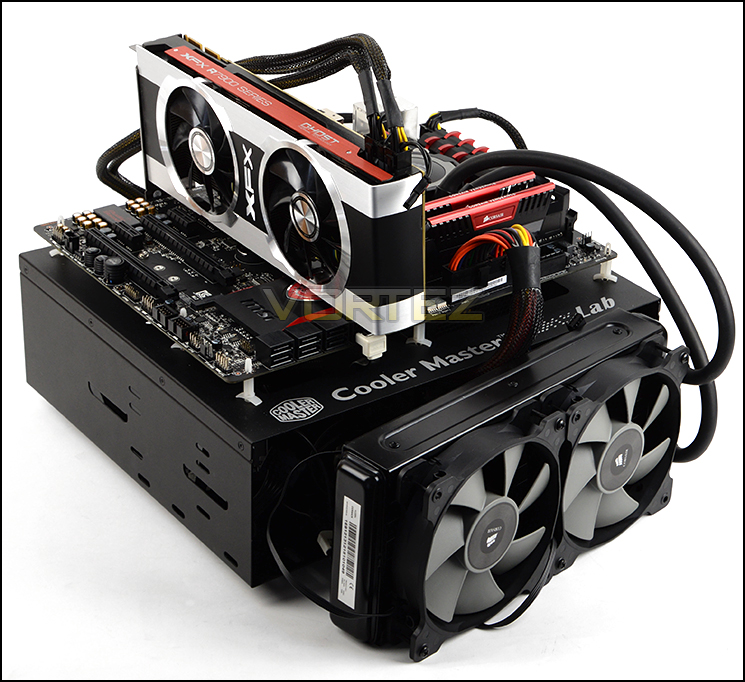
Test Setup
CPU Intel Core i7 4770K (Haswell) 3.50GHz
Cooling Corsair Hydro Series H105
Motherboard ASUS Z97-A
Memory 16GB Corsair Vengeance Pro 2800MHz CL12 DDR3
Graphics XFX R7970 Black Edition
Storage Corsair Neutron GTX 480GB
PSU Corsair HX1050 80 Plus Gold Certified PSU
Cooling Corsair Hydro Series H105
Motherboard ASUS Z97-A
Memory 16GB Corsair Vengeance Pro 2800MHz CL12 DDR3
Graphics XFX R7970 Black Edition
Storage Corsair Neutron GTX 480GB
PSU Corsair HX1050 80 Plus Gold Certified PSU
Benchmarks
Cinebench R15 – CPU/OpenGL Score
x264 HD 4.0 – 1st and 2nd pass encoding
SiSoftware SANDRA 2014 – CPU & Memory benchmarks
AIDA64 – CPU benchmarks
PCMark 8 – Home Suite
3DMark FireStrike – DX11 3D Benchmark
Games – Tomb Raider, THIEF
x264 HD 4.0 – 1st and 2nd pass encoding
SiSoftware SANDRA 2014 – CPU & Memory benchmarks
AIDA64 – CPU benchmarks
PCMark 8 – Home Suite
3DMark FireStrike – DX11 3D Benchmark
Games – Tomb Raider, THIEF
Other Software
Temperature Analysis: Core Temp
Stress Testing Software: LinX
CPU Specification Monitoring: CPU-Z
Stress Testing Software: LinX
CPU Specification Monitoring: CPU-Z
Overclocking
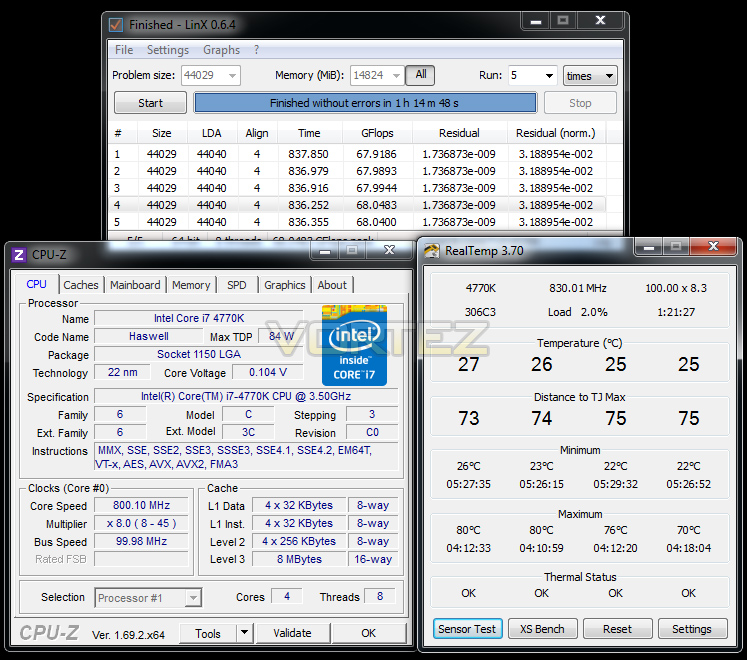
Since the introduction of Z87 back in 2013, there has been a return to BCLK overclocking. This type of functionality ensures flexibility for Overclockers compared to previous generations were the BCLK was locked to 100MHz and only the ratio could be adjusted. As many of you will know, Haswell CPUs get very hot with little voltage increase therefore the flexibility and headroom for overclocking can be limited. For the Z97 launch, we are testing with the Intel Core i7-4770K which from previous, extensive testing, has a maximum overclock of 4.6GHz.
We have to admit we did have some difficulties with our MSI Z97 GAMING 7 motherboard when we put it through the overclocking stage. We discovered that this motherboard wasn’t fully compatible with our memory kit and applying an overclock whilst the kit had XMP enabled caused instability. We did however manage to get 4.5GHz stable at 1.3v – though this is not our best result by any means. When we revisit GAMING 7 – we will be verifying whether this issue still exists.
Benchmarks: Power Consumption
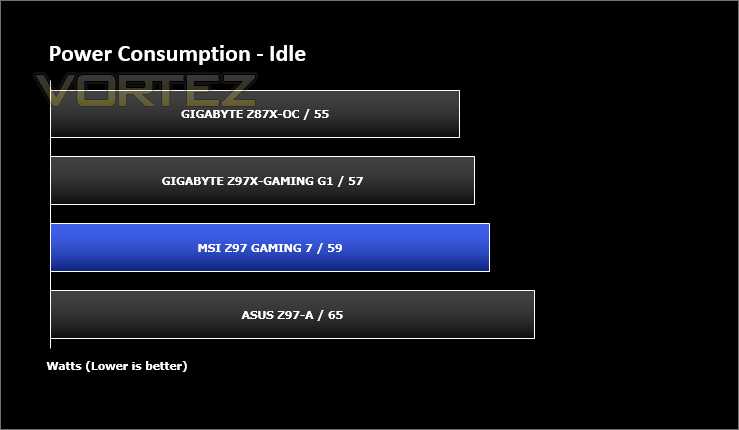
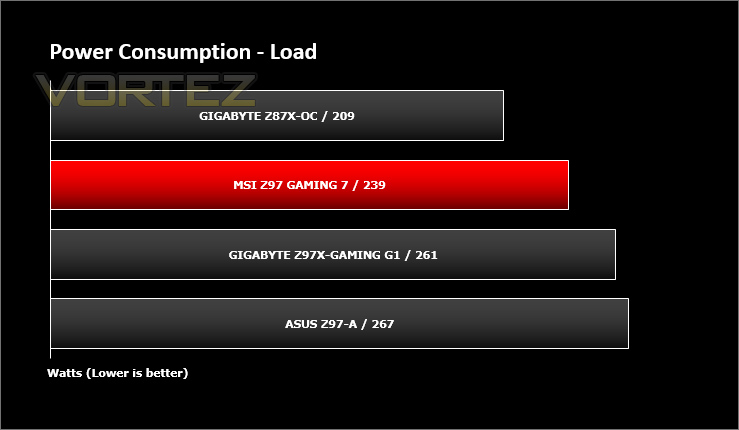
It’s interesting to note the power consumption across all motherboards. Although they are using Z97 chipsets, energy results can fluctuate between manufacturers due to the features and specifications that are integrated. First of all, for the idle tests the system is cold booted into Windows and no additional applications are executed – the watts are noted on the external energy monitor we use and then the system is loaded with 3DMark FireStrike – watts are again monitored for the duration of the test and the highest rated wattage result is then noted down. Below are the results of this energy test.
Benchmarks: X264 HD
Simply put, this test measures how fast your machine can encode a short, DVD quality MPEG-2 video clip into a high-quality x264 video clip. What’s x264, you ask? It’s more or less the next-generation Xvid/DivX codec. I think it’s ideal for a benchmark because the application (x264.exe) reports fairly accurate compression results (in frames per second) for each pass of the video encoding process, and it uses multi-core processors very efficiently.
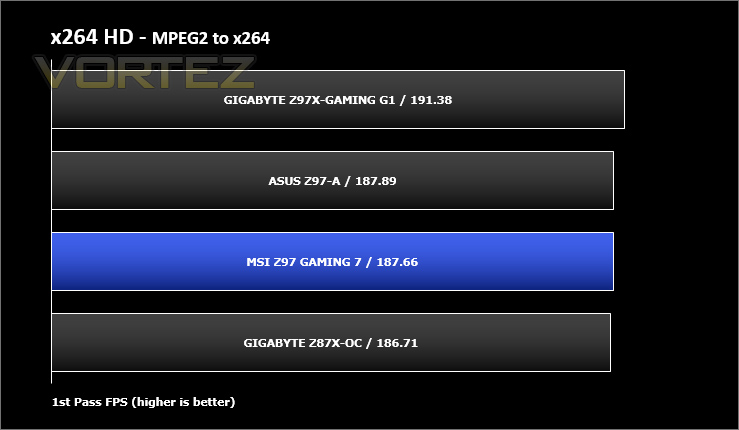
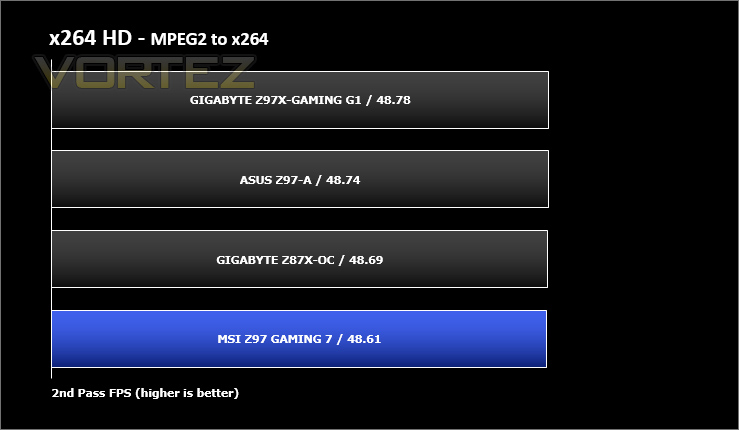
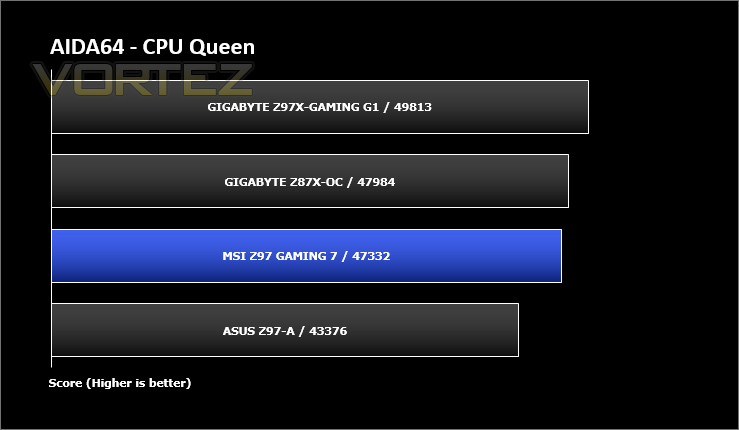
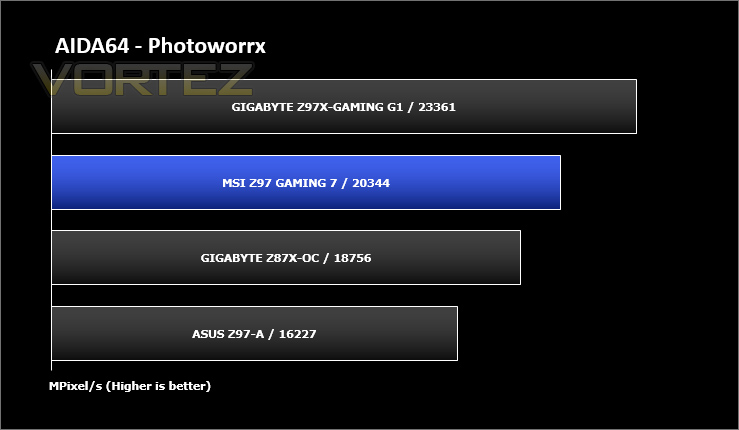
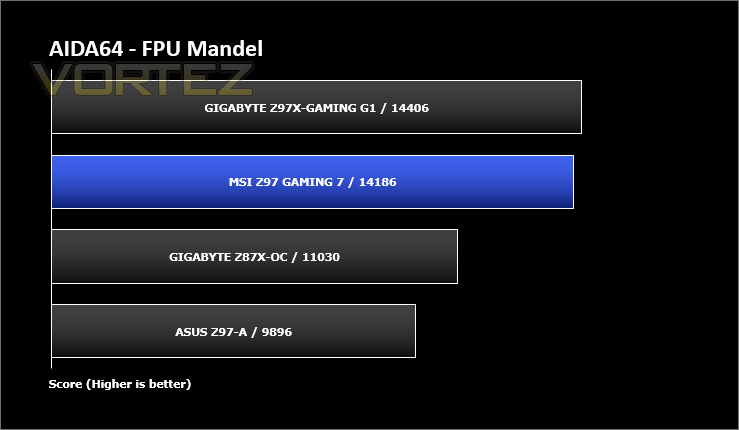
Benchmarks: AIDA64
AIDA64 Product PageThis simple integer benchmark focuses on the branch prediction capabilities and the misprediction penalties of the CPU. It finds the solutions for the classic “Queens problem” on a 10 by 10 sized chessboard. At the same clock speed theoretically the processor with the shorter pipeline and smaller misprediction penalties will attain higher benchmark scores. For example — with HyperThreading disabled — the Intel Northwood core processors get higher scores than the Intel Prescott core based ones due to the 20-step vs 31-step long pipeline. CPU Queen test uses integer MMX, SSE2 and SSSE3 optimizations.
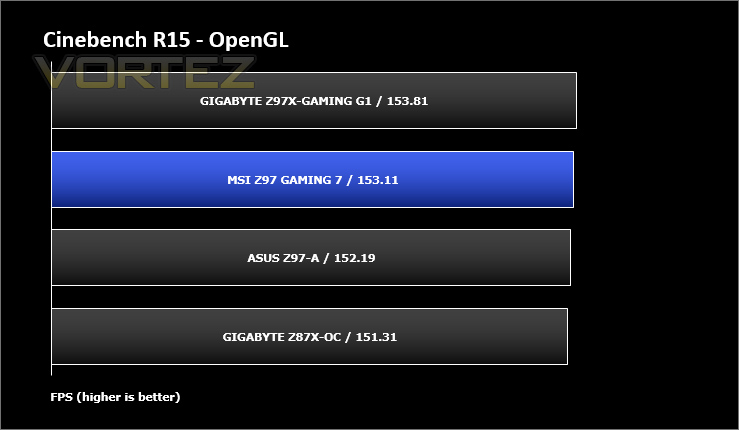
Benchmarks: Cinebench
CINEBENCH is a real-world cross platform test suite that evaluates your computer’s performance capabilities. CINEBENCH is based on MAXON’s animation software CINEMA 4D 3D content creation.
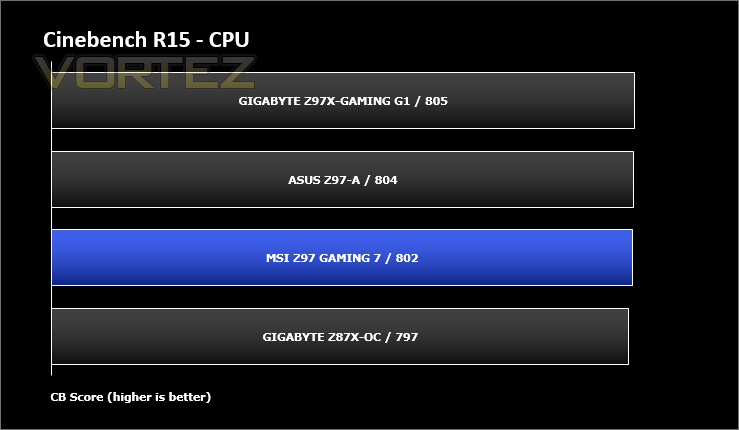
Benchmarks: SiSoftware SANDRA
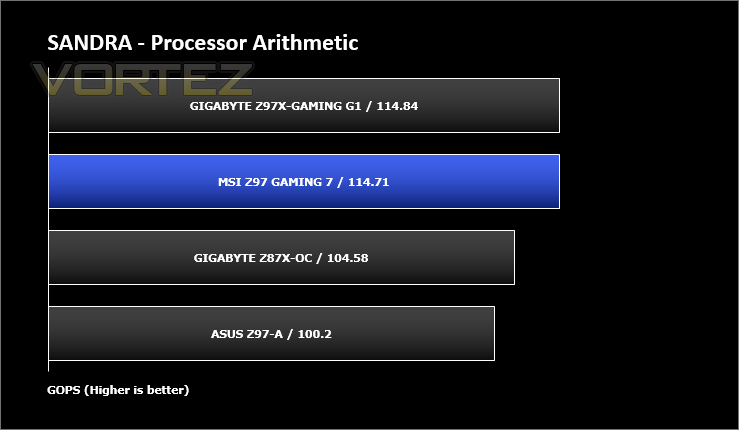
SANDRA isn’t always a benchmark that is included in hardware reviews but I believe it shouldn’t be ignored. SANDRA provides a vigorous package that tests your system in a rather large array of benchmarks. There are many aspects of benchmark that can be executed. We will be considering – CPU and memory tests.
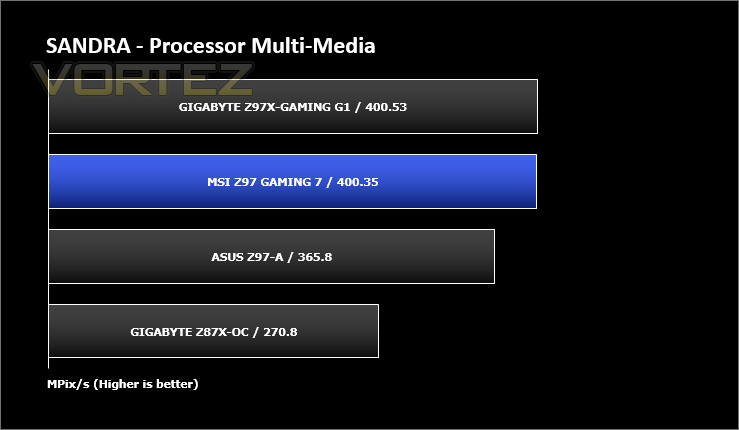
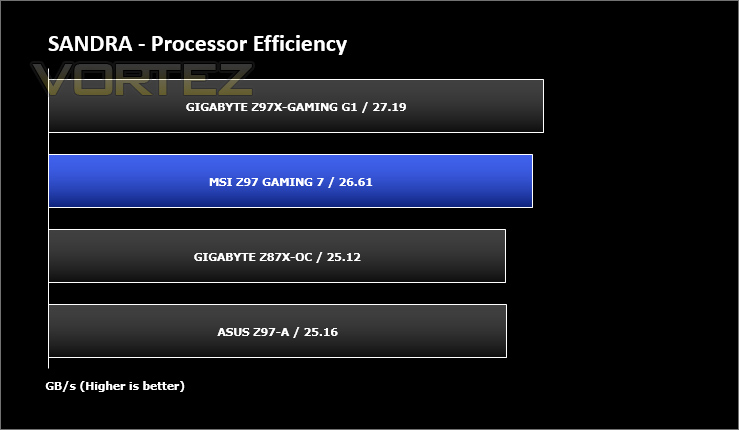
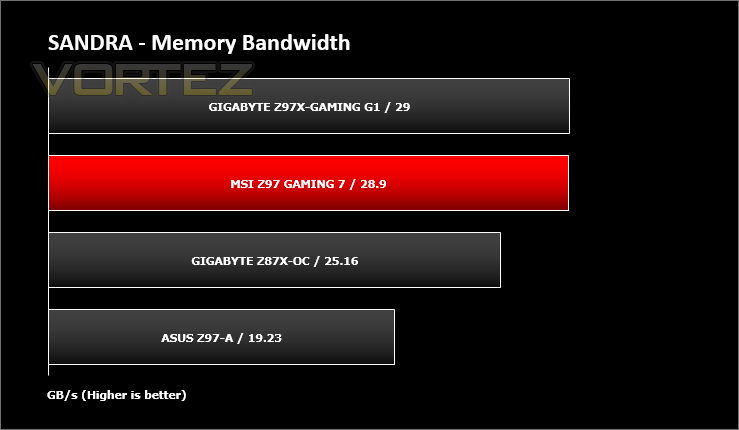
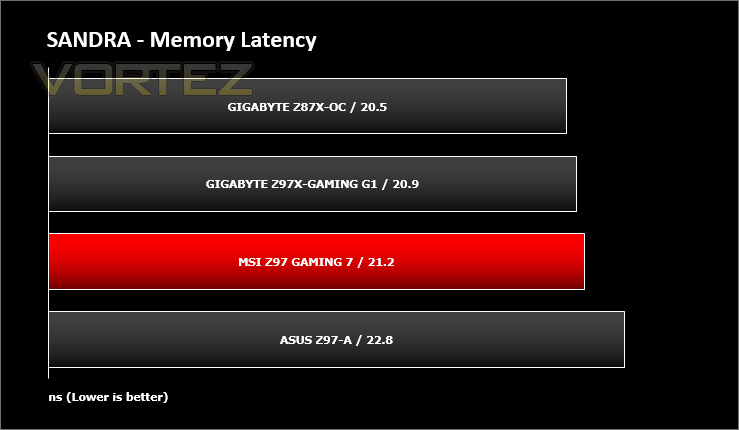
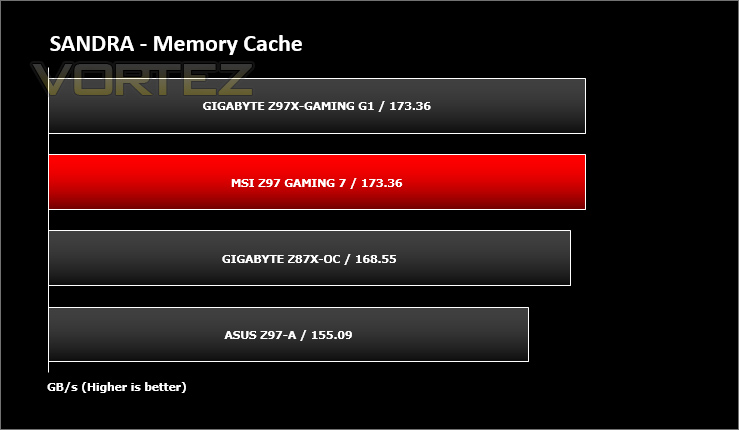
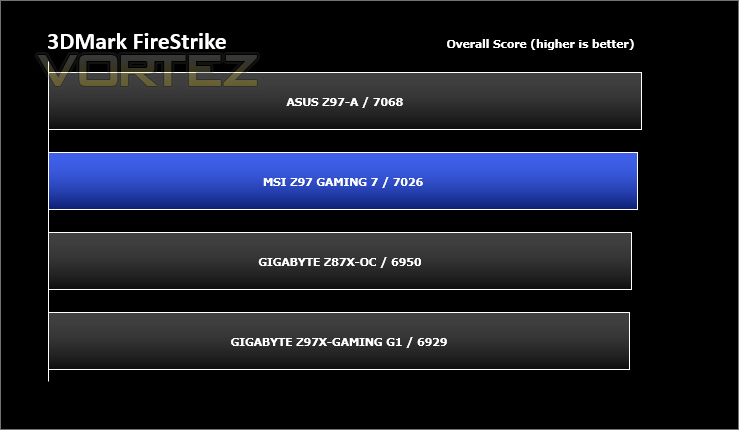
Benchmarks: 3DMark
3DMark FireStrike Product PageFire Strike is our new showcase DirectX 11 benchmark designed for high-performance gaming PCs. It is our most ambitious and technical benchmark ever, featuring real-time graphics rendered with detail and complexity far beyond what is found in other benchmarks and games today. Fire Strike will only be available in the Windows editions of 3DMark initially.
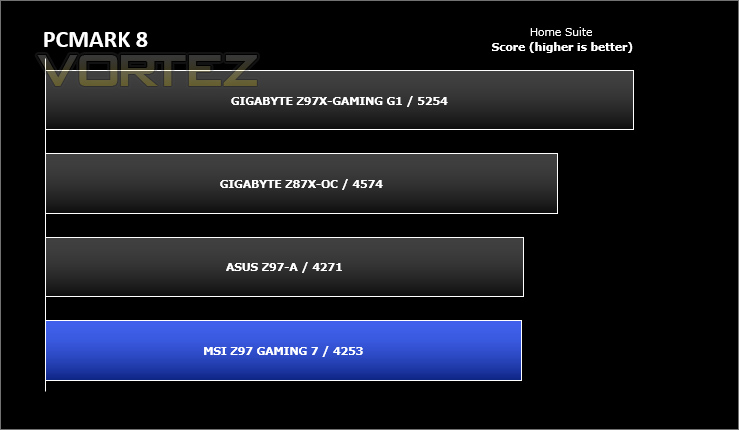
Benchmarks: PCMark 8
PCMark 8 combines performance benchmarking with battery life measurement and includes tests based on popular Adobe and Microsoft applications. Whether you are looking for long battery life, or maximum power, PCMark 8 will help you find the devices that offer the perfect combination of efficiency and performance for your needs. It’s the complete PC performance benchmark for home and business.
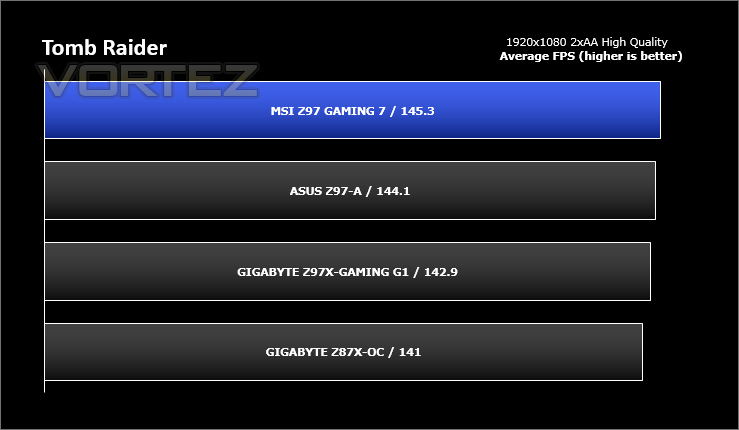
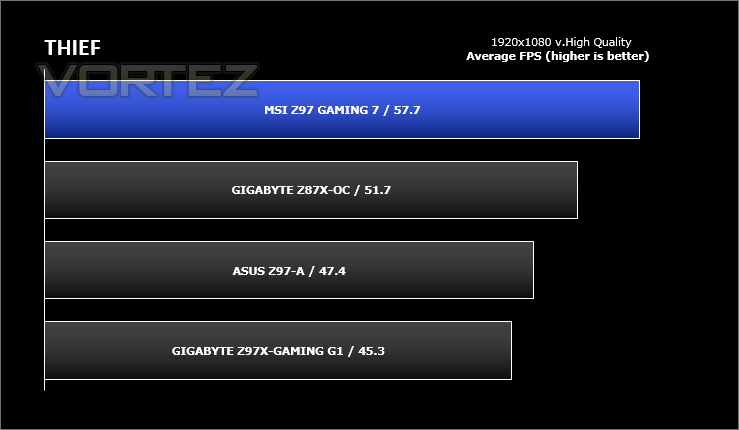
Benchmarks: Tomb Raider & THIEF
It’s important for us to perform a number of game benchmarks as well as the synthetic tests because gamers will want to know if there are any significant benefits. So here we have two popular and recent gaming titles which feature a dedicated benchmark tool within them to display results.
Conclusion
MSI’s Z97 GAMING 7 is one of three motherboards we’re looking at on day one of the Z97 launch, a launch which has been notable for how disparate some of the synthetic results have been whilst still being based on the same chipset. These results should narrow as drivers mature, but until then real-world performance will nonetheless be quite similar.
Priced at £140 / $189, the GAMING 7 is at an almost perfect pricing mid-point with respect to Z97 as a whole, and its positioning is reflected in the gaming-focussed design with a dusting of serious overclocking features. Cooling is more robust, voltage check points are present and catered for, and particular attention has been taken to improving audio clarity thanks to Audio Boost 2. Whilst the GAMING 7 will pale in comparison to specialised overclocking and audio hardware it hits an ideal note for the gamer.
The software and UEFI BIOS in particular is worthy of praise and is as easy to use as any, considerably more so than GIGABYTE Z97X-OC. Gamers are increasingly more confident when it comes to pushing systems to their limit or tailoring them to optimal sound levels, and so it’s important that MSI catered to this demand. We should note however that there are more comprehensive software suite’s out there, but the GAMING 7 hits just the right note for its target audience.
One interesting point of differentiation is the use of an M.2 slot, but no SATA Express at stock. MSI aren’t the only company to do this – ASUS ROG also eschew SATA Express for now – and reflects the current reality that SATA Express isn’t quite ready for prime time. No doubt they will make an appearance as and when the interface matures (or more likely is compacted into smaller physical dimensions) but until then the optional adapter seems like a good compromise. Certainly we would not like the reverse situation – SATA Express but no M.2 – to be the norm as things stand.
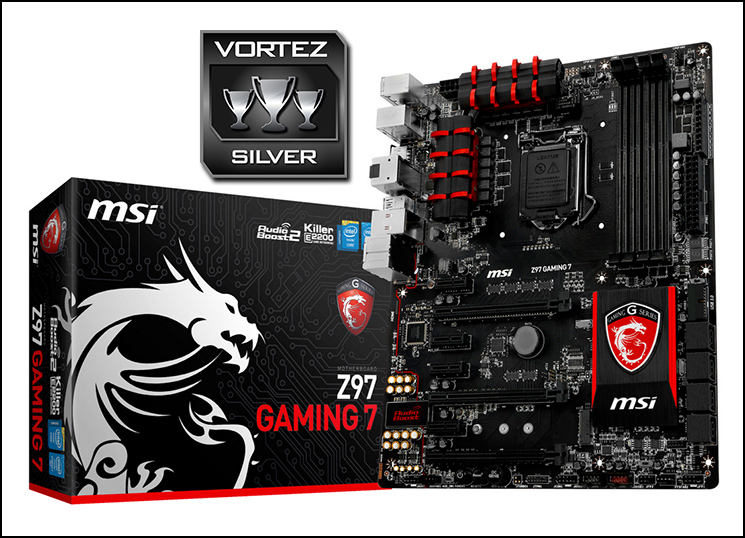
Aesthetically, and despite having a colour-scheme which has been criticised as being too similar to that of competitors, the MSI has finally started to carve out its own identity. They’ve taken a step forward in terms of the finish such that the copper traces don’t show up brown through the paintwork, and the red is a slightly more distinct shade; subtle, but the differences add up. Furthermore the writing on the board has been kept down to a minimum, giving an far cleaner look overall. This progression from Z87 is significant and worthy of special mention.
As with all Z97 motherboards the GAMING 7 suffers from one major drawback – no accompanying new CPUs. Performance for our Core i7-4770K was topping out at the well established limits for Z87, and although it was notable that the GAMING 7 was capable of reaching these limits at a lower voltage than our Z87 test bed they’re in dire need of unlocked Haswell Refresh CPUs – with their improved TIM – to really find their true limitations.
The second component in the Devil’s Canyon platform – unlocked Haswell Refresh CPUs – are due out relatively soon and it may well be that you’ll be put off from investing in new parts. Until then the MSI Z97 GAMING 7 remains a creditable design which doesn’t warrant an upgrade from Z87, but may well tempt users of Sandybridge/Ivybridge-era CPUs who would also appreciate the forwards-compatibility to Intel’s 5th Generation Core CPUs.
Gamers and overclockers alike will find a lot of value in the £140 MSI Z97 GAMING 7, especially in the form of attractive finish, bundled features and high quality software design. Its one failing is that the Devil’s Canyon platform is not yet complete, and won’t be for a little while yet.
Pros
+ Top notch Z97 aesthetics
+ A step up in overclocking results from Z87
+ Easy to overclock
+ Marked improvement in software and UEFI BIOS UI
+ High speed M.2 storage slot
Cons
– Compatibility issues with memory
– Middle of the pack stock results
+ Top notch Z97 aesthetics
+ A step up in overclocking results from Z87
+ Easy to overclock
+ Marked improvement in software and UEFI BIOS UI
+ High speed M.2 storage slot
Cons
– Compatibility issues with memory
– Middle of the pack stock results

Click here for an explanation of our awards at Vortez.net.


