







Three USB 3.0 HDD enclosures grace our desk for your consideration: the IB-116StU3 Docking Station, IB-366StU3 3.5" Enclosure and dual-bay IB-3662U3.
Products On Review:

– IB-116StU3-B HDD Docking Station
– IB-366StU3+B 3.5″ External Enclosure
– IB-3662U3 2 Bay External Enclosure
Manufacturer: ICY BOX, subsidiary of RaidSonic
Street Price (inc. V.A.T.):
– IB-116StU3-B : £19.04
– IB-366StU3+B : £31.17
– IB-3662U3 : £54.94
ICY BOX has been a presence in the external enclosure market since 2003, but their parent company RaidSonic has also been a significant player in external storage since their founding in 1999. The Hamburg-based manufacturer cater to both enterprise level requirements – through their RaidSonic brand – and the consumer and SOHO market segments through ICY BOX. As strange as it sounds, this led to a huge diversity in products considering the relatively simple set of requirements which appear at face value. The current line-up of ICYBOX products alone includes Network Addressed Storage, USB JBOD enclosure, Smartphone accessories and even multimedia entertainment devices.
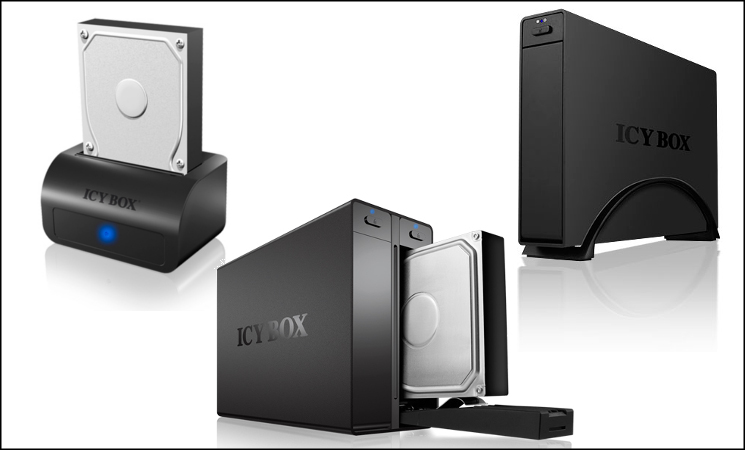
Icy Box are also well aware that in order to appeal to a wider range of users their products need to be both highly functional and aesthetically pleasing. To that end designs have been created which include brushed aluminium exteriors, fashionably coloured cases, leather pouches or ruggedised reinforcement. Although the products we’re reviewing today are some of the more standard in this regard, Icy Box have an enclosure to suit almost any need.
You will have noted that today we’re reviewing three different enclosures, encompassing two slightly different market requirements. The IB-116StU3-B uses an external docking station style which has become popular in more recent years, primarily intended for hot-swapping 2.5″ and 3.5″ drives. By contrast the IB-366StU3+B and IB-3662U3 are robust external enclosures for more long-term holding and transporting of disk drives on a desk and between workplace and home. The IB-366StU3+B in particular is noteworthy thanks to its support for UASP, the latest improvements to the USB protocols for improved performance. All three utilise USB 3.0 as their method of high-speed data transfer, but unlike some USB3.0 enclosures they all support SATA III 6Gbps drives at above SATA II speeds.
ICYBOX IB-116SrU3-B HDD Docking Station
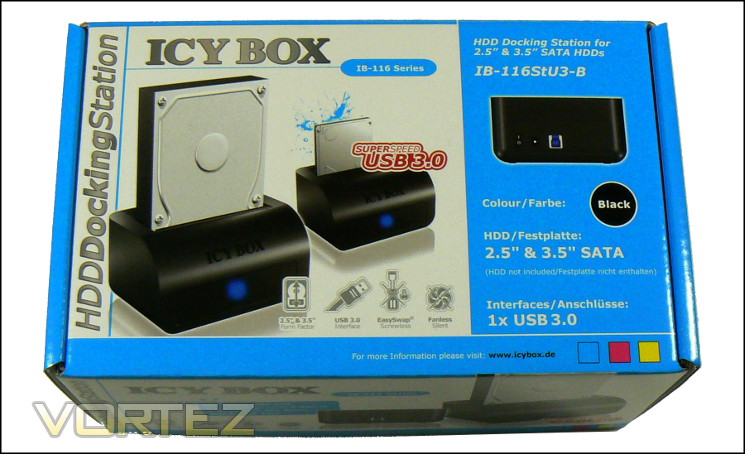
First up we have the somewhat less than snappily named IB-116StU3-B. But we’re not here for names, we’re here for the technology! The packaging certainly knows this, displaying the docking station with both 3.5″ and 2.5″ drives as well as keeping to the blue and white packaging we will swiftly become accustomed to in this review. Whilst a little busy, the outer packaging makes the features and requirements of the device quite clear, and in ten different languages no less.
Technical Specifications
Compatible Disk Sizes: 2.5″, 3.5″
* Disk Interface:- SATA I/II/III
* PC Interface:- USB 3.0 (backwards compatible to USB 2.0)
* External Power:- Yes
* Dimensions:- 90mm x 130mm x 70mm (L x W x H)
* Disk Interface:- SATA I/II/III
* PC Interface:- USB 3.0 (backwards compatible to USB 2.0)
* External Power:- Yes
* Dimensions:- 90mm x 130mm x 70mm (L x W x H)
—
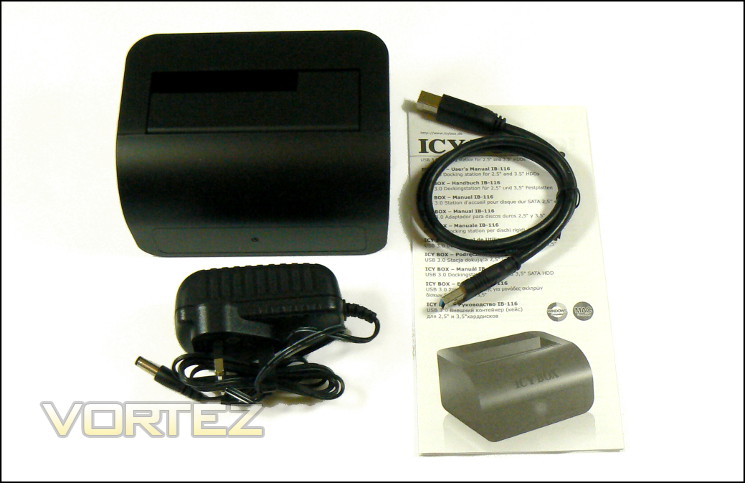
Unlike the other two devices we’re reviewing today, the 116SrU3 is docking station type. The exterior a quite solidly finished plastic, with weight biased towards the floor to improve stability when a potentially heavy drive is inserted. Drives are inserted in the top, where a flap collapses if a 3.5″ drive is installed or guides if a 2.5″ HDD/SSD is inserted. The slot is 45mm deep, swallowing around the third of the length of a standard 3.5″. Those with limited desk space will welcome the relatively small footprint, which though not slimline will only take up small amounts of space.
Located at the rear are the two external connections for data and 12V DC power. The USB port provided may be a little unfamiliar – it is USB 3.0 Type B, a standard which is backwards compatible with USB 2.0 Type B plugs if necessary. Icy Box provide a full USB 3.0 A-B cable with the 116SrU3, making it suitable for any system with a USB port – although you’ll obviously want to make the most of the possible 5Gbps bandwidth if possible. The docking station supports Hot Plug functionality, and Icy Box recommend that you switch off power to the station before inserting and removing HDDs.
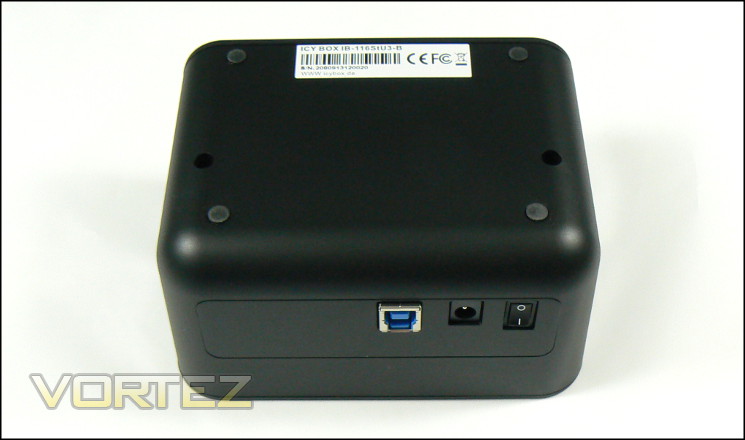
On the floor of the 116SrU3 are four small rubber feet and a product label which includes the serial number. Despite their size, they hold the docking station in place very well, generating a surprising amount of friction. The base is square where it meets the front of the dock, but curves at the rear. Normally this would result in a lack of stability, but the cables affixed to the rear will more than compensate.
On the front is a large panel with a blue and red LED at the centre. You get the impression that the chassis is a modified design re-purposed from other docking stations which would have additional features on this panel, but what it has is more than enough to indicate connectivity and activity.
—
The 116StU3 is the sort of docking station you’ll want if you’re frequently shipping discrete HDDs between machines, and especially in that situation if there are limited HDD bays inside your PC. Some PC cases have this feature designed into the top I/O zone or 5.25″ bay, but they’re not typical and quite rare on diminutive mini-ITX and mATX chassis. The external docking station solution also provides a level of portability not otherwise offered.
Other high-speed external solutions are often eSATA rather than USB 3, which although increasingly a part of motherboard back-panel I/O isn’t quite as ubiquitous as USB. When upgrading therefore the 116SrU3 offers more functional value, even if it may be held back by the USB protocol. The 116SrU3’s party trick however is the ability to run at SATA III speeds on the HDD end, so that you can begin to saturate USB 3.0’s 5Gbps data rate; many other USB 3.0 docking stations are limited to SATAII speeds. You will need an SSD or hybrid drive to approach those speeds with any regularity of course, but it does pay to have that piece of mind.
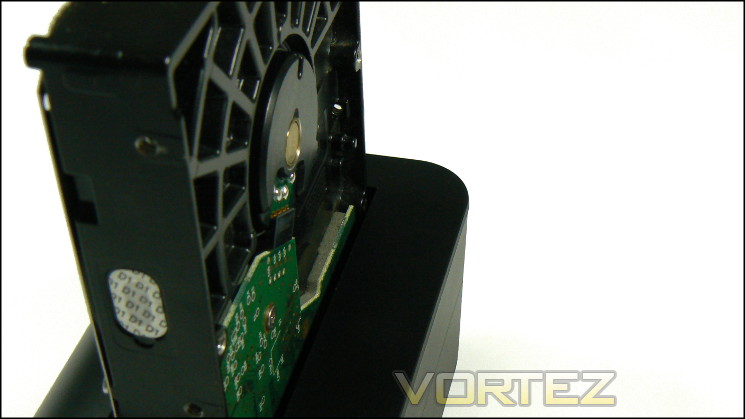
When inserting drives you will need to take care with your placement and the force you use. Although it does provide you with a guide to slide the drive into place, with our HDD there was a good 2mm gap between the back of the drive and the rear side of the docking port, whilst the front of the drive was flush with the front of the port. It’s not a problem, but the sort of design quirk which you need to recognise in your first few sessions..
In operation, noise may be the only downside. Vibration characteristics will largely be dependant on the drive, and whilst there is some dampening provided it won’t be sufficient to eliminate everything. This reinforces the presumption that it’s a device to use as needed rather than have hooked up constantly, for which you would want a true enclosure.
ICYBOX IB-366StU3+B Single Bay 3.5" External HDD Enclosure

Moving on to the IB-366StU3+B, the consistent graphical design will once again clue you in to the manufactures. The pack itself is of course larger than that of the 116StU3, but the distinctive white with blue band is still present. Once again the product you’re buying is clearly visible, and Icy Box have ensured that the main features including compatible disk sizes (3.5″ only in this case) and the interface types on drive and PC end. Icy Box have also ensured that there is plenty of space around the enclosure itself, so there’s little chance of the aluminium exterior being scratched.
Technical Specifications
* Compatible Disk Sizes:- 3.5″
* Supports UASP Function
* Loading Type:- Tray, tool-less
* Disk Interface:- SATA I/II/III
* PC Interface:- USB 3.0 (backwards compatible to USB 2.0)
* External Power:- Yes
* Dimensions:
– Just enclosure : 200mm x 40mm 140mm
– Inc. Stand : 200 x 50mm x 150mm (L x W x H)
* Supports UASP Function
* Loading Type:- Tray, tool-less
* Disk Interface:- SATA I/II/III
* PC Interface:- USB 3.0 (backwards compatible to USB 2.0)
* External Power:- Yes
* Dimensions:
– Just enclosure : 200mm x 40mm 140mm
– Inc. Stand : 200 x 50mm x 150mm (L x W x H)
—
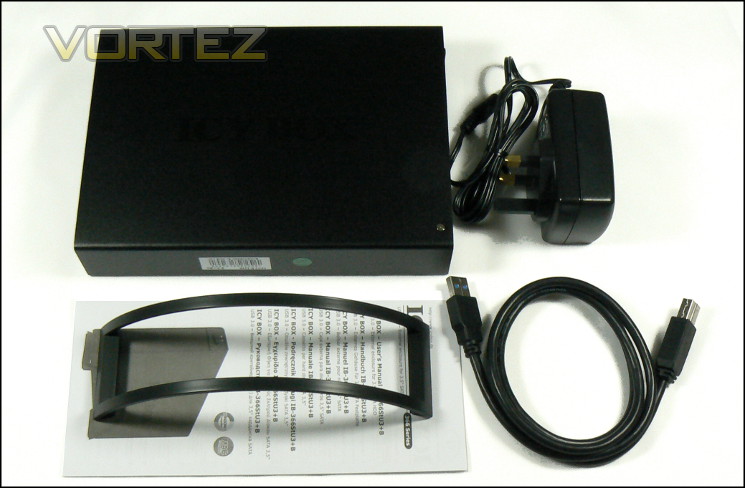
Unlike the IB-116StU3-B the IB-366StU3+B is a true enclosure, surrounding the whole of the drive and providing some measure of protection when on the move. The enclosure’s chassis is a sturdy 2mm thick aluminium alloy with a hard-wearing textured finish; not quite the brush aluminium you might be expecting from the specification but slightly more resistant to fingerprints. When in use the chassis may sit on the provided stand – an arc of plastic with rubber feet which will provide some level of noise dampening during operation – or lay flat if you’re comfortable with the vibration.
Fronting the enclosure is a plastic door with eject button and blue/red LED at the top. When the button is pressed the door swings open hinged from the bottom, revealing a tray and tongue mechanism. At the other end of the tray is the SATA power and data connection, while a large spring and spring-loaded metal bar is intended to aid extraction from the enclosure.
At the rear are the connectivity points for USB 3.0, 12V DC power and a fairly stealthy on/off power switch. Note the USB 3.0 type B socket, a design that is backwards compatible with USB 2.0; thank goodness they’ve avoided the much more fragile micro-USB 3.0 connection. Once again Icy Box have supplied a true USB 3.0 cable rather than utilising a cheaper alternative or requiring an additional purchase from the end-user. A 12V, 2A transformer is integrated into the UK 3-pin plug, and will reduce the space taken up both in the desk and in any travel satchels.
An eSATA blanking plate indicates that the backplate on this model is also reused by other enclosure designs, but it’s not a factor with the IB-366StU3+B. At the top and bottom are ventilation holes, which should help to keep normally quite toasty mechanical drives cool. The fanless design is entirely passive, and so heat diffusion from quite warm 3.5″ drives will be an important factor in assessing value.
—
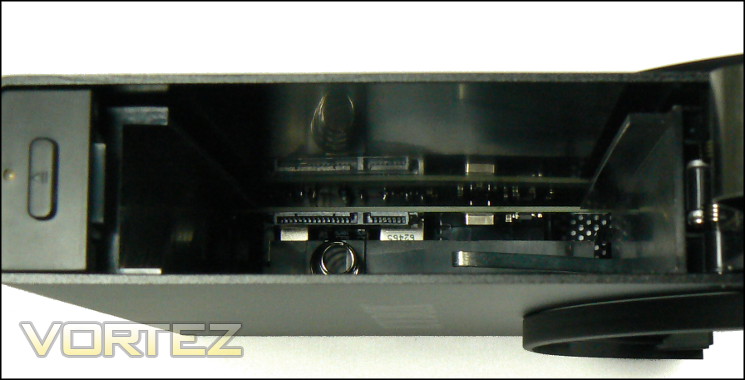
Inserting and extracting drives from the IB-366StU3+B is extremely simple and, as mentioned, toolless. Upon opening the door you’re presented with guide rails at the top and bottom which fit a standard one inch thick 3.5″ HDD snugly. The backplane connectors are at the top-right, and you will want to ensure that the drive is in the correct orientation. Once the drive is 90% inside the enclosure you will feel the resistance of the spring, at which point you press firmly on the top and close the door firmly. The guide rails and spring-loaded mechanism inside ensures that everything remains tight.
The status LED is solid blue when powered on, and purple when the HDD is in operation. Unlike the larger IB-3662 reviewed later there is no indication of the drive being in sleep/low power mode, but it’s less of an importance in single-bay caddies. As an indicator of activity and power state it’s adequate, no more no less.
During operation we found that the stand did a fair job of reducing vibration from the drive, whilst the enclosure gripped the drive tight enough to eliminate any movement within the chassis. The dampening through the stand wasn’t quite enough to eliminate resonating effects fully – the particular drive we used interacts with the test station’s desk quite aggressively – but it does do a much more creditable role than many other enclosures we have used.
Despite the challenging noise characteristics of our 3.5″ mechanical drive the IB-366 did sterling work to ensure that all we heard was the odd whir and click; furthermore whilst the drive was in sleep mode the enclosure was totally silent. Similarly the exterior of the drive never became uncomfortably or dangerously hot even during long operation, indicating a very cool balance of heat extraction through the perforation at the rear and the chassis as a whole.
UASP
The IB-366StU3+B supports the USB Attached SCSI Protocol (UASP) specification, which addresses some of the failings of the older USB bulk-order transport (BOT) definition. Chief among the improvements are the enabling of out-of-order completion and NCQ over USB, reducing USB overheads both in terms of bandwidth and CPU processing. Icy Box claim that this allows the enclosure to reach transfer speeds of 400MB/s with an SSD, although you will typically need a 2.5″ to 3.5″ form factor converter to allow such a drive to be inserted into the enclosure securely.
UASP is most useful for situations where you are utilising the external drive as a true workhorse drive rather than sequential file transfer. Benchmarks show that the performance of the enclosure and drive will scale with queue depth; that doesn’t happen with standard USB BOT protocols.
Unfortunately, to make use of UASP both the USB device and the host USB controller need to be compatible, which in terms of motherboards only began to be phased in at the Z68 era. Hardware support for UASP is not universal even in modern generations due to licensing costs, making it necessary to check with your motherboard vendor for compatibility. At the driver level Windows 8 supports UASP natively, whilst we believe Windows 7 still requires third party support from the motherboard/USB host device manufacturer.
Some motherboard manufacturers have propriety technologies which accelerate the speed of the drive when performing more demanding tasks, but they are generally inferior to UASP. However they have the benefit of working with almost all USB 3.0 storage devices. They’re good in a pinch, but obviously not ideal if you have the potential for better.
For more information on UASP we recommend the following short guide provided by ASUS, who have pioneered both incorporating UASP into their motherboards and documenting compatible models:
ASUS – What is UASP?
—
Overall the enclosure is excellent. UASP enclosures remain a relative rarity, such that users cannot gain maximum use from USB 3.0’s potential. The IB-366StU3+B does offer that, but at a price: the greatest benefits can be had only when an SSD is installed, and that mandates a 2.5″ form factor. 2.5″ to 3.5″ form factor converters do exist, but they will typically add another £15-£20 to the solution; a simple tray adapter will not be sufficient due to the spring-loaded docking mechanism.
With the above noted, we still found the build quality to be very good, and the toolless mechanism to be quite robust. You will need to stabilise it with a second hand before inserting and removing the drive, but that’s really par for the course. Only the stand is a genuine worry as the support struts are quite vulnerable to being bent out of shape if care isn’t taken when packing it away.
ICYBOX IB-3662U3 2-Bay 3.5" External HDD Enclosure
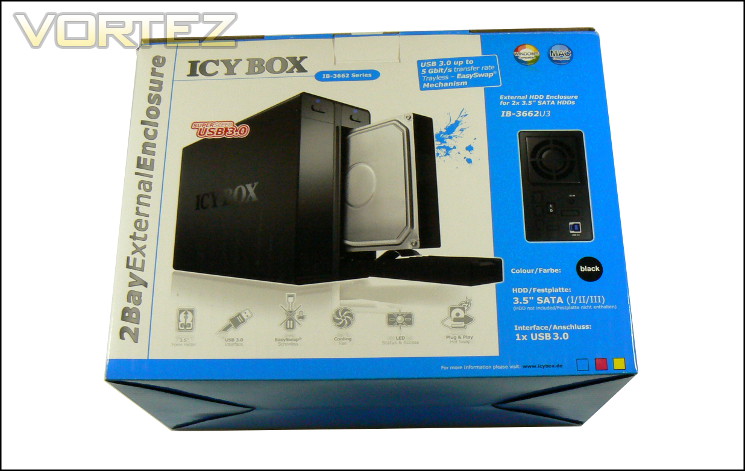
Moving on to the IB-3662U3, we can immediately see the consistent branding in packaging design. The pack itself is of course considerably larger than that for the 116StU3 and 366StU3, but the distinctive white with blue band is still present. Once again the product you’re buying is shown, and Icy Box have ensured that the main features including compatible disk sizes (3.5″ only in this case) and the interface types on drive and PC end are clearly indicated. As with the previous enclosures, the 3662U3’s shouldn’t pose any confusion to the casual buyer browsing a brick-and-mortar retailer.
Technical Specifications
* Compatible Disk Sizes:- 2 x 3.5″
* Supports JBOD Function: Two Independent Drives In OS
* Loading Type:- Tray, toolless
* Disk Interface:- SATA I/II/III
* PC Interface:- USB 3.0 (backwards compatible to USB 2.0)
* External Power:- Yes
* Dimensions: 203mm x 82mm x 147mm (L x W x H)
* Supports JBOD Function: Two Independent Drives In OS
* Loading Type:- Tray, toolless
* Disk Interface:- SATA I/II/III
* PC Interface:- USB 3.0 (backwards compatible to USB 2.0)
* External Power:- Yes
* Dimensions: 203mm x 82mm x 147mm (L x W x H)
—
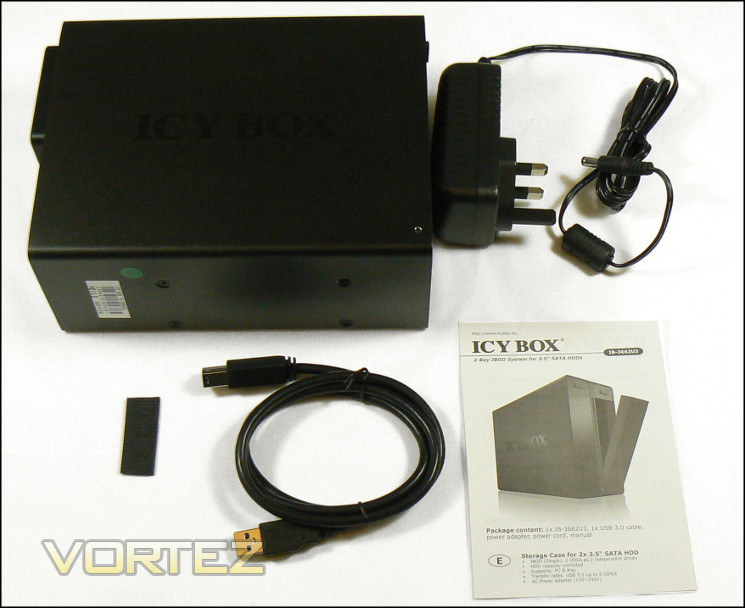
Like the IB-366StU3+B the IB-3662U3 is a true enclosure which surrounds the whole of the drive(s), providing some measure of protection and noise dampening. The enclosure chassis is a sturdy 2mm thick aluminium alloy with a hard-wearing textured finish that will tend to resist fingerprints. Unlike the IB-366StU3, the IB-3662U3 isn’t supported off the desk by a stand, nor by substantial noise dampening feet. Icy Box instead provide a strip of 2mm thick self-adhesive rubber pre-punched with four circular ‘feet’ so act as a noise and vibration dampening layer. You can arrange the feet along a side of the chassis in any way you require, or instead choose a different (3rd party) solution for noise and vibration isolation.
Fronting the enclosure are two plastic doors with individual eject buttons and indicator LEDs. When the button is pressed the door swings open from the bottom, revealing a tray and tongue mechanism which will aid loading the disk(s) considerably. At the other end of the tray is the SATA power and data connection, as well as a spring-loaded metal bar similar to that of the IB-366StU3’s and intended to aid in the extrication of drives from the enclosure. The lack of a large spring at the rear is noticeable, and may affect drive stability compared to the single-bay solution. Additionally the orientation of the SATA connectors is flipped 180 degrees, so once again checking is required lest you damage the components inside.
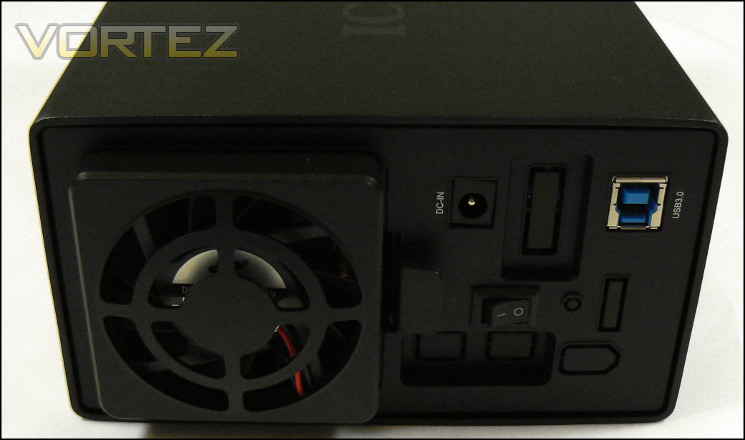
At the rear of the enclosure are the connectivity points for USB 3.0, 12V DC power and an on/off power switch. Note the USB 3.0 type B socket, backwards compatible with USB 2.0. ICY BOX once again supply a true USB 3.0 to USB 2.0 cable rather than utilising a cheaper alternative or requiring an additional purchase from the end-user. Interestingly, as with the single-bay solution there are spaces on the rear for a number of unused connector types, perhaps indicating that the backplate is reused from a NAS function device. At the top is a single 60mm fan; the two-bay enclosure was obviously deemed to warrant active cooling rather than the passive solution seen on the IB-366.
—
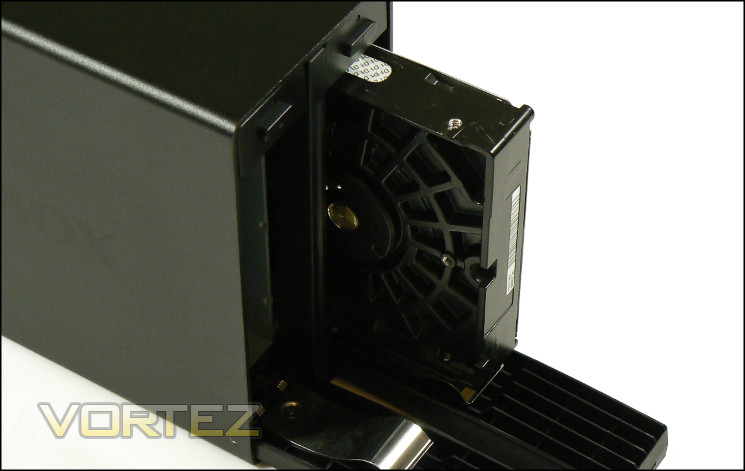
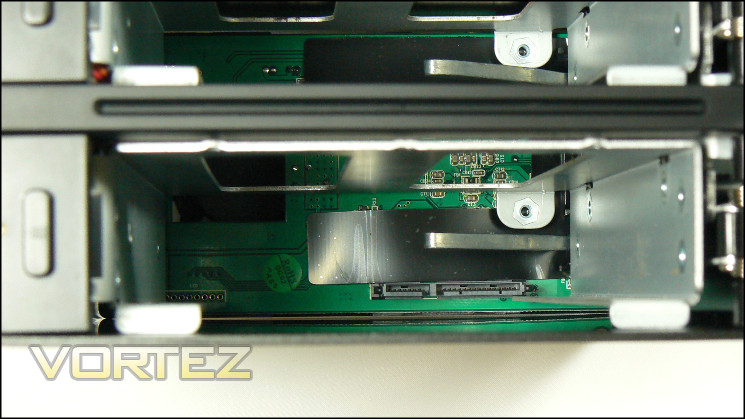
Inserting and extracting drives from the IB-3662U3 is simple and, as mentioned, toolless. Upon opening a door you’re presented with guide rails at the top and bottom which fit a standard 3.5″ form factor drive, although a fractional horizontal gap means that it’s not quite as stable as the 366StU3. Once the drive is 90% inside the enclosure you will feel some resistance from the metal bar at the rear, at which point can close the door firmly; we should note that you may want to rest a hand on the top of the enclosure when closing the door in order to hold it in place. The guide rails and spring-loaded mechanism inside ensures that everything remains relatively tight.
During operation we found that the stand did a fair job of reducing vibration from the drive, whilst the enclosure gripped the drive tight enough to eliminate the sound of the drive rattling against the guide rails. The dampening wasn’t quite enough to remove resonating effects fully – the particular drive we used interacts with the test station’s desk quite aggressively – perhaps down to the feet being relatively thin. It’s possible that if using the enclosure on a day-to-day basis you will want to investigate alternative options, such as a small rubber mouse-mat.
We were a little disappointed to note that the fan will run continuously, regardless of the number of drives in the enclosure, activity levels or temperature. Although it does provide a level of overheating protection to the HDDs the fan isn’t a touch smarter and offer more for long-term quality of life. Furthermore rather than a continuous hum it has a rhythmic swishing characteristic which is a little disruptive, but thankfully is pitched low enough such that it never becomes annoying.
The status LED is solid blue when powered on, purple when the HDD is in operation and red when any particular bay is empty. It provides a great indicator of activity and power state, and prevents you from accidentally removing an active drive. If the system sends the HDD to a power off/sleep mode the light will go out entirely, which we believe means that the drive is also safe to remove.
—
Overall the IB-3662 is a creditable drive for its intended use. In order to push the USB 3.0 connection to the limit you would need to be running an SSD or two, but it is nonetheless pleasing to note that you won’t be hampered by a USB 2.0 connection yet still have compatibility where necessary. Unfortunately the drive really needs to support a 2.5″ form factor for SSDs, and although converters to a 3.5″ form factor do exist they will add a considerable cost to the solution. If you’re looking for a USB 3.0 enclosure for two 2.5″ SSDs you’re better off looking elsewhere, but there will be few better solutions for mechanical 3.5″ drives short of a NAS or dual-eSATA product.
We should mention that it is relatively noisy compared to the IB-366, but that really should be expected given that it’s engineered to handle two mechanical HDDs whilst still not costing a fortune. By the same token external temperatures were excellent even after hours of quite heavy use with two drives, which was particularly satisfying given that previous enclosure have become extremely hot to the touch in similar circumstances.
With the above noted overall build quality was very good, and the toolless mechanism quite robust. We encountered the need to stabilise it with a second hand before inserting and removing the drive, but that’s really par for the course.
Whilst USB 3.0, throughput rates were not particularly impressive. This is primarily down to the USB 3.0 protocol and no support for UASP, although there are some third-party software innovations which will serve to improve large file read/writes. Once again an eSATA enclosure would perform well, but the IB-3662 is more than sufficient for a large data repository for video, music and archiving games.
Conclusion
That’s three high-quality enclosures down, and it became quite clear during our time with them that they each have a distinct niche to fill. As a consequence you wouldn’t say that any could have a cast-iron recommendation for any end-use or situation, but you may find any – or all – effective to meet the varied needs of a home or small business. They all however provide a massive improvement over older USB 2.0 enclosures, and are almost a must-have upgrade given the ballooning of file sizes for video and audio in recent years.
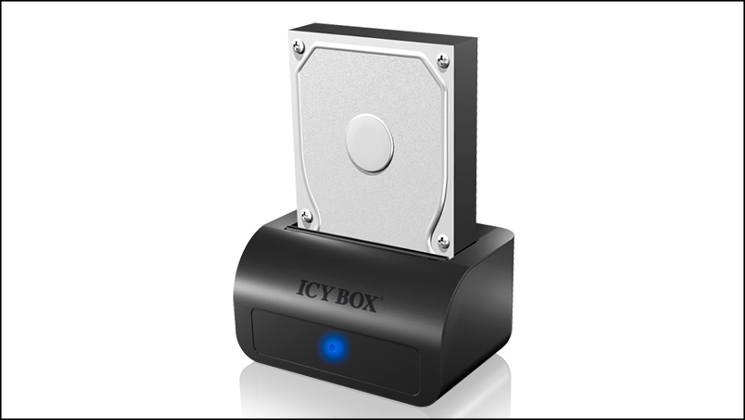
We found the IB-116StU3-B docking station to be exceptionally convenient. Mirroring essential patches, drivers, video files and Steam folders over multiple machines is one use almost daily use we could put it to, where installing within a computer chassis is time-consuming and an enclosure dedicated to the job is unsuitable. Copying exceptionally large video files, even on SSD, is fast and trouble-free. It isn’t a jack of all trades, but should be a very useful tool in an arsenal of someone who works in the industry or provides some level of IT support.
Where the docking station will be less suitable is for heavy workloads where read/write cycles to the HDD are required. Even with an SSD the USB protocols will include a heavy overhead versus SATA. Furthermore PC chassis are increasingly building native SATA docking stations into the case itself, sidestepping some of the downsides. These solutions don’t have the portability of the IB-116 though, and so fulfil only one side of the equation.
Pros
+ High speed USB 3.0
+ Can take advantage of SATAIII SSD speeds
+ Exceptionally durable and stable
Cons
+ No alternative connectivity options e.g. eSATA
+ Does not support UASP
+ High speed USB 3.0
+ Can take advantage of SATAIII SSD speeds
+ Exceptionally durable and stable
Cons
+ No alternative connectivity options e.g. eSATA
+ Does not support UASP
—
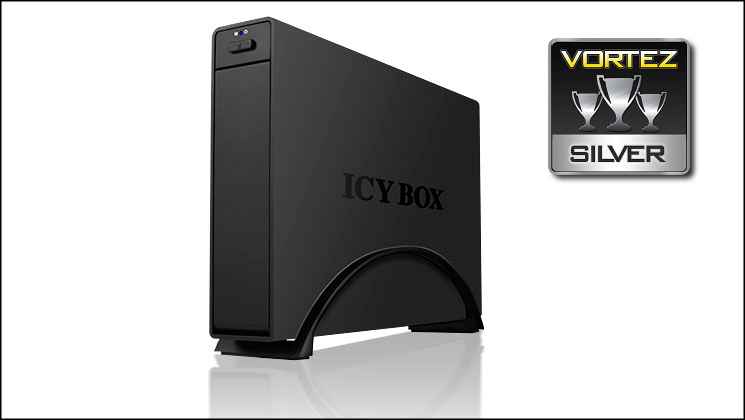
The single-bay IB-36StU3+B could have been unremarkable were it not for two key features: supporting SATAIII drives and UASP. Both work well to boost throughput, the latter also improving performance with more demanding workloads that can take advantage of the protocol. The disappointment is that the enclosure will not support 2.5″ SSDs natively, practically restricting the speeds of compatible drives without the use of a form factor converter. Despite this, even slower mechanical HDDs which support NCQ will benefit over standard USB protocols.
It’s clear therefore that the enclosure is designed for modern systems. Unfortunately there is a cruel twist: not all USB 3.0-enabled systems will support UASP, and discovering whether your hardware will be compatible is an exercise in frustration. If your system isn’t one of the lucky ones then the IB-36StU3+B may seem expensive, but otherwise it can be well worth its weight.
As a more standard enclosure the IB-366StU3+B is still very sturdy thanks to the aluminium chassis, and extremely easy to use. Noise dynamics will tend to depend on the HDD you’re using rather than the enclosure itself, but it did a acceptable job in isolating our test HDD from a desk with which it has resonated with previous enclosures. Due to this we’re happy with awarding the IB-36StU3+B a Silver award thanks to its usability and features, with the proviso that you will want to become familiar with your own system specs before assuming that you can take full advantage of it.
Pros
+ High speed USB 3.0
+ Can take advantage of SATAIII SSD speeds
+ Compatible with UASP
+ Aluminium chassis design
Cons
+ No alternative connectivity options e.g. eSATA
+ Limited to 3.5″ HDDs
+ High speed USB 3.0
+ Can take advantage of SATAIII SSD speeds
+ Compatible with UASP
+ Aluminium chassis design
Cons
+ No alternative connectivity options e.g. eSATA
+ Limited to 3.5″ HDDs
—
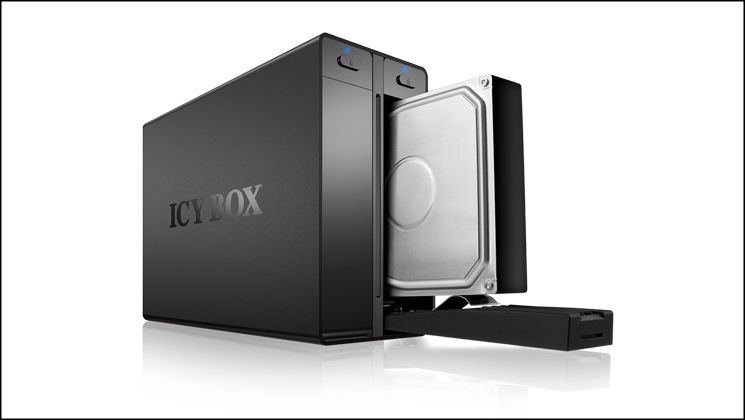
As with the single-bay variant, the Dual-bay IB-3662 is accomplished in being a sturdy device with solid functionality. For those who need the portable storage of two HDDs (up to 4TB per drive) the enclosure may seem ideal, but it should be stressed that this isn’t – and shouldn’t be approached as – an alternative to a NAS. Although not silent, the fan isn’t obtrusive in a work environment; those seeking true silence would need to utilise SSDs in any case, something which the IB-3662 isn’t well suited to.
The question is, is there a market for users who just need a dual-bay enclosure rather than a NAS. That’s a tough one to field, a NAS does after all offer far greater functionality at even an entry level. However the relative affordability of the IB-3662 cannot be underestimated, and so for those seeking to expand available semi-permanent storage with the added benefit of being portable it could be a justifiable boon. It should however be stressed that it doesn’t serve as a true and comprehensive back-up device except in a superficial sense.
Pros
+ High speed USB 3.0
+ Can take advantage of SATAIII SSD speeds
+ Exceptionally durable and stable
Cons
+ No alternative connectivity options e.g. eSATA
+ Does not support UASP
+ Limited to 3.5″ HDDs
+ High speed USB 3.0
+ Can take advantage of SATAIII SSD speeds
+ Exceptionally durable and stable
Cons
+ No alternative connectivity options e.g. eSATA
+ Does not support UASP
+ Limited to 3.5″ HDDs

Click here for an explanation of our awards at Vortez.net.


