







Optimised and overclocked, the Intel 730 Series SSD is about to be unleashed. Can it compete with the current high performance SSDs?

Product on Review: Intel 730 240GB SSD
Manufacturer : Intel
Street Price: £177.43
Intel is renowned for building some of the fastest components on the planet, especially when it comes to CPUs. Dominating the CPU market is however not enough for the American mega-corp. They have their fingers in a lot of pies and with a variety of divisions come a wealth of scientific research enabling them to continue to expand into other markets. The advent of solid state drives has meant the importance of precision engineering found in mechanical drives has now passed on to the microchip and so it is hardly a surprise that Intel are heavily involved in this market.
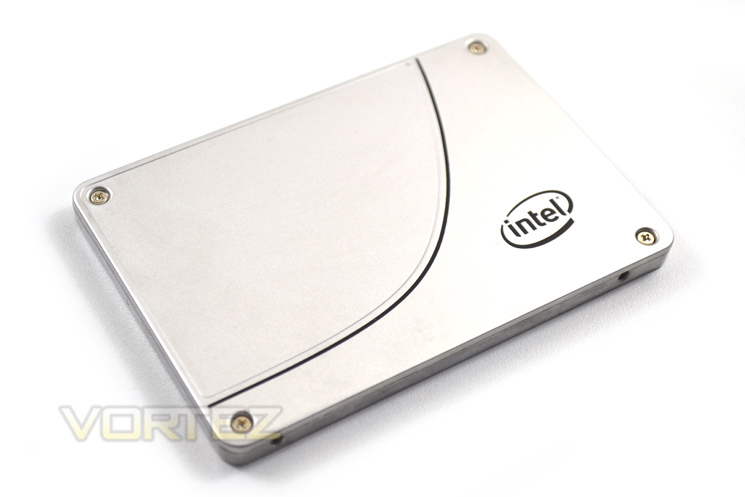
The Intel 520 we reviewed impressed us throughout and while it wasn’t perfect, it would certainly have been high on our shopping list. Today we see an evolution of that SSD with the new and hopefully improved Intel 730. This time around we are testing the smaller 240GB version but again Intel do offer this SSD in the larger 480GB capacity. There is a key difference other than the size of the storage between the two drives which we will discuss later in the review but it, rather than the capacity could very well be the deciding factor of which drive you choose to purchase.
Intel’s take on the 730 series
The Intel® Solid-State Drive 730 Series combines enthusiast-grade performance with the endurance and dependability that has traditionally been reserved for data center storage products. In other words, it’s the best of both worlds, and what that means to you is freedom from compromise.
Specification
Capacities:
240GB, 480GB
Components:
Intel® 20nm NAND Flash Memory, Multi-Level Cell (MLC)
Form Factors:
2.5 inch
Thickness:
7mm
Weight:
Up to 78 grams
SATA 6Gb/s Bandwidth Performance1 (Iometer* Queue Depth 32, 128KB3 IO)
Sustained Seq Read: Up to 550MB/s2
Sustained Seq Write: Up to 470MB/s2
SATA 6Gb/s Read and Write IOPS1 (Iometer Queue Depth 32)
Random 4KB4 Reads: Up to 89,000 IOPS
Random 4KB4 Writes: Up to 74,000 IOPS
Latency (average sequential)
Read: 50 μs (TYP)
Write: 60 μs (TYP)
Power Management
2.5 inch: 5V or 12V SATA Supply Rail4
Power (5V / 12V)5
Active: 5.0W / 5.5W
Idle: 1.3W / 1.5W
Temperature
Operating: 0° C to 70° C
Non-Operating: -55° C to 95° C
Compatibility
Intel® SSD Toolbox with Intel® SSD Optimizer
Intel® Data Migration Software
Intel® Rapid Storage Technology
SATA Revision 3.0
ACS-2 (ATA/ATAPI Command Set 2)
SSD Enhanced SMART ATA feature set
Reliability
Uncorrectable Bit Error Rate (UBER):
< 1 sector/ 1017 bits reads
Mean Time Between Failure (MTBF):
2 Million Hours
Shock (operating and non-operating):
1,000 G/0.5 msec
Endurance
50GB of writes a day
Vibration
Operating: 2.17 GRMS (5-700 Hz)
Non-operating: 3.13 GRMS (5-800 Hz)
Certifications and Declarations:
UL*, CE*, C-Tick*, BSMI*, KCC*, Microsoft* WHCK, VCCI*, SATA-IO*
Product Ecological Compliance
RoHS
240GB, 480GB
Components:
Intel® 20nm NAND Flash Memory, Multi-Level Cell (MLC)
Form Factors:
2.5 inch
Thickness:
7mm
Weight:
Up to 78 grams
SATA 6Gb/s Bandwidth Performance1 (Iometer* Queue Depth 32, 128KB3 IO)
Sustained Seq Read: Up to 550MB/s2
Sustained Seq Write: Up to 470MB/s2
SATA 6Gb/s Read and Write IOPS1 (Iometer Queue Depth 32)
Random 4KB4 Reads: Up to 89,000 IOPS
Random 4KB4 Writes: Up to 74,000 IOPS
Latency (average sequential)
Read: 50 μs (TYP)
Write: 60 μs (TYP)
Power Management
2.5 inch: 5V or 12V SATA Supply Rail4
Power (5V / 12V)5
Active: 5.0W / 5.5W
Idle: 1.3W / 1.5W
Temperature
Operating: 0° C to 70° C
Non-Operating: -55° C to 95° C
Compatibility
Intel® SSD Toolbox with Intel® SSD Optimizer
Intel® Data Migration Software
Intel® Rapid Storage Technology
SATA Revision 3.0
ACS-2 (ATA/ATAPI Command Set 2)
SSD Enhanced SMART ATA feature set
Reliability
Uncorrectable Bit Error Rate (UBER):
< 1 sector/ 1017 bits reads
Mean Time Between Failure (MTBF):
2 Million Hours
Shock (operating and non-operating):
1,000 G/0.5 msec
Endurance
50GB of writes a day
Vibration
Operating: 2.17 GRMS (5-700 Hz)
Non-operating: 3.13 GRMS (5-800 Hz)
Certifications and Declarations:
UL*, CE*, C-Tick*, BSMI*, KCC*, Microsoft* WHCK, VCCI*, SATA-IO*
Product Ecological Compliance
RoHS
Closer Look
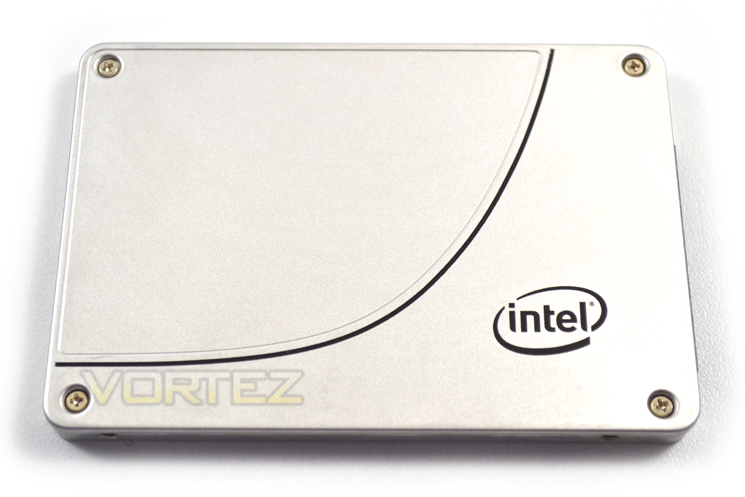
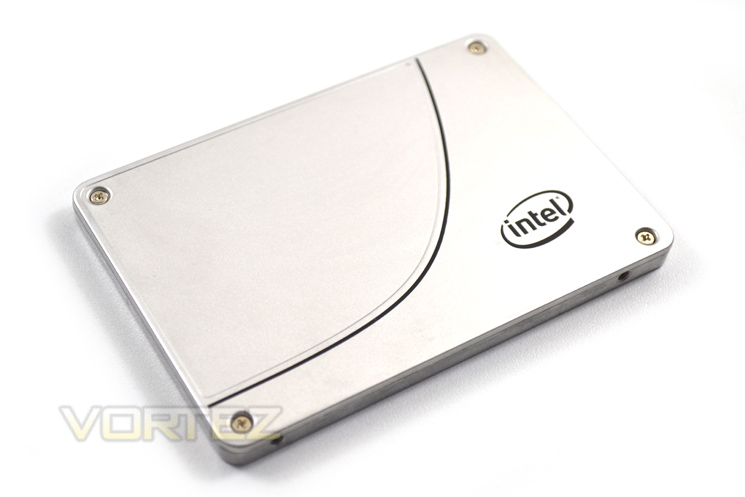
The exterior of the drive is very robust. A full metal cover feels a little on the heavy side but also like it is built to last. The top of the SSD has a metallic effect paint job and while our sample is a very early offering, we expect retail editions to feature a picture of Intel’s ‘Skulltrail’ emblem signifying that this drive is of the highest calibre.
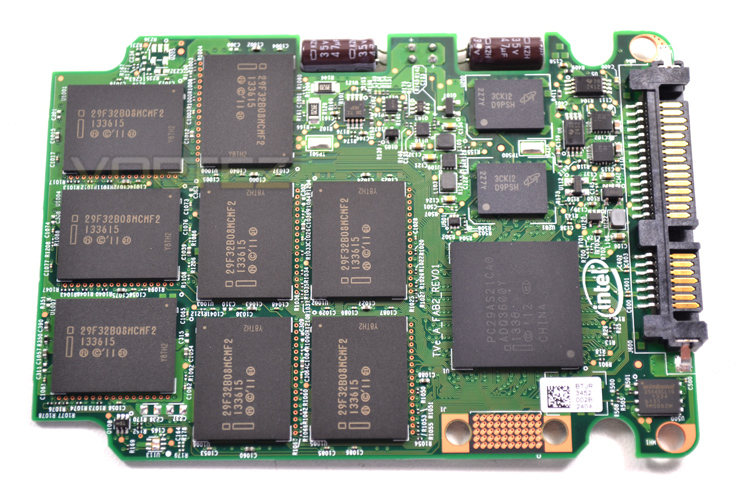
Breaking open the SSD the first thing that catches our eye are the twin capacitors meaning should your PC shutdown unexpectedly during mid write, there will be enough power left to finish writing small files so you date will not be lost.
This SSD is effectively a serve grade component, the Datacenter S3500 drive. To make the drive fast enough for us enthusiasts, Intel have increased the clockspeed of both the NAND and the controller.
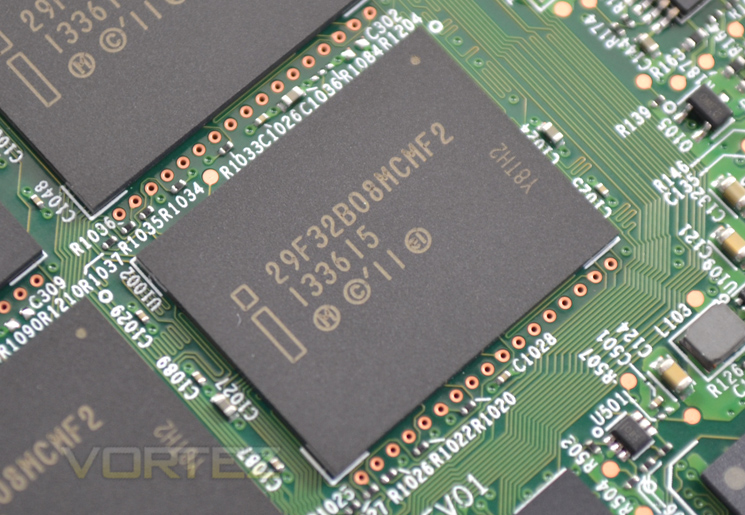
The 10 x 20nm MLC NAND chips run at 100MHz which is a 17% increase over the same chips found on the S3500, a humble but welcome increase.
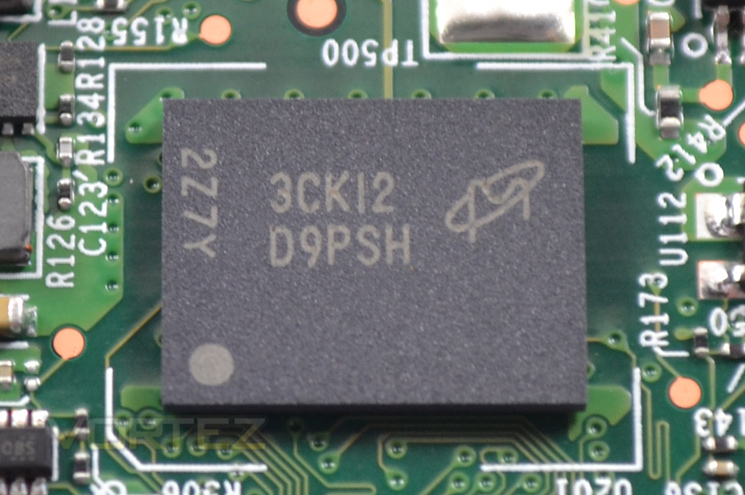
The SSD also comes with 2x512MB (1GB) 1600MHz DRAM cache courtesy of Micron.
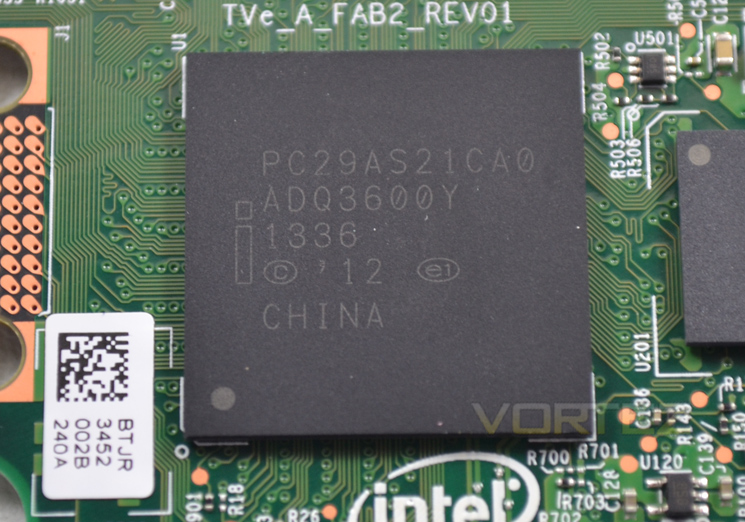
Perhaps the most significant feature of the drive is the controller which has seen a large increase in clockspeed from 400MHz to 600MHz. To reach this clockspeed we suspect that Intel have employed a speed binning process, reserving on the very best ‘Tisdale’ silicon for their Intel 730 drives.
Test Setup & Methodology
Our test system is formatted and a fresh version of Windows is installed with just drives in place – no additional applications. Windows is then updated to the latest release and the drivers are installed. Included in the list of benchmarks are the following applications:Benchmarks
ATTO Disk Benchmark v2.46
AS SSD
CrystalDiskMark 3.0
Iometer
SiSoftware SANDRA 2012
HDTune Pro 5.5
AS SSD
CrystalDiskMark 3.0
Iometer
SiSoftware SANDRA 2012
HDTune Pro 5.5
Test system
CPU Intel Core-i7 4770K
Motherboard GIGABYTE Z87X-OC
Graphics MSI R7970 Black Edition
Memory 16GB Corsair Vengeance Pro (2400MHz) CL10
HDD
– Intel 730 240GB (Sata 6Gbps)
– OCZ Vector 150 240GB (Sata 6Gbps)
– Samsung 840 EVO mSATA 500GB (Sata 6Gbps)
– Samsung 840 EVO mSATA 250GB (Sata 6Gbps)
– Kingston HyperX 3K Na’Vi 240GB (Sata 6Gbps)
– OCZ Vertex 450 256GB (Sata 6Gbps)
– Samsung 840 EVO 750GB (Sata 6Gbps)
– Samsung 840 Pro 256GB (Sata 6Gbps)
– Samsung 840 256GB (Sata 6Gbps)
– Toshiba 256GB THNSNH256GCST (Sata 6Gbps)
– OCZ Vector 256GB (Sata 6Gbps)
– Corsair Neutron GTX 240GB (Sata 6Gbps)
– Corsair Force GS 240GB (Sata 6Gbps)
– OCZ Vertex 4 128GB (Sata 6Gbps)
– Kingston HyperX 3K 120GB (Sata 6Gbps)
– Kingston HyperX 240GB (Sata 6Gbps)
– ADATA S510 120GB (Sata 6Gbps)
– Intel 520 480GB (Sata 6Gbps)
– Samsung 830 Series 256GB (Sata 6Gbps)
– Samsung HD103SJ 1TB (Sata 3Gbps)
PSU Corsair HX1050 Gold
OS Microsoft Windows 7 Professional 64-Bit
Motherboard GIGABYTE Z87X-OC
Graphics MSI R7970 Black Edition
Memory 16GB Corsair Vengeance Pro (2400MHz) CL10
HDD
– Intel 730 240GB (Sata 6Gbps)
– OCZ Vector 150 240GB (Sata 6Gbps)
– Samsung 840 EVO mSATA 500GB (Sata 6Gbps)
– Samsung 840 EVO mSATA 250GB (Sata 6Gbps)
– Kingston HyperX 3K Na’Vi 240GB (Sata 6Gbps)
– OCZ Vertex 450 256GB (Sata 6Gbps)
– Samsung 840 EVO 750GB (Sata 6Gbps)
– Samsung 840 Pro 256GB (Sata 6Gbps)
– Samsung 840 256GB (Sata 6Gbps)
– Toshiba 256GB THNSNH256GCST (Sata 6Gbps)
– OCZ Vector 256GB (Sata 6Gbps)
– Corsair Neutron GTX 240GB (Sata 6Gbps)
– Corsair Force GS 240GB (Sata 6Gbps)
– OCZ Vertex 4 128GB (Sata 6Gbps)
– Kingston HyperX 3K 120GB (Sata 6Gbps)
– Kingston HyperX 240GB (Sata 6Gbps)
– ADATA S510 120GB (Sata 6Gbps)
– Intel 520 480GB (Sata 6Gbps)
– Samsung 830 Series 256GB (Sata 6Gbps)
– Samsung HD103SJ 1TB (Sata 3Gbps)
PSU Corsair HX1050 Gold
OS Microsoft Windows 7 Professional 64-Bit
Benchmarks: ATTO
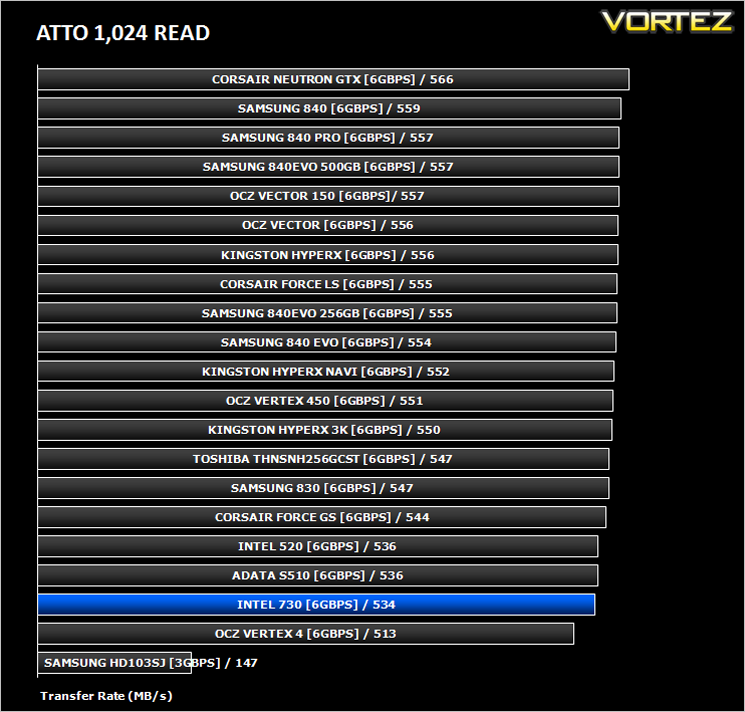
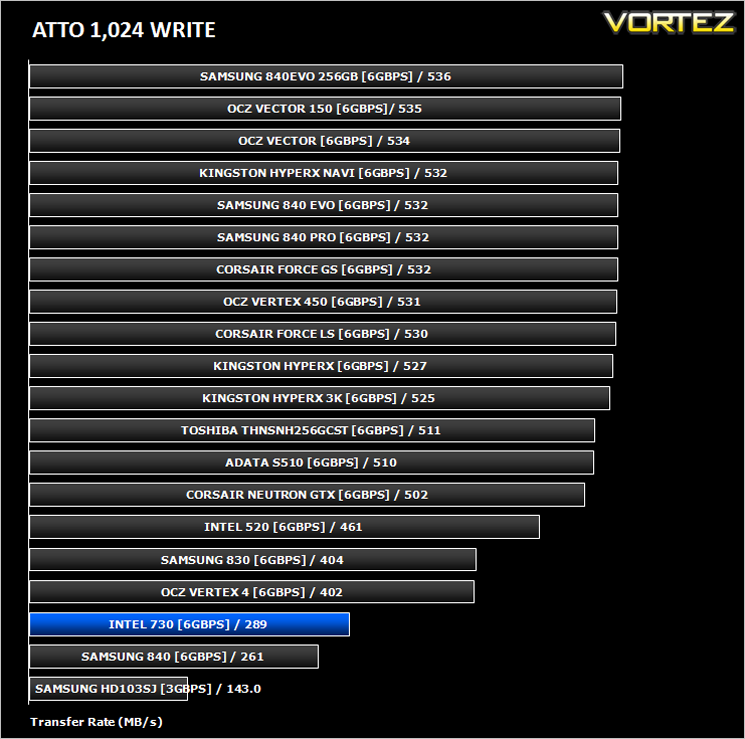
The ATTO Disk Benchmark performance measurement tool is compatible with Microsoft Windows. Measure your storage systems performance with various transfer sizes and test lengths for reads and writes. Several options are available to customize your performance measurement including queue depth, overlapped I/O and even a comparison mode with the option to run continuously. Use ATTO Disk Benchmark to test any manufacturers RAID controllers, storage controllers, host adapters, hard drives and SSD drives and notice that ATTO products will consistently provide the highest level of performance to your storage.
Benchmarks: AS SSD
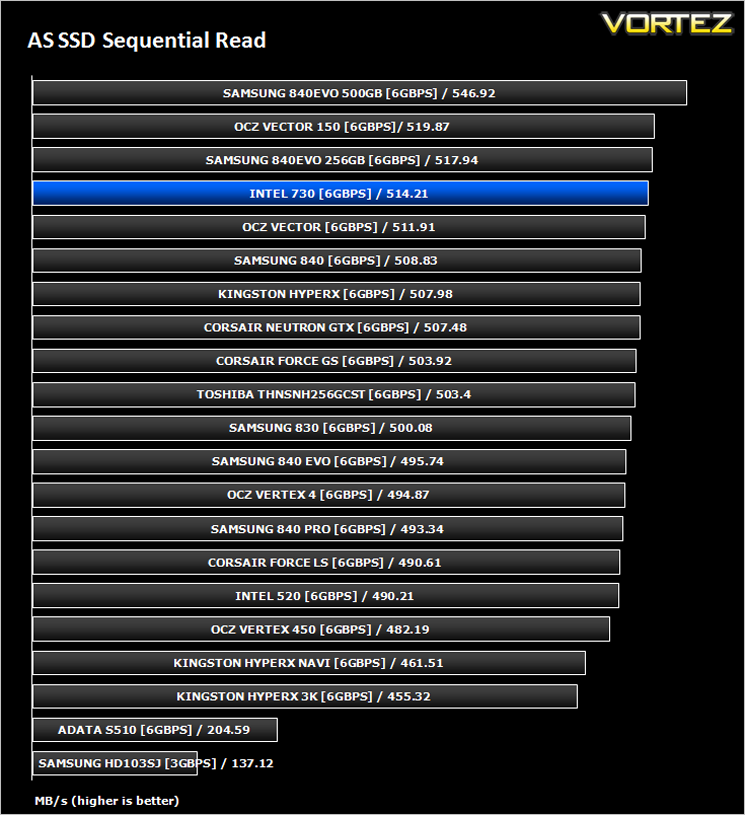
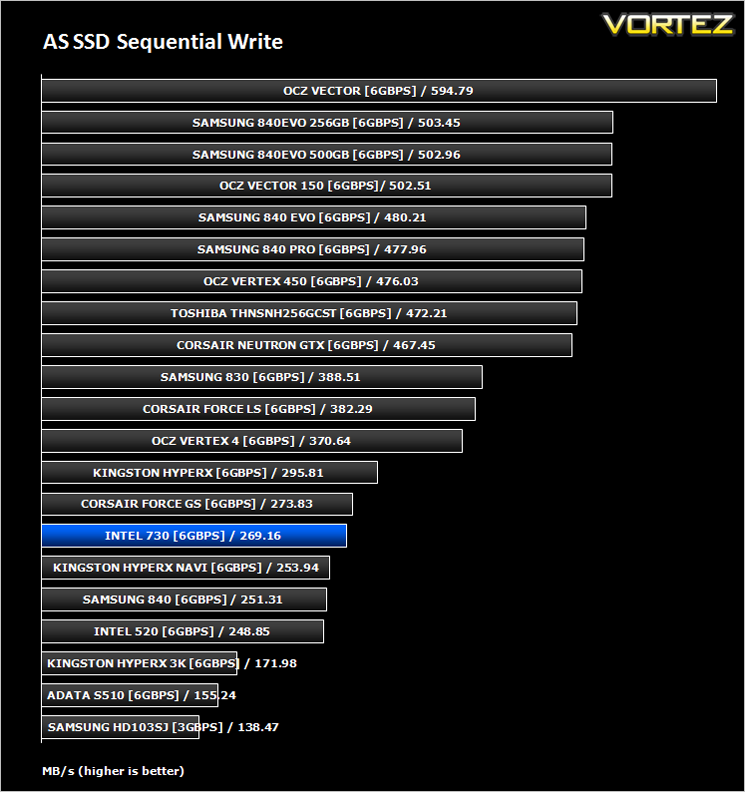
AS SSD Benchmark is a straightforward tool for measuring the speed of your SSD drive.
Simply launch the program, choose your drive, click Start, and it’ll test your SSD’s read and write speed in a variety of ways, delivering a score for each when it’s done. And if that’s not enough, there are also additional file copy and compression-related benchmarks available from the Tools menu. (The author’s support page is German only, but if you need further English explanations then there’s a thread on the program at the OCZ Technology forum.).
Simply launch the program, choose your drive, click Start, and it’ll test your SSD’s read and write speed in a variety of ways, delivering a score for each when it’s done. And if that’s not enough, there are also additional file copy and compression-related benchmarks available from the Tools menu. (The author’s support page is German only, but if you need further English explanations then there’s a thread on the program at the OCZ Technology forum.).
Benchmarks: CrystalDiskMark 3.0
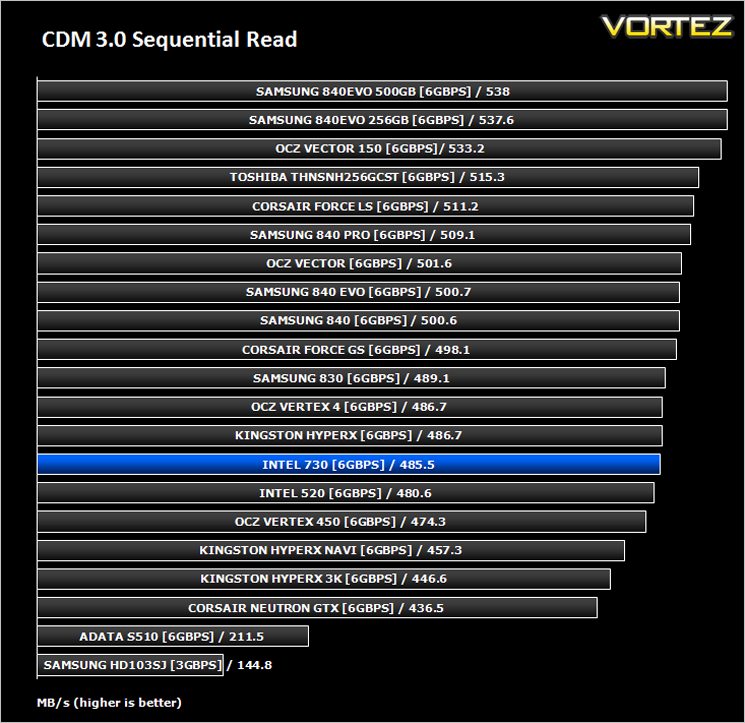
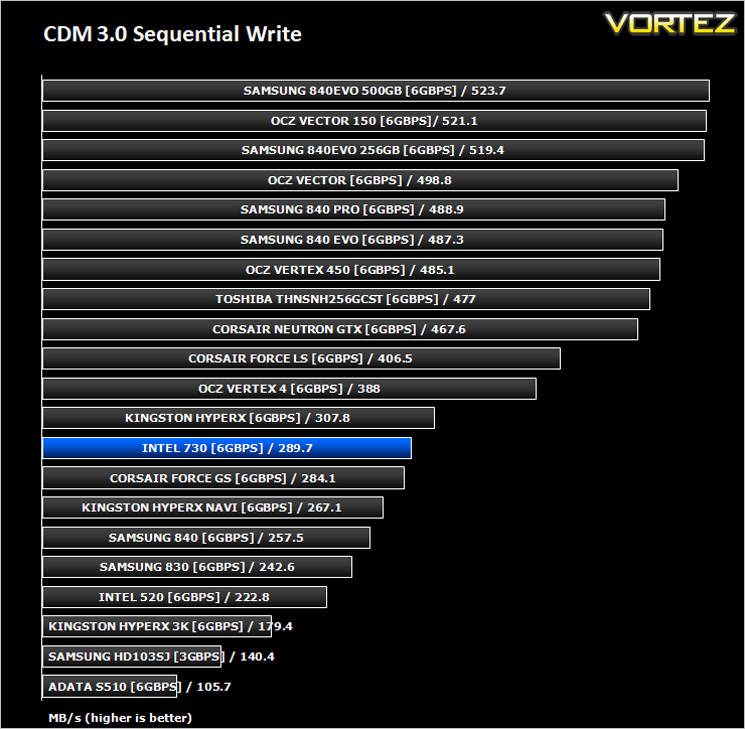
CrystalDiskMark is a disk benchmark software that analyses different types of hard drive. Giving sequential benchmark write and read statistics in MB/s. A simple program that is very useful.
Benchmarks: Iometer
Iometer is based on a client–server model, where one instance of the Iometer graphical user interface is managing multiple ‘workers’ (each one representing a separate Dynamo.exe process) which are doing the I/O. Iometer performs Asynchronous I/O – accessing files or block devices (later one allowing to bypass the file system buffers).
Iometer allows the configuration of disk parameters such as the ‘Maximum Disk Size’, ‘Starting Disk Sector’ and ‘# of Outstanding I/Os’. This allows a user to configure a test file upon which the ‘Access Specifications’ configure the I/O types to the file.
Iometer allows the configuration of disk parameters such as the ‘Maximum Disk Size’, ‘Starting Disk Sector’ and ‘# of Outstanding I/Os’. This allows a user to configure a test file upon which the ‘Access Specifications’ configure the I/O types to the file.
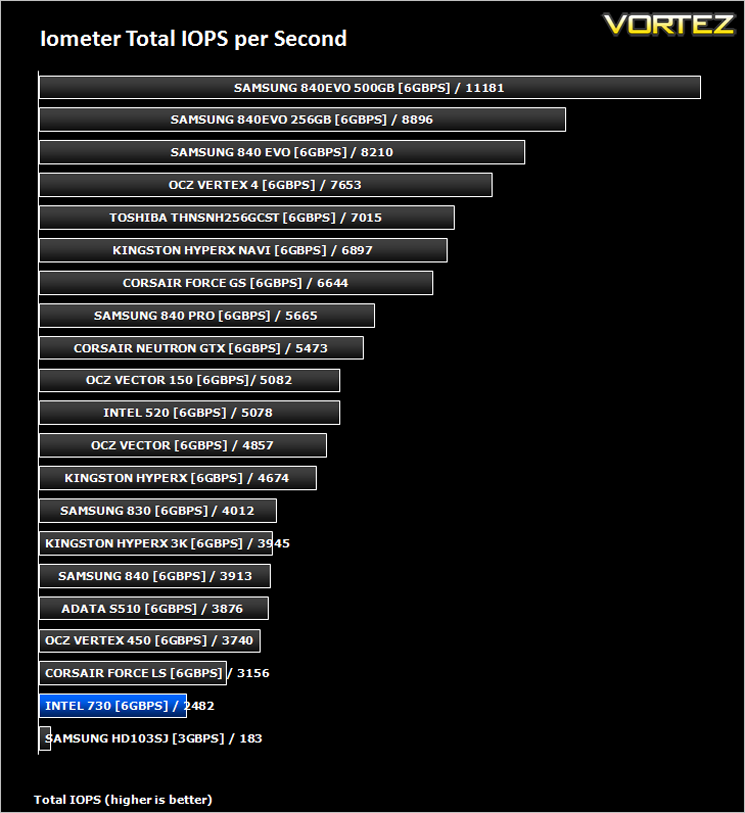
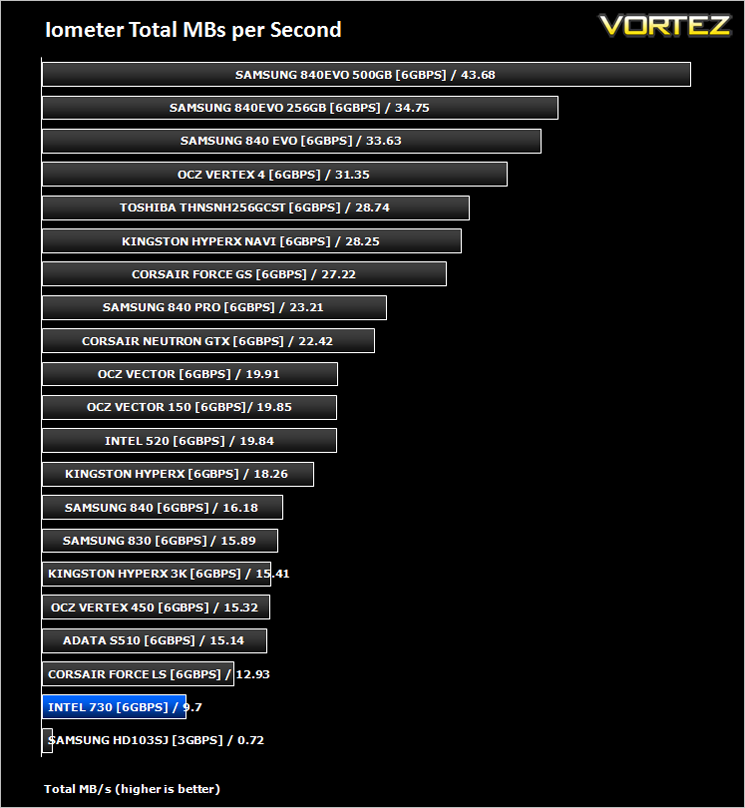
For the purpose of this test. The 4K 50%/50% read/write file will be under the examination with 100% Random Distribution – reporting back on IOPS and MBs per Second.
Benchmarks: SiSoftware SANDRA
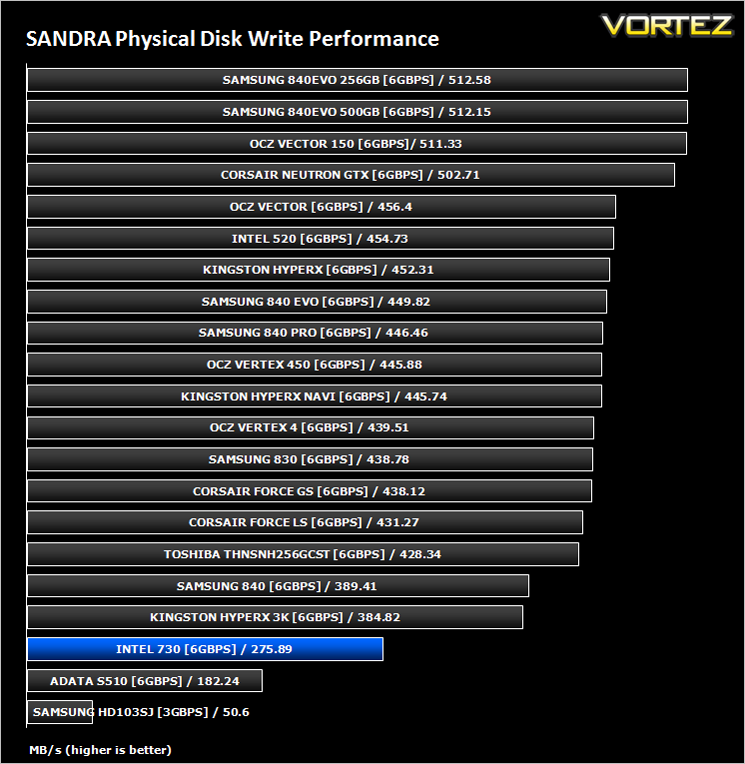
SiSoftware Sandra (the System ANalyser, Diagnostic and Reporting Assistant) is an information & diagnostic utility. It should provide most of the information (including undocumented) you need to know about your hardware, software and other devices whether hardware or software.
Sandra is a (girl) name of Greek origin that means “defender”, “helper of mankind”. We think that’s quite fitting.
It works along the lines of other Windows utilities, however it tries to go beyond them and show you more of what’s really going on. Giving the user the ability to draw comparisons at both a high and low-level. You can get information about the CPU, chipset, video adapter, ports, printers, sound card, memory, network, Windows internals, AGP, PCI, PCI-X, PCIe (PCI Express), database, USB, USB2, 1394/Firewire, etc.
Sandra is a (girl) name of Greek origin that means “defender”, “helper of mankind”. We think that’s quite fitting.
It works along the lines of other Windows utilities, however it tries to go beyond them and show you more of what’s really going on. Giving the user the ability to draw comparisons at both a high and low-level. You can get information about the CPU, chipset, video adapter, ports, printers, sound card, memory, network, Windows internals, AGP, PCI, PCI-X, PCIe (PCI Express), database, USB, USB2, 1394/Firewire, etc.
Benchmarks: HDTune Pro
A new utility we have added to our line-up of benchmarks is the ever popular HDTune Pro. HD Tune Pro is a hard disk / SSD utility with many functions. It can be used to measure the drive’s performance, scan for errors, check the health status (S.M.A.R.T.), securely erase all data and much more.
Conclusion
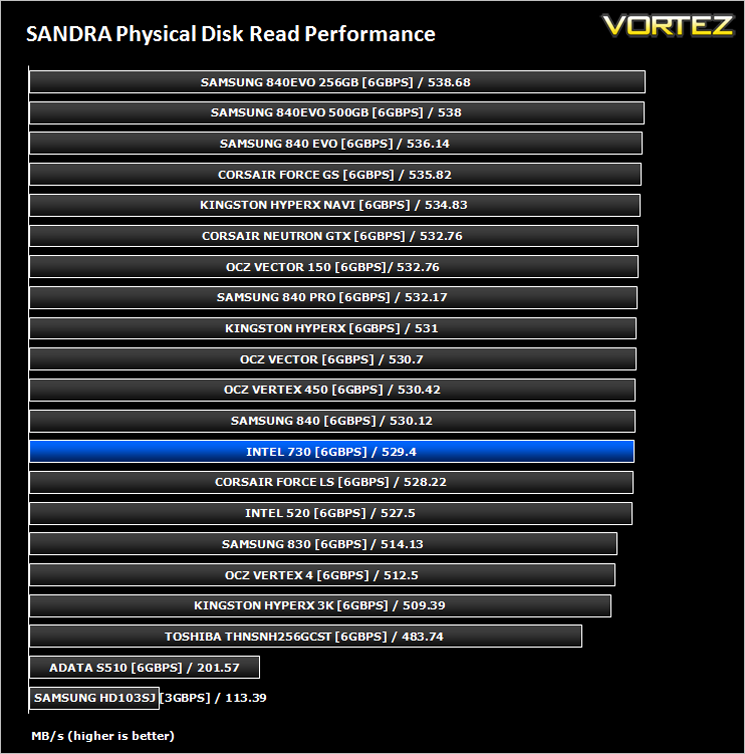
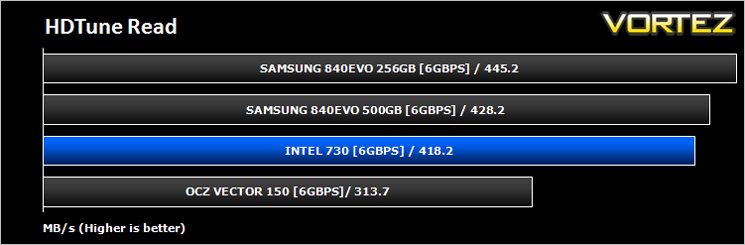
There are two sides to a coin as we all know and the same can be said of the Intel 730 SSD, at least the 240GB version. Read speeds were comparable to the leading SSDs currently available. Add to this the sleek metal design and the class leading 50GB of writes per day that are warranted for five years and you would be forgiven for assuming the Intel 730 is an amazing piece of hardware that is deserving of the highest accolade. Sadly, this is not the case.
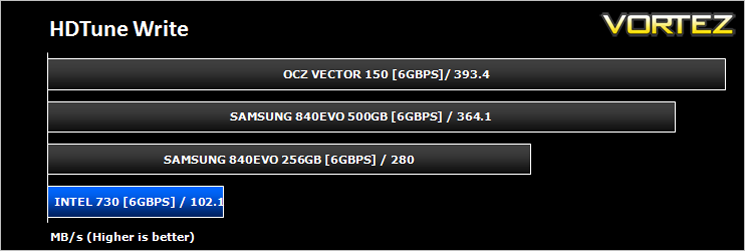
While read speeds and IOPs are perhaps the most important considerations to make when buying an SSD, write speeds should also be considered. For the 480GB version of the Intel 730 SSD this is not an issue however for our sample, the 240GB, it clearly is as our benchmarks have shown. At an average of 270MB/s write speed it is little over half as fast as the best drives available. If you are upgrading from a mechanical drive, this will still appear to be seriously fast however, if you are used to a drive that can write at 500MB/s then you are equally likely to notice a drop in performance.
The drive is priced a little over the average at around the £175 mark and if long term durability (50GB of writes per day for the 240GB model over 5 years) does not rank high on your list there are faster drives on the market which cost less. We could of course recommend the 480GB model and for a single drive this certainly hits the mark if the specifications are to be believed but for just £10 more you could buy 2 of the smaller 240GB drives, run them in Raid 0 and enjoy even better performance.
We appreciate Intel’s foresight into making a drive which has the durability of an enterprise solution with the speed of an enthusiast component but the 240GB model we have reviewed today doesn’t break any boundaries in either department. Its is neither scorchingly fast nor offers more than more recent enthusiast drives in terms of durability. We recently reviewed the OCZ Vector 150 which matches Intel’s durability specification and has faster write speeds while doing so which makes it hard to recommend the Intel 730 240GB model over that SSD if durability is a major factor in your purchase. What the Intel has that the OCZ does not are capacitors preventing data loss which is sure to give peace of mind and a feature we would like to see used as standard in other drives.
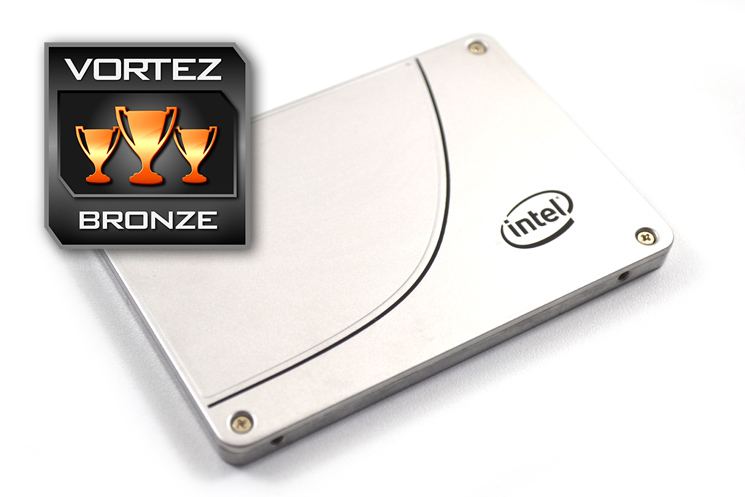
To conclude then, the Intel 730 can hold its own against the current crop of SSDs where read speeds are concerned. It’s also a class leader with regard to warranted writes which at 50GB per day matches the most recent enthusiast grade Vector 150 and should you opt for the 480GB version, is 20GB more than the closest competitor. Where this 240GB drive falls down (and falls down heavily) is its write speed. Were it not for the poor write speed performance of the 240GB model we would highly recommend taking a look at this drive but with such poor write performance, on its own we feel there are better, higher performing drives on the market that also cost less. For us, if you desire an Intel SSD, the 480GB 730 would be the one to consider.
The Intel 730 is a fast SSD with a huge 50GB of writes warranted per day however, if write speeds are important to you (and the bonus of 20GB of additional writes per day durability), we would advise you to go for the 480GB version.
Pros
+ A large 50GB of writes per day warranted
+ High read Performance
+ Full metal shroud
Cons
– Poor write speed
+ A large 50GB of writes per day warranted
+ High read Performance
+ Full metal shroud
Cons
– Poor write speed

Click here for an explanation of our awards at Vortez.net.


