Heard of NVMe? No? You should do as it is the new standard that is setting the PCIe SSD world alight with blistering speed. Read on as we test the new king of SSD performance: The Intel 750 Series PCIe SSD.

Product on Review: Intel 750 Series PCIe SSD
Manufacturer: Intel
Street Price: £862.15 GBP / $1099 USD
First off we had IDE, then came SATA, then PCIe, then M2 over PCIe and now we have NVMe. We reviewed a few PCIe SSDs including the OCZ RevoDrive and more recently, the Plextor M6e which have all impressed with the amount of performance on offer so what gives with NVMe? While NVMe still utilises PCIe 3.0 it does so with much less overheads. What does this mean for you? Well compared to your average SSD over SATA interface using AHCI, the Intel 750 gives us between 4 and 8x the performance! The NVMe (Non-volatile memory express) protocol is a break from the usual AHCI protocol used for SSDs including PCIe SSDs but where NVMe differs is that is is much more efficient than AHCI. Perhaps the major advantage of NVMe over AHCI is its ability to exploit parallelism in host hardware and software, namely PCIe and multi-core CPUs. For the technically inquisitive we’ll go into greater detail regarding NVMe on the next page.
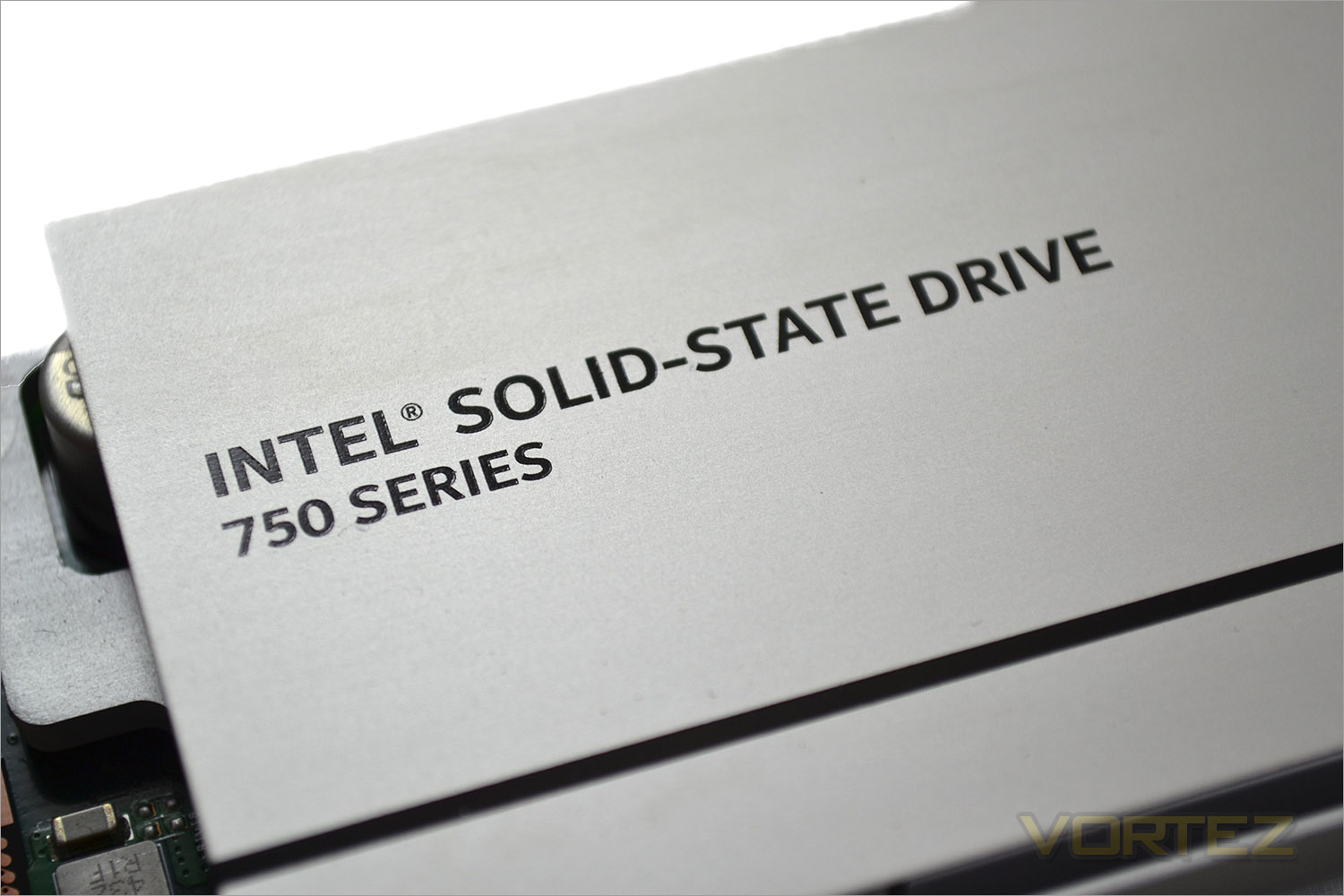
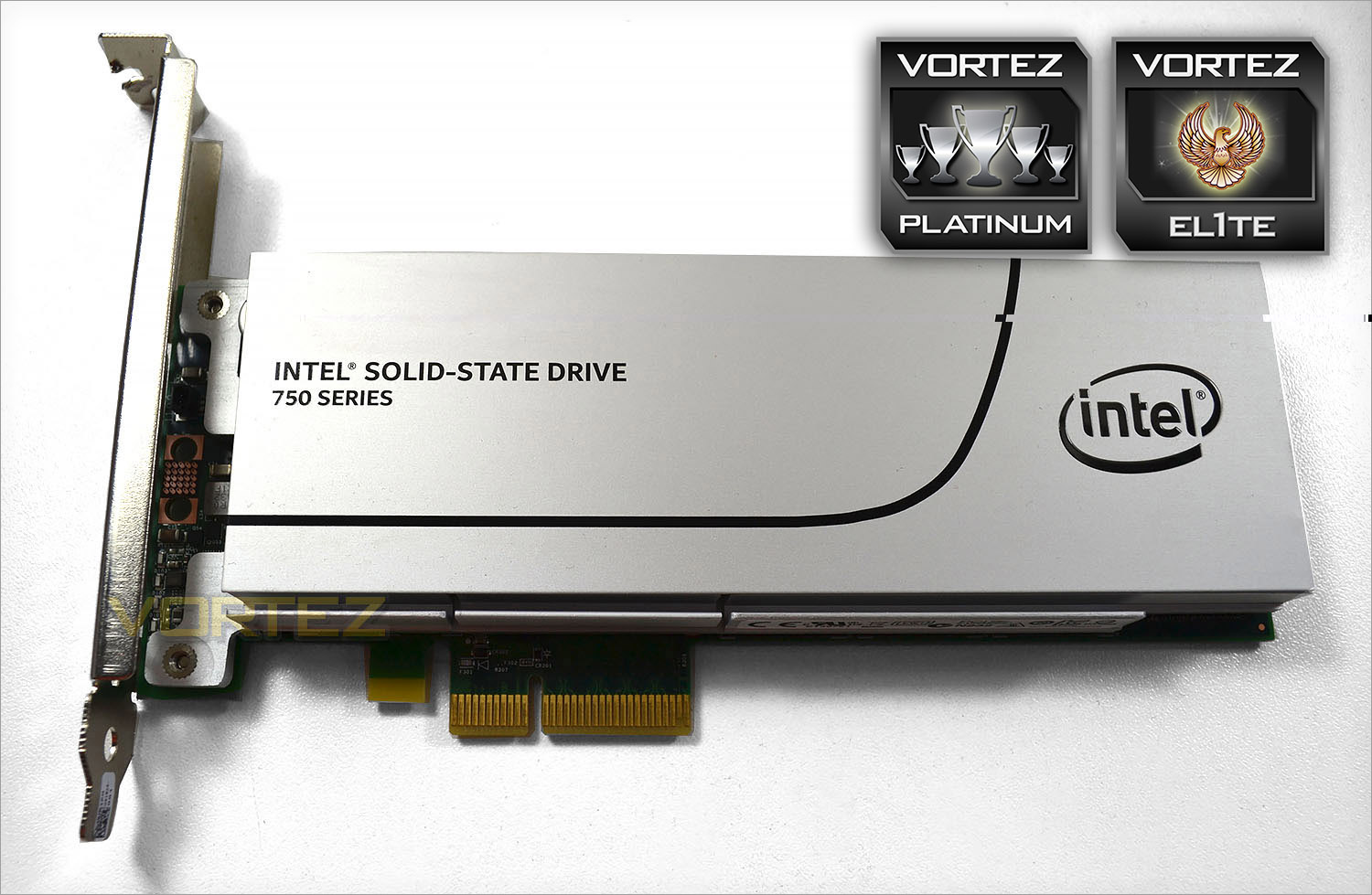
Don’t be fooled into thinking the new Intel 750 PCIe solid state drive is a brand new drive. It is not. It’s essentially a tweaked version of the P3700 Enterprise card but his time for consumers. The device currently comes in two sizes: 400GB & 1.2TB. Sadly, there is no middle ground such as an 800GB model which we found a little odd considering this would likely be the most popular size but regardless, priced at £307 for the 400GB and £862 for the 1TB drive only the most affluent performance junkies will be stumping up the cash required for these drives. That said a 800GB model for around £500 would, we think, be the sweet spot for most and still within an affordable range while offering enough capacity to satisfy.
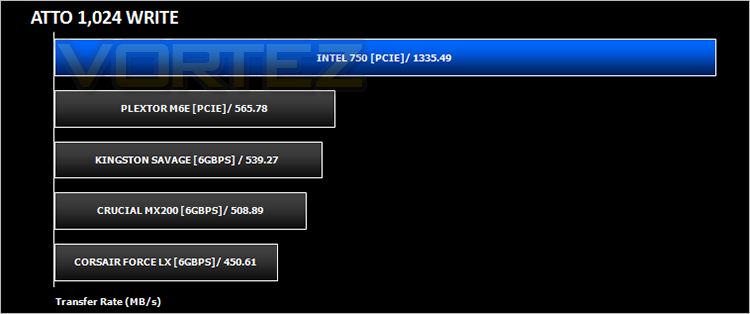
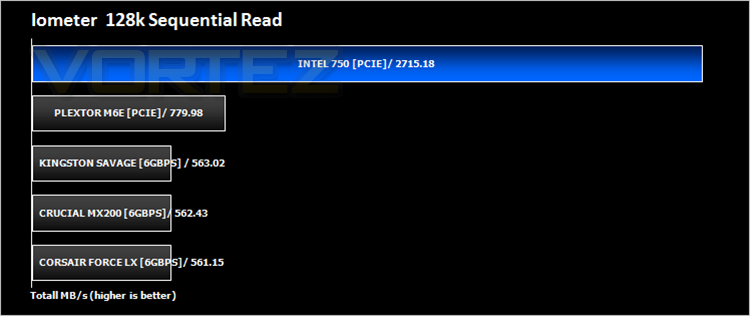
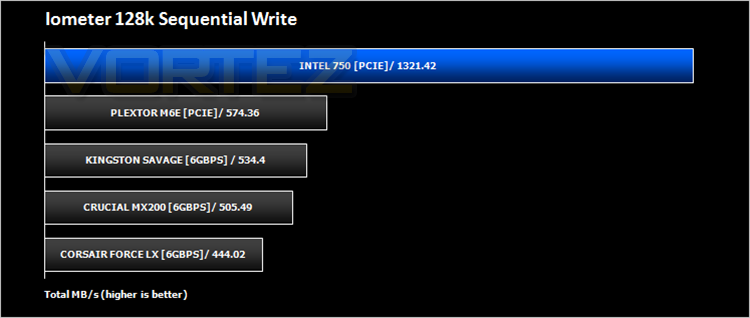
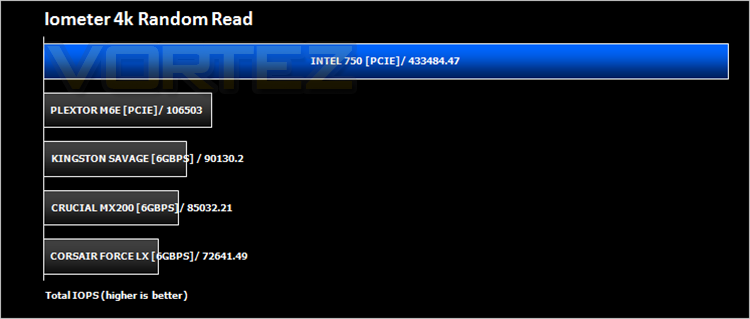
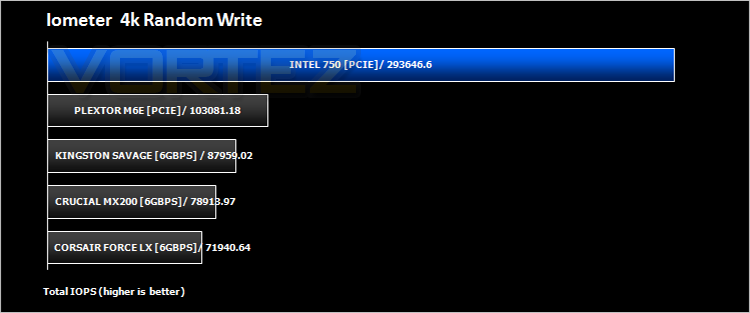
Performance wise, the 750 boasts up to 2400 MB/s read speeds and 1200 MB/s write. None too shabby I’m sure you will agree! IOPs performance of up to 440K and random write IOPS of up to 290K for 4KB operations are attainable too which makes this one of, if not the highest performing SSD currently on the market today. We’ll be comparing the against the M6e along with a number of ‘standard’ SSDs to fully evaluate the performance of what on paper at least, appears to be an exceptionally fast storage device.
Here’s what Intel had to say on their latest SSD:
Non Volatile Memory Express (NVMe)
Regular visitors to Vortez in the past will have had a hard time discerning which SSD is best bast on read speed because for all intents and purposes there wasn’t a massive amount between them, certainly not in any ‘real world’ scenario. Sure a few MB/s here and there can differentiate them but it’s not as though say 20MB/s is going to make a massive amount of difference unless you are a benchmark junkie. The thing is, serial ATA’s 6GB/s limitation means that most drives will score on average around the 500MB/s mark, meaning one drive perform close to the next unless RAID 0 or SCSI is implemented. The problem is that SSDs as we know them have always been ‘crippled’ by legacy protocols which have been based on old architecture. Upon SSDs being released this was never an issue due to the fact they were so much faster than their mechanical brethren but as time has passed, even the cheapest drives are now showing tremendous speed whereas the flagship models no longer hold the advantage they once did. Not because the drives are physically the same but because of the protocols/architecture in use so much so that many manufacturers began to concentrate more on durability and sustained speed rather than out right performance figures.
Enter PCIe. Primarily used for high bandwidth items such as graphics cards, PCIe and the massive amount of bandwidth afforded has slowly been utilised such as with the OCZ Revodrive and Plextor’s M6e we reviewed recently. While performance was enhanced and actually looked very impressive when compared to the SATA devices due to the enhanced bandwidth available, they were essentially still restricted in some form because of the SATA protocol.
Non Volatile Memory Express (NVMe) work differently than SATA. For starters it can take advantage of parallelism through PCIe. With most devices expected to use the PCIe x4 socket this means that four lanes are available for use which also dictates that multiple CPU cores can also be used and thus multiple applications. Queue depth is massively increased as a result. For example, SATA (AHCI) is limited to 1 command queue with 32 commands per queue. In comparison NVMe can have up to 65536 queues each with 65536 commands per queue! This is one of the rare occasions that a queue (or rather 65536 queues)is not a bad thing!
If you prefer the standard SSD sizing rather than a card format don’t worry because NVMe will also take on the format of a 2.5″ drive but instead of using a SATA connection, the four-lane PCI Express interface through an SFF-8639 connector. Also, if you are worried about drivers, don’t be. While it is true that you would need a compatible driver for anything Windows 7 or older, Windows 8.1 has NVMe drivers included as standard. The main issue as we see it with the uptake of these drives is the BIOS of motherboards. Some manufacturers are very slow in updating their products which will mean that until there is an updated BIOS for your NVMe drive, you will not be able to boot an OS from it. Thankfully we are starting to see compatible BIOS’ appear but it is worth checking beforehand if using the NVMe drive as a boot device is your intended purpose. If you do not have a compatible BIOS, the NVMe drive can still be used as a normal DATA drive. This is not going to be a ‘here today-gone tomorrow’ fad that’s for sure. Expect this to rapidly become the norm. Apple Retina products already support NVMe as standard and we expect Windows based devices, if not already, to follow suit.
Specification
-400GB, 1.2TB
PCIe* Gen3 x4
Form Factor
-2.5-inch Form Factor
-15mm Z-height
-8639-compatible connector
-Add-in Card (AIC) Form Factor
-Half-height, Half-length
-Single slot x4 connector
Performance
-Seq R/W: Up to 2400/1200 MB/s3
-4K Random Read: Up to 440K
-4K Random Write: Up to 290K
Latency (average sequential)
-Read: 20 µs (TYP)
-Write: 20 µs (TYP)
Components
-Intel® 20nm MLC NAND Flash Memory
Operating System Support:
-Windows 7* 64 bit
-Windows 8* 64 bit
-Windows 8.1* 64 bit
-UEFI* 2.3.1 or later
Reliability
-Uncorrectable Bit Error Rate (UBER):
1 sector per 1016 bits read
-Mean Time Before Failure (MTBF):
1.2 million hours
Power
-2.5-inch: 3.3V and 12V Supply Rail
-AIC: 3.3V and 12V Supply Rail
-Enhanced power-loss data protection
-Active/Idle (TYP): 25W/4W (TYP)
Compliance
-NVM Express* 1.0
-PCI Express* Base Specification Rev 3.0
-SFF 8639 Enterprise SSD Form Factor
Version 1.0a
-PCI Express Card Electro-Mechanical*
(CEM) Specification Rev 2.0
Certifications and Declarations
-UL*, CE*, C-Tick*, BSMI*, KCC*,
Microsoft WHQL*, VCCI*
Endurance Rating
-70 GB Writes Per Day
-Up to 219 TBW (Terabytes Written)5
Temperature Specification
-Operating:
-AIC: 0 to 55° C
-2.5-inch: 0 to 70° C
-Non-Operating
: -55 to 95° C
-Temperature monitoring
Weight
-AIC: up to 195 gm
-2.5-inch: up to 125 gm
Shock
-2.5-inch: 1,000 G/0.5msec
-AIC: 50 G Trapezoidal, 170 in/s
Vibration
-Operating: 2.17 GRMS (5-700Hz)
-Non-Operating: 3.13 GRMS (5-800Hz)
Altitude (Simulated)
-Operating: -1,000 to 10,000 ft
-Non-Operating: -1,000 to 40,000 ft
Product Ecological Compliance
-RoHS
First Look
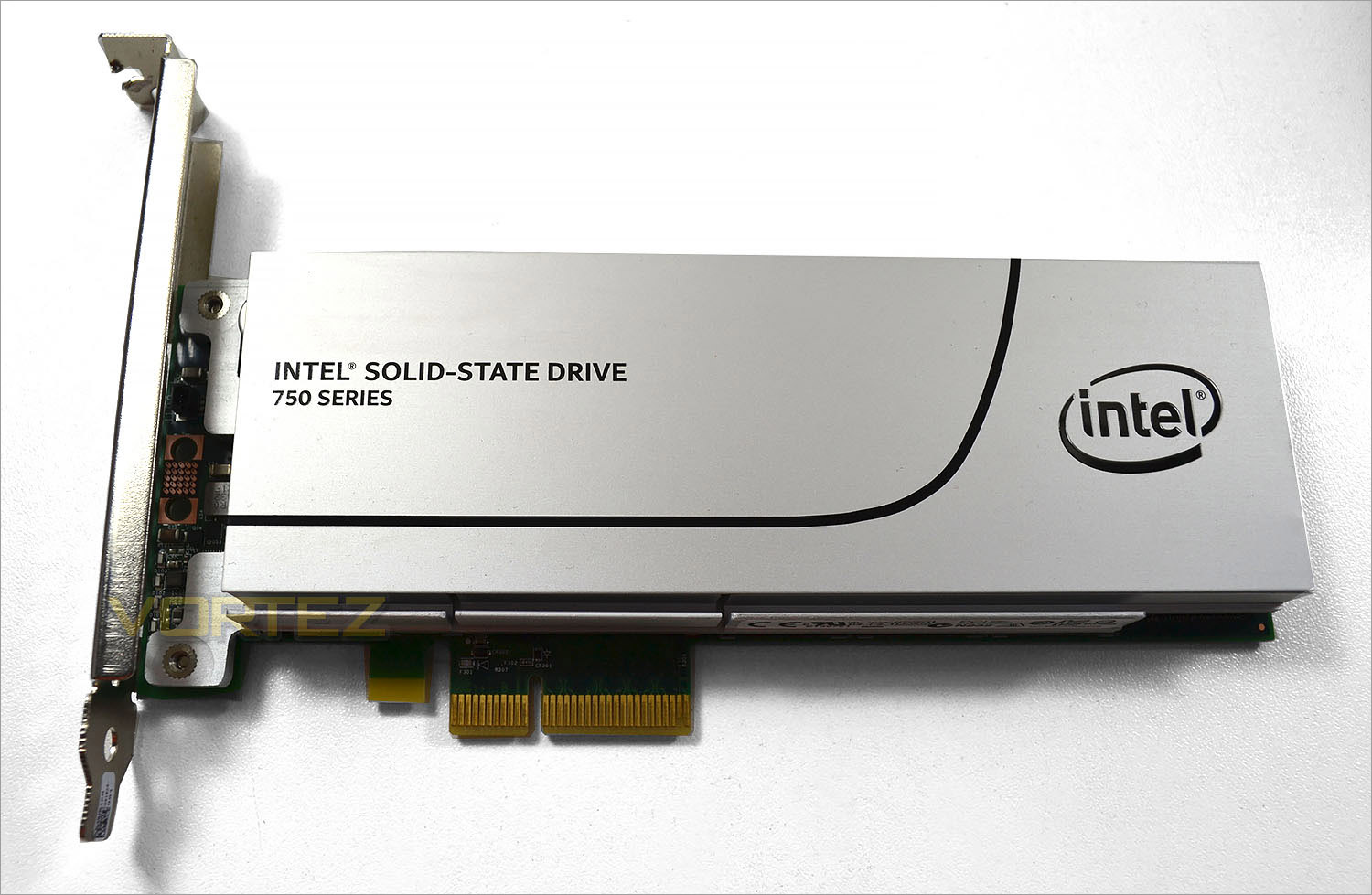
The Intel 750 PCIe unsurprisingly makes use of a PCIe slot so you will need a minimum 4x slot spare on your motherboard with which to plug the unit into if you want optimal speed. The device will work in a smaller slot with less PCIe lanes but obviously there will be a performance impact to take into consideration. Obtusely, it can also be slot into a slot with more lanes available but will only utilise the 4 lanes specified.
The device takes all the power it needs from the socket and thus needs no additional power input. The card consumes 25w when in use while 3W are consumed in idle state. As with the P3700, the controller features power loss protection which is good to see.
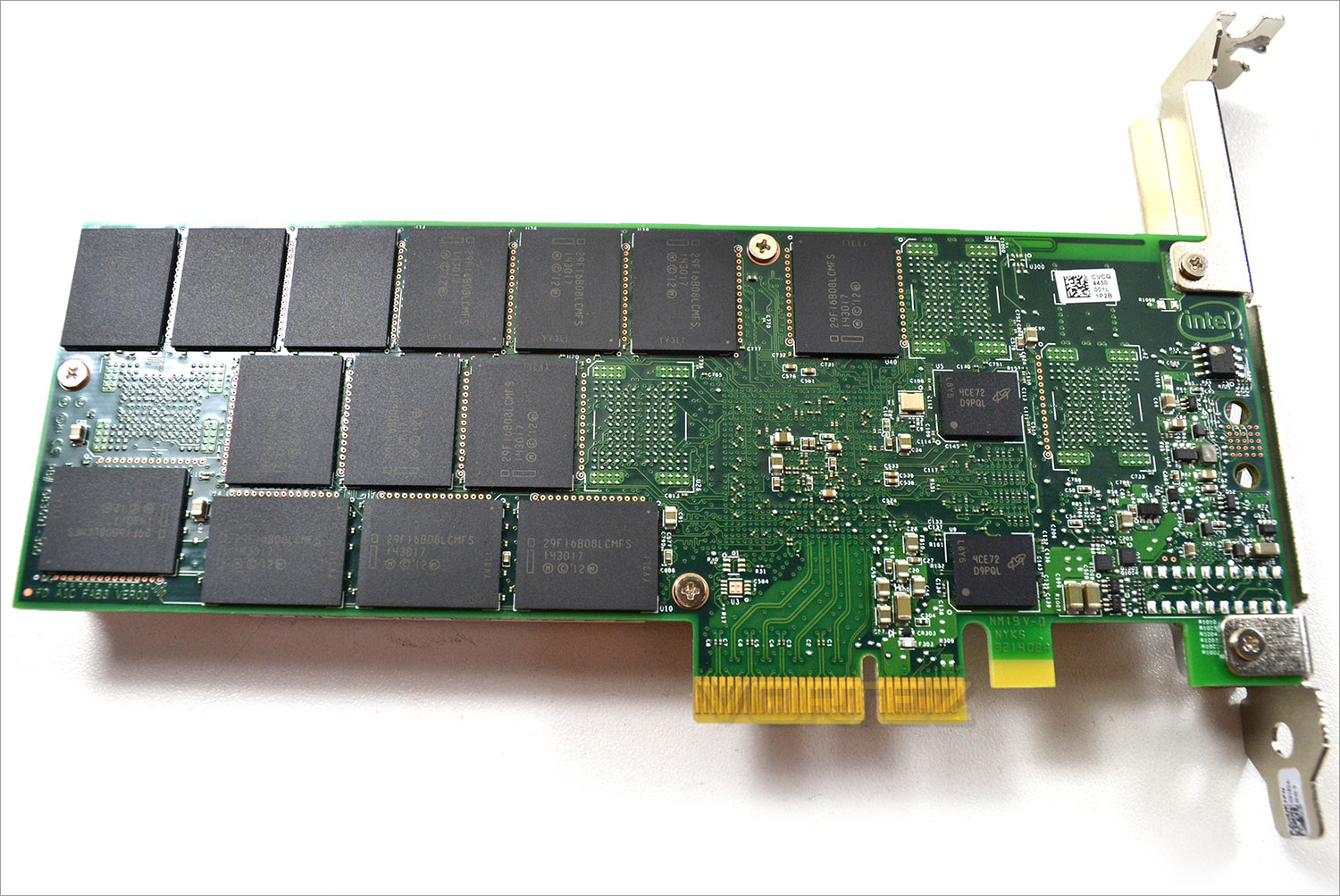
To the rear we see the PCB is exposed which was a shame. 14 single die MLC NAND 16GB flash chips are found on the exterior of the PCB with a further 18x64GB quad-die (4x128GBit) MLC NAND flash chips hidden beneath that full length heatsink. All of the flash chips are manufactured by Micron using the 20nm process. Also hidden from view are five DDR3-1600 DRAM modules providing a total of 1.25GB for the controller – twice the amount used on the Intel P3700 drive.
Intel have chosen to provide the controller themselves rather than rely on an aftermarket solution which makes sense if (as we suspect) it’s the same controller used on the enterprise P3700 SSD.
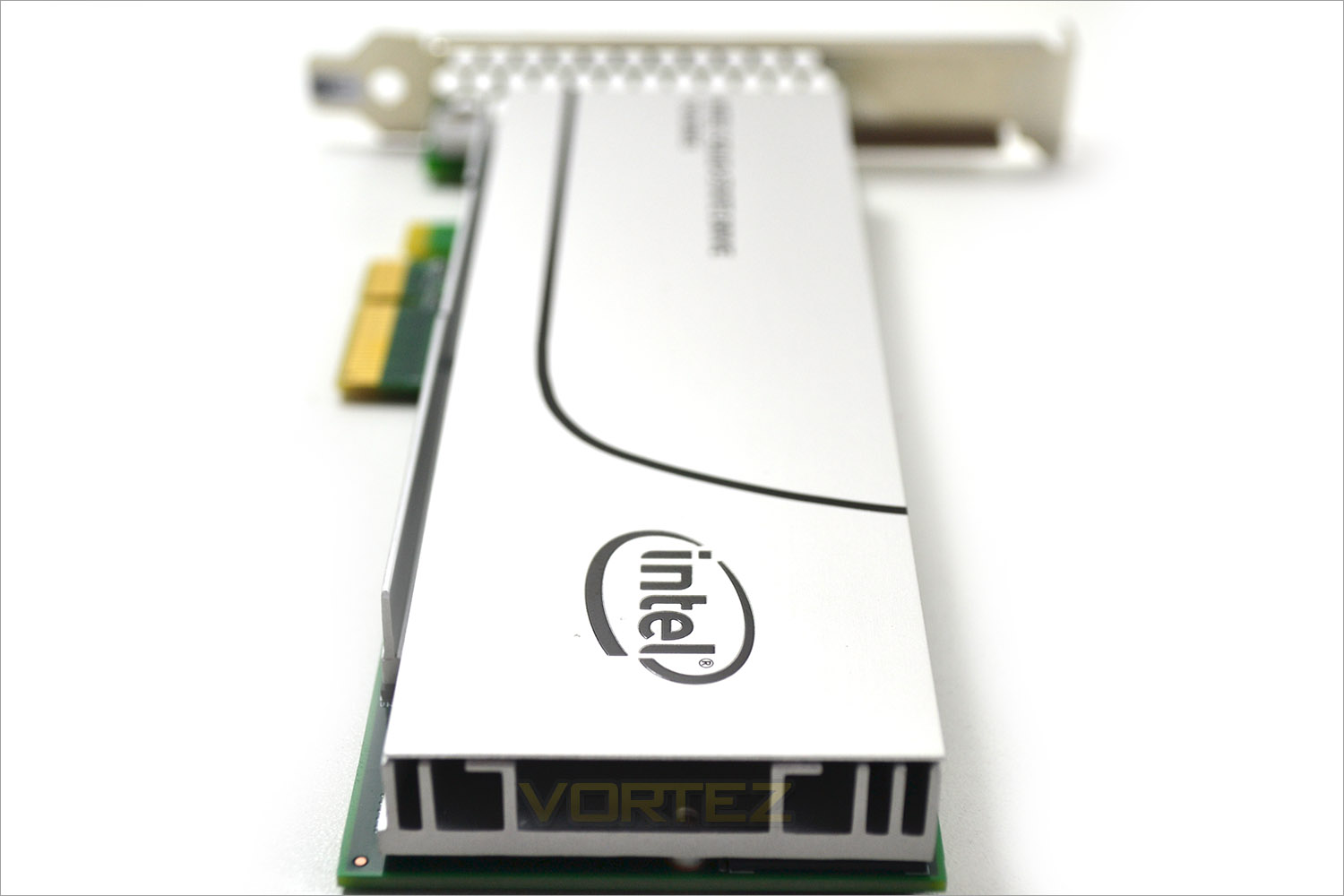
The 750 card is a single slot design and as such should fit most any system you decide to use it in, even an mATX motherboard. In terms of system requirements we believe the biggest restriction aside from an available PCIe 4x slot will be the operating system requirements. While there are work arounds available for Windows 7 (credit to techpowerup), the drive is clearly focussed on the present with Windows 8, 8.1 and Windows 10 fully supported. We managed to install the drive as a boot drive on all of these operating systems with ease (BIOS supported) but Windows 7 was more troublesome requiring a Windows 8 install and then re-configuring the boot manager and a registry tweak. So while booting to Windows 7 is possible, it is not without its problems.
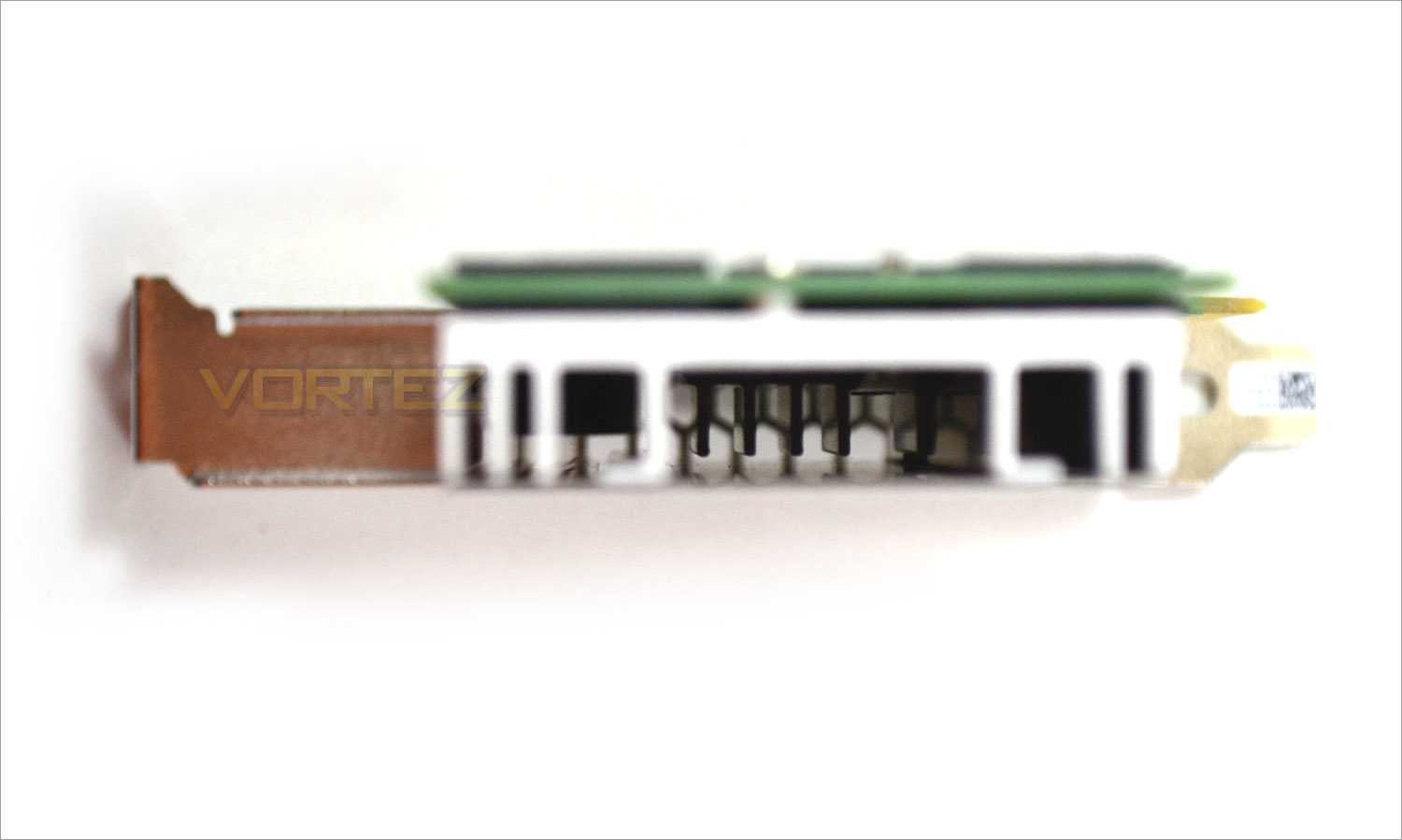
The card does not have any active cooling, instead relying on passive solution utilising a variety of heatsinks to cool the controller and chips down. The card did get a little toasty when in constant use but with adequate case cooling we don’t think this would be an issue to be concerned about.
All in all, the new Intel drive is very well specced. We were a little disappointed about the backwards compatibility however it is unlikely performance users are going to stick with older operating systems. We would have liked to have seen a black, instead of green PCB too or at least a full cover heatsink/backplate configuration. That said these are only minor issue for what is in effect a stunning product. The key however is of course performance so let’s see how it stacks up against a crop of SSDs currently available on the market…
Test Setup & Methodology
Our test system is formatted and a fresh version of Windows is installed with just drives in place – no additional applications. Windows is then updated to the latest release and the drivers are installed. Included in the list of benchmarks are the following applications:Benchmarks
AS SSD
ATTO Disk Benchmark v2.46
Iometer
Futuremark PCMark 8
Test system
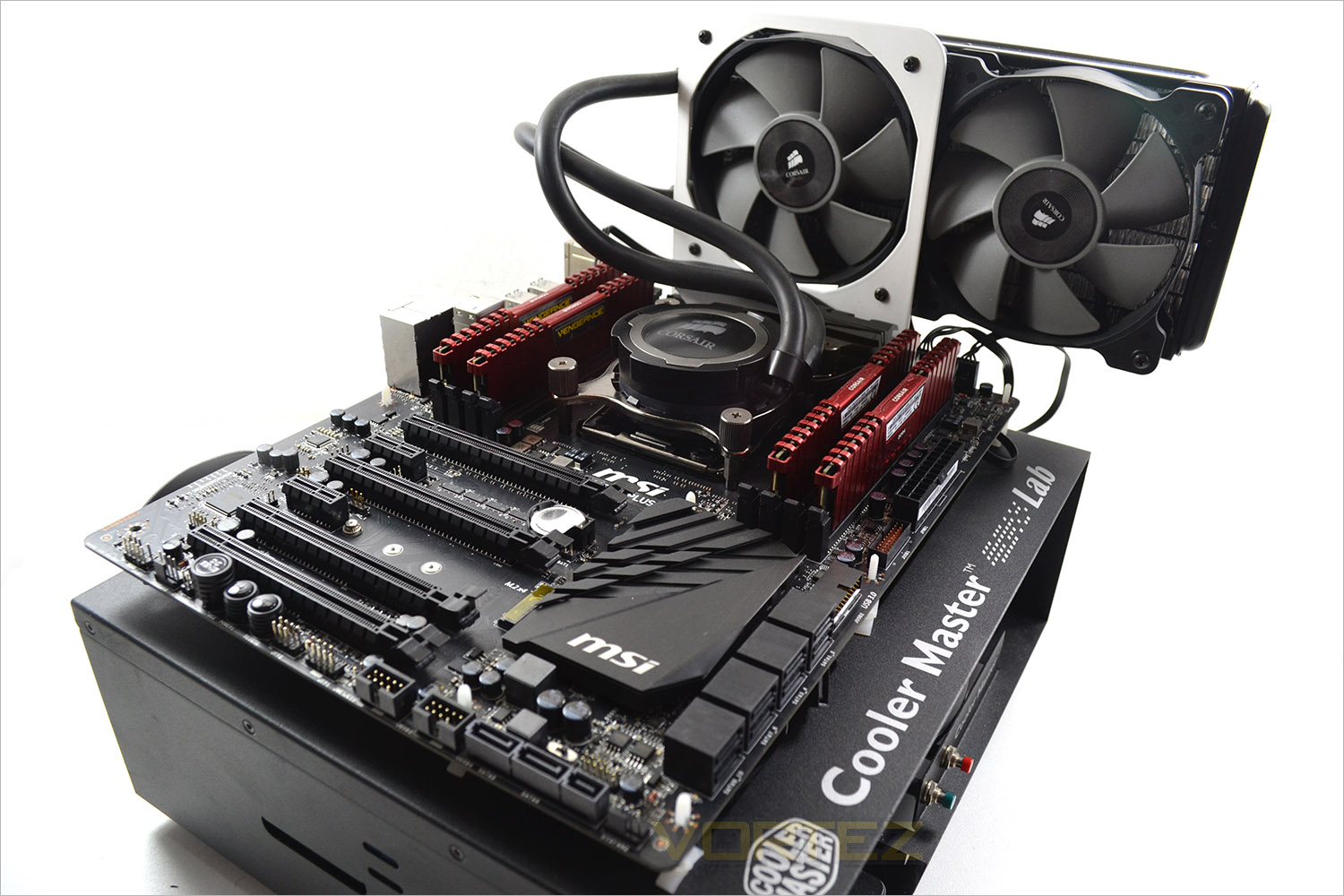
Motherboard MSI X99S – SLI
Graphics PALIT NVIDIA GTX 760
Memory 16GB Corsair Vengeance Pro (2666MHz) CL15
HDD
–
– Kingston HyperX Savage 256GB (Sata 6Gbps)
– Crucial MX200 1TB (Sata 6Gbps)
– Corsair Force LX 256GB (Sata 6Gbps)
– Plextor M6e 256GB(PCIe)
PSU Corsair HX1050 Gold
OS Microsoft Windows 7 Professional 64-Bit
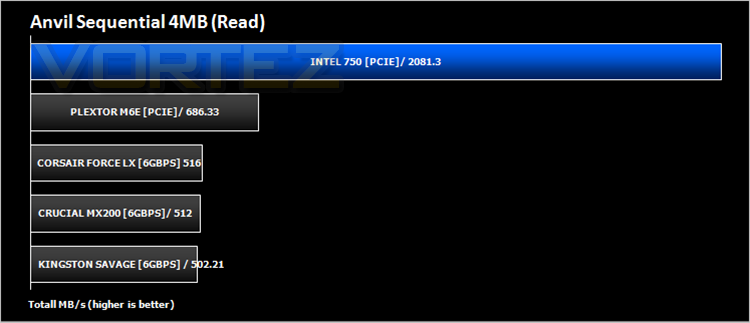
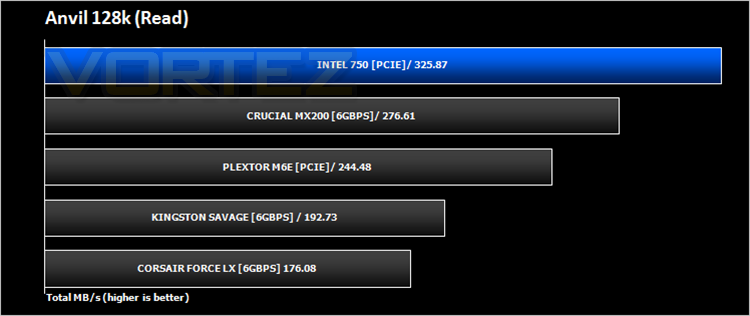
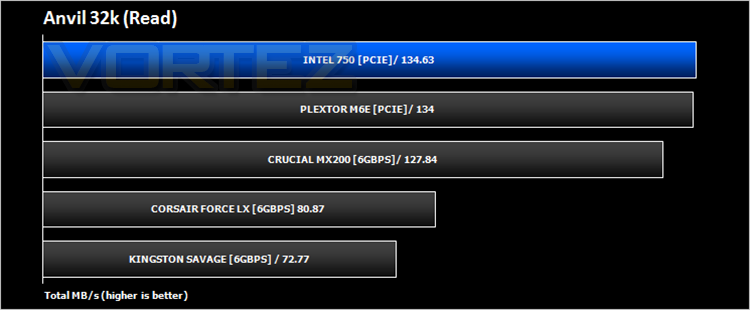
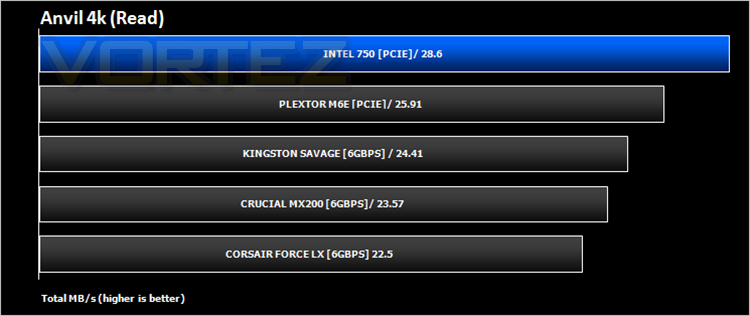
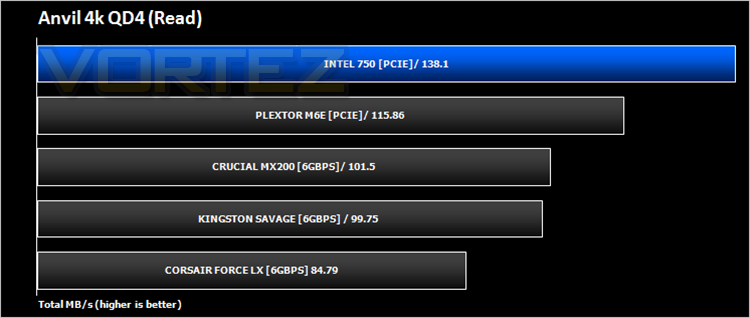
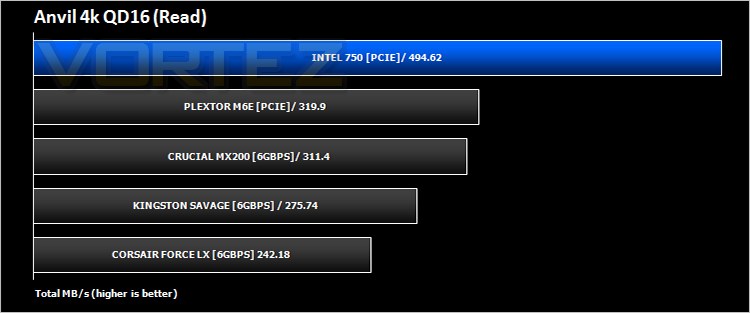
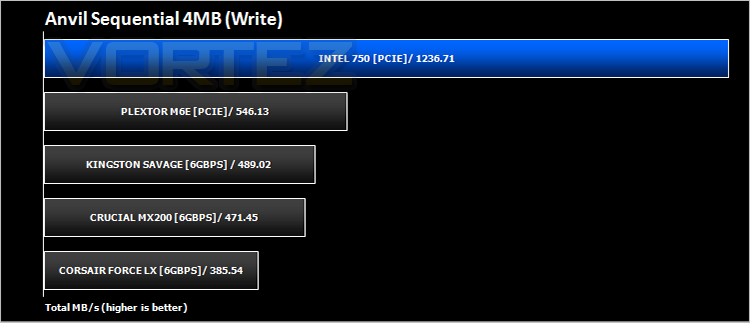
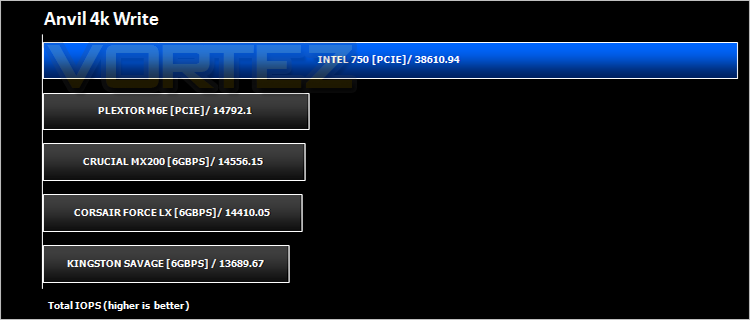
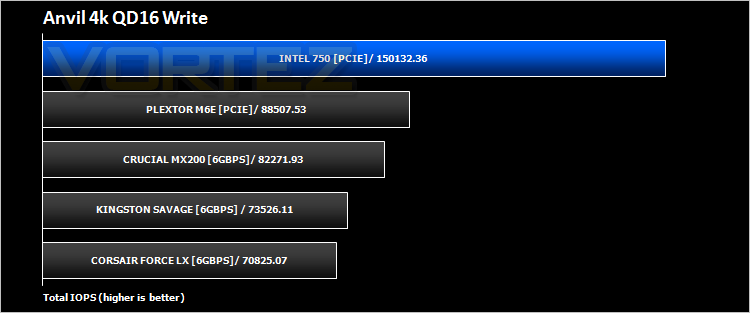
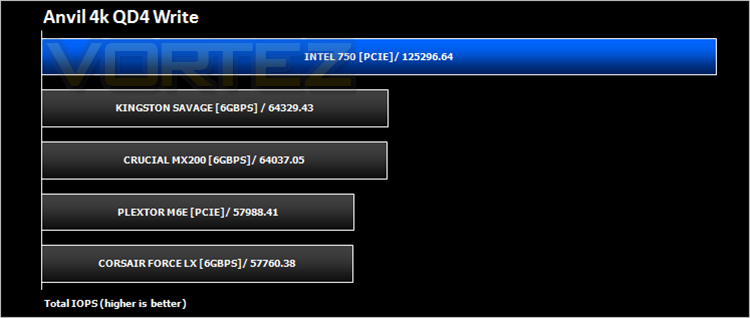
Benchmarks: Anvil Pro
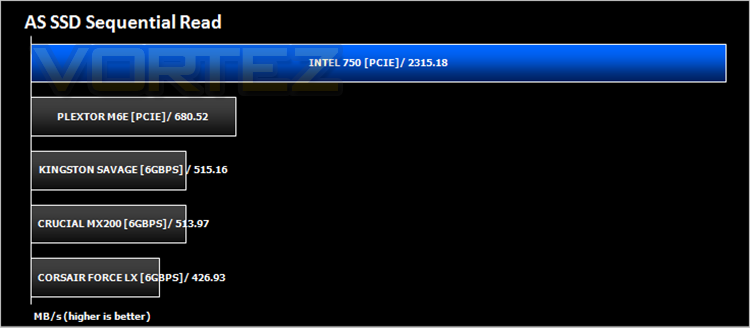
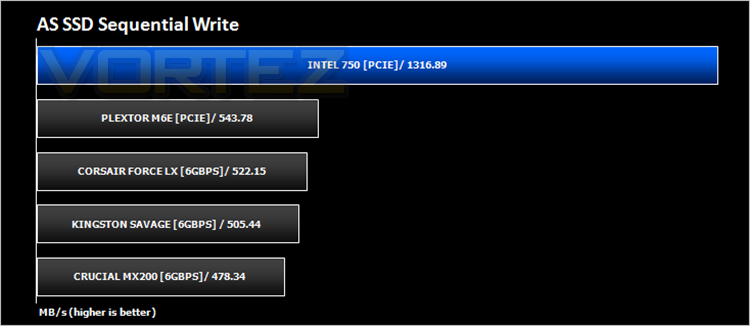
Benchmarks: AS SSD
Simply launch the program, choose your drive, click Start, and it’ll test your SSD’s read and write speed in a variety of ways, delivering a score for each when it’s done. And if that’s not enough, there are also additional file copy and compression-related benchmarks available from the Tools menu. (The author’s support page is German only, but if you need further English explanations then there’s a thread on the program at the OCZ Technology forum.).
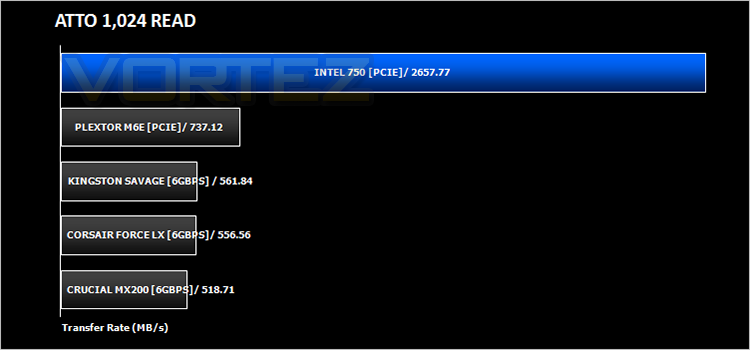
Benchmarks: ATTO
Benchmarks: IOmeter
Iometer allows the configuration of disk parameters such as the ‘Maximum Disk Size’, ‘Starting Disk Sector’ and ‘# of Outstanding I/Os’. This allows a user to configure a test file upon which the ‘Access Specifications’ configure the I/O types to the file.
For the purpose of this test, we prepared the drive for 20 minutes using sequential writes. We then ran 128kb sequential read and 128kb sequential write speeds for 20 minutes measuring MB/s and then 4kb random read/writes to 4 workers in order to measure IOPs.
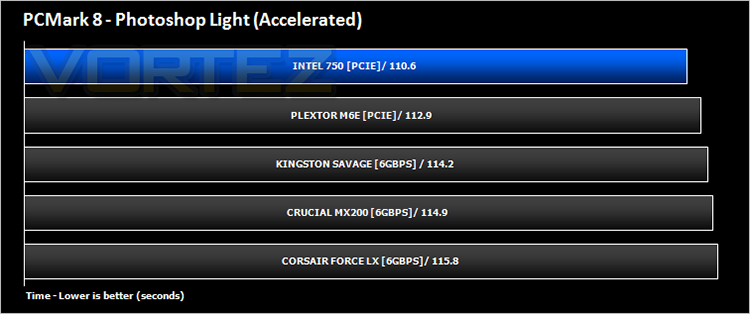
Futuremark PCMark 8
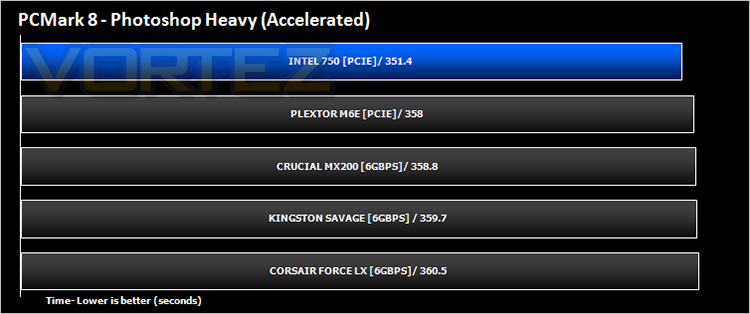
Conclusion
It’s clear that NVMe is the way forward as far as SSDs are concerned, at least until the restrictions on SATA are resolved or lifted some how. The performance displayed over the last few pages shows just how much an advantage this protocol has over its SATA counterpart by not just bettering it rather it blows it clean out of the water. Even your standard PCIe SSD cannot hope to compete with the Intel drive which is a surprise given how much faster they are over traditional solid state drives.
Cost is ultimately going to be the deciding factor and here is where the new Intel drives may prove to be out of reach for many. For a little over £300, the 400GB offering is however still under £1 per GB. The 1.2TB drive costs considerably more at £816 but 1.2TB is a very good size for a desktop drive allowing you to store your OS, games and applications which will make use of that phenomenal speed, especially if you are running multiple applications simultaneously. However, we still think there should be some middle ground with a 800GB drive and hope Intel will come to their senses in delivering this but for now the two options are all we have.
‘The best things in life are free’. How many times do we hear that? Sadly the storage Gods don’t agree because the best consumer SSD is certainly not free however, it is the best and we think it is worth every penny. If you’re a performance junkie, then you just have to get one! For everyone else you need to save up because this device will add more performance to your PC than any other currently on the market.
In summary:
If you want the best SSD, get the Intel 750 PCIe. Enough said!
+ Class leading read/write performance
+ Easy setup
+ 5 year warranty
+ Low Profile
Cons
– Expensive
– Backwards OS boot compatibility
– Green PCB