







The successor to LGA 1150 Haswell Core i7-4770K is here. Boasting a 4GHz base clock, is this new Devil’s Canyon processor really worth the investment?

Product on Review: Core i7-4790K
Manufacturer Intel
Street Price: £269.99 GBP / $339 USD
A little over 12 months have passed since our reviews of the original unlocked Intel Haswell CPUs, the Core i5-4670K and Core i7-4770K. Rather than release a whole new generation Intel have instead returned to LGA1150 and opted to refresh the Haswell line-up on the now mature 22nm lithography process, in so doing increasing the performance for users whilst holding prices stable.
Alongside last month’s Haswell refresh was the introduction of Intel’s 9-series motherboards – in the form of the Z97 and H97 chipsets for overclocking and mainstream markets respectively. An incremental evolution of the 8-series, it brings support for new storage interface technologies as standard in addition to the latest Haswell chips straight out of the box. The 9-series will also support desktop variants of Haswell’s 14nm successor, Broadwell, when that CPU is released.
Despite their reveal in March, unlocked ‘K’ CPUs weren’t included in the first round of Haswell Refresh CPUs, and so gamers and enthusiasts have had to wait the intervening six weeks for their fix of new overclockable chips. The update has not been quite as cut and dried as one might have expected however; Intel have decided to do something a little special for the unlocked chips in the form of Devil’s Canyon.
Devil’s Canyon CPUs – sold under the Core i7-4790K and Core i5-4690K – are designed with higher base clocks and higher overclocks in mind. At one stage many were working under the impression that the i7-4790K would be a simple multiplier bump of the i7-4770K, bringing very little added value to the market over its predecessor. As we will see in the review the 4790K is a substantial engineering improvement, creating a major lead in both stock speeds and additional overclocking headroom without a price increase.
Intel on their Core i7-4790K
Looking for the perfect processor to build your gaming rig around? But you also want to edit your action videos and photos? But to do this you know you need serious performance. Not to worry – Intel is happy to announce our first 4GHz base frequency quad core processor. If it is performance you crave, then this is the processor you have been waiting for. But what if you feel the need to overclock your system to squeeze every last bit of performance out of it? Well, then this is still the perfect processor you. The lastest 4th gen Intel Core i5 and Intel Core i7 processors, paired with the latest Intel 9 Series H and Z chipsets, will get you the results you want. Add in features like built in visuals and Intel Quick Sync Video, which allows the conversion of media from one device to another and prepares your media from one device to another and prepares your media to share online at incredible speeds, and these are processors that meet every need you have.
Features, Specifications & Micro-architecture
As a member of the Haswell refresh range the capabilities of the Core i7-4790K are broadly in line with that of other Haswell CPUs, including:
• 8-Way Multi-Task Processing: Runs 8 independent processing threads in one physical package.
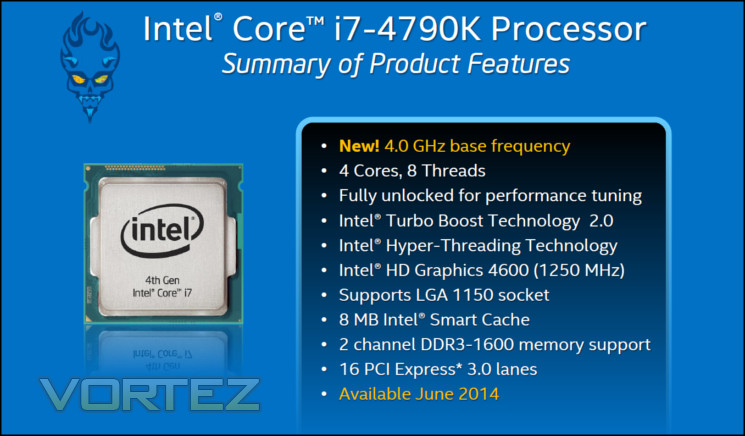
• Intel® Turbo Boost Technology 2.0: Dynamically increases the processor frequency up to 4.4 GHz when applications demand more performance. Speed when you need it, energy efficiency when you don’t.
• Intel® Hyper-Threading Technology: Allows each core of the processor to work on two tasks at the same time providing unprecedented processing capability for better multi-tasking, and for threaded applications.
• Intel® Smart Cache: 8MB of shared cached allows faster access to your data by enabling dynamic and efficient allocation of the cache to match the needs of each core significantly reducing latency to frequently used data and improving performance.
• CPU Overclocking Enabled (with Intel® Z97 Chipset): Fully unlocked core multiplier, power, base clock and DDR3 memory ratios enable ultimate flexibility for overclocking.
• Graphics Overclocking Enabled (with Intel® 9 Series Chipset): Unlocked graphics multiplier allows for overclocking to boost the graphics clock speed.
• Integrated Memory Controller: Supports 2 channels of DDR3-1600 memory with 2 DIMMs per channel. Support for memory based on the Intel® Extreme Memory Profile (Intel® XMP) specification.
• Chipset/Motherboard Compatibility: Compatible with all Intel® 9 Series Chipsets
• AES-NI: Provides processor instructions that help to improve performance for AES encryption and decryption algorithms.
• Built-in Visuals: New enhanced built-in visual features deliver a seamless visual PC experience for doing everything from simple e-mail to enjoying the latest 3D and HD entertainment. The built-in visuals suite includes:
– Intel® Quick Sync Video Technology: Media processing for incredibly fast conversion of video files for portable media players or online sharing.
– Intel®InTru™3D: Stereoscopic 3D Blu-ray* playback experience in full HD 1080p resolution over HDMI 1.4 with 3D.
– Intel® Clear Video HD Technology: Visual quality and color fidelity enhancements for spectacular HD playback and immersive web browsing.
– Intel® Advanced Vector Extensions 2.0 (Intel® AVX 2.0): Increased performance for demanding visual applications like professional video & image editing.
– Intel® HD Graphics 4600: Significant 3D performance for immersive mainstream gaming on a broad range of titles. The dynamic graphics frequency ranges up to 1250MHz.
• Intel® Turbo Boost Technology 2.0: Dynamically increases the processor frequency up to 4.4 GHz when applications demand more performance. Speed when you need it, energy efficiency when you don’t.
• Intel® Hyper-Threading Technology: Allows each core of the processor to work on two tasks at the same time providing unprecedented processing capability for better multi-tasking, and for threaded applications.
• Intel® Smart Cache: 8MB of shared cached allows faster access to your data by enabling dynamic and efficient allocation of the cache to match the needs of each core significantly reducing latency to frequently used data and improving performance.
• CPU Overclocking Enabled (with Intel® Z97 Chipset): Fully unlocked core multiplier, power, base clock and DDR3 memory ratios enable ultimate flexibility for overclocking.
• Graphics Overclocking Enabled (with Intel® 9 Series Chipset): Unlocked graphics multiplier allows for overclocking to boost the graphics clock speed.
• Integrated Memory Controller: Supports 2 channels of DDR3-1600 memory with 2 DIMMs per channel. Support for memory based on the Intel® Extreme Memory Profile (Intel® XMP) specification.
• Chipset/Motherboard Compatibility: Compatible with all Intel® 9 Series Chipsets
• AES-NI: Provides processor instructions that help to improve performance for AES encryption and decryption algorithms.
• Built-in Visuals: New enhanced built-in visual features deliver a seamless visual PC experience for doing everything from simple e-mail to enjoying the latest 3D and HD entertainment. The built-in visuals suite includes:
– Intel® Quick Sync Video Technology: Media processing for incredibly fast conversion of video files for portable media players or online sharing.
– Intel®InTru™3D: Stereoscopic 3D Blu-ray* playback experience in full HD 1080p resolution over HDMI 1.4 with 3D.
– Intel® Clear Video HD Technology: Visual quality and color fidelity enhancements for spectacular HD playback and immersive web browsing.
– Intel® Advanced Vector Extensions 2.0 (Intel® AVX 2.0): Increased performance for demanding visual applications like professional video & image editing.
– Intel® HD Graphics 4600: Significant 3D performance for immersive mainstream gaming on a broad range of titles. The dynamic graphics frequency ranges up to 1250MHz.
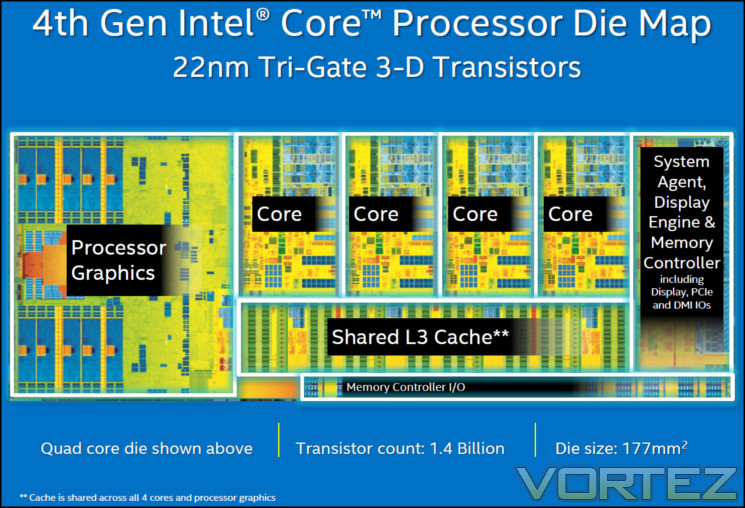
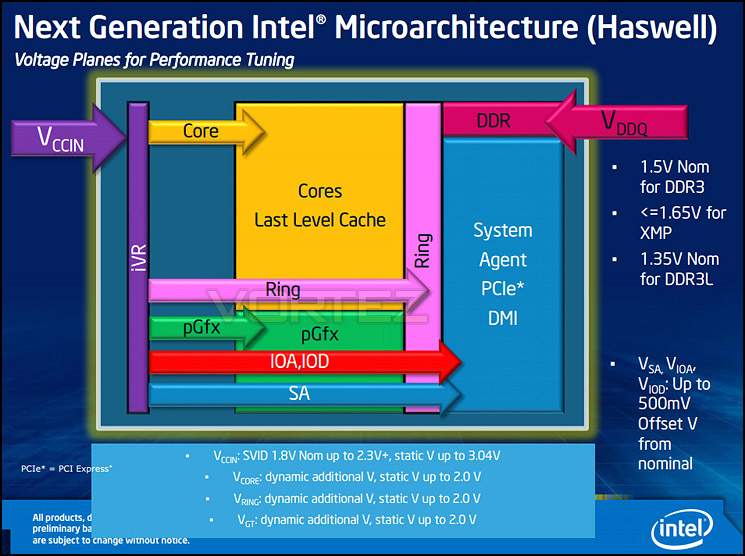
The underlying architecture has not changed significantly, as shown by the die diagram. Modifications were deliberately restricted to the underlying package, most notably in the form of additional power delivery/regulation components.

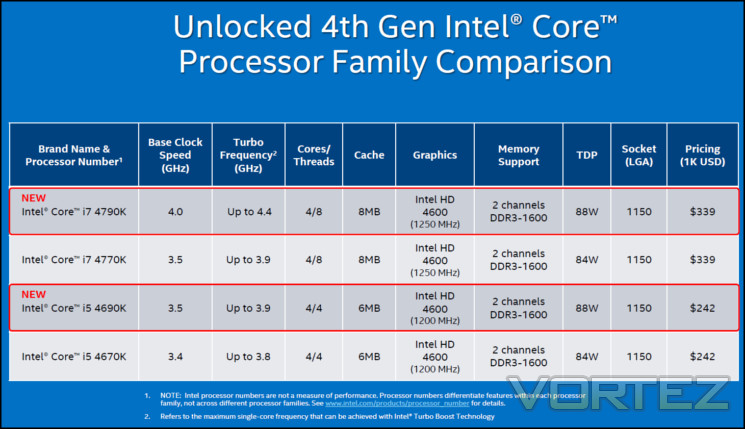
A brief comparison of the Devil’s Canyon CPUs and their unlocked predecessors in the Haswell range can be see below. In terms of headline figures the base/turbo clock speed boost of the i7-4790K over the 4770K is clearly the most significant.
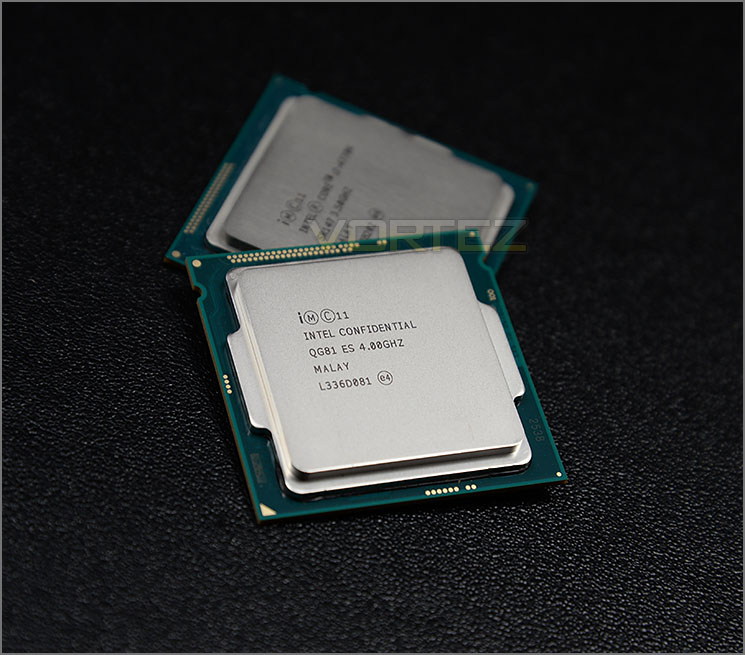
Core i7-4790K In The Flesh
Intel’s Devil’s Canyon CPUs remain part of the 4th Generation core lineup on the same LGA1150 socket, built with the 22nm process and Intel’s tri-gate transistor technology. A die shrink to 14nm isn’t scheduled until the advent of Broadwell in late 2014/2015, and so huge gains in power efficiency and performance aren’t expected. These new CPUs are designed to operate with Intel 9-series motherboards, overclocking on the Z97 chipset; older Z87 motherboard may be compatible presupposing sufficiently robust power circuitry.
The i7-4790K is a quad-core processor supporting eight threads through Hyperthreading and comes complete with 8MB L3 cache. Its party trick over the i7-4770K is a base clock of 4GHz and boost clock of up to 4.4GHz through Turbo Boost 2.0, made possible thanks to a more mature process and additional power circuitry in the CPU package. The improved clock speeds come at a TDP cost however; both the Core i7 and Core i5 Devil’s Canyon CPUs have a TDP rating of 88W, up from 84W in the pre-refresh unlocked Haswell CPUs.
Our Core i7-4790K is an Engineering Sample rather than full retail model. There should be no significant difference between these processor batches but we mention it only for completeness.
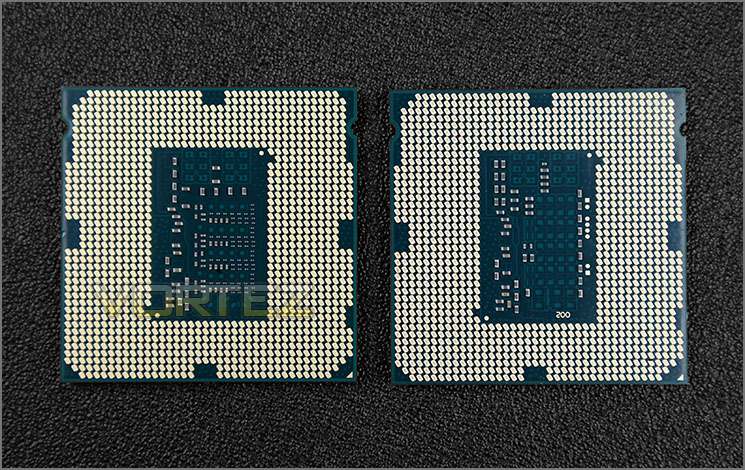
As you can see from the above image the underside of the i7-4790K differs appreciably from that of the 4770K. Whilst the dimensions and contact pad layout are identical the 4790K also includes a greater number of capacitors and further changes to the underlying circuitry. In general this should lead to more stable power delivery, aiding in both long-term reliability and overclocking.
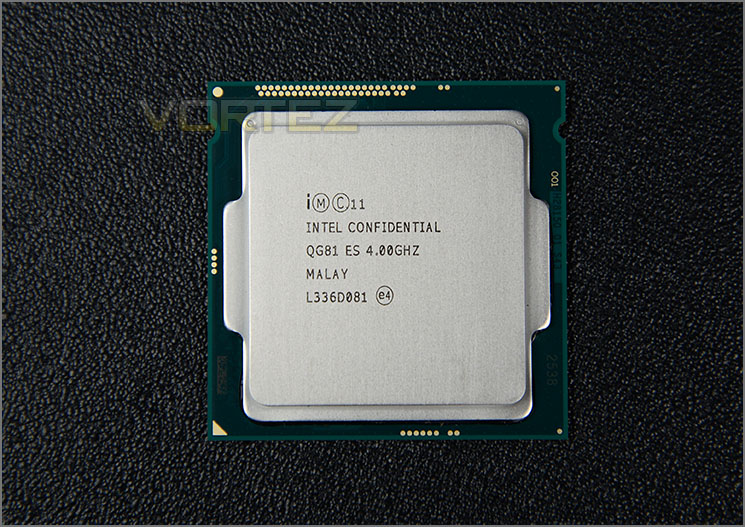
Not visible is the new Next-Generation Polymer Thermal Interface Material (NGPTIM). One of the chief criticisms of both Ivybridge and Haswell CPUs has been the quality of the TIM between CPU die and heatspreader, resulting in many high level enthusiasts going so far as to de-lid the CPU and replace it. As Intel needed to improve heat dissipation in the i7-4790K to hit their 4GHz target the TIM was ripe for improvement, and as a result we should see improved thermals at the same freq/voltage as well as potentially greater overclocks.
Unchanged from the Core i7-4770K is the integrated HD 4600 graphics clocked at 1250MHz, Turbo Boost Technology 2.0, and automatic downclocking (the latter of which which will lower the CPU to 800MHz when idle to reduce long-term power consumption). Each are a major improvement over the 3rd Generation Core CPUs (AKA Ivybridge), but don’t in of themselves constitute a selling point for Devil’s Canyon over the original Haswell chips.
As can be expected, the packaging for Intel’s Core i7-4790K arrive in a bright blue retail box. Retail versions also come with a fan-less option and OEM – without packaging altogether. Retail versions come with the added bonus of an extended warranty (3 years) and Intel reference fan.
Test Setup & Methodology
Test Setup
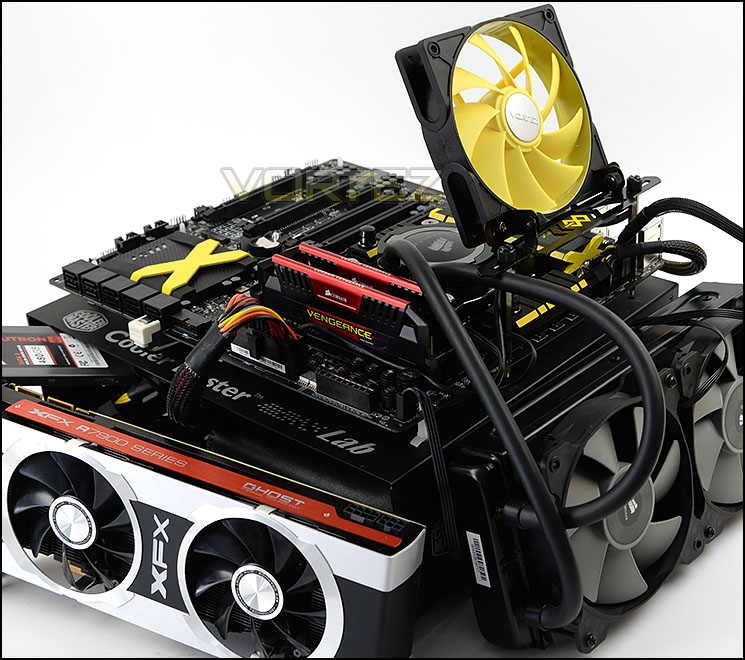
CPU: Intel Core i5 2500K (3.3GHz) Sandy Bridge
Intel Core i5-3570K (3.40GHz) Ivy Bridge
Intel Core i7-3770K (3.50GHz) Ivy Bridge
Intel Core i5-4670K (3.40GHz) Haswell
Intel Core i7-4770K (3.50GHz) Haswell
– Intel Core i7-4790K
Cooling Corsair Hydro Series H105
Motherboard MSI Z97 XPOWER AC (Core i7-4790K & i7-4770K only)
Memory 16GB Corsair Vengeance Pro 2800MHz CL12 DDR3
Graphics XFX R7970 Black Edition
Storage Corsair Neutron GTX 480GB
PSU Corsair HX1050 80 Plus Gold Certified PSU
Intel Core i5-3570K (3.40GHz) Ivy Bridge
Intel Core i7-3770K (3.50GHz) Ivy Bridge
Intel Core i5-4670K (3.40GHz) Haswell
Intel Core i7-4770K (3.50GHz) Haswell
– Intel Core i7-4790K
Cooling Corsair Hydro Series H105
Motherboard MSI Z97 XPOWER AC (Core i7-4790K & i7-4770K only)
Memory 16GB Corsair Vengeance Pro 2800MHz CL12 DDR3
Graphics XFX R7970 Black Edition
Storage Corsair Neutron GTX 480GB
PSU Corsair HX1050 80 Plus Gold Certified PSU
Benchmarks
Cinebench R15 – CPU/OpenGL Score
x264 HD 4.0 – 1st and 2nd pass encoding
SiSoftware SANDRA 2014 – CPU & Memory benchmarks
AIDA64 – CPU benchmarks
PCMark 8 – Home Suite
3DMark FireStrike – DX11 3D Benchmark
Games – Tomb Raider, THIEF
x264 HD 4.0 – 1st and 2nd pass encoding
SiSoftware SANDRA 2014 – CPU & Memory benchmarks
AIDA64 – CPU benchmarks
PCMark 8 – Home Suite
3DMark FireStrike – DX11 3D Benchmark
Games – Tomb Raider, THIEF
Other Software
Temperature Analysis: Core Temp
Stress Testing Software: LinX
CPU Specification Monitoring: CPU-Z
Stress Testing Software: LinX
CPU Specification Monitoring: CPU-Z
NOTE: Some benchmarks do not have full comparative models because we have since introduced new testing applications to give expand analysis and are not able to re-test older chips.
Temperatures and Overclocking
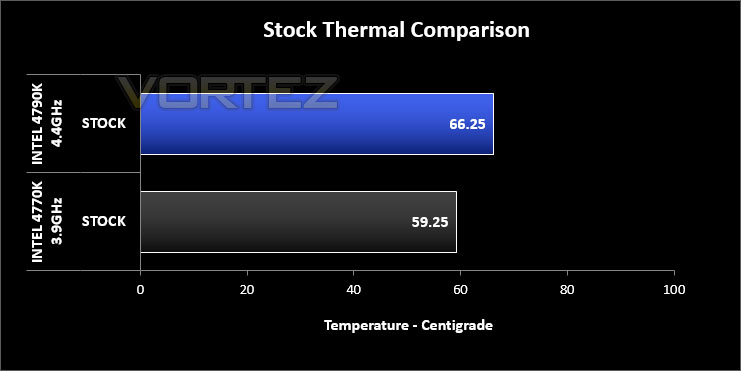
It’s widely accepted that Intel’s Core i7-4770K can get rather hot, especially when the chip is fully loaded and an overclock is applied. The inauguration of Devil’s Canyon claims to combat this very issue and below verifies this notion.
Although at stock temperatures the 4790K results in higher temperatures in the graph, it’s imperative to note that the base clock on this chip is 4GHz – 500MHz faster than the 4770K – and will Boost to 4.4GHz. This increase in frequency also alters the voltage too but as you can clearly see, the difference in temperature is nominal. Place the 4770K at 4.4-4.6GHz and you will almost certainly have the chip sitting in the low-mid 80s on identical cooling.
Overclocking
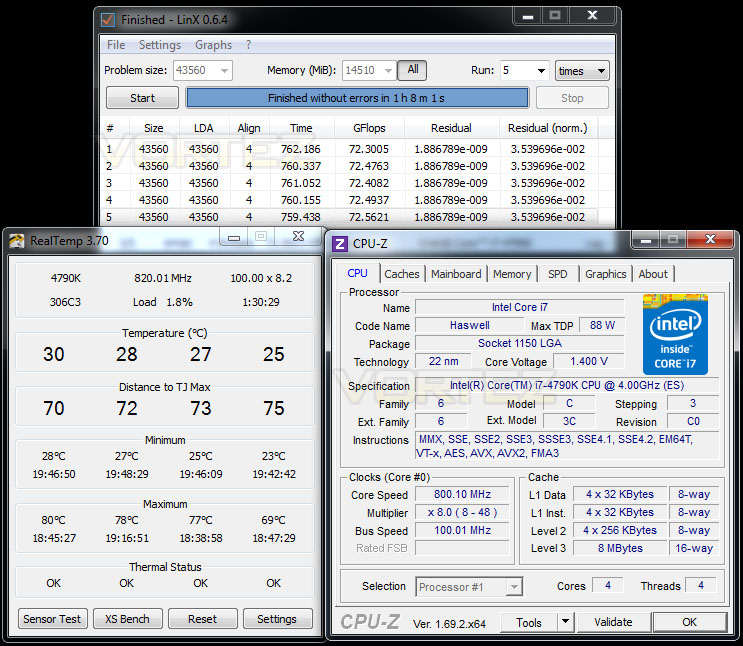
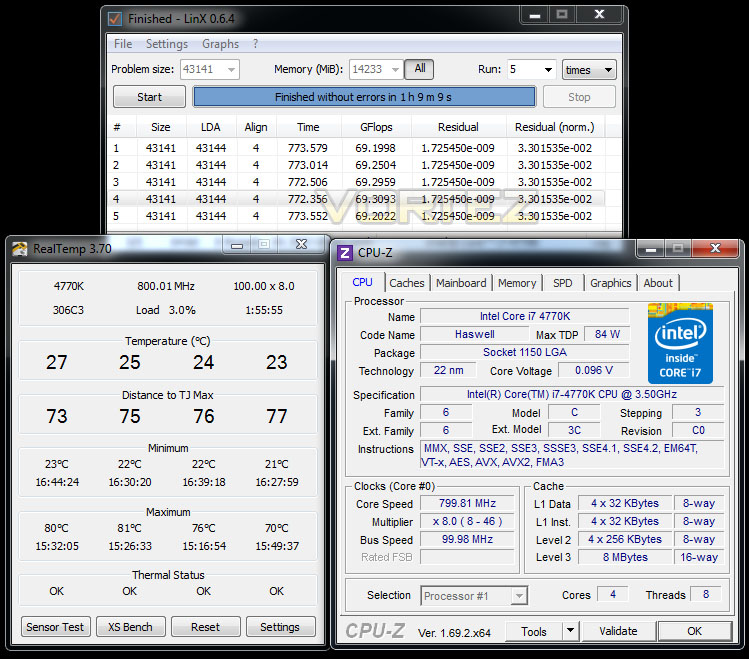
Since the introduction of Z87 back in 2013, there has been a return to BCLK overclocking. This type of functionality ensures flexibility for Overclockers compared to previous generations where the BCLK was locked to 100MHz and only the ratio could be adjusted. As many of you will know, when the Haswell CPUs hit the scene, reports revealed high temperatures with even small increases in voltage (which is required for attaining substantial overclocks) This meant there was little headroom for overclocking but the new 4790K hope to change this. Intel has replaced the TIM and so we expect good things from this new chip. For reference, our 4770K hit a brick wall at 4.6GHz.
Intel Devil’s Canyon Core i7-4790K max. overclock & temps
After many hours of adjustments and tweaking, the best overclock we could reach with 4790K was 4.8GHz. No amount of core voltage or other modifications would allow the chip to move up to 4.9/5GHz). Even increasing the core voltage to 1.45v or dropping the ratio down and increasing the BCLK didn’t allow us to budge over the 4.8GHz mark.
Although we did need 1.38v to achieve 4.8GHz you will notice the temperatures are lower than an equivalent 4770K at such frequency and/or voltage. This is testament to the improved TIM, and could indicate that our Engineering Sample is limited by other than heat output. Overclockers experienced with the Haswell platform may find that there are yet more gains to be had, especially under water or more exotic cooling methods.
Intel Core i7-4770K max. overclock & temps
Benchmarks: Power Consumption
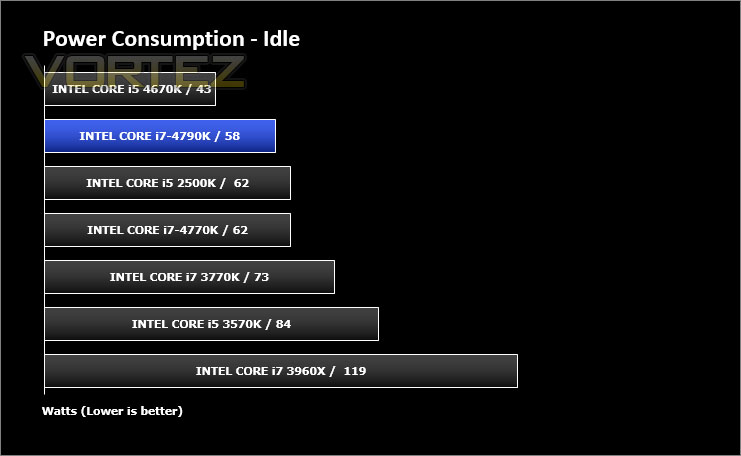
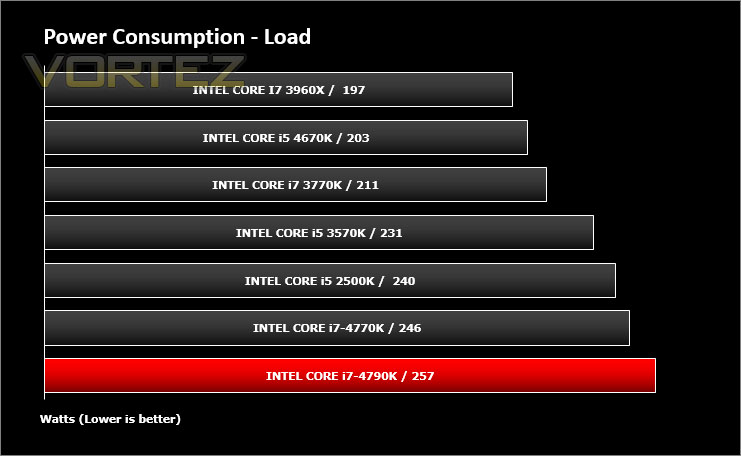
Energy consumption between different CPU models started to be a key point of interest in the Sandy Bridge era due to enormous gains in the perf/Watt metrics which were normally the province of GPUs along. We analyse two crucial figures: first of all idle tests where the system is cold booted into Windows and no additional applications are executed – the watts are noted on the external energy monitor we use; second the system is loaded with 3DMark FireStrike – watts are again monitored for the duration of the test and the highest rated wattage result is then noted down. Below are the results of this energy test.
Intel Haswell CPUs will down-clock to 800MHz when idle, resulting in a far lower idle power figure than the Ivy Bridge and Sandy Bridge which could only reach as far as 1600MHz. In the case of the i7-4790K it achieved a lower idle power consumption than the 4770K on the same motherboard, despite an ostensibly higher TDP. As expected when under load at stock speeds the power consumption was higher than its older counterpart due to the higher base and boost clocks (and higher voltages required), although 11W (~4%) is not signficant.
Another noteworthy result from these tests is the impact of the motherboard on idle power consumption – changing motherboard can have a more significant effect than changing from 4770K to 4790K.
Benchmarks: Integrated GPU Performance
With the advent of the Sandybridge Architecture Intel began integrating graphics on-die rather than with the motherboard chipset. This has meant that whether or not discrete graphics were part of the system a “built in” component was always available and unlocked by the inclusion of video-out ports on the motherboard back panel. Intel HD graphics is capable of hardware video decoding of movies, 3D content and some casual gaming, but historically hasn’t replaced a mainstream graphics card on the majority of systems.
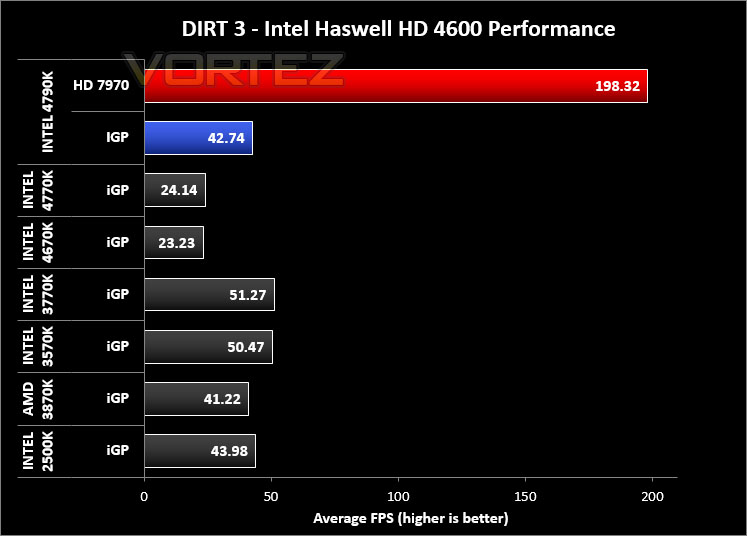
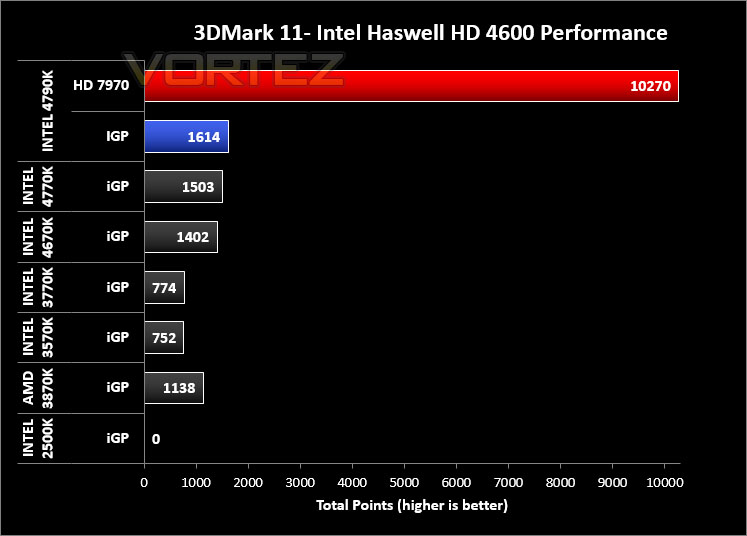
Devil’s Canyon utilises the same Intel HD 4600 graphics as previous Haswell Core i5 and i7 CPUs, delivering full DX11 functionality. Accordingly they have greater performance potential than Sandy Bridge and Ivy Bridge-generation on-die GPUs for common tasks in addition to greater hardware resources dedicated to Intel’s Quick Sync transcoding.
Testing procedure
In order to assess the effectiveness of the Core i7’s iGP there are a variety of benchmarks we can use but we have decided upon 3DMark 11’s 720p performance preset and DIRT 3 @ 1680×1050 with low settings and 4xMSAA, setting which would be a doddle for most performance GPUs but have been challenging for Intel’s integrated setup. Test results will be compared against those previously achieved by AMD’s A8-3870K iGP along with Intel’s 2500K, 3570K, 3770K, 4670K and 4770K; finally the performance advantage of combining integrated graphics with a discreet solution – an XFX 7970 Black Edition – will also be assessed.
With 3DMark 11 being DX11 only – the 2500K results could not be obtained, hence no score.
Benchmarks: X264 HD
Simply put, this test measures how fast your machine can encode a short, DVD quality MPEG-2 video clip into a high-quality x264 video clip. What’s x264, you ask? It’s more or less the next-generation Xvid/DivX codec. I think it’s ideal for a benchmark because the application (x264.exe) reports fairly accurate compression results (in frames per second) for each pass of the video encoding process, and it uses multi-core processors very efficiently.


Benchmarks: AIDA64
AIDA64 Product PageThis simple integer benchmark focuses on the branch prediction capabilities and the misprediction penalties of the CPU. It finds the solutions for the classic “Queens problem” on a 10 by 10 sized chessboard. At the same clock speed theoretically the processor with the shorter pipeline and smaller misprediction penalties will attain higher benchmark scores. For example — with HyperThreading disabled — the Intel Northwood core processors get higher scores than the Intel Prescott core based ones due to the 20-step vs 31-step long pipeline. CPU Queen test uses integer MMX, SSE2 and SSSE3 optimizations.


Benchmarks: Cinebench
CINEBENCH is a real-world cross platform test suite that evaluates your computer’s performance capabilities. CINEBENCH is based on MAXON’s animation software CINEMA 4D 3D content creation.


Benchmarks: SiSoftware SANDRA
SANDRA isn’t always a benchmark that is included in hardware reviews but I believe it shouldn’t be ignored. SANDRA provides a vigorous package that tests your system in a rather large array of benchmarks. There are many aspects of benchmark that can be executed. We will be considering – CPU and memory tests.


Benchmarks: 3DMark
3DMark FireStrike Product PageFire Strike is our new showcase DirectX 11 benchmark designed for high-performance gaming PCs. It is our most ambitious and technical benchmark ever, featuring real-time graphics rendered with detail and complexity far beyond what is found in other benchmarks and games today. Fire Strike will only be available in the Windows editions of 3DMark initially.

Benchmarks: PCMark 8
PCMark 8 combines performance benchmarking with battery life measurement and includes tests based on popular Adobe and Microsoft applications. Whether you are looking for long battery life, or maximum power, PCMark 8 will help you find the devices that offer the perfect combination of efficiency and performance for your needs. It’s the complete PC performance benchmark for home and business.

Benchmarks: Tomb Raider & THIEF
It’s important for us to perform a number of game benchmarks as well as the synthetic tests because gamers will want to know if there are any significant benefits. So here we have two popular and recent gaming titles which feature a dedicated benchmark tool within them to display results.


Conclusion
At one stage we had expected the Haswell refresh to be a by-the-numbers update of the original Haswell CPU – a small multiplier bump and perhaps slightly better overclocking capability for the same cost. Whilst it isn’t part of today’s review, the Core i5-4690K is looking to be just that but the headline specs of the i7-4790K immediately indicated an altogether different animal. By pushing to that 4GHz milestone (not to mention boosting to 4.4GHz) Intel bumped the base CPU multiplier to 40 from 35 resulting in a higher base clock than many 4770K users would even overclock to.
To a certain extent, Devil’s Canyon represents a bone thrown to enthusiasts waiting patiently for the next top of the range CPU. Intel have recognised that these members of the market are influential beyond their relatively small numbers; engineering a product meaningful to them would be important even on an accelerated timetable. They gave their engineers six months with specific stipulations including limiting changes to the off-die package, and it appears to be time well spent. Not only does it reward overclockers, but also gamers who either ran no overclock or at least a modest one at that.
We were a little disappointed when going straight in at 5GHz didn’t yield any success, but nonetheless our highest overclock exceeded that of our 4770K by ~200 MHz. For some that will be only a modest gain, but the notable reduction in core temperature deltas should be eye-opening to any user. The 4790K was held to slightly lower temperatures than the 4770K when both were at their maximum, despite both higher frequencies and voltages, representing a step forward and one we hope is also extended to Broadwell and other enthusiast-class CPUs down the line.
Intel’s Devil’s Canyon Core i7-4790K is therefore a genuine contender as a replacement for an Ivy Bridge-generation Core i7 presupposing you chiefly utilise stock speeds. Coupled with the diverse range of Z97 motherboards it provides a meaningful improvement in both performance and features including support for next-gen PCIe-based storage.
The question of upgrade viability is muddier if you already own one of last years’ unlocked Haswell CPUs. Professional overclockers and those keen to push their CPU to the bleeding edge will see better number if not measurably better performance, however those who tend to run with only modest overclocks or at stock speeds will be see a very large boost.
One final point to mention is that on availability. At present Devil’s Canyon CPUs are very rare, as evidenced by our use of an Engineering Sample rather than the usual Retail model, and so finding them could be relatively difficult and some retailers may charge a premium over the MSRP both to capitalise on this shortage and clear i7-4770K stock. If you have the opportunity to you should always pick up a Devil’s Canyon CPU over the older model is the prices are compatible, but a >£40 (~15%) disparity should perhaps make you think twice.
Intel’s Devil’s Canyon Core i7-4790K is a significant improvement over the i7-4770K, offering better overclocks and substantially better temperatures. It is a Haswell CPU which may finally tempt Ivy Bridge users to upgrade, and aligned with the Z97 chipset also presents an updated feature-set. Introducing a redesigned package to the market so quickly is worthy of praise and those who routinely overclock to the bleeding edge may be pleasantly surprised by the additional headroom and improved power delivery. The Core i7-4790K is quite simply a better alternative to the Core i7-4770K and thus is worthy of our Gold award.
Pros
+ Stock speeds from 4 GHz base and 4.4 GHz boost, over 500 MHz higher than the CPU it replaces
+ Measurably better thermal performance at the same voltage and frequencies
+ Higher overclocking results with our sample (4.8GHz compared with 4.6GHz)
+ Overclocking is easy and effective
+ Overclocking is flexible – BCLK adjustments
+ Overclocking realises significant performance improvements
+ Requires less voltage to overclock
+ Feature set improvement when matched with Z97
Cons
– Update isn’t quite significant enough to upgrade from the initial Haswell CPUs
– IGP performance in non-synthetic benchmarks continues to be a concern
+ Stock speeds from 4 GHz base and 4.4 GHz boost, over 500 MHz higher than the CPU it replaces
+ Measurably better thermal performance at the same voltage and frequencies
+ Higher overclocking results with our sample (4.8GHz compared with 4.6GHz)
+ Overclocking is easy and effective
+ Overclocking is flexible – BCLK adjustments
+ Overclocking realises significant performance improvements
+ Requires less voltage to overclock
+ Feature set improvement when matched with Z97
Cons
– Update isn’t quite significant enough to upgrade from the initial Haswell CPUs
– IGP performance in non-synthetic benchmarks continues to be a concern

Click here for an explanation of our awards at Vortez.net.


