If you’re looking for a USB external hard drive with the speeds of Solid State then the Lexar Workflow DD512 may suit your needs.

Product on Review: Workflow DD512r
Manufacturer: LEXAR
Street Price: £152 GBP / $215.99 USD
Solid State drives are common place in today’s fast paced PC environment. As most will know the SSD has multiple benefits to the user, not least performance so it is puzzling why few manufacturers have taken this leap of performance to external storage devices. It used to be the case that Solid State technology was prohibitively expensive and because of this expense, storage size was limited with SSDs usually being hte preserve of boot drives with older mechanical hard drives used for mass data storage. Today we see that SSD prices have fallen dramatically and with that much larger storage capacities are available. External devices are for the most part still bulky, requiring an additional power source or at the least, a large and heavy enclosure making portability problematic. Lexar look to solve this problem by combining the performance of an SSD with the throughput of USB 3.0.
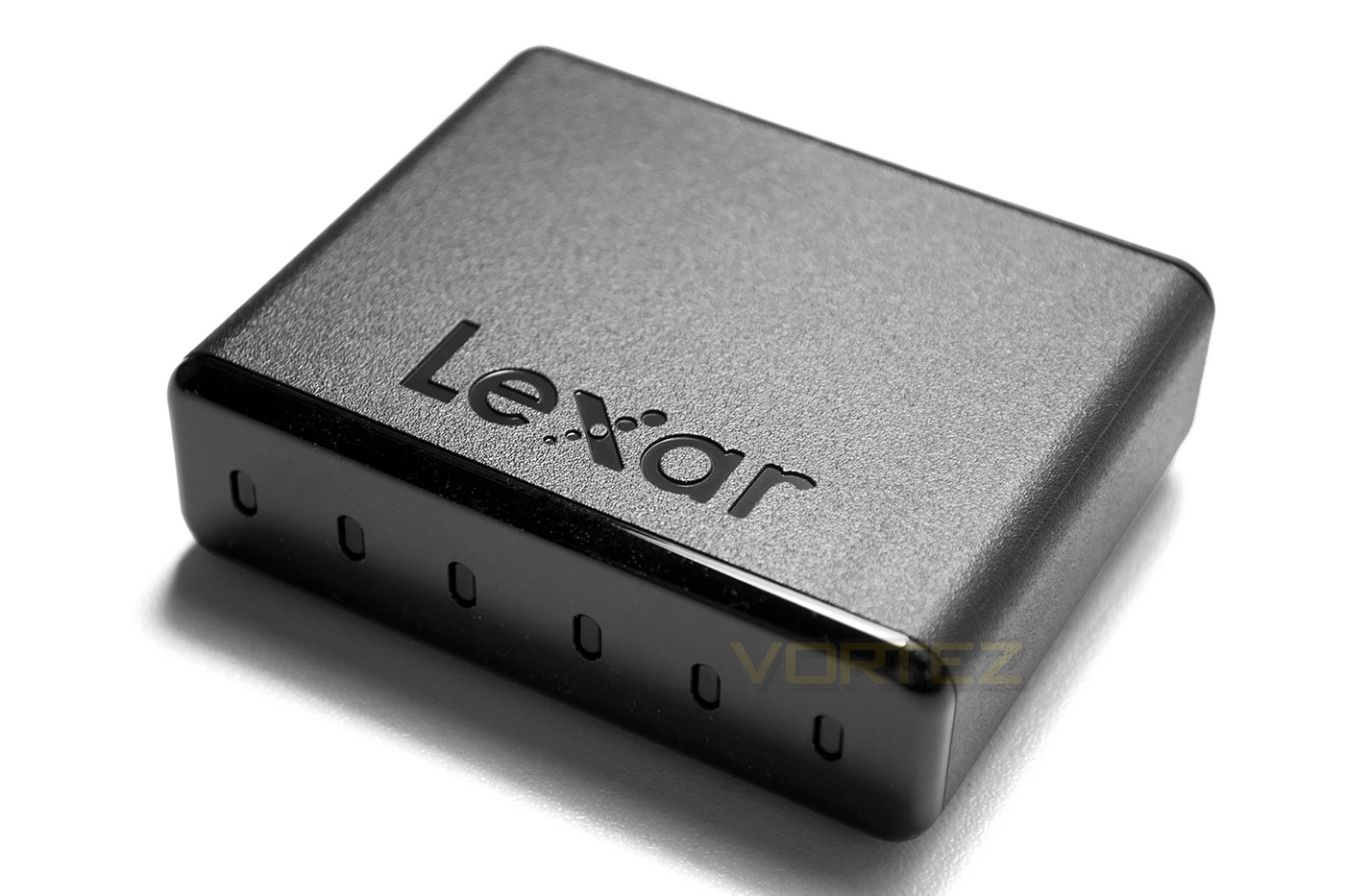
Today’s sample offers a huge 512GB of storage courtesy of Micron technology and is an external drive that can be used alone or as part of Lexar’s Workflow product line. Connecting up to a USB 3.0 (USB 2.0 backwards compatible) means that most modern PCs or laptops can take advantage of this diminutive storage device that promises to offer SSD speeds without a compromise on storage capacity.
Here’s what Lexar had to say about their latest line of products:
Lexar on their Workflow series
The Lexar® Professional Workflow line of products includes your choice of two four-bay reader and storage drive hubs, a selection of card readers, and two storage drives. Its innovative, modular design lets you create a custom setup, while its high-speed performance lets you offload and back up your work, faster. Pick and choose the right combination for your needs, and take control of your workflow.
First Look
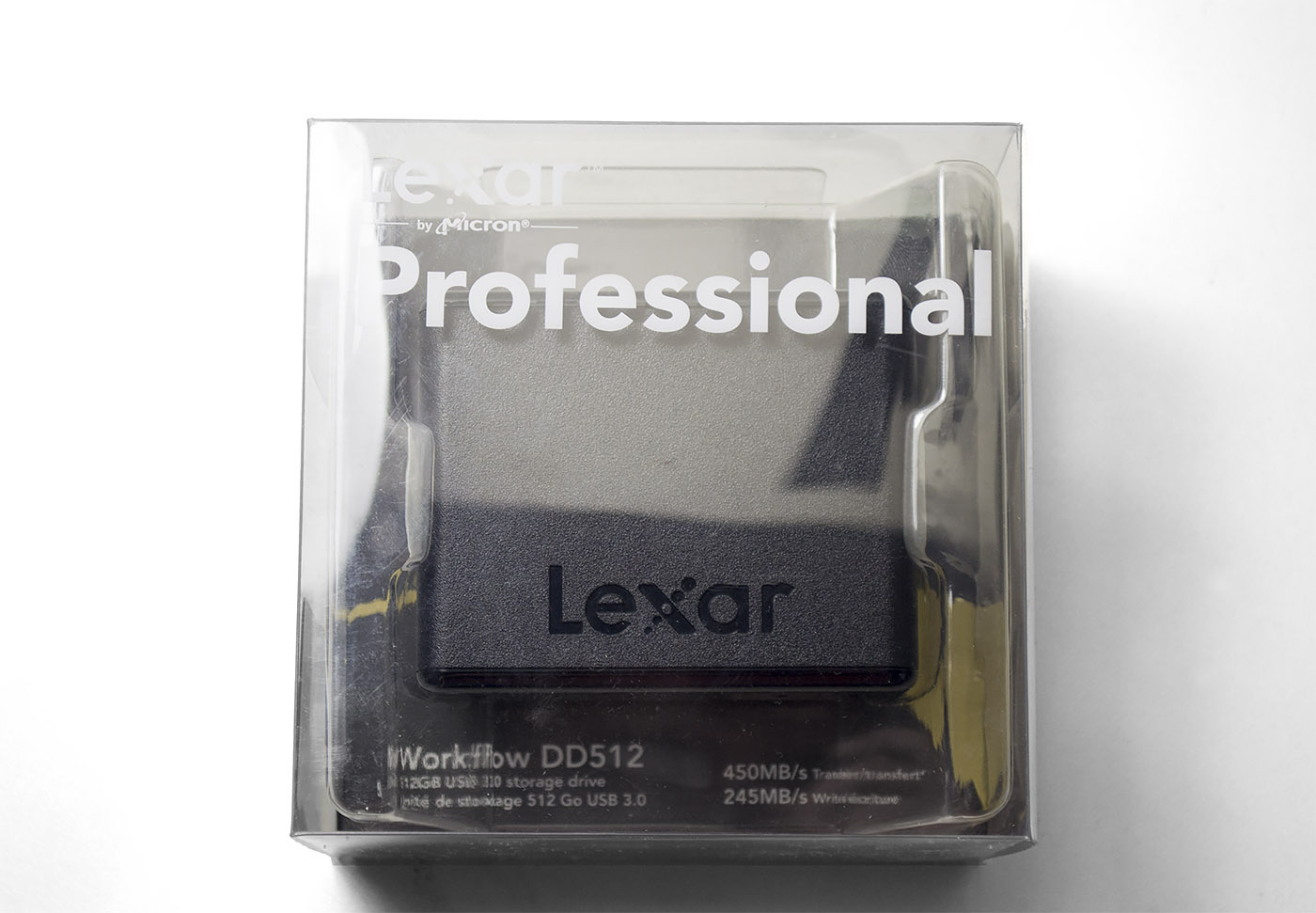
The DD512 comes in a small plastic translucent case with the product on display. Underneath this we find that Lexar have included a cardboard box containing (very) basic instructions with a USB 3.0 cable inside.
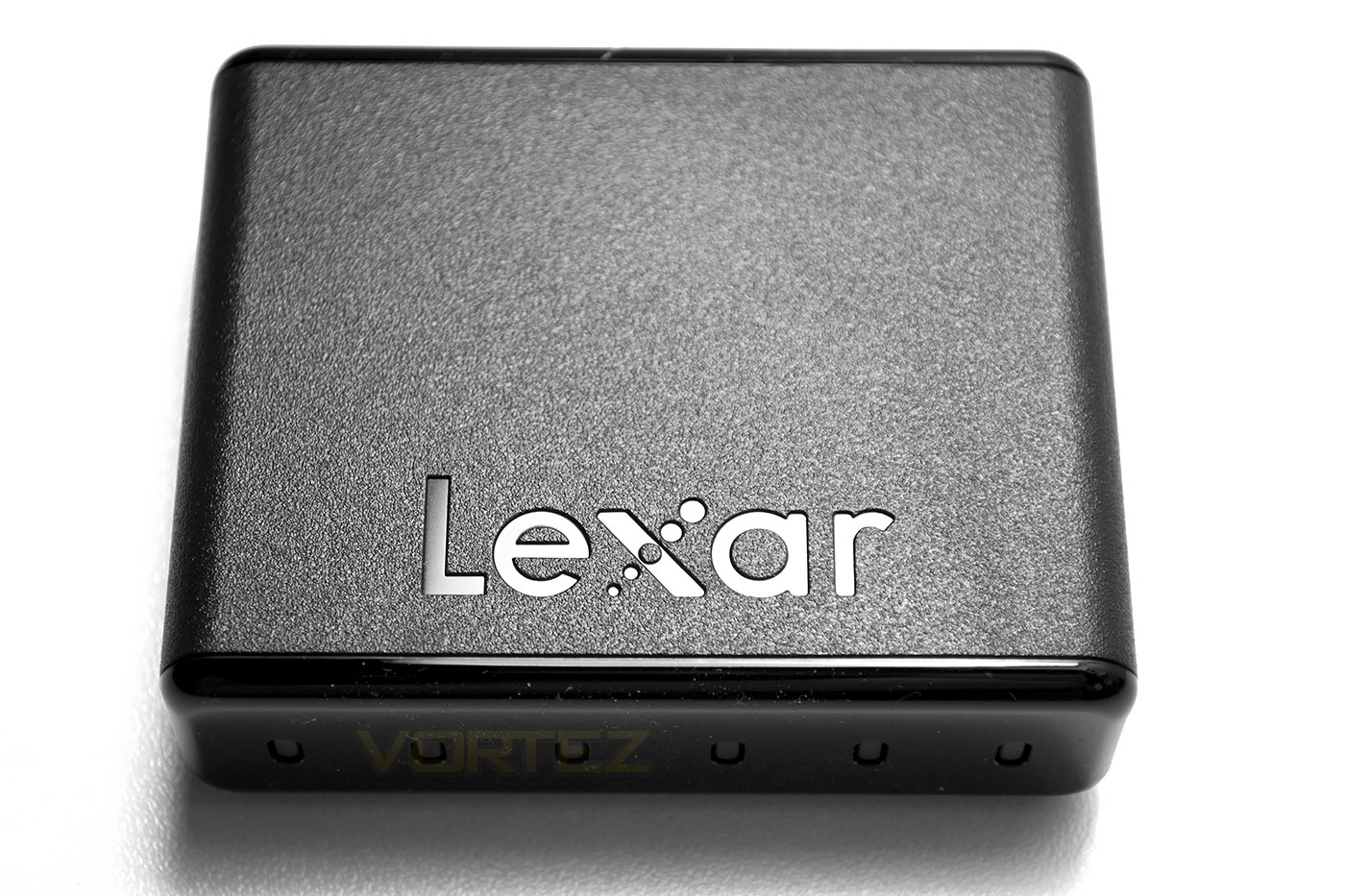
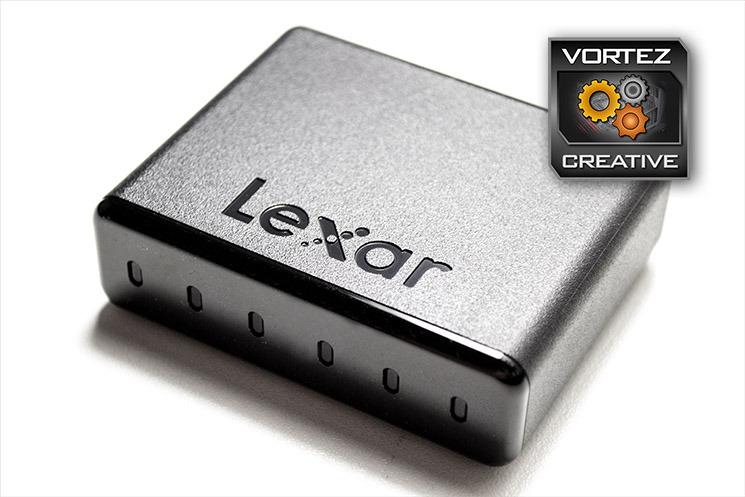
The drive itself is tiny, measuring just 60x70mm and 20mm in height and weighs little more than a standard SSD thanks to the plastic enclosure. The leading edges are gloss black with both upper and sides having a dimpled effect. The front of the drive features a number of LED’s to indicate what the drive is doing (read/write/access/power on) and are a mixture of blue and white.
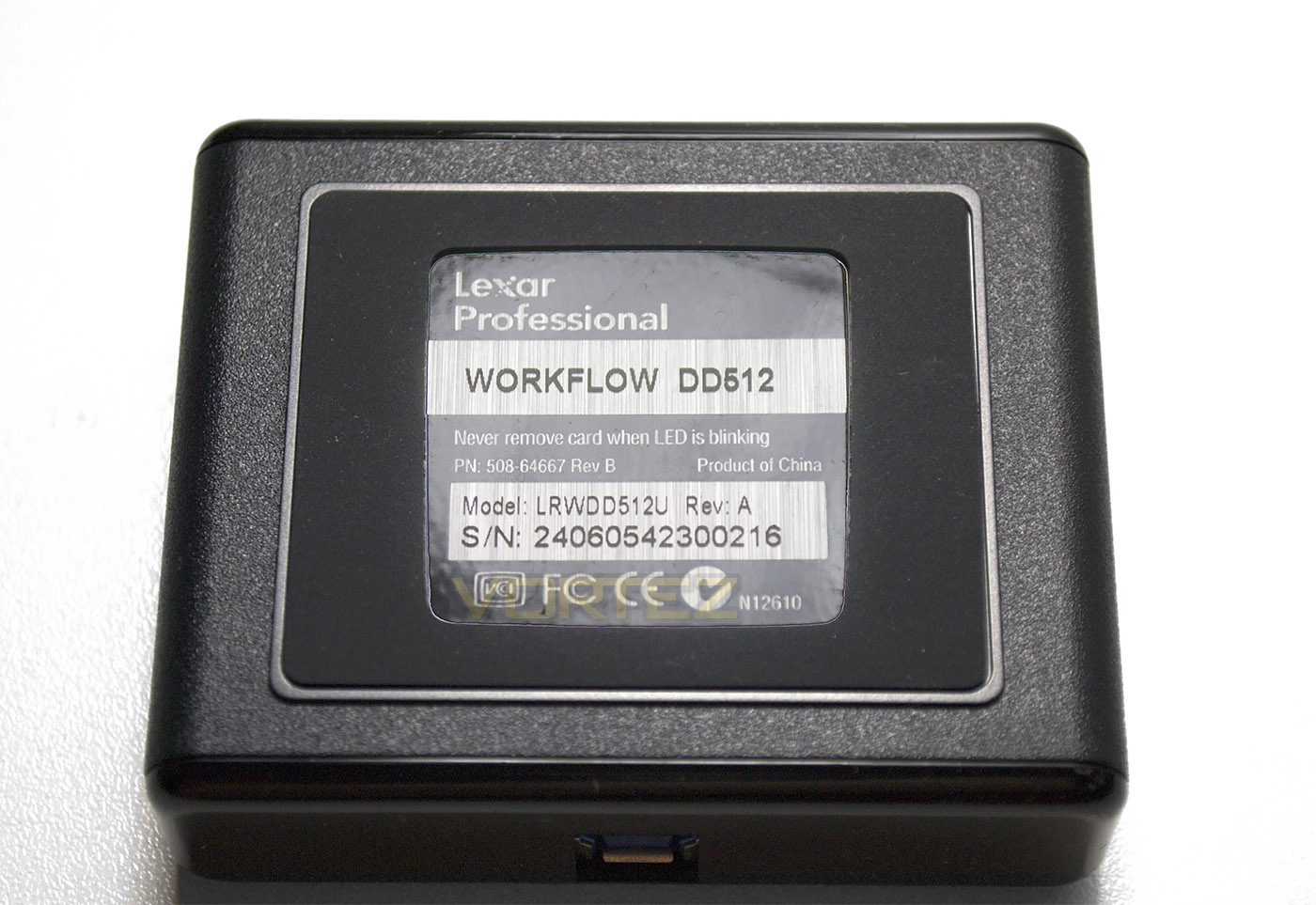
The underside of the drive features a rubber baseplate to stop the drive from skidding off your desktop however because the drive is so light, the drive doesn’t sit well on a flat surface as the USB cable has a greater effect on the drives orientation.
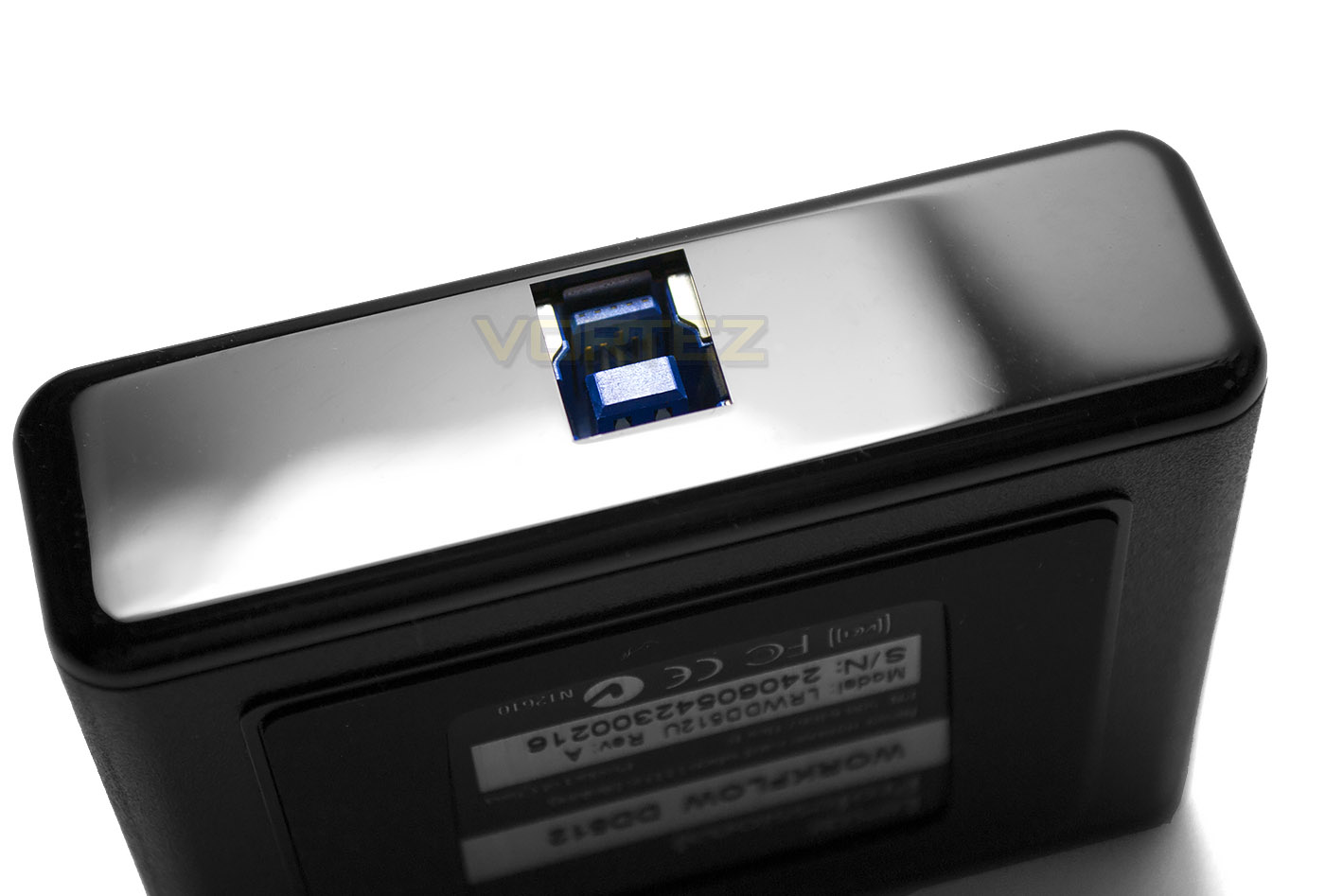
There are no power switches for this device, no buttons, nothing other than the LED’s at the front and the USB port to the rear. We would perhaps have liked to have seen a standard USB port, just in case you misplace the specialised USB 3.0B cable (below) but a normal USB 3.0 cable apparently will not afford the drive full speed as (obviously) neither will USB 2.0.
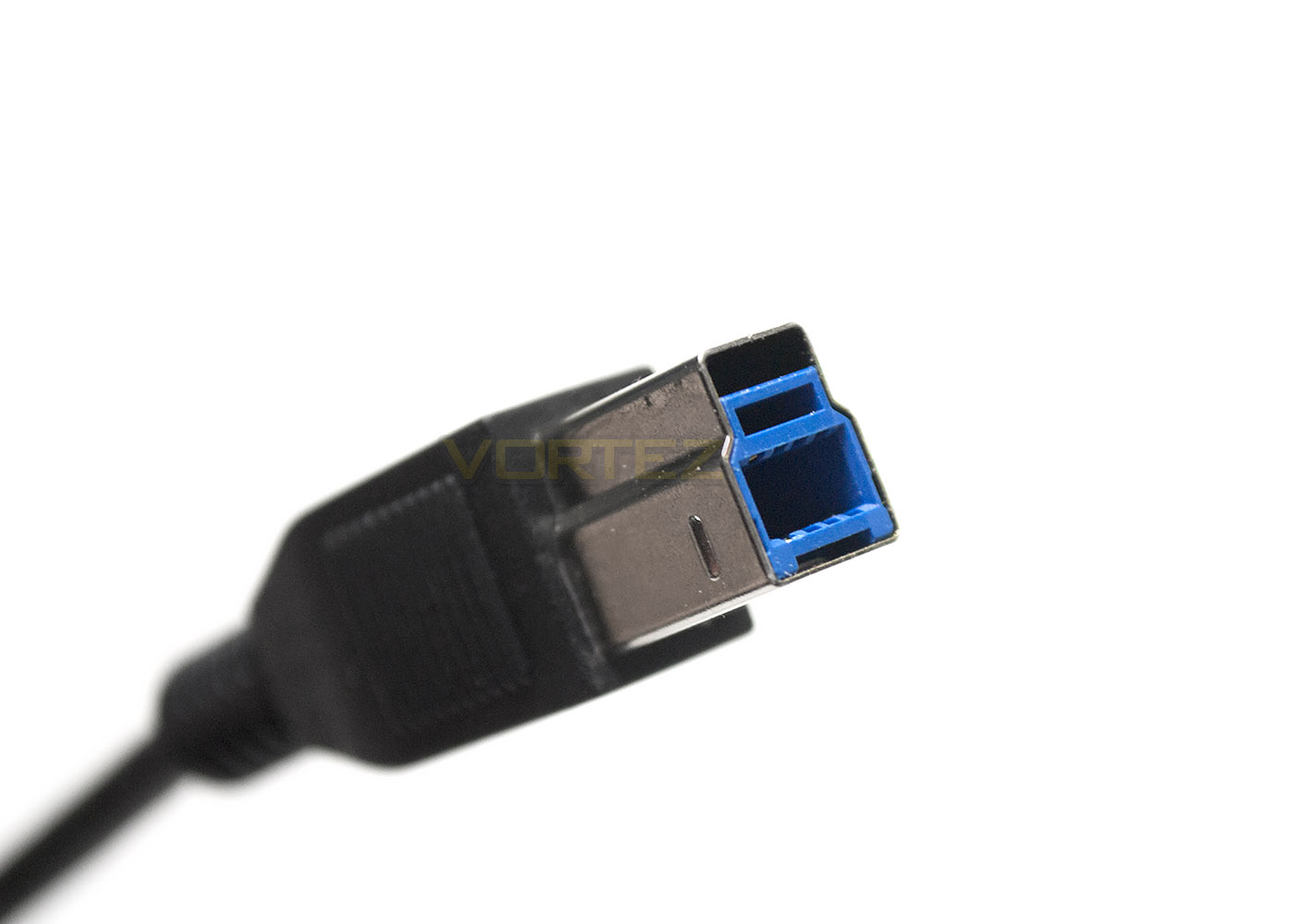
USB 3.0B is akin to your standard printer cable but with an additional protrusion on top of the connector. This added section of the cable carries five additional pins for additional boosts in speed. Due to the size of the product we would have liked to see the introduction of a micro USB 3.0B connectivity rather than the bulky full size USB 3.0B.
Overall, we liked the look of the product in that while basic, it isn’t obtrusive. the addition of lights to show us what is happening with the drive was a good addition and something we applaud. Our only criticism is the bulk of the USB cable which we would like to see thinner and more flexible adding to the portability of the unit.
Test Setup & Methodology
Our test system is formatted and a fresh version of Windows is installed with just drives in place – no additional applications. Windows is then updated to the latest release and the drivers are installed. Included in the list of benchmarks are the following applications:
Benchmarks
ATTO Disk Benchmark v2.46
AS SSD
CrystalDiskMark 3.0
Iometer
SiSoftware SANDRA 2012
AS SSD
CrystalDiskMark 3.0
Iometer
SiSoftware SANDRA 2012
Test system
CPU Intel Core-i7 4770K
Motherboard GIGABYTE Z87X-OC
Graphics MSI R7970 Black Edition
Memory 16GB Corsair Vengeance Pro (2400MHz) CL10
HDD
– Lexar Workflow DD512 512GB(USB 3.0B)
– Samsung 850 EVO 500GB(Sata 6Gbps)
– Crucial MX100 512GB(Sata 6Gbps)
– SanDisk Extreme Pro 480GB(Sata 6Gbps)
– Samsung 850 Pro 128GB (Sata 6Gbps)
– Corsair Force LX 256GB (Sata 6Gbps)
– Intel 730 240GB (Sata 6Gbps)
– ADATA Premier Pro SP920SS 256GB (Sata 6Gbps)
– OCZ Vertex 460 240GB (Sata 6Gbps)
– OCZ Vector 150 240GB (Sata 6Gbps)
– Samsung 840 EVO mSATA 500GB (Sata 6Gbps)
– Samsung 840 EVO mSATA 250GB (Sata 6Gbps)
– Kingston HyperX 3K Na’Vi 240GB (Sata 6Gbps)
– OCZ Vertex 450 256GB (Sata 6Gbps)
– Samsung 840 EVO 750GB (Sata 6Gbps)
– Samsung 840 Pro 256GB (Sata 6Gbps)
– Samsung 840 256GB (Sata 6Gbps)
– Toshiba 256GB THNSNH256GCST (Sata 6Gbps)
– OCZ Vector 256GB (Sata 6Gbps)
– Corsair Neutron GTX 240GB (Sata 6Gbps)
– Corsair Force GS 240GB (Sata 6Gbps)
– OCZ Vertex 4 128GB (Sata 6Gbps)
– Kingston HyperX 3K 120GB (Sata 6Gbps)
– Kingston HyperX 240GB (Sata 6Gbps)
– ADATA S510 120GB (Sata 6Gbps)
– Intel 520 480GB (Sata 6Gbps)
– Samsung 830 Series 256GB (Sata 6Gbps)
– Samsung HD103SJ 1TB (Sata 3Gbps)
PSU Corsair HX1050 Gold
OS Microsoft Windows 7 Professional 64-Bit
Motherboard GIGABYTE Z87X-OC
Graphics MSI R7970 Black Edition
Memory 16GB Corsair Vengeance Pro (2400MHz) CL10
HDD
– Lexar Workflow DD512 512GB(USB 3.0B)
– Samsung 850 EVO 500GB(Sata 6Gbps)
– Crucial MX100 512GB(Sata 6Gbps)
– SanDisk Extreme Pro 480GB(Sata 6Gbps)
– Samsung 850 Pro 128GB (Sata 6Gbps)
– Corsair Force LX 256GB (Sata 6Gbps)
– Intel 730 240GB (Sata 6Gbps)
– ADATA Premier Pro SP920SS 256GB (Sata 6Gbps)
– OCZ Vertex 460 240GB (Sata 6Gbps)
– OCZ Vector 150 240GB (Sata 6Gbps)
– Samsung 840 EVO mSATA 500GB (Sata 6Gbps)
– Samsung 840 EVO mSATA 250GB (Sata 6Gbps)
– Kingston HyperX 3K Na’Vi 240GB (Sata 6Gbps)
– OCZ Vertex 450 256GB (Sata 6Gbps)
– Samsung 840 EVO 750GB (Sata 6Gbps)
– Samsung 840 Pro 256GB (Sata 6Gbps)
– Samsung 840 256GB (Sata 6Gbps)
– Toshiba 256GB THNSNH256GCST (Sata 6Gbps)
– OCZ Vector 256GB (Sata 6Gbps)
– Corsair Neutron GTX 240GB (Sata 6Gbps)
– Corsair Force GS 240GB (Sata 6Gbps)
– OCZ Vertex 4 128GB (Sata 6Gbps)
– Kingston HyperX 3K 120GB (Sata 6Gbps)
– Kingston HyperX 240GB (Sata 6Gbps)
– ADATA S510 120GB (Sata 6Gbps)
– Intel 520 480GB (Sata 6Gbps)
– Samsung 830 Series 256GB (Sata 6Gbps)
– Samsung HD103SJ 1TB (Sata 3Gbps)
PSU Corsair HX1050 Gold
OS Microsoft Windows 7 Professional 64-Bit
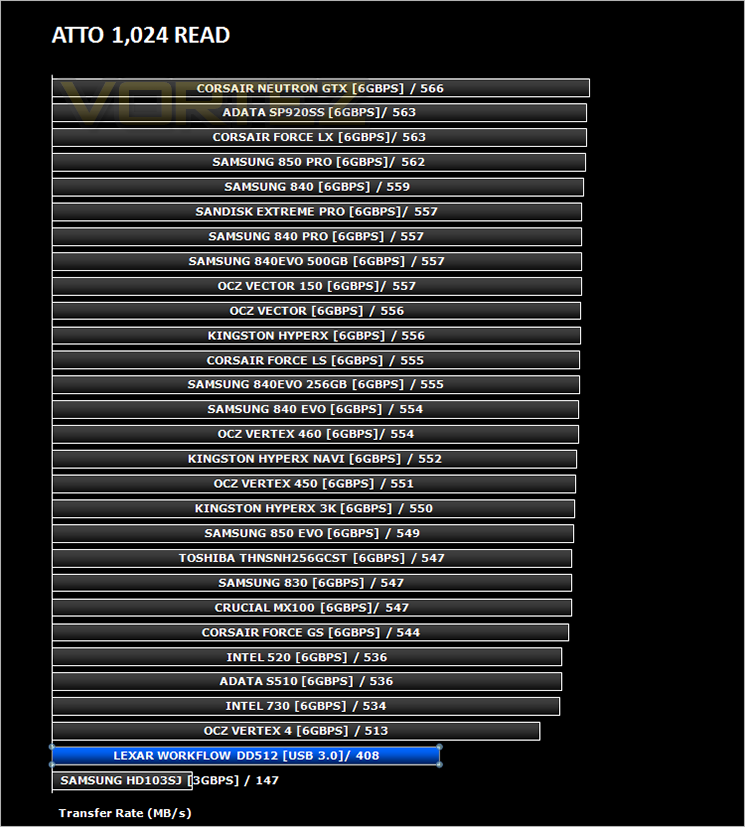
Benchmarks: ATTO
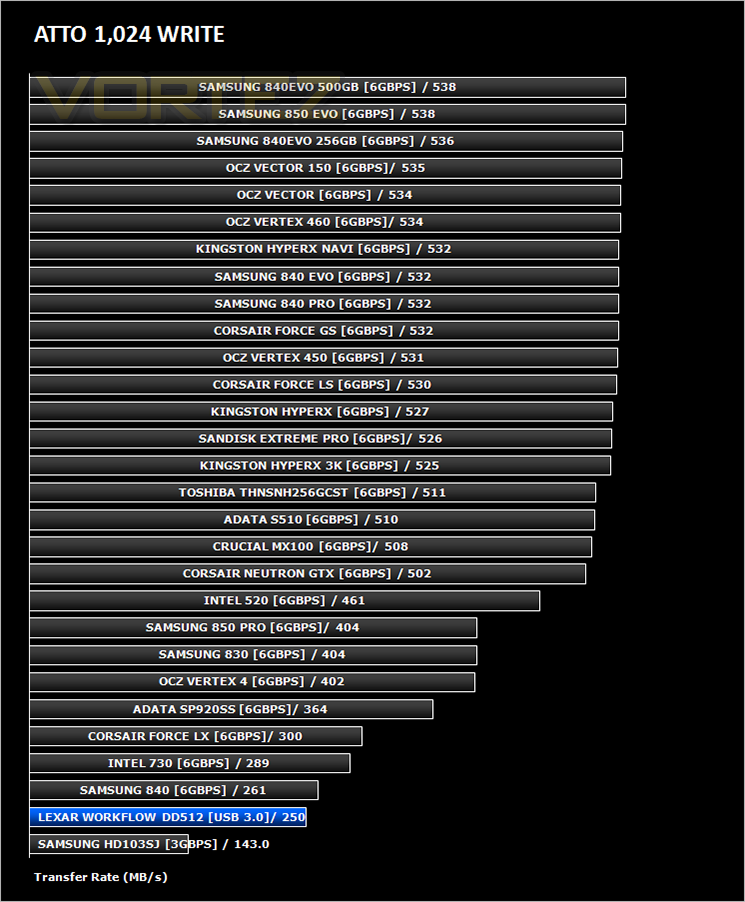
The ATTO Disk Benchmark performance measurement tool is compatible with Microsoft Windows. Measure your storage systems performance with various transfer sizes and test lengths for reads and writes. Several options are available to customize your performance measurement including queue depth, overlapped I/O and even a comparison mode with the option to run continuously. Use ATTO Disk Benchmark to test any manufacturers RAID controllers, storage controllers, host adapters, hard drives and SSD drives and notice that ATTO products will consistently provide the highest level of performance to your storage.
Benchmarks: AS SSD
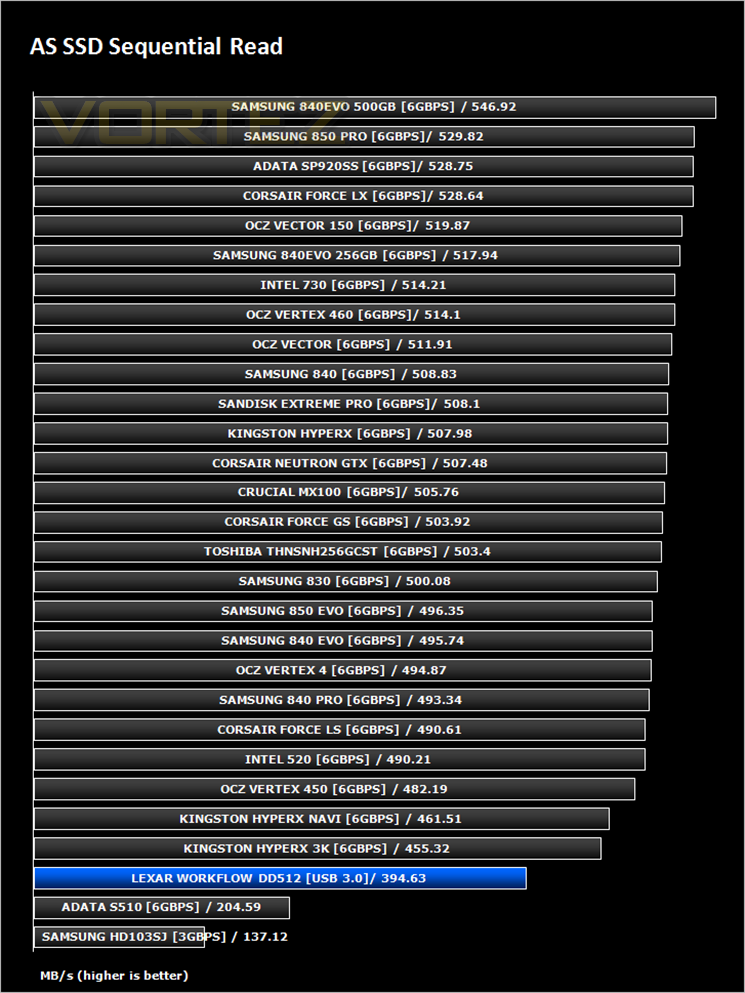
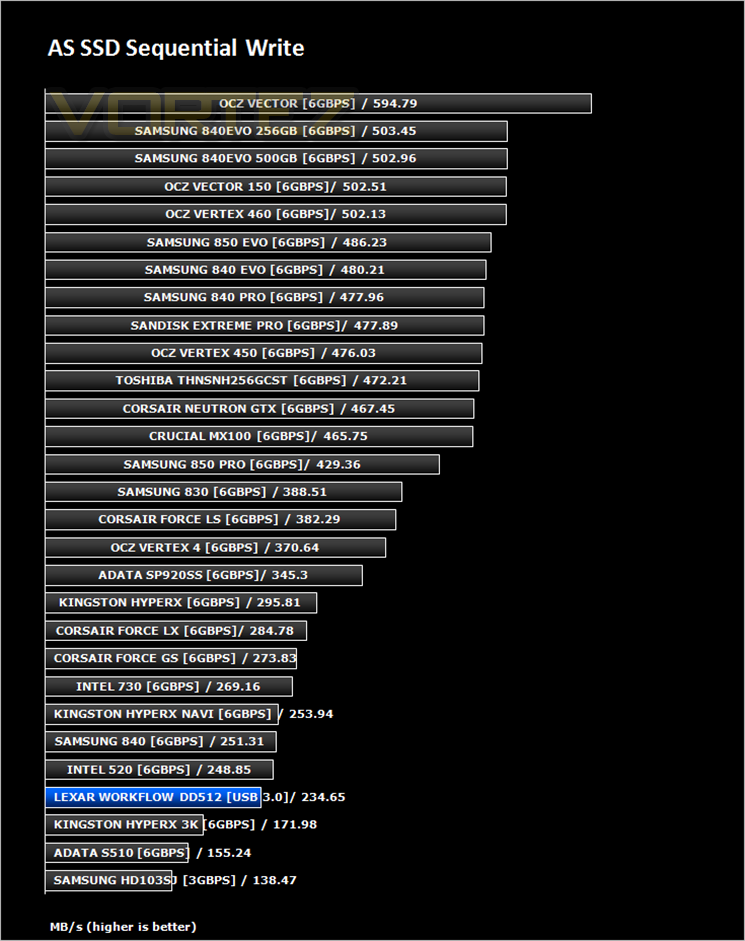
AS SSD Benchmark is a straightforward tool for measuring the speed of your SSD drive.
Simply launch the program, choose your drive, click Start, and it’ll test your SSD’s read and write speed in a variety of ways, delivering a score for each when it’s done. And if that’s not enough, there are also additional file copy and compression-related benchmarks available from the Tools menu. (The author’s support page is German only, but if you need further English explanations then there’s a thread on the program at the OCZ Technology forum.).
Simply launch the program, choose your drive, click Start, and it’ll test your SSD’s read and write speed in a variety of ways, delivering a score for each when it’s done. And if that’s not enough, there are also additional file copy and compression-related benchmarks available from the Tools menu. (The author’s support page is German only, but if you need further English explanations then there’s a thread on the program at the OCZ Technology forum.).
Benchmarks: CrystalDiskMark 3.0
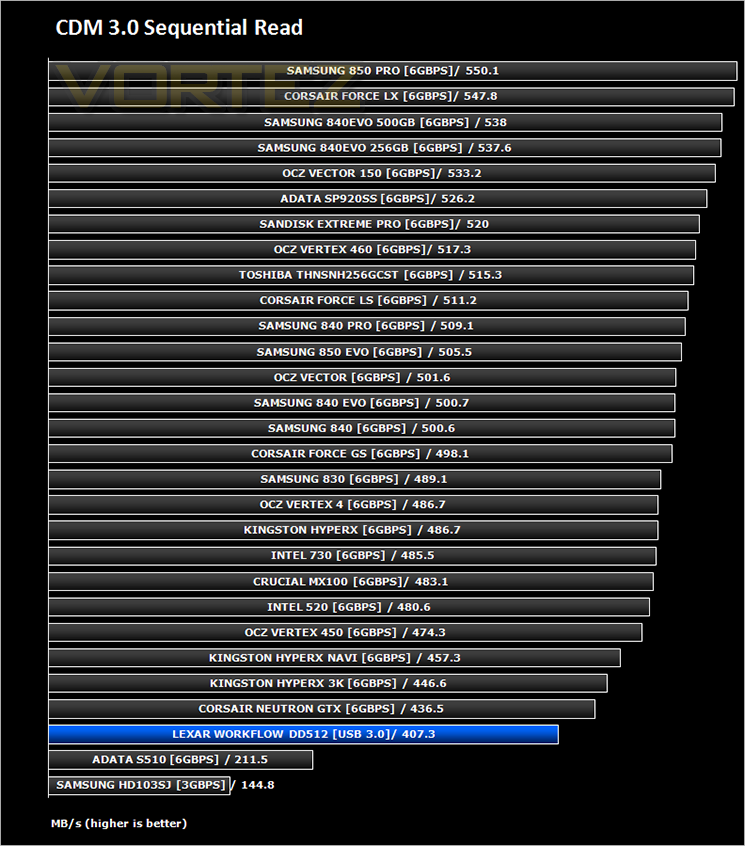
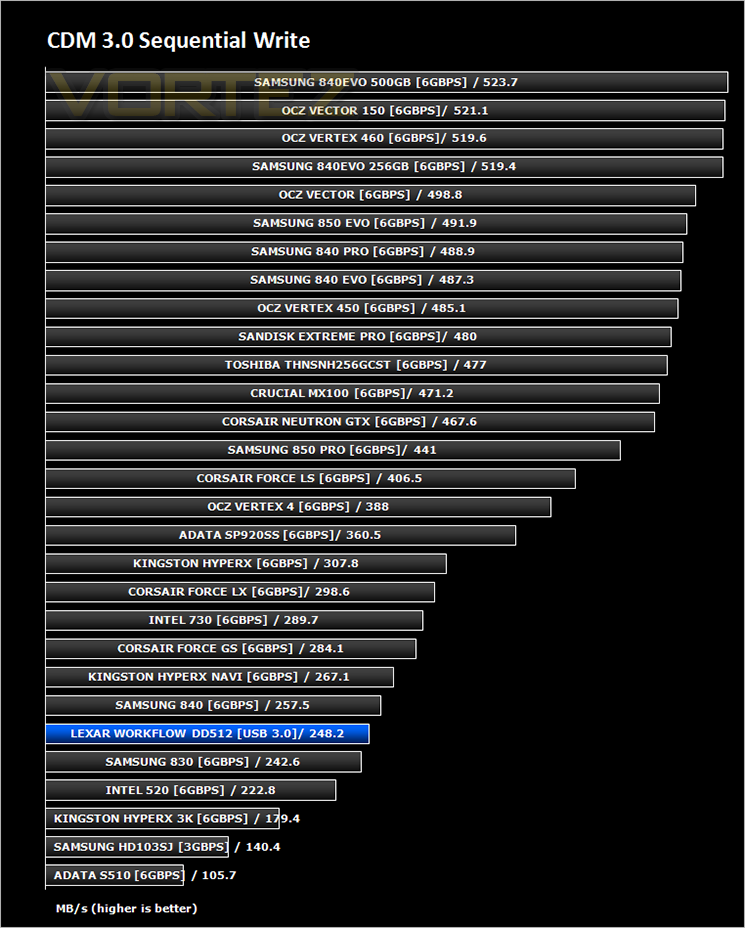
CrystalDiskMark is a disk benchmark software that analyses different types of hard drive. Giving sequential benchmark write and read statistics in MB/s. A simple program that is very useful.
Benchmarks: Iometer
Iometer is based on a client–server model, where one instance of the Iometer graphical user interface is managing multiple ‘workers’ (each one representing a separate Dynamo.exe process) which are doing the I/O. Iometer performs Asynchronous I/O – accessing files or block devices (later one allowing to bypass the file system buffers).
Iometer allows the configuration of disk parameters such as the ‘Maximum Disk Size’, ‘Starting Disk Sector’ and ‘# of Outstanding I/Os’. This allows a user to configure a test file upon which the ‘Access Specifications’ configure the I/O types to the file.
Iometer allows the configuration of disk parameters such as the ‘Maximum Disk Size’, ‘Starting Disk Sector’ and ‘# of Outstanding I/Os’. This allows a user to configure a test file upon which the ‘Access Specifications’ configure the I/O types to the file.
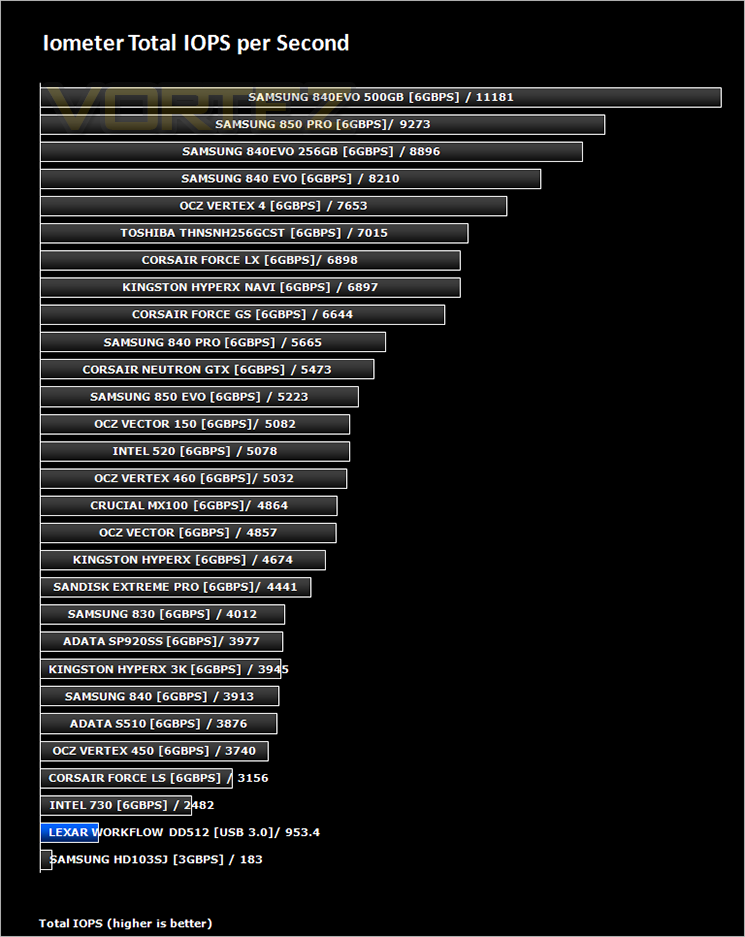
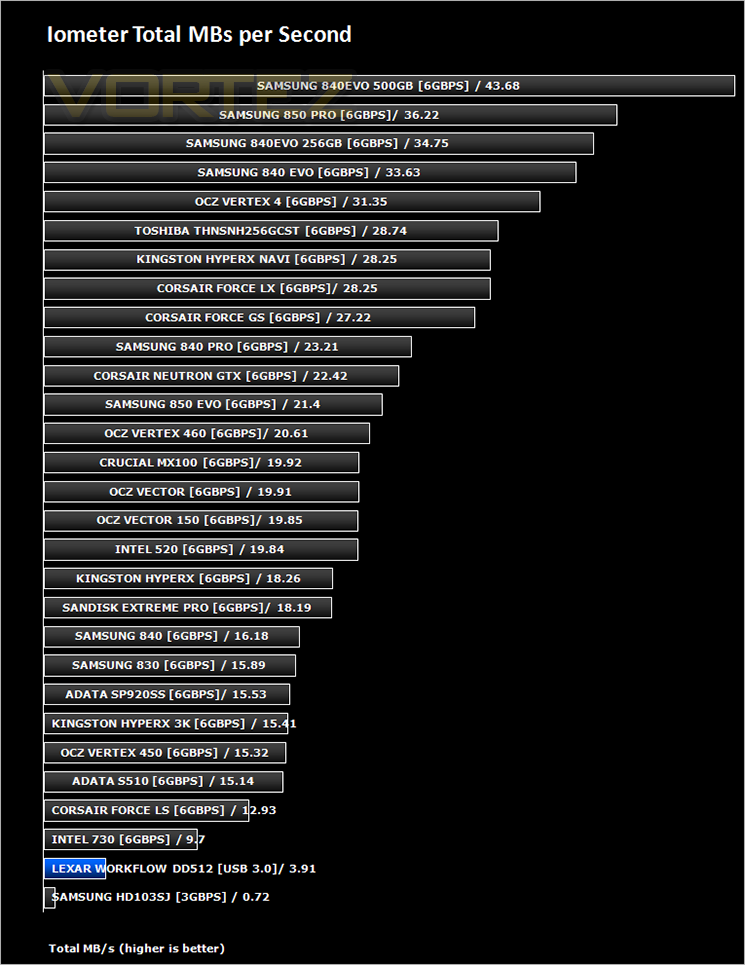
For the purpose of this test. The 4K 50%/50% read/write file will be under the examination with 100% Random Distribution – reporting back on IOPS and MBs per Second.
Benchmarks: SiSoft Sandra
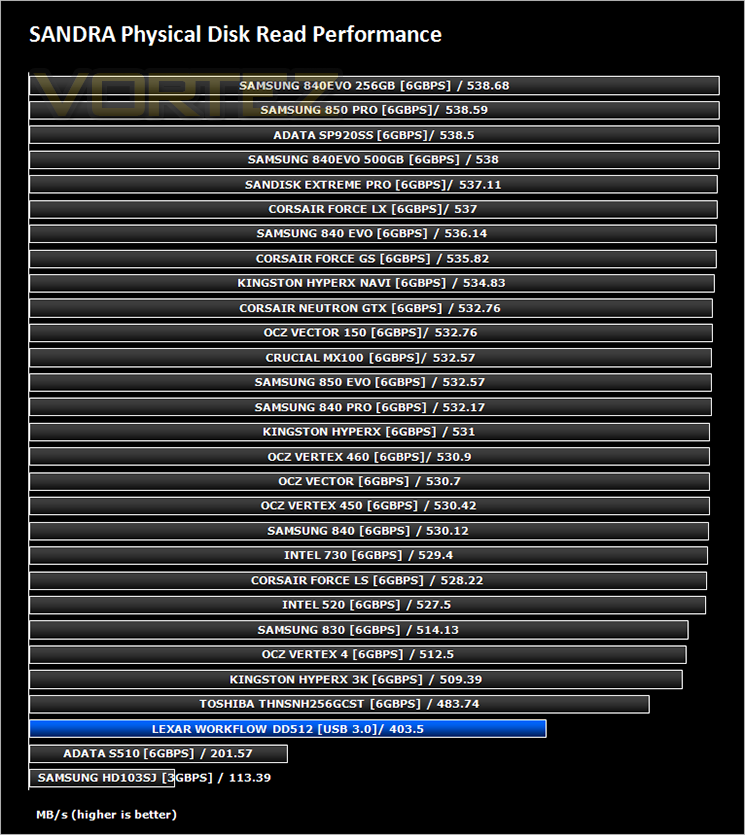
SiSoftware Sandra (the System ANalyser, Diagnostic and Reporting Assistant) is an information & diagnostic utility. It should provide most of the information (including undocumented) you need to know about your hardware, software and other devices whether hardware or software.
Sandra is a (girl) name of Greek origin that means “defender”, “helper of mankind”. We think that’s quite fitting.
It works along the lines of other Windows utilities, however it tries to go beyond them and show you more of what’s really going on. Giving the user the ability to draw comparisons at both a high and low-level. You can get information about the CPU, chipset, video adapter, ports, printers, sound card, memory, network, Windows internals, AGP, PCI, PCI-X, PCIe (PCI Express), database, USB, USB2, 1394/Firewire, etc.
Sandra is a (girl) name of Greek origin that means “defender”, “helper of mankind”. We think that’s quite fitting.
It works along the lines of other Windows utilities, however it tries to go beyond them and show you more of what’s really going on. Giving the user the ability to draw comparisons at both a high and low-level. You can get information about the CPU, chipset, video adapter, ports, printers, sound card, memory, network, Windows internals, AGP, PCI, PCI-X, PCIe (PCI Express), database, USB, USB2, 1394/Firewire, etc.
Conclusion
It’s difficult to place the Lexar Workflow DD512. On the one hand it is a little slower than your average SSD. While we weren’t expecting ultra performance from this product we were however hoping for performance akin to an SSD given that it takes advantage of this technology. On this front the 512DD doesn’t deliver. Speeds you can expect are 350-400MB/s read with write speeds maxing out around the 240MB/s mark. It is however very close to those SSD speeds and much, much faster than a regular, mechanical hard drive. More to the point it is portable. Without the USB cable one could easily fit this in your pocket and as such lugging around slower, bulkier external devices will be a thing of the past.
You can expect to pay £150 for one of these drives which is roughly the same as an SSD of the same capacity making the DD512 good value for money. While we didn’t test power consumption we do not expect it to have a massive effect on notebook battery life given that this device is in effect an SSD and with that comes low power consumption.
Commending the DD512 with our creative award was easy as it is well deserved due to the innovative design. It can be used alone or as part of a bigger ‘Workflow’ system. IF you are looking for a speedy, lightweight, portable external storage solution we think you would be foolish not to consider the Lexar Workflow DD512 because there are few other devices that offer the same benefits.
In summary:
Fast, portable and a no-nonsense setup makes it a excellent choice for portable external data storage.
Pros
+ Fast
+ Portable
+ 2 year warranty
+ small footprint
Cons
– Not quite as fast as a regular SSD
– USB cable adds unwanted bulk
+ Fast
+ Portable
+ 2 year warranty
+ small footprint
Cons
– Not quite as fast as a regular SSD
– USB cable adds unwanted bulk

Click here for an explanation of our awards at Vortez.net.