Armed with the latest Intel Z390 chipset and ready for the new Intel Core i9-9900K, this black/silver motherboard from MSI bears a selection of great features and promises to offer superb performance

Product on Review: MPG Z390 Gaming Pro Carbon
Manufacturer & Sponsor: MSI
Street Price: £219 GBP $219 USD $339 AUD
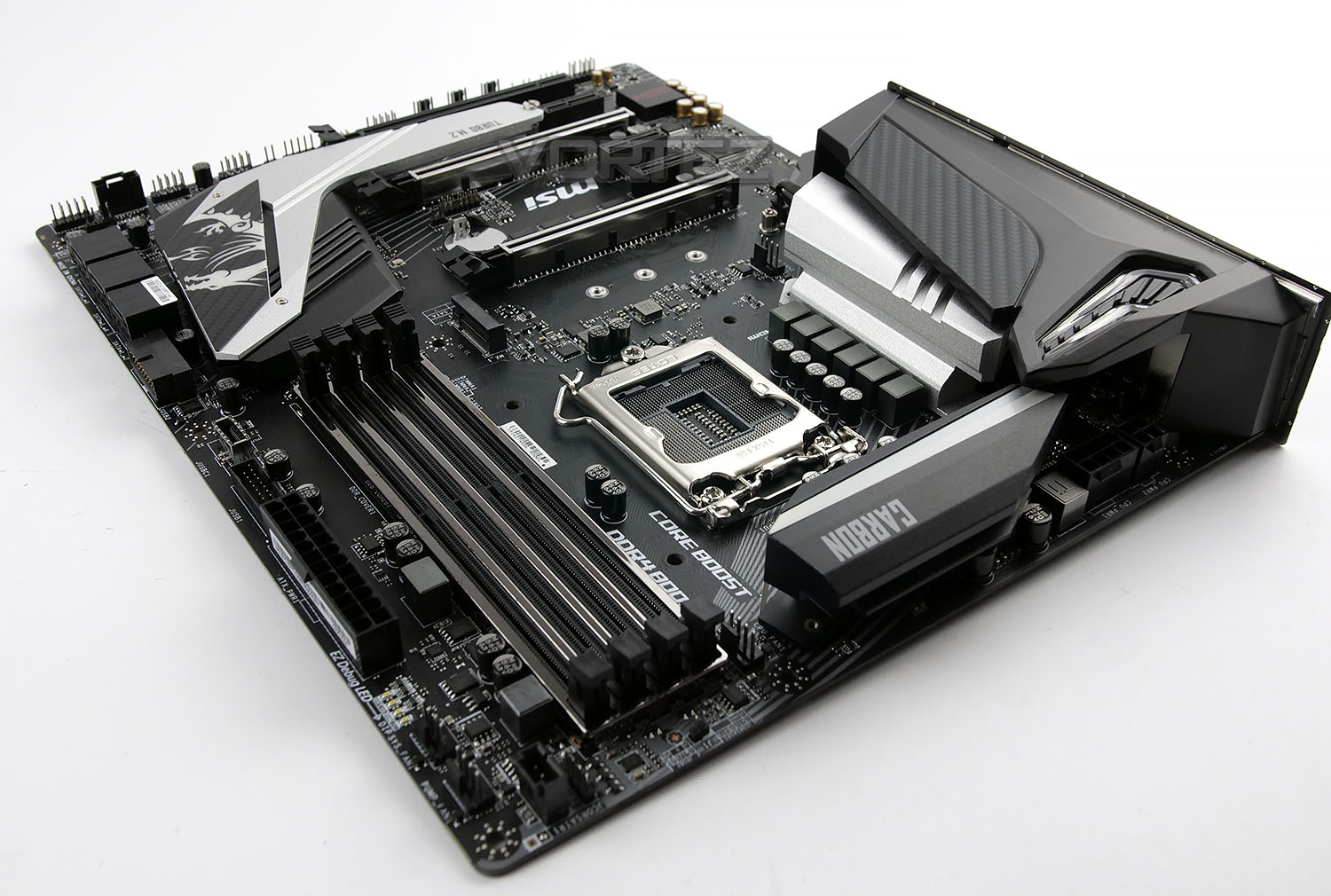
Today we introduce you to the MSI MPG Z390 Gaming Pro Carbon; this board pads out the mid-high end of MSIs lineup with several impressive features. Following the typical styling of the Carbon lineup, the Z390 Gaming Pro Carbon is no different, with the black and white colour scheme. The dragon also makes an appearance on the Southbridge.
Not only does this board utilise Intel’s latest Z390 chipset, which offers compatibility with 8th Gen Intel Core CPUs, as well as the new 9th Gen Intel Core i9-9900K. We also see a pre-installed rear IO shield, substantial VRM power delivery for the CPU, SLI and CrossfireX support, M.2 NVMe storage and Audio Boost 4 sound output.
The MPG nomenclature is derived from a design language seeking a Modish outlook and high Performance for the best Gaming experience. So you can expect good things from this range.
MSI on the MPG Z390 Gaming Pro Carbon
Designed with Modish outlook and high Performance for the best Gaming experience. The MPG motherboards always feature unique look & feel, unlimited customisation options and packed with more exclusive gaming weapons. Inherited curves and shape of concept cars, the unique and powerful design offers unlimited customisation options by using MSI Mystic Light RGB and also tuned for great performance. With plenty of features, the CARBON series tailored to given gamers the best gaming experiences.
Technical Specifications
Below are the technical specifications concerning the GAMING PRO CARBON:
CPU
• Supports 9th/8th Gen Intel® Core™ i3/i5/i7 processors for Socket LGA1151
Chipset
• Intel® Z390 Chipset
Main Memory
• 4 x DDR4 memory slots, support up to 64GB
– Supports DDR4 Up to 4400MHz
• Dual channel memory architecture
• Supports ECC, un-buffered memory
– ECC UDIMM memory (non-ECC mode)
• Supports Intel® Extreme Memory Profile (XMP)
Slots
• 3 x PCIe 3.0 x16 slots (Modes: 16, 8, 4)
• 3 x PCIe 3.0 x1 slot
Onboard Graphics
• 1 x HDMI™ port
• 1 x Displayport™ port
Multi-GPU
• Supports 3-Way AMD® CrossFire™ Technology
• Supports 2-Way NVIDIA® SLI™ Technology
Storage
• Intel® Z390 Chipset
• 6 x SATA 6Gb/s ports
• 2 x M.2 PCIe Gen3 slots (Supports Intel Optane Memory – 8th Gen Processor required)
RAID
• Intel® Z390 Chipset
– Supports RAID 0, RAID1, RAID 5 and RAID 10 for SATA storage devices
Audio
• Realtek ALC 1220 Codec
– 7.1-Channel High Definition Audio
– Supports S/PDIF output
LAN
• 1 x Intel i219 Gigabit LAN controller
Back Panel I/O Ports
• PS/2 Combo Port
• Gigabit LAN
• HD Audio Connectors
• 2x USB 2.0
• 1x DisplayPort
• 1x HDMI
• 1x USB 3.1 Gen2 Type-A + C
• 3x USB 3.1 Gen2 Type-A
• Optical S/PDIF out
Dimension
• 12 inch x 9.6 inch ( 30.5 cm x 24.4 cm )
• ATX Form Factor
• Supports 9th/8th Gen Intel® Core™ i3/i5/i7 processors for Socket LGA1151
Chipset
• Intel® Z390 Chipset
Main Memory
• 4 x DDR4 memory slots, support up to 64GB
– Supports DDR4 Up to 4400MHz
• Dual channel memory architecture
• Supports ECC, un-buffered memory
– ECC UDIMM memory (non-ECC mode)
• Supports Intel® Extreme Memory Profile (XMP)
Slots
• 3 x PCIe 3.0 x16 slots (Modes: 16, 8, 4)
• 3 x PCIe 3.0 x1 slot
Onboard Graphics
• 1 x HDMI™ port
• 1 x Displayport™ port
Multi-GPU
• Supports 3-Way AMD® CrossFire™ Technology
• Supports 2-Way NVIDIA® SLI™ Technology
Storage
• Intel® Z390 Chipset
• 6 x SATA 6Gb/s ports
• 2 x M.2 PCIe Gen3 slots (Supports Intel Optane Memory – 8th Gen Processor required)
RAID
• Intel® Z390 Chipset
– Supports RAID 0, RAID1, RAID 5 and RAID 10 for SATA storage devices
Audio
• Realtek ALC 1220 Codec
– 7.1-Channel High Definition Audio
– Supports S/PDIF output
LAN
• 1 x Intel i219 Gigabit LAN controller
Back Panel I/O Ports
• PS/2 Combo Port
• Gigabit LAN
• HD Audio Connectors
• 2x USB 2.0
• 1x DisplayPort
• 1x HDMI
• 1x USB 3.1 Gen2 Type-A + C
• 3x USB 3.1 Gen2 Type-A
• Optical S/PDIF out
Dimension
• 12 inch x 9.6 inch ( 30.5 cm x 24.4 cm )
• ATX Form Factor
Box, Bundle & First Look
Traditionally, MSI’s colour scheme has always been black and red, though recently we’ve seen a shift towards different styles and colours. The MSI MPG Z390 Gaming Pro Carbon uses a blue and purple theme. The front of the box gives very little information other than mention of the Z390 chipset as well as MSI’s Mystic Light and a pre-installed rear IO shield.
Within the box there are a large number of bundled accessories which include the following:
– MSI User Guide
– Quick Installation Guide
– Software/Driver DVD
– 2 x SATA Data Cables
– 1 x MSI SLI HB Bridge M
– 1 x Cable Label Sticker Sheet
– 2 x M.2 Screws
– 1 x MSI Case Badge
Various RGB Extension Cables
Please remember that the rear IO shield is pre-attached, so is obviously missing from this section. A large portion of the PC building enthusiast community have forgotten to install this crucial piece, only to find it’s impossible to add in later, so we like to see these arrive pre-installed.
The MSI SLI Bridge included with the motherboard is compatible with the NVIDIA GEFORCE 10-Series GPUs, though is not compatible with the latest Turing GPUs, such as the RTX 2080 and RTX 2080Ti, which use the new NVLINK interconnect.
As is generally the case with MSIs Gaming Pro Carbon series, there’s very little in the way of colour, focussing on the Carbon scheme of black, grey and silver. This should coordinate with other components easily, and help to show off any RGB lighting effects that you may employ.
The ATX motherboard, measuring in at 305mm x 244mm, packs a pair of M.2 connections, both supporting NVMe and SATA storage; the lower one is equipped with a thermal heatsink connected to the Southbridge, helping to minimise any thermal throttling from some of the hotter NVMe disk drives on the market. Reinforced DIMM and PCI-E slots also help round out the rugged feature set on this board, helping longevity and stability by shielding these sensitive connections from interference.
MSI’s Mystic Light RGB lighting is equipped along the rear-right edge of the motherboard, as well as the very top-left above the VRM heatsinks.
Closer Look
Thanks to the latest Z390 chipset, the LGA1151 socket is capable of supporting next-gen Intel CPUs as well as the current Intel 8th Gen Core CPUs. Surrounding the CPU socket is 10+1+1 all-digital power phase, ensuring optimal operating conditions for your CPU, as well as providing the best possible power delivery for overclocking. To allow cool and stable operation of the power phase, there’s a pair of independent heatsinks dissipating heat as well as providing a stylish appearance.
Tucked away behind the heatsinks is an 8pin + 4pin power connection for the CPU. This suggests the motherboard is capable of supporting some higher-power CPUs, perhaps with a TDP surpassing the 100W mark.
Located nearby to the CPU socket is only a single 4-pin PWM fan header, no water-pump headers here.
The Z390 chipset doesn’t change anything in the memory department, still utilising dual-channel memory. MSI’s MPG Z390 Gaming Pro Carbon is capable of 4400MHz (OC) and up to 64GB of addressable RAM. The shielding surrounding the DIMM slots helps to reduce interference from surrounding components, increasing stability.
Alongside the DIMM slots are a pair of 4-pin PWM connections, one of which is specifically for watercooling pumps; these are generally located a little closer to the CPU socket for all-in-one solutions. We also see a JRGB header as well as the JCORSAIR standard for Corsair-specific lighting. Front USB 3.1 and 3.0 is catered for to the left of the 24-pin ATX power connection.
Finally, as EZ Debug LED layout is tucked in between the fan headers and ATX power connection. This enables the user a quick and easy indication of any problems that may occur when booting the system; sometimes something as simple as a bad mount on a RAM stick or the GPUs auxiliary power isn’t connected can be the culprit, which these LEDs would help to indicate.
While we’re seeing a gradual shift towards more and more users opting for the extra speed and responsiveness of an NVMe SSD, SATA will still be present for years to come thanks to the price-per-gigabyte that hard disk drives can offer. This particular board offers a total of six SATA 3.0 ports, arranged in a right-angle from the board.
The port to the right is a secondary front USB 3.0 port, again at a right-angle, to aid with cable management in some cases.
Looking at the motherboard from above, you can clearly see the full outfit of PCI-E slots. Functionality consists of the following:
• 3x PCI-e 3.0 x16 slots (Modes: 16, 8, 4)
• 4x PCI-e 3.0 x1 slots
AMD CrossfireX and NVIDIA SLI and NVIDIA NVLink is supported on the MSI Z390 board, allowing up to three AMD cards or a pair of NVIDIA. NVLink requires the purchase of a separate NVLink connector.
At the top of the image is the first M.2 connector, supporting all four of the common form factors: 22/42, 22/60, 22/80 and 22/110. The 2nd M.2 connector is located under the large silver heatsink, labelled TURBO M.2. This supports the same four form factors. Both ports are capable of PCI-E x4 NVMe connectivity for incredible throughput.
The bottom left corner of the board is isolated from the rest via a physical trace through the motherboard, this prevents any unwanted interference which audio components are particularly susceptible to. The Audio Boost 4 audio processor uses the ALC1220 Realtek codec and passes the audio output via audio caps which are tuned for a warm sound.
Last, but not least, is the rear IO. As we’ve previously mentioned, the IO Shield is pre-attached, saving you the bother of forgetting to install it before the motherboard.
Starting at the left and working towards the right, we have:
– 1x PS/2 Mouse/Keyboard port
– 2x USB 3.0
– 1x DisplayPort
– 1x HDMI port
– 1x USB 3.1 Gen. 2 Type-A
– 1x USB 3.1 Gen. 2 Type-C
– 1x Intel® I219-V Gigabit LAN
– 2x USB 3.1
– 5x 3.5mm audio in/out (Rear Speaker / Central / Bass / Line in / Front Speaker / Microphone)
– 1x SPDIF out
Test Setup & Methodology
Test Setup
CPU Intel Core i9-9900K
Cooling Corsair H100i GTX
Motherboard MSI MPG Z390 Gaming Pro Carbon
Memory 16GB Corsair Vengeance LPX 3000MHz
Graphics GIGABYTE GTX 1080 G1 Gaming
Storage OCZ Vector 180 240GB SSD
PSU Corsair HX1050 80 Plus Gold Certified PSU
Monitor AOC U2879VF
Capture Device Epiphan AV.iO 4K
Cooling Corsair H100i GTX
Motherboard MSI MPG Z390 Gaming Pro Carbon
Memory 16GB Corsair Vengeance LPX 3000MHz
Graphics GIGABYTE GTX 1080 G1 Gaming
Storage OCZ Vector 180 240GB SSD
PSU Corsair HX1050 80 Plus Gold Certified PSU
Monitor AOC U2879VF
Capture Device Epiphan AV.iO 4K
Benchmarks
Cinebench R15 – CPU/OpenGL Score
x264 HD 4.0 – 1st and 2nd pass encoding
SiSoftware SANDRA – CPU & Memory benchmarks
POV-RAY – CPU benchmarks
TrueCrypt – CPU benchmarks
AIDA64 – CPU benchmarks & Memory
PCMark 8 – Home Suite & Photoshop
3DMark FireStrike – 3D Benchmark
Games – Rise of the Tomb Raider & Total War: WARHAMMER
x264 HD 4.0 – 1st and 2nd pass encoding
SiSoftware SANDRA – CPU & Memory benchmarks
POV-RAY – CPU benchmarks
TrueCrypt – CPU benchmarks
AIDA64 – CPU benchmarks & Memory
PCMark 8 – Home Suite & Photoshop
3DMark FireStrike – 3D Benchmark
Games – Rise of the Tomb Raider & Total War: WARHAMMER
Other Software
Temperature Analysis: Real Temp
Stress Testing Software: AIDA64 Stability Test
CPU Specification Monitoring: CPU-Z
Stress Testing Software: AIDA64 Stability Test
CPU Specification Monitoring: CPU-Z
Benchmarks: Power Consumption
It’s interesting to note the power consumption across all motherboards. Although they are using the Z390 chipset, energy results can fluctuate between manufacturers due to the features and specifications that are integrated. First of all, for the idle tests the system is cold booted into Windows and no additional applications are executed – the watts are noted on the external energy monitor we use and then the system is loaded with 3DMark FireStrike – watts are again monitored for the duration of the test and the highest rated wattage result is then noted down. Below are the results of this energy test.
Benchmarks: Cinebench R15
CINEBENCH is a real-world cross platform test suite that evaluates your computer’s performance capabilities. CINEBENCH is based on MAXON’s award-winning animation software CINEMA 4D, which is used extensively by studios and production houses worldwide for 3D content creation. MAXON software has been used in blockbuster movies such as Iron Man 3, Oblivion, Life of Pi or Prometheus and many more.
Benchmarks: X264 HD
Simply put, this test measures how fast your machine can encode a short, DVD quality MPEG-2 video clip into a high-quality x264 video clip. What’s x264, you ask? It’s more or less the next-generation Xvid/DivX codec. I think it’s ideal for a benchmark because the application (x264.exe) reports fairly accurate compression results (in frames per second) for each pass of the video encoding process, and it uses multi-core processors very efficiently.
Benchmarks: SiSoftware SANDRA
SANDRA isn’t always a benchmark that is included in hardware reviews but we believe it shouldn’t be ignored. SANDRA provides a vigorous package that tests your system in a rather large array of benchmarks. There are many aspects of benchmark that can be executed. We will be considering – CPU and memory tests.
Benchmarks: POV-RAY
Persistence of Vision Raytracer’s PovRay is a free and open source 3D animator application with versions for computers with different operating systems.
This product allows users to build their custom 3D worlds with excellent quality despite their computer’s hardware. It has adjustable options for levels of radiance, refraction, and reflection. Calculation time may vary depending on the computer model, but PovRay can adapt to many computer builds, and is supported by the open source community.
This product allows users to build their custom 3D worlds with excellent quality despite their computer’s hardware. It has adjustable options for levels of radiance, refraction, and reflection. Calculation time may vary depending on the computer model, but PovRay can adapt to many computer builds, and is supported by the open source community.
Benchmarks: TrueCrypt
TrueCrypt is a discontinued source-available freeware utility used for on-the-fly encryption (OTFE). It can create a virtual encrypted disk within a file or encrypt a partition or (under Microsoft Windows except Windows 8 with GPT) the entire storage device (pre-boot authentication).
Benchmarks: AIDA64
AIDA64 Product PageThis simple integer benchmark focuses on the branch prediction capabilities and the misprediction penalties of the CPU. It finds the solutions for the classic “Queens problem” on a 10 by 10 sized chessboard. At the same clock speed theoretically the processor with the shorter pipeline and smaller misprediction penalties will attain higher benchmark scores. For example — with HyperThreading disabled — the Intel Northwood core processors get higher scores than the Intel Prescott core based ones due to the 20-step vs 31-step long pipeline. CPU Queen test uses integer MMX, SSE2 and SSSE3 optimizations.
Benchmarks: PCMark 8 & PCMark 10
PCMark 8 combines performance benchmarking with battery life measurement and includes tests based on popular Adobe and Microsoft applications. Whether you are looking for long battery life, or maximum power, PCMark 8 will help you find the devices that offer the perfect combination of efficiency and performance for your needs. It’s the complete PC performance benchmark for home and business.
Benchmarks: PCMark 8 Photoshop
The PCMark 8 Applications benchmark measures system performance using popular applications from the Adobe Creative Suite and Microsoft Office. You can choose which tests to run based on the applications installed on your system. Each test automatically steps through a series of actions such as opening, editing and saving a file. The results are used to calculate the PCMark 8 Applications scores for the system.
Benchmarks: 3DMark FireStrike & TimeSpy
3DMark FireStrike Product PageFire Strike is our new showcase DirectX 11 benchmark designed for high-performance gaming PCs. It is our most ambitious and technical benchmark ever, featuring real-time graphics rendered with detail and complexity far beyond what is found in other benchmarks and games today. Fire Strike will only be available in the Windows editions of 3DMark initially.
Benchmarks: ROT Tomb Raider & Total War: WARHAMMER
It’s important for us to perform a number of game benchmarks as well as the synthetic tests because gamers will want to know if there are any significant benefits. So here we have two recent gaming titles.
Conclusion
The Gaming Pro Carbon remains a popular choice for enthusiasts and gamers and under the Intel Z390 umbrella we can tell it will also have plenty of appeal.
A neutral theme is a route which many board designers are now opting for – especially with in the era of RGB when colour can be injected through lighting instead of permanent styling. Although this motherboard follows a monochrome type of design it still brings in some aggressive aesthetics which gamers tend to lean more towards.
Across this motherboard we have a large helping of well-known features – some of which are MSI’s trademark options. Mystic Light plays quite a central role, with various integrated RGB LEDs – along with dedicated RGB headers too. M.2 Shield Frozr, DDR4 Boost, Game Boost and Steel Armor all make an appearance, carried over from previous generations and still highly favoured.
There are a few features which could give the Gaming Pro Carbon the edge over others in the same price rage – MSI includes seven fan headers in key locations and there are a few more USB ports on the rear IO panel – which also has the cover pre-installed.
Shifting on to the performance, MSI’s efforts do not shy away from delivering great performance in a range of different scenarios. This motherboard gave us reliable performance in the range of tests we ran and we had no problems nudging up the frequency in our overclocking phase, pushing 9900K to 5GHz.
Having reviewed the Gaming Pro Carbon throughout many generations we were surprised to see it listed for £219 GBP $219 USD $339 AUD. There are plenty of good features on offer, but we’re reminded that this board is mid-range and should therefore have a price reflective of this.
The MPG Z390 Gaming Pro Carbon does not disappoint – for those wanting to venture onto Intel’s 9th Generation then this motherboard should definitely be on the shortlist.
Pros
+ Black/silver theme looks great
+ Integrated RGB works well
+ Excellent performance
+ Great for overclocking
+ Uses strengthened PCI Express & memory slots
+ Comprehensive selection of fan headers
+ Features dual-M.2 with heatsink
+ Decent audio capabilities
Cons
– Pricey
+ Black/silver theme looks great
+ Integrated RGB works well
+ Excellent performance
+ Great for overclocking
+ Uses strengthened PCI Express & memory slots
+ Comprehensive selection of fan headers
+ Features dual-M.2 with heatsink
+ Decent audio capabilities
Cons
– Pricey
Click here for an explanation of our awards at Vortez.net.
Stay connected with Vortez social media pages: