Intel unleashes their first mainstream Core i9 CPU, boasting 8-cores and 16-threads and capable of up to 5GHz turbo boost. Can this new flagship take on AMD’s Ryzen 7 2700X Processor?

Product on Review: Core i9-9900K Processor
Manufacturer: Intel
Street Price: £599 GBP – $529 USD – $859 AUD
The Desktop CPU market is currently the most exciting and competitive it has been in years. At the very high end Intel’s Skylake-X platform is duking it out with AMD’s Threadripper, both offering masses of cores and overall horsepower with radically different architectures and topologies. In the mainstream Ryzen shook things by bringing up to eight cores in a single socket, while Intel responded last year with Coffee Lake’s 6-core i7-8700K. A refresh of Ryzen to an improved process node in April of this year brings you up to date, with Intel’s seeking to land a decisive blow upon today’s new release.
Yes, we’re returning this week to the very top of the mainstream desktop CPU segment this week with a review of the Intel 9th Generation Core i9-9900K. Only the second outing of their i9 branding, the intention is clearly to make a statement similar to the ‘Extreme Edition’ SKUs of yester-year: ‘this is the best you will see on this platform and in this segment, bar none’.
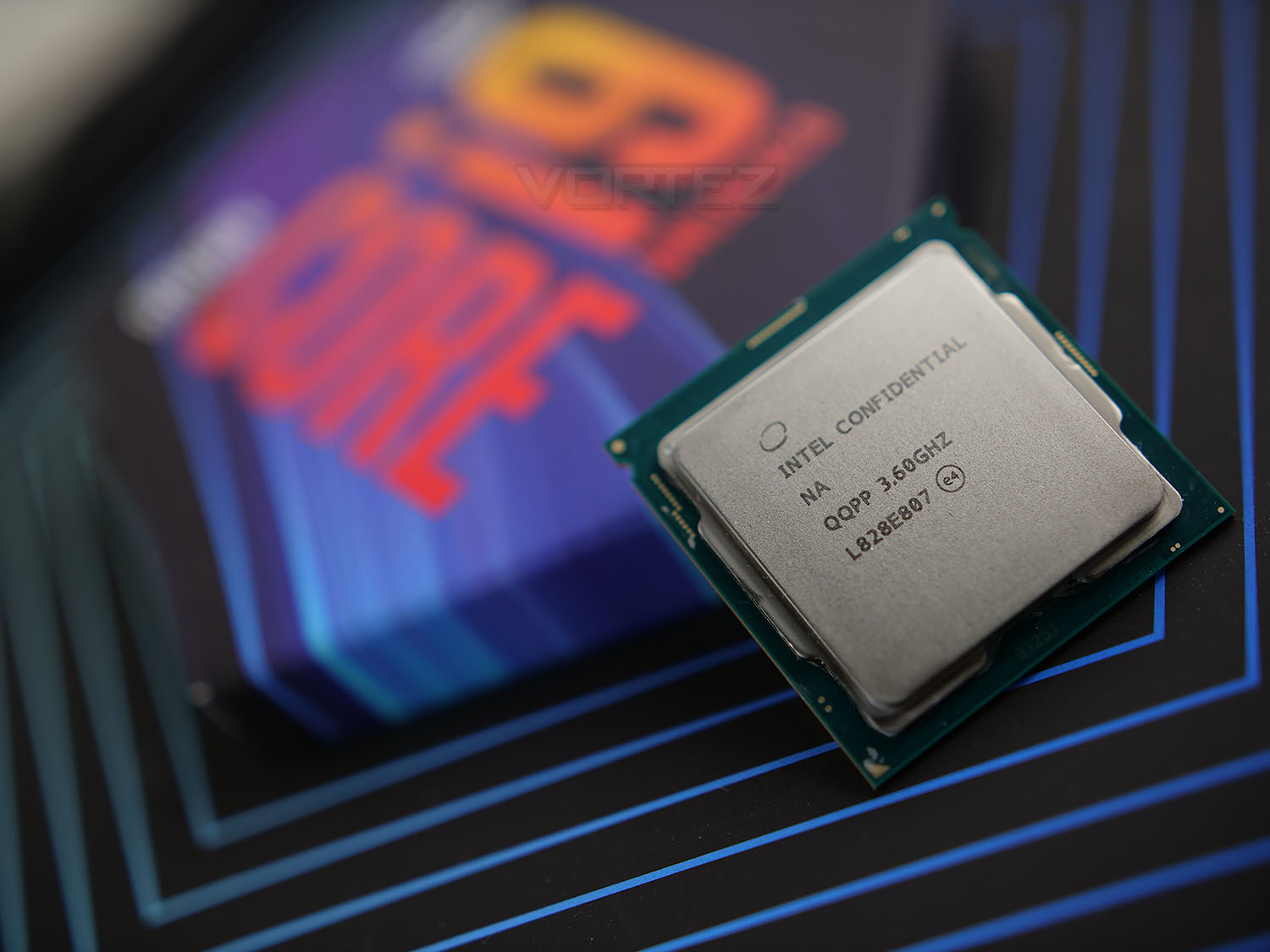
For Intel this is no bluff; the CPU is by some margin the most complex they’ve brought to the mainstream desktop platform. It features eight cores, each supporting hyperthreading and hence sixteen independent threads, easily surpassing the 6/12 configuration of the i7-8700K and bringing it up to the raw count of the Ryzen 2700K. Where it clearly pulls ahead is the max turbo speed of 5GHz, the first mainstream retail CPU to offer this eye-watering figure. On paper at least the i9-9900K is a world-beater.
This new CPU is part of the 9th generation line-up that currently consists of just two additional CPUs: the i7-9700K and i5-9600K. These offer 8 and 6 core configurations respectively, although neither support hyperthreading; as a result the 9700K should perform quite unlike other CPUs in Intel’s past range, while the 9600K is broadly similar to the i5-8600K (although some differences exist).
Launching in tandem with the 9th generation CPUs is a new motherboard range, the Z390. Although the on-paper differences between Z390 and Z370 are few and far between – indeed both feature and LGA1151 and both 8th and 9th Gen. CPUs are supported on either – it’s expected that Z390 will incorporate more robust power delivery in the main to better support the requirements of the new behemoth. If you’re assembling a new system there’s no reason not to opt for Z390 over Z370, especially as motherboard manufacturers are launching extensive ranges’ from entry-level to bleeding edge, but in-place upgrades can also be made too.
That sounds great, but there is an elephant in the room: the price. The Core i9-9900K has an MSRP of £599 inc. V.A.T. in the UK, $529 in the US and $859 AUD in Australia. That’s £140 more than the current price of the 8700K, £300 more than the AMD Ryzen 2700X (following price drops this week), and on par with similar HEDT Skylake-X models. In short, the i9-9900K needs to be exceptional.
Features & Specifications
Intel Core i9-9900K
– 8 Physical Coffee Lake cores, 16 threads, supporting Hyperthreading.
– 3.60 GHz Base Clock, 5 GHz Turbo Mode
– 16 MB SmartCache
– Socket LGA1151
– Fully Unlocked Multiplier
– 64GB DDR4 support (Dual-Channel Mode)
– 40 total PCI-Express Lanes shared among chipset and other integrated and expansion devices
– 16 PCI-Express 3.0 lanes direct to the CPU –1×16 / 2×8 / 1×8 + 2×4 configurations
– 95W TDP
– 3.60 GHz Base Clock, 5 GHz Turbo Mode
– 16 MB SmartCache
– Socket LGA1151
– Fully Unlocked Multiplier
– 64GB DDR4 support (Dual-Channel Mode)
– 40 total PCI-Express Lanes shared among chipset and other integrated and expansion devices
– 16 PCI-Express 3.0 lanes direct to the CPU –1×16 / 2×8 / 1×8 + 2×4 configurations
– 95W TDP
FEATURES
In 2016 Intel formally retired the ‘Tick-Tock’ architectural development model. The rising costs of ever shrinking process nodes to keep up with Moore’s Law had become untenable, so more needed to be done with the technology available. This ushered in the ‘Process -> Architecture -> Optimisation’ model, three distinct phases on the same process, beginning with Broadwell on 14nm. Yes, Broadwell.Since then Skylake, Kaby Lake and Coffeelake have each been released on the same 14nm process node, with the latter two being optimisations of the Skylake architecture. Alleged delays to the rollout of Intel’s 10nm process and sudden stiff competition have required a more imaginative use of what’s to hand.
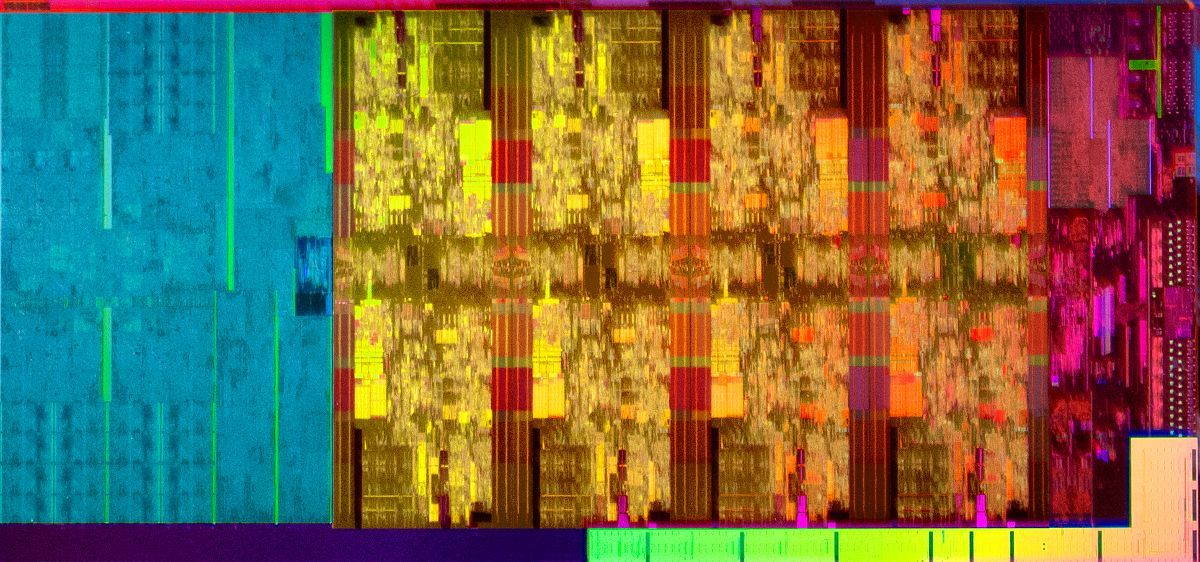
Core i9-9900K CPU Die
It will come as no surprise to learn that both the 14nm process and Coffeelake architecture have been repurposed for Intel’s 9th Generation CPUs, albeit in a more complex combination that had perhaps been initially desired. For Intel, the CPUs represent a generational leap due to performance improvements rather than technological innovations, a justifications that echoes those used for the 8th Generation last year.
Intel’s Core i9-9900K is an 8-core CPU with Hyperthreading enabled, supporting a total of 16 independent threads. In that regard it overlaps with Intel’s Skylake-X HEDT range, which offer between six and eighteen cores with Hyperthreading as standard. Architectural differences between Coffeelake and Skylake-X aren’t trivial and include a quad-channel memory controller and more complex caching system, but users will look to the 9900K for similar workhorse tasks such as gaming, streaming and video rendering.
In common with previous designs that utilise Hyperthreading the 9900K is equipped with more Smart Cache than models without, in this instance the 8-core 9700K. Not only does this cache have value when Hyperthreading, it also tends to improve the performance of only lightly threaded tasks on a clock for clock bases. This is often why the top-end i7’s (and now i9’s) are recommended for the best possible performance in gaming, and contributes to Intel’s general IPC lead.
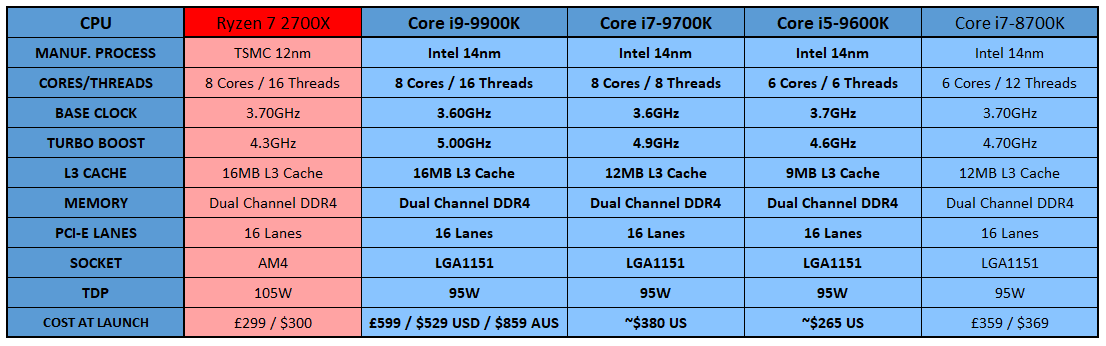
Intel 9th Generation Core Lineup Comparison
INTEGRATED GPU
Although the main CPU cores tend to get the attention when it comes to discussions of premium and gaming-oriented models, the vast majority of Intel’s CPU range also feature integrated graphics components. While not as powerful as discrete GPUs they do nonetheless occupy a useful niche for video encoding, low-impact gaming (especially on mobile platforms) and troubleshooting. This GPU is also DirectX12 Compliant, and as a Quick Sync Video device is also a robust performer for video transcoding.The i9-9900K incorporates Intel UHD Graphics 630 with a base frequency of 350MHz that boost up to 1.20 GHz; video memory is allocated from main system memory. External display support typically depends on the extent to which video outputs are built into a specific motherboard, but the chips supports 4K60Hz output over HDMI and DisplayPort. The platform should also support Microsoft Playready 3.0 DRM and hence applications such 4K streaming services as Netflix.
If desired, the Integrated GPU of K-Series CPU can be overclocked when operating in tandem with a suitable Z-series Motherboard, although there shouldn’t be most call for it in desktop configurations where this chip would be present.
OVERCLOCKING
As a K-Series CPU, the Core i9-9900K is unlocked for overclocking when paired with a compatible Z390 or Z370 CPU. Both frequency multiplier and memory clock speeds can be adjusted independently, pushing the envelope of performance during all-core operation. While the CPU boasts a maximum turbo of 5GHz, this figure only applies when only a single core is operating; lesser turbo modes apply as more cores are loaded. Overclocking typically disables these Turbo modes in favour of a frequency which applies to all cores simultaneously; as a result the maximum stable 8-core overclock may even be lower than the 5 GHz Turbo Mode, depending on the other factors such as voltages, cooling and the so-called ‘silicon lottery’.For the first time since the Sandybridge (2nd Generation Core CPU) era Intel have equipped their performance-class mainstream desktop processors with solder as the thermal interface material between silicon die and heatspreader, rather than a paste compound. The i7-9700K and i5-9600K are slimmed down versions of the full-fat i9-9900K with features and cores selectively disabled, but both also come shipped with solder TIM.
Solder is a better conductor of heat than paste TIM, allowing for better efficiency in heat transfer from CPU die to cooler. When utilising the same cooler, this should mean that the die will operate at lower temperatures compared to a paste TIM solution. Adept overclockers who run closer to the limit with more high-end solutions including bespoke water cooling may be especially appreciative of this fact, and it removes the temptation to de-lid the chip and apply a liquid metal TIM.
Quick Look
Below is a top-down shot of the Core i9-9900K along with comparison against the Core i7-8700K – front and back.


Test Setup & Testing
For the purpose of testing the Intel Core i9-9900K we used the MSI MPG Z390 Gaming Pro Carbon since this motherboard gave us the best overclock for this chip out of all the Intel Z390 motherboards we tested.CPU being tested
Intel Core i9-9900K (5GHz) Coffee Lake-STEST SETUP
Cooling Corsair Hydro Series H110iMotherboard MSI MPG Z390 Gaming Pro Carbon
Memory 32GB Corsair Vengeance LPX 3000MHz
Graphics Radeon RX 480 8GB
Storage Kingston HyperX 240GB
PSU Corsair RM 1000 80 Plus Gold Certified PSU
Monitor AOC U2879VF
Capture Device Epiphan AV.iO 4K
COMPARED AGAINST
AMD Ryzen 5 1400 (3.2GHz) Summit RidgeAMD Ryzen 3 2200G (3.5/3.7GHz) Raven Ridge
AMD Ryzen 5 2400G (3.6GHz/3.9GHz) Raven Ridge
AMD Ryzen 3 1200 (3.1/3.4GHz) Summit Ridge
AMD Ryzen 3 1300X (3.4/3.7GHz) Summit Ridge
AMD Ryzen 5 1400 (3.2GHz) Summit Ridge
AMD Ryzen 5 1600 (3.2GHz) Summit Ridge
AMD Ryzen 7 1700 (3.0GHz) Summit Ridge
AMD Ryzen 7 1700X (3.4GHz) Summit Ridge
AMD Ryzen 7 1800X 3.6GHz) Summit Ridge
AMD FX-8350 (4.0GHz) PileDriver
Intel Core i7-8700K (4.5GHz) Coffee Lake
Intel Core i7-7900X (3.3GHz) Skylake-X
Intel Core i7-7800X (3.5GHz) Skylake-X
Intel Core i5-7700K (4.2GHz) Kaby Lake
Intel Core i7-6950X (3.0GHz) Broadwell-E
Intel Core 7-6900K (3.2GHz) Broadwell-E
BENCHMARKS
Cinebench R15 – CPU/OpenGL Scorex264 HD 4.0 – 1st and 2nd pass encoding
SiSoftware SANDRA – CPU & Memory benchmarks
POV-RAY – CPU benchmarks
TrueCrypt – CPU benchmarks
AIDA64 – CPU benchmarks & Memory
PCMark 8 – Home Suite & Photoshop
3DMark FireStrike – 3D Benchmark
Games – Rise of the Tomb Raider & Total War: WARHAMMER
OTHER SOFTWARE
Temperature Analysis: CoreTempStress Testing Software: AIDA64 Stability Test
CPU Specification Monitoring: CPU-Z
Performance Monitoring: MSI Afterburner
Temperatures & Overclocking
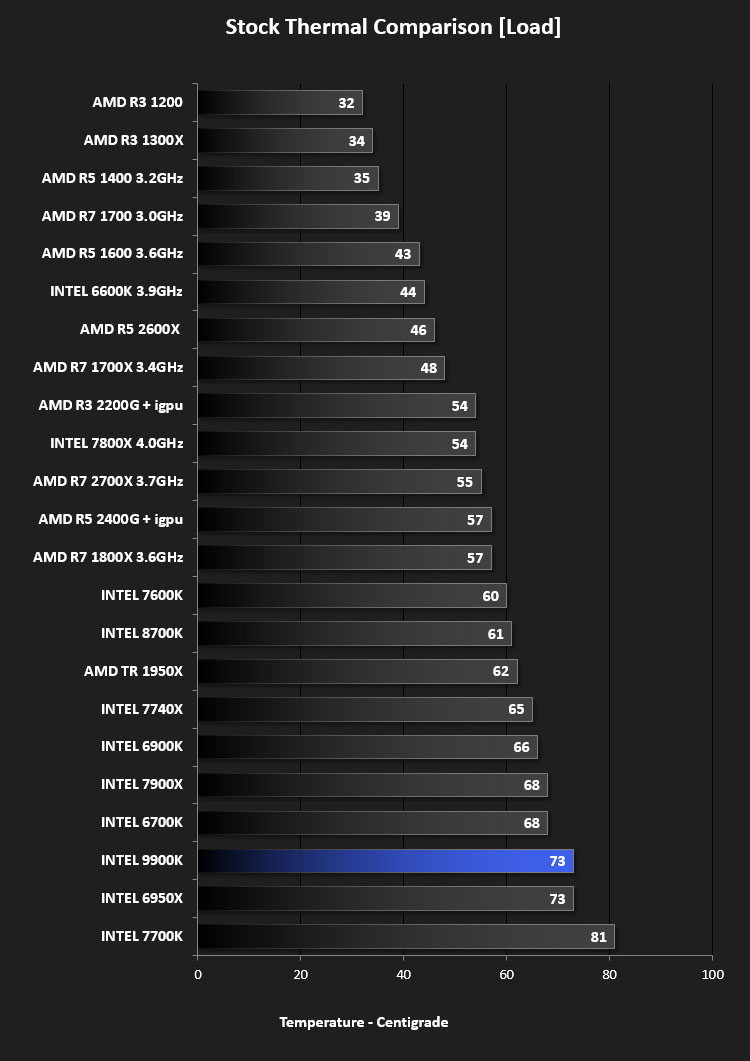
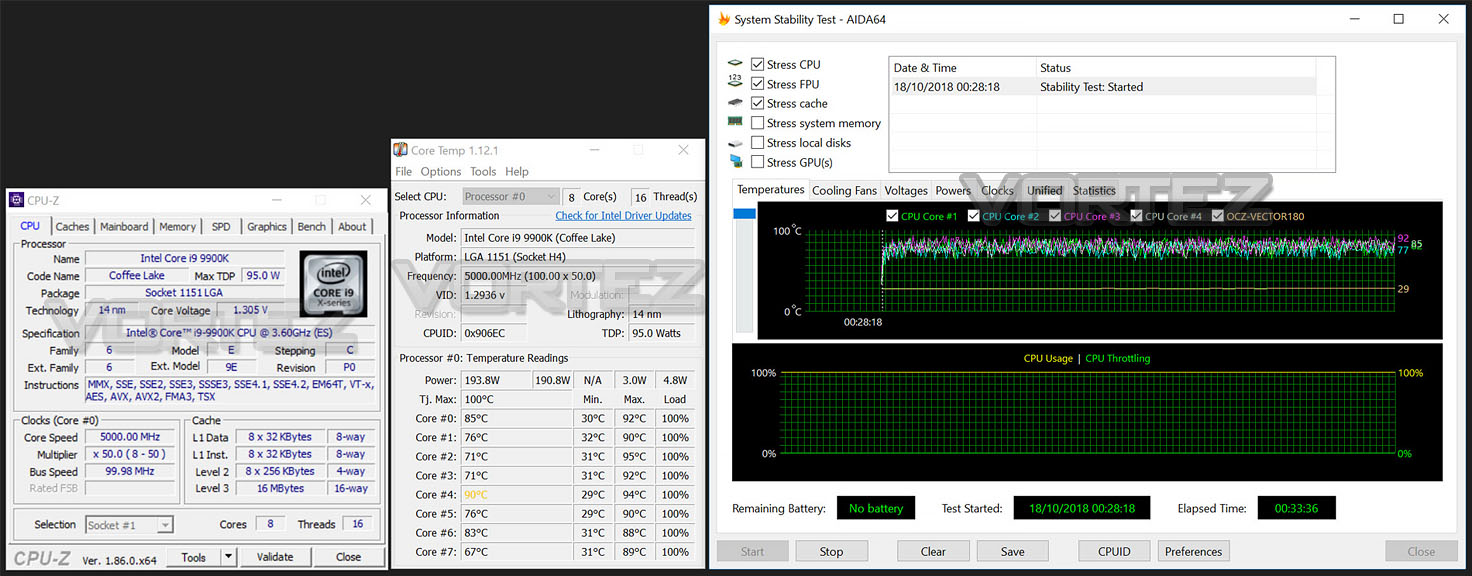
Below are the temperatures for each of the CPUs – without any overclock applied. We’ve also compared to previously released AMD Ryzen chips as well as the former Kaby Lake, Broadwell-E and Skylake counterparts (which we’ve also benchmarked against on the subsequent pages too):
OVERCLOCKING
Moving to the overclocking phase of our review the above result highlights the small headroom available for overclocking 9900K.Our best result allowed us to hit over 5GHz, requiring 1.3v. Nudging up the frequency above this required more voltage and thus higher temperatures – taking us above the safezone parameter.
Power Consumption
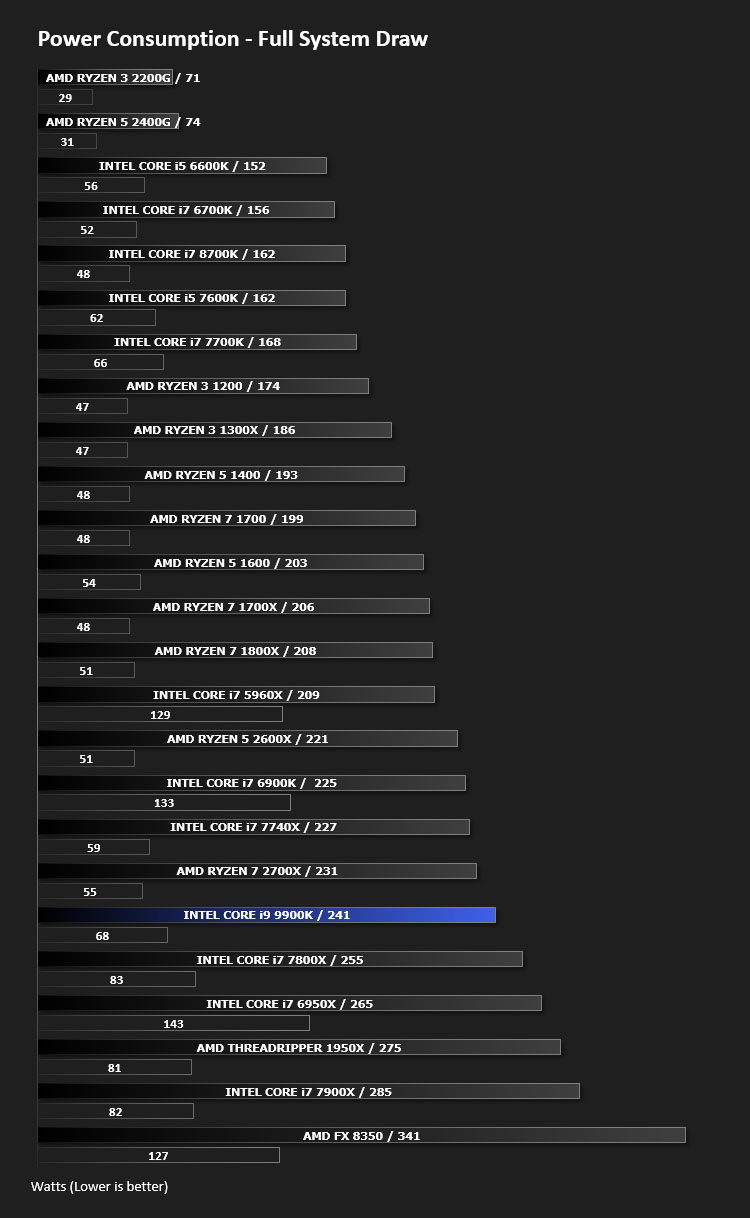
It’s interesting to note the power consumption across all processors. Although they are using a combination of different motherboard chipsets, energy results can fluctuate between manufacturers due to the features and specifications that are integrated. First of all, for the idle tests the system is cold booted into Windows and no additional applications are executed – the watts are noted on the external energy monitor we use and then the system is loaded with 3DMark FireStrike – watts are again monitored for the duration of the test and the highest rated wattage result is then noted down. Below are the results of this energy test.
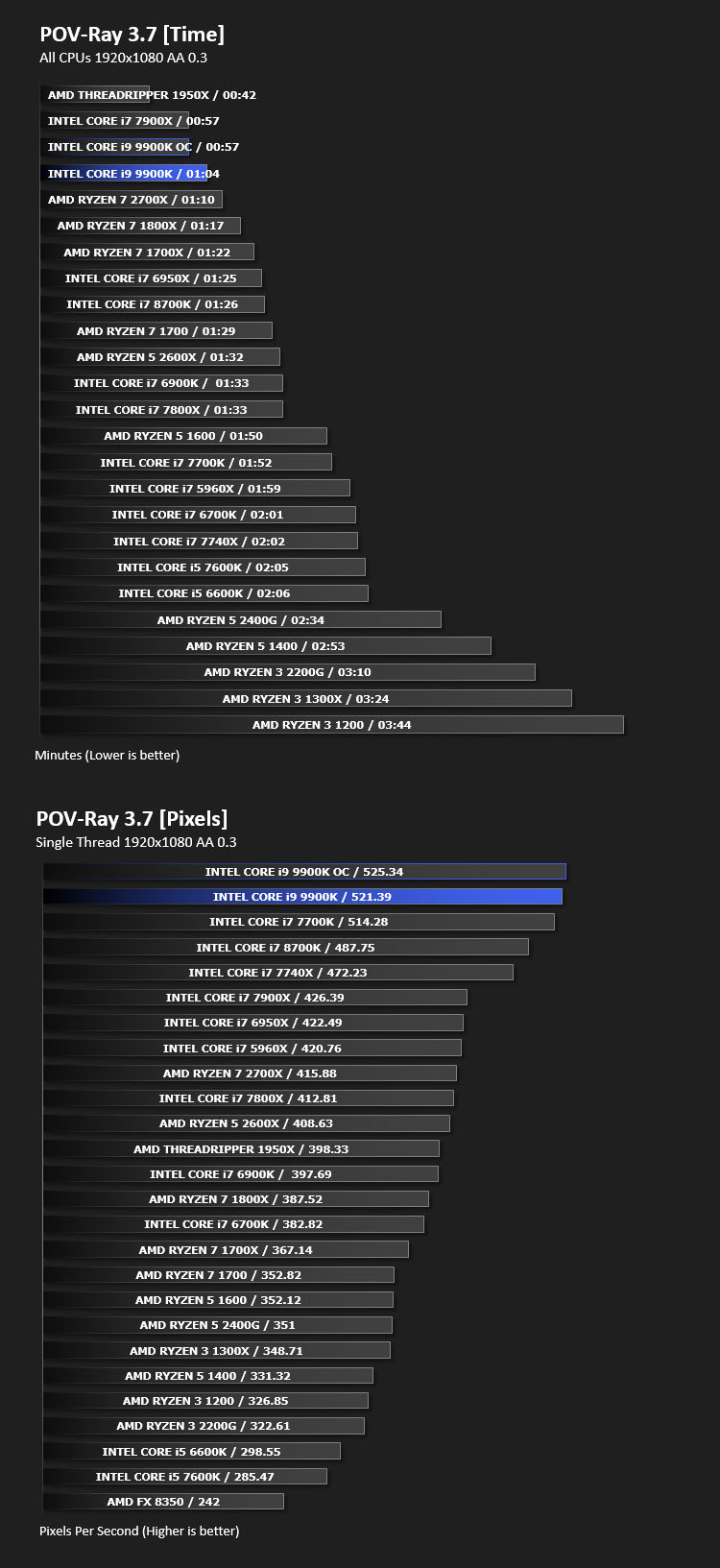
Ray Tracing Performance – POV-Ray 3.7
Persistence of Vision Raytracer’s PovRay is a free and open source 3D animator application with versions for computers with different operating systems.
This product allows users to build their custom 3D worlds with excellent quality despite their computer’s hardware. It has adjustable options for levels of radiance, refraction, and reflection. Calculation time may vary depending on the computer model, but PovRay can adapt to many computer builds, and is supported by the open source community.
This product allows users to build their custom 3D worlds with excellent quality despite their computer’s hardware. It has adjustable options for levels of radiance, refraction, and reflection. Calculation time may vary depending on the computer model, but PovRay can adapt to many computer builds, and is supported by the open source community.
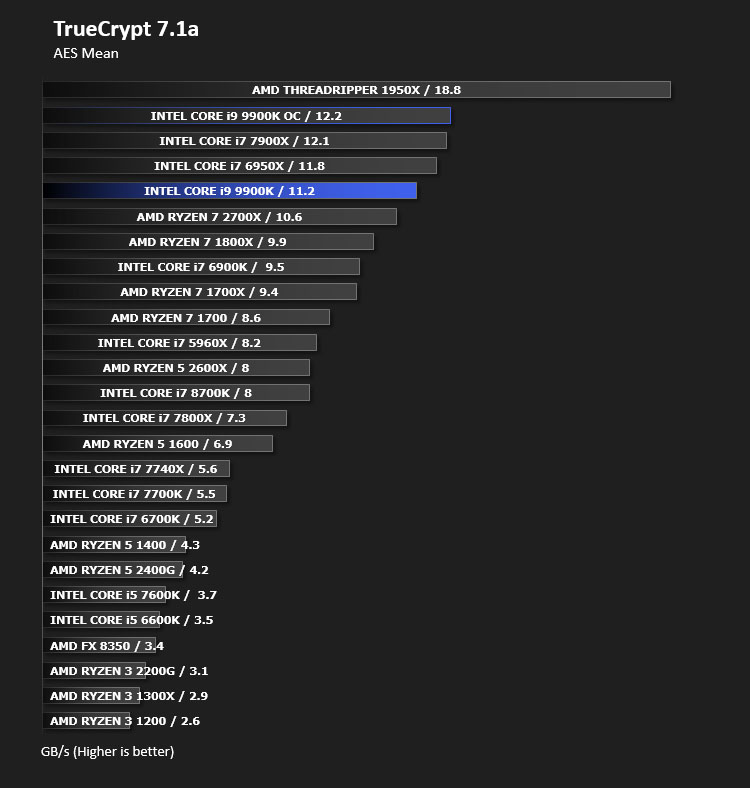
AES Encryption Performance – TrueCrypt 7.1a
TrueCrypt is a discontinued source-available freeware utility used for on-the-fly encryption (OTFE). It can create a virtual encrypted disk within a file or encrypt a partition or (under Microsoft Windows except Windows 8 with GPT) the entire storage device (pre-boot authentication).
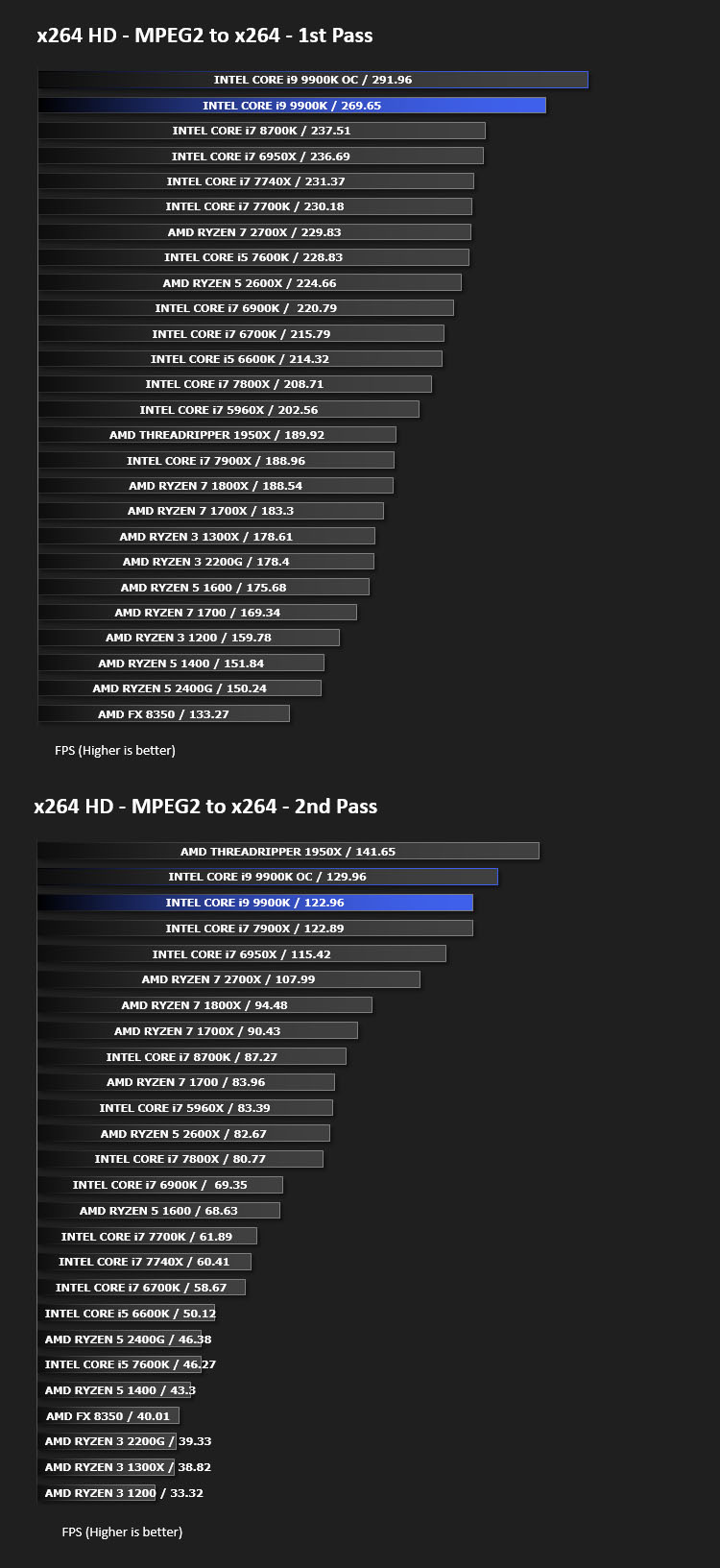
Encoding Performance – X264 HD
Simply put, this test measures how fast your machine can encode a short, DVD quality MPEG-2 video clip into a high-quality x264 video clip. What’s x264, you ask? It’s more or less the next-generation Xvid/DivX codec. I think it’s ideal for a benchmark because the application (x264.exe) reports fairly accurate compression results (in frames per second) for each pass of the video encoding process, and it uses multi-core processors very efficiently.
x264 HD gives results for 2 passes when compressing an MPEG-2 clip into x264. It presents 4 separate results for each pass giving a total of 8 – all results are given in FPS. For each pass I have averaged out the results.
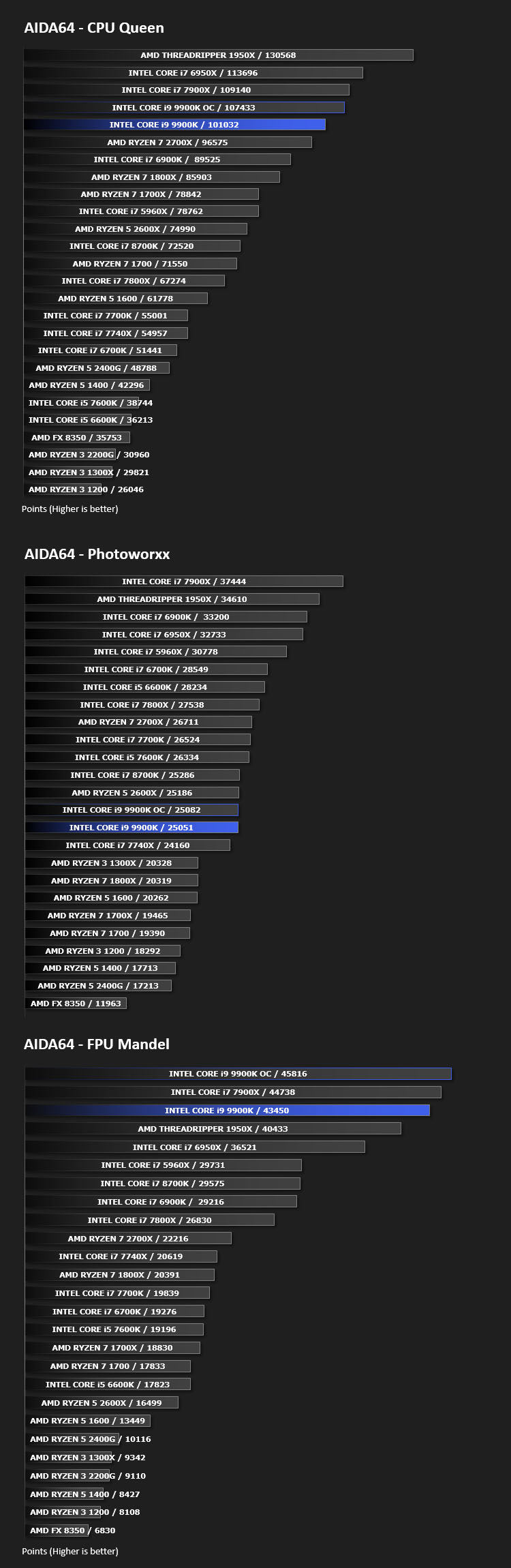
Processing Features Performance – AIDA64
AIDA64 Product PageThis simple integer benchmark focuses on the branch prediction capabilities and the misprediction penalties of the CPU. It finds the solutions for the classic “Queens problem” on a 10 by 10 sized chessboard. At the same clock speed theoretically the processor with the shorter pipeline and smaller misprediction penalties will attain higher benchmark scores. For example — with HyperThreading disabled — the Intel Northwood core processors get higher scores than the Intel Prescott core based ones due to the 20-step vs 31-step long pipeline. CPU Queen test uses integer MMX, SSE2 and SSSE3 optimizations.
Memory Transfer Performance – AIDA64
AIDA64 Product PageThis simple integer benchmark focuses on the branch prediction capabilities and the misprediction penalties of the CPU. It finds the solutions for the classic “Queens problem” on a 10 by 10 sized chessboard. At the same clock speed theoretically the processor with the shorter pipeline and smaller misprediction penalties will attain higher benchmark scores. For example — with HyperThreading disabled — the Intel Northwood core processors get higher scores than the Intel Prescott core based ones due to the 20-step vs 31-step long pipeline. CPU Queen test uses integer MMX, SSE2 and SSSE3 optimizations.

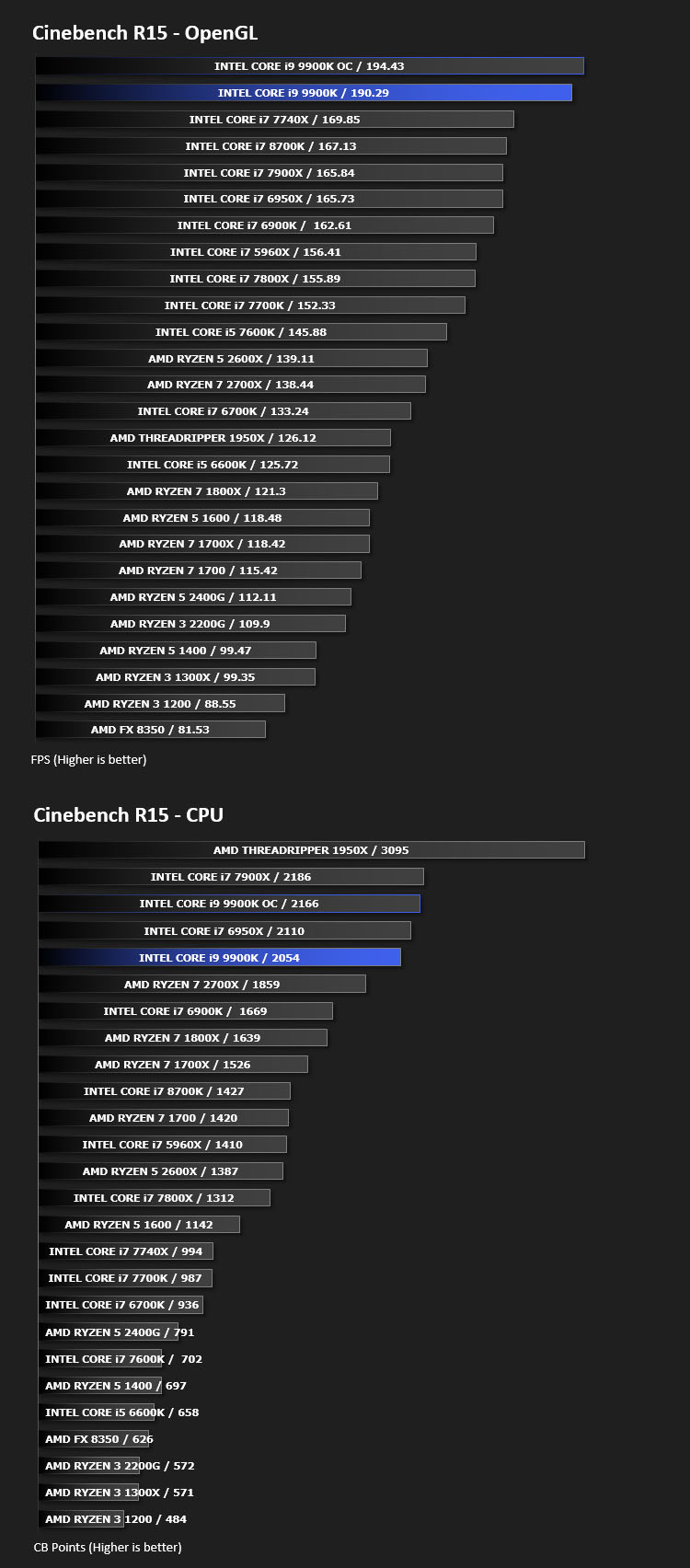
Processing Power Performance – Cinebench R15
CINEBENCH can measure systems with up to 64 processor threads. This test scene contains approximately 2,000 objects which in turn contain more than 300,000 polygons in total, and uses sharp and blurred reflections, area lights, shadows, procedural shaders, antialiasing, and much more. The result is displayed in points (pts). The higher the number, the faster your processor.
Bandwidth Performance – SiSoftware SANDRA
3DMark 11 Product PageSANDRA isn’t always a benchmark that is included in hardware reviews but I believe it shouldn’t be ignored. SANDRA provides a vigorous package that tests your system in a rather large array of benchmarks. There are many aspects of benchmark that can be executed. We will be considering – CPU and memory tests.

Image Editing Performance – PCMark 8 Photoshop
PCMark 8 Product Page Developed in partnership with Benchmark Development Program members Acer, AMD, Condusiv Technologies, Dell, HGST, HP, Intel, Microsoft, NVIDIA, Samsung, SanDisk, Seagate and Western Digital, PCMark 8 is the latest version in FutureMark’s popular series of PC benchmarking tools. Improving on previous releases, PCMark 8 includes new tests using popular applications from Adobe and Microsoft.

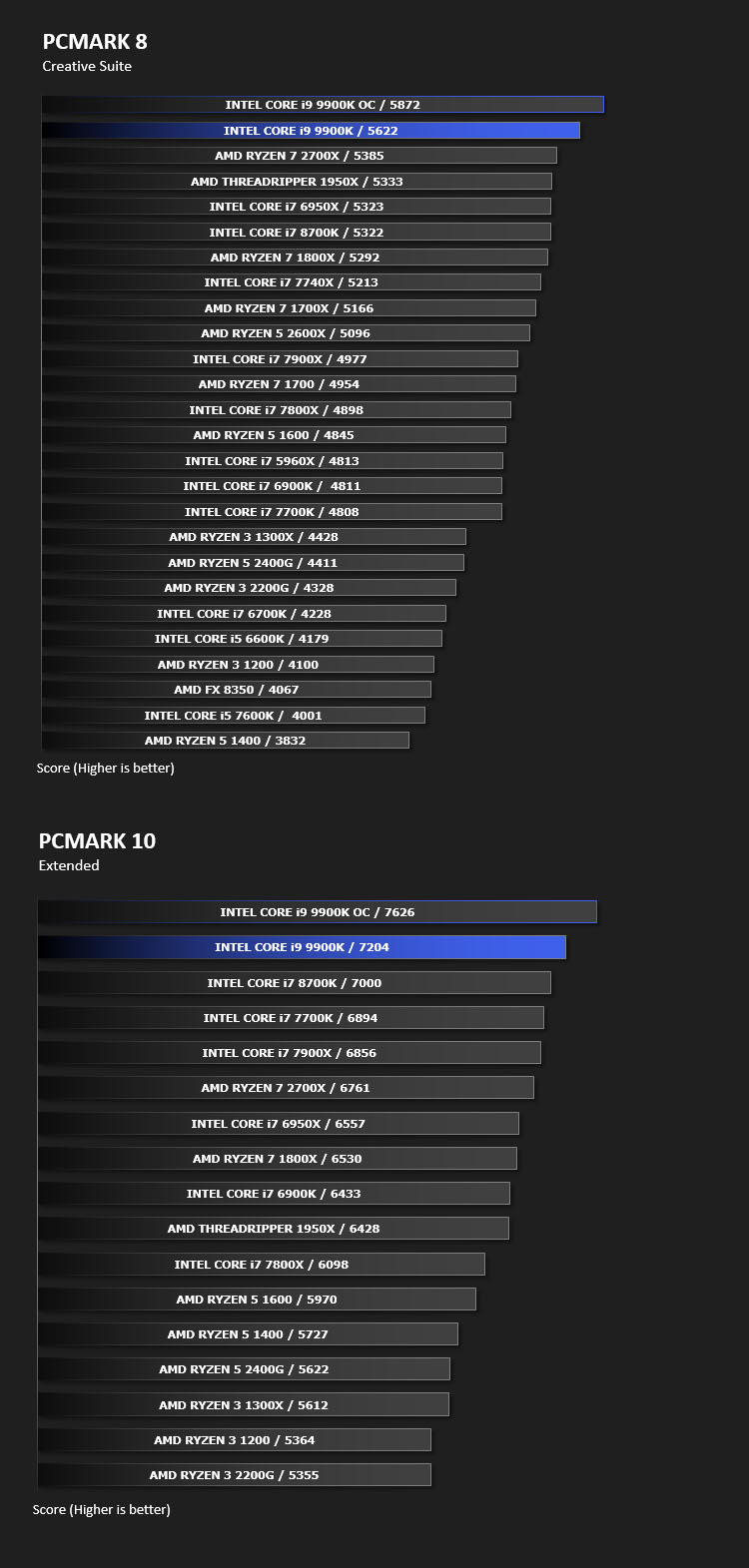
Overall System Performance – PCMark 8 & PCMark 10
PCMark 8 Product Page Developed in partnership with Benchmark Development Program members Acer, AMD, Condusiv Technologies, Dell, HGST, HP, Intel, Microsoft, NVIDIA, Samsung, SanDisk, Seagate and Western Digital, PCMark 8 is the latest version in FutureMark’s popular series of PC benchmarking tools. Improving on previous releases, PCMark 8 includes new tests using popular applications from Adobe and Microsoft.
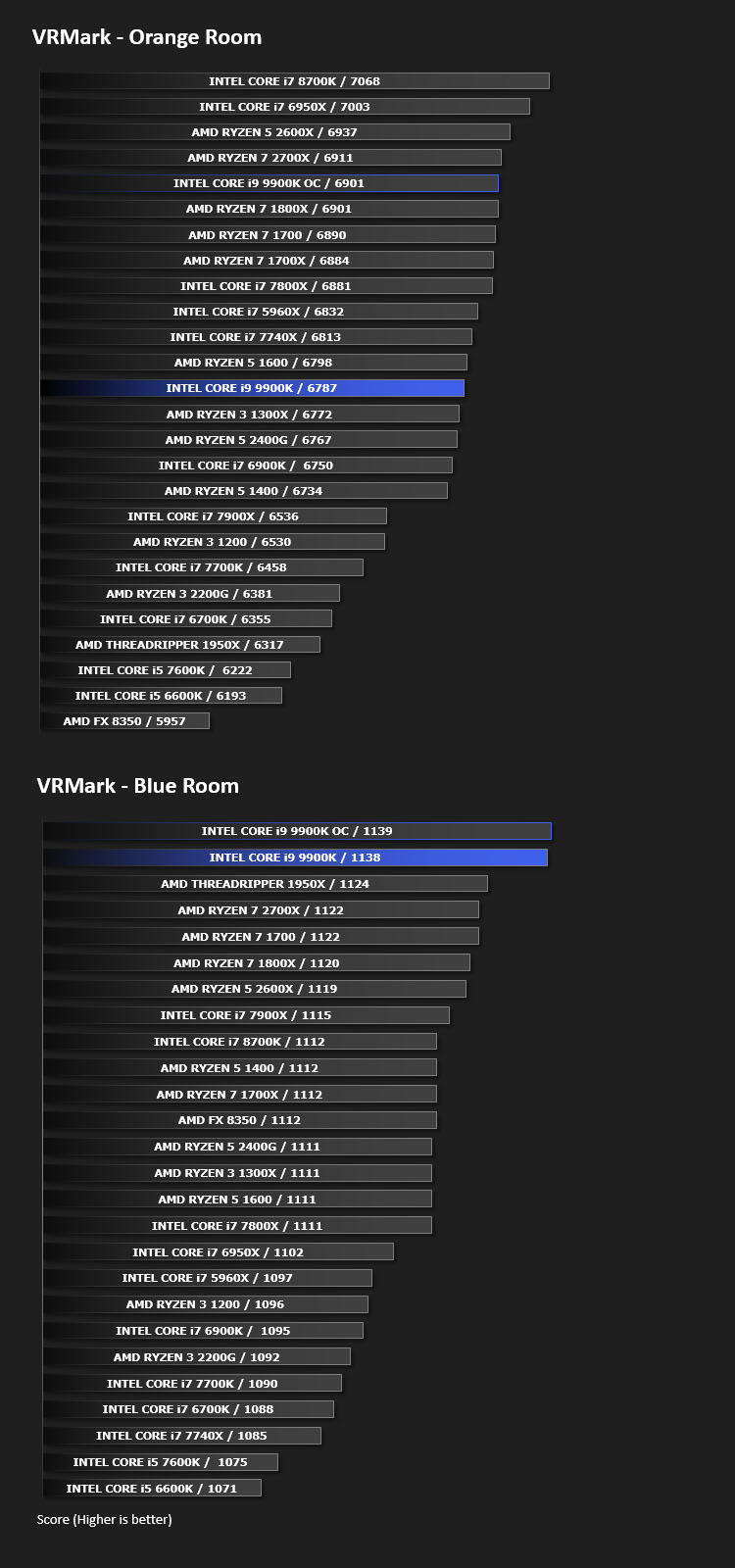
VR Performance – VRMark
VRMark Product PageVRMark includes two VR benchmark tests that run on your monitor, no headset required, or on a connected HMD. At the end of each test, you’ll see whether your PC is VR ready, and if not, how far it falls short.
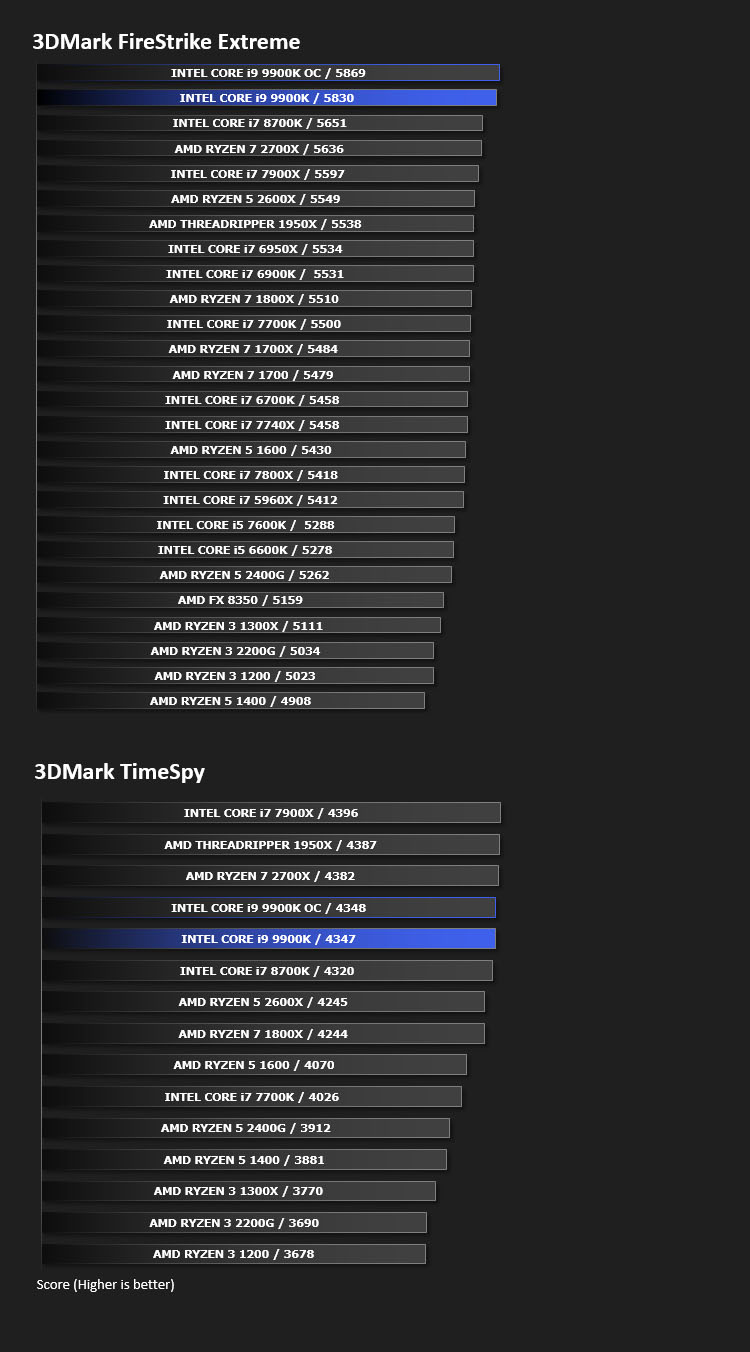
3D Performance – 3DMark FireStrike & 3DMark TimeSpy
3DMark FireStrike Product PageFire Strike is our new showcase DirectX 11 benchmark designed for high-performance gaming PCs. It is our most ambitious and technical benchmark ever, featuring real-time graphics rendered with detail and complexity far beyond what is found in other benchmarks and games today. Fire Strike will only be available in the Windows editions of 3DMark initially.
Gaming Performance
We’ll be updating this page shortly with gaming performance versus the Intel Core i7-8700K. Stay tuned.
Conclusion
It’s quite easy to become complacent with CPU releases, viewing them as an exercise in marketing and massaging consumer perception rather than advancing performance. That’s perhaps an unfair characterisation of the recent history of CPUs as a product segment, but it does capture an opinion that was pervasive only a few years ago. Now however something has lit a fire under Intel, and the mainstream segment is finally starting to see the gains possible when you brute force optimisations of efficient architectures into higher performance categories. Sadly this didn’t occur when there was clear scope for shrinking to a smaller process.
By most metrics, especially synthetic ones, the Core i9-9900K is an absolute beast of chip, gobbling through single- and multi-threaded benchmarks with aplomb thanks to Intel’s big-core Coffee Lake architecture and monolithic die design. Reaching 5GHz on a retail product, even as a single-core Turbo mode, is a testament to both engineering and manufacturing expertise. That they were able – perhaps forced – to do this on an optimisation on an ageing 14nm manufacturing node is remarkable, and bodes well for the eventual shift to 10nm if they can progress that far in 2019.
That both Power Consumption and Temperatures run high on the i9-9900K will be of little concern to the enthusiasts who purchase this CPU. The move to solder TIM over paste was clearly a necessary step; with a Corsair H110i it still ran at a toasty 73C under heavy load, rivalling HEDT processors of the past. Total system power draw meanwhile was only a little higher than the Ryzen 2700K, so clearly the platform as a whole has by no means taken a retrograde path in the last year.
With performance verging on HEDT territory it’s not surprising to see the logic of HEDT pricing. The i9-9900K matches 8-core Intel Skylake-X counterparts at ~£600, $530 USD or $859 AUD, and in many tests more than matches performance thanks to high clock speeds and dual-channel memory rarely being a drawback. Intel’s issue will be the preemptive cuts made by AMD to the Ryzen 7 2700K; to be clear, the 9900K is broadly faster, but you’ll really need to be stretching its legs in workhorse tasks to observe meaningful difference when you’re more likely to be GPU limited in gaming.
Enthusiasts will almost certainly be eager to get their hands on Intel’s new flagship, especially if the mainstream Z370/390 is their platform of choice. In terms of core count it is forward-looking as Windows and game engines are finally beginning to adapt to more cores being available. Hopefully this is the sign of a lasting strategy from Intel, and perhaps a means of them to reinvigorate their approach to Moore’s Law scale performance gains.
When it comes to overclocking Intel’s platform remains a breeze to work with from a tinkerer’s standpoint. We overclocked our sample to 5GHz on all cores at 1.3v, and are confident that adept overclockers chasing benchmarks will be able to breeze through the barrier now that paste TIM is no longer an impediment. We should note that pushing beyond 1.3v did cause temperatures to rocket past 100C, so bespoke water cooling may well be the order of the day when running continuously at a high overclock. At the very least, there will be fewer CPU dies lost to delidding, thank goodness.
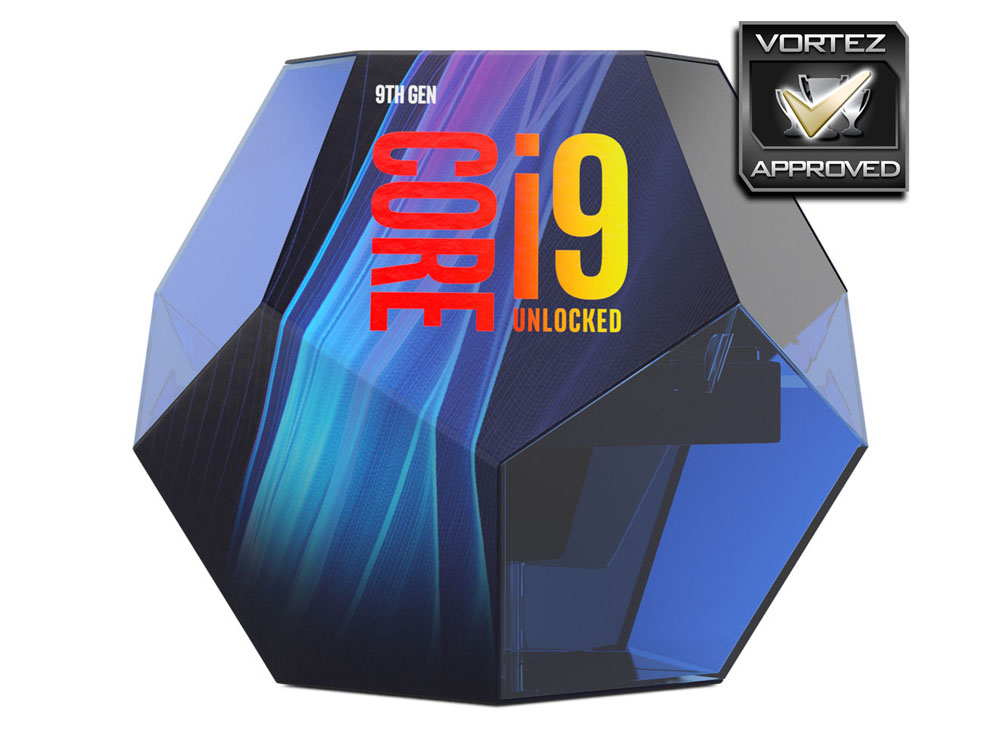
All in all, the Intel Core i9-9900K is effectively an Extreme Edition chip for a new generation of enthusiasts, rather than a mainstream price/performance high watermark. No-one will ever be able to call it affordable, but those leery of the cost implications of moving to the HEDT Skylake-X platform now have a greater stake in the mainstream segment. Intel’s reintroduction of solder TIM is welcome, although high temperatures and power consumption may mean that it was a necessity. If you’re looking for the highest performing mainstream CPU this is it, but it would be best to consider very carefully the use you’re putting your system to before making this investment over other components.
Pros
+ Up to 5GHz Turbo Boost
+ Adept multi-core processing
+ Ideal for multiple uses inc. video editing
+ Excellent overall performance
+ Soldered IHS
Cons
– Small amount of overclocking headroom
– Expensive when compared to AMD Ryzen 7 2700X
– 16 PCIe lane functionality only
+ Up to 5GHz Turbo Boost
+ Adept multi-core processing
+ Ideal for multiple uses inc. video editing
+ Excellent overall performance
+ Soldered IHS
Cons
– Small amount of overclocking headroom
– Expensive when compared to AMD Ryzen 7 2700X
– 16 PCIe lane functionality only
Click here for an explanation of our awards at Vortez.net.
Stay connected with the Vortez Social Media pages:
Join in with the discussions on Discord