MSIs current flagship in the Ryzen 2nd Generation, the X470 GAMING M7 AC. Featuring extreme power delivery and isolated DDR4 lanes for incredible performance. How does it stack against the competition?

Product on Review: MSI X470 GAMING M7 AC
Manufacturer: MSI
Street Price: £239 / $259
MSI are wasting no time in introducing their motherboards this time around, with the MSI X470 GAMING M7 AC landing in our test labs a couple of weeks ago. We’ve had plenty of time to mess around with settings and get a good look at the feature set.
The GAMING M7 AC likely won’t be MSIs flagship model, but it’s their current best offering for the X470 chipset to compliment the launch of AMDs Ryzen Zen+ CPUs, the 2xxx Series.
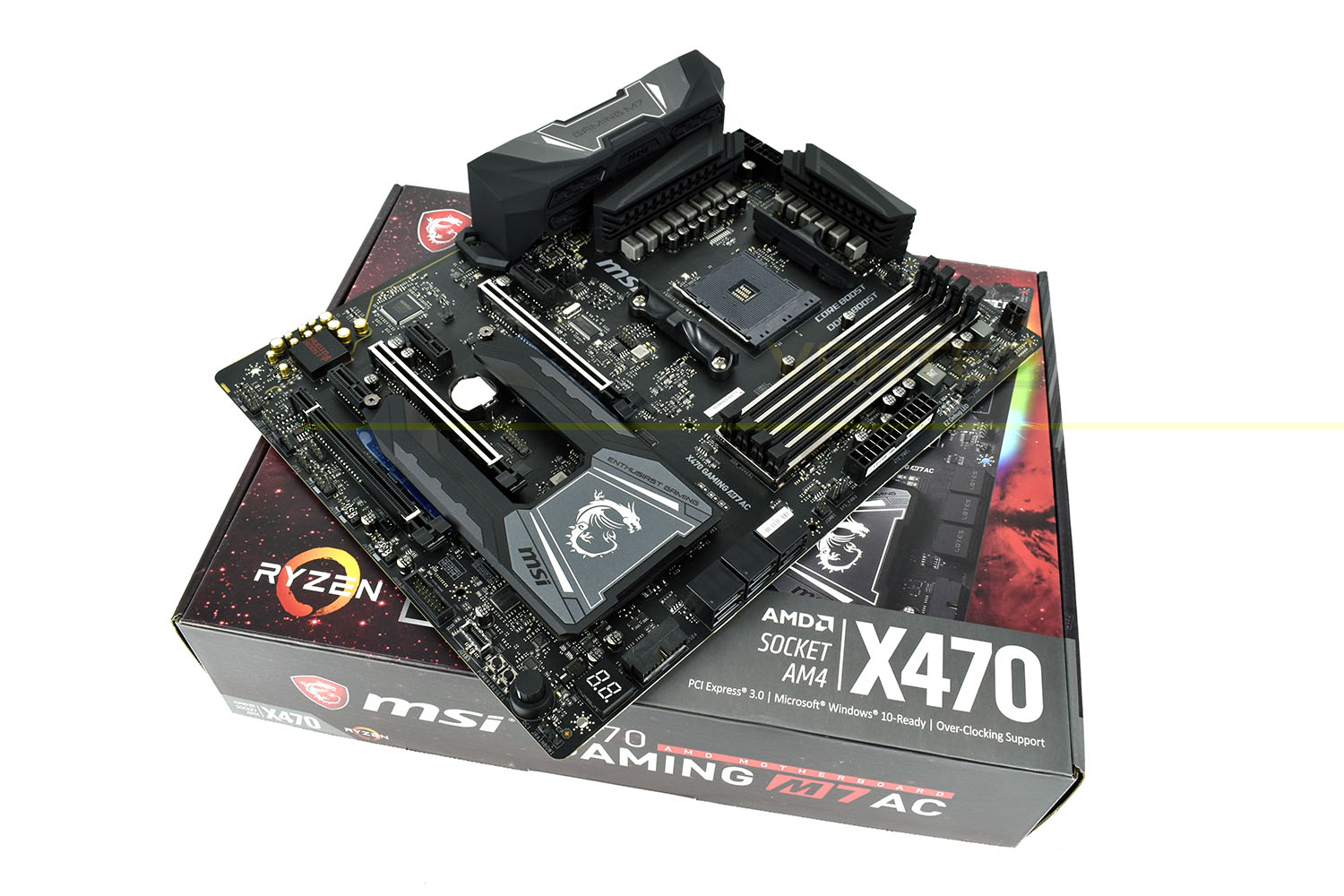
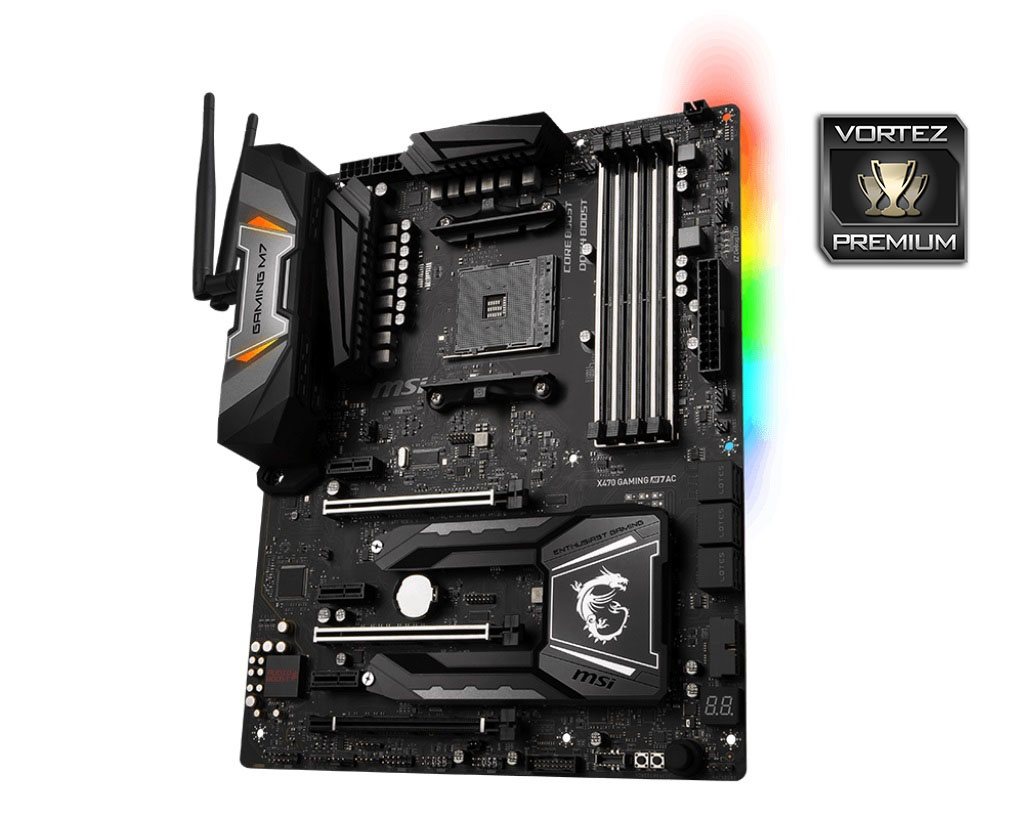
The striking design is difficult to miss, with a dual-purpose southbridge heatsink, named the M.2 Shield FROZR, also offering protection and helping to increase heat dissipation to prevent energy-hungry M.2 drives from throttling. The power delivery heatsinks are also particularly overstated, ensuring the Ryzen CPU receives all of the power it requires while remaining 100% stable.
Of course, any modern-day motherboard wouldn’t be complete without RGB lighting. The GAMING M7 AC features two RGB LED lit zones, one above the IO shield at the back and then a bank of 8 LEDs mounted on the reverse side, on the top-right section; illuminating the rear of the DIMM slots against the motherboard back plate. The RGB implementation is arranged by MSIs Mystic Light.
Gaming performance is catered for from several different angles; audio is provided by the Audio Boost 4 with included amplifier using premium components. DDR4 memory is isolated from external circuitry, preventing interference and improving performance, while a similar approach is taken towards the two main PCI-E 3.0 x16 ports, with steel armour reinforcement inhibiting bending and EMI. NVIDIA SLI and AMD CrossFire is supported in 2-way and 3-way respectively. Killer E2500 Gigabit GAMING LAN is utilised to give you every chance possible while an Intel WiFi/Bluetooth module provides wireless options.
Connectivity is provided through USB 2.0, 3.1 Gen. 1 and 3.1 Gen. 2 as well as 6 SATA 6Gbps ports.
Certainly, the MSI X470 GAMING M7 AC seems to offer everything an enthusiast gamer would require, so how does it stack up against the competition? And does the X470 chipset offer performance gains over the X370?
MSI on the X470 GAMING M7 AC RGB Lighting:
Customize and set up your own color scheme with MSI Mystic Light utility. Select the available colors from the palette to match your system style. Bored of the same colors? Simply change the complete look of your system in 1 second!
Technical Specifications
SOCKET: AM4
CPU (MAX SUPPORT): Ryzen 7
CHIPSET: AMD X470 Chipset
DDR4 MEMORY: 1866/ 2133/ 2400/ 2667(OC)/ 2933(OC)/ 3200(OC)/ 3600+ Mhz
MEMORY CHANNEL: Dual
DIMM SLOTS: 4
MAX MEMORY (GB): 64
PCI-EX16: 2
PCI-E GEN: Gen3(16,0) (8,8), Gen2(4)
PCI-EX1: 3
SATAIII: 6
M.2 SLOT: 2
RAID: 0/1/10
TPM (HEADER): 1
LAN: 1x Killer E2500 Gigabit LAN controller
USB 3.1 PORTS (FRONT): 1(Gen2, Type C), 4(Gen1, Type A)
USB 3.1 PORTS (REAR): 1(Gen2, Type C), 1(Gen2, Type A), 4(Gen1, Type A)
USB 2.0 PORTS (FRONT): 4
USB 2.0 PORTS (REAR): 2
AUDIO PORTS (REAR): Realtek® ALC1220 Codec
DIRECTX: 12
FORM FACTOR: ATX
SLI: Yes
CPU (MAX SUPPORT): Ryzen 7
CHIPSET: AMD X470 Chipset
DDR4 MEMORY: 1866/ 2133/ 2400/ 2667(OC)/ 2933(OC)/ 3200(OC)/ 3600+ Mhz
MEMORY CHANNEL: Dual
DIMM SLOTS: 4
MAX MEMORY (GB): 64
PCI-EX16: 2
PCI-E GEN: Gen3(16,0) (8,8), Gen2(4)
PCI-EX1: 3
SATAIII: 6
M.2 SLOT: 2
RAID: 0/1/10
TPM (HEADER): 1
LAN: 1x Killer E2500 Gigabit LAN controller
USB 3.1 PORTS (FRONT): 1(Gen2, Type C), 4(Gen1, Type A)
USB 3.1 PORTS (REAR): 1(Gen2, Type C), 1(Gen2, Type A), 4(Gen1, Type A)
USB 2.0 PORTS (FRONT): 4
USB 2.0 PORTS (REAR): 2
AUDIO PORTS (REAR): Realtek® ALC1220 Codec
DIRECTX: 12
FORM FACTOR: ATX
SLI: Yes
AMD X470 Chipset Overview
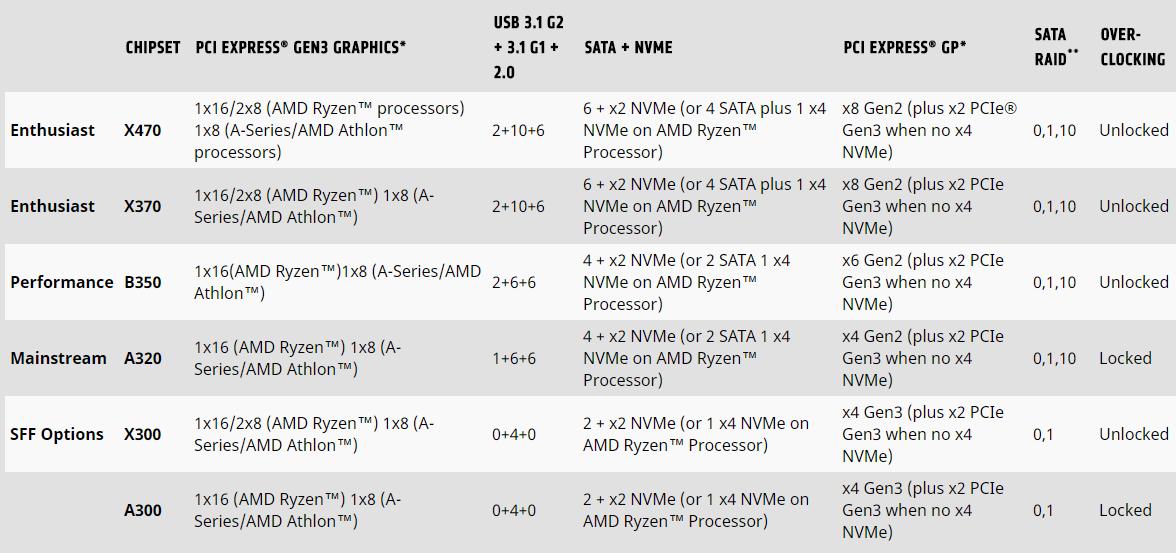
AMD designed the AM4 socket with longevity in mind, focussing on forwards and backwards compatibility. However, even a company like AMD doesn’t possess perfect precognition and some adaptations must be made within each revision. The main difference between the X370 and X470 chipsets are the utilisation of Precision Boost 2 and Extended Frequency Range 2 (XFR2).Check out our AMD Ryzen 7 2700X review for more information on those technologies.
Packaging & First Look
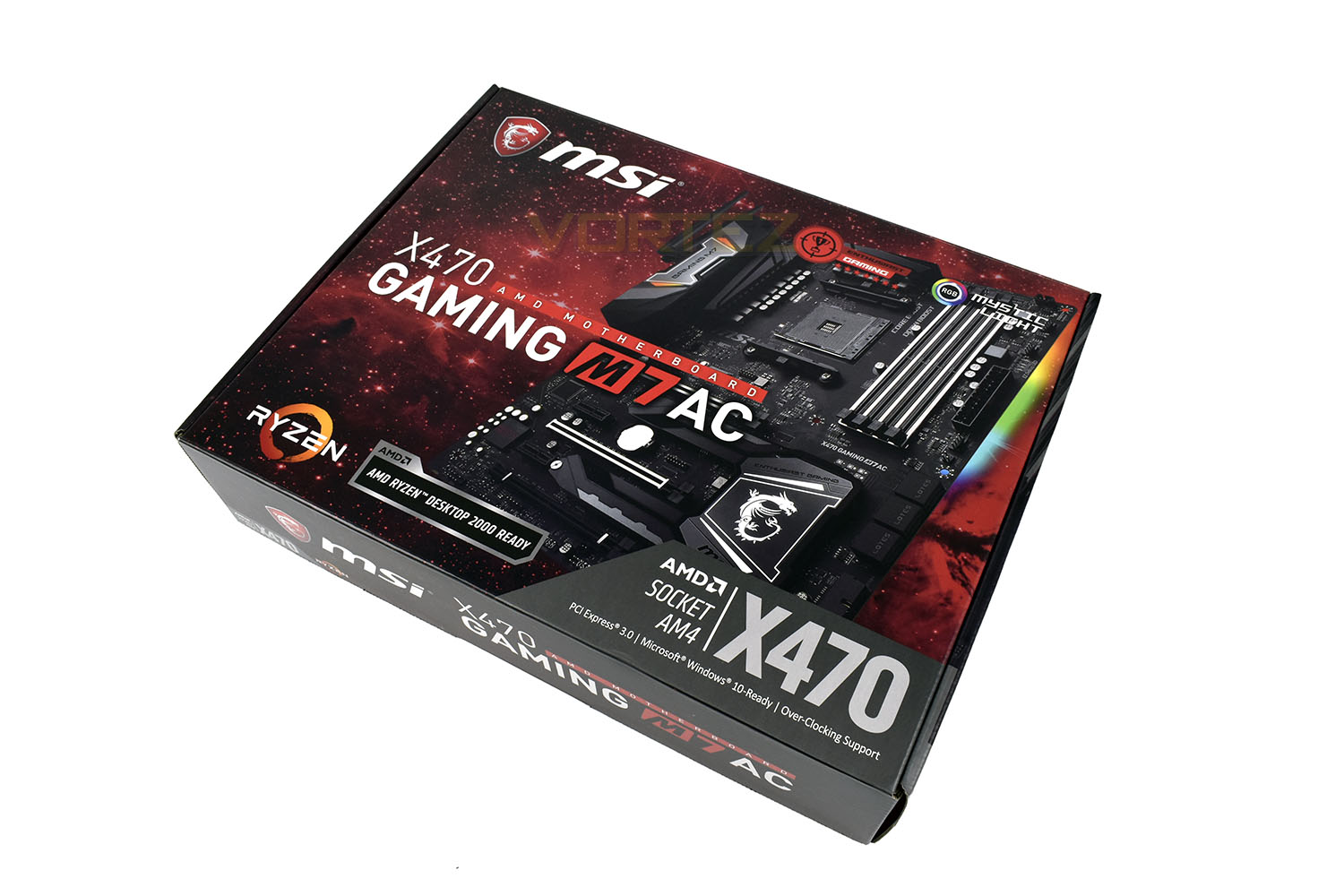
MSI, clinging onto their trademark black and red theme, deliver the X470 GAMING M7 AC in typical style, with some added deep-space feel. The front of the box gives basic information on the socket used and overclocking support, with an “AMD RYZEN DESKTOP 2000 READY” badge added in the centre.The preview of the motherboard accurately displays what the motherboard looks like.
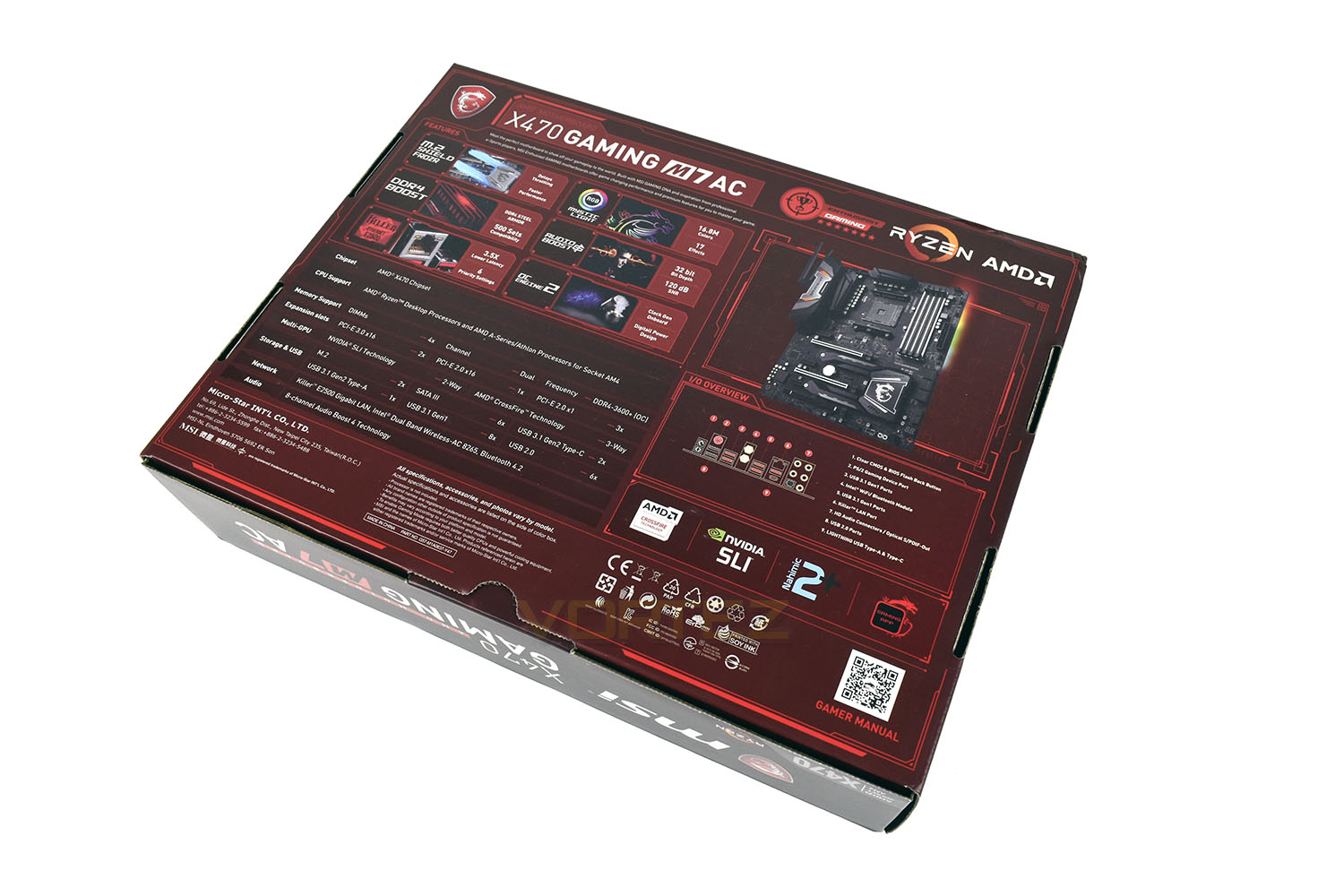
Flipping the box over and you’re presented with a mass of information. Aside from performance figures, this layout almost does us out of a job. Thumbs up to MSI for the info provided here.
Included with the motherboard is the following:
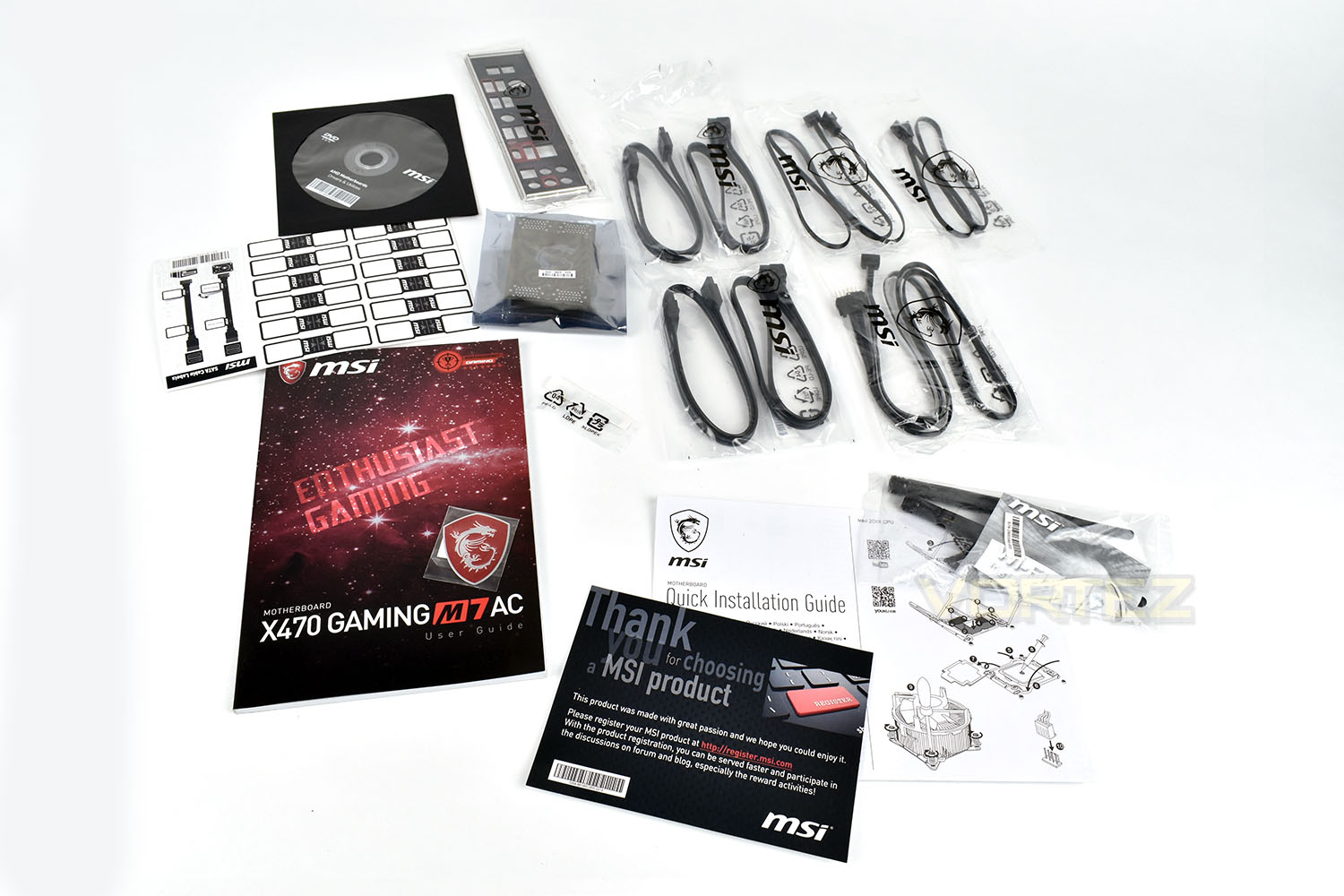
• MSI Motherboard user guide
• MSI Thank You card
• Quick Install Guide
• Case badge
• Internal labelling stickers
• 2x WiFi Antenna
• 4x SATA cables
• RGB LED extension cables
• SLI Bridge
• MSI Installation CD
• IO shield
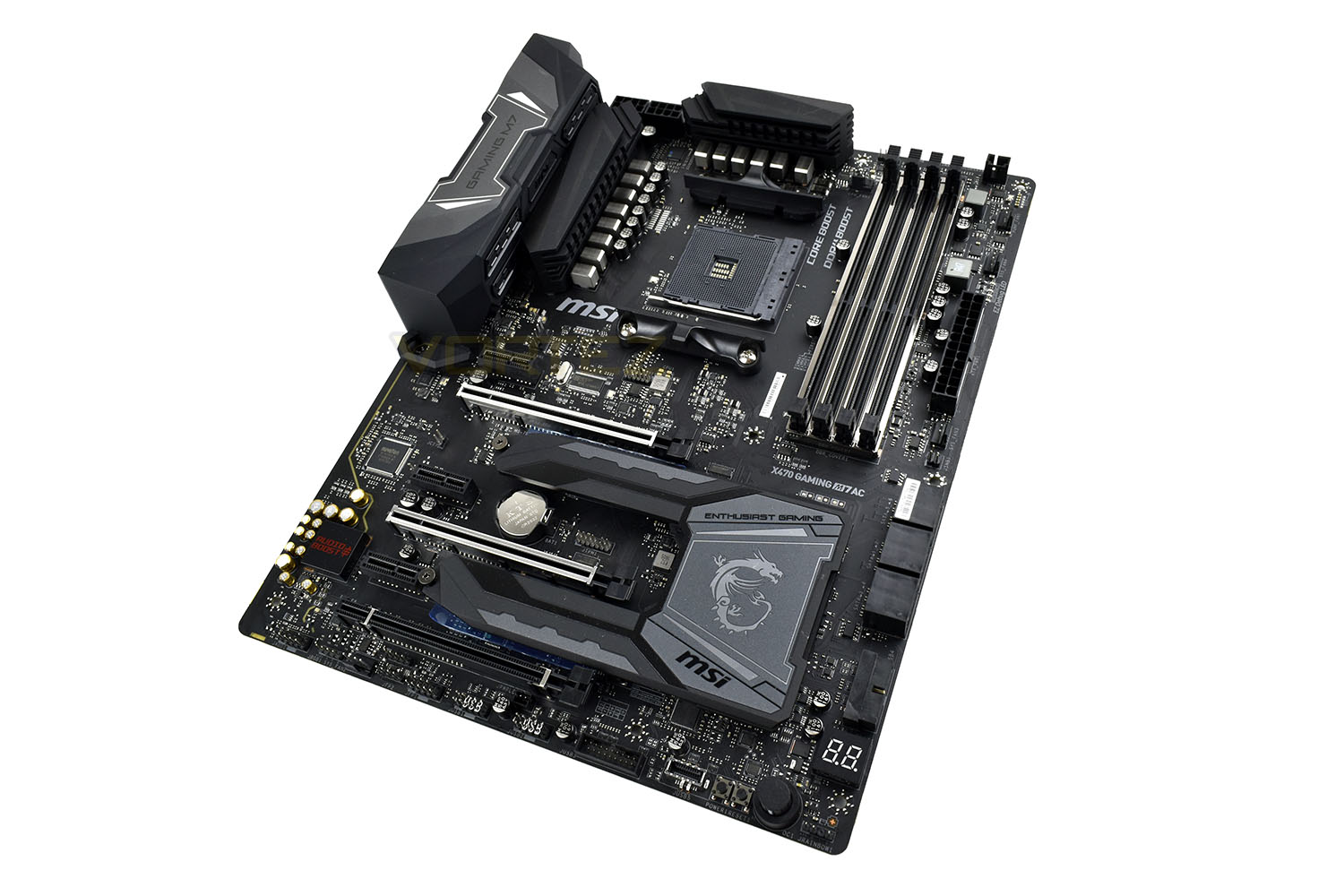
Conforming to the ATX form factor, the motherboard measures 243mm wide and 304mm long. An all-black appearance gives the board a stealthy appeal with a good layout.
Closer Look
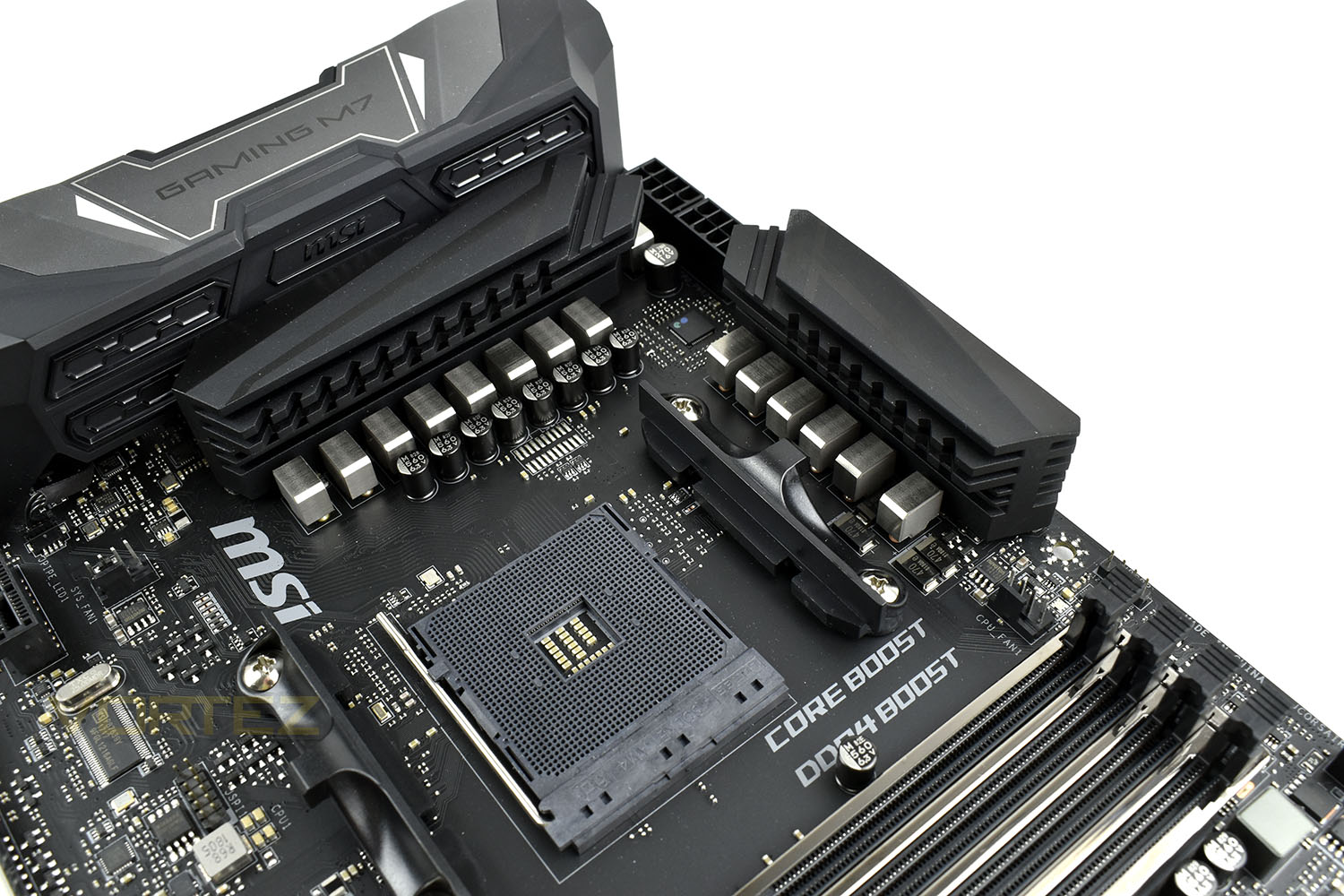
Of course, nothing has changed with the AM4 CPU socket, being backwards and forwards compatible with any 1st Gen Ryzen 3/5/7 processors. The processor’s 14+2 power delivery is all-digital, helping with stability and overclocks for the best performance.Being an enthusiast-centric motherboard, MSI have provided dual 8-pin CPU power, located top-right. Only one needs to be populated for general use, but if exploring the extreme limits of the Ryzen CPUs, especially the R7 series, you may find higher and more stable clocks can be attained by populating both power delivery slots.
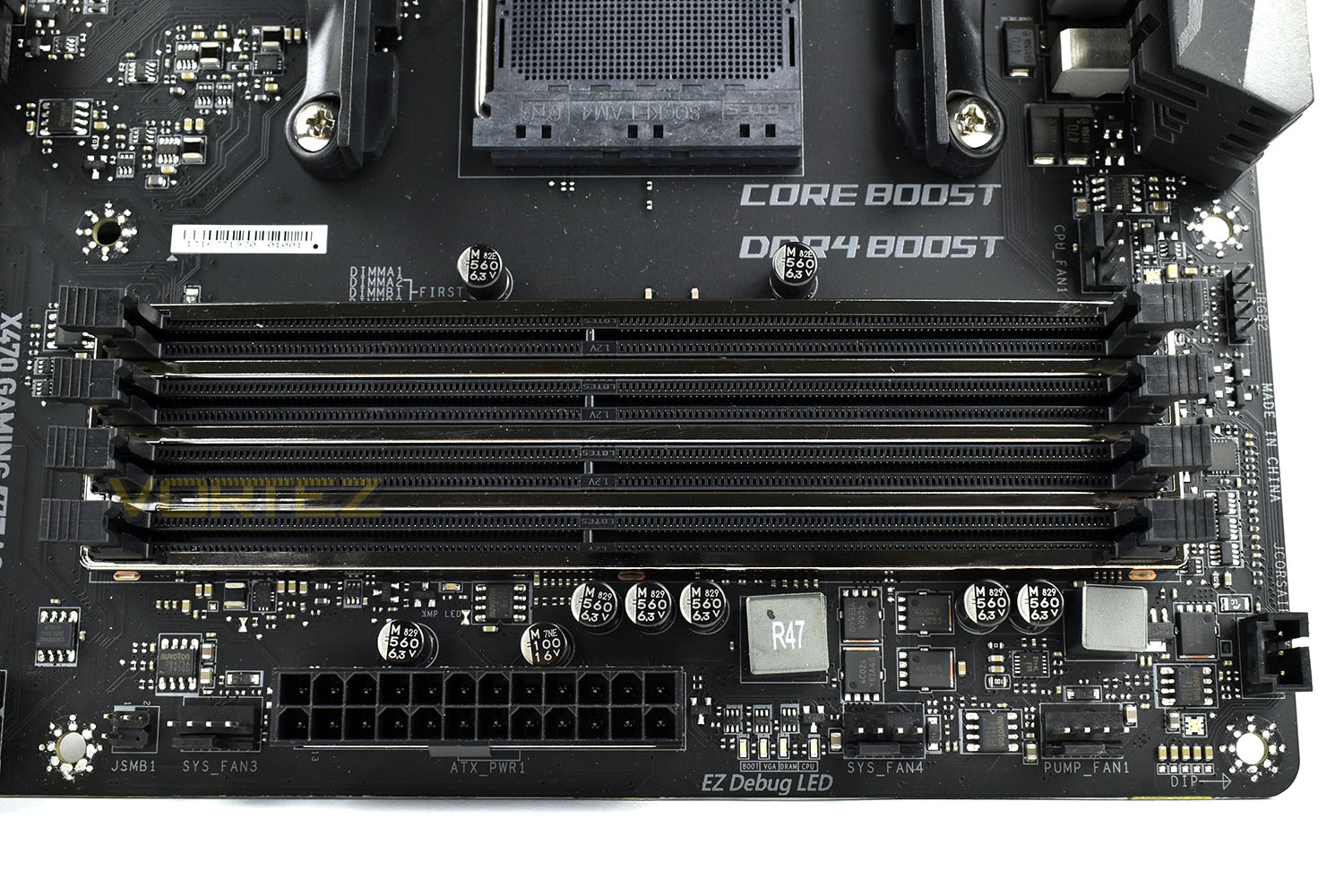
A total of six PWM fan headers populate the board, one is located next to the CPU socket, three along the side of the DIMM slots. There’s one above the PCI-E x1 slot and finally one located along the bottom edge.
Memory support is provided by a dual channel DDR4 controller located within the AMD Ryzen chip. MSI claim support for up to 3600MHz on the GAMING M7 AC with capacity support up to 64GB (4x 16GB). The metal DIMM slots, paired with isolated circuitry provide optimal stability. MSI have tested the M7 AC with over 500 DRAM kits to help guarantee memory compatibility.
Immediately right of the 24-pin ATX power are four LEDs, dubbed the EZ Debug LED, to help diagnose any issues. BOOT, VGA, DRAM and CPU are here. The offending item will be lit to help locate the problem, should you encounter any.
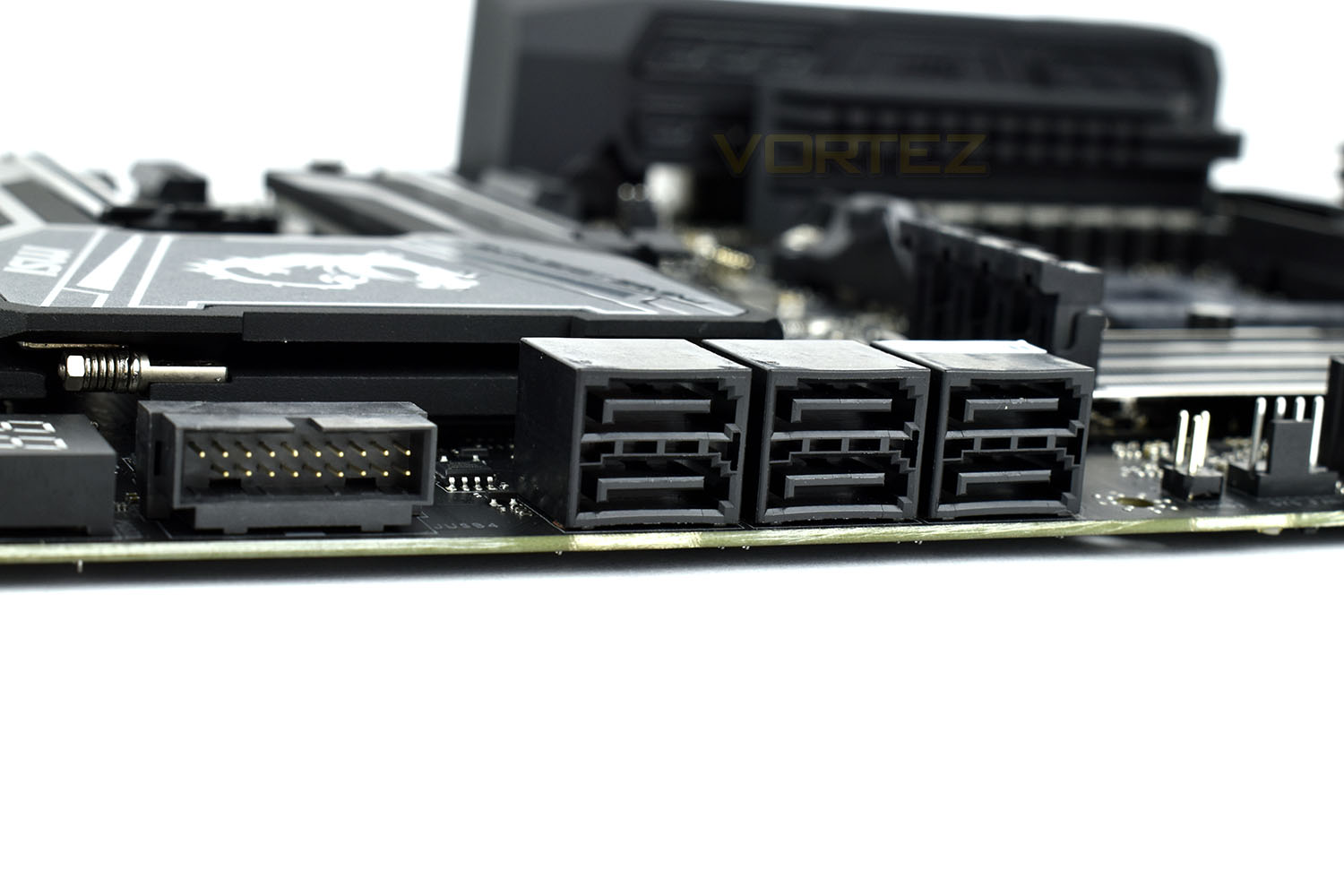
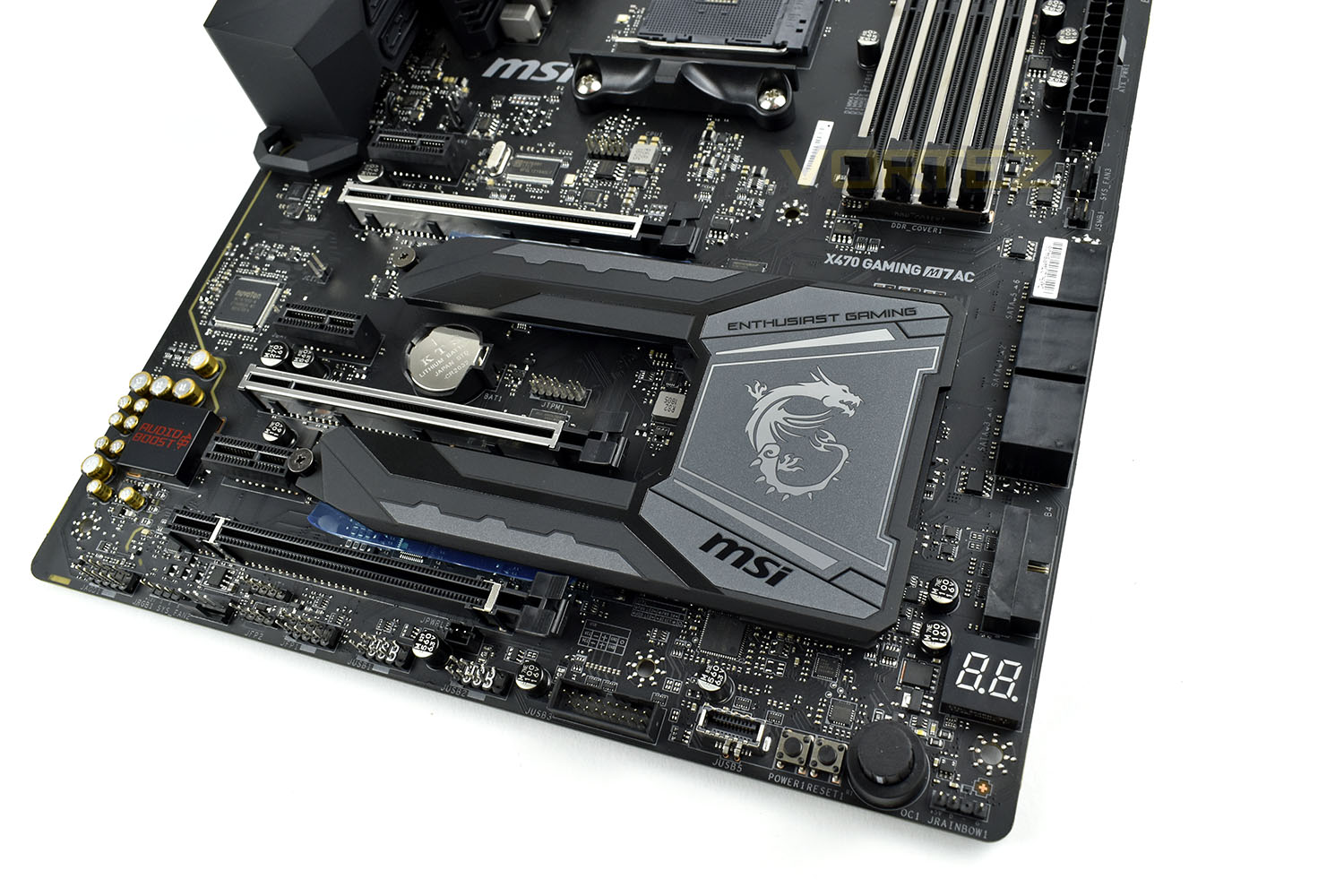
Located to the right of the southbridge/M.2 heatsink are six SATA3 headers, arranged 90° from the board for optimal cable routing. Just to the left is a 90° USB 3.0 case header, for front USB ports.
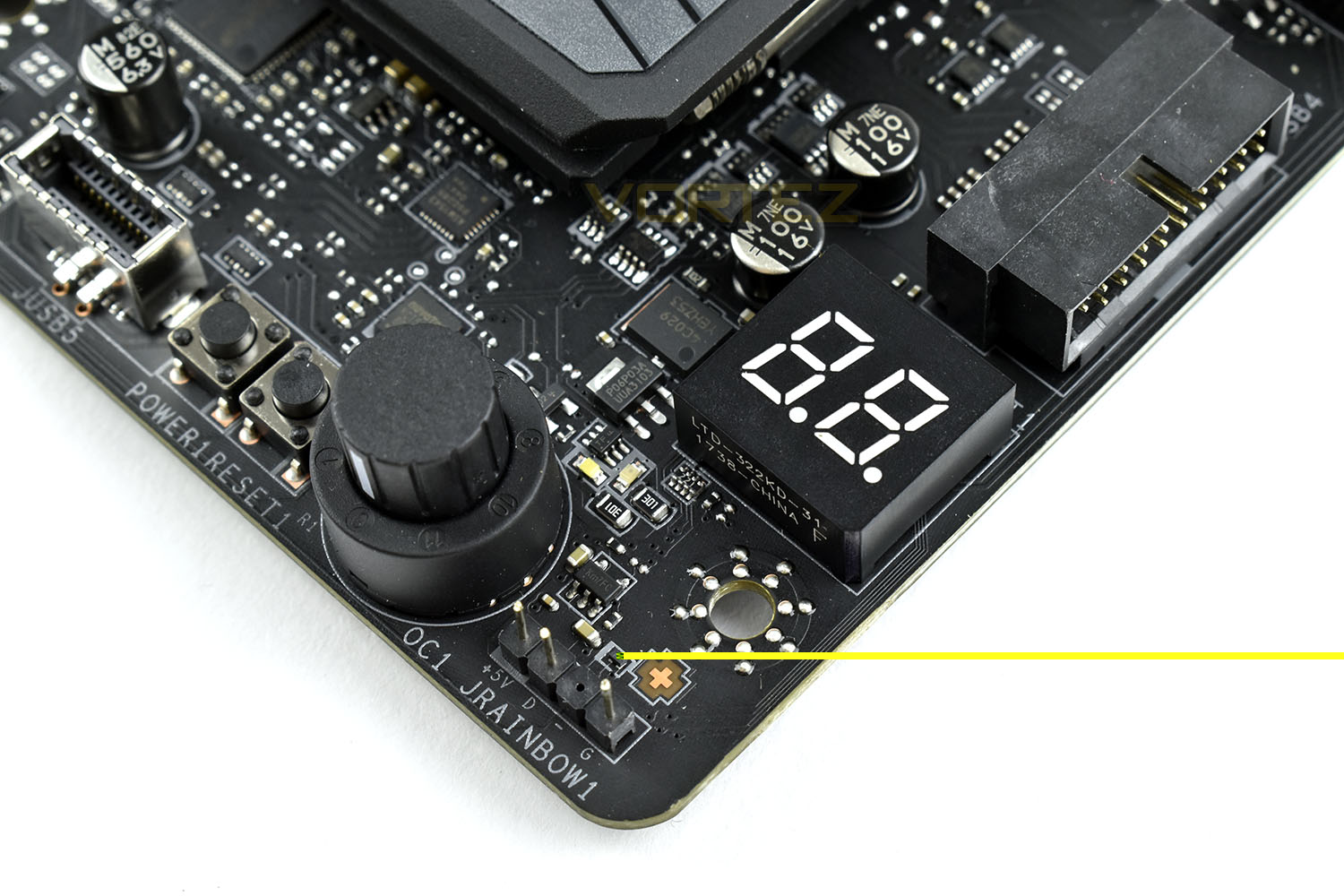
If the EZ Debug LEDs weren’t enough, there’s also a two-digit LED display on the bottom-right of the board. The debug codes are listed within the manual, helping to pinpoint the exact cause of any issues during the boot process.
The GAME BOOST Knob is there to automatically overclock your CPU. Going from 0 to 11, because who doesn’t want to turn it up to 11? Unfortunately, due to the timing of our review, there aren’t currently any known good values for this with the 2700X CPU so we were unable to test its usefulness; however, in our experience on other MSI motherboards, this can be a quick and simple way to overclock your CPU, though results are often better if you tweak settings yourself. A one-size-fits-all approach to overclocking will very rarely yield optimal results.
The M.2 Shielf FROZR dominates the south portion of the motherboard, providing cooling for the southbridge and both M.2 slots. This part is unlocked by undoing both M.2 screws, at which point the whole piece hinges up at the right.
PCI-E ports are as follows:
• 2x PCI-E 3.0 x16
• 1x PCI-E 2.0 x16
• 3x PCI-E 2.0 x1
The bottom edge provides us with the following, from left to right:
• Front Audio
• RGB fan header
• PWM fan header
• JFP2 (Jumper front panel)
• JFP1 (Jumper front panel, traditional)
• USB 2.0
• USB 2.0
• USB 3.0
• JUSB5 (Type-C connection for front of case)
• Power
• Reset
• GAME BOOST Knob
• RGB Rainbow header
Audio is isolated, to prevent any interference with incredibly sensitive pieces of equipment. Audio is provided by Audio Boost 4, featuring Chemi-Con capacitors for a warmer sound, along with gold-plated connectors.
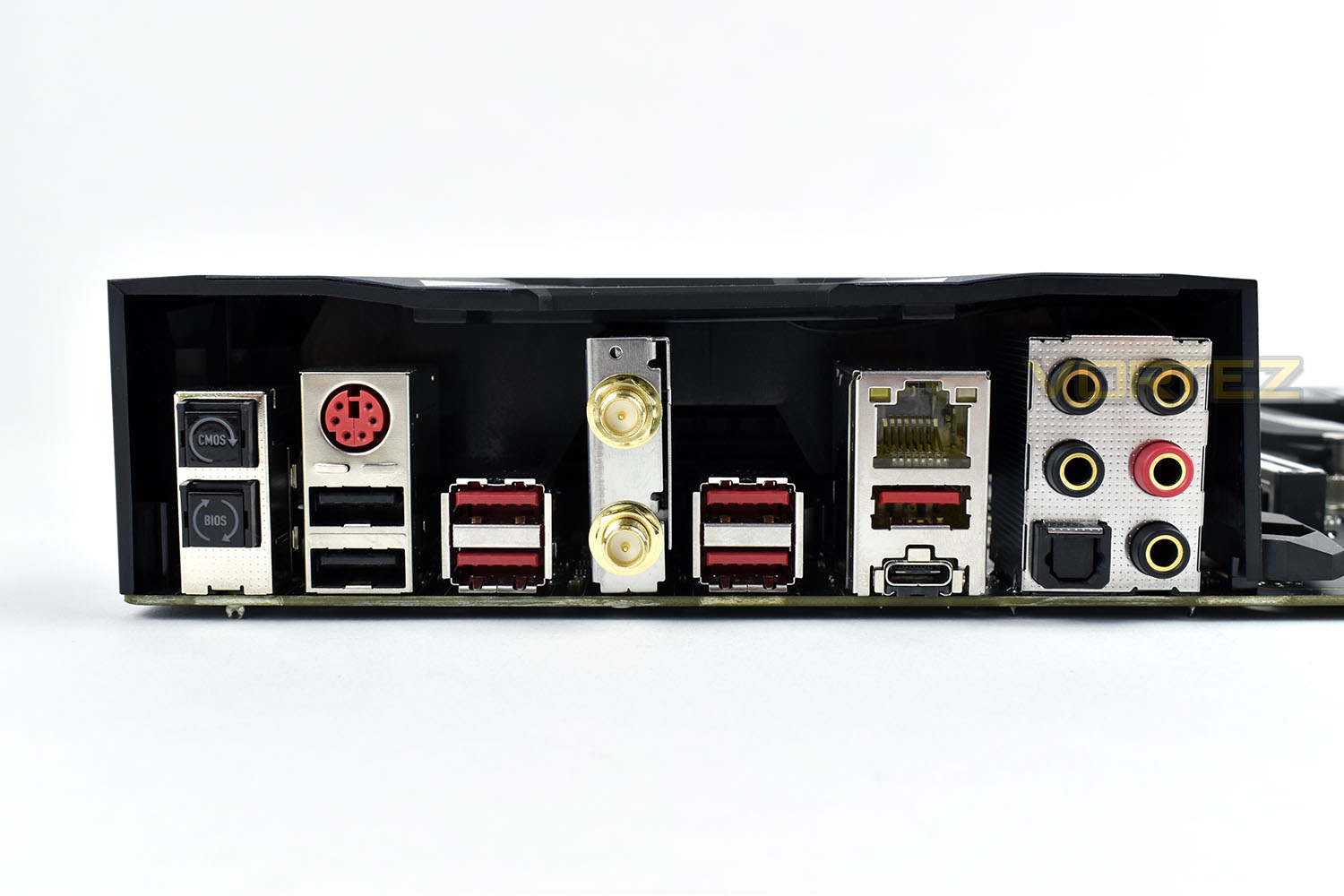
The rear IO panel, with shield included, provides these input/outputs:
• PS/2 Device port
• 2x USB 2.0 ports
• 4x USB 3.1 Gen. 1 ports
• Intel WiFi/Bluetooth antenna connections
• Killer E2500 Gigabit LAN port
• USB 3.1 Gen. 2 Type A & Type C ports
• 7.1 Audio output + SPDIF Optical out
The inclusion of USB 2.0, in 2018, seems a little out-dated, but there may be products with compatibility issues that will only function correctly over USB 2.0. If that’s the case, you’ll be glad they’re there. They also offer ample performance for keyboards and mice, even with 1000Hz polling rates and RGB lighting.
Overclocking & BIOS
The MSI Click BIOS 5 offers a pair of user interfaces; a simple, easy to use BIOS layout with minimal adjustments, for those who are happy with XMP overclocking on their RAM and a stock-clock CPU.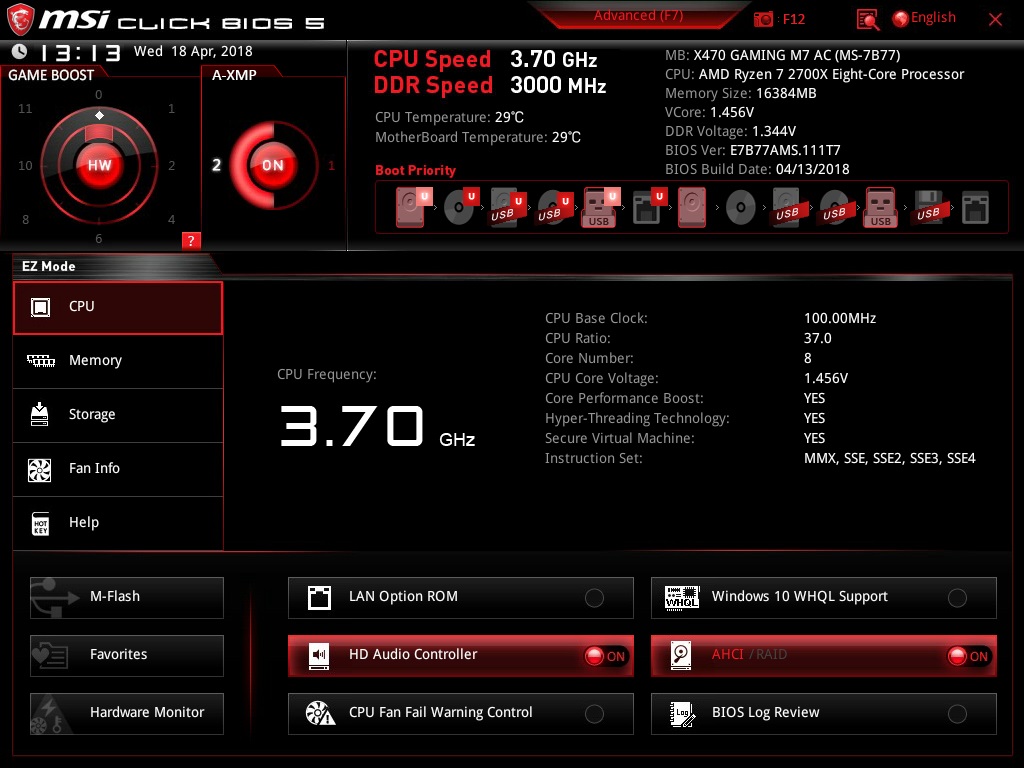
Or for those with tuning in mind, wishing to extract an overclock from their Ryzen CPU, the Advanced screen offers a whole plethora of options, including the ability to adjust the BCLK, an alternative to the usual CPU overclocking, instead overclocking the entire system’s frequency.
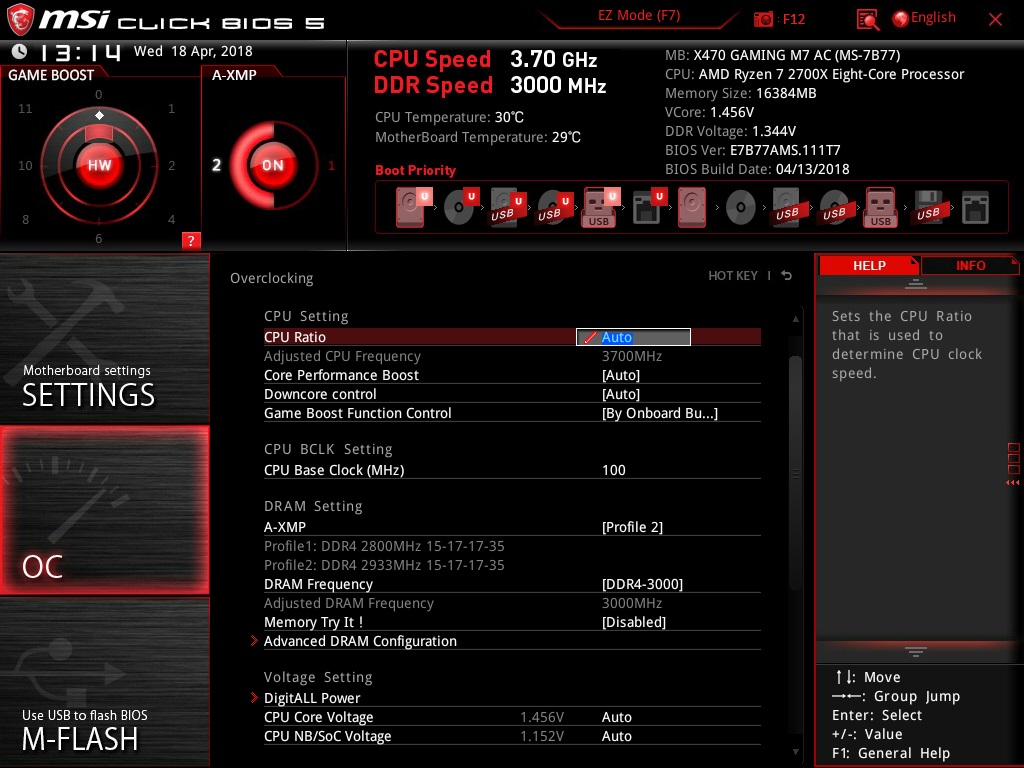
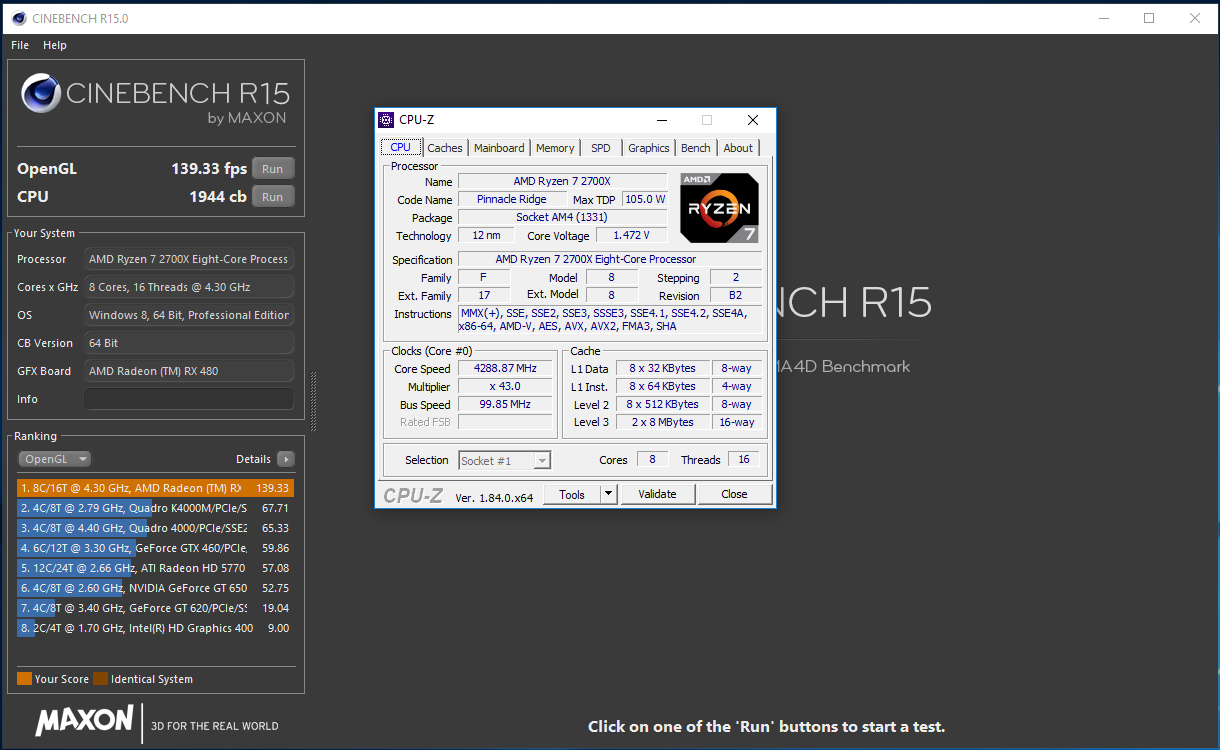
Overclocking was a resounding success, hitting 4.3GHz without much trouble. Voltage had to be increased to 1.475v to achieve this frequency, but the Cinebench score did rise from 1832 to 1944.
Test Setup & Software
Within our testing, we’ve included the results from an AORUS AX-370 GAMING 5 motherboard, equipped with the exact same memory, processor, SSD, GPU and PSU. This acts as a direct comparison from the X370 and X470 chipsets.Test Setup
CPUAMD Ryzen 7 2700X
Cooling Noctua NH-U12S-SE-AM4
Motherboard MSI X470 GAMING M7 AC
Memory 16GB Corsair Vengeance LPX 3000MHz @ 3000MHz 15-17-17-38-52-T1
Graphics AMD Radeon RX 480 8GB
Storage Corsair Force LE 480GB
PSU Corsair RM750X 80 Plus Gold Certified PSU
Cooling Noctua NH-U12S-SE-AM4
Motherboard MSI X470 GAMING M7 AC
Memory 16GB Corsair Vengeance LPX 3000MHz @ 3000MHz 15-17-17-38-52-T1
Graphics AMD Radeon RX 480 8GB
Storage Corsair Force LE 480GB
PSU Corsair RM750X 80 Plus Gold Certified PSU
Benchmarks
Cinebench R15 – CPU/OpenGL Score
x264 HD 4.0 – 1st and 2nd pass encoding
SiSoftware SANDRA – CPU & Memory benchmarks
POV-RAY – CPU benchmarks
TrueCrypt – CPU benchmarks
AIDA64 – CPU benchmarks & Memory
PCMark 8 – Home Suite & Photoshop
3DMark FireStrike – 3D Benchmark
Games – Rise of the Tomb Raider & Total War: WARHAMMER
x264 HD 4.0 – 1st and 2nd pass encoding
SiSoftware SANDRA – CPU & Memory benchmarks
POV-RAY – CPU benchmarks
TrueCrypt – CPU benchmarks
AIDA64 – CPU benchmarks & Memory
PCMark 8 – Home Suite & Photoshop
3DMark FireStrike – 3D Benchmark
Games – Rise of the Tomb Raider & Total War: WARHAMMER
Other Software
Temperature Analysis: Aida64 & Ryzen Master
Stress Testing Software: AIDA64 Stability Test
CPU Specification Monitoring: CPU-Z
Performance Monitoring: MSI Afterburner
Stress Testing Software: AIDA64 Stability Test
CPU Specification Monitoring: CPU-Z
Performance Monitoring: MSI Afterburner
Benchmarks: Power Consumption
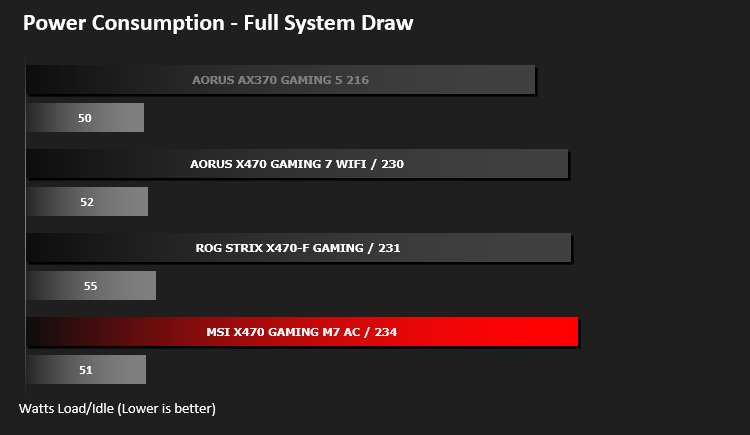
It’s interesting to note the power consumption across all motherboards. Although they are using the Z270 chipset, energy results can fluctuate between manufacturers due to the features and specifications that are integrated. First of all, for the idle tests the system is cold booted into Windows and no additional applications are executed – the watts are noted on the external energy monitor we use and then the system is loaded with 3DMark FireStrike – watts are again monitored for the duration of the test and the highest rated wattage result is then noted down. Below are the results of this energy test.
Benchmarks: Cinebench R15
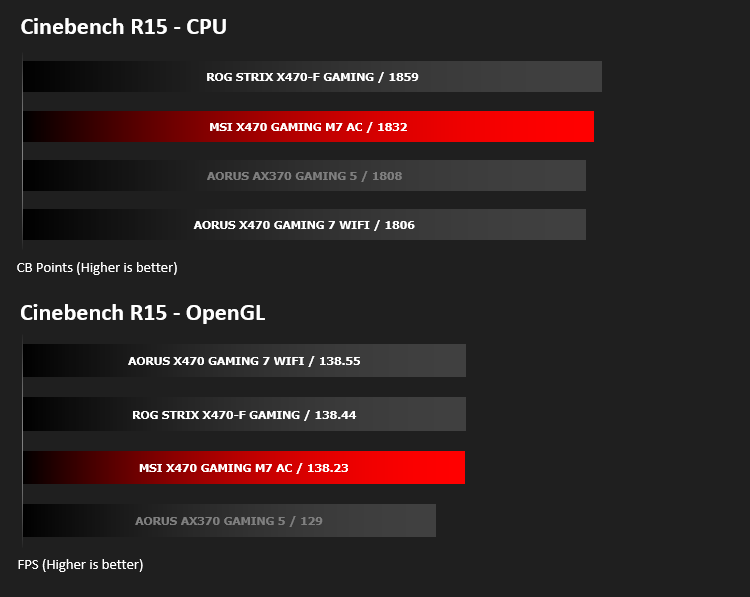
CINEBENCH can measure systems with up to 64 processor threads. This test scene contains approximately 2,000 objects which in turn contain more than 300,000 polygons in total, and uses sharp and blurred reflections, area lights, shadows, procedural shaders, antialiasing, and much more. The result is displayed in points (pts). The higher the number, the faster your processor.
Benchmarks: x264 HD
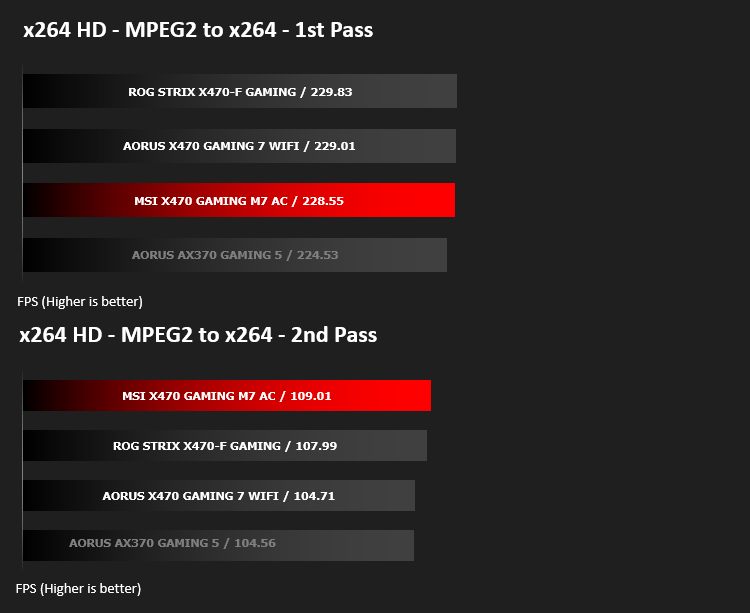
Simply put, this test measures how fast your machine can encode a short, DVD quality MPEG-2 video clip into a high-quality x264 video clip. What’s x264, you ask? It’s more or less the next-generation Xvid/DivX codec. I think it’s ideal for a benchmark because the application (x264.exe) reports fairly accurate compression results (in frames per second) for each pass of the video encoding process, and it uses multi-core processors very efficiently.
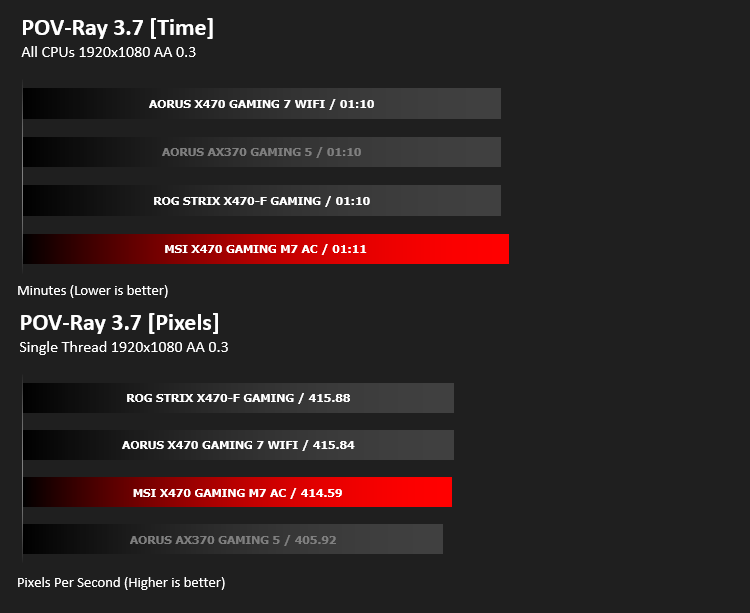
Benchmarks: POV-RAY 3.7
Persistence of Vision Raytracer’s PovRay is a free and open source 3D animator application with versions for computers with different operating systems.
This product allows users to build their custom 3D worlds with excellent quality despite their computer’s hardware. It has adjustable options for levels of radiance, refraction, and reflection. Calculation time may vary depending on the computer model, but PovRay can adapt to many computer builds, and is supported by the open source community.
This product allows users to build their custom 3D worlds with excellent quality despite their computer’s hardware. It has adjustable options for levels of radiance, refraction, and reflection. Calculation time may vary depending on the computer model, but PovRay can adapt to many computer builds, and is supported by the open source community.
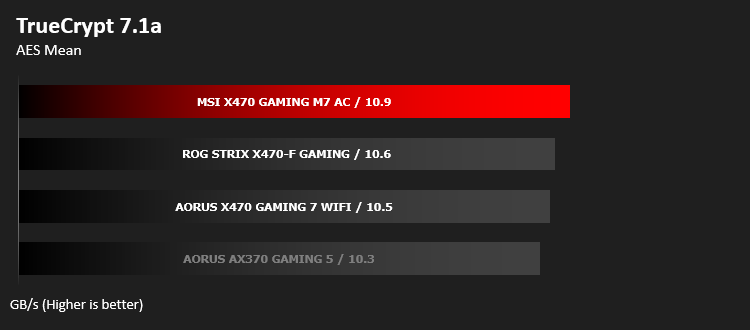
Benchmarks: TrueCrypt
TrueCrypt is a discontinued source-available freeware utility used for on-the-fly encryption (OTFE). It can create a virtual encrypted disk within a file or encrypt a partition or (under Microsoft Windows except Windows 8 with GPT) the entire storage device (pre-boot authentication).
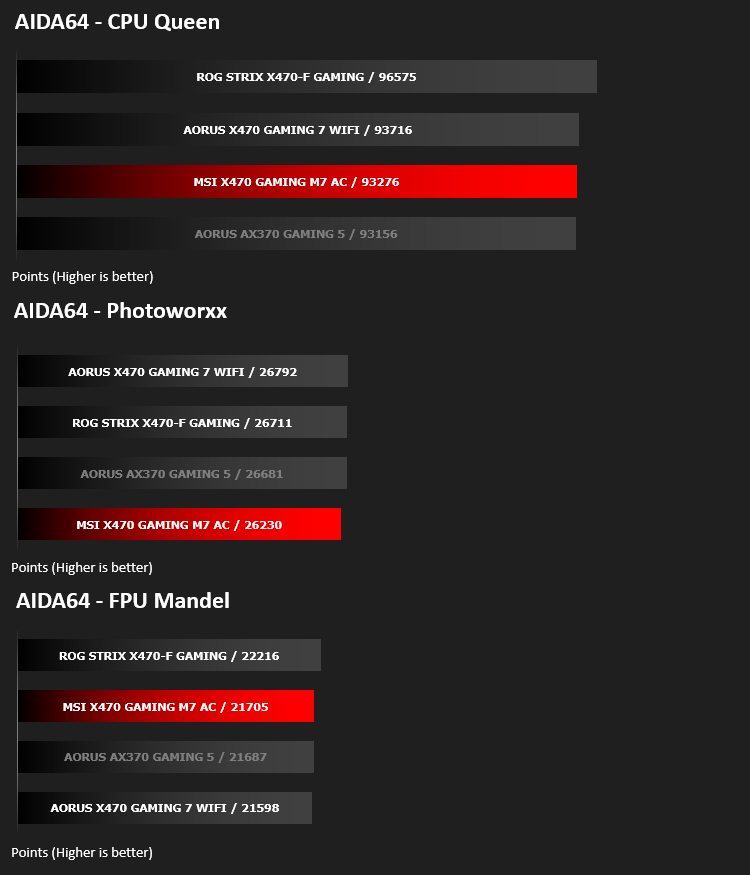
Benchmarks: AIDA64
AIDA64 Product PageThis simple integer benchmark focuses on the branch prediction capabilities and the misprediction penalties of the CPU. It finds the solutions for the classic “Queens problem” on a 10 by 10 sized chessboard. At the same clock speed theoretically the processor with the shorter pipeline and smaller misprediction penalties will attain higher benchmark scores. For example — with HyperThreading disabled — the Intel Northwood core processors get higher scores than the Intel Prescott core based ones due to the 20-step vs 31-step long pipeline. CPU Queen test uses integer MMX, SSE2 and SSSE3 optimizations.
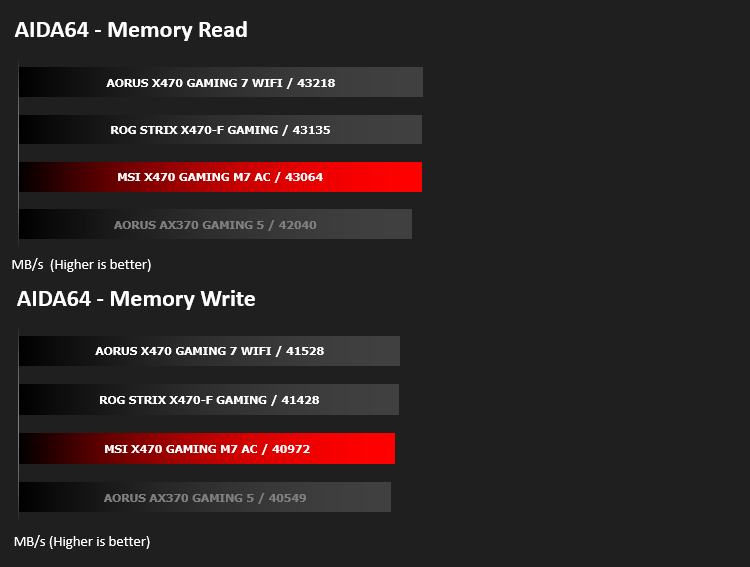
Memory bandwidth benchmarks (Memory Read, Memory Write, Memory Copy) measure the maximum achiveable memory data transfer bandwidth. The code behind these benchmark methods are written in Assembly and they are extremely optimized for every popular AMD, Intel and VIA processor core variants by utilizing the appropriate x86/x64, x87, MMX, MMX+, 3DNow!, SSE, SSE2, SSE4.1, AVX, and AVX2 instruction set extension.
The Memory Latency benchmark measures the typical delay when the CPU reads data from system memory. Memory latency time means the penalty measured from the issuing of the read command until the data arrives to the integer registers of the CPU.
The Memory Latency benchmark measures the typical delay when the CPU reads data from system memory. Memory latency time means the penalty measured from the issuing of the read command until the data arrives to the integer registers of the CPU.
Benchmarks: SiSoftware SANDRA
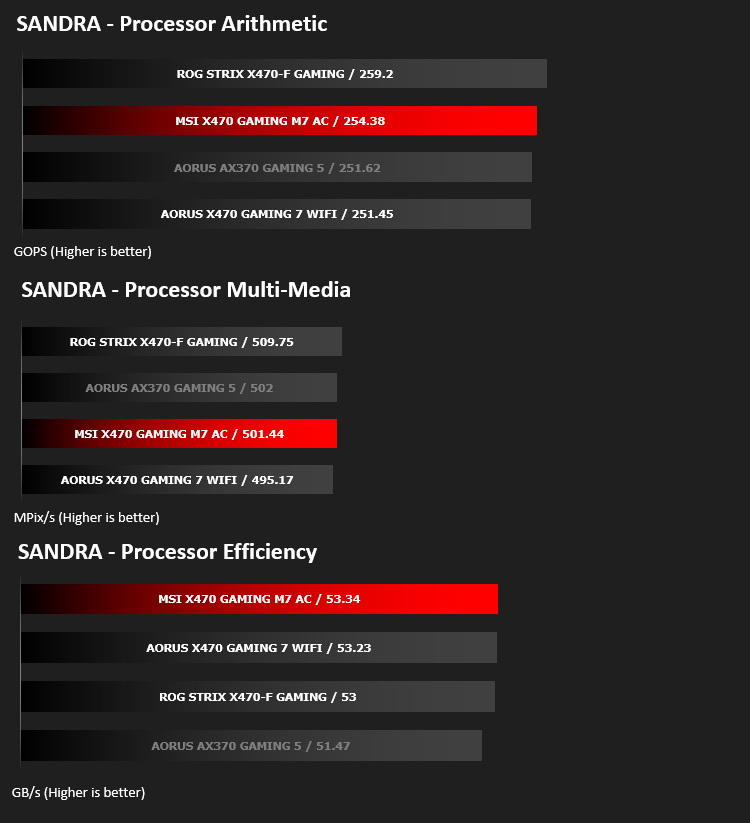
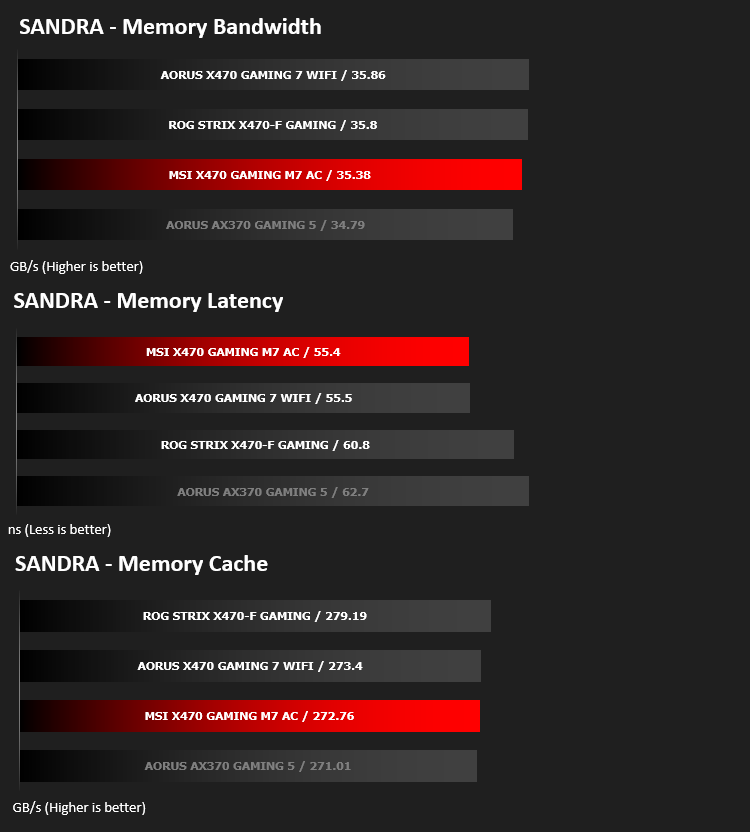
SANDRA isn’t always a benchmark that is included in hardware reviews but I believe it shouldn’t be ignored. SANDRA provides a vigorous package that tests your system in a rather large array of benchmarks. There are many aspects of benchmark that can be executed. We will be considering – CPU and memory tests.
Benchmarks: PCMark 8
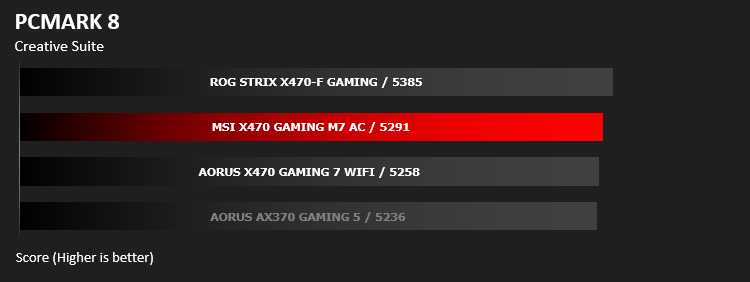
PCMark 8 combines performance benchmarking with battery life measurement and includes tests based on popular Adobe and Microsoft applications. Whether you are looking for long battery life, or maximum power, PCMark 8 will help you find the devices that offer the perfect combination of efficiency and performance for your needs. It’s the complete PC performance benchmark for home and business.
Benchmarks: PCMark 8 Photoshop
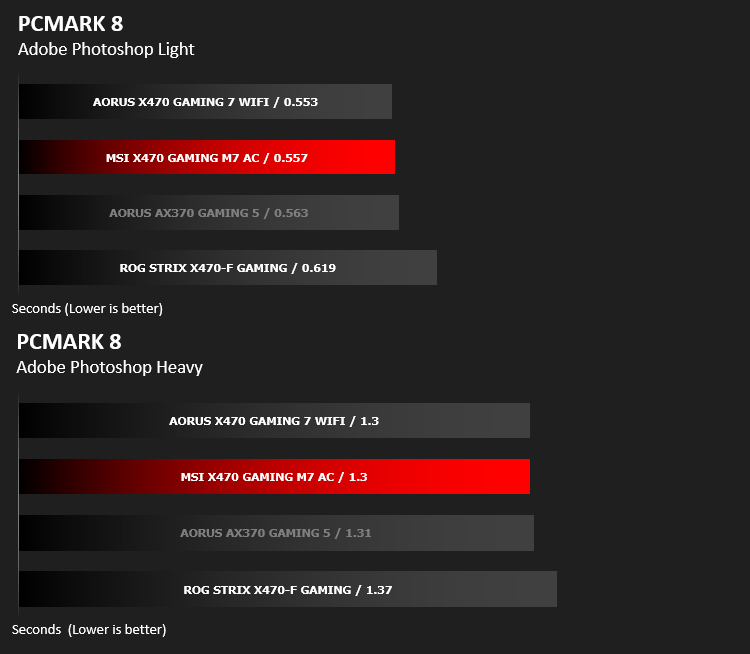
PCMark 8 Product Page Developed in partnership with Benchmark Development Program members Acer, AMD, Condusiv Technologies, Dell, HGST, HP, Intel, Microsoft, NVIDIA, Samsung, SanDisk, Seagate and Western Digital, PCMark 8 is the latest version in FutureMark’s popular series of PC benchmarking tools. Improving on previous releases, PCMark 8 includes new tests using popular applications from Adobe and Microsoft.
Benchmarks: 3DMark FireStrike & TimeSpy
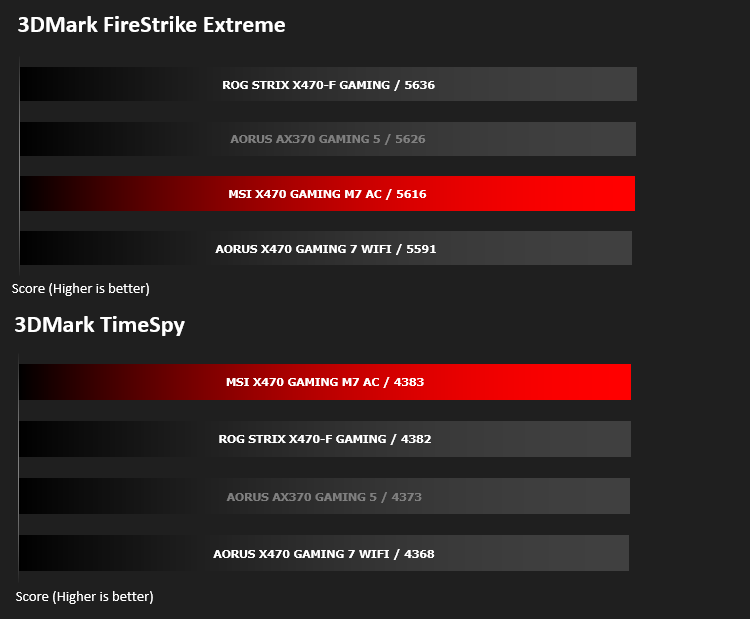
3DMark FireStrike Product PageFire Strike is our new showcase DirectX 11 benchmark designed for high-performance gaming PCs. It is our most ambitious and technical benchmark ever, featuring real-time graphics rendered with detail and complexity far beyond what is found in other benchmarks and games today. Fire Strike will only be available in the Windows editions of 3DMark initially.
Benchmarks: VRMark
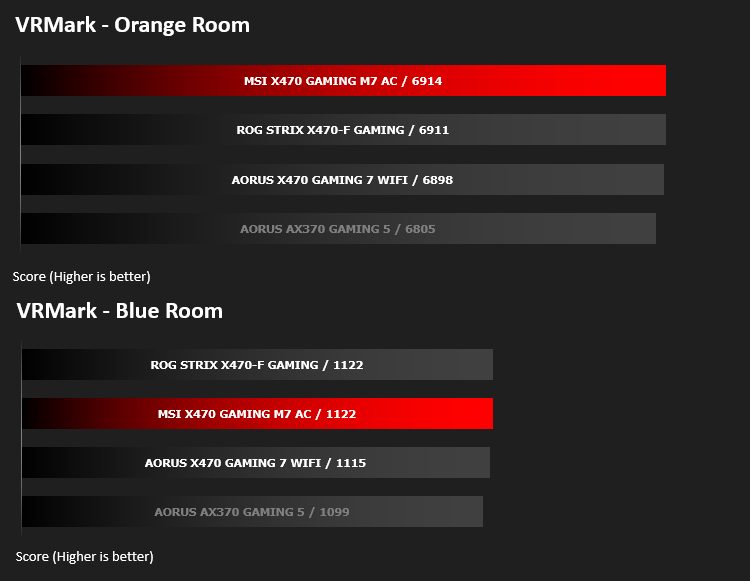
VRMark Product PageVRMark includes two VR benchmark tests that run on your monitor, no headset required, or on a connected HMD. At the end of each test, you’ll see whether your PC is VR ready, and if not, how far it falls short.
Benchmarks: Rise of the Tomb Raider & Total War: Warhammer
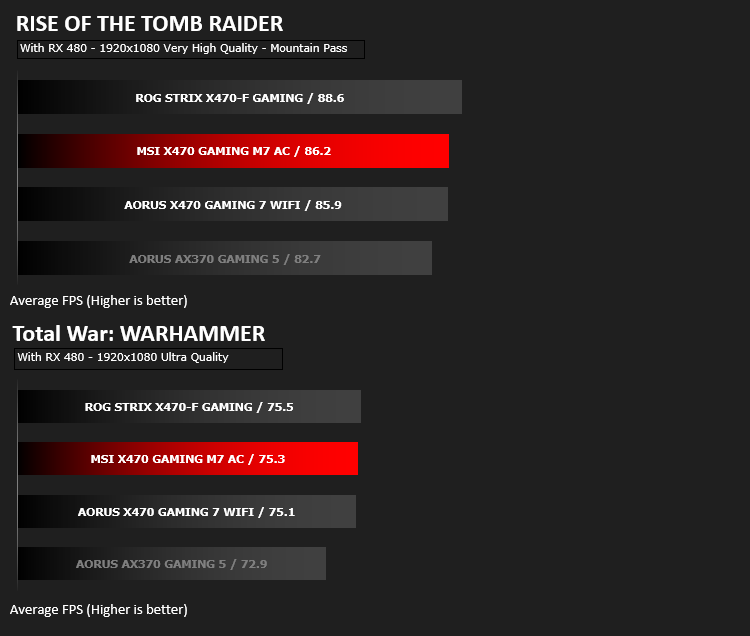
It’s important for us to perform a number of game benchmarks as well as the synthetic tests because gamers will want to know if there are any significant benefits. So here we have two recent gaming titles.
Conclusion
As we saw in the X370-era, MSI were amongst the top performers, offering features unseen from other brands. It’s good to see they’ve carried on those thoughts and haven’t been distracted from their true focus; gaming.Overclocking features, despite being aplenty, aren’t over the top on this model, leaving way for a more focussed, enthusiast-centric model in the coming weeks or months. Usually arriving under the ACK nomenclature. However, having said that, we did manage a 4.3GHz overclock and found the BIOS very easy to navigate. The all-digital 14+2 power phase, with the 8+8 CPU power does open up options, if you wish to explore the limits of the Ryzen 2nd Gen. CPUs.
With the rapid adoption of M.2 NVMe drives, for their speed, size and lack of cables, it’s good to see MSI sticking with a pair of slots on their boards but it would be nice to see more of these in the future. The M.2 FROZR, helping to decrease NVMe temperatures, certainly isn’t a bad thing either!
The placement of PWM fan headers around the edge of the board, for optimal cable management, as well as right-angled SATA and USB 3.1 will please those with tempered-glass cases, which are all the rage right now; helping to improve appearance and airflow.
Performance, considering the price of the M7 GAMING AC, was unfortunately a little lacking, but this may very well improve in the near future, from BIOS and Windows updates being issued. Though that doesn’t detract from the fact we must base our thoughts on performance in the here and now, instead of speculating on what might come. It did top some of our charts, but the margin amongst the three boards tested so far is small and largely insignificant, instead showing a trend towards an improvement over X370 boards.
The AM4 platform, as can be seen by the comparison to the mature AORUS AX-370 GAMING 5, a very capable board from the X370 line-up, shows a decent improvement in memory-intensive tasks, but power usage, both idle and load, were increased. This increase in power usage directly correlates with the higher TDP and power draw of the R7 2700X CPU. Obviously, due to this, the performance-per-watt does drop somewhat.
All in, we experienced no real issues with the MSI board, other than the asking price being higher than the tested competition; however, with the feature set presented and attention to detail on component placement, that price can be warranted, if those are attributes you require.
If you already own a Ryzen 7 system, the need to upgrade probably doesn’t exist, but if you require the bleeding edge of performance or are buying into an AMD system at this time, this MSI board will provide an incredible starting point to work from.
Pros
+ Great overclocking potential
+ DDR4-3600(OC) Support
+ Wireless and wired gaming possible
+ Audio Boost 4 for crystal clear sound
+ Alpha-Numeric LED readout for simple diagnostics
+ 2x M.2 slots
+ Right angled SATA and USB 3.1 ports
+ Good fan header and adaptor placement across the board
+ Easy overclocking GAME BOOST knob
+ 8+8 CPU power for extreme overclocking
+ Easy to use BIOS
Cons
– Not the best performance
+ Great overclocking potential
+ DDR4-3600(OC) Support
+ Wireless and wired gaming possible
+ Audio Boost 4 for crystal clear sound
+ Alpha-Numeric LED readout for simple diagnostics
+ 2x M.2 slots
+ Right angled SATA and USB 3.1 ports
+ Good fan header and adaptor placement across the board
+ Easy overclocking GAME BOOST knob
+ 8+8 CPU power for extreme overclocking
+ Easy to use BIOS
Cons
– Not the best performance
Click here for an explanation of our awards at Vortez.net.
Stay connected with the Vortez Social Media pages:
Join in with the discussions on Discord