







If you are on the look out for a budget X79 motherboard maybe the MSI GD45 8D will take your fancy. Join us as we put the baby MSI motherboard through its paces…
Product on Review: MSI X79A-GD45 8D

Manufacturer and Sponsor: MSI
Street Price: £153.98
The MSI X79A GD65 8D was one of the first X79 motherboards we reviewed and while it impressed, it didn’t set our pulses racing. Conversely, the MSI Big Bang II is perhaps the best X79 motherboard we have had through our doors. Both mid and top range motherboards have been met with varying levels of success, not least because of the cost of the X79 chipset. It’s been a while arriving but MSI have finally released an entry level motherboard in the guise of the GD45 8D. I say entry level but in all fairness, the X79 chipset feature list is anything but entry level as it has many features, lower end chipsets would only serve up in their flagship products so even though this motherboard is marketed as a budget motherboard, you have to place this in context, there is simply no such thing as a budget X79 motherboard!
Costing £154, the MSI GD45 8D is certainly at the lower priced end of the X79 motherboard market but for this you still get PCIe Gen 3, Military Class III components and MSI’s user friendly ClickBios II UEFI BIOS along with a host of other features we will cover in this review. Let’s make no bones about it though because cost is the biggest feature of the GD45 8D. It is presently the cheapest ATX X79 motherboard available and allows the extreme enthusiast an entry point into the feature rich X79 chipset without breaking the bank nor having to compromise on features. At first glance you would be very hard pushed to tell the difference between the GD45 and its bigger brother, the GD65 because both boards are almost identical in appearance. There are however a few small differences which may tempt you to go for the baby MSI board over its stable mate.
About MSI (In their own words)
MSI is proud of its more than 20 years experience in designing and manufacturing high performance IT products. The product lines of MSI are mainboards, graphic cards, notebooks, consumer electronics, barebones, networking and server products, and fully integrated add-on peripherals. With its ISO 9001 and ISO 14001 qualified facilities, MSI products provide the best performance, reliability and value-increasing productivity.
We distribute our products through offices located in The Netherlands, Germany, Italy, France, United Kingdom, Spain, Turkey, Czech Republic, Poland, Serbia, Ukraine, Russia, United States, Canada, Mexico, Latin America, Brazil, Taiwan, Japan, China, Korea, India and Australia. MSI markets its products to distributors, computer system manufacturers, and system integrators. For more information about the company go to Specification
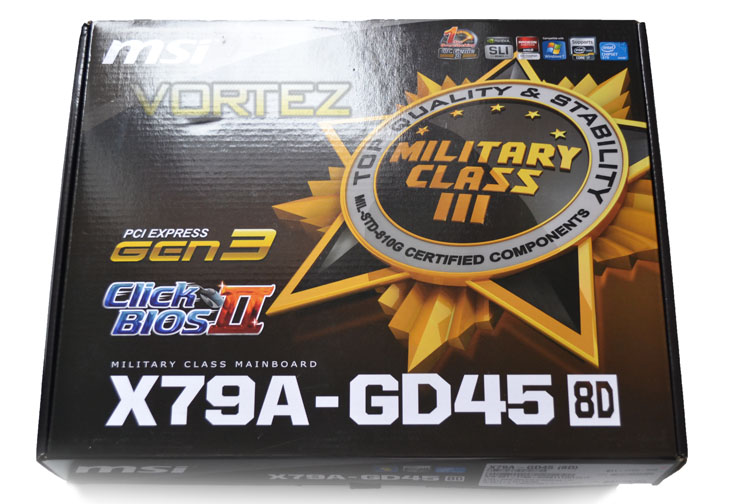
The front of the package, like the mainboard itself is near identical to the MSI GD65 packaging with MSI placing big emphasis on the military component III moniker which dominates the front packaging. the glossy packaging is sturdy and attractive enough however unlike the higher end offerings, there is no outer sleeve to protect the box nor a flip lid allowing you to digest the many features. Instead the feature list is found to the rear of the packaging…
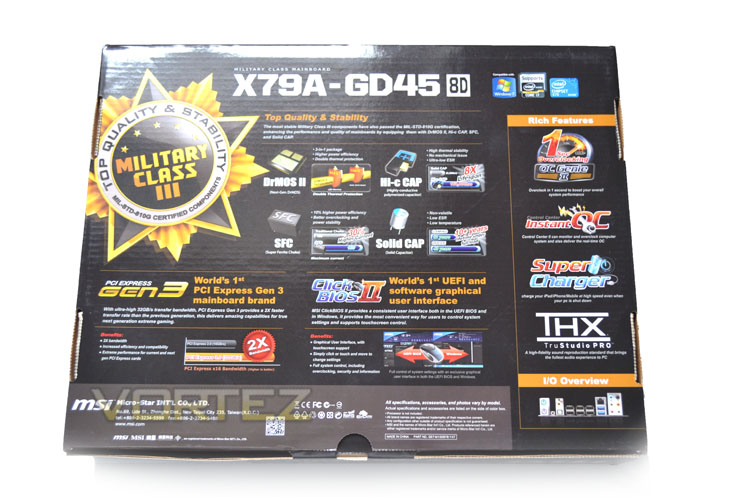
Again we see that the Military Class III components is the main attraction here along with the motherboards other features such as PCIe Gen 3 and click BIOS II.
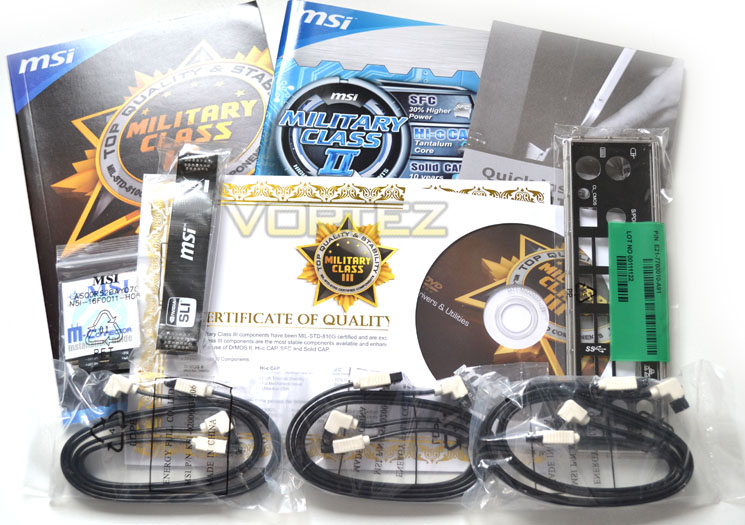
The accessory list is well thought out with pretty much everything you need to get you started. I would perhaps have liked to have seen a USB 3.0 bracket as there is a header on the mainboard for this so I’m afraid unless you have a PC case front header then the additional USB 3.0 ports will be unavailable. You do however get 6 SATA cables which is more than average for an entry level motherboard. You also get a single SLI bridge, driver CD and a plethora of guides and manuals.
Let’s have look at some of the motherboards main on-board features…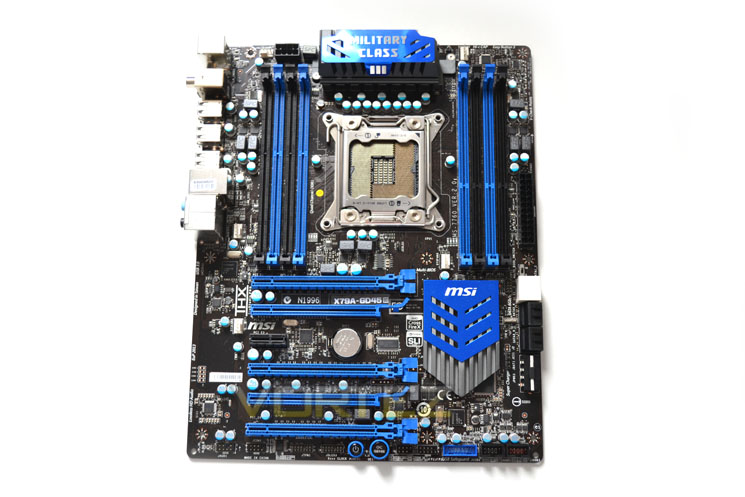
The black and blue theme that’s now familiar with MSI motherboards and high end components is carried through to the GD45 to enhance visual appeal. Everything is pretty much where you would expect to find it with all of the connectivity found around the leading edge of the mainboard.
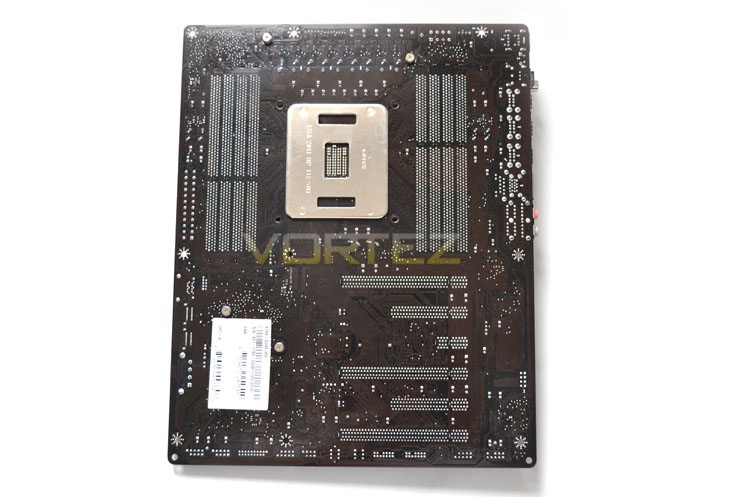
To the rear of the motherboard we find nothing much of interest with none of the heatsinks featuring a backplate. Worthy of note is that the motherboard PCB has a dark brown tinge to it rather than being solid black which is a shame as it doesn’t exactly add anything to the aesthetics (unless you are fond of dark brown of course)!
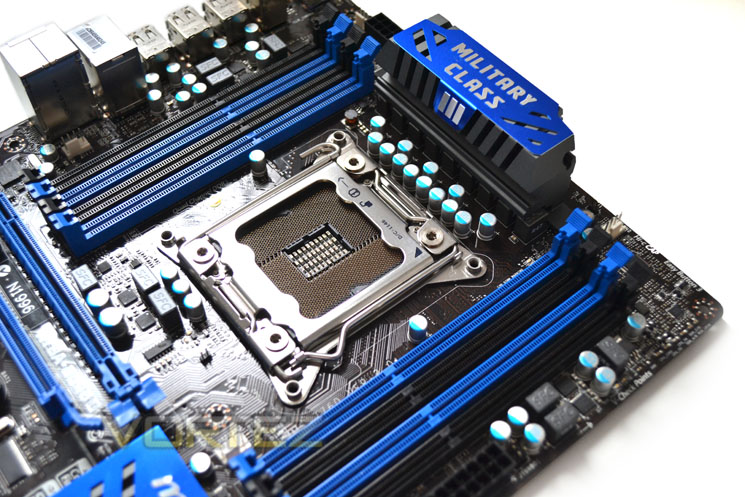
Back to the front of the motherboard and the socket area is has a scattering of solid capacitors along with a couple of free standing chokes. Those wondering what the differences between the GD45 and GD45 8D are should look at the ‘DIMM sockets, of which there are 8 on the GD45-8D supporting up to 128GB.
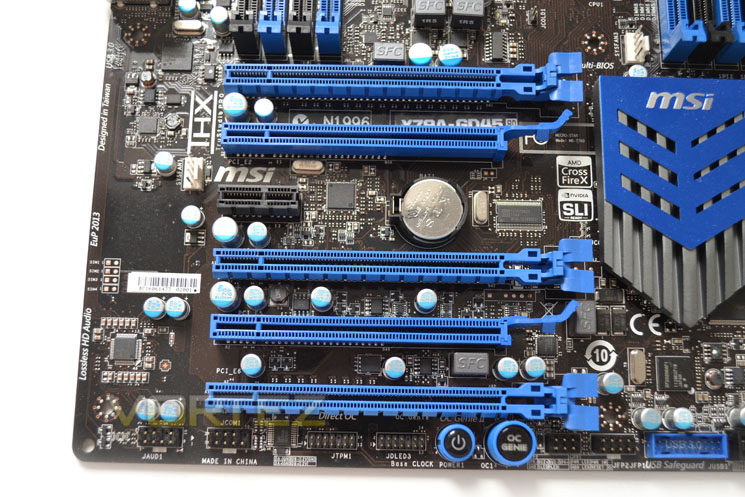
The PCIe Area is full of slots however as we saw with the back of the mainboard, only the PCIe Gen3 capable ones (slots 1, 4 and 6) are full fat x16 lanes. The two other slots with slightly different latching points are 8x with the remaining black slot being PCIe x1.
The GD45 8D is capable of multi card configurations, be it Tri SLI or CrossfireX but consideration should be given to the bottom slot which will cover both on-board buttons and perhaps the USB 3.0 header.
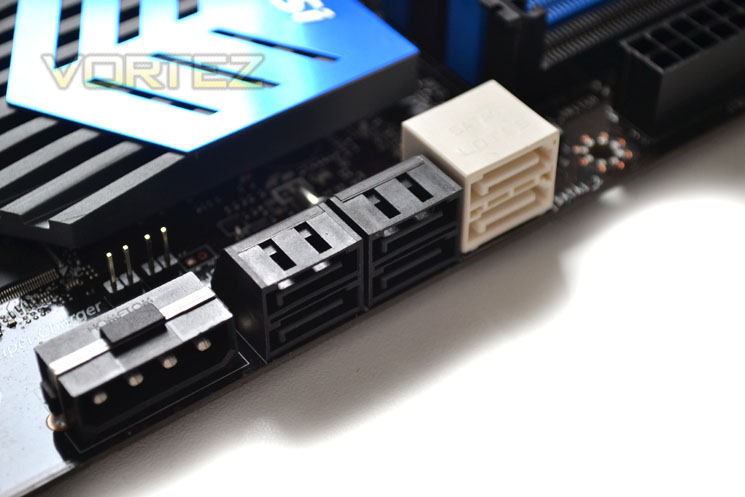
There are 2x 6GB/s SATA ports (white) coupled with a further 4x SATA 3GB/s ports which should be plenty for the average user. Interestingly, MSI have added a MOLEX power socket next to the SATA ports to give multi card GPU configurations a little extra juice.
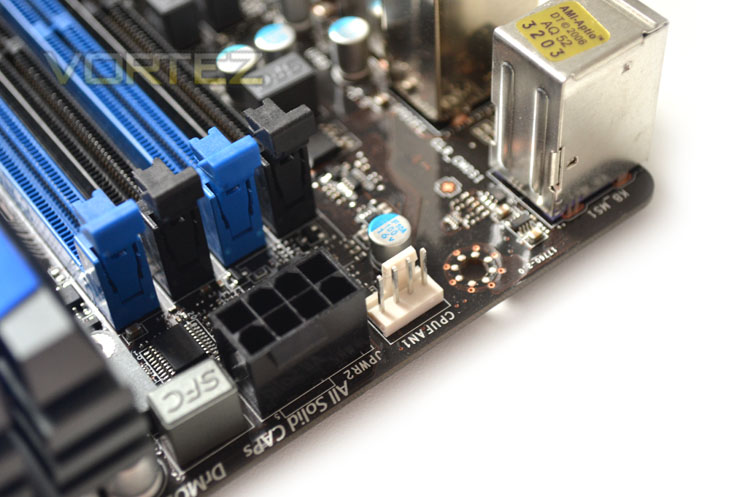
The 8 pin ATX power port is thoughtfully positioned towards the upper left of the motherboard making for easy cable tidying.
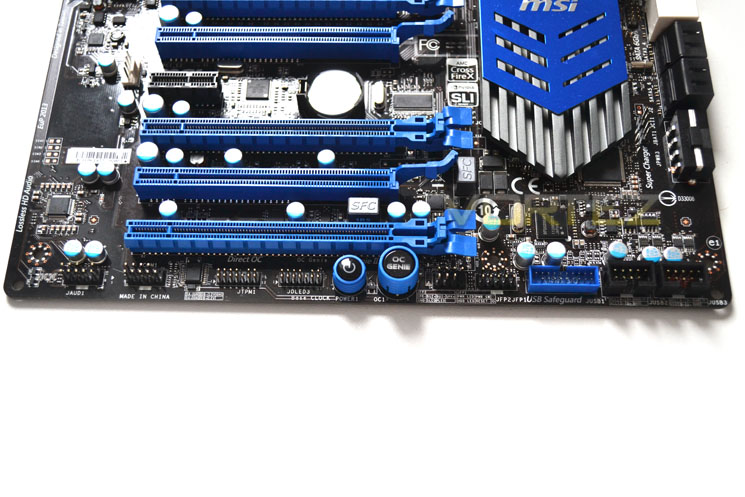
The majority of the case connections are found towards the bottom of the motherboard. A serial port (16550A) connector is joined by a voice genie connector, ‘Multiconnect’ control port, the OC Genie button (automatic overclocking for novices) and an on-board power switch.
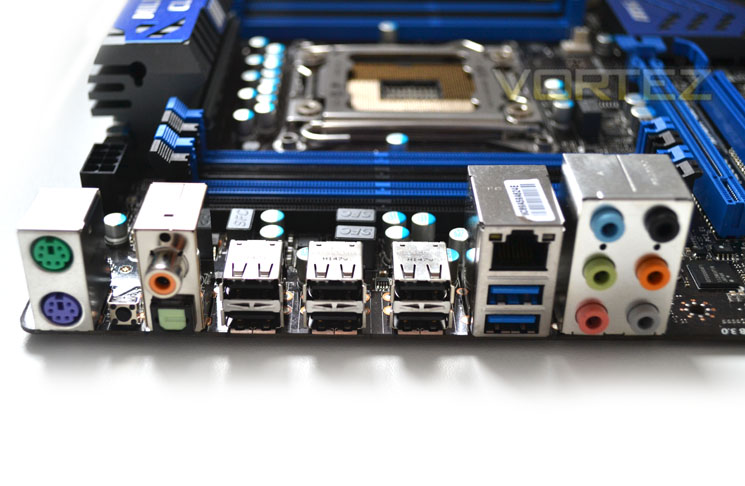
The IO area stacks up fairly well too with PS2 mice and keyboards catered for along with a CMOS clear button, Coaxial and Optical S/PDIFF ports, 2xUSB2 ports, Intel LAN, 2x USB 3.0 ports and 6x 3.5mm audio ports.
Let’s take a closer look at this motherboard…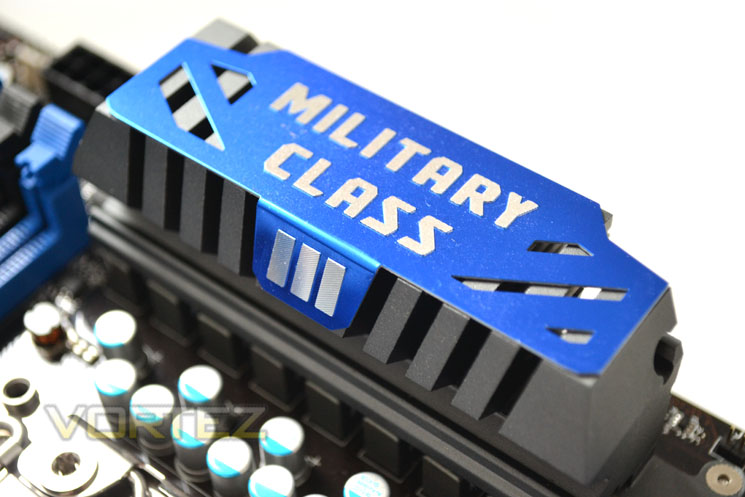
The VRM heatsink stands quit high on the motherboard and may intrude on some low slung CPU heatsinks.
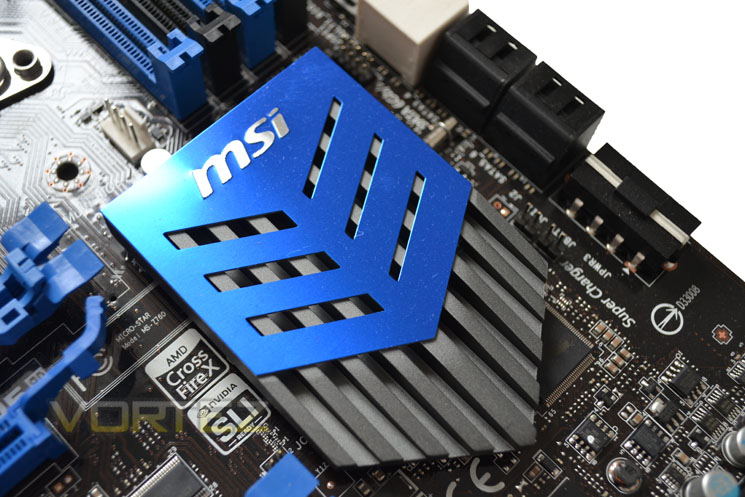
Conversely, the chipset heasink is, as you would expect low profile so not to interfere with expansion card positioning.
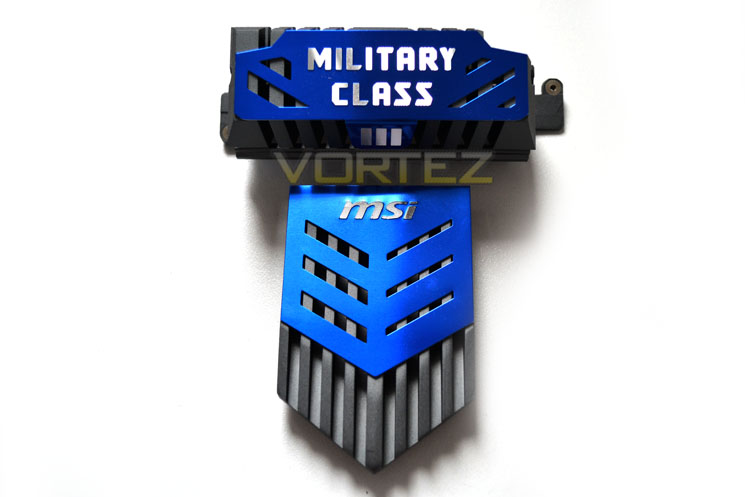
Both heatsinks are good looking with the gunmetal base covered by pearlescent blue shielding which matches the blue plastic on the motherboard perfectly. The heatsinks cool independently of one another with no heatpie connecting the two.
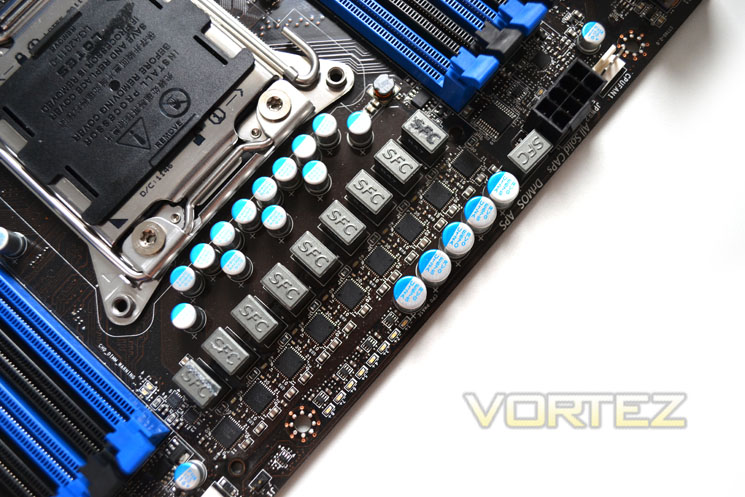
Removing the heatsinks we see the VRM is made up of Ferrite core chokes, Solid capacitors and DrMOS II MOSFETs. The Phase design is imitated by 8 LED’s which shine up blue depending on the CPU load.
Let’s get this party started now and see how well the MSI GD45 8D performs…
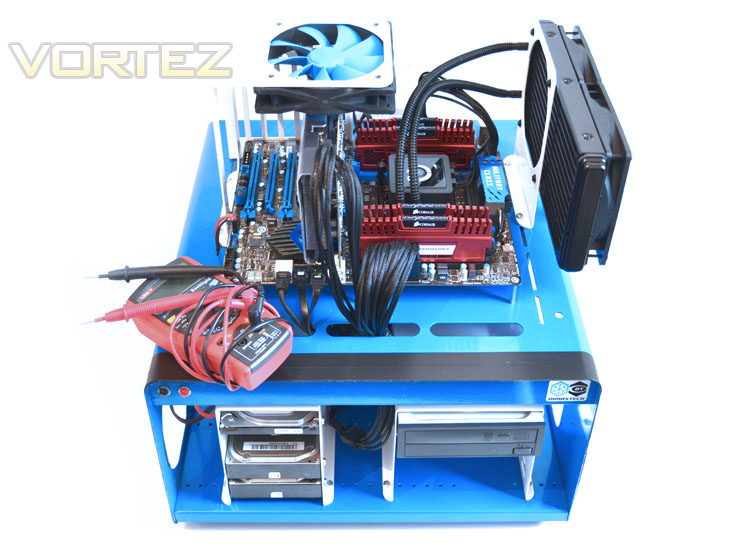
Some of the components for our test bench were kindly donated by CORSAIR who provided the majority of components without whom we would not have been able to bring you this review so a big thanks to them. Thanks also go to MSI who donated their NVIDIA GTX560Ti.
Motherboards on test:
ASRock Extreme6 GB
GIGABYTE X79-UD3
MSI X79 Big Bang XPower II
ASRock X79 Extreme4-M
GIGABYTE X79-UD5
MSI X79A-GD65(8D)
Benchmarks
Cinebench 11.5 – CPU Score
x264 HD 4.0 – 1st and 2nd pass encoding
SiSoftware SANDRA 2011 – CPU benchmarks
AIDA64 – CPU benchmarks
PCMark 7 – System Benchmark
3DMark 11 – Performance and Extreme preset
Games – Crysis 2 & DiRT3
Other Software
Core Temp 0.99.5
LinX stress Test
CPUID HWMonitor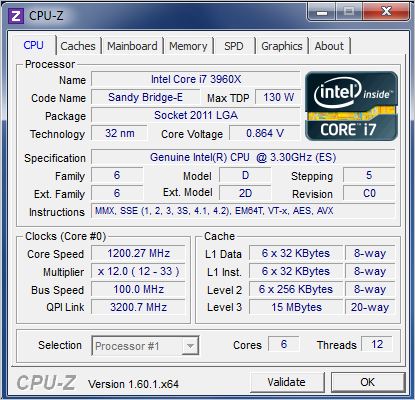
In stock format with the BIOS defaults loaded, the MSI GD45 8D is much the same as any other board with our CPU, loading it with a default clockspeed of 1200MHZ and Turbo boosting to 3.9GHz on one core with the remainder set to 3.8GHz on our test Intel i7-3960X.
We know from experience that to reach the magic 5GHz figure (50 multiplier x 100 baseclock) we have to top the Vcore scales at a smidge over 1.5v which is not recommended for 24/7 purposes. Unfortunately, the MSI GD45 didn’t want to play ball at this voltage and even though we raise the Vcore to 1.55v with days messing about with the various other voltages available in the ClickBIOS II we could not get it to even POST.
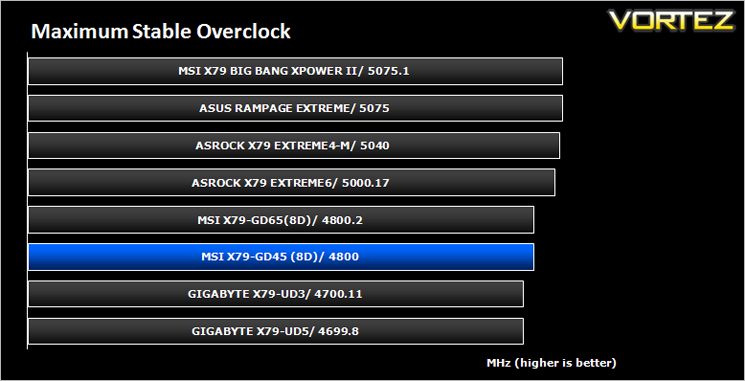
We had a little more success with 4.9GHz, getting into windows at least but even this clockspeed proved unstable during testing so we backed off further to 4.8GHz which passed 8 hours of Prime95 at 1.48 Vcore. Not a bad result for an entry level motherboard, beating the GIGABYTE UD3. It cannot however hold a flame to the big boys but for a motherboard costing half as much, it isn’t what I would describe as a shameful showing.
To test for power consumption we use the same basic components for each motherboard on test. Readings are then taken from the wall both in stock (Optimised defaults loaded) and maximum overclocked (Voltages may vary).
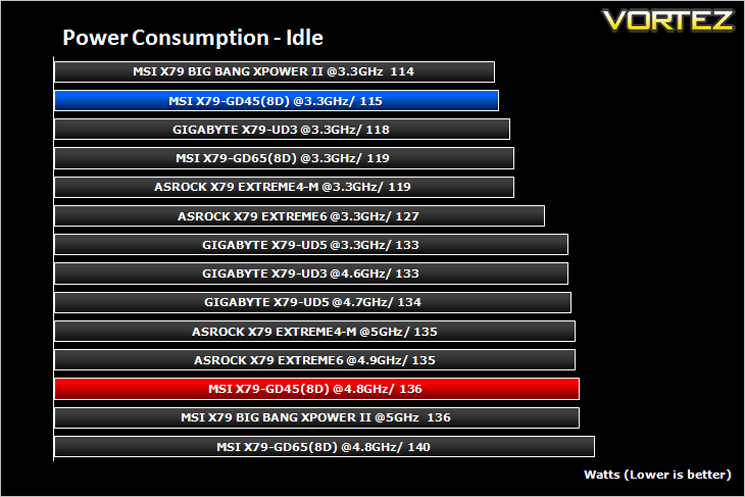
Under idle conditions the MSI GD456 performed very well, second only to its big brother, the big Bang II.
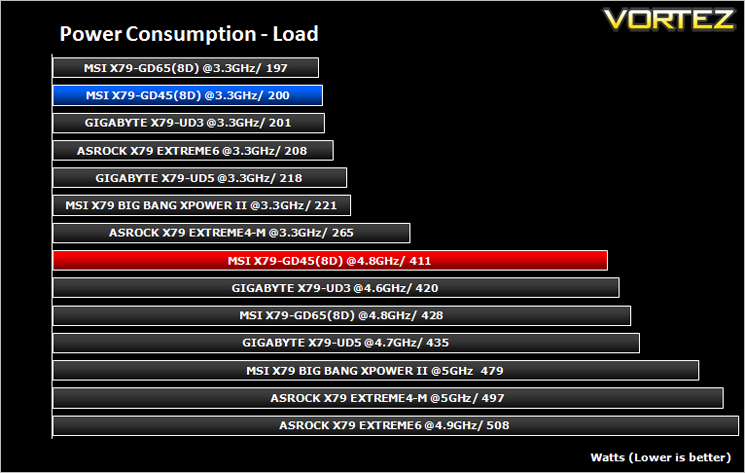
Under 100% load using Prime95, the news got even better by being the most efficient on test(albeit at less voltage of course) however, it still beat its nearest rival (which used less voltage) by a fair margin.
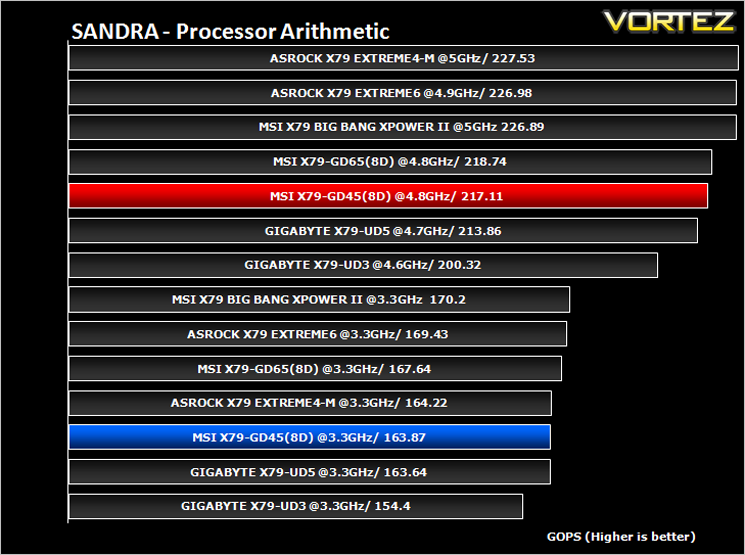
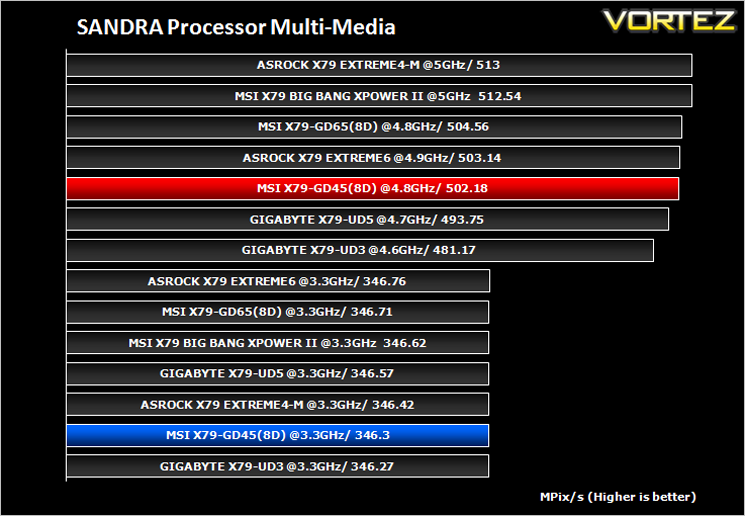
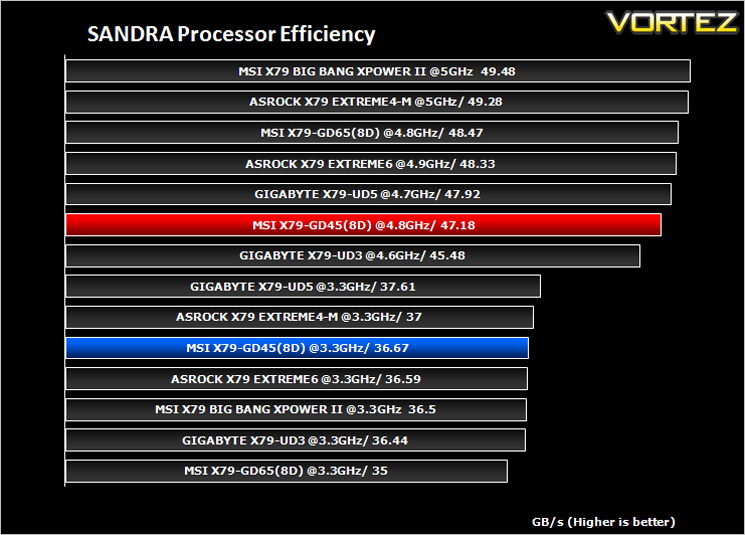
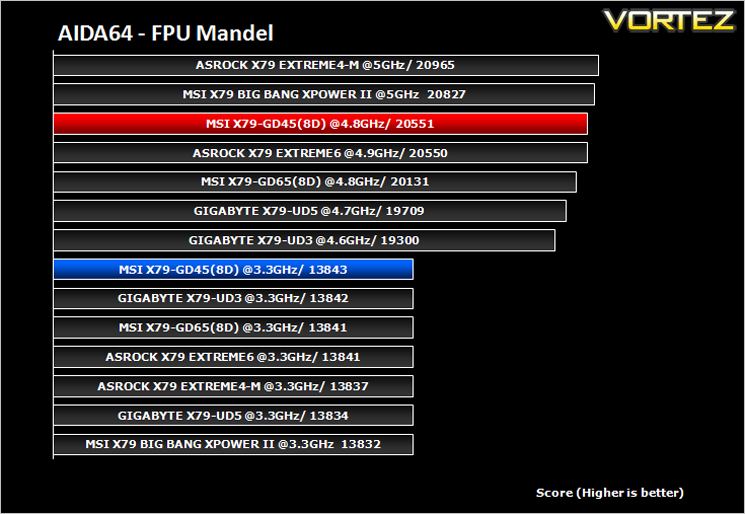
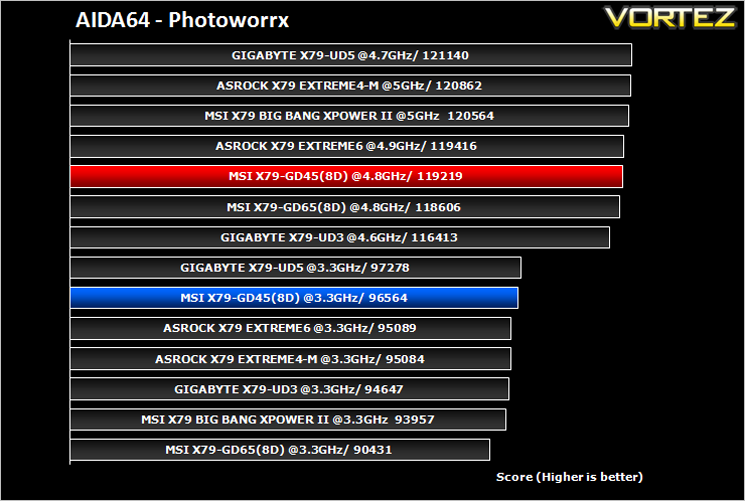
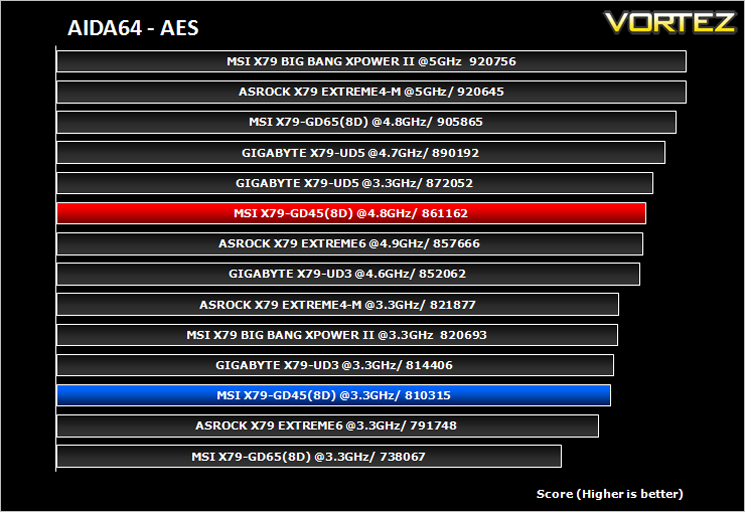
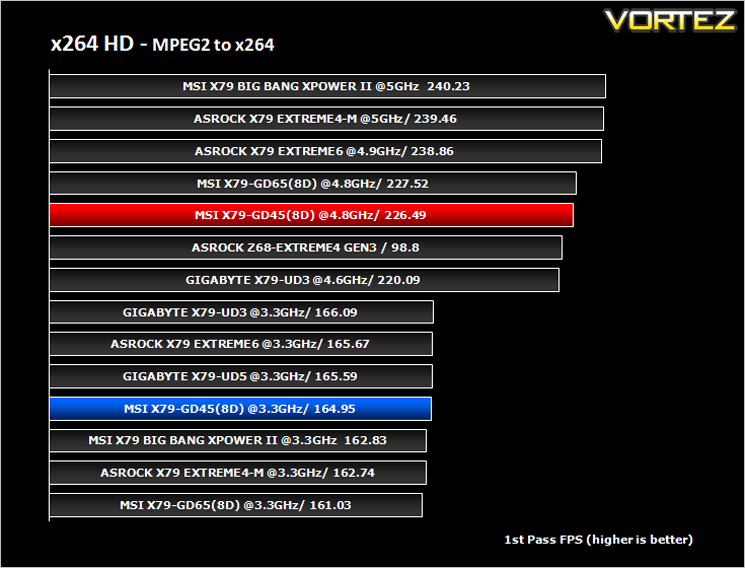
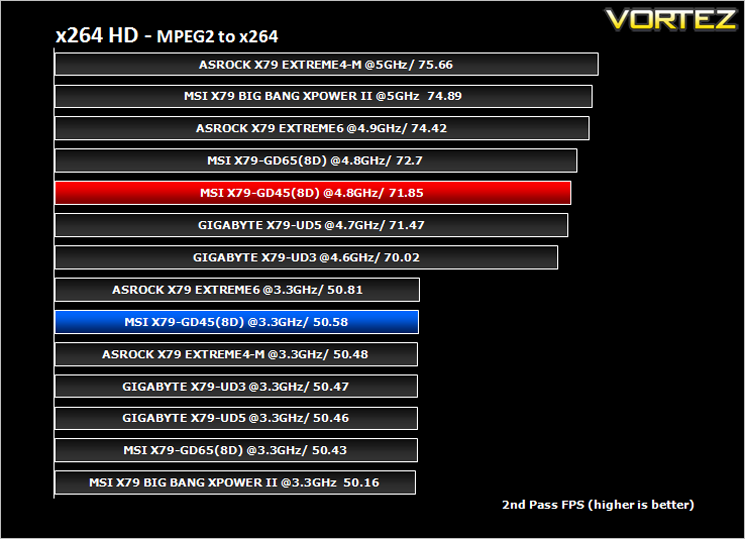
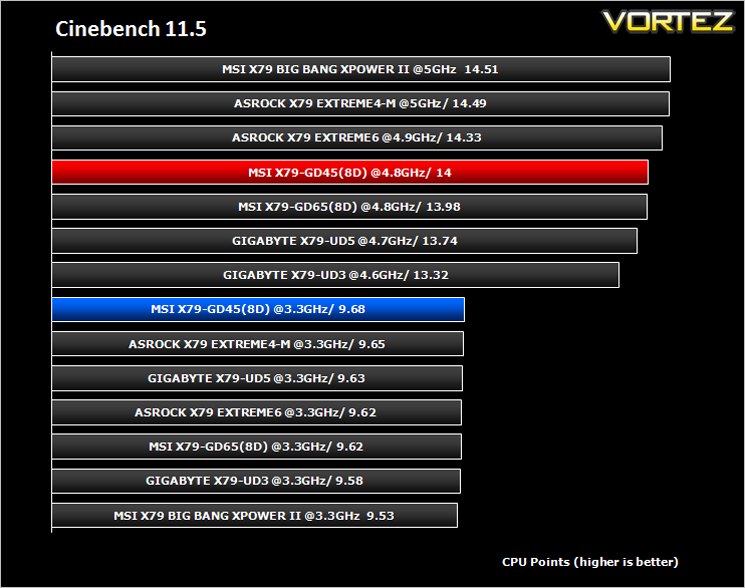
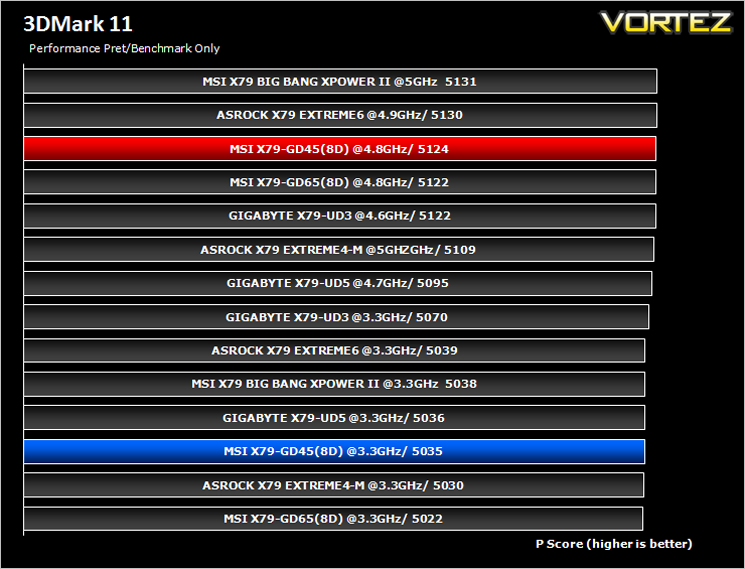
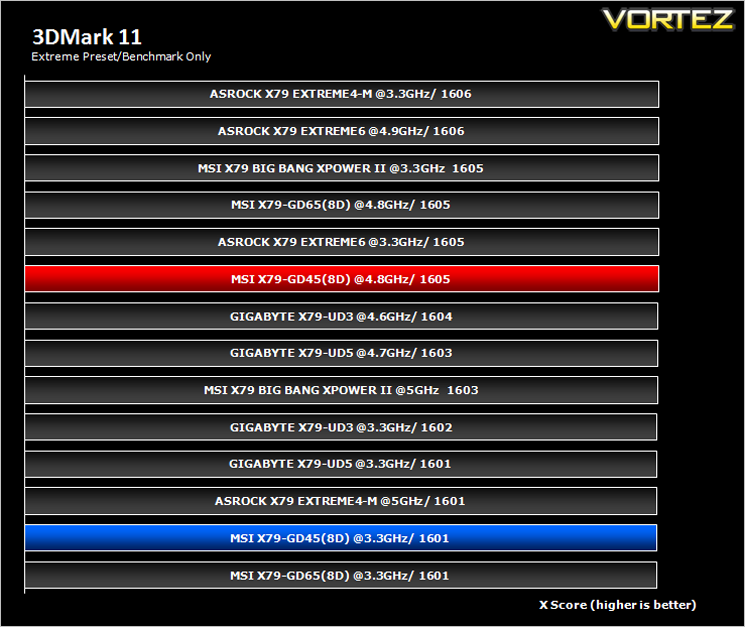
The MSI GD45-8D presents an interesting proposition in that it gives those budget minded among us to sample the delights of the X79 chipset. Being the cheapest motherboard on test you would not believe it thanks to the feature rich components used, TRI SLI/Crossfire capability and 8DIMM support. The VRM however, was lacking and perhaps this is an area where cuts were made which could have had an effect on the overclocking results. These results, while far from disgraceful, were some 300MHz short of the best we have attained with our CPU so we know it wasn’t a CPU limitation.
People who buy this board will not be looking to break world records however, they will be looking for a motherboard which offers good value in a market riddled with expensive, overpriced components. With this aim in mind I can safely say that the MSI GD45 8D has fulfilled its destiny in being an affordable choice which doesn’t make too many compromises. It has most everything the average overclocker could want with a wealth of BIOS options. Gamers are catered for with full PCIe Gen 3 support and 8 channel audio. A host of other features should attract many buyers, not least the 8 DIMM slots which is rare on entry level platforms.
With the above in mind I would find it hard to recommend the GD65 over the GD45 as both boards look identical and for the most part are identical save for the extra USB and SATA ports available on the GD65 8D. So the MSI X79A GD45 offers most of the useful features the GD65 has at a lower price point making it a bit of a bargain. The MSI GD45 beats its nearest competitor too, the GIGABYTE UD3 in most tests and also weighs in cheaper. So, if you are on the lookout for an entry level motherboard, you should certainly take a look at the MSI X79A GD45-8D, a bargain basement motherboard that offers almost as much as one costing twice the price.

Click here for an explanation of our awards at Vortez.net.

We distribute our products through offices located in The Netherlands, Germany, Italy, France, United Kingdom, Spain, Turkey, Czech Republic, Poland, Serbia, Ukraine, Russia, United States, Canada, Mexico, Latin America, Brazil, Taiwan, Japan, China, Korea, India and Australia. MSI markets its products to distributors, computer system manufacturers, and system integrators. For more information about the company go to Specification
CPU (Max Support) i7
FSB / Hyper Transport Bus 100MHz
Chipset Intel® X79
DDR3 Memory DDR3 1066/1333/1600/1800*/2133*/2400*(OC)
Memory Channel Quad
DIMM Slots 8
Max Memory (GB) 128
PCI-Ex16 5
PCI-E Gen Gen3 (16, 16, 8), Gen2 (1, 1)
PCI-Ex1 1
SATAIII 2
SATAII 4
RAID 0/1/5/10
LAN 10/100/1000*1
TPM 1
USB 3.0 ports (Rear) 2
USB 2.0 ports (Rear) 6
Audio ports (Rear) 6+Coaxial / Optical SPDIF
Form Factor ATX
DrMOS Y
APS Y
SLI Y
3-way SLI Y
CrossFire Y
FSB / Hyper Transport Bus 100MHz
Chipset Intel® X79
DDR3 Memory DDR3 1066/1333/1600/1800*/2133*/2400*(OC)
Memory Channel Quad
DIMM Slots 8
Max Memory (GB) 128
PCI-Ex16 5
PCI-E Gen Gen3 (16, 16, 8), Gen2 (1, 1)
PCI-Ex1 1
SATAIII 2
SATAII 4
RAID 0/1/5/10
LAN 10/100/1000*1
TPM 1
USB 3.0 ports (Rear) 2
USB 2.0 ports (Rear) 6
Audio ports (Rear) 6+Coaxial / Optical SPDIF
Form Factor ATX
DrMOS Y
APS Y
SLI Y
3-way SLI Y
CrossFire Y
Features
Military Class III
MSI mainboards maintains the commitment to product stability and reliability by introducing Military Class III components! In addition to the use of Hi-c CAP, SFC, and Solid CAP, MSI now incorporates DrMOS II, the next-generation DrMOS that provides an integrated Double Thermal Protection to maximize the lifespan of components. All Military Class III components have passed MIL-STD-810G certification, making MSI’s Military Class III components synonymous with premium quality and ultimate stability.
World’s 1st PCI Express Gen 3 mainboard brand
With ultra-high 32GB/s transfer bandwidth, PCI Express Gen 3 provides a 2X faster transfer rate than the previous generation, this delivers amazing capabilities for true next generation extreme gaming.
Benefits:
– 2X bandwidth
– Increased efficiency and compatibility
– Extreme performance for current and next gen PCI Express cards
World’s 1st UEFI and software graphical user interface
MSI ClickBIOS II provides a consistent user interface both in the UEFI BIOS and in Windows, it provides the most convenient way for users to control system settings and supports touchscreen control.
Benefits:
– Graphical User Interface, with touchscreen support
– Simply click or touch and move to change settings
– Full system control, including overclocking, security and information
Gaming Optimized
Increasing the thickness of the gold-plated layer in the 2-in-1 PS2 and optimized USB ports to 30um to meet the demand of professional gamers. Besides enhancing mouse sensitivity in games, these improved interfaces deliver a longer lifespan and better stability of connectors and total solution for e-sports mouse control in UEFI BIOS.
THX TruStudio PRO
THX is a trade mark of a high-end audio/visual reproduction standard for movies, home theaters, computer speakers and other audio devices. THX Certified Audio products are designed to let users experience movies & videos as live show. The true sound effect can make high definition video more powerful.
Features
– A high-fidelity sound reproduction standard
– Accurately reproduce the fullest audio experience of movie, music and game soundtracks
Super Charger
Mobile consumer appliances are getting more and more attention in current day fast moving life style, with smart phones and tablets almost becoming a fashion accessory. However, many ordinary personal computers cannot charge some of these devices, making it difficult to stay connected. The MSI Super Charger is a Windows resident program capable of revising the power supply mode of your USB port to become more powerful. Once your phone or tablet is connected to your USB port, the Super Charger sends a signal to initiate its charging circuit, making it a really smart and convenient charging solution for mobile computing needs.
Features
– Instant MB info monitor
– Green Power: CPU Phase, system fan speed controlled with max power saving
– Smart Mode: 4 instant OC modes
USB 3.0
Compared to the 480Mbps provided by traditional USB 2.0, the all-new USB 3.0’s 5Gb/s offers 10 times the transfer bandwidth, so transferring a Blu-ray movie takes less than one minute. MSI also has implemented a front panel USB 3.0 port, making the use of an external USB 3.0 device even more convenient.
Features
– 10X Faster Than USB 2.0
– Up to 5Gb/s Data Transfer Bandwidth
– World’s first to provide Front Panel USB 3.0 Port
– Boost Transfer Rate Between Your PC and External Storage Devices
SATA 6Gb/s
SATA 6Gb/s provides double the bandwidth of traditional SATA 3Gb/s, and increases the data transfer rate between your mainboard and internal storage devices, such as 7200RPM HDDs, 10000RPM HDDs and SSDs. It’s also the current trend for upcoming high-speed internal storage devices to to break the existing bottleneck of a PC’s performance.
Features
– 2X Faster Than SATA 3Gb/s
– Up to 6Gb/s Data Transfer Bandwidth
– Unleash True Performance of New HDDs/SSDs
Lossless 24-bit/192KHz HD Audio
Onboard PC audio gets better! MSI is the first to implement the most high-end HD Audio codecs available. Don’t be fooled by other inferior audio solutions onboard (sometimes you can’t even find the driver!) Only MSI offers the Loss-less 24-bit/192KHz HD Audio function with an incredible 109 SNR dB value to provide the most clear & vivid HD audio quality and support 7.1 channels surround sound playback with a 2-channel independent stereo output (multiple streaming) through the front panel 3.5 inch phone jack.
Winki 3
Winki 3 is a free Linux-based O/S which is based on the Linux core. With an ultra-fast booting speed and a multi-language interface, the built-in Winki 3 provides an easy-to-use internet environment that includes the most popular functions such as internet surfing, web mail, instant messaging, picture browsing, and more. It’s the most practical way to be online in the shortest time.
Features
– User friendly & totally free applications
– Power on to run applications in 25 seconds
– Multi-language interface support
APS (Active Phase Switching)
Active Phase Switching, APS, technology is an intelligent design that helps to save energy on MSI’s mainboards. The underlying idea is to switch off the power supply as soon as no electricity is needed, and when the system needs more resources again, APS will automatically adjust electricity supply accordingly. APS will automatically detect your processor’s loading at any given time and save energy accordingly. This is only possible by means of a very advanced power controlling technology. Other than software-based solutions, APS technology stands out from MSI’s own research. The specially developed IC chip can operate automatically depending on the demands of the power supply, which is to reduce the total power usage.
M-Flash
Compared to common mainboard which need extra BIOS chips, MSI’s M-Flash has a double advantage which doesn’t need extra components and secondly, all your BIOS data will be saved in the USB drive. The stored data does not only have backup and upgrade function, moreover it can also be seen as a portable BIOS chip which is actually able to boot up your PC.
Features
– Backup/Restore Your BIOS to/from Any USB Flash Disk
– Avoid Unnecessary Repair Due to Accident Failures During The Upgrading Process
– Earn more BIOS Lifespan by Reducing Unnecessary Rewriting Process
USB Safeguard
USB Safeguard can prevent mainboards and USB devices from being damaged by short-circuit and ESD (Electro-Static Discharge) with Anti-ESD chips built-into the mainboards. Additionally, the safeguard can protect against such dangers multiple times, and greatly improves product lifespan.
Features
– All MSI mainboards use USB Safeguard’s anti-ESD chip for thorough protection against ESD damage
– USB Safeguard is protected against a short circuit and/or ESD without the need for a fuse. It also supports stand-by power supply
Live Update 5
MSI Live Update 5 is a powerful and useful application for updating the latest BIOS and Drivers, saving you time and lowers the risk of updating. End-users can install and run the Live Update 5 software on their computers with the companion CD or downloading the app from the MSI website.
Features
– Automatically Detect the BIOS/Driver/VGA/Utility Update
– Support Microsoft Windows 98SE/ME/2000/XP/Vista/7 32Bit
AMD CrossFireX
AMD CrossFireX™ is the ultimate multi-GPU performance gaming platform. Enabling game-dominatig power, AMD CrossFireX technology enables two or more discrete graphics processors to work together to improve graphics performance. AMD CrossFireX technology allows you to expand your system’s graphics capabilities. It allows you the ability to scale your system’s graphics horsepower as you need it, supporting up to four AMD Radeon™ HD graphics cards, making it the most scalable gaming platform ever. With an AMD CrossFireX gaming technology, the traditional graphics limitation exists no more, allowing you to enjoy higher performance as well as visual experience.
NVIDIA SLI
SLI technology allows using multiple Nvidia graphics cards in a single computer system with a mainboard equipped with an nForce SLI MCP. Users need an a mainboard with two PCI-Express 16x graphics slots and two matching GeForce graphics cards which are “SLI Ready”. Most NVIDIA’s PCI-Express graphics cards starting from the 6600 GPU can enjoy the benefits of SLI.
Instant OC
• Instant MB info monitor
• Intelligently auto set clock/voltage of CPU and memory
• Smart Mode: 4 instant OC modes
3TB+ Infinity
3TB+ Infinity is not only breaking through the limit of traditional BIOS, but also enhancing the utilization of hard drives efficiently. In addition to supporting the latest 3TB hard drives, MSI 3TB+ Infinity technology can use the 3TB hard drive as boot disk when installing a 64-bit operating system. Compared to competitors, MSI 3TB+ Infinity is an industry-leading technology which substantially presents an advantage of development and application in the future.
Features
– All the latest 3TB hard drivers on the market can be supported
– Make the 3TB hard drive as boot disk when installing a 64-bit operating system
MSI mainboards maintains the commitment to product stability and reliability by introducing Military Class III components! In addition to the use of Hi-c CAP, SFC, and Solid CAP, MSI now incorporates DrMOS II, the next-generation DrMOS that provides an integrated Double Thermal Protection to maximize the lifespan of components. All Military Class III components have passed MIL-STD-810G certification, making MSI’s Military Class III components synonymous with premium quality and ultimate stability.
World’s 1st PCI Express Gen 3 mainboard brand
With ultra-high 32GB/s transfer bandwidth, PCI Express Gen 3 provides a 2X faster transfer rate than the previous generation, this delivers amazing capabilities for true next generation extreme gaming.
Benefits:
– 2X bandwidth
– Increased efficiency and compatibility
– Extreme performance for current and next gen PCI Express cards
World’s 1st UEFI and software graphical user interface
MSI ClickBIOS II provides a consistent user interface both in the UEFI BIOS and in Windows, it provides the most convenient way for users to control system settings and supports touchscreen control.
Benefits:
– Graphical User Interface, with touchscreen support
– Simply click or touch and move to change settings
– Full system control, including overclocking, security and information
Gaming Optimized
Increasing the thickness of the gold-plated layer in the 2-in-1 PS2 and optimized USB ports to 30um to meet the demand of professional gamers. Besides enhancing mouse sensitivity in games, these improved interfaces deliver a longer lifespan and better stability of connectors and total solution for e-sports mouse control in UEFI BIOS.
THX TruStudio PRO
THX is a trade mark of a high-end audio/visual reproduction standard for movies, home theaters, computer speakers and other audio devices. THX Certified Audio products are designed to let users experience movies & videos as live show. The true sound effect can make high definition video more powerful.
Features
– A high-fidelity sound reproduction standard
– Accurately reproduce the fullest audio experience of movie, music and game soundtracks
Super Charger
Mobile consumer appliances are getting more and more attention in current day fast moving life style, with smart phones and tablets almost becoming a fashion accessory. However, many ordinary personal computers cannot charge some of these devices, making it difficult to stay connected. The MSI Super Charger is a Windows resident program capable of revising the power supply mode of your USB port to become more powerful. Once your phone or tablet is connected to your USB port, the Super Charger sends a signal to initiate its charging circuit, making it a really smart and convenient charging solution for mobile computing needs.
Features
– Instant MB info monitor
– Green Power: CPU Phase, system fan speed controlled with max power saving
– Smart Mode: 4 instant OC modes
USB 3.0
Compared to the 480Mbps provided by traditional USB 2.0, the all-new USB 3.0’s 5Gb/s offers 10 times the transfer bandwidth, so transferring a Blu-ray movie takes less than one minute. MSI also has implemented a front panel USB 3.0 port, making the use of an external USB 3.0 device even more convenient.
Features
– 10X Faster Than USB 2.0
– Up to 5Gb/s Data Transfer Bandwidth
– World’s first to provide Front Panel USB 3.0 Port
– Boost Transfer Rate Between Your PC and External Storage Devices
SATA 6Gb/s
SATA 6Gb/s provides double the bandwidth of traditional SATA 3Gb/s, and increases the data transfer rate between your mainboard and internal storage devices, such as 7200RPM HDDs, 10000RPM HDDs and SSDs. It’s also the current trend for upcoming high-speed internal storage devices to to break the existing bottleneck of a PC’s performance.
Features
– 2X Faster Than SATA 3Gb/s
– Up to 6Gb/s Data Transfer Bandwidth
– Unleash True Performance of New HDDs/SSDs
Lossless 24-bit/192KHz HD Audio
Onboard PC audio gets better! MSI is the first to implement the most high-end HD Audio codecs available. Don’t be fooled by other inferior audio solutions onboard (sometimes you can’t even find the driver!) Only MSI offers the Loss-less 24-bit/192KHz HD Audio function with an incredible 109 SNR dB value to provide the most clear & vivid HD audio quality and support 7.1 channels surround sound playback with a 2-channel independent stereo output (multiple streaming) through the front panel 3.5 inch phone jack.
Winki 3
Winki 3 is a free Linux-based O/S which is based on the Linux core. With an ultra-fast booting speed and a multi-language interface, the built-in Winki 3 provides an easy-to-use internet environment that includes the most popular functions such as internet surfing, web mail, instant messaging, picture browsing, and more. It’s the most practical way to be online in the shortest time.
Features
– User friendly & totally free applications
– Power on to run applications in 25 seconds
– Multi-language interface support
APS (Active Phase Switching)
Active Phase Switching, APS, technology is an intelligent design that helps to save energy on MSI’s mainboards. The underlying idea is to switch off the power supply as soon as no electricity is needed, and when the system needs more resources again, APS will automatically adjust electricity supply accordingly. APS will automatically detect your processor’s loading at any given time and save energy accordingly. This is only possible by means of a very advanced power controlling technology. Other than software-based solutions, APS technology stands out from MSI’s own research. The specially developed IC chip can operate automatically depending on the demands of the power supply, which is to reduce the total power usage.
M-Flash
Compared to common mainboard which need extra BIOS chips, MSI’s M-Flash has a double advantage which doesn’t need extra components and secondly, all your BIOS data will be saved in the USB drive. The stored data does not only have backup and upgrade function, moreover it can also be seen as a portable BIOS chip which is actually able to boot up your PC.
Features
– Backup/Restore Your BIOS to/from Any USB Flash Disk
– Avoid Unnecessary Repair Due to Accident Failures During The Upgrading Process
– Earn more BIOS Lifespan by Reducing Unnecessary Rewriting Process
USB Safeguard
USB Safeguard can prevent mainboards and USB devices from being damaged by short-circuit and ESD (Electro-Static Discharge) with Anti-ESD chips built-into the mainboards. Additionally, the safeguard can protect against such dangers multiple times, and greatly improves product lifespan.
Features
– All MSI mainboards use USB Safeguard’s anti-ESD chip for thorough protection against ESD damage
– USB Safeguard is protected against a short circuit and/or ESD without the need for a fuse. It also supports stand-by power supply
Live Update 5
MSI Live Update 5 is a powerful and useful application for updating the latest BIOS and Drivers, saving you time and lowers the risk of updating. End-users can install and run the Live Update 5 software on their computers with the companion CD or downloading the app from the MSI website.
Features
– Automatically Detect the BIOS/Driver/VGA/Utility Update
– Support Microsoft Windows 98SE/ME/2000/XP/Vista/7 32Bit
AMD CrossFireX
AMD CrossFireX™ is the ultimate multi-GPU performance gaming platform. Enabling game-dominatig power, AMD CrossFireX technology enables two or more discrete graphics processors to work together to improve graphics performance. AMD CrossFireX technology allows you to expand your system’s graphics capabilities. It allows you the ability to scale your system’s graphics horsepower as you need it, supporting up to four AMD Radeon™ HD graphics cards, making it the most scalable gaming platform ever. With an AMD CrossFireX gaming technology, the traditional graphics limitation exists no more, allowing you to enjoy higher performance as well as visual experience.
NVIDIA SLI
SLI technology allows using multiple Nvidia graphics cards in a single computer system with a mainboard equipped with an nForce SLI MCP. Users need an a mainboard with two PCI-Express 16x graphics slots and two matching GeForce graphics cards which are “SLI Ready”. Most NVIDIA’s PCI-Express graphics cards starting from the 6600 GPU can enjoy the benefits of SLI.
Instant OC
• Instant MB info monitor
• Intelligently auto set clock/voltage of CPU and memory
• Smart Mode: 4 instant OC modes
3TB+ Infinity
3TB+ Infinity is not only breaking through the limit of traditional BIOS, but also enhancing the utilization of hard drives efficiently. In addition to supporting the latest 3TB hard drives, MSI 3TB+ Infinity technology can use the 3TB hard drive as boot disk when installing a 64-bit operating system. Compared to competitors, MSI 3TB+ Infinity is an industry-leading technology which substantially presents an advantage of development and application in the future.
Features
– All the latest 3TB hard drivers on the market can be supported
– Make the 3TB hard drive as boot disk when installing a 64-bit operating system
Packaging & Accessories
Package Front
The front of the package, like the mainboard itself is near identical to the MSI GD65 packaging with MSI placing big emphasis on the military component III moniker which dominates the front packaging. the glossy packaging is sturdy and attractive enough however unlike the higher end offerings, there is no outer sleeve to protect the box nor a flip lid allowing you to digest the many features. Instead the feature list is found to the rear of the packaging…
Package Rear
Again we see that the Military Class III components is the main attraction here along with the motherboards other features such as PCIe Gen 3 and click BIOS II.
Accessories
The accessory list is well thought out with pretty much everything you need to get you started. I would perhaps have liked to have seen a USB 3.0 bracket as there is a header on the mainboard for this so I’m afraid unless you have a PC case front header then the additional USB 3.0 ports will be unavailable. You do however get 6 SATA cables which is more than average for an entry level motherboard. You also get a single SLI bridge, driver CD and a plethora of guides and manuals.
Let’s have look at some of the motherboards main on-board features…
First Look
Motherboard Front
The black and blue theme that’s now familiar with MSI motherboards and high end components is carried through to the GD45 to enhance visual appeal. Everything is pretty much where you would expect to find it with all of the connectivity found around the leading edge of the mainboard.
Motherboard Rear
To the rear of the motherboard we find nothing much of interest with none of the heatsinks featuring a backplate. Worthy of note is that the motherboard PCB has a dark brown tinge to it rather than being solid black which is a shame as it doesn’t exactly add anything to the aesthetics (unless you are fond of dark brown of course)!
CPU Socket Area
Back to the front of the motherboard and the socket area is has a scattering of solid capacitors along with a couple of free standing chokes. Those wondering what the differences between the GD45 and GD45 8D are should look at the ‘DIMM sockets, of which there are 8 on the GD45-8D supporting up to 128GB.
PCIe Area
The PCIe Area is full of slots however as we saw with the back of the mainboard, only the PCIe Gen3 capable ones (slots 1, 4 and 6) are full fat x16 lanes. The two other slots with slightly different latching points are 8x with the remaining black slot being PCIe x1.
The GD45 8D is capable of multi card configurations, be it Tri SLI or CrossfireX but consideration should be given to the bottom slot which will cover both on-board buttons and perhaps the USB 3.0 header.
SATA Support
There are 2x 6GB/s SATA ports (white) coupled with a further 4x SATA 3GB/s ports which should be plenty for the average user. Interestingly, MSI have added a MOLEX power socket next to the SATA ports to give multi card GPU configurations a little extra juice.
Power Port
The 8 pin ATX power port is thoughtfully positioned towards the upper left of the motherboard making for easy cable tidying.
Connectivity
The majority of the case connections are found towards the bottom of the motherboard. A serial port (16550A) connector is joined by a voice genie connector, ‘Multiconnect’ control port, the OC Genie button (automatic overclocking for novices) and an on-board power switch.
I/O Area
The IO area stacks up fairly well too with PS2 mice and keyboards catered for along with a CMOS clear button, Coaxial and Optical S/PDIFF ports, 2xUSB2 ports, Intel LAN, 2x USB 3.0 ports and 6x 3.5mm audio ports.
Let’s take a closer look at this motherboard…
Closer Look
VRM Heatsink
The VRM heatsink stands quit high on the motherboard and may intrude on some low slung CPU heatsinks.
X79 Chipset Heatsink
Conversely, the chipset heasink is, as you would expect low profile so not to interfere with expansion card positioning.
Heatsink Removal
Both heatsinks are good looking with the gunmetal base covered by pearlescent blue shielding which matches the blue plastic on the motherboard perfectly. The heatsinks cool independently of one another with no heatpie connecting the two.
Voltage Regulation
Removing the heatsinks we see the VRM is made up of Ferrite core chokes, Solid capacitors and DrMOS II MOSFETs. The Phase design is imitated by 8 LED’s which shine up blue depending on the CPU load.
Let’s get this party started now and see how well the MSI GD45 8D performs…
Test Setup
When we decided to put the test bench together for X79 we wanted a system that would not only perform well but also last the test of time given that X58 has been around for some 3 years now so we saw no reason to believe that its successor, X79 would not be able to do the same.Some of the components for our test bench were kindly donated by CORSAIR who provided the majority of components without whom we would not have been able to bring you this review so a big thanks to them. Thanks also go to MSI who donated their NVIDIA GTX560Ti.
Motherboards on test:
MSI X79A-GD45 (8D)
ASRock Extreme6 GB
GIGABYTE X79-UD3
MSI X79 Big Bang XPower II
ASRock X79 Extreme4-M
GIGABYTE X79-UD5
MSI X79A-GD65(8D)
X79 Test Setup
CPU: Intel Core i7-3960X Extreme Edition
Graphics Card: NVIDIA GTX560Ti
RAM – 16GB (4x4GB) Corsair Vengeance (Red) DDR3 @ 1866MHz 9-10-9-27
Power Supply – Corsair TX750M 750W
Hard Drive – Hitachi SATA II 250GB
Samsung F3 1TB
Cooler – Corsair H100
CPU: Intel Core i7-3960X Extreme Edition
Graphics Card: NVIDIA GTX560Ti
RAM – 16GB (4x4GB) Corsair Vengeance (Red) DDR3 @ 1866MHz 9-10-9-27
Power Supply – Corsair TX750M 750W
Hard Drive – Hitachi SATA II 250GB
Samsung F3 1TB
Cooler – Corsair H100
Benchmarks
Cinebench 11.5 – CPU Score
x264 HD 4.0 – 1st and 2nd pass encoding
SiSoftware SANDRA 2011 – CPU benchmarks
AIDA64 – CPU benchmarks
PCMark 7 – System Benchmark
3DMark 11 – Performance and Extreme preset
Games – Crysis 2 & DiRT3
Other Software
Core Temp 0.99.5
LinX stress Test
CPUID HWMonitor
Overclocking
In stock format with the BIOS defaults loaded, the MSI GD45 8D is much the same as any other board with our CPU, loading it with a default clockspeed of 1200MHZ and Turbo boosting to 3.9GHz on one core with the remainder set to 3.8GHz on our test Intel i7-3960X.
We know from experience that to reach the magic 5GHz figure (50 multiplier x 100 baseclock) we have to top the Vcore scales at a smidge over 1.5v which is not recommended for 24/7 purposes. Unfortunately, the MSI GD45 didn’t want to play ball at this voltage and even though we raise the Vcore to 1.55v with days messing about with the various other voltages available in the ClickBIOS II we could not get it to even POST.
We had a little more success with 4.9GHz, getting into windows at least but even this clockspeed proved unstable during testing so we backed off further to 4.8GHz which passed 8 hours of Prime95 at 1.48 Vcore. Not a bad result for an entry level motherboard, beating the GIGABYTE UD3. It cannot however hold a flame to the big boys but for a motherboard costing half as much, it isn’t what I would describe as a shameful showing.
Power Consumption
To test for power consumption we use the same basic components for each motherboard on test. Readings are then taken from the wall both in stock (Optimised defaults loaded) and maximum overclocked (Voltages may vary).
Under idle conditions the MSI GD456 performed very well, second only to its big brother, the big Bang II.
Under 100% load using Prime95, the news got even better by being the most efficient on test(albeit at less voltage of course) however, it still beat its nearest rival (which used less voltage) by a fair margin.
Sisoft Sandra 2012
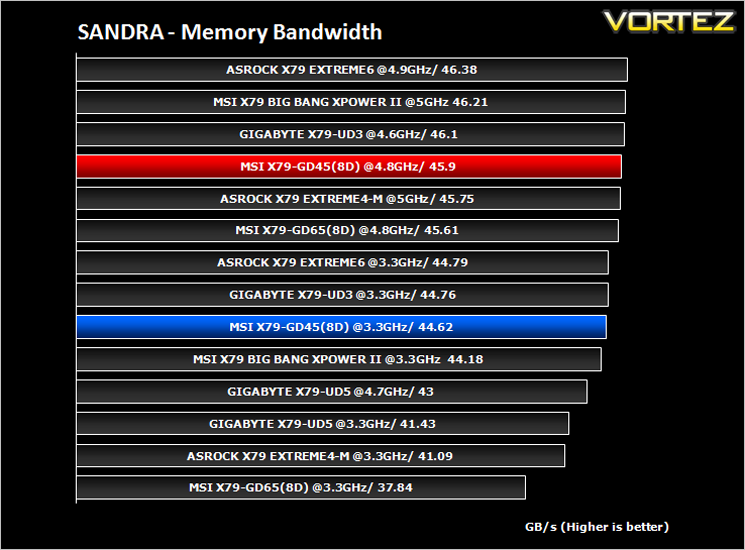
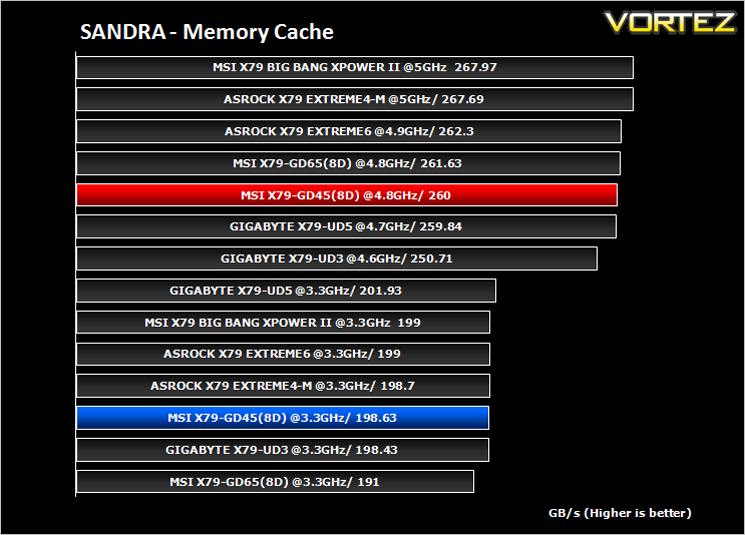
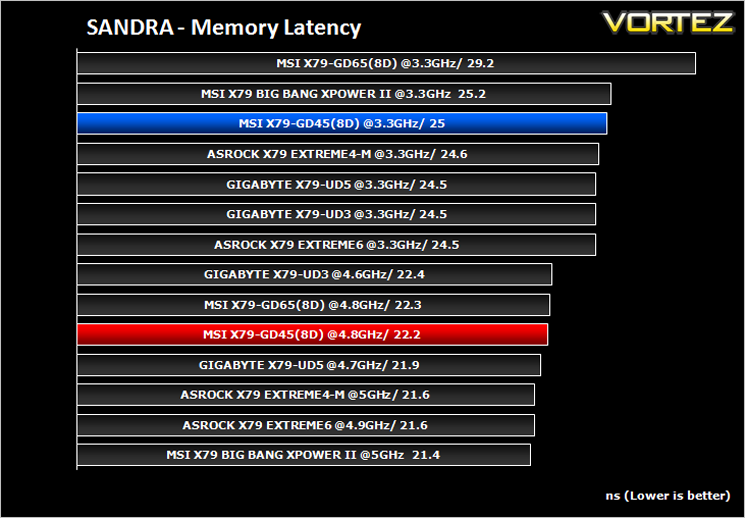
SANDRA isn’t always a benchmark that is included in hardware reviews but I believe it shouldn’t be ignored. SANDRA provides a vigorous package that tests your system in a rather large array of benchmarks. There are many aspects of benchmark that can be executed. We will be considering – CPU and memory tests.
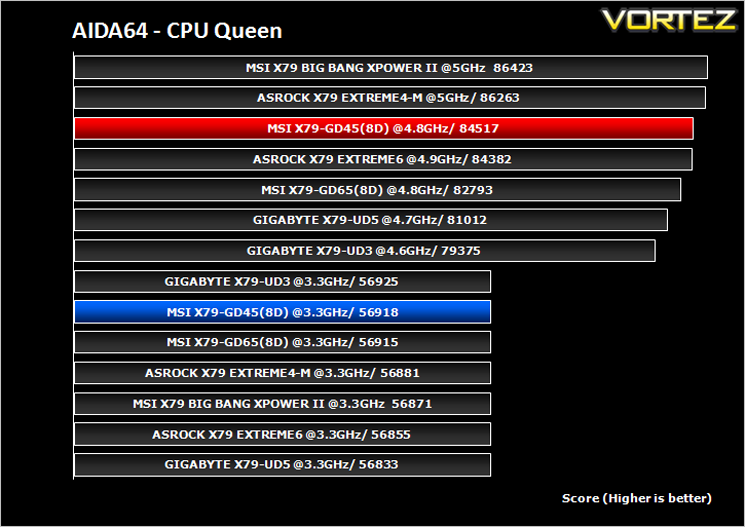
AIDA64
This simple integer benchmark focuses on the branch prediction capabilities and the misprediction penalties of the CPU. It finds the solutions for the classic “Queens problem” on a 10 by 10 sized chessboard. At the same clock speed theoretically the processor with the shorter pipeline and smaller misprediction penalties will attain higher benchmark scores. For example — with HyperThreading disabled — the Intel Northwood core processors get higher scores than the Intel Prescott core based ones due to the 20-step vs 31-step long pipeline. CPU Queen test uses integer MMX, SSE2 and SSSE3 optimizations.
x264 HD V4.0
Simply put, this test measures how fast your machine can encode a short, DVD quality MPEG-2 video clip into a high-quality x264 video clip. What’s x264, you ask? It’s more or less the next-generation Xvid/DivX codec. I think it’s ideal for a benchmark because the application (x264.exe) reports fairly accurate compression results (in frames per second) for each pass of the video encoding process, and it uses multi-core processors very efficiently. The test uses multiple cores efficiently to give a good representation of real world performance.
Cinebench 11.5
Based on the MAXON animation software CINEMA 4D, Cinebench is a test suite that uses the system’s processing power to render a photorealistic 3D scene. This makes it an excellent benchmark to measure CPU and motherboard performances.
CINEBENCH can measure systems with up to 64 processor threads. This test scene contains approximately 2,000 objects which in turn contain more than 300,000 polygons in total, and uses sharp and blurred reflections, area lights, shadows, procedural shaders, antialiasing, and much more. The result is displayed in points (pts). The higher the number, the faster your processor.
CINEBENCH can measure systems with up to 64 processor threads. This test scene contains approximately 2,000 objects which in turn contain more than 300,000 polygons in total, and uses sharp and blurred reflections, area lights, shadows, procedural shaders, antialiasing, and much more. The result is displayed in points (pts). The higher the number, the faster your processor.
Futuremark 3DMark 11
Designed to measure your PC’s gaming performance 3DMark 11 makes extensive use of all the new features in DirectX 11 including tessellation, compute shaders and multi-threading. Trusted by gamers worldwide to give accurate and unbiased results, 3DMark 11 is the best way to consistently and reliably test DirectX 11 under game-like loads.
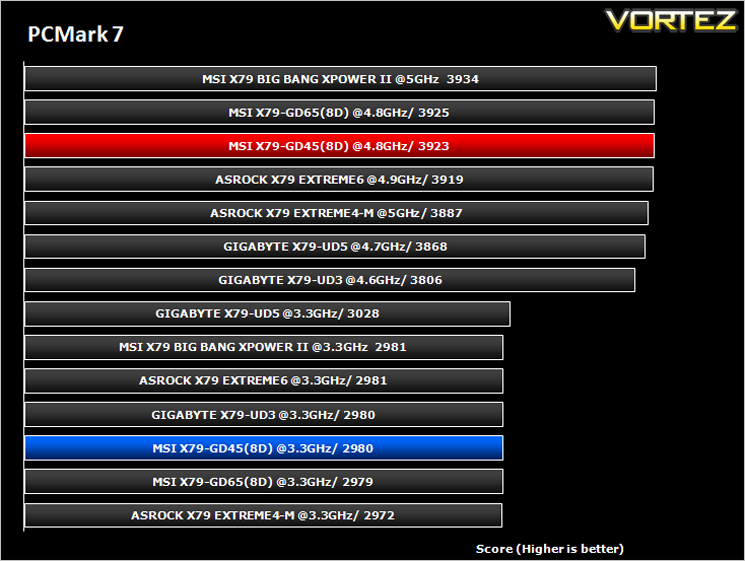
Futuremark PCMark 7
PCMark 7 is a tool provided by FutureMark that tests the PCs ability in general office and everyday use. It produces a number that reflects the all-round performance of the PC and is useful to compare between differing setups. For more information, visit the FutureMark website.
Gaming Benchmarks
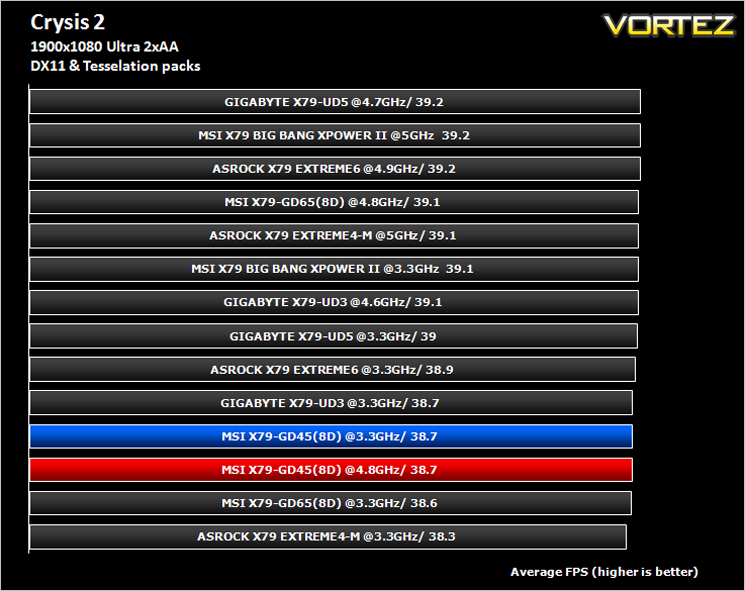
Crysis 2
Crytek took an internet beating from its loyal fans due to the fact that they pandered to the console masses and dumbed down the graphics to DirectX 9. Fortunately, fans of the PC version of Crysis managed to force Cryteks hand and they have since developed a DX11 patch and have also enhanced the textures with added tesselation. It is for this reason that we have decided to include it in our suite of benchmarks.
Crytek took an internet beating from its loyal fans due to the fact that they pandered to the console masses and dumbed down the graphics to DirectX 9. Fortunately, fans of the PC version of Crysis managed to force Cryteks hand and they have since developed a DX11 patch and have also enhanced the textures with added tesselation. It is for this reason that we have decided to include it in our suite of benchmarks.
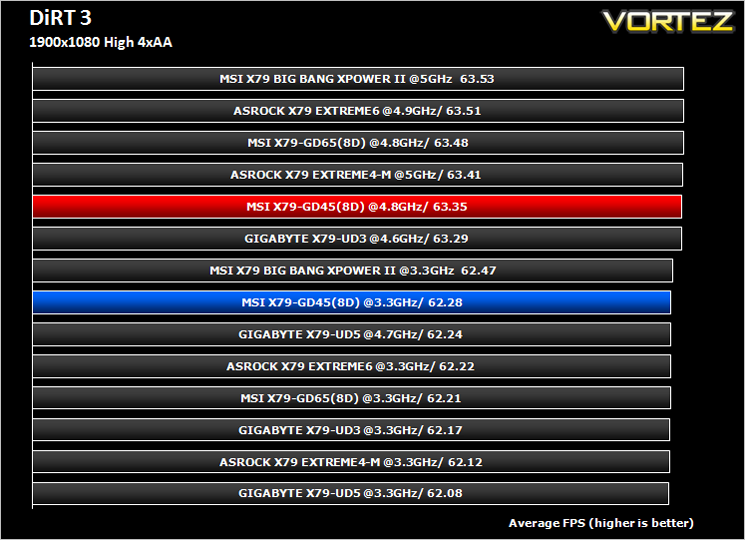
DiRT3
As players race to elevate their global standing, DiRT 3 is back delivering mud, sweat and gears world over: from the intense weather-beaten rally stages of Europe, Africa and the US, to executing performance driving showcases and career challenges where car control is pushed to spectacular limits.
As players race to elevate their global standing, DiRT 3 is back delivering mud, sweat and gears world over: from the intense weather-beaten rally stages of Europe, Africa and the US, to executing performance driving showcases and career challenges where car control is pushed to spectacular limits.
Conclusion
The MSI GD45-8D presents an interesting proposition in that it gives those budget minded among us to sample the delights of the X79 chipset. Being the cheapest motherboard on test you would not believe it thanks to the feature rich components used, TRI SLI/Crossfire capability and 8DIMM support. The VRM however, was lacking and perhaps this is an area where cuts were made which could have had an effect on the overclocking results. These results, while far from disgraceful, were some 300MHz short of the best we have attained with our CPU so we know it wasn’t a CPU limitation.
People who buy this board will not be looking to break world records however, they will be looking for a motherboard which offers good value in a market riddled with expensive, overpriced components. With this aim in mind I can safely say that the MSI GD45 8D has fulfilled its destiny in being an affordable choice which doesn’t make too many compromises. It has most everything the average overclocker could want with a wealth of BIOS options. Gamers are catered for with full PCIe Gen 3 support and 8 channel audio. A host of other features should attract many buyers, not least the 8 DIMM slots which is rare on entry level platforms.
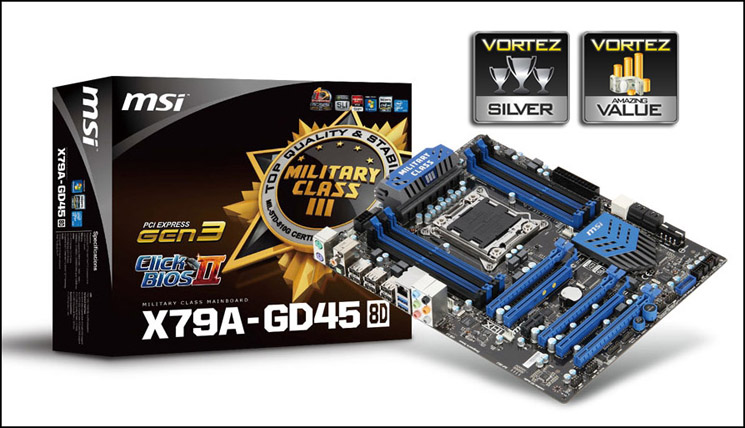
With the above in mind I would find it hard to recommend the GD65 over the GD45 as both boards look identical and for the most part are identical save for the extra USB and SATA ports available on the GD65 8D. So the MSI X79A GD45 offers most of the useful features the GD65 has at a lower price point making it a bit of a bargain. The MSI GD45 beats its nearest competitor too, the GIGABYTE UD3 in most tests and also weighs in cheaper. So, if you are on the lookout for an entry level motherboard, you should certainly take a look at the MSI X79A GD45-8D, a bargain basement motherboard that offers almost as much as one costing twice the price.
Pros:
+ Great value
+ Aesthetically pleasing
+ Excellent BIOS options
+ 3-way SLI/Crossfire
+ Quad Channel Memory
+ On-board Power and OC Genie buttons
Cons:
– Questionable ‘brown’ PCB under certain lighting conditions
– No USB 3.0 bracket
– Tall VRM heatsink may restrict CPU cooler choice
+ Great value
+ Aesthetically pleasing
+ Excellent BIOS options
+ 3-way SLI/Crossfire
+ Quad Channel Memory
+ On-board Power and OC Genie buttons
Cons:
– Questionable ‘brown’ PCB under certain lighting conditions
– No USB 3.0 bracket
– Tall VRM heatsink may restrict CPU cooler choice
Click here for an explanation of our awards at Vortez.net.

