







Under the spotlight an Intel Z87 gaming motherboard from MSI: GD65 delivers Military Class 4 to LGA1150. How will it compare to rivals?
Product on Review: Z87 GD65 Gaming

Manufacturer and Sponsor: MSI
Street Price: £150
MSI first introduced their gaming series of motherboards back on the Intel Z77 chipset not so long ago and caused quite a stir. A new look and new focus arrived from MSI that specifically targets the gamer and their demanding needs. With the launch of Intel Haswell and the new chipset Z87 MSI are back once again to assert their new gaming series.
It goes without saying, the Z77-GD65 was a firm favourite here at Vortez. We have used it as the basis for one of our test rigs and have used it in our own personal workstations and so today we are filled with anticipation as to what Z87-GD65 Gaming will bring to the table. Z87-GD65 Gaming continues with the new gaming series styling and brings a whole host of interesting features to LGA1150, such as Military Class 4, Killer E2200 audio, OC Genie 4 and much more. Join us as we examine the GD65 in plenty of detail…
About MSI
Micro-Star International Co., Ltd (MSI) was established in August 1986 in Jhonghe, Taipei by 5 founders, one of the world’s largest information technology manufacturers with more than 12,700 employees, including those in Taipei headquarters, Baoan Plant (Shenzhen), Kunshan Plant and sales staff around the world.
MSI started from the motherboard and graphics card industries and extended into consumer and commerical electronics including notebooks, All-in-One PCs, servers, workstations, industrial PCs, household appliances, car infotainment products, barebone systems, multimedia, communication devices, and others.
MSI started from the motherboard and graphics card industries and extended into consumer and commerical electronics including notebooks, All-in-One PCs, servers, workstations, industrial PCs, household appliances, car infotainment products, barebone systems, multimedia, communication devices, and others.
Specifications
Taken from MSI’s website:
Socket 1150
CPU (Max Support) i7
FSB/BCLK/Hyper Transport Bus 100MHz
Chipset Intel® Z87 Express Chipset
DDR3 Memory
DDR3 1066/1333/1600*/1866*/2000*/2133*/2200*/2400*/2600*/2666*/2800*/3000*(*OC) HMz
Memory Channel Dual
DIMM Slots 4
Max Memory (GB) 64
PCI-E x16 3
PCI-E Gen Gen3 (16,0,0), (8,8,0), (8,4,4)
PCI-E x14
mSATA 1
SATAIII 8
RAID 0/1/5/10
LAN10/100/1000*1
TPM 1
USB 3.0 ports (Rear) 4
USB 2.0 ports (Rear) 2
Audio ports (Rear) 6+Coaxial / Optical SPDIF
VGA 1
HDMI 1
DVI 1
VGA Max Share Memory (MB) 1760
DirectX DX11
Form Factor ATX
SLI Yes
CrossFire Yes
CPU (Max Support) i7
FSB/BCLK/Hyper Transport Bus 100MHz
Chipset Intel® Z87 Express Chipset
DDR3 Memory
DDR3 1066/1333/1600*/1866*/2000*/2133*/2200*/2400*/2600*/2666*/2800*/3000*(*OC) HMz
Memory Channel Dual
DIMM Slots 4
Max Memory (GB) 64
PCI-E x16 3
PCI-E Gen Gen3 (16,0,0), (8,8,0), (8,4,4)
PCI-E x14
mSATA 1
SATAIII 8
RAID 0/1/5/10
LAN10/100/1000*1
TPM 1
USB 3.0 ports (Rear) 4
USB 2.0 ports (Rear) 2
Audio ports (Rear) 6+Coaxial / Optical SPDIF
VGA 1
HDMI 1
DVI 1
VGA Max Share Memory (MB) 1760
DirectX DX11
Form Factor ATX
SLI Yes
CrossFire Yes
Packaging, Bundle & First Look
MSI’s gaming series is symbolised by the dragon and this is featured heavily on the packaging for GD65. MSI have gone to extra lengths to improve even the packaging for this motherboard, the box is made of an alternative material to the common cardboard now prevalent. This will ensure the product is delivered in as best condition as possible. On the back of the packaging there are more details covering the feature-set of this motherboard and technical details are listed also.
Inside, all of the items are well packaged and the motherboard itself is protected inside an anti-static bag.
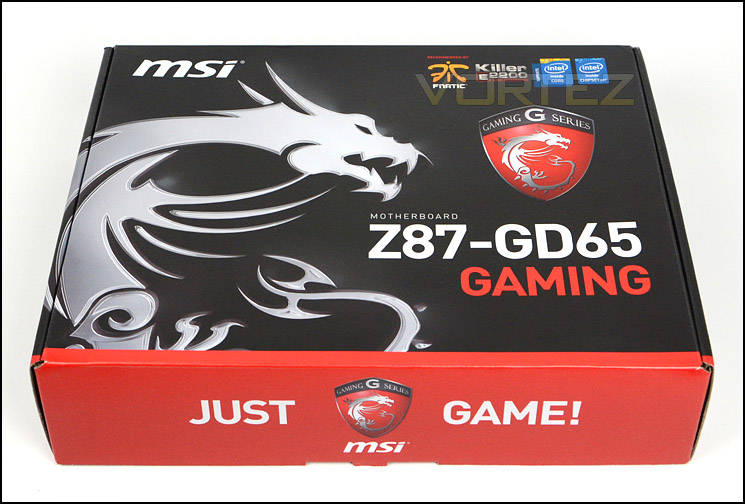
The packaging for GD65
Along with the motherboard, there are plethora of items included within the bundle these include the following:
• 4x SATA3 6GB/s Cables
• Rear IO shield
• Case Badge
• Documentation: user manual, software guide, quick start guide
• Driver CD/Utilities
• NVIDIA SLI bridge (flexible)
• Voltage check cables
• Quick connection adapters
• Door handle hanger
So as you can tell, there are a lot of included items – including the amusing door hanger which we have seen other vendors do in times past.
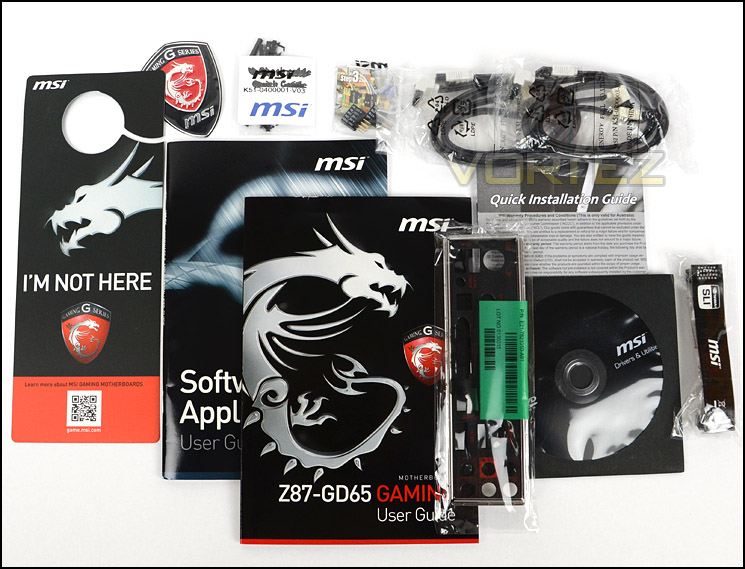
The bundle includes various items
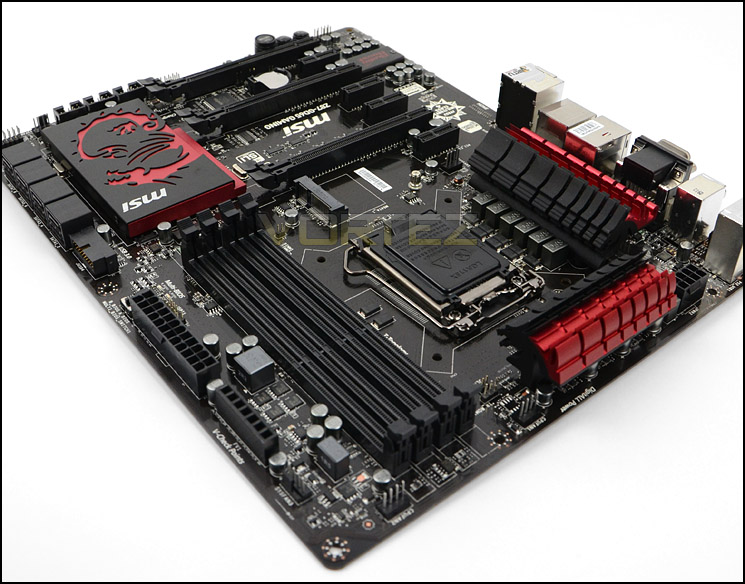
Aesthetics are something which the GD65 excels in. MSI have furnished this motherboard with the type of styling which enthusiasts go weak at the knees with. Black ports, slots and heatsinks are very favourable – the PCB is glossy and is both black and brown in areas. Although this board looks to be red on some of the stock photos which MSI have listed on the product page, the shade is closer to crimson than blood red.
GD65 is obviously designed to be appealing to the eye and MSI have done a great job with the styling.
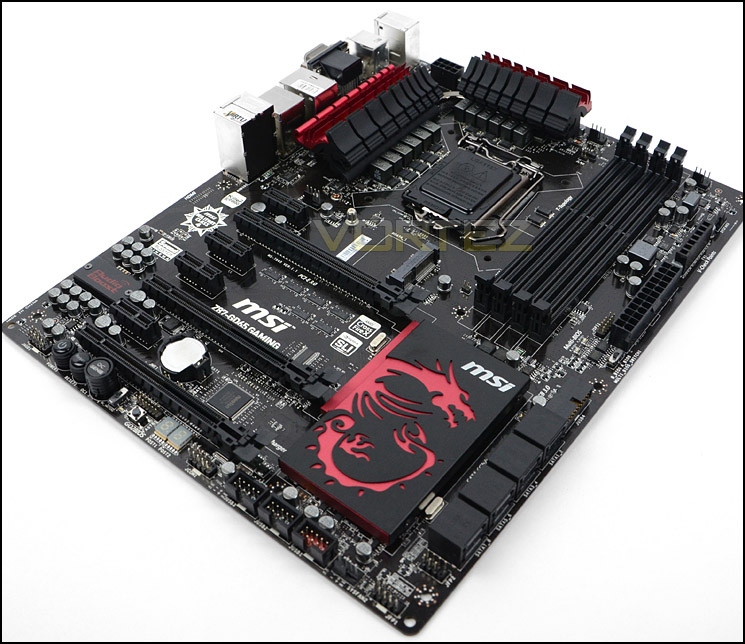
Super sleek and pleasing to the eye
On the next page we will take a closer look at the various aspects of this board.
Closer Look
We’ll now move in for a closer look at the different features found on GD65, starting with the socket area. This motherboard is of course designed to work with Intel’s 4th Generation of processors – Haswell. The socket is LGA1150 but has the mounting holes for LGA115X so if you have a cooler that has been used on another socket such as LGA1155 then it will work fine here too.
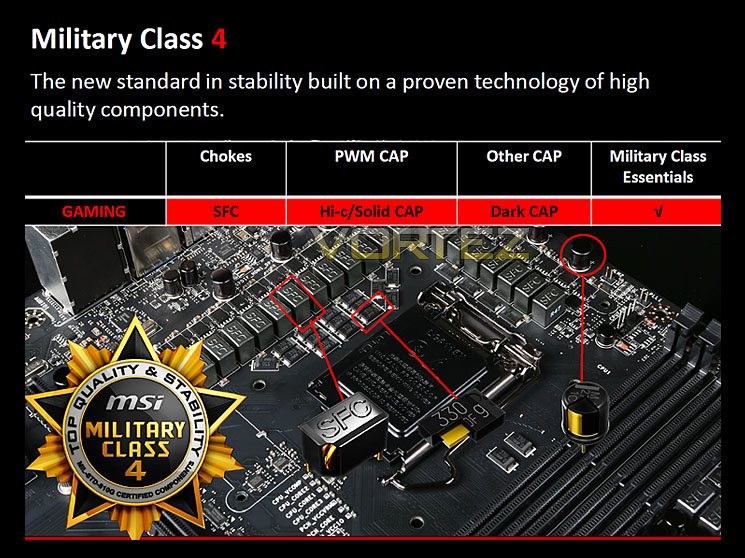
GD65 uses a 12-digital phase power design and has 8-pin EPS power for the CPU. MSI have placed a dual heatsink design over the MOSFETs which has a single copper heatpipe running through them. Those with an eye for motherboard design will notice that GD65 has different components compared to other vendors. GD65 features Military Class 4. In short this means that MSI have included military grade components throughout the motherboard design. Hi-c caps, super ferrite chokes and dark caps are all featured in and around the CPU socket to maintain excellent stability and durability, later in the review we will cover the Military Class 4 feature-set.
We are glad to see that MSI have included dual CPU fan headers neat the CPU socket for the latest dual fan air coolers and ALCs.
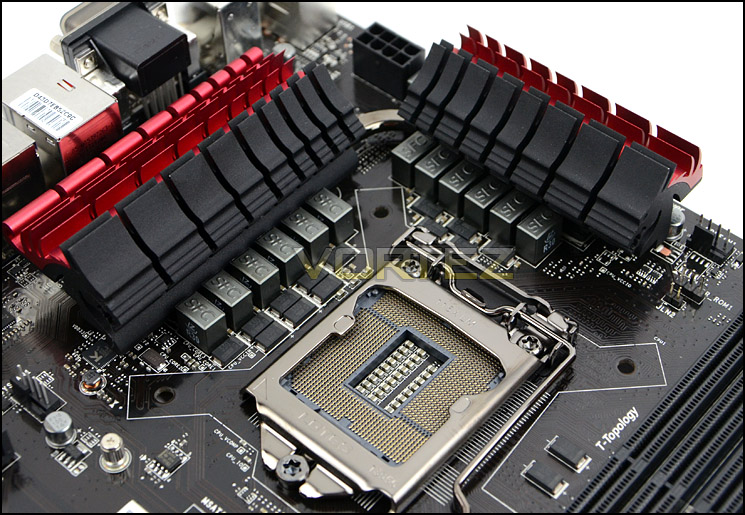
Military Class 4 components around socket
Moving over to the memory slot region there is support for dual channel DDR3. GD65 can accommodate up to 64GB capacity and DDR-3200(OC). Do bear in mind such capacity may not be available just yet, but two 32GB kits could be installed and by MSI showing compatibility for such hardware keeps things future-proofed.
Also in this region are two additional features worth mentioning. MSI have included V-Check points for advanced users to directly obtain voltage readings via the included Voltage Cables. Right beside the 24-pin ATX power there is a multi-BIOS switch so that users can change between different BIOS arrangements with the flick of a button.
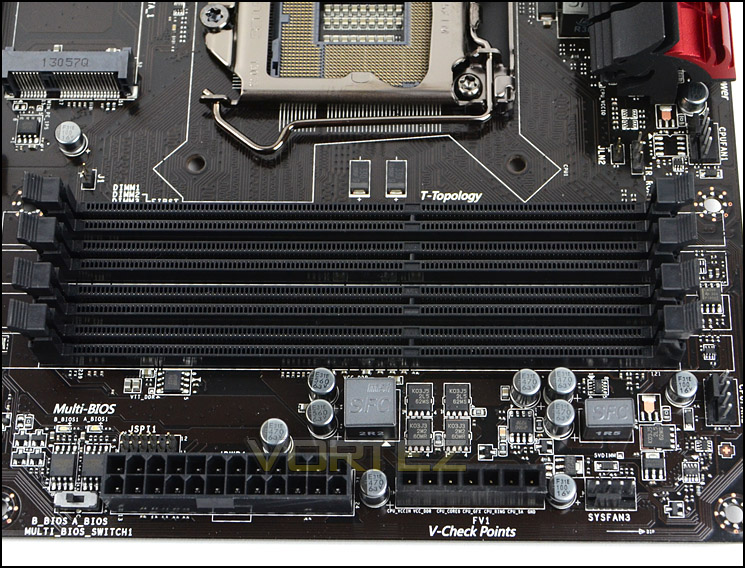
Dual channel DDR3 support – up to 64GB
Further along the motherboard are eight SATA 3 (6GB/s) ports. No longer do we have SATA 2, and since SATA 3 is backwards compatible older SATA 2 devices will work fine anyway, their speed will just be capped. Six of the ports are controlled via Intel Z87 and the other two are via ASMEDIA.
When the mSATA port (which is in the centre of the motherboard) is used port number 6 becomes redundant.
MSI have included a USB 3.0 front panel header beside the SATA ports for obtaining USB 3.0 functionality at the front of the computer case.
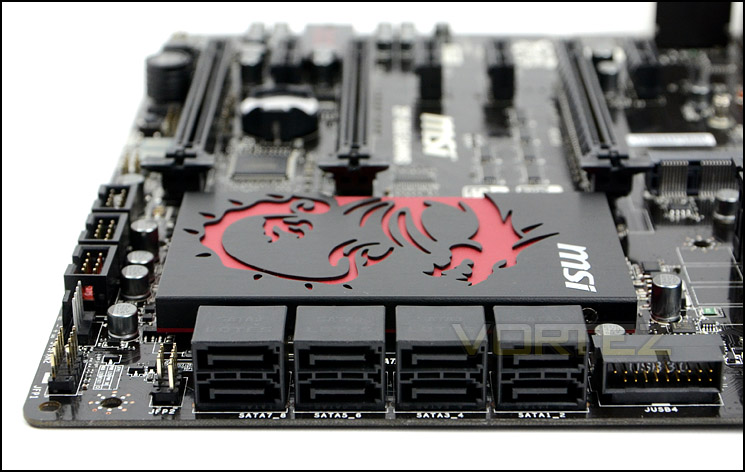
A total of eight SATA 3 (6GB/s) ports
Just like the MSI Z77 gaming motherboards, MSI have used a large dragon heatsink to cover the chipset, though on the Z87 chip this is significantly larger. We are left in no doubt that this heatsink can sufficiently take care of cooling.
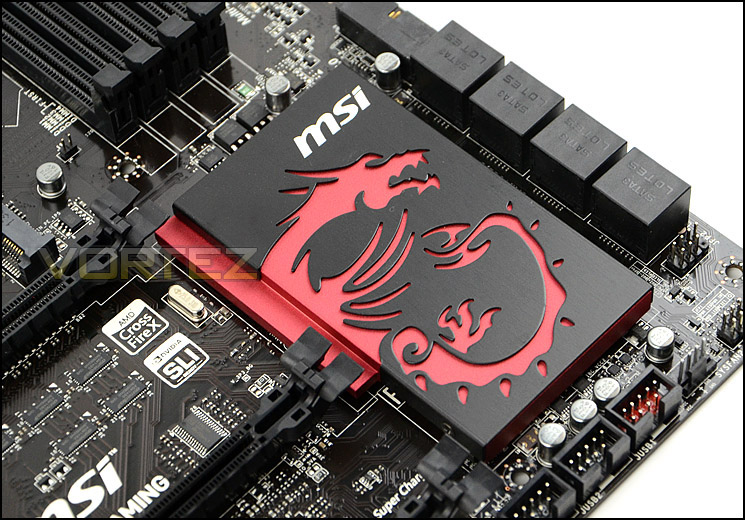
A large dragon heatsink covers Intel Z87 chip
GD65 has support for many different options when we arrive at the PCI Express area. These include support for NVIDIA SLI and AMD CrossfireX.
1 x PCI Express 3.0 x16 slot (Running @x16)
1 x PCI Express 3.0 x16 slots (Running @x8)
1 x PCI Express 3.0 x16 slots (Running @x4)
4 x PCI Express 2.0 x1 slot
If you want to use a single graphics card the then the best slot to use is the top PCI-E 3.0. Speed will drop depending on the amount of cards used on this motherboard, as per the specifications. It is noticeable that MSI have decided to leave legacy PCI support absent on GD65 and we think this is a worthwhile pursuit since PCI devices have now been superseded and few people use them nowadays.
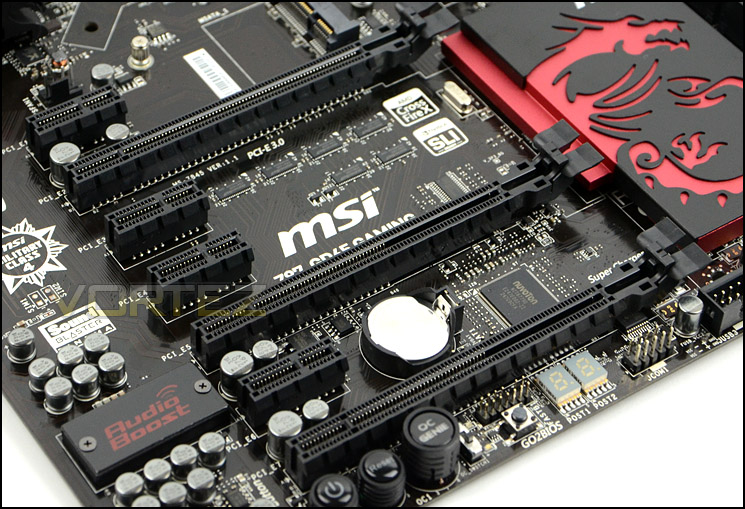
Support for multi-GPU configurations, legacy PCI absent
Located at the bottom of the motherboard are the onboard power controls and other functionality. There are many differences of opinion for placement of these features but regardless, MSI have done a good job in cramming so much in such a little space.
Available are the following:
• LED Debug – fault diagnostics
• GO2Bios – click once and on next bootup BIOS loads automatically
• OC Switch – enables 10% or 14% overclock function for OC Genie
• OC Genie – apply pre-set overclock in 1 second
• Power/reset buttons – boot system and restart system
Having such functionality on GD65 is very useful. We especially like the OC Genie (which is now in its 4th instalment) and GO2Bios. Both of these controls just make life so much easier for general and advanced usage.
Also present in this region is the Audio Boost chip and support audio capacitors. The chip that MSI have used is ALC 1150 and the amplifier: OPA1652. This works in conjunction with the audio jacks and the Creative Sound Blaster suite included on the software CD. In short, by having Audio Boost users can make use of a studio level integrated 600Ω headphone amplifier and audio should be significantly better than typical onboard offerings.
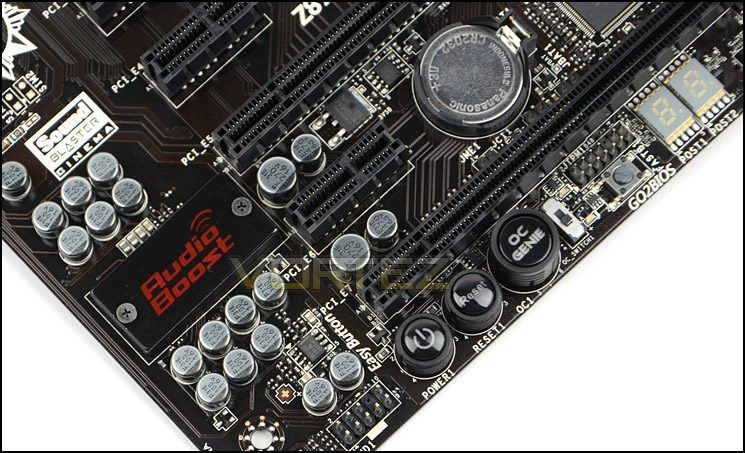
Onboard power buttons and Audio Boost
Lastly we come to the rear IO section, here there are plenty of ports to take advantage of, including the following:
– 1 x PS/2 keyboard/mouse combo port
– 1 x Clear CMOS button
– 1 x Coaxial S/PDIF-out port
– 1 x Optical S/PDIF-out port
– 2 x USB 2.0 ports
– 4 x USB 3.0 ports
– 1 x RJ45 LAN jack
– 6 OFC audio jacks
– 1 x VGA port, supporting a maximum resolution of 1920×1200 @60Hz, 24bpp
– 1 x DVI-D port, supporting a maximum resolution of 1920×1200 @60Hz, 24bpp
– 1 x HDMI port, supporting a maximum resolution of 4096×2160@24Hz, 24bpp/ 2560×1600@60Hz, 24bpp/ 1920×1080@60Hz, 36bpp
With Intel Haswell featuring an IGP there are outputs should the user require onboard graphics. Here there are three options to choose from, VGA, DVI and HDMI.
We should mention that the gigabit LAN port combines with the Killer E2200 chip to improve latency and ping during gaming sessions. MSI provide software to take full advantage of this feature.
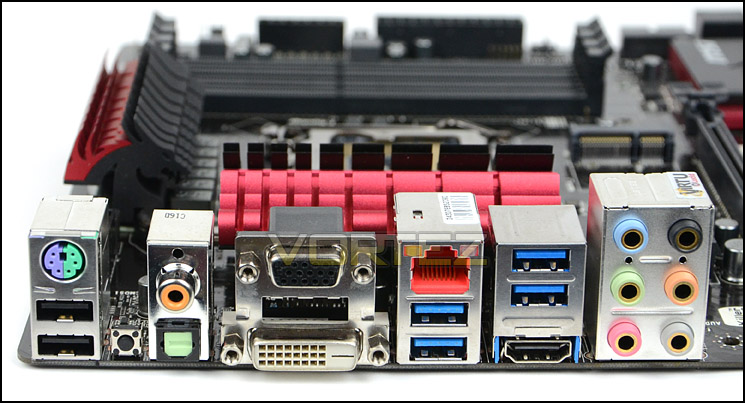
The Rear IO with lots of USB 3.0
Military Class 4 Features
MSI have included Military Class 4 components on GD65 and many will be familiar with its highly regarded feature-set. The 4th instalment includes Dark CAPs as a new addition. These capacitors are resilient and can ensure stability even with temperatures soaring up to 260°C!!
There is a return to some trusty components which MSI have used in previous generations of Military Class also, these include:
Super Ferrite Chokes
Super Ferrite Chokes deliver 60 Amp or 20-50% more current than chokes used by other brands to deliver better overclockability.
Hi C-Caps
Traditional capacitors use a rubber coating that seriously impacts life expectancy under heavy loads od to Oxidation and UV exposure. This is why Hi-C CAPs are the best choice for high-temp overclocking.
• 10x higher life expectancy under load than normal capacitors
• Ultra-low Form Factor
• High thermal stability
• 93.4% lower leakage than an aluminum capacitor
• Self-healing Tantalum

MSI Click BIOS 4
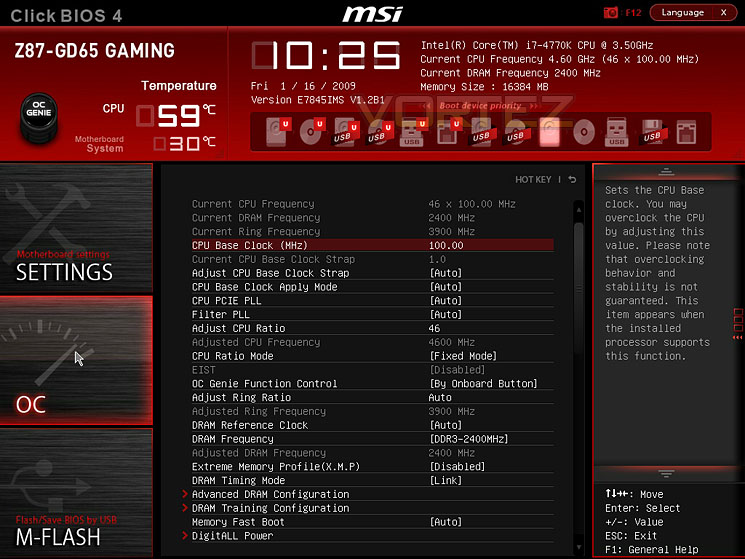
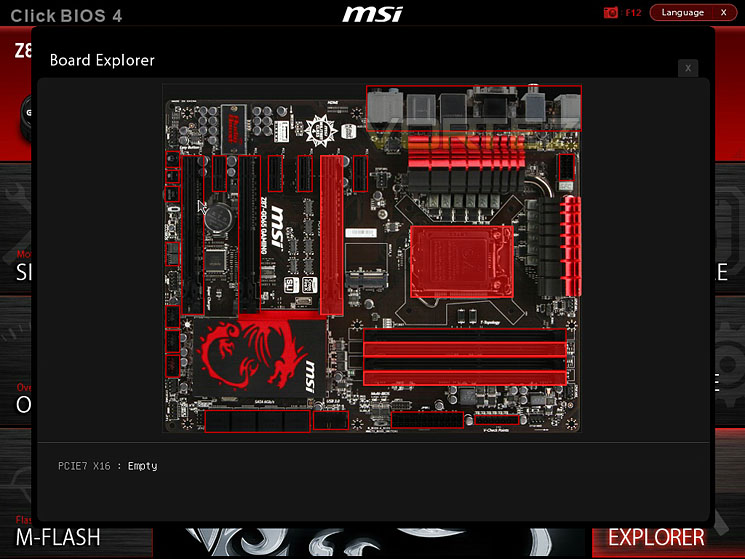
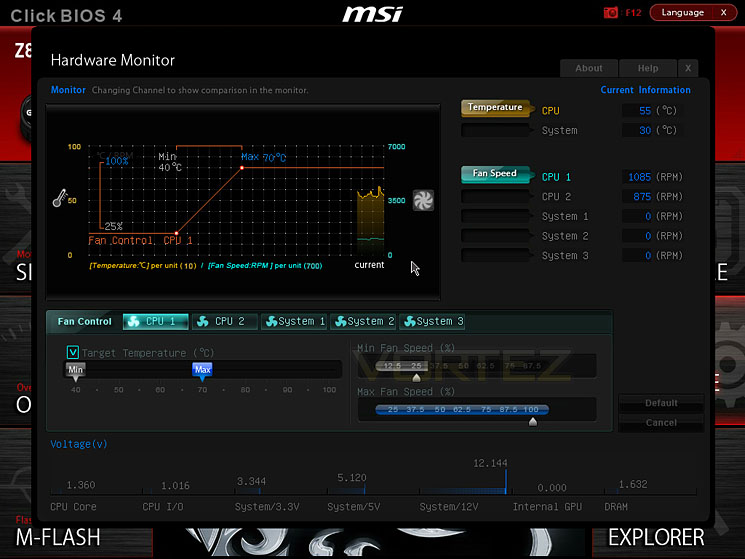
We were impressed by MSI’s attempt at UEFI when they first introduced it back with the Z77/X79 chipset but the latest instalment with Z87 is even more of a dream to work with. The interface is quite possibly the best we have used thus far, movement is exact, fluid and precise. Options are in just the area you want them in and the design isn’t gaudy.
Below are some screenshots showing what you can expect from the interface. We have included some screenshots of “Board Explorer” which gives you a schematic of the motherboard, hovering the mouse over certain areas will list specific settings that have been applied. The Hardware Monitor gives accurate details regarding fan speeds and temperatures as shown.
Test Setup & Overclocking
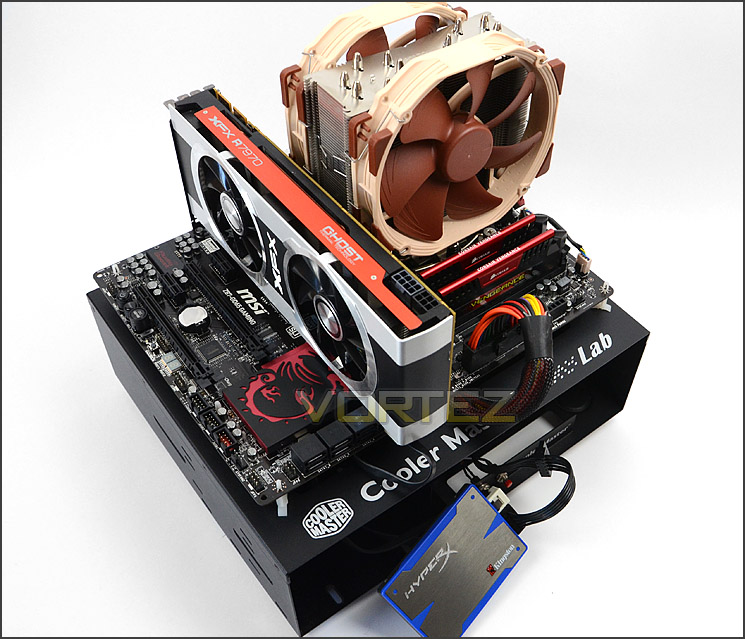
Test Setup
CPU Intel Core i7 4770K (Haswell) 3.50GHz
Cooling Noctua NH-U14
Motherboard MSI Z87-GD65 Gaming
Memory 16GB Corsair Vengeance Pro 2400MHz CL10 DDR3
Graphics XFX R7970 Black Edition
Storage Kingston HyperX 240GB SSD
PSU Corsair HX1050 80 Plus Gold Certified PSU
Cooling Noctua NH-U14
Motherboard MSI Z87-GD65 Gaming
Memory 16GB Corsair Vengeance Pro 2400MHz CL10 DDR3
Graphics XFX R7970 Black Edition
Storage Kingston HyperX 240GB SSD
PSU Corsair HX1050 80 Plus Gold Certified PSU
Benchmarks
Cinebench 11.5 – CPU Score
x264 HD 4.0 – 1st and 2nd pass encoding
SiSoftware SANDRA 2013 – CPU & Memory benchmarks
AIDA64 – CPU benchmarks
3DMark FireStrike – DX11 3D Benchmark
3DMark 11 – DX11 3D Performance and Extreme preset
Games – Tomb Raider, Crysis 3, Metro Last Light
x264 HD 4.0 – 1st and 2nd pass encoding
SiSoftware SANDRA 2013 – CPU & Memory benchmarks
AIDA64 – CPU benchmarks
3DMark FireStrike – DX11 3D Benchmark
3DMark 11 – DX11 3D Performance and Extreme preset
Games – Tomb Raider, Crysis 3, Metro Last Light
Other Software
Temperature Analysis: Core Temp
Stress Testing Software: LinX
CPU Specification Monitoring: CPU-Z
Stress Testing Software: LinX
CPU Specification Monitoring: CPU-Z
Overclocking
The introduction of Z87 brings a return to BCLK overclocking. This will in turn deliver more flexibility for Overclockers compared to previous generations where the BCLK was locked to 100MHz and only the ratio could be adjusted.
We managed to squeeze 4.6GHz out of the 4770K with Z87-GD65 Gaming. It did struggle to beat the record currently set of 4.7GHz by Z87X-OC but nevertheless, this is still a great result. The overclock required 1.34v. Increasing the vcore wouldn’t allow for 4.7GHz – although we could boot the LinX stress test generated a BSOD after 30 minutes in.
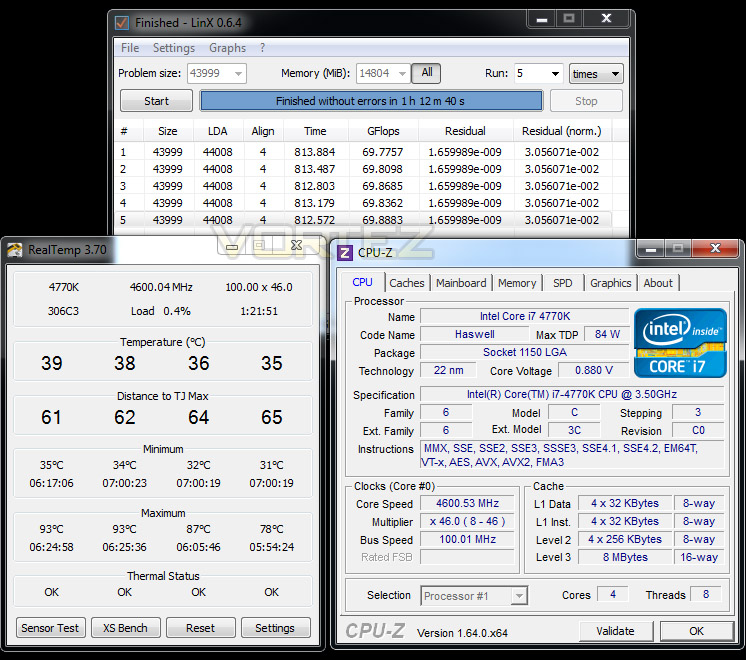
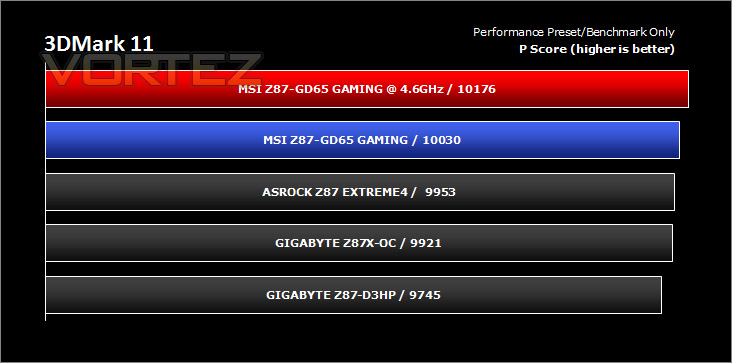
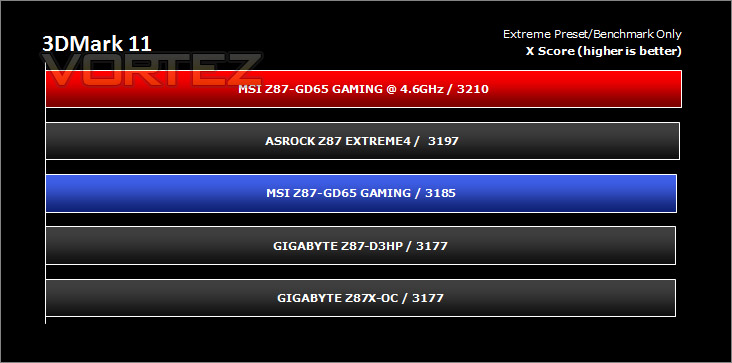
With the 4.6GHz overclock being our best, we will take this into our benchmark suite and test both stock and overclocked results on the subsequent pages. Our comparison results will obviously grow in the forthcoming weeks as we review more and more Z87 motherboards.
Power Consumption
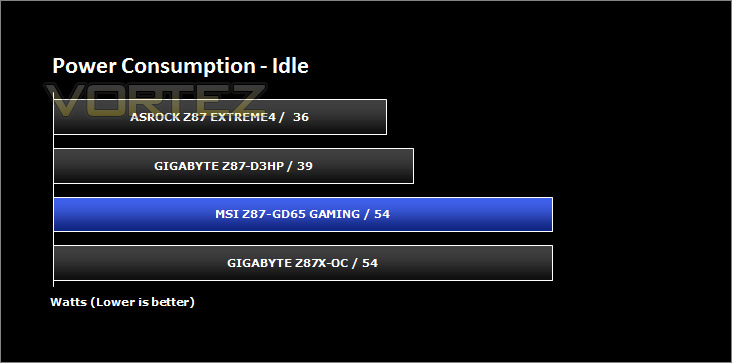
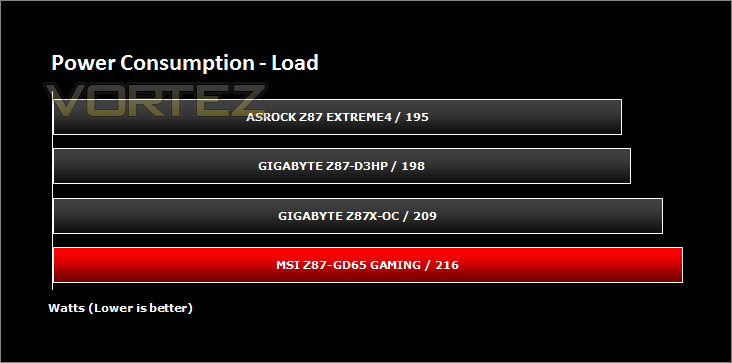
It’s interesting to note the power consumption across all motherboards. Although they are using Z87 chipsets, energy results can fluctuate between manufacturers due to the features and specifications that are integrated. First of all, for the idle tests the system is cold booted into Windows and no additional applications are executed – the watts are noted on the external energy monitor we use and then the system is loaded with 3DMark FireStrike – watts are again monitored for the duration of the test and the highest rated wattage result is then noted down. Below are the results of this energy test.
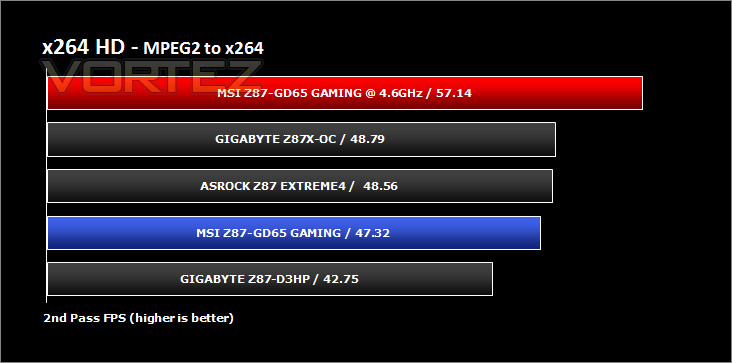
Benchmarks: X264 HD
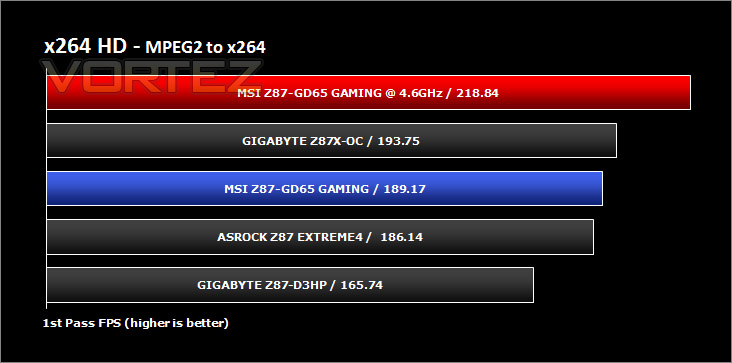
Simply put, this test measures how fast your machine can encode a short, DVD quality MPEG-2 video clip into a high-quality x264 video clip. What’s x264, you ask? It’s more or less the next-generation Xvid/DivX codec. I think it’s ideal for a benchmark because the application (x264.exe) reports fairly accurate compression results (in frames per second) for each pass of the video encoding process, and it uses multi-core processors very efficiently.
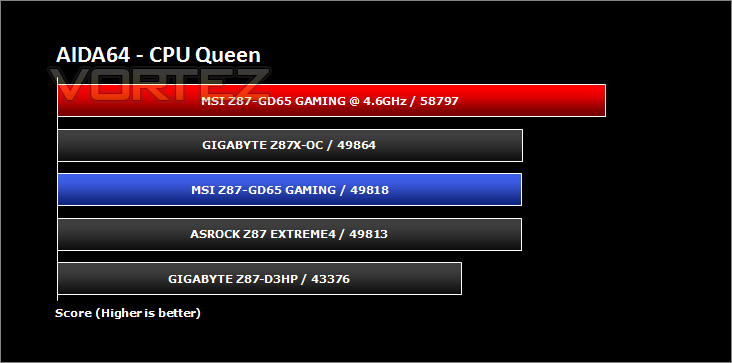
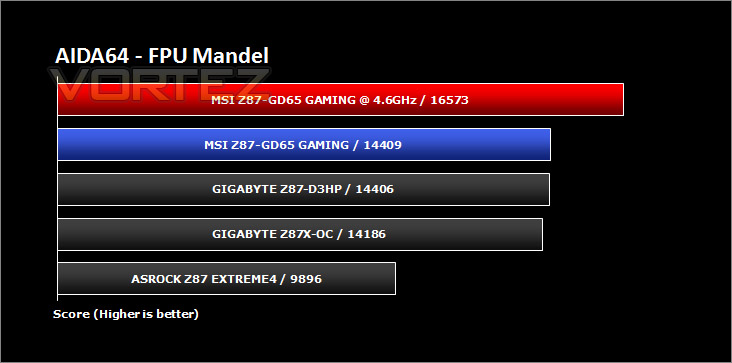
Benchmarks: AIDA64
AIDA64 Product PageThis simple integer benchmark focuses on the branch prediction capabilities and the misprediction penalties of the CPU. It finds the solutions for the classic “Queens problem” on a 10 by 10 sized chessboard. At the same clock speed theoretically the processor with the shorter pipeline and smaller misprediction penalties will attain higher benchmark scores. For example — with HyperThreading disabled — the Intel Northwood core processors get higher scores than the Intel Prescott core based ones due to the 20-step vs 31-step long pipeline. CPU Queen test uses integer MMX, SSE2 and SSSE3 optimizations.
Benchmarks: Cinebench
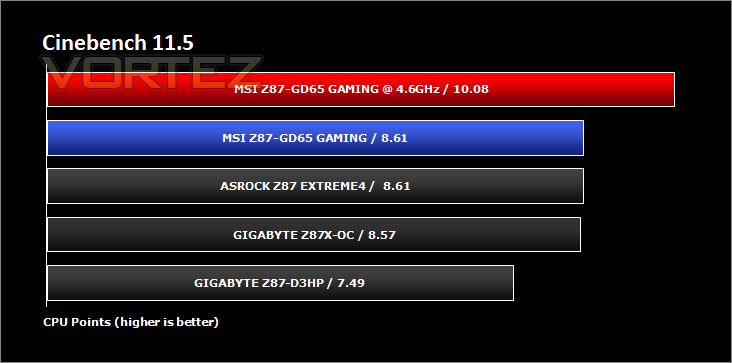
CINEBENCH can measure systems with up to 64 processor threads. This test scene contains approximately 2,000 objects which in turn contain more than 300,000 polygons in total, and uses sharp and blurred reflections, area lights, shadows, procedural shaders, antialiasing, and much more. The result is displayed in points (pts). The higher the number, the faster your processor.
Benchmarks: SiSoftware SANDRA
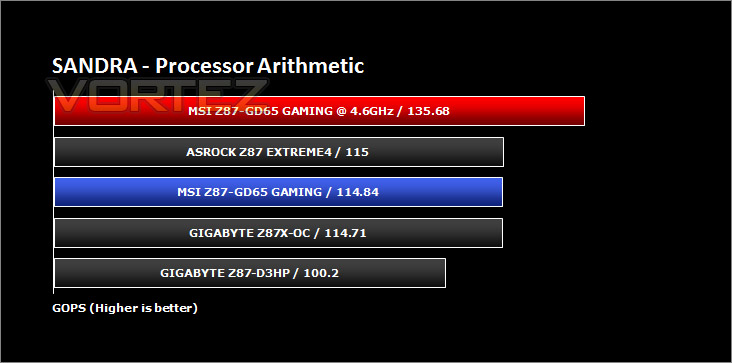
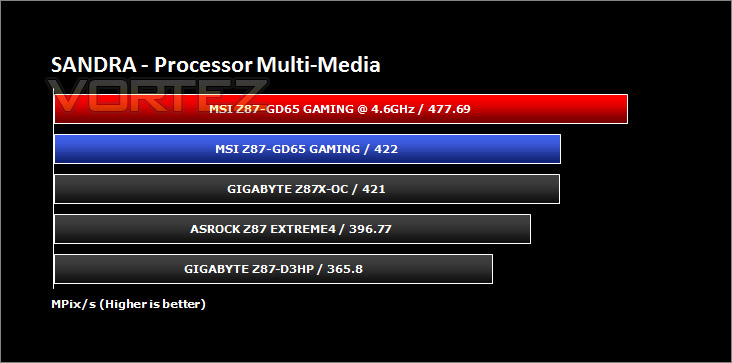
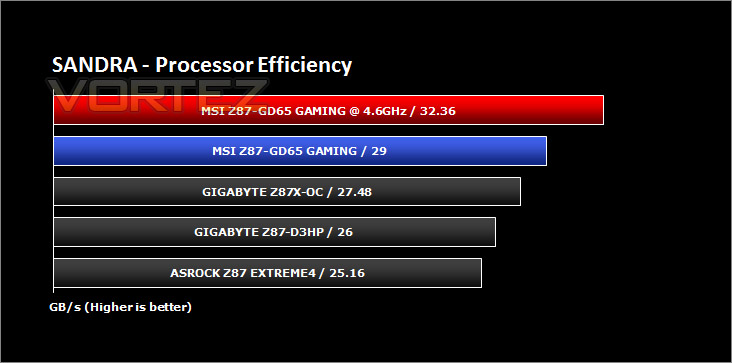
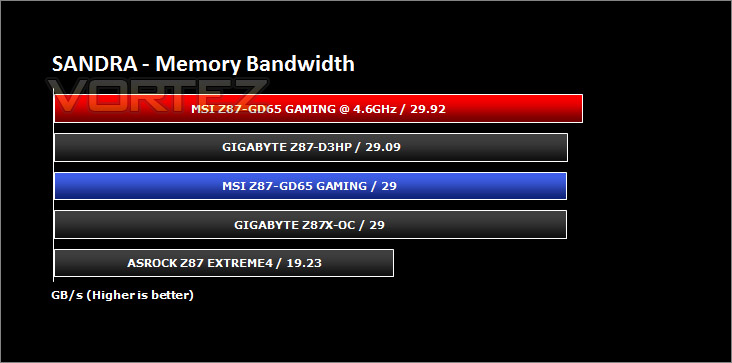
3DMark 11 Product PageSANDRA isn’t always a benchmark that is included in hardware reviews but I believe it shouldn’t be ignored. SANDRA provides a vigorous package that tests your system in a rather large array of benchmarks. There are many aspects of benchmark that can be executed. We will be considering – CPU and memory tests.
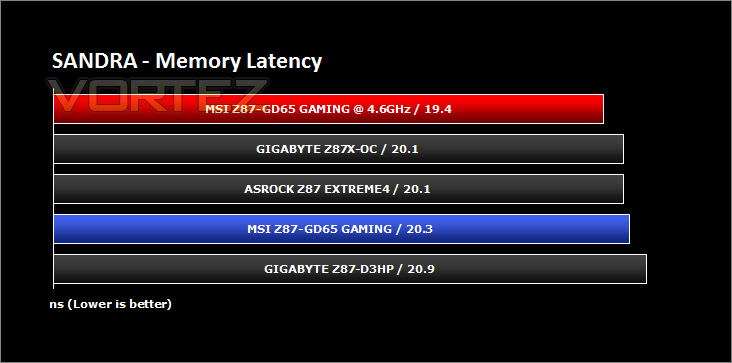
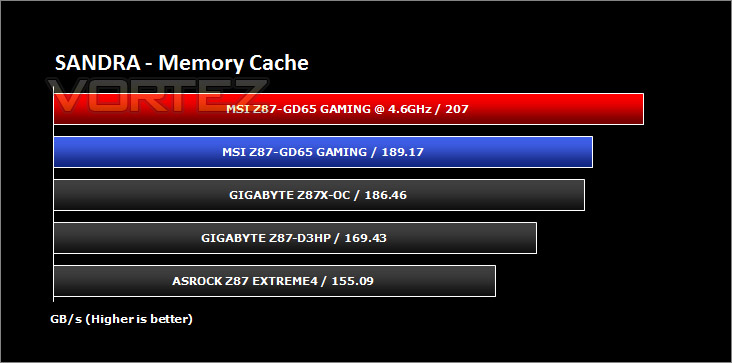
Benchmarks: 3DMARK FireStrike
3DMark FireStrike Product PageFire Strike is our new showcase DirectX 11 benchmark designed for high-performance gaming PCs. It is our most ambitious and technical benchmark ever, featuring real-time graphics rendered with detail and complexity far beyond what is found in other benchmarks and games today. Fire Strike will only be available in the Windows editions of 3DMark initially.
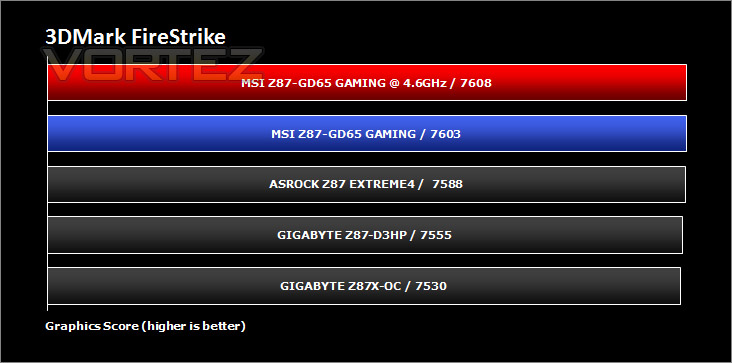
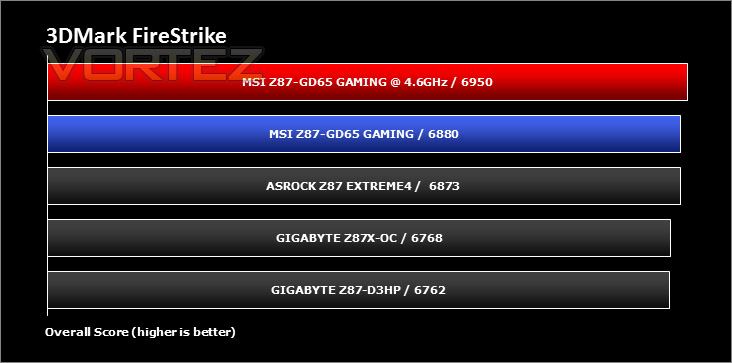
Benchmarks: 3DMARK 11
[quote]Designed to measure your PC’s gaming performance 3DMark 11 makes extensive use of all the new features in DirectX 11 including tessellation, compute shaders and multi-threading. Trusted by gamers worldwide to give accurate and unbiased results, 3DMark 11 is the best way to consistently and reliably test DirectX 11 under game-like loads.3DMark 11 is a very popular 3D performance benchmark suite and needs little introduction. For the test settings both Performance and Extreme presets are run with ‘benchmark only’ being selected. This provides good analysis. Many will only test the performance preset, using the extreme mode we can examine the board under much more severe stressing – at 720p and 1080p.
Benchmarks: Tomb Raider, Crysis 3, Metro Last Light
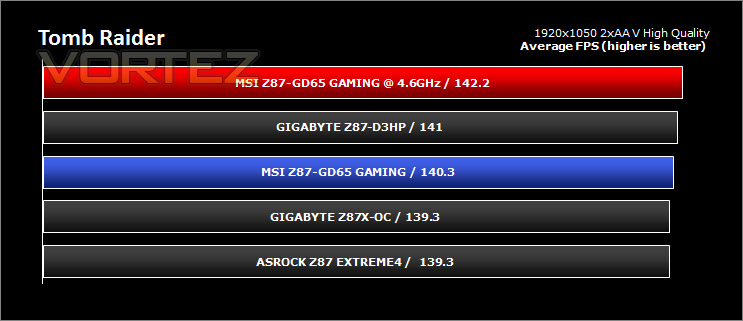
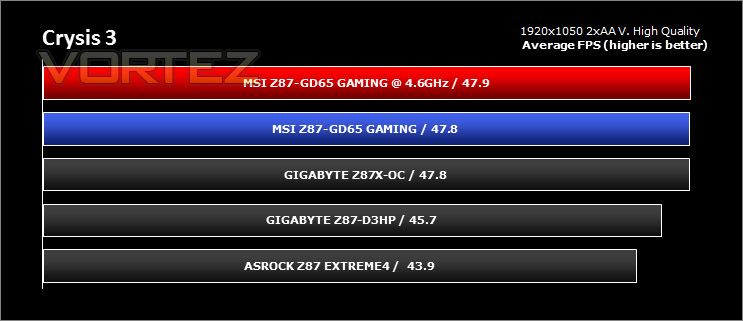
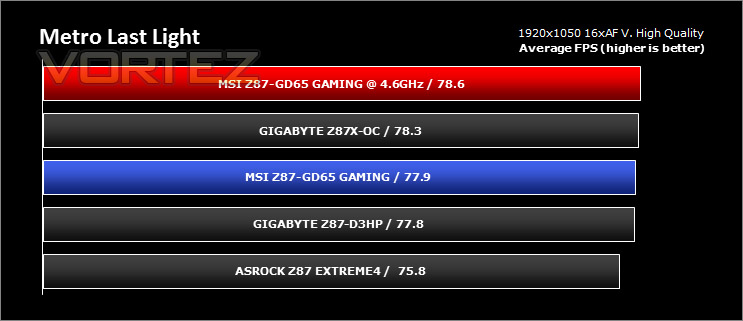
It’s important for us to perform a number of game benchmarks as well as the synthetic tests because gamers will want to know if there are any significant benefits. So here we have a selection of popular gaming titles, critically acclaimed and action-packed.
Settings
Tomb Raider
– 1920×1050 2xAA – Very High Quality *Benchmark tool*
Crysis 3
– 1920×1050 2xAA – Very High Quality *FRAPS – 1st scene/gameplay*
Metro Last Light
– 1920×1050 16xAF – Very High Quality *FRAPS – 1st scene/gameplay*
The gaming titles selected demand GPU power over CPU power – in each test the difference is rather marginal. VSync is disabled in all titles.
Conclusion
So far in our endeavours with Intel Z87 we have examined offerings from GIGABYTE, but now we turn to MSI and go straight to their premium gaming motherboard, so what we do we think?
Well, our findings are very positive indeed. In likeness to our Z77-GD65 Review we find ourselves falling head over heels for the new Z87-GD65 Gaming. It’s physical design is very pleasing to the eye – the stealth of black is a particular favourite amongst both enthusiasts and gamers. That being said, we do miss the black and blue aesthetics from the previous generation.
Being integrated with Military Class 4 components leaves the end user in no doubt that this motherboard is well-equipped for general and intense usage. It instils confidence in the product and would certainly lure us in for a potential buy.
At stocking settings the 4770K we tested with the GD65 demonstrated consistent results against other rivals and overclocking only improved the results, showing that partaking in such a task would be worthwhile, especially since OC Genie is ready and waiting for your little pinky. We managed to squeeze 4.6GHz out of our retail 4770K which is an impressive result.
One particular aspect which we love about GD65 is the Click BIOS 4. To fully understand why, the BIOS needs to be experienced by the user. The design MSI have used is pleasing to the eye, not too garish and is fluid and accurate. It’s simply one of the best interfaces we have had the pleasure of using.
At a cost of £150, we think the GD65 is a reasonably priced Z87 motherboard. It comes with all the features a gamer would expect and more. GO2Bios, OC Genie 4 are just a few features that are present on this board and they make life so much easier.
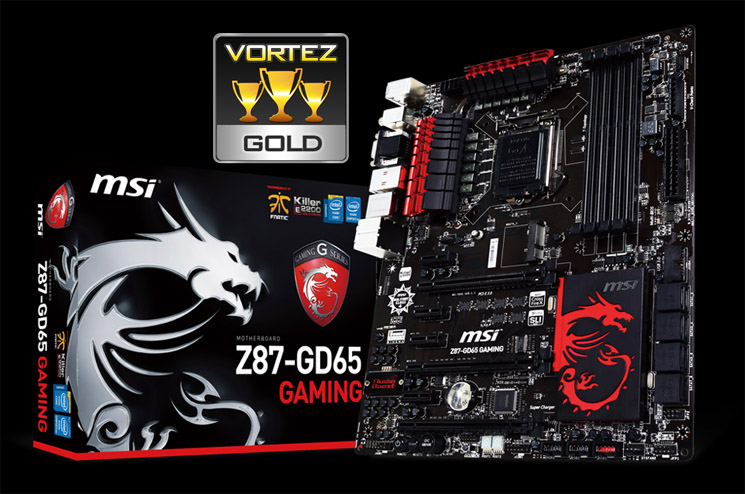
MSI have upped the ante with Z87-GD65 Gaming – other vendors ought to be worried. In its price-range GD65 Gaming should take the crown for visuals, features and performance. We are pleased to hand out our much coveted Gold award.
VIDEO REVIEW – VORTEZ TV
Pros
+ One of the best looking Z87 motherboards around
+ Performs great at stock settings – consistent
+ BIOS is fluid, attractive and easy to use
+ Lots of onboard features – GO2Bios, OC Genie etc
+ Military Class 4 components used throughout
+ Reasonably priced
Cons
– Only one USB 3.0 header – other boards in same price-range have more than one
– No AMD CrossfireX bridge
+ One of the best looking Z87 motherboards around
+ Performs great at stock settings – consistent
+ BIOS is fluid, attractive and easy to use
+ Lots of onboard features – GO2Bios, OC Genie etc
+ Military Class 4 components used throughout
+ Reasonably priced
Cons
– Only one USB 3.0 header – other boards in same price-range have more than one
– No AMD CrossfireX bridge

Click here for an explanation of our awards at Vortez.net.


