







The OCZ Vector 150 range are SSDs that are not only seriously fast but also built to last. We test the 240GB model to see how it performs…

Product on Review: Vertex 150
Manufacturer & Sponsor: OCZ Storage Solutions
Street Price: £164.99inc. VAT (GBP)
Most enthusiasts have now embraced SSD technology and it is fair to assume that those who have may have experienced degradation of their drives over a period of time lowering the effect of that once blisteringly fast upgrade to one which is more akin to a mechanical hard drive. Ok, maybe not THAT slow but it will likely have slowed a good percentage. It is to this end that OCZ are marketing the Vector 150 as a drive that is built to combat this eventual slow-down. It is all very well being the fastest drive on the planet when you first hook it up to your machine but can it still compete with the field? Unlikely if it suffers from degradation to such an extent that it loses not only to the new releases on the market but also those it formally competed against.
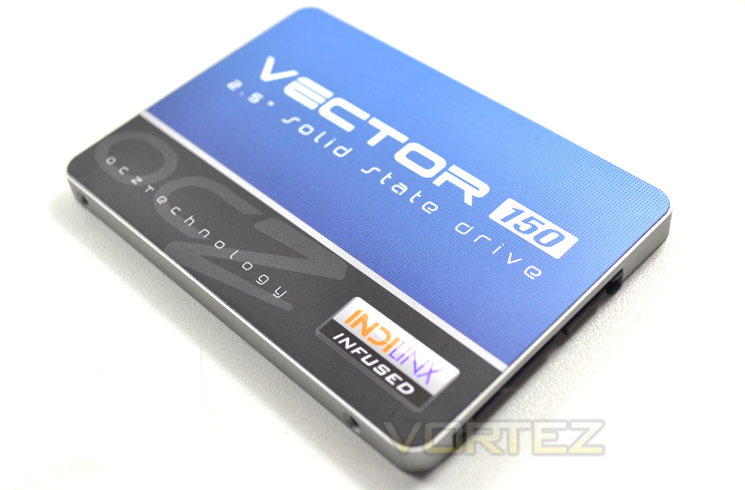
The Vector 150 is rated for an industry-leading 50GB/day of host writes for 5 years (typical client workloads) makes this SSD top of the class in terms of durability. Couple this with next generation 19nm MLC NAND flash along with Proprietary Barefoot 3 controller technology and the OCZ Vector 150 SSD is set to boast phenomenal speed with matching durability.
About OCZ
San Jose, California-based OCZ Storage Solutions – A Toshiba Group Company, is a global leader in the design and manufacturing of industry-leading solid state drives (SSDs), a disruptive, game-changing technology that is replacing traditional rotating magnetic hard disk drives (HDDs). OCZ develops best-in-class solid state drive solutions for professionals, enthusiasts, and gamers, and is committed to driving storage innovation. With a rich portfolio of consumer SSD offerings for laptop, desktop, and workstation applications covering a range of popular interfaces and media formats, our SSDs utilize proprietary in-house controllers and firmware to deliver exceptional I/O performance, differentiated features, lower power consumption and superior reliability, all of which translate into faster file transfers, instant system boot-ups, and an enhanced computing or gaming experience.
Specification
PERFORMANCE
Sequential Read: Speed1 550MB/s
Sequential Write: Speed1 530MB/s
Random Read Speed:
(4K, QD32)2 90,000 IOPS
Random Write Speed
(4K, QD32)2 95,000 IOPS
Steady State Random Write
(4K QD32)2 21,000 IOPS
PHYSICAL
Usable Capacities (IDEMA): 240GB,
NAND Components: 19nm Multi-Level Cell (MLC) Flash
NAND Controller: Barefoot 3 M00
Interface: SATA 3 6Gb/s (Backwards compatible with SATA II 3Gb/s)
Form Factor: 2.5 Inch, Ultra-slim 7mm
Dimension (L x W x H): 99.7 x 69.75 x 7mm
Weight: 115g
ENVIRONMENTAL
Power Consumption: Idle: 0.55W, Active: 2.5W
Operating Temperature: 0°C ~ 70°C
Storage Temperature: -45°C ~ 85°C
Shock Resistance: 1500G/0.5ms
Vibration (Operational): 2.17Grms (7-800Hz)
Vibration (Non-operational): 16.3Grms (20-2000Hz)
Certifications: RoHS, CE, FCC, KCC, C-Tick, VCCI, BSMI
RELIABILITY / PROTECTION
MTBF: 2.3 million hours
Data Path Protection: BCH ECC corrects up to 44 random bits/1KB
Encryption: 256-bit AES-compliant
Product Health Monitoring: Self-Monitoring, Analysis and Reporting Technology (SMART) Support
Endurance: Rated for 50GB/day of host writes for 5 years under typical client workloads
COMPATIBILITY
Serial ATA (SATA): Fully compliant with Serial ATA International Organization: Serial ATA Revision 3.0: Fully compliant with ATA/ATAPI-8 Standard Native Command Queuing (NCQ)
Operating System: Windows / Mac / Linux
ADDITIONAL FEATURES
Performance Optimization: TRIM (requires OS support), Idle Time Garbage Collection
Service & Support: 5-Year Warranty, Toll-Free Tech Support, 24 Hour Forum Support, Firmware Updates
Included Accessories: Acronis® True Image HD cloning software registration key (current version compatible with Windows XP, Vista and 7.) and a 3.5″ desktop adapter
Sequential Read: Speed1 550MB/s
Sequential Write: Speed1 530MB/s
Random Read Speed:
(4K, QD32)2 90,000 IOPS
Random Write Speed
(4K, QD32)2 95,000 IOPS
Steady State Random Write
(4K QD32)2 21,000 IOPS
PHYSICAL
Usable Capacities (IDEMA): 240GB,
NAND Components: 19nm Multi-Level Cell (MLC) Flash
NAND Controller: Barefoot 3 M00
Interface: SATA 3 6Gb/s (Backwards compatible with SATA II 3Gb/s)
Form Factor: 2.5 Inch, Ultra-slim 7mm
Dimension (L x W x H): 99.7 x 69.75 x 7mm
Weight: 115g
ENVIRONMENTAL
Power Consumption: Idle: 0.55W, Active: 2.5W
Operating Temperature: 0°C ~ 70°C
Storage Temperature: -45°C ~ 85°C
Shock Resistance: 1500G/0.5ms
Vibration (Operational): 2.17Grms (7-800Hz)
Vibration (Non-operational): 16.3Grms (20-2000Hz)
Certifications: RoHS, CE, FCC, KCC, C-Tick, VCCI, BSMI
RELIABILITY / PROTECTION
MTBF: 2.3 million hours
Data Path Protection: BCH ECC corrects up to 44 random bits/1KB
Encryption: 256-bit AES-compliant
Product Health Monitoring: Self-Monitoring, Analysis and Reporting Technology (SMART) Support
Endurance: Rated for 50GB/day of host writes for 5 years under typical client workloads
COMPATIBILITY
Serial ATA (SATA): Fully compliant with Serial ATA International Organization: Serial ATA Revision 3.0: Fully compliant with ATA/ATAPI-8 Standard Native Command Queuing (NCQ)
Operating System: Windows / Mac / Linux
ADDITIONAL FEATURES
Performance Optimization: TRIM (requires OS support), Idle Time Garbage Collection
Service & Support: 5-Year Warranty, Toll-Free Tech Support, 24 Hour Forum Support, Firmware Updates
Included Accessories: Acronis® True Image HD cloning software registration key (current version compatible with Windows XP, Vista and 7.) and a 3.5″ desktop adapter
First Look
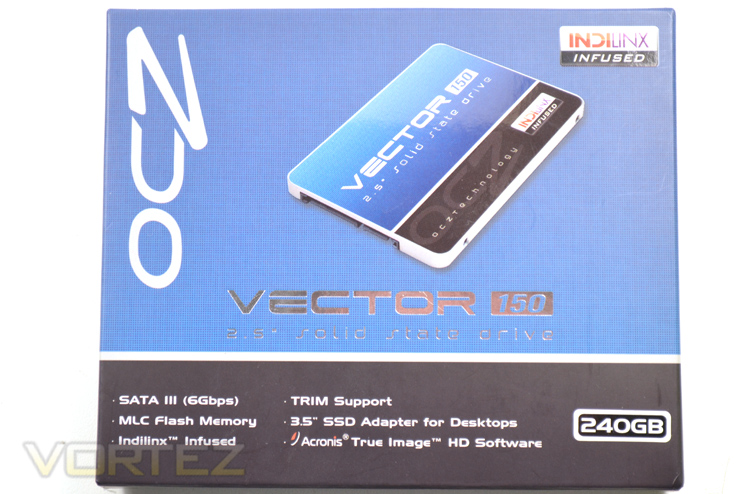
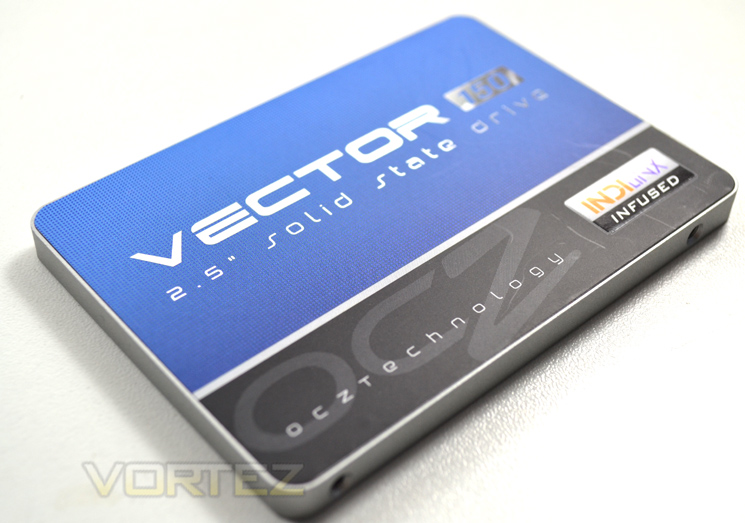
The exterior packaging is a typical size for an SSD. The basic features of the product are found beneath the product title along with the size of the SSD found on the bottom right of the product packaging. We found the weight to be a great surprise as the product is seriously heavy for an SSD. Maybe this is a good thing for desktops (heavy = tough) but will inevitably be bad news for those looking to use this SSD in a notebook. More on this later…
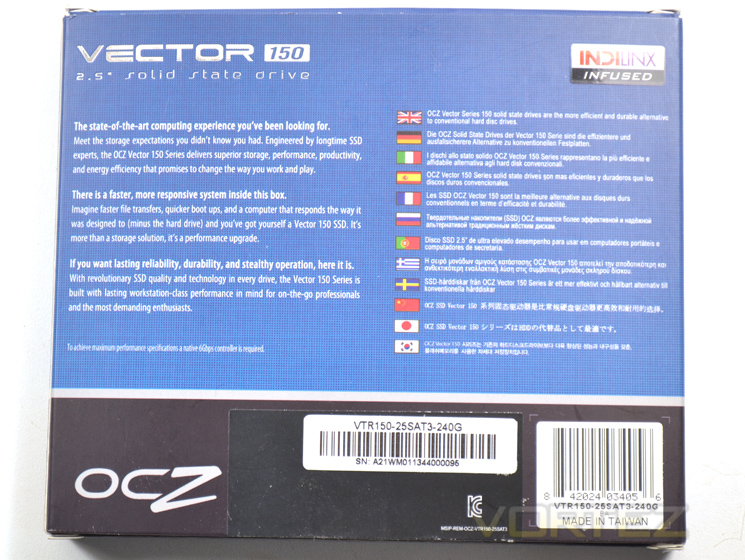
Following on from the blue, black and silver theme OCZ explain the attractions of the card with perhaps the most outstanding feature being durability. Inside the package we were greeted with the usual paraphernalia but also worthy of note is that this product has a 2.5″ – 3.5″ adaptor for use in desktop PC enclosures. Another great addition is the inclusion of Acronis True Image (digital download code) which is perhaps one of the best pieces of software on the market for backing up a hard disk or indeed transferring files from one hard disk to this SDD.
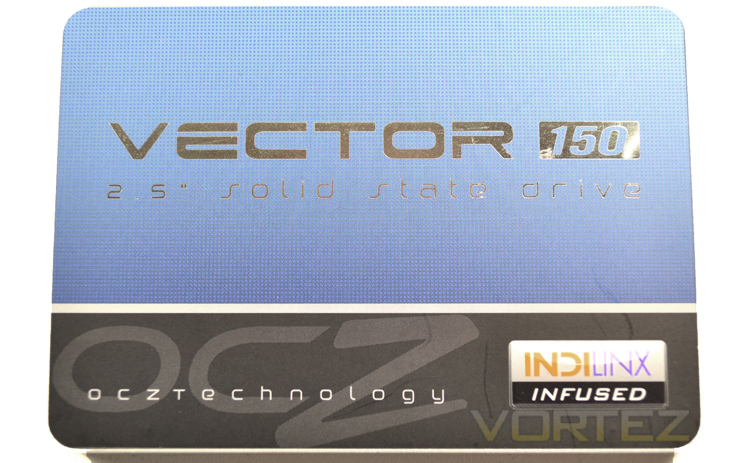
The SSD itself is encased in aluminium which, along with the SSD bracket explains why this product felt so heavy. One of the main attractions for those looking to upgrade to an SSD is the weight and while this product is much lighter than a mechanical hard drive, it is also heavier than plastic encased SSD’s. It is fair to say that the major selling point of this SSD is durability, not only with the technical design and integrated chips but also as we can see, OCZ have ensured that it is not only electrically durable but also physically.
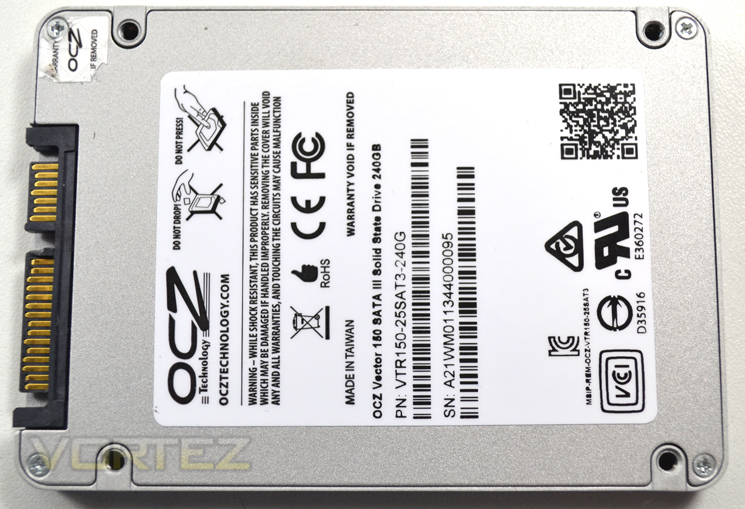
The rear of the drive features product serials codes along with the size of the drive. There is also a warning that should the drive be opened then the warranty will be voided. The SSD measures 99.8mm x 69.63mm x 7mm so will fit in most laptops and notebooks however with a weight of 83 grams it is one of the heavier SSD’s on the market so those with Ultrabooks looking for a lightweight SSD solution may wish to consider mSATA.
Closer Look
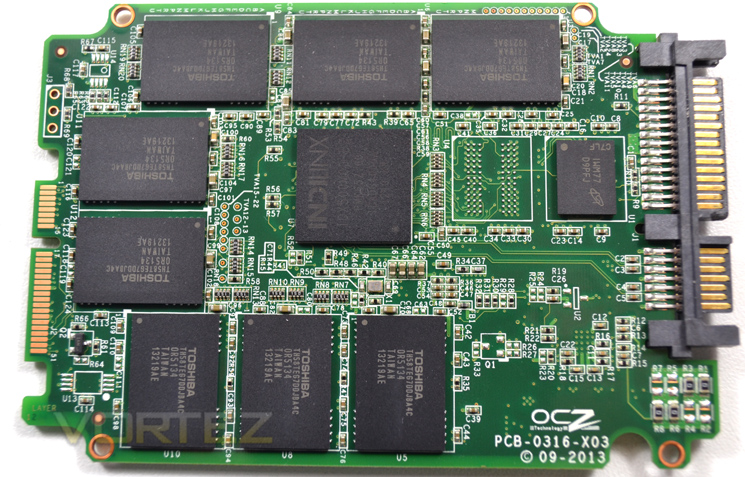
Armed with the Indilinx Barefoot 3 M00, the Vector 150 has the same controller found on the original Vector SSD which was marketed towards a ‘performance user’. OCZ aim the Vector 150 to the ‘enthusiast’ market while the Vertex remains focussed on the mainstream segment. The difference? We’re not sure as an enthusiast demands performance however, much like slapping ‘Ultra/super/classified’ (insert excessive adjective here), OCZ hope to capture the users who want the very best, in this instance, the Vector 150.
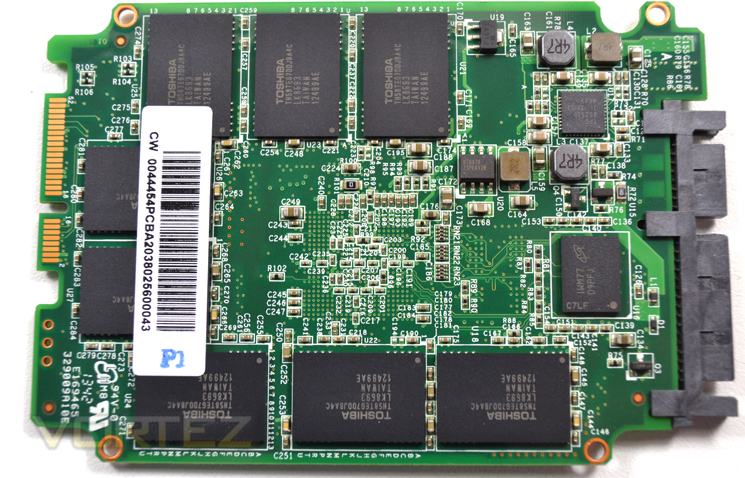
There have been two enhancements since the Vector 450. First and foremost and perhaps the key selling point is the durability of the SSD. OCZ warrant this drive for 50GB of writes per day which is 30GB of writes more per day than the original Vector. This is of course backed up by OCZ’s five year warranty. The second improvement is hardware encryption. While the drive does not support Bitlocker (Windows
 it does afford protection with AES-256 hardware encryption for secure data erasing and encryption.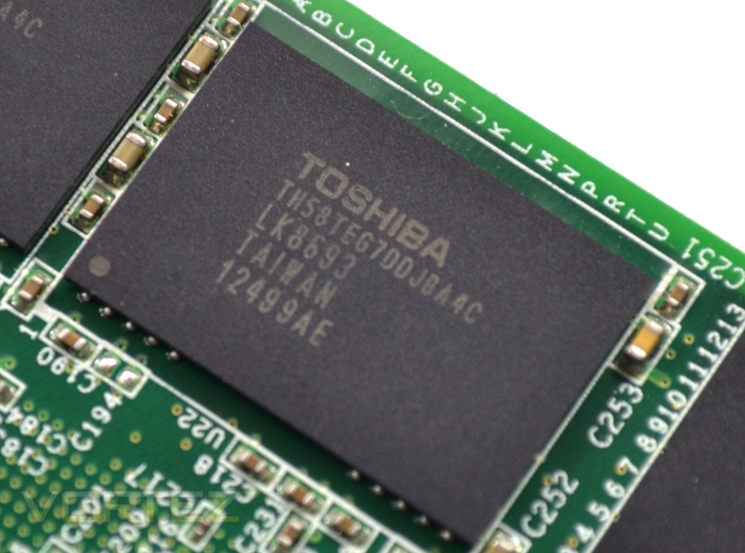
So, we have seen the difference between the original Vector now for the difference between the Vector 450 and today’s Vector 150. The Vector 450 utilised 20nm IMFT IC’s whereas today’s sample uses Toshiba’s 19nm MLC synchronous flash NAND chips. The Vector uses a 16 x 16GB profile giving a theoretical 256GB however in a Windows environment the SSD will likely show 240GB and hence the drive is marketed as such.
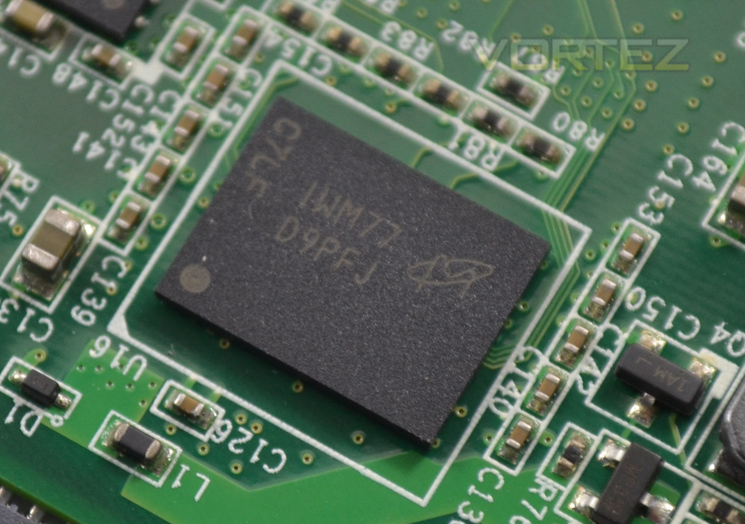
Here we see one of the Micron DDR3 512MB chips which makes up the 1GB of DRAM cache available to the Indilinx controller.
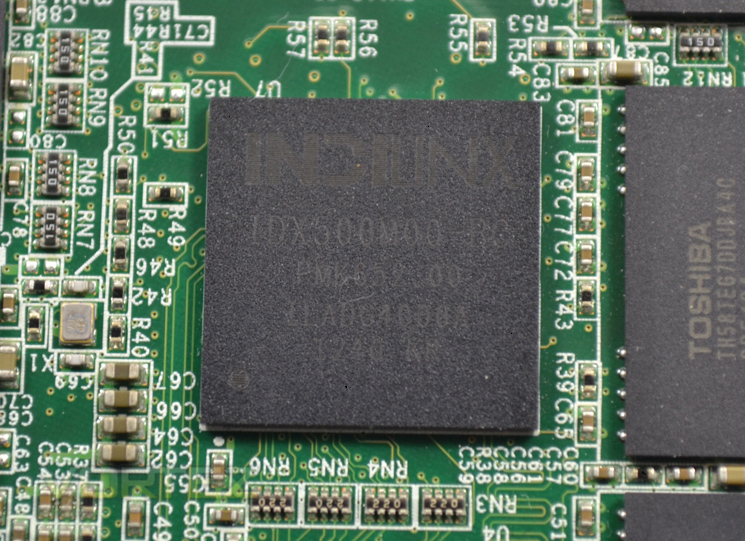
Taking pride of place in the centre of the PCB is of course the Indilinx controller (IDX500M00-BC). This features an ARM Cortex processor along with an OCZ Aragon co-processor which have 1GB DRAM of cache at their disposal.
Test Setup & Methodology
Our test system is formatted and a fresh version of Windows is installed with just drives in place – no additional applications. Windows is then updated to the latest release and the drivers are installed. Included in the list of benchmarks are the following applications:Benchmarks
ATTO Disk Benchmark v2.46
AS SSD
CrystalDiskMark 3.0
Iometer
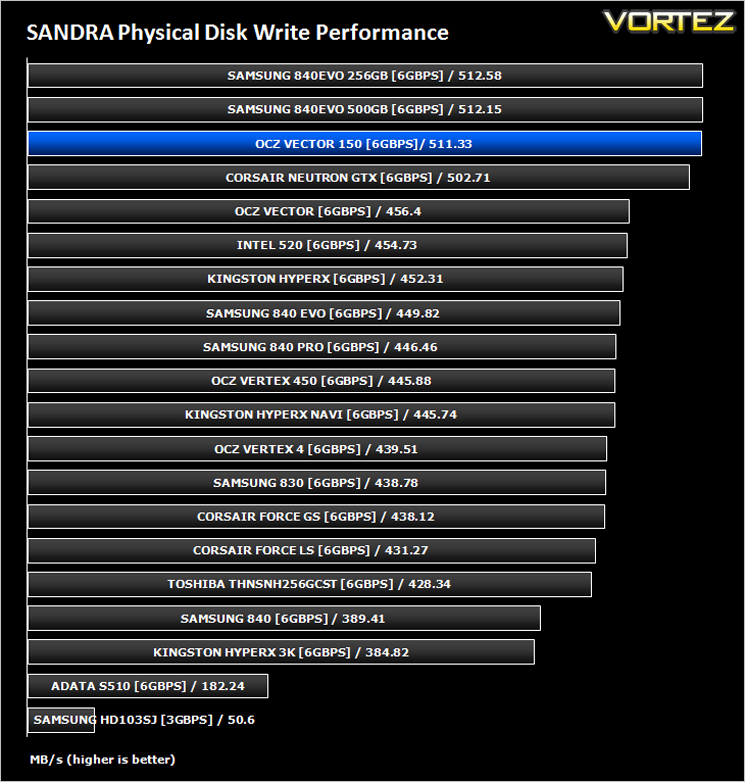
SiSoftware SANDRA 2012
HDTune Pro 5.5
AS SSD
CrystalDiskMark 3.0
Iometer
SiSoftware SANDRA 2012
HDTune Pro 5.5
Test system
CPU Intel Core-i7 4770K
Motherboard GIGABYTE Z87X-OC
Graphics MSI R7970 Black Edition
Memory 16GB Corsair Vengeance Pro (2400MHz) CL10
HDD
– OCZ Vector 150 240GB (Sata 6Gbps)
– Samsung 840 EVO mSATA 500GB (Sata 6Gbps)
– Samsung 840 EVO mSATA 250GB (Sata 6Gbps)
– Kingston HyperX 3K Na’Vi 240GB (Sata 6Gbps)
– OCZ Vertex 450 256GB (Sata 6Gbps)
– Samsung 840 EVO 750GB (Sata 6Gbps)
– Samsung 840 Pro 256GB (Sata 6Gbps)
– Samsung 840 256GB (Sata 6Gbps)
– Toshiba 256GB THNSNH256GCST (Sata 6Gbps)
– OCZ Vector 256GB (Sata 6Gbps)
– Corsair Neutron GTX 240GB (Sata 6Gbps)
– Corsair Force GS 240GB (Sata 6Gbps)
– OCZ Vertex 4 128GB (Sata 6Gbps)
– Kingston HyperX 3K 120GB (Sata 6Gbps)
– Kingston HyperX 240GB (Sata 6Gbps)
– ADATA S510 120GB (Sata 6Gbps)
– Intel 520 480GB (Sata 6Gbps)
– Samsung 830 Series 256GB (Sata 6Gbps)
– Samsung HD103SJ 1TB (Sata 3Gbps)
PSU Corsair HX1050 Gold
OS Microsoft Windows 7 Professional 64-Bit
Motherboard GIGABYTE Z87X-OC
Graphics MSI R7970 Black Edition
Memory 16GB Corsair Vengeance Pro (2400MHz) CL10
HDD
– OCZ Vector 150 240GB (Sata 6Gbps)
– Samsung 840 EVO mSATA 500GB (Sata 6Gbps)
– Samsung 840 EVO mSATA 250GB (Sata 6Gbps)
– Kingston HyperX 3K Na’Vi 240GB (Sata 6Gbps)
– OCZ Vertex 450 256GB (Sata 6Gbps)
– Samsung 840 EVO 750GB (Sata 6Gbps)
– Samsung 840 Pro 256GB (Sata 6Gbps)
– Samsung 840 256GB (Sata 6Gbps)
– Toshiba 256GB THNSNH256GCST (Sata 6Gbps)
– OCZ Vector 256GB (Sata 6Gbps)
– Corsair Neutron GTX 240GB (Sata 6Gbps)
– Corsair Force GS 240GB (Sata 6Gbps)
– OCZ Vertex 4 128GB (Sata 6Gbps)
– Kingston HyperX 3K 120GB (Sata 6Gbps)
– Kingston HyperX 240GB (Sata 6Gbps)
– ADATA S510 120GB (Sata 6Gbps)
– Intel 520 480GB (Sata 6Gbps)
– Samsung 830 Series 256GB (Sata 6Gbps)
– Samsung HD103SJ 1TB (Sata 3Gbps)
PSU Corsair HX1050 Gold
OS Microsoft Windows 7 Professional 64-Bit
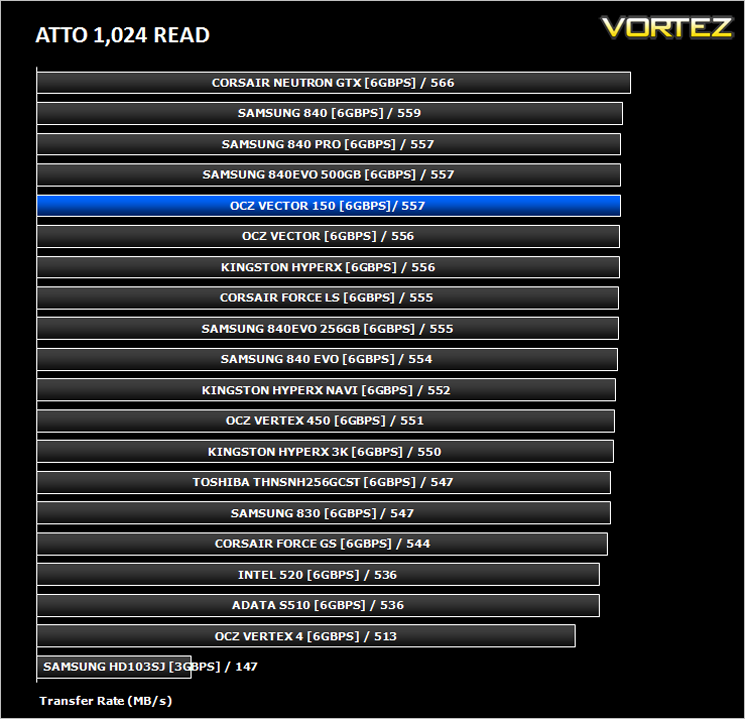
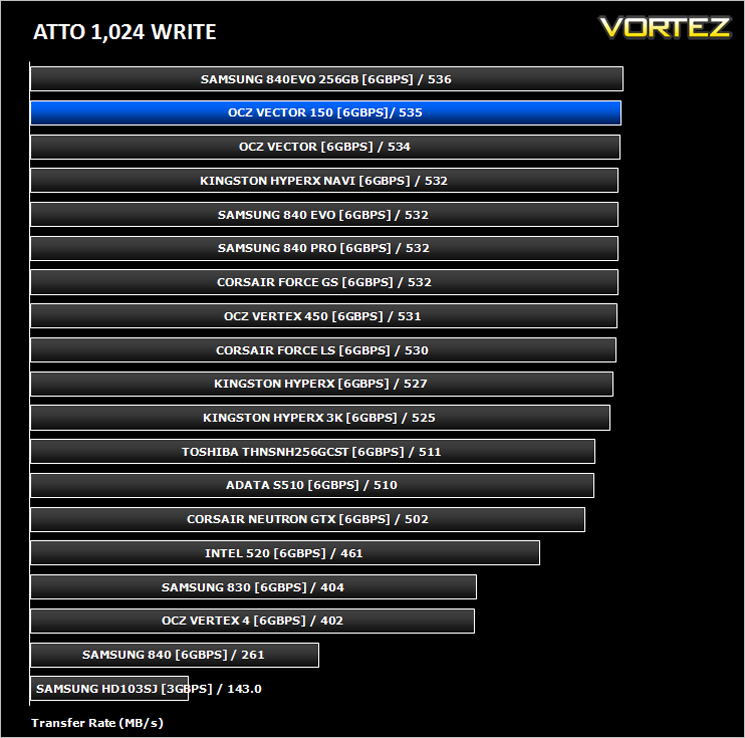
Benchmarks: ATTO
The ATTO Disk Benchmark performance measurement tool is compatible with Microsoft Windows. Measure your storage systems performance with various transfer sizes and test lengths for reads and writes. Several options are available to customize your performance measurement including queue depth, overlapped I/O and even a comparison mode with the option to run continuously. Use ATTO Disk Benchmark to test any manufacturers RAID controllers, storage controllers, host adapters, hard drives and SSD drives and notice that ATTO products will consistently provide the highest level of performance to your storage.
Benchmarks: AS SSD
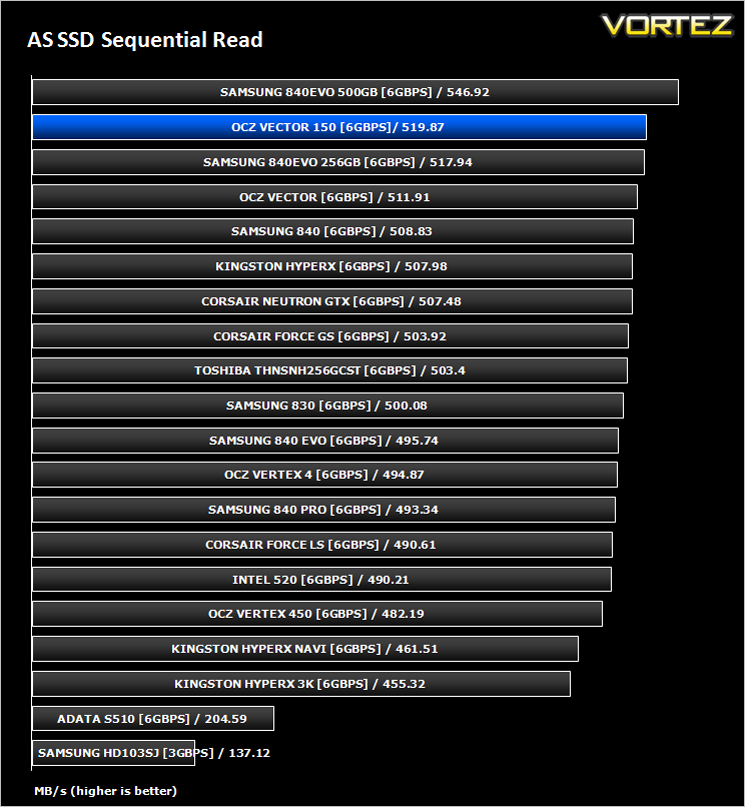
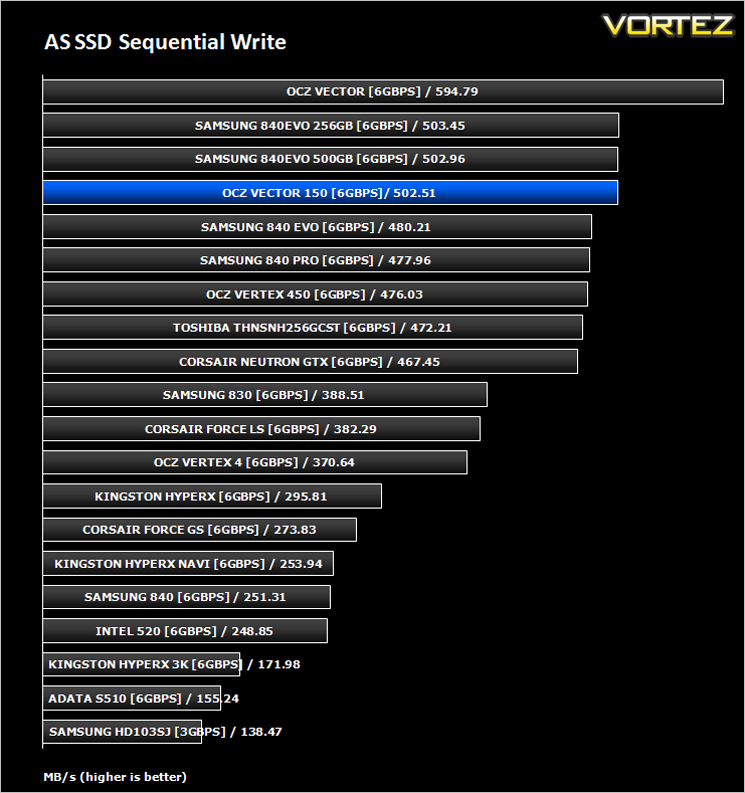
AS SSD Benchmark is a straightforward tool for measuring the speed of your SSD drive.
Simply launch the program, choose your drive, click Start, and it’ll test your SSD’s read and write speed in a variety of ways, delivering a score for each when it’s done. And if that’s not enough, there are also additional file copy and compression-related benchmarks available from the Tools menu. (The author’s support page is German only, but if you need further English explanations then there’s a thread on the program at the OCZ Technology forum.).
Simply launch the program, choose your drive, click Start, and it’ll test your SSD’s read and write speed in a variety of ways, delivering a score for each when it’s done. And if that’s not enough, there are also additional file copy and compression-related benchmarks available from the Tools menu. (The author’s support page is German only, but if you need further English explanations then there’s a thread on the program at the OCZ Technology forum.).
Benchmarks: CrystalDiskMark 3.0
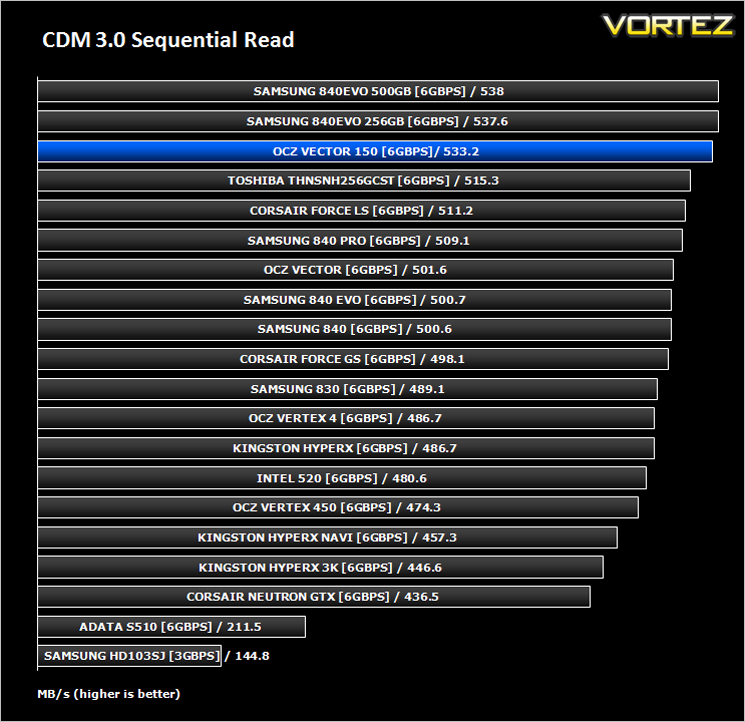
CrystalDiskMark is a disk benchmark software that analyses different types of hard drive. Giving sequential benchmark write and read statistics in MB/s. A simple program that is very useful.
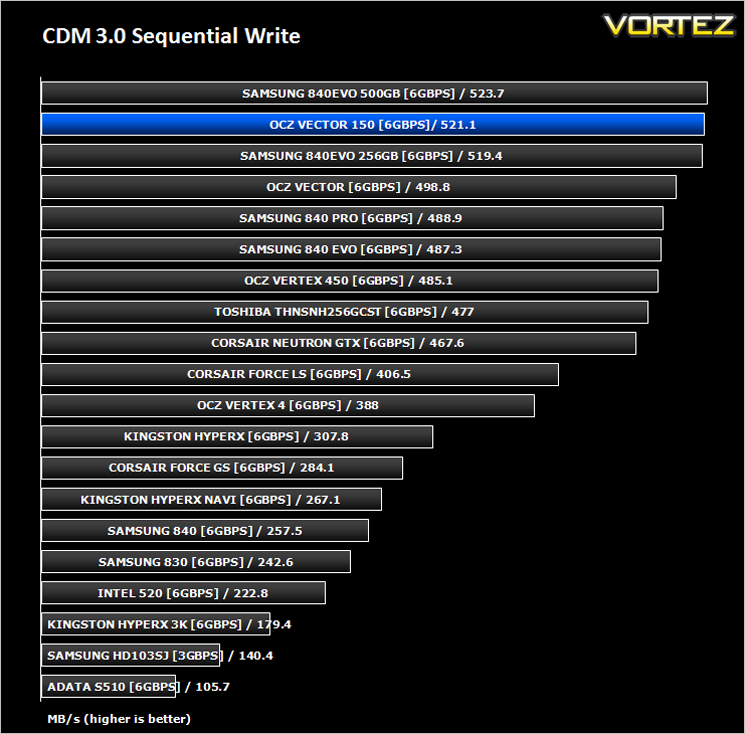
Benchmarks: Iometer
Iometer is based on a client–server model, where one instance of the Iometer graphical user interface is managing multiple ‘workers’ (each one representing a separate Dynamo.exe process) which are doing the I/O. Iometer performs Asynchronous I/O – accessing files or block devices (later one allowing to bypass the file system buffers).
Iometer allows the configuration of disk parameters such as the ‘Maximum Disk Size’, ‘Starting Disk Sector’ and ‘# of Outstanding I/Os’. This allows a user to configure a test file upon which the ‘Access Specifications’ configure the I/O types to the file.
Iometer allows the configuration of disk parameters such as the ‘Maximum Disk Size’, ‘Starting Disk Sector’ and ‘# of Outstanding I/Os’. This allows a user to configure a test file upon which the ‘Access Specifications’ configure the I/O types to the file.
For the purpose of this test. The 4K 50%/50% read/write file will be under the examination with 100% Random Distribution – reporting back on IOPS and MBs per Second.
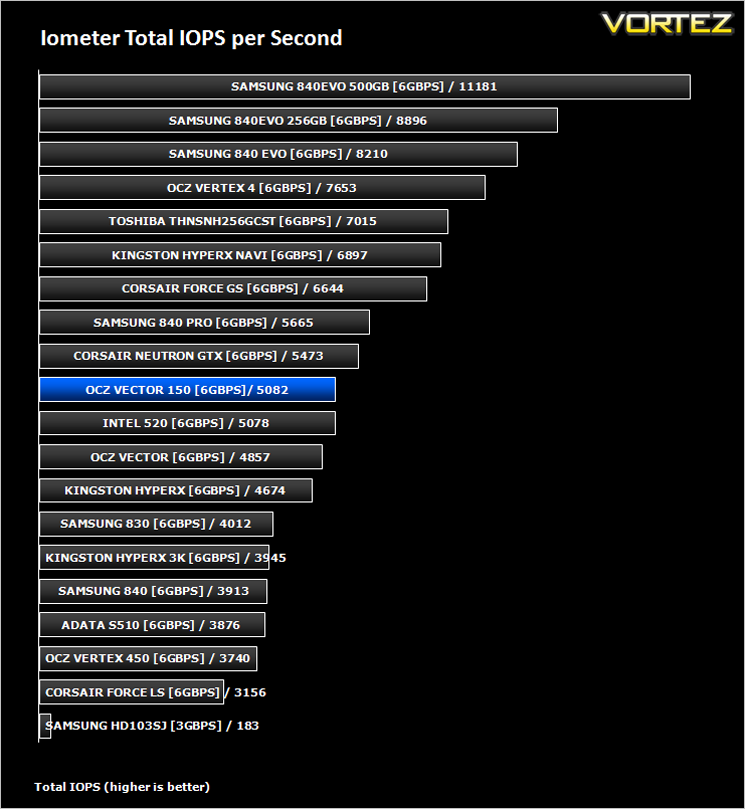
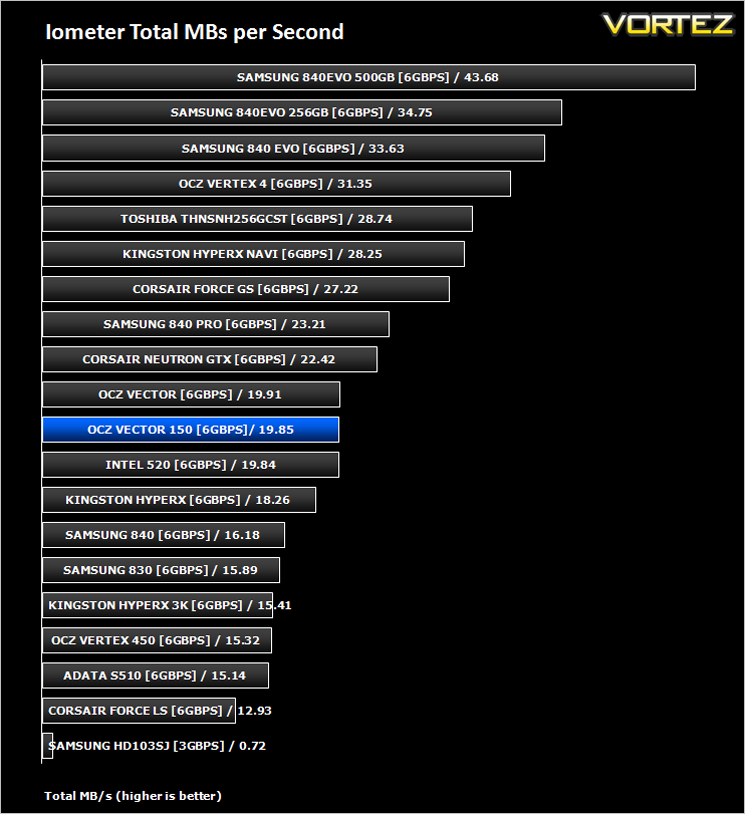
Benchmarks: SiSoftware SANDRA
SiSoftware Sandra (the System ANalyser, Diagnostic and Reporting Assistant) is an information & diagnostic utility. It should provide most of the information (including undocumented) you need to know about your hardware, software and other devices whether hardware or software.
Sandra is a (girl) name of Greek origin that means “defender”, “helper of mankind”. We think that’s quite fitting.
It works along the lines of other Windows utilities, however it tries to go beyond them and show you more of what’s really going on. Giving the user the ability to draw comparisons at both a high and low-level. You can get information about the CPU, chipset, video adapter, ports, printers, sound card, memory, network, Windows internals, AGP, PCI, PCI-X, PCIe (PCI Express), database, USB, USB2, 1394/Firewire, etc.
Sandra is a (girl) name of Greek origin that means “defender”, “helper of mankind”. We think that’s quite fitting.
It works along the lines of other Windows utilities, however it tries to go beyond them and show you more of what’s really going on. Giving the user the ability to draw comparisons at both a high and low-level. You can get information about the CPU, chipset, video adapter, ports, printers, sound card, memory, network, Windows internals, AGP, PCI, PCI-X, PCIe (PCI Express), database, USB, USB2, 1394/Firewire, etc.
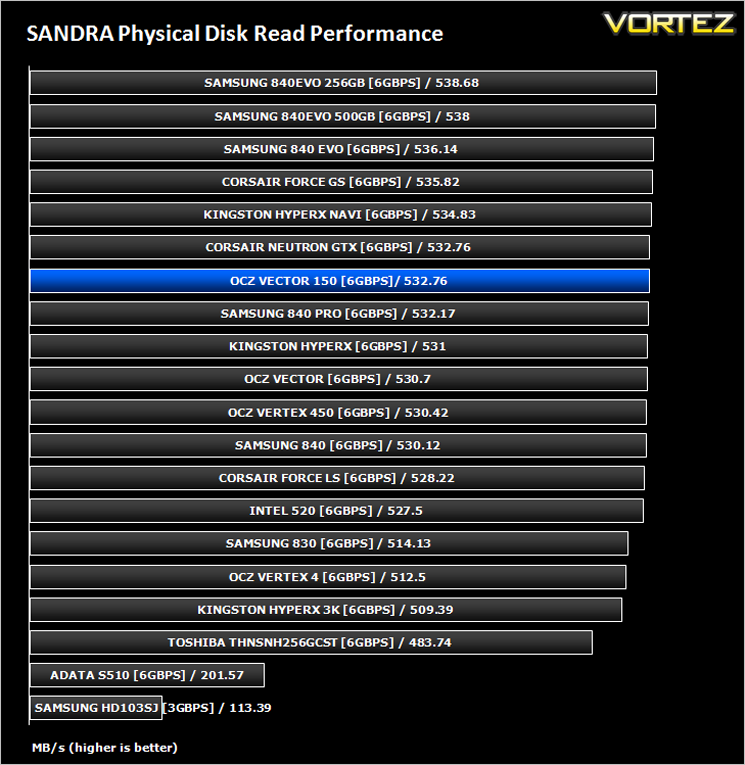
Benchmarks: HDTune Pro
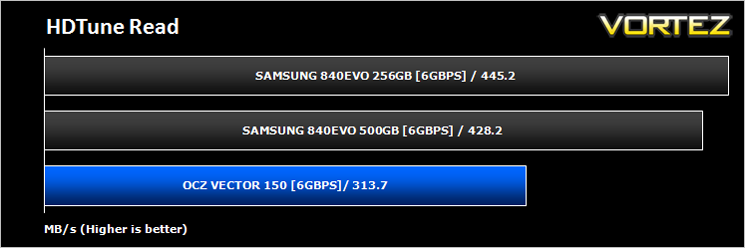
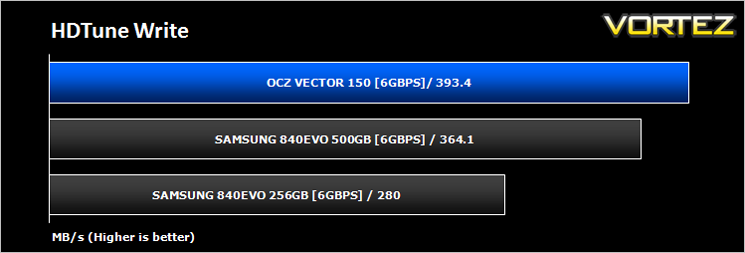
A new utility we have added to our line-up of benchmarks is the ever popular HDTune Pro. HD Tune Pro is a hard disk / SSD utility with many functions. It can be used to measure the drive’s performance, scan for errors, check the health status (S.M.A.R.T.), securely erase all data and much more.
Conclusion
The OCZ Vector 150 is the logical step up in performance from the Vector 450. We already knew the Vector 450 was a great performer as per our review and while the Vector 150 succeeded in bettering this drive in a lot of tests we were not exactly blown away. Performance wasn’t bad you understand, it was actually very good however, it is not the range topper we were hoping for.
Granted, the main selling point for this drive is the enterprise challenging 50GB writes per day. This phenomenal durability originally excited us but in all likelihood the ‘enthusiast’, for which this drive is aimed at, is unlikely to hammer the drive this much. However, is nice to have the peace of mind of the five year warranty which in itself goes some way to arrest our fears of drive failure. the inclusion of hardware encryption is also welcomed but we would have liked to have seen this drive have hardware encryption compatibility with Windows 8’s Bitlocker feature.
Price is a key consideration for anyone looking to upgrade their mechanical drive and the price of the drive is toward the top end of the scale. While it isn’t the most expensive drive on the market it is more expensive than other drives offering similar performance. If durability is of huge importance (and let’s face it, why wouldn’t it be) then the Vector 150 is certainly worthy of consideration however if you are a mainstream user then there are other drives, by both OCZ and their competitors that offer cheaper solutions.
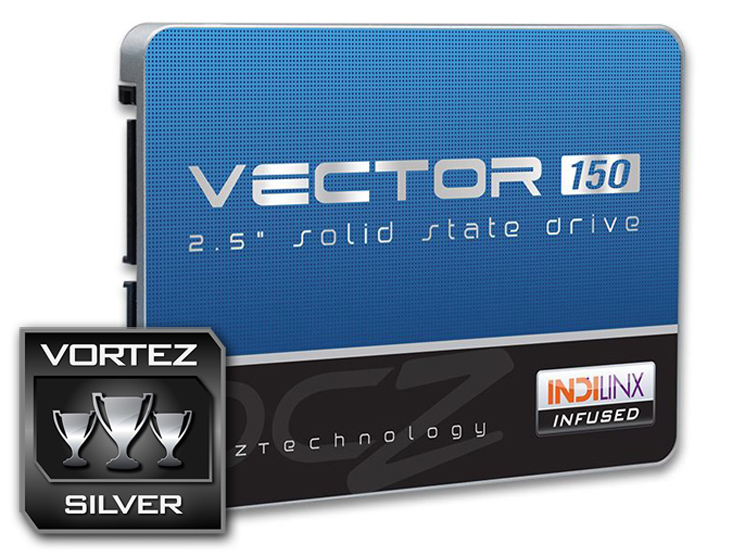
The OCZ Vector 150 scores high in all areas but not quite high enough to warrant our very best award. The Vector offers great performance and durability and along with the included software makes the drive a viable option for all but the most demanding performance enthusiast.
Pros
+ Great Durability
+ High Performance
+ Included Software & Accessories
Cons
– Heavy (for notebook users)
– Expensive in comparison
+ Great Durability
+ High Performance
+ Included Software & Accessories
Cons
– Heavy (for notebook users)
– Expensive in comparison

Click here for an explanation of our awards at Vortez.net.


