







A mid-range keyboard with membrane switch style, does the Blade bring enough to the party to justify a £50 price tag?

Product On Review: Ozone Gaming Gear Blade
Manufacturer & Review Sponsor: Ozone
Street Price: £49.99 (Inc. V.A.T)
Ozone are no longer the relatively new company we first met in 2011 with the Strike Mechanical Keyboard. Since then they have flexed their muscles in the peripheral arena with a plethora of new releases such as the RADON Opto gaming mouse and more recently the Silver Award winning Rage ST Headset. Rather than aim for the boutique-end of the market Ozone design very much for gamers seeking good quality at the mid-range budget, and so far have done an admirable job.
A strong product line-up isn’t quite enough to put a manufacturer ahead of the curve these days though. In common with other prominent gaming peripheral brands in recent times Ozone have sought to take advantage of the burgeoning E-Sports sector, including becoming the headline sponsor for teams based both in the EU and Korean E-Sports heartland. Among these teams are MVP-White, a professional League of Legends outfit who have since changed their name to MVP-Ozone to reflect this partnership. A list of some of the teams Ozone support in the community can be found here: http://www.ozonegaming.com/ozoners
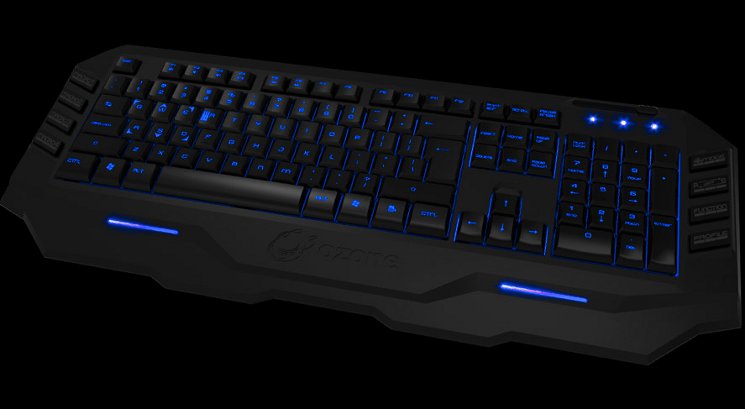
In our second Ozone keyboard review we’re taking a look at the Blade. Designed with a membrane switch mechanism rather than the mechanical Strike, the more modestly priced Blade brings with it multiple profile support, macro keys and illumination for a more broadly rounded package suitable for gamers seeking to make their money go as far as possible.
About The Blade:
Blade is the new addition to the Ozone´s keyboard family, designed to enhance gaming experience and bring the game to the top. A stylized and aggressive design with back-lighted keys combined with hot gaming features makes Ozone´s Blade in a complete gaming weapon sharp as a knife. The 128 Kb on board memory together with the software included allow you to fully customize the keyboard saving up to 50 different macros in 5 different profiles.
Blade is the new addition to the Ozone´s keyboard family, designed to enhance gaming experience and bring the game to the top. A stylized and aggressive design with back-lighted keys combined with hot gaming features makes Ozone´s Blade in a complete gaming weapon sharp as a knife. The 128 Kb on board memory together with the software included allow you to fully customize the keyboard saving up to 50 different macros in 5 different profiles.
Pitched below £50 from online retail outlets, the Ozone Blade neatly undercuts the vast majority of mechanical gaming keyboards – tenkeyless types included – and on the face of it offers features rarely seen on membrane types. As crowded as the mechanical keyboard market gets at £60-80 the membrane market peters out, with only a few dedicated gaming brands choosing to create high-end models. With a great deal of value on the face of it, the build and software quality will be key to assessing it success.
Features and Specifications
Features
Dual Backlight Illumination
Get a stunning look in the dark with the Blade´s back-lighted keys. Choose from the two available colors, red or blue, and adjust the light intensity to your needs on-the-fly.
On the fly profile switch
Blade´s profile management allow you to save up to 5 different profiles and change them on-the-fly. Switch to your game or character-specific profile immediately.
10 Macro Keys
Easily customize your commands and abilities saving up to 50 macro keys using 5 different profiles. Hot keys, shortcuts or a whole key sequence can be easily saved.
128Kb On board memory
Take your preferred gaming profiles everywhere and use them on any system with Blade´s on board memory. Store up to five unique user profiles and 50 different macro keys.
Never stop action. Forget about the windows key
And if you are tired of exiting the game accidentally by pressing the windows key, Blade´s game mode option will allow you to disable the windows key when you are in the middle of the action.
Get a stunning look in the dark with the Blade´s back-lighted keys. Choose from the two available colors, red or blue, and adjust the light intensity to your needs on-the-fly.
On the fly profile switch
Blade´s profile management allow you to save up to 5 different profiles and change them on-the-fly. Switch to your game or character-specific profile immediately.
10 Macro Keys
Easily customize your commands and abilities saving up to 50 macro keys using 5 different profiles. Hot keys, shortcuts or a whole key sequence can be easily saved.
128Kb On board memory
Take your preferred gaming profiles everywhere and use them on any system with Blade´s on board memory. Store up to five unique user profiles and 50 different macro keys.
Never stop action. Forget about the windows key
And if you are tired of exiting the game accidentally by pressing the windows key, Blade´s game mode option will allow you to disable the windows key when you are in the middle of the action.
Technical Specifications
– Multimedia gaming keyboard, compatible with PC Win98SE/Me/2000/XP/VISTA/WIN 7/8
– Dual back light (red or blue)
– 10 Macro keys
– 5 Profiles
– Multimedia keys
– 128Kb On board memory
– 18K gold plated USB Connector
– Anti-ghosting capability
– 8x Faster –1000 Hz Polling Rate. Response time 1 millisecond
– Dimensions: 510 x 199.8 x 30 mm (Length*Width*Height)
– Approximate Weight: 1.14 kg
– Cable length: 160 cm
– Dual back light (red or blue)
– 10 Macro keys
– 5 Profiles
– Multimedia keys
– 128Kb On board memory
– 18K gold plated USB Connector
– Anti-ghosting capability
– 8x Faster –1000 Hz Polling Rate. Response time 1 millisecond
– Dimensions: 510 x 199.8 x 30 mm (Length*Width*Height)
– Approximate Weight: 1.14 kg
– Cable length: 160 cm
Packaging and First Look
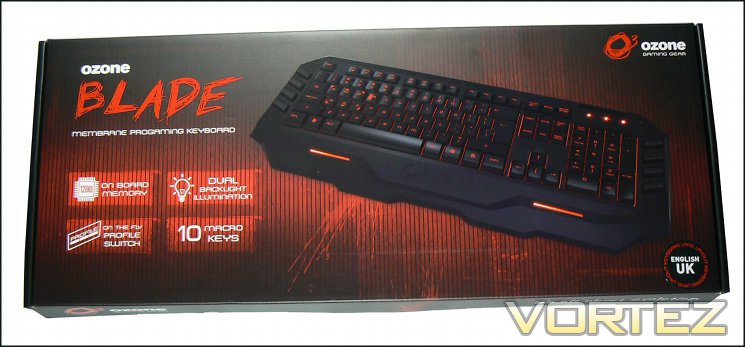
Ozone have kept the front of the Blade packaging as clear as possible, setting aside many of the marketing tweaks often seen on medium-to-high end products of the same type. Instead they concentrate on a prominent image of the Blade keyboard – in this case with the long-shift EU layout – and four key features which they feel would be of most interest to the potential user. Also noteworthy is the red livery common to Ozone products, although the keyboard includes a blue illumination capability.
The layout of the keyboard inside is actually denoted by a label on the front – here it’s clearly identified as a English/UK style – but if it comes with none then be sure to get confirmation from the retailer of the specific SKU before purchasing.
With some justification Ozone feel that the 128KB onboard memory, dual-illumination backlight, profile switching and macro keys are major selling points worthy of emblazoning on the front. Interestingly they make no mention here of the 1ms response time and anti-ghosting capability, the latter of which one would imagine is of primary importance to any gamer.
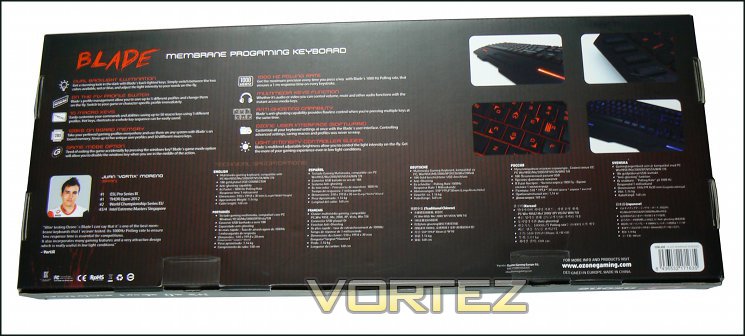
Unsurprisingly the packaging rear contains the majority of the information you will need to ascertain that this product is a little more than your average gaming keyboard. Key features from the front are repeated, whilst additional information such as accelerated USB polling rate, light intensity controller and anti-ghosting capability make their first appearance. The rear is also where you will discover that the second lighting option is blue, with small image inserts highlighting specific portions of the keyboard. We should note here that lighting appears to be limited to the main keyboard sections and two accent areas, macro keys to either side of the keyboard are not lit.
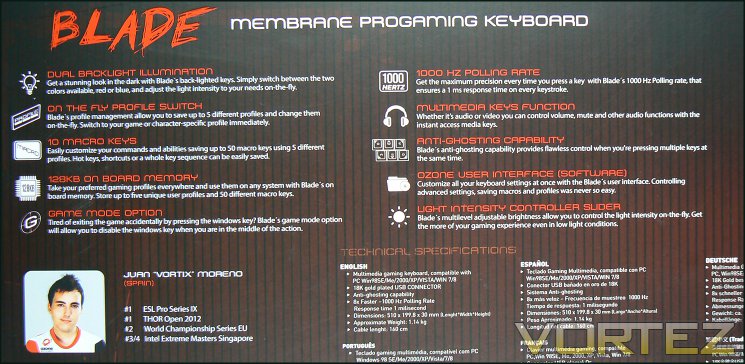
Specific technical information is shown in ten different languages, providing some general compatibility guidelines which should be comprehensible to most readers across the world. Accompanying these facts in the bottom half of the panel is an endorsement from Spanish pro-gamer Juan “VortiX” Moreno extolling the virtues of the Blade’s mechanical keys and 1000Hz polling rate. Weighty words indeed.
They keyboard is held firmly in place by 1cm thick foam, ensuring that there should be very little opportunity for damage so long as couriers take reasonable care in transit. Curiously Ozone have included a Driver CD and User Manual in the package; other manufacturers have moved away from this to reduce manufacturing and shipping costs whilst also ensuring that any new user will be pushed towards the latest version of the software rather than a defunct earlier version. On the other hand including a user manual can help as keyboards become ever more complex, especially if you decide not to host one on your website.
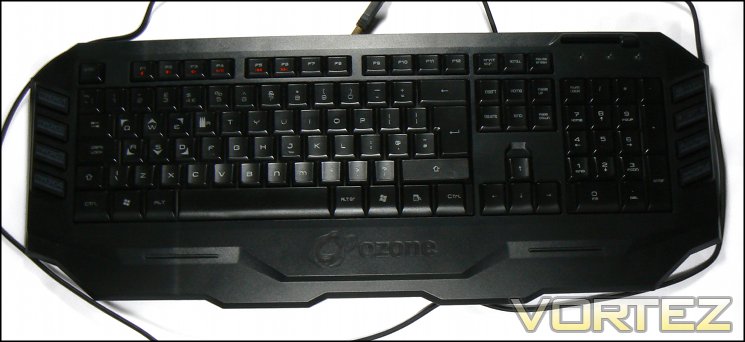
One piece of information which is lacking is the location of the macro keys. One might assume that the eight keys around the edge of the keyboard are all macro keys, but this is not the case – only MACRO1-4 on the left hand side are. The remaining six macro keys are made up of the INSERT/HOME/PGUP/DELETE/END/PGDN block (often know as the command keys); this information is only revealed within the user manual and driver software.
Overall the packaging for the Blade is solid and robust, providing adequate protection for the contents and information to any interested parties. It won’t exactly leap off the shelf, the colours aren’t quite vibrant enough and black/red is a common scheme, but it does push the keyboard into looking more like a high-end product than would otherwise be the case.
A Closer Look
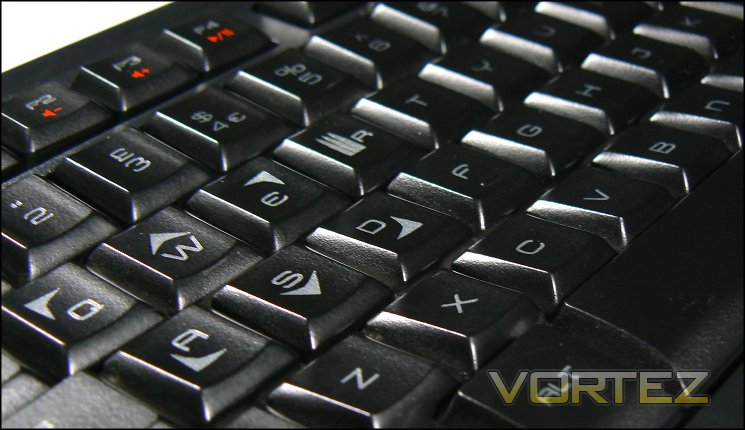
Ozone have utilised membrane switches on the Blade, the design of which is very similar to that of the ROCCAT ISKU FX we reviewed some time ago. A translucent rubber ‘dome’ and transparent plastic conduit support channels LED light up through the keycap, with some also bleeding around the key for a backlight effect. The key tops have a slightly glossy finish with lettering etched out of the paintwork, which should allow excellent differentiation between keys in low-light conditions when illuminated. Oddly, all the keys are uppercase with the exception of ‘n’ and ‘m’, which are lowercase. We’re not sure if this is an error or stylistic choice, but it hardly affects the dynamics of the keyboard.
The Blade’s keys are low profile and have a fairly short distance between rest and the point of actuation. In comparison to some membrane keyboards they are fairly light-weight (in that they require little force), but do have a relatively consistent response across most of the standard keyset; an exception is the Spacebar, which seems poorly anchored and can sound loose when striking. This makes the actuation of the space bar markedly different from that of other keys, including the Return and Backspace keys.
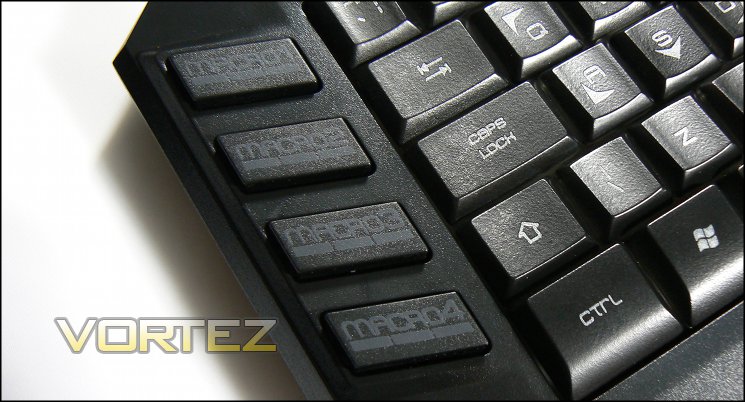
On the left are four of the ten advertised macro keys, the only keys which are dedicated to this function. They’re clearly labelled MACRO1-MACRO4 and are well positioned for use with either the little or ring finger, although you’ll want to use a finger with some dexterity as the actuation point is at the very bottom of the downstroke. The MACRO keys’ membrane switch also buckles in a perceptibly different way to the main keys, resulting in some disparity that’s nothing you shouldn’t be able to handle with experience.
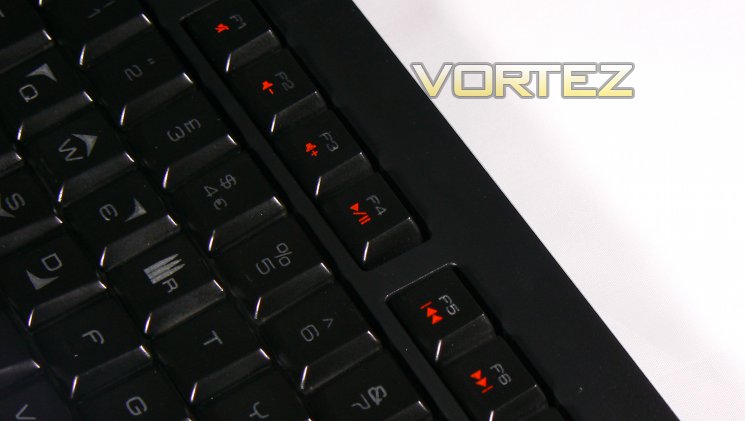
Located in the centre-top are the F-keys, which also double as media keys (indicated by red icons on F1-F6, see below). These keys are half-height, which may make them a little harder to strike if you’re using them infrequently.
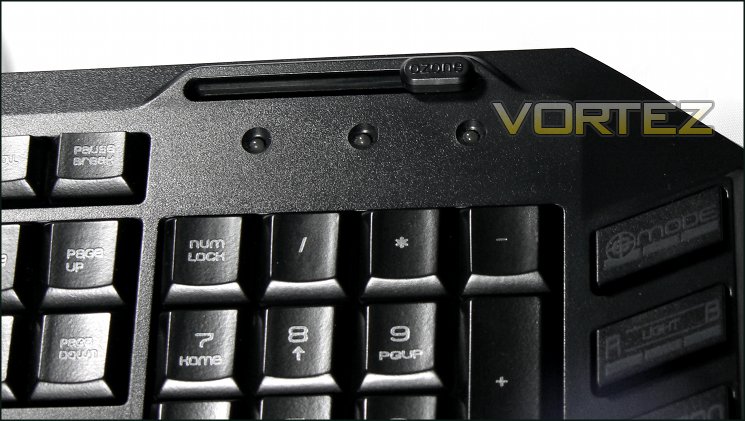
At the top-right is a sliding control with OZONE labelled on the sliding piece. At first the functionality may be hard to discern, but it is simply a brightness control for the keyboard illumination. Below it are three unlabelled indicator LEDs, which are the traditional indicators for NUM-LOCK, CAPS-LOCK and SCROLL-LOCK respectively.
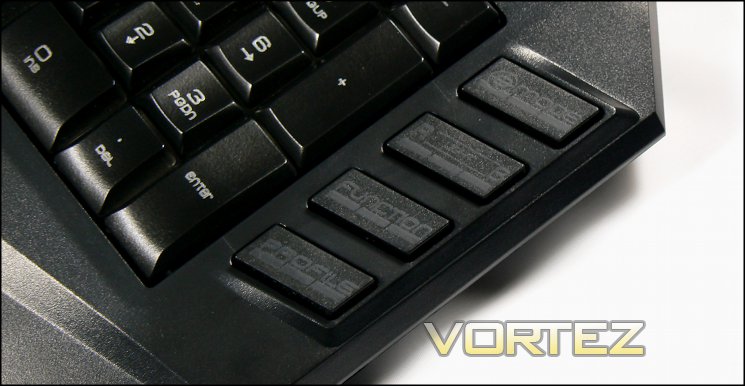
On the right are four additional buttons, which from the top-down are:
G-Mode:- Enables and Disables the Windows Keys,
R-Light-B:- Switches LED lighting between Red, Blue and off,
Function:- When pressed, F1-6 revert to media key functionality,
Profile:- Switches between profiles.
R-Light-B:- Switches LED lighting between Red, Blue and off,
Function:- When pressed, F1-6 revert to media key functionality,
Profile:- Switches between profiles.
Their use isn’t well indicated in User Guides but are significant for the overall functionality of the keyboard itself. You would be forgiven for thinking that they were Macro keys at first glance as they mirror the location of the other four, but this is not the case.
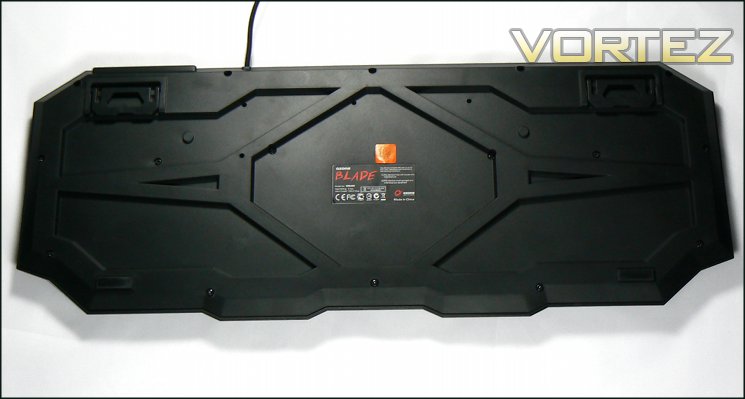
The back of the keyboard has two extendible feet, lifting the keyboard to a fixed angle if preferred, and two small rubber feet designed to limit movement on a desk whilst in use; there is no additional rubber or other high-friction surface on the extendible feet. Only including the two is a significant departure from competitor keyboards, even those in lower price brackets, and could result in the keyboard slipping in extended use. It’s definitely a problem to keep an eye on.
Ozone have avoided finishing the keyboard frame with a rough plastic as we have seen on some other keyboards, instead opting for fairly smooth matte surface. At the bottom of the keyboard frame there is a slightly extended palm rest zone with the Ozone logo pressed into it. We found this okay, but more discerning users may be a little put off with this rough effect under their palm when typing. Finally, the keyboard cable is braided – always a good sign of quality – and includes a 18 carat gold-plated USB connector. In theory this could help with long-term durability, all other factors being equal, but if nothing else is a nice aesthetic touch.
Overall the layout is reassuringly standard with no great surprises. The macro keys are well positioned on the left hand side, and the additional functionality keys are out the way on the right where they will not obstruct regular use yet still be easily accessible. The only setback in terms of finish is the rather poor ‘LOCK’ LEDs and the area of the keyboard around them.
Illumination
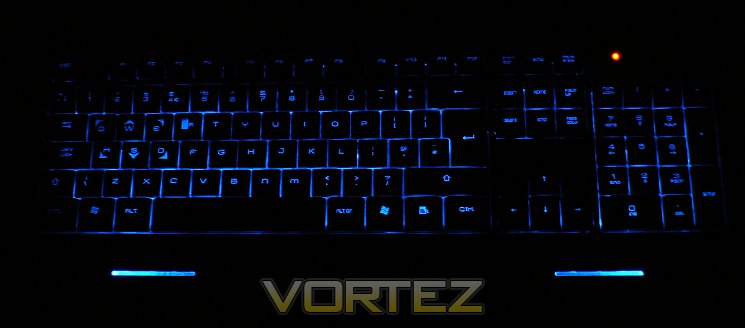
LED Illumination on the Blade is controlled entirely by mechanisms on the keyboard itself. The much-touted dual-backlight-illumination consists of two colour modes with lighting distributed across the backplate by way of multiple lightbars. Colour is switched between red, blue and off via the R—B button on the right edge of the keyboard, whilst brightness is controlled through the use of the OZONE slider at the top. Offering two colours as standard on the keyboard is excellent, especially for those with corrective lenses for whom blue LEDs can create a glare or halo-like effect, and analogue brightness control will also aid in making the lighting more comfortable.
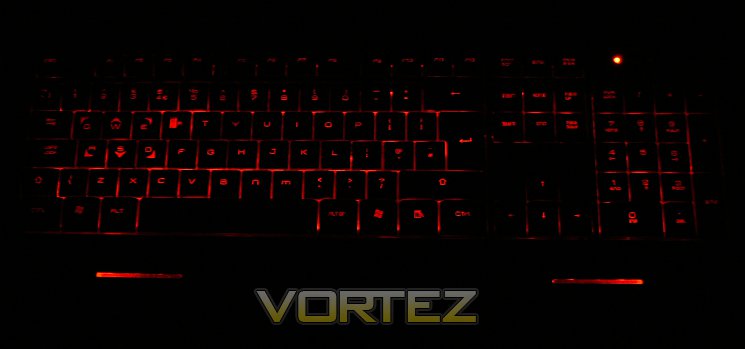
The quality of the lighting is good overall for a distributed system which can’t rely on a dedicated LED per switch, although there is a pronounced dimming towards the top-left and bottom-left when viewed from most angles. There is also some inconsistency in how the light shines through the keycaps, specifically were some residual paint remains when it should have been removed in the etching process, however this is rarely an issue.
One minor disappointment is that lighting cannot be controlled by the software, although if you change the illumination on the keyboard for a specific profile it will remember that choice and revert to it next time you load the profile. Using lighting to indicate the active profile is for some extremely important; to have no indicator at all on the keyboard and the slightly ham-fisted approach of varying LED colour on a per-profile basis is a distinct oversight. Hopefully it’s something they can fix in a later software release, elevating the lighting from aesthetic choice to gaming tool.
We should also note that the illumination does not extend to the left and right MACRO/Function buttons on the edges of the keyboard. Coupled with their uncharacteristically dull lettering this can make them very hard to distinguish in low-light conditions, even with full brightness on the keyboard LEDs.
Software
The Ozone Blade retail packaging contains a software/driver disc as well as User Guide, but as always it is recommended that you download the latest version from the official site. The current version of the software, used in this review, is 1.0; at the time of writing there is no firmware update for the Blade. Ozone do have an driver policy update in place – new drivers have been made available for other peripherals, though at present the Blade hasn’t warranted it.
Stylistically the software suite matches Ozone’s brand colours of red and black, but is notable for being laid out in a clear and logical fashion. It’s focussed in a way that other software suites often are not, and doesn’t feature any confusing extraneous components.
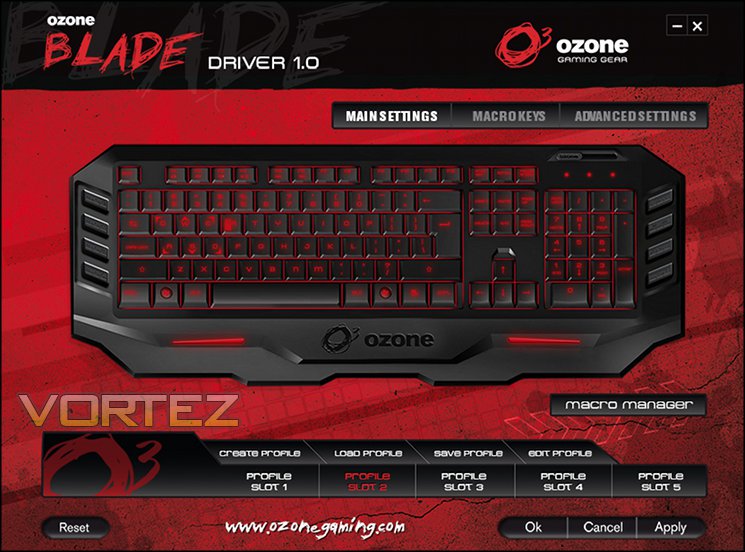
The first panel for the Blade’s software – Main Settings – gets straight to business with a layout-view of the keyboard. Top-most are three buttons: Main Settings (which in highlighted as the current window), Macro Keys and Advanced Settings that serve as navigation tools for the utility. Below and to the right is a button to launch the Macro Manager, where macros can be created and saved for recalling later.
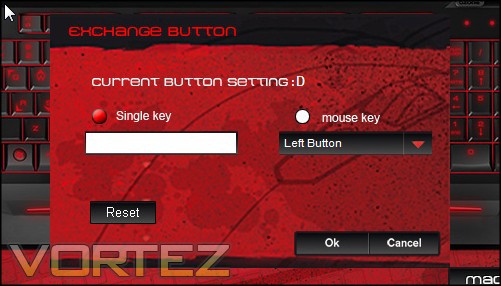
One of the features offered on this pane is quite an odd one – single key reassignment. Each key (barring macro and media keys) on the keyboard image can be clicked, upon which the software will prompt you to reassign it to either another keystroke or single mouse click. Off the top of our heads we can only think of games or other software which don’t allow in-game key assignments as potentially valuable scenarios for use so it seems like a rather curious niche to cater to. Even so, the functionality is there if you need it.
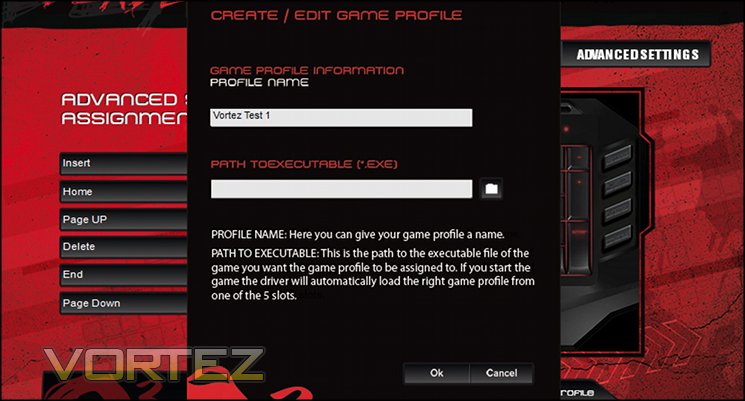
At the foot is the Profile indicator, a set of five tabs which indicate the active profile. Profiles can be created, loaded, saved, and renamed with the buttons just above, and also bound to an executable so that a profile runs on demand. Unfortunately the “Profile Slot X” label doesn’t change as you rename and assign profiles to a slot, making assessing the active profile a little more difficult than it should be.

Profiles can be associated with specific executables including games and office applications, making the process of switching somewhat easier. The active profile slot is also reflected in an OSD which pops up on the bottom-right of your screen when you change profiles.
Also worthy of mentioning is that the Ozone-gaming.com link is a hyperlink which sends you straight to the website in your default web browser. There’s no indication on the screen if the driver you’re using is the latest one, but at least finding out is only a few clicks away.
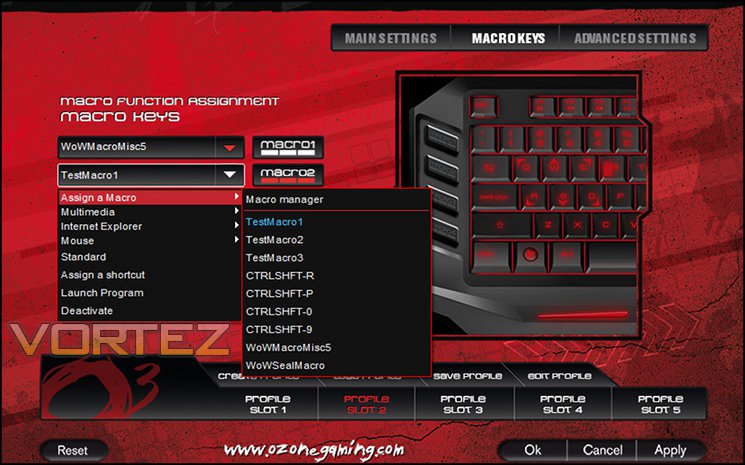
Next up is Macro Keys. Here you can bind one of the four major macro keys (located on the left of the keyboard) to a stored macro on a pre-profile basis. If a macro isn’t your thing, you can also bind them to one of a number of common keyboard, multimedia or internet shortcuts. Ozone also let you bind them to a mouse click, or even a program launch. That’s a pretty wide range for these unassuming keys, and are a genuine plus for the keyboard as a whole. Note that the secondary macro keys Insert, Home, PageUp etc. are not included in this section of the software.
The macro list populates from the top down, which will cause some issues once it becomes sufficiently large.
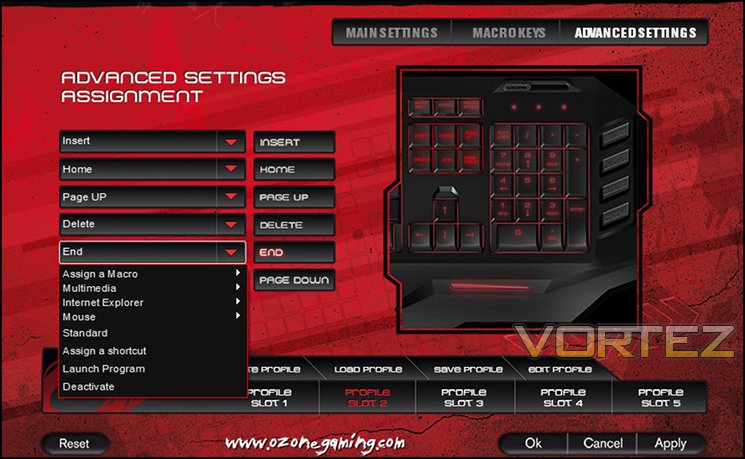
The final pane, Advanced Button Assignment, allows you to utilise the Command keys (i.e. Insert, Delete, Home, End Page-Up and Page Down) as macro keys in much the same way as MACRO1-4. Obviously these are somewhat suboptimal from a location standpoint but could be useful for any situation where you’re unlikely to be using the mouse for an extended period of time, such as wordprocessing and spreadsheet manipulation. Unfortunately the trade-off of denying yourself one of these normally quite useful keys is something you will have to deal with, although again this can be ameliorated with the use of single key stroke reassignment.
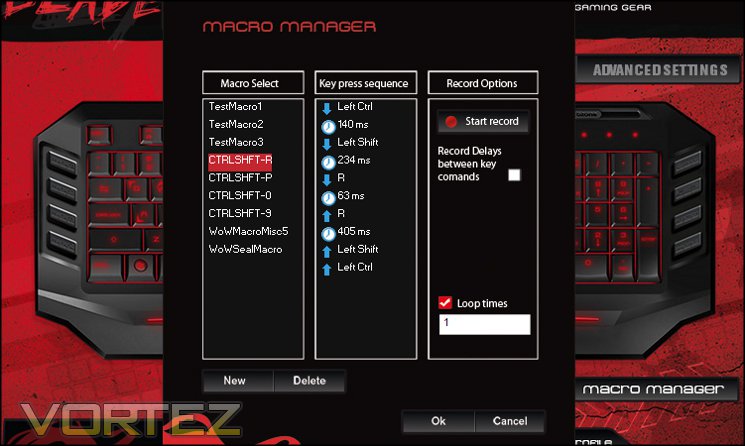
Macro editing through the Macro Manager on the Ozone Blade software suite is pretty standard. First a macro needs to be created, and then recording can begin. The macro software is limited to 20 keystrokes (push+release count as one) with the option of recording the time delay between actions if desired. One completed, additional options such as adding/editing a specific delay or inserting a new section to the macro are available by right-clicking on the macro timeline.
Twenty keystrokes isn’t the longest we’ve seen, but the improved editing options allow it to surpass a number of competitor implementations. It does seem however to be crying out for a backup process allowing you to restore some or all of a macro set. If you delete a macro from the list it will still be implemented within a specific profile but is not re-integrated into the macro list after a profile with a missing macro is loaded.
Marked by their absence are core features we would expect to see on the keyboard: disabling of Windows/App Keys and Lighting choices. Ozone have chosen to place some of this functionality directly on the keyboard rather than the GUI via the G-Mode and R–Light–B buttons, although there is no means to disable the App key in hardware or software. Interestingly the keyboard does remember the last G-Mode and LED colour setting for each profile, so it seems strange to us that there’s no interaction with the software to streamline the process.
Overall, if you don’t want to be bogged down by extraneous McGuffins in your peripheral software Ozone have created a utility which should serve you well. The fundamentals are there, they’re done well, and will feel like at least a side-grade if buying up from keyboards with a lesser cost. Very advanced users will feel a little underwhelmed because of the considerable scope for improvement, but equally they should be setting their heights a little higher in the market.
Performance
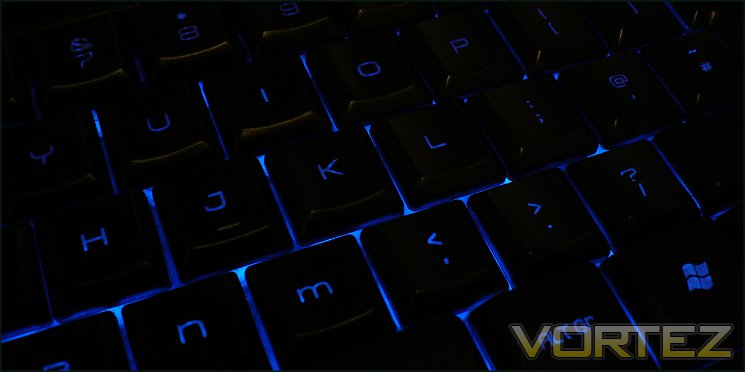
The Ozone Blade features membrane switches composed of firm rubber domes which buckle when pushed to provide firm resistance towards the point of actuation. The design of the Blade puts the actuation point at almost a full stroke of the low profile keys, rather than the half-stroke of many full-height membrane keyboards. Whilst not having the responsiveness of mechanical switches, even the relatively low-gauge Cherry MX Reds, they remain a good choice with gamers seeking a cost compromise. Because the rubber switch can be transparent it’s typically far easier to project light from the keyboard base and neatly sidesteps the need for an LED per switch, a feature which Ozone exploit for their even lighting across all keycaps.
Blade keycaps a transparent plastic finished with a fairly reflective glossy black surface, whilst characters have been etched out of this surface to provide a contrast and allow light to pass through. The keyboard is supported by a very rigid backplate, ensuring that there is minimal flex on striking the keys even when both feet are extended. As the keyboard isn’t mechanical it isn’t supported by a steel backplate, but nonetheless the Ozone Blade is very rigid in the face of significant punishment.
A wide keycap design for the Blade leads to an accurate typing experience with little opportunity to miss-hit a key. The membrane switch however lacks feedback and responsiveness even after the bedding in period required for most ‘factory-fresh’ keyboards. Word per minute rates will tend to suffer compared to mechanical and firmer membrane switches, an effect only somewhat ameliorated by the low-profile key design. Keystrokes are generally consistent across the keyboard proper with the only exception being the spacebar, which is anchored a little loosely and hence is louder and sounds ‘loose’ when striking. The Macro/Function keys however have a noticeably different feel than the rest of the keyboard and are slightly less precise if pressed from a corner, a factor which could be an issue for those trying to strike with their little finger.
One issue which presents with many keyboards, especially those where you’re hammering the keys, is where the underside doesn’t grip well enough and it begins to wander around the desk. Although perfectly even when raised at an angle, the two rubber feet of the Blade at the front are not sufficient to the task of holding the keyboard in place in this configuration, to the extent that those who use a moderate to high amount of force when typing/gaming could be lead a merry dance. It’s a shame because you feel that it only really needs two rubber pads on the rear feet for an effective amount of friction, and seems like a large and obvious oversight.
Keycaps can be removed for cleaning, but this is certainly not recommended due to being held in place with clips rather than merely sat on a switch post. Cleaning therefore could be rather difficult, and something will will not want to do regularly.
Anti-Ghosting/ N-Key Rollover
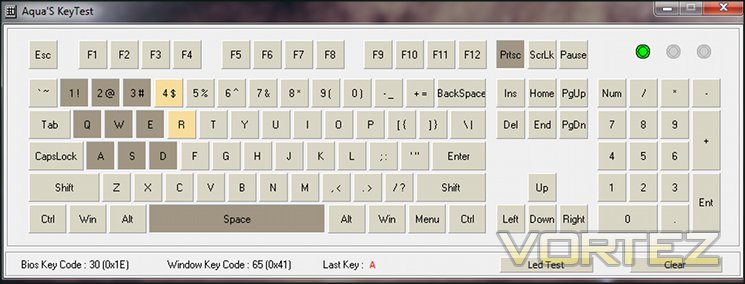
As you would expect from a gaming keyboard the Blade advertises anti-ghosting prominently. This feature is notoriously difficult to test due to the sheer number of possible combinations on a standard keyboard, and in the past was only seen on keyboards which utilised PS2 connections (thanks chiefly to limitations of the USB protocol).
A solid port of call is Aquakey, a small application which tracks the keypresses registered by the OS and displays them on a convenient UI; Microsoft offer a similar web-based service here. Testing all combinations simply isn’t feasible, but important ones such as around the standard gaming WASD keys are more than possible and often present themselves during gaming. Here the Blade was up to par, at maximum extent reaching 10-key-rollover around the crucial WASD zone. Aqua-key was able to register full anti-ghosting over {1,2,3,q,w,e,a,s,d,r,f}, with no further keypress registration in the key WASD zone following that. Adding SHIFT/CONTROL to the mix was more troubling, with 1 and 2 being prevented from registering independently when both are pushed.
Just as crucially the macro keys M1-M4 were not as robust to ghosting, with combinations in the WASD zone + MACRO1-MACRO4 failing with as few as five simultaneous keypresses. In general this will not be a huge issue – CTRL+SHFT+MACROx is a hand-contortioningly difficult manoeuvre to pull off whilst keeping major digits around WASD – but there will be side cases occurring for very advanced users.
All told, it’s neither the strongest nor the weakest anti-ghosting performance we have seen and is adequate for gaming. FPS gamers should see no issue with their chosen titles, whilst MMO gamers who make extensive use of hotkeys should make careful note of inadequacies as they are encountered and compensate accordingly.
General Performance
Although billed as a gaming keyboard, and peripheral attached to a PC will need to at some time or another prove its worth in the more menial tasks involved in computing – wordprocessing, spreadsheet manipulation and the like. Advanced users may even double up their PC as both an ‘work’ (i.e. SOHO) and ‘gaming’ outlet, in which case peripherals will need to excel at both. So, how does the Blade do?
General typing on the Blade isn’t fantastic, chiefly because the keys feels spongy and with little feedback. The required force is just high enough that you don’t feel too bogged down in typing, but you do feel that it would be especially problematic if Ozone had chosen normal-height keys. Though not exceptional we found it comfortable overall, and should suite those who are particularly sensitive to high-impact strain when typing. Words per minute scores will not be out of this world, but equally they should hold their own vs lower quality mid-range boards.
Those who make extensive use of spreadsheets should be able to take great advantage of the powerful macro system for repetitious data input, and as a full-sized board does not have the issues of tenkeyless mechanical keyboards which approach the Blade’s price point. For both wordprocessing and other forms of heavy use the major keys should be relatively quiet which the exception of the space-bar, which may be a slight distraction in an office environment.
Gaming Performance
We took a look at three common gaming titles representing three distinct gaming types to see how well the keyboard was suited to gameplay and if any issues cropped up. The following is a summary of our conclusions.
Team Fortress 2
A free to play title that anyone can pick up and play, Team Fortress 2 can still reward precision and quick reflexes thanks to a relatively high skill ceiling.
As expected, precision was good for the wide-base, low profile keys but we would have welcomed slightly more resistance to make lift-off a little faster. The low profile design also aided reaction speeds, not to the level of a mechanical switch but well up there compared to most membrane styles. You’ll tend to linger over the keys a little more than you would like, but that is likely to be an issue for most membrane keyboards. Predictably the lighting was excellent for low-light and no-light conditions, and the option of red LED was a boon as the light refracts less when passed through glasses.
World of Warcraft & Starcraft
To make use of the Blade’s macro capabilities in gaming we once more launched our World of Warcraft account and spent yet more time playing a little Starcraft. Without doubt the macros came into their own in WoW, such that even the relatively straightforward game it as become was still made markedly easier by macro binds. Of course those who play healers will tend to find the most value simply because of the wide range of skills they use on a minute by minute basis, but even DPSers will tend to make some use of them. MACRO1-MACRO4 are located optimally and require little learning curve to utilise to great effect, especially if you have slightly smaller hands.
Starcraft gameplay is an RTS title which thrives on high actions-per-minute from the user, and it is here where the membrane design runs into most difficulty. For high-end players it may seem positively sluggish thanks to an almost glacial speed from actuation to release compared to mechanical keyboards, but for the rest of us other areas fundamental to your game will be deciding factors in winning or losing. Moderate your expectations and it should be fine, if uninspiring.
We should mention however that the six additional macro keys, i.e. Insert, Delete, Home etc., never really struck us as useful. They’re too far away from the WASD zone to make them particularly accessible over other keys on the keyboard if you’re using a mouse.
Obviously when playing multiple games the Profile system was particularly useful too. All in all, we can say that the Blade performed above par, but we found it difficult to really capitalise on all the options it makes available. It very much fits it’s price range – not quite having the build quality of the very high end membrane keyboards, but clearly having more than enough usable features to set it apart from the <£35 price bracket.
Conclusion
As a membrane switch type keyboard the Ozone Blade is positioned at a precarious price point, £49.95 likely being on the high end of what gamers will be willing to pay for an unfamiliar brand. Lower would place it in the standard bracket for membrane gaming keyboards, whilst any more would butt heads with mechanical or premium membrane products; neither holds much attraction. Thankfully Ozone have put in a lot of work to push the keyboard’s feature set.
Ozone’s switch stock on the Blade is a mixed bag. As we’ve noted, they’re a little spongy whilst still being pretty high on the Bell Curve of membrane switches, and the choice of a low-profile design is sensible for both typing speed and reaction time. There was a very slight inconsistent response across the main set when brand new, however all bar the slightly rattling spacebar work themselves out in the end. By contrast the side-macro keys are disappointing thanks to their actuation mechanics, which differ substantially from the main set. That said, the location is excellent and we wish that more companies would place their macro keys in such ideal positions.
From an aesthetic perspective the keyboard should be a clear win amongst many gamers. The aggressive styling complements the brand and intended audience, whilst the backlight choice is not common below £50 and in this case clearly bright and vibrant enough to deal with low-light conditions. A little more thought for the LOCK indicator LEDs zone would rectify the only plain area, and an enterprising modder made view it as a challenge. There are also a couple of slight flaws in the finish both on the keycaps and keyboard frame, but this should not be a factor on most boards.
In terms of additional hardware features, we’d love to see a profile indicator on the keyboard itself. It’s something we always seem to miss on peripherals with profile functionality and feels like an oversight, although we recognise that Ozone have to be terribly cost-focussed with this keyboard in particular; the on-screen-display is not a bad compromise.
On the software side Ozone have done a pretty great job all things considered. Functionally, from macro editing to the selective activation of specific profiles on application launch, you really can’t fault it at the price. It’s well laid out and easy to grok, and though it could perhaps add additional layers of complexity in terms of tweaking settings for the vast majority of gamers it’s all they could need.
There are however a few quirks in design, which aren’t immediately obvious even after reading the user guide. Most glaring is the lighting – change based on a switch but can’t be controlled in software or bound to a particular profile – with a slider for a brightness controller is odd. Both ‘G-Mode’ and the Function button enabling media keys are others – making sense when you experiment but not well documented.
Anti-ghosting on the Blade is good, but not exceptional. Ten keys will be your upper limit, which is fair for a USB membrane keyboard, but as reported there are a few combinations within the key gaming zone which could pose an issue for very high-end MMORPG or RTS gamers. If you meet that sort of criteria then you will most likely be looking at full n-key rollover mechanical keyboards anyway, although they will set you back much more money.
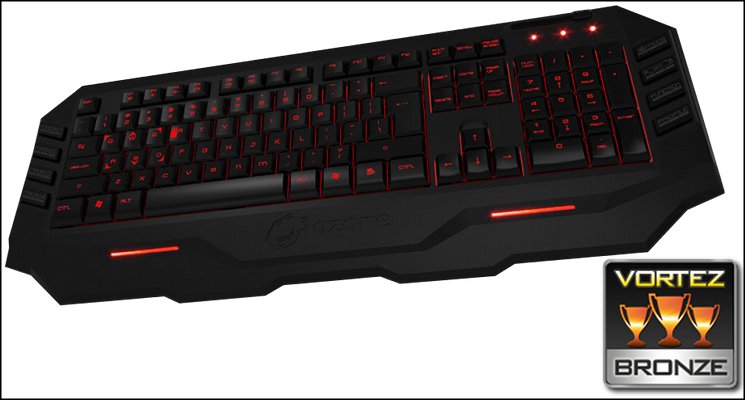
£50 is a lot to pay for a membrane keyboard outside of the flashier gaming brands such as ROCCAT or Razer, but despite the more low-profile nature of Ozone in the market you’re getting quite a lot for your money in the Blade. Most significantly it faces stiff competition from all sides, but it feels well placed for its feature set and build quality. Despite slightly inconsistent keys the solid feature set including macro engine, gaming profiles and lighting puts it firmly into Bronze Award territory.
Pros:
+ Solid membrane switches
+ Four well placed macro keys
+ Good dual-colour illumination
+ On-board memory
+ Dedicated keys for Profile switching
Cons
– Inconsistent key response
– No control for some key features in software
– Six of the advertised macro keys less than ideally located
+ Solid membrane switches
+ Four well placed macro keys
+ Good dual-colour illumination
+ On-board memory
+ Dedicated keys for Profile switching
Cons
– Inconsistent key response
– No control for some key features in software
– Six of the advertised macro keys less than ideally located

Click here for an explanation of our awards at Vortez.net.


