







In our next IP camera review we take a look at an outdoor WiFi security camera capable of full HD recording plus night vision via infrared.

Product on Review: Bullet HD 1080
Manufacturer and Sponsor: Y-Cam
Street Price: £325 (At time of review)
Y-Cam are a popular choice for consumers in the IP camera segment and although they haven’t been around for altogether that long, they have an impressive portfolio of cameras to choose from for home and office use. For the small office, security is a-must. The inevitable can often occur during the day time and even more so during the hours when no-one is around. Likewise, the home is another establishment where more and more consumers are installing security devices too.
The Bullet HD 1080 is under our observation today and is Y-Cam’s premium choice in their outdoor range. It boasts full HD capabilities, as well as up to 30fps, WiFi support and impressive Infrared night vision support. So let’s waste no further time and begin our look at Bullet HD 1080…
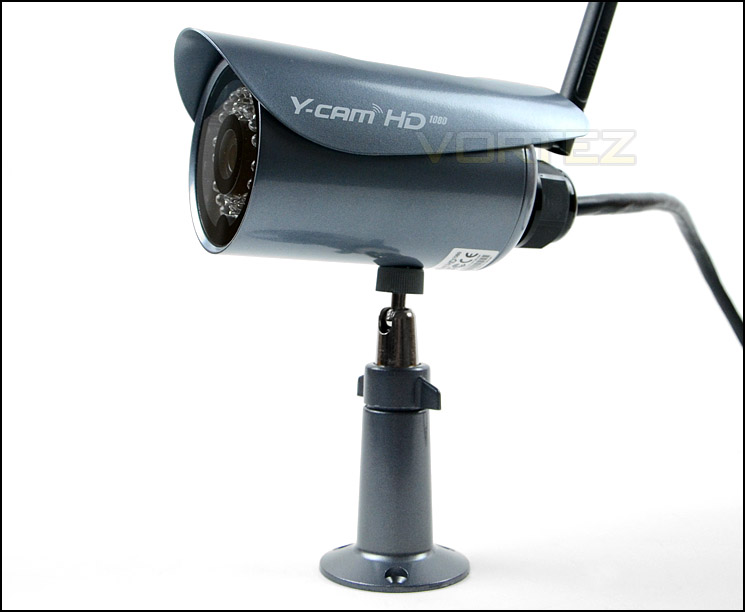
Y-Cam on their Bullet HD 1080
The Y-cam Bullet HD 1080 delivers outstanding 1080p video in full HD. Combining industry standard features with exceptional extras, including powerful Wi-Fi N, H.264 compression, exclusive Y-cam CableConnectTM installation and full ONVIF compliance.
Delivering images over your network through Wi-Fi, PoE or Ethernet connections, the camera can operate independently, without the need for a computer, in full colour and infrared night vision. Equipped with motion detected, the camera instantly emails you an alert with snapshot and store video to a number of devices.
Easy to install, simple to operate, secure to use; the weatherproof Y-cam Bullet HD 1080 can be viewed remotely from a PC, Mac, internet enabled smartphone or tablet.
Delivering images over your network through Wi-Fi, PoE or Ethernet connections, the camera can operate independently, without the need for a computer, in full colour and infrared night vision. Equipped with motion detected, the camera instantly emails you an alert with snapshot and store video to a number of devices.
Easy to install, simple to operate, secure to use; the weatherproof Y-cam Bullet HD 1080 can be viewed remotely from a PC, Mac, internet enabled smartphone or tablet.
Technical Specifications
Camera
• Image device ½.7″ CMOS
• Resolution 1920 x 1080 (HD 1080p)
• Pixels 2, 073, 600
• White Balance, Exposure, Gain Auto
• Viewing angle Horizontal:73°, Vertical:61°
• Focal length f=4.15mm
• Aperture F1.8
• Min.llumination 1 Lux (0 Lux Nightvision mode)
• Infrared LED 32
• Night Vision Distance 15m
• IR Cut Filter Yes
• Image compression H.264, MJPEG
• Max. frame rate 30fps @ 1920×1080
• Audio compression G.711 (ulaw) 8Khz
• Built-in microphone Yes
Network
• Authentication 3 levels, up to 10 users
• Network protocols TCP,UDP,IP,ARP,ICMP,DHCP,DNS,HTTP,FTP,SMTP,NTP,UPnP,DDNS
• Stream type RTSP/RTP/RTCP
• Network connection Ethernet (10BASE-T/100BASE-TX)
• Power over Ethernet (PoE) 802.3af
Wireless LAN
• Wireless technology IEEE802.11b/g/n
• Frequency 2.4-2.4684GHz
• Transmission speed Auto Switch up to 108Mbps (1 Spatial Stream)
• Security WEP (64/128 bit), WPA-PSK (AES/TKIP), WPA2-PSK (AES/TKIP)
External Ports
• Audio output (2 way audio) Yes
• SD slot microSD card (4Gb – 32GB, class 6 or higher)
• Digital I/O 1 input, 1 output
General
• Power requirements DC 12V/POE
• Power consumption 4W (Normal) 5W (Wi-Fi) 9W (WifFi & IR)
• Operating temperature -10 to +50 °C (+14 to +122 °F)
• Storage temperature -20 to +60 °C (-4 to +140 °F)
• Operating humidity 20-80%RH (Non-condensing)
• Storage humidity 20-95%RH (Non-condensing)
• Dimensions(D x H) 70mm x 113mm
• Weight 810g (Main Body)
• Supplied accessories AC Adaptor (x1), Quick Start Guide (x1), CD-ROM inc. Setup Software & User Manual (x1), Stand (x1), Network Cable (x1), Sun Shield (x1), Conduit Gland (X1)
Minimum PC System Requirements
• Operating system Windows 2000/XP/Vista/Windows 7/Windows 7
• Processor Intel Pentium 4, 2.6GHz
• Memory 512Mb RAM
Minimum Mac System Requirements
• Operating system Mac OSX 10.4 (Tiger)
• Processor 2000MHz – PowerPC G4 or Intel
• Memory 512Mb RAM
Viewing System Requirements
• Web Browser Setup/Viewing Microsoft Internet Explorer version 9 or later, Mozilla Firefox, Google Chrome, Safari & most other browsers
• Mobile Phone Viewing VLC, Real Player, QuickTime and most other VLC players.Y-cam Mobile Live Images feed can be viewed via most internet enabled devices
Other Requirements
Broadband connection with at least 256kb/s upload recommended for Internet viewing
This Y-cam is designed for indoor or outdoor use, and is weatherproof to IP66 standards.
• Image device ½.7″ CMOS
• Resolution 1920 x 1080 (HD 1080p)
• Pixels 2, 073, 600
• White Balance, Exposure, Gain Auto
• Viewing angle Horizontal:73°, Vertical:61°
• Focal length f=4.15mm
• Aperture F1.8
• Min.llumination 1 Lux (0 Lux Nightvision mode)
• Infrared LED 32
• Night Vision Distance 15m
• IR Cut Filter Yes
• Image compression H.264, MJPEG
• Max. frame rate 30fps @ 1920×1080
• Audio compression G.711 (ulaw) 8Khz
• Built-in microphone Yes
Network
• Authentication 3 levels, up to 10 users
• Network protocols TCP,UDP,IP,ARP,ICMP,DHCP,DNS,HTTP,FTP,SMTP,NTP,UPnP,DDNS
• Stream type RTSP/RTP/RTCP
• Network connection Ethernet (10BASE-T/100BASE-TX)
• Power over Ethernet (PoE) 802.3af
Wireless LAN
• Wireless technology IEEE802.11b/g/n
• Frequency 2.4-2.4684GHz
• Transmission speed Auto Switch up to 108Mbps (1 Spatial Stream)
• Security WEP (64/128 bit), WPA-PSK (AES/TKIP), WPA2-PSK (AES/TKIP)
External Ports
• Audio output (2 way audio) Yes
• SD slot microSD card (4Gb – 32GB, class 6 or higher)
• Digital I/O 1 input, 1 output
General
• Power requirements DC 12V/POE
• Power consumption 4W (Normal) 5W (Wi-Fi) 9W (WifFi & IR)
• Operating temperature -10 to +50 °C (+14 to +122 °F)
• Storage temperature -20 to +60 °C (-4 to +140 °F)
• Operating humidity 20-80%RH (Non-condensing)
• Storage humidity 20-95%RH (Non-condensing)
• Dimensions(D x H) 70mm x 113mm
• Weight 810g (Main Body)
• Supplied accessories AC Adaptor (x1), Quick Start Guide (x1), CD-ROM inc. Setup Software & User Manual (x1), Stand (x1), Network Cable (x1), Sun Shield (x1), Conduit Gland (X1)
Minimum PC System Requirements
• Operating system Windows 2000/XP/Vista/Windows 7/Windows 7
• Processor Intel Pentium 4, 2.6GHz
• Memory 512Mb RAM
Minimum Mac System Requirements
• Operating system Mac OSX 10.4 (Tiger)
• Processor 2000MHz – PowerPC G4 or Intel
• Memory 512Mb RAM
Viewing System Requirements
• Web Browser Setup/Viewing Microsoft Internet Explorer version 9 or later, Mozilla Firefox, Google Chrome, Safari & most other browsers
• Mobile Phone Viewing VLC, Real Player, QuickTime and most other VLC players.Y-cam Mobile Live Images feed can be viewed via most internet enabled devices
Other Requirements
Broadband connection with at least 256kb/s upload recommended for Internet viewing
This Y-cam is designed for indoor or outdoor use, and is weatherproof to IP66 standards.
Packaging & Bundle
The Bullet HD 1080 is presented in a large white box. The cover has a depiction of the the camera along with the fundamental features which come as standard. The back goes into a little more detail such as the technical specifications.
Inside, all of the included extras are protected with polystyrene padding. Y-Cam have used this to ensure everything arrives intact.
The packaging for Bullet HD 1080
Inside the box there are a number if included items which are noteworthy. These include the following:
• Mounting bracket
• Conduit gland
• Screws & wall plugs
• Networking cable (Ethernet)
• WiFi antenna
• Power supply (12v)
• Documentation: Quick start guide, user manual
• Software CD
The included items within the bundle
Closer Look
Bullet HD 1080 is designed for outdoor use and has steel construction for its external make up. The top of the camera features an adjustable visor which protects against weather such as rain/sun. To adjust this visor a screw needs to be removed.
Since the rear of the camera has a rubber conduit, Bullet HD 1080 is perfect for outdoor usage. Although it is advisable to install the camera in a sheltered area if possible such as under the eaves of the house, Bullet HD 1080 is robust and able to withstand the elements. Y-Cam have done a great job with the build quality of this unit.
The back of the camera also features an antenna socket to fit the WiFi aerial. Bullet HD 1080 gets it network connectivity via Ethernet port or WiFi. IEEE802.11b/g/n is supported with frequencies of 2.4GHz and WPA-PSK (AES/TKIP), WPA2-PSK (AES/TKIP) encryption methods.
In order to use the Micro SD card slot the back of the unit needs to be unscrewed. A minimum of class 8 card should be used in the unit. Since this camera is an outdoor unit, having to remove the back to gain access to the micro SD card slot is rather cumbersome.
An overview of Bullet HD 1080
The back of the camera – weather-proof conduit and WiFi antenna port
Turning our attention to the front of the camera there is a ½.7″ CMOS lens which is capable of recording up to 1920×1080 at 30fps, which is the perfect balance between quality and movement. The focal length is 4.15mm and aperture F1.8. Bullet HD 1080 will record in h.264 and MPJEG modes and even has night vision capabilities – as you can see from the image below there are a total of 32 Infrared LEDs which offer 15m of distance during low-light situations. Y-Cam have chosen to go with a lens that gives a viewing angle of 73° – Horizontal and 61° Vertical – this provides a wide range angle and almost fish-eye view.
Aside from the video capabilities, Bullet HD 1080 also has two-way audio. This audio is provided by a built-in microphone on the camera and audio out connector. This allows offsite communication directly to the camera.
The front of Bullet HD 1080 with 32 Infrared LEDs for night vision
The cabling that comes from the camera is shielded to assist with protection from the weather and brings a plethora of functionality which include:
• Power connector
• Audio connector
• Power-over-Ethernet
• CableConnect
The power-over-Ethernet allows just a single CAT5 network cable directly to the router without the need for a power connector. This is helpful since the camera will be used outdoors and sourcing a power socket can be problematic. CableConnect is another neat idea which brings extended connectivity, here is what Y-Cam have to say about it:
The new cable connect system allows for DIY users or installation companies to save valuable time and money when installing. CableConnect™ allows for the termination of a single Cat 5 network cable into the rear of the camera, minimising cable routing and drilling requirements
The group of cables coming from Bullet HD 1080
Software UI
To gain access to the unit the software CD has an application to locate the camera on the network. Oddly this didn’t work for us so we just went into the router and located the camera, obtaining its IP address. Once we had the IP address, we could then gain access to the cameras settings by inputting this into a web browser.
Once the login credentials have been input by the prompt, users can gain access to a variety of settings within the built-in software interface. The first page you are greeted with is the Live View, which gives a preview from the lens of Bullet HD 1080 itself.
First page is Live View
Compared to your standard IP camera, the Bullet HD 1080 has a plethora of settings which can be tweaked at your leisure. In this review we can only show a small portion of what is available. A wide selection of video/audio related options can be configured under the “Camera” tab whilst the “Storage” tab allows a variety of recording methods to be accessed such as SD card setup, NAS server setup, email and FTP server access. This gives plenty of flexibility and can be aligned with such devices are Synology VS240HD
Settings for configuring video options
Coupled with the different recording methods, timed recording and motion recording are also available. Continuous recording is available but most users are likely to opt for recording via motion detection. Motion detection can be scheduled to specific days and triggered via email alert, snapshot alert and more.
Recording schedule and timed recording
Testing – Smartphone Usage & Image Quality
Y-Cam have their own smartphone app for IP cameras called Y-Cam MultiLive. Unfortunately, as many others report – this application frequently “Force closes” and we were unable to properly use this to demonstrate usage. There are however a number of different apps developed by other vendors which are available for Android/Apple devices, we chose to go with IP Cam Viewer with allows for the inclusion of numerous cameras, giving the user the ability to fully control the unit.
Below demonstrates this application when using Bullet HD 1080. We are using wireless connectivity, the image quality is good and the range of vision with this camera is also good with its wide-angle lens.
Testing Bullet HD 1080 with a 3rd party smartphone app
Bullet HD 1080 can record footage continuously, between set times or via motion detection. As its name suggests, this camera records footage at hi-def, 1920×1080 and at 30fps. This means recordings will be high resolution and very smooth.
For the purpose of motion and quality we have recorded a short clip and uploaded directly to YouTube without compressing further in a video editor.
As you can see from the footage, image quality is very good and movement is fluid at 30fps. Unfortunately the audio feedback wasn’t as impressive but video is the primary concern with a camera.
Bullet HD 1080 has impressive Infra-Red results. Recording in pitch dark surroundings prevents no difficulties with seeing objects in the view of the lens. Y-Cam have given the LEDs a 15m distance capability which is more than sufficient for small home-office environments.
Conclusion
The Bullet HD 1080 is the first high-end IP camera we have had the pleasure of taking a look at and we are certainly impressed by what Y-Cam have brought to the table.
Being able to record at 1920×1080 and 30fps means that footage is crystal clear and fluid. This doesn’t just stand for daylight recording either, Y-Cam have equipped this camera with 32 Infra-Red LEDs which give excellent night vision capabilities and up to 15m of viewing.
Bullet HD 1080 is designed to operate outdoors and as a result has exceptional build quality. It has a protective visor to shield from the elements and is constructed of durable steel to give it a robust shell.
The only aspects we found to be a downside were the fact that this unit is probably more suited to advanced users since the configuration and usage demands experience and knowledge before-hand. Novice users may have trouble getting to grips with the general operation. The SD card slot is also in a rather odd location – the back of Bullet HD 1080 has to be unscrewed to attach/detach the card, this is hardly ideal, especially since prominent usage will be outdoors.
Priced just over the £300 mark the Bullet HD 1080 is costly compared to other outdoor cameras but it does have a superior specification too. This camera is competent, being able to handle full HD at 30fps and has outstanding night vision operation.
The Bullet HD 1080 is a sturdy outdoor IP camera that boasts full HD capabilities. It comes with an extensive software interface and we found its feature-set and performance to be top-class. We have no qualms in handing this camera our much coveted Gold award.
Pros
+ 1080p Resolution
+ Fluid motion with 30p
+ Great build quality
+ Excellent night vision capabilities
Cons
– SD card slot in awkward location
– Novice users may find configuration difficult
+ 1080p Resolution
+ Fluid motion with 30p
+ Great build quality
+ Excellent night vision capabilities
Cons
– SD card slot in awkward location
– Novice users may find configuration difficult

Click here for an explanation of our awards at Vortez.net.


