Patriot, a long time player in the memory and flash storage sector, have released a cost-effective Gen. 3 NVMe drive, the P300. Let’s take a look.

Product on Review: Patriot P300
Manufacturer: Patriot
Street Price:
128GB: GBP £TBC / USD $34.99
256GB: GBP £43.99 / USD $64.99
512GB: GBP £77.99 / USD $106.99
1TB: GBP £TBC / USD $163.99
2TB: GBP £TBC / USD $349.99
Patriot, a firm based in the San Francisco Bay Area, have been dedicated to producing high quality DRAM, flash memory, mobile accessories and gaming equipment since their inception in 1985.
While the PCI-E 4.0 storage market is getting into its stride, the PCI-E 3.0 side of things is still absolutely relevant, particularly for budget-conscious users who don’t feel the need to strive for the bleeding edge of performance, or feel the law of diminishing returns might bite too hard.
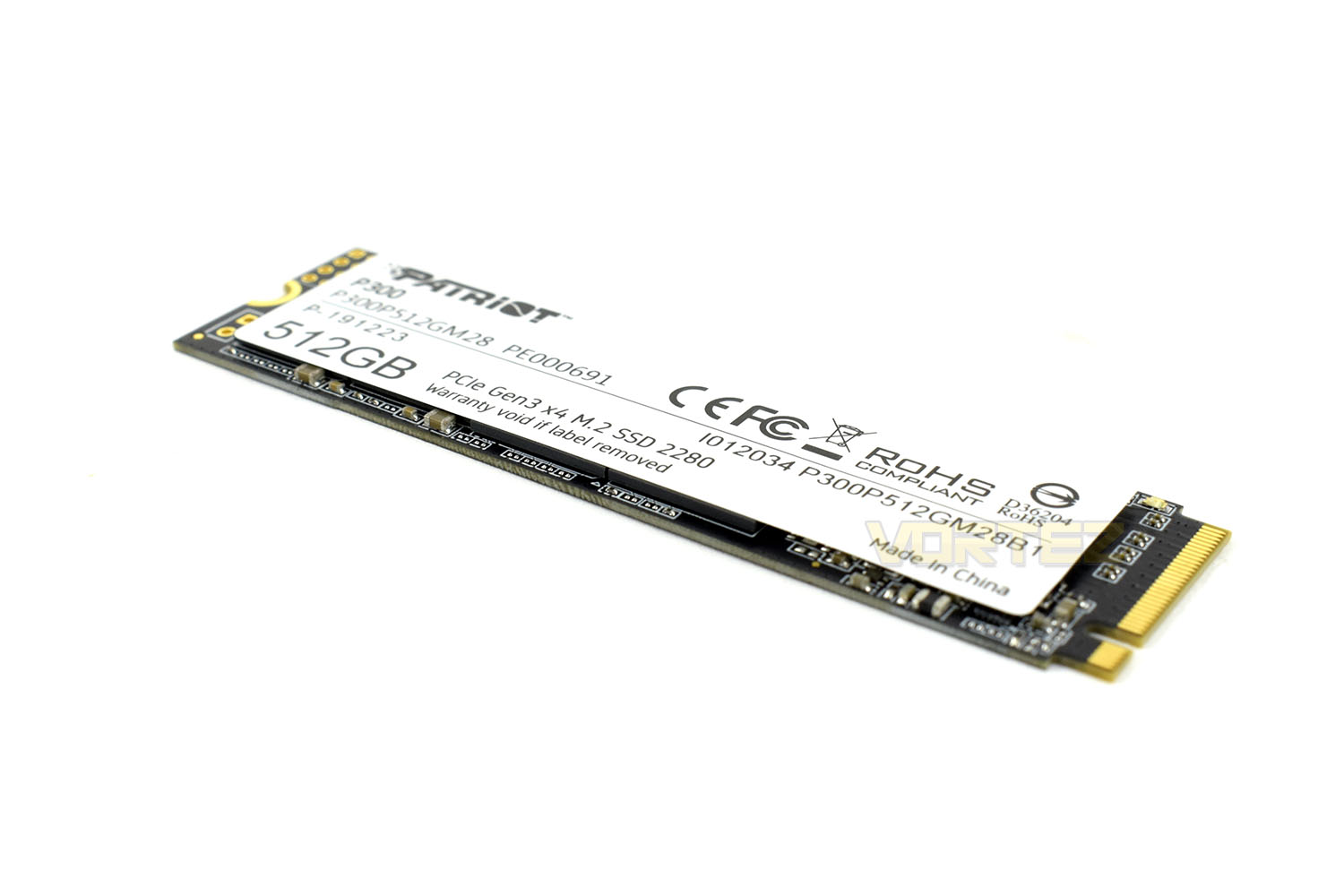
Today we’re looking at Patriot’s latest PCI-E 3.0 x4 SSD, the P300. Available in capacities of 128GB all the way up to 2TB, there’s a wide range available to suit a broad variety of requirements, and with speeds in excess of 2GB/s, you certainly aren’t going to be lacking in speed.
The P300 NVMe M.2 SSD utilises the Silicon Motion SM2263XT controller paired with Toshiba’s BiCS 3D TLC NAND flash to offer speeds of 2100MB/s read and 1650MB/s write, with 290K and 260K random IOPS.
The key selling point of the P300 NVMe SSD is the price, firmly aimed at budget-orientated consumers. We’ve been supplied with the 512GB model, a good compromise between outright capacity and a low cost at £77.99/$106.99. Let’s throw some benchmarks at the device and see how it copes.
Patriot on the P300
The P300 is Patriot’s next generation of mid-tier PCIe gen 3×4 NVMe SSD to hit the market, offering 25% higher transfer speeds and IOPs than standard PCIe 3×2 solutions. The compact m.2 form factor is designed for easy installation and will fit into any PC or laptop, while its low power consumption helps extend laptop battery life. The P300 is guaranteed to improve start-up, loading, and transfer times over traditional hard disk drives.
Technical Specifications
512GB
Description: Patriot P300 M.2 PCIe Gen 3 x4
Product Warranty: 3 year warranty
Operating Temperature: 0 – 70°C
Power Consumption:
Full: 2.07W
Idle: 0.37W
TBW: 160TB
4K Aligned Random Read: 290K IOPS
4K Aligned Random Write: 260K IOPS
Sequential Read (ATTO): up to 1,700MB/s
Sequential Write (ATTO): up to 1,100MB/s
Sequential Read (CDM): up to 1,700MB/s
Sequential Write (CDM): up to 1,100MB/s
O/S Supported: Windows® 7*/8.0*/8.1/10
Unit Weight: 0.01 lbs / 9g
Unit Dimensions: 3.15″ x 0.87″ x 0.15″ – 8cm x 2.2cm x 0.38cm
Packaging Type: Hang card
Packaging Weight: 0.04 lbs / 20g
Packaging Dimensions: 0.26″ x 5.15″ x 3.92″ – 0.66cm x 13.08cm x 9.96cm
Packaging & Closer Look
Based on a blue and white theme, which Patriot use on most of their packaging, the SSD is sealed in a blister packet that cannot be re-used easily. The front gives an idea of the performance with several plus icons along the bottom and tells you the capacity in the top-right.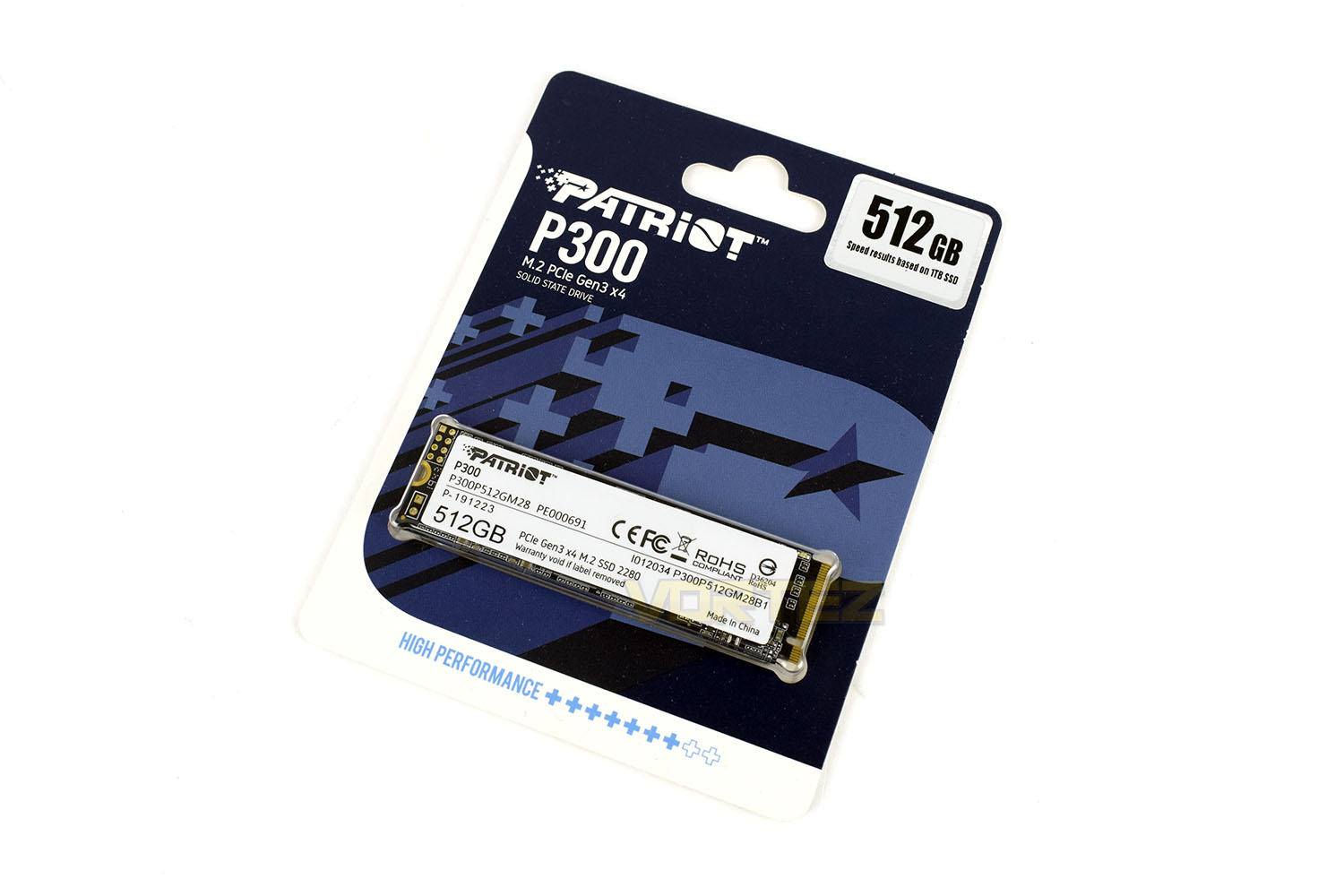
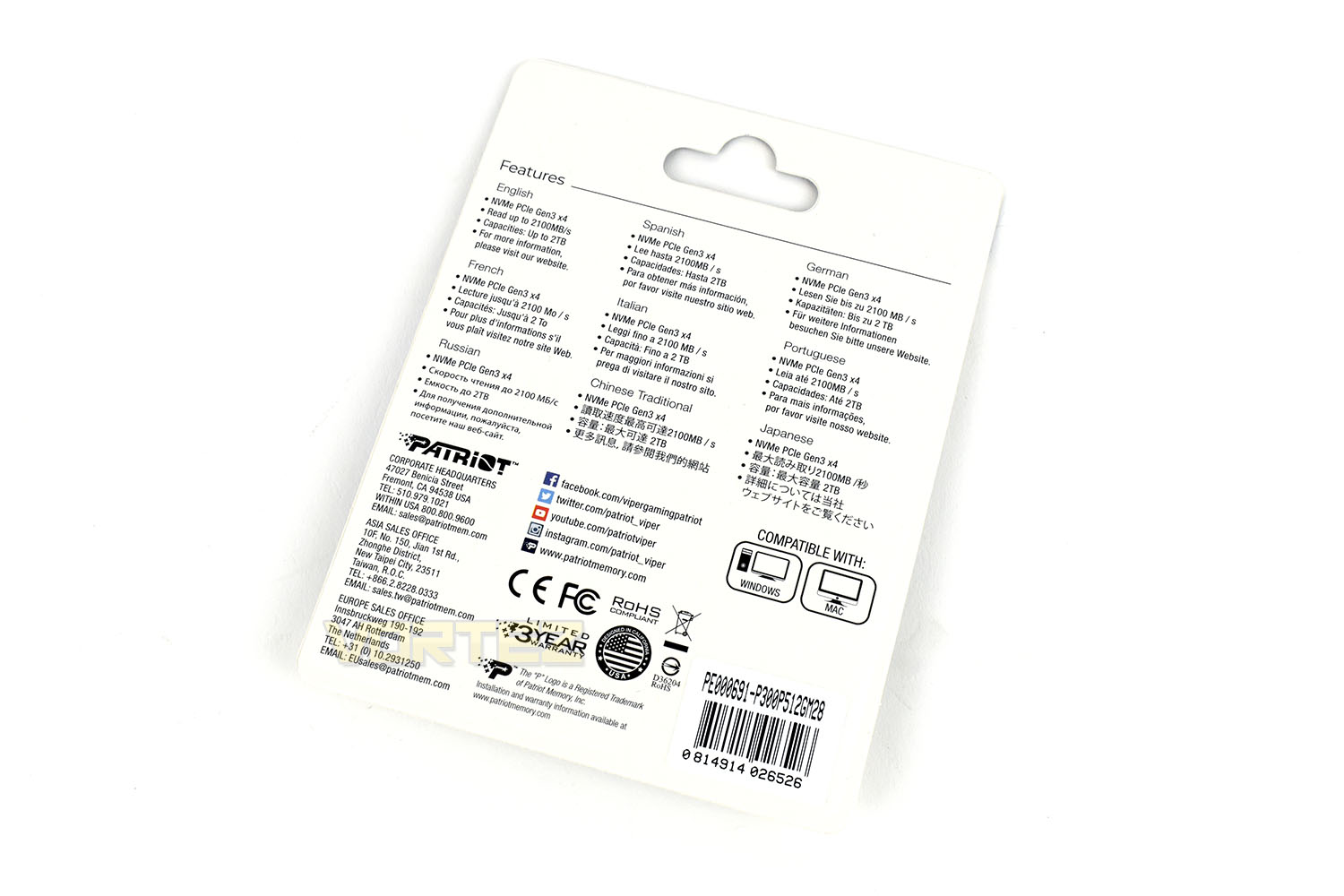
The rear of the packaging shows some performance stats and compatibility information but these figures are based on the 1TB model, with the highest figures. All other capacity options will be slower than this.
Based on a black PCB, the P300 conforms to the M.2 2280 standard. The front of the drive is entirely covered by a white sticker, which somewhat ruins the appeal of the drive if you plan to use it in a prominent position within your case.
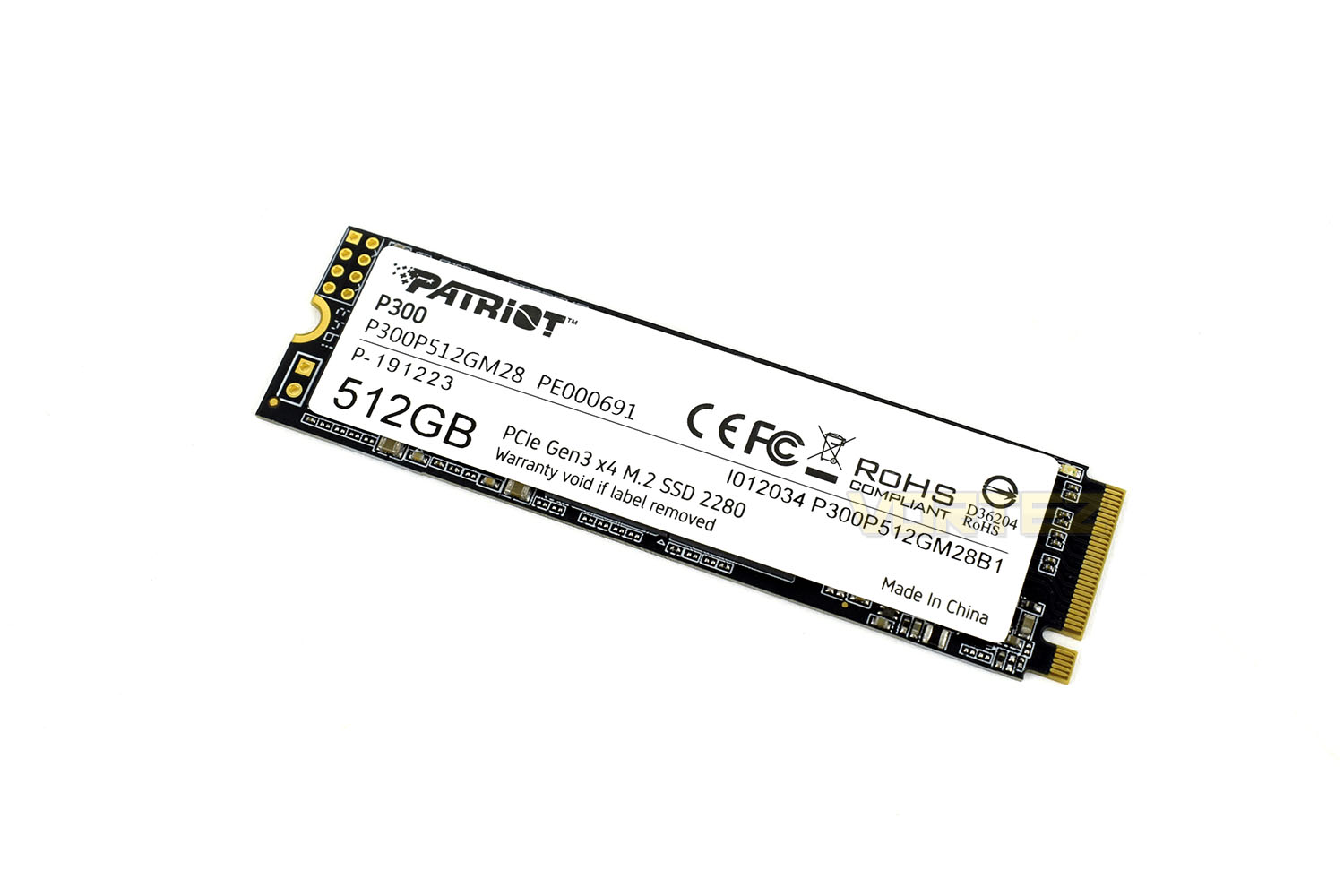
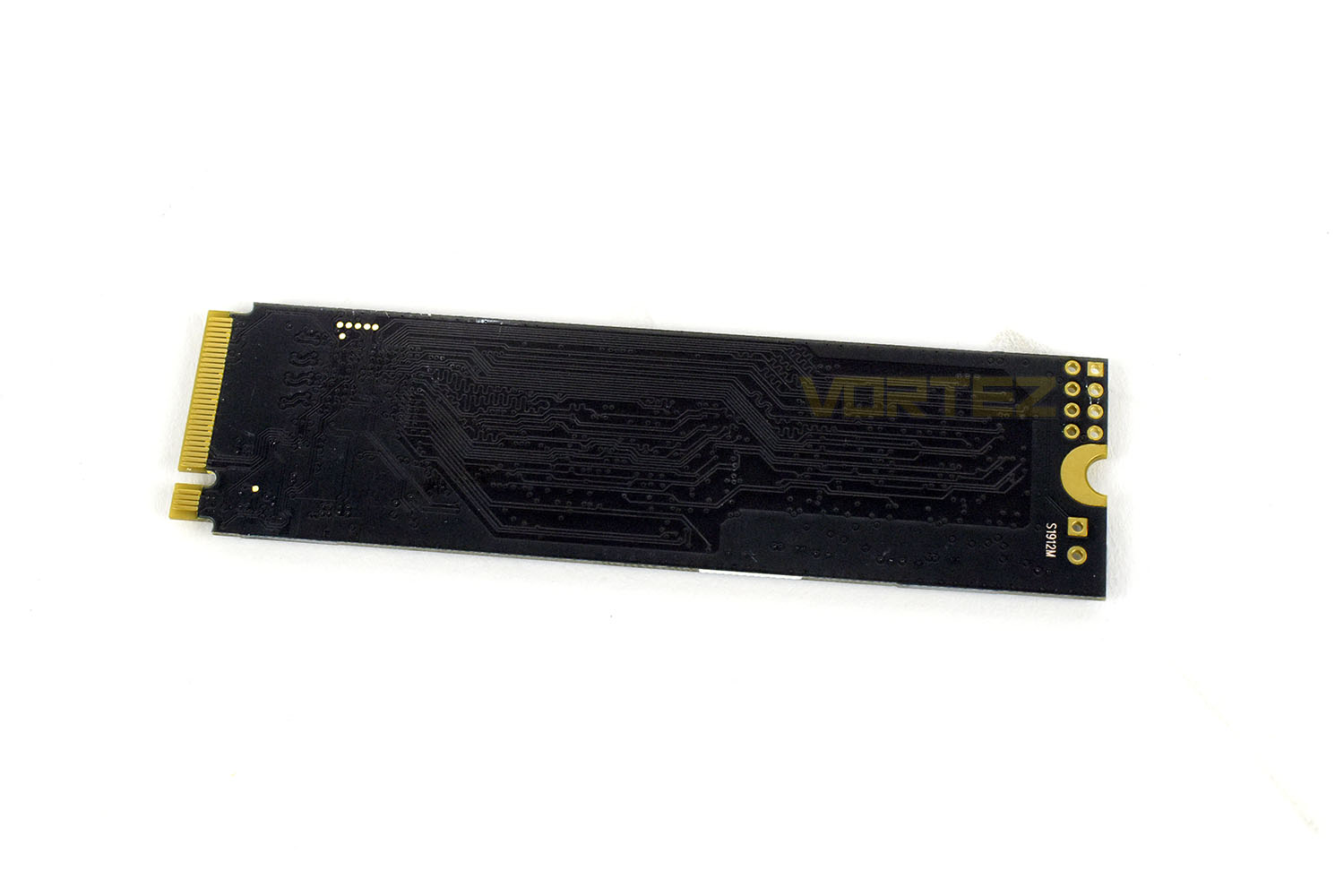
As is evident from the total absence of any hardware, the drive is entirely single-sided. This can help with keeping the drive cool, particularly if you plan to use motherboard-mounted M.2 cooling, or other similar third-party M.2 heatsinks.
Test Setup & Methodology
Our test system is formatted and a fresh version of Windows is installed with just drives in place – no additional applications. Windows is then updated to the latest release and the drivers are installed.Included in the list of benchmarks are the following applications:
Benchmarks
Anvil Pro
AS SSD
ATTO Disk Benchmark v2.46
AIDA64
CrystalDiskMark 6.0.2 x64
AS SSD
ATTO Disk Benchmark v2.46
AIDA64
CrystalDiskMark 6.0.2 x64
Test Setup
CPU AMD Ryzen 7 3800X
Cooling Corsair H150i Pro RGB – Balanced Profile
Motherboard
Memory 16GB Corsair Vengeance LPX 3000MHz @ 3000MHz @ 15-17-17-38-58
Graphics AMD Radeon RX 480 8GB
Storage Corsair Force LE 480GB
PSU Corsair RM750X 80 Plus Gold Certified PSU
Cooling Corsair H150i Pro RGB – Balanced Profile
Motherboard
Memory 16GB Corsair Vengeance LPX 3000MHz @ 3000MHz @ 15-17-17-38-58
Graphics AMD Radeon RX 480 8GB
Storage Corsair Force LE 480GB
PSU Corsair RM750X 80 Plus Gold Certified PSU
Benchmarks: Anvil Pro
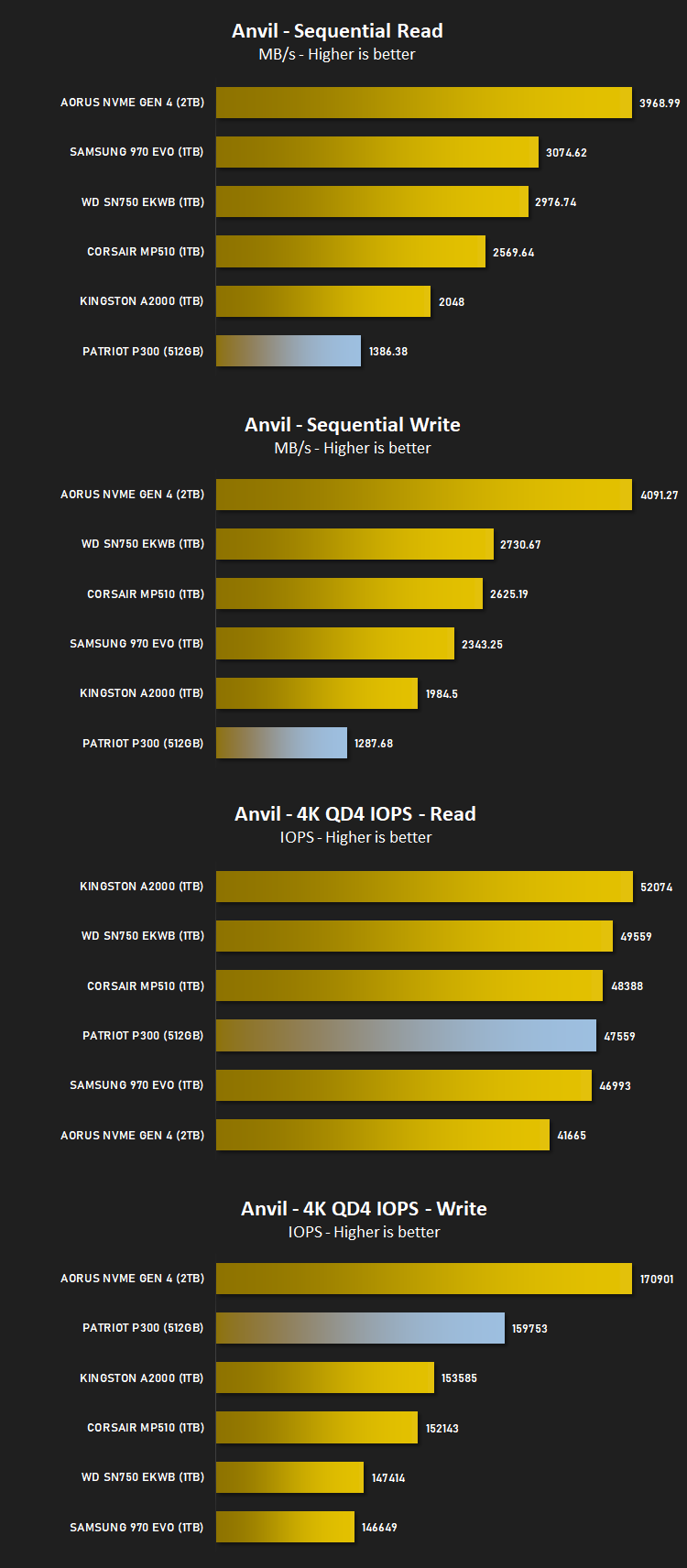
Anvil Pro from Anvil Storage utilities is one of the most popular storage benchmarking utilities today thanks to the large suit of tests available. You can test pretty much anything from Read/write Speed to IOPs with many variables to tweak allowing you to get either a single or host of results to compare with other likeminded enthusiasts. In our test we ran the standard suite 5 times, subtracting both the highest and lowest scores and determined the final result from the average of the remaining three results.
Benchmarks: AS SSD
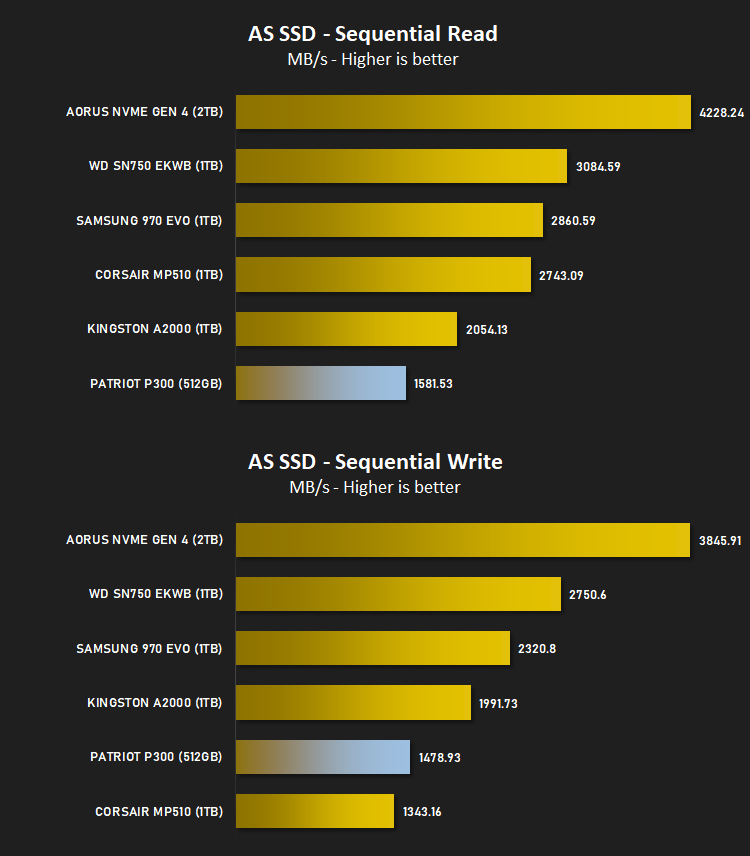
AS SSD Benchmark is a straightforward tool for measuring the speed of your SSD drive.
Simply launch the program, choose your drive, click Start, and it’ll test your SSD’s read and write speed in a variety of ways, delivering a score for each when it’s done. And if that’s not enough, there are also additional file copy and compression-related benchmarks available from the Tools menu. (The author’s support page is German only, but if you need further English explanations then there’s a thread on the program at the OCZ Technology forum.).
Simply launch the program, choose your drive, click Start, and it’ll test your SSD’s read and write speed in a variety of ways, delivering a score for each when it’s done. And if that’s not enough, there are also additional file copy and compression-related benchmarks available from the Tools menu. (The author’s support page is German only, but if you need further English explanations then there’s a thread on the program at the OCZ Technology forum.).
Benchmarks: ATTO
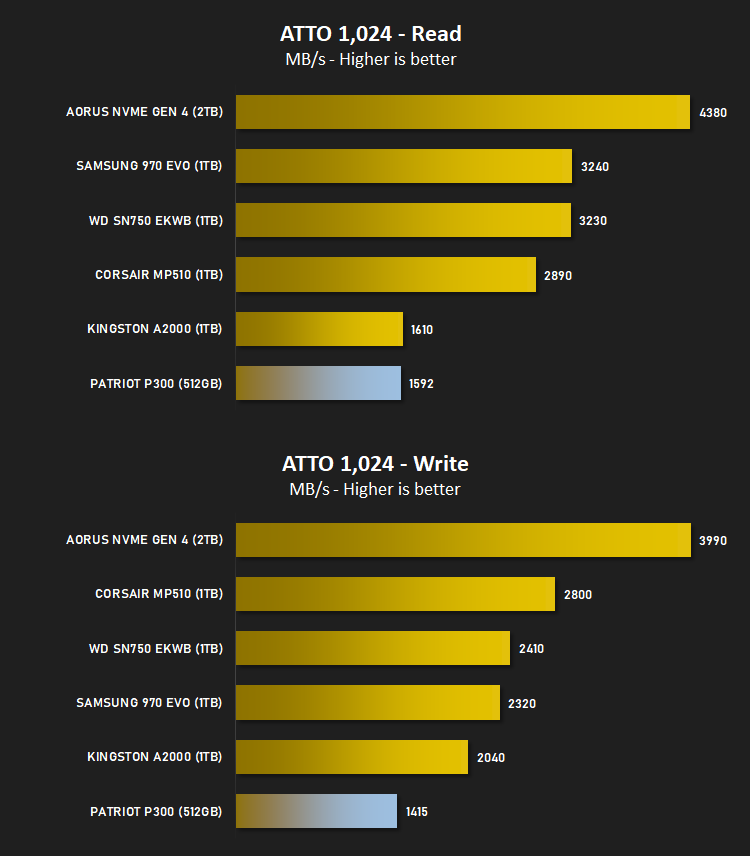
The ATTO Disk Benchmark performance measurement tool is compatible with Microsoft Windows. Measure your storage systems performance with various transfer sizes and test lengths for reads and writes. Several options are available to customize your performance measurement including queue depth, overlapped I/O and even a comparison mode with the option to run continuously. Use ATTO Disk Benchmark to test any manufacturers RAID controllers, storage controllers, host adapters, hard drives and SSD drives and notice that ATTO products will consistently provide the highest level of performance to your storage.
Benchmarks: AIDA64
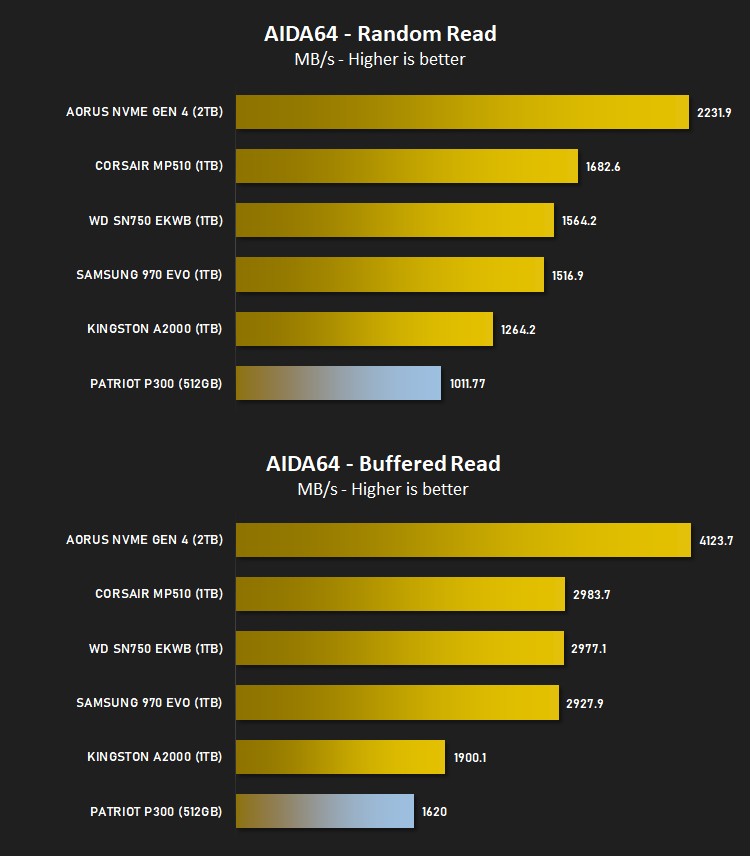
With this module, we can measure the performance of the PC’s storage devices, including (S)ATA or SCSI hard disk drives, RAID arrays, optical drives, solid-state drives (SSD), USB drives and memory cards. It also allows us to perform write tests, which helps us detect fake products and errors on the devices. In order to attain reliable benchmark results we have to make sure to close all background applications.
Benchmarks: CrystalDiskMark
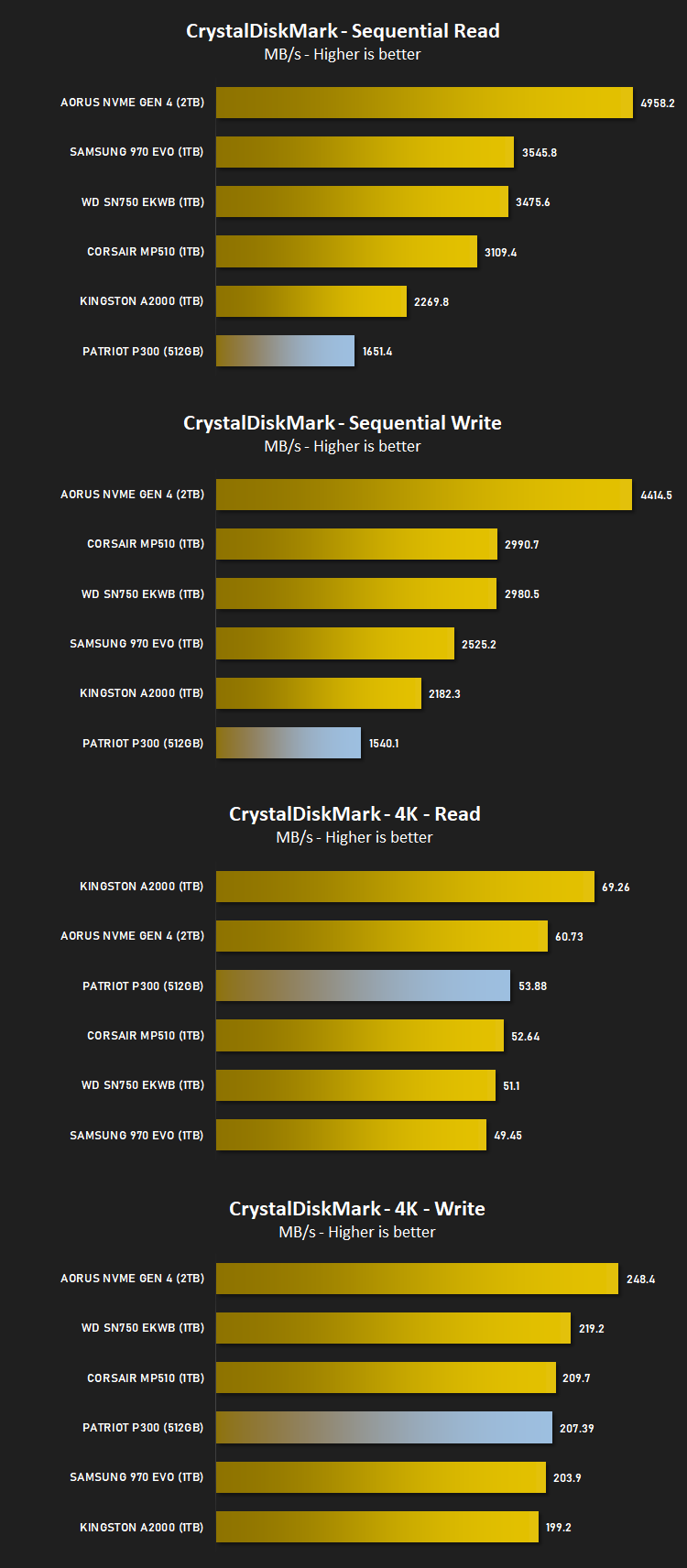
CrystalDiskMark is an open source disk drive benchmark tool for Microsoft Windows. Based on Microsoft’s MIT-licensed Diskspd tool, this graphical benchmark is commonly used for testing the performance of solid-state storage. It works by reading and writing through the filesystem in a volume-dependent way. It generates read/write speeds in sequential and random positions with varying numbers of queues and threads.
Conclusion
After chucking some tests at the Patriot P300, it’s evident that it isn’t the fastest drive on the market, but don’t write it off just yet. There’s much more to the NVMe market than just outright performance figures.While you might see figures approaching the 3500MB/s barrier from the like of Samsung, Western Digital, ADATA and CORSAIR, but the simple fact of the matter is, most applications can’t use anywhere near that kind of throughput. Where NVMe excels over SATA is in data queueing and simultaneous access, which helps with system responsiveness and overall fell, and the P300 does well in the IOPS benchmark tests; beating everything apart from the AORUS Gen. 4 NVMe in our Anvil 4K QD4 IOPS write test.
UK and Aussie pricing, at the time of writing, is a little thin on the ground, but we can compare the US prices against competing drives, which is where the drive falls to its knees. The drive is competing on a similar price level to the WD SN750, Samsung 970 Evo and Corsair MP510, all of which vastly outperform the drive, offer similar or better warranty periods and, frankly, are much easier to find in the marketplace.
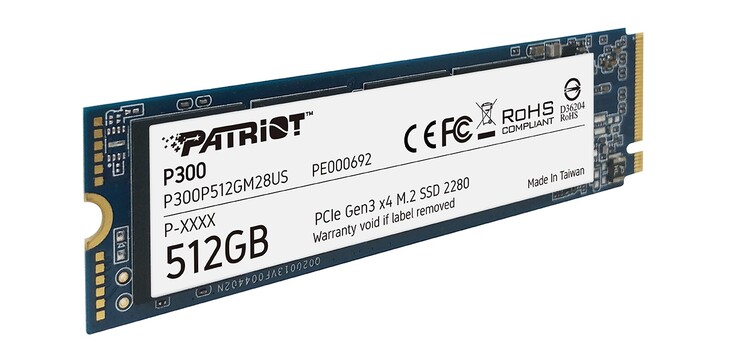
The Patriot P300 is a reasonable offering but availability seems to be lacking. Pair that with a high price tag and lacklustre performance and it’s difficult to recommend.
Pros
+ Reasonable warranty period
+ Good range of capacity options
Cons
– Lacklustre performance
– Pricey compared to faster options
– Wasteful packaging
– Large white sticker ruins the appearance somewhat
+ Reasonable warranty period
+ Good range of capacity options
Cons
– Lacklustre performance
– Pricey compared to faster options
– Wasteful packaging
– Large white sticker ruins the appearance somewhat
Click here for an explanation of our awards at Vortez.net.
Stay connected with the Vortez Social Media pages: