Optimised for professional gamers, the Plextor M6e PCI express SSD bypasses SATA 3.0 bottlenecks to boast some serious performance.

Product on Review: Plextor M6e
Manufacturer & Sponsor: Plextor
Street Price: £182.36/$264.99
The Solid State drive was revolutionary when it was first introduced but for the past few years, SSD performance has stagnated somewhat partly because of bottlenecking on SATA 3.0 and so many manufacturers instead focussed their efforts on better features such as software enhancements and better security encryption. There has been little uptake on PCIe storage despite the leap in performance due to the high cost in comparison to an SSD. Plextor look to rectify this with their M6e. This PCIe SSD is targeted toward gamers who desire the speed, ease of setup but who don’t wish to pay through the nose to get that boost in performance. The M6e, as we shall see satisfies on both fronts.
The M6e comes in two flavours, the vanilla M6e and the Black edition which is much more pleasing to the eye and encompasses a range of evolutions from the standard M6e we have for review today. That said, the standard M6e has a lot to offer both in terms of performance and features which we will examine over the following pages. The Plextor M6e comes in three different storage sizes: 128GB, 256GB and 512GB and has a combination of the latest Marvel Controller and Toshiba toggle NAND Flash.
About Plextor
Be more productive with a lightning-fast Plextor M6e PCI Express Series SSD.With the PCI Express interface, the M6e PCI Express bypasses the standard SATA connection bottleneck, thus drastically shortening the start time in many of today’s systems. Operating more efficiently than traditional SATA SSDs, the M6e PCI Express consumes less power, which extends your system’s battery life. The M6e PCI Express also features True Speed technology, an exclusive firmware feature that works to prevent SSD speed drops and automatically maintains performance. With blazing fast random access speeds of up to 105,000 IOPS and sequential access speeds of up to 770 MB/s, the M6e PCI Express Series SSDs are built to provide superior and consistent performance for years to come. Download large files in seconds rather than minutes and access your stored movies, games, photos and music quickly and easily.
Specification
Performance
Model: PX-AG256M6e
Capacity: 256GB
DRAM Cache: 512MB DDR3
Read/Write Speed (Under Windows NTFS)
Sequential Read Speed Up to 770 MB/s*
Sequential Write Speed Up to 580 MB/s*
Random Read Speed
(IOPS 4KB) Up to 105,000*
Random Write Speed
(IOPS 4KB) Up to 100,000*
* Results may vary based on hardware, software and overall system configuration.
Environment and Reliability
Temperature 0°C ~ 70°C (Operating)
Shock 1500G(Max), At 1 msec half-sine
Vibration 7 ~ 800Hz, 16.3Grms (Non-operation)
MTBF >2,400,000 hours
Warranty 5 years Plextor’s Warranty Service
Compatibility
Operating System Supported Windows 7 x86 / x64, Windows 8 x86 / x64, Windows Server 2008, Windows Server 2012, Linux series, Fedora, SUSE, Ubuntu
Agency Approval BSMI, UL, TUV, C-Tick, CE, KCC, VCCI, FCC, ROHS, CB
Command Set Support TRIM, S.M.A.R.T., NCQ
DATA Encryption AES 256
Firmware Upgrade Supported
Interface PCIe Gen2 x 2
Form Factor and Connectors
Form Factor Standardized PCle Card with Half-Height/Half-Length
Data Connector PCIe connector
Dimension and Weight
Dimension (W/L/H)
121.04 x 180.98 x 22.39 mm
Weight
72g (Max)
First Look
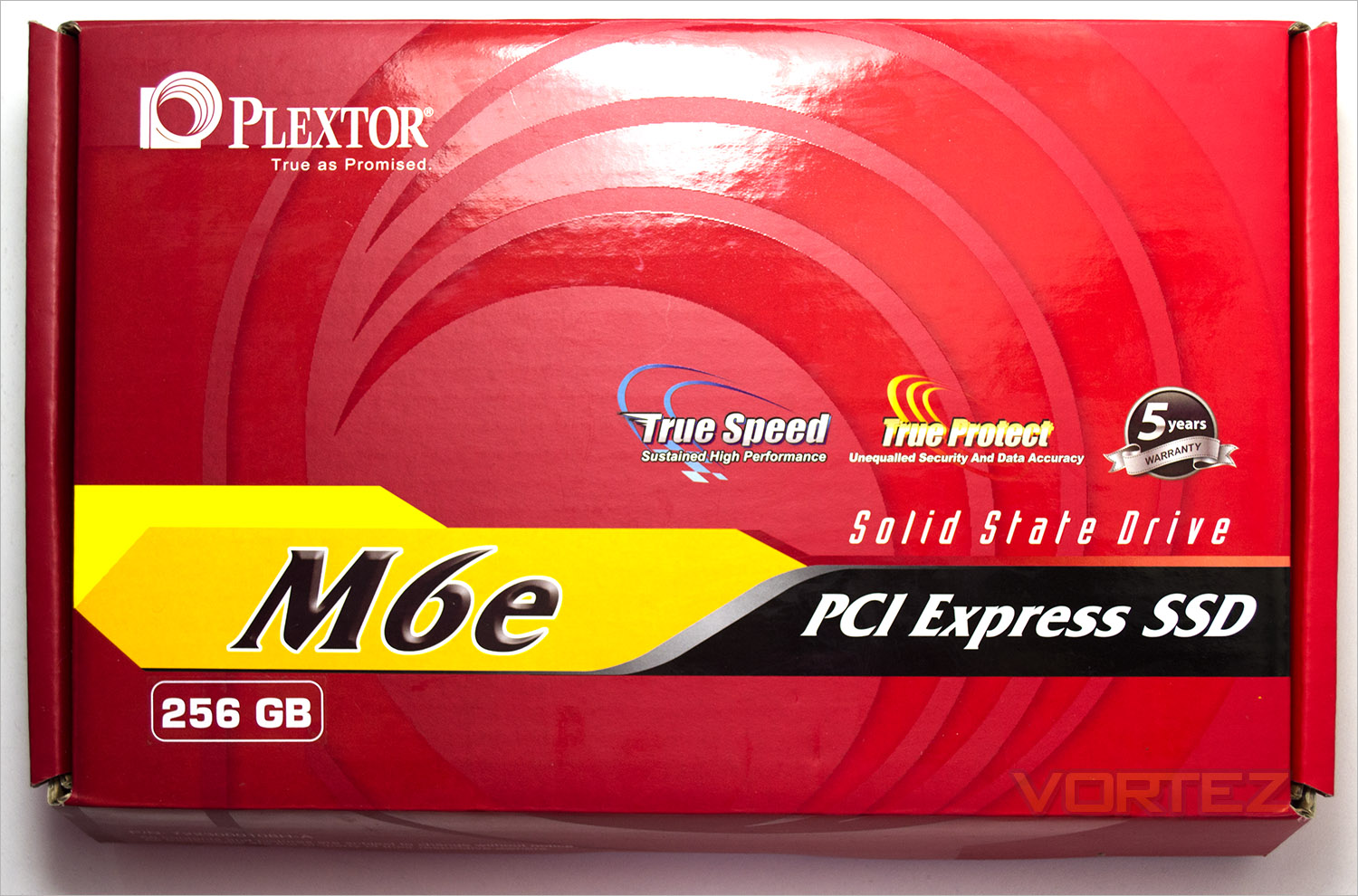
The box that the product comes packaged in is quite large as far as SSDs go. Main features and the product title are to be found on the front which is attractively composed.
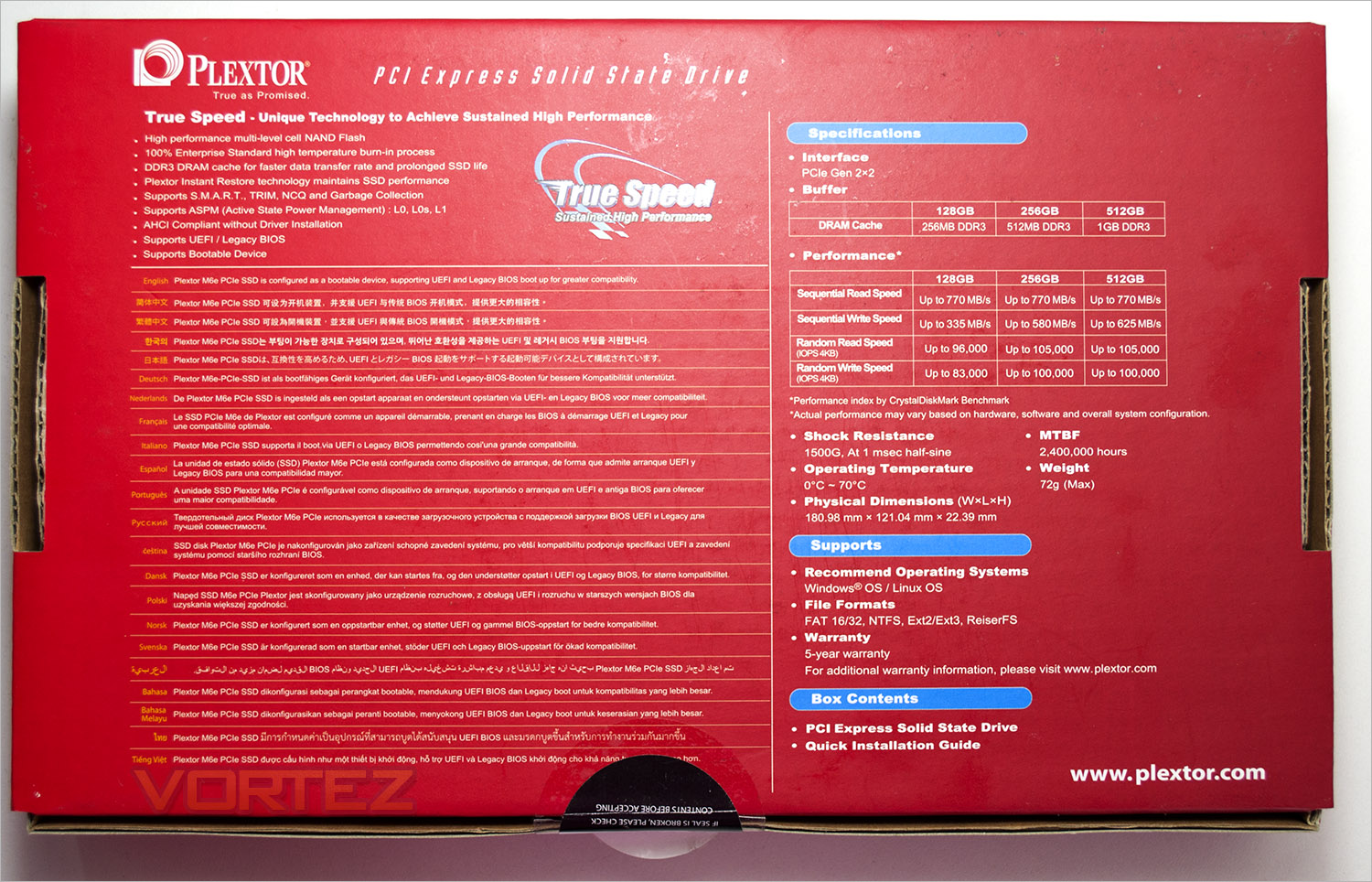
The rear of the package focusses solely on the specifications and a breakdown of the features in multiple languages. The same packaging will be used for all three storage sizes which just a sticker indicating the storage capacity on the front of the box to differentiate the three versions.
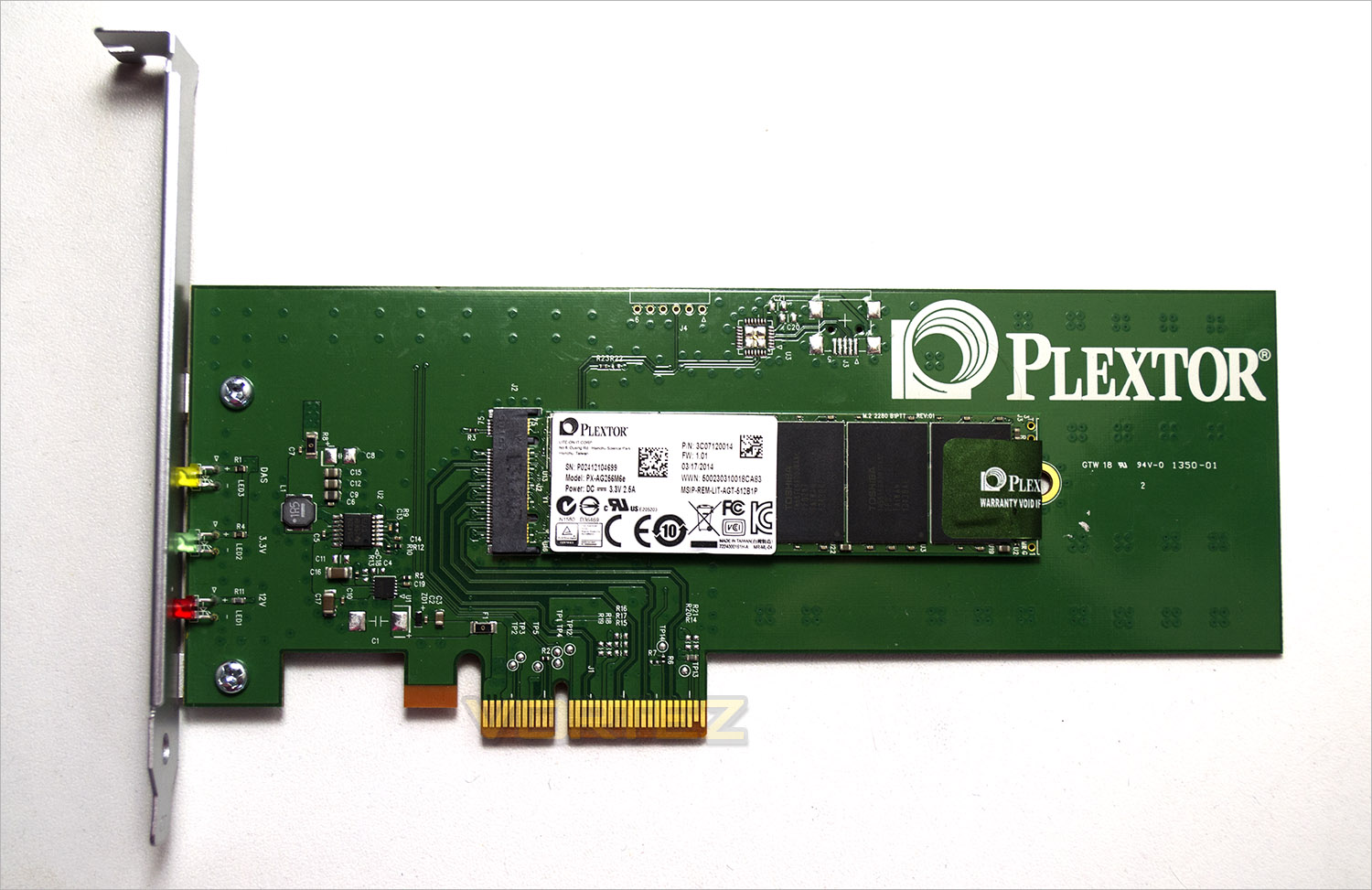
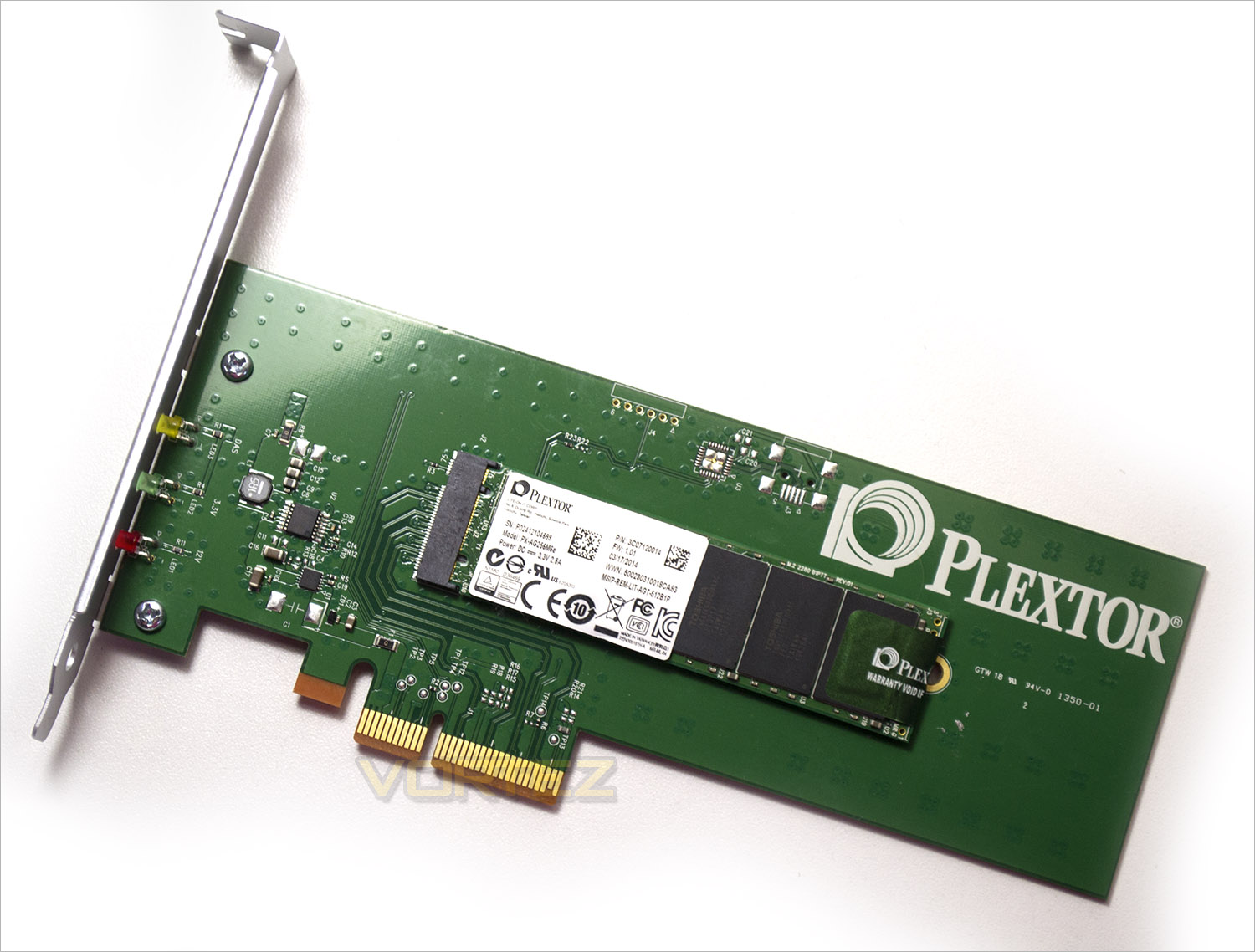
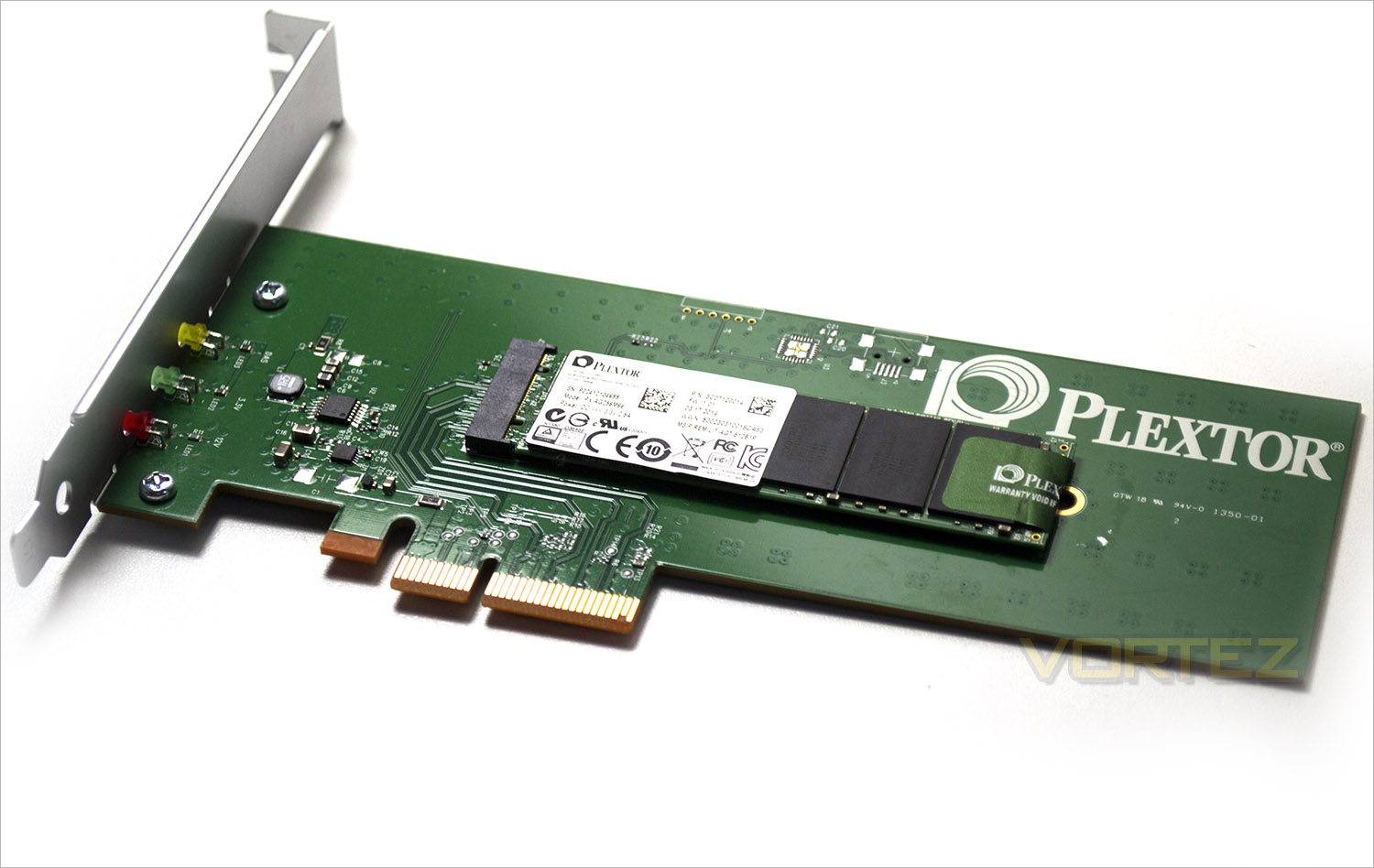
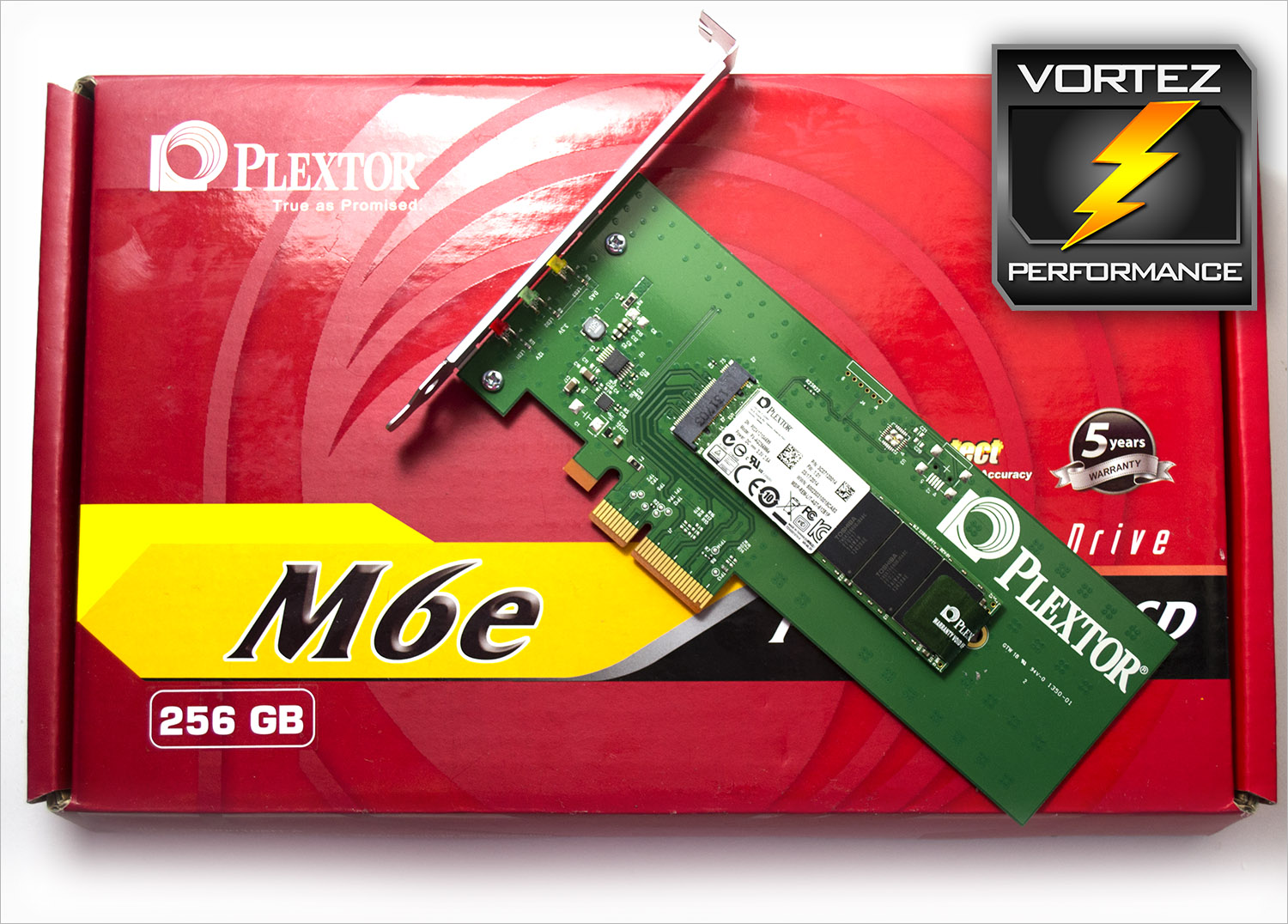
The device itself is kind of basic looking in truth. We are not fans of green PCB’s here at Vortez and were it not for the low profile NAND chips at the heart of the PCB you could be forgiven for believing this was a component from a 1990’s PC, such is the very basic design. The Black edition looks much more modern so if aesthetics are important to you then this will certainly be the one to go for because as far as looks are concerned, the M6e has fallen from the ugly tree, hitting most of the branches on the way down!
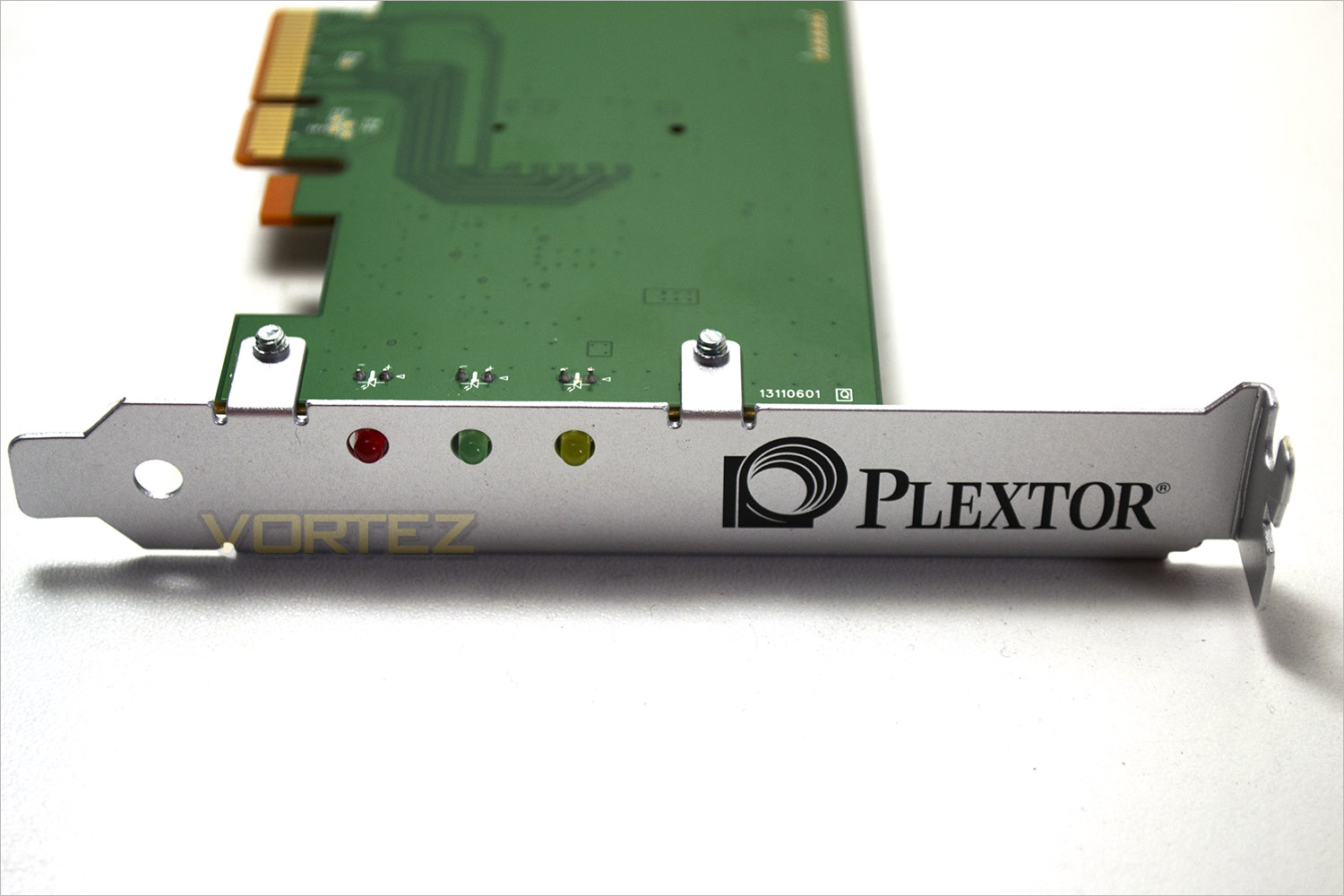
3 LEDs on the backplate signify the following: Red – Power status, Green – Link Status, Yellow – Activity.
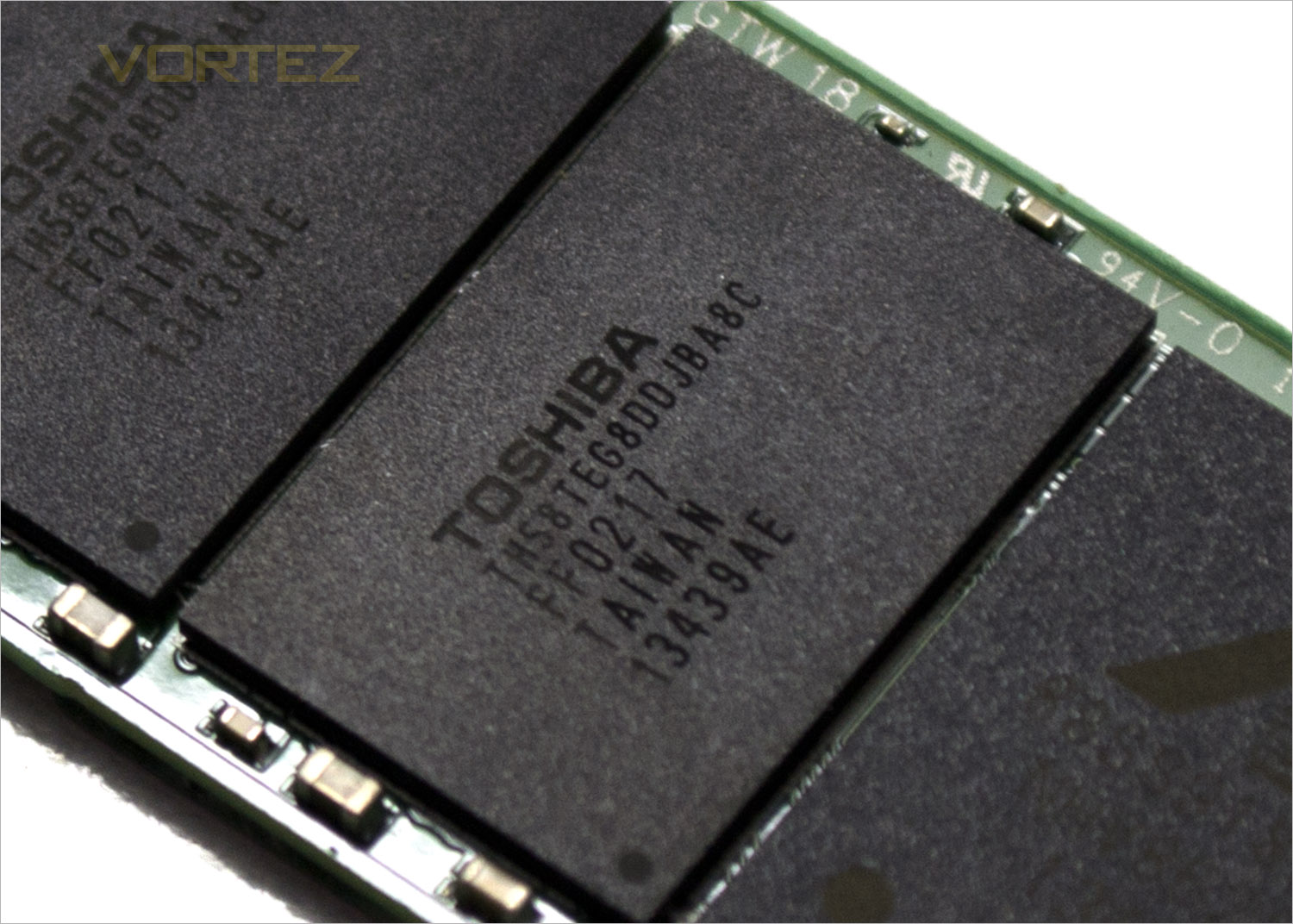
At the heart of the M6e is the Marvell® 88SS9183 dual-core server-grade controller. Toshiba Toggle NAND flash with updated True Speed technology guarantees that the M6e SSD will sustain long-term performance without huge amounts of degradation sometimes witnessed with some other SSD storage solutions which are speedy out of the box, but after sustained use can slow down over time.
Installing the card was very easy. All you will need is a PCIe 4x (or higher). There are no additional power cables, no SATA leads, no link cables in fact nothing to attach to the card – just slot it in and power up. The card will add slightly to the BIOS boot up stages as it has to load its own BIOS upon initialisation but this will easily be off-set by the increase in speed this device affords because all of the devices can be initialised at the same time due to UEFI compatibility. Should you not have a UEFI BIOS then this device is also backwards compatible with legacy BIOS revisions.
Firmware updating was a little fiddly as this can only be done in a DOS environment but the software to do this is fairly straightforward and there appears to be frequent firmware update revisions on the Plextor product page. which tells us the product is well supported.
Test Setup & Methodology
Our test system is formatted and a fresh version of Windows is installed with just drives in place – no additional applications. Windows is then updated to the latest release and the drivers are installed. Included in the list of benchmarks are the following applications:Benchmarks
ATTO Disk Benchmark v2.46
AS SSD
CrystalDiskMark 3.0
Iometer
SiSoftware SANDRA 2012
AS SSD
CrystalDiskMark 3.0
Iometer
SiSoftware SANDRA 2012
Test system
CPU Intel Core-i7 4770K
Motherboard GIGABYTE Z87X-OC
Graphics MSI R7970 Black Edition
Memory 16GB Corsair Vengeance Pro (2400MHz) CL10
HDD
– Plextor M6e 256GB(PCIe)
– Lexar Workflow DD512 512GB(USB 3.0B)
– Samsung 850 EVO 500GB(Sata 6Gbps)
– Crucial MX100 512GB(Sata 6Gbps)
– SanDisk Extreme Pro 480GB(Sata 6Gbps)
– Samsung 850 Pro 128GB (Sata 6Gbps)
– Corsair Force LX 256GB (Sata 6Gbps)
– Intel 730 240GB (Sata 6Gbps)
– ADATA Premier Pro SP920SS 256GB (Sata 6Gbps)
– OCZ Vertex 460 240GB (Sata 6Gbps)
– OCZ Vector 150 240GB (Sata 6Gbps)
– Samsung 840 EVO mSATA 500GB (Sata 6Gbps)
– Samsung 840 EVO mSATA 250GB (Sata 6Gbps)
– Kingston HyperX 3K Na’Vi 240GB (Sata 6Gbps)
– OCZ Vertex 450 256GB (Sata 6Gbps)
– Samsung 840 EVO 750GB (Sata 6Gbps)
– Samsung 840 Pro 256GB (Sata 6Gbps)
– Samsung 840 256GB (Sata 6Gbps)
– Toshiba 256GB THNSNH256GCST (Sata 6Gbps)
– OCZ Vector 256GB (Sata 6Gbps)
– Corsair Neutron GTX 240GB (Sata 6Gbps)
– Corsair Force GS 240GB (Sata 6Gbps)
– OCZ Vertex 4 128GB (Sata 6Gbps)
– Kingston HyperX 3K 120GB (Sata 6Gbps)
– Kingston HyperX 240GB (Sata 6Gbps)
– ADATA S510 120GB (Sata 6Gbps)
– Intel 520 480GB (Sata 6Gbps)
– Samsung 830 Series 256GB (Sata 6Gbps)
– Samsung HD103SJ 1TB (Sata 3Gbps)
PSU Corsair HX1050 Gold
OS Microsoft Windows 7 Professional 64-Bit
Motherboard GIGABYTE Z87X-OC
Graphics MSI R7970 Black Edition
Memory 16GB Corsair Vengeance Pro (2400MHz) CL10
HDD
– Plextor M6e 256GB(PCIe)
– Lexar Workflow DD512 512GB(USB 3.0B)
– Samsung 850 EVO 500GB(Sata 6Gbps)
– Crucial MX100 512GB(Sata 6Gbps)
– SanDisk Extreme Pro 480GB(Sata 6Gbps)
– Samsung 850 Pro 128GB (Sata 6Gbps)
– Corsair Force LX 256GB (Sata 6Gbps)
– Intel 730 240GB (Sata 6Gbps)
– ADATA Premier Pro SP920SS 256GB (Sata 6Gbps)
– OCZ Vertex 460 240GB (Sata 6Gbps)
– OCZ Vector 150 240GB (Sata 6Gbps)
– Samsung 840 EVO mSATA 500GB (Sata 6Gbps)
– Samsung 840 EVO mSATA 250GB (Sata 6Gbps)
– Kingston HyperX 3K Na’Vi 240GB (Sata 6Gbps)
– OCZ Vertex 450 256GB (Sata 6Gbps)
– Samsung 840 EVO 750GB (Sata 6Gbps)
– Samsung 840 Pro 256GB (Sata 6Gbps)
– Samsung 840 256GB (Sata 6Gbps)
– Toshiba 256GB THNSNH256GCST (Sata 6Gbps)
– OCZ Vector 256GB (Sata 6Gbps)
– Corsair Neutron GTX 240GB (Sata 6Gbps)
– Corsair Force GS 240GB (Sata 6Gbps)
– OCZ Vertex 4 128GB (Sata 6Gbps)
– Kingston HyperX 3K 120GB (Sata 6Gbps)
– Kingston HyperX 240GB (Sata 6Gbps)
– ADATA S510 120GB (Sata 6Gbps)
– Intel 520 480GB (Sata 6Gbps)
– Samsung 830 Series 256GB (Sata 6Gbps)
– Samsung HD103SJ 1TB (Sata 3Gbps)
PSU Corsair HX1050 Gold
OS Microsoft Windows 7 Professional 64-Bit
Benchmarks: ATTO
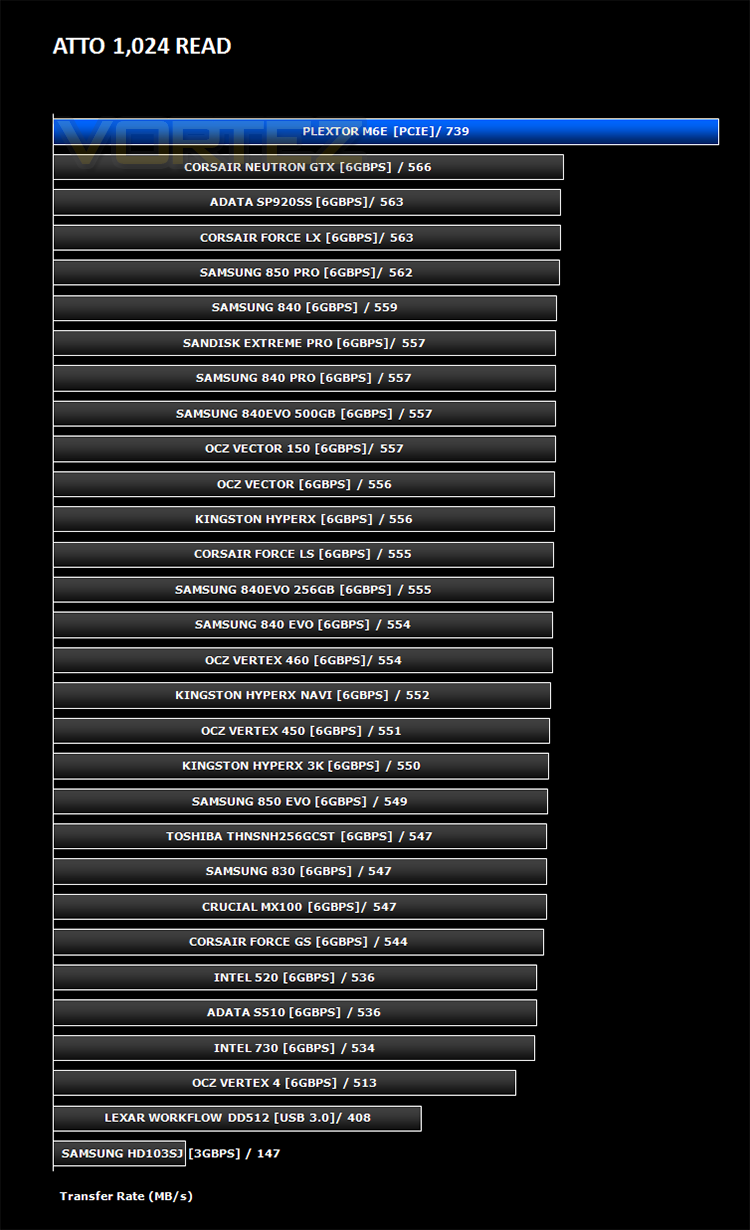
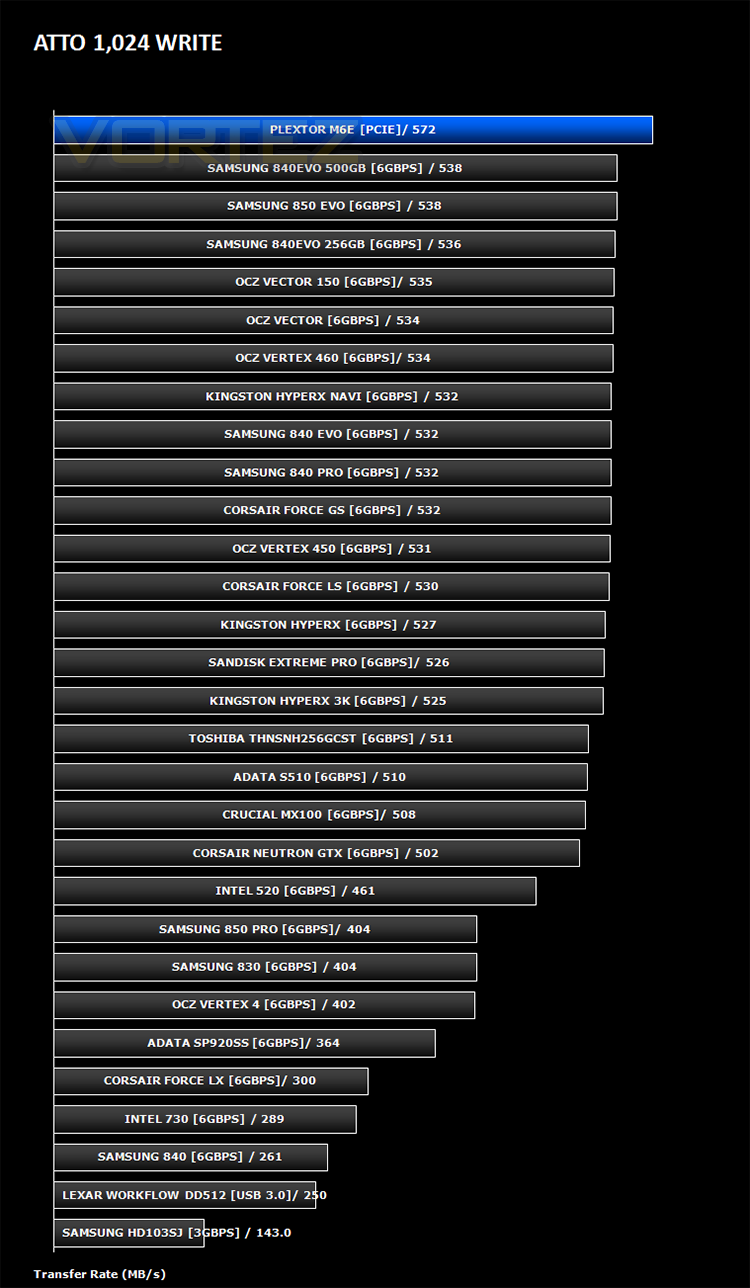
The ATTO Disk Benchmark performance measurement tool is compatible with Microsoft Windows. Measure your storage systems performance with various transfer sizes and test lengths for reads and writes. Several options are available to customize your performance measurement including queue depth, overlapped I/O and even a comparison mode with the option to run continuously. Use ATTO Disk Benchmark to test any manufacturers RAID controllers, storage controllers, host adapters, hard drives and SSD drives and notice that ATTO products will consistently provide the highest level of performance to your storage.
Benchmarks: AS SSD
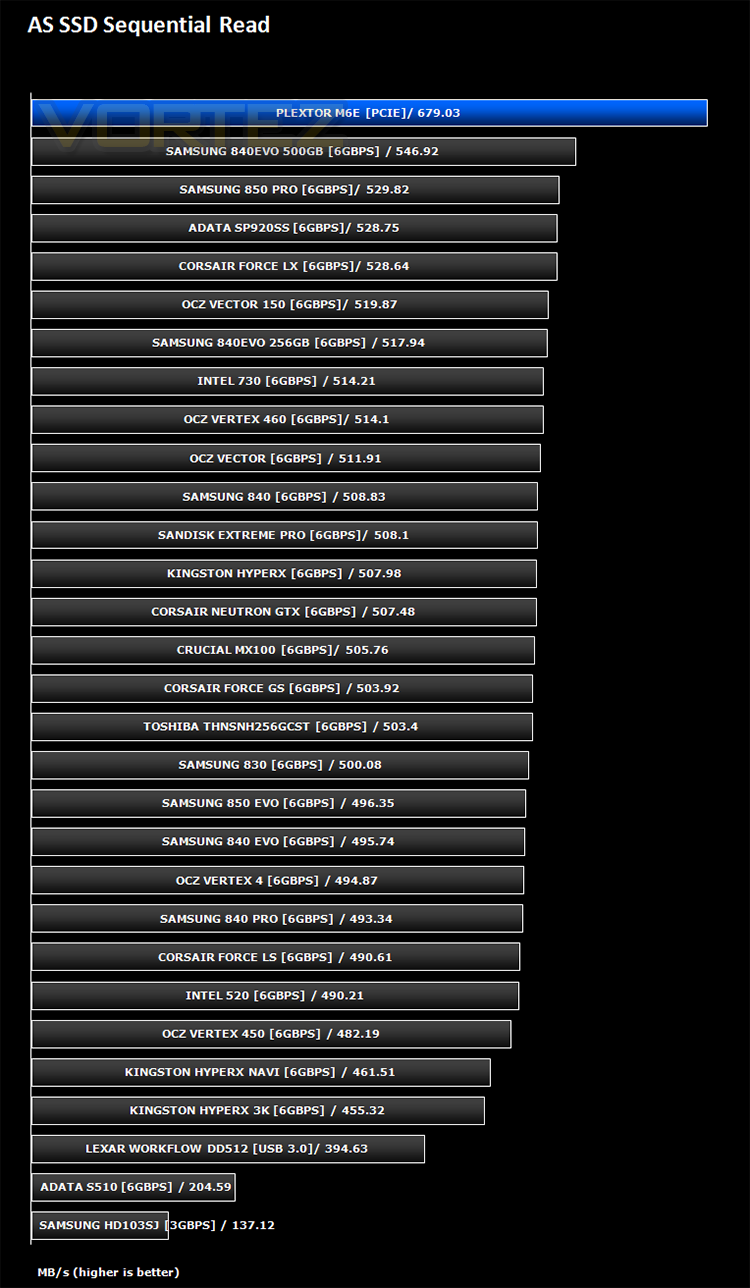
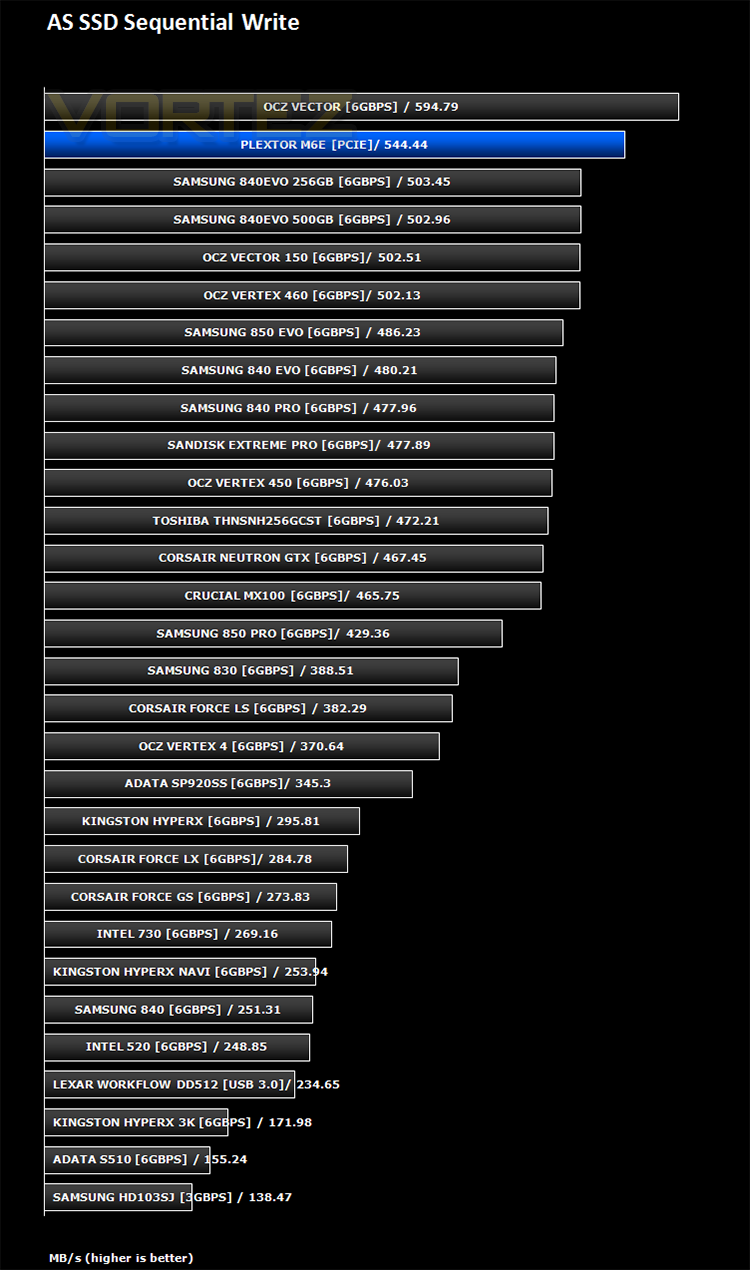
AS SSD Benchmark is a straightforward tool for measuring the speed of your SSD drive.
Simply launch the program, choose your drive, click Start, and it’ll test your SSD’s read and write speed in a variety of ways, delivering a score for each when it’s done. And if that’s not enough, there are also additional file copy and compression-related benchmarks available from the Tools menu. (The author’s support page is German only, but if you need further English explanations then there’s a thread on the program at the OCZ Technology forum.).
Simply launch the program, choose your drive, click Start, and it’ll test your SSD’s read and write speed in a variety of ways, delivering a score for each when it’s done. And if that’s not enough, there are also additional file copy and compression-related benchmarks available from the Tools menu. (The author’s support page is German only, but if you need further English explanations then there’s a thread on the program at the OCZ Technology forum.).
Benchmarks: CrystalDiskMark 3.0
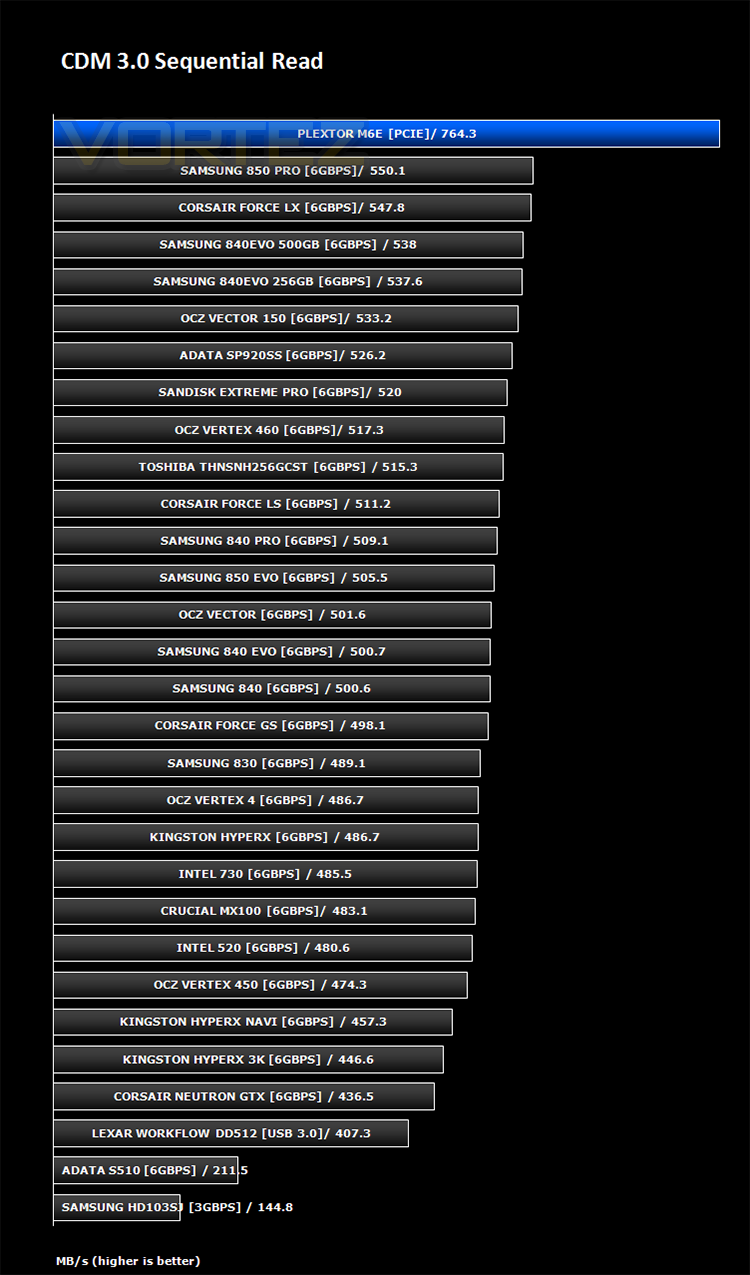
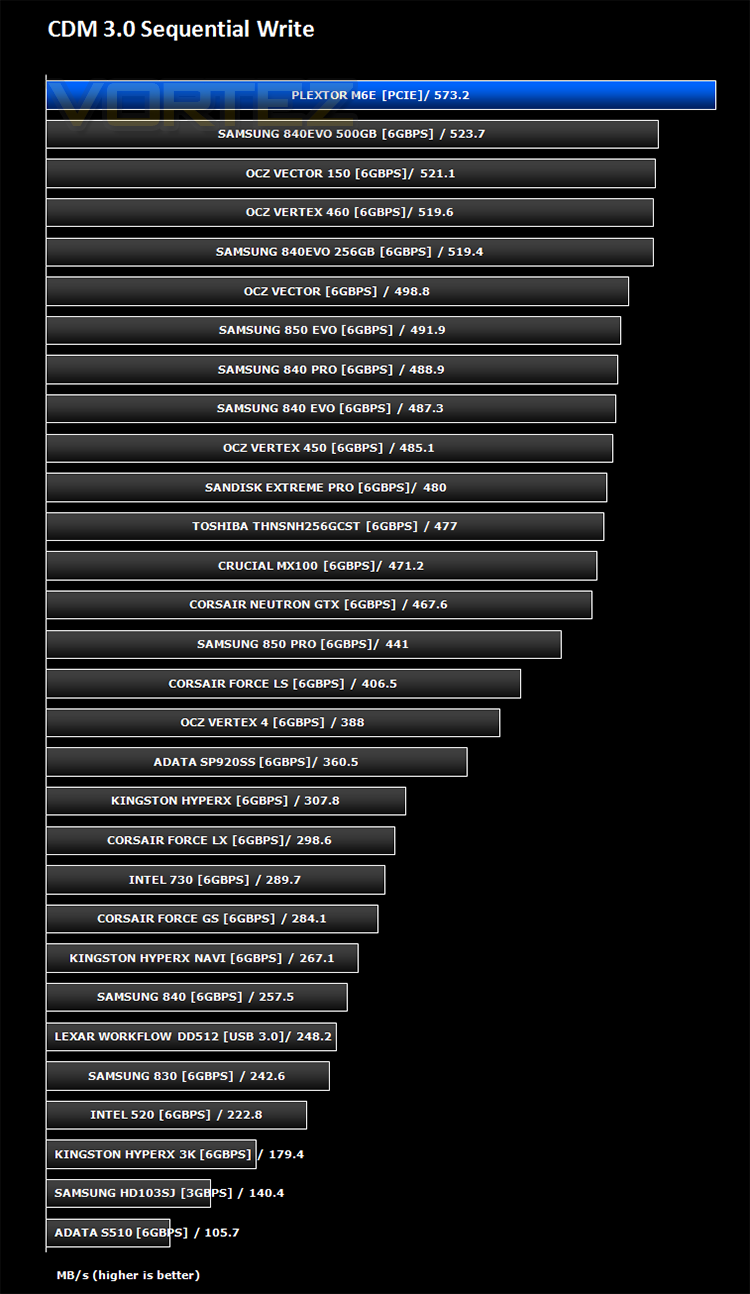
CrystalDiskMark is a disk benchmark software that analyses different types of hard drive. Giving sequential benchmark write and read statistics in MB/s. A simple program that is very useful.
Benchmarks: Iometer
Iometer is based on a client–server model, where one instance of the Iometer graphical user interface is managing multiple ‘workers’ (each one representing a separate Dynamo.exe process) which are doing the I/O. Iometer performs Asynchronous I/O – accessing files or block devices (later one allowing to bypass the file system buffers).
Iometer allows the configuration of disk parameters such as the ‘Maximum Disk Size’, ‘Starting Disk Sector’ and ‘# of Outstanding I/Os’. This allows a user to configure a test file upon which the ‘Access Specifications’ configure the I/O types to the file.
Iometer allows the configuration of disk parameters such as the ‘Maximum Disk Size’, ‘Starting Disk Sector’ and ‘# of Outstanding I/Os’. This allows a user to configure a test file upon which the ‘Access Specifications’ configure the I/O types to the file.
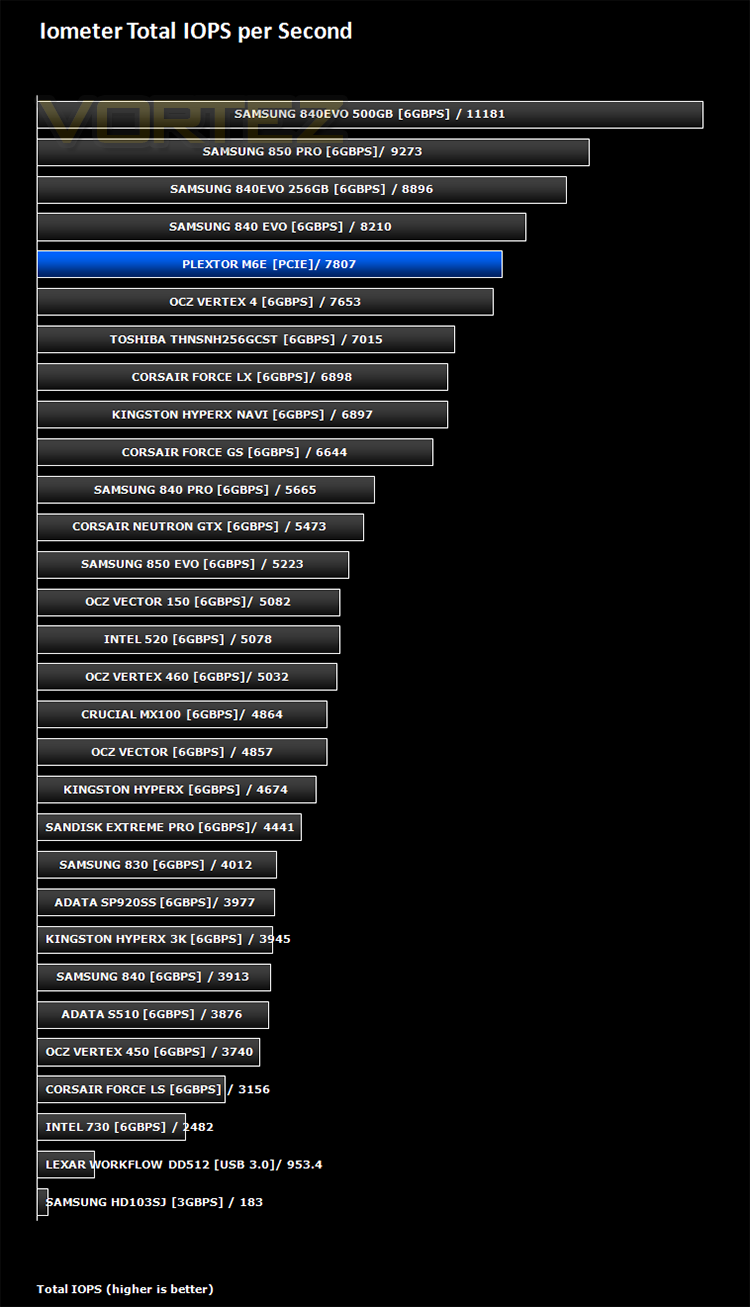
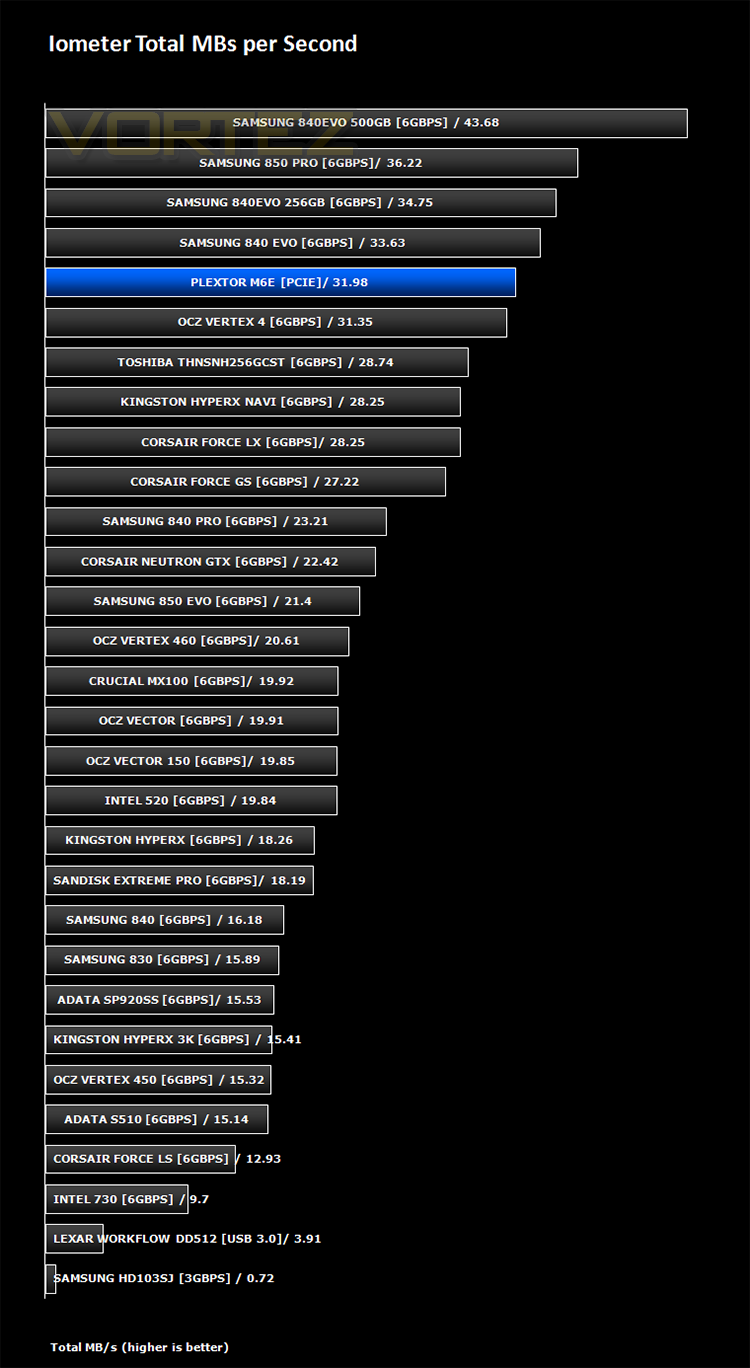
For the purpose of this test. The 4K 50%/50% read/write file will be under the examination with 100% Random Distribution – reporting back on IOPS and MBs per Second.
Benchmarks: SiSoft Sandra
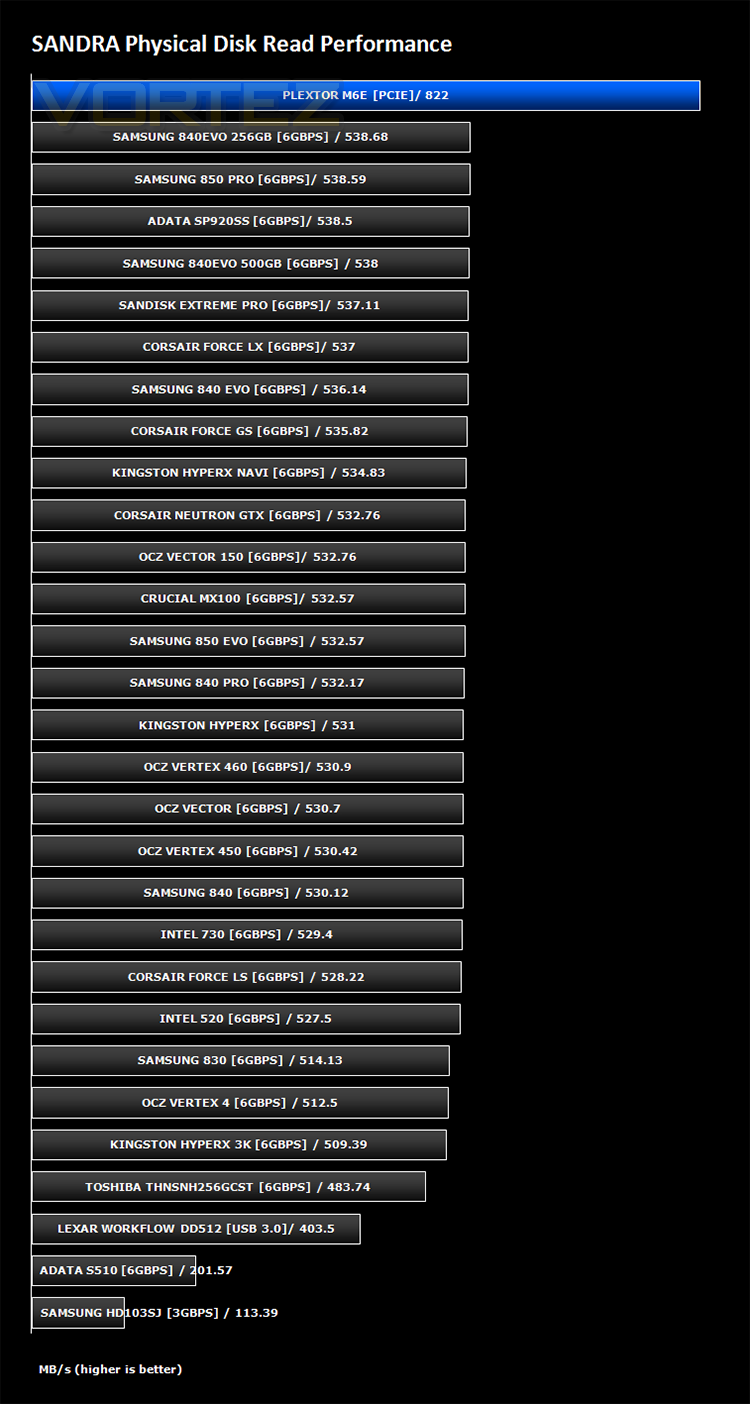
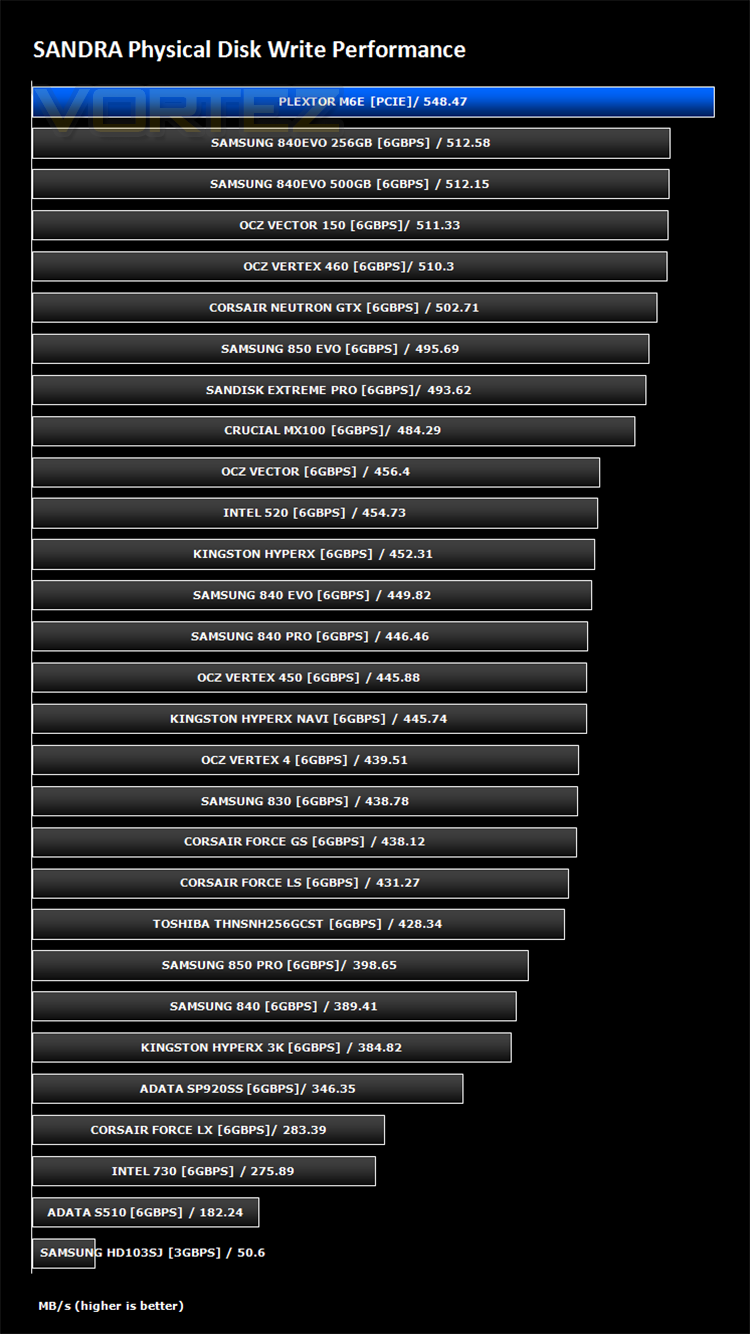
SiSoftware Sandra (the System ANalyser, Diagnostic and Reporting Assistant) is an information & diagnostic utility. It should provide most of the information (including undocumented) you need to know about your hardware, software and other devices whether hardware or software.
Sandra is a (girl) name of Greek origin that means “defender”, “helper of mankind”. We think that’s quite fitting.
It works along the lines of other Windows utilities, however it tries to go beyond them and show you more of what’s really going on. Giving the user the ability to draw comparisons at both a high and low-level. You can get information about the CPU, chipset, video adapter, ports, printers, sound card, memory, network, Windows internals, AGP, PCI, PCI-X, PCIe (PCI Express), database, USB, USB2, 1394/Firewire, etc.
Sandra is a (girl) name of Greek origin that means “defender”, “helper of mankind”. We think that’s quite fitting.
It works along the lines of other Windows utilities, however it tries to go beyond them and show you more of what’s really going on. Giving the user the ability to draw comparisons at both a high and low-level. You can get information about the CPU, chipset, video adapter, ports, printers, sound card, memory, network, Windows internals, AGP, PCI, PCI-X, PCIe (PCI Express), database, USB, USB2, 1394/Firewire, etc.
Conclusion
When we first cast our eyes on the the Plextor M6e we weren’t exactly impressed. The aesthetics are less than pleasing and while it isn’t the worst looking product we have seen, it will look out of place on a modern gaming PC which is Plextor’s target market. The green PCB will however draw a few raised eyebrows if you have a window on your PC at a LAN as folk will no doubt be asking what it is to which you can reply with a wry grin that you have a PCIe SSD! So its not all bad. If the visuals are a turn off for you though, fear not because the Black Edition rectifies this issue and looks much more at home in a gaming PC.
Looks aside this product delivers performance by the bucket load. It is well over 200MB/s faster than a regular SSD meaning your operating system will load faster, your applications will fire up in no time and perhaps crucially you will likely be the first person on the server come map rotation on your favourite game. While we couldn’t quite match the claimed 625MB/s write speeds, we did surpass the 770 write speed on occasion so we figure these claims will be dependent on what benchamrk you are running but you can be assured, there are no other SATA based SSD’s on the market to match the speed this product will give you.
The ease of setup without the need for any extra cabling or drivers was very appealing and a test Windows 8.1 installation was a breeze presenting no issues at all with the drive detected both within the BIOS of our test setup and within the Windows Setup page. Encryption isn’t the best with just AES 256 but this will be ample for most gamers. Warranty stands at 5 years which is very good.
The M6e is clearly a product that has its advantages and disadvantages. If you can see past the old school green PCB, then you will have a stupendously fast storage device that will put any SATA SSD in the shade. For this reason it gets our performance award.
In summary:
The M6e is a seriously fast product but not the best looking. Truly a Cheetah in Warthogs clothing!
Pros
+ Very fast
+ 5 year warranty
+ Easy Setup
Cons
– Green PCB/Dated looks
+ Very fast
+ 5 year warranty
+ Easy Setup
Cons
– Green PCB/Dated looks

Click here for an explanation of our awards at Vortez.net.