Thinking about turning to AMD Vega Series for your high-end graphics card? We analyse a newly launched custom design by way of PowerColor’s Red Devil RX VEGA 56.

Product on Review: Red Devil RX VEGA 56
Manufacturer & Sponsor: PowerColor
Street Price: £799 GBP – $1000 USD
It’s been a long time coming – and almost didn’t happen at all, but custom AMD Vega graphics card designs are beginning to filter onto the market and today we’ll be looking to PowerColor for a look at their new Red Devil RX VEGA 56.
For those wanting to turn to AMD for a high-end graphics solution, the Vega series is the only range offering anything worth considering and reference designs (as tradition would have it) leave a lot to be desired. In fact, for AMD board partners, the challenge to improve on AMD’s reference design opens up the door to lots of potential and many possibilities.
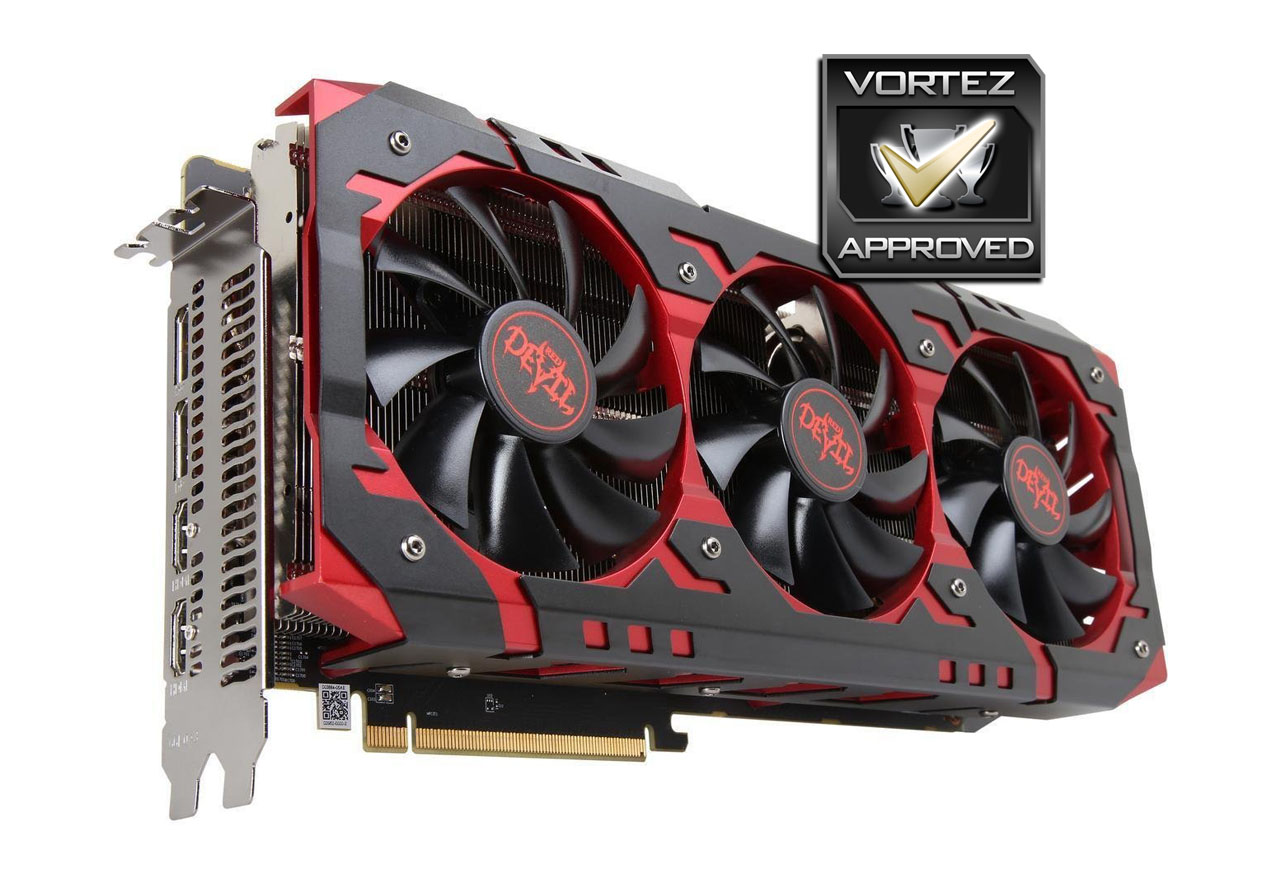
In our hands today is the PowerColor Red Devil RX Vega 56 – a burly triple-fan solution which carries a decent factory overclock by way of three pre-defined OC profiles. PowerColor has also included an extra HDMI port for VR users and armed the innards with a hefty 12-phase power design.
Is Vega 56 worth a second look? Let’s find out!

PowerColor on their Red Devil RX VEGA 56
PowerColor VEGA 56 Red Devil has 3584 stream processors and 945MHz memory clock. With a dedicated High-Bandwidth Cache, the VEGA utilizes HBM2, the latest in graphic memory technology, to provide incredible levels of power efficiency and memory performance.
Technical Specifications
Below are the technical specifications surrounding Red Devil RX VEGA 56, supplied directly by PowerColor:
GPU
VEGA 10
Stream Processor
3584
Video Memory
8GB HBM2
Memory Bus
2048-bit
Engine Clock
1590 MHz (OC Mode)
1540MHz (Standard Mode)
1510 MHz (Silent Mode)
Memory Clock
800MHz (1.6Gbps)
PCI Express
3.0
Display Outputs
2x DisplayPort 1.4
2x HDMI 2.0b
Recommended Power Supply
750W
DirectX
12 API feature level 12_1
OpenGL
4.5
Cooling
Triple-fan solution
Slot Size
Triple slot
Supported OS
Windows 10 / 8 / 7
Card Length
316 x 150 x 55 mm
VEGA 10
Stream Processor
3584
Video Memory
8GB HBM2
Memory Bus
2048-bit
Engine Clock
1590 MHz (OC Mode)
1540MHz (Standard Mode)
1510 MHz (Silent Mode)
Memory Clock
800MHz (1.6Gbps)
PCI Express
3.0
Display Outputs
2x DisplayPort 1.4
2x HDMI 2.0b
Recommended Power Supply
750W
DirectX
12 API feature level 12_1
OpenGL
4.5
Cooling
Triple-fan solution
Slot Size
Triple slot
Supported OS
Windows 10 / 8 / 7
Card Length
316 x 150 x 55 mm
Detailed Look & Video Review
For this review we’ve produced a video review over on our YouTube channel which details all of the included features, and takes a close look at the PCB/cooling solution along with the addition of some gaming benchmarks. Please check out our video review or hit play on the video below:
Test Setup & Methodology
How we test graphics cards
Testing a graphics card is an extremely lengthy process. We sometimes see reviews where a graphics card has been tested using out of date equipment, out of date games and even out of date drivers. While the latter can be excused due to the sheer amount of driver updates making a thorough review impossible we will however notify the reader when we have used a different driver to the normal for example a pre-release driver. For the most part however we will always use the same hardware and latest drivers so this does certainly need to be taken into consideration when viewing our testing results. Each game and benchmark is tested times with the lowest and highest scores omitted out of the 5 results and the average then taken from the three remaining to give us our final result for each resolution and setting used.
Hardware
Taking Intel’s High-End Desktop platform, our hardware utilises the Intel X99 chipset. Combined with this we use the Intel Core i7-5960X Extreme Edition processor clocked to a realistic and achievable 4GHz to ensure we have no CPU bottlenecks. With 16GB (4x4GB) of DDR4 at 2666MHz and a 750GB SSD there should be minimal paging so the benchmarks we run today will hopefully give a true reflection of the graphics card’s performance.
Graphics Cards on test:
PowerColor Red Devil RX VEGA 56
ZOTAC GTX 1070 Ti AMP Extreme
NVIDIA GTX 1080 Ti
NVIDIA GTX 1080
PowerColor RED DEVIL Golden Sample RX 580
ASUS STRIX GTX 1070
PowerColor RED DEVIL RX 470
NVIDIA GTX 1060
NVIDIA GTX 980
NVIDIA GTX 970
AMD Radeon RX 480
XFX R9 FURY
AMD Radeon R9 390X
Special thanks go to Epiphan, Intel, Corsair, MSI and AOC for providing the extreme spec components used for our test bench:
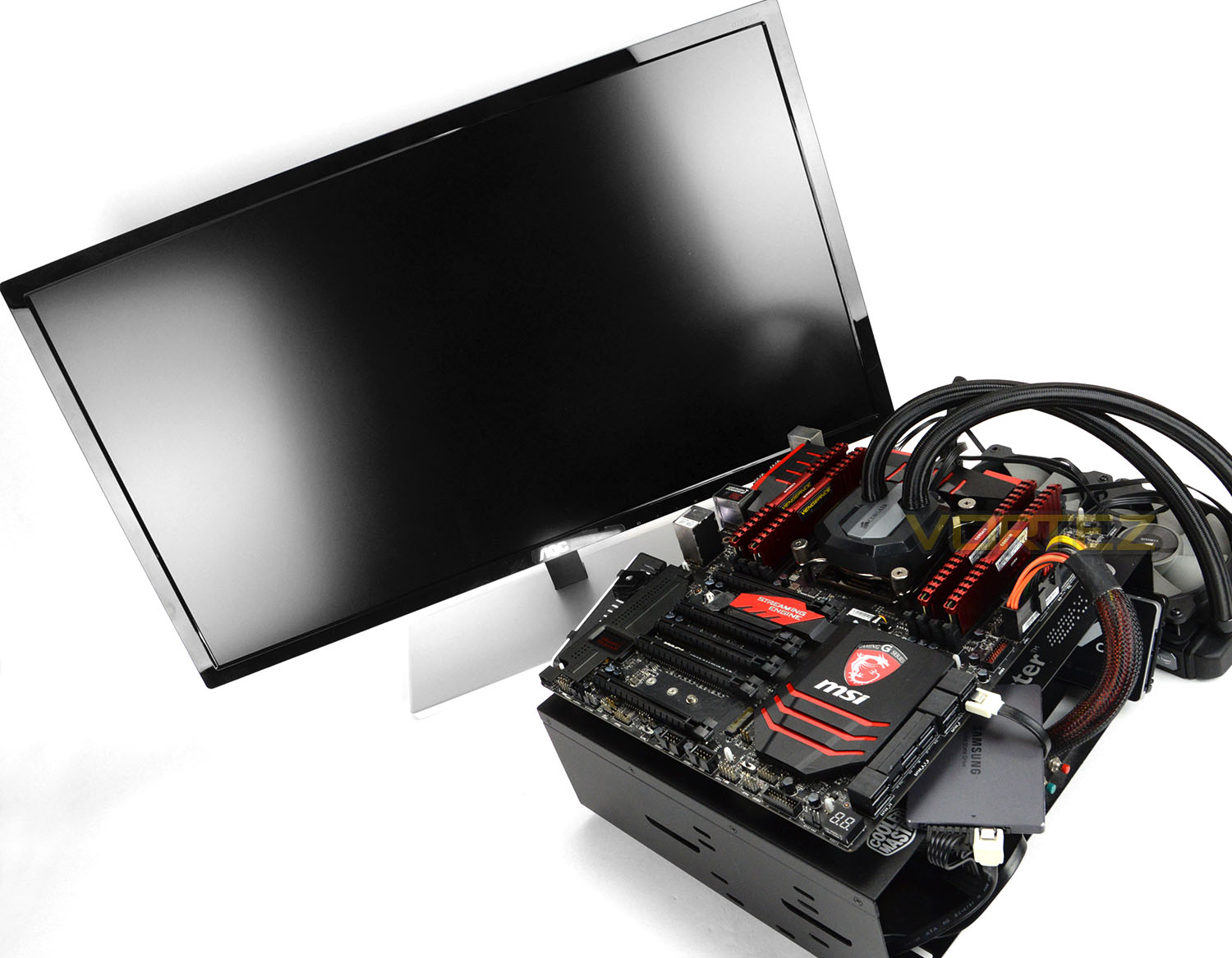
Motherboard: MSI X99A Workstation
CPU: Intel Core i7-5960X Extreme Edition @ 4GHz
RAM – 16GB (4x4GB) Corsair LPX Vengeance (Red) DDR3 @ 2666MHz 16-17-17-35 C1
Power Supply – CORSAIR HX1050
Hard Drive – Samsung 840 EVO 750GB
Cooler – CORSAIR Hydro Series™ H105 240mm Extreme Performance Liquid CPU Cooler
Monitor – AOC 28″ 4K U2879VF
Capture Card – Epiphan AV.io 4K
CPU: Intel Core i7-5960X Extreme Edition @ 4GHz
RAM – 16GB (4x4GB) Corsair LPX Vengeance (Red) DDR3 @ 2666MHz 16-17-17-35 C1
Power Supply – CORSAIR HX1050
Hard Drive – Samsung 840 EVO 750GB
Cooler – CORSAIR Hydro Series™ H105 240mm Extreme Performance Liquid CPU Cooler
Monitor – AOC 28″ 4K U2879VF
Capture Card – Epiphan AV.io 4K
Benchmarks
If you are a regular reader of our reviews you will know we like to test the latest hardware with the latest games and benchmarks on the market. Here are the games we’ve chosen:
DOOM (OpenGL 4.5 & Vulkan)
Total War: Warhammer
Rise of the Tomb Raider
HITMAN
DiRT Rally
Total War: Warhammer
Rise of the Tomb Raider
HITMAN
DiRT Rally
To capture framerates we use a combination of in-game benchmark tools, FRAPS and PresentMon.
We also take into consideration the benchmarkers out there so have included three of the more popular synthetic benchmarks available:
Unigine: Valley
Unigine: Heaven 4
Futuremark 3DMark Firestrike
Futuremark 3DMark Time Spy
Unigine: Heaven 4
Futuremark 3DMark Firestrike
Futuremark 3DMark Time Spy
Let’s see how today’s graphics card performed…
Power, Temperatures, Acoustics
To test for power consumption, we take a measurement from the plug socket. It is important to note that the figures below represent total system power use and not just the GPU. The CPU was always in a fixed state (4GHz overclock) so did not affect the additional power load when the GPU was placed under 100% load using Heaven 4.0 which was ran for 20 minutes at which point a load reading was taken. Idle readings were taken 5 minutes after system boot to ensure any background services and applications had loaded.

Temperature
To test temperatures we measured idle temperatures after booting windows, letting all applications finish loading and ran a few benchmarks. Once the benchmarks were complete we left the card to reach a cooling plateau where we then took the idle temperatures. For the load tests we set Heaven 4.0 running continuously for ~30 minutes recorded the peak/maximum GPU temperature.

Acoustics
Thanks to the cooling fan design, Red Devil is quiet under full load when the OC profile is being used. If the temperature sits below 60 degrees celius, the fans will cease from spinning and there is also a “Silent Mode” available which forces the fans to remain still.
Overclocking
To overclock the Red Devil RX Vega 56 we used the MSI Afterburner Tool since it gives extensive options for modifying the GPU and memory clock.
There are three profiles/BIOS on this graphics card – OC, standard and silent. Each profile has a different core clock speed allowing the GPU to boost to: 1590 MHz (OC Mode) 1540MHz (Standard Mode) 1510 MHz (Silent Mode). In this overclocking section, we’ll seek to take the GPU clock beyond these frequencies and increase the memory clock too – which sits untouched at stock settings.
We were able to modify both parameters quite easily and achieved 1720MHz for the GPU clock and 951MHz for the memory clock. This represents a 16% and 18% increase – not too shabby at all.
In reality, applying such an overclock to both elements of Vega 56 allows us to gain advantages in frame rate performance – see below for the comparison.


DX12: 3DMark Time Spy
With its pure DirectX 12 engine, which supports new API features like asynchronous compute, explicit multi-adapter, and multi-threading, 3DMark Time Spy is the ideal benchmark for testing the DirectX 12 performance of the latest graphics cards.

DX11: 3DMark FireStrike
Fire Strike is the new showcase DirectX 11 benchmark designed for high-performance gaming PCs. It is Futuremark’s most ambitious and technical benchmark ever, featuring real-time graphics rendered with detail and complexity far beyond what is found in other benchmarks and games today.

DX11: Unigine Heaven 4.0
Heaven Benchmark with its current version 4.0 is a GPU-intensive benchmark that hammers graphics cards to the limits. This powerful tool can be effectively used to determine the stability of a GPU under extremely stressful conditions, as well as check the cooling system’s potential under maximum heat output. It provides completely unbiased results and generates true in-game rendering workloads across all platforms.

DX11: Unigine Valley
Valley Benchmark is a new GPU stress-testing tool from the developers of the very popular and highly acclaimed Heaven Benchmark. The forest-covered valley surrounded by vast mountains amazes with its scale from a bird’s-eye view and is extremely detailed down to every leaf and flower petal. This non-synthetic benchmark powered by the state-of-the art UNIGINE Engine showcases a comprehensive set of cutting-edge graphics technologies with a dynamic environment and fully interactive modes available to the end user.

DX12: DOOM OpenGL 4.5
By default DOOM utilises an OpenGL 4.5 renderer, and is one of relatively few Windows PC titles to not use DirectX 12. It tests how well NVIDIA and AMD’s GPUs deal with a less mainstream approach, especially in regards to driver optimisations, and like all of id titles stretches graphics quality to the limit.


DX12: DOOM Vulkan
id have also released an optional Vulkan rendering path for DOOM. This API is a development of AMD’s Mantle low level which has been taken on board by the Kronos Group for implementation as the next generation of Open graphics APIs. Like DirectX 12 Vulkan is capable of Asynchronous Compute in specific configurations.

DX12: Total War: WARHAMMER
Total War: WARHAMMER is a pseudo Real-Time Strategy title which leverages DirectX 12 to render huge numbers of complex units on screen at any one time.


DX12: Rise of the Tomb Raider
Square Enix’s Rise of the Tomb Raider is the sequel to 2013’s Tomb Raider reboot. An enormously challenging title graphically, the developers also released an optional DirectX 12 render path for Windows 10 users. Although it has undergone a number of iterations this rendering pathway notably doesn’t currently utilise the full capabilities of DirectX 12.


DX12: HITMAN
Yet another DirectX 12 title, 2016’s Hitman from Square Enix and developer IO Interactive has a more robust DirectX 12 implementation than Rise of the Tomb Raider. We’ve tested at a full range of resultions, from 1080p through to 4K, which provides a look at the impact of GPU speed and memory utilisation.


DX11: DiRT Rally


Overall Performance
Here we take a look at the overall performance of the graphics card. This figure is determined by finding the average FPS across all of the settings used in a particular benchmark(game) to give us an overall value.

Value For Money
We make a simple calculation for this set of results. For each game we add all of the resulting FPS totals together and then divide by the four sets to give us an overall performance figure. While the figures alone do not give you an accurate picture of how the card will perform in any given scenario, they do tell you, when averaged, which GPU is the more capable across all of the benchmarks and settings tested.
NOTE: The below charts are inaccurate due to the current dramatic shift in pricing of current GPUs.

Conclusion
It’s clearly evident from our time with the Red Devil VEGA 56, that PowerColor has maximized the potential of the AMD hardware/technology they’ve been given. On the table is a very capable piece of kit which is able to offer great performance, both out of the box and with a secondary overclock.
The arrival of Vega custom design graphics cards comes at a rather odd moment in time and for gamers this is somewhat tainted by the impact that Cryptocurrency has made on the market – driving prices up and supply down.
In the Red Devil we have a burly graphics card which is adorned in an all-metal design. There is no mistaking the attention to detail with construction of this card and we’re pleased to see a few other extra features making an appearance which will no doubt be useful to some gamers – additional HDMI for VR support, triple BIOS profile (including a silent mode).
On the previous pages we switched Red Devil into its fastest profile mode – OC. The results demonstrate how this PowerColor card can contend with the likes of NVIDIA’s GTX 1070, 1070 Ti and in some cases even the GTX 1080.
The most notable advantage to using this Vega 56 card is in scenarios where the resolution shifts above 1080p. The rear IO panel alludes to the very fact that WQHD and 4K are the primary focus. So if you are gaming at 1440p and 4K then this Vega 56 should offer better performance in most gaming titles.
While it may be said that Vega 56 is a watered down version of Vega 64, this isn’t strictly true. We may be getting Stream Processors and slower clock speeds, we do benefit from the full 8GB HBM2 and if you fancy saving yourself some cash, our overclock highlights how easy it is to nudge up the GPU/memory clock speeds to within the realms of the 64. This overclocking prowess is mostly down to PowerColor’s excellent 12-phase power design – we were able to apply a 16% overclock to the GPU and 18% to the memory, translating to better performance in-game!
One thing which stands in favour of the AMD route is Freesync – monitors using this technology are much more affordable. In fact, most of the displays which sit at the lower-end of the market are more often than not Freesync ready, whilst NVIDIA G-Sync will demand more from your wallet.
The elephant in the room is quite obviously the price. Prices could/are changing as supply alters, but at the moment Red Devil Vega 56 is positioned at £799 GBP / $1000 USD – putting it into similar territory as the GTX 1070 Ti and GTX 1080. The Red Devil does a great job at rivalling both these cards at their current price but we’re hopeful that once more cards hit the channel and mining diminishes that pricing could be even more competitive.
Is Vega 56 worth a second look? PowerColor has done an excellent job with their Red Devil variant of Vega 56 but this is somewhat overshadowed by the skyrocketing price inflation currently plaguing the GPU market.
Pros
+ Attractive design
+ Top-class build quality
+ Excellent performance, especially at high-end
+ Low noise cooling solution
+ Three pre-defined BIOS profiles
+ Great overclocking headroom
+ AMD Freesync displays are cheaper
+ Additional HDMI port for VR
+ 3-year warranty
Cons
– Appeals only to red themes
– Large and weighty
– Expensive
+ Attractive design
+ Top-class build quality
+ Excellent performance, especially at high-end
+ Low noise cooling solution
+ Three pre-defined BIOS profiles
+ Great overclocking headroom
+ AMD Freesync displays are cheaper
+ Additional HDMI port for VR
+ 3-year warranty
Cons
– Appeals only to red themes
– Large and weighty
– Expensive
Click here for an explanation of our awards at Vortez.net.
Stay connected with the Vortez Social Media pages:
Join in with the discussions on Discord