







The fraternal twin of the Kone Pure brings an optical sensor option, but does it hold up to the high standards of the original? In a word… yes.

Product On Review: Kone Pure Optical
Manufacturer and Review Sponsor: ROCCAT
Street Price: £54.99 Inc. V.A.T.
Not a week has passed since the review of the ROCCAT Ryos MK mechanical keyboard and we have another peripheral for your consideration – the ROCCAT Kone Pure Optical. But first, a little background.
The Kone is a now venerable mouse range from ROCCAT’s already comprehensive stable of gaming peripherals. The original Kone was of a 2008 vintage, but had customisation options rare for its time and still uncommon by today’s standards. More recently the Kone XTD brought very high levels of customisation, even beyond that of the original, whilst the Kone Pure stripped it all out to perform as the name indicates – a pure gaming mouse. Although the Kone Pure Color introduced a range of colour options this fundamental ethos has remained true.
With that in mind, we come to the Kone Pure Optical. It’s a subtly different beast to the Kone Pure, which integrates the 8200dpi Pro-Aim Laser Sensor R3 for scanning the mousing surface. In order to satisfy those with slightly different preferences the Pure Optical utilises a 4000dpi Pro-Optical Sensor R3; in most other aspects the Pure Optical is identical, only changing up the aesthetics slightly and removing a tracking control unit no longer relevant without a laser sensor.
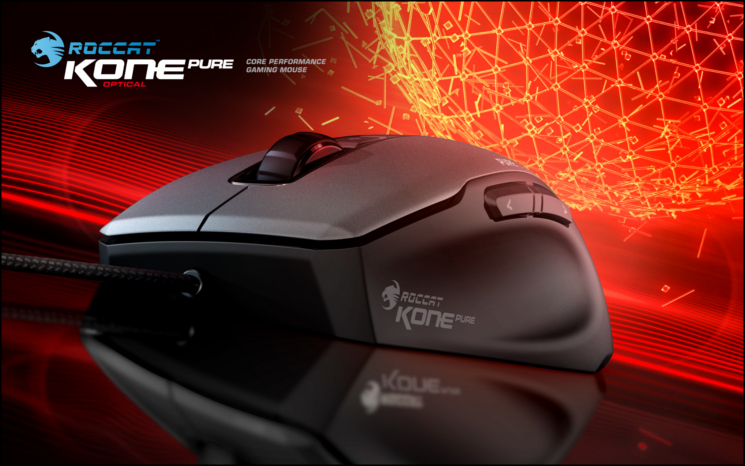
About The ROCCAT Kone Pure Optical
You wanted it. We listened to you, and we made it. The killer performance of the ROCCAT™ Kone Pure, now with an ultra-precise, true 4000 DPI Pro-Optic (R3) optical sensor. Celebrating the five year anniversary since the award-winning Kone series was born, the Kone Pure Optical is a hat tip to the community feedback that shaped the series’ success story. With groundbreaking innovations such as Easy-Shift[+]™, Talk®, and Talk® FX, ROCCAT™’s Kone series has continued to set a new standard in gaming.
Its veins pumping with fabled Kone blood, the Kone Pure Optical combines the customizable functionality and ergonomic shape of the Kone Pure – 91% the size of the Kone – with the unique feel of an ultra-precise optical sensor. Adjustable to 400, 800, 1200, 1600, 2000, 3200 and 4000 DPI, the Pro-Optic (R3) optical sensor delivers lag-free speed and control to suit your gaming style.
You wanted it. We listened to you, and we made it. The killer performance of the ROCCAT™ Kone Pure, now with an ultra-precise, true 4000 DPI Pro-Optic (R3) optical sensor. Celebrating the five year anniversary since the award-winning Kone series was born, the Kone Pure Optical is a hat tip to the community feedback that shaped the series’ success story. With groundbreaking innovations such as Easy-Shift[+]™, Talk®, and Talk® FX, ROCCAT™’s Kone series has continued to set a new standard in gaming.
Its veins pumping with fabled Kone blood, the Kone Pure Optical combines the customizable functionality and ergonomic shape of the Kone Pure – 91% the size of the Kone – with the unique feel of an ultra-precise optical sensor. Adjustable to 400, 800, 1200, 1600, 2000, 3200 and 4000 DPI, the Pro-Optic (R3) optical sensor delivers lag-free speed and control to suit your gaming style.
Although not especially relevant to the vast majority of gamers, the relative merits of Optical and Laser sensors make ROCCAT’s decision to include an Optical variant quite an interesting one. For some time there has been a DPI arms race, with the assumption that higher DPI means a better sensor. That’s not quite the case as aficionados will attest – scan rates and other factors still play a major part in sensor dynamics beyond DPI. A large proportion of ROCCAT fans clamoured for an Optical version of the Kone Pure to suit, and ROCCAT delivered.
Setting sensors aside, the Kone Pure Optical still features ROCCAT’s other gaming technologies such as ROCCAT Talk, Easy-Shift[+] and switches designed in partnership with Omron. The result is a compact design by gamers and for gamers, which at £54.99 is actually less than the standard price of the Kone Pure.
Features And Technical Specifications
Features
ADJUSTBALE 4000DPI PRO-OPTIC (R3) SENSOR
– with true 400, 800, 1200, 1600, 2000, 3200 or 4000dpi
ROCCAT™ CLICK MASTER
– switch tech powered by Omron©
EASY-SHIFT[+]™ BUTTON DUPLICATOR
– with Easy-Aim + Easy-Wheel functions
32-BIT TURBO CORE V2 PROCESSOR
– for lightning-fast computing speed
576KB ON-BOARD MEMORY
– for storing a wealth of macros and settings
16.8 MILLION-COLOR LIGHTING SYSTEM
– for customizable colors + effects
7 MOUSE BUTTONS + SOLID 2D WHEEL
– for a full complement of command options
SOFT-TOUCH SURFACE
– for extended gaming in total comfort
ROCCAT™ DRIVER + MACRO MANAGER
– for advanced customization + presets for games & apps
ROCCAT™ ACHIEVEMENTS DISPLAY
– for monitoring gaming performance
– with true 400, 800, 1200, 1600, 2000, 3200 or 4000dpi
ROCCAT™ CLICK MASTER
– switch tech powered by Omron©
EASY-SHIFT[+]™ BUTTON DUPLICATOR
– with Easy-Aim + Easy-Wheel functions
32-BIT TURBO CORE V2 PROCESSOR
– for lightning-fast computing speed
576KB ON-BOARD MEMORY
– for storing a wealth of macros and settings
16.8 MILLION-COLOR LIGHTING SYSTEM
– for customizable colors + effects
7 MOUSE BUTTONS + SOLID 2D WHEEL
– for a full complement of command options
SOFT-TOUCH SURFACE
– for extended gaming in total comfort
ROCCAT™ DRIVER + MACRO MANAGER
– for advanced customization + presets for games & apps
ROCCAT™ ACHIEVEMENTS DISPLAY
– for monitoring gaming performance
Technical Specifications
* Pro-Optic Sensor R3 with up to 4000dpi
* 1000Hz polling rate
* 1ms response time
* 10.8megapixel
* 20G acceleration
* 3.8m/s
* 16-bit data channel
* 72MHz Turbo Core V2 32-bit Arm based MCU
* 576kB onboard memory
* Zero angle snapping/prediction
* 1.8m braided USB cable
* Weight – 90g approx. (excl. cable)
* Dimensions – 70mm x 120mm x 35mm approx. max extent
* 1000Hz polling rate
* 1ms response time
* 10.8megapixel
* 20G acceleration
* 3.8m/s
* 16-bit data channel
* 72MHz Turbo Core V2 32-bit Arm based MCU
* 576kB onboard memory
* Zero angle snapping/prediction
* 1.8m braided USB cable
* Weight – 90g approx. (excl. cable)
* Dimensions – 70mm x 120mm x 35mm approx. max extent
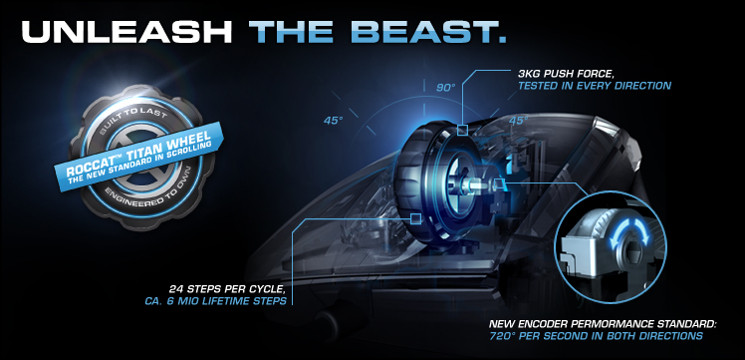
About Titan Wheel
Packaging And First Look
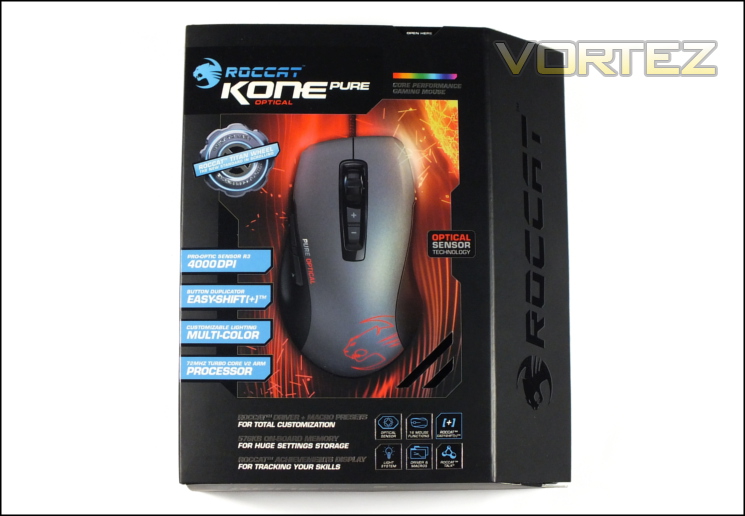
Unsurprisingly the packaging of the Kone Pure Optical shares many of the hallmarks of the Kone Pure, to the extent that you’d be forgiven for mistaking them as the same product if you say them on a store shelf. Thankfully ROCCAT have added a little bit of red to the former’s exterior, differentiating it from the blue of the latter and at least adding some clear distinguishing marks.
Chief among the features highlighted on the front are the Titan Wheel, an interesting choice when it comes to striking a contrast from competitors in the field and placing a slight focus on long-term durability. Also represented are the Pro-Optic Sensor R3 itself, Easy-Shift[+] functionality, customisable lighting and 72 MHz on-board processor. The devil is in the detail however, with macro system and on-board also memory figuring prominently. Due to not overloading with buzzwords and ancillary features there’s still plenty of space for a top-down shot of the Kone Pure Optical emphasising that it’s not an ambidextrous design, something which we find quite important.
Each of the sides of the packaging are also used to the fullest extent possible. System requirements, packaging contents and technical specs are all included on the bottom alongside the barcode and EU certification logos, whilst the right side panel goes into a little more detail for four of the features highlighted in the front.
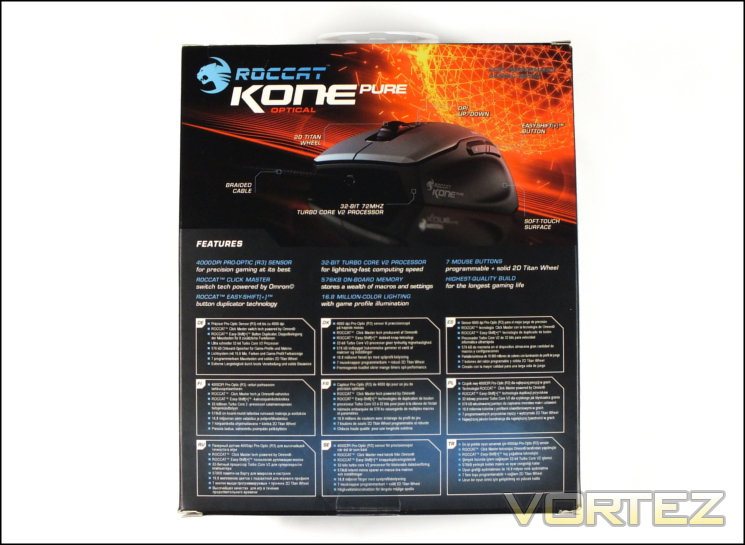
Moving to the rear, ROCCAT have used the space saved to include an image of the Kone Pure Optical mouse, this time from the front and at an angle to display the area where your thumb would be resting and give you some idea of the ergonomic contoured shape. This image is labelled with some of the features already discussed, and just below that ROCCAT repeat a selection of the elements you can exploit on the mouse. For the mouse connoisseur the most intriguing is likely to be the use of Omron switches, a choice which has been noticeable (for the better) in the past with both the Kone Pure and other manufacturer’s mice.
Opening up a front flap afforded us our first glimpse at the ROCCAT Kone Pure Optical as well as some explanation on how Easy-Shift[+] works and some of the pre-set application macros.
ROCCAT have done an excellent job relaying the key mouse features to any potential user, and although many purchases will be made online where such a list is already naturally available on the etailers website the brick-and-mortar retail experience is still important.
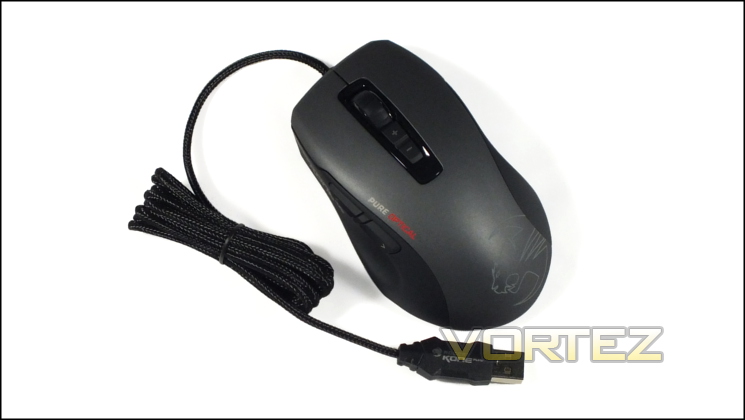
Here’s out first look at the Kone Pure Optical. The retail bundle is sparse, including only the quick-start guide. Frankly that’s all anyone tends to need or want if they have an internet connection, and if it has no weight customisation options (as in the case of the Kone XTD) that’s pretty much all you should expect.
A Closer Look
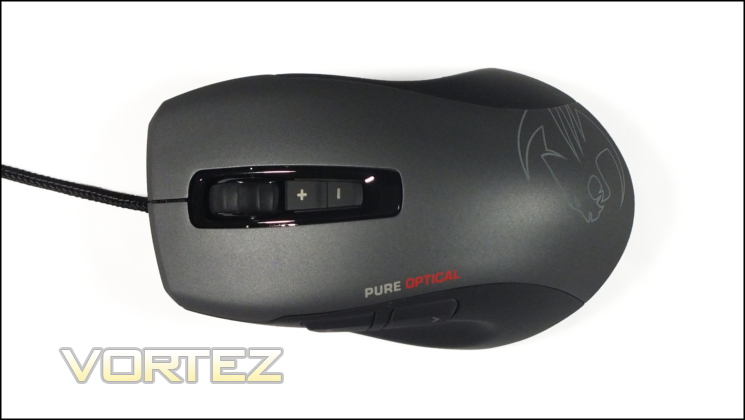
The shape and size of the Kone Pure Optical is identical to the Kone Pure, obviously due to an ‘if it ain’t broke, don’t fix it’ attitude. The Kone Pure design is quite small, measuring only 92% of the original Kone and compact compared to similar mice at this price point. The elongated dimensions are down to how narrow the mouse is, making it more suited to those with smaller hands or more cramped grips.
Weighing in at 90g the Pure Optical is also one of the lightest mice we’ve reviewed, which is certainly something of an achievement considering the electronics packed inside. Despite the lack of weight customisations the balance is good, with weight very slightly distributed towards the rear when gripped in line with the sensor. When lifting the mouse from a surface this should help you keep it level and is one aspect to the design’s stability.
Although the finish applied to the Kone Pure Optical differs from that of the Kone Pure in colour it’s still the same smooth rubberised ‘soft-touch’ of the original. This makes it tremendously easy to grip, but consequently will acquire grime a little more readily (if not in the same way as smooth plastic). Cleaning will be relatively simple, although investing in a wire brush for the small gaps between plastic sections is advisable.
At the top of the mouse we have the two main buttons, main scroll wheel and two buttons labelled + and -. The main buttons are solid with very little travel distance and no looseness in the housing. Following criticism of their mouse wheel ROCCAT moved to the Titan Wheel design, which reinforced the axle and improved the rate at which it can sense rotation. Thanks to the reinforced axle the middle mouse button is very solid and easy to click without rotating, something which is crucial if you want to use it on a minute-by-minute basis. The two additional buttons default to DPI control, but the top-most can usually be used effectively in-game if you’re using a claw or fingertip grip.
At the bottom of the shell ROCCAT have etched their stylised cat logo into the translucent plastic below the rubberised surface. Naturally an array of LEDs will shine through when active, in your choice of colour.
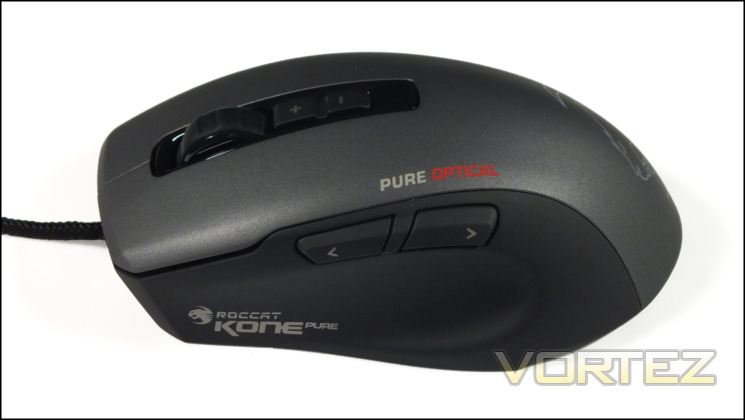
Moving to the left side (as the right is bare) we can see the two thumb buttons and a significantly recessed thumb rest. The latter will allow you to lift the mouse without having to grip the sides too tightly, improving stability in FPS gaming particularly. The thumb buttons are recessed into the shell with quite some separation, making them very easy to distinguish in the heat of the moment.
Just above the thumb buttons is the Pure Optical logo. It does spoil the clean aesthetic somewhat, but is still probably necessary to prevent any possibility of confusion given their otherwise nearly identical looks.
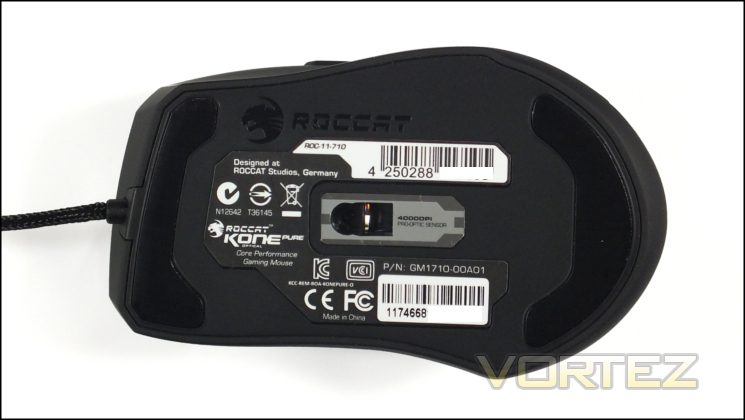
Finally we come to the base of the mouse. Two non-stick feet are at the top and bottom to ensure a smooth and even mousing action, although we’ll need to keep a close eye out for any wobble or other instability sometimes caused by having more or less than three ‘feet’ on a mouse. The optical sensor is almost perfectly central to the base and should ensure that even small movements with a slight rotation are picked up and relayed accurately. Other than that, this is also the place to go for product and serial numbers as well as a number of EU manufacturing and disposal certification labels.
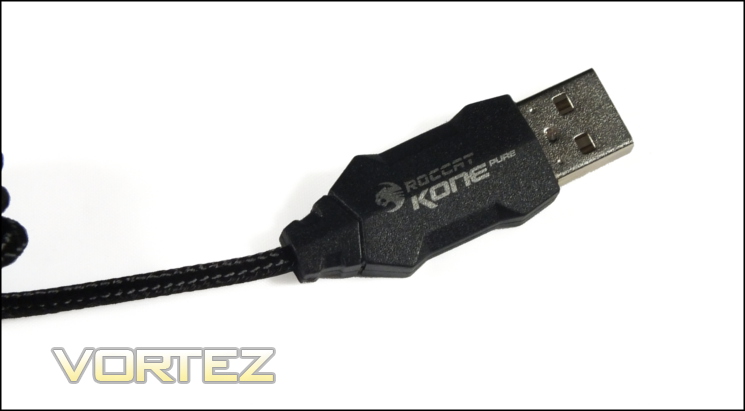
The final component to the Kone Pure Optical is a braided USB cable. The braid is fairly lightweight which in conjunction with the relatively thin cable should ensure that it doesn’t move the mouse when the mouse is at rest. Here some of our extended time with the Kone Pure comes in handy, as after a couple of months the cable was notable loose and flexible compared to its retail-fresh state.
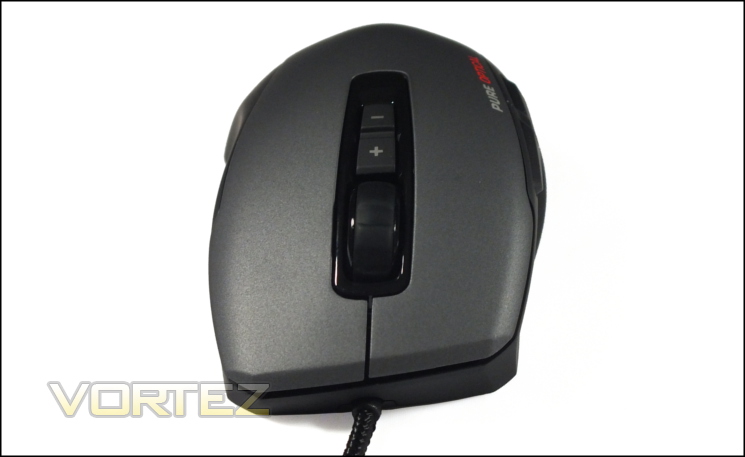
So there is the ROCCAT Kone Pure Optical. Much of the shell and all of the external parts appear to be identical to that of the Kone Pure, which in of itself if no surprise, but it’s also put together in a way that oozes quality and reassuring solidity.
Lighting Customisation
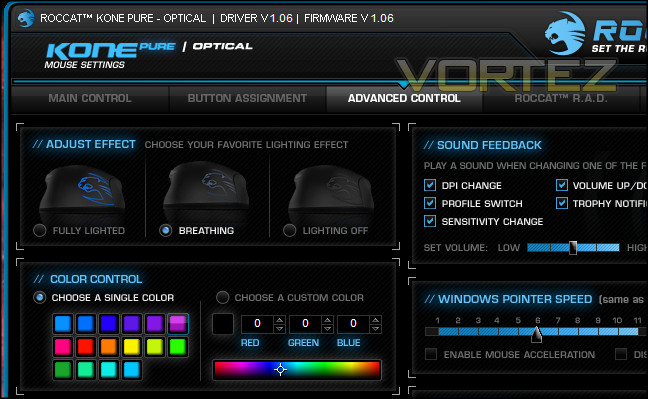
If you look closely at the ROCCAT Kone Pure Optical’s software you’ll find that the Kone Pure Optical features an LED-illuminated logo in theory capable of 16.8 million colours in RGB space. The utility allows the selection of colour in a 2D spectrum or selecting colour via its RGB value. Whichever colour is selected, the response on the mouse is bright and rich even if it cannot quite replicate all of them quite as accurately as you might want. The LEDs do appear to have difficulty matching particular colours with low intensities in a RGB field: a little (<5) blue in a strongly red signal will tend to appear more pink/purple than expected; a little green creates a strongly orange/yellow etc. That said, you should be able to achieve a pleasing result if you play around a little. Whilst perhaps not quite 16.8 million different colours, there are at least dozens and probably hundreds of colours to choose from.
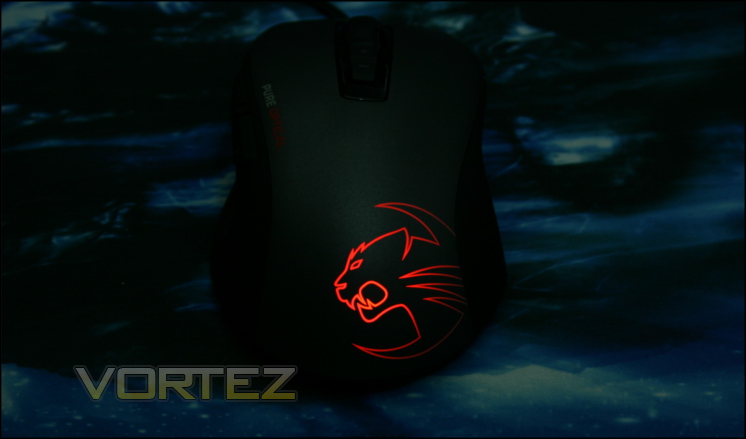
As we mentioned the LEDs illuminate the ROCCAT logo on the rear of the mouse, but in the case of the Kone Pure Optical does it with a sharpness that’s surprising. The bleed we noticed on the Kone Pure appears to have been close to eliminated on the Kone Pure Optical, although there’s still some brightness variation around the logo itself. For those using the mouse with their right hand (the vast majority we would expect) the variation will never be problematic and may in fact reduce the chances of distracting anyone sitting adjacent to you. We’re not sure if this was a deliberate design decision, but it’s worth highlighting.
The mouse also features breathing and fully-off modes for lighting, whilst we’ve been able to discover that other modes are possible through early ROCCAT Talk FX software prototypes. Adding the ability to change the rate of the breathing pulse, or simply adding a means of flowing through all colours, would be a pretty cool; however as configured the effect is smooth without any significantly perceptible step transitions between intensities.
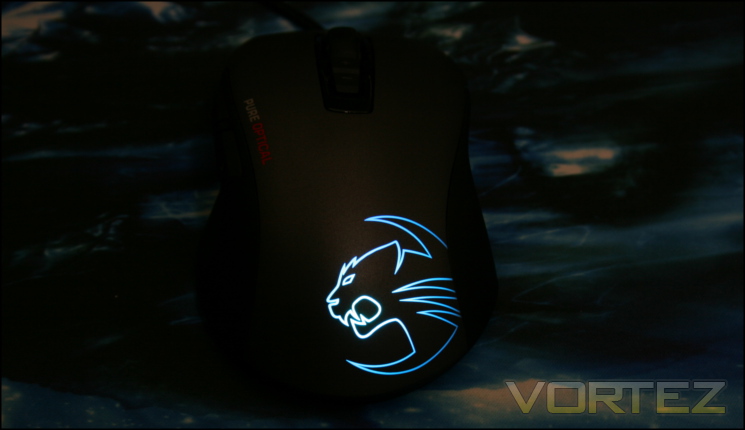
Colours are stored on a per-profile basis, meaning that a particular colour combination could be used to discriminate between said profiles. Configuring this to also vary on DPI would probably be too much of a challenge without adding additional LED locations, but it does mean that the only active indication of a DPI change is either the audio notification or you perceiving the movement of the cursor.
If the mouse is in ROCCAT Easy-Shift[+] mode the LEDs will be overridden to a light blue. At first we couldn’t quite see the point, but when combined with ROCCAT Talk it makes troubleshoot that much more straightforward as you can assess what mode the mouse is in at a glance.
For a mouse in this price bracket the colour options are pretty good, and improve the functionality of the mouse to boot.
ROCCAT TALK FX
ROCCAT Talk FX is a propriety protocol which links the lighting of ROCCAT peripherals for the purpose of synced colouring and effects. It allows control of the underlying dynamics of the lighting and, if the API made use of in a game engine, can react to in-game events. In World Of Tanks for instance the lighting can be set up to reflect your current hit point status and blink when you’re hit by a projectile; however it can also be use to reflect ambient on-screen lighting to increase immersion in otherwise low-light conditions.
Although the recent Kone mice all support ROCCAT Talk FX, only the Isku FX keyboard fully supports it thanks to a multicolour distributed lighting system. Keyboards with a fixed colour backlight, such as that present on most mechanical boards, are unsuitable for some of the aspects of Talk FX (although it may be possible to link non-colour lighting effects). In that regard Talk FX should only really enter into your decision-making if you own or plan to purchase an Isku FK keyboard.
You can find a discussion of Talk FX in our review of the Isku FX, but since then ROCCAT has make the Talk FX SDK more widely available through their download site. With enthusiast developer support it’s hoped that more complex tools will be created for this largely aesthetic feature, but until then only World Of Tanks actively supports it in-game.
Software
ROCCAT don’t include software in the majority of their peripherals’ retail bundles, instead electing to guide users towards the official site and picking up the latest version. That has all sorts of benefits, not least of which ensuring that the devices aren’t bundled with an old-of-date and potentially harmful software version, but it does also mean that you will require an internet connection.
We should note that the software for the ROCCAT Kone Pure Optical is not the same as the Kone Pure. We picked up verison 1.06 and firmware version 1.06, the most current software at the time of writing, as well as ROCCAT Talk v2.1.
—
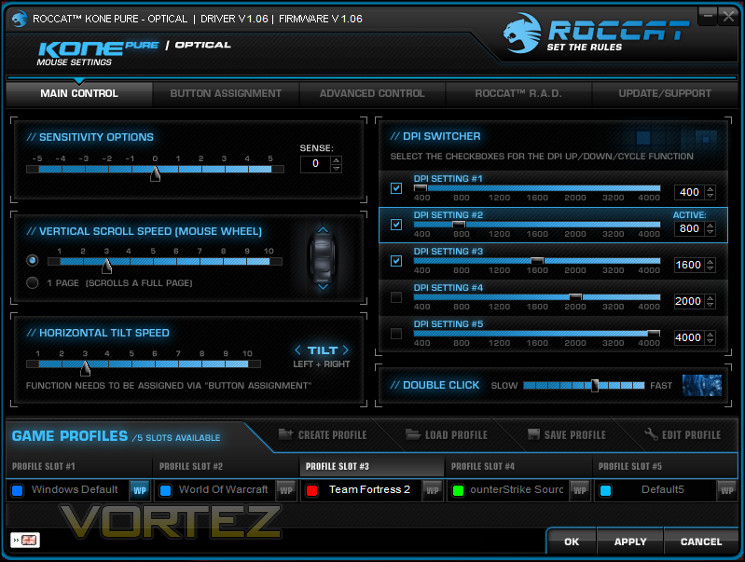
ROCCAT’s software, once again, follows the aesthetic tradition of blue writing on black background within a pretty compact window. UI designs from other manufacturers often take up a huge amount of vertical space, in some cases over 700 pixels, but in this case you’ll have no issue with running it on older 720p or 1024*768 screens.
If you’ve used ROCCAT’s software before you’ll feel immediately at home with the familiar layout. Tab selection is at the top for easy navigation, whilst the bottom is reserved for Profiles and associated tools. Most settings are on a per-profile basis as you would expect, with profiles able to be renamed and saved locally as desired. One can also be selected as the Windows Default, which is handy if you’re making use of profile launching simultaneous to application launches. Each profile slot corresponds to a slot within the mouse memory, and backing up a profile can be performed simply by saving it to a new location. If you have any lighting assigned to the profile it is reflected in the small rectangle next to its name.
Five tabs adorn the top of the window, two of which are the strictly non-technical R.A.D. and Update/Support panes. The other three – Main Control, Button Assignment and Advanced Control – are the tools by which the mouse is configured.
Beginning with Main Control, we’re given the option of adjusting a variety of sensitivity options, mouse tilt and scroll speeds, and DPI settings. Unlike the Kone Pure the Optical variant has rigidly fixed DPI levels: 400, 800, 1200, 1600, 2000, 3200 and 4000; settings can be allocated any DPI level, and they’re not mutually exclusive. Because DPI navigation is performed by way of a up/down/cycle selector option ROCCAT allow you to disable any inactive setting in order to make switching quicker and where possible use less button assignment slots.
Easy-Aim is a function which can be assigned to any button outside of the main two, and whilst held it sets the DPI to a chosen value. Any value currently allocated to a DPI Setting – active or inactive – can be used. If you’re after a low-DPI ‘sniper’ button for your Kone Pure Optical then allocating 200/400dpi to a DPI Setting and then selecting that as your Easy-Aim value will do the job pretty well.
Note that the horizontal tilt isn’t set to any default location because the Kone Pure isn’t equipped with a tilt-wheel. However it is available as a pre-defined function in Button Assignment, which may be handy for spreadsheet navigation.
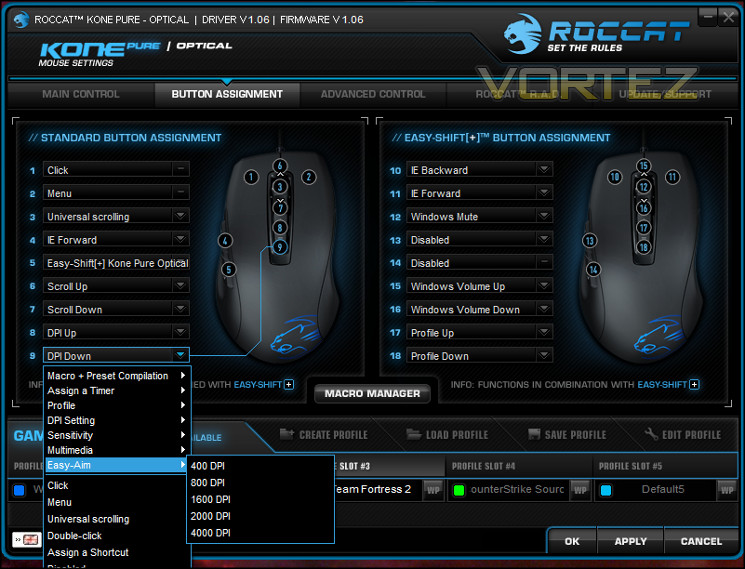
Button Assignment is the meat of any mouse configuration utility, and that’s still the case for the Kone Pure Optical. From here you can set the behaviour of most mouse buttons with secondary assignments also available for Easy-Shift[+] operation; an immense range of pre-configured options are available including multimedia functions, games shortcut and profile switching. On the mouse itself Easy-Shift[+] can only be set to one of the two thumb buttons (labelled 4 and 5), however another ROCCAT device can be used to activate Easy-Shift[+] mode if ROCCAT Talk is installed.
Timers can also be assigned to button presses, but won’t operate simultaneously with another command. That’s something of an omission (which we also noted recently with the Ryos MK), and along with a lack of OSD flexibility make it a tool which could be much more useful in certain gaming genres.
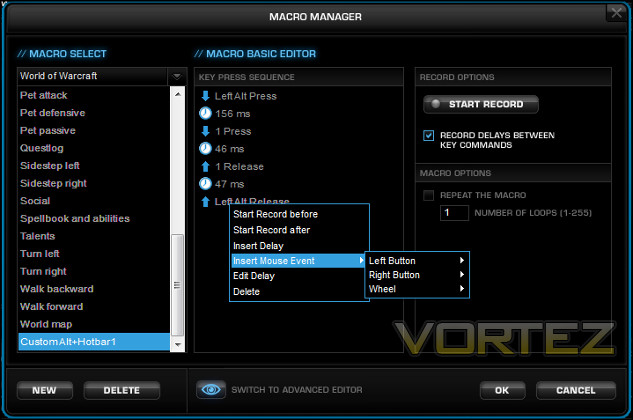
Of course, for all the breadth of pre-programmed macros, you’ll almost certainly still want to create your own. That’s where the Macro Manager comes in, which allows you to record macros on a keystroke-by-keystroke basis. Later you can insert additional keystrokes or mouse events, and if necessary alter the delays between events. An advanced view plots this out in a timeline rather than list of actions, and can be useful to determine how well certain events overlap if using modifiers.
Macros are assigned to particular application groups (such as specific games etc.) and stored within profiles, but there’s no explicit way to back-up the entire catalogue of macros so far as we can discern. One way or another, this sort of functionality would be immensely handy when migrating settings from one PC or OS installation to another, ensuring that no work on optimising macros is lost.
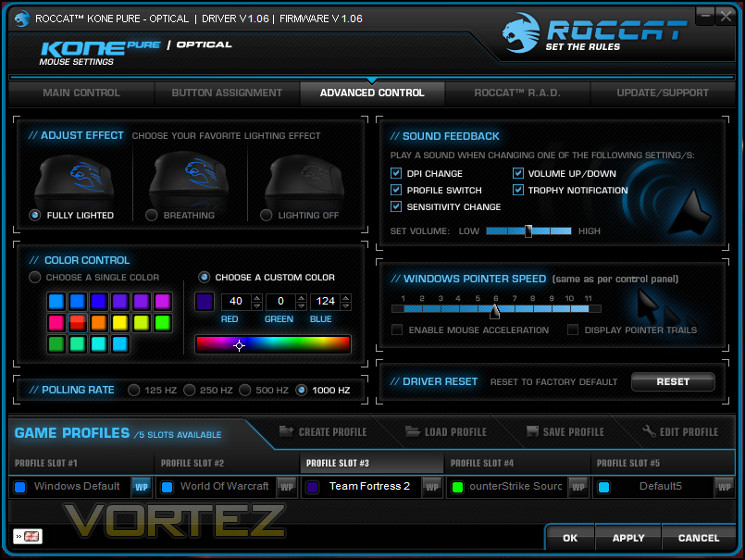
Advanced Control, the final configuration tab, defines the more aesthetic features of the mouse. As discussed already you can control the lighting, but you can also alter sound feedback settings (a must to prevent being scared by a someone blaring that you just won a trophy mid-coffee) and Windows mouse dynamics. Polling rate is also adjustable here, although you will likely stick to 1000Hz polling in almost every case.
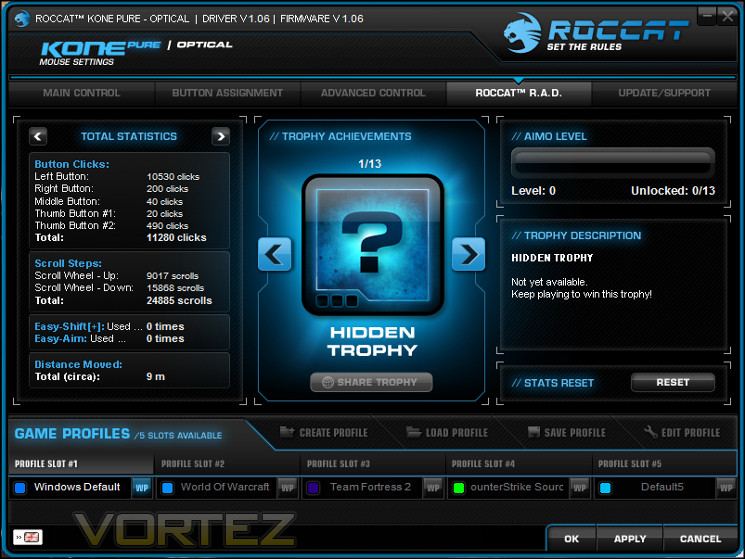
ROCCAT Achievement Display (R.A.D), tracks mouse activity metrics such as number of clicks or total distance travelled. Other manufactures have taken the step of collating this information into heat-maps of activity for the mouse, but at present ROCCAT merely displays the information which serves as an entry into the Roccat World social hub. As pleasant as an addition that is, ROCCAT could be doing a whole lot more with this information and it would be sensible to start to provide a little bit more in a visual manner, as well as streamlining the process of tracking the info.
The final Update/Support tab presents summarised information on driver and firmware version as well as links to the official support site and forum. At present the software suite doesn’t automatically check for new versions and relies on a manual lookup, which is somewhat disappointing given how sleek the sofware is otherwise. That excepted it is function, and at least provices this inforation in a logical and easy to find spoit.
All in all the ROCCAT Kone Pure Optical’s software suite is a reasonable modification to that of the original Kone Pure. We’ve mentioned in the past that other manufacturers are improving their software and ROCCAT need to step up their game; the same is true here as for all its polish it’s a little lacking, relatively speaking. Even so it’s more than adequate and very few are likely to be harmed by some of the more significant omissions.
Performance
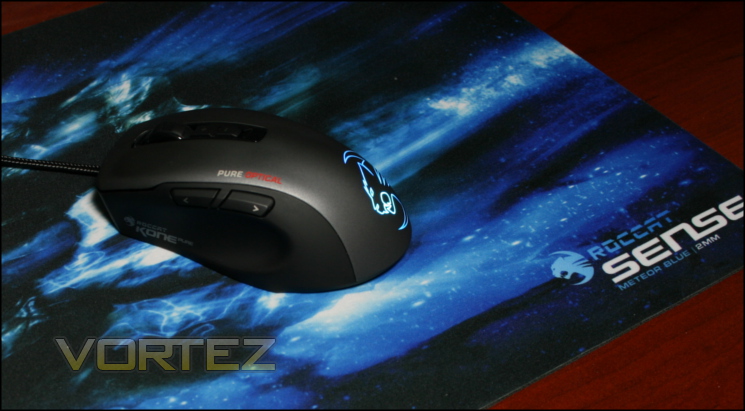
We had the pleasure of a couple of weeks with the Kone Pure Optical, and paired it for some of that time with a ROCCAT Sense mousemat. This mat, apart from looking particularly cool, is a fairly standard 400mm x 280mm affair with 2mm thick rubber backing and surface treatment to provide a smooth yet durable finish. As it’s neither glass nor highly reflective it should allow both optical and laser sensors to operate optimally.
Additionally, we also looked at the mouse’s performance in conjunction with the Ryos MK, primarily to assess the value of ROCCAT Talk whilst still ensuring that we test the MMO capabilities independent of the excellent macro system on said keyboard.
General Performance
The first key ingredient we look for in a high-quality mouse is a fairly simple one: a solid, even base. The Kone Pure designs make do with two large Teflon pads where others may have four, five or more; any other than three has the potential to result in an uneven resting position. Our Kone Pure Optical has a very slight side-to-side wobble which will subside over time as the pads wear, and thankfully isn’t too noticeable on softer surfaces which yield a little such as cloth mouse-mats.
We’ve mentioned how light the Kone Pure optical design is, and that makes it ideal for FPS titles and extended gaming sessions. Due to being paired down to a pure gaming mouse it doesn’t have much of the ancillary features of some such as an additional clutch/sniper button, removable weights and the like which all add weight to the design. Combined with the low friction pads, this results in high accuracy at higher mouse sensitivities and low inertia. From the point of view of pure mouse dynamics it’s therefore well suited to office tasks as well as MMO and FPS gaming.
Mouse button presses are fairly light and pleasantly without the clunk sometimes associated with mice in this price bracket. We put this down to the choice of Omron switches, which have often more than pulled their weight in the past. Travel distance for both the main and thumb buttons is minimal as the actuation point is immediate; in the case of the side buttons there is some travel to the back plate, but resistance is uniform and the distance is not sufficient for it to feel spongy. Their overall lightweight nature should make them quiet enough for use in shared spaces or when using a fairly sensitive microphone.
The ‘Titan’ mouse wheel is sturdy with small but well defined ratchet points that were routinely registered when used. It was able to keep up well with high and low speed rotation, never seeming to lag. The resistance between each ratchet point allows the middle mouse button to be pushed without much risk of accidentally scrolling, which should be of particular value in gaming and using it as a point to assign macros too for office use.
Gaming Performance
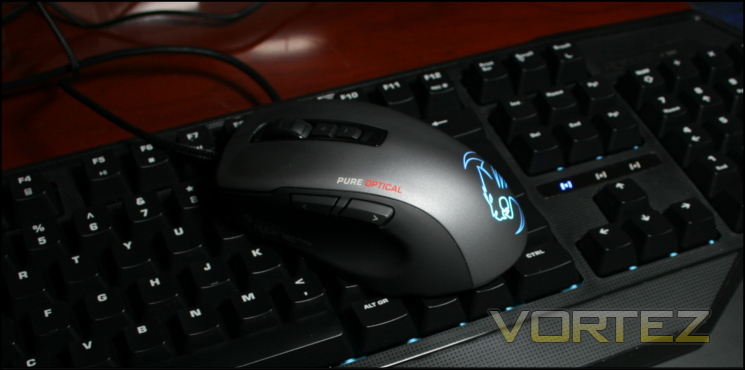
The Kone Pure Optical is a gaming mouse, and in gaming it shone. Low weight and ergonomic design allows for very good control and precision whether sniping in Team Fortress 2 or selecting character portraits whilst healing in World of Warcraft. The two side buttons are also clearly differentiated and responsive, reducing the learning curve necessary to adapt to a new mouse and aiding stability so that a button push doesn’t impact the pointer position greatly.
The slightly slanted sides of the Kone Pure Optical made lifting it easy, but one notable difference from the Kone Pure is the lack of a Tracking Control Unit. Amongst other features the ROCCAT TCU can adjust the lift-off distance at which the sensor will no longer register input; this can be useful for advanced FPS gamers as repositioning your hand on the mousemat is a regular requirement. The Kone Pure Optical’s lift-off distance is around 3mm, and although we didn’t find that to be too problematic your mileage may vary.
Angle snapping / pointer prediction didn’t appear to be present with the Kone Pure Optical, although it’s possible that if its quite subtle. On the flip side there is independent control of X/Y axis sensitivity, which could be something of an issue to some advanced users of this feature.
As we always do, we found clear profile indicators on the Kone Pure Optical to be a boon. Less so was the lack of DPI indicator, yet although we would like to see more on the mouse as standard the audio cues do sterling work. The seven different DPI levels seemed appropriate, and although you will have to rely on in-game settings for fine sensitivity adjustment it’s unlikely you suffer greatly from the absence.
Building on the profile system is a robust macro system that will operate independently to the software once loaded into mouse memory. Although slightly more limited in terms of locations to bind macros to than some mice at a similar price point – seven in standard configuration – Easy-Shift[+] almost doubles this to 15. Using all of those will be a challenge, both in terms of muscle memory and developing the optimum configuration, but the option is there. For FPS gaming binding one of the thumb buttons to Easy-Aim and a setting that to a low DPI effectively performs the same duties of a ‘sniper’ button at the cost of one assignment, which isn’t too much of a hardship in such titles.
For RPGs and FPS titles the Kone Pure Optical is an great choice on its own, but we also have to bear in mind ROCCAT Talk. As we discussed in our review of the Isku FX, combining the two increases the number of macros able to be assigned at any one time and allows Easy-Shift and Easy-Aim to operate from the keyboard rather than the mouse. Doing so makes both functions far easier to use, reduces learning time and increases overall flexibility at the cost of, well, acquiring and using a ROCCAT keyboard over your current one.
To sum up, the Kone Pure Optical operates exceedingly well as an FPS mouse and will be well suited to entry-level RPG and MMO gaming thanks to its extensive macro system. Those with more complex requirements, of a high-level MOBA player MMO raider, you’ll likely either look at more specialised mice with more baseline assignment locations or also invest in a ROCCAT Isku FX/Ryos MK keyboard to take advantage of ROCCAT Talk.
Conclusion
Our conclusions for the ROCCAT Kone Pure Optical have been informed by our previous experience with the excellent laser-sensor-based Kone Pure, and we have to say that there’s really not much between the two. Both have seemingly excellent build quality, great features and a sensor that as far as we were able to discern never misbehaved. The question then becomes, how much has the market moved on since the release of the Kone Pure?
The answer is not too much. New mice have tended to be either incremental updates to well-established products, much like the Kone Pure Optical itself. Genuinely new designs have tended to be at the higher range of the market or more specialised to the MMO side, which isn’t really the target for the Kone (the XTD being a more generally MMO-oriented mouse from ROCCAT).
With that said, the ROCCAT Kone Pure Optical has to match our award for the Kone Pure, especially as it comes in at a price under it’s sibling. Key to this is retaining operation independent of software where necessary thanks to its Turbo Core V2 processor and 576kb on-board memory, although using the software will of course bring additional benefits. The strength of the mouse is augmented by pairing it to a ROCCAT Talk-compatible keyboard such as the Isku or Ryos MK range, and it’s hard to understate just how much that coupling unlocks the potential of both devices.
If we had one reservation, it would be the software. As stated in our review of the Ryos MK last week ROCCAT are beginning to fall behind the competition purely with regards to the features and customisations their software offers. It should be stated that this doesn’t mean the Kone Pure Optical’s isn’t fit for purpose, because it genuinely is highly functional and well polished, but it’s still static where other manufacturers are progressing forward relatively rapidly.
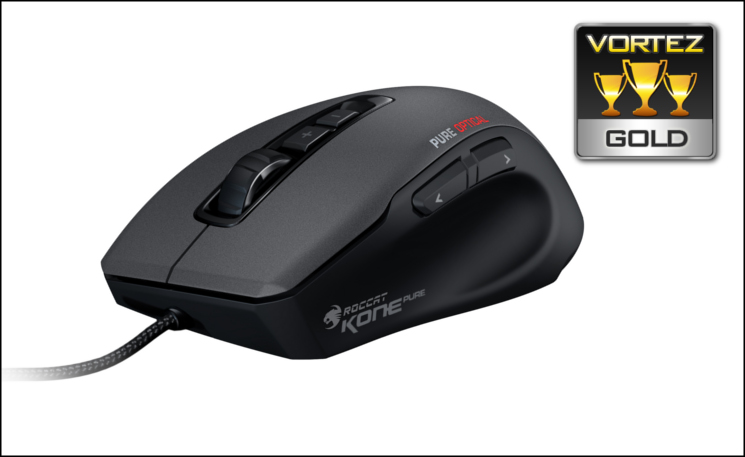
The ROCCAT Kone Pure Optical matches the excellence of the Kone Pure as a 7-button mouse with great responsiveness, well constructed elements and good levels of customisation. Through software you can adapt it more closely to your own game preferences, whilst synergies with other ROCCAT periperhals increase your options greatly. Especially well suited to those with slightly smaller hands and associated grip styles, it receives our Gold Award.
Pros
+ Brings the strengths of the Kone Pure with the option of an optical sensor
+ 72 MHz on-board processor allows for quick, responsive macro parsing
+ Five profiles and dozens of button assignments thanks to 576kb memory
+ Keenly priced
+ Good software
+ Some personalisation through lighting
Cons
– Still a slightly higher price than some competitors
– Fewer customisation options than some
Tips
= Pair with a ROCCAT Keyboard such as the Iksu FX or Ryos MK range to take advantage of ROCCAT Talk
+ Brings the strengths of the Kone Pure with the option of an optical sensor
+ 72 MHz on-board processor allows for quick, responsive macro parsing
+ Five profiles and dozens of button assignments thanks to 576kb memory
+ Keenly priced
+ Good software
+ Some personalisation through lighting
Cons
– Still a slightly higher price than some competitors
– Fewer customisation options than some
Tips
= Pair with a ROCCAT Keyboard such as the Iksu FX or Ryos MK range to take advantage of ROCCAT Talk

Click here for an explanation of our awards at Vortez.net.
Our thanks go to ROCCAT for providing this review sample.

