







Combining the Pro Aim Sensor R3 of the Kone Pure with the customisation options of the Kone[+], is this a big step forward for ROCCAT…

Product on Review: ROCCAT Kone XTD
Manufacturer and Sponsor: ROCCAT
Street Price: €89.99 / USD$69.99 (MSRP)
If you’ve not heard the name ROCCAT before, where have you been? Established in 2007, the German outfit have been significant players in the gaming peripheral market for years and have gone from strength to strength following the explosive increase in popularity of the Western eSports scene.
ROCCAT have a great reputation for style in their gaming peripherals, utilising an aesthetic flair rarely seen in competitors but running throughout their range. Functional design is solid by contrast, with button layout being provably popular and suitable for a wide variety of games. The hardware development process – curated by ROCCAT Labs – tends to be evolutionary rather than revolutionary, focussing on improving internal technology rather than radical external redesigns of mice which have already received excellent feedback from users with regards to shape and button layout. Even so, they can’t resist a few tweaks here and there, allowing enthusiasts to customise their mouse or keyboard in subtle ways.
The area in which ROCCAT innovate the most is in software and firmware as they strive for closer integration of their peripherals to the benefit of gamers. In our review of the Isku, David discussed the then-new ROCCAT Talk technology which allowed keyboard modifiers to control certain aspects of mouse performance, resulting in additional control for the users. Easy-Shift[+] by contrast can be used with just a mouse, and effectively doubles the number of functions a mouse button may be bound to. As you might also expect for products which offer almost bewildering choice, the driver software utility is marked by clear layout and customisation depth.
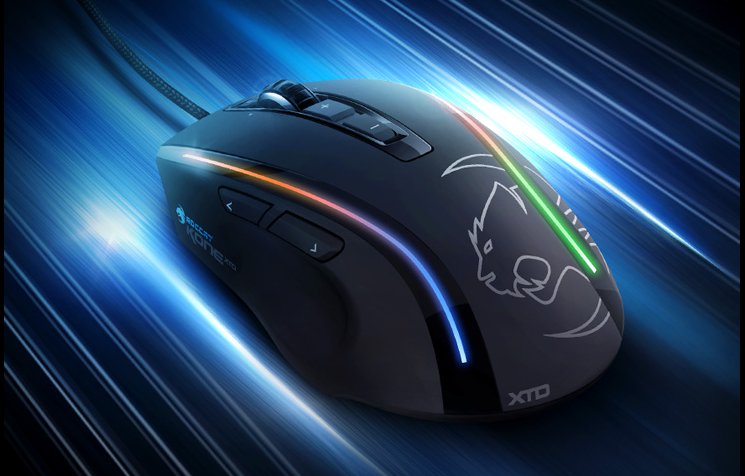
The Kone XTD, on review today, is a mouse grounded firmly in the successful Kone products of yesteryear. It superficially resembles the Kone and (more closely) Kone[+], classic ROCCAT designs in shape and layout, but adds an improved laser sensor and ROCCAT Talk/Talk FX technology to the mix as additional premium features.
About the ROCCAT Kone XTD
To build the mighty ROCCAT™ KONE XTD – Max Customization Gaming Mouse, our ROCCAT™ Scientists increased the already formidable capabilities of the legendary Kone[+] – while keeping the legendary design of the Kone[+] 100% intact. The result? A supreme gaming weapon – custom-built for the most battle-hardened fighters – that will thrill Kone[+] fans worldwide.
The XTD is powered by an astounding performance package loaded with the latest 8200 DPI Pro Aim R3 laser sensor, a commanding 32-bit Turbo Core V2 72MHz ARM MCU processor, and the most advanced Tracking & Distance Control Unit around – all working in clockwork unison to deliver world-beating battle ability.
Add to that a plethora of ergonomic features designed for the longest play comfort – and a suite of the world’s most advanced gaming software for max customization – and you’ve got a masterful tool for dominating any world you choose.
The XTD is powered by an astounding performance package loaded with the latest 8200 DPI Pro Aim R3 laser sensor, a commanding 32-bit Turbo Core V2 72MHz ARM MCU processor, and the most advanced Tracking & Distance Control Unit around – all working in clockwork unison to deliver world-beating battle ability.
Add to that a plethora of ergonomic features designed for the longest play comfort – and a suite of the world’s most advanced gaming software for max customization – and you’ve got a masterful tool for dominating any world you choose.
Features
FULLY-ADJUSTBALE 8200DPI PRO-OPTIC (R3) SENSOR
with 41 true DPI setting ranging from 200 to 8200
ROCCAT™ CLICK MASTER
switch tech powered by Omron© for precision button activation
EASY-SHIFT[+]™ BUTTON DUPLICATOR
with Easy-Aim + Easy-Wheel functions for max command power
32-BIT TURBO CORE V2 PROCESSOR
for lightning-fast computing speed
TRACKING & DISTANCE CONTROL UNIT
for less pick-up flight & more precise gaming
576KB ON-BOARD MEMORY
for storing a wealth of macros and settings
4-LED LIGHT SYSTEM
for customizable colors + effects
8 MOUSE BUTTONS + SOLID 4D WHEEL
for a full complement of command options
4 EASY-TO-CLIP-IN WEIGHTS (4 X 5G)
for customized weight adjustment
ROCCAT™DRIVER + MACRO MANAGER
for advanced customization + presets for games & apps
ROCCAT™ ACHIEVEMENTS DISPLAY
for monitoring gaming performance
with 41 true DPI setting ranging from 200 to 8200
ROCCAT™ CLICK MASTER
switch tech powered by Omron© for precision button activation
EASY-SHIFT[+]™ BUTTON DUPLICATOR
with Easy-Aim + Easy-Wheel functions for max command power
32-BIT TURBO CORE V2 PROCESSOR
for lightning-fast computing speed
TRACKING & DISTANCE CONTROL UNIT
for less pick-up flight & more precise gaming
576KB ON-BOARD MEMORY
for storing a wealth of macros and settings
4-LED LIGHT SYSTEM
for customizable colors + effects
8 MOUSE BUTTONS + SOLID 4D WHEEL
for a full complement of command options
4 EASY-TO-CLIP-IN WEIGHTS (4 X 5G)
for customized weight adjustment
ROCCAT™DRIVER + MACRO MANAGER
for advanced customization + presets for games & apps
ROCCAT™ ACHIEVEMENTS DISPLAY
for monitoring gaming performance
Additional Sensor and Connectivity Specs:
Sensor
* Pro-Aim Laser Sensor R3 with up to 8200dpi
* 12000fps, 10.8megapixel
* 30G acceleration
* 3.8m/s (150ips)
* 16-bit data channel
* 1-5mm Lift off distance
Processing Hardware
* Tracking & Distance Control Unit
* 72MHz Turbo Core V2 32-bit Arm based MCU
* 576kB onboard memory
* Zero angle snapping/prediction
USB 2.0
* 1000Hz polling rate
* 1ms response time
* 1.8m braided USB cable
* Pro-Aim Laser Sensor R3 with up to 8200dpi
* 12000fps, 10.8megapixel
* 30G acceleration
* 3.8m/s (150ips)
* 16-bit data channel
* 1-5mm Lift off distance
Processing Hardware
* Tracking & Distance Control Unit
* 72MHz Turbo Core V2 32-bit Arm based MCU
* 576kB onboard memory
* Zero angle snapping/prediction
USB 2.0
* 1000Hz polling rate
* 1ms response time
* 1.8m braided USB cable
Packaging And Accessories
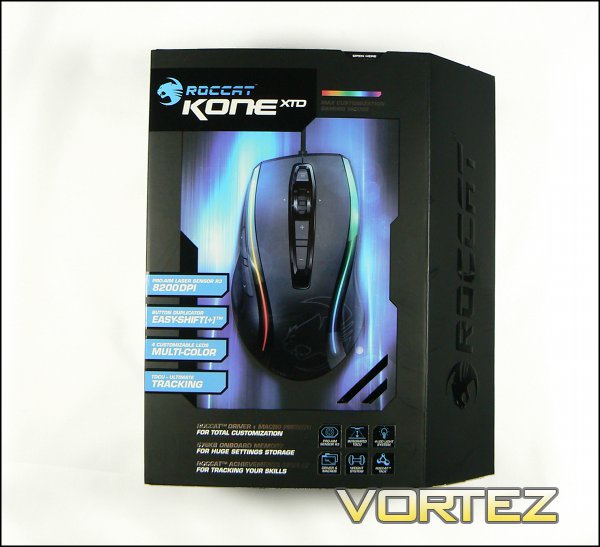
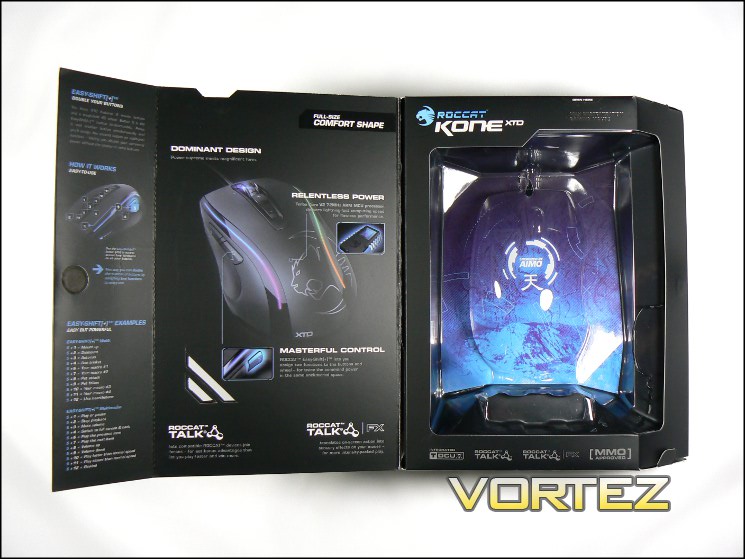
The ROCCAT Kone XTD bears the legend ‘Max Customisable Gaming Mouse’, an indication both of the major selling points and the market the Kone XTD is aimed at. We can immediately see a stylised shot of the Kone XTD showing the lighting highlights, and four inserts describing the significant major features of the new sensor, Easy-Shift[+], LEDs and TDCU surface tracking technology. The front packaging opens to reveal the mouse itself, with detail on the Easy-Shift[+] functionality – a crucial yet easy to misunderstand feature.
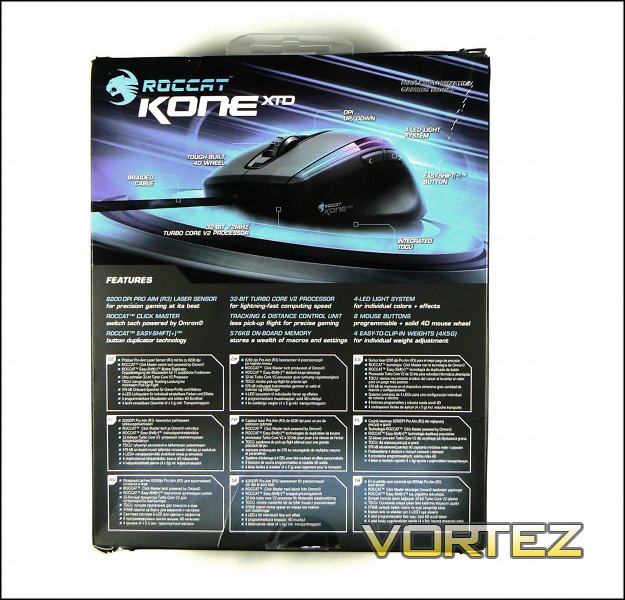
On the reverse side we can see yet more detail of the mouse’s functionality including button placement, braided cable and processor, whilst still dedicating plenty of room to the less visible features. Each of the nine major selling points are listed with a short explanation, spelling out exactly what to expect when you purchase this particular Kone. The feature list is also repeated in nine additional languages, which should help in multi-lingual regions of the world.
Additional Accessories.
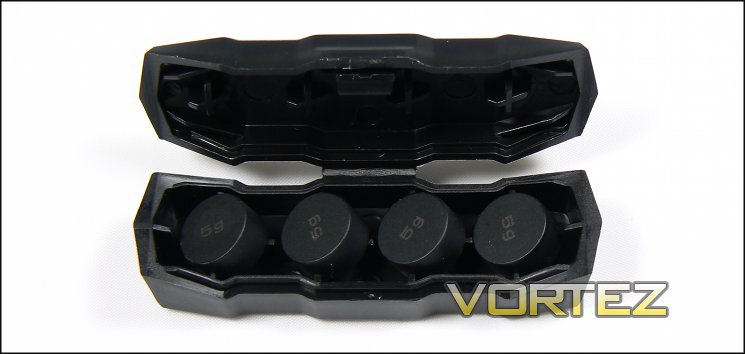
As mentioned, the Kone XTD package includes four additional 5g weights, and ROCCAT have thankfully included a small case to store them when not in use. Also in the package is a quick installation guide, but interestingly no driver CD. ROCCAT advise downloading the latest drivers from the website, which reduces packing and shipping costs whilst recognising that the vast majority of potential users will have an internet connection. It also means that the risk of shipping a driver set with dangerous undiscovered bugs is obviated and provides more control over the drivers available in the wild, which is generally better for long term tech support.
Closer Look
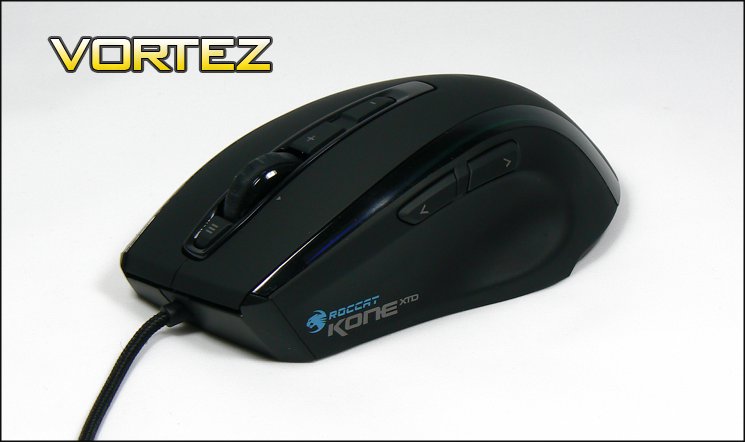
Here’s our first look at the Kone XTD in the flesh, and it’s an interesting fusion of styles. In an earlier review Richard described ROCCAT’s Savu as discrete and not gaudy, and whilst certainly not gaudy the Kone XTD could hardly be labelled discrete. Two high-gloss bands run the length of the mouse, under which lies the LED light-bars which can not so subtly illuminate it. Rather than an illuminated ROCCAT logo, the Kone XTD has a prominent silvered logo on the palm rest, along with the XTD label. The majority of the mouse is finished with a matte black rubberised layer, a style heavily in use as it both makes the surface adhere to the hand and is a more quality feel than bare plastic.
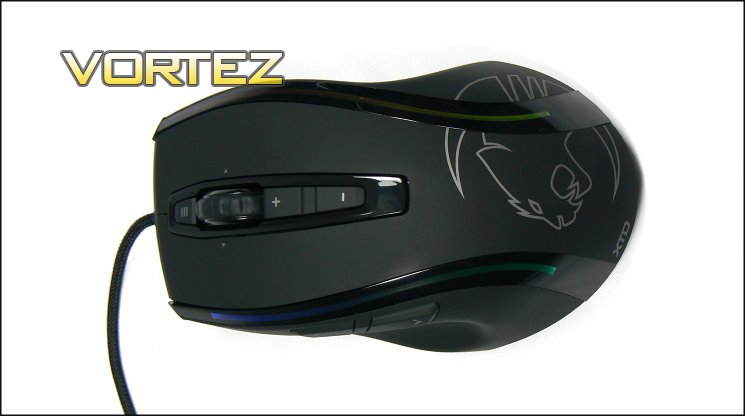
On the top we have the usual left and right mouse buttons (LMB, RMB), and central scroll wheel. Below the scroll wheel are two buttons – labelled ‘+’ and ‘-‘ – which are generally reserved for DPI/Profile changing on gaming mice. Above the wheel is a single button for miscellaneous use, bound to the Windows Key by default. The scroll wheel also includes tilt functionality to the left and right, a feature typically more often seen in those designed for office productivity, which should add to the Kone XTD’s overall appeal in areas other than gaming.
The left of the mouse features two thumb buttons, located relatively high on the shoulder. The thumb rest is contoured in such a way as to provide support for the thumb without greatly increasing the width. Seen in profile, the relatively high arch of the Kone XTD is clear. This shape should provide plenty of support for the hand arch, though it may feel a little large for those with particularly small hands. It lends itself to a palm grip for most people, rather than the flatter arch which tends to encourage claw grips.
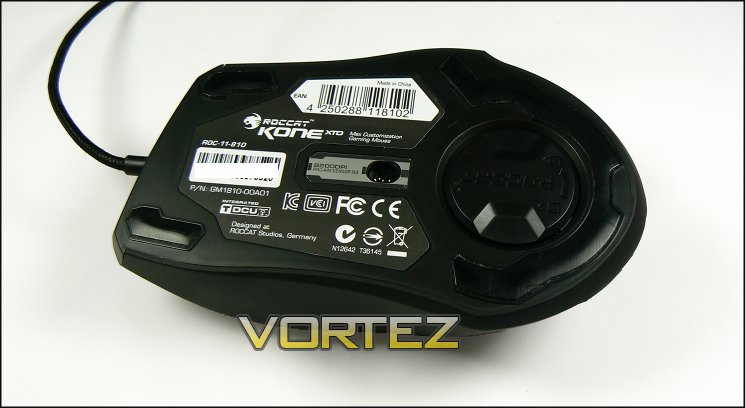
Underneath the Kone XTD we can see the sensor – the laser 8200DPI Pro-Aim Sensor R3 – and a small storage compartment for the four additional 5g weights, which is rotated to open when the triangles line up. A substantial portion of the mouse floor is taken up by three teflon pads, designed to allow a smooth motion over any mousing surface; there are no replacements for these in the pack, so treat them well.
Those interested in registering their Kone XTD with ROCCAT should also note that the serial number is also printed on the mouse floor, just above the Product Number (P/N).
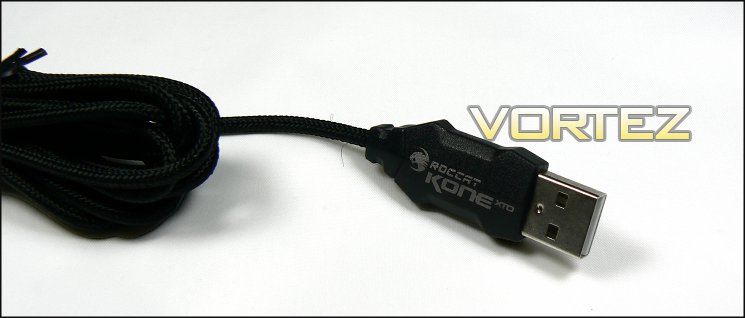
Finally, the mouse USB cord is a lightweight braided cable with a particularly narrow connector. The braiding appears to be good quality, exhibiting a fair bit of flexibility and resistance to fraying. It does seem to have that ever-present issue of a couple of loose threads, but a pair of small and sharp scissors will fix that swiftly.
Customisation Options
The ROCCAT Kone XTD feature three mains areas of user customisation: lighting, weight and the plethora of button assignments. We’ll discuss the software aspect of this on the next page, but first we should take a moment or two to investigate the first two.
Weight
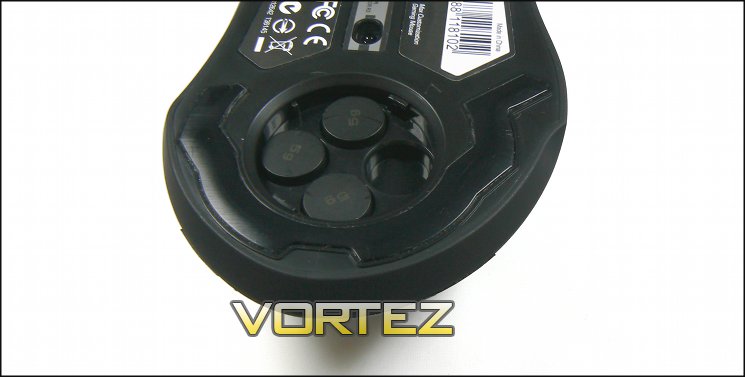
High-end mice are increasingly allowing users to add or subtract weight from their mouse, especially in the case of non-wireless mice unencumbered by heavy battery packs. Comfort is generally the overriding factor, although the ability to change the centre of mass can be useful in certain niche circumstances. Increasing the weight of the mouse can also benefit the user if the cable is particularly heavy and inflexible, causing the mouse to move when not actively held in place; or by dampening harmonics if there’s a slight vibration in the desk causing movement reflected in the on-screen cursor.
The Kone XTD includes four weights, with a small compartment on the underside for all four. This can increase the mouse’s weight by up to 20g to a total of 143g, which is still lighter than many mice with an aluminium base. When no weights are installed the compartment door is loose, which is a little disappointing, but upon insertion the door fits more snugly and no longer rattles in place.
The weight options aren’t as extreme as some other high-end mice on the market, but are solid and should suit the vast majority of gamers. We should also once again mention the carry case for the weights, which is a nice little touch to make sure they don’t get lost during storage.
Lighting
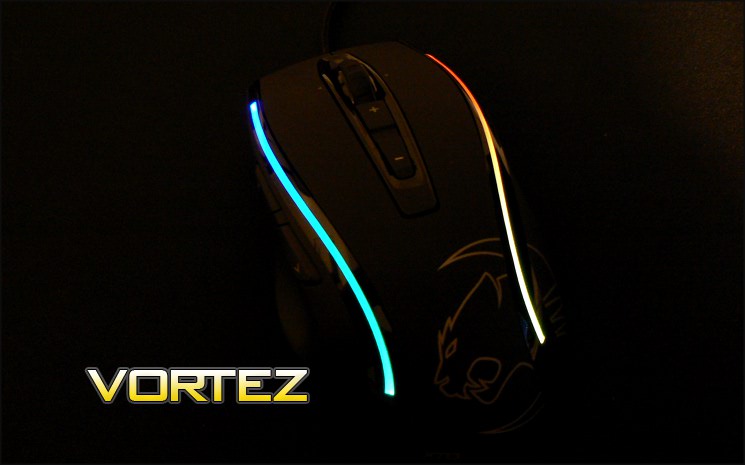
In the transition from the Kone[+] to the Kone XTD ROCCAT retained the 4-LED light-bar, yet removed the customisable logo lighting. This reduces the customisation options a little, but thanks to the 34 different colours options the total number of variations is still on the order of 1.33 million. The light bars which run down the sides of the mouse blend the colour nicely, so there is no perceptible boundary point. That’s a pretty nice feature for a mouse with ostensibly only four LED positions.
Extremely close inspection of the light bar indicates a few flaws in the plastic, but anyone looking from further than six inches away would struggle to notice. The colours produced are varied – from a deep blue to a deep red, deeper than shown above – and vibrant, and only really lacking in a true white rather than pale blue. Of course you can also turn them all off entirely if that’s you’re preference, at which point you can only dimly see a greyish line of the lightbar plastic under the mouse’s glossy finish.
Lighting can be controlled on a per-LED, per-Profile basis, with additional options to make the lighting change over time. These effects include the ability to pulse the intensity of the lighting, or add a flow which changes the colour through the available spectrum. At times the transition from one colour to the next was a perceptible step, rather than smooth. The ability to change lighting on a per-profile basis gives a very clear indication of which profile you have active, if that’s a useful feature for your own usage pattern. Easy-Shift[+] activation also changes the colouring to a cool and even blue, and whilst a cool visual indicator disabling it would also be handy lest it prove distracting in those instances where you’re using it often.
Overall, aesthetic customisation options are solid without being extravagant and though their software ROCCAT make the most of that which they have made available. There are a couple of quality issues which could do with being cleared up, although they are by no means cataclysmic.
Software
As we noted earlier, the ROCCAT Kone XTD doesn’t come with a driver CD. To get the latest ROCCAT driver utility you need to navigate to the Kone XTD’s specific support page, and whilst you’re there it’s worth picking up the ROCCAT™ Talk©/ ROCCAT™ Talk© FX software if you’re also sporting an Isku keyboard. We tested the mouse with the latest driver and firmware as of the time of writing: v1.15.
Upon installing the software and plugging in the Kone XTD for the first time, the untility prompts to update the firmware. It is important not to interrupt the updating process, for obvious reasons.
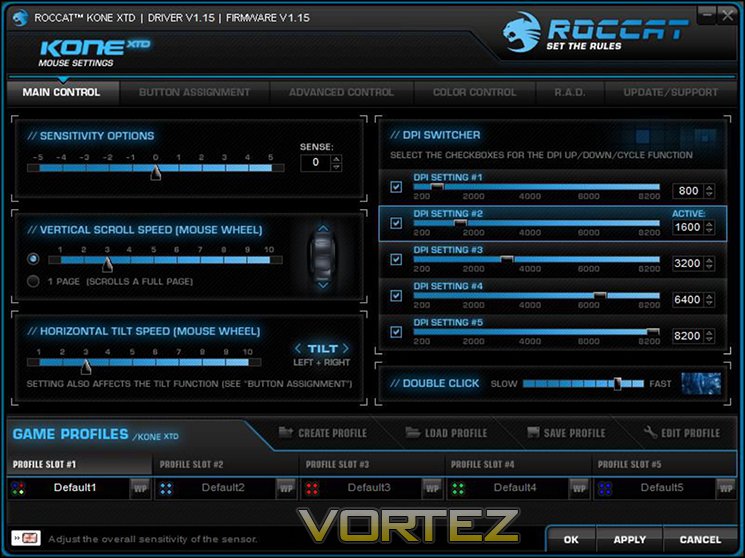
The Main Control tab is the first tab active upon the launch of the utility, and houses controls for standard mouse features such as double-click, DPI and sensitivity options. Although seemingly allowing DPI variation in increments of 1 in the UI, it in fact only allows variation in 200 DPI chunks. That’s fine at the high-end of the spectrum, but the difference at <1000 DPI is quite marked; more fine increments would be handy for those after absolute control. Of the five DPI settings per profile one can be used for the EasyAim function, which overrides the current DPI when an assigned button is pressed and held for, as the name suggests, easy aiming.
Those more interested in the productivity side of the Kone XTD will be pleased by the facility to tweak scroll speed (esp. horizontal scroll speed via MWHEEL tilt) and sensitivity (for those who hammer their keyboards).
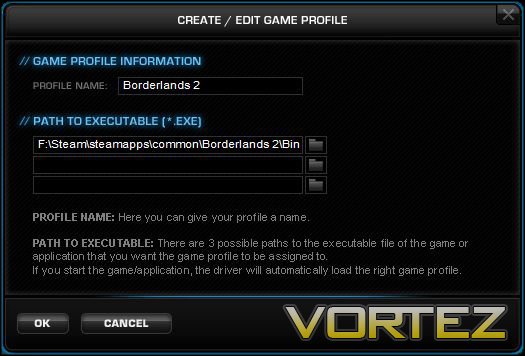
Just below the main window are the Profile Load/Save/Select tabs. Each profile stores a set of button assignments, DPI and lighting information and can be selected manually or automatically when a particular application is launched. Profiles can also be saved individually, so that even if it’s not one of the five available it can be recalled quickly. ROCCAT Kone XTD profiles (.rmp extension files) are by default stored under ‘\Programs Files (x86)\ROCCAT\Kone XTD Mouse\config’.
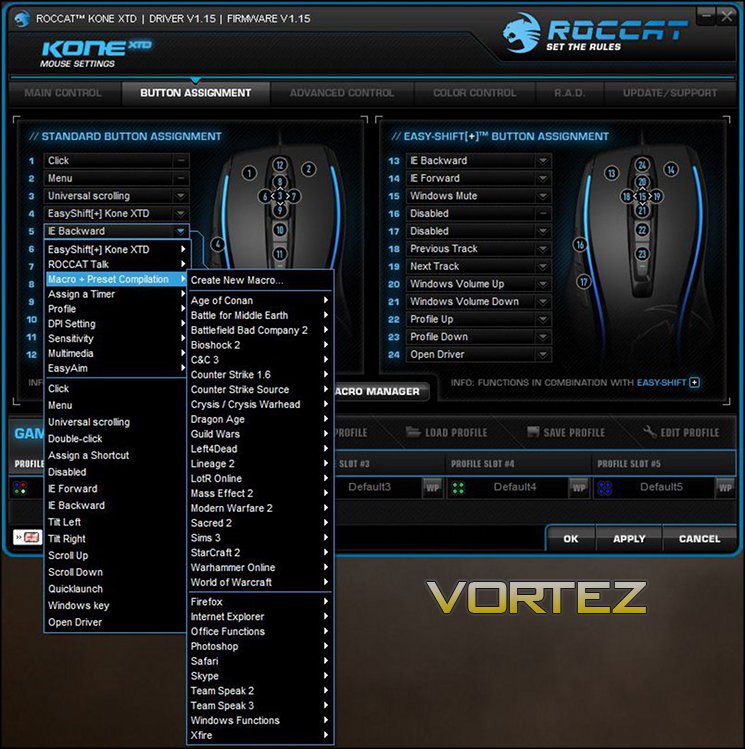
The next tab is one for Button Assignment, and is split between two mouse states: normal and with Easy-Shift[+] active. Here you can assign a huge number of default Windows functions to your mouse such as Browser Forward/Back, Volume Up/Down, Windows key etc., or you can create your own Macro’s and assign them individually. EasyAim can also be bound to a button in this utility through the same process.
To enable EasyShift[+] you must bind that function to either button 4 or 5 (the thumb buttons), or other keys on a ROCCAT Isku keyboard by activating ROCCAT Talk. The restriction is a little disappointing, though in fairness binding this functionality to another other group of buttons seems quite sub-optimal.
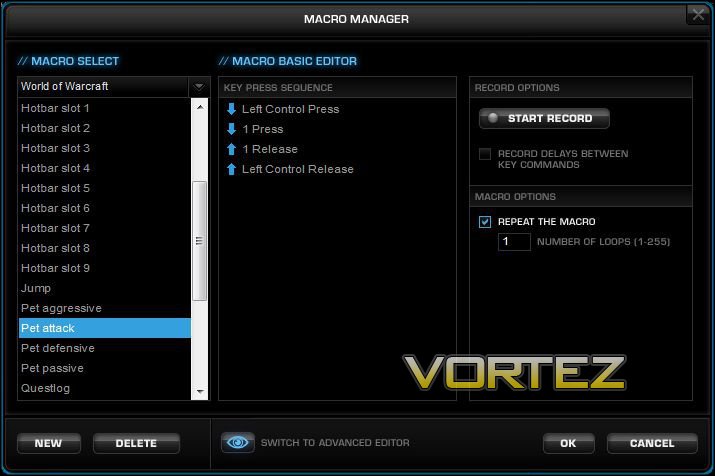
The ROCCAT Macro Manager allows you to record your own macros, edit existing macros or view one of the dozens of preset macros for popular games. All in all it’s pretty intuitive, and allows an advanced mode to precisely time key presses to the millisecond.
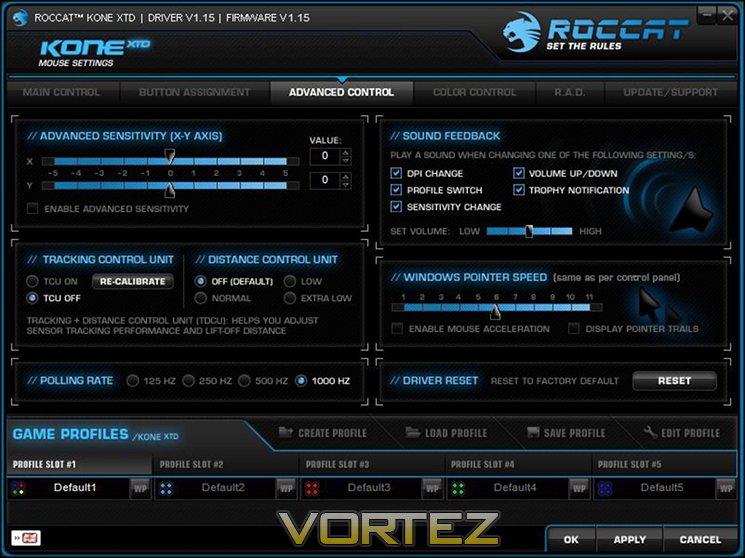
Advanced Control, the third tab, features a number of advanced options which probably won’t be tweaked much on a day-to-day basis. Included are individual X-Y sensitivity biases and Windows pointer speed (which is inherited from Windows control panel settings). The sound feedback board enables or disables event notifications which are played through your speakers; we imagine that in very short order you’ll wish to disable DPI notification at least. Although some notification of state changes are great, we would in general prefer a visual rather than audio cue.
USB polling rate and the Tracking + Distance Control Unit settings can also be accessed here. Typically there’s no need to change these from the default, but advanced users may want to enable the TDCU if they’re having difficulties with lift-off distances or mouse-pad surface tracking is poor.
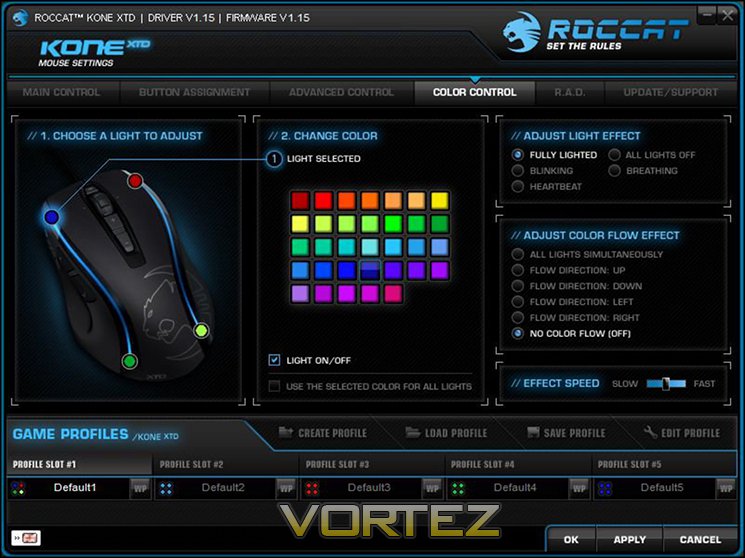
Colour Control, the fourth tab, is dedicated to controlling the lighting effects of LEDs. It clearly indicates which LED is selected (or allows you to bind to all four LEDs simultaneously) and select a number of effects. Those who really want to personalise their mouse will love these features. Due to lighting being on a per-profile basis, ROCCAT have taken the step of reflect the selected lighting and lighting effect in the profile slots. If you choose to create distinct lighting per profile, this allows you to clearly differentiate between the profiles both in the editor and on the mouse itself.
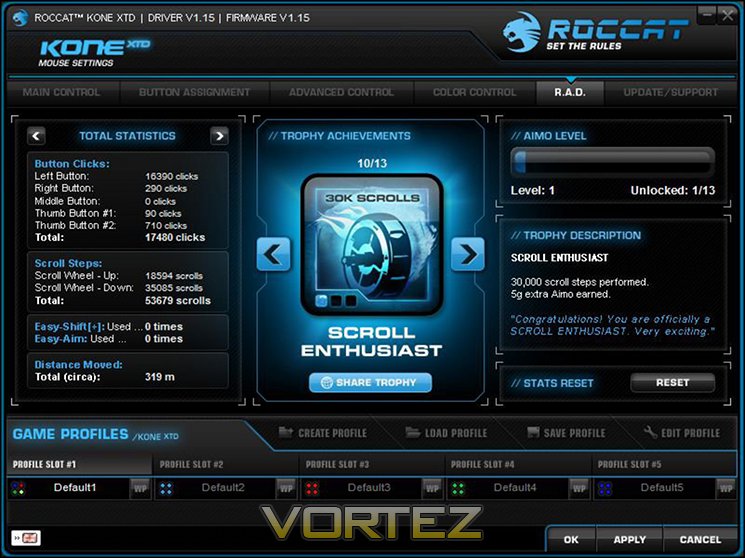
R.A.D., or ROCCAT Achievement Display, tracks the usage statistics of the mouse such as distance travelled or number of clicks. Reach a set number and you get an achievement. The idea is that they’re cool metrics and serve as an entry into the Roccat World social hub. In fairness most users will quickly gloss over this tab, but it’s a nice little addition which is well presented and provides information which may be useful at some point (after all, you never know).
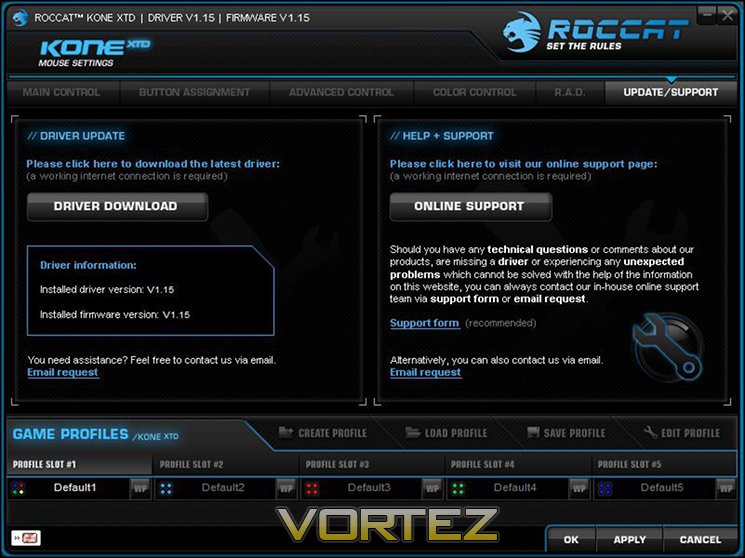
The final tab is the Update/Download tab, through which you can check for driver updates or request support; the only requirement is a working mouse and internet connection. This is a great feature which is often understated, allowing you to keep your drivers up-to-date with very little fuss. It could be slightly easier, perhaps through the use of a ‘Live-Update’ system or simple notification of new drivers being available, but at present the software doesn’t seem to allow that.
All in all, the ROCCAT software is excellent: the graphics are crisp and layout is logical without being cluttered. No significant area appears to be lacking, and it seems perfectly tailored to the Kone XTD itself.
Performance
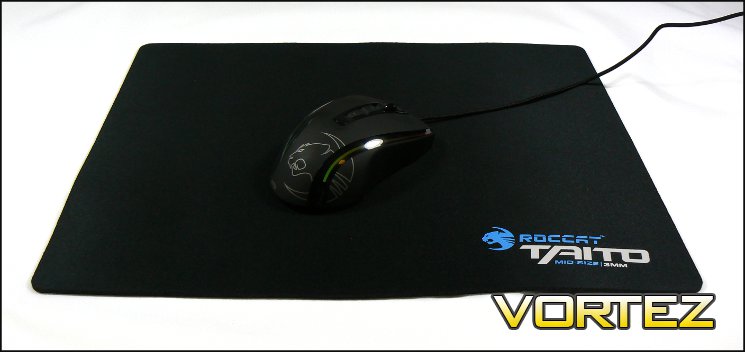
To judge the performance of the Kone XTD we paired it with a Taito mousemat, also produced by ROCCAT. This 3mm-thick, 400mm x 320mm mat with cloth surface and rubberised backing is designed for long-life durability in gaming. Whilst not quite being the thickest pad on the market it’s more than enough for smooth, comfortable mousing and long gaming sessions. The rear in particular is surprisingly grippy, resulting in no slipping on the desk, and the overall thinness make it a small enough to comfortable pack it for a LAN. This mid-size close to the maximum comfortable size for most desks without moving to the very large mats bordering on a meter wide.
General Performance
Mousing over the Taito mousemat is extremely smooth with the Kone XTD. It’s light enough, even with all four weights inside, to never really tire your hand out and the three teflon pads do their job exceptionally well. Those not blessed with a high-quality mousemat will also be pleased to know that ROCCAT have done a great job in keeping the teflon pads level, ensuring that mouse doesn’t rock on an unyielding surface. Long sessions at your terminal are not uncomfortable from an ergonomic perspective, and the mouse doesn’t accumulate much sweat even when used for extended periods.
Slightly negatively, we did note that the noise of button presses, especially on the LMB, RMB and scroll wheel buttons, is a little more frustrating and would be extremely distracting in an communal office environment. Furthermore, users of the Kone XTD with larger-than-average hands will likely begin to default to a claw grip in long-term use, whereas smaller-handed users will tend to use the Kone XTD with a palm grip.
The Kone XTD is not at its best in an office, but nor is it badly suited to the task. It’s down to the user to judge whether the productivity advantages of a tilt wheel and plethora of macro options sufficiently mitigate the downsides.
Gaming Performance
The Kone XTD comes into its own when gaming. The button layout is logical and sensible, allowing the two main, three wheel and two shoulder buttons to be pressed without any real issue. It would be useful for the shoulder buttons to be differentiated a little more sharply; infrequently it’s possible to loose track of either one when under the thumb and large hands with a more forward thumb position may find this niggle particularly acute. Thanks to the Japanese-made Omron switchgear button presses were as responsive as you could wish, with no part of the button feeling loose or rocking in its housing.
Those who stream their gameplay should be aware that button actuation on the Kone XTD is pretty loud and could be easily picked up on a standard headset microphone. This is especially the case with the two major buttons and mouse wheel tilt function, which approach being loud. Mechanical keyboard users will no doubt shrug this off given the ‘clicky-ness’ of those switches, but those comfortable with a more subtle click from their peripherals will find it slightly jarring.
One feature which is lacking on the Kone XTD is a clear visual representation of DPI. The software allows for five DPI presets per profile, and although setting up lighting to differentiate between each profile is easy, the same cannot be said of DPI. There is an option to enable an audio cue for DPI, which calls out “1600 DPI” etc. in increasingly more urgent tones as DPI increases, but to put it mildly this breaks flow during gaming.
MMO gamers will be particularly receptive to Easy-Shift[+]. ROCCAT’s modifier function effectively doubles the button assignments possible for each mouse button, with the exception of the one bound to Easy-Shift[+] itself. Combined with macros – both at the driver level and in-game – this option allows a wild variation of commands to be available at your fingertips in fractions of a second. In general nine different easy to access operations (button presses or mouse wheel movements) can be modified, allowing eighteen different operations without considering profiles. When active, Easy-Shift[+] will change LED colours to a light blue.
By contrast, FPS gamers will be less enamoured with Easy-Shift[+], but ROCCAT’s driver software does allow you the flexibility to use not use it. A more relevant technology is ROCCAT Talk, which allows optimum use of Easy-Aim in conjunction with a ROCCAT Isku keyboard. This allows you to use your left hand to situationally change DPI to a more suitable level, speeding up the changes between DPI in fast action gameplay similar to ‘sniper’ buttons on other mice. Easy-Aim is also available as a mouse button assignment, but isn’t particularly optimal because it makes your grip a little less stable.
Overall, the Kone XTD is a very strong gaming mouse which is a little less suitable for office and general use down to the noise and wider travel button travel distance.
Conclusion
The Kone XTD is the third ROCCAT device we’ve reviewed over the past year or so, and each time it’s been impressed upon us how solid a product they are. Rather than out-there aesthetic design and risk-taking their peripherals have been coolly functional with high-quality components and software that’s is a cut above. The Kone XTD is no different, even if it does have the odd piece of aesthetic trim.
The headline upgrade of this mouse from the Kone[+] is the new 8200 DPI Pro-Aim Sensor R3, which we must say operates very well. High DPI levels will often be a bone of contention to gamers, especially FPS gamers who tend to eschew high DPI in favour of greater control, but equally important is the tracking and lift distance detection. The Kone XTD didn’t jump or skip during gameplay, even on the rather aged glass mousing surface we had to hand. Default lift distance was a little high, but that was remedied by a few tweaks in software. ROCCAT’s Pro-Aim Sensor R3 in this respect did appear to be a worthy addition to the product.
At first, when you hear Omron Japanese Switches you fear that it may be marketing buzzwords, but the worry is swiftly dispelled. The whole surface of almost every button feels equally sensitive to pressure, and not even the thumb buttons give the impression that your are straddling the switch. A sole exception could be the ‘+’ rocker button, but even that rarely used part is better than many button on many other mice. The choice of Omron switches should also ensure long-term durability, always handy on a mouse reaching half a million clicks a month.
We mentioned in the performance summation that button travel/actuation may be a point of individual concern defined by personal preference. The travel distance of both LHS and RHS buttons are a little far and lead to a slightly clunky sound, but there is no issue in the hardware registering that button click. The scroll wheel is also a little stiff, although it remains securely located at all times and never felt like it was slipping off its axis.
We investigated the software at some length, and determined that it was very good indeed. An intuitive UI is massively important and the Kone XTD’s software succeeds thanks to crisp graphics and a lack of wasted space that rewards getting stuck in. One question mark could be assignment of Easy-Shift[+] to the closest thumb button by default, simply because it may confuse new users. On the other hand it does encourage them to interface with the UI as soon as they can, if only to reassign it. Easy-Shift[+] itself is interesting, coming into its own in MMO gaming where dozens of button assignments are beneficial but also handy in RPGs and RTS’s. FPS gamers would probably prefer an additional thumb button located nearer the base, also making best use of EasyAim. It goes almost without saying that coupling the Kone XTD with a ROCCAT Isku keyboard would make all the mouse’s features relevant to every gamer.
Of the remainder, only a couple of issues really presented themselves. One was the light bar, which exhibited slight imperfections that marred the continuous lighting effect, and the other was a rattle from the weight compartment when no additional weights were installed. Neither are sufficient to dissuade from a purchase.
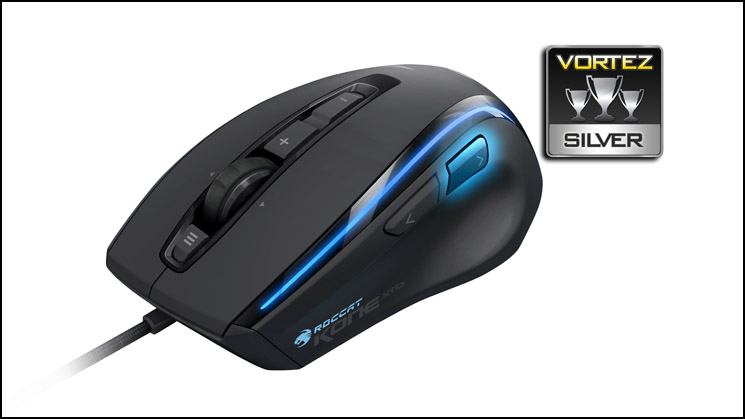
The ROCCAT Kone XTD is a very good mouse optimised for gaming with excellent software support backing it up. Those who already have a Kone[+] may not find it a significant upgrade in the main, but gamers currently using budget mice should find it a considerable step up in functionality and quality. The customisation options are very good without quite being market leading, yet the growing synergy between diverse ROCCAT peripherals add features found in few other places. On its own the Kone XTD is well worthy of a Silver Award, and for those who previously invested in an Isku keyboard it would be touching Gold.
Pros
+ Uncomplicated design
+ Great software
+ 8 Programmable buttons and 4-D scroll wheel
+ 5 Profiles
+ Good 8200 DPI sensor
+ Omron Switch Technology
+ Customisable Lighting
Cons
– Button click action not for everyone
– Slight lighting imperfections
– ROCCAT Talk features require additional ROCCAT peripherals
+ Uncomplicated design
+ Great software
+ 8 Programmable buttons and 4-D scroll wheel
+ 5 Profiles
+ Good 8200 DPI sensor
+ Omron Switch Technology
+ Customisable Lighting
Cons
– Button click action not for everyone
– Slight lighting imperfections
– ROCCAT Talk features require additional ROCCAT peripherals

Click here for an explanation of our awards at Vortez.net.


