Today we introduce the ASUS ROG Strix B450-F Gaming, a highly feature-packed, gaming orientated B450 motherboard with RGB lighting and graffiti to boot.

Product on Review: ROG STRIX B450-F GAMING
Manufacturer: ASUS
Street Price: GBP £119.99 / USD $129.99 / AUS $209.00
The ROG Strix gaming arm of the ASUS brand has become one of the go-to brands within the PC gaming industry, loved for their styling and performance. The ROG Strix X470-F Gaming which we looked at in April offered brilliant value for money compared to the competition while sacrificing very little as a result of that. In today’s review, the ROG Strix B450-F Gaming is under the spotlight, the directly comparable model to which we reviewed a few months ago.
The ROG Strix B450-F Gaming uses AMDs latest B450 chipset based on the AM4 socket, aiming to strike a balance between the cost effectiveness that the B450 chipset offers, as well as including features gamers expect and need.
The B450-F Gaming arrives with a pair of PCIe 3.0 M.2 connectors, both operating with the x4 NVMe interface, while the uppermost connection can also utilise SATA M.2 drives. We get three full-length x16 PCIe ports, and four x1 ports.
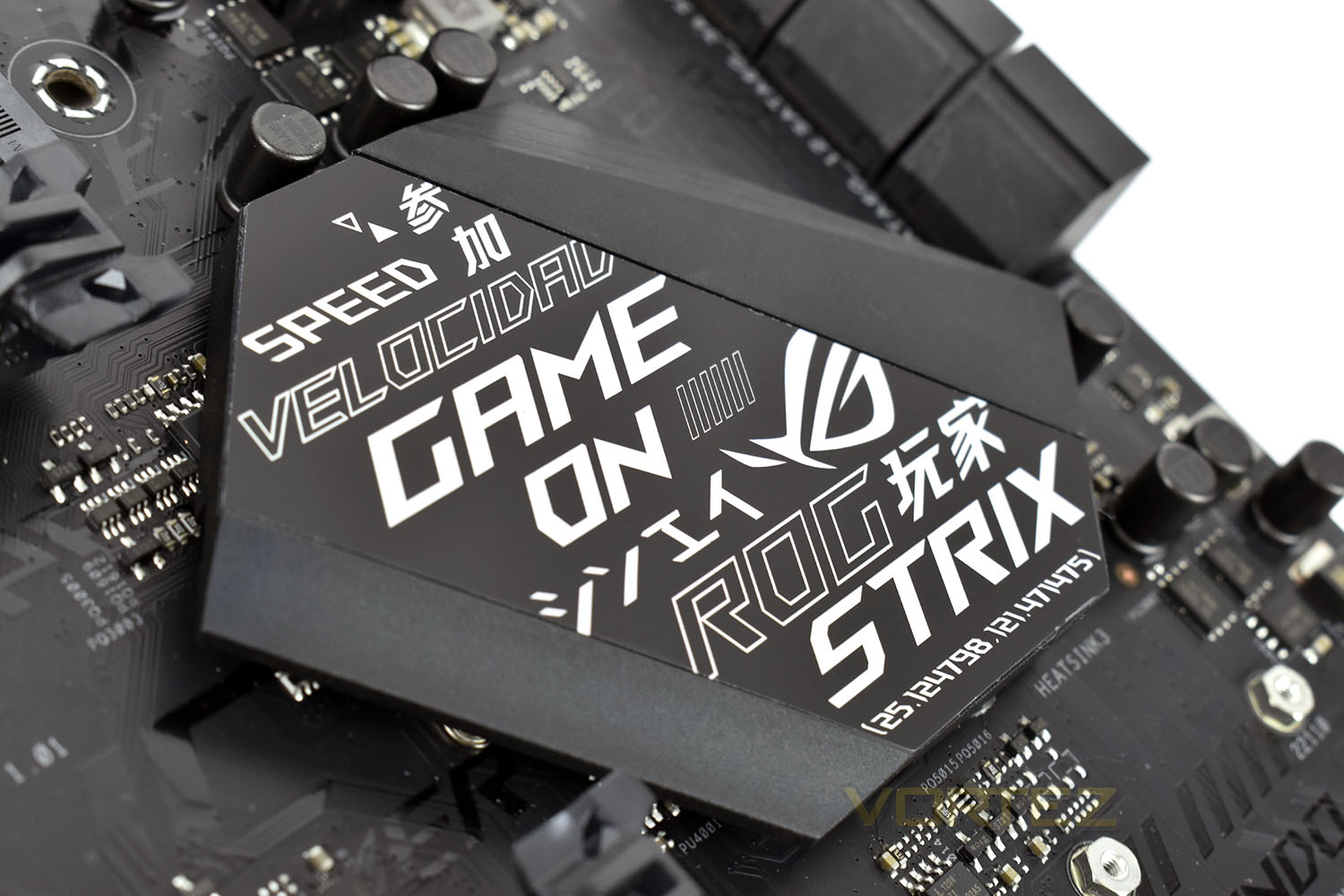
Covering the RGB base, which is important to many people in 2018, the ROG logo lights up on the CPU Power Phase cooling, while there’s backlighting on the southbridge heatsink. There’s also a pair of ASUS Aura Sync connections on the board for RGB lighting strips.
On paper, the ROG Strix B450-F Gaming certainly seems promising, following in the footsteps laid down by its older brother, the ROG Strix X470-F Gaming, which we reviewed back in April with the launch of AMD’s 2nd Gen. Ryzen CPUs. How will it fare in our tests? Read on to find out.
ROG on the Strix B450-F Gaming:
ROG Strix B450 Gaming series provides a feature set distilled from the high-end ROG Strix X470 Gaming series that gives you all the essentials for a well-balances build. With comprehensive cooling options, dual PCIe 3.0 M.2 slots and AMD StoreMI support for incredibly storage speeds, improved DDR4 memory stability and much more, ROG Strix B450 Gaming delivery the performance you need with room to focus your budget on accompanying hardware. The motherboard also offers rich customization options with lighting synchronization as well as guided performance tuning and optimization via intuitive ROG software that makes it easy for experience and fire-time system builders alike to create a gaming system that really stands out.
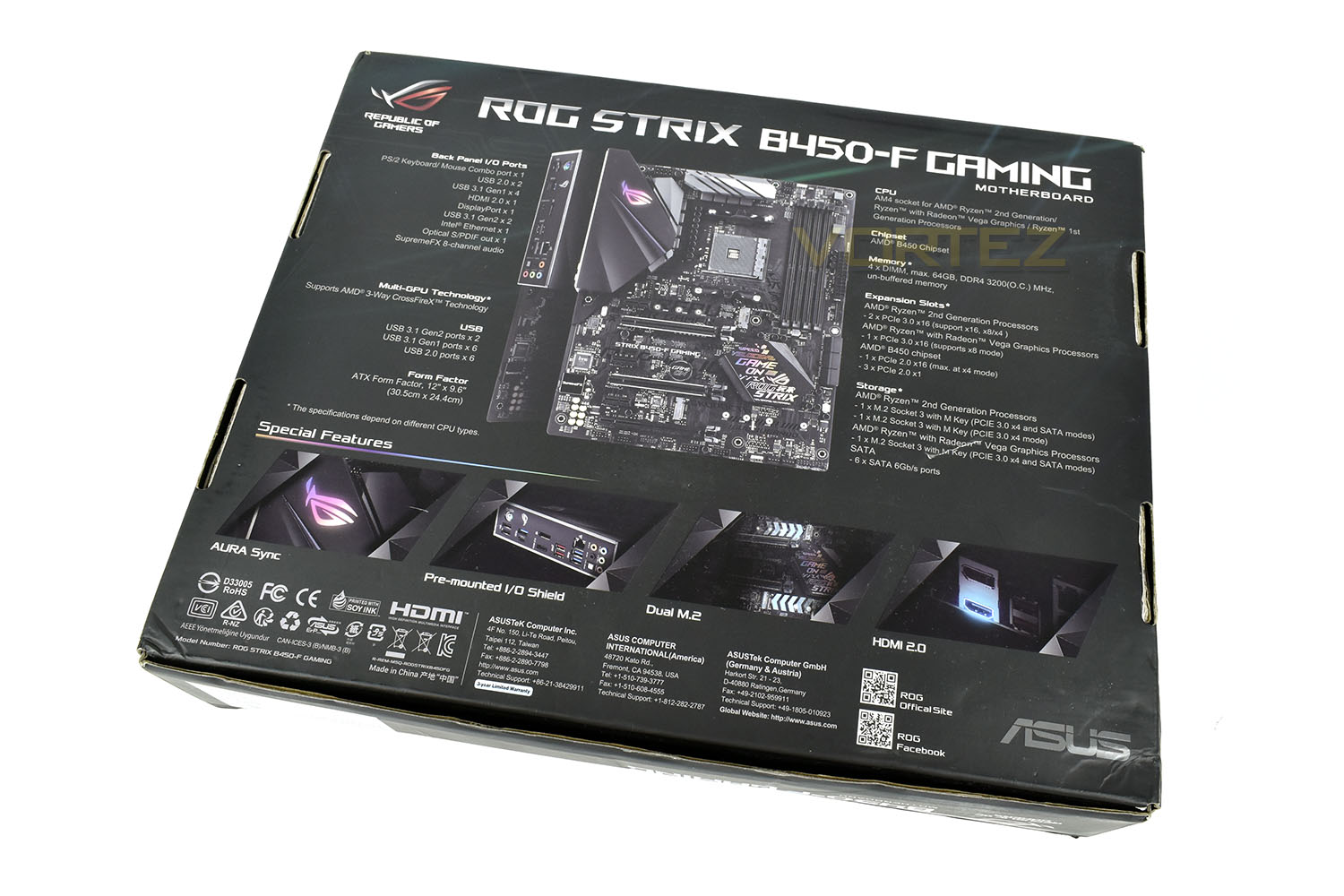
Technical Specifications
CPU
AMD AM4 Socket AMD Ryzen™ 2nd Generation/Ryzen™ with Radeon™ Vega Graphics/Ryzen™ 1st Generation Processors
* Refer to www.asus.com for CPU support list
Chipset
AMD B450
Memory
AMD Ryzen™ Processors
4 x DIMM, Max. 64GB, DDR4 3200(O.C.)/3000(O.C.)/2800(O.C.)/2666/2400/2133 MHz Non-ECC, Un-buffered Memory
Dual Channel Memory Architecture
* Refer to www.asus.com for the Memory QVL (Qualified Vendors Lists).
Graphic
Integrated in the AMD Ryzen™ with Radeon™ Vega Graphics Processors
Multi-VGA output support : HDMI/DisplayPort ports
– Supports HDMI 2.0b with maximum resolution of 4096 x 2160 @ 60 Hz
– Supports DisplayPort 1.2 with max. resolution 4096 x 2160 @ 60 Hz
Multi-GPU Support
AMD Ryzen™ 2nd Generation/Ryzen™ 1st Generation Processors
Supports AMD 3-Way CrossFireX™ Technology
Expansion Slots
AMD Ryzen™ 2nd Generation/ Ryzen™ 1st Generation Processors
2 x PCIe 3.0/2.0 x16 (x16 or x8/x4)
AMD Ryzen™ with Radeon™ Vega Graphics Processor
1 x PCIe 3.0/2.0 x16 (x8 mode)
AMD B450 chipset
1 x PCIe 2.0 x16 (max at x4 mode) *1
3 x PCIe 2.0 x1
Storage
AMD Ryzen™ 2nd Generation/ Ryzen™ 1st Generation Processors : *2
1 x M.2 Socket 3, , with M key, type 2242/2260/2280 storage devices support (SATA & PCIE 3.0 x 4 mode)*3
1 x M.2 Socket 3, , with M key, type 2242/2260/2280/22110 storage devices support (PCIE 3.0 x 4 mode)*4
2 x SATA 6Gb/s port(s)
AMD Ryzen™ with Radeon™ Vega Graphics Processor : *2
1 x M.2 Socket 3, with M key, type 2242/2260/2280 storage devices support (SATA & PCIE 3.0 x 4 mode)*3
2 x SATA 6Gb/s port(s)
AMD B450 chipset :
4 x SATA 6Gb/s port(s),
Support Raid 0, 1, 10
LAN
Intel® I211-AT, 1 x Gigabit LAN Controller(s)
Anti-surge LANGuard
ROG GameFirst Technology
Audio
ROG SupremeFX 8-Channel High Definition Audio CODEC S1220A
– Dual OP Amplifiers
– Impedance sense for front and rear headphone outputs
– Supports : Jack-detection, Multi-streaming, Front Panel Jack-retasking
– High quality 120 dB SNR stereo playback output and 113 dB SNR recording input
– SupremeFX Shielding Technology
– Supports up to 32-Bit/192kHz playback *5
Audio Feature :
– Optical S/PDIF out port(s) at back panel
– Sonic Radar III
– Sonic Studio III + Sonic Studio Link
USB Ports
AMD Ryzen™ 2nd Generation/ Ryzen™ with Radeon™ Vega Graphics/ Ryzen™ 1st Generation :
3 x USB 3.1 Gen 1 port(s) (3 at back panel, blue)
AMD Ryzen™ 2nd Generation/ Ryzen™ with Radeon™ Vega Graphics/ Ryzen™ 1st Generation :
1 x USB 3.1 Gen 1 port(s) (1 at back panel, , Type-C)
AMD B450 chipset :
2 x USB 3.1 Gen 2 port(s) (2 at back panel, red)
AMD B450 chipset :
2 x USB 3.1 Gen 1 port(s)
AMD B450 chipset :
6 x USB 2.0 port(s) (2 at back panel, , 4 at mid-board)
ROG Exclusive Features
ROG RAMCache II
ROG CPU-Z
Pre-mounted I/O Shield
Overwolf
GameFirst IV
Special Features
5-Way Optimization by Dual Intelligent Processors 5
– Whole system optimization with a single click! 5-Way Optimization tuning key perfectly consolidates TPU, EPU, DIGI+ VRM, Fan Xpert 4, and Turbo App together, providing better CPU performance, efficient power saving, precise digital power control, whole system cooling and even tailor your own app usages.
TPU
– Auto Tuning, TurboV, GPU Boost
Fan Xpert4
– Fan Xpert 4 featuring Fan Auto Tuning function and multiple thermistors selection for optimized system cooling control
Gamer’s Guardian:
– ESD Guards on LAN, Audio, KBMS and USB3.1/3.0/2.0 ports
– DRAM Overcurrent Protection
– Highly Durable Components
– SafeSlot
ASUS EPU :
– EPU
AURA :
– Aura Lighting Control
– Aura RGB Strip Headers
– Aura Lighting Effects Synchronization with compatible ASUS ROG devices
ASUS Exclusive Features :
– AI Suite 3
– Ai Charger
– ASUS Grid
ASUS EZ DIY :
– ASUS CrashFree BIOS 3
– ASUS EZ Flash 3
ASUS Q-Design :
– ASUS Q-Shield
– ASUS Q-LED (CPU, DRAM, VGA, Boot Device LED)
– ASUS Q-Slot
– ASUS Q-DIMM
Digi+VRM
Turbo APP
– featuring system performance tuning for selected applications
Back I/O Ports
1 x PS/2 keyboard/mouse combo port(s)
1 x DisplayPort
1 x HDMI
1 x LAN (RJ45) port(s)
2 x USB 3.1 Gen 2 (red)Type-A,
4 x USB 3.1 Gen 1 (blue) ,
2 x USB 2.0
1 x Optical S/PDIF out
5 x Audio jack(s)
Internal I/O Ports
2 x Aura RGB Strip Headers
1 x USB 3.1 Gen 1(up to 5Gbps) connector(s) support(s) additional 2 USB 3.1 Gen 1 port(s)
2 x USB 2.0 connector(s) support(s) additional 4 USB 2.0 port(s)
1 x M.2 Socket 3 with M key, type 2242/2260/2280 storage devices support (SATA & PCIE 3.0 x 4 mode)
1 x M.2 Socket 3 with M key, type 2242/2260/2280/22110 storage devices support (PCIE 3.0 x 4 mode)
1 x TPM header
1 x COM port(s) connector(s)
6 x SATA 6Gb/s connector(s)
1 x CPU Fan connector(s)
1 x CPU OPT Fan connector(s)
3 x Chassis Fan connector(s)
1 x AIO_PUMP connector
1 x 24-pin EATX Power connector(s)
1 x 8-pin EATX 12V Power connectors
1 x Front panel audio connector(s) (AAFP)
1 x System panel(s)
1 x Thermal sensor connector(s)
1 x Clear CMOS jumper(s)
Operating System
Windows® 10 64-bit
Form Factor
ATX Form Factor
12 inch x 9.6 inch ( 30.5 cm x 24.4 cm )
Note
*1 PCIe x16_3 slot shares bandwidth with PCIe x1_2 and PCIe x1_3.
*2 Support StoreMI and NVMe RAID
*3 When the M.2_1 Socket 3 is operating in SATA or PCIE mode, SATA6G_5/6 ports will be disabled.
*4 When the M.2_2 is occupied by M.2 device, PCIe x16_1 will run at x8 mode.
*5 *Due to limitations in HDA bandwidth, 32-Bit/192kHz is not supported for 8-Channel audio.
AMD AM4 Socket AMD Ryzen™ 2nd Generation/Ryzen™ with Radeon™ Vega Graphics/Ryzen™ 1st Generation Processors
* Refer to www.asus.com for CPU support list
Chipset
AMD B450
Memory
AMD Ryzen™ Processors
4 x DIMM, Max. 64GB, DDR4 3200(O.C.)/3000(O.C.)/2800(O.C.)/2666/2400/2133 MHz Non-ECC, Un-buffered Memory
Dual Channel Memory Architecture
* Refer to www.asus.com for the Memory QVL (Qualified Vendors Lists).
Graphic
Integrated in the AMD Ryzen™ with Radeon™ Vega Graphics Processors
Multi-VGA output support : HDMI/DisplayPort ports
– Supports HDMI 2.0b with maximum resolution of 4096 x 2160 @ 60 Hz
– Supports DisplayPort 1.2 with max. resolution 4096 x 2160 @ 60 Hz
Multi-GPU Support
AMD Ryzen™ 2nd Generation/Ryzen™ 1st Generation Processors
Supports AMD 3-Way CrossFireX™ Technology
Expansion Slots
AMD Ryzen™ 2nd Generation/ Ryzen™ 1st Generation Processors
2 x PCIe 3.0/2.0 x16 (x16 or x8/x4)
AMD Ryzen™ with Radeon™ Vega Graphics Processor
1 x PCIe 3.0/2.0 x16 (x8 mode)
AMD B450 chipset
1 x PCIe 2.0 x16 (max at x4 mode) *1
3 x PCIe 2.0 x1
Storage
AMD Ryzen™ 2nd Generation/ Ryzen™ 1st Generation Processors : *2
1 x M.2 Socket 3, , with M key, type 2242/2260/2280 storage devices support (SATA & PCIE 3.0 x 4 mode)*3
1 x M.2 Socket 3, , with M key, type 2242/2260/2280/22110 storage devices support (PCIE 3.0 x 4 mode)*4
2 x SATA 6Gb/s port(s)
AMD Ryzen™ with Radeon™ Vega Graphics Processor : *2
1 x M.2 Socket 3, with M key, type 2242/2260/2280 storage devices support (SATA & PCIE 3.0 x 4 mode)*3
2 x SATA 6Gb/s port(s)
AMD B450 chipset :
4 x SATA 6Gb/s port(s),
Support Raid 0, 1, 10
LAN
Intel® I211-AT, 1 x Gigabit LAN Controller(s)
Anti-surge LANGuard
ROG GameFirst Technology
Audio
ROG SupremeFX 8-Channel High Definition Audio CODEC S1220A
– Dual OP Amplifiers
– Impedance sense for front and rear headphone outputs
– Supports : Jack-detection, Multi-streaming, Front Panel Jack-retasking
– High quality 120 dB SNR stereo playback output and 113 dB SNR recording input
– SupremeFX Shielding Technology
– Supports up to 32-Bit/192kHz playback *5
Audio Feature :
– Optical S/PDIF out port(s) at back panel
– Sonic Radar III
– Sonic Studio III + Sonic Studio Link
USB Ports
AMD Ryzen™ 2nd Generation/ Ryzen™ with Radeon™ Vega Graphics/ Ryzen™ 1st Generation :
3 x USB 3.1 Gen 1 port(s) (3 at back panel, blue)
AMD Ryzen™ 2nd Generation/ Ryzen™ with Radeon™ Vega Graphics/ Ryzen™ 1st Generation :
1 x USB 3.1 Gen 1 port(s) (1 at back panel, , Type-C)
AMD B450 chipset :
2 x USB 3.1 Gen 2 port(s) (2 at back panel, red)
AMD B450 chipset :
2 x USB 3.1 Gen 1 port(s)
AMD B450 chipset :
6 x USB 2.0 port(s) (2 at back panel, , 4 at mid-board)
ROG Exclusive Features
ROG RAMCache II
ROG CPU-Z
Pre-mounted I/O Shield
Overwolf
GameFirst IV
Special Features
5-Way Optimization by Dual Intelligent Processors 5
– Whole system optimization with a single click! 5-Way Optimization tuning key perfectly consolidates TPU, EPU, DIGI+ VRM, Fan Xpert 4, and Turbo App together, providing better CPU performance, efficient power saving, precise digital power control, whole system cooling and even tailor your own app usages.
TPU
– Auto Tuning, TurboV, GPU Boost
Fan Xpert4
– Fan Xpert 4 featuring Fan Auto Tuning function and multiple thermistors selection for optimized system cooling control
Gamer’s Guardian:
– ESD Guards on LAN, Audio, KBMS and USB3.1/3.0/2.0 ports
– DRAM Overcurrent Protection
– Highly Durable Components
– SafeSlot
ASUS EPU :
– EPU
AURA :
– Aura Lighting Control
– Aura RGB Strip Headers
– Aura Lighting Effects Synchronization with compatible ASUS ROG devices
ASUS Exclusive Features :
– AI Suite 3
– Ai Charger
– ASUS Grid
ASUS EZ DIY :
– ASUS CrashFree BIOS 3
– ASUS EZ Flash 3
ASUS Q-Design :
– ASUS Q-Shield
– ASUS Q-LED (CPU, DRAM, VGA, Boot Device LED)
– ASUS Q-Slot
– ASUS Q-DIMM
Digi+VRM
Turbo APP
– featuring system performance tuning for selected applications
Back I/O Ports
1 x PS/2 keyboard/mouse combo port(s)
1 x DisplayPort
1 x HDMI
1 x LAN (RJ45) port(s)
2 x USB 3.1 Gen 2 (red)Type-A,
4 x USB 3.1 Gen 1 (blue) ,
2 x USB 2.0
1 x Optical S/PDIF out
5 x Audio jack(s)
Internal I/O Ports
2 x Aura RGB Strip Headers
1 x USB 3.1 Gen 1(up to 5Gbps) connector(s) support(s) additional 2 USB 3.1 Gen 1 port(s)
2 x USB 2.0 connector(s) support(s) additional 4 USB 2.0 port(s)
1 x M.2 Socket 3 with M key, type 2242/2260/2280 storage devices support (SATA & PCIE 3.0 x 4 mode)
1 x M.2 Socket 3 with M key, type 2242/2260/2280/22110 storage devices support (PCIE 3.0 x 4 mode)
1 x TPM header
1 x COM port(s) connector(s)
6 x SATA 6Gb/s connector(s)
1 x CPU Fan connector(s)
1 x CPU OPT Fan connector(s)
3 x Chassis Fan connector(s)
1 x AIO_PUMP connector
1 x 24-pin EATX Power connector(s)
1 x 8-pin EATX 12V Power connectors
1 x Front panel audio connector(s) (AAFP)
1 x System panel(s)
1 x Thermal sensor connector(s)
1 x Clear CMOS jumper(s)
Operating System
Windows® 10 64-bit
Form Factor
ATX Form Factor
12 inch x 9.6 inch ( 30.5 cm x 24.4 cm )
Note
*1 PCIe x16_3 slot shares bandwidth with PCIe x1_2 and PCIe x1_3.
*2 Support StoreMI and NVMe RAID
*3 When the M.2_1 Socket 3 is operating in SATA or PCIE mode, SATA6G_5/6 ports will be disabled.
*4 When the M.2_2 is occupied by M.2 device, PCIe x16_1 will run at x8 mode.
*5 *Due to limitations in HDA bandwidth, 32-Bit/192kHz is not supported for 8-Channel audio.
Packaging & First Look
The Republic of Gamers have stuck with their current styling for a few years now, with the orange, pink and blue ROG logo on a black, Aztec-style background. We love this styling and hope ROG continue to use it for a while.The front of the box features a full image of the motherboard with some of the included technologies listed along the bottom edge.
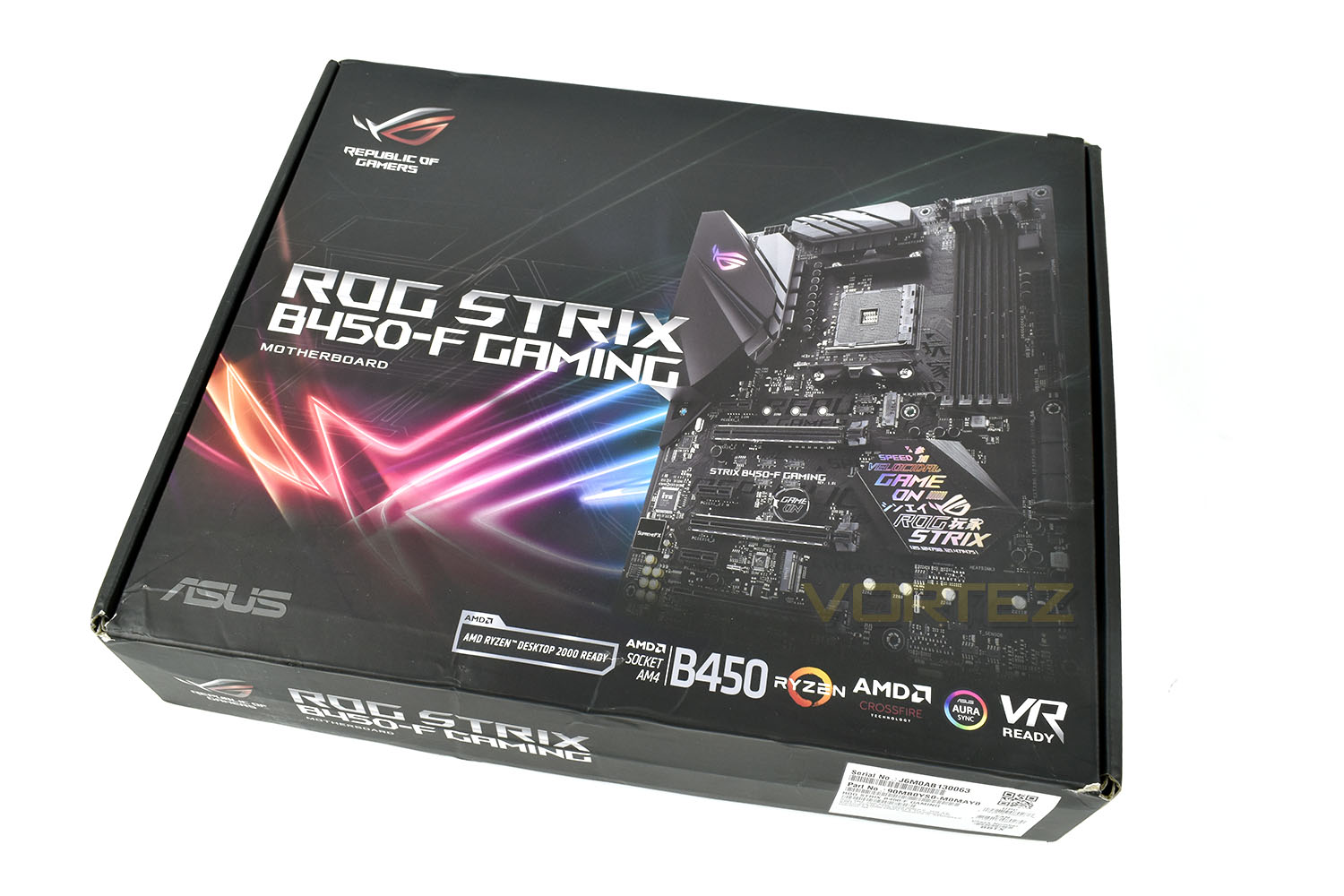
On the back side of the box is a comprehensive list of features, along with illustrations of specific features. More than enough to make an informed decision.
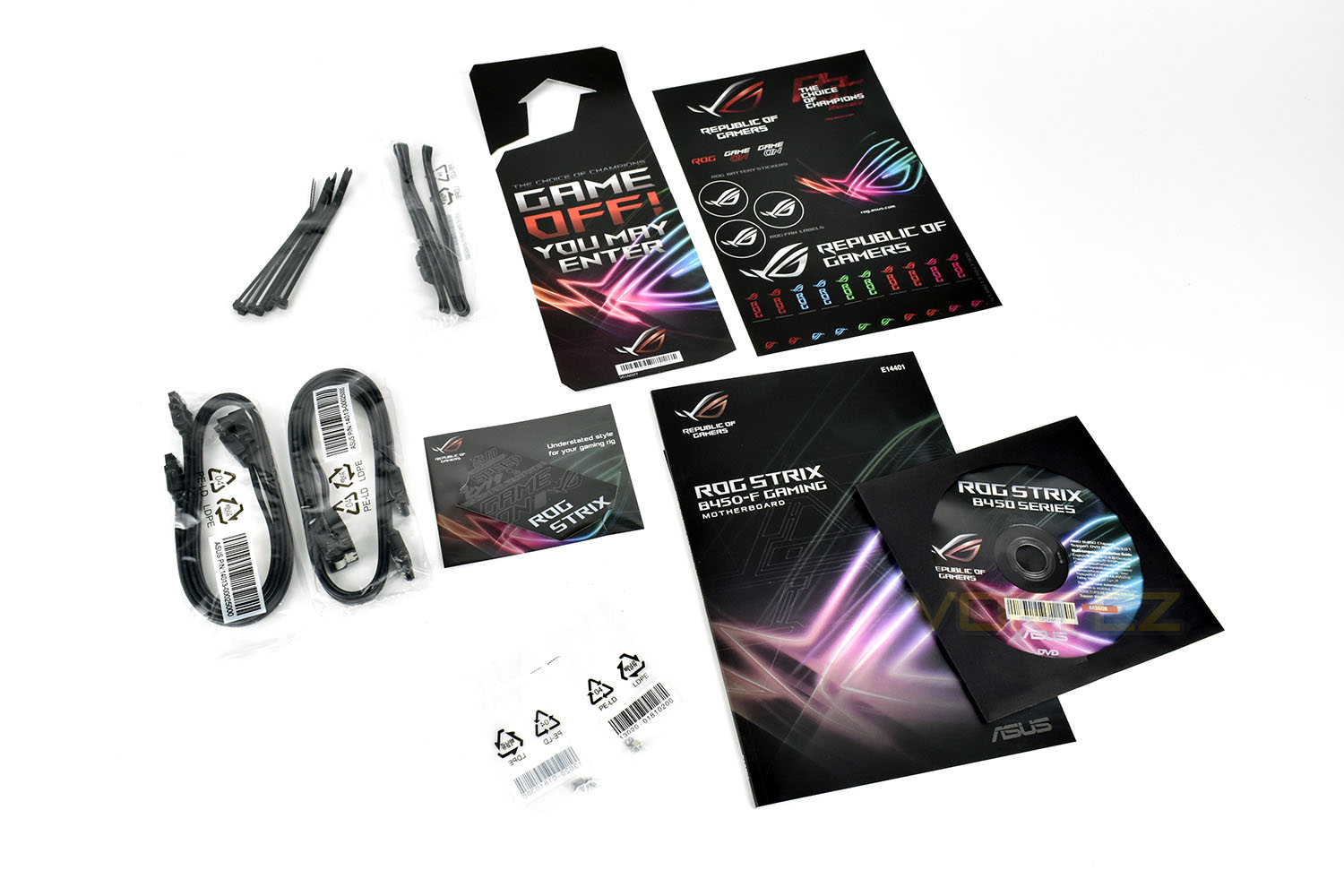
Included with the Strix B450-F is a large instruction manual, in full colour, a driver CD (do people still use these?), a replacement badge for the southbridge, more on that later. A sheet of shiny stickers, RGB extension cables, four SATA cables and a packet of cable ties. There’s also a pair of M.2 standoffs which you need to install yourself.
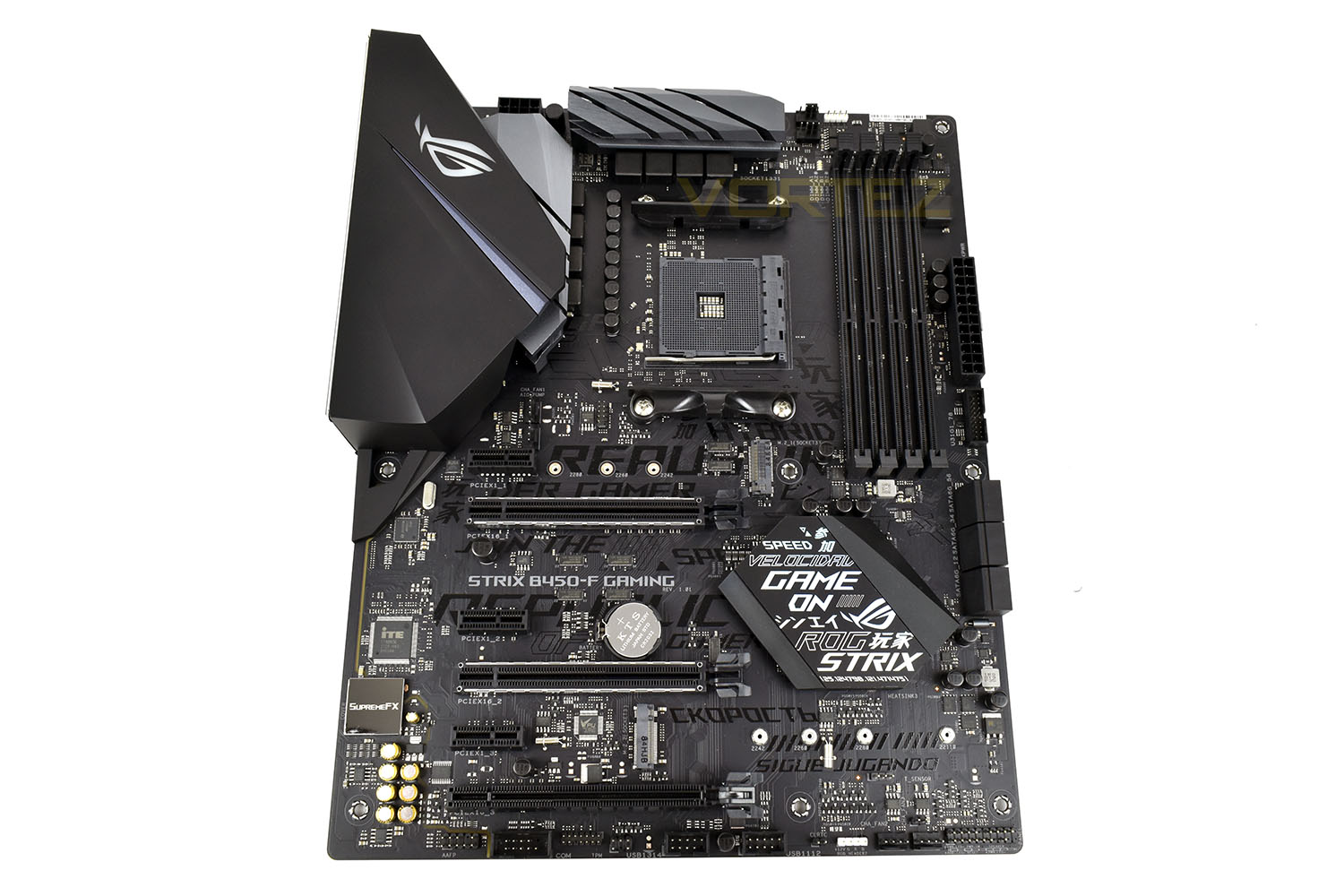
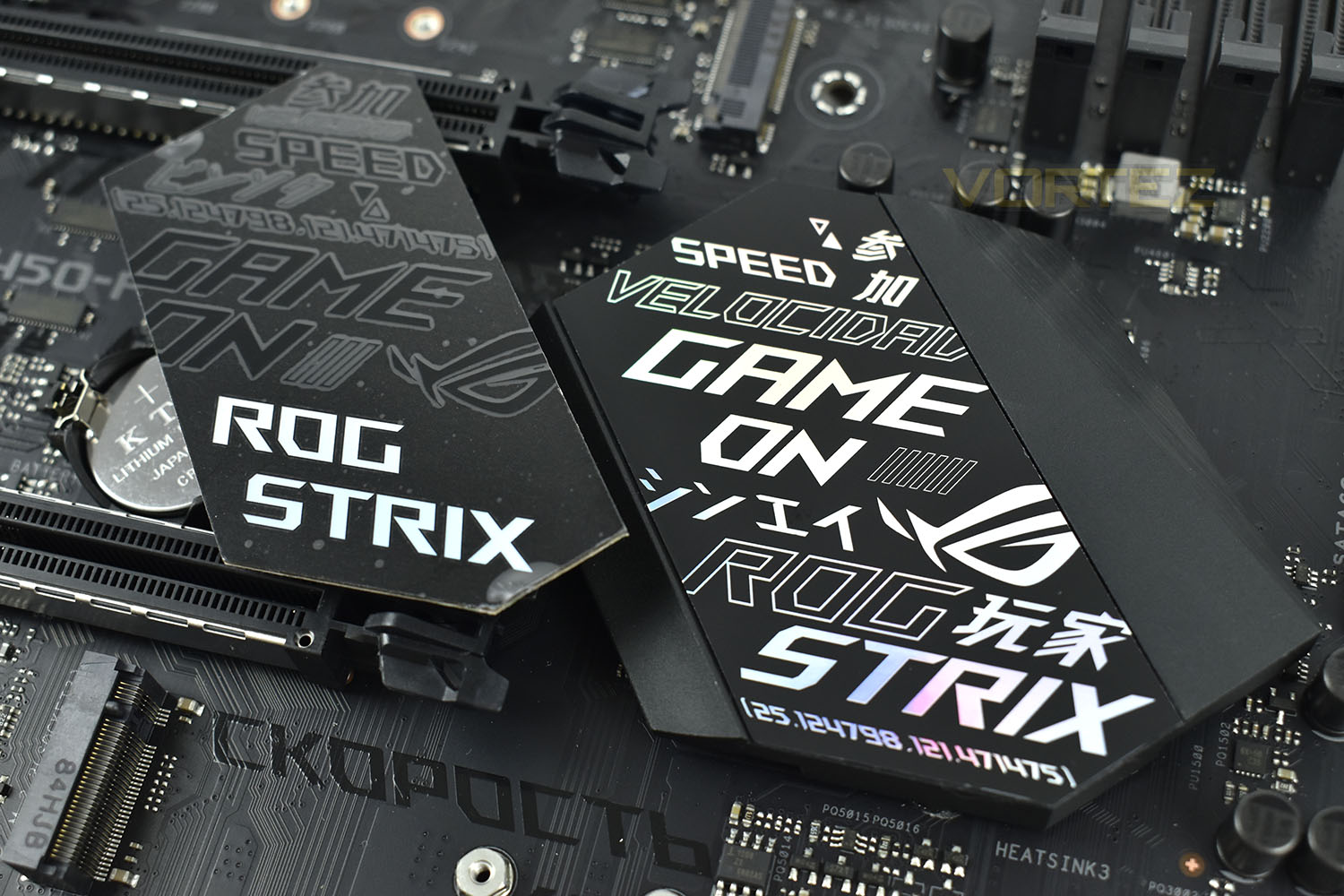
Typical for a ROG board of recent times, there’s an all-black colour scheme with iridescent markings on the southbridge heatsink. The board has been heavily graffitied in the factory, in a glossy black to stand out from the black PCB.
Closer Look
Around the AM4 socket are a pair of reasonably large power delivery heatsinks, styled nicely to look good while they function. The rear IO shield extends over the heatsink, with the RGB lighting recessed into it, but this does not provide any realistic function, instead it perhaps may be limiting airflow, hindering cooling.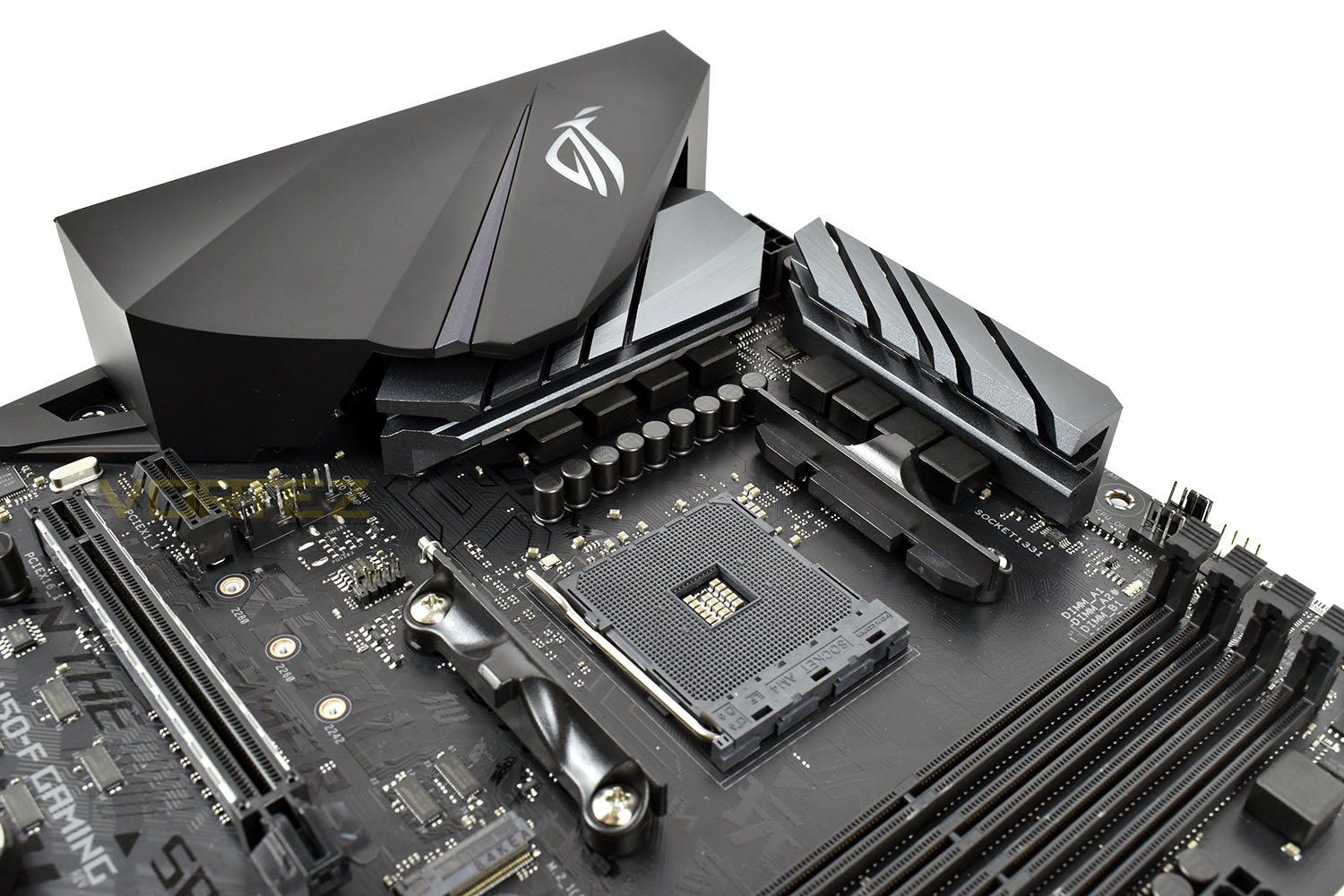
DDR4 memory is dealt with by 4 DIMM slots, offering support for up to 3200MHz and 64GB capacity. Directly left of the upper most DIMM slot is the first of a pair of Aura Sync RGB connections, the small white piece, along with a pair of PWM 4-pin connections.
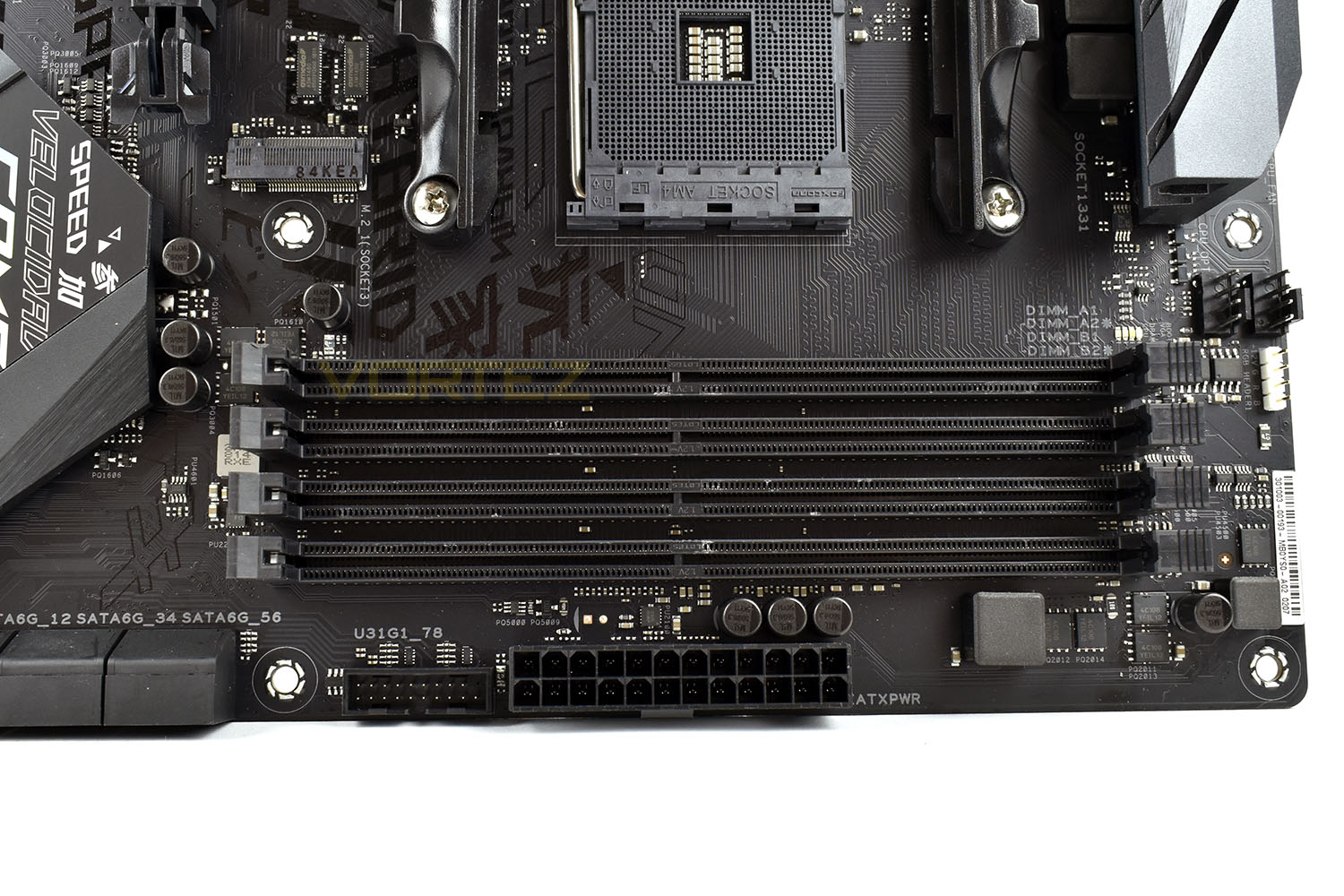
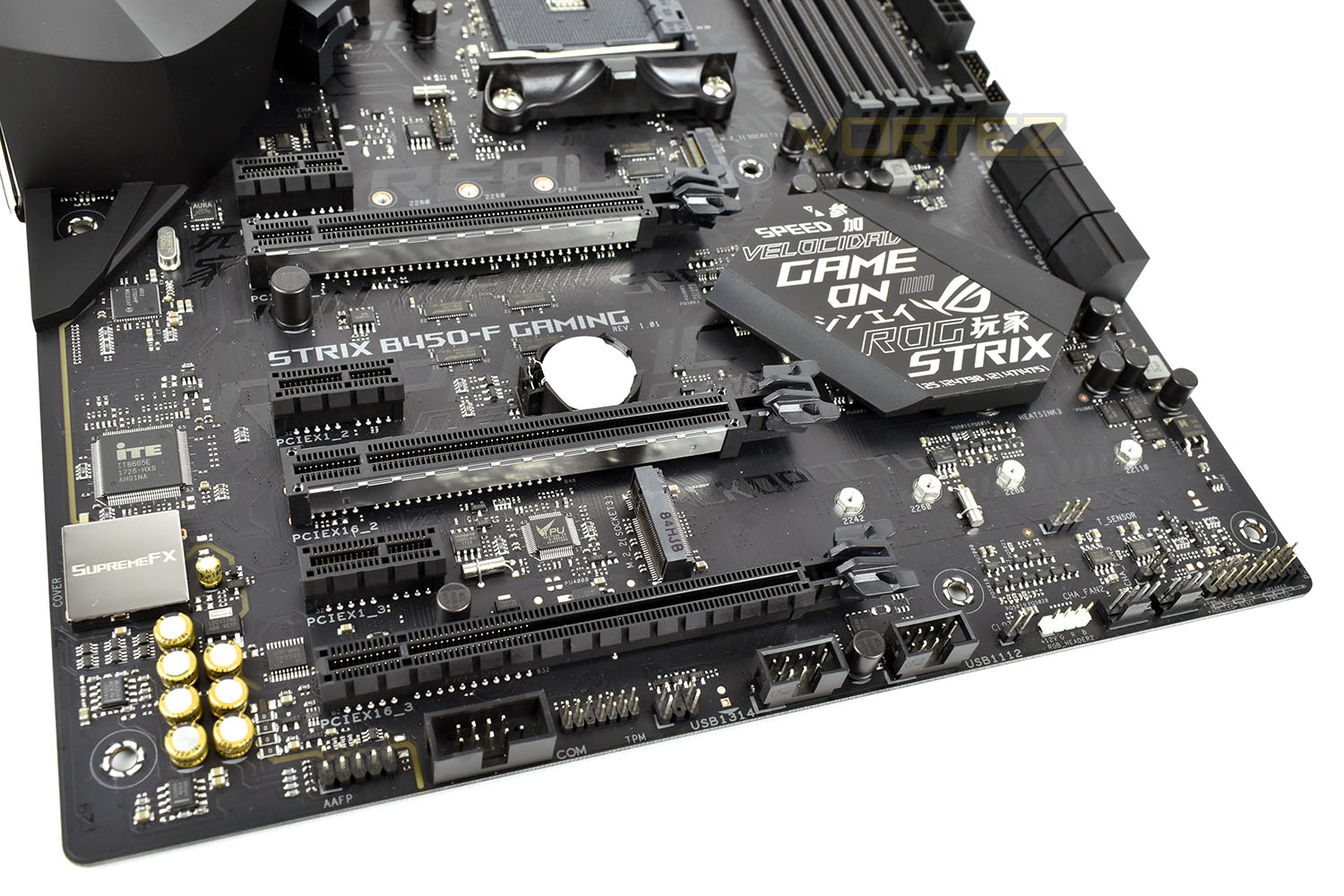
ROG have included a pair of M.2 ports on the B450-F Gaming, strangely mounted the opposite way to each other. The Primary, or top slot, is capable of running both SATA and NVMe M.2 disks, while the secondary slot is capable of NVMe only. The top slot is laid out to accept a disk up to 22mm x 80mm, while the lower slot can accept a disk of 22mm x 110mm.
Alongside the M.2 slots, we get three full-length x16 PCI-E ports, and four x1 ports. The two upper most x16 ports are reinforced with a steel bracket to help prevent interference and also help to reinforce the PCI-E port.
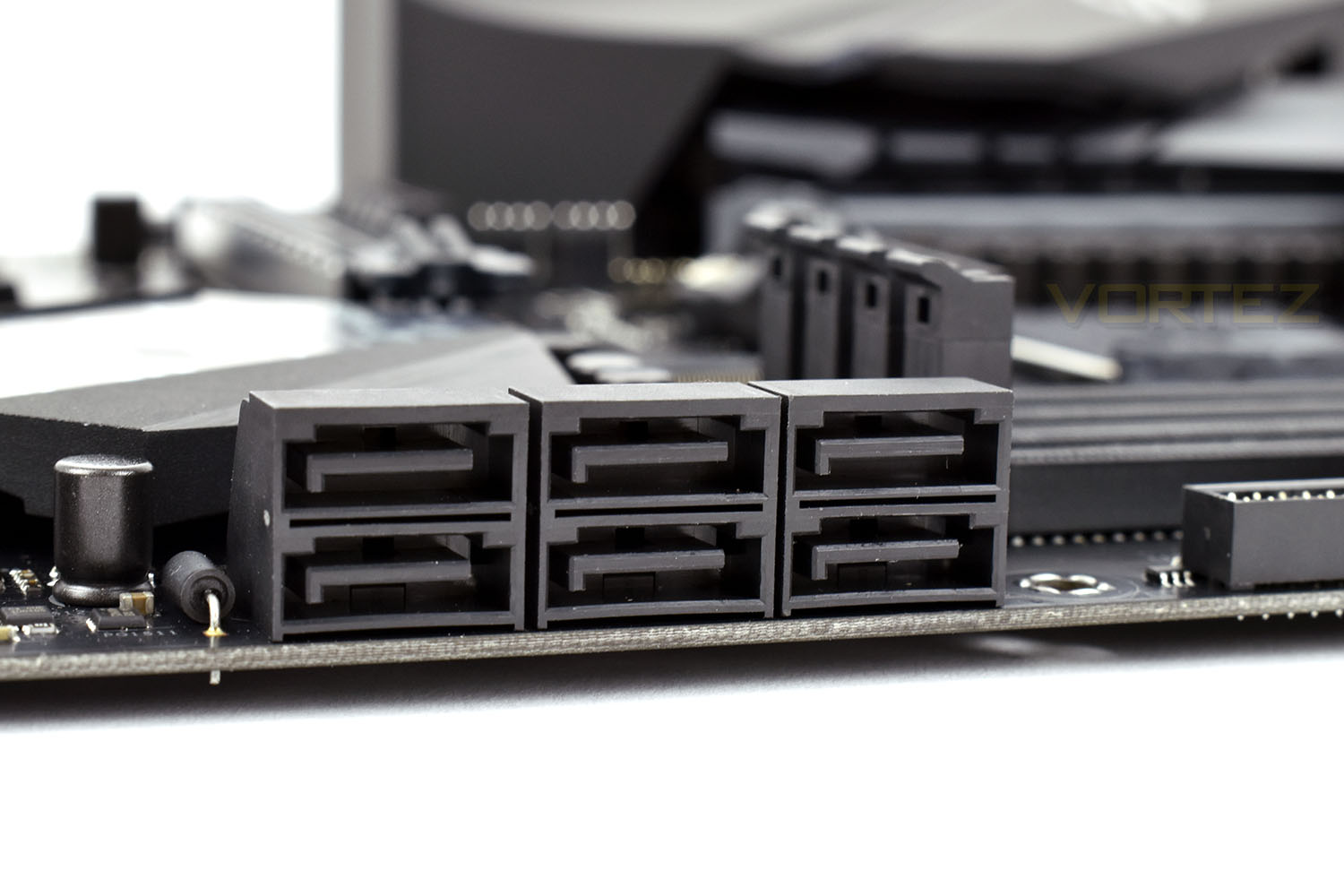
NVMe M.2 storage is lovely and quick, but SATA is usually a much more cost-effective method of storing large amounts of data. The Strix B450-F is equipped with six SATA 3.0 ports, mounted at a 90° angle to the board.
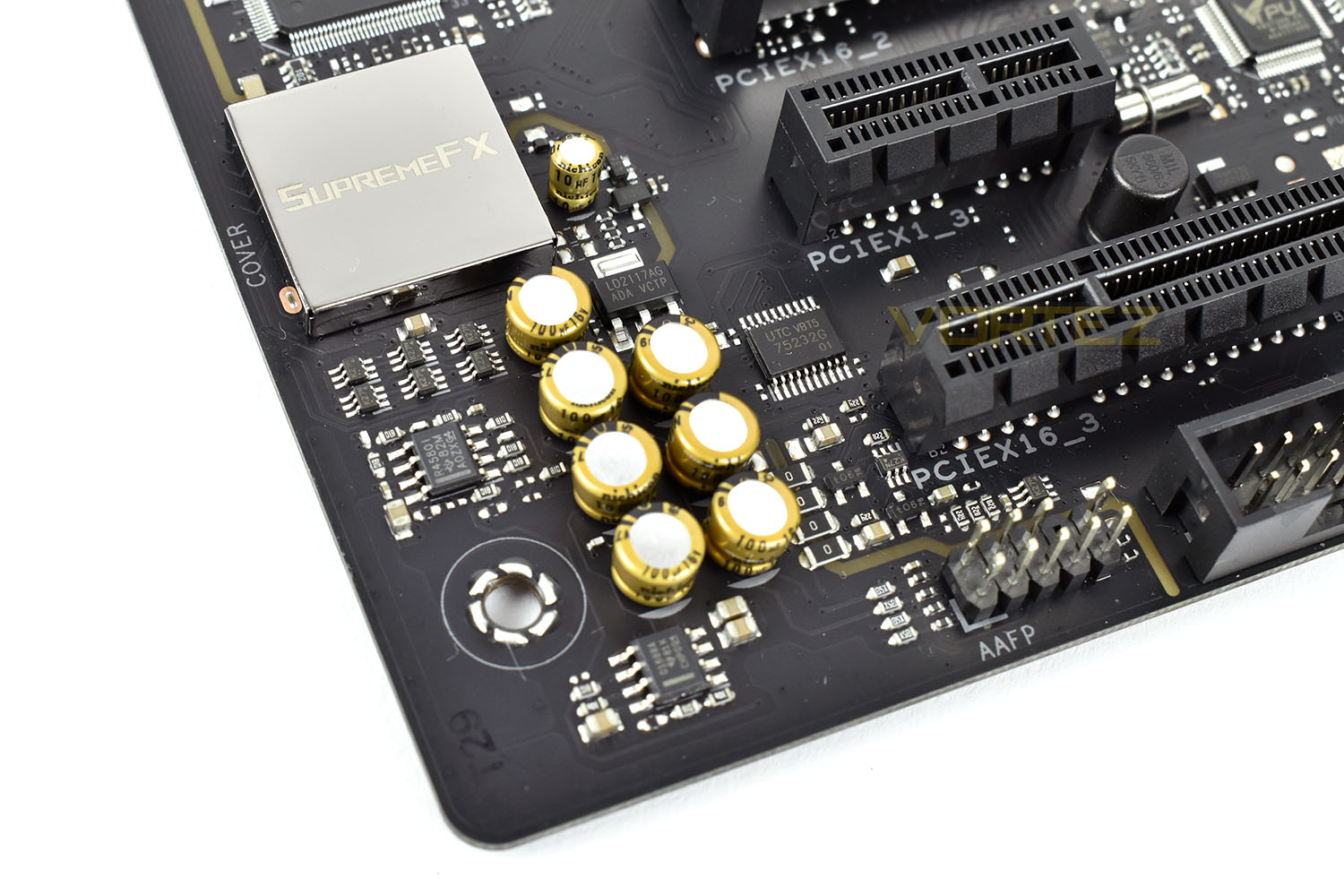
Audio is an important component on any gaming motherboard; the ROG Strix B450-F uses SupremeFX for their audio supply, isolated from the rest of the motherboard via the yellow trace on the motherboard. Nichicon audio capacitors are produced in Japan to stringent standards, used to produce a neutral audio output for exceptional clarity.
Closer Look (Continued)
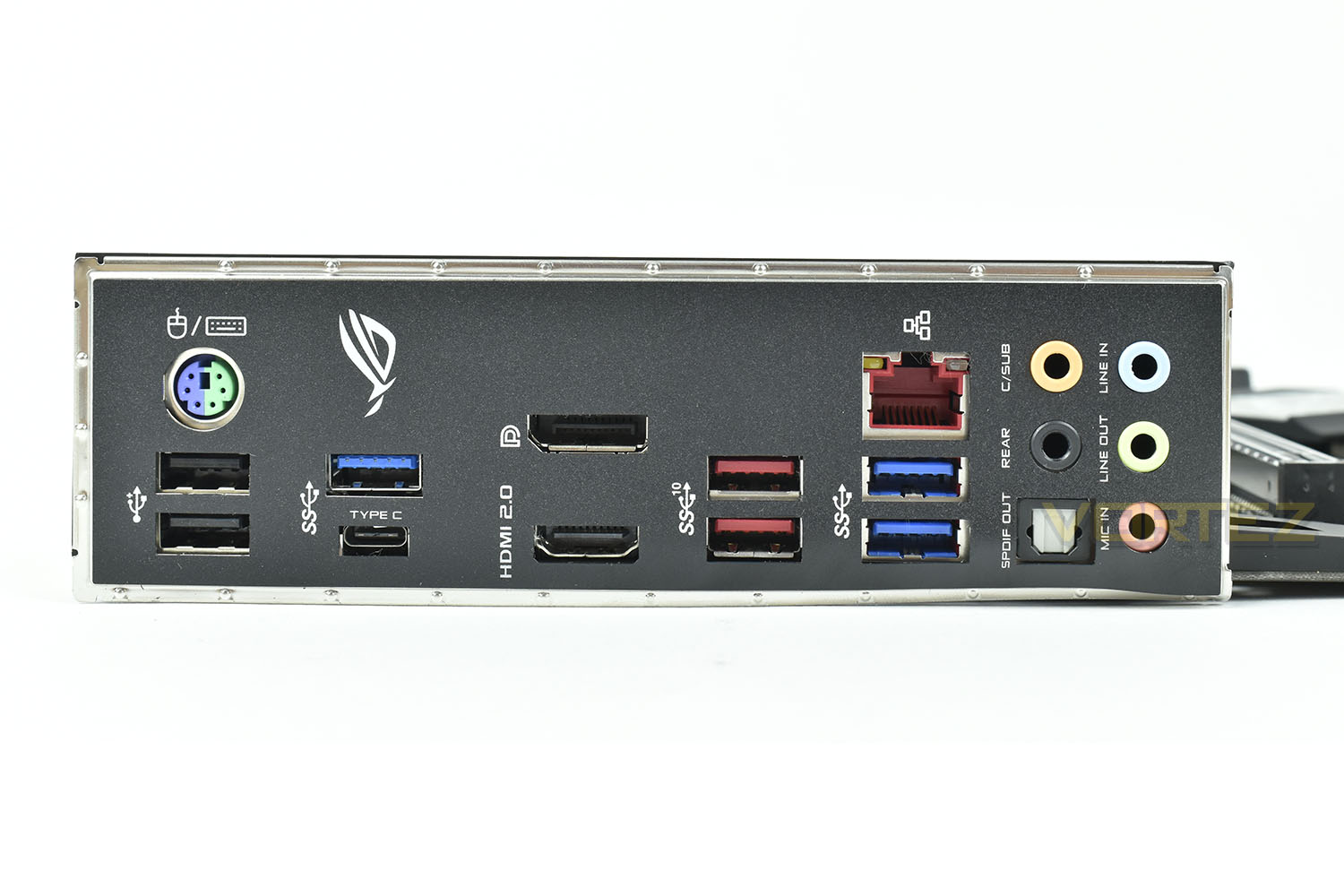
The rear IO shield is pre-attached to the motherboard, saving you from that embarrassing moment when you build a new PC and forget to install this important piece.On the back, starting at the left, we have:
1x PS/2 port
2x USB 2.0 ports
1x USB 3.1 Gen. 2 Type-A
1x USB 3.1 Gen. 2 Type-C
1x Display Port
1x HDMI 2.0
2x USB 3.0
2x USB 3.1
1x Intel Gigabit Ethernet
7.1 Audio output with SPDIF Optical
ASUS ROG have provided a pair of stylish heatsink covers, one in a vibrant style and the other stealthy; you choose which to use.
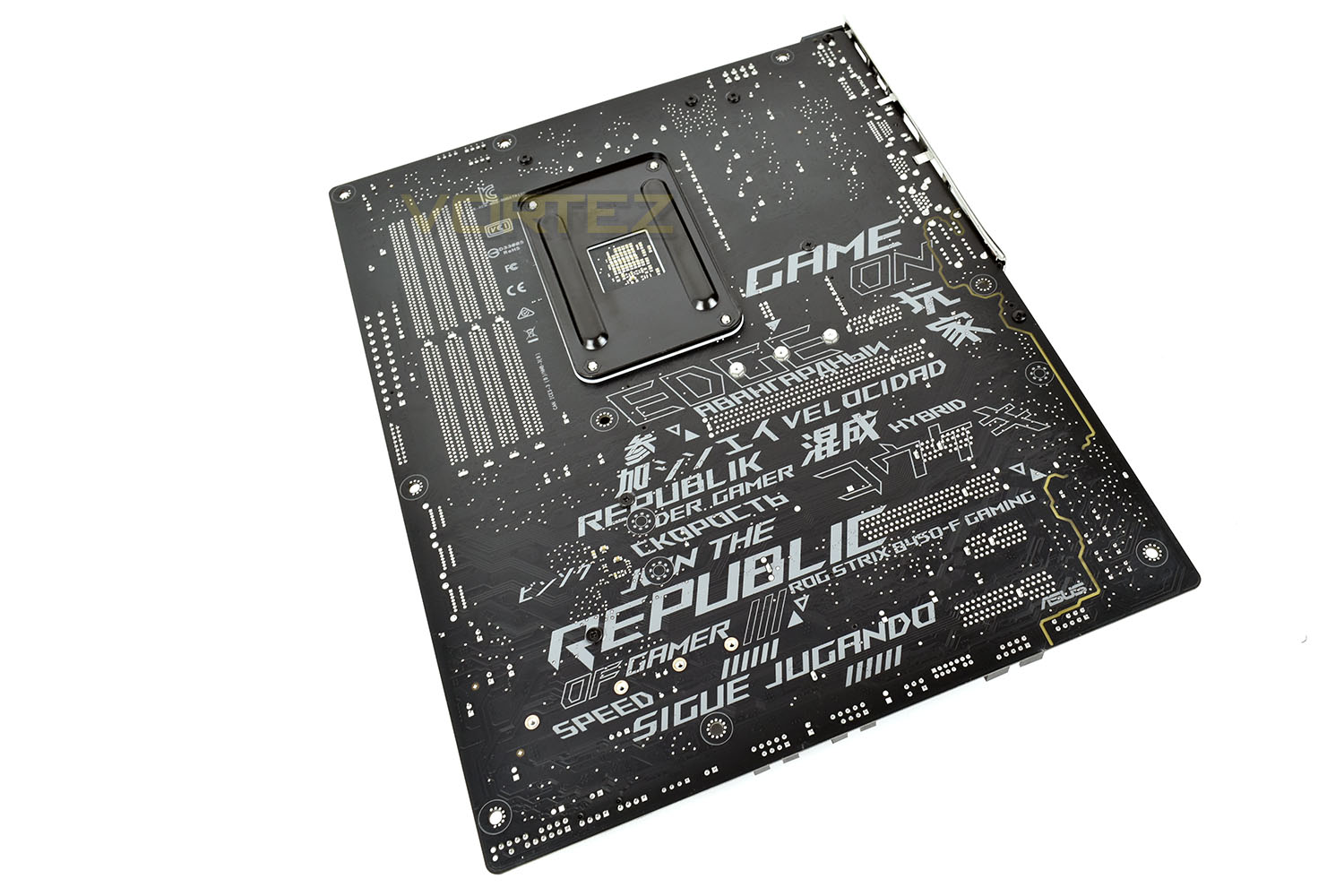
It’s not often we’d mention the rear of a motherboard, but the ROG Strix B450-F looks fantastic. You can also clearly see the isolated audio section on the bottom-right of this image.
BIOS & Overclocking
BIOSArriving as the only ATX motherboard in the ASUS ROG B450 range, you’d expect a fully-featured BIOS to be provided alongside. That’s not really the case, unfortunately, with some rather basic functions completely missing.
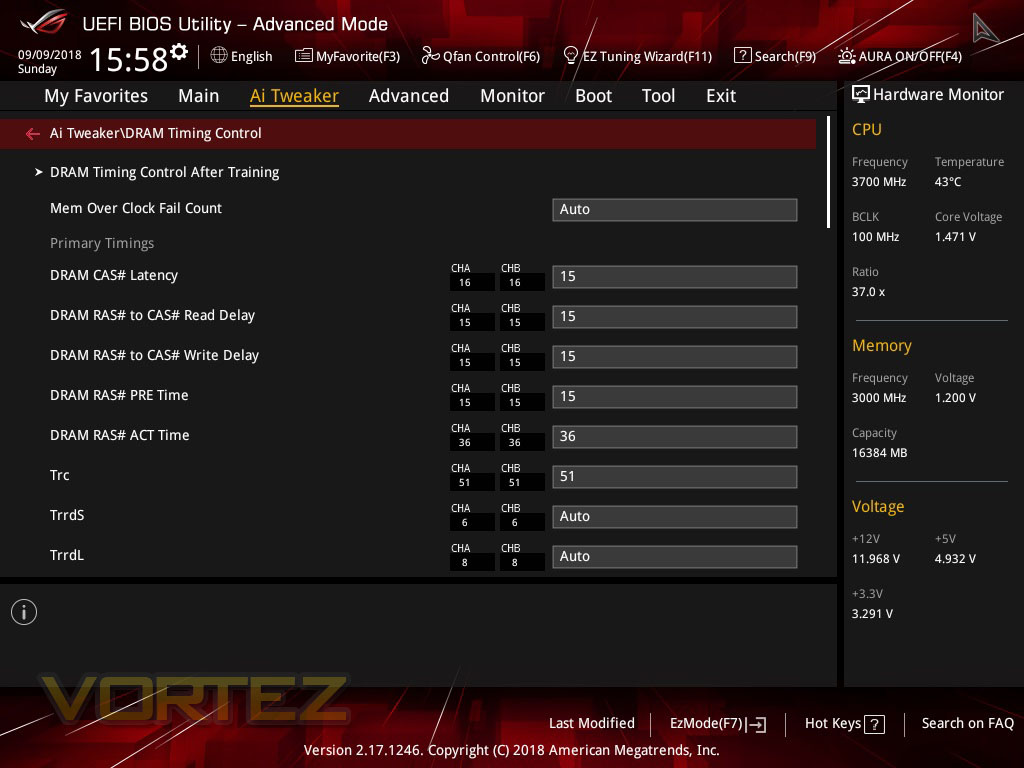
The layout is fantastic and the options are plentiful, until you need something basic like manual core voltage control, or an XMP profile. Both of which are missing in the public BIOS release. We have been provided with a beta BIOS build which adds in manual voltage control but as far as XMP is concerned, you’re gonna have to enter those timings manually.
The Main page gives you a good overview of the system, in a lovely ROG styley black and red, with the hardware monitor on the right-hand-side.
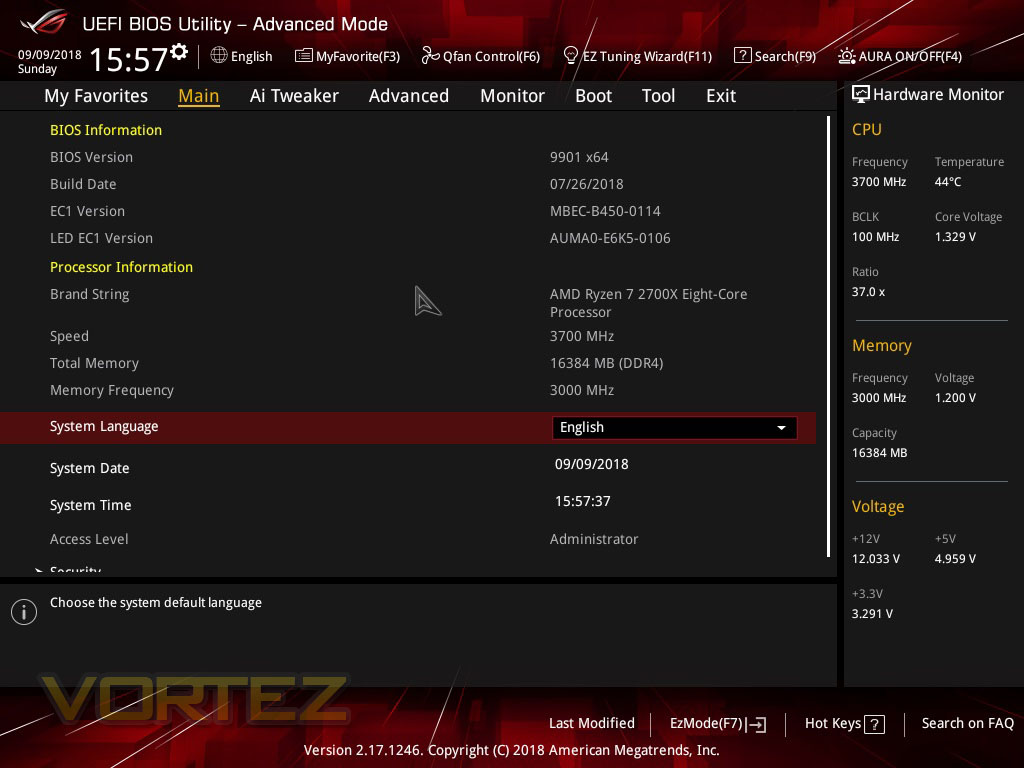
But then moving over to the Ai Tweaker, this is where we began to run into problems. It seems that ASUS have tried a little too hard, this time around, to add in “intelligent automatic overclocking solutions”, which work well at overboosting the CPU and extracting performance, but a manual overclock is made difficult as a result.
We were able to change the CPU Core Ratio, without issue, but when selecting the CPU Core Voltage, we were met with two options, Auto or Offset Mode; we usually see three options here: Auto, Manual or Offset Mode. After being provided with the beta BIOS release from ASUS, we were then able to overclock our CPU.

This page, you would imagine, should also be home to an XMP profile switch; making overclocking your graphics to their XMP profile that bit easier, instead of manually inputting the CAS timings. Again, this has been left out, despite the DRAM Timing Control section being pre-populated with the correct timings, the RAM boots up to use the standard JEDEC standards, even if you choose 3000MHz Memory Frequency in the Ai Tweaker.
Overclocking
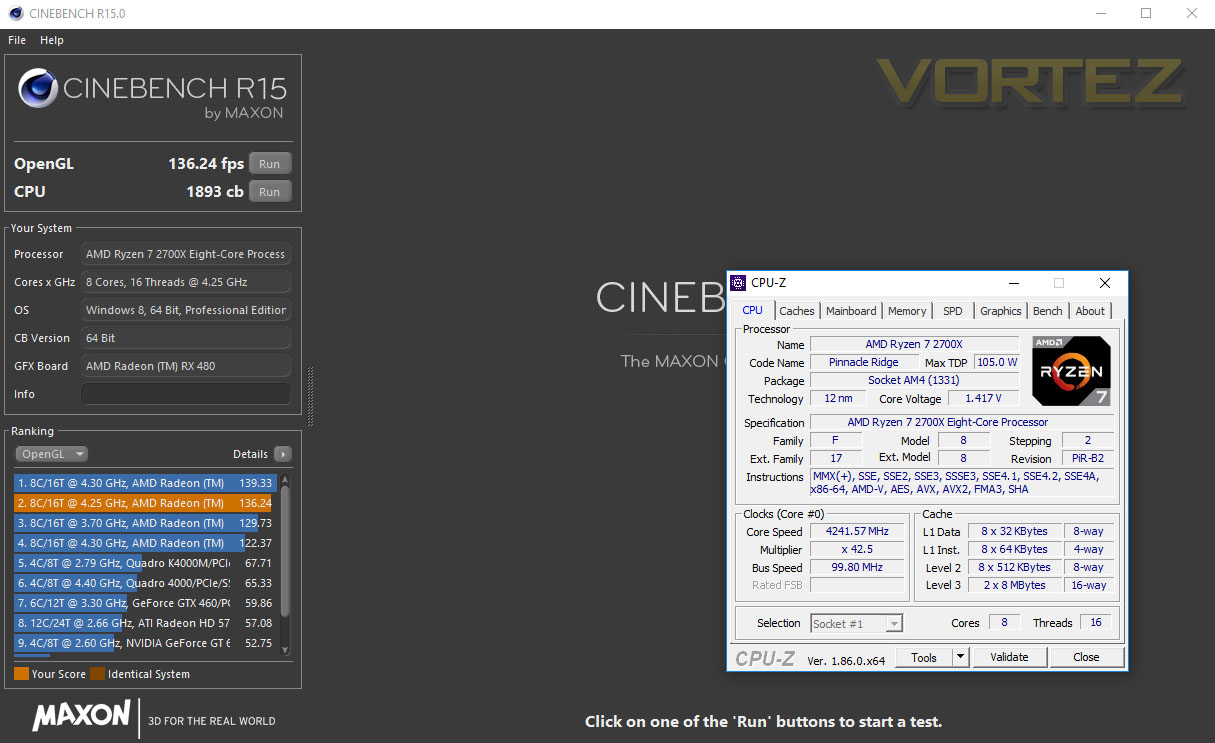
Thanks to the beta BIOS, which we’ve been told will be rolled out to the public very soon, we are able to adjust the voltage manually instead of relying on an offset mode, which adds complexity.
Overclocking the CPU to 4.25GHz, which was our stable maximum, we saw almost 100 extra points in Cinebench, certainly not to be sniffed at!
Test Setup & Software
Test SetupCPU AMD Ryzen 7 2700X
Cooling Corsair H150i Pro RGB
Motherboard ROG Strix B450-F Gaming
Memory 16GB Corsair Vengeance LPX 3000MHz @ 3000MHz @ 15-17-17-37-55
Graphics AMD Radeon RX 480 8GB
Storage Corsair Force LE 480GB
PSU Corsair RM750X 80 Plus Gold Certified PSU
Cooling Corsair H150i Pro RGB
Motherboard ROG Strix B450-F Gaming
Memory 16GB Corsair Vengeance LPX 3000MHz @ 3000MHz @ 15-17-17-37-55
Graphics AMD Radeon RX 480 8GB
Storage Corsair Force LE 480GB
PSU Corsair RM750X 80 Plus Gold Certified PSU
Benchmarks
Cinebench R15 – CPU/OpenGL Score
x264 HD 4.0 – 1st and 2nd pass encoding
SiSoftware SANDRA – CPU & Memory benchmarks
POV-RAY – CPU benchmarks
TrueCrypt – CPU benchmarks
AIDA64 – CPU benchmarks & Memory
PCMark 8 – Home Suite & Photoshop
3DMark FireStrike – 3D Benchmark
Games – Rise of the Tomb Raider & Total War: WARHAMMER
x264 HD 4.0 – 1st and 2nd pass encoding
SiSoftware SANDRA – CPU & Memory benchmarks
POV-RAY – CPU benchmarks
TrueCrypt – CPU benchmarks
AIDA64 – CPU benchmarks & Memory
PCMark 8 – Home Suite & Photoshop
3DMark FireStrike – 3D Benchmark
Games – Rise of the Tomb Raider & Total War: WARHAMMER
Other Software
Temperature Analysis: Aida64 & Ryzen Master
Stress Testing Software: AIDA64 Stability Test
CPU Specification Monitoring: CPU-Z
Performance Monitoring: MSI Afterburner
Stress Testing Software: AIDA64 Stability Test
CPU Specification Monitoring: CPU-Z
Performance Monitoring: MSI Afterburner
Benchmarks: Power Consumption
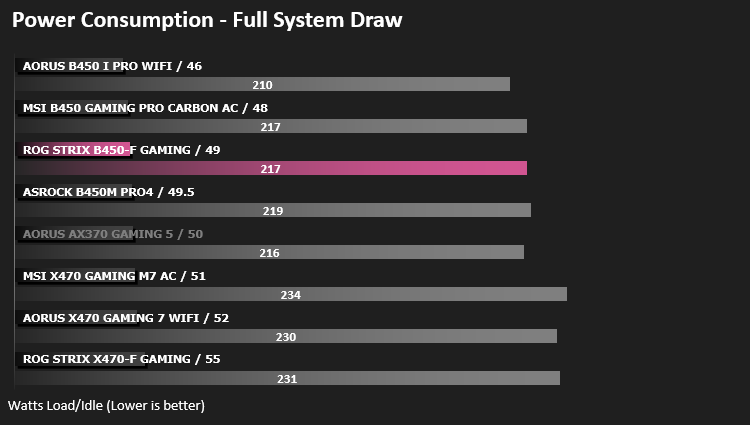
It’s interesting to note the power consumption across all motherboards. Although they are using the Z270 chipset, energy results can fluctuate between manufacturers due to the features and specifications that are integrated. First of all, for the idle tests the system is cold booted into Windows and no additional applications are executed – the watts are noted on the external energy monitor we use and then the system is loaded with 3DMark FireStrike – watts are again monitored for the duration of the test and the highest rated wattage result is then noted down. Below are the results of this energy test.
Ray Tracing Performance – POV-Ray 3.7
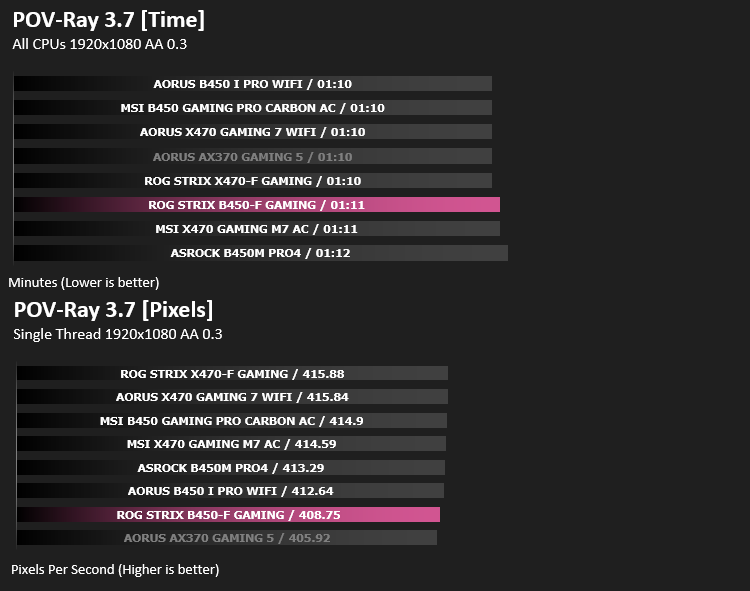
Persistence of Vision Raytracer’s PovRay is a free and open source 3D animator application with versions for computers with different operating systems.
This product allows users to build their custom 3D worlds with excellent quality despite their computer’s hardware. It has adjustable options for levels of radiance, refraction, and reflection. Calculation time may vary depending on the computer model, but PovRay can adapt to many computer builds, and is supported by the open source community.
This product allows users to build their custom 3D worlds with excellent quality despite their computer’s hardware. It has adjustable options for levels of radiance, refraction, and reflection. Calculation time may vary depending on the computer model, but PovRay can adapt to many computer builds, and is supported by the open source community.
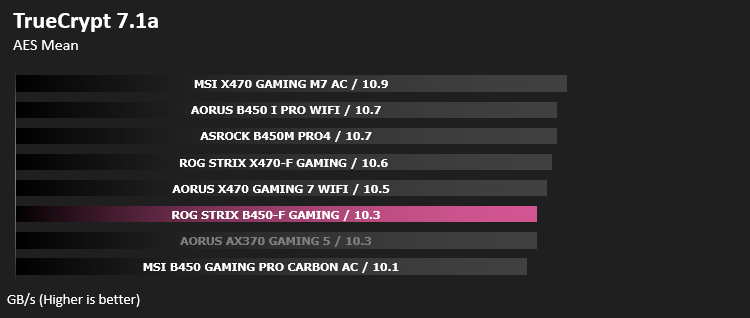
AES Encryption Performance – TrueCrypt 7.1a
TrueCrypt is a discontinued source-available freeware utility used for on-the-fly encryption (OTFE). It can create a virtual encrypted disk within a file or encrypt a partition or (under Microsoft Windows except Windows 8 with GPT) the entire storage device (pre-boot authentication).
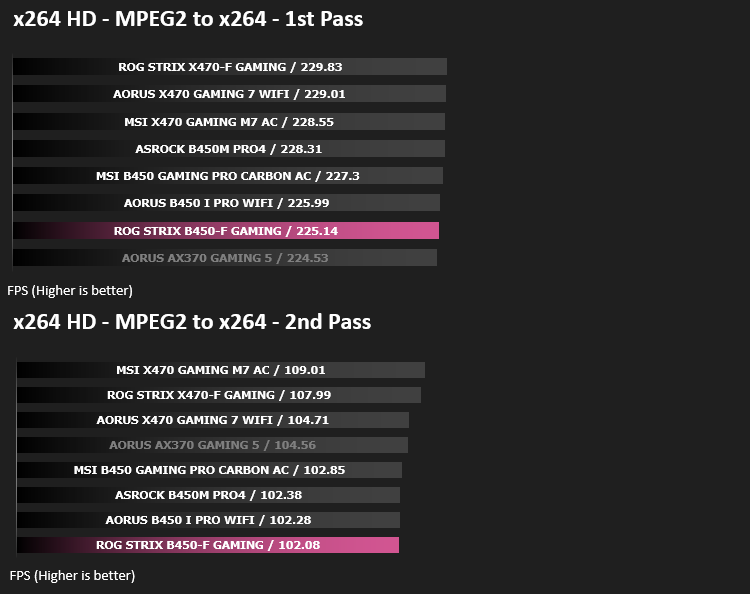
Encoding Performance – x264 HD
Simply put, this test measures how fast your machine can encode a short, DVD quality MPEG-2 video clip into a high-quality x264 video clip. What’s x264, you ask? It’s more or less the next-generation Xvid/DivX codec. I think it’s ideal for a benchmark because the application (x264.exe) reports fairly accurate compression results (in frames per second) for each pass of the video encoding process, and it uses multi-core processors very efficiently.
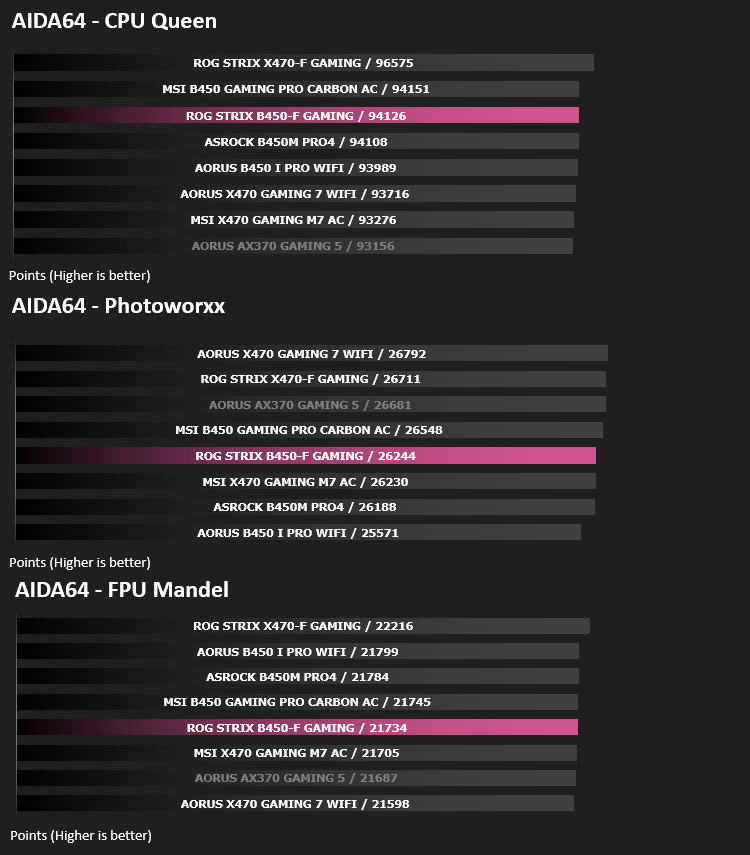
Processing Features Performance – AIDA64
AIDA64 Product PageThis simple integer benchmark focuses on the branch prediction capabilities and the misprediction penalties of the CPU. It finds the solutions for the classic “Queens problem” on a 10 by 10 sized chessboard. At the same clock speed theoretically the processor with the shorter pipeline and smaller misprediction penalties will attain higher benchmark scores. For example — with HyperThreading disabled — the Intel Northwood core processors get higher scores than the Intel Prescott core based ones due to the 20-step vs 31-step long pipeline. CPU Queen test uses integer MMX, SSE2 and SSSE3 optimizations.
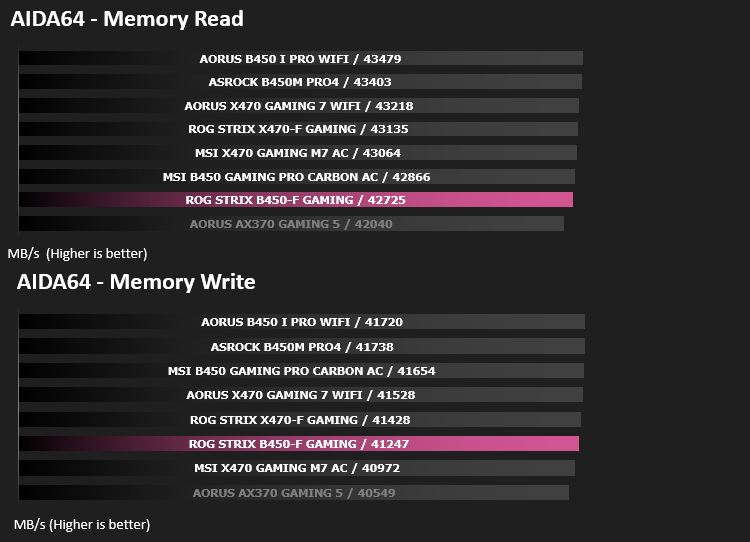
Memory Transfer Performance – AIDA64
AIDA64 Product PageMemory bandwidth benchmarks (Memory Read, Memory Write, Memory Copy) measure the maximum achiveable memory data transfer bandwidth. The code behind these benchmark methods are written in Assembly and they are extremely optimized for every popular AMD, Intel and VIA processor core variants by utilizing the appropriate x86/x64, x87, MMX, MMX+, 3DNow!, SSE, SSE2, SSE4.1, AVX, and AVX2 instruction set extension.
The Memory Latency benchmark measures the typical delay when the CPU reads data from system memory. Memory latency time means the penalty measured from the issuing of the read command until the data arrives to the integer registers of the CPU.
The Memory Latency benchmark measures the typical delay when the CPU reads data from system memory. Memory latency time means the penalty measured from the issuing of the read command until the data arrives to the integer registers of the CPU.
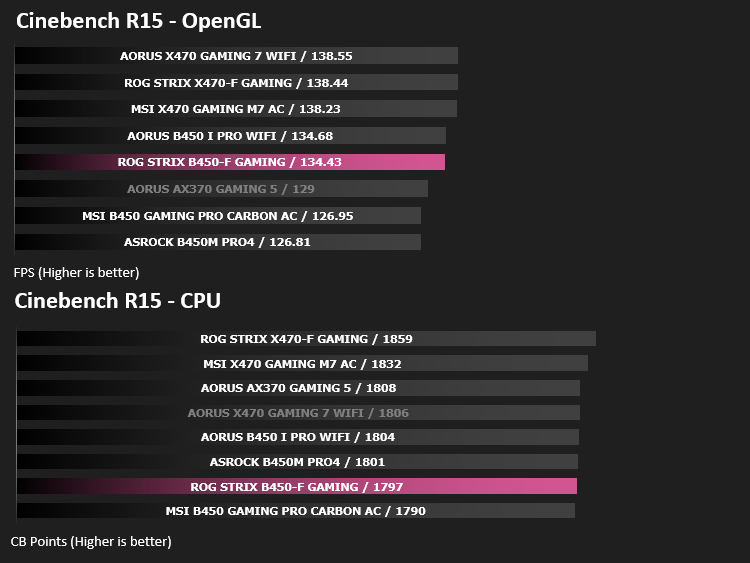
Processing Power Performance – Cinebench R15
CINEBENCH can measure systems with up to 64 processor threads. This test scene contains approximately 2,000 objects which in turn contain more than 300,000 polygons in total, and uses sharp and blurred reflections, area lights, shadows, procedural shaders, antialiasing, and much more. The result is displayed in points (pts). The higher the number, the faster your processor.
Bandwidth Performance – SiSoftware SANDRA
SANDRA isn’t always a benchmark that is included in hardware reviews but I believe it shouldn’t be ignored. SANDRA provides a vigorous package that tests your system in a rather large array of benchmarks. There are many aspects of benchmark that can be executed. We will be considering – CPU and memory tests.
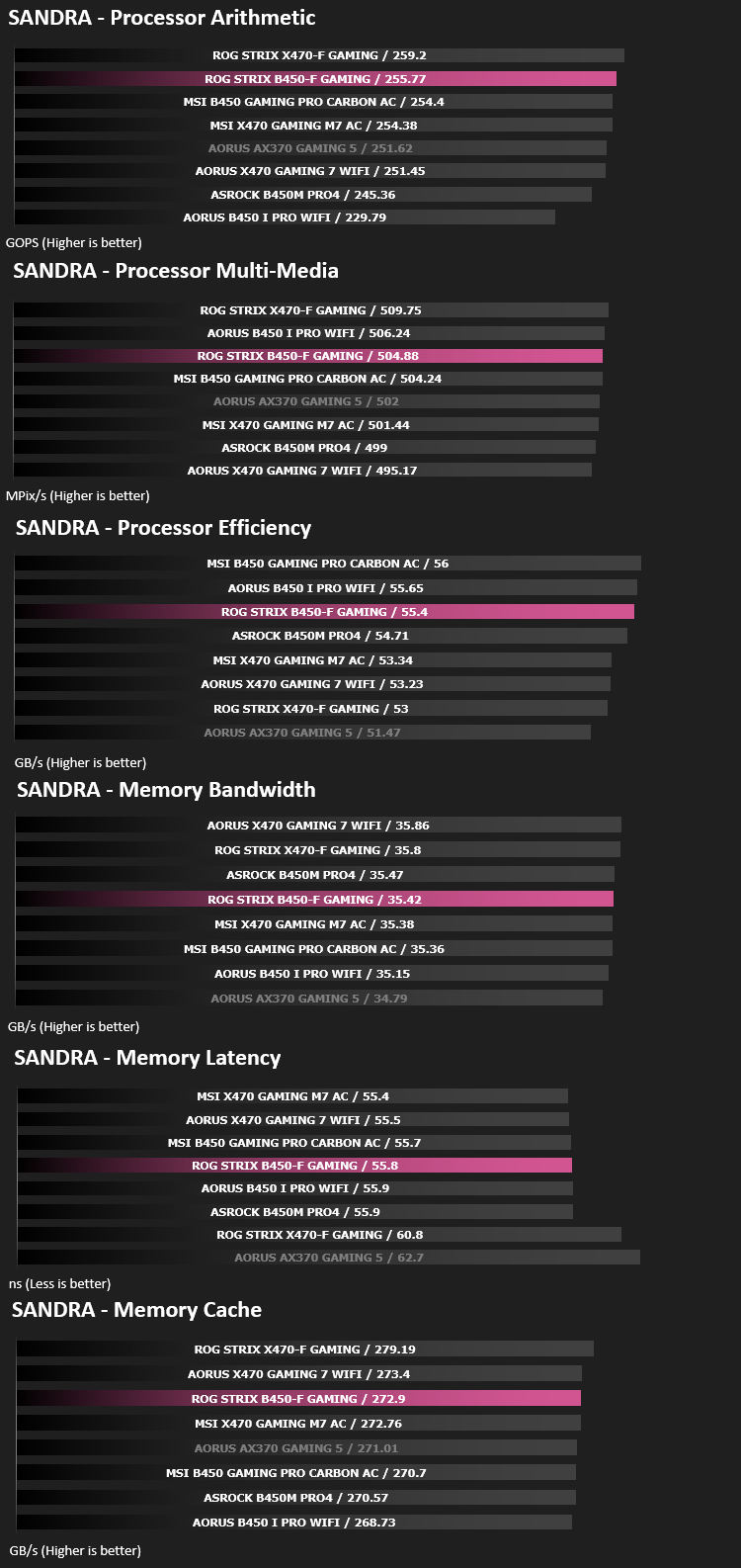
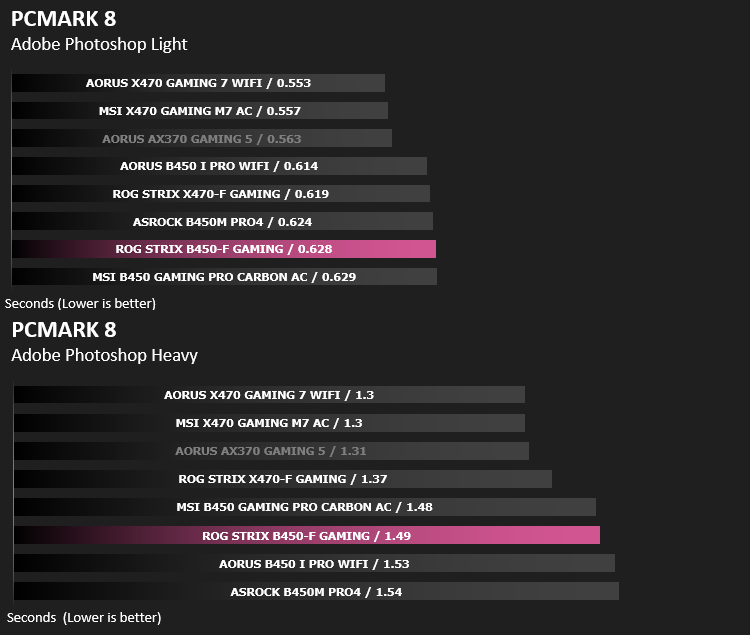
Image Editing Performance – PCMark 8 Photoshop
PCMark 8 Product Page Developed in partnership with Benchmark Development Program members Acer, AMD, Condusiv Technologies, Dell, HGST, HP, Intel, Microsoft, NVIDIA, Samsung, SanDisk, Seagate and Western Digital, PCMark 8 is the latest version in FutureMark’s popular series of PC benchmarking tools. Improving on previous releases, PCMark 8 includes new tests using popular applications from Adobe and Microsoft.
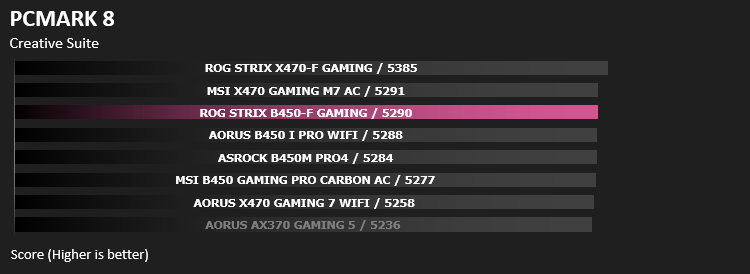
Overall System Performance – PCMark 8
PCMark 8 combines performance benchmarking with battery life measurement and includes tests based on popular Adobe and Microsoft applications. Whether you are looking for long battery life, or maximum power, PCMark 8 will help you find the devices that offer the perfect combination of efficiency and performance for your needs. It’s the complete PC performance benchmark for home and business.
VR Performance – VRMark
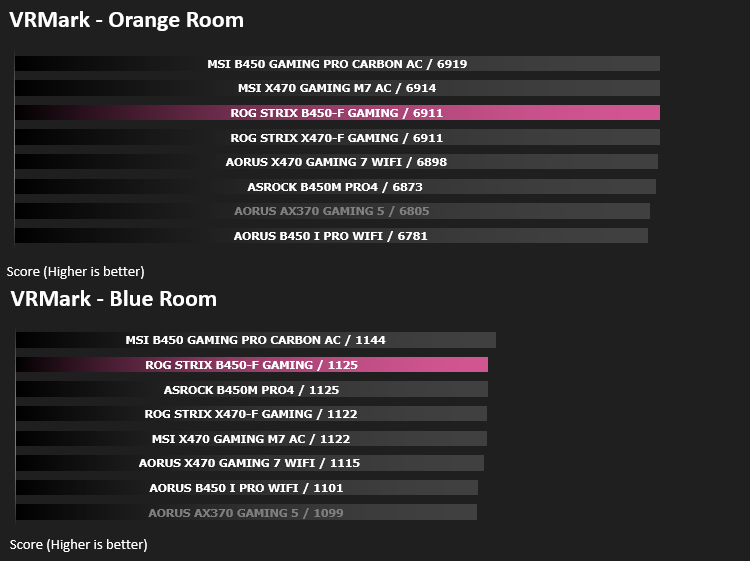
VRMark Product PageVRMark includes two VR benchmark tests that run on your monitor, no headset required, or on a connected HMD. At the end of each test, you’ll see whether your PC is VR ready, and if not, how far it falls short.
3D Performance – 3DMark
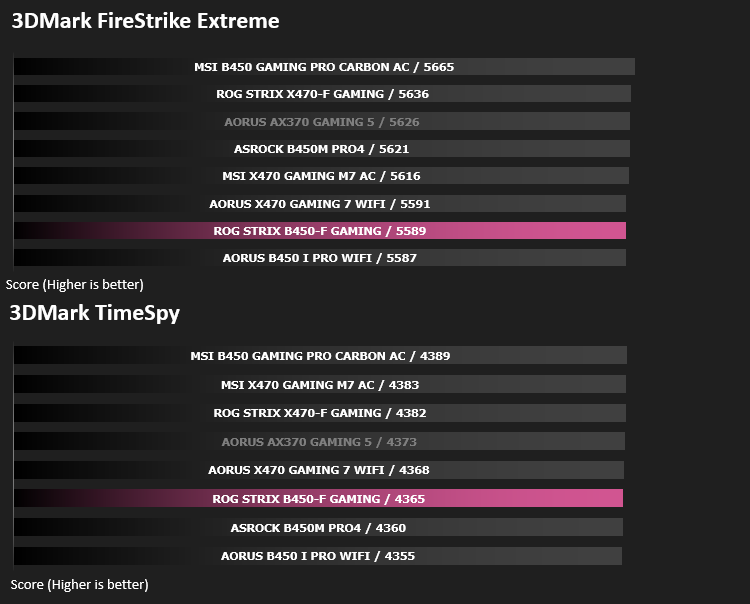
3DMark FireStrike Product PageFire Strike is our new showcase DirectX 11 benchmark designed for high-performance gaming PCs. It is our most ambitious and technical benchmark ever, featuring real-time graphics rendered with detail and complexity far beyond what is found in other benchmarks and games today. Fire Strike will only be available in the Windows editions of 3DMark initially.
Gaming Performance – Rise of the Tomb Raider & Total War: WARHAMMER
It’s important for us to perform a number of game benchmarks as well as the synthetic tests because gamers will want to know if there are any significant benefits. So here we have two recent gaming titles.

Conclusion
Compared to the more expensive X470-F version, we’re struggling to see how ROG justify the £60-£70 GBP or $100-110 AUD difference between the two models. We marked the ROG STRIX X470-F Gaming as excellent value when we’d finished our roundup of X470 chipset motherboards, back in April, but looking back with the benefit of hindsight, we still feel that award is deserved, however it does highlight the huge value of the motherboard being reviewed today.
If you look at the graphs, there’s not a great deal between the X470 and B450 chipsets, with the ROG STRIX B450-F trading blows with the competition. This statement rings true for most of the B450 tests we’ve conducted so far, showing that AMD really aren’t holding back on their chipset implementations, holding essential features to increase high-end sales.
The rear IO is well equipped, giving plenty of USB ports, including a Type-C, a Display Port and HDMI port, allowing users of APUs, such as the 2200G and 2400G, to create a budget PC.
The black and grey colour scheme should match any system you wish to drop this into, with the graffiti adding a bit of flair. The graffiti on the rear of the board seems a little pointless though it might inspire some case mods that can show it off.
For your £120 GBP / $209 AUD, you receive RGB lighting, a high-spec power phase with adequate cooling, two M.2 NVMe slots, six SATA ports, three PCI-E x16 slots and three x1 slots, SupremeFX audio and ample fan and RGB connections. If you’re not too bothered about getting the absolute bleeding edge of performance that the X470 platform allows, this really is the whole shebang for around £60 GBP / $110 AUD less. Our only gripe lies with the lack of XMP and voltage controls in the BIOS, though the voltage control should be fixed soon.
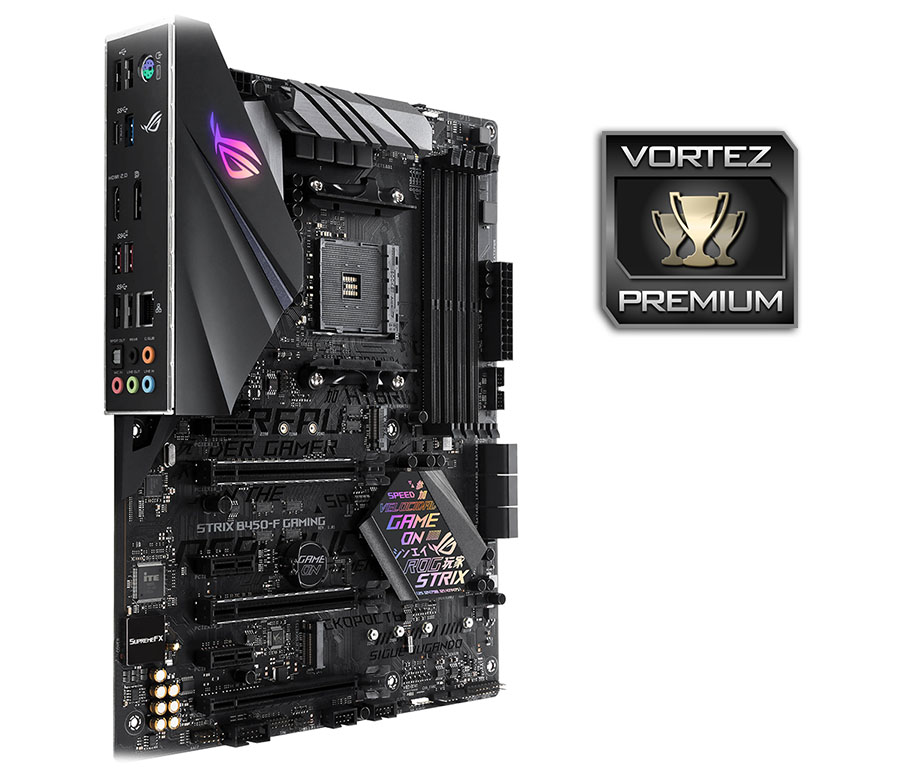
For the £120 GBP / $209 AUD, it’s very difficult to find anything to put us off recommending it. If you’re after a B450 motherboard with all of the trimmings, certainly pay close attention to the B450-F
Pros
+ Motherboard looks great
+ Good performance
+ RGB lighting
+ Twin M.2 slots
+ Well-equipped rear IO (with the IO shield already in place)
+ Price
+ Plenty of PWM and RGB connections
+ SupremeFX Audio
+ Swappable southbridge sticker
Cons
– Some worrying BIOS oversights
+ Motherboard looks great
+ Good performance
+ RGB lighting
+ Twin M.2 slots
+ Well-equipped rear IO (with the IO shield already in place)
+ Price
+ Plenty of PWM and RGB connections
+ SupremeFX Audio
+ Swappable southbridge sticker
Cons
– Some worrying BIOS oversights
Click here for an explanation of our awards at Vortez.net.
Stay connected with the Vortez Social Media pages:
Join in with the discussions on Discord