







The latest SSD from Samsung has just hit the market which promises speed, bang per buck and one of the longest warranties available. Presenting the Samsung 850 EVO.

Product on Review: 850 EVO
Manufacturer and Sponsor: Samsung
Street Price: 120GB – £73.49, 250GB – £109.99, 500GB – £198.49, 1TB – £367.49
When we sampled the previous generation 840 EVO from SAMSUNG we were very impressed. It was reasonably priced, had good encryption qualities and in stock format was also a very fast drive. Add RAPID technology and the drive became a performance beast. So, with today’s example being a refresh of that SSD we are hoping for much the same, if not more. It would be fair to say that this drive, perhaps more than most is eagerly anticipated by the enthusiast market due to the popularity if the 840 EVO but that isn’t to say that the 850 EVO is aimed purely at the enthusiast market segment because with the popularity of Ultra books and the demand for fast data access ever increasing, all users in the PC market will benefit from a drive such as this so when the chips are down – how does this drive perform? Is it value for money? A worthwhile investment or an unneeded rehash?
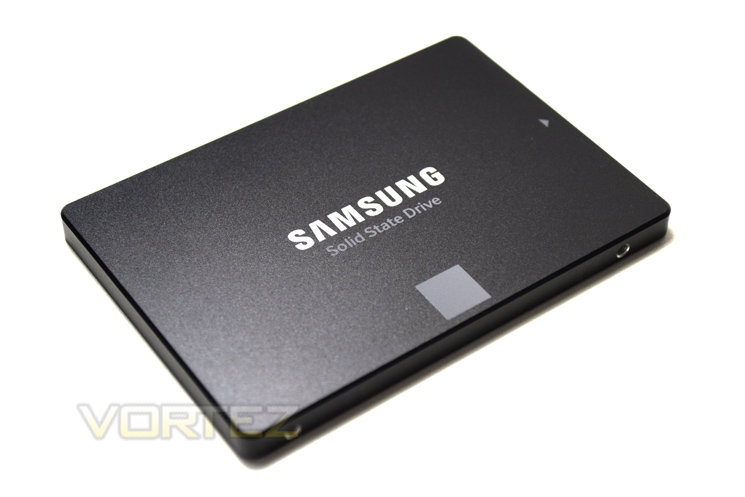
The 850 EVO features 3D V-NAND technology, RAPID enhancements courtesy of SAMSUNG’s Magician software, itself an OS optimisation tool along with a 5 year warranty and a host of security encryption features so you can be assured this will be a quality product. It will certainly be interesting to see if it can topple their own 850 Pro, itself an extremely high performing SSD which we reviewed. As we have seen in the past, manufacturers are so eager to release the latest technology that sometimes they fail to recognise the competitiveness of their own previous success. By this we mean they are already market leaders in this area and while they should be definitely applauded for moving technology forward, small steps may not be enough to warrant such an upgrade, especially with the festive season almost upon us and the frugality the accompanies this time of the year.
About Samsung:
SEOUL, South Korea – July 1, 2014 – Samsung Electronics Co., Ltd., the world leader in advanced memory technology, today launched the 850 PRO, a new solid state drive (SSD) line-up featuring Samsung’s cutting-edge three-dimensional (3D) vertical NAND (V-NAND) flash memory technology. The new Samsung 850 PRO, unveiled at the 2014 Samsung SSD Global Summit in Seoul, offers a new breed of performance for solid state drives and will be available globally across 53 markets from this month.
Specification & Features
V-NAND Technology
– More capacity
– More speed
– More endurance
– More power efficiency
Samsung’s new 3D V-NAND will be used for a wide range of consumer electronics and enterprise applications, including solid state drives (SSDs). Consumers can expect their handheld computers to perform better for longer periods of time between charges. Datacenter managers can expect increased productivity and longevity while saving on their power bill.
SAMSUNG Magician Software
With Magician 4.0, Samsung is introducing a host of improvements designed to enhance user experience and to make Magician’s features more user-friendly and accessible to novices. The totally redesigned User Interface (UI) features simple, graphical indictors to show SSD health status and Total Bytes Written (TBW) at a glance. Users can now determine SATA and AHCI compatibility and status without consulting their user’s manuals. The updated Benchmarking feature lets users test other storage devices so that they can clearly see the dramatic performance improvements their new Samsung SSD delivers.
Particularly dramatic improvements have been made to the OS Optimization feature with a simpler, tabbed interface providing access to 3 optimization profiles (Maximum Performance, Maximum Capacity, & Maximum Reliability), along with detailed descriptions of each OS setting and why they are turned on or off for each profile. This feature should reduce user confusion about OS configuration, a common question among new SSD users, and the Magician team is excited to outline what’s changed.
RAPID Mode
RAPID mode is paired exclusively with Samsung 840 EVO SSDs and available as a feature of the accompanying Samsung SSD Magician Software Toolset (version 4.2 and later).
When enabled, RAPID mode is inserted as a filter driver in the Windows storage stack. The driver actively monitors all storage-related activity between and among the operating system, user applications and the SSD. The RAPID technology analyzes system traffic and leverages spare system resources (DRAM and CPU) to deliver read acceleration through intelligent caching of hot data and write optimization through tight coordination with the SSD.
Usage Application Client PCs
Capacity 120GB, 250GB, 500GB, 1TB(1,000GB)
Dimensions (LxWxH) 100 x 69.85 x 6.8 (mm)
Interface SATA 6Gb/s (compatible with SATA 3Gb/s and SATA 1.5Gb/s)
Form Factor 2.5 inch
Controller
120/250/500GB : Samsung MGX controller
1TB: Samsung MEX controller
NAND Flash Memory Samsung 32 layer 3D V‐NAND
DRAM Cache Memory 256MB (120GB) or 512MB(250GB&500GB) or 1GB (1TB) LPDDR2
Performance
Sequential Read: Max. 540 MB/s
Sequential Write**: Max. 520 MB/s
4KB Random Read (QD1): Max. 10,000 IOPS
4KB Random Write(QD1): Max. 40,000 IOPS
4KB Random Read(QD32):
Max. 98,000 IOPS(500GB/1TB)
Max. 97,000 IOPS(250GB)
Max. 94,000 IOPS(120GB)
4KB Random Write(QD32):
Max. 90,000 IOPS(500GB/1TB)
Max. 88,000 IOPS(120GB/250GB)
Data Security
AES 256‐bit Full Disk Encryption (FDE)
TCG/Opal V2.0, Encrypted Drive(IEEE1667)
Weight Max. 66g (1TB)
Reliability MTBF: 1.5 million hours
TBW
120/250GB: 75TBW
500GB/1TB: 150 TBW
Power Consumption
Active Read/Write (Average): Max. 3.7W(1TB)/ Max. 4.4W(1TB)
Idle: Max. 50mW
Device Sleep: 2mW(120/250/500GB), 4mW(1TB)
Supporting features TRIM(Required OS support), Garbage Collection, S.M.A.R.T
Temperature
Operating:
Non‐Operating:
0°C to 70°C
‐40°C to 85°C
Humidity 5% to 95%, non‐condensing
Vibration Non‐Operating: 20~2000Hz, 20G
Shock Non‐Operating: 1500G , duration 0.5m sec, 3 axis
Warranty 5 years limited
Capacity 120GB, 250GB, 500GB, 1TB(1,000GB)
Dimensions (LxWxH) 100 x 69.85 x 6.8 (mm)
Interface SATA 6Gb/s (compatible with SATA 3Gb/s and SATA 1.5Gb/s)
Form Factor 2.5 inch
Controller
120/250/500GB : Samsung MGX controller
1TB: Samsung MEX controller
NAND Flash Memory Samsung 32 layer 3D V‐NAND
DRAM Cache Memory 256MB (120GB) or 512MB(250GB&500GB) or 1GB (1TB) LPDDR2
Performance
Sequential Read: Max. 540 MB/s
Sequential Write**: Max. 520 MB/s
4KB Random Read (QD1): Max. 10,000 IOPS
4KB Random Write(QD1): Max. 40,000 IOPS
4KB Random Read(QD32):
Max. 98,000 IOPS(500GB/1TB)
Max. 97,000 IOPS(250GB)
Max. 94,000 IOPS(120GB)
4KB Random Write(QD32):
Max. 90,000 IOPS(500GB/1TB)
Max. 88,000 IOPS(120GB/250GB)
Data Security
AES 256‐bit Full Disk Encryption (FDE)
TCG/Opal V2.0, Encrypted Drive(IEEE1667)
Weight Max. 66g (1TB)
Reliability MTBF: 1.5 million hours
TBW
120/250GB: 75TBW
500GB/1TB: 150 TBW
Power Consumption
Active Read/Write (Average): Max. 3.7W(1TB)/ Max. 4.4W(1TB)
Idle: Max. 50mW
Device Sleep: 2mW(120/250/500GB), 4mW(1TB)
Supporting features TRIM(Required OS support), Garbage Collection, S.M.A.R.T
Temperature
Operating:
Non‐Operating:
0°C to 70°C
‐40°C to 85°C
Humidity 5% to 95%, non‐condensing
Vibration Non‐Operating: 20~2000Hz, 20G
Shock Non‐Operating: 1500G , duration 0.5m sec, 3 axis
Warranty 5 years limited
Packaging & Accessories
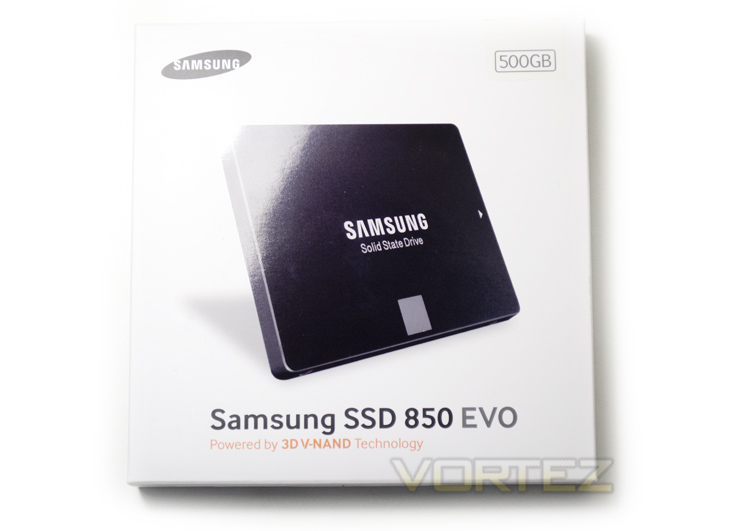
The outer packaging is pretty standard as far as SSD packaging goes. In actual fact we think it is fair to say that SAMSUNG have gone for the minimalistic look as aside from a glossy shot of the SSD amid a matt white background, there is little other to accompany the drive other than the product title at the bottom and a sticker telling us the capacity which also doubles up as a seal for the packaging.
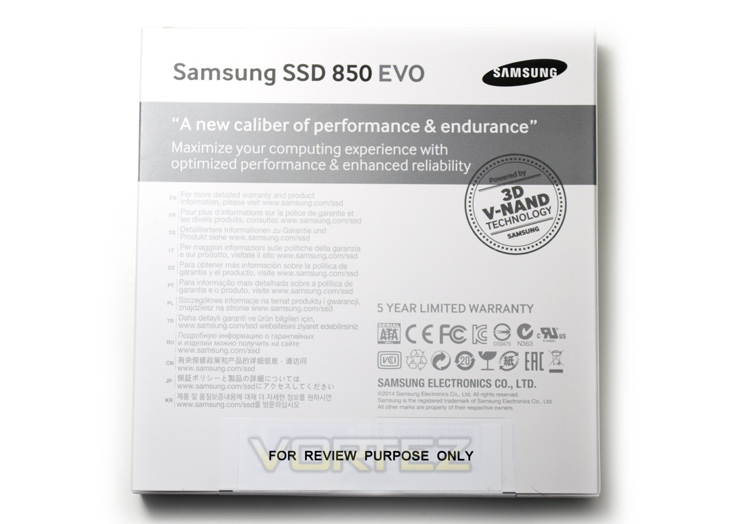
To the rear of the packaging we see that SAMSUNG tell us this drive is a ‘New caliber of performance & endurance’ – while this remains to be seen we are happy to report that SAMSUNG have seen fit to equip the 850 EVO with 3D V-NAND technology so going by our previous experiences it should be no slouch!
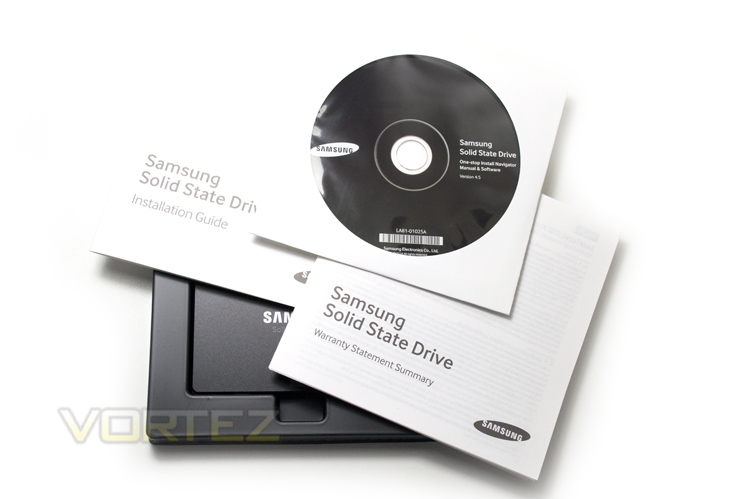
The drive comes in a thin plastic brace but no protective anti-static wrap. We also get both an installation booklet and Warranty Summary along with a utility CD – more than the usual accompaniments found with SSDs from other manufacturers however there was no drive bracket to allow fitment to either 3.5″ mechanical hard drive slot or a 9mm bracket for larger notebook ports.
Closer Look
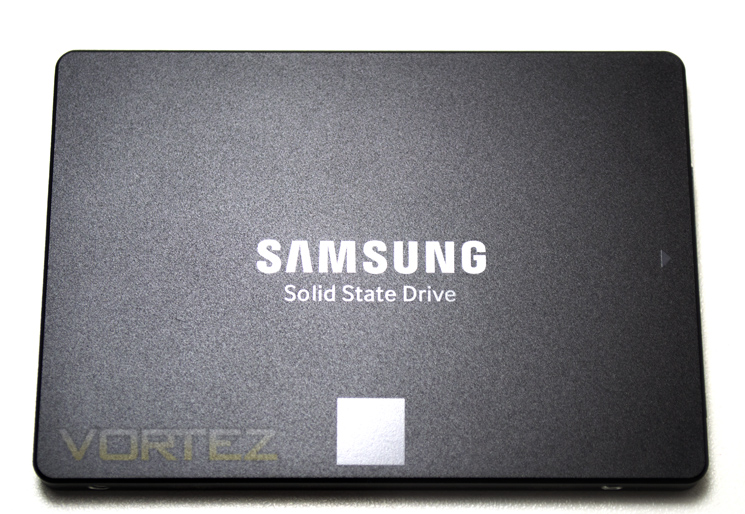
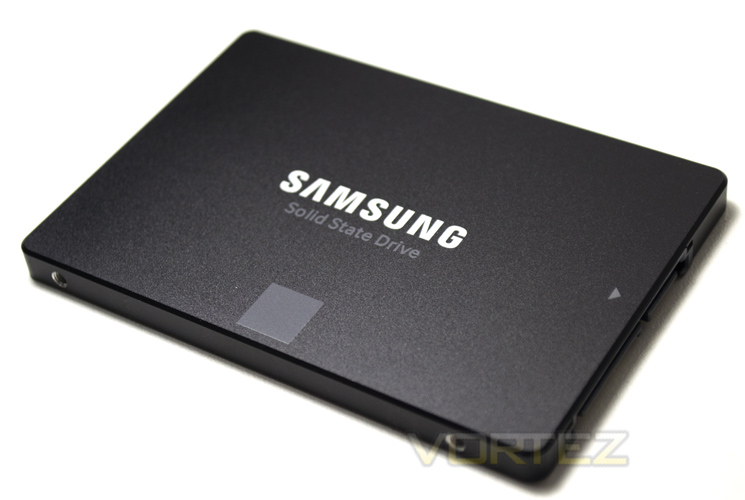
Continuing the minimalistic theme, the drive is a carbon black with both logos being screen printed rather than via stickers which was a nice touch of class adding to the aesthetics.
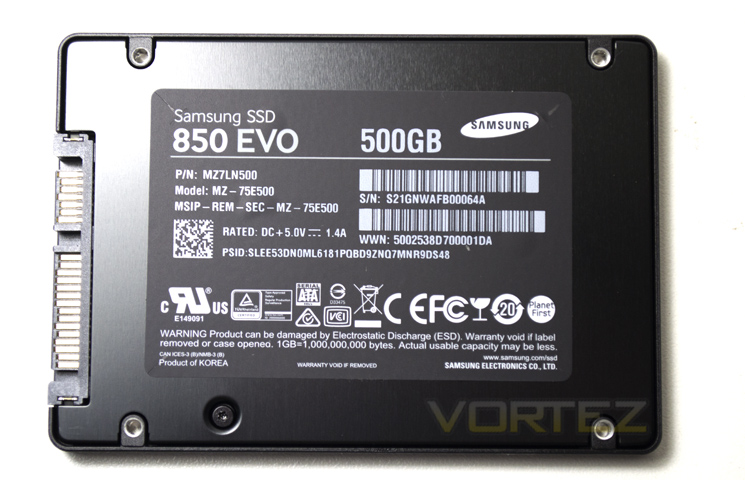
The rear of the drive features a host of serial numbers along with warnings regarding ESD and of course the drive title and size in bold font. The drive stands a little under 7mm, measuring just 6.8mm in height and will consume (based on 1TB models) 4.4W under load while just 50mW when idle along with a 2mW power draw during device sleep conditions.
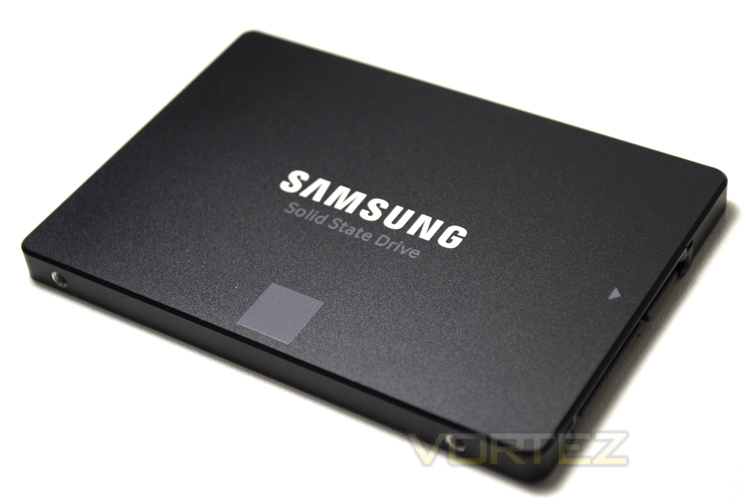
Sadly, we couldn’t open up the drive thanks to SAMSUNG protecting the innards with a 3x Silverhill 5 point torx screws. However, we do know that inside the Samsung 850 EVO you will find 32 layer 3D V-NAND flash memory, 512MB DRAM Cache along with Samsung’s 3-core MGX Controller.
Magician Software
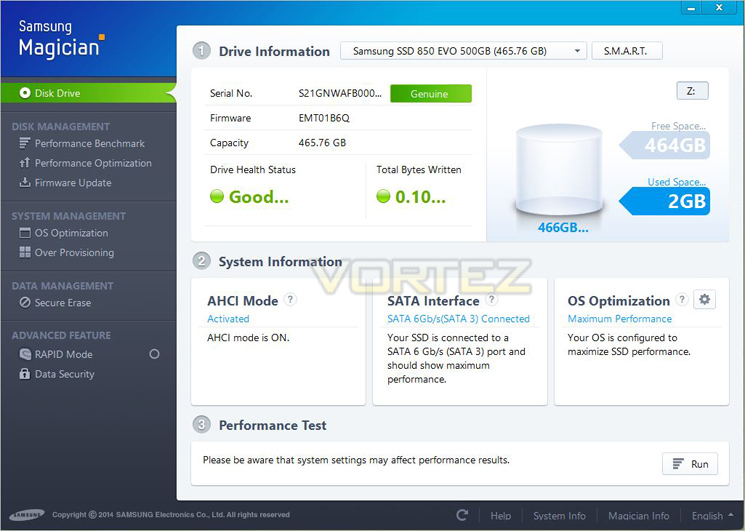
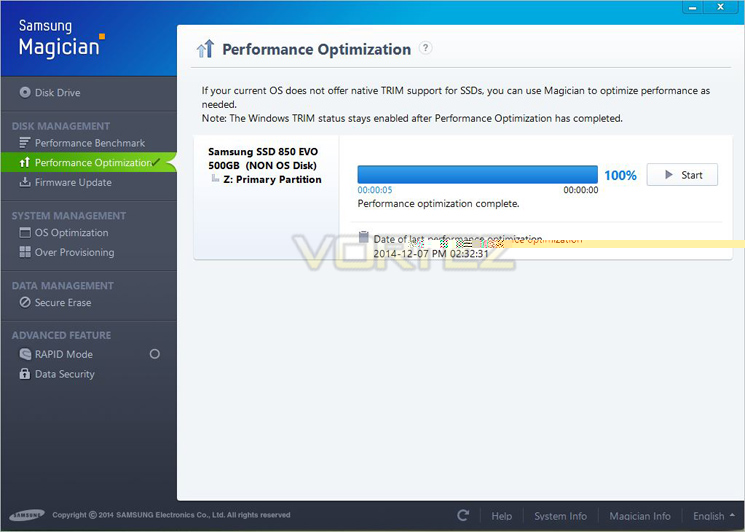
The Magician Software comes included on the enclosed CD (version 4.5) but it is worthwhile checking the SAMSUNG website periodically for the latest version as the software is backwards compatible. The first screen we are greeted with covers the basics such as drive condition serial numbers and firmware. The next screen optimises the drive by enabling TRIM.
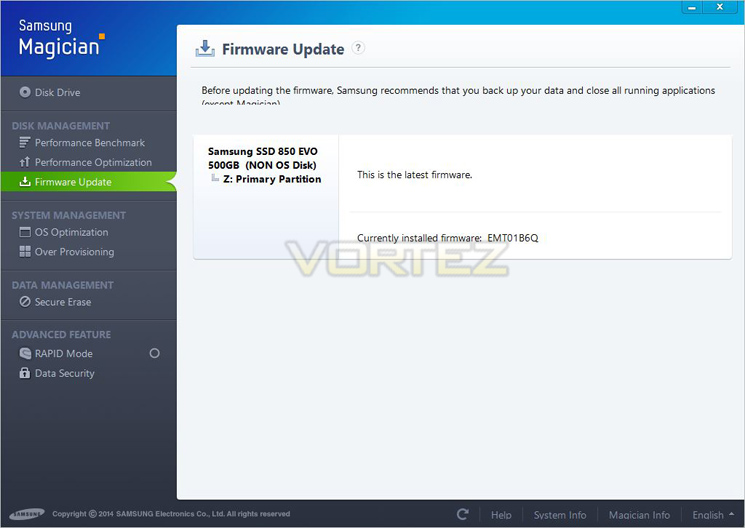
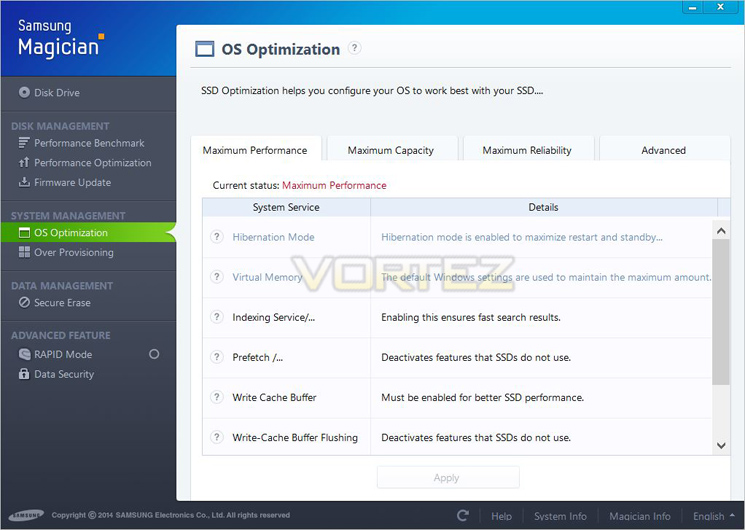
The next screen allows you to check if a firmware update is required and will flash the drive for you if this is the case. Following on from this and further to the TRIM enabler, you can set the drive to 3 different modes, Max performance, capacity or reliability. Obviously we would like all three and should you wish you can balance the three out via the advanced options but this should only be done by folk who know what they are doing otherwise you could conceivably degrade all three options rather than enhance them. We opted for performance throughout our testing.
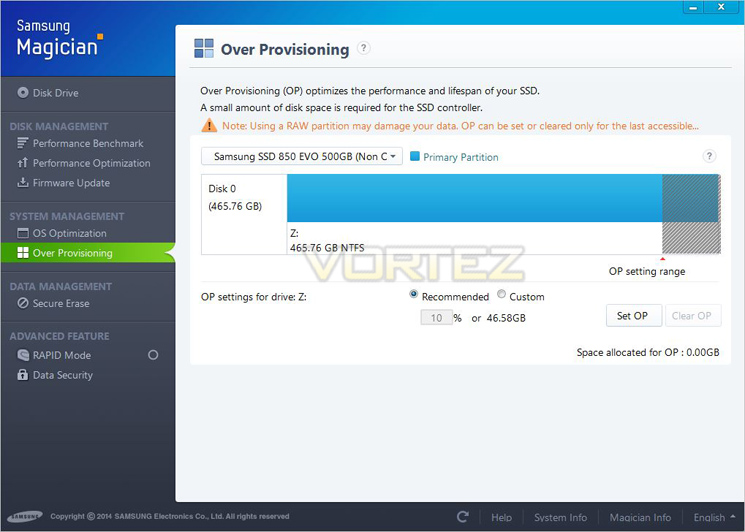
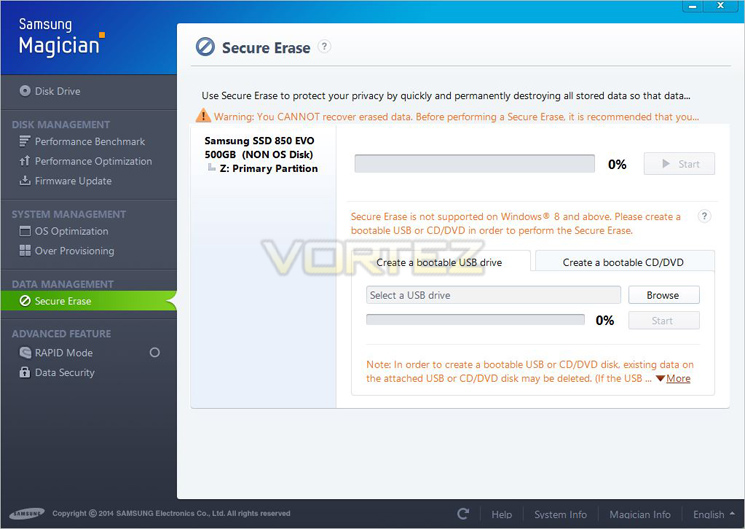
Over provisioning further optimises the performance and lifespan of the 850 EVO which very simply stated allocates a specific, permanent amount of free space on an SSD. We dare say many of you have sold a drive on the second hand market. We would also assume you have done so without correctly and thoroughly deleting the data on that drive. It is becoming increasingly difficult to securely erase all data on a drive with the many methods of retrieving ‘lost’ data so Samsung have added their own method called Secure Erase. How good or bad this is we couldn’t say for sure but we did try and retrieve a file using a couple of popular products to no avail so we would say you data is fairly secure to all but the most eager of hackers.
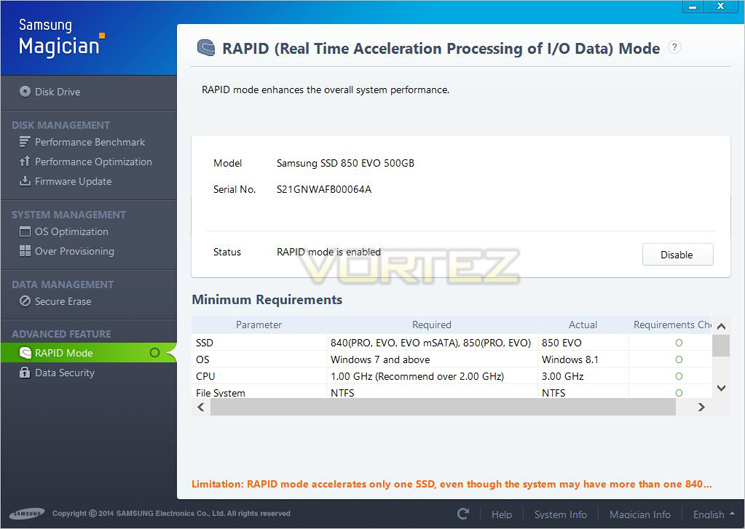
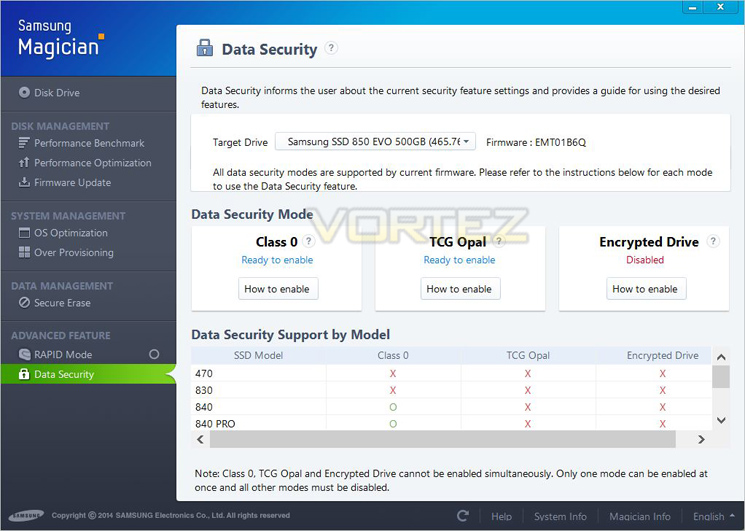
Next we find perhaps the most valuable item, at least in terms of performance – RAPID. There is a an excellent whitepaper from SAMSUNG here which details how RAPID works. All we’ll say is that it makes an already fast drive a lot faster. The final screen allows us to setup the DATA encryption level: (AES 256‐bit Full Disk Encryption (FDE), TCG/Opal V2.0, Encrypted Drive(IEEE1667)).
Overall, we like the Magician software. It goes some way to show the support Samsung has for its product to invest in a software suite for it, something many other manufacturers fail to do. More than that, the Magician software is actually very useful and adds to the three key components of any good SSD, performance, reliability and security.
Test Setup & Methodology
Our test system is formatted and a fresh version of Windows is installed with just drives in place – no additional applications. Windows is then updated to the latest release and the drivers are installed. Included in the list of benchmarks are the following applications:
Benchmarks
ATTO Disk Benchmark v2.46
AS SSD
CrystalDiskMark 3.0
Iometer
SiSoftware SANDRA 2012
HDTune Pro 5.5
AS SSD
CrystalDiskMark 3.0
Iometer
SiSoftware SANDRA 2012
HDTune Pro 5.5
Test system
CPU Intel Core-i7 4770K
Motherboard GIGABYTE Z87X-OC
Graphics MSI R7970 Black Edition
Memory 16GB Corsair Vengeance Pro (2400MHz) CL10
HDD
– Samsung 850 EVO 500GB(Sata 6Gbps)
– Crucial MX100 512GB(Sata 6Gbps)
– SanDisk Extreme Pro 480GB(Sata 6Gbps)
– Samsung 850 Pro 128GB (Sata 6Gbps)
– Corsair Force LX 256GB (Sata 6Gbps)
– Intel 730 240GB (Sata 6Gbps)
– ADATA Premier Pro SP920SS 256GB (Sata 6Gbps)
– OCZ Vertex 460 240GB (Sata 6Gbps)
– OCZ Vector 150 240GB (Sata 6Gbps)
– Samsung 840 EVO mSATA 500GB (Sata 6Gbps)
– Samsung 840 EVO mSATA 250GB (Sata 6Gbps)
– Kingston HyperX 3K Na’Vi 240GB (Sata 6Gbps)
– OCZ Vertex 450 256GB (Sata 6Gbps)
– Samsung 840 EVO 750GB (Sata 6Gbps)
– Samsung 840 Pro 256GB (Sata 6Gbps)
– Samsung 840 256GB (Sata 6Gbps)
– Toshiba 256GB THNSNH256GCST (Sata 6Gbps)
– OCZ Vector 256GB (Sata 6Gbps)
– Corsair Neutron GTX 240GB (Sata 6Gbps)
– Corsair Force GS 240GB (Sata 6Gbps)
– OCZ Vertex 4 128GB (Sata 6Gbps)
– Kingston HyperX 3K 120GB (Sata 6Gbps)
– Kingston HyperX 240GB (Sata 6Gbps)
– ADATA S510 120GB (Sata 6Gbps)
– Intel 520 480GB (Sata 6Gbps)
– Samsung 830 Series 256GB (Sata 6Gbps)
– Samsung HD103SJ 1TB (Sata 3Gbps)
PSU Corsair HX1050 Gold
OS Microsoft Windows 7 Professional 64-Bit
Motherboard GIGABYTE Z87X-OC
Graphics MSI R7970 Black Edition
Memory 16GB Corsair Vengeance Pro (2400MHz) CL10
HDD
– Samsung 850 EVO 500GB(Sata 6Gbps)
– Crucial MX100 512GB(Sata 6Gbps)
– SanDisk Extreme Pro 480GB(Sata 6Gbps)
– Samsung 850 Pro 128GB (Sata 6Gbps)
– Corsair Force LX 256GB (Sata 6Gbps)
– Intel 730 240GB (Sata 6Gbps)
– ADATA Premier Pro SP920SS 256GB (Sata 6Gbps)
– OCZ Vertex 460 240GB (Sata 6Gbps)
– OCZ Vector 150 240GB (Sata 6Gbps)
– Samsung 840 EVO mSATA 500GB (Sata 6Gbps)
– Samsung 840 EVO mSATA 250GB (Sata 6Gbps)
– Kingston HyperX 3K Na’Vi 240GB (Sata 6Gbps)
– OCZ Vertex 450 256GB (Sata 6Gbps)
– Samsung 840 EVO 750GB (Sata 6Gbps)
– Samsung 840 Pro 256GB (Sata 6Gbps)
– Samsung 840 256GB (Sata 6Gbps)
– Toshiba 256GB THNSNH256GCST (Sata 6Gbps)
– OCZ Vector 256GB (Sata 6Gbps)
– Corsair Neutron GTX 240GB (Sata 6Gbps)
– Corsair Force GS 240GB (Sata 6Gbps)
– OCZ Vertex 4 128GB (Sata 6Gbps)
– Kingston HyperX 3K 120GB (Sata 6Gbps)
– Kingston HyperX 240GB (Sata 6Gbps)
– ADATA S510 120GB (Sata 6Gbps)
– Intel 520 480GB (Sata 6Gbps)
– Samsung 830 Series 256GB (Sata 6Gbps)
– Samsung HD103SJ 1TB (Sata 3Gbps)
PSU Corsair HX1050 Gold
OS Microsoft Windows 7 Professional 64-Bit
Benchmarks: ATTO
The ATTO Disk Benchmark performance measurement tool is compatible with Microsoft Windows. Measure your storage systems performance with various transfer sizes and test lengths for reads and writes. Several options are available to customize your performance measurement including queue depth, overlapped I/O and even a comparison mode with the option to run continuously. Use ATTO Disk Benchmark to test any manufacturers RAID controllers, storage controllers, host adapters, hard drives and SSD drives and notice that ATTO products will consistently provide the highest level of performance to your storage.
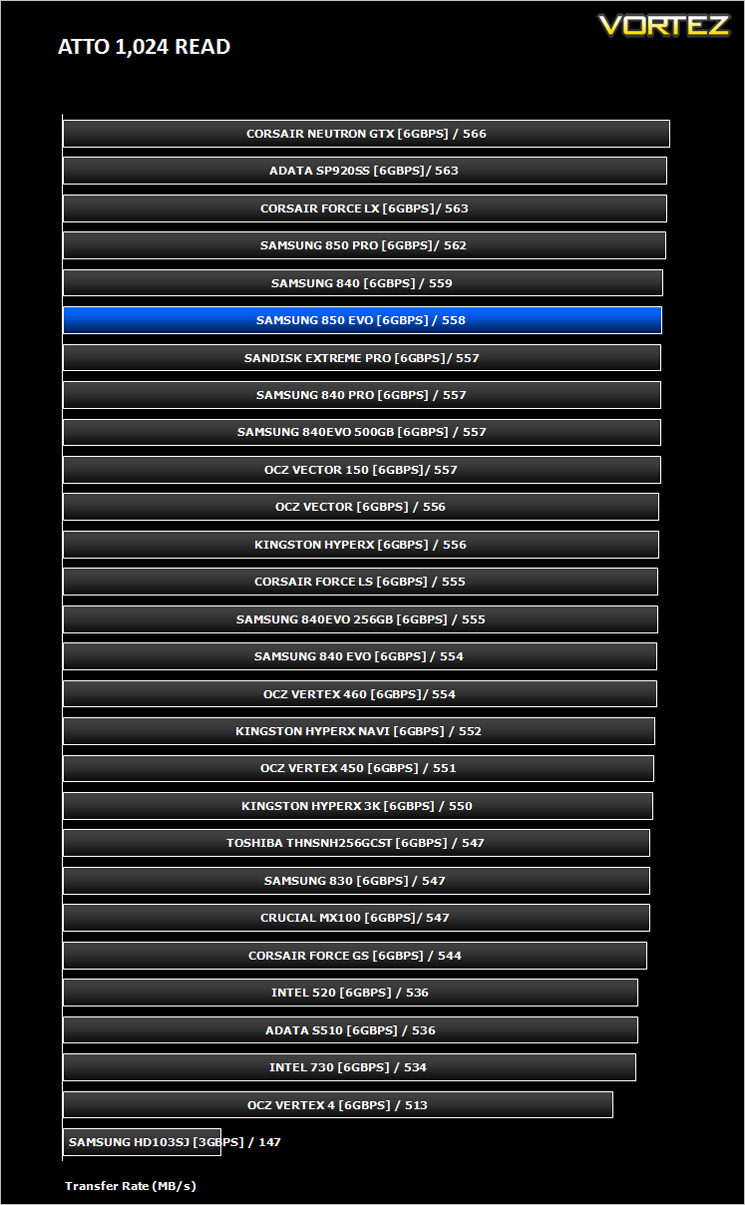
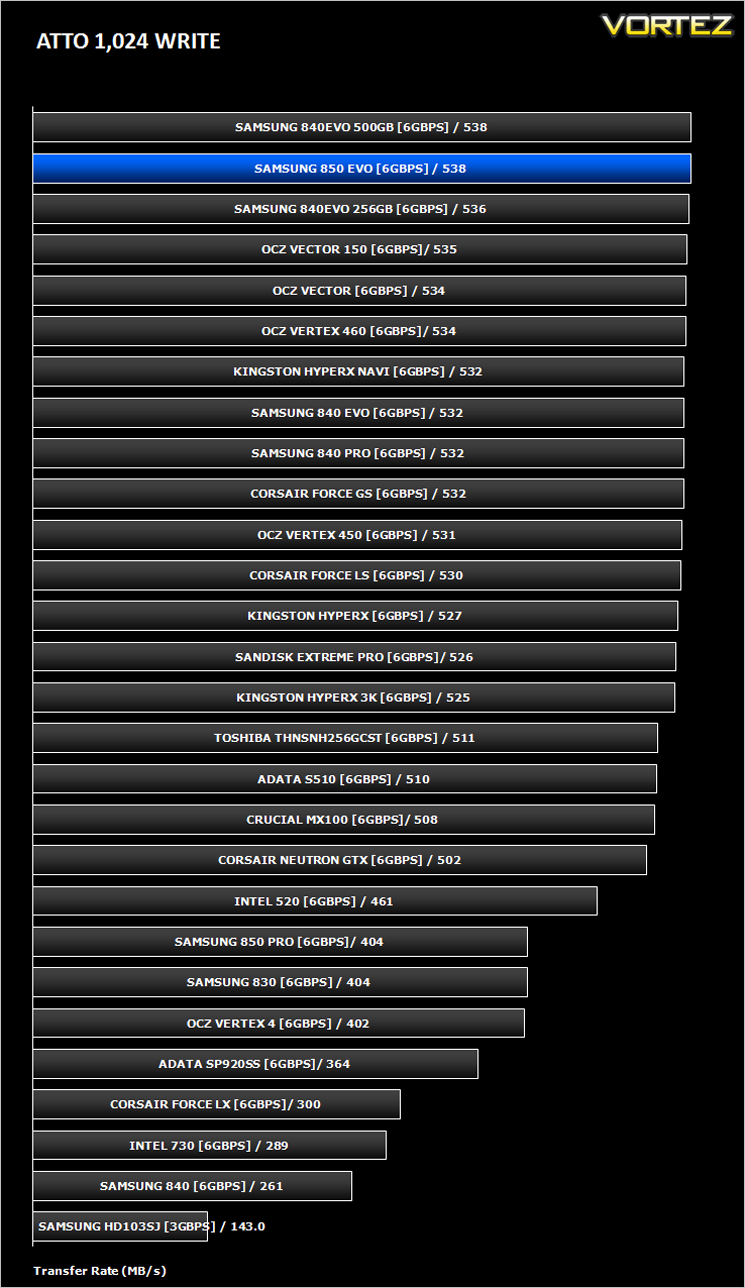
Benchmarks: AS SSD
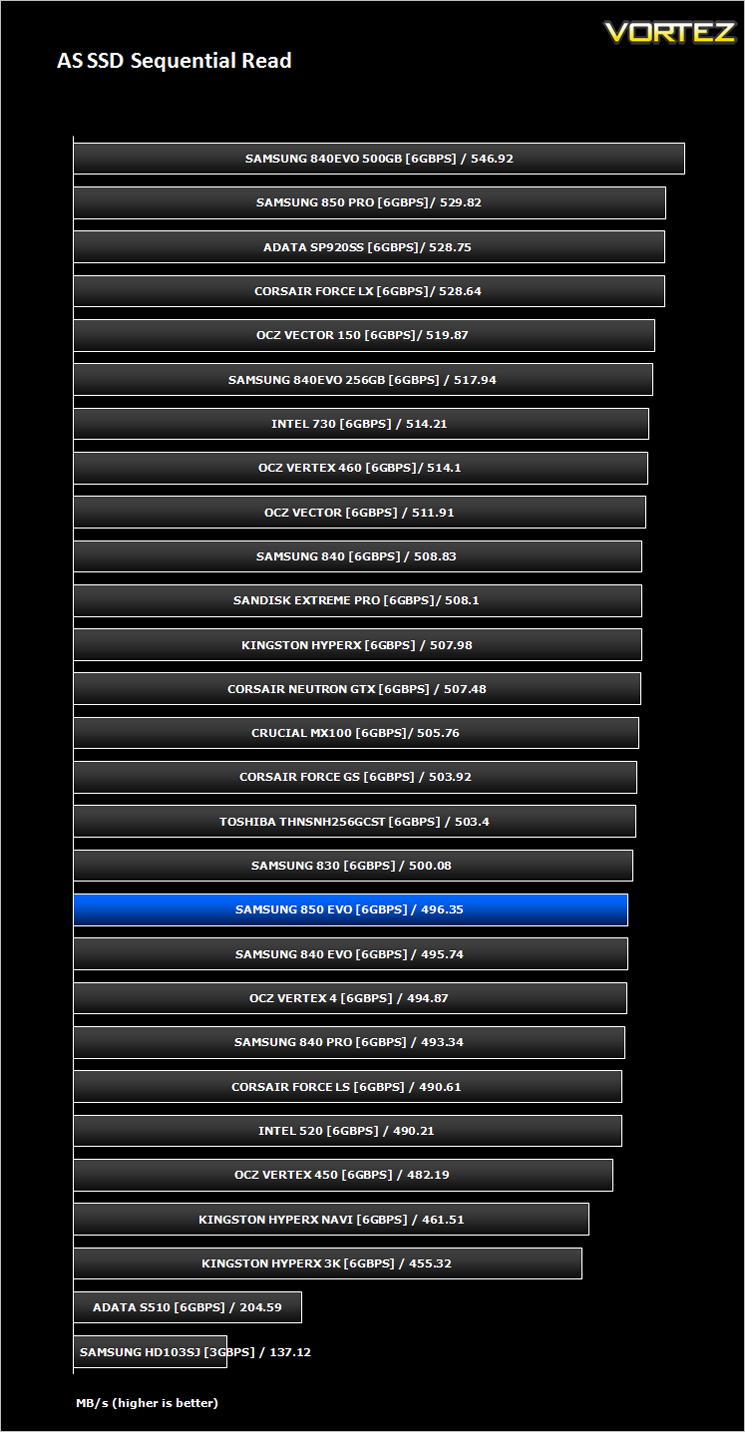
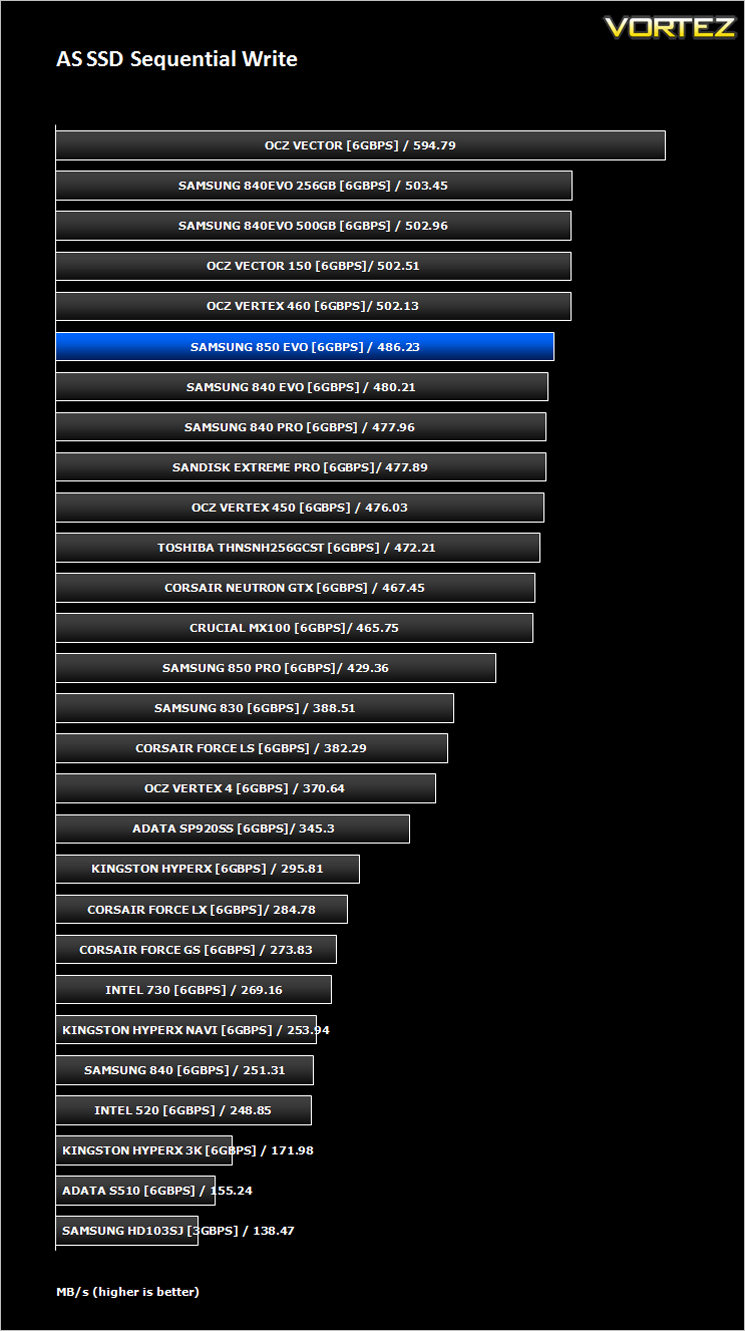
AS SSD Benchmark is a straightforward tool for measuring the speed of your SSD drive.
Simply launch the program, choose your drive, click Start, and it’ll test your SSD’s read and write speed in a variety of ways, delivering a score for each when it’s done. And if that’s not enough, there are also additional file copy and compression-related benchmarks available from the Tools menu. (The author’s support page is German only, but if you need further English explanations then there’s a thread on the program at the OCZ Technology forum.).
Simply launch the program, choose your drive, click Start, and it’ll test your SSD’s read and write speed in a variety of ways, delivering a score for each when it’s done. And if that’s not enough, there are also additional file copy and compression-related benchmarks available from the Tools menu. (The author’s support page is German only, but if you need further English explanations then there’s a thread on the program at the OCZ Technology forum.).
Benchmarks: CrystalDiskMark 3.0
CrystalDiskMark is a disk benchmark software that analyses different types of hard drive. Giving sequential benchmark write and read statistics in MB/s. A simple program that is very useful.
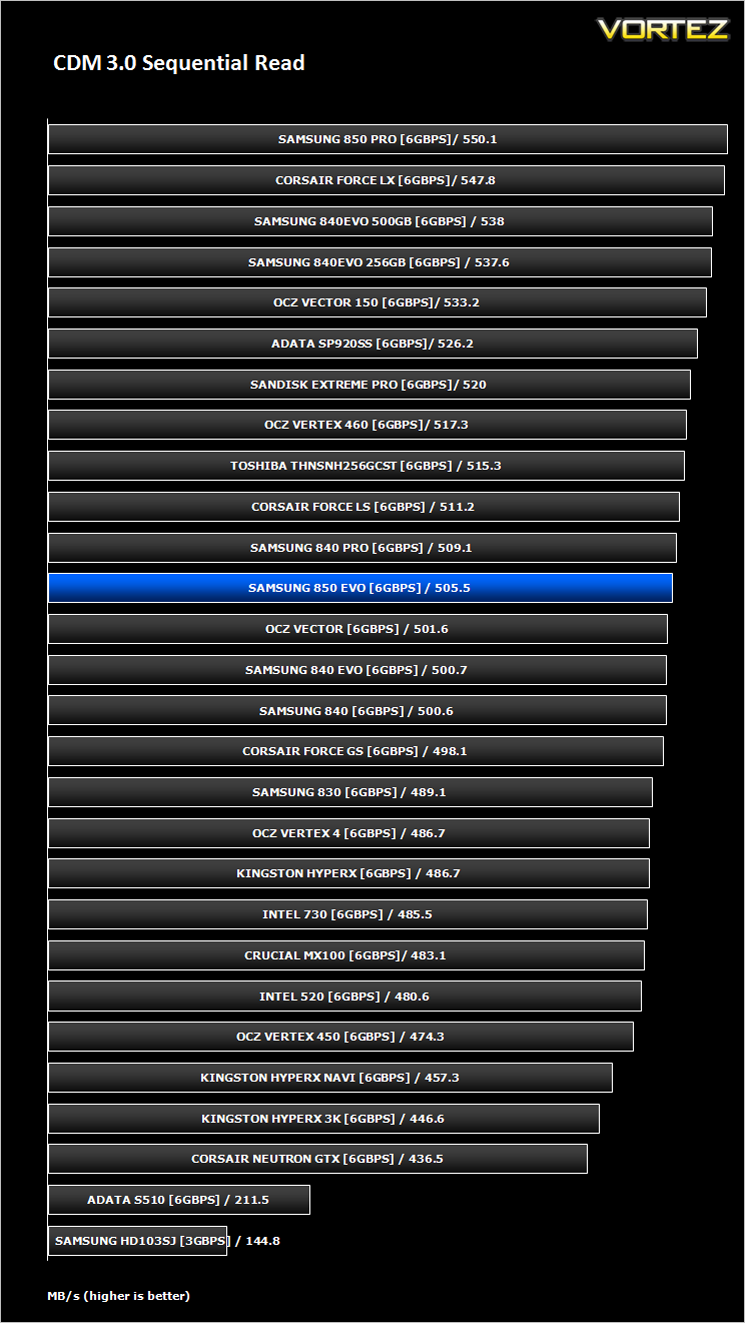
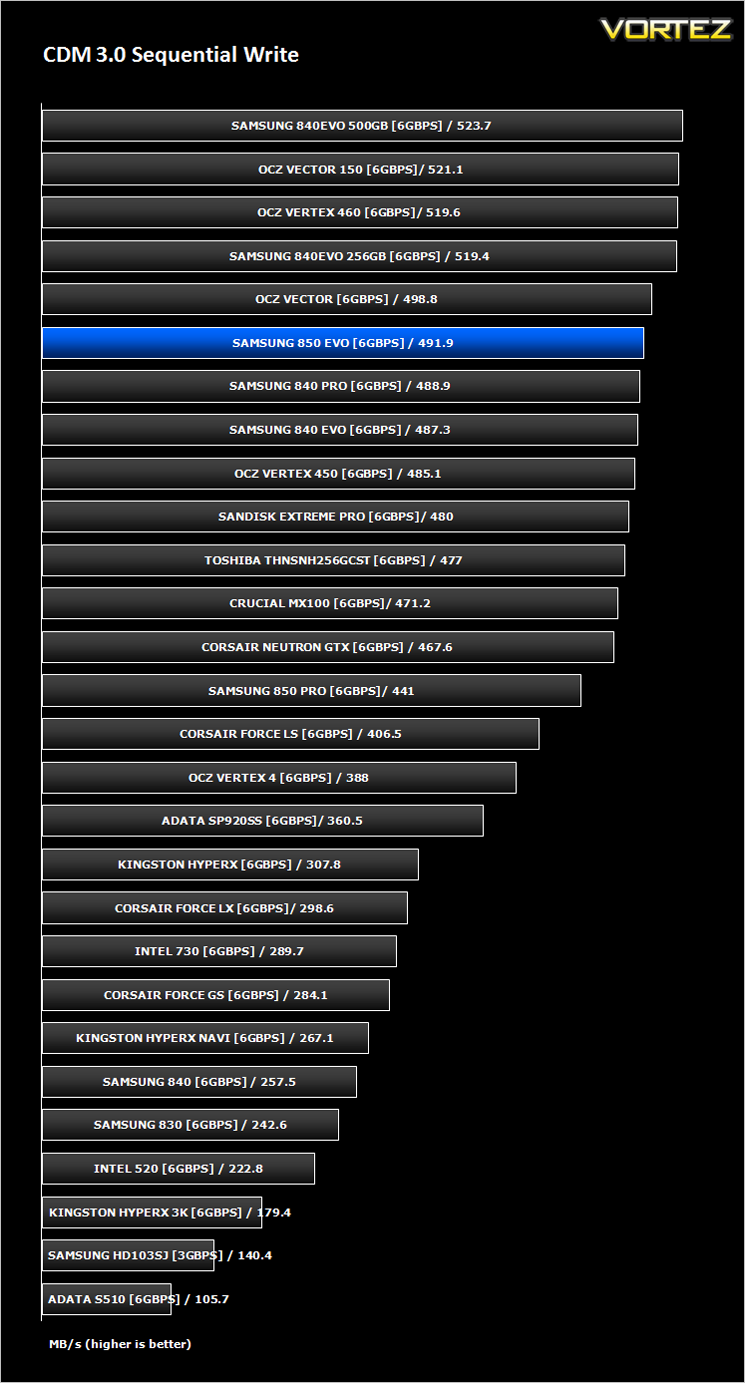
Benchmarks: Iometer
Iometer is based on a client–server model, where one instance of the Iometer graphical user interface is managing multiple ‘workers’ (each one representing a separate Dynamo.exe process) which are doing the I/O. Iometer performs Asynchronous I/O – accessing files or block devices (later one allowing to bypass the file system buffers).
Iometer allows the configuration of disk parameters such as the ‘Maximum Disk Size’, ‘Starting Disk Sector’ and ‘# of Outstanding I/Os’. This allows a user to configure a test file upon which the ‘Access Specifications’ configure the I/O types to the file.
Iometer allows the configuration of disk parameters such as the ‘Maximum Disk Size’, ‘Starting Disk Sector’ and ‘# of Outstanding I/Os’. This allows a user to configure a test file upon which the ‘Access Specifications’ configure the I/O types to the file.
For the purpose of this test. The 4K 50%/50% read/write file will be under the examination with 100% Random Distribution – reporting back on IOPS and MBs per Second.
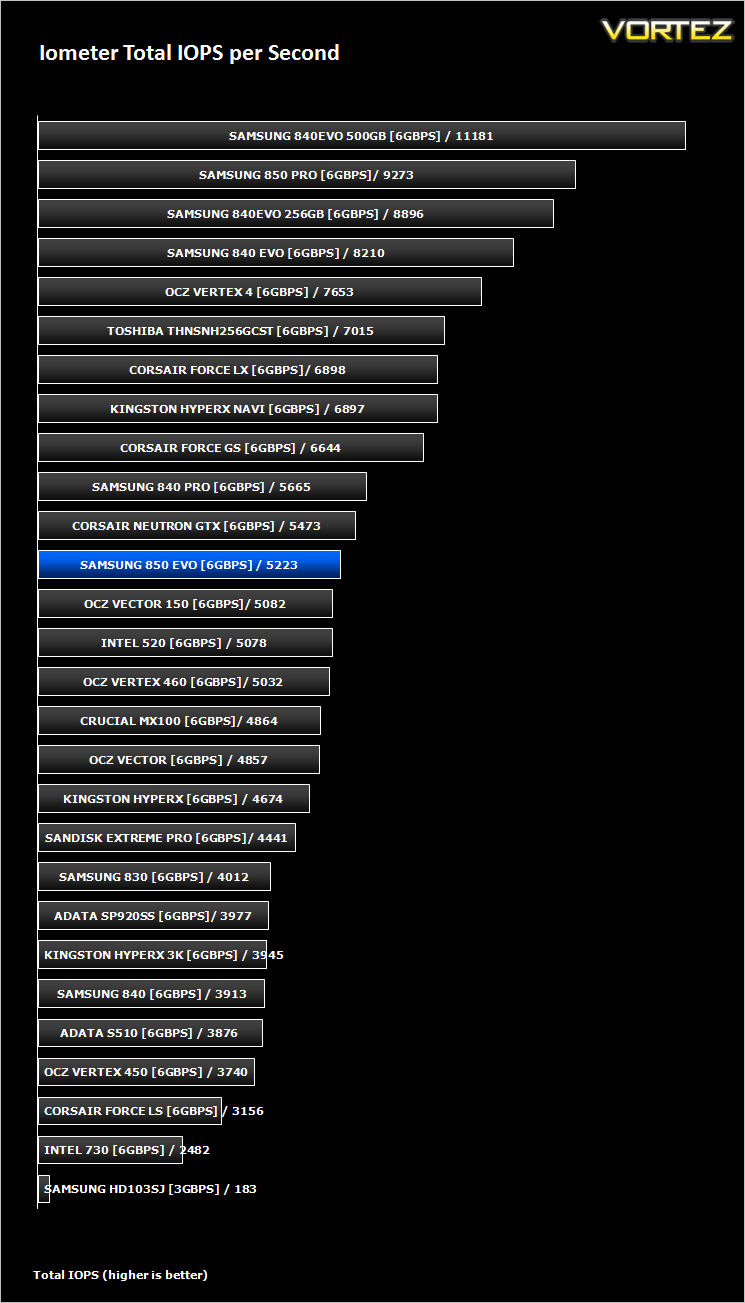
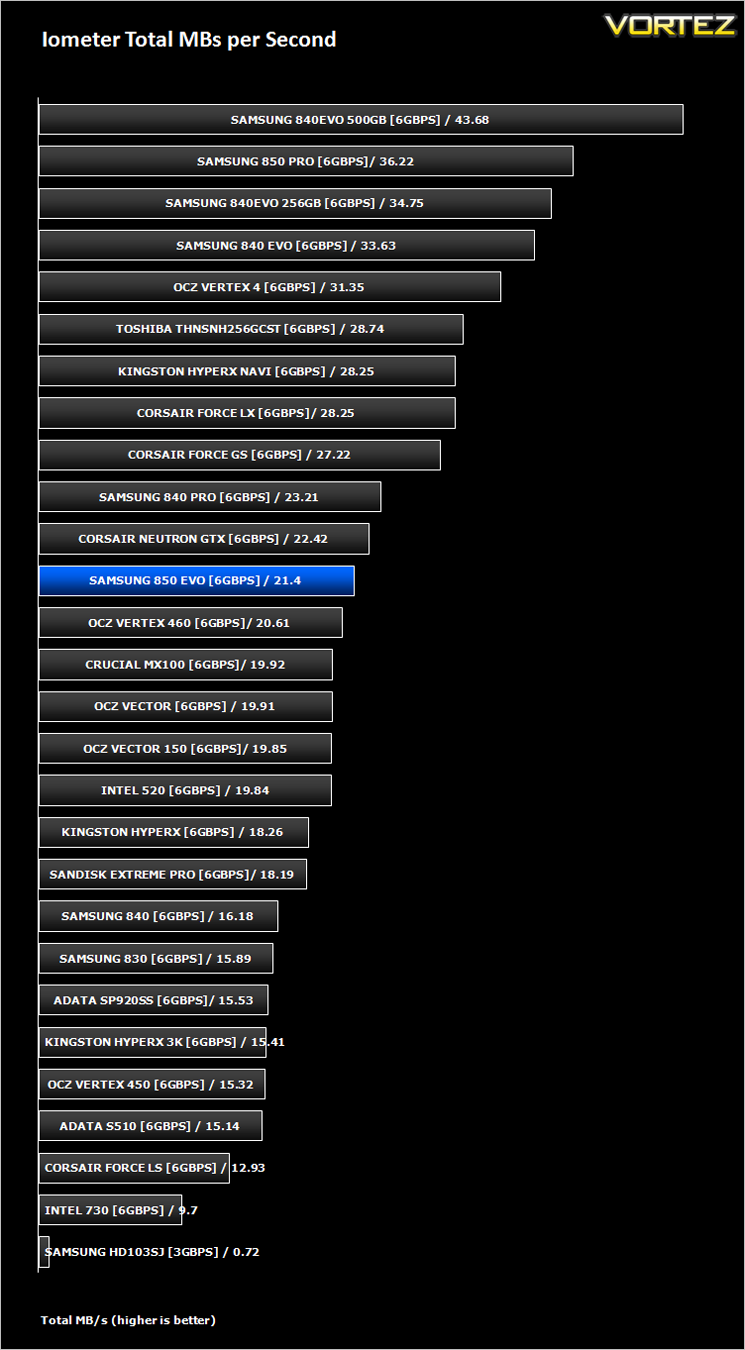
Benchmarks: SiSoft Sandra
SiSoftware Sandra (the System ANalyser, Diagnostic and Reporting Assistant) is an information & diagnostic utility. It should provide most of the information (including undocumented) you need to know about your hardware, software and other devices whether hardware or software.
Sandra is a (girl) name of Greek origin that means “defender”, “helper of mankind”. We think that’s quite fitting.
It works along the lines of other Windows utilities, however it tries to go beyond them and show you more of what’s really going on. Giving the user the ability to draw comparisons at both a high and low-level. You can get information about the CPU, chipset, video adapter, ports, printers, sound card, memory, network, Windows internals, AGP, PCI, PCI-X, PCIe (PCI Express), database, USB, USB2, 1394/Firewire, etc.
Sandra is a (girl) name of Greek origin that means “defender”, “helper of mankind”. We think that’s quite fitting.
It works along the lines of other Windows utilities, however it tries to go beyond them and show you more of what’s really going on. Giving the user the ability to draw comparisons at both a high and low-level. You can get information about the CPU, chipset, video adapter, ports, printers, sound card, memory, network, Windows internals, AGP, PCI, PCI-X, PCIe (PCI Express), database, USB, USB2, 1394/Firewire, etc.
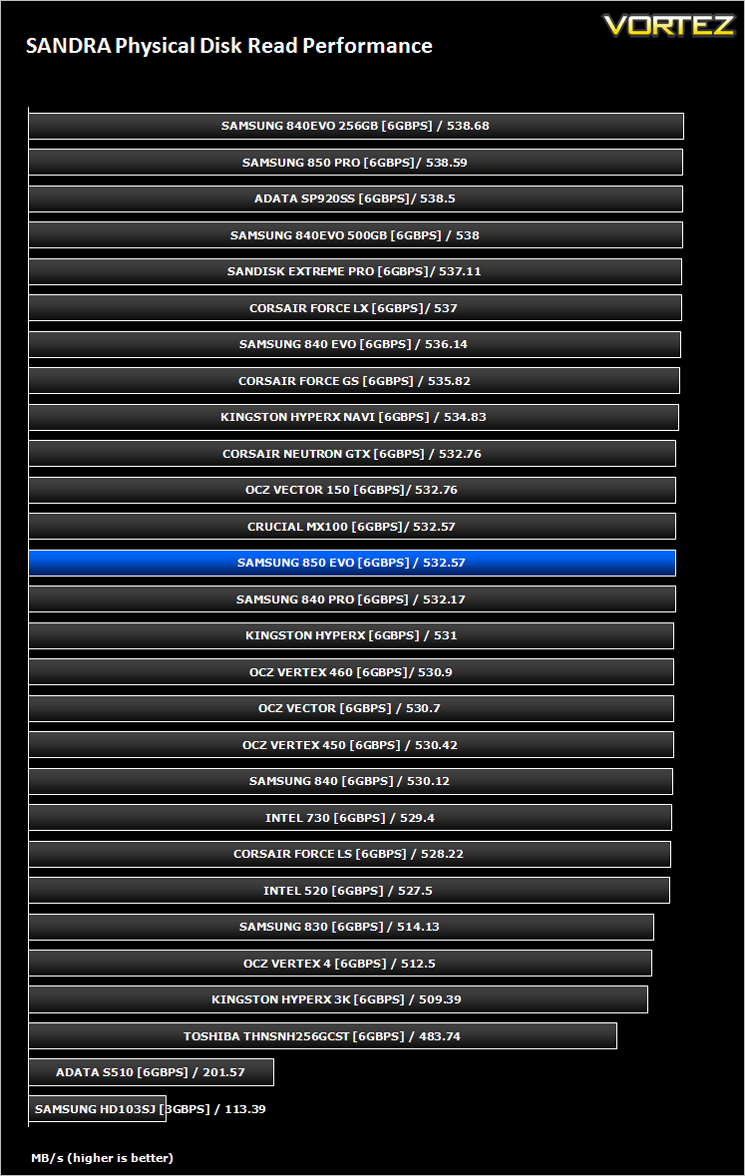
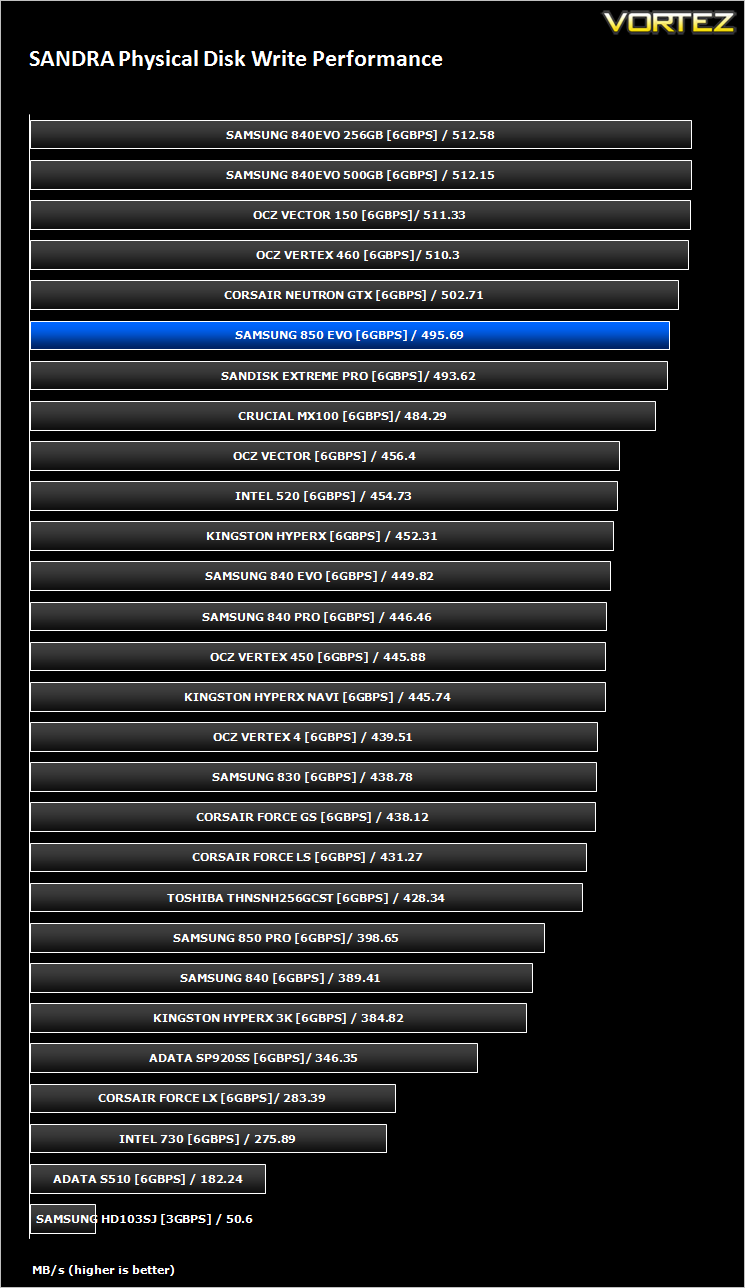
Benchmarks: HDTune Pro
A new utility we have added to our line-up of benchmarks is the ever popular HDTune Pro. HD Tune Pro is a hard disk / SSD utility with many functions. It can be used to measure the drive’s performance, scan for errors, check the health status (S.M.A.R.T.), securely erase all data and much more.
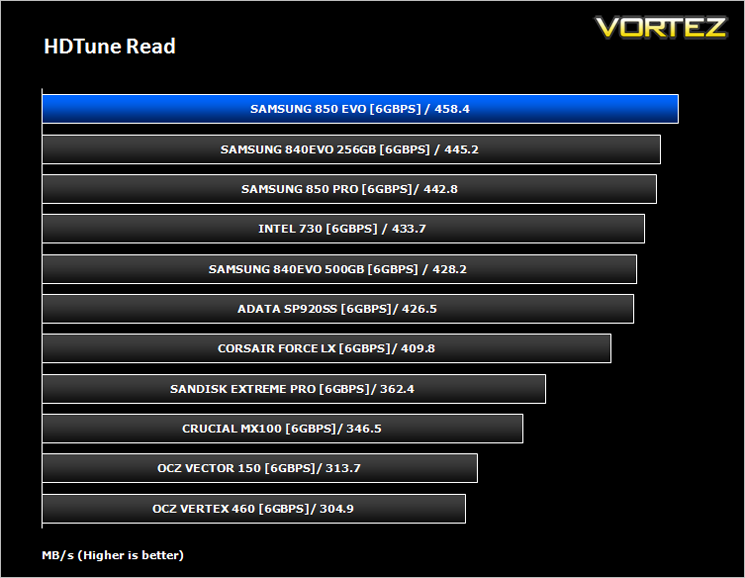
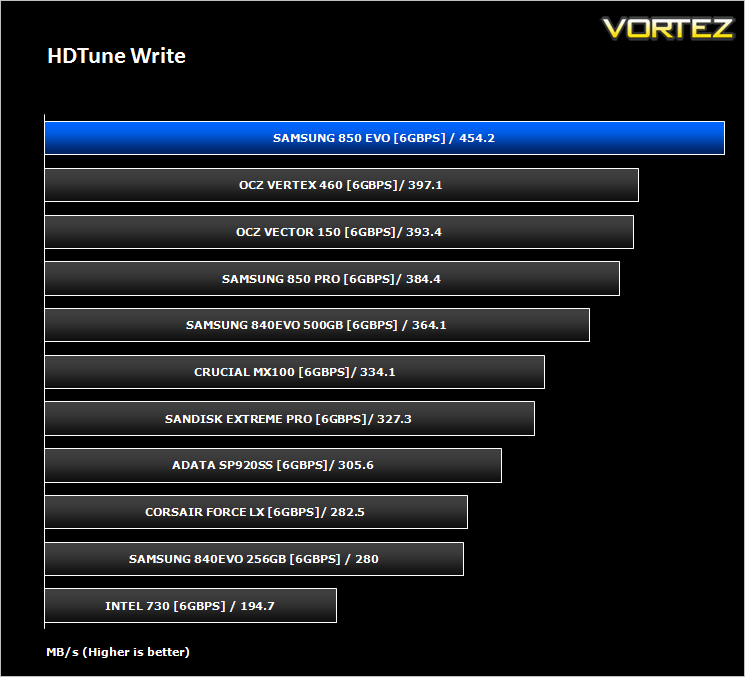
Samsung Magician RAPID mode Analysis
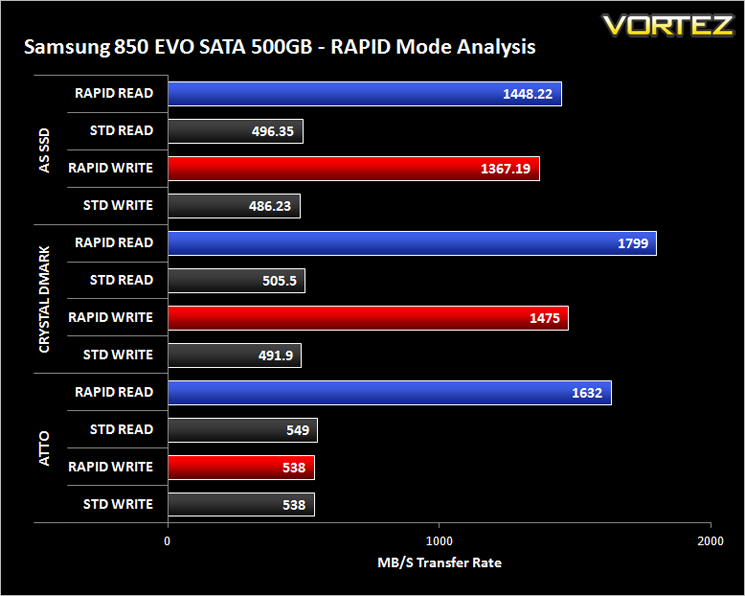
With Magician V4.5 the 850 EVO is able to boost beyond 500MB/s using the SATA 6GB/s interface. Samsung claim that this feature can push transfer speeds even past 1GB. In short, RAPID mode takes advantage of dynamic disk caching technology. This makes use of left over CPU and RAM resources in order to boost the performance of the SSD.To demonstrate this feature we will show performance results for read/write transfer speeds with and without the RAPID mode enabled within Magician V4.5. (To take full advantage of this feature just install Magician V4.5+ and click RAPID mode – reboot required).
Conclusion
The latest EVO drive from Samsung is likely to give any enthusiast PC a decent boost in terms of performance, especially if you are looking to make the leap from older mechanical drives. While it isn’t quite as fast as the 850 Pro and only slightly faster than the 840 EVO the cost is very competitive weighing in at a little under £200, just £10 more than the previous generation 840 EVO. If only every ‘evolution’ cost increase was as little as this! 18 months ago the 500GB 840 EVO cost £290 and even with the price cuts, the 840 EVO still commands a £190 price tag. With all this talk about cost savings though you would be forgiven for thinking the 850 EVO is a budget SSD – it isn’t. It is neither the most expensive nor the cheapest 500GB SSD, striking a good balance between both high and low ranges.
Performance wise, the 850 EVO again is neither the slowest nor the fastest – at least until RAPID technology is enabled. That is when this drive really takes off and puts other drives into the shade. The blistering performance of RAPID shows just how much an advantage SAMSUNG have over other manufacturers in the current marketplace and indeed why their SSDs are just so damn popular. SAMSUNG could command a higher price tag and users; especially enthusiasts would no doubt pay the premium for the extra speed. The 850 EVO isn’t just for the speed freaks though because at just 7mm in height it will appeal to both notebook and ultra book users alike. Encryption levels are good too and the drive is backed up with a substantial 5 year warranty. We look forward to see what SAMSUNG do with the mSATA versions of the 850 EVO because if this drive is a taster of what is available we cannot wait to bring you a further review of these products.
Overall, we feel justified in awarding our Gold award to the 850 EVO. In ‘normal’ operation the drive is not the fastest but remains toward the top half of our performance charts. Enable RAPID using Magician software though and the drive is near untouchable. The warranty period is extended to 5 years over the 4 offered with the 840 EVO while retaining the same excellent encryption levels available. All this for £10 more than the outgoing 840 EVO is not a lot to ask for and certainly a price we would pay were it our money. You should too!
In summary:
Feature packed and ridiculously fast thanks to 3D V-NAND and RAPID technologies will no doubt make the SAMSUNG 850 EVO extremely popular with enthusiast and business users alike.
Pros
+ RAPID Technology
+ 3D V-NAND
+ 5 year warranty
+ 6.8mm Height
Cons
– Not much faster than an 840 EVO in some tests
+ RAPID Technology
+ 3D V-NAND
+ 5 year warranty
+ 6.8mm Height
Cons
– Not much faster than an 840 EVO in some tests

Click here for an explanation of our awards at Vortez.net.


