950 PRO is V-NAND based NVMe SSD that supports PCI Express 3.0 x4. We test two 256GB drives in RAID 0 to determine the maximum storage bandwidth.

Product on Review: 950 PRO SSD
Manufacturer: Samsung
Street Price: 256GB: £159 GBP / $200 USD
It’s fair to say the SATA-based SSD sector has now become quite a stagnant marketplace. Performance has hit its peak and plateaued – while this has meant that prices have plummeted, the arena has seen very little innovation and excitement in the last 3-4 years. With the introduction of Intel Z170 this Summer and full compatibility with M.2 and NVM Express this game is about to change. NVMe uses lower latency and can handle up to 64K queues and up 64K commands each while SATA and AHCI can only handle 1 queue and 32 commands each.
Last month Samsung unleashed their new NVMe SSD – the 950 PRO. This much-anticipated drive gives users the ability to home in on read transfer rates which exceed 2000MB/s. Today we’ll be taking two 256GB 950 PROs and configuring a RAID array to maximise performance and discover what kind of throughput figures we can achieve. Prepare to be amazed!
Samsung on their 950 PRO
If you’re a heavy workload professional searching for an SSD with uncompromising power and performance, look no further. The next-generation Samsung 950 PRO delivers exceptional performance for professionals. This cutting-edge V-NAND-based NVMe SSD supports PCI Express® Gen 3 x4 lanes, providing a higher bandwidth and lower latency to process a massive amount more data than SATA SSDs. Presented in a compact M.2 form factor, the future-oriented 950 PRO is ideal for professionals using high-end PCs and workstations.
Technical Specifications
Packaging, Bundle & Closer Look
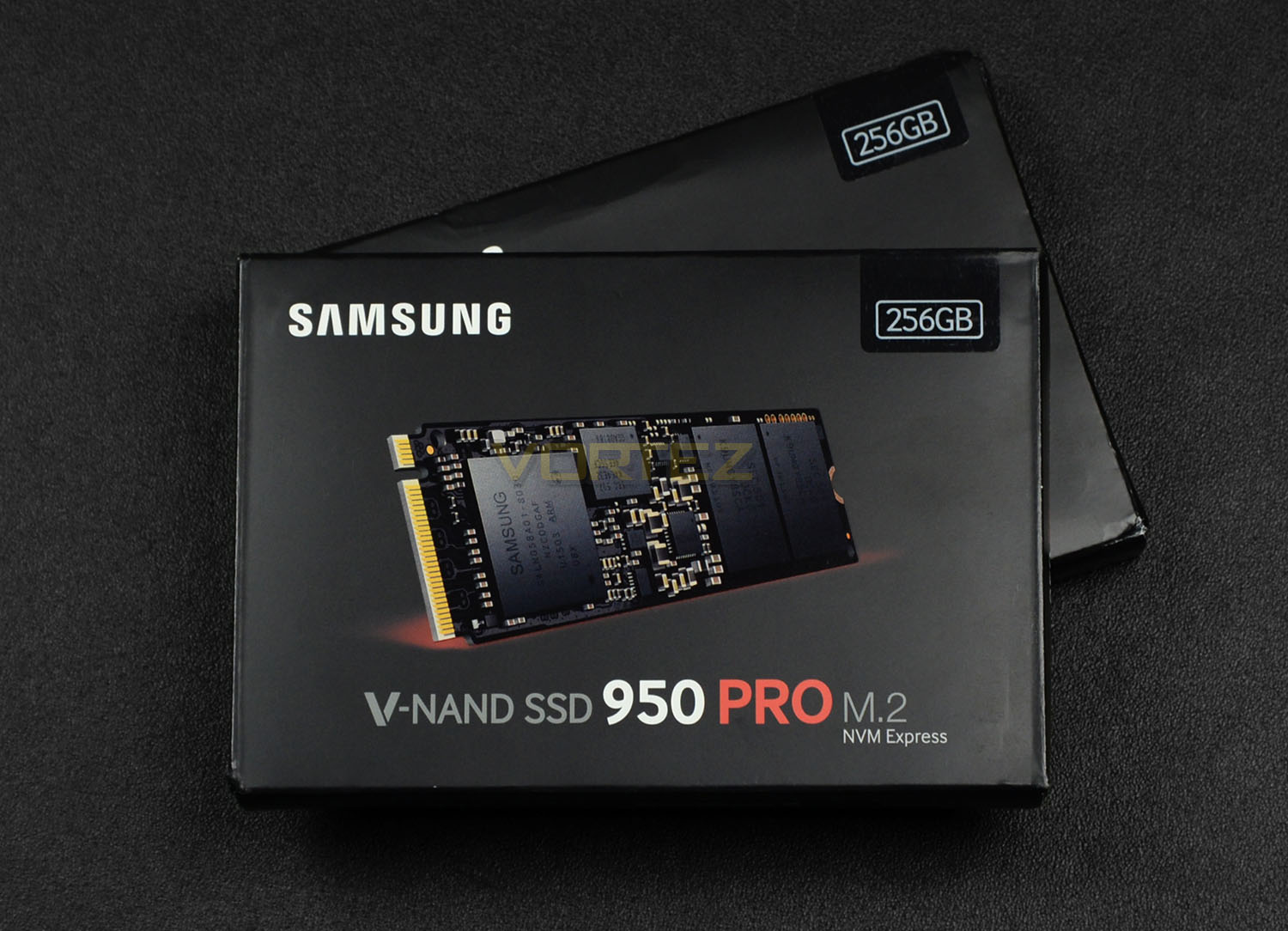
The 950 PRO arrives in a nicely designed packet which showcases the drive on the front and highlights the capacity. On the reverse, the features are listed and there are details on the technical specifications.
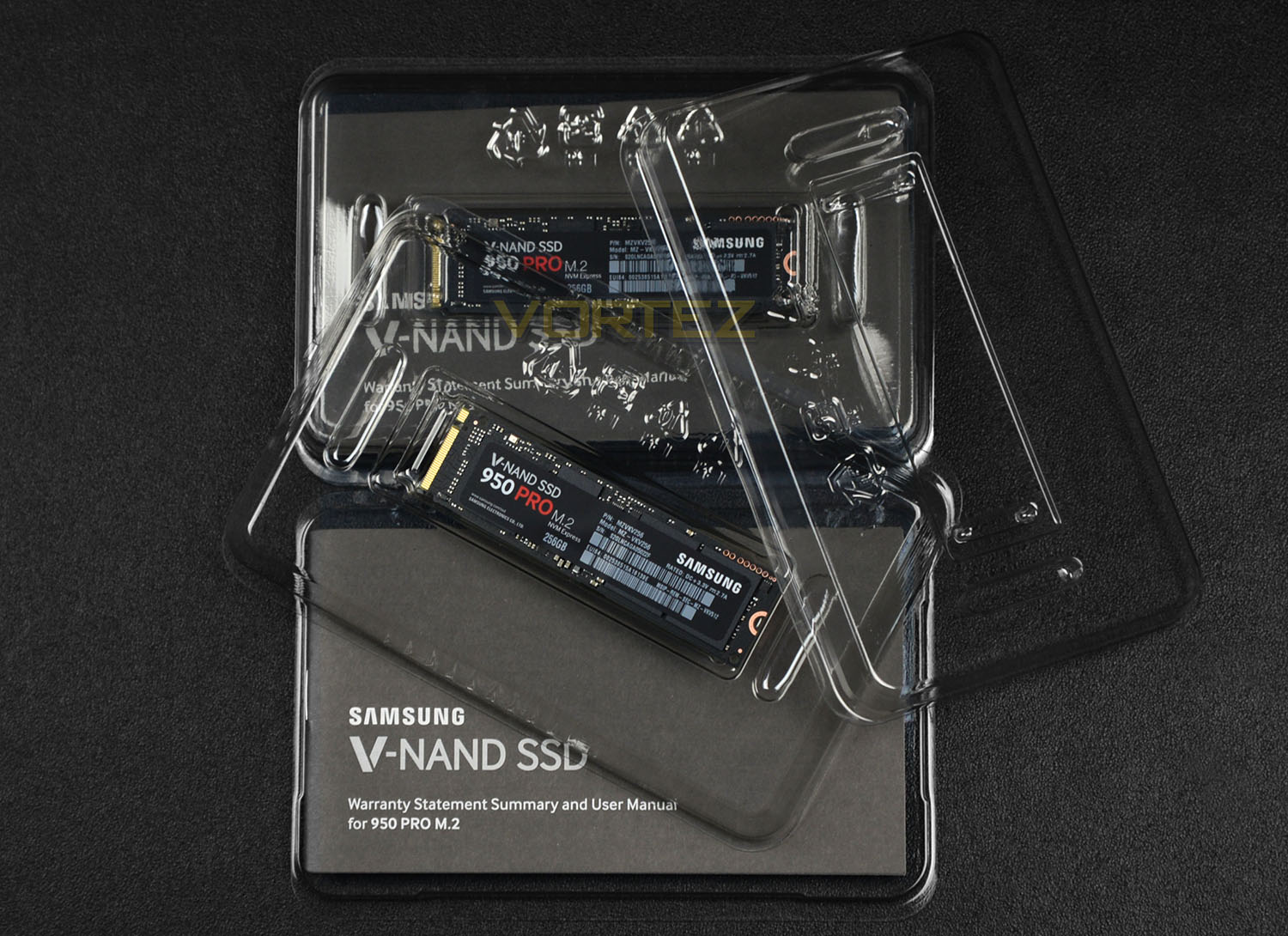
Inside the box there is very little regarding any accessories bundle. All we get is the drive and an instructions manual/guide.
950 PRO is well-protected within triple plastic shroud. This casing helps to protect the product while it’s in transit. M.2 drives are a lot more fragile and exposed compared to their SATA-based 2.5” counterparts.
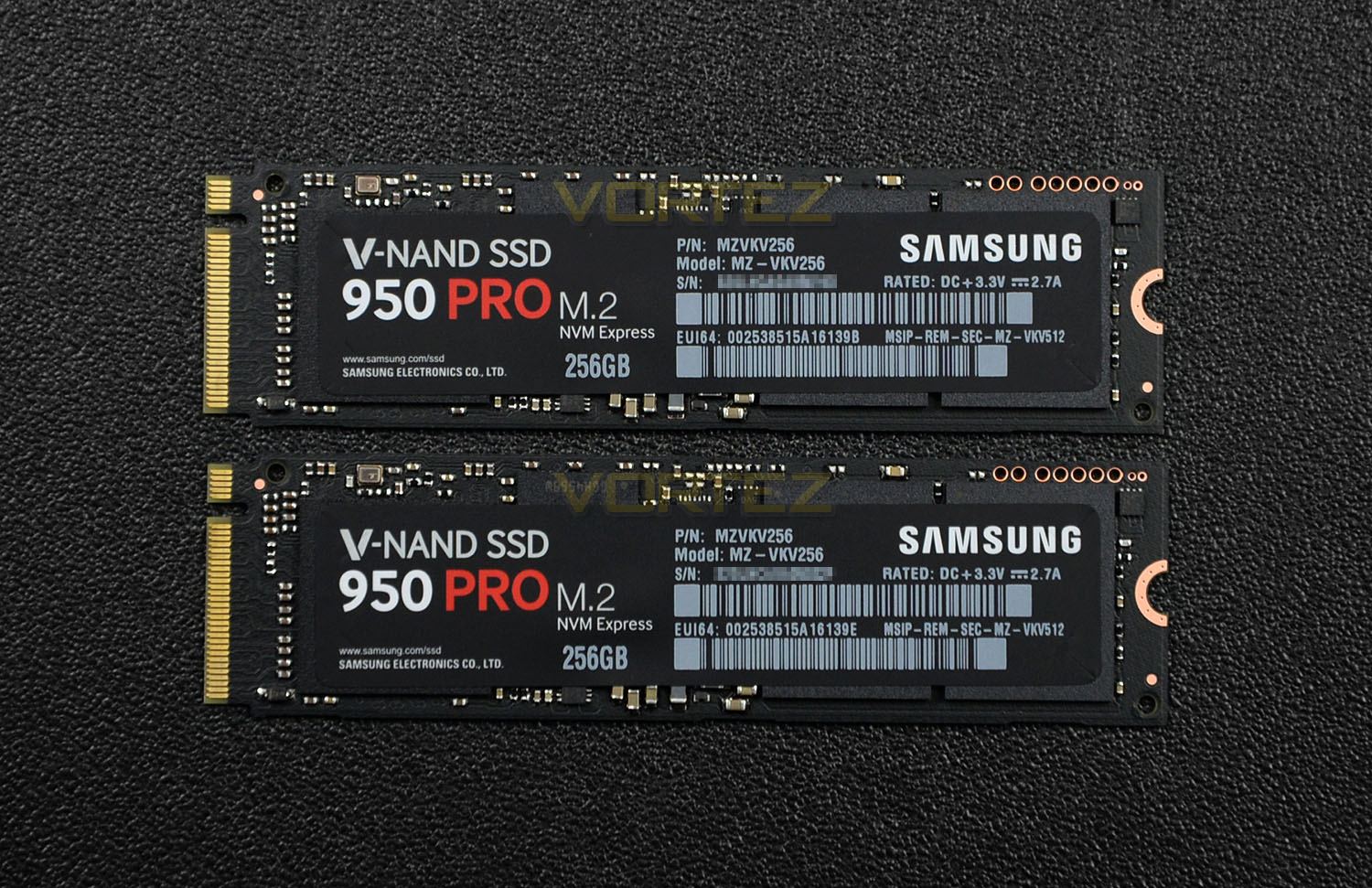
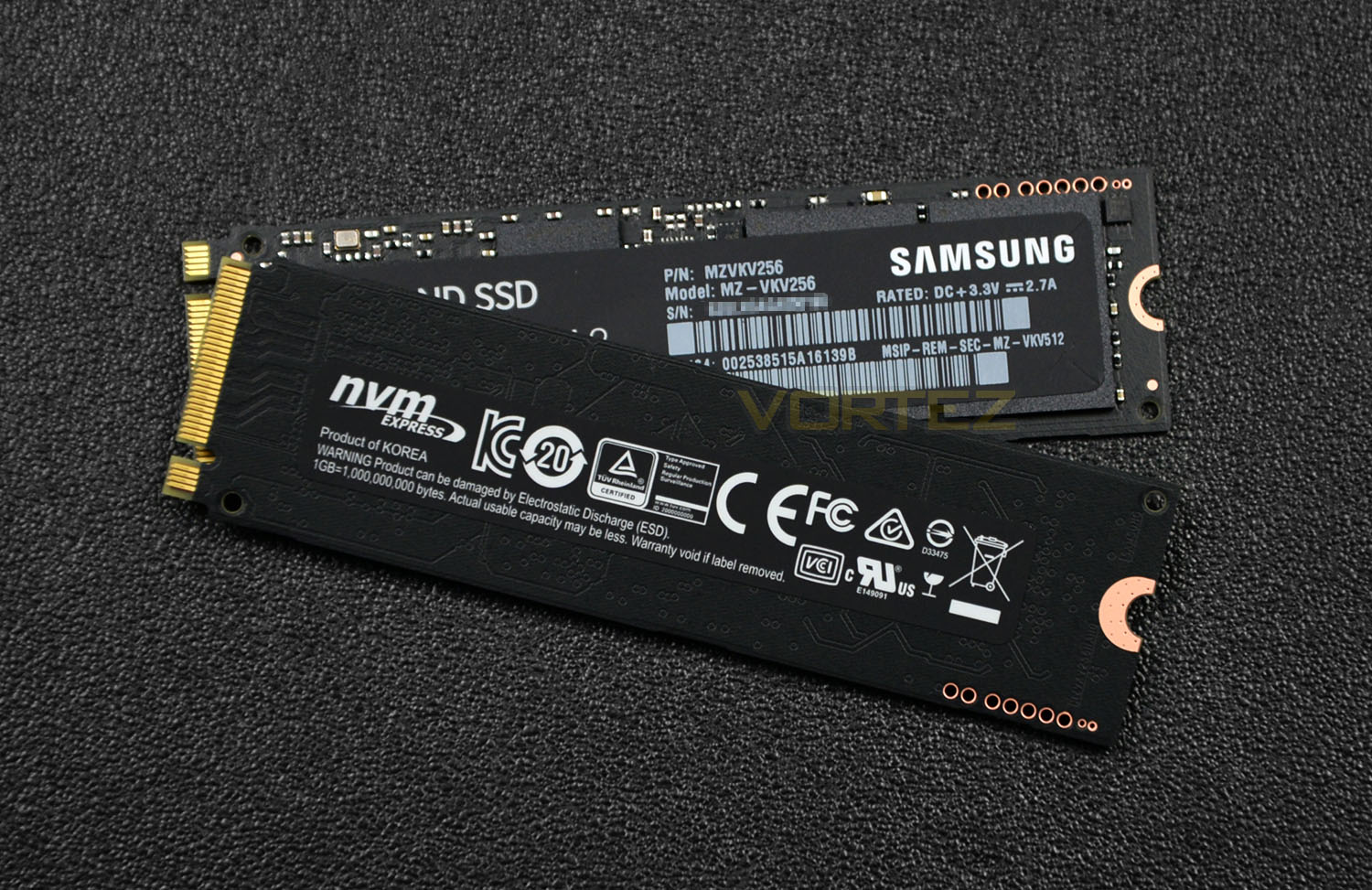
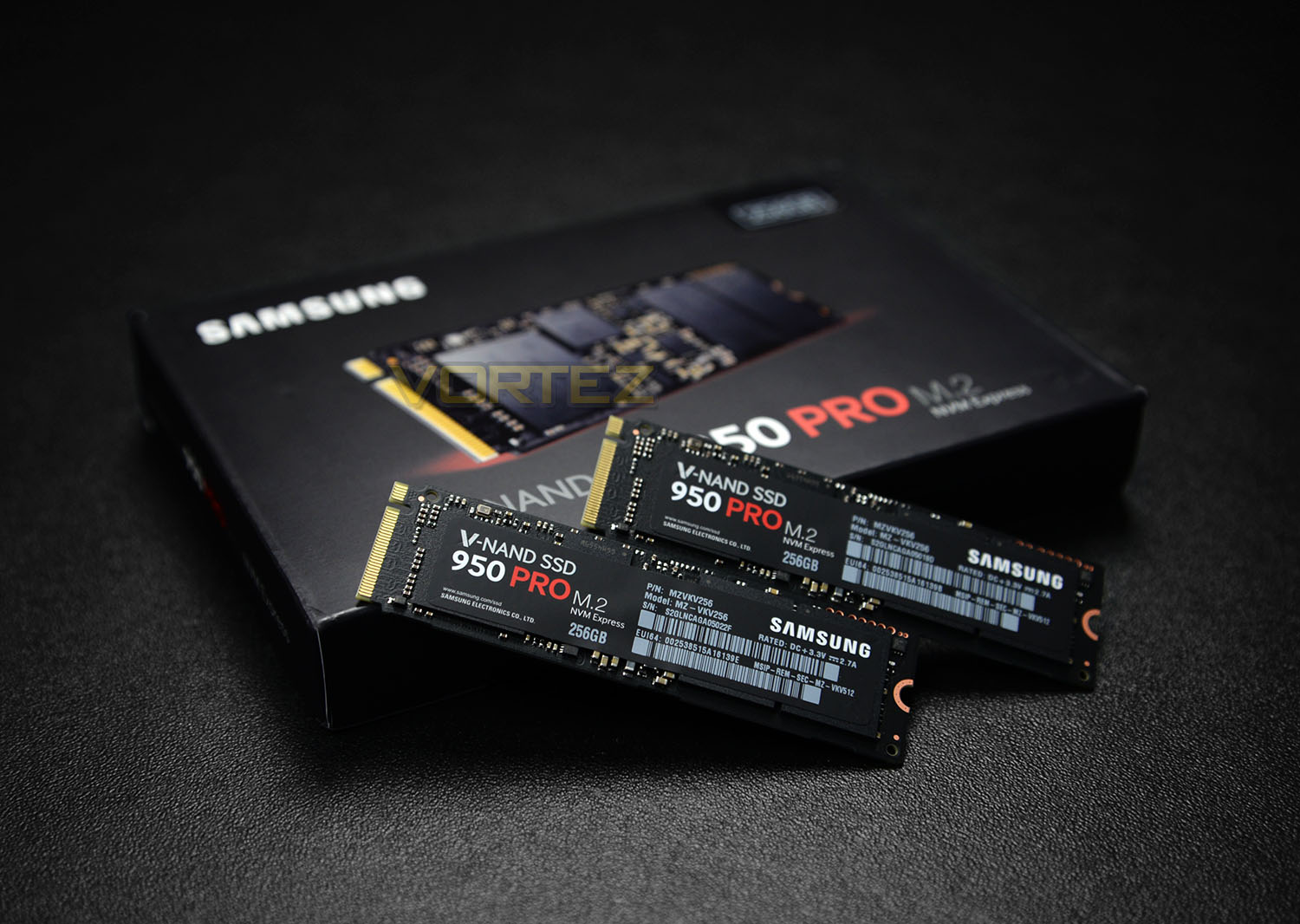
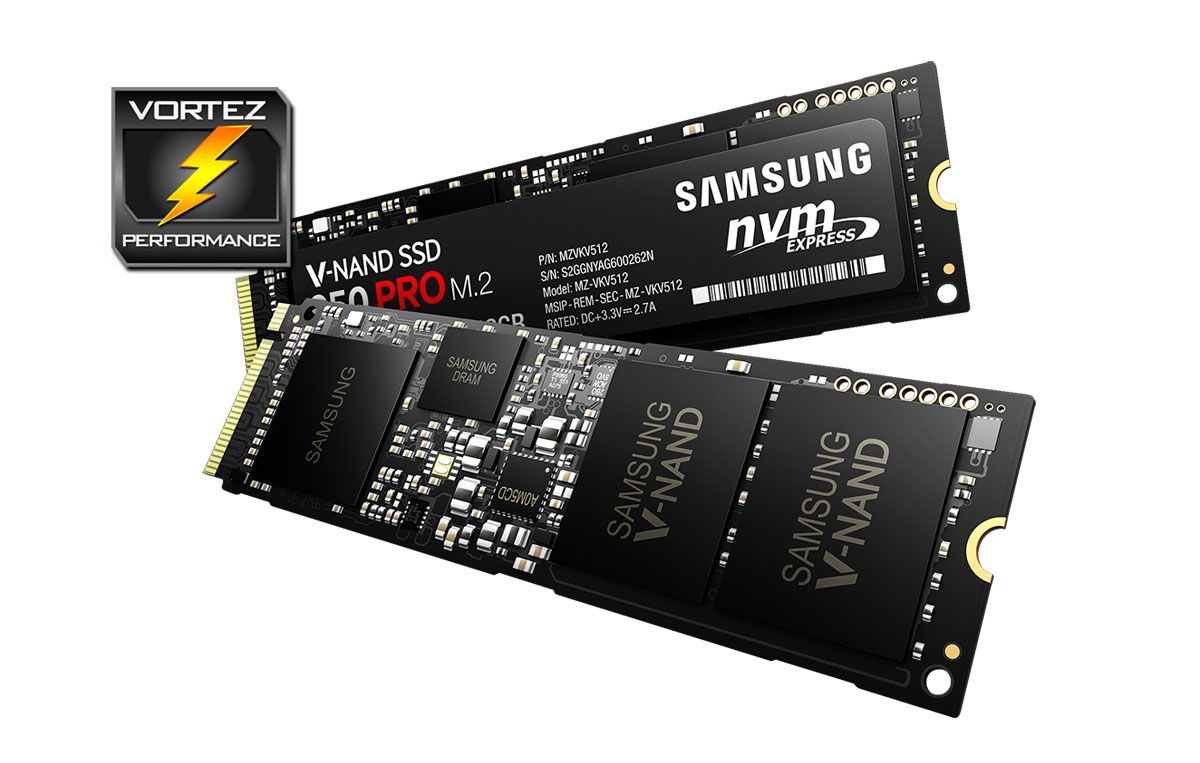
Samsung’s 950 PRO conforms to 2280 and opts for a stealthy black PCB. Although this probably wouldn’t influence a purchasing decision, it’s nice to see that M.2 drives are moving in the same direction that DRAM has also gone in terms of aesthetics.
The front of 950 PRO features a sticker containing the model name, capacity and other information such as the serial number. While the reverse lists the standards which are involved – notably NVM Express since this is the interface which 950 PRO takes advantage of.
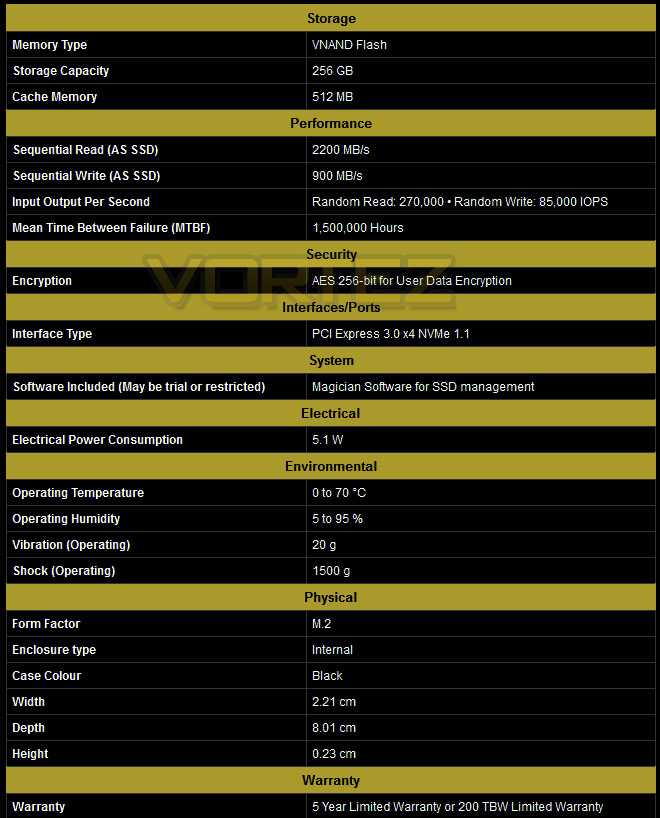
While 950 PRO arrives in the M.2 form factor this SSD utilises PCI Express Gen 3 x4, which in turn gives us access to greater bandwidth. 950 PRO uses Samsung’s own V-NAND and the UBX Controller. TRIM, Garbage collection and AES-256-bit encryption are all supported.
On paper the 256GB edition boasts 2200MB/s sequential read and 900MB/s sequential write transfer rates. In the next section of this review we’ll be observing how a single drive performs and what kind of performance we can expect when two 256GB 950 PROs are paired up in RAID0.
Test Setup & Methodology
Our test system is formatted and a fresh version of Windows is installed with just drives in place – no additional applications. Windows is then updated to the latest release and the drivers are installed. Included in the list of benchmarks are the following applications:
Benchmarks
Anvil Pro
AS SSD
ATTO Disk Benchmark v2.46
Futuremark PCMark 8
AIDA64
AS SSD
ATTO Disk Benchmark v2.46
Futuremark PCMark 8
AIDA64
Test system
CPU Intel Core i7-6700K
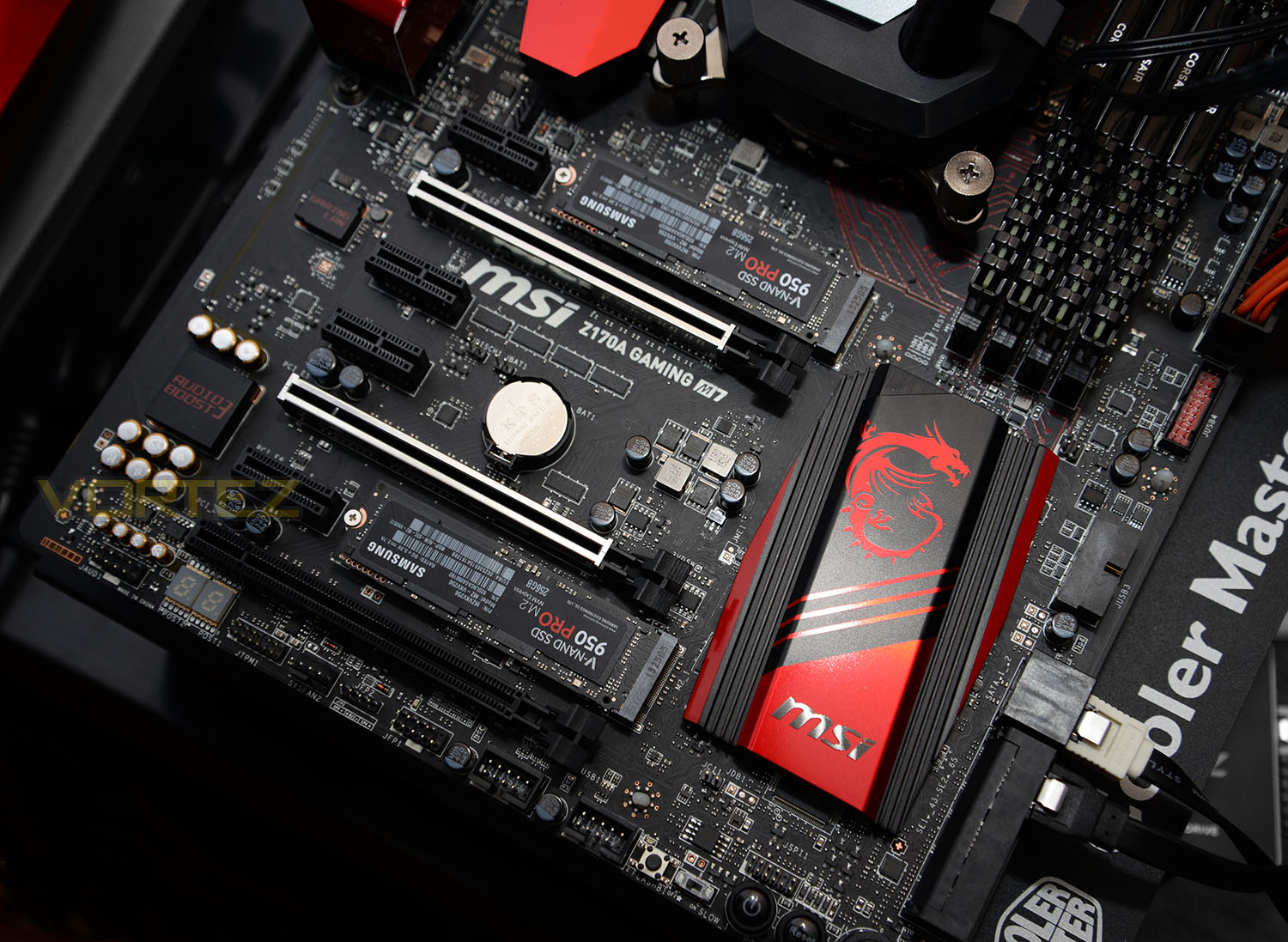
Motherboard MSI Z170A GAMING M7
Graphics PALIT NVIDIA GTX 760
Memory 32GB Corsair Vengeance LPX 3200MHz DDR4
HDD
– Samsung 950 PRO 256GB (NVM Express)
– Crucial BX200 960GB (Sata 6Gbps)
– OCZ Vector 180 240GB (Sata 6Gbps)
– Crucial MX200 1TB (Sata 6Gbps)
– Corsair Force LX 256GB (Sata 6Gbps)
– Corsair Neutron GTX 480GB (Sata 6Gbps)
PSU Corsair HX1050 Gold
OS Microsoft Windows 8.1 Professional 64-Bit
Motherboard MSI Z170A GAMING M7
Graphics PALIT NVIDIA GTX 760
Memory 32GB Corsair Vengeance LPX 3200MHz DDR4
HDD
– Samsung 950 PRO 256GB (NVM Express)
– Crucial BX200 960GB (Sata 6Gbps)
– OCZ Vector 180 240GB (Sata 6Gbps)
– Crucial MX200 1TB (Sata 6Gbps)
– Corsair Force LX 256GB (Sata 6Gbps)
– Corsair Neutron GTX 480GB (Sata 6Gbps)
PSU Corsair HX1050 Gold
OS Microsoft Windows 8.1 Professional 64-Bit
RAID
As well as a single drive test of 950 PRO, we’ll be combining two drives in a RAID configuration to demonstrate optimum performance.
Benchmarks: Anvil Pro
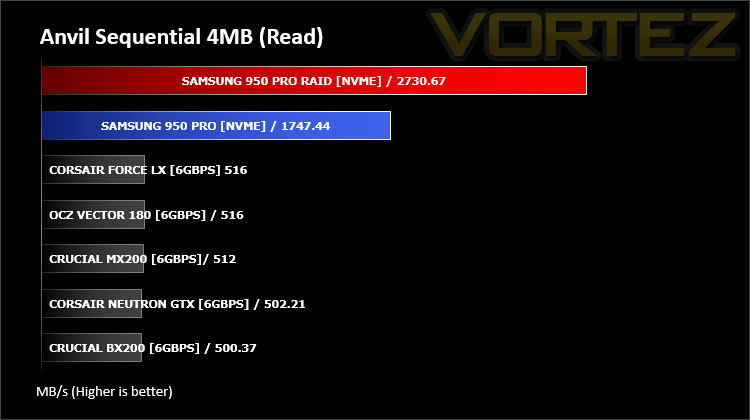
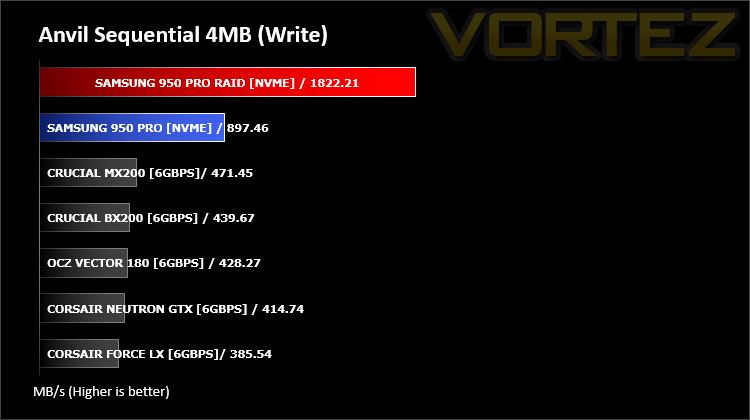
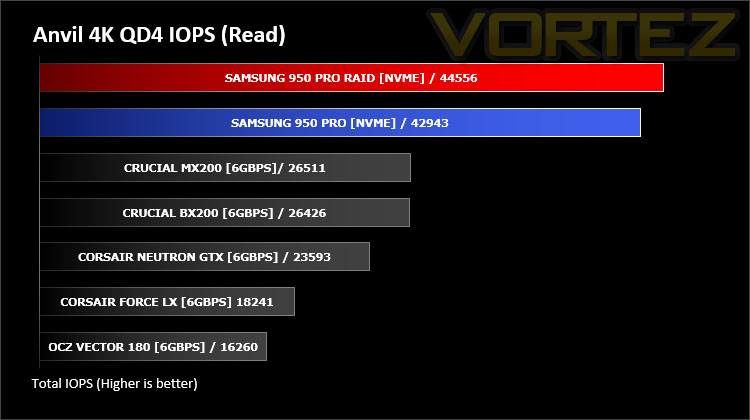
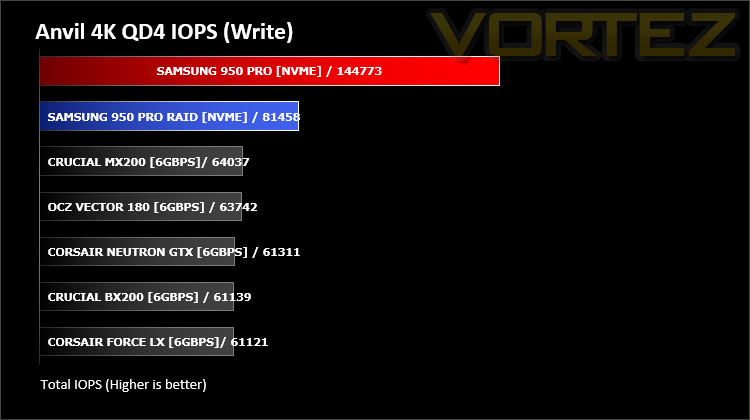
Anvil Pro from Anvil Storage utilities is one of the most popular storage benchmarking utilities today thanks to the large suit of tests available. You can test pretty much anything from Read/write Speed to IOPs with many variables to tweak allowing you to get either a single or host of results to compare with other likeminded enthusiasts. In our test we ran the standard suite 5 times, subtracting both the highest and lowest scores and determined the final result from the average of the remaining three results.
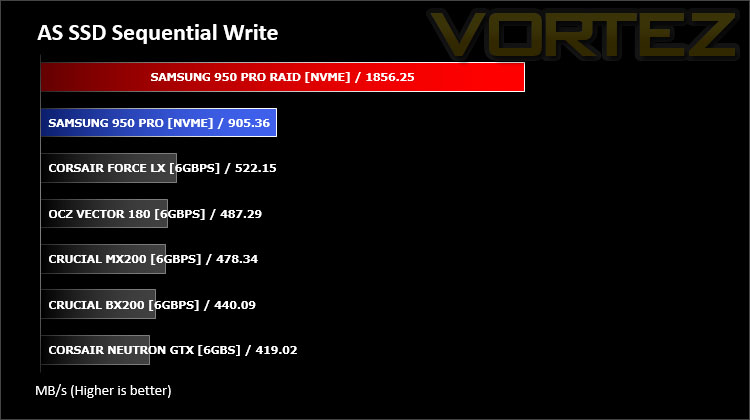
Benchmarks: AS SSD
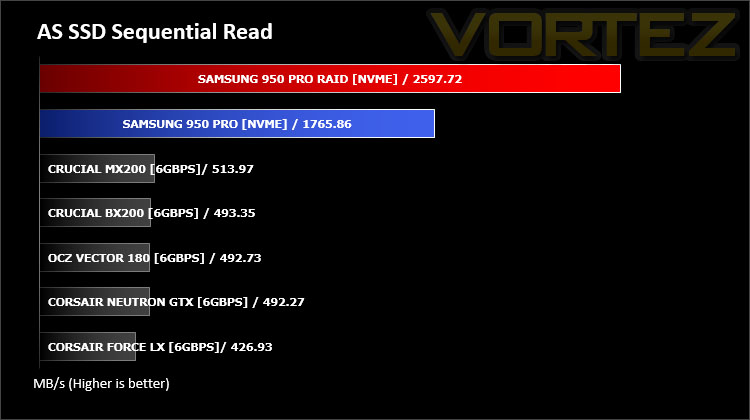
AS SSD Benchmark is a straightforward tool for measuring the speed of your SSD drive.
Simply launch the program, choose your drive, click Start, and it’ll test your SSD’s read and write speed in a variety of ways, delivering a score for each when it’s done. And if that’s not enough, there are also additional file copy and compression-related benchmarks available from the Tools menu. (The author’s support page is German only, but if you need further English explanations then there’s a thread on the program at the OCZ Technology forum.).
Simply launch the program, choose your drive, click Start, and it’ll test your SSD’s read and write speed in a variety of ways, delivering a score for each when it’s done. And if that’s not enough, there are also additional file copy and compression-related benchmarks available from the Tools menu. (The author’s support page is German only, but if you need further English explanations then there’s a thread on the program at the OCZ Technology forum.).
Benchmarks: ATTO
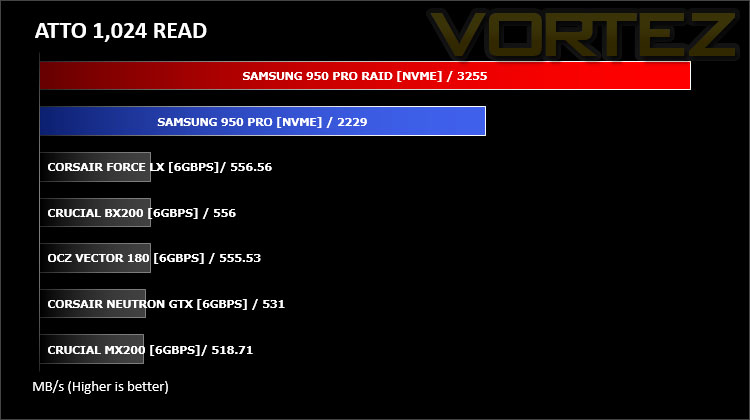
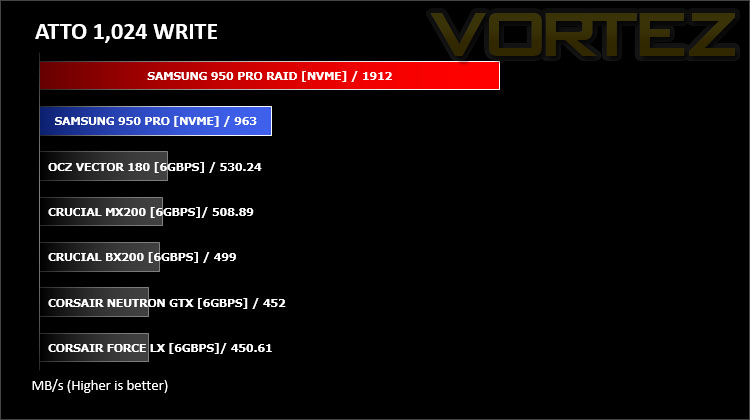
The ATTO Disk Benchmark performance measurement tool is compatible with Microsoft Windows. Measure your storage systems performance with various transfer sizes and test lengths for reads and writes. Several options are available to customize your performance measurement including queue depth, overlapped I/O and even a comparison mode with the option to run continuously. Use ATTO Disk Benchmark to test any manufacturers RAID controllers, storage controllers, host adapters, hard drives and SSD drives and notice that ATTO products will consistently provide the highest level of performance to your storage.
Benchmarks: AIDA64
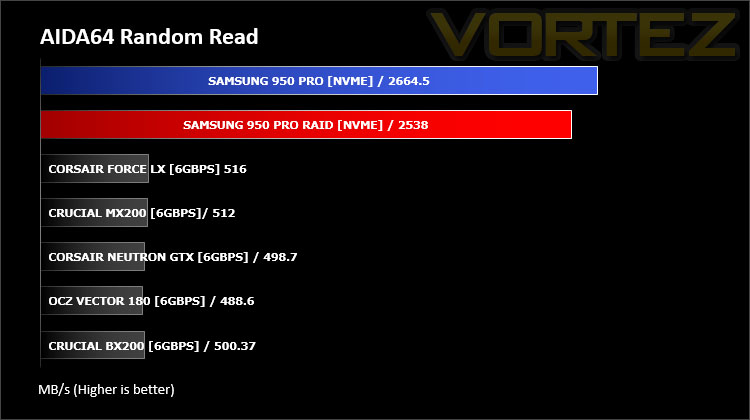
AIDA64 Product PageThis simple integer benchmark focuses on the branch prediction capabilities and the misprediction penalties of the CPU. It finds the solutions for the classic “Queens problem” on a 10 by 10 sized chessboard. At the same clock speed theoretically the processor with the shorter pipeline and smaller misprediction penalties will attain higher benchmark scores. For example — with HyperThreading disabled — the Intel Northwood core processors get higher scores than the Intel Prescott core based ones due to the 20-step vs 31-step long pipeline. CPU Queen test uses integer MMX, SSE2 and SSSE3 optimizations.
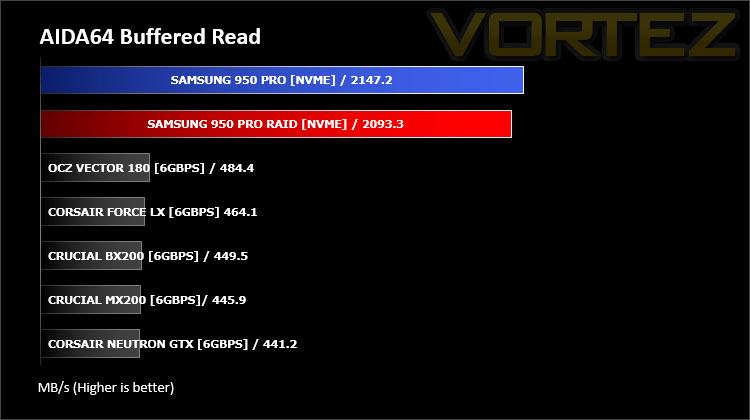
Benchmarks: PCMark 8
PCMark 8 Product PageWe use the Futuremark PCMark 8 utility to measure storage via Photoshop performance under both light and heavy loading conditions. Accelerated (open CL) is used to perform this test. The test is measured in seconds to complete.
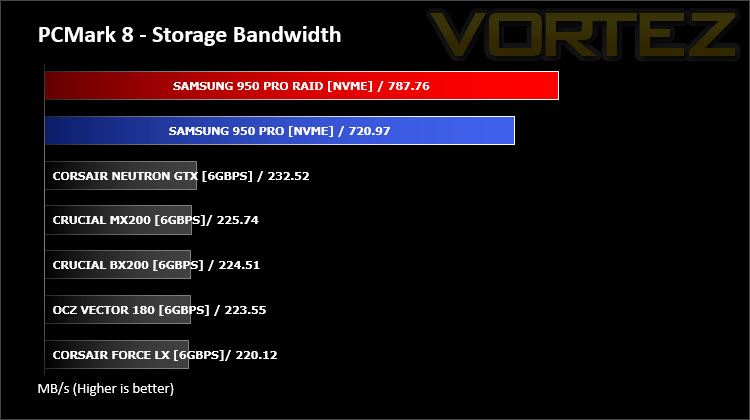
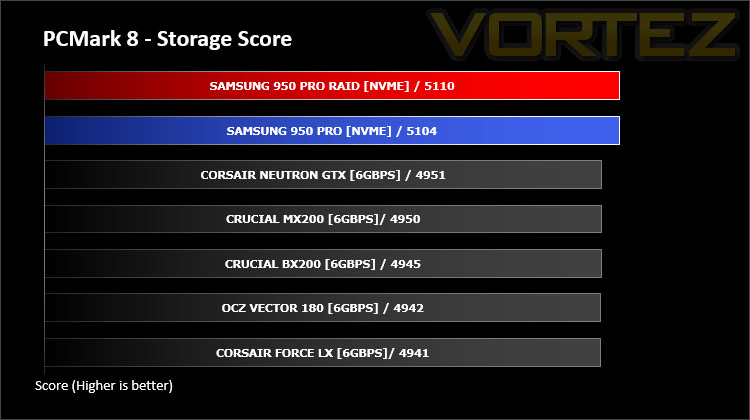
Conclusion
We’ve been eager to get our hands on the 950 PRO since we heard about its release and from today’s analysis we aren’t disappointed by any means.
The 950 PRO is Samsung’s first NVMe M.2 drive and as such takes full advantage of PCI Express 3.0 x4. Combining this with V-NAND flash memory and the UBX Controller Samsung’s 950 PRO is able to home in on blistering read, write and IOPS performance. By pairing up two of these drives and configuring RAID 0 the performance is nothing short of phenomenal. Although the 256GB version we’ve looked at today is slightly lower in specification compared to its 512GB counterpart the real-world difference is unlikely to be of any great significance. What does stand out is the magnitude of such a drive when compared to any SATA-based SSD, the performance charts are very much reminiscent of the comparison when SATA SSDs debuted (with the comparison to the now redundant mechanical drive).
By their nature, M.2 drives can get rather hot and users have reported their M.2 drives throttling performance in order to drive down temperatures. Some of these reports come from users with the Samsung SM951 drive – With the 950 PRO Samsung has since revised their methodology and this is what they have to say about it:
Dynamic Thermal Guard
In most cases of data transfers, heavy workloads can induce heat and result in high temperatures. Once temperatures reach a threshold, memory performance may malfunction. As the leader in SSD memory solutions, we equipped the 950 PRO with Dynamic Thermal Throttling Protection technology to automatically monitor and maintain optimal operating temperature to reduce the risks of overheating. We do not anticipate any performance drops due to thermal throttling.
This is encouraging but it’s still highly recommended that if users are planning to install 950 PRO into an M.2 slot on their motherboard, that chassis airflow is carefully planned. Typically, the M.2 slots are tucked away between the PCI Express lanes and heat will unsurprisingly find it difficult to dissipate away from a drive.
Samsung’s 950 PRO is available to buy now – the 256GB version is priced at £159 GBP – $200 USD and the 512GB version is £320 GBP – $350 USD. Considering the revolutionary step-up in performance to SATA-SSDs and the generous 5 year warranty this represents decent value for money. Especially if you’re day-to-day tasks involve heavy workloads – the only stipulation being either an M.2 or PCI Express slot.
The Samsung 950 PRO steps away from the stagnant SATA-SSD market and paves the way for a new level of storage bandwidth. This drive is ideal for those who demand the very best!
RAID GUIDE – VORTEZ TV
Pros
+ Outstanding performance
+ Stylish design
+ Compact form factor
+ Uses Samsung V-NAND
+ TRIM Support
+ Dynamic Thermal Guard
+ 5 Years Warranty
Cons
– Good chassis airflow highly recommended
+ Outstanding performance
+ Stylish design
+ Compact form factor
+ Uses Samsung V-NAND
+ TRIM Support
+ Dynamic Thermal Guard
+ 5 Years Warranty
Cons
– Good chassis airflow highly recommended
Click here for an explanation of our awards at Vortez.net.