







In the spotlight, a 2-bay NAS solution ready to take on the might of Synology’s new DSM 4.3. Are you looking for a network device for sharing and protecting data?

Product on Review: DiskStation DS214
Manufacturer and Sponsor: Synology
Street Price: £216 Inc. VAT (At time of review)
The end of the year is upon us and as usual, Synology are on hand with their latest, 2014 edition NAS solutions. This week, Synology announced their new DS214. The DS214 is a 2-bay NAS with some subtle improvements over its predecessor and ready to effectively use DSM 4.3 operating system.
The DS214 is of course the successor to the DS213 – If you aren’t familiar with Synology’s naming system. It’s very intuitive – Diskstation (DS) Number of bays (2) Year of production (12). The variable at the end of each of the product range such as + or j symbolise – Performance (+) Entry Level, storage focussed (j) or no symbol for a mixture of the both – performance and storage. So the unit that we are focussing on today is right in the middle of the entry level and performance models and can be deemed as a mainstream NAS solution specifically for workgroups and offices.
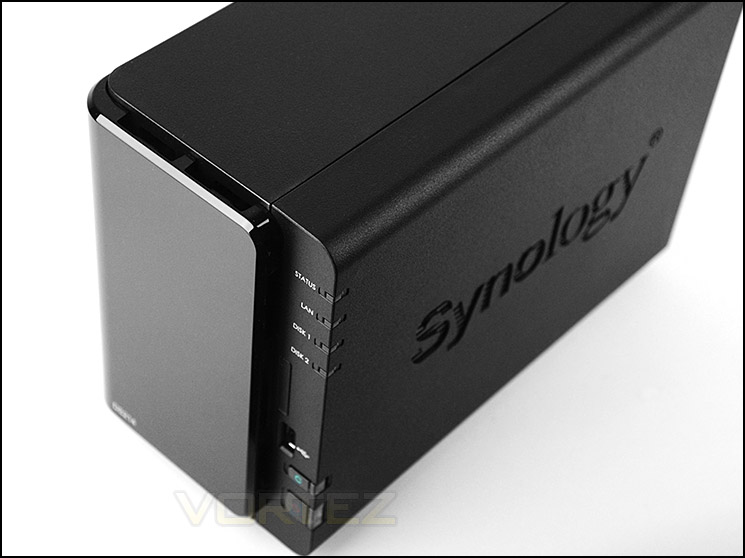
Synology on their DS214
Synology® DiskStation DS214 is a feature-rich 2-bay NAS server for workgroups and offices, specifically designed for users who need to share and protect data effectively, while increasing productivity with comprehensive office applications.
Features & Specifications
• Dual Core CPU with Floating-Point Unit
• Excellent Reading/Writing Performance over 100MB/s
• Fastest Encrypted Data Transfer-rate in its Product Sector
• Features SuperSpeed USB3.0
• Hot-swappable & Tool-Less Hard Drive Tray Design
• Running on Synology DiskStation Manager (DSM)
Hardware Specifications
• CPU Frequency: 1.066GHZ (Dual Core)
• Hardware Encrypted Engine + Floating Point
• Memory: DDR3 512MB
• Internal HDD/SSD: 3.5″ or 2.5″ SATA(II + III) X2 (Hard drive not included)
• Max Internal Capacity: 8TB (2X 4TB HDD) (Capacity may vary by RAID types) (See All Supported HDD)
• Hot Swappable HDD
• External HDD Interface: USB 3.0 Port X 2, USB 2.0 Port X 1
• Size (HxWxD) : 165 X 108 X 233.2 mm
• Weight: 1.3Kg
• LAN: Gigabit X1
• Wake on LAN/WAN
• System Fan: 92x92mm x1
• Wireless Support
• Noise Level : 19.9 dB(A)
• Power Recovery
• AC Input Power Voltage: 100V to 240V AC
• Power Frequency: 50 / 60Hz, Single Phase
• Power Consumption: 22.64W (Access) ; 9.12W (HDD Hibernation)
• Operating Temperature: 5°C to 95°F (5 to 35°C)
• Storage Temperature: -10°C to 155°F (-10 to 70°C)
• Relative Humidity: 5% to 95% RH
• Maximum Operating Altitude: 10,000 feet
• Certification: FCC Class B, CE Class B, BSMI Class B
• Warranty: 2 Years
• CPU Frequency: 1.066GHZ (Dual Core)
• Hardware Encrypted Engine + Floating Point
• Memory: DDR3 512MB
• Internal HDD/SSD: 3.5″ or 2.5″ SATA(II + III) X2 (Hard drive not included)
• Max Internal Capacity: 8TB (2X 4TB HDD) (Capacity may vary by RAID types) (See All Supported HDD)
• Hot Swappable HDD
• External HDD Interface: USB 3.0 Port X 2, USB 2.0 Port X 1
• Size (HxWxD) : 165 X 108 X 233.2 mm
• Weight: 1.3Kg
• LAN: Gigabit X1
• Wake on LAN/WAN
• System Fan: 92x92mm x1
• Wireless Support
• Noise Level : 19.9 dB(A)
• Power Recovery
• AC Input Power Voltage: 100V to 240V AC
• Power Frequency: 50 / 60Hz, Single Phase
• Power Consumption: 22.64W (Access) ; 9.12W (HDD Hibernation)
• Operating Temperature: 5°C to 95°F (5 to 35°C)
• Storage Temperature: -10°C to 155°F (-10 to 70°C)
• Relative Humidity: 5% to 95% RH
• Maximum Operating Altitude: 10,000 feet
• Certification: FCC Class B, CE Class B, BSMI Class B
• Warranty: 2 Years
Packaging & Bundle
Since the 2013 range, Synology have been using vibrant lime green and white packaging. The front of the box identifies some key features of DS214 and gives a hardware specification listing. We’ve been impressed by Synology’s packaging from the early days and then continue to see this as an important factor for all their products.

DS214 packaging is lively and vibrant
Inside, all of the items within the bundle are sectioned off into compartments via cardboard and the NAS itself with protected within a padded cover. The bundle consists of:
• Documentation – Quick start
• AC power pack/cables
• Screws for attaching drives to HDD trays
• Installation CD – Guide, setup utility, data replicator 3

Included items within the bundle
On the next page we will take a closer look at the DS214 NAS itself.
Closer Look
Keeping with the same styling from previous years, Synology present the DS214 in a rugged plastic enclosure that has a matt finish and glossy plastic front fascia. Both sides feature the Synology emblem engraved – this also gives some additional ventilation for the internal hard drives/components. Overall we’re pleased with how DS214 looks and feels, and we see no problem with the company continuing to use a reliable design.
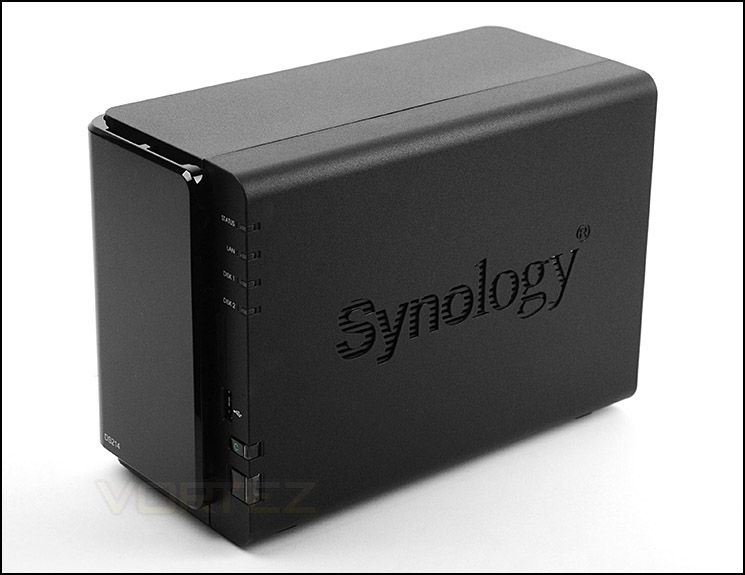
Sleek and professional aesthetics
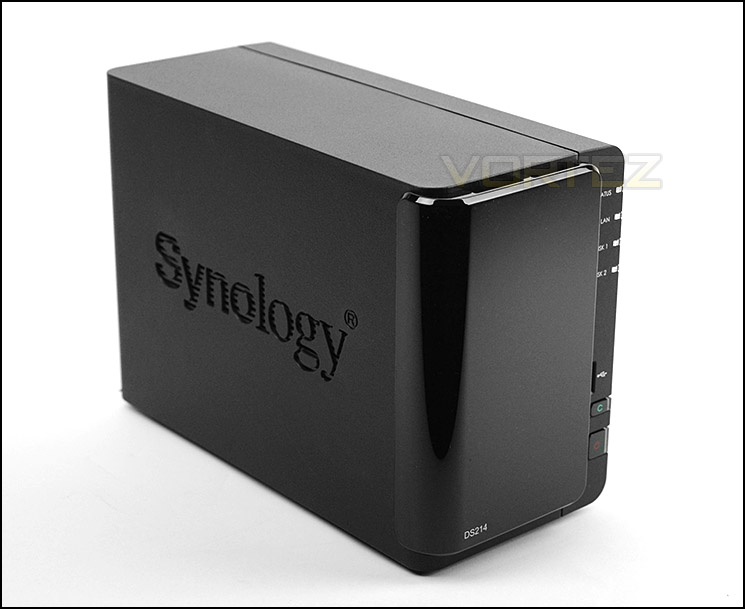
Synology logo on either side
Casting our eyes onto the front of DS214, our NAS has a glossy plastic front fascia which is removable. Running along the right edge of the unit are various LED indicators, ports and buttons. From top to bottom there are the following:
• Status LED
• LAN LED
• Disk 1 LED
• Disk 2 LED
• USB 2.0 port
• Reset button
• Power button
Note: Although there are markings for the SD card slot, the DS214 does not come with this feature unlike its predecessor. We are led to believe the markings are there because the same outer body has been used for this new version.
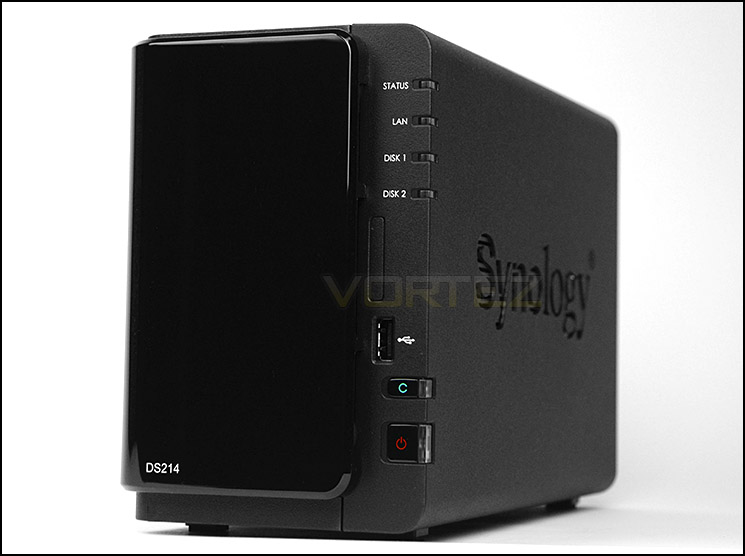
Glossy plastic front with LEDs, ports and buttons
Spinning the DS214 round to the back we see the unit still has a 92mm exhaust fan for extracting heat from the PCB and HDDs. Beneath this fan are 2x USB 3.0 ports and a RJ45 Gigabit LAN port. Also on the back panel is the AC connector and a label with the mac address and serial number should you need these details for technical requirements. As is common with most network devices – Synology have kindly included a bracket on the back for use with a Kensington lock.
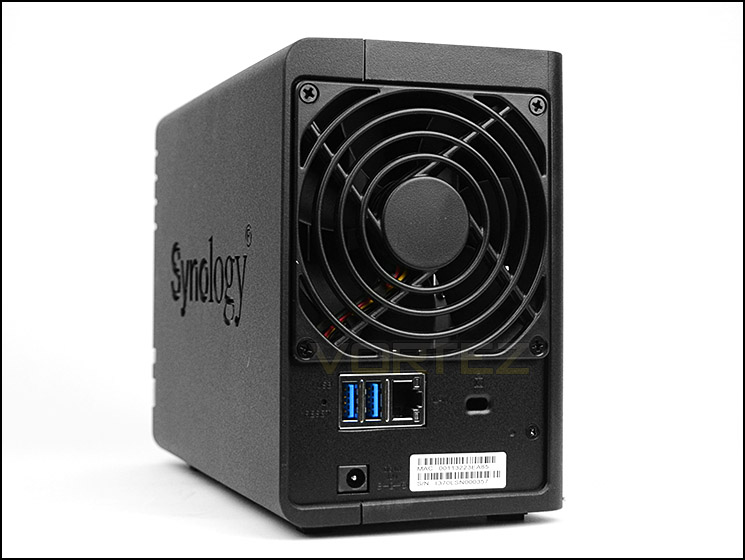
The back of DS214 with dual USB 3.0 ports
HDD Installation – Inside DS214
The eagle eyed amongst you will notice there are no visible screws on DS214, nor are is there any way to separate the covers to gain access to the inside. So in order to get inside the front fascia has to be removed. This fascia simply lifts off and underneath are two HDD trays. To remove a tray the tab at the top must be pressed down and then the handle pulled in a backwards motion.
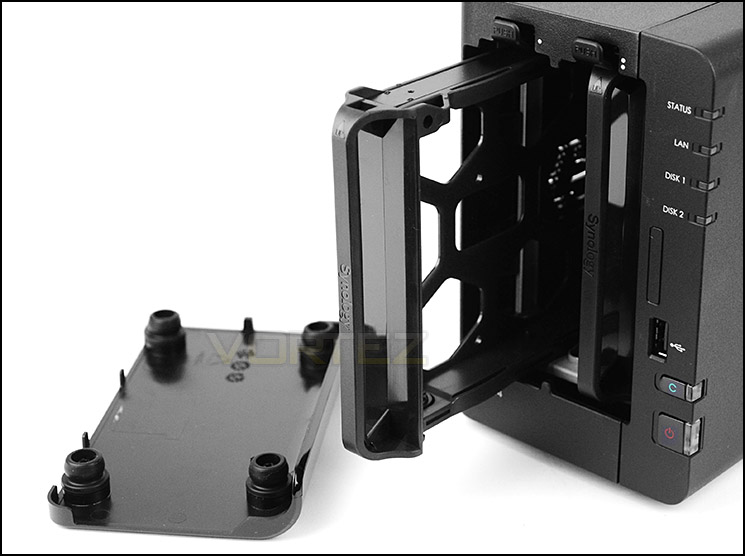
Removable HDD trays at front
To attach a drive to one of these trays, screws must be attached to the side of the drive for 3.5” HDD or the underside for 2.5” HDDs. With the drive attached, the tray is then slid back into the unit and the SATA connection ports meet the back of the unit and activate connectivity.
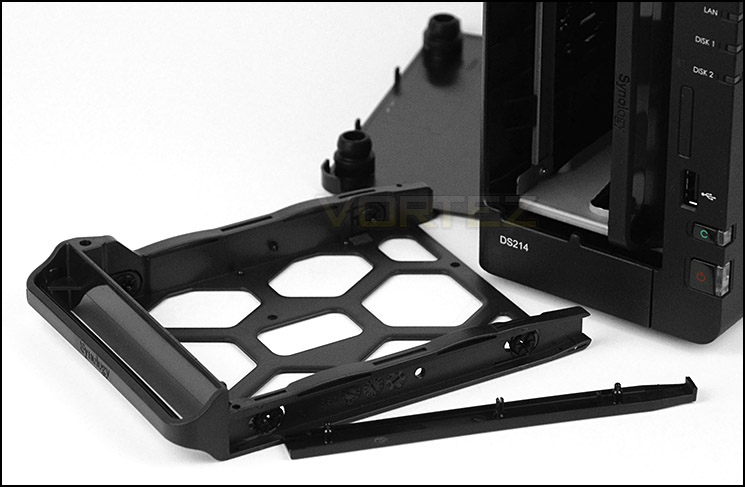
HDD trays accommodate 2.5” and 3.5” HDD installation
We would usually take a look at the internal design and components within the NAS but since there is no clear way of getting inside the unit we must refer to the technical specifications instead. These are as follows
• CPU Frequency: 1.06GHz
• Hardware Encrypted Engine + Floating Point
• Memory: DDR3 512MB
• Internal HDD/SSD: 3.5″ or 2.5″ SATA(II or III) X2
• Max Internal Capacity: 8TB (2X 4TB HDD)
DS214 has been given some subtle but important alterations compared to the previous generation DS213. Whilst DS213 had a 2GHz CPU at its heart, this processor was single-core. The new DS214 has been given a dual-core processor which operates at 1.06GHz. Although this chip has a reduction in frequency, it has the added bonus of having two cores which is better suited towards multi-tasking – an integral operation for a NAS.
Although SATA III is compatible the controller is actually SATA II so SATA III drives will not run at their optimum transfer rates.
Synology DSM 4.3 with Video Overview
At the end of August, Synology announced DSM 4.3 – the next phase of their popular operating system. As we have reported in the past DSM is extensive in its feature-set. Not only this but it is very easy to use and is pleasing to the eye. DSM 4.3 integrates Cloud features, Apps-on-demand and of course multi-tasking as a key element too.
The 4.3 update allows Cloud Station to use selective sync. This enables users to select which data gets synced to their local computer from the remote NAS.
To gain access to the NAS and begin using the DS214 it is necessary to install Synology Assistant – once this has installed, DSM can be fed to the NAS via a .pat file.
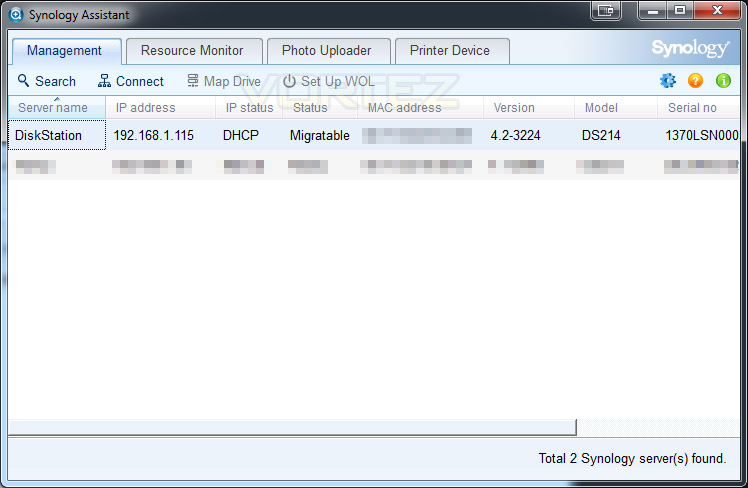
Synology Assistant gives access to available NAS’ on the network
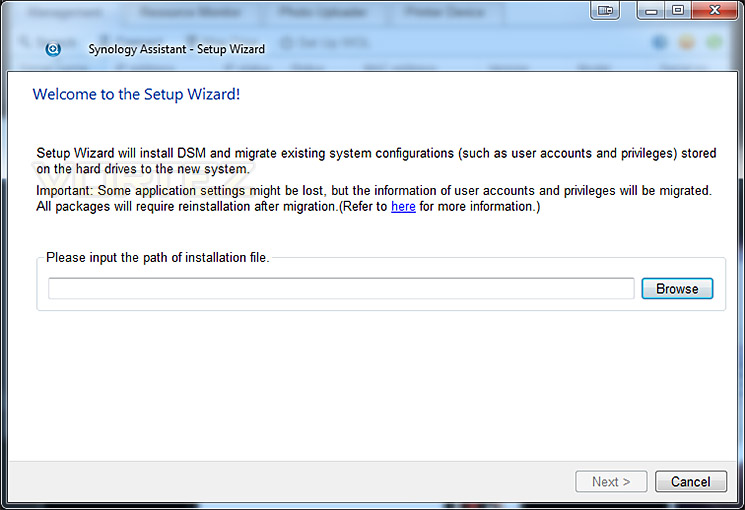
Installing latest DSM via .pat file from Synology website
The next stage of installation is to set the credentials – setting the password and naming the server. Once you are happy with the details submitted – click the next button.
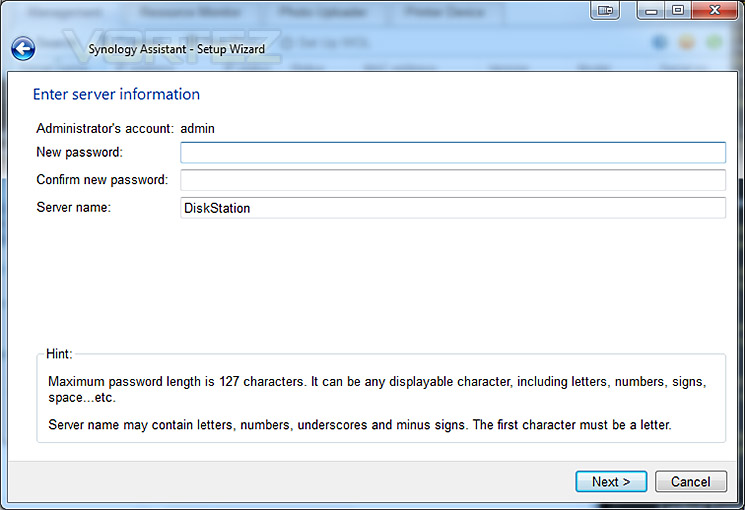
Setting up credentials
During the installation of DSM, networking settings are applied and configuration files are transferred. This process involves applying network protocols, formatting the drives and adding partitions ready to be used for storage. This process doesn’t take very long at all – it will of course depend on how large the drives are though. Once complete, the installation wizard reboots the NAS.
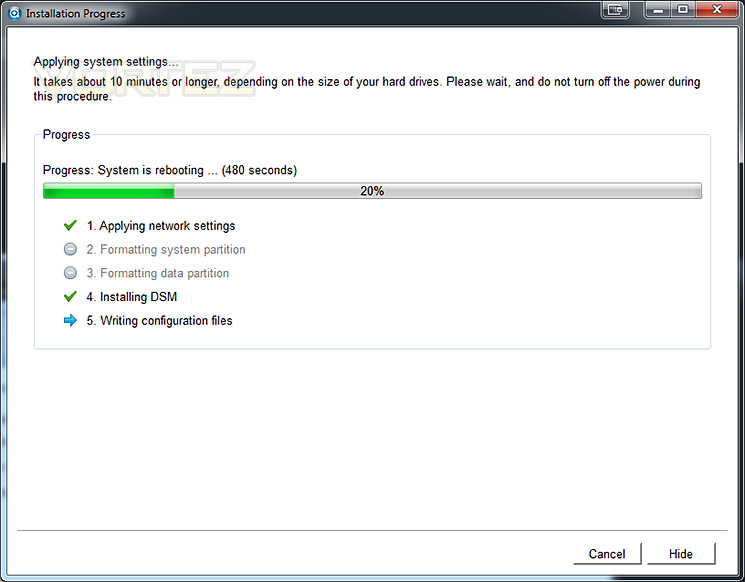
DSM during various installation stages
Upon completing the installation of DSM 4.0 we can now log into the system. Login details are “admin” and the password that was specified during setup.
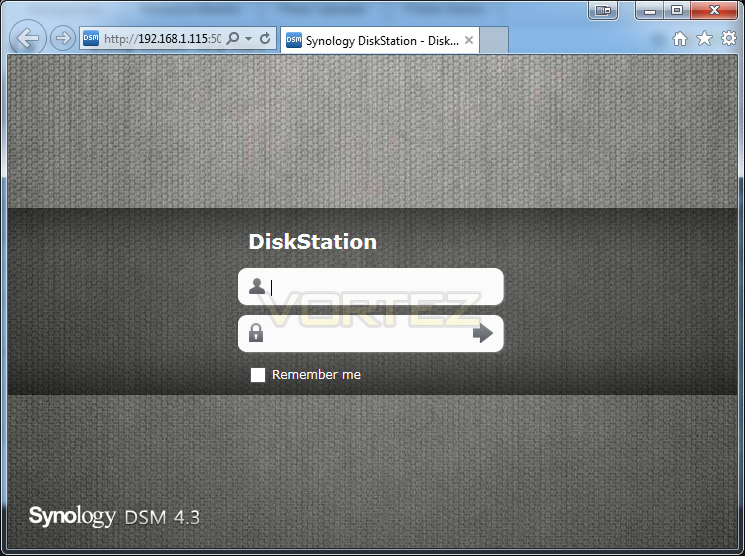
Login screen after installing DSM 4.3
Inside the GUI there are lots of features to look at and use. Compared to previous versions, DSM 4.3 is even better. The interface is fluid, interactive and very extensive. Rather than show its functionality via screenshots, here is a brief overview of what you can find inside.
VIDEO – DSM 4.3 brief overview
Audio streaming – Mobile phone
VIDEO OVERVIEW – DS Audio in action!
Amongst many of the class leading features within DSM 4.3 we have the ability to store files on the NAS and stream them to mobile devices such as Android ready devices. For the purpose of this review I thought it would be a worthwhile inclusion to show the functionality between the NAS and mobile device for audio files with DS Audio by Synology. About Synology DS Audio.
Synology DiskStations not only offer a great storage solution for media files, but now you can access your music collection directly from your iPhone or iPod Touch. Synology’s DS audio application allows users to access their music collections stored on the Synology DiskStation and stream that music through the iPhone or iPod Touch across an internet connection.
NOTE: Sound station will need to be enabled from the Control Panel of DSM 4.3
The first thing to do is download the App from Android Market. Performing a search for Synology returns lots of different Apps and the best thing is, they are all free! DS Audio is the one we want.
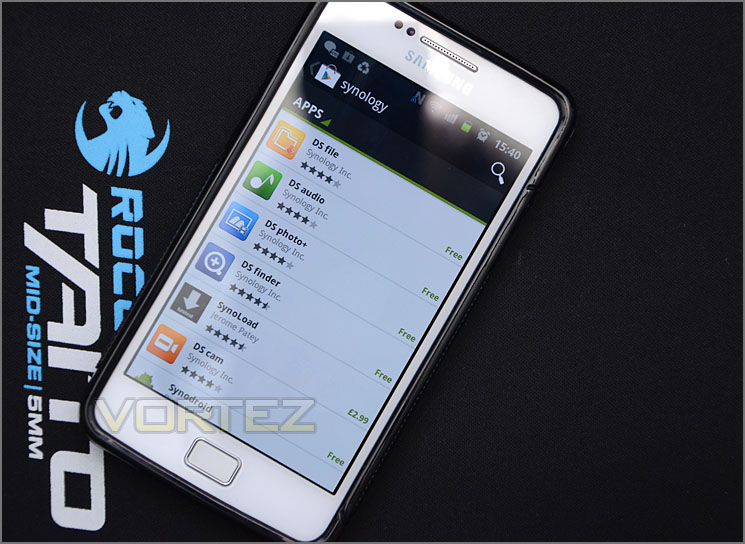
Android market has many Synology Apps – all are free!
After installing the app, we are met with a login screen (just put in the IP, username and password) and then you come to a home screen which gives you different options. We select “Folder” and can then navigate to where we have put an MP3 on the DS214.
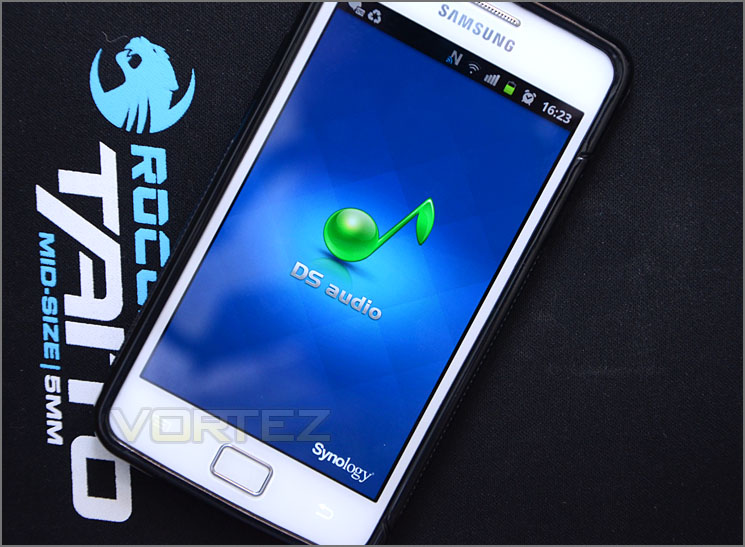
The DS Audio loading up
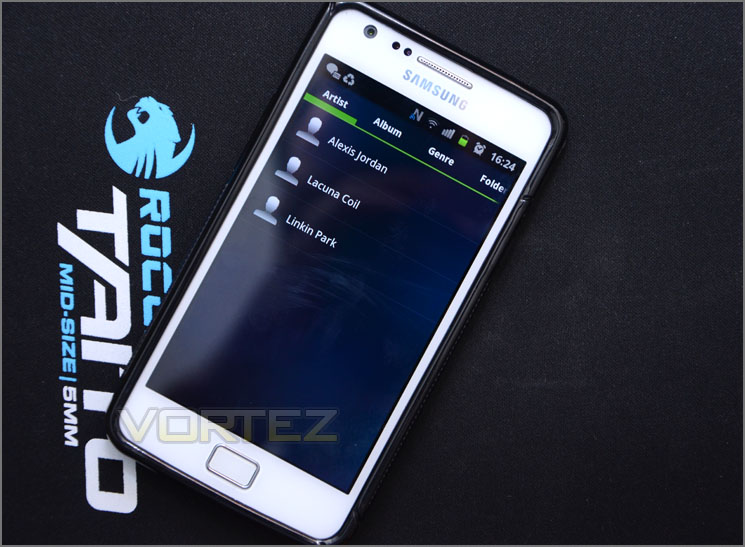
MP3s listed on the NAS
We can then play the file directly from the DS214 from anywhere within range of the wireless connection the NAS is being hosted on. So if you have a docking station with speakers you can ideally have the music playing off the NAS within another room. Perfect if you are entertaining guests and want some ambience!
From start to finish – installing software onto the NAS is very easy. Once DSM is installed we then have a plethora of features to take advantage of that allows seamless operation for almost any task a user could want.
Transfer & Power Performance
We have looked at some of the features that DSM 4.3 brings with DS214 but how does this affect performance? What are typical transfer rates like over a Gigabit network? Is power consumption reasonable? These are all questions that you might be asking and we are here to answer them.
Test System Specifications
CPU Intel Core i5 2500K
Motherboard ASRock Z68 Extreme4 Gen3
Memory 8GB Kingston HyperX 1600MHz DDR3
Graphics NVIDIA GTX 580
PSU Thermaltake Toughpower Grand 750W
Motherboard ASRock Z68 Extreme4 Gen3
Memory 8GB Kingston HyperX 1600MHz DDR3
Graphics NVIDIA GTX 580
PSU Thermaltake Toughpower Grand 750W
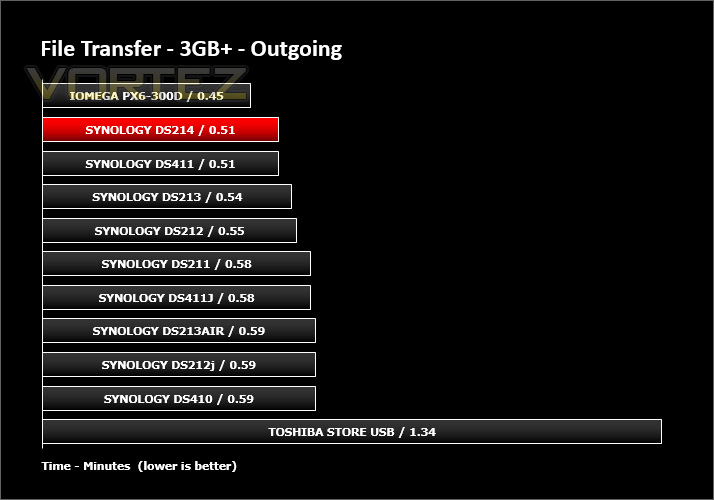
First of all, for the purpose of real world testing we bundled together 6 files which were in 2 folders amounting to 3.2GB. We wanted to discover the incoming and outgoing transfer times between the DS214 and the computer – against other devices on a Gigabit network. Here are the results.
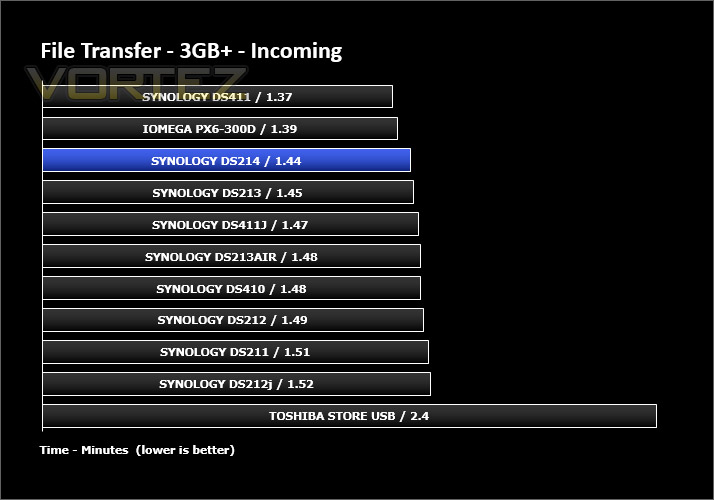
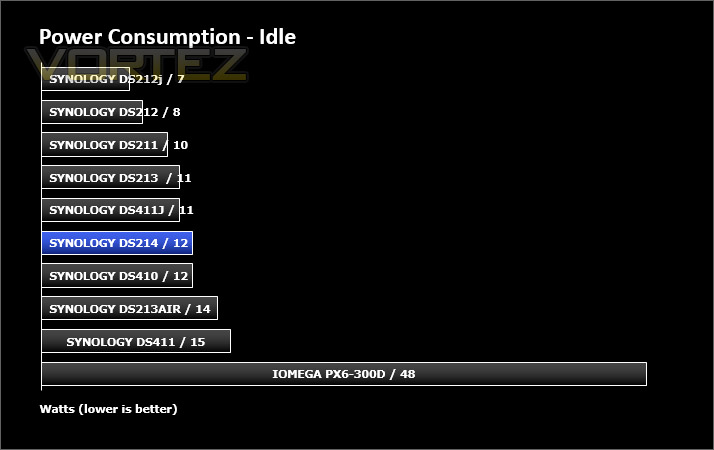
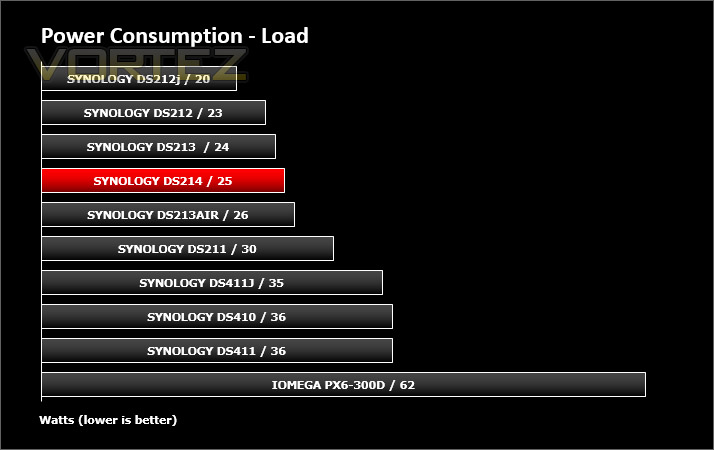
Whilst performing these tests load power consumption was monitored. The power consumption was also monitored whilst being in an idle state. There are actually two states, idle after usage and hibernation which the unit falls into after 10 minutes of non-usage. Hibernation figures were recorded.
Conclusion
It’s crystal clear why Synology remain a dominating force in the NAS storage sector. Whilst at the hardware level subtle changes are made, it is their persistence at the software level that realises the true success.
The decision to integrate a dual-core processor in this 2014 edition of the 2-bay series is a welcome one. It makes perfect sense in the natural develop of the product line to utilise such a component for multi-tasking purposes which are fundamental to the NAS and Synology’s DSM.
We’ve seen Synology’s DSM operating system mature from as early as version 2.0 and having used the new DSM 4.3 extensively, we can whole-heartedly say that using it is a very satisfying experience. The 4.3 update brings with it ADS Trusted Domain Support, TRIM Support and enhanced SSD caching as well as allowing Cloud Station to sync up to 30% faster than previously.
As we demonstrated in this review, making use of the features is easy thanks to the helpful and intuitive GUI. It would be impossible to cover all the features but our demonstration reveals just how versatile and feature-rich Synology’s NAS and DSM really are.
Priced at £216inc VAT (GBP) the DS214 is considerably cheaper than its predecessor at launch and we think it’s a great buy for the price considering everything you can make use of – all backed by a 2 year warranty.
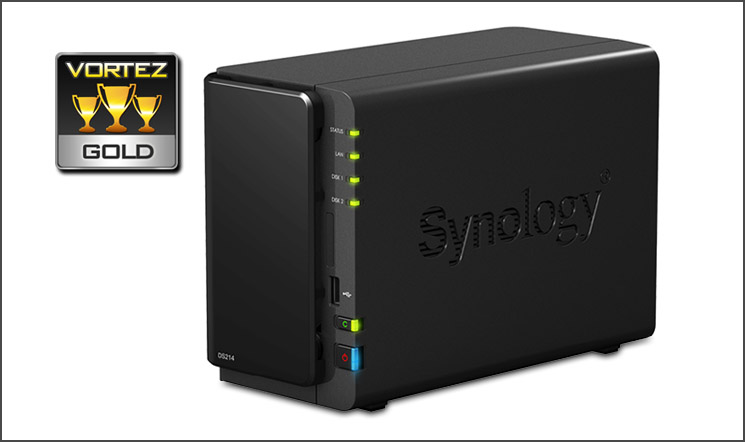
Synology have made some subtle alterations to the new DS214 which actually, in turn make significant improvements to an already outstanding product and we’re confident the DS214 will be a great success for them. It is our pleasure to hand out our prestigious GOLD award.
VIDEO REVIEW – VORTEZ TV
Pros
+ Pleasing to the eye
+ Great build quality
+ Dual-core support
+ 2.5” and 3.5” drive support
+ Excellent performance
+ Low fan noise
+ Feature rich operating system
Cons
– There are none!
+ Pleasing to the eye
+ Great build quality
+ Dual-core support
+ 2.5” and 3.5” drive support
+ Excellent performance
+ Low fan noise
+ Feature rich operating system
Cons
– There are none!

Click here for an explanation of our awards at Vortez.net.


