







Powered by an Intel Atom 1.6GHz dual-core processor, N2560 NAS is designed for the Soho/home network. Delivering great performance at an affordable price.

Product on Review: N2560 NAS
Manufacturer & Sponsor: Thecus
Street Price: £245
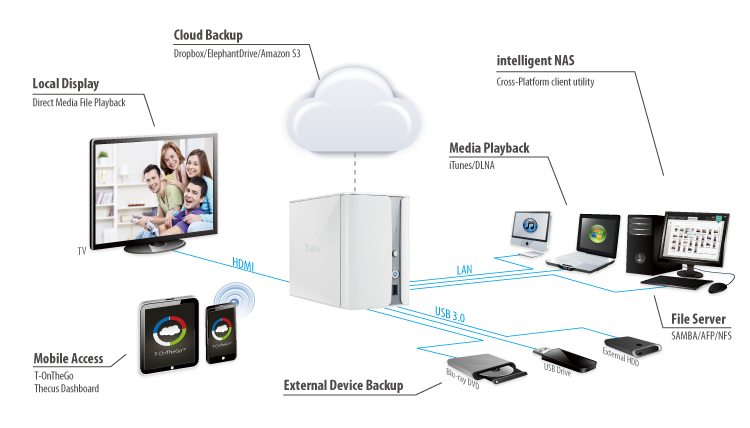
Smartphones and tablets have steadily been increasing in popularity over the last few years and it would be quite odd to see them absent from the average household. In similar fashion, the home network has also evolved too, with devices now working in conjunction with our mobile devices. NAS designers have been keen to channel into the interaction between the home network and mobile device, and users can now enjoy the freedom to access and configure media file servers just like the product we are taking a look at today from Thecus.
The N2560 is a dual-bay NAS which features an Intel Atom 1.6GHz dual-core processor, 2GB of DDR3 memory and promises to deliver a wealth of features for the home network.
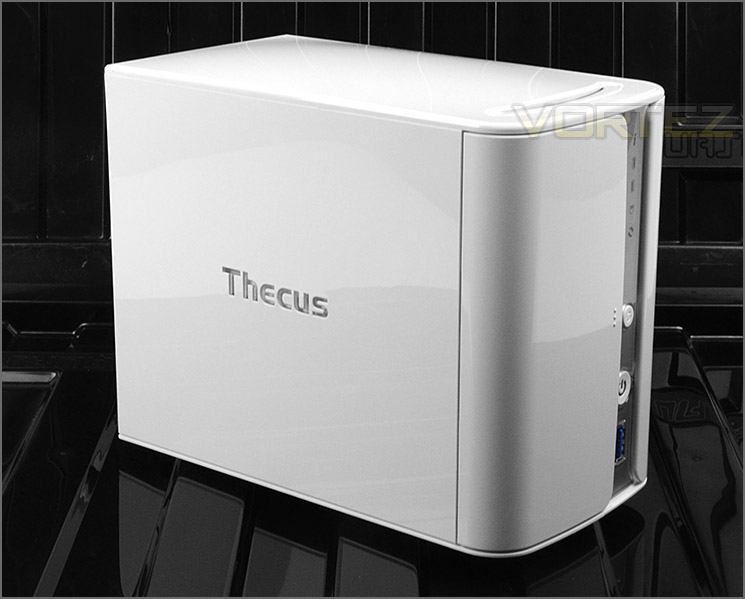
Thecus on their N2560
Thecus® is proud to announce the release of the latest incarnations of its ground-breaking line of home- and SMB-targeted NAS solutions. The 2-bay N2560 and 4-bay N4560 feature the latest Intel Atom SoCs, increased RAM, as well as all the hardware that made the original models such a success. Thecus® has also striven to improve functionality and productivity through the inclusion of the T-OnTheGo™ remote accessibility feature and the unveiling of the NAS Application Center online. With improved power and performance along with cutting-edge features, the N2560 and N4560 are pushing the boundaries in home and SMB networking.
Features & Technical Specifications
Processor
Intel® Atom™ SoC CE5335 (1.6GHz Dual Core)
System Memory
2GB DDR3
LAN Interface (PCI-e)
RJ-45×1: 10/100/1000 BASE-TX Auto MDI/MDI-X
WOL supported
USB Interface
USB 2.0 host port x2 (back x2)
USB 3.0 host port x1 (front x1)
HDMI Output
HDMI port (back x1)
Audio Output
SPDIF (back x1)
Disk Interface
2 x SATA for internal
Power Supply
40W external power adaptor
Power Management
Auto power on after shutdown due to power loss
Buttons
Power button
USB copy button
Reset button
Environment
Temperature: 5°C to 40°C
Humidity: 0 ~ 80 % R.H. (Non-condensing)
Chassis
2bays Tower
Dimensions (HxWxD)
166 x 114 x 210 (mm)
Weight
2.4Kgs
Certificates
CE/FCC/C-Tick/VCCI/BSMI
RoHS
WEEE
Intel® Atom™ SoC CE5335 (1.6GHz Dual Core)
System Memory
2GB DDR3
LAN Interface (PCI-e)
RJ-45×1: 10/100/1000 BASE-TX Auto MDI/MDI-X
WOL supported
USB Interface
USB 2.0 host port x2 (back x2)
USB 3.0 host port x1 (front x1)
HDMI Output
HDMI port (back x1)
Audio Output
SPDIF (back x1)
Disk Interface
2 x SATA for internal
Power Supply
40W external power adaptor
Power Management
Auto power on after shutdown due to power loss
Buttons
Power button
USB copy button
Reset button
Environment
Temperature: 5°C to 40°C
Humidity: 0 ~ 80 % R.H. (Non-condensing)
Chassis
2bays Tower
Dimensions (HxWxD)
166 x 114 x 210 (mm)
Weight
2.4Kgs
Certificates
CE/FCC/C-Tick/VCCI/BSMI
RoHS
WEEE
Packaging & Bundle
The N2560 is presented in a small and lightly decorating box. Thecus have gone down the minimalist approach by listing only fundamental features for the NAS and Thecus OS.
Inside, the box, essential components are sectioned off into another cardboard box and the NAS itself is protected with polystyrene blocks and covered with anti-scratch sheeting.
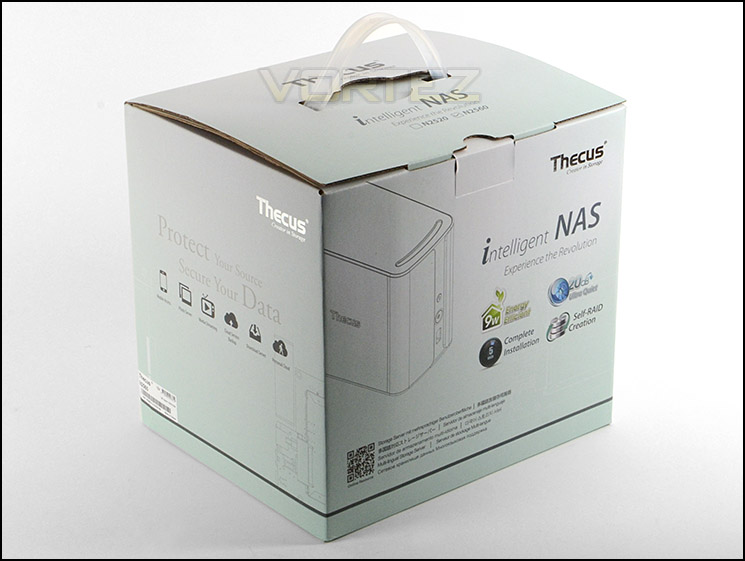
Packaging for N2560
Thecus bundle a number of accessories with N2560 to get you up and running. These items include the following:
• Software CD
• Quick Start Guide
• Network Cable
• 4x HDD installation adapters
• 40W Power adapter pack
• Power cable
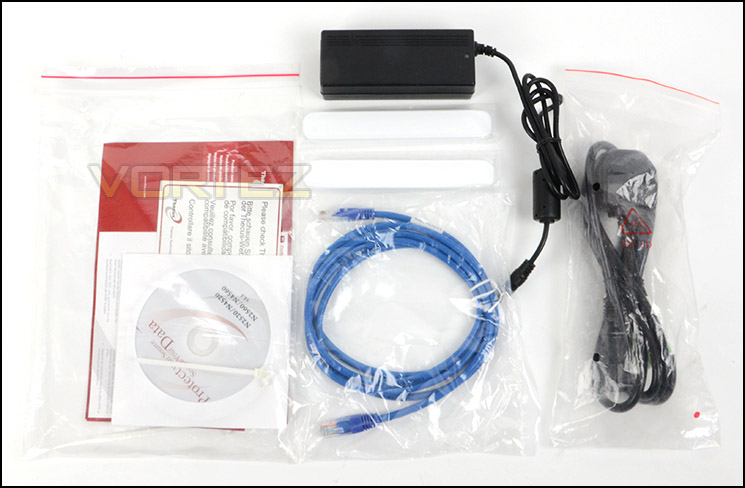
Bundled accessories
Closer Look
N2560 features a classy, elegant glossy-plastic enclosure. Adopting such style fits in perfect with home users. The Thecus emblem has been carved out of one side of the NAS and illuminates with a bright white LED when the unit is powered up.
The top-side of the unit has a small incision which encourages ventilation for internal components and HDD storage.
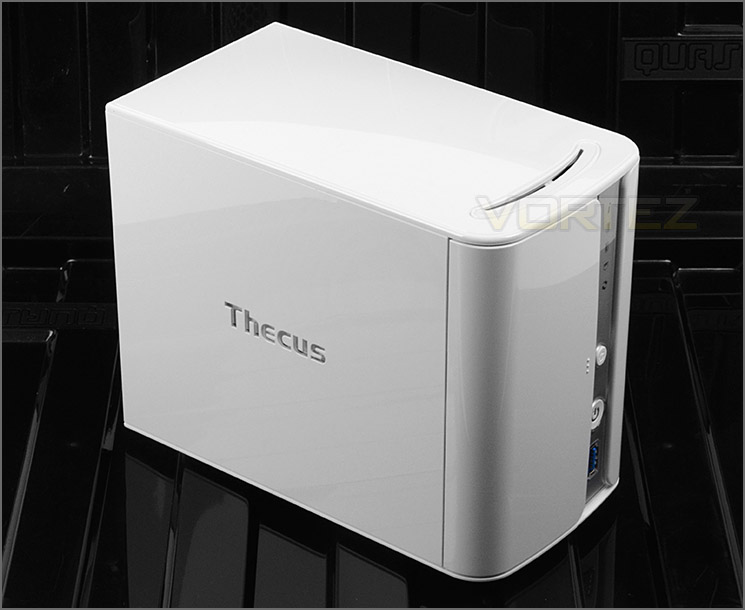
Thecus branding on the side lights up when powered
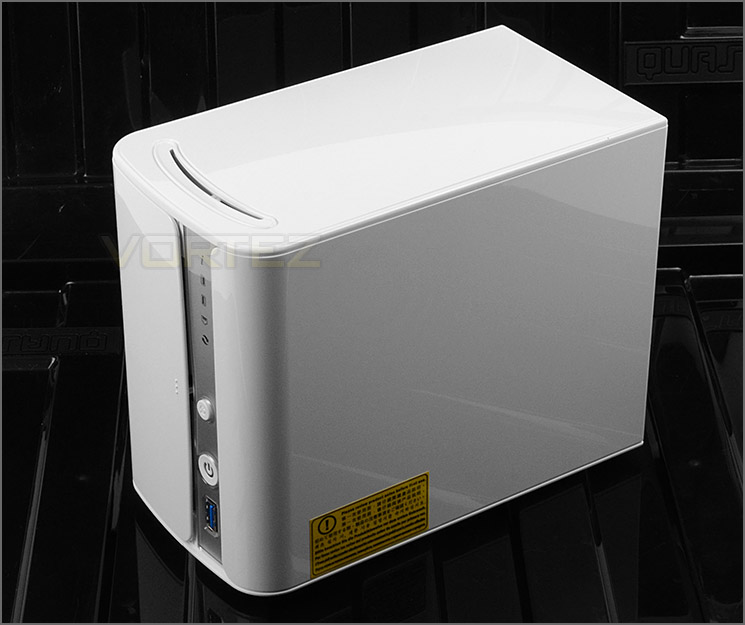
Minimalist and professional styling
At the front of N2560, Thecus have given the unit a push-to-release door for the HDD installation and on the right of this door are a series of buttons, ports and LED indicators. Thecus have done a great job on the aesthetics and quality here and we’re pleased to see the inclusion of a USB 3.0 port at the front of the unit rather than the rear.
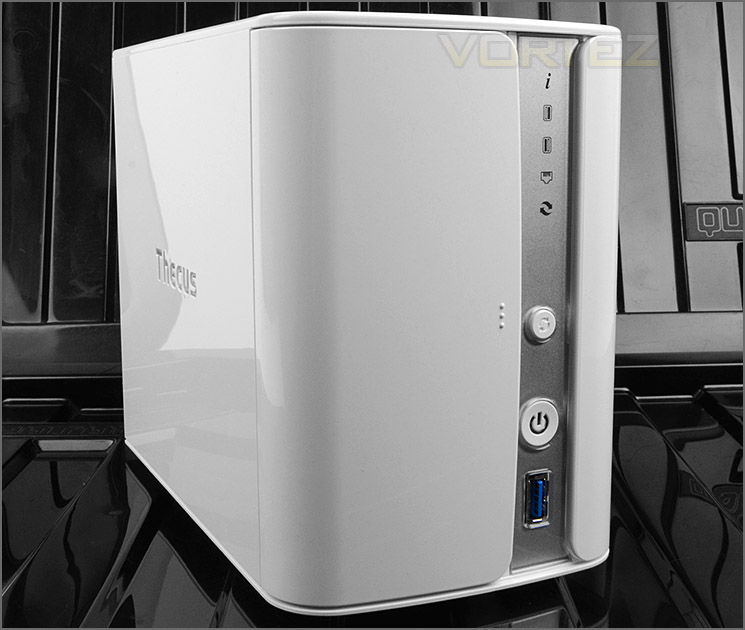
The front of N2560 with USB 3.0 port
Around the back there is yet more functionality to take advantage of. Thecus have equipped N2560 with an 80mm cooling fan in the upper region to handle cooling for the internal components and HDD storage. Below this there are a number of features which include:
• SPDIF port
• HDMI port
• Factory Reset Button
• Gigabit LAN port
• Dual USB 2.0 ports
• DC power socket
• Spec Label – Serial Number
• Kensington Lock Option
N2560 appears to be a very capable NAS considering how dainty this unit is.
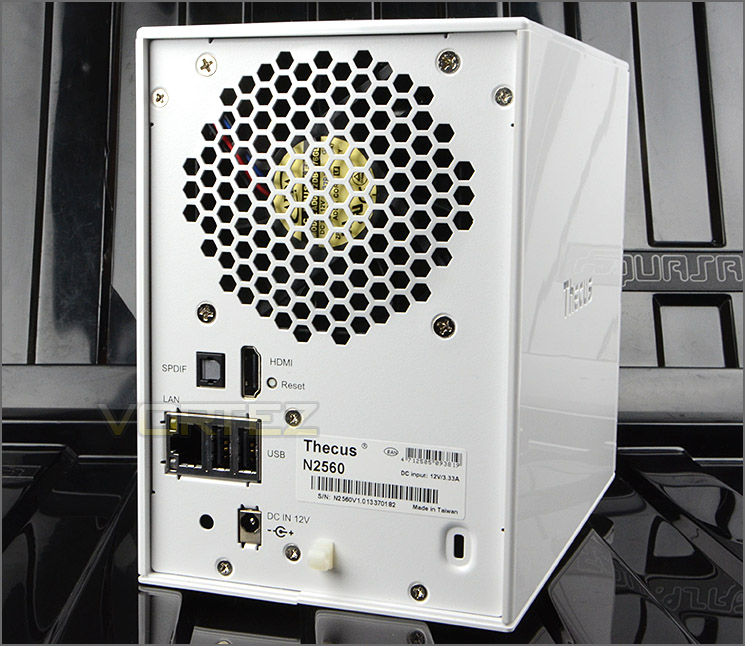
Around the back of N2560
HDD Installation
In order to attach storage drives to N2560 entry into the unit is required. Once the push-to-release door is opened, the SATA connection ports can be seen at the very back of the unit and two latches are visible at the front.
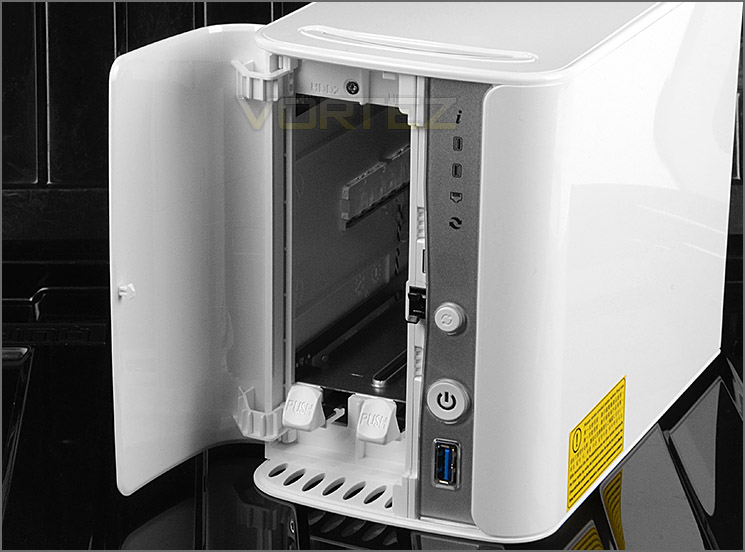
Access inside N2560 from the front
Installing HDDs inside N2560 is very easy but we’re quite surprised only 3.5” types are supported. To install a drive, two of the provided adapters simply need to be fixed to the sides of the drive and then it can slid into one of the bays inside the unit.
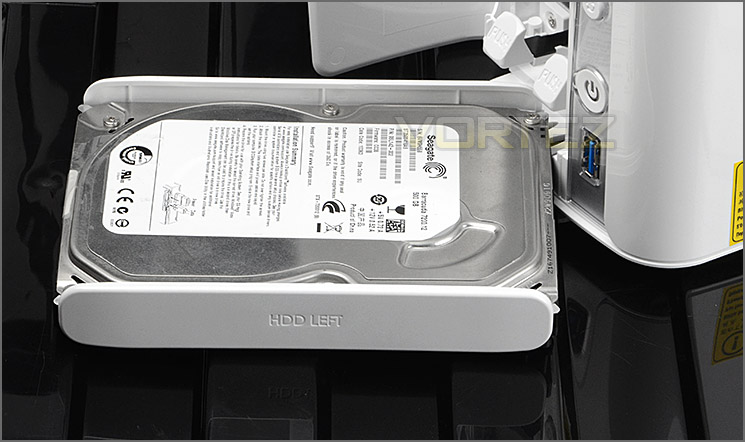
Installation of HDD requires special adapters
Inside our NAS are some very capable components which actually out-perform some of the rival NAS offerings at this price-point. Internal components consist of the following:
Processor: Intel® Atom™ SoC CE5335 (1.6GHz Dual Core)
System Memory: 2GB DDR3
Maximum Capacity: 8TB – 2x 3.5” HDD
ThecusOS 6
Getting up and running with the Thecus NAS is very easy. Of course, to get into position for actually using the N2560 and accessing the software, a drive needs to be attached first. Once this is complete the Ethernet and power cables need to be connected and then the NAS can be powered up.
Thecus have designed a novel way to install the Operating System onto the NAS; via the web. A visit to http://install.thecus.com initiates the installation for Mac, Linux and Windows users.
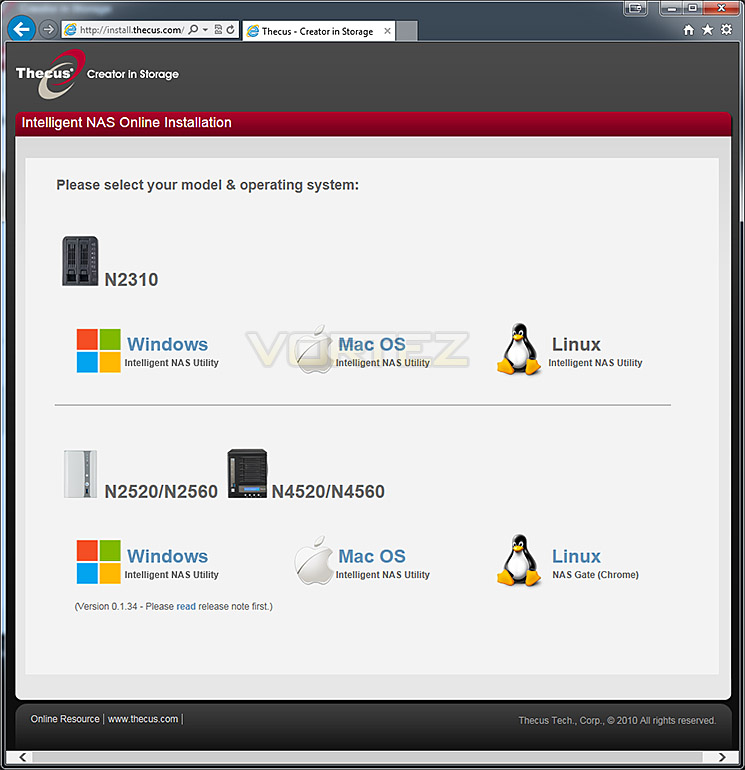
The installation process takes less than 5 minutes to complete and moves between various stages to configure user access and general settings.
Below we have produced a video which demonstrates some of the options and features which can be used when ThecusOS 6 is installed.
Although there are plenty of options inside the OS the feedback and overall design feels somewhat rough around the edges compared to rival NAS software. We think Thecus need to improve the interface by making it more user friendly and by making use of newer programming technologies.
T-OnTheGo – Smartphone Functionality
There are plenty of uses for a Thecus NAS but one particular feature which is touted as fundamental to ThecusOS is T-OnTheGo.T-OnThego is a cloud management solution that allows interface between a smartphone/tablet and the Thecus NAS. All types of files can be managed between both devices and users can even upload directly to specific folders. In order to use T-OnTheGo, WebDAV needs to be enabled server-side and by default this is already enabled so its just a case of downloading the T-OnTheGo app for your mobile device.
Below shows a demonstration of how T-OnTheGo works with the Thecus N2560. As you can see, files and folders can be read quite easily. Videos can be streamed directly to mobile devices and files such as pictures can be uploaded to folders for backup/storage purposes.
Transfer & Power Performance
We have looked at some of the features that ThecusOS 6 brings with N2560 but how does this affect performance? What are typical transfer rates like over a Gigabit network? Is power consumption reasonable? These are all questions that you might be asking and we are here to answer them.
Test System Specifications
CPU Intel Core i7-4770K
Motherboard GIGABYTE Z87X-OC
Memory 16GB Corsair Vengeance Pro 2400MHz CL10 DDR3
Graphics XFX R7970 Black Edition
PSU Corsair HX1050 80 Plus Gold Certified PSU
Motherboard GIGABYTE Z87X-OC
Memory 16GB Corsair Vengeance Pro 2400MHz CL10 DDR3
Graphics XFX R7970 Black Edition
PSU Corsair HX1050 80 Plus Gold Certified PSU
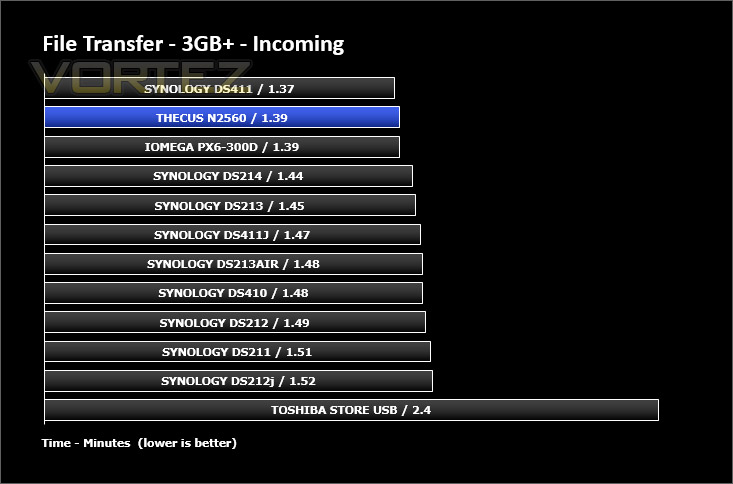
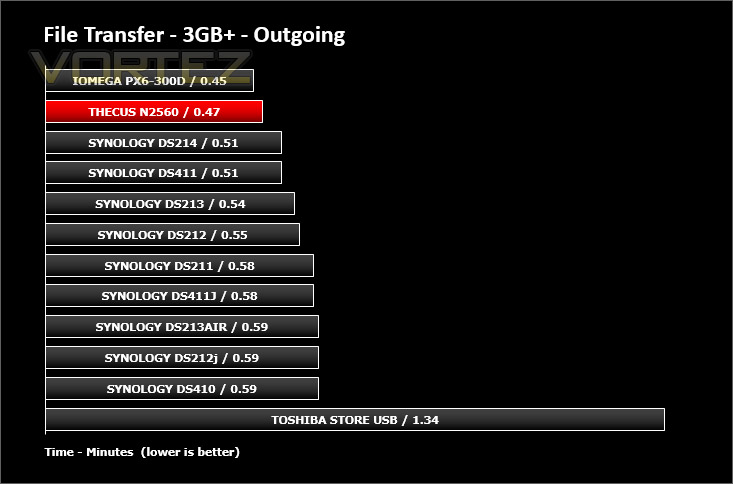
First of all, for the purpose of real world testing we bundled together 6 files which were in 2 folders amounting to 3.2GB. We wanted to discover the incoming and outgoing transfer times between the N2560 and the computer – against other devices on a Gigabit network. Here are the results.
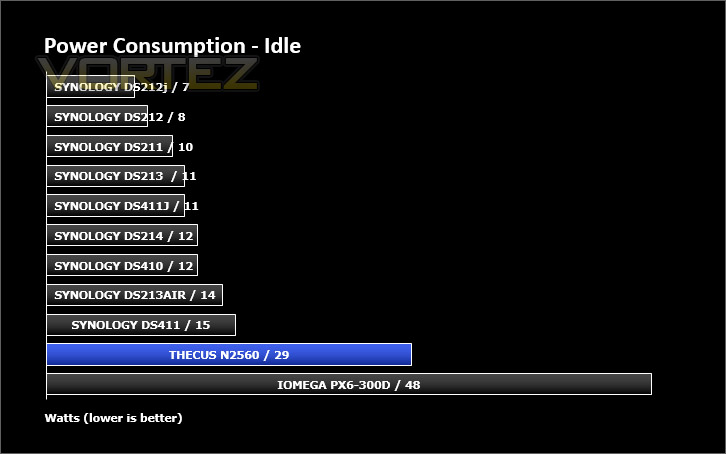
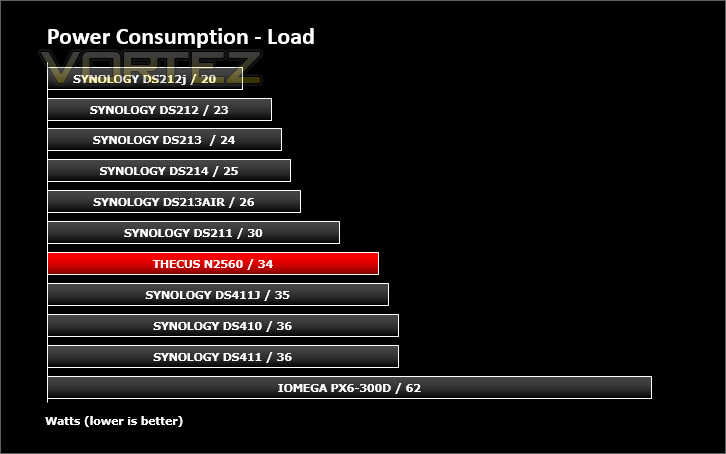
Whilst performing these tests load power consumption was monitored. The power consumption was also monitored whilst being in an idle state. The Synology units in the chart have the benefit of falling into a hibernation state which lowers the recorded figures for power usage.
Conclusion
Having mostly reviewed NAS products from another vendor it’s a breath of fresh air spending time with another brand. Thecus is under 10 years old and yet they have demonstrated they are force to be reckoned with.
On the hardware side, the N2560 is presented in a professional enclosure which looks and feels great. Inside, the list of components are:
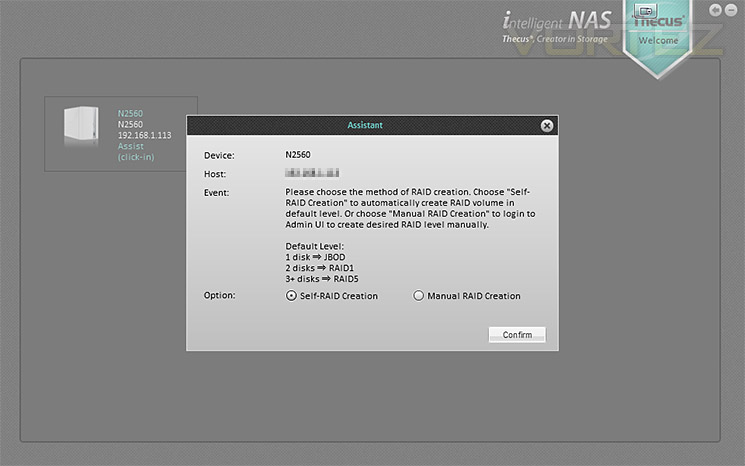
During our testing and general usage we found N2560 a very capable unit, offering solid performance regardless of what is thrown at it. Due to ThecusOS 6 being all-encompassing it’s no surprise there are plenty of features and uses for such a unit. Getting the NAS up and running is really easy too, thanks to the online installation which takes less than 5 minutes to complete – along with the installation process, RAID is configured in the early stages and can be manually set up or automatically.
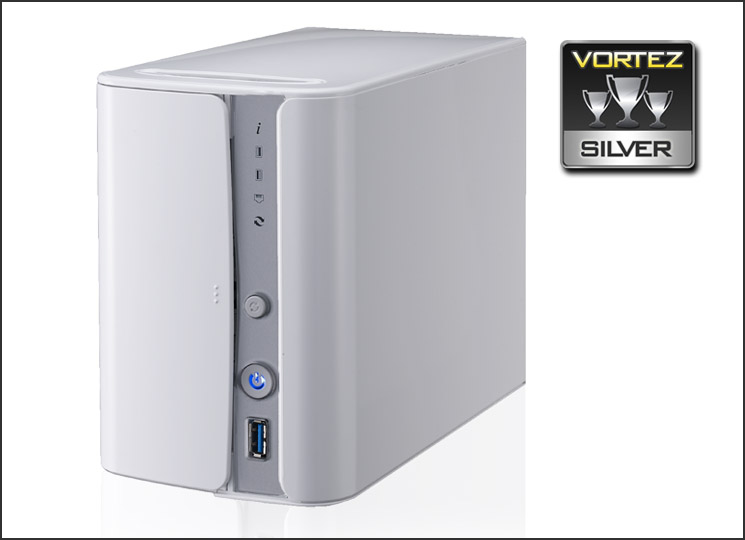
Although our experience with N2560 is largely positive, we did see some room for improvement. Lack of 2.5” SSD/HDD support is one such feature which is lacking within the unit, we’d like to see compatibility for more than just 3.5” options. Comparing the software to other NAS OS’s out there, Thecus’s attempt appears to lag behind the competition. Areas within the OS felt unfinished and the general look and feel can be described as “rough around the edges”.
Coming in at a cost of £250 we think the N2560 is actually quite a good value for money offering. Other NAS units which feature the same hardware specification are generally priced much higher and we think N2560 would be a worthwhile investment for anyone wanting to implement a central storage location within their home network.
Operating as a central file system, N2560 is an affordable home network solution which is laden with reliable hardware, brilliant performance and an extensive feature-set to boot.
Pros
+ Pleasing to the eye
+ Great hardware specification
+ Solid performance
+ Flexible feature-set
+ HDMI port
+ Easy to set up
Cons
– Lack of 2.5” storage support
– Not very energy efficient
– Operating system requires work
+ Pleasing to the eye
+ Great hardware specification
+ Solid performance
+ Flexible feature-set
+ HDMI port
+ Easy to set up
Cons
– Lack of 2.5” storage support
– Not very energy efficient
– Operating system requires work

Click here for an explanation of our awards at Vortez.net.


