







With NAS becoming a regular commodity in the home and workplace, we take a look at one from Thecus. How does it fare against our tests? Lets find out

Product on Review: Thecus N5550
Manufacturer: Thecus
Street Price: £460.76 (at time of review)
With many different companies releasing NAS (Network Attached Storage) products, it takes something special these days to catch the eye of the consumer. With many different offerings packed with features, brimming with style and now very affordable, how does a company differentiate themselves from the competition?
Thecus, who were founded in 2004, had the vision of becoming industry leaders in digital storage technology. Fast forward to today and Thecus are exactly that. In a sector with huge names that dominate the market, Thecus can be proud of what they have achieved over the past 9-10 years. One model in particular has caught the eye which has tons of features, oozes style and screams quality, but how will it do in our tests?
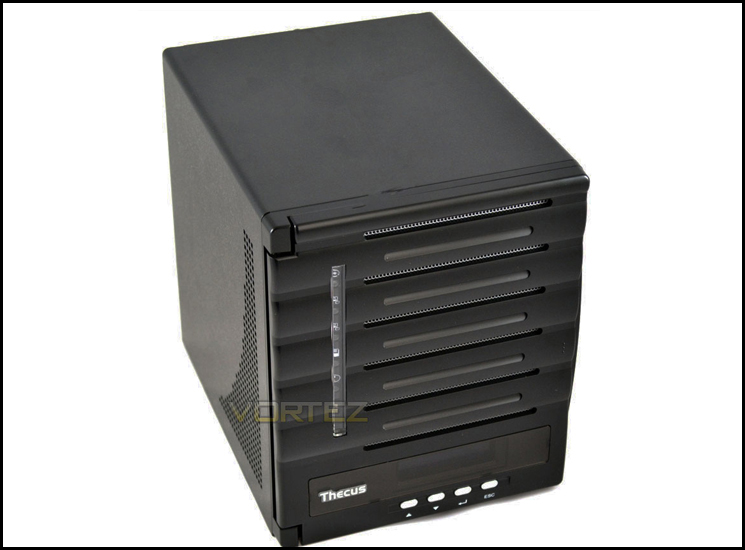
Today we are taking a look at their 5 bay SMB (Server Message Block) NAS system, the Thecus N5550.
About Thecus
Digital storage is our life. The entire Thecus team is passionate about what we do, and it shows. Our support for our products doesn’t stop at the sale. With numerous online and offline resources, Thecus stands behind each and every one of its products. With a goal to optimize every part of the user experience, Thecus continues to set new standards for excellence in the world of digital storage. We invite everyone to experience the quality, reliability, and ingenuity that goes into each of our products.
Features & Specification
Hardware Platform
Processor – Intel® Atom™ Processor
System Memory – 2GB DDR3
LAN Interface – RJ-45×2: 10/100/1000 BASE-TX Auto MDI/MDI-X WOL supported
USB Interface – USB 2.0 host port x4 (back x4) USB 3.0 host port x1 (front x1)
LCM Module – LCM display 4 buttons (ENTER, ESC, UP, DOWN)
SATA DOM – 1GB
HDMI Output – HDMI port (back x1)
VGA Output – VGA port (back x1)
Audio – MIC input, Line input, Audio output
Disk Interface 5 x SATA for internal 1 x eSATA for external
Power Supply – 200W Power Supply
USB UPS – Supported
Thermal/Fan control Thermal sensor on processor temperature System FAN speed controlled by temperature
System Clock – Battery-backed up system clock
Power Management – Auto power on after shutdown due to power loss
Buzzer – Adjustable frequency alarm
Buttons – Power button LCM button
Environment – Temperature: 5°C to 40°C Humidity: 0 ~ 80 % R.H. (Non-condensing)
Chassis – Tower Metal Chassis
Dimensions (HxWxD) 230 x 190 x 240 (mm)
Certificates CE/FCC/C-Tick/VCCI/BSMI RoHS WEEE VMware, Citrix
Processor – Intel® Atom™ Processor
System Memory – 2GB DDR3
LAN Interface – RJ-45×2: 10/100/1000 BASE-TX Auto MDI/MDI-X WOL supported
USB Interface – USB 2.0 host port x4 (back x4) USB 3.0 host port x1 (front x1)
LCM Module – LCM display 4 buttons (ENTER, ESC, UP, DOWN)
SATA DOM – 1GB
HDMI Output – HDMI port (back x1)
VGA Output – VGA port (back x1)
Audio – MIC input, Line input, Audio output
Disk Interface 5 x SATA for internal 1 x eSATA for external
Power Supply – 200W Power Supply
USB UPS – Supported
Thermal/Fan control Thermal sensor on processor temperature System FAN speed controlled by temperature
System Clock – Battery-backed up system clock
Power Management – Auto power on after shutdown due to power loss
Buzzer – Adjustable frequency alarm
Buttons – Power button LCM button
Environment – Temperature: 5°C to 40°C Humidity: 0 ~ 80 % R.H. (Non-condensing)
Chassis – Tower Metal Chassis
Dimensions (HxWxD) 230 x 190 x 240 (mm)
Certificates CE/FCC/C-Tick/VCCI/BSMI RoHS WEEE VMware, Citrix
Software Functions
RAID
RAID Modes – RAID 0, 1, 5, 6, 10 and JBOD
Auto-rebuild – Supported
Hot-swap – Supported
Hot Spare – Supported
Online RAID Migration – Supported
Online RAID Expansion – Supported
RAID Volume Encryption – AES256bit
Disk
Power Management – Available spin-down on idle setting
Bad Block Scanning – Supported
SMART Info – Supported
SMART Test – Supported
Disk Roaming – Supports volume-based roaming to other Thecus NAS
Network
Configuration – Fixed IP address, dynamic IP address
Transport Protocols – TCP/IP/AppleTalk
File Protocols – SMB/CIFS, HTTP/HTTPS, FTP, NFS v4, AFP
Link Aggregation – Load balance, Failover, 802.3ad, Balance-XOR, Balance-TLB, Balance-ALB
TCP/IP – IPV6 & IPV4
DDNS – Supported
SSH – Supported
UPnP – Supported
UPnP Port forwarding – Supported
System status
System Monitor – Monitoring CPU, memory, temperature, fan, network utilization and protocols access user count
Syslog Management – Send syslog to assigned location Act as syslog server to receive log info from other systems
Data Access
Client OS Support – Windows 8/7/Vista/2003/XP/2000 UNIX/Linux Mac OS X
FTP – Built-in FTP server with bandwidth control
Secure FTP – Built-in secure FTP server with bandwidth control
TFTP – Users can download and upload files with TFTP programs
Download Manager – BT download (via Transmission module) NZB download (via NZB module)
Printer Server (IPP) – Supports USB printers Supports a wide range of IPP printers Client can manage print tasks (list/delete) via web user interface
Data Backup
Client Incremental Data Backup – Acronis True Image (OEM version)
Client System Disaster Recovery – Acronis True Image (OEM version)
Client Side Backup Software – Thecus Backup Utility (Windows/Mac OS X)
Data Burn – Create files to ISO image and burn to optical disc Create files to ISO image Read ISO image from optical disc and write to NAS
Mac OS X Time Machine – Supported
Data Guard – Remote Backup/Local Backup
Block Level Access
iSCSI Target/Initiator – Supports Microsoft/Mac OS X/Linux initiators and Thecus NAS targets
iSCSI Thin Provisioning – Supported
MPIO – Supported
MCS – Supported
Clustering – Supported
SCSI3 Persistent Group Reservation – Supported
Power Management
Scheduled Power On/Off – Supported
Volume Management
Multiple RAID – Supported
Multiple File System Selectable – EXT3/EXT4/XFS
Multimedia Support
iTunes Server – Supports AAC, MP3 w/ID3 tag and WAV
Piczza!™ Photo Server (via module) – Supports GIF, JPG (JPEG), BMP and PNG Supports EXIF display Supports slide shows
Media Server – Supports uPnP AV streaming protocol (via Twonkymedia module)
User Authentication
Local User – Supports built-in user accounts
Local Group – Supports built-in user groups
Windows ADS – Supported
LDAP – Supported
Access Guard – Supports Black & White list/IP Filter
Cloud Backup
DropBox – Supported (via module)
ElephantDriver – Supported (via module)
Amazon S3 – Supported
File System
Type – Journaling File System
Language Support – Unicode Support
Authorization (ACL) – “Read”, “write”, or “deny” privileges to individual users or groups in folders and sub-folders
User Quota – Supported
Administration
User Interface – Web-based user interface supports English, Traditional Chinese, Simplified Chinese, Japanese, Korean, French, German, Italian, Spanish, Russian, Polish, Portuguese, Turkish and Czech.
Utility Program – MS Windows Setup Wizard Supports Windows 8/7/Vista/2003/XP/2000 Mac OS X Setup Wizard
Email Notifications – Sends system messages via email to the system administrator
SNMP Trap – System information trap out
Mobile Applications (iOS/Android)
Thecus Dashboard – Mobile monitoring and administration (via module)
T-OnTheGo™ (iOS) – Upload, download and stream multimedia
Data Security
Virus Scan – Supports McAfee® (via module)
Capacity Expansion
Stackable – Can extend for 5 additional iSCSI volumes from other Thecus NAS
Others
Recycle Bin – Supported
Web Disk – Supported (via module)
Web Server – Supported (via module)
ISO Mount – Supported
IP Cam Surveillance – Supports up to 5 IP cameras (via module)
Auto Module Installation – Thecus’ module server automatically provides the latest modules and updates through the user interface.
Local Display – X-Window via HDMI output
RAID
RAID Modes – RAID 0, 1, 5, 6, 10 and JBOD
Auto-rebuild – Supported
Hot-swap – Supported
Hot Spare – Supported
Online RAID Migration – Supported
Online RAID Expansion – Supported
RAID Volume Encryption – AES256bit
Disk
Power Management – Available spin-down on idle setting
Bad Block Scanning – Supported
SMART Info – Supported
SMART Test – Supported
Disk Roaming – Supports volume-based roaming to other Thecus NAS
Network
Configuration – Fixed IP address, dynamic IP address
Transport Protocols – TCP/IP/AppleTalk
File Protocols – SMB/CIFS, HTTP/HTTPS, FTP, NFS v4, AFP
Link Aggregation – Load balance, Failover, 802.3ad, Balance-XOR, Balance-TLB, Balance-ALB
TCP/IP – IPV6 & IPV4
DDNS – Supported
SSH – Supported
UPnP – Supported
UPnP Port forwarding – Supported
System status
System Monitor – Monitoring CPU, memory, temperature, fan, network utilization and protocols access user count
Syslog Management – Send syslog to assigned location Act as syslog server to receive log info from other systems
Data Access
Client OS Support – Windows 8/7/Vista/2003/XP/2000 UNIX/Linux Mac OS X
FTP – Built-in FTP server with bandwidth control
Secure FTP – Built-in secure FTP server with bandwidth control
TFTP – Users can download and upload files with TFTP programs
Download Manager – BT download (via Transmission module) NZB download (via NZB module)
Printer Server (IPP) – Supports USB printers Supports a wide range of IPP printers Client can manage print tasks (list/delete) via web user interface
Data Backup
Client Incremental Data Backup – Acronis True Image (OEM version)
Client System Disaster Recovery – Acronis True Image (OEM version)
Client Side Backup Software – Thecus Backup Utility (Windows/Mac OS X)
Data Burn – Create files to ISO image and burn to optical disc Create files to ISO image Read ISO image from optical disc and write to NAS
Mac OS X Time Machine – Supported
Data Guard – Remote Backup/Local Backup
Block Level Access
iSCSI Target/Initiator – Supports Microsoft/Mac OS X/Linux initiators and Thecus NAS targets
iSCSI Thin Provisioning – Supported
MPIO – Supported
MCS – Supported
Clustering – Supported
SCSI3 Persistent Group Reservation – Supported
Power Management
Scheduled Power On/Off – Supported
Volume Management
Multiple RAID – Supported
Multiple File System Selectable – EXT3/EXT4/XFS
Multimedia Support
iTunes Server – Supports AAC, MP3 w/ID3 tag and WAV
Piczza!™ Photo Server (via module) – Supports GIF, JPG (JPEG), BMP and PNG Supports EXIF display Supports slide shows
Media Server – Supports uPnP AV streaming protocol (via Twonkymedia module)
User Authentication
Local User – Supports built-in user accounts
Local Group – Supports built-in user groups
Windows ADS – Supported
LDAP – Supported
Access Guard – Supports Black & White list/IP Filter
Cloud Backup
DropBox – Supported (via module)
ElephantDriver – Supported (via module)
Amazon S3 – Supported
File System
Type – Journaling File System
Language Support – Unicode Support
Authorization (ACL) – “Read”, “write”, or “deny” privileges to individual users or groups in folders and sub-folders
User Quota – Supported
Administration
User Interface – Web-based user interface supports English, Traditional Chinese, Simplified Chinese, Japanese, Korean, French, German, Italian, Spanish, Russian, Polish, Portuguese, Turkish and Czech.
Utility Program – MS Windows Setup Wizard Supports Windows 8/7/Vista/2003/XP/2000 Mac OS X Setup Wizard
Email Notifications – Sends system messages via email to the system administrator
SNMP Trap – System information trap out
Mobile Applications (iOS/Android)
Thecus Dashboard – Mobile monitoring and administration (via module)
T-OnTheGo™ (iOS) – Upload, download and stream multimedia
Data Security
Virus Scan – Supports McAfee® (via module)
Capacity Expansion
Stackable – Can extend for 5 additional iSCSI volumes from other Thecus NAS
Others
Recycle Bin – Supported
Web Disk – Supported (via module)
Web Server – Supported (via module)
ISO Mount – Supported
IP Cam Surveillance – Supports up to 5 IP cameras (via module)
Auto Module Installation – Thecus’ module server automatically provides the latest modules and updates through the user interface.
Local Display – X-Window via HDMI output
Packaging & Bundle
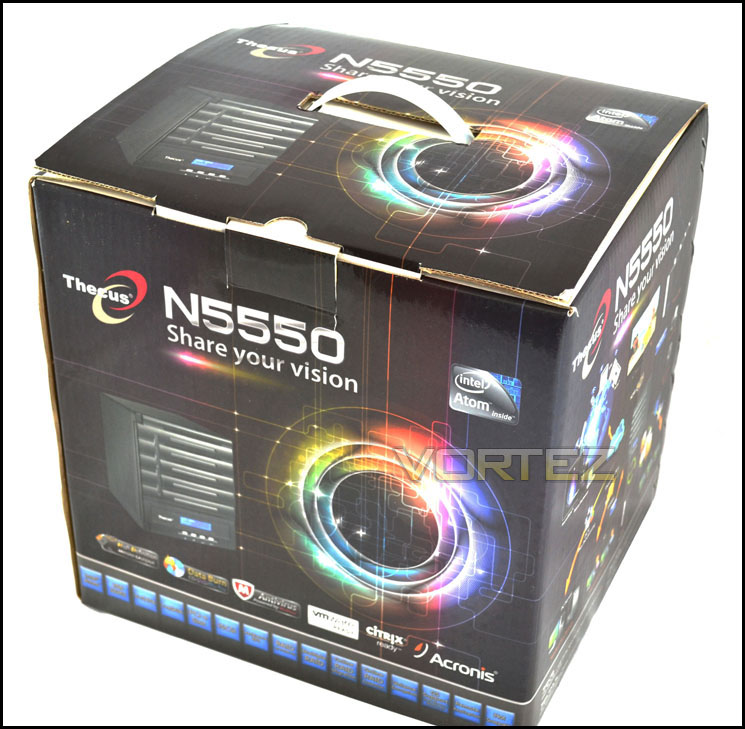
The N5550 comes presented in glossy black box, with many eye catching pictures and logos. The logos illustrate the features and software that comes bundled with the NAS. On the front of the box is a picture of the N5550 in operation while to the left of this, we have a spherical and colourful illustration. The rear is exactly the same layout and content as the front.
At the sides, we have more in depth pictures displaying the numerous functions the N5550 which includes cloud access, which allows you to upload your data to an online storage facility in case of failure.
Another great feature of the packaging is the carry handle made from hard wearing and durable plastic. The NAS itself is heavy so it’s a very attractive feature albeit a small one.
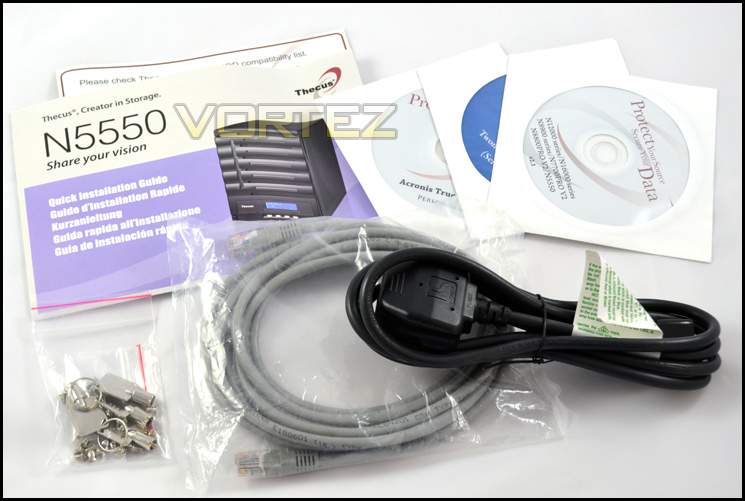
Bundled with the N5500 we have all the accessories out of the box required to plug in and play. Included is the operating manual, warranty information card, the screws required to fix the HDDs into the NAS, keys to lock and unlock the NAS bay draws to keep your HDDs in securely to avoid theft or accidently sliding out. We also have the traditional UK kettle lead for power and of course a RJ45 cable to connect the NAS to your chosen device.
Software wise the N5550 comes with Twonky Media v6.0.34 (server edition), Acronis True Image 2010 and a Universal CD. Also included is a HDD compatibility list card so right out of the box, you can check if your HDDs are compatible with the N5550. Something simple but something ever so useful!
Closer Look
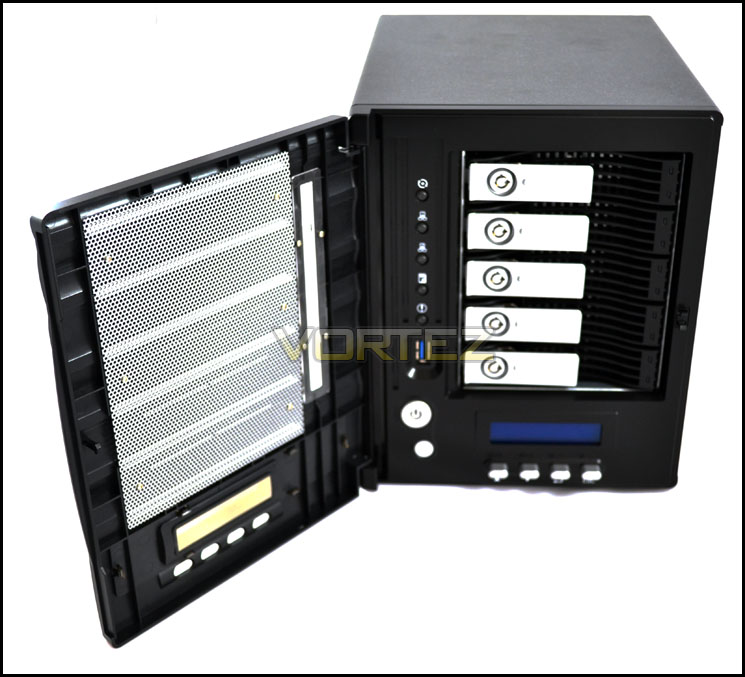
The N5550 itself is a very good looking piece of hardware which is presented in an all-black casing. With the door closed it looks very neat and tidy and would fit in with the majority of hardware on the market especially if you have a black decor. The casing itself is made from metal and as you can see from the side, there is ventilation holes to allow airflow to keep the internals nice and cool. No plastic here and for the price, we are glad.
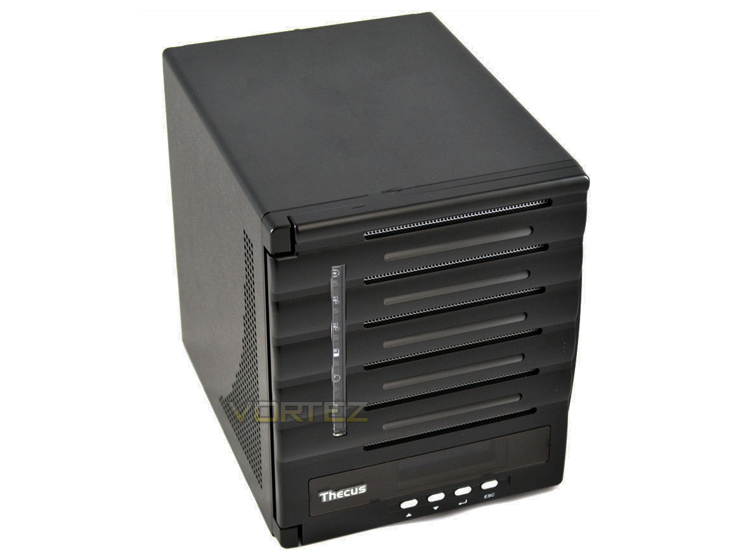
As we open the door, we are presented with 5 bays, each equipped with locking draw mechanisms. On the bottom there is a power button and a reset button which allows you to reboot the NAS.
To access the drive bays you need to unlock them with the keys provided. There are 4 keys, all universal to each drive bay so if you lose one, you have 3 to rely on. Lose all 4 then you might have to get in-contact with Thecus.
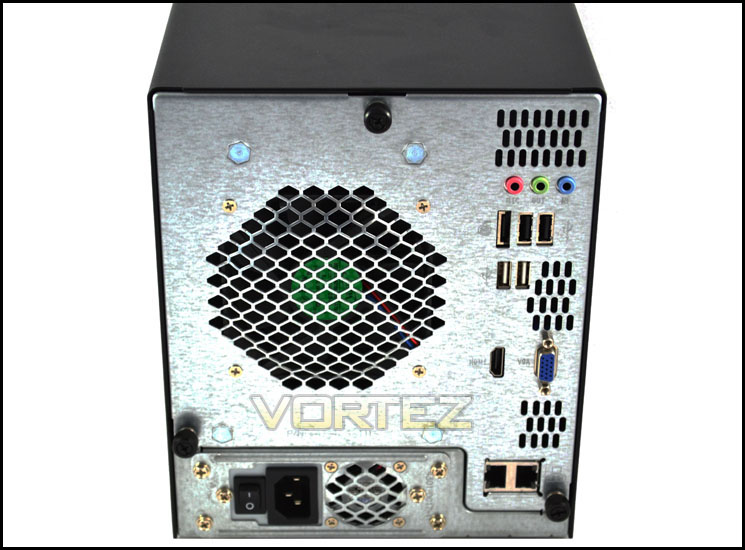
On the rear of the N5550, we have numerous connections such as VGA ports which consist of 1 x HDMI and 1 x D-Sub connection. There are also audio inputs and 2 x Ethernet ports, along with 4 x USB2.0 host ports and also includes plenty of ventilation openings to allow sufficient airflow. As we can see there are 3 thumb screws in total which allow us to open the N5550 open and take a look inside.
Closer Look – Internal
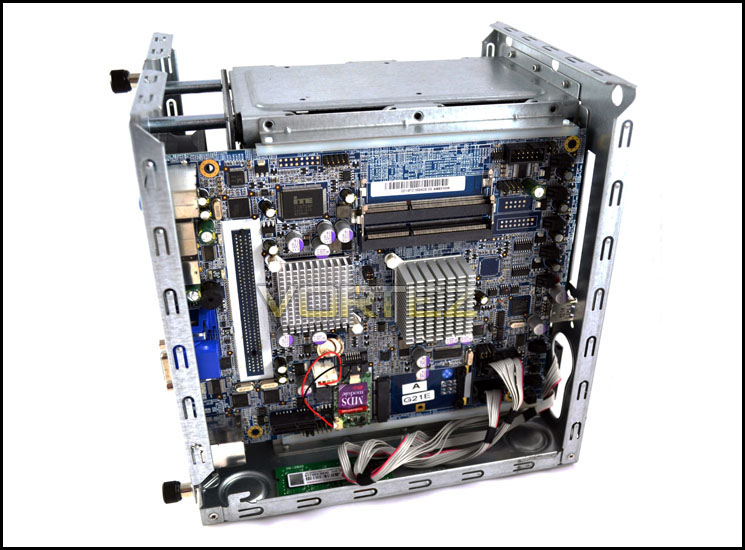
After removing the black metal chassis and upon looking inside, we can see that the structure isn’t that much different from a desktop PC. The N5550 packs some impressive hardware for a NAS, including an Intel Atom D2550 (dual core) processor running at 1.86GHz , 2gb of DDR3 memory, and an ample 200watt power supply which is more than enough for the NAS as Atom CPU’s are generally light on the power.
The board has plenty of heat sinks cooling the components, one of the main factors here is the noise, without a CPU fan things tend to run quieter and depending on the placement, the silent operation could be a deciding factor.
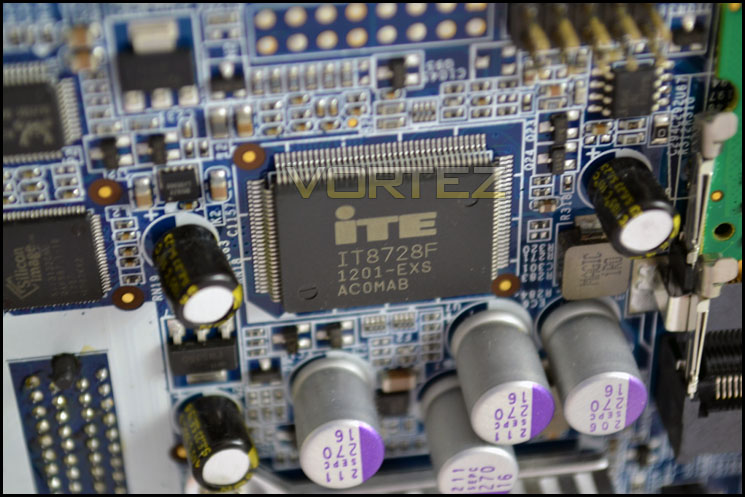
Having a closer look at the motherboard powering the N5550, we can see it uses the ITE IT8728F chip which controls the internal I/O devices. These chips are generally found on some of the highest spec motherboards on the market so it shows just how much quality goes inside the N5550.
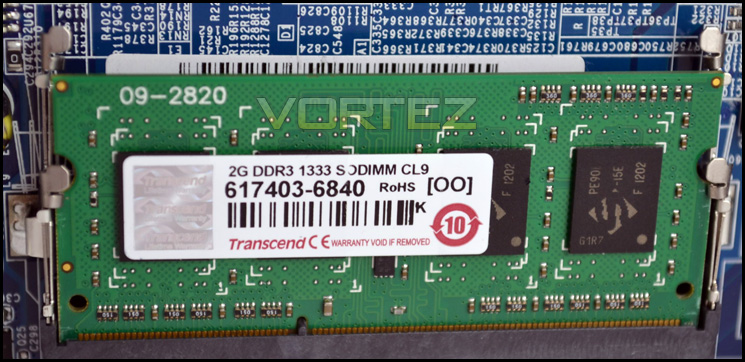
The memory that comes supplied with the N5550 is a 2GB module from Transend, which runs at 1333MHz CAS9. There are 2 dimm slots on the motherboard so if you wanted to, you could upgrade to 4GB of ram which would allow you to increase the workload especially if in time the system feels sluggish.
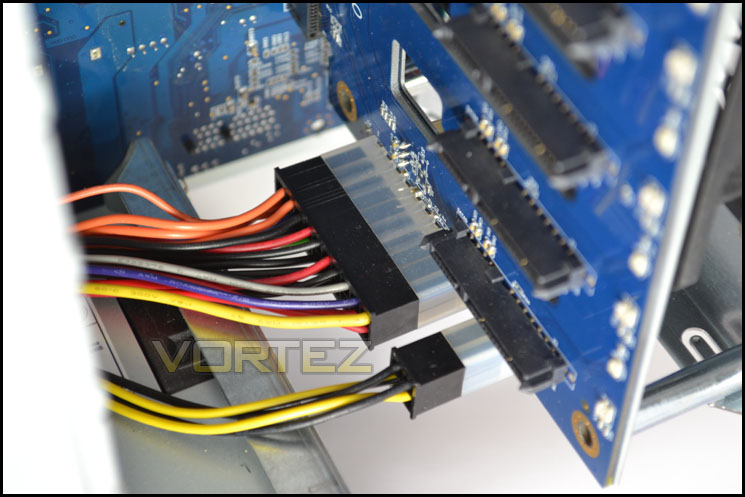
A closer look at how the NAS is powered, we have a standard 24 pin ATX power cable with an additional 4 pin for the CPU. The 200W power supply is more than capable enough to run the NAS fully loaded with HDDs at max load.
HDD Installation – Thecus N5550
To get inside the N5550 to add or remove HDDs is a very straight forward process. After opening the main door and using one of the keys to unlock one of the 5 HDD docks, the drive bay just slides out without any effort whatsoever. Once removed, we have a bare HDD cage which is made of very sturdy metal.
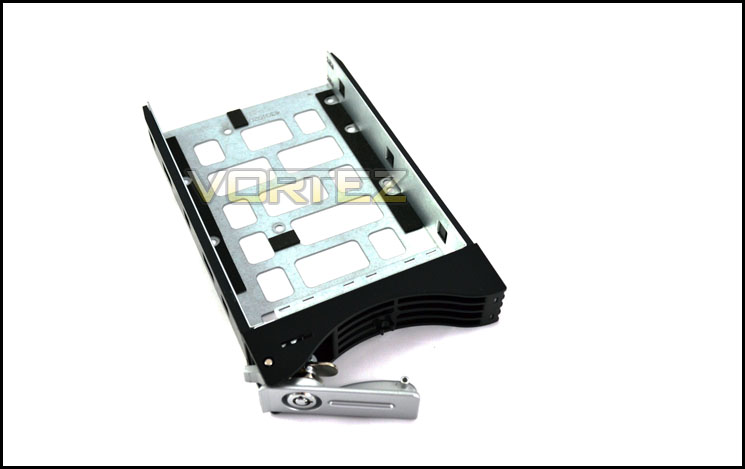
To install your HDD, you need the screws that came with the bundle. The way the mount is designed is that it can only be attached one way, which is handy if sometimes you don’t know your left from your down! Once you align your HDD up in the mount with the screw holes (bottom side), you can screw in the HDD or SSD to secure it in.
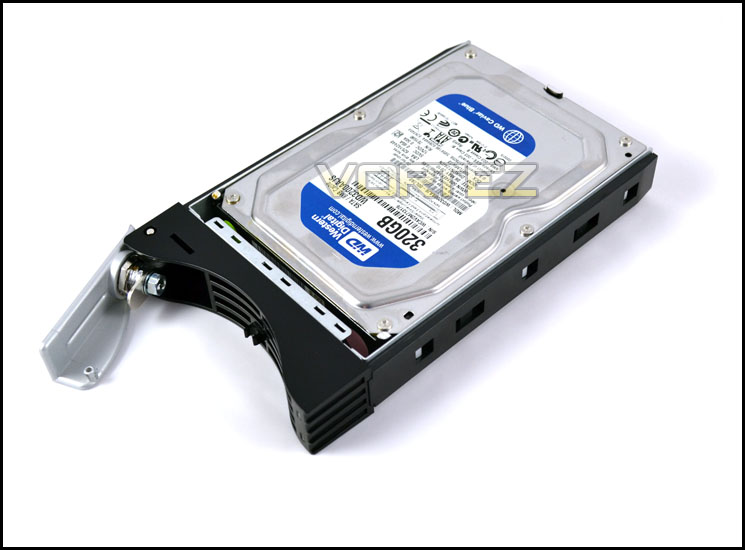
Once you have secured the HDD onto the mounting tray, it simply gets pushed back into the bay ensuring it goes in as far back as it can. Once you have installed it is just a case of simply locking the cage in, and it’s as easy as that.
The N5550 supports up to 4TB HDDs, so multiply that by 5 and we have a whopping 20TB of potential storage space! It also supports a multitude of RAID configurations including 0, 1, 5, 6 , 10 and JBOD so the options available are effectively limitless.
Test Setup & Software Installation
Z77 Setup
CPU – Intel i7 3770k
Motherboard – ASUS Z77 Sabertooth
RAM – Xtreem LV PC3 19200 DDR3 LV 2400
HDD – Intel 520 240gb SSD (SATA3)
Power Supply – NZXT Hale82 650W
Cooler – CoolerMaster Hyper 212+
Thecus N5550
HDD – Western Digital 320GB 7200rpm SATA2
Soon as we got the N5550 on our test bench, we made sure the HDD was secured and the power cable was plugged in correctly, we also connected the N5550 up to our Virgin Superhub Modem/Router. We then proceeded to install the Thecus software on our test system.
We were greeted with a nice and simple layout which included an in-built user manual, quick installation guide, a backup utility and our best friend, the setup wizard.
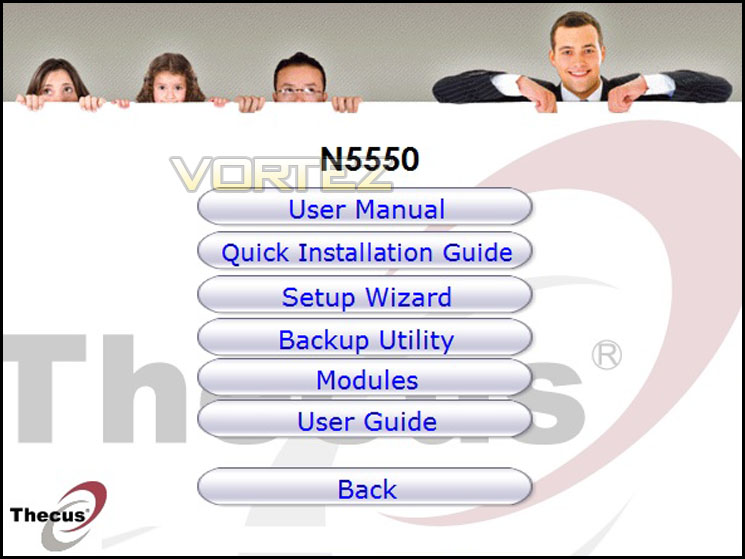
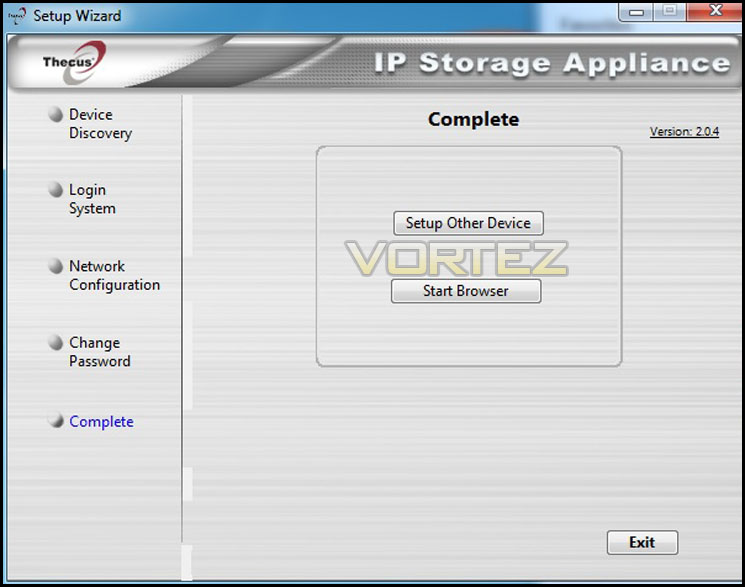
After clicking setup wizard, we were then welcomed with a simple 5 step process for initialising the Thecus N5550.
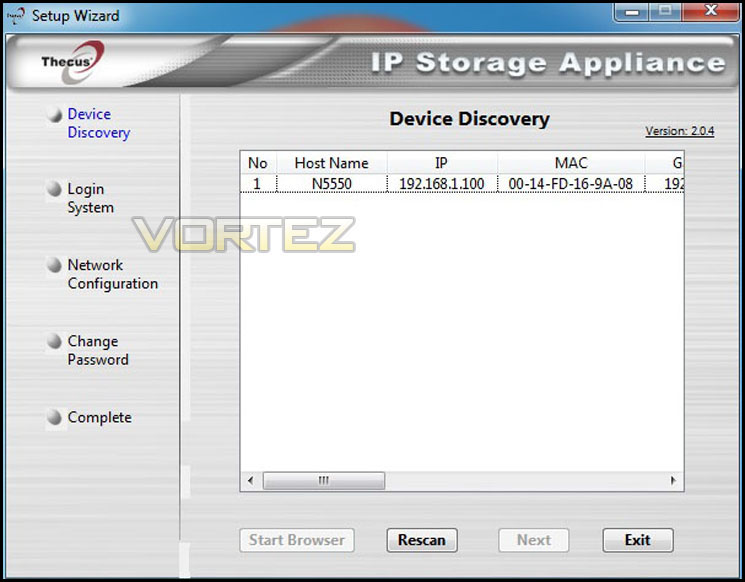
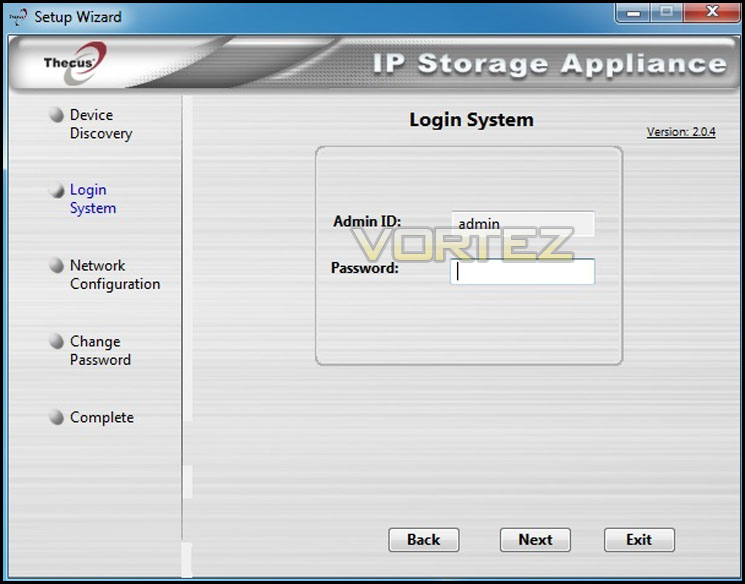
Going through the motions we had to enter the admin ID and password which by default, both values are set to admin which is mentioned in the operating manual.
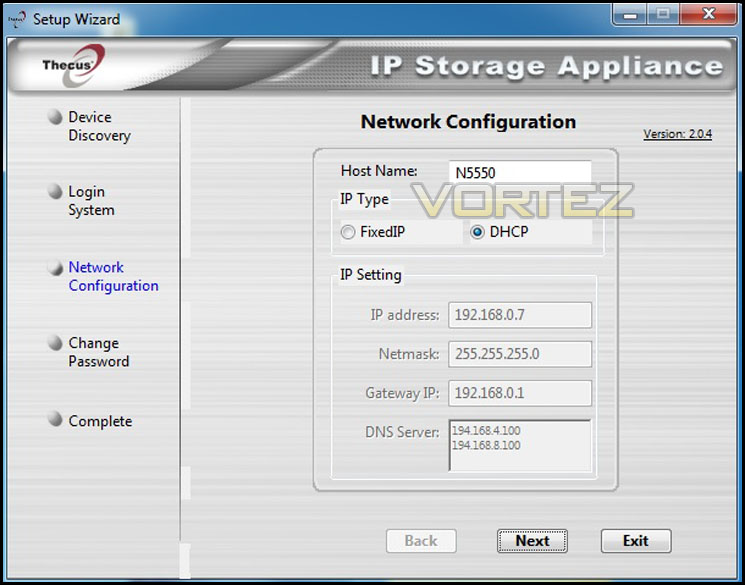
Next we went onto the network configuration. It instantly picked up our N5550 and we chose to set it up via the DHCP (The Dynamic Host Configuration Protocol). It selected and entered the fields required automatically for us.
After finishing the setup wizard we were told everything was set up by a pop-up box. You can choose to set-up another device if you have more than 1 Thecus device in your setup, but we proceeded to click start browser which took us on the next step of our installation
Setting up the HDD with the Thecus N5550 turned out to be very easy. While using 1 disk it initialises the disk in JBOD. If you had multiple disks to install you would have more options such as RAID0, 1, 5 etc.
Configuring RAID – Thecus N5550
Setting up a RAID array with the Thecus N5550 is a very simple process. First and foremost make sure the HDDs you want to set up an array onto are installed into the NAS. After this proceed to log in to the Thecus browser. We clicked the storage option, then RAID, and it brought up a disk list menu which informs you of which HDDs are available to set up. We selected our installed Western Digital Caviar Blue 320gb 7200rpm HDD and went onto the next screen.
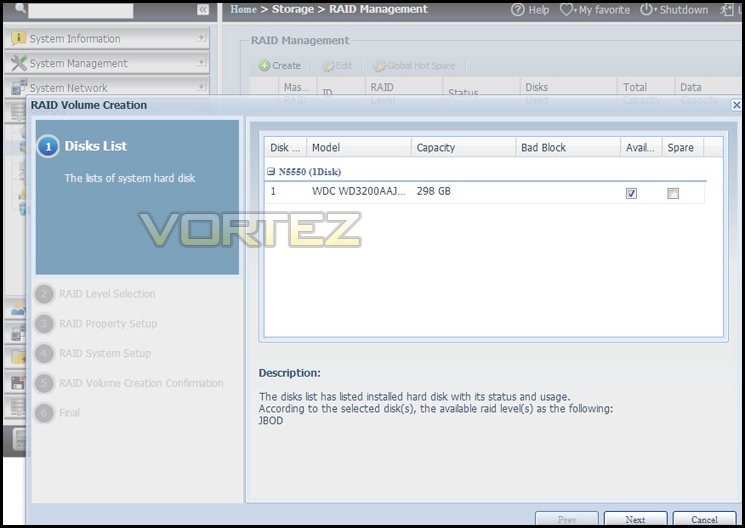
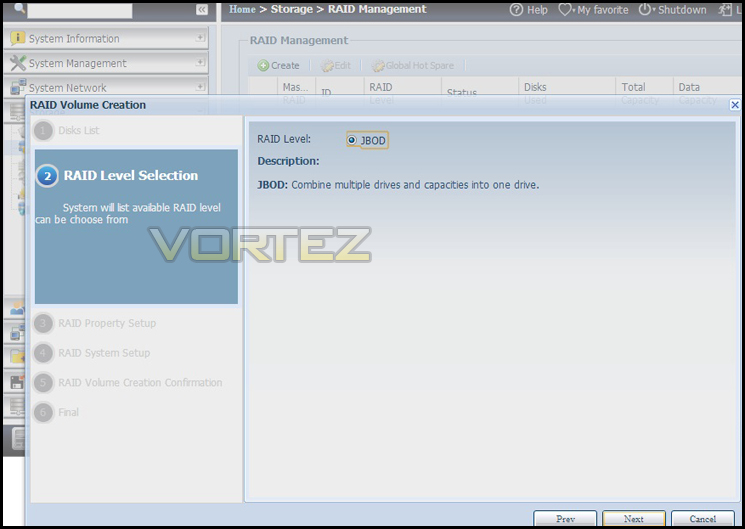
Next it will ask you what kind of RAID array you want to set-up, whether that be RAID0, 1, 5 etc, it will only list the options available to you at the time. Our only option available was JBOD which stands for just a bunch of drives. Unlike RAID1 there is no fault tolerance with JBOD.
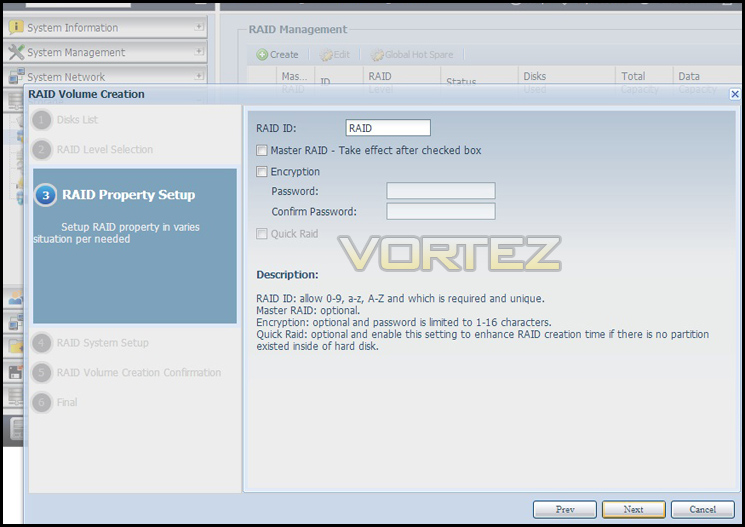
We went forward and came across this screen, which allowed us to encrypt our RAID array and also name it. We chose not to password it and carried on with the set-up.
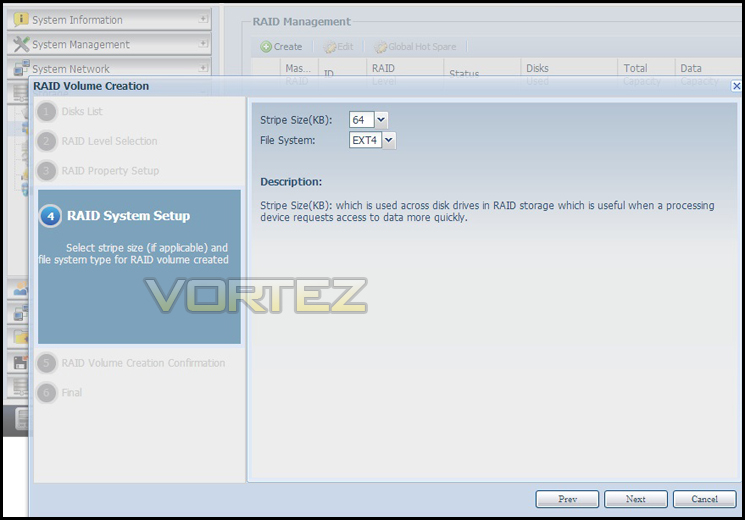
Here we have the options to choose the stripe size and also the file system we want to arrange our array into. We left this at the stock settings which were 64KB and EXT4 respectively.
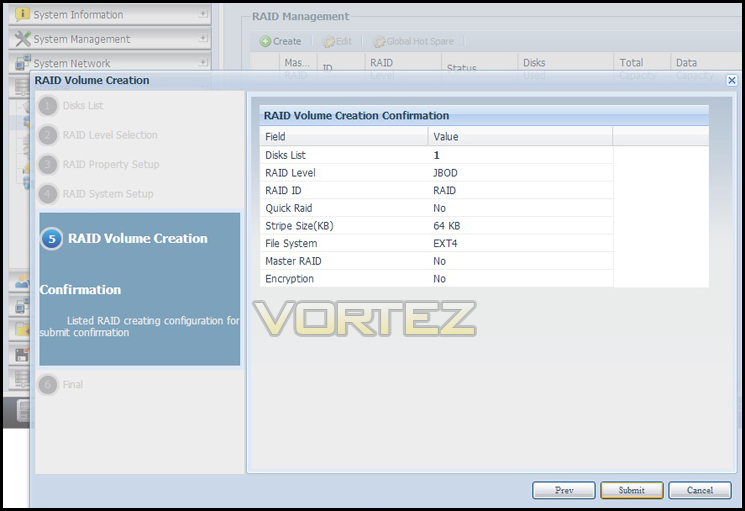
The next step is a conclusion of all the settings we have chosen. This allows us to make sure we have selected the right options and it also allows us to go back and amend them. Once we were happy we clicked submit to start building our JBOD RAID array.
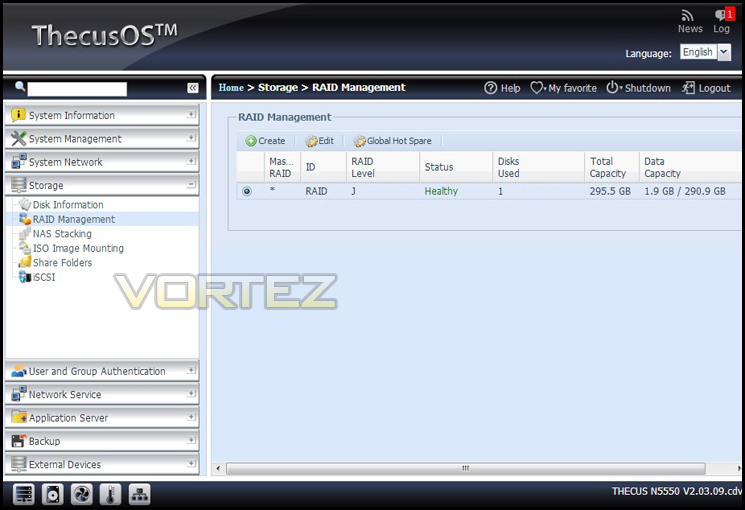
As we can see here our RAID build was successful and is running healthy. The N5550 uses S.M.A.R.T (Self-Monitoring, Analysis and Reporting Technology) which is great for monitoring the health of not only your HDD, but your entire array.
File Transfer & Power Consumption
For the purpose of real world scenarios, to test the incoming and outgoing file transfer rates, we bundled together 3 folders which was placed together equalling 3.2GB in total. We wanted to show how fast files can be transferred to and from our Thecus N5550 over our wired gigabit network.
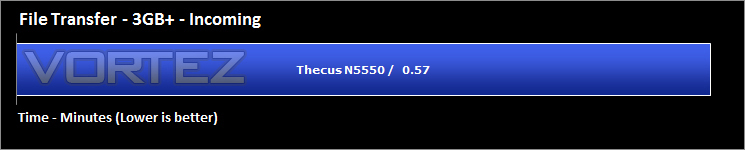
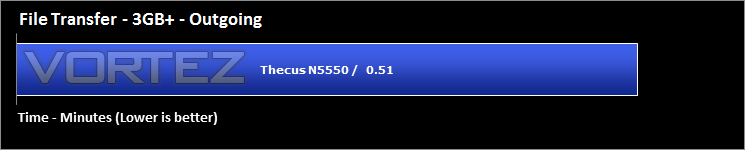
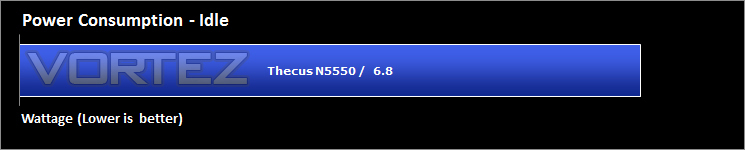
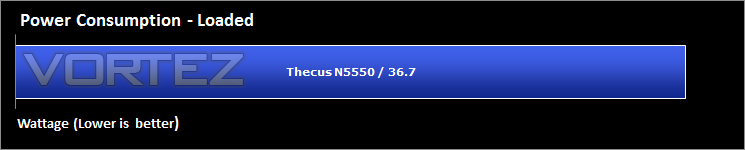
While performing these tests we also tested power consumption, both in idle states and when under full load while transferring files to and from the N5550. The N5550 has 2 forms of idle which includes hibernation. The hibernation figures were recorded.
Intel NAS Performance Toolkit
The Intel® NAS Performance Toolkit (Intel® NASPT) is a file system exerciser and analysis tool designed to enable performance comparisons between network attached storage (NAS) devices. Intel NASPT focuses on user level performance using real world workload traces gathered from typical digital home applications.

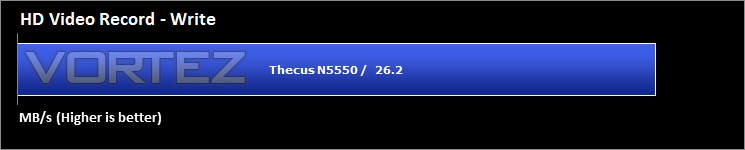
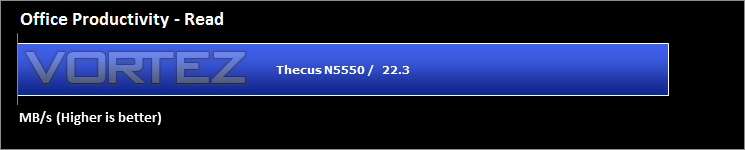
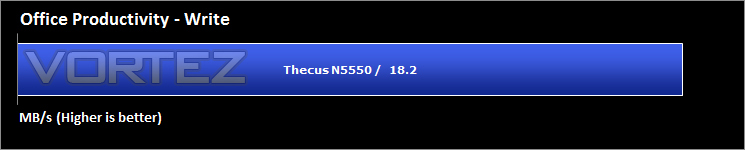
As we can see from the results the NAS really does a fantastic job, especially in the HD Video playback. In RAID0 configuration this would be even higher, but please take into consideration that a RAID0 array could fail at any moment thus losing all the data on your drives.
Conclusion
When we first received the N5550, which we need to mention is our first ever product from Thecus, we were really excited to see how it would perform. It looks absolutely stunning and with many NAS solutions available on the market available in many different configurations, how did N5550 perform?
Well when you take the price into consideration, some might be wondering if £450 represents good value for money. Take into account that the 5 bay N5550 comes in cheaper than other 4 bay NAS systems on the market. We feel this represents fantastic value for money, especially with the multitude of features available. Supporting up to the largest 4TB HDDs, high capacity SSDs and being able to run various RAID configurations such as RAID0, RAID1, RAID5 etc, there is no shortage of options available.
Setting up and configuring the N5550 was a dream, we had no problems whatsoever in getting the N5550 to work with our network, had no crashes or random shutdowns and found the experience a real delight. When we got into the main control panel, we could see the plethora of options available. With the ability to quickly build RAID configurations after a few clicks is a fantastic and the process seemed trouble free.
The LCD screen at the front displays the current settings and can be configured via the screen but we a much easier time of doing it via the Thecus Browser. There is also the option to connect the N5550 up to a monitor via its own in-built Linux Operation system, but again we chose to do it via the browser.
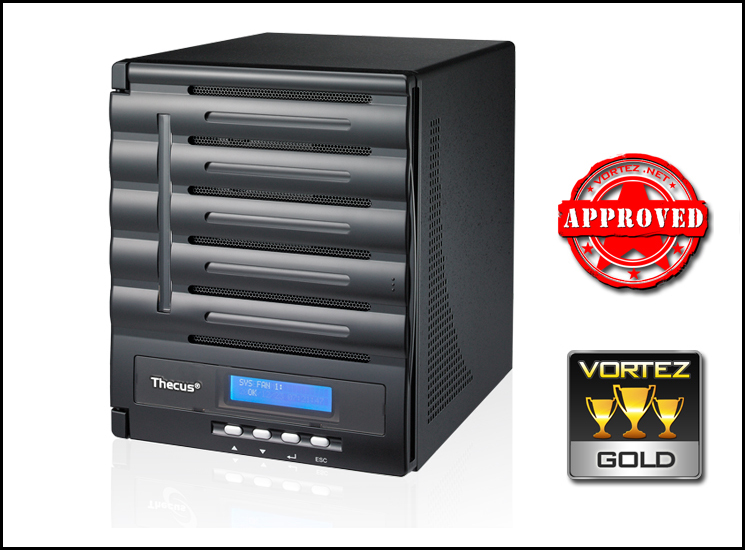
The software that comes bundled with the N5550 such as Acronis True Image, we think is fantastic at creating back-ups of the files you cannot afford to lose.
The aesthetics of the N5550 are stunning, we really love the subtle black exterior and how it fits in with the rest of our black hardware. The lockable drive bays are a nice addition which ensure protection against theft but also means they stay securely connected. The only niggle we feel unhappy with was the brightness of the front LCD panel, the glow can be bright when the lights in our room are dimmed and might not be suitable for a living room. Also the fan inside the N5550 can be quite loud at times, even at idle we could hear the drone over the background noise ever so slightly.
We found the N5550 a great purpose-built NAS solution for home and small-business users. Having this unit integrated on a network will bring flexibility and control to file sharing tasks.
The N5550 is versatile and can be used for many things such as CCTV systems, data storage, multiple RAID volumes, remote back-ups and even down to a standard file sharing network storage device. With the amount of options available and taking the price into consideration, if you are looking for a 5 bay NAS at a very competitive price then the Thecus N5550 might just be the ticket! We feel the Thecus N5550 proudly deserves our gold award and wasn’t far off from a platinum, great job Thecus!
Pros
+ Excellent performance
+ Amazing sleek looks
+ Very easy to install and configure
+ Priced well for what you get
Cons
– Fan can be a tad noisy even at idle
– Bright LCD panel on the front
+ Excellent performance
+ Amazing sleek looks
+ Very easy to install and configure
+ Priced well for what you get
Cons
– Fan can be a tad noisy even at idle
– Bright LCD panel on the front

Click here for an explanation of our awards at Vortez.net.


