







Thermaltake have a new chassis designed especially for gamers on the move.
Product on Review: Thermaltake V5 Black Edition CaseManufacturer and Sponsor: Thermaltake
Street Price: Approx. £60

Thermaltake are easily recognizable as one of the stalwarts of case and cooling design, not only do they cover quite a wide array of products outside of these two departments but they have been doing so for over 10 years now.
It was their V5 Black Edition Chassis that attracted attention at CES earlier in the year, boasting features that allow it to be an ‘on the move case’, targeted primarily at the LAN party gamer. This is what Thermaltake actually say regarding the V5 Black Edition:
Thermaltake is getting ready to launch the latest edition to their mobile chassis series, the V5 Black Edition. The V5 Black Edition is catering specifically to the needs of LAN party enthusiasts and people on the move, who frequently have to schlep their PC along. An extra large and reinforced handle on top of the V5 Black Edition guarantees for a firm and comfortable grip. The stealth black color coating inside and outside in combination with the blue exhaust LED-fan on top and a transparent window on the left side panel, lend this chassis its stylish and characteristic looks. The V5 Black Edition is available for a suggested retail price of $69.99 and it does not come with a power supply.

Features
– Re-enforced, big handle for easy transportation
– All black coating for stylish inward appearance
– Top eSATA, USB, and HD Audio In/Out
– Bottom based PSU location with dust filter
– Flexible drive management cage for 3 x 2.5” drives
Exterior
Having never owned or reviewed a Thermaltake chassis I don’t know what to expect from the packaging aspect of things, but across brands the marketing is very similar. The V5 Black Edition comes packaged in a large graphical box, the image on the front of the box is quite revealing of its principal function – mobility. On the reverse of the box and indeed on the sides are further technical details giving information regarding weight, size and so forth.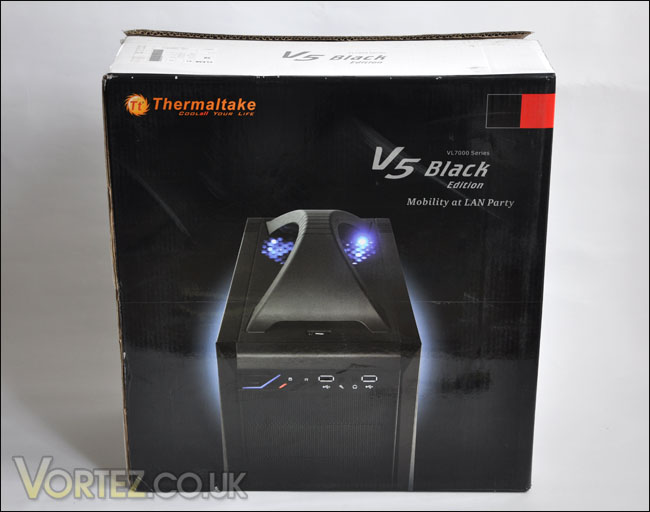
Thermaltake V5 Black Edition Box
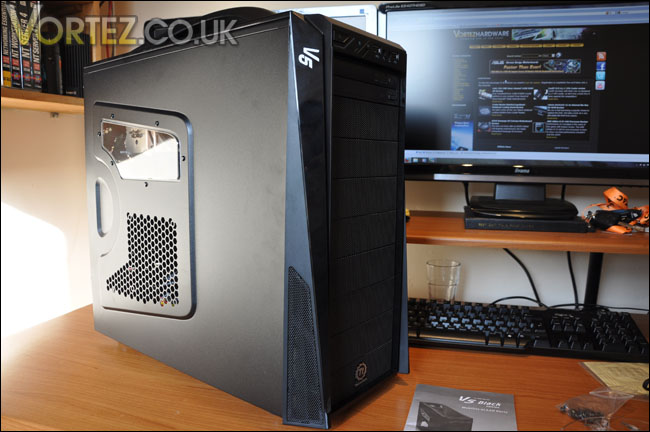
Inside, the V5 Black Edition is protected with plastic film on all high-gloss plastic areas as well as the clear window on the side panel. With the case now outside the box, it really does look like a rather attractive enclosure. On the outward appearance, much thought has gone into the designing of this case. With the idea of the V5 Black Edition primarily attending LAN parties and the like, it will stand out as being a distinctive gaming case. As you can tell, the visual appearance has impressed me somewhat, I really like the contours and textures of the panels.
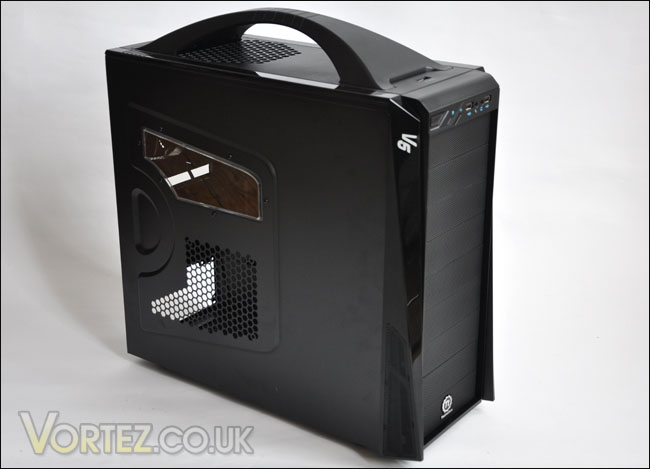
A stunning looker!
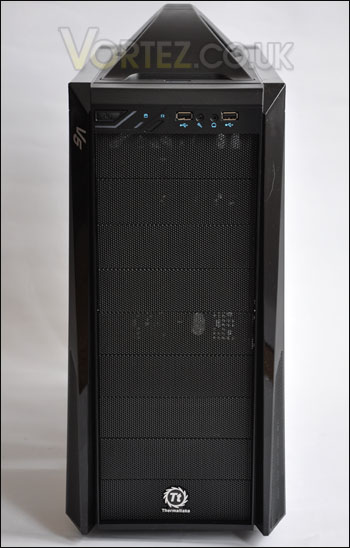
Turning our attention to the front panel, here we have the usual forte of outlets and controls. From left to right – power button, activity LED’s, reset button, USB, microphone jack, headphone jack and another USB port. As well as these features, there is also E-SATA support on the topside of the case. Whilst we are speaking about the top side of the V5 Black Edition, one of the most prominent of characteristics on our case is the large handle that covers almost the entire top panel. To pick the case up by means of this handle feels comfortable and it doesn’t feel like flimsy or cheap, even though it is just plastic.
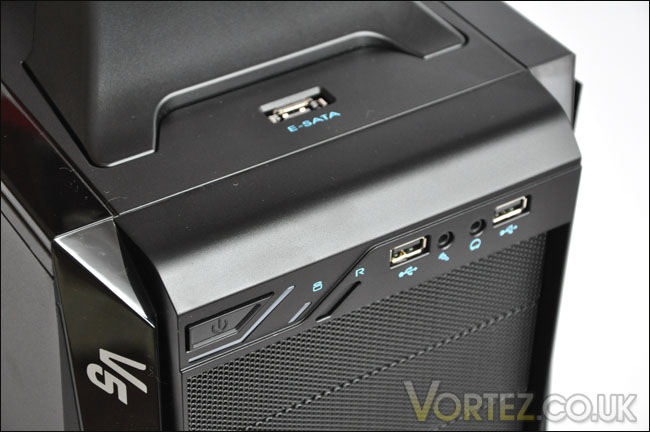
The front panel on the V5 Black Edition.
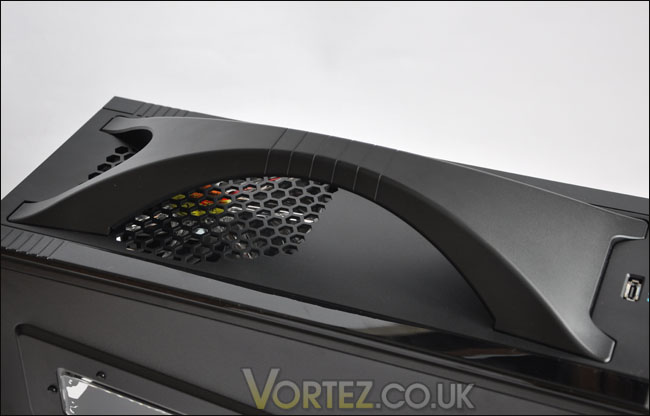
Large handle for easy transportation
Moving back to the front of the V5 Black Edition, the bay covers have a honeycomb metallic finish, right at the very bottom is another metallic object, a Thermaltake badge.
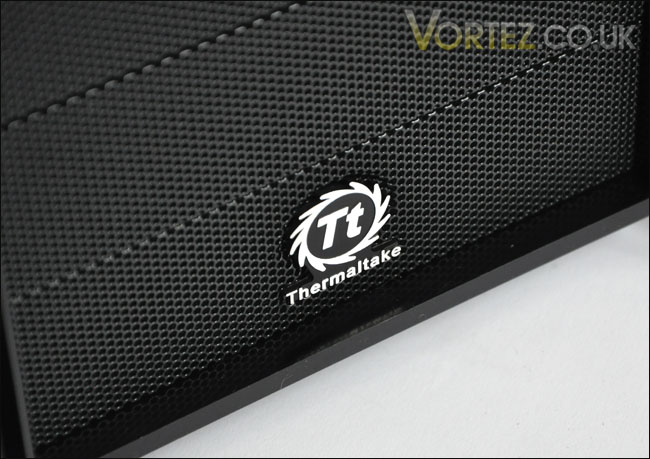
The embossed/metalic TT emblem
The side panels are sturdy and the component facing panel has a perforated honeycombed outlet to allow mounting of an intake fan to pull in a draft over the VGA. Alternatively though this can act as a channel to dispel heat from the VGA. Above this is a small window, giving you a preview of the CPU section of the system. Perhaps if you have a watercooled setup or even LED panels inside, this will benefit you as you can keep your eye on things. You may even have LED fans, this will allow you to show off the insides a little!
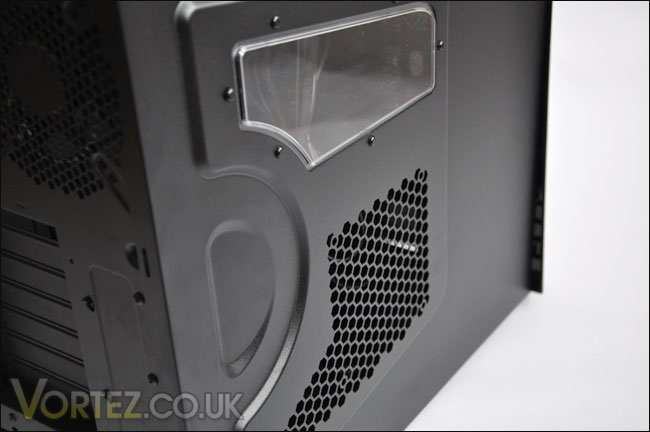
The side panel showing you a preview of the inside
The only other thing left to say of the exterior is that the back side of the case is quite conventional. It follows the typical layout as most other cases – the power supply unit will be mounted at the bottom of the case as is the trend lately for case design. It also comes with a dust filter which is a nice feature.
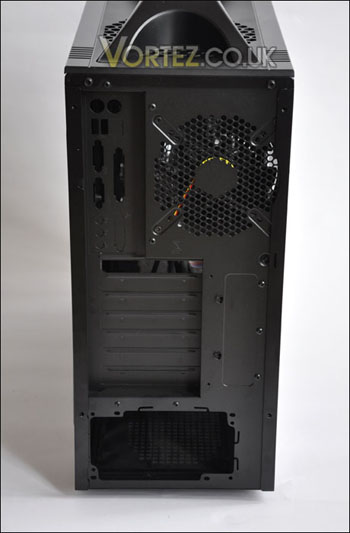
Interior
Removing the panels from the V5 Black Edition reveals the accessories kit that is included with the package. We have a manual, set of screws, three expansion plate covers, four cable tidies, wire saddle, lock bracket, buzzer alarm, and 3.5″ bay cover. The instructions manual is actually very well written, is comprehensive and helpful should you need to use it.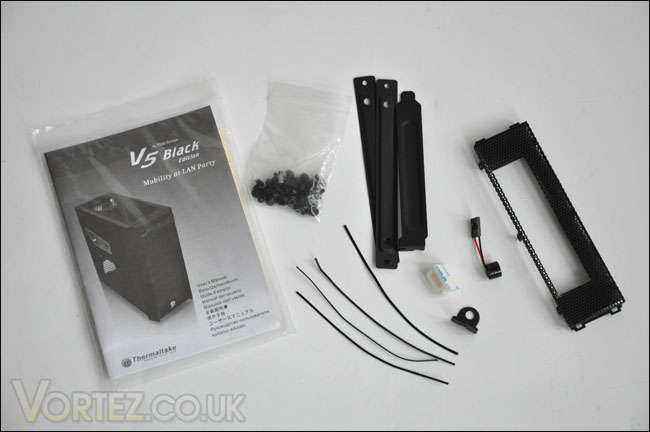
All of the accessories that are bundled with the V5 Black Edition
With the side panels off, we want to take a good look at the insides of the V5 Black Edition and the first thing to draw our attention on is the tool-less design of optical drive mounting. I’ve seen the same method used on NZXT cases, its a good move. It reduces the hassle of having to fiddle about with screws and however delicate it may look – does keep things rather secure. Mounting the HDD’s seems to require the need to slot the device into a tray and either into the top with the optical drive or beneath. If you do opt for the latter, an optional intake fan can be mounted to encourage airflow and HDD cooling.
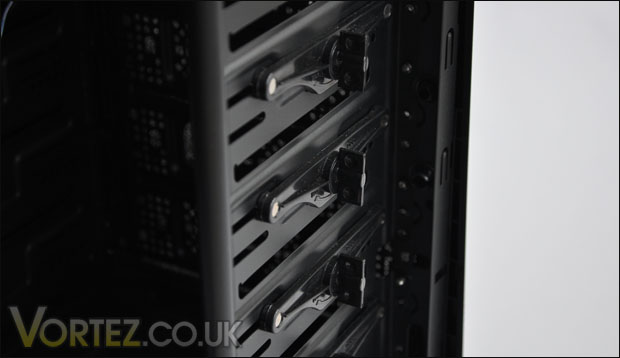
Easy to install devices
Concerning the cooling abilities of the V5 Black Edition, there is a 120mm rear exhaust fan in the usual spot, and a 200mm LED fan at the top of the case. Check the mounting holes on the motherboard tray nearby. They are far too close to that 200mm fan. This undoubtedly cause issues with the installation a little later, fitting large heatsinks in such a tight space is going to prove quite a challenge. More on this later.
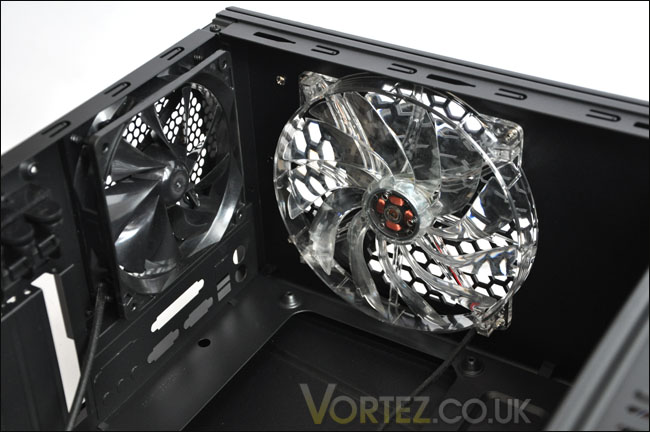
Both the fans that come with the V5 Black Edition. Notice the mounting holes, they are close to that 200mm fan!
If we take a look round the other side of the case, we can see that there is a significantly large CPU cooler back plate cutout. This allows the removal of CPU coolers to be that much quicker. It removes the annoyance of having to remove the entire motherboard just to get the backplate off the underside. A novel idea, we are seeing more and more brands doing this, but whilst they may implement such an idea – most are not giving a large enough space to cater for different socket types. It will be interesting to see how this opening facilitates the platform I am using a little later.
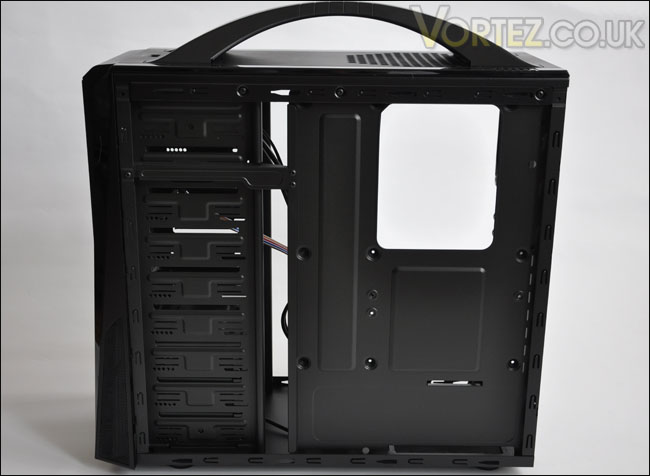
A nice, large cut out for the backplate access
There are plenty of nice gaps and openings on this case to tuck away cables, and looking at the below image you can see that the feet are rubber to prevent slipping and marking surfaces.
Installation
Intel Core 2 Duo E2160ASUS P5KC LGA775
MSI 8800GTX
XFX 7900GT
Samsung Spinpoint 250GB
Silverstone Strider 560W
The first thing I put into the V5 Black Edition was the PSU. I like to try and get all the cabling laid in and organized. This went ahead no problems at all. The cabling actually tucks away quite well, there are some good gaps as I mentioned on the previous page.
Problems did become apparent however when trying to install the main component into the case – the motherboard. As I referred to on the previous page, the motherboard mounting holes are far too close to the top of the case, let alone the 200mm fan that is mounted to the top of the case. As you can see from the photograph, the CPU Cooler (Noctua NH-U12P) is actually touching the fan. There is actually over an inch separating the mounting holes on the motherboard to the motherboard tray.
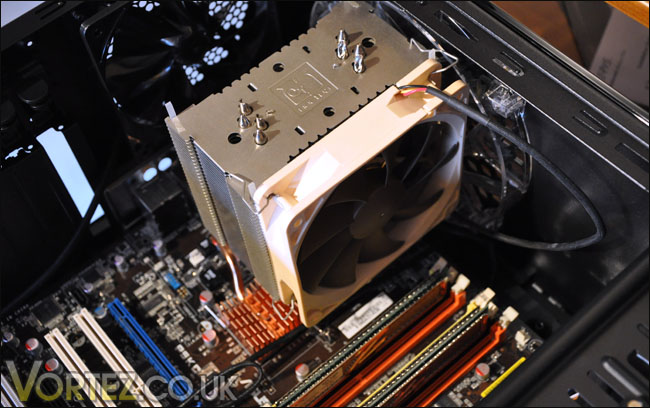
Cannot install motherboard, 200mm fan is an obstruction. Those mounting holes are too close
So the only solution to this is to remove the 200mm fan, and I can tell you – this is no easy task. Removal of the entire top panel of the case is required, and then the removal of the handle to even enable viewing of the screws holding in the fan.
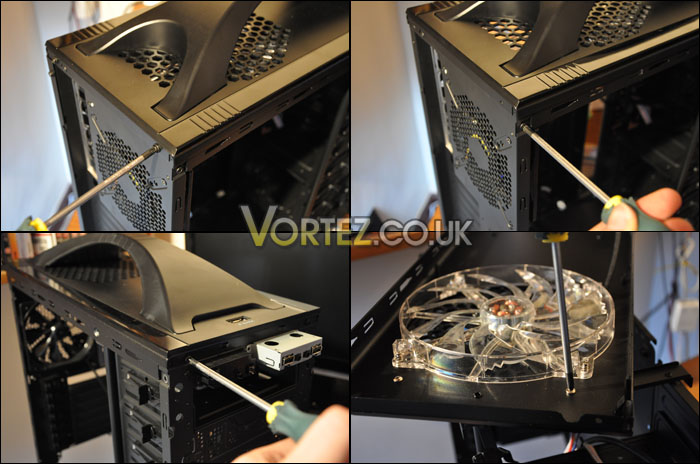
Removing the 200mm fan requires over 12 screws to be removed. Get your screwdriver out and a cuppa!
Installation Continued
Installation of the optical drive and HDD is quite simple thanks to the tool-less design. Quite surprisingly though, no anti-vibration mounting is supplied for HDD devices.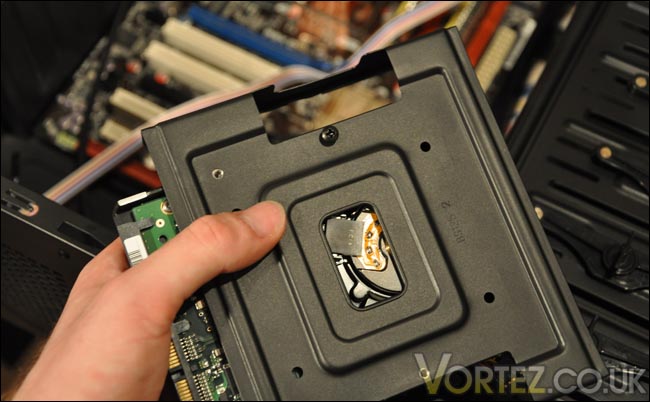
Lack of anti-vibration for HDD devices
So with everything almost in the only other items to secure in are the PCI cards. The system that I will be installing into the V5 Black Edition features a NVIDIA 8800GTX. Trying to get this card into the case was nigh on impossible. It simply will not fit. Length-wise, the graphics card fits fine but it’s the expansion card bracket that is the issue. The tool-less feature around the PCI area has a shelf that does not allow you to manoeuvre the card into place. The gap between the case and the motherboard is also a concern as it’s noticeably tight.
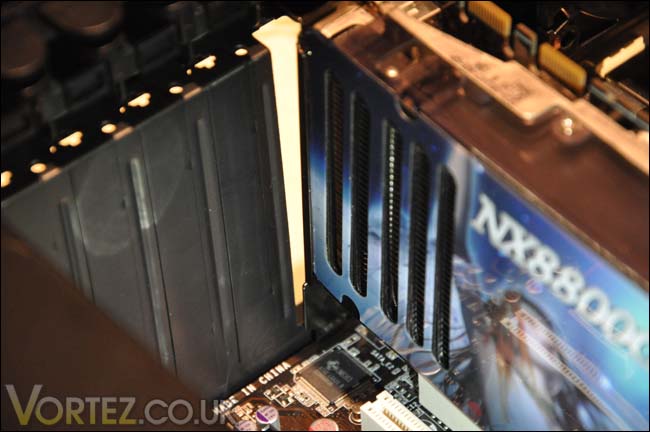
Tight gap between motherboard and case
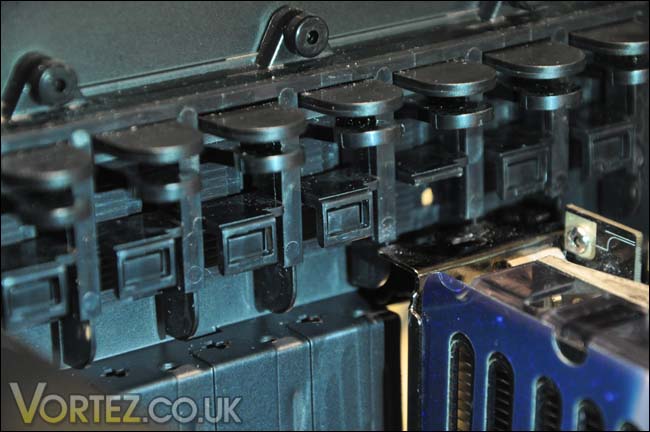
Shelf will not allow PCI-e bracket to fit into the gap
Fortunately I had another PCI-e graphics card at hand. With the expansion brackets side by side the 7900GT and 8800GTX are different in size. Something which I would have thought was a standard, but obviously not. The 7900GT expansion bracket is smaller in length by 2mm. This makes a significant benefit because this card just about fits inside the case. The fit is very tight indeed, but with some shuffling it goes in, just be very careful as you do not want to damage motherboard components.
This is an important aspect of the V5 Black Edition, as overlooking this may mean that you cannot install your graphics card. Sadly, graphics card manufacturers do not list the expansion bracket size. So finding out whether your graphics card will fit in the V5 Black Edition is as easy as finding a needle in a haystack. Regrettably this is quite an issue, had Thermaltake repositioned the tool-less feature some 5-7mm higher this problem would have been avoided.
So, after a lot of toil with the graphics card installation another issue reared itself, the expansion framework has bent, the materials used here are quite flimsy and this is the simple explanation of why this has happened.
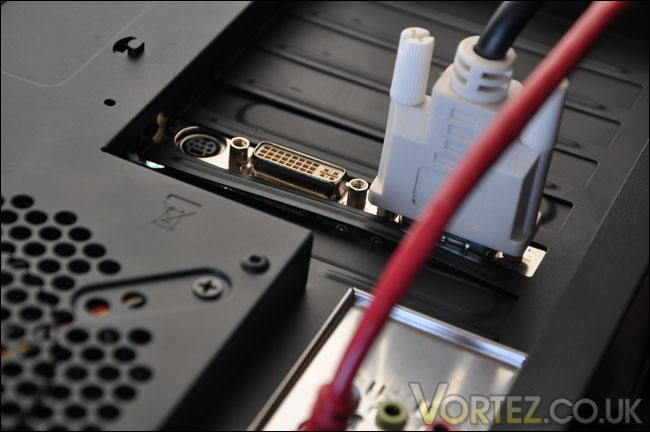
Flimsy expansion covers and case framework bend easily
Everything is now installed, the V5 Black Edition does look like a really nice case. There are also plenty of places to tuck things away and keep the insides tidy. Unfortunately the installation wasn’t without setbacks. Due to the removal of the 200mm fan, there is only a single 120mm fan present to control cooling. Something which will definitely affect the cooling potential of the V5 Black Edition.
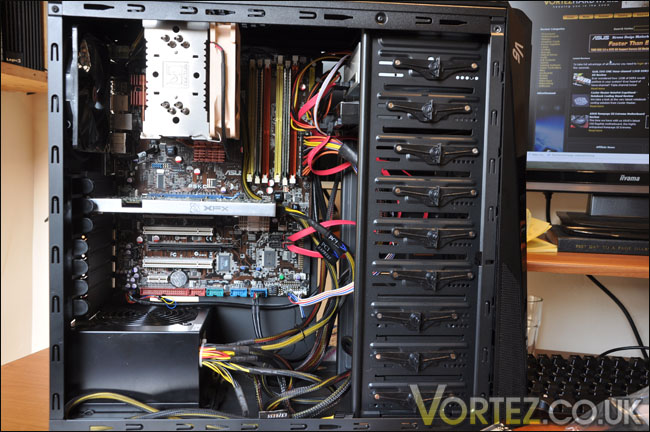
Everything now installed
Performance
With only the one 120mm exhaust fan installed cooling performance will be hindered. But there is the option of having fans mounted to the inside of the front panel as intake, onto the side panel to cover the VGA region and of course on the HDD rack.Thermal results will be given during idle and load states. Load will be simulated via OCCT, after some 20 minutes have passed temperatures till be recorded.
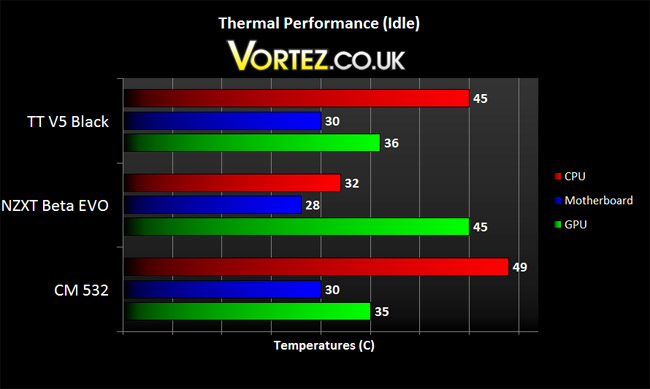
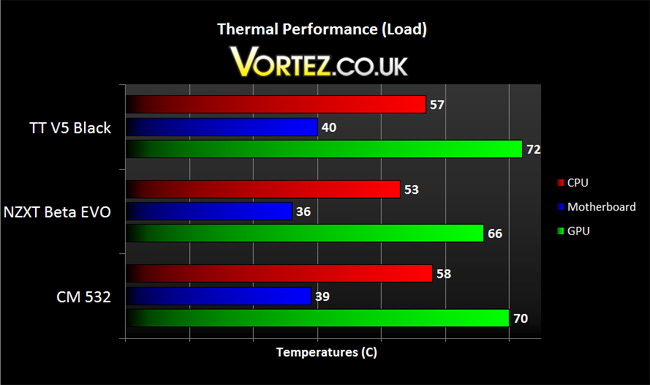
Thermal performance is quite good considering the absence of optional fans plus the whopping 200mm LED fan at the top of the case. With another two fans inside the case I’m quite confident those temperatures would drop, allowing it to match the lower temperatures reported from the NZXT Beta EVO.
Conclusion
First impressions of the V5 Black Edition were good, taking it out of the box it sure looks like a case to admire with the great contours and shapes. It looks and feels superb. Visual appearance is one thing but functionality is another, and of course how a case functions is a major factor.The installation was troublesome and annoying. First there was the inability to install the motherboard with a typically sized performance CPU heatsink fitted. The mounting holes are clearly too close to the 200mm fan at the top of case. With this causing an issue there is then the hassle of having to remove a simple fan, but the whole removal of this is very tedious to say the least. Having to remove the entire top section of a case and then the handle just to get at the screws is surely a poor design choice.
If Thermaltake may not want you to remove the 200mm fan (as it will significantly aid thermal performance) then why is the compatibility with motherboard/CPU cooler so lacking? It makes little sense to me.
The next issue is again compatibility. After many hours I couldn’t fit the 8800GTX into the case because the expansion bracket was touching the shelf on the tool-less feature. Luckily I did have a 7900GT to hand and this was 2mm smaller and did fit. But how will you know if your graphics card will fit? You won’t, manufacturers do not list the expansion bracket size on their graphics cards.
The final issue I had with the V5 Black Edition was the lack of anti-vibration for the HDD mounting. I had an idea this would be an issue during installation and upon booting up I was right, humming noises can be heard from the case.
You’ll probably be aware that I’m not best pleased with the V5 Black Edition, the whole experience has been plagued with issues. Visually a stunning setup, but functionality is seriously lacking. It’s hard to comment as to whether the case is worth the stated RRP because of the functionality issues but if Thermaltake make steps to improving these issues identified the V5 Black Edition would be a worthwhile purchase.
Pros
+ Looks great
+ Very portable
+ Lightweight
+ Reasonable cooling
Cons
– Cannot fit majority of CPU Coolers
– Removing 200mm fan is tedious
– Certain graphics cards will not fit
– Lack of anti-vibration means noise from HDD
We would like to thank Thermaltake for supplying this sample and we look forward to reviewing more of their products. Discuss this review on our forums

