







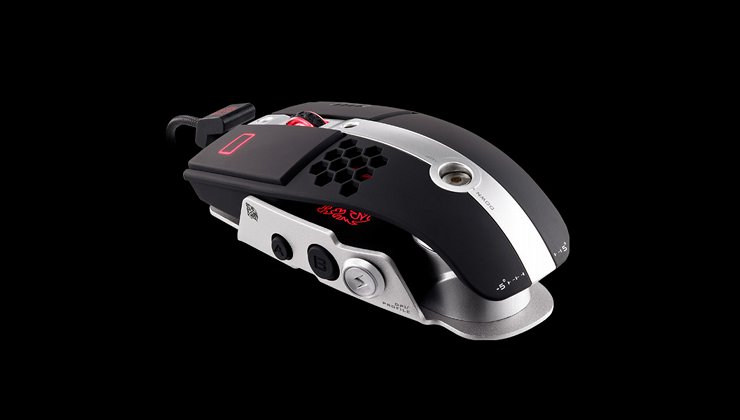
Tt eSPORTS bring us a Thermaltake and BMW Group DesignworksUSA collaboration gaming mouse with striking aesthetics and high-quality design.
Product on Review : Tt eSPORTS Level10M

Manufacturer: Tt eSPORTS
Street Price: £89.99
In recent years Thermaltake has become a force to be reckoned with in the gaming peripherals market under their Tt eSPORTS brand. We’ve had the pleasure of reviewing their Meka G-Unit mechanical keyboard in the past, and recently Richard took their Theron RTS mouse for a spin, where it achieved our Silver Award. The product we have in to review today is something a little bit different though.
The Level 10M is a mouse designed in collaboration with BMW Group DesignworksUSA, a firm responsible for a staggering number of innovative aesthetic concepts in a variety of engineering fields. Diverse products such as software GUIs, skis, concept cars and even yachts have all had the DesignworksUSA touch to meld high-end performance with unique and engaging aesthetics.
The first collaboration between BMW DesignWorksUSA and Thermaltake was the avant garde Level 10 aluminium chassis. Unveiled in 2009, the Level 10 sought to dispense with consumer expectations of a dull box for your PC components, instead bringing to market a chassis which looked like no other whilst also integrating a modular design reflecting the modular nature of PC components. DesignworksUSA integrated a number of flourishes, most especially hot-swap drive bays which proved an inspiration for the Level 10 name – the drive bays evoked the concept of levelling up in a game.
Picking up on subtle cues and going all-in to accentuate the concept is key, although sometimes the outcome isn’t quite what the market is ready for. The chassis met with mixed reviews: picking up numerous design awards but a price matching its high-concept aesthetic it didn’t bring mainstream recognition. It was left to the Level 10 GT, a separate product designed wholly by Thermaltake, to bring Level 10 to the masses.
The Level 10M is the first foray of the design-centric partnership into peripherals, so it’s very interesting to note that Thermaltake have chosen to market it through the Tt eSPORTS subsidiary.
“Challenge is the game” highlights the philosophy to bring out gamers’ addiction in gaming and the ambition of reaching to the extreme. Tt eSPORTS, a gaming obsessed division from Thermaltake, is uniting gamers from all over the world in a unique & fascinating eSPORTS culture, inherited the spirits of Thermaltake, is an energetic, powerful, bold and intelligent challenger who never says “no” to the extreme competition. we do not only provide gamers the ultimate gaming gears but also fulfils the passion to achieve the ultimate success.
The intent seems to be obvious: push Tt eSPORTS as the Thermaltake peripherals branding and attempt to garner a reputation for style and high-end quality as well as mid-range and affordable gear. The success of Tt eSPORTS teams in the Eastern market has generated enough brand recognition to open two retail stores – the latest in Taipei City, Taiwan – whilst in the West will for now have to build on the fundamentals of good design and positive feedback. Should be fun to see how well they’ve done.
Technical Specifications
In the Level 10 project, Thermaltake wanted to present a gaming product that can immediately communicate both the design and the functions with the gamers, and in return each individual gamer was able to reflect his/her personality from the product and extends it to the user experience. It is also a platform; free the mind of the users creativity to creatively remodulate the product to further match that individualism.
Right from the beginning, therefore, the Level 10 M chassis successfully attracted more than just gamers but also users who appreciate aesthetics in their lives. To be more closely attentive in gamers behavours, Thermaltake and Tt eSPORTS decided to initiate the Level 10 M Mouse project, transferring visions and inspirations from the chassis to the mouse without losing the established design language.
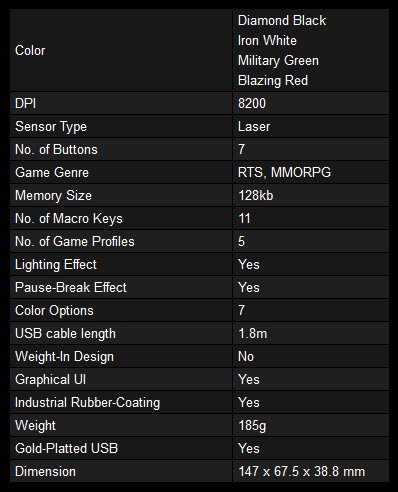
Specifications
Colour Options
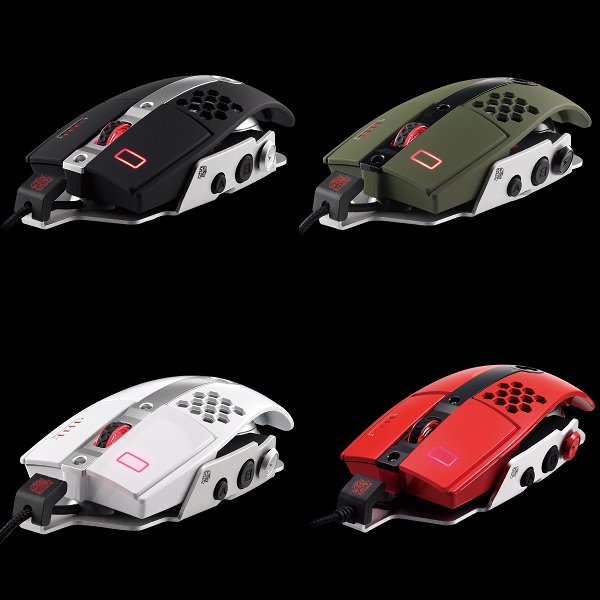
NOTE: Blazing Red Option Coming Soon
Packaging & Accessories
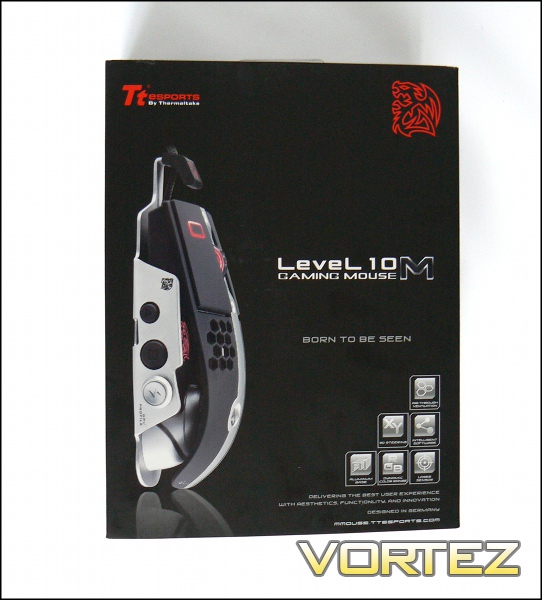
The Level 10M – Born To Be Seen. That sums up the mouse very nicely, but before our first look we need to discuss the packaging. Let there be no doubt, this isn’t a peripheral where the retail box is plain and they’re selling the name and trademarked graphic. The Level10M is right there, bold as brass with design touches to be admired, not discretely overlooked. Tt eSPORTS is also highlighted, though in time we should be able to recognise it merely from the stylised dragon logo, also present on the mouse.
The front highlights the major design innovations you’ll see, although the marketing jargon is a little difficult to decipher in two instances: 3D-steering and Dynamic Colour Range. More on those later. Additionally, make note of “designed in Germany”; automobile enthusiasts will understand why that’s a big deal.
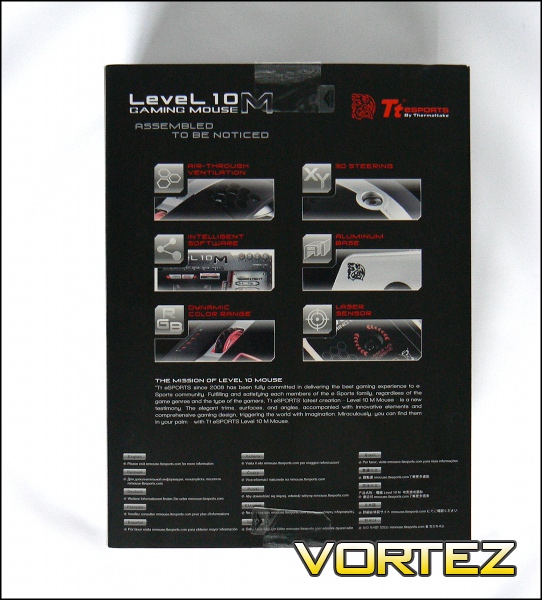
The rear presents the highlighted features as images, displaying relevant parts of the mouse. Here we can see that Dynamic Colour Range is a feature of the built-in lighting, but 3D-Steering remains a little vague. We’ll get to that.
The packaging here makes special mention of the website for additional information, so we will too: mmouse.ttesports.com.
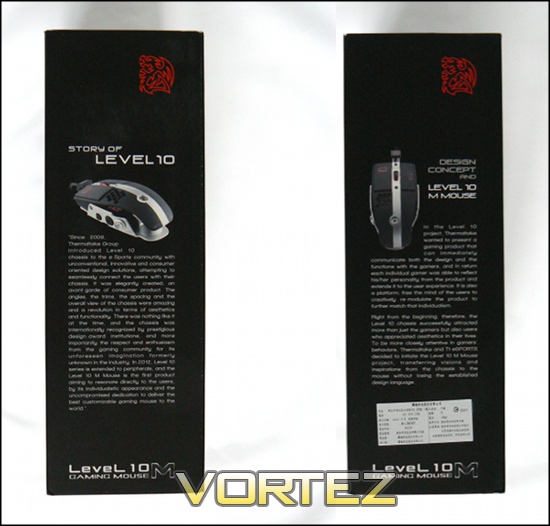
Left and right sides provide two additional views of the mouse, and discuss the Level10 concept and Level10M mouse design brief. In the discussion of the concept we’re given a hint that this may not be the only Level10 peripheral to every be brought to market… already we’re looking forward to the future.
The packaging floor contains important safety and compatibility information, including compliance with international safety standards. Slip the sleeve off and we’re left with an inviting portal inside. You can tell that someone in marketing has been picking up a few tricks from Apple.
Bundled Accessories
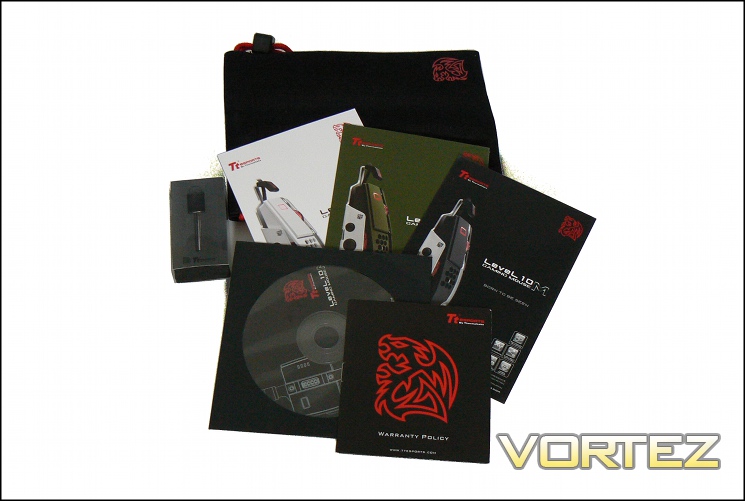
* Level 10 M Adjuster Tool (see: Customisation Features)
* Driver CD, warranty policy, product postcards
Tt eSPORTS have seen no need to bundle a range of unnecessary accessories, instead keeping to the basics. The carry case is a nice touch given the Level 10M’s value – not something you want to lose at a LAN or other event.
Closer Look
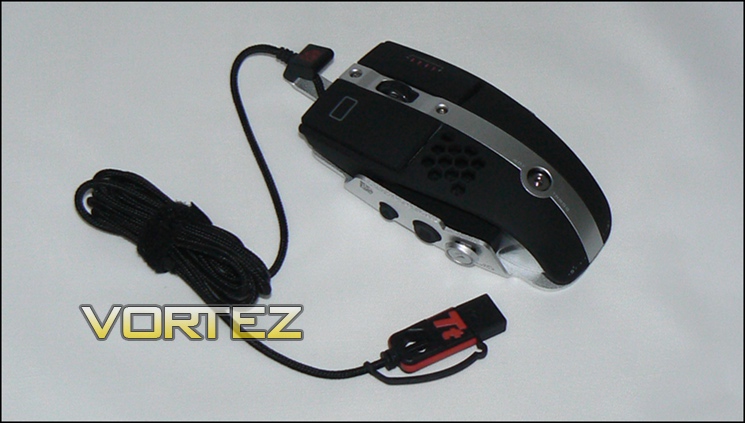
The first feature you’ll notice of the Level 10M is the cut-away design of the top from the base, reminiscent of modular, adjustable mouse designs. Rather than mask this, the Level10M emphasises it as a design choice, exposing the palm arch’s supporting pillar and two red-sheathed data cables. The top is a single piece of curved plastic, coated with a matte black rubberised and textured finish with the exception of a single stripe, making it a grippy surface for those who appreciate it. The same surface is used for the major mouse buttons.
Right-hand and left-hand buttons both have their own specific design flourishes. A four-LED DPI indicator is a feature of the RMB, whereas the LMB includes a rectangular cut-out in the matte finish. Centrally located is the scroll-wheel/third mouse button, which is superficially identical to the wheel of the Tt eSPORTS Theron reviewed last month.
The hexagonal array cut-out, dubbed ‘Air-Through Ventilation’, allows air to circulate more freely underneath the user’s palm. Conceptually at least, the intent is to allow sweat to evaporate more freely, making long sessions of use more comfortable.
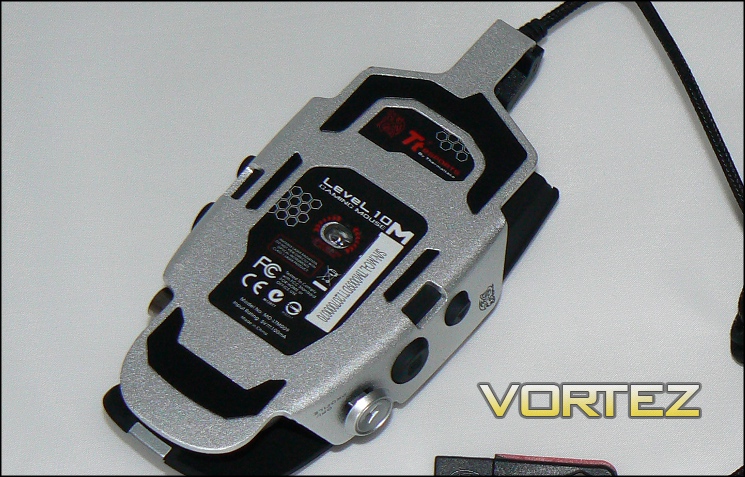
The Level 10M’s base is a single piece of aluminium, swept up at the sides as mounting points for the buttons and switches. Although other manufacturers have been utilising aluminium bases for a while, Level 10M’s use is more considerable, adding rigidity and weight for a more quality feel. With such a design it’s extremely important that the mouse is level when sitting on the mousing surface, and the Level10M is that.
Four Teflon feet allows the mouse to glide over most surfaces, which it will certainly need to due to its weight. Unlike the Theron there is no facility to customise the weight, whilst balance is adjusted via a different mechanism.
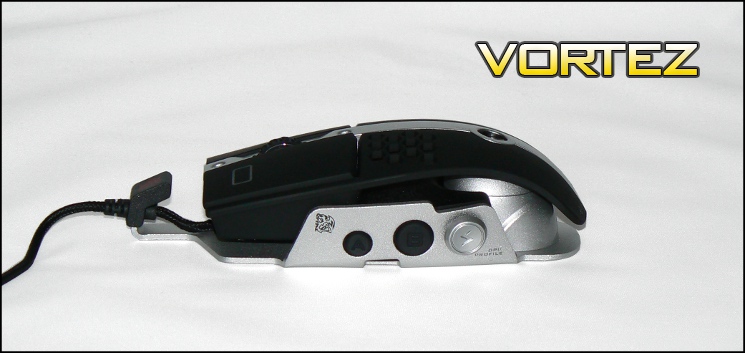
The LHS features two standard micro-switch buttons (A + B) and one additional 5-way adjuster (lightning bolt). The two buttons are slightly rubberised, whereas the selector stick is plastic with smooth finish.
In what way is it 5-way?
Back: Increase DPI Level
Up: Profile-based Macro activation
Down: Profile-based Macro activation
Press: Cycle through Profiles
The position will feel a little awkward at first, though becoming accustomed to it as a DPI-selector is quite swift. In all likelihood you’ll need to programme the selector for functions rarely needed ‘in the heat of battle’.
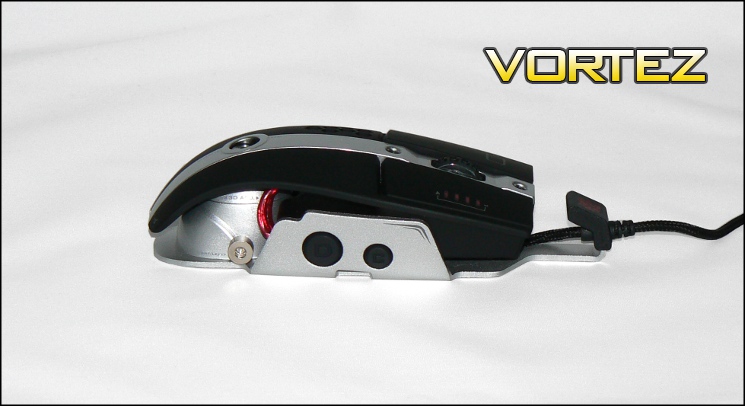
Far less prevalent on all the images you will have seen of the Level 10M are the two buttons (C + D) on the RHS of the mouse. By default, the software picks these up as configurable macro buttons, and so you can bind them to whatever you feel to be appropriate. How useful you find these will depend on the dexterity of your little and ring fingers, but the actuation force required is fairly low. Potential left handed users of the Level10M will obviously have a field day with them by comparison, although it’s not really a true ambidextrous mouse.
To round off the package, Tt eSPORTS have braided the mouse cable for additional durability, and added a cap to the gold-plated USB plug to protect it in transit or whilst in storage. Sometimes, it’s the small touches which are most pleasing.
Closer Look – Customisation Features
Fit to hand
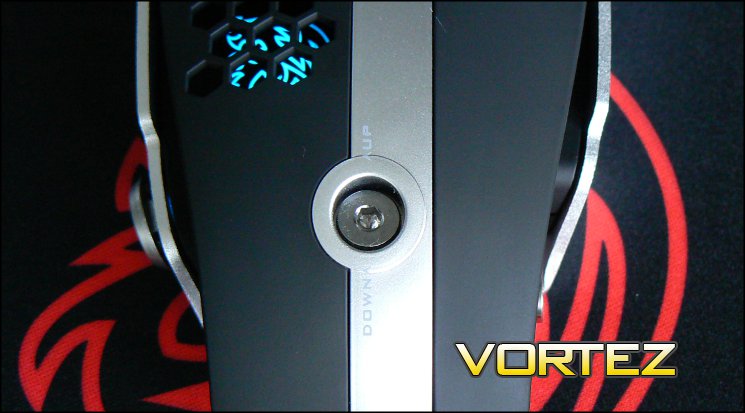
Use of the bundled adjuster key tool, ostensibly a small hex key, allows the height and angle of the palm rest to be adjusted based on your preferences. Angle is controlled through a small rotating knob on the right, whereas the height is adjusted by rotating a dial in the centre of the palm rest.
Angle adjustment is +/- 5 degrees from the vertical, but there is always a slight give in the base along this axis. Generally speaking you won’t be pushing down with enough force on one of the main mouse buttons to notice however. Height adjustment is through approximately 0.5cm, and at no point does the palm rest feel like it may collapse due to poor structural integrity.
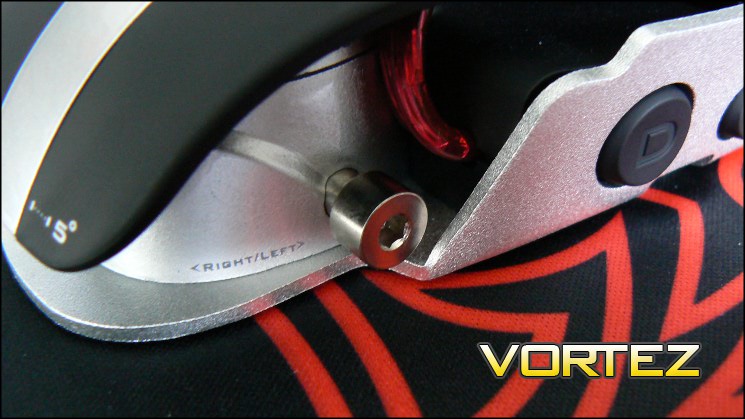
The action of these dials is smooth and continuous, rather than relying in pre-selected values as in many other adjustable mice. Also, at no point can you be over-zealous and unscrew it – the limits of the range is obvious when you use it.
Colour
Colour is all the rage in mice right now and the Level10M allows you to add your own splash of colour in three different locations: the mouse wheel, left-mouse-button and the Tt eSports Logo under the hexagonal grid. Colour is set in software, whilst by default all three are in the red of Tt eSPORTS.
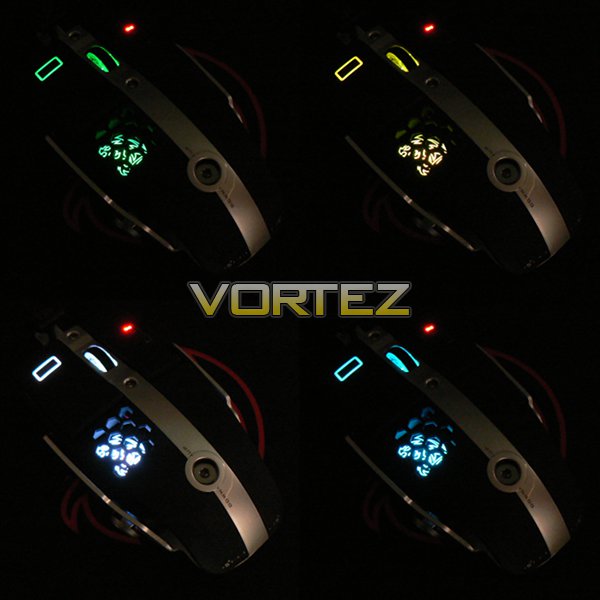
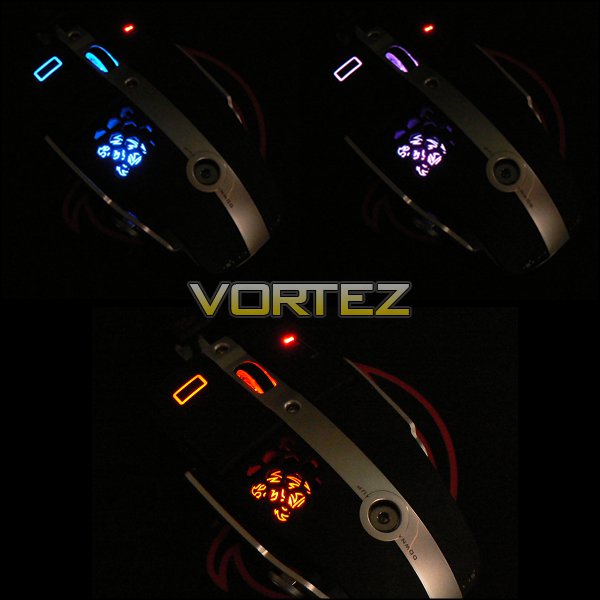
We’ll discuss the limitations with the rest of the Software next…
Software
Tt eSPORTS software for the Level10M is based on a design similar to that for the Theron and other mice from the same stable. Those who are familiar with this utility will be comfortable with diving right in, but could be a little confusing to newcomers. It runs in the background, and the main window can be activated by right-clicking the Tt eSPORTS icon in the Windows 7 System Tray.
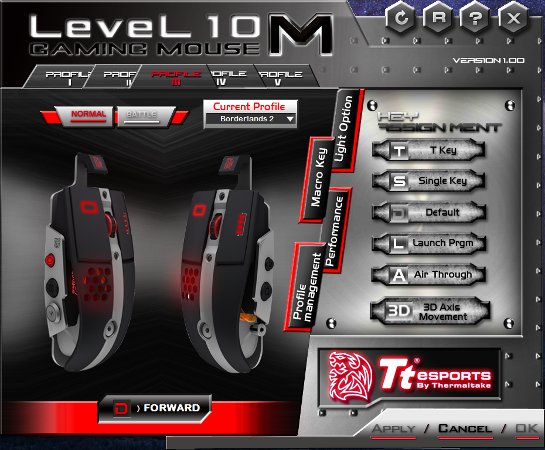
Cycling through the five available profiles is as simple as selecting the tabs, and the same cycling can be performed by pressing the appropriate DPI/Profile selector button on the mouse. Once the profile you wish to edit is active, you will need to click on an individual button (highlighting it), which will then display it’s current function below the mouse image. ” D > … ” indicates that the button is in it’s default mode, “S > …” that it is bound to a single default action (Right mouse click… etc) and “T> …” indicates a Macro bind.
Four vertical tabs allow you to customise further aspects of the mouse.
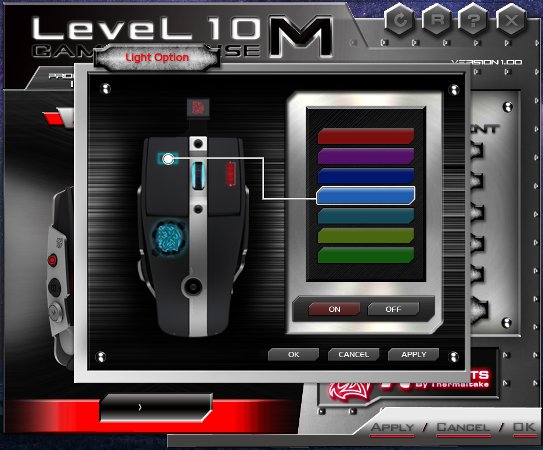
The lighting page is relatively straight-forward. Three areas are selectable, which can then be adjusted to one of seven predetermined colours or disabled individually. Equally, by selecting all three or none at all, the colour changes you select will apply to all three. To see the colour change reflected in the mouse in real-time you will need to hit ‘Apply’.
It’s a little disappointing that there appears to be no means to disable the pulsing effect of the Tt eSPORTS icon in software or hardware apart from to turn the light off entirely. Also, seven colours seems a little on the low-end for a high-end mouse, and we would appreciate seeing a far wider available spectrum. The colours which are available are vibrant and bright; there can be no complaints that they are too dim.
Another feature we would like to see is the ability to change the colour of the DPI indicator, with options matching those of the rest of the mouse. Although it goes perfectly well with the LEDs in Red, other colour selections make the DPI indicator seem out of place.
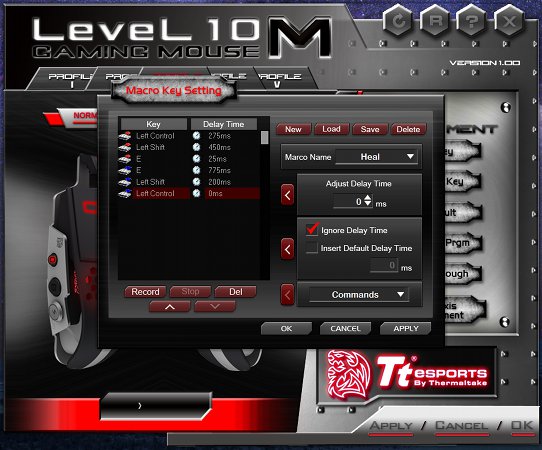
The Macro editor appears to be comprehensive, with the ability to chain together simulated keypresses and default keyboard commands (Page Up, Page Down etc.). Time delays can be calibrated or discounted, and both engage and disengage events are recorded. Macro’s can be saved and later bound to a mouse button or buttons.
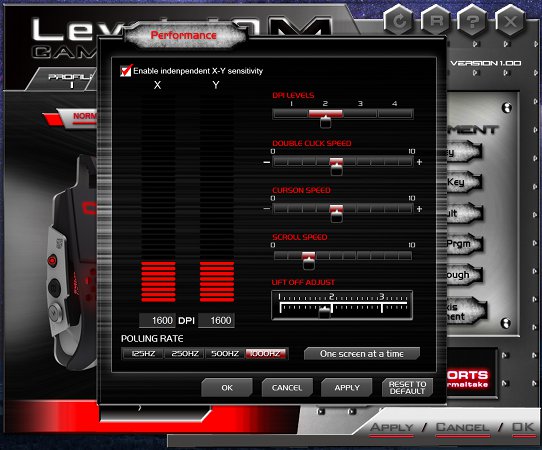
The performance tab pops up the performance window, which allows the editing of a whole host of those aspects. Four DPI levels can be bound to different sensitivity levels, and X-Y sensitivity can be configured independently. Also editable are the double-click threshold, cursor speed and scroll wheel speed, though only in discrete chunks. Advanced users will want to take note of the lift-off adjust editor, defining the height at which the mouse detects that it has been lifted from the mousing surface, and USB polling rate selector.
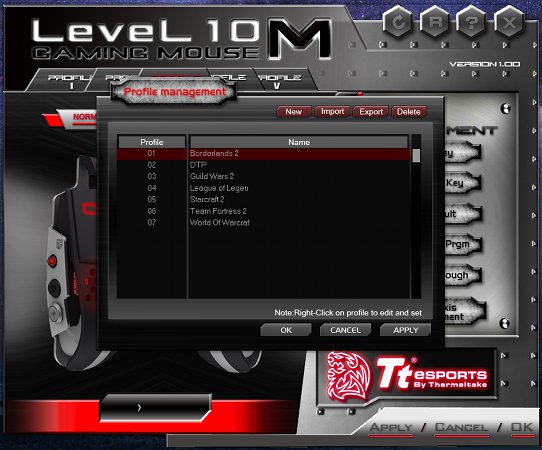
Although profiles are stored on the mouse they may be back-up locally and loaded into one of the profile slots at any time through the utility. All active profiles should migrate with the mouse to other systems, though you will need to have the driver utility installed in order to take full advantage of this roaming feature.
We’re not convinced by the addition of the Air Through and 3D Axis Movement buttons on the driver main screen, as all they do is launch videos showing that particular function, videos not even 40 seconds long but with 20 seconds of branding. They feel a little like an afterthought to pad out space, and to be honest those who have bought the mouse would be well aware of both features.
Other than that described above, we would have liked to see built-in functionality for an optional live update to both driver and utility within the utility, ensuring that the user remains up to date at all times. Other than that, reflecting LED colour changes on the main page rather than selecting the Profile and then ‘Light Option’ would be great, especially for Profile recognition.
Note: Testing was performed on a Windows 7 system utilising v1.00 of the Level 10M configuration utility.
Performance
General Use
Tt eSPORTS are a gaming brand, but Thermaltake don’t just want to market this mouse to frugal gamers. The high-concept design and build quality are also targeted at office professionals with an eye for durable personalised peripheral hardware in their working life. If that idea floats your boat, you’ll want to know how well it works in general use.
Left and right buttons should not be cause for complaint in the Level 10 M. The LMB’s actuation is quite light with a fairly quiet click, absolutely ideal for communal workspaces; by contrast the RMB is a little heavier and louder, making mis-clicks rare.
As with the Theron, the scroll wheel is is a little more mixed when it comes to a quality feel. Each notch is very prominent – great for gaming but a little less easy to live with for content creation and browsing – and the wheel wobbles an almost imperceptible amount if it undergoes lateral force. Our sample never missed activation in any particular notch, which is very important from a precision aspect, but some may prefer a smooth wheel action in day-to-day use. No left/right lean buttons on the wheel may also disappoint some, although the mouse otherwise offers a large number of accessible options.
Thumb buttons require a little more force than may be strictly necessary to press, especially with regards to the more further forward ‘A’. The use for the DPI/Profile selector in an office environment is a little unknowable, but it remains a very functional feature that takes a little while to get used to.
Ergonomically speaking, the mouse offers plenty of palm support which as we have noted is adjustable, but comfort will very much depend on the size of ones palm. Notably absent is any form of thumb, ring-finger and little finger support, but the impact that will have varies very much on a person-to-person basis. We should note that when lifting the mouse with one hand the natural gripping points are the side button locations, and can cause unwanted activation.
Finally, we should mention the weight: the Level10M is quite heavy at 185g and there are no means to lighten it. It also doesn’t have the excuse of a battery pack weighting it down, unlike wireless mice. The very slick Teflon feet will compensate significantly, as will high-quality mousing surfaces, but it pays to be aware if you’re used to lighter mainly-plastic mice.
Gaming Performance
In gaming, the Level10M begins to come into its own, especially in the RTS genre where fast and extremely precise clicking is a must. Setting the mouse up for Starcraft 2 is simple and the variability in macro’s can aid casual players significantly. With side buttons situated lower than the shoulder of the mouse body, claw grips are less necessary and many gamers will find longer sessions more comfortable.
Visual indications of both DPI level set and profile selected are excellent, a criticism which Richard had of the Theron last month. Being able to independently set all four DPI levels per profile is also great given that the high end of the DPI range will be irrelevant to many FPS gamers. It would be nice to be able to bind a specific DPI level selection to a macro, but here we may be getting a little greedy. The only shortfalls to some would be the lack of a low-DPI toggle switch for sniping and slightly awkward positioning of RHS buttons, although use of these buttons would be occasional at best.
Whilst not featuring the most extreme mouse adaptations for their genre of choice, MMO/MOBA players will enjoy the fact that all the buttons can be bound individually to macros and that at least 5 of the typically ‘extra’ are within easy reach and have quick activation. Those who play tanks and healers in that particular genre will benefit most from the available functionality, whereas characters which rely on more complex button/keybinds would happily step up to this mouse, but wouldn’t benefit by stepping down from a more complex design. The most advanced players may feel the lack of thumb button array, but the vast majority will find the more standard functionality preferable.
In general, our experience with the Level10M was very good, despite a few software hiccups due to user error on our part. It does require a little more perseverance to adapt, but those who stick with it should enjoy it.
Conclusion
Reading back, it may appear that we have been overly critical of the Tt eSPORTS Level 10M, but the price of the mouse demands that we do just that. This isn’t a £20 disposable, or even £45 enthusiast device; the Level10M is a £100 piece of engineering which has to be assessed on just that basis. So given that, what are our overall thoughts?
Lets discuss the design. When you talk to designers they will focus on emotion, which is nearly impossible to objectively assess: ‘We wanted to concentrate on how it made you feel’ or ‘We wanted the Level 10M to enrich your experience’. However, the Level 10M is a mouse you immediately want to pick up and explore; it’s an intriguing piece of hardware which you find yourself looking at from every angle, seeing new quirks seemingly every time you look at it. This is exceptionally rare, even at the high-end.
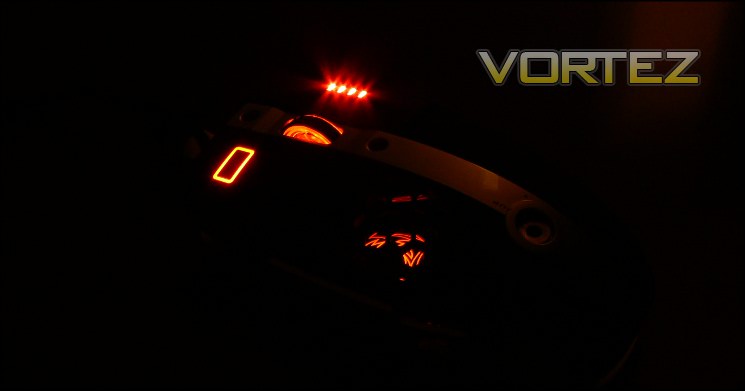
As with any peripheral, some aspects of the functionality will not be for everyone. RHS mouse buttons are difficult to deal with unless placed directly under the finger, and up till now gaming mice have tended to place LHS buttons on the shoulder rather than directly under the thumb. Placing the DPI/Profile selector on the side yet towards the rear has also been an innovation, though only time will tell if it’s a successful feature. At times it almost feels a little like a very late addition to satisfy gaming necessity, especially reflecting on earlier designs where it didn’t feature.
After two weeks of use we have to assess the build quality of the Level 10M to be superb. It oozes quality, and those parts which are required to be plastic have been created with sufficient ruggedness and rigidity to not feel out of place. The matte-black finish is even and grippy, and it’s nice to see other colour options for those so inclined. The aluminium base is ideal for a high-end mouse, and we would love to see more companies explore the potential further as DesignworksUSA did.
Special note should be made of the angle and height adjusters, which offer a very smooth motion and have little give when selected, especially in the case of the height. Competing modular designs tend to have plastic sliders with pre-determined notches, and have been comprehensively eclipsed by Thermaltake’s example.
Aesthetic customisation is a little less positive, and may come from inherent software limitations. Only having seven colours to choose from is quite disappointing even given the quality of the lighting, and fixing the colour of the DPI level to red is a pretty significant oversight. Perhaps most odd is that you can’t stop the pulsing effect of the logo, which can become a little tiresome.
The software is in fact the major criticism we would have of the Level 10M package. It’s unintuitive, and doesn’t have the same attention to user experience that the mouse itself has. It works, but is really just functional and temperamental rather than well thought out and logically designed. Including space on the initial screen to marketing product features is a little off, and it also would benefit from a means to alert in the case of software updates and offer automatic download.
All told, how does that feel at £89.99 – would gamers really want to lay down that much money for what is in effect a gaming mouse? The average age of PC gamers are those well out of their teens, and we’re well aware that strong brands in niche markets can command a significant price premium and remain viable. The PC market is also moving to a Free-To-Play business model, leaving more disposable income for components than had previously been the case. In such a market it’s not unreasonable to upgrade to a higher price bracket, so long as you are assured of highly durable products with extended life spans, and in many cases consumers are doing just that.
A mouse is perhaps the component of your set-up most subject to personal preference, which makes the lack of brick-and-mortar retailers in the UK all the more acute; you need to get your hands on the mouse to appreciate how it differs from the conventional, but making the leap is hard. Choosing an e-retailer which offers a satisfaction guarantee would be very sensible for any mouse. Once you have the Level 10M in your hands, we’re pretty sure you’ll be impressed.
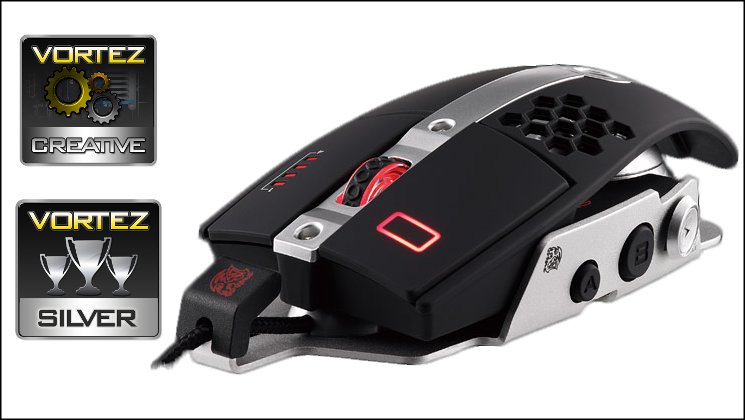
Thermaltake and BMW DesignWorksUSA have combined to create an eyecatching new mouse which sets an extremely high standard for aesthetic design in the gaming and office professional peripherals market. The build quality is exceptional, and presents a basis ideal for a combination of gaming and office use. Customisation is good, though software needs to be improved to unlock added potential. The Tt eSPORTS Level 10M has a nailed-on Creative Award, and is a very strong overall Silver Award winner.
+ Well crafted design
+ Great build quality
+ 11 Programmable Buttons
+ Up-to 8400 DPI Sensor
+ Vibrant customisable illumination
+ Range of three (soon to be four) colour options
Cons
– Disappointing software (v1.00)
– Steep learning curve due to unconventional button placement
– Premium price


