







A mechanical gaming keyboard with backlit keys and macro capability: Is this the holy grail we have been searching for?
Product on Review : Tt eSPORTS MEKA G-Unit Mechanical Gaming Keyboard
Manufacturer and Sponsor : Tt eSPORTS
Street Price: £90 inc. VAT (GBP)
We’ve sampled three mechanical gaming keyboards over the past couple of months and have been equally impressed with all three. Each offered something new but none offered all of the attributes from each of the manufacturers. Missing from all three of the mechanical keyboards was a feature that is held in high regard by some gaming fraternities, especially those whose preferred flavour is MMORPG titles. Each was heavily criticised for not having this feature on their ‘gaming’ keyboard so while each had some good features, none had them all and none could claim macro capability either.
Enter the Tt eSPORTS MEKA G Unit. Cherry Black MX keys throughout, adjustable backlighting, audio/usb hubs, media keys and the ability to set 3 profiles up, each containing up to 20 Macro keys makes this keyboard perhaps the most feature packed mechanical keyboard we have tested to date. It combines all of the features we liked from each of our previous reviews and adds full macro capability into the mix. On paper at least, it should present itself to be the perfect solution to our gaming keyboard needs.
Tt eSPORTS
Thermaltake has been a well-known brand in the gaming & DIY market for PC Chassis, Coolers and Power Supplies PSU for many years. The brand personality of unique, aggressive, vivid and stylish makes Thermaltake an expert in creating exciting things and fascinating environment for gamers and enthusiasts. Tt eSPORTS inherited the brand personality with unique and creative design by observing users’ behaviours and requirements. The fan cooling design on Tt eSPORTS Challenger keyboard demonstrate the brand spirit. It is the worldwide first keyboard with fan cooling function that could dry your hand sweats and blow tension away during cut-throat competition.
Thermaltake has been a well-known brand in the gaming & DIY market for PC Chassis, Coolers and Power Supplies PSU for many years. The brand personality of unique, aggressive, vivid and stylish makes Thermaltake an expert in creating exciting things and fascinating environment for gamers and enthusiasts. Tt eSPORTS inherited the brand personality with unique and creative design by observing users’ behaviours and requirements. The fan cooling design on Tt eSPORTS Challenger keyboard demonstrate the brand spirit. It is the worldwide first keyboard with fan cooling function that could dry your hand sweats and blow tension away during cut-throat competition.
Let’s take a look at the product specification and features…
Specification & Features
Specification Tt eSPORTS MEKA G Unit Gaming Keyboard
– Interface: USB
– Operational system: Windows 7/Vista/XP & MAC OS (will be available later)
– Number of Multimedia keys: 7
– 2.0 USB port: 2
– Mic-In &SP Out jacks
– Switch lifecycle: 50 Millions
– Switch brand: Cherry Black switch
– Cable length: 1.8m braided cable with gold-plated USB connector
– Body dimension (L*W*H): 517×166.6×36.6mm(without palm rest) 517×237.5×36.6mm (with palm-rest)
– Interface: USB
– Operational system: Windows 7/Vista/XP & MAC OS (will be available later)
– Number of Multimedia keys: 7
– 2.0 USB port: 2
– Mic-In &SP Out jacks
– Switch lifecycle: 50 Millions
– Switch brand: Cherry Black switch
– Cable length: 1.8m braided cable with gold-plated USB connector
– Body dimension (L*W*H): 517×166.6×36.6mm(without palm rest) 517×237.5×36.6mm (with palm-rest)

Features
1000Hz polling rate
Up to 1000Hz polling rate which equates to 8x quicker than a regular gaming keyboard
Cherry black switches
Using the now familiar Cherry black switches you can expect a 50 million keystroke life expectancy.
Anti Ghosting
While not having PS2 functionality, the MEKA G Unit can still allow upto 46 keys to be pressed simultaneously (gaming mode).
USB hub & Audio jacks
Having a USB hub on the keyboard allows other USB devices to either be powered or communicate through the keyboard. The keyboard also supports headset and mic connectivity through the 3.5mm audio jacks.
Backlit keys
3 sections of the keyboard are backlit and have adjustable lighting levels for easy identification during dim-light scenarios.
Large on-board memory
The G Unit features 640k of on-board memory for saving profiles and macro settings.
Macro capability
Up to 60 macro keys can be set over 3 profiles (20 each = 12 fixed and 8 unfixed).
Normal/Game Modes
Switchable modes avoid unwanted windows key activation during gaming.
ISS (Instant Switch System)
Advanced macro key switching function allows gamers to reach all 60 macro keys within one profile.
Multimedia keys
7 multimedia keys provide gamers instant control of sound and audio.
Cable management
The cable is detachable and can also be hid away behind the keyboard for those who like a tidy appearance.
Up to 1000Hz polling rate which equates to 8x quicker than a regular gaming keyboard
Cherry black switches
Using the now familiar Cherry black switches you can expect a 50 million keystroke life expectancy.
Anti Ghosting
While not having PS2 functionality, the MEKA G Unit can still allow upto 46 keys to be pressed simultaneously (gaming mode).
USB hub & Audio jacks
Having a USB hub on the keyboard allows other USB devices to either be powered or communicate through the keyboard. The keyboard also supports headset and mic connectivity through the 3.5mm audio jacks.
Backlit keys
3 sections of the keyboard are backlit and have adjustable lighting levels for easy identification during dim-light scenarios.
Large on-board memory
The G Unit features 640k of on-board memory for saving profiles and macro settings.
Macro capability
Up to 60 macro keys can be set over 3 profiles (20 each = 12 fixed and 8 unfixed).
Normal/Game Modes
Switchable modes avoid unwanted windows key activation during gaming.
ISS (Instant Switch System)
Advanced macro key switching function allows gamers to reach all 60 macro keys within one profile.
Multimedia keys
7 multimedia keys provide gamers instant control of sound and audio.
Cable management
The cable is detachable and can also be hid away behind the keyboard for those who like a tidy appearance.
Let’s take a look at the packaging and contents…
Packaging & First Look
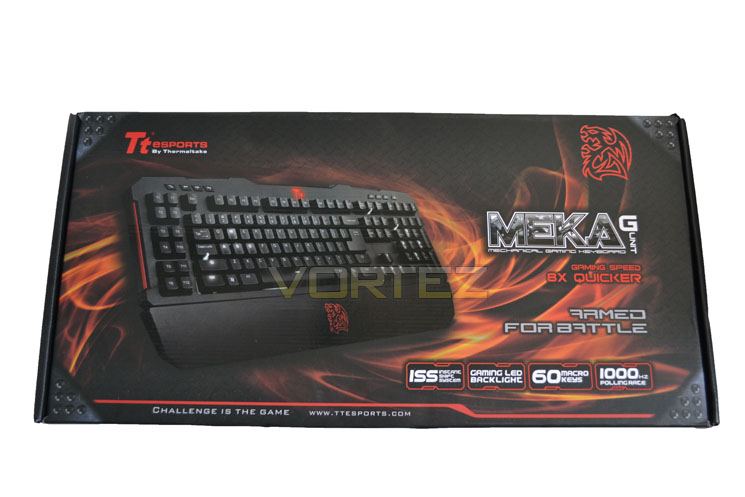
Box Front
The front of the package is very well designed. While there is no window, there is a glossy picture of the product on display set on a backdrop of flames. To the bottom right we get a brief rundown of the features of the MEKA G Unit.
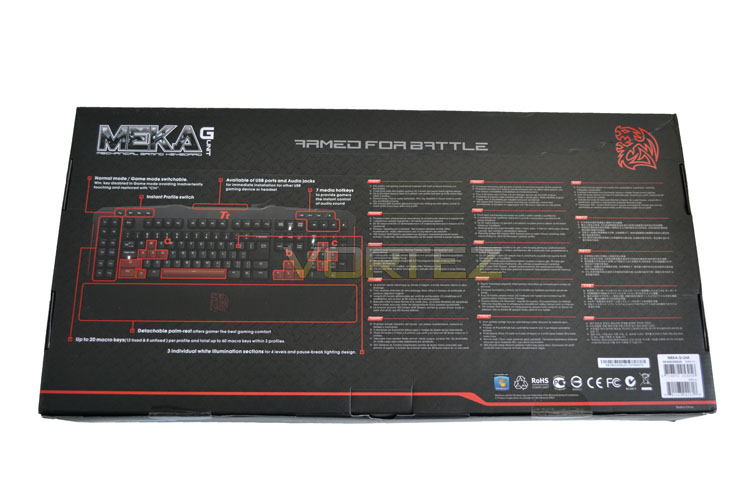
Box Rear
Flipping the box over we see that Tt eSPORTS have printed a diagram of the keyboard in turn identifying some more of the ‘key’ features. The full list of features is also printed alongside in multiple languages.
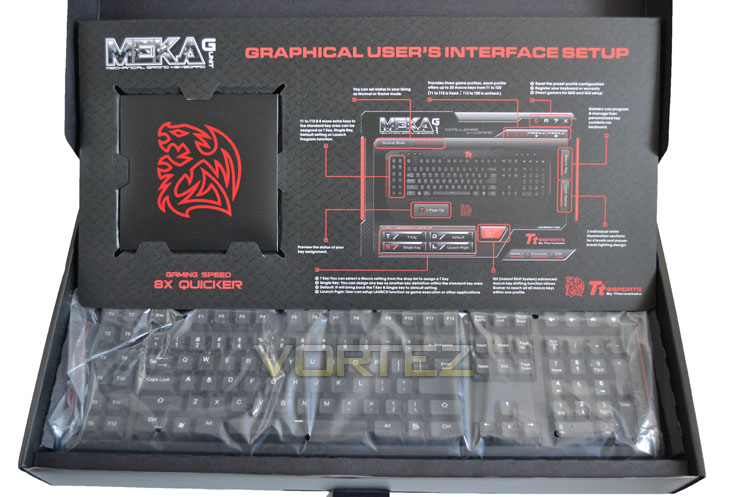
Box Open
Opening the box up, unusually from front to back we are greeted with yet another schematic of the keyboard, this time of the graphical user interface. To the left is a wallet containing the paperwork and driver CD.
Accessories
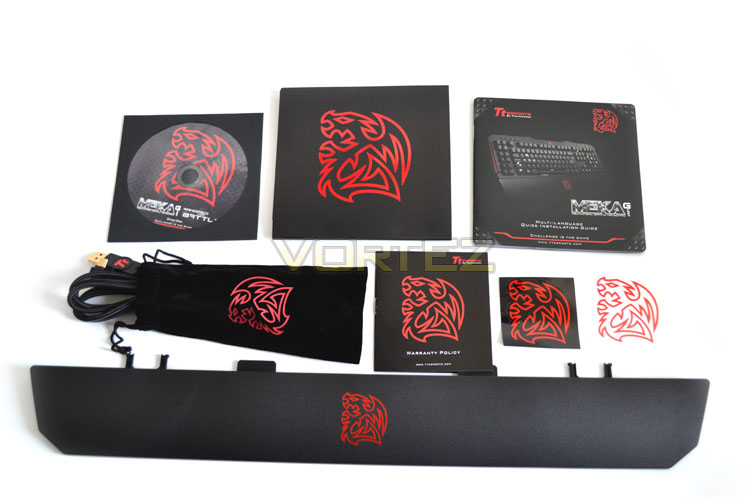
The accessories are split into two sections. As stated above, the thick paper wallet contains the setup-guide, warranty information, driver/software CD along with two stickers embossed with the Tt eSPORTS emblem. Also included in the accessory list is a palm rest and a faux velvet pouch containing the detachable data/power cable for the keyboard.
Power/Data Cable
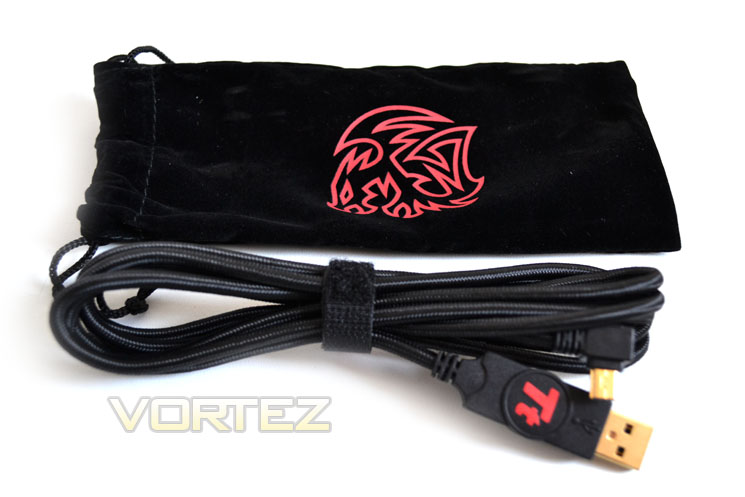
Unusually for a keyboard, the data cable is detachable. While I’m not averse to this feature, I find it a strange inclusion given that the keyboard is not wireless and will always need the cable unless you intend on using it as a door stop. Nevertheless, the pouch it comes in was a nice touch – just don’t forget to pack it when you attend the next LAN! The cable is nicely braided and each end of the cable has the now obligatory gold plating.
Let’s move on to the star of the show – the MEKA G Unit mechanical gaming keyboard…
Closer Look
Keyboard Top
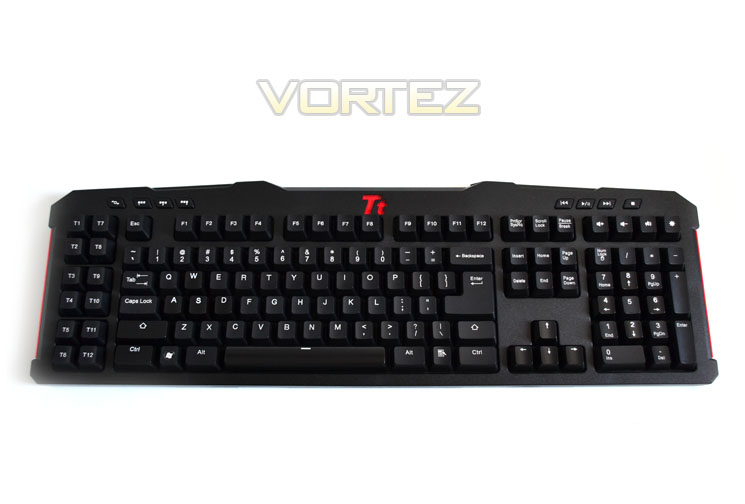
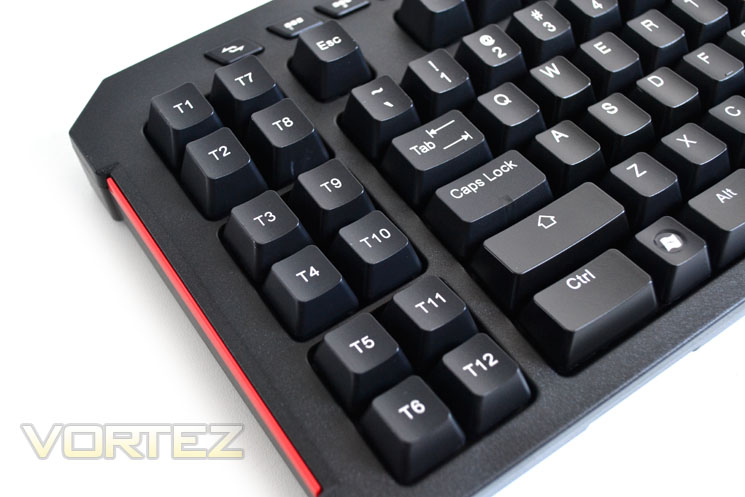
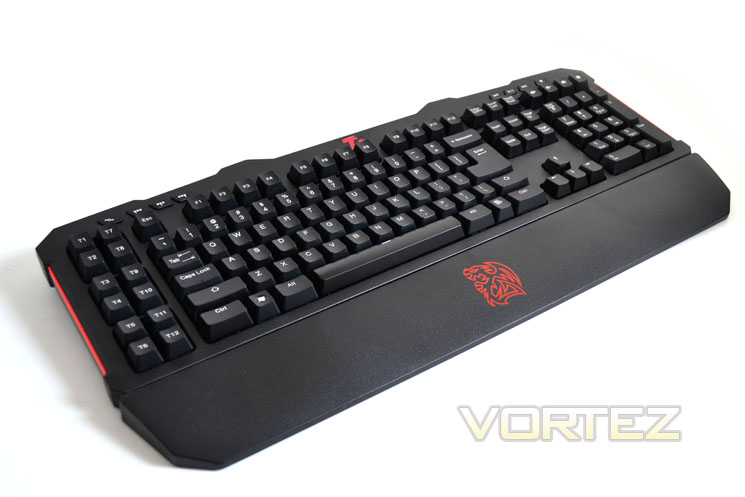
The keyboard layout is very good. There are 12 macro keys to the left with the num-pad to the right, very similar to the Logitech G15 layout. To the top left we have the profile buttons and top right, four media buttons. Interestingly, Tt eSPORTS have elected to have a large ENTER key with smaller SHIFT beneath rather than having a larger SHIFT key. How this translates in real-world usage we will see in the performance section.
Keyboard Bottom
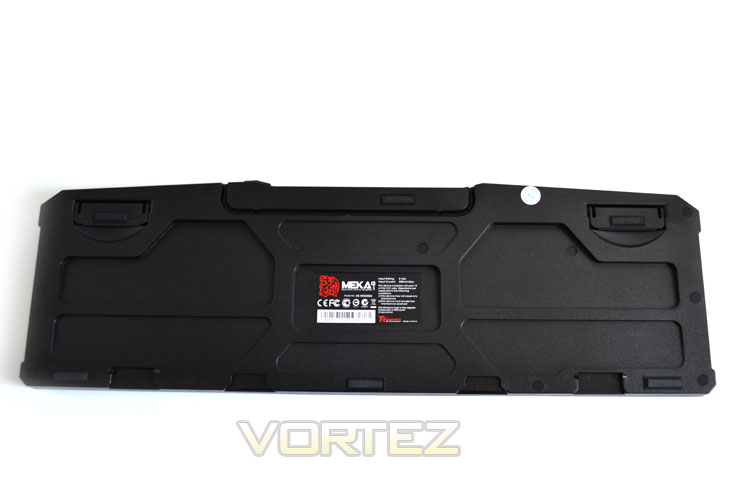
Underneath the keyboard we find that the MEKA has a number of runner pads to hold the keyboard in place. There is also a large groove which will allow the cable to be tidied away. The plastic used on the keyboard is the rigid type and other than the rough, dimpled effect as seen on DELL keyboards, it doesn’t have a quality feel to it.
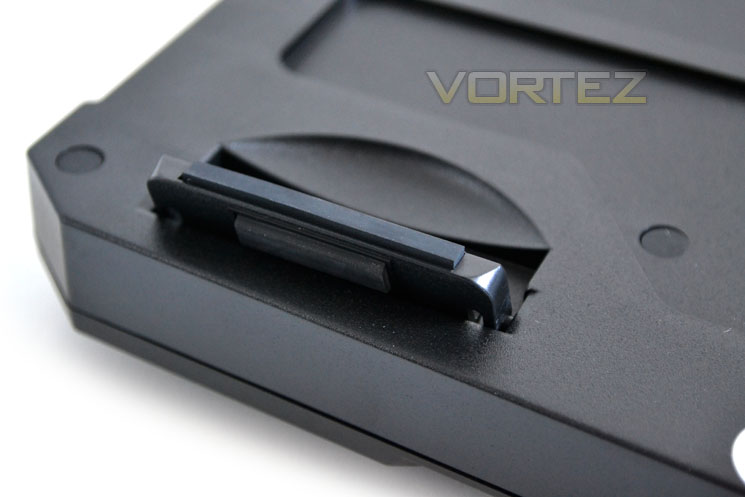
Keyboard Legs
The legs of the MEKA are a little on the short side raising the keyboard up by just 12mm. The legs are however much sturdier than other keyboards we have tested. They also have rubber feet to further enhance the keyboards static stance under extreme use.
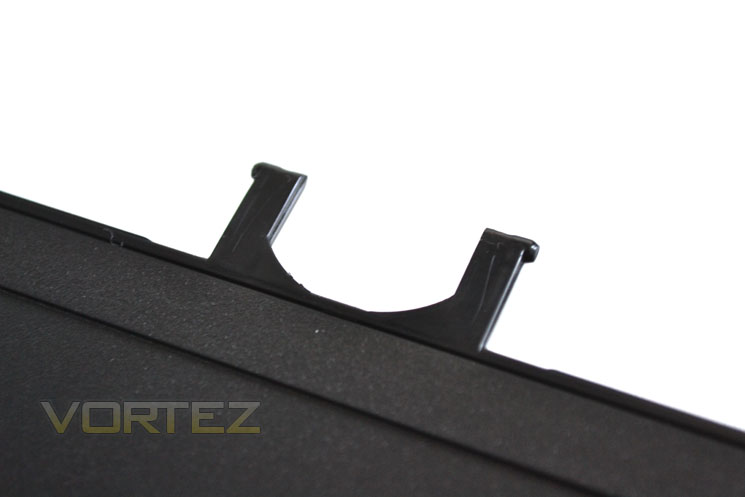
Palm Rest Clips
Unlike the legs, the palm rest clips are very flimsy and it is highly recommended you do not make a habit of removing the clips as they will surely break after very little use which is a shame as other than these clips, the keyboard on a whole feels very robust.
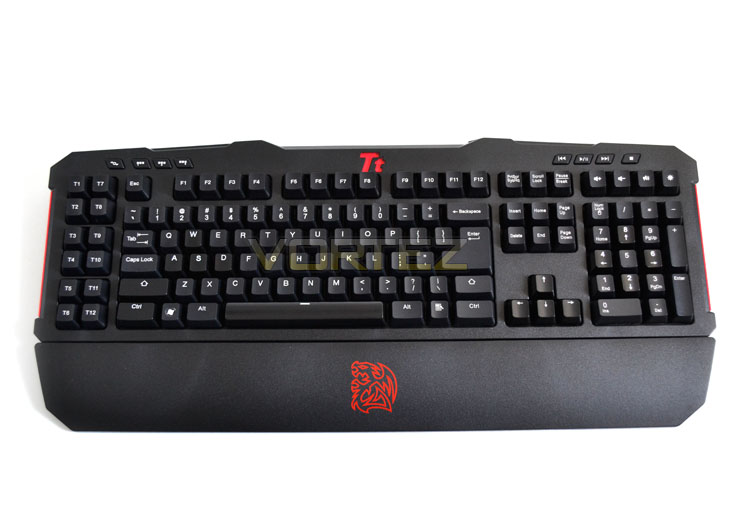
Palm Rest Attached
Here we see the palm rest attached. It clicked into place relatively easy despite my concerns over the slight clips. With the palm rest attached the ergonomics were improved ten-fold and it was also wide enough to accommodate my shovels.
Overall then the keyboard looks very attractive. The layout is very good save for the ENTER and Right SHIFT key sizes. Even without the palm rest attached the keyboard feels very heavy thanks to the switchgear used which can only be a good thing as heavy usually translates to hardy which intensive gamers will appreciate.
Let’s take a closer look at the MEKA G Unit to see what else it has to offer…
Closer Look Pt.2
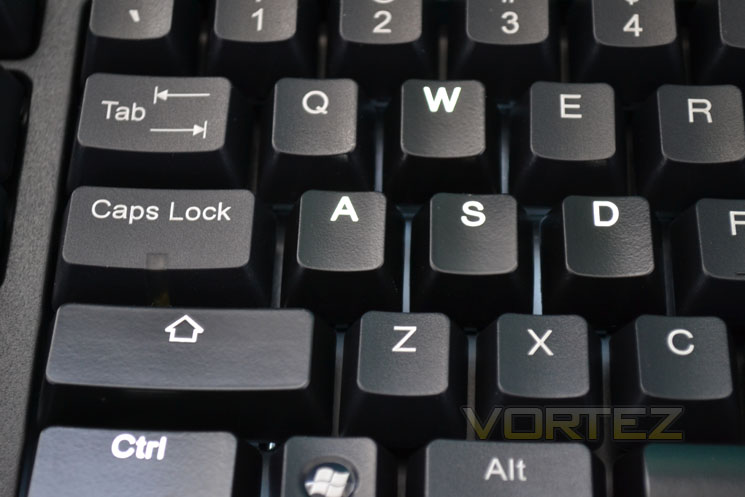
Key type
The MEKA G Unit, like the other mechanical keyboards we have reviewed, use cylindrical type keys. The sculpted design is perfected for cradling fingers under both touch and holding positions.
Macro Keys
There are 12 ‘T’ keys to afford macro capability. With a further 8 programmable keys allowed anywhere else on the keyboard makes a total of 20 macro keys per profile, of which there are 3 so in effect there are a total of 60 macro keys available! Not only is this the first mechanical keyboard we have reviewed with this feature but having up to 60 keys available makes it pretty much ground breaking!
You will also notice flashes of red at either end of the keyboard. Unfortunately these have no effect other than for visual appeal. Sadly, the trim cannot be illuminated either.
Profile Keys
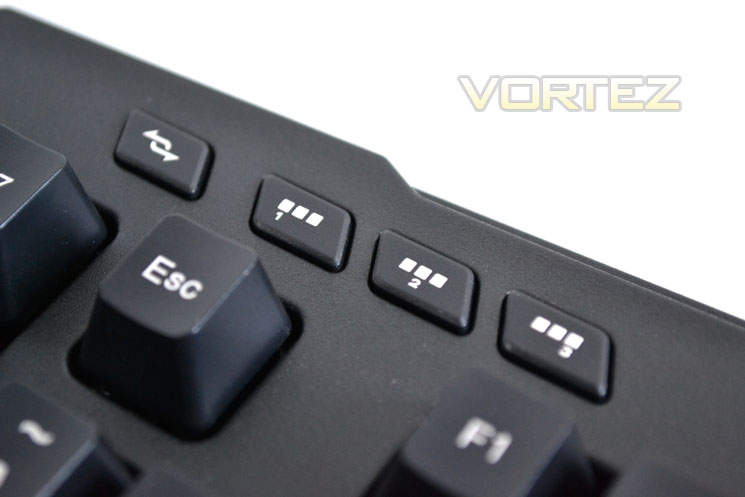
As previously mentioned, there are 3 programmable profile setups, each with it’s own ‘quick-switch button (above). This is ideal if, for example, you have 3 favourite games or indeed while in game, 3 different classes of hero, you can simply switch between one profile to another instantly with the macro pre-setup for that character or game. Alongside these buttons is the Normal/Gaming switch key. This simply disables the Windows key (gaming).
Media keyset 1
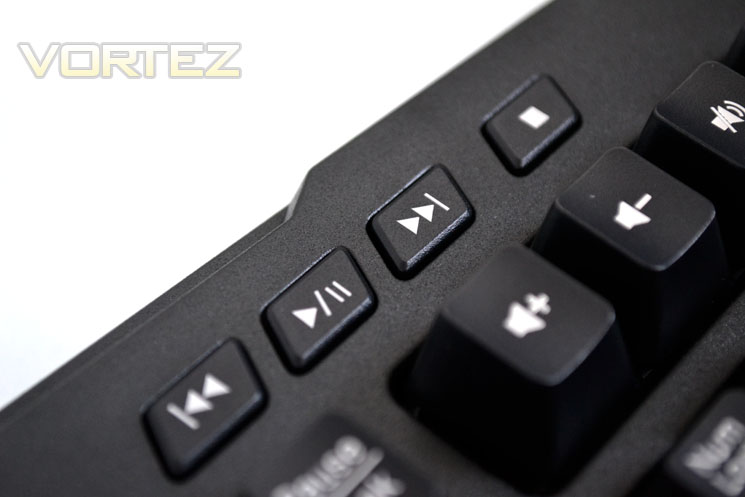
There are a total of 7 media keys, forward, rewind, play/pause and stop are via the buttons above.
Media keyset 2
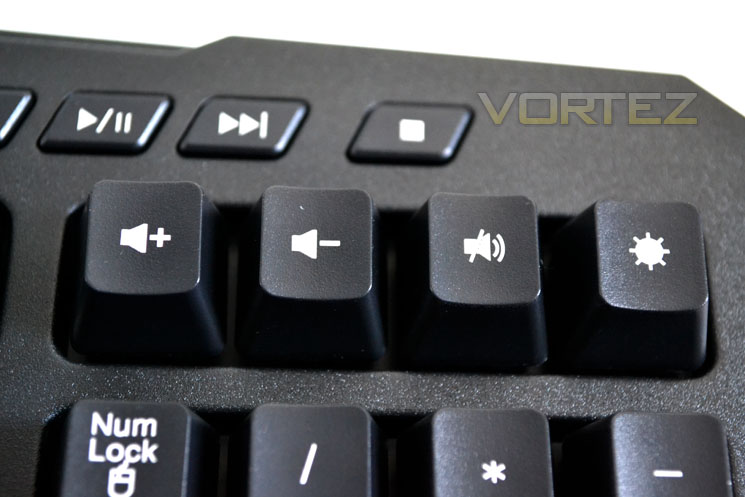
The three remaining media keys are below and are mechanical rather than push-button. Why Tt eSPORTS elected to have different versions of keys for the media functions I cannot say but it certainly seems an oddity. The remaining ‘light bulb’ key controls the keyboards lighting.
Connectivity
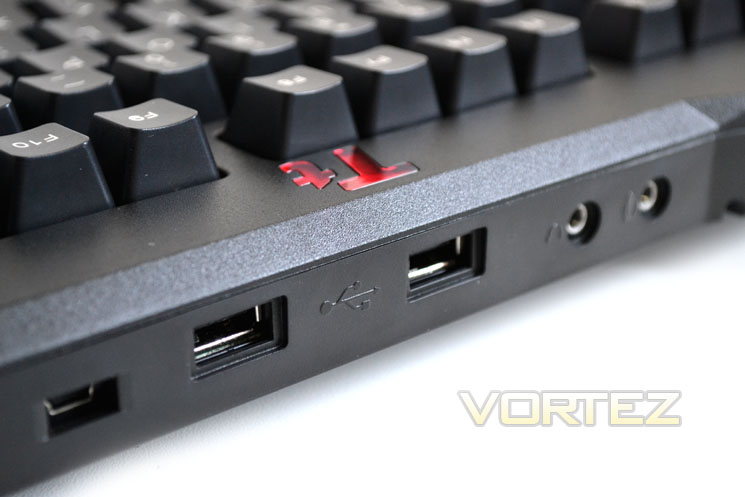
As with all of the mechanical keyboards tested thus far, the MEKA G Unit features a twin USB hub along with audio and mic 3.5mm plugs. While this function is a nice addition I would have perhaps preferred the audio and mic jacks to be to the side of the keyboard keeping unwanted cables from a headset away from the keyboard itself.
Cherry Black MX Switches
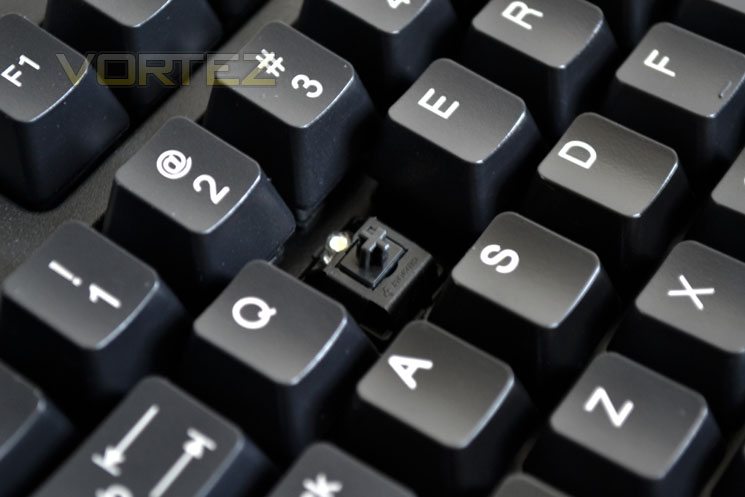
Finally, we arrive at the main attraction of the keyboard, the mechanical switches. Tt eSPORTS, like most other mechanical gaming keyboards make use of the Black MX variety. We will discuss this selection later in the review in terms of performance but suffice to say, Cherry Blacks appear to be the popular choice among pro gamers.
Let’s take a look at the bundled software you will need to use to get the most from today’s review sample…
Software
Front end
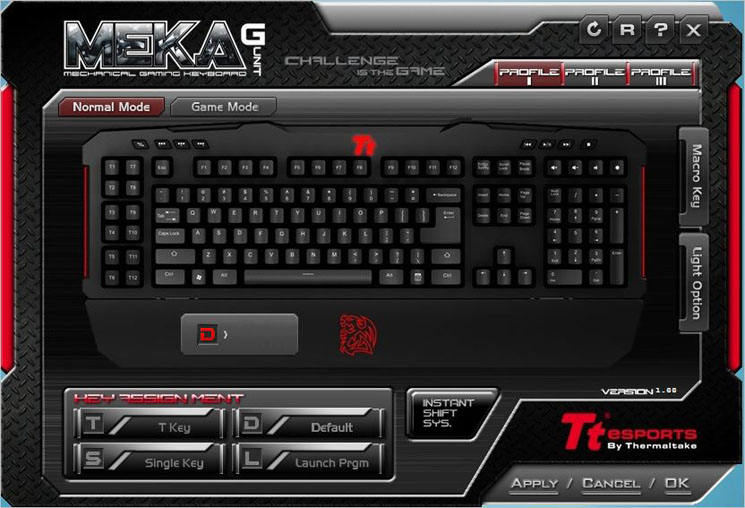
The GUI is neat and tidy if a little daunting at first. The frontend is worked through a series of tabs located around the image of the keyboard. Using the mouse to select one of the tabs opens up a sub-menu allowing access and customising of that particular feature.
Macro setup
Firstly, we’ll deal with the complexities of setting up macro assignments. After selecting the key you wish to assign a macro to (and under which profile), it is simply a matter of hitting record then whatever key presses you type, including for how long, are recorded. You can set a name to the macro then once you have configured the time delay you can save it. All of the 12 ‘T’ keys to the left of the keyboard are configurable along with a further 8 keys of your choice.
T Keys
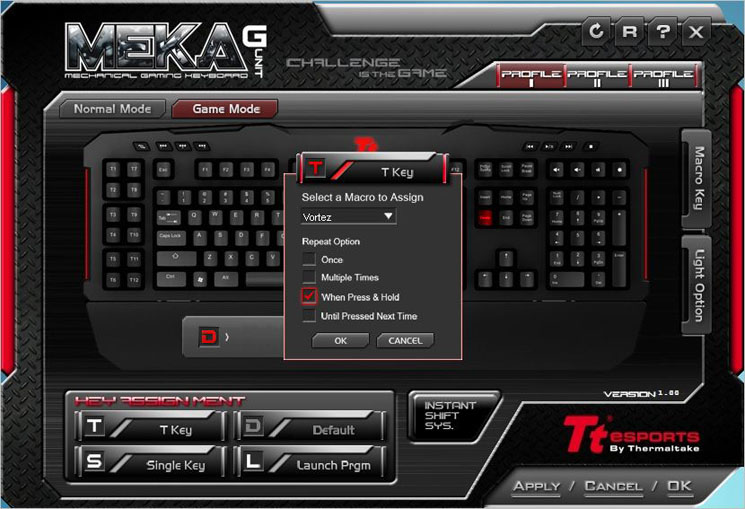
The T key assignment allows you to assign a macro setting previously record to a key and then edit how the macro setting works. You can have the macro repeat once, multiple, when press and hold to repeat the macro continuously until you release the key or keep repeating until pressed next time (on/off).
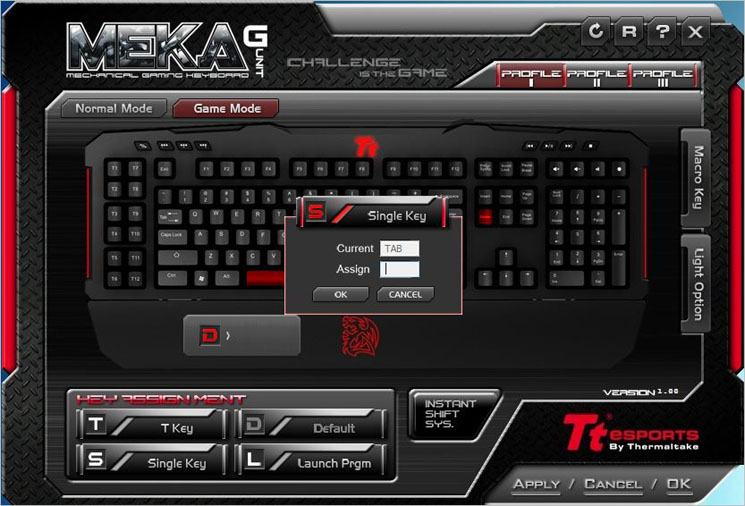
Single Key and Launch buttons
Once you have set your macro keys you then have a further four options, Default (performs the macro default operation), T Key (as below), Single key (assigns it as a single keystroke) or Launch (launch a chosen .exe). The launch button, while use would perhaps have been better implemented had it been configured to open any file rather than simply an executable one.
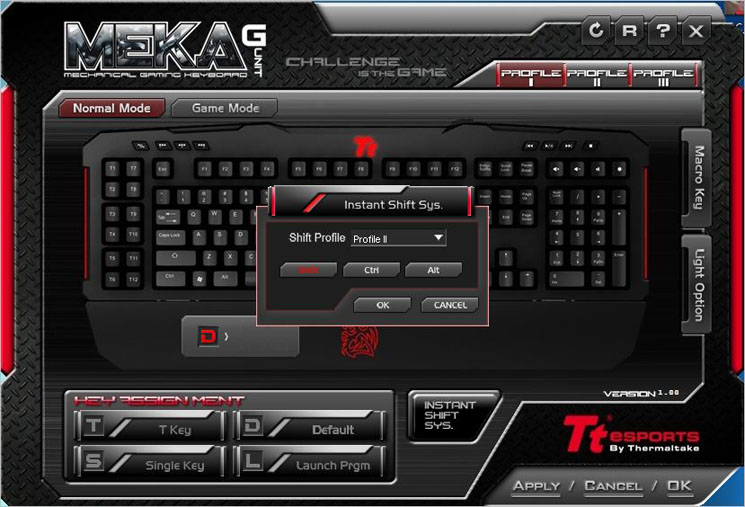
Insta-shift
To quickly select one of the profiles, the software can be configured to allow a single key-press to pre-load anyone of the 3 profiles, therefore giving instant access to the 60 macro settings. I find it hard to believe anyone could possibly need even 20 macro scripts let alone 60 but if you feel you need this feature then I guess this will appeal to you. What may not be so attractive as the only Insta-shift keys available are CTRL, Alt and Shift which is a shame as these are very commonly use during game play which may prove awkward to use.
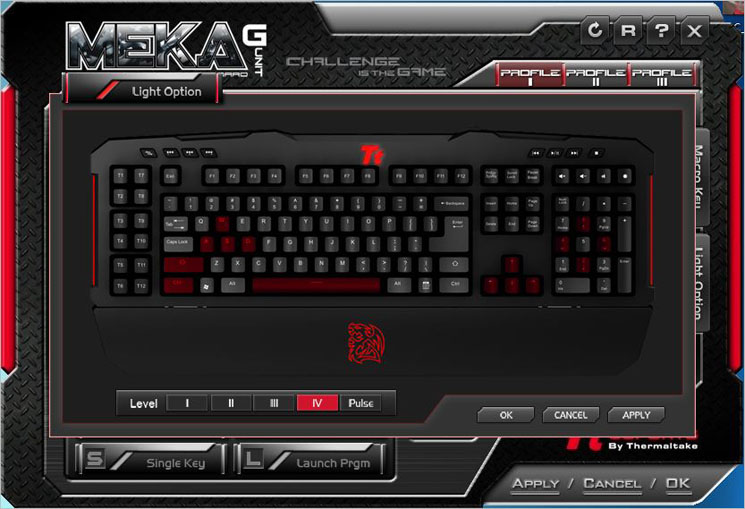
Light Control
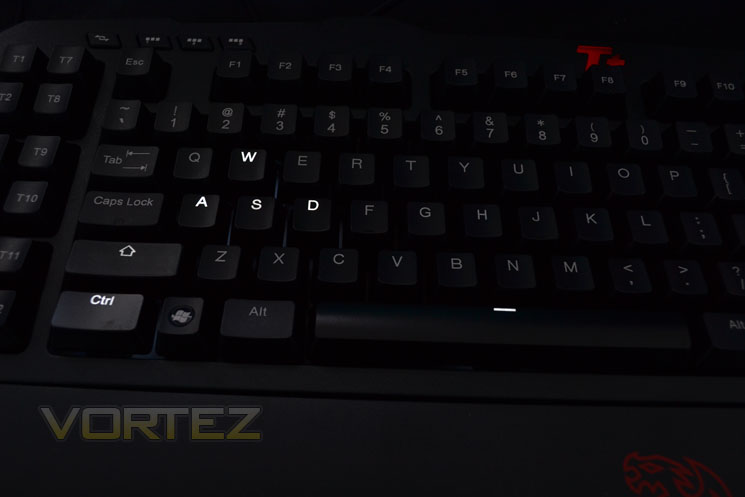
Four levels of illumination can be configured for the keys but even the brightest setting is not intrusive. Unlike most keyboards, the MEKA G Unit only has certain sections of the keyboard illuminated (above). Unfortunately, the lighting cannot be changed in colour, instead it remains white. My personal preference is having the whole keyboard illuminated as I have little need for knowing where WASD keys are (my fingers will be on those while gaming). That said, the illumination does add aesthetic appeal if somewhat lacking in overall functionality. The Tt emblem can also be set to pulse, if you like that sort of thing.
Overall the software is functional if somewhat confusing at first. It certainly is not what I would describe as intuitive. There are some strange choices made, not least the use of Alt, CTRL and shift as Insta-shift keys. Tt eSports went to the trouble of illuminating keys you will likely cover while gaming yet the others remain unlit which was a shame. The macro selection is very good though and should be applauded, it’s just a shame other areas let this piece of software down.
Let’s see how the keyboard performs in both gaming and general use…
Performance Testing
General UseTo put the keyboard through its paces there is no better way than writing up this review. Cherry Black switches are not the perfect companion to a typist, certainly if you are not familiar with mechanical keyboards. The non tactile, linear effect of the keys will feel very strange initially but you will soon become accustomed to its feel. The keyboard is not as’ clicky’ as the tactile Cherry Blue switches used in the QPAD keyboard we reviewed recently nor is it as loud but sadly it is not as nice to type with either. While it is by no means a slouch, the actuation force required for each key-press can prove a little tiring after long prose. While this may be perfect for gamers, touch typists might wish to reconsider.
Remember earlier when I moaned about the Enter and Shift Key? Well sure enough I found myself pressing a host of keys instead of right shift due to its small size. Again, while this will not affect gamers, especially ones who readily use the enter key in their gaming control configuration, for typing it can be very frustrating.
Gaming
I’m not a MORRPG combatant by trade however I did find the macro capability useful in Battlefield 3. I am still baffled at the sheer number of macro settings available (60) and why anyone would need such a huge amount but I guess when you are throwing spells at one another while formulating a potion along with going on raids you may need more than the two or three I used. Needless to say, if macro capability and mechanical switches are what you want then this keyboard is certainly for you.
That isn’t of course to say FPS players should look elsewhere as the MEKA will play just as well as any other Cherry Black MX switch furnished keyboard. Indeed it was a pleasure to use in Battlefield 3, Modern Warfare 3 and Crysis 2. The satisfying action of Cherry Blacks will soon make you wonder how you ever did without a mechanical keyboard. Sure it feels a little alien primarily but it soon becomes second nature and you will be racking up the frags in no time. A pro gamer it won’t make you but improve your game it might.
Audio
As with all of the other keyboards we have tested with an audio hub, both the mic and audio were sub-standard. While the microphone was not that noticeable save for very vague crackling, the clarity of audio was clearly diminished when compared to using the motherboard/sound card jacks. Having a keyboard with audio pass-through capability would however be a great idea if it helped to keep cables out of the way. However, having the audio ports at the back of the unit means that you will be constantly moving the headphone cable out of the way which is a less than ideal design and one which all mechanical keyboards seem guilty of.
With my testing complete it’s time we rounded the review off with my concluding thoughts of the Tt eSPORTS MEKA G Unit mechanical Gaming Keyboard…
Conclusion
The Tt eSPORTS MEKA G Unit makes for an interesting proposition. On paper it is the perfect combination of looks, performance and functionality however in testing we found some minor flaws which may or may not sway your buying decision.
The packaging is one of the best we have seen for the mechanical keyboard. From the exterior to the internals, The attention to detail was fantastic. I would have preferred to have seen a more detailed manual, especially for the included software. Perhaps a spare set of WSAD keys would have also been nice if I’m being picky as that have been included in two other keyboards we reviewed recently. The detachable cable is innovative if somewhat defunct. I fail to see the point of a detachable cable when it will always be in use. I can only assume it is for ease of replacement should it become damaged. The included faux velvet cable pouch was a nice touch but again, after removing the cable it has little use.
The keyboard itself is very good looking with contrasting flashes of red. Strange then that Tt eSPORTS elected to use white LED’s instead of the obvious choice, red and these LED’s were not used throughout the board, only on the keys that would be most used. The lighting is adjustable but in truth, the highest setting is hardly intrusive so a simple on/off switch would suffice in this area. Being picky I would also liked to have seen the feet raise the profile a little more but with the palm rest attached the ergonomics were more than adequate save for the Shift/enter keys which can become irritable after a few mistypes.
The performance of the keyboard is excellent for gaming as you would expect given the use of Cherry Black MX keys throughout. MMORPG gamers will be thrilled with the amount of macro keys available and for those gamers; this keyboard offers the perfect balance of durability, performance and functionality. It will suit FPS gamers too and is the equal of any other mechanical keyboard on the market at present. Those looking for a keyboard to do copious amounts of writing on may soon become frustrated though as not only are the cherry blacks not tactile but the actuation force coupled with the shift/enter keys may prove too much to handle.
Overall the keyboard does exactly what you would expect of it. It is clearly a gamer’s keyboard and to that end there are no major flaws. It is a solid performer, has some interesting features including macro capability and along with backlighting will doubtless make this keyboard a success. It doesn’t score a ‘flawless victory’ but it comes pretty damn close and out of all of the keyboards we have tested thus far, it notches a win in almost every department. There are a few little niggles but those aside the Tt eSPORTS MEKA G Unit strikes a very good medium of all of the keyboards we have tested to date, taking features from each and carrying them out very well. Couple this with a very competitive price point and the keyboard becomes a very tempting prospect indeed. To that end, the Tt eSPORTS MEKA G Unit mechanical gaming keyboard strikes Vortez Gold.
Pros:
+Excellent packaging
+Good looks
+60 Macro keys
+Cherry Black MX switches
+Partial backlighting
Cons:
– Flimsy palm rest clips
– Rigid/firm plastics used
– Confusing software
+Excellent packaging
+Good looks
+60 Macro keys
+Cherry Black MX switches
+Partial backlighting
Cons:
– Flimsy palm rest clips
– Rigid/firm plastics used
– Confusing software


Click here for an explanation of our awards at Vortez.net. Thanks to Tt eSPORTS for providing today’s review sample.


